Enabling Secure Data Discoverability
Rachana Ananthakrishnan – ranantha@uchicago.edu
Brigitte Raumann - braumann@uchicago.edu
Vas Vasiliadis - vas@uchicago.edu
November 14, 2021
Agenda
• Introduction and Motivation
• The Modern Research Data Portal Design Pattern
• Brokering Access to Services using Globus Auth
• Making Data Findable with Globus Search
• Deploying a Simple Research Data Portal
• Enabling Secure Data Collaboration
• Making Data Discoverable at Scale
- Hands-on exercise
- Live demonstration
Introduction and Motivation
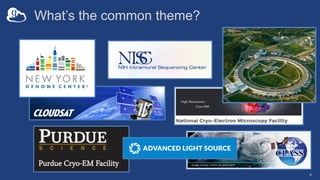
What’s the common theme?
4
The brilliance “arms race”...
K. Wille, The Physics of Particle Accelerators: An Introduction, Oxford University Press, Oxford, UK (2000); J. B. Parise and G. E. Brown, Jr., Elements, 2, 37-42 (2006)
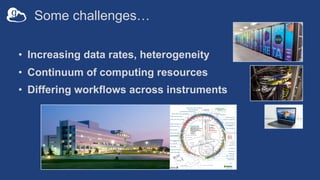
Some challenges…
• Increasing data rates, heterogeneity
• Continuum of computing resources
• Differing workflows across instruments
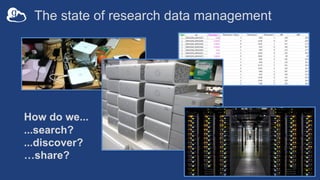
The state of research data management
How do we...
...search?
...discover?
…share?
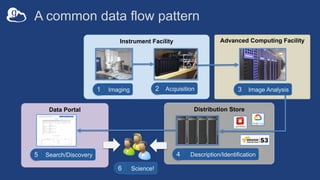
Distribution Store
Data Portal
Advanced Computing Facility
Instrument Facility
A common data flow pattern
Image Analysis
3
Search/Discovery
5
Science!
6
Imaging
1 Acquisition
2
Description/Identification
4
v
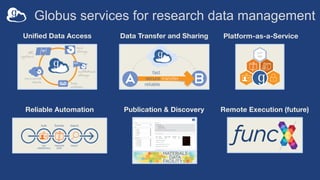
Globus services for research data management
Unified Data Access Data Transfer and Sharing Platform-as-a-Service
Reliable Automation Publication & Discovery Remote Execution (future)
The Modern Research Data
Portal Design Pattern
docs.globus.org/mrdp
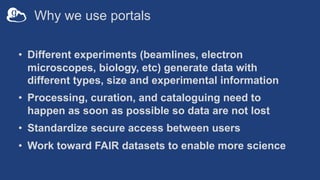
Why we use portals
• Different experiments (beamlines, electron
microscopes, biology, etc) generate data with
different types, size and experimental information
• Processing, curation, and cataloguing need to
happen as soon as possible so data are not lost
• Standardize secure access between users
• Work toward FAIR datasets to enable more science
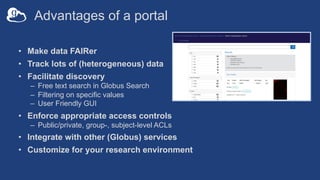
Advantages of a portal
• Make data FAIRer
• Track lots of (heterogeneous) data
• Facilitate discovery
– Free text search in Globus Search
– Filtering on specific values
– User Friendly GUI
• Enforce appropriate access controls
– Public/private, group-, subject-level ACLs
• Integrate with other (Globus) services
• Customize for your research environment
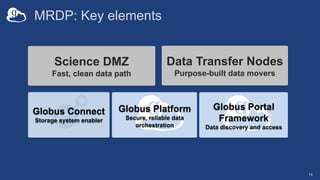
MRDP: Key elements
Science DMZ
Fast, clean data path
Data Transfer Nodes
Purpose-built data movers
Globus Platform
Secure, reliable data
orchestration
Globus Connect
Storage system enabler
14
Globus Portal
Framework
Data discovery and access
…makes your
storage system a
Globus endpoint
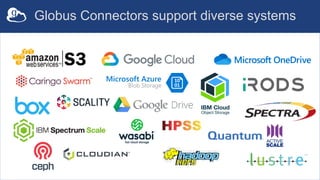
Globus Connectors support diverse systems
What’s wrong with my LRDP?
17
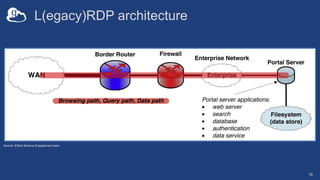
L(egacy)RDP architecture
18
Source: ESnet Science Engagement team
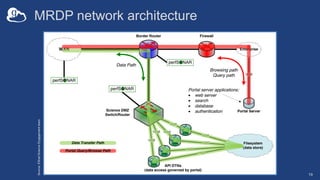
MRDP network architecture
19
Source:
ESnet
Science
Engagement
team
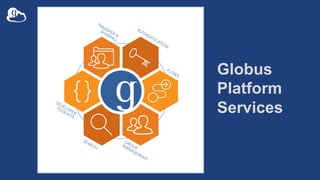
Globus
Platform
Services
Relevant Globus platform capabilities
• Data transfer and sharing
• Data description (metadata) and discovery
• Data (and compute) task orchestration
• Authentication and Authorization
21
Brokering Access to
Services using Globus Auth
Globus Auth: Foundational IAM service
Brokers authentication and authorization among…
– End-users
– Identity providers: enterprise, external (federated identities)
– Services: resource servers with REST APIs
– Apps: web, mobile, desktop, command line clients
– Services acting as clients to other services
• OAuth 2.0 Authorization Framework (a.k.a. OAuth2)
• OpenID Connect Core 1.0 (a.k.a. OIDC)
23
Several authentication models supported
• Application acting as user with consent
– Authorization code grant
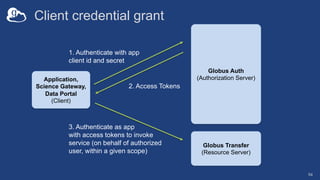
• Application authenticating as itself
– Client credentials grant
• Application able to manage tokens for offline or long
running tasks
– Refresh tokens
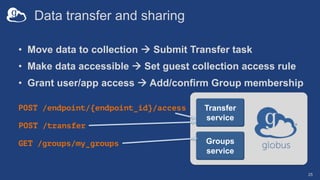
Data transfer and sharing
• Move data to collection à Submit Transfer task
• Make data accessible à Set guest collection access rule
• Grant user/app access à Add/confirm Group membership
25
Groups
service
Transfer
service
GET /groups/my_groups
POST /endpoint/{endpoint_id}/access
POST /transfer
Using guest collections in your data portal
• Create a guest collection; requires authentication
– Cannot be completely automated – must ”log in”
– Create once and automate rest of the steps
• Grant the application Access Manager role
– Allows the application to manage permissions on the collection
– Set for application identity: appclientid@clients.auth.globus.org
• Grant roles for management of endpoint and tasks
Accessing Globus
platform services
27
jupyter.demo.globus.org
Making Data Findable with
Globus Search
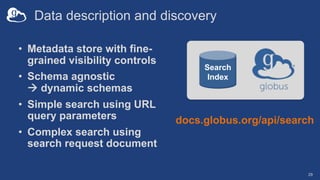
Data description and discovery
• Metadata store with fine-
grained visibility controls
• Schema agnostic
à dynamic schemas
• Simple search using URL
query parameters
• Complex search using
search request document
29
docs.globus.org/api/search
Search
Index
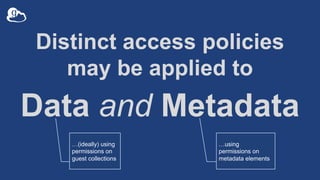
Distinct access policies
may be applied to
Data and Metadata
…(ideally) using
permissions on
guest collections
…using
permissions on
metadata elements
Data ingest with Globus Search
31
Search
Index
POST /index/{index_id}/ingest'
{
"ingest_type": "GMetaList",
"ingest_data": {
"gmeta": [
{
"id": "filetype",
"subject”: "https://search.api.globus.org/abc.txt",
"visible_to": ["public"],
"content": {
"metadata-schema/file#type": "file”
}
},
...
]
}
- Bulk create and update
- Task model for ingest at scale
Data ingest with Globus Search
32
Search
Index
POST /index/{index_id}/ingest'
{
"ingest_type": "GMetaList",
"ingest_data": {
"gmeta": [
{
"id": ”weight",
"subject": "https://search.api.globus.org/abc.txt",
"visible_to": ["urn:globus:auth:identity:46bd0f56-
e24f-11e5-a510-131bef46955c"],
"content": {
"metadata-schema/file#size": ”37.6",
"metadata-schema/file#size_human": ”<50lb”
}
},
...
]
}
Visibility limited to Globus Auth identity
- Single user
- Globus Group
- Registered client application
Data discovery with Globus Search
33
{
"@datatype": "GSearchResult",
"@version": "2017-09-01",
"count": 1,
"gmeta": [
{
"@datatype": "GMetaResult",
"@version": "2019-08-27",
"entries": [
{ ... }
],
"subject": "https://..."
}
],
"offset": 0,
"total": 1
}
GET /index/{index_id}/search?q=type%3Ahdf5
Search
Index
Simple query
Data discovery with Globus Search
34
POST /index/{index_id}/search
Search
Index
Complex query
{
"filters": [
{
"type": "range",
"field_name": ”pubdate",
"values": [
{
"from": "*",
"to": "2020-12-31"
}
]
}
],
"facets": [
{
"name": "Publication Date",
"field_name": "pubdate",
...
}
]
}
Filter
Facets
Boosts
Sort
Limit
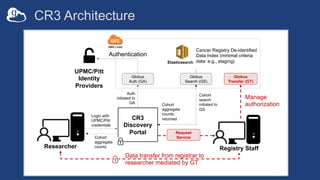
Cancer Registry Records for Research (CR3)
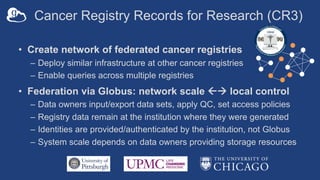
• Create network of federated cancer registries
– Deploy similar infrastructure at other cancer registries
– Enable queries across multiple registries
• Federation via Globus: network scale ßà local control
– Data owners input/export data sets, apply QC, set access policies
– Registry data remain at the institution where they were generated
– Identities are provided/authenticated by the institution, not Globus
– System scale depends on data owners providing storage resources
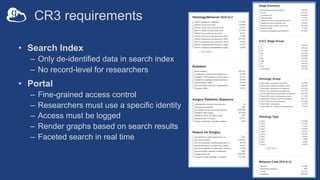
CR3 requirements
• Search Index
– Only de-identified data in search index
– No record-level for researchers
• Portal
– Fine-grained access control
– Researchers must use a specific identity
– Access must be logged
– Render graphs based on search results
– Faceted search in real time
CR3
Discovery
Portal
Cohort
aggregate
counts
Login with
UPMC/Pitt
credentials
Globus
Search (GS)
Globus
Auth (GA)
UPMC/Pitt
Identity
Providers
Authentication
Auth
initiated to
GA
Cohort
search
initiated to
GS
Researcher
Cohort
aggregate
counts
returned
CR3 Architecture
Globus
Transfer (GT)
Registry Staff
Data transfer from registrar to
researcher mediated by GT
Manage
authorization
Elasticsearch
Request
Service
Cancer Registry De-identified
Data Index (minimal criteria
data: e.g., staging)
SEER Registry
Medical Center Registry
State Registry
SEER Registry
Medical Center Registry
State Registry
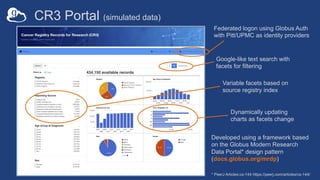
CR3 Portal (simulated data)
Federated logon using Globus Auth
with Pitt/UPMC as identity providers
Dynamically updating
charts as facets change
Variable facets based on
source registry index
Google-like text search with
facets for filtering
Developed using a framework based
on the Globus Modern Research
Data Portal* design pattern
(docs.globus.org/mrdp)
* PeerJ Articles:cs-144 https://peerj.com/articles/cs-144/
Working with Globus
Search
39
jupyter.demo.globus.org
Ingesting search
metadata
40
github.com/globus/searchable-files-demo
Deploying a Simple
(but fully functional and extensible)
Research Data Portal
Globus Search
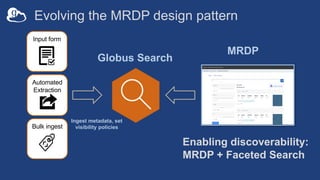
Evolving the MRDP design pattern
Enabling discoverability:
MRDP + Faceted Search
Input form
Automated
Extraction
Ingest metadata, set
visibility policies
Bulk ingest
MRDP
Implementation
• Django framework with integrated Globus services
• Python package bootstraps deployment
– Install from PyPi using pip
– github.com/globus/django-globus-portal-framework
• Reference Globus Portal Framework deployment
ALCF Community Data Co-Op: acdc.alcf.anl.gov
Exemplar portal
The ALCF Data Co-op
44
acdc.alcf.anl.gov/
Portal Core Functionality
• User authentication
• Django-based framework
– Portal URL mappings
– Token loading
• Service calls to Globus Search
• Manage request lifecycle
• Post process search requests
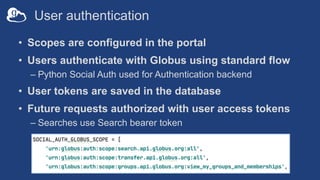
User authentication
• Scopes are configured in the portal
• Users authenticate with Globus using standard flow
– Python Social Auth used for Authentication backend
• User tokens are saved in the database
• Future requests authorized with user access tokens
– Searches use Search bearer token
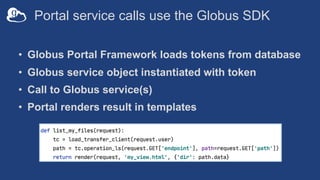
Portal service calls use the Globus SDK
• Globus Portal Framework loads tokens from database
• Globus service object instantiated with token
• Call to Globus service(s)
• Portal renders result in templates
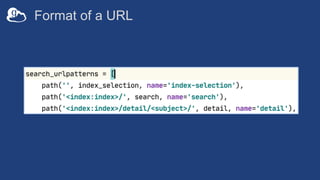
Globus Portal Framework URLs
• URLs span three categories
– Index Selection
– Index Search page
– Search Subject detail page
• Supports multiple Globus Search indices
• Search page links to multiple result subjects
• Each subject has a unique URL
Format of a URL
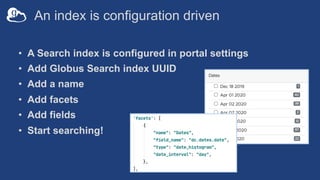
An index is configuration driven
• A Search index is configured in portal settings
• Add Globus Search index UUID
• Add a name
• Add facets
• Add fields
• Start searching!
Lifecycle of a request
• User makes a query
• Portal sends request to Globus Search
– Request contains user bearer token
• Portal receives response
• Portal does processing on response
– Parse Dates, build URL for Globus webapp, etc.
• Portal renders data into templates
• User receives a search page
Securing Apps with Globus Auth
• Select the appropriate standard OAuth flow:
• Native App (with refresh tokens – extend expiration)
– Clients can’t keep a secret; tokens stored in plain text
– Authenticate as user identity à get authorization code
– Examples: Jupyter Notebooks, Globus Timer CLI
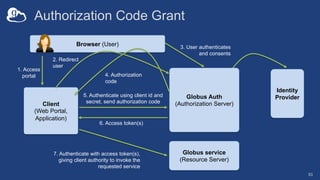
• Authorization Code Grant
– Tokens stored securely
– Authenticate as user identity à auth code returned via callback
– Examples: JupyterHub secured with Globus Auth
• Confidential Client
– ClientID and Secret stored securely
– Authenticate as application
– Example: Data portal, custom webapps
52
Authorization Code Grant
53
Client
(Web Portal,
Application)
Globus service
(Resource Server)
Globus Auth
(Authorization Server)
5. Authenticate using client id and
secret, send authorization code
Browser (User)
1. Access
portal
2. Redirect
user
3. User authenticates
and consents
4. Authorization
code
6. Access token(s)
7. Authenticate with access token(s),
giving client authority to invoke the
requested service
Identity
Provider
Client credential grant
54
1. Authenticate with app
client id and secret
2. Access Tokens
Application,
Science Gateway,
Data Portal
(Client)
3. Authenticate as app
with access tokens to invoke
service (on behalf of authorized
user, within a given scope)
Globus Transfer
(Resource Server)
Globus Auth
(Authorization Server)
Creating your
own data portal
55
bit.ly/globus-sc21
Source: github.com/globus/django-globus-portal-framework
Docs: django-globus-portal-framework.readthedocs.io/en/stable/
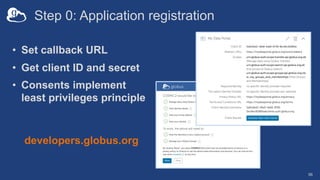
Step 0: Application registration
• Set callback URL
• Get client ID and secret
• Consents implement
least privileges principle
56
developers.globus.org
Portal deployment
• (Already available on your EC2 instance)
• Clone the repo
• Configure settings
• For production use, add robust WSGI/ASGI server
• Future: containers
Portal configuration
• Review settings.py and check that portal runs
• Update settings.py
– Add search index to SEARCH_INDEXES
– Include search scope in Globus Auth setup
• Configure search (facets, fields, …)
• Optional: Configure templates
Enabling Secure Data
Collaboration
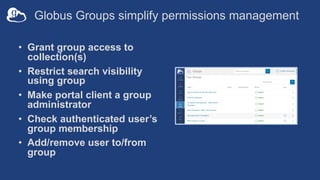
Globus Groups simplify permissions management
• Grant group access to
collection(s)
• Restrict search visibility
using group
• Make portal client a group
administrator
• Check authenticated user’s
group membership
• Add/remove user to/from
group
Adding a search
index to the portal
61
Making Data Discoverable at
Scale
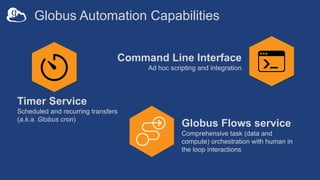
Globus Automation Capabilities
Timer Service
Scheduled and recurring transfers
(a.k.a. Globus cron)
Command Line Interface
Ad hoc scripting and integration
Globus Flows service
Comprehensive task (data and
compute) orchestration with human in
the loop interactions
Globus Timer Service
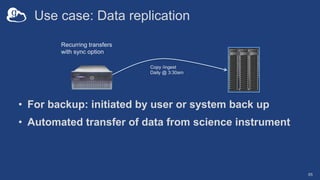
Use case: Data replication
• For backup: initiated by user or system back up
• Automated transfer of data from science instrument
65
Recurring transfers
with sync option
Copy /ingest
Daily @ 3:30am
The Globus Timer service
• Scheduled/recurring file transfers
• Supports all Globus transfer and sync options
• Service with a command line interface
• Example: NIH – hpc.nih.gov/storage/globus_cron.html
66
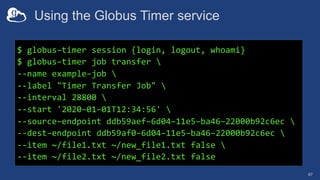
Using the Globus Timer service
67
$ globus–timer session {login, logout, whoami}
$ globus–timer job transfer 
--name example–job 
--label "Timer Transfer Job" 
--interval 28800 
--start '2020–01–01T12:34:56' 
--source–endpoint ddb59aef–6d04–11e5–ba46–22000b92c6ec 
--dest–endpoint ddb59af0–6d04–11e5–ba46–22000b92c6ec 
--item ~/file1.txt ~/new_file1.txt false 
--item ~/file2.txt ~/new_file2.txt false
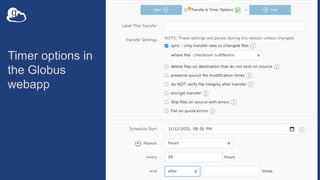
Timer options in
the Globus
webapp
Scheduled transfers
to data portal
endpoint(s)
Globus Timer CLI: pypi.org/project/globus-timer-cli
69
Globus Command Line
Interface (CLI)
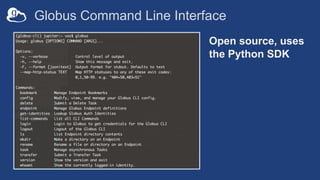
Globus Command Line Interface
Open source, uses
the Python SDK
Automated
management of
data portal endpoint(s)
72
Globus SDK: globus-sdk python.readthedocs.io/en/stable/
Globus CLI: docs.globus.org/cli/
Globus Flows Service
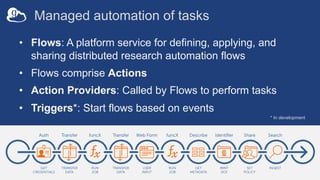
Managed automation of tasks
• Flows: A platform service for defining, applying, and
sharing distributed research automation flows
• Flows comprise Actions
• Action Providers: Called by Flows to perform tasks
• Triggers*: Start flows based on events
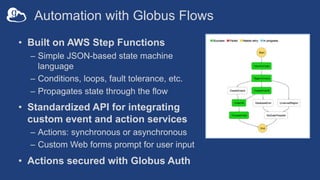
* In development
Automation with Globus Flows
• Built on AWS Step Functions
– Simple JSON-based state machine
language
– Conditions, loops, fault tolerance, etc.
– Propagates state through the flow
• Standardized API for integrating
custom event and action services
– Actions: synchronous or asynchronous
– Custom Web forms prompt for user input
• Actions secured with Globus Auth
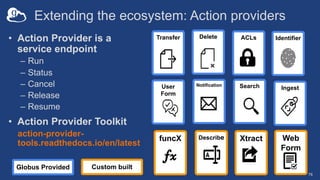
Extending the ecosystem: Action providers
76
• Action Provider is a
service endpoint
– Run
– Status
– Cancel
– Release
– Resume
• Action Provider Toolkit
action-provider-
tools.readthedocs.io/en/latest
Search
Transfer
Notification
ACLs Identifier
Delete
Ingest
User
Form
Describe Xtract
funcX Web
Form
Custom built
Globus Provided
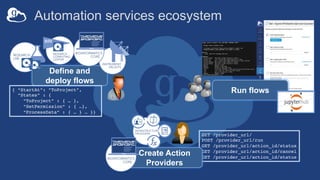
Automation services ecosystem
GET /provider_url/
POST /provider_url/run
GET /provider_url/action_id/status
GET /provider_url/action_id/cancel
GET /provider_url/action_id/status
Create Action
Providers
Define and
deploy flows
{ “StartAt”: ”ToProject”,
”States” : {
”ToProject” : { … },
”SetPermission” : { …},
“ProcessData” : { … } … }}
Run flows
Working with
Globus Flows
Try it: demo.gladier.org/gladier-demo/upload-file
Run flows: app.globus.org/flows/library
Docs: docs.globus.org/globus-automation-services
78
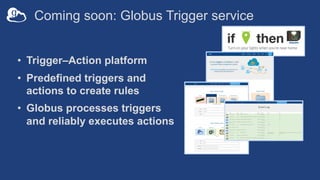
Coming soon: Globus Trigger service
• Trigger–Action platform
• Predefined triggers and
actions to create rules
• Globus processes triggers
and reliably executes actions
bit.ly/globus-sc21
docs.globus.org
github.com/globus
outreach@globus.org
support@globus.org

Enabling Secure Data Discoverability (SC21 Tutorial)

  • 1.
    Enabling Secure DataDiscoverability Rachana Ananthakrishnan – ranantha@uchicago.edu Brigitte Raumann - braumann@uchicago.edu Vas Vasiliadis - vas@uchicago.edu November 14, 2021
  • 2.
    Agenda • Introduction andMotivation • The Modern Research Data Portal Design Pattern • Brokering Access to Services using Globus Auth • Making Data Findable with Globus Search • Deploying a Simple Research Data Portal • Enabling Secure Data Collaboration • Making Data Discoverable at Scale - Hands-on exercise - Live demonstration
  • 3.
  • 4.
  • 5.
    The brilliance “armsrace”... K. Wille, The Physics of Particle Accelerators: An Introduction, Oxford University Press, Oxford, UK (2000); J. B. Parise and G. E. Brown, Jr., Elements, 2, 37-42 (2006)
  • 6.
    Some challenges… • Increasingdata rates, heterogeneity • Continuum of computing resources • Differing workflows across instruments
  • 7.
    The state ofresearch data management How do we... ...search? ...discover? …share?
  • 8.
    Distribution Store Data Portal AdvancedComputing Facility Instrument Facility A common data flow pattern Image Analysis 3 Search/Discovery 5 Science! 6 Imaging 1 Acquisition 2 Description/Identification 4 v
  • 9.
    Globus services forresearch data management Unified Data Access Data Transfer and Sharing Platform-as-a-Service Reliable Automation Publication & Discovery Remote Execution (future)
  • 11.
    The Modern ResearchData Portal Design Pattern docs.globus.org/mrdp
  • 12.
    Why we useportals • Different experiments (beamlines, electron microscopes, biology, etc) generate data with different types, size and experimental information • Processing, curation, and cataloguing need to happen as soon as possible so data are not lost • Standardize secure access between users • Work toward FAIR datasets to enable more science
  • 13.
    Advantages of aportal • Make data FAIRer • Track lots of (heterogeneous) data • Facilitate discovery – Free text search in Globus Search – Filtering on specific values – User Friendly GUI • Enforce appropriate access controls – Public/private, group-, subject-level ACLs • Integrate with other (Globus) services • Customize for your research environment
  • 14.
    MRDP: Key elements ScienceDMZ Fast, clean data path Data Transfer Nodes Purpose-built data movers Globus Platform Secure, reliable data orchestration Globus Connect Storage system enabler 14 Globus Portal Framework Data discovery and access
  • 15.
  • 16.
  • 17.
  • 18.
  • 19.
  • 20.
  • 21.
    Relevant Globus platformcapabilities • Data transfer and sharing • Data description (metadata) and discovery • Data (and compute) task orchestration • Authentication and Authorization 21
  • 22.
  • 23.
    Globus Auth: FoundationalIAM service Brokers authentication and authorization among… – End-users – Identity providers: enterprise, external (federated identities) – Services: resource servers with REST APIs – Apps: web, mobile, desktop, command line clients – Services acting as clients to other services • OAuth 2.0 Authorization Framework (a.k.a. OAuth2) • OpenID Connect Core 1.0 (a.k.a. OIDC) 23
  • 24.
    Several authentication modelssupported • Application acting as user with consent – Authorization code grant • Application authenticating as itself – Client credentials grant • Application able to manage tokens for offline or long running tasks – Refresh tokens
  • 25.
    Data transfer andsharing • Move data to collection à Submit Transfer task • Make data accessible à Set guest collection access rule • Grant user/app access à Add/confirm Group membership 25 Groups service Transfer service GET /groups/my_groups POST /endpoint/{endpoint_id}/access POST /transfer
  • 26.
    Using guest collectionsin your data portal • Create a guest collection; requires authentication – Cannot be completely automated – must ”log in” – Create once and automate rest of the steps • Grant the application Access Manager role – Allows the application to manage permissions on the collection – Set for application identity: appclientid@clients.auth.globus.org • Grant roles for management of endpoint and tasks
  • 27.
  • 28.
    Making Data Findablewith Globus Search
  • 29.
    Data description anddiscovery • Metadata store with fine- grained visibility controls • Schema agnostic à dynamic schemas • Simple search using URL query parameters • Complex search using search request document 29 docs.globus.org/api/search Search Index
  • 30.
    Distinct access policies maybe applied to Data and Metadata …(ideally) using permissions on guest collections …using permissions on metadata elements
  • 31.
    Data ingest withGlobus Search 31 Search Index POST /index/{index_id}/ingest' { "ingest_type": "GMetaList", "ingest_data": { "gmeta": [ { "id": "filetype", "subject”: "https://search.api.globus.org/abc.txt", "visible_to": ["public"], "content": { "metadata-schema/file#type": "file” } }, ... ] } - Bulk create and update - Task model for ingest at scale
  • 32.
    Data ingest withGlobus Search 32 Search Index POST /index/{index_id}/ingest' { "ingest_type": "GMetaList", "ingest_data": { "gmeta": [ { "id": ”weight", "subject": "https://search.api.globus.org/abc.txt", "visible_to": ["urn:globus:auth:identity:46bd0f56- e24f-11e5-a510-131bef46955c"], "content": { "metadata-schema/file#size": ”37.6", "metadata-schema/file#size_human": ”<50lb” } }, ... ] } Visibility limited to Globus Auth identity - Single user - Globus Group - Registered client application
  • 33.
    Data discovery withGlobus Search 33 { "@datatype": "GSearchResult", "@version": "2017-09-01", "count": 1, "gmeta": [ { "@datatype": "GMetaResult", "@version": "2019-08-27", "entries": [ { ... } ], "subject": "https://..." } ], "offset": 0, "total": 1 } GET /index/{index_id}/search?q=type%3Ahdf5 Search Index Simple query
  • 34.
    Data discovery withGlobus Search 34 POST /index/{index_id}/search Search Index Complex query { "filters": [ { "type": "range", "field_name": ”pubdate", "values": [ { "from": "*", "to": "2020-12-31" } ] } ], "facets": [ { "name": "Publication Date", "field_name": "pubdate", ... } ] } Filter Facets Boosts Sort Limit
  • 35.
    Cancer Registry Recordsfor Research (CR3) • Create network of federated cancer registries – Deploy similar infrastructure at other cancer registries – Enable queries across multiple registries • Federation via Globus: network scale ßà local control – Data owners input/export data sets, apply QC, set access policies – Registry data remain at the institution where they were generated – Identities are provided/authenticated by the institution, not Globus – System scale depends on data owners providing storage resources
  • 36.
    CR3 requirements • SearchIndex – Only de-identified data in search index – No record-level for researchers • Portal – Fine-grained access control – Researchers must use a specific identity – Access must be logged – Render graphs based on search results – Faceted search in real time
  • 37.
    CR3 Discovery Portal Cohort aggregate counts Login with UPMC/Pitt credentials Globus Search (GS) Globus Auth(GA) UPMC/Pitt Identity Providers Authentication Auth initiated to GA Cohort search initiated to GS Researcher Cohort aggregate counts returned CR3 Architecture Globus Transfer (GT) Registry Staff Data transfer from registrar to researcher mediated by GT Manage authorization Elasticsearch Request Service Cancer Registry De-identified Data Index (minimal criteria data: e.g., staging)
  • 38.
    SEER Registry Medical CenterRegistry State Registry SEER Registry Medical Center Registry State Registry CR3 Portal (simulated data) Federated logon using Globus Auth with Pitt/UPMC as identity providers Dynamically updating charts as facets change Variable facets based on source registry index Google-like text search with facets for filtering Developed using a framework based on the Globus Modern Research Data Portal* design pattern (docs.globus.org/mrdp) * PeerJ Articles:cs-144 https://peerj.com/articles/cs-144/
  • 39.
  • 40.
  • 41.
    Deploying a Simple (butfully functional and extensible) Research Data Portal
  • 42.
    Globus Search Evolving theMRDP design pattern Enabling discoverability: MRDP + Faceted Search Input form Automated Extraction Ingest metadata, set visibility policies Bulk ingest MRDP
  • 43.
    Implementation • Django frameworkwith integrated Globus services • Python package bootstraps deployment – Install from PyPi using pip – github.com/globus/django-globus-portal-framework • Reference Globus Portal Framework deployment ALCF Community Data Co-Op: acdc.alcf.anl.gov
  • 44.
    Exemplar portal The ALCFData Co-op 44 acdc.alcf.anl.gov/
  • 45.
    Portal Core Functionality •User authentication • Django-based framework – Portal URL mappings – Token loading • Service calls to Globus Search • Manage request lifecycle • Post process search requests
  • 46.
    User authentication • Scopesare configured in the portal • Users authenticate with Globus using standard flow – Python Social Auth used for Authentication backend • User tokens are saved in the database • Future requests authorized with user access tokens – Searches use Search bearer token
  • 47.
    Portal service callsuse the Globus SDK • Globus Portal Framework loads tokens from database • Globus service object instantiated with token • Call to Globus service(s) • Portal renders result in templates
  • 48.
    Globus Portal FrameworkURLs • URLs span three categories – Index Selection – Index Search page – Search Subject detail page • Supports multiple Globus Search indices • Search page links to multiple result subjects • Each subject has a unique URL
  • 49.
  • 50.
    An index isconfiguration driven • A Search index is configured in portal settings • Add Globus Search index UUID • Add a name • Add facets • Add fields • Start searching!
  • 51.
    Lifecycle of arequest • User makes a query • Portal sends request to Globus Search – Request contains user bearer token • Portal receives response • Portal does processing on response – Parse Dates, build URL for Globus webapp, etc. • Portal renders data into templates • User receives a search page
  • 52.
    Securing Apps withGlobus Auth • Select the appropriate standard OAuth flow: • Native App (with refresh tokens – extend expiration) – Clients can’t keep a secret; tokens stored in plain text – Authenticate as user identity à get authorization code – Examples: Jupyter Notebooks, Globus Timer CLI • Authorization Code Grant – Tokens stored securely – Authenticate as user identity à auth code returned via callback – Examples: JupyterHub secured with Globus Auth • Confidential Client – ClientID and Secret stored securely – Authenticate as application – Example: Data portal, custom webapps 52
  • 53.
    Authorization Code Grant 53 Client (WebPortal, Application) Globus service (Resource Server) Globus Auth (Authorization Server) 5. Authenticate using client id and secret, send authorization code Browser (User) 1. Access portal 2. Redirect user 3. User authenticates and consents 4. Authorization code 6. Access token(s) 7. Authenticate with access token(s), giving client authority to invoke the requested service Identity Provider
  • 54.
    Client credential grant 54 1.Authenticate with app client id and secret 2. Access Tokens Application, Science Gateway, Data Portal (Client) 3. Authenticate as app with access tokens to invoke service (on behalf of authorized user, within a given scope) Globus Transfer (Resource Server) Globus Auth (Authorization Server)
  • 55.
    Creating your own dataportal 55 bit.ly/globus-sc21 Source: github.com/globus/django-globus-portal-framework Docs: django-globus-portal-framework.readthedocs.io/en/stable/
  • 56.
    Step 0: Applicationregistration • Set callback URL • Get client ID and secret • Consents implement least privileges principle 56 developers.globus.org
  • 57.
    Portal deployment • (Alreadyavailable on your EC2 instance) • Clone the repo • Configure settings • For production use, add robust WSGI/ASGI server • Future: containers
  • 58.
    Portal configuration • Reviewsettings.py and check that portal runs • Update settings.py – Add search index to SEARCH_INDEXES – Include search scope in Globus Auth setup • Configure search (facets, fields, …) • Optional: Configure templates
  • 59.
  • 60.
    Globus Groups simplifypermissions management • Grant group access to collection(s) • Restrict search visibility using group • Make portal client a group administrator • Check authenticated user’s group membership • Add/remove user to/from group
  • 61.
    Adding a search indexto the portal 61
  • 62.
  • 63.
    Globus Automation Capabilities TimerService Scheduled and recurring transfers (a.k.a. Globus cron) Command Line Interface Ad hoc scripting and integration Globus Flows service Comprehensive task (data and compute) orchestration with human in the loop interactions
  • 64.
  • 65.
    Use case: Datareplication • For backup: initiated by user or system back up • Automated transfer of data from science instrument 65 Recurring transfers with sync option Copy /ingest Daily @ 3:30am
  • 66.
    The Globus Timerservice • Scheduled/recurring file transfers • Supports all Globus transfer and sync options • Service with a command line interface • Example: NIH – hpc.nih.gov/storage/globus_cron.html 66
  • 67.
    Using the GlobusTimer service 67 $ globus–timer session {login, logout, whoami} $ globus–timer job transfer --name example–job --label "Timer Transfer Job" --interval 28800 --start '2020–01–01T12:34:56' --source–endpoint ddb59aef–6d04–11e5–ba46–22000b92c6ec --dest–endpoint ddb59af0–6d04–11e5–ba46–22000b92c6ec --item ~/file1.txt ~/new_file1.txt false --item ~/file2.txt ~/new_file2.txt false
  • 68.
    Timer options in theGlobus webapp
  • 69.
    Scheduled transfers to dataportal endpoint(s) Globus Timer CLI: pypi.org/project/globus-timer-cli 69
  • 70.
  • 71.
    Globus Command LineInterface Open source, uses the Python SDK
  • 72.
    Automated management of data portalendpoint(s) 72 Globus SDK: globus-sdk python.readthedocs.io/en/stable/ Globus CLI: docs.globus.org/cli/
  • 73.
  • 74.
    Managed automation oftasks • Flows: A platform service for defining, applying, and sharing distributed research automation flows • Flows comprise Actions • Action Providers: Called by Flows to perform tasks • Triggers*: Start flows based on events * In development
  • 75.
    Automation with GlobusFlows • Built on AWS Step Functions – Simple JSON-based state machine language – Conditions, loops, fault tolerance, etc. – Propagates state through the flow • Standardized API for integrating custom event and action services – Actions: synchronous or asynchronous – Custom Web forms prompt for user input • Actions secured with Globus Auth
  • 76.
    Extending the ecosystem:Action providers 76 • Action Provider is a service endpoint – Run – Status – Cancel – Release – Resume • Action Provider Toolkit action-provider- tools.readthedocs.io/en/latest Search Transfer Notification ACLs Identifier Delete Ingest User Form Describe Xtract funcX Web Form Custom built Globus Provided
  • 77.
    Automation services ecosystem GET/provider_url/ POST /provider_url/run GET /provider_url/action_id/status GET /provider_url/action_id/cancel GET /provider_url/action_id/status Create Action Providers Define and deploy flows { “StartAt”: ”ToProject”, ”States” : { ”ToProject” : { … }, ”SetPermission” : { …}, “ProcessData” : { … } … }} Run flows
  • 78.
    Working with Globus Flows Tryit: demo.gladier.org/gladier-demo/upload-file Run flows: app.globus.org/flows/library Docs: docs.globus.org/globus-automation-services 78
  • 79.
    Coming soon: GlobusTrigger service • Trigger–Action platform • Predefined triggers and actions to create rules • Globus processes triggers and reliably executes actions
  • 80.