Lee Liming – lliming@uchicago.edu
Steve Turoscy – sturoscy@globus.org
Vas Vasiliadis – vas@uchicago.edu
May 11, 2022
Building Data Portals and Science
Gateways with Globus
Agenda
• Introduction and motivation
• The Modern Research Data Portal design pattern
• Introducing the Django Globus Portal
• Deploying your Django Globus Portal
• Globus data transfer: a range of options
• Making data findable with Globus Search
• Other customization examples
- Hands-on exercise
- Live demonstration
Motivation and
Framing the Solution
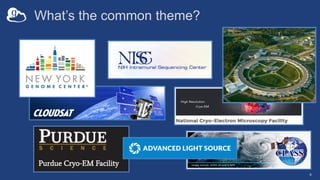
What’s the common theme?
4
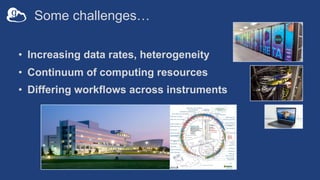
Some challenges…
• Increasing data rates, heterogeneity
• Continuum of computing resources
• Differing workflows across instruments
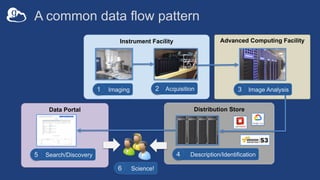
Distribution Store
Data Portal
Advanced Computing Facility
Instrument Facility
A common data flow pattern
Image Analysis
3
Search/Discovery
5
Science!
6
Imaging
1 Acquisition
2
Description/Identification
4
v
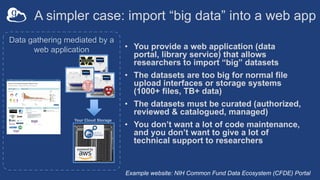
Data gathering mediated by a
web application
A simpler case: import “big data” into a web app
• You provide a web application (data
portal, library service) that allows
researchers to import “big” datasets
• The datasets are too big for normal file
upload interfaces or storage systems
(1000+ files, TB+ data)
• The datasets must be curated (authorized,
reviewed & catalogued, managed)
• You don’t want a lot of code maintenance,
and you don’t want to give a lot of
technical support to researchers
Your Cloud Storage
Example website: NIH Common Fund Data Ecosystem (CFDE) Portal
Why we provide portals and science gateways
• Enable a broad audience of researchers to access the
latest research data
• Simplify access to complicated data sources
(beamlines, electron microscopes, sequencers, etc)
• Add curation and cataloguing so data is findable
• Enable researchers to customize their experience
• Enforce (sometimes complex) access policies
What does Globus do for portals?
• Federated login
– Globus handles authentication &
identity federation
– Your portal manages profiles
• Rich groups API for access
management
– Public/private, group-, subject-level
ACLs
• Data upload/download at scale
– Call out to Globus Transfer API
• Facilitate discovery
– Free text search in Globus Search
– Filtering on specific values
– User Friendly GUI
• Automation
– Define Flows for data handling steps
(copy, move, add a search record,
create a DOI, change permissions, etc.)
– Run each Flow w/one API call & let
Globus manage everything
– Simplify your curation code
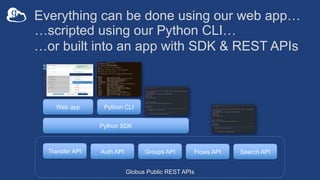
Everything can be done using our web app…
Web app Python CLI
Python SDK
Globus Public REST APIs
Transfer API Search API
Auth API Groups API Flows API
…scripted using our Python CLI…
…or built into an app with SDK & REST APIs
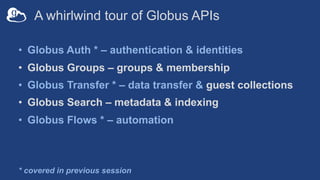
A whirlwind tour of Globus APIs
• Globus Auth * – authentication & identities
• Globus Groups – groups & membership
• Globus Transfer * – data transfer & guest collections
• Globus Search – metadata & indexing
• Globus Flows * – automation
* covered in previous session
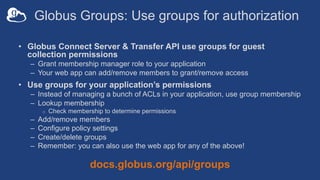
Globus Groups: Use groups for authorization
• Globus Connect Server & Transfer API use groups for guest
collection permissions
– Grant membership manager role to your application
– Your web app can add/remove members to grant/remove access
• Use groups for your application’s permissions
– Instead of managing a bunch of ACLs in your application, use group membership
– Lookup membership
o Check membership to determine permissions
– Add/remove members
– Configure policy settings
– Create/delete groups
– Remember: you can also use the web app for any of the above!
docs.globus.org/api/groups
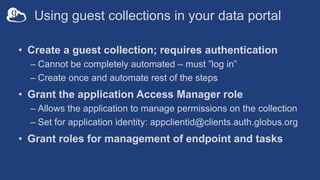
Using guest collections in your data portal
• Create a guest collection; requires authentication
– Cannot be completely automated – must ”log in”
– Create once and automate rest of the steps
• Grant the application Access Manager role
– Allows the application to manage permissions on the collection
– Set for application identity: appclientid@clients.auth.globus.org
• Grant roles for management of endpoint and tasks
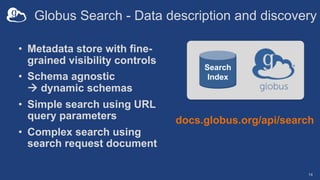
Globus Search - Data description and discovery
• Metadata store with fine-
grained visibility controls
• Schema agnostic
à dynamic schemas
• Simple search using URL
query parameters
• Complex search using
search request document
14
docs.globus.org/api/search
Search
Index
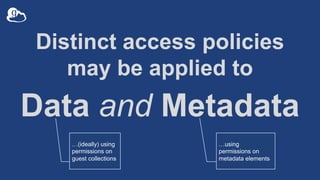
Distinct access policies
may be applied to
Data and Metadata
…(ideally) using
permissions on
guest collections
…using
permissions on
metadata elements
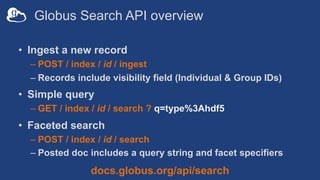
Globus Search API overview
• Ingest a new record
– POST / index / id / ingest
– Records include visibility field (Individual & Group IDs)
• Simple query
– GET / index / id / search ? q=type%3Ahdf5
• Faceted search
– POST / index / id / search
– Posted doc includes a query string and facet specifiers
docs.globus.org/api/search
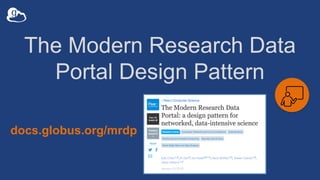
The Modern Research Data
Portal Design Pattern
docs.globus.org/mrdp
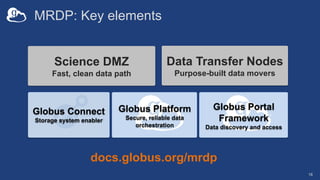
MRDP: Key elements
Science DMZ
Fast, clean data path
Data Transfer Nodes
Purpose-built data movers
Globus Platform
Secure, reliable data
orchestration
Globus Connect
Storage system enabler
18
Globus Portal
Framework
Data discovery and access
docs.globus.org/mrdp
…makes your
storage system a
Globus endpoint
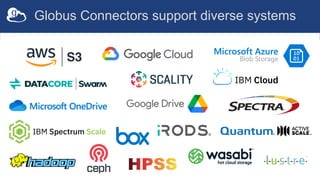
Globus Connectors support diverse systems
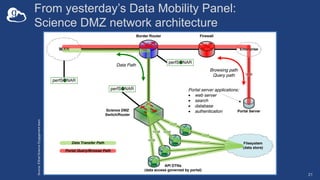
From yesterday’s Data Mobility Panel:
Science DMZ network architecture
21
Source:
ESnet
Science
Engagement
team
An exemplar:
The ALCF Data Co-op
22
acdc.alcf.anl.gov
Creating your data portal using
the Django Globus Portal
Framework
23
Key features
• Federated login (InCommon campus IDs)
• Big data export using Globus
• Browse datasets w/Globus Search calls
• Template-driven search results & landing pages
• Django-based framework & templating
• Bootstrap your project with Cookiecutter Django
24
Source: github.com/globus/django-globus-portal-framework
Docs: django-globus-portal-framework.readthedocs.io/en/stable/
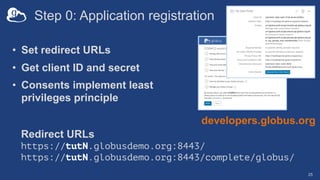
Step 0: Application registration
• Set redirect URLs
• Get client ID and secret
• Consents implement least
privileges principle
25
developers.globus.org
Redirect URLs
https://tutN.globusdemo.org:8443/
https://tutN.globusdemo.org:8443/complete/globus/
Portal deployment
• Install dependent libraries
– For production use, add robust WSGI/ASGI server
• Deploy a portal instance using cookiecutter
• Configure settings
• Run and use!
• Future: containers
Exporting data via Globus
from easy to custom
Where’s the data?
• Remember – we’re using Globus Connect, so your
datasets are in a Globus collection
• Three options for enabling transfers from your portal:
1. Link to the collection in the Globus web app (Easy! But not
customizable.)
2. Use the Globus Helper Page (Easy! A bit customizable.)
3. Use a JavaScript interface (Less easy. Very customizable.)
• Let’s see an example of each…
Easy: Link to the
Globus web app
Easy: Select destination
with Globus Helper Page
Advanced: Create a
custom UI that uses
the Globus SDK
Adding a new search
index to your portal
32
Other Customizations with
Django Globus Portal
Add image previews
to search results
Use sliders
for search facets
https://bit.ly/gw-tut
docs.globus.org
github.com/globus
outreach@globus.org
support@globus.org

Building Data Portals and Science Gateways with Globus

  • 1.
    Lee Liming –lliming@uchicago.edu Steve Turoscy – sturoscy@globus.org Vas Vasiliadis – vas@uchicago.edu May 11, 2022 Building Data Portals and Science Gateways with Globus
  • 2.
    Agenda • Introduction andmotivation • The Modern Research Data Portal design pattern • Introducing the Django Globus Portal • Deploying your Django Globus Portal • Globus data transfer: a range of options • Making data findable with Globus Search • Other customization examples - Hands-on exercise - Live demonstration
  • 3.
  • 4.
  • 5.
    Some challenges… • Increasingdata rates, heterogeneity • Continuum of computing resources • Differing workflows across instruments
  • 6.
    Distribution Store Data Portal AdvancedComputing Facility Instrument Facility A common data flow pattern Image Analysis 3 Search/Discovery 5 Science! 6 Imaging 1 Acquisition 2 Description/Identification 4 v
  • 7.
    Data gathering mediatedby a web application A simpler case: import “big data” into a web app • You provide a web application (data portal, library service) that allows researchers to import “big” datasets • The datasets are too big for normal file upload interfaces or storage systems (1000+ files, TB+ data) • The datasets must be curated (authorized, reviewed & catalogued, managed) • You don’t want a lot of code maintenance, and you don’t want to give a lot of technical support to researchers Your Cloud Storage Example website: NIH Common Fund Data Ecosystem (CFDE) Portal
  • 8.
    Why we provideportals and science gateways • Enable a broad audience of researchers to access the latest research data • Simplify access to complicated data sources (beamlines, electron microscopes, sequencers, etc) • Add curation and cataloguing so data is findable • Enable researchers to customize their experience • Enforce (sometimes complex) access policies
  • 9.
    What does Globusdo for portals? • Federated login – Globus handles authentication & identity federation – Your portal manages profiles • Rich groups API for access management – Public/private, group-, subject-level ACLs • Data upload/download at scale – Call out to Globus Transfer API • Facilitate discovery – Free text search in Globus Search – Filtering on specific values – User Friendly GUI • Automation – Define Flows for data handling steps (copy, move, add a search record, create a DOI, change permissions, etc.) – Run each Flow w/one API call & let Globus manage everything – Simplify your curation code
  • 10.
    Everything can bedone using our web app… Web app Python CLI Python SDK Globus Public REST APIs Transfer API Search API Auth API Groups API Flows API …scripted using our Python CLI… …or built into an app with SDK & REST APIs
  • 11.
    A whirlwind tourof Globus APIs • Globus Auth * – authentication & identities • Globus Groups – groups & membership • Globus Transfer * – data transfer & guest collections • Globus Search – metadata & indexing • Globus Flows * – automation * covered in previous session
  • 12.
    Globus Groups: Usegroups for authorization • Globus Connect Server & Transfer API use groups for guest collection permissions – Grant membership manager role to your application – Your web app can add/remove members to grant/remove access • Use groups for your application’s permissions – Instead of managing a bunch of ACLs in your application, use group membership – Lookup membership o Check membership to determine permissions – Add/remove members – Configure policy settings – Create/delete groups – Remember: you can also use the web app for any of the above! docs.globus.org/api/groups
  • 13.
    Using guest collectionsin your data portal • Create a guest collection; requires authentication – Cannot be completely automated – must ”log in” – Create once and automate rest of the steps • Grant the application Access Manager role – Allows the application to manage permissions on the collection – Set for application identity: appclientid@clients.auth.globus.org • Grant roles for management of endpoint and tasks
  • 14.
    Globus Search -Data description and discovery • Metadata store with fine- grained visibility controls • Schema agnostic à dynamic schemas • Simple search using URL query parameters • Complex search using search request document 14 docs.globus.org/api/search Search Index
  • 15.
    Distinct access policies maybe applied to Data and Metadata …(ideally) using permissions on guest collections …using permissions on metadata elements
  • 16.
    Globus Search APIoverview • Ingest a new record – POST / index / id / ingest – Records include visibility field (Individual & Group IDs) • Simple query – GET / index / id / search ? q=type%3Ahdf5 • Faceted search – POST / index / id / search – Posted doc includes a query string and facet specifiers docs.globus.org/api/search
  • 17.
    The Modern ResearchData Portal Design Pattern docs.globus.org/mrdp
  • 18.
    MRDP: Key elements ScienceDMZ Fast, clean data path Data Transfer Nodes Purpose-built data movers Globus Platform Secure, reliable data orchestration Globus Connect Storage system enabler 18 Globus Portal Framework Data discovery and access docs.globus.org/mrdp
  • 19.
  • 20.
  • 21.
    From yesterday’s DataMobility Panel: Science DMZ network architecture 21 Source: ESnet Science Engagement team
  • 22.
    An exemplar: The ALCFData Co-op 22 acdc.alcf.anl.gov
  • 23.
    Creating your dataportal using the Django Globus Portal Framework 23
  • 24.
    Key features • Federatedlogin (InCommon campus IDs) • Big data export using Globus • Browse datasets w/Globus Search calls • Template-driven search results & landing pages • Django-based framework & templating • Bootstrap your project with Cookiecutter Django 24 Source: github.com/globus/django-globus-portal-framework Docs: django-globus-portal-framework.readthedocs.io/en/stable/
  • 25.
    Step 0: Applicationregistration • Set redirect URLs • Get client ID and secret • Consents implement least privileges principle 25 developers.globus.org Redirect URLs https://tutN.globusdemo.org:8443/ https://tutN.globusdemo.org:8443/complete/globus/
  • 26.
    Portal deployment • Installdependent libraries – For production use, add robust WSGI/ASGI server • Deploy a portal instance using cookiecutter • Configure settings • Run and use! • Future: containers
  • 27.
    Exporting data viaGlobus from easy to custom
  • 28.
    Where’s the data? •Remember – we’re using Globus Connect, so your datasets are in a Globus collection • Three options for enabling transfers from your portal: 1. Link to the collection in the Globus web app (Easy! But not customizable.) 2. Use the Globus Helper Page (Easy! A bit customizable.) 3. Use a JavaScript interface (Less easy. Very customizable.) • Let’s see an example of each…
  • 29.
    Easy: Link tothe Globus web app
  • 30.
  • 31.
    Advanced: Create a customUI that uses the Globus SDK
  • 32.
    Adding a newsearch index to your portal 32
  • 33.
  • 34.
    Add image previews tosearch results
  • 35.
  • 36.