Connecting Your System to Globus
Vas Vasiliadis
vas@uchicago.edu
October 12, 2021
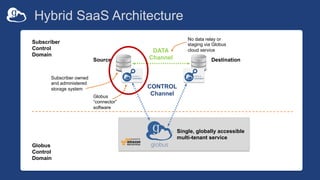
Hybrid SaaS Architecture
DATA
Channel
CONTROL
Channel
Source Destination
Subscriber owned
and administered
storage system
Globus
“connector”
software
No data relay or
staging via Globus
cloud service
Subscriber
Control
Domain
Globus
Control
Domain
Single, globally accessible
multi-tenant service
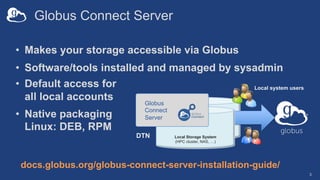
Globus Connect Server
3
• Makes your storage accessible via Globus
• Software/tools installed and managed by sysadmin
docs.globus.org/globus-connect-server-installation-guide/
Local system users
Local Storage System
(HPC cluster, NAS, …)
Globus
Connect
Server
DTN
• Default access for
all local accounts
• Native packaging
Linux: DEB, RPM
Creating a Globus endpoint
Globus Connect Server v5
(GCSv5) should be used
for all new endpoint
installations
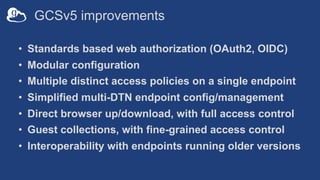
GCSv5 improvements
• Standards based web authorization (OAuth2, OIDC)
• Modular configuration
• Multiple distinct access policies on a single endpoint
• Simplified multi-DTN endpoint config/management
• Direct browser up/download, with full access control
• Guest collections, with fine-grained access control
• Interoperability with endpoints running older versions
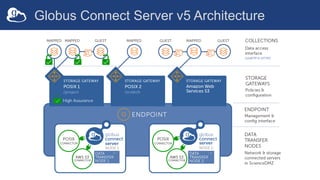
Globus Connect Server v5 Architecture
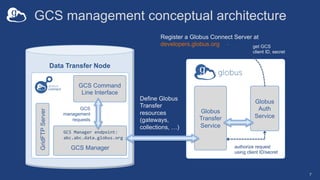
GCS management conceptual architecture
7
Data Transfer Node
GCS Command
Line Interface
GridFTP
Server
Globus
Transfer
Service
GCS
management
requests
Globus
Auth
Service
GCS Manager authorize request
using client ID/secret
GCS Manager endpoint:
abc.abc.data.globus.org
Register a Globus Connect Server at
developers.globus.org get GCS
client ID, secret
Define Globus
Transfer
resources
(gateways,
collections, …)
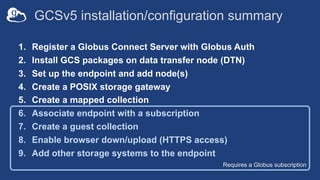
Requires a Globus subscription
GCSv5 installation/configuration summary
1. Register a Globus Connect Server with Globus Auth
2. Install GCS packages on data transfer node (DTN)
3. Set up the endpoint and add node(s)
4. Create a POSIX storage gateway
5. Create a mapped collection
6. Associate endpoint with a subscription
7. Create a guest collection
8. Enable browser down/upload (HTTPS access)
9. Add other storage systems to the endpoint
GCS registration
9
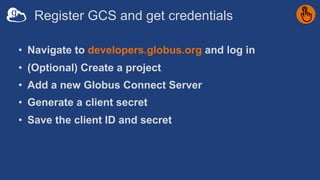
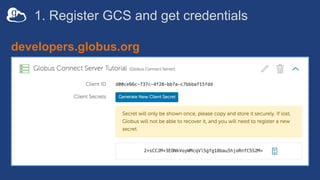
Register GCS and get credentials
• Navigate to developers.globus.org and log in
• (Optional) Create a project
• Add a new Globus Connect Server
• Generate a client secret
• Save the client ID and secret
1. Register GCS and get credentials
developers.globus.org
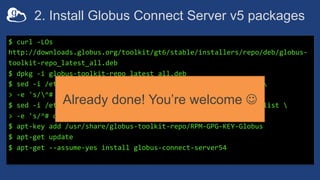
2. Install Globus Connect Server v5 packages
$ curl -LOs
http://downloads.globus.org/toolkit/gt6/stable/installers/repo/deb/globus-
toolkit-repo_latest_all.deb
$ dpkg -i globus-toolkit-repo_latest_all.deb
$ sed -i /etc/apt/sources.list.d/globus-toolkit-6-stable*.list 
> -e 's/^# deb /deb /'
$ sed -i /etc/apt/sources.list.d/globus-connect-server-stable*.list 
> -e 's/^# deb /deb /'
$ apt-key add /usr/share/globus-toolkit-repo/RPM-GPG-KEY-Globus
$ apt-get update
$ apt-get --assume-yes install globus-connect-server54
Already done! You’re welcome J
Endpoint creation and
node setup
13
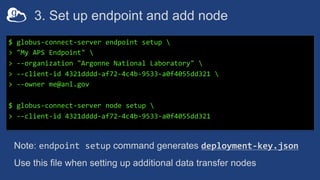
3. Set up endpoint and add node
$ globus-connect-server endpoint setup 
> "My APS Endpoint" 
> --organization "Argonne National Laboratory" 
> --client-id 4321dddd-af72-4c4b-9533-a0f4055dd321 
> --owner me@anl.gov
$ globus-connect-server node setup 
> --client-id 4321dddd-af72-4c4b-9533-a0f4055dd321
Note: endpoint setup command generates deployment-key.json
Use this file when setting up additional data transfer nodes
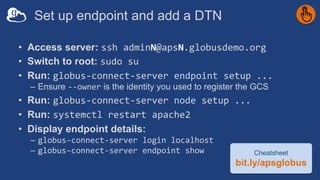
Set up endpoint and add a DTN
• Access server: ssh adminN@apsN.globusdemo.org
• Switch to root: sudo su
• Run: globus-connect-server endpoint setup ...
– Ensure --owner is the identity you used to register the GCS
• Run: globus-connect-server node setup ...
• Run: systemctl restart apache2
• Display endpoint details:
– globus-connect-server login localhost
– globus-connect-server endpoint show Cheatsheet
bit.ly/apsglobus
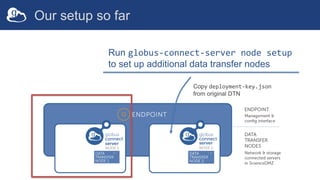
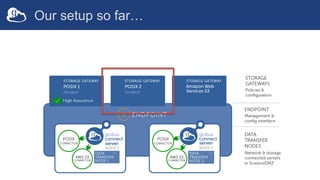
Our setup so far
Run globus-connect-server node setup
to set up additional data transfer nodes
Copy deployment-key.json
from original DTN
Storage Gateways define a set of access policies
• Authentication for local account-holders
– Which identity domain(s) are acceptable?
– How are identities mapped from domain(s) to local accounts?
• Policy scope
– Which parts of the storage system are accessible via Globus?
– Which local accounts does this policy allow (or deny)?
• High Assurance settings
• MFA requirements
Authentication for local account-holders
• Primary access (via a mapped collection) requires an
account on the host system*
• Two-part authentication configuration:
1. Pick one or more identity domains
2. Configure the method to map the authenticated identity to an
account on your system
* You may allow primary users to share with others who don’t have accounts on your system
Picking identity domains
• User must present identity from one of the configured
domains
– On access attempts, linked identities will be scanned for a match
– If no identity from the required domain(s), will be asked to link one
• Identity domains may include…
– …any organization in Globus federated list (incl. anl.gov, bnl.gov)
– …your institution’s identity provider trusted by Globus
– …a local OpenID Connect (OIDC) server using your PAM stack
Mapping identities to local accounts
• Default: Strip identity domain (everything after “@”)
– e.g. userX@globusdemo.org maps to local account userX
– Best for campus identities w/synchronized local accounts
• Use --identity-mapping option on storage gateway
– Specify expression in a JSON document
– Execute a custom script
docs.globus.org/globus-connect-server/v5.4/identity-mapping-guide/
Create a POSIX
storage gateway
21
Creating a storage gateway
• Our storage gateway will access a POSIX system
– This is the only type permitted without a subscription
• It will allow access to users with credentials from the
anl.gov (or bnl.gov) domain
• Reauthentication will be required every 12 hours
Cheatsheet
bit.ly/apsglobus
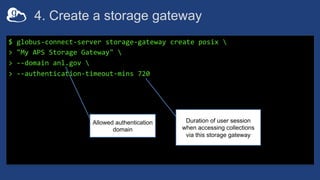
4. Create a storage gateway
$ globus-connect-server storage-gateway create posix 
> "My APS Storage Gateway" 
> --domain anl.gov 
> --authentication-timeout-mins 720
Allowed authentication
domain
Duration of user session
when accessing collections
via this storage gateway
Our setup so far…
Create a mapped
collection on the
POSIX gateway
25
Creating a collection
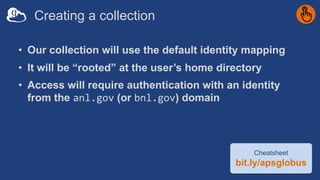
• Our collection will use the default identity mapping
• It will be “rooted” at the user’s home directory
• Access will require authentication with an identity
from the anl.gov (or bnl.gov) domain
Cheatsheet
bit.ly/apsglobus
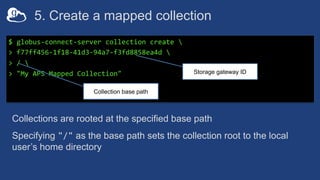
5. Create a mapped collection
$ globus-connect-server collection create 
> f77ff456-1f18-41d3-94a7-f3fd8858ea4d 
> / 
> "My APS Mapped Collection"
Collections are rooted at the specified base path
Specifying "/" as the base path sets the collection root to the local
user’s home directory
Storage gateway ID
Collection base path
Common Collection configuration options
• Restrict access: local users, local groups
• Allow guest collections à enables sharing
• Restrict sharing: paths, local users, local groups
• Enable HTTPS access
• Force data channel encryption
Local account restrictions
• Note: These only apply to mapped collections
• A storage gateway’s allowed identity domains and
identity mapping method determine the universe of local
accounts that may access the mapped collection
• You can further narrow the access universe using…
--user-allow
--user-deny
--posix-group-allow (POSIX storage gateways only)
--posix-group-deny (POSIX storage gateways only)
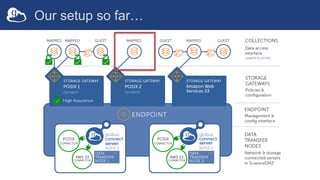
Our setup so far…
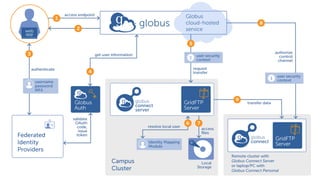
Accessing mapped
collections
31
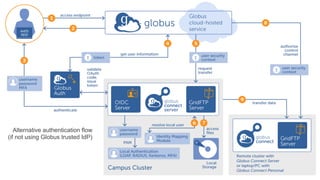
Alternative authentication flow
(if not using Globus trusted IdP)
Path restrictions
• Always use the narrowest base path possible for your storage
gateway(s) and collection(s)
– Storage gateway base specifies where collections may be created
– Collection base specifies the base directory for the collection
• POSIX storage gateway
– Use --restrict_paths to specify narrower read, read/write, or none
access for specific paths
– You provide a JSON doc that lists paths for each permission type
– Note: These are absolute paths on the host system
• Collection: specify narrowest base path that satisfies the need
Restrict collection
access to filesystem
35
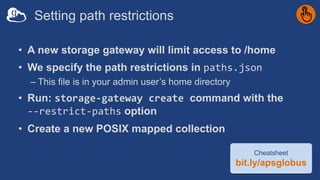
Setting path restrictions
• A new storage gateway will limit access to /home
• We specify the path restrictions in paths.json
– This file is in your admin user’s home directory
• Run: storage-gateway create command with the
--restrict-paths option
• Create a new POSIX mapped collection
Cheatsheet
bit.ly/apsglobus
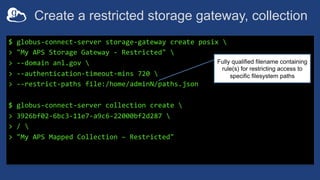
Create a restricted storage gateway, collection
$ globus-connect-server storage-gateway create posix 
> "My APS Storage Gateway - Restricted" 
> --domain anl.gov 
> --authentication-timeout-mins 720 
> --restrict-paths file:/home/adminN/paths.json
$ globus-connect-server collection create 
> 3926bf02-6bc3-11e7-a9c6-22000bf2d287 
> / 
> "My APS Mapped Collection – Restricted"
Fully qualified filename containing
rule(s) for restricting access to
specific filesystem paths
Revisit your mapped collections
• Your will need to authenticate as user@anl.gov on
your new (restricted access) collection, and consent
• Note the access behavior differences between the two
mapped collections
• Move some files, if you like!
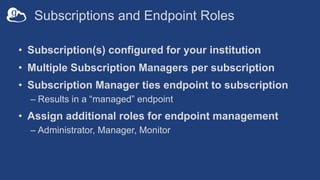
Subscriptions and Endpoint Roles
• Subscription(s) configured for your institution
• Multiple Subscription Managers per subscription
• Subscription Manager ties endpoint to subscription
– Results in a “managed” endpoint
• Assign additional roles for endpoint management
– Administrator, Manager, Monitor
Associate the
endpoint with a
subscription
40
6. Associate endpoint with a subscription
• Subscription managers can enable subscription
features on an endpoint
• If you are not the subscription manager, just send
your endpoint ID to your subscription manager and
ask them to add it.
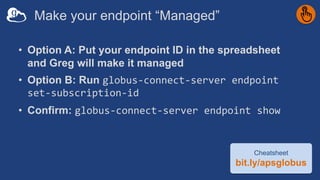
Make your endpoint “Managed”
• Option A: Put your endpoint ID in the spreadsheet
and Greg will make it managed
• Option B: Run globus-connect-server endpoint
set-subscription-id
• Confirm: globus-connect-server endpoint show
Cheatsheet
bit.ly/apsglobus
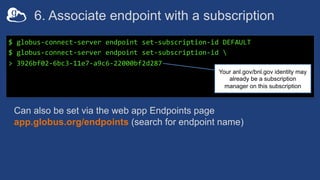
6. Associate endpoint with a subscription
$ globus-connect-server endpoint set-subscription-id DEFAULT
$ globus-connect-server endpoint set-subscription-id 
> 3926bf02-6bc3-11e7-a9c6-22000bf2d287
Can also be set via the web app Endpoints page
app.globus.org/endpoints (search for endpoint name)
Your anl.gov/bnl.gov identity may
already be a subscription
manager on this subscription
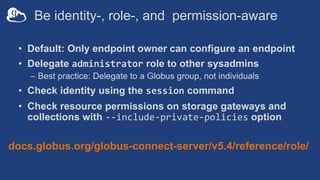
Be identity-, role-, and permission-aware
• Default: Only endpoint owner can configure an endpoint
• Delegate administrator role to other sysadmins
– Best practice: Delegate to a Globus group, not individuals
• Check identity using the session command
• Check resource permissions on storage gateways and
collections with --include-private-policies option
docs.globus.org/globus-connect-server/v5.4/reference/role/
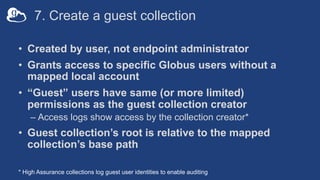
7. Create a guest collection
• Created by user, not endpoint administrator
• Grants access to specific Globus users without a
mapped local account
• “Guest” users have same (or more limited)
permissions as the guest collection creator
– Access logs show access by the collection creator*
• Guest collection’s root is relative to the mapped
collection’s base path
* High Assurance collections log guest user identities to enable auditing
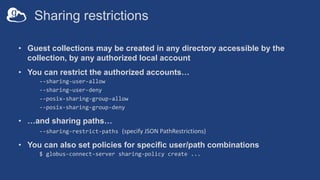
Sharing restrictions
• Guest collections may be created in any directory accessible by the
collection, by any authorized local account
• You can restrict the authorized accounts…
--sharing-user-allow
--sharing-user-deny
--posix-sharing-group-allow
--posix-sharing-group-deny
• …and sharing paths…
--sharing-restrict-paths (specify JSON PathRestrictions)
• You can also set policies for specific user/path combinations
$ globus-connect-server sharing-policy create ...
Create and access a
guest collection
47
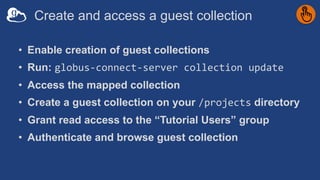
Create and access a guest collection
• Enable creation of guest collections
• Run: globus-connect-server collection update
• Access the mapped collection
• Create a guest collection on your /projects directory
• Grant read access to the “Tutorial Users” group
• Authenticate and browse guest collection
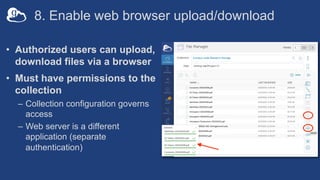
8. Enable web browser upload/download
• Authorized users can upload,
download files via a browser
• Must have permissions to the
collection
– Collection configuration governs
access
– Web server is a different
application (separate
authentication)
Enable/disable file
download/upload via
browser
50
Enable HTTPS access
• Run: globus-connect-server collection update
• Access your mapped collection
• Download the James Webb PNG file
Cheatsheet
bit.ly/apsglobus
9. Add other storage systems to the endpoint
• Update your GCS packages
• Add the appropriate storage gateway
– Non-POSIX systems require add-on connector subscription(s)
• Gateway configuration options vary by connector
– e.g., specify bucket name(s) for AWS S3
• Collection authentication options vary by connector
– e.g., provide user access key and secret key for AWS S3
Accessing non-POSIX
storage systems
53
Accessing an object store (AWS S3)
• An S3 storage gateway and a mapped collection exist
– Access is restricted to two buckets within the AWS account
• Authenticating to the mapped collection(s) requires a
credential from the specified domain…
• …as well as S3 access credentials that allows access
to buckets and objects
Using the
management console
55
Things to do with the management console
• Monitor current transfers on your endpoints
– See what’s going on at the transfer request level
– Much better than watching individual file transfers
• Pause (and later resume) a transfer in progress
– Sends a notice to the transfer owner
• Set a pause rule for current and future transfers
– Ideal for maintenance mode
– Notifies transfer owners,
– Tasks resume when endpoint is un-paused
docs.globus.org/management-console-guide/
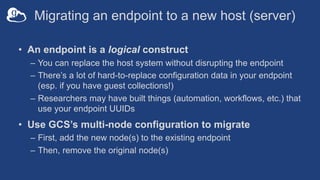
Migrating an endpoint to a new host (server)
• An endpoint is a logical construct
– You can replace the host system without disrupting the endpoint
– There’s a lot of hard-to-replace configuration data in your endpoint
(esp. if you have guest collections!)
– Researchers may have built things (automation, workflows, etc.) that
use your endpoint UUIDs
• Use GCS’s multi-node configuration to migrate
– First, add the new node(s) to the existing endpoint
– Then, remove the original node(s)
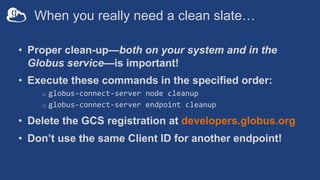
When you really need a clean slate…
• Proper clean-up—both on your system and in the
Globus service—is important!
• Execute these commands in the specified order:
o globus-connect-server node cleanup
o globus-connect-server endpoint cleanup
• Delete the GCS registration at developers.globus.org
• Don’t use the same Client ID for another endpoint!
Clean up endpoint
and delete registration
59
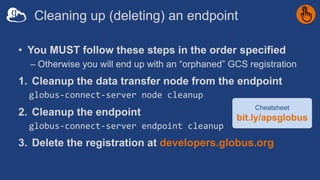
Cleaning up (deleting) an endpoint
• You MUST follow these steps in the order specified
– Otherwise you will end up with an “orphaned” GCS registration
1. Cleanup the data transfer node from the endpoint
globus-connect-server node cleanup
2. Cleanup the endpoint
globus-connect-server endpoint cleanup
3. Delete the registration at developers.globus.org
Cheatsheet
bit.ly/apsglobus
On performance…
61
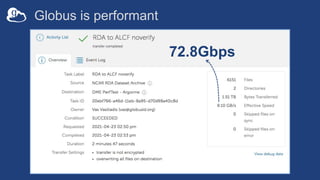
Globus is performant
72.8Gbps
Balance: performance - reliability
• Network use parameters: concurrency, parallelism
• Maximum, Preferred values for each
• Transfer considers source and destination endpoint settings
min(
max(preferred src, preferred dest),
max src,
max dest
)
• Service limits, e.g. concurrent requests
63
Modifying network
use parameters
64
Setting network use parameters
• May only be changed on managed endpoints
• Modify via the web app: Endpoints à Server tab
• Modify via Globus Connect Server CLI
– Run globus-connect-server endpoint modify
• Strong recommendation: Do not change network use
parameters before establishing baseline performance
65
GCSv5 resources – please consult these first
• Quickstart Guide
docs.globus.org/globus-connect-server/v5.4/quickstart
• GCS Command Line Reference
docs.globus.org/globus-connect-server/v5.4/reference
• Video walkthrough of an installation
www.youtube.com/watch?v=8ILtsSRiML8
General Resources
• Access the service: app.globus.org
• Documentation: docs.globus.org/globus-connect-server
• Engage: discuss@globus.org
• Subscribe: globus.org/subscriptions
• Need help? support@globus.org
• Follow us: @globus

Connecting Your System to Globus (APS Workshop)

  • 1.
    Connecting Your Systemto Globus Vas Vasiliadis vas@uchicago.edu October 12, 2021
  • 2.
    Hybrid SaaS Architecture DATA Channel CONTROL Channel SourceDestination Subscriber owned and administered storage system Globus “connector” software No data relay or staging via Globus cloud service Subscriber Control Domain Globus Control Domain Single, globally accessible multi-tenant service
  • 3.
    Globus Connect Server 3 •Makes your storage accessible via Globus • Software/tools installed and managed by sysadmin docs.globus.org/globus-connect-server-installation-guide/ Local system users Local Storage System (HPC cluster, NAS, …) Globus Connect Server DTN • Default access for all local accounts • Native packaging Linux: DEB, RPM
  • 4.
    Creating a Globusendpoint Globus Connect Server v5 (GCSv5) should be used for all new endpoint installations
  • 5.
    GCSv5 improvements • Standardsbased web authorization (OAuth2, OIDC) • Modular configuration • Multiple distinct access policies on a single endpoint • Simplified multi-DTN endpoint config/management • Direct browser up/download, with full access control • Guest collections, with fine-grained access control • Interoperability with endpoints running older versions
  • 6.
    Globus Connect Serverv5 Architecture
  • 7.
    GCS management conceptualarchitecture 7 Data Transfer Node GCS Command Line Interface GridFTP Server Globus Transfer Service GCS management requests Globus Auth Service GCS Manager authorize request using client ID/secret GCS Manager endpoint: abc.abc.data.globus.org Register a Globus Connect Server at developers.globus.org get GCS client ID, secret Define Globus Transfer resources (gateways, collections, …)
  • 8.
    Requires a Globussubscription GCSv5 installation/configuration summary 1. Register a Globus Connect Server with Globus Auth 2. Install GCS packages on data transfer node (DTN) 3. Set up the endpoint and add node(s) 4. Create a POSIX storage gateway 5. Create a mapped collection 6. Associate endpoint with a subscription 7. Create a guest collection 8. Enable browser down/upload (HTTPS access) 9. Add other storage systems to the endpoint
  • 9.
  • 10.
    Register GCS andget credentials • Navigate to developers.globus.org and log in • (Optional) Create a project • Add a new Globus Connect Server • Generate a client secret • Save the client ID and secret
  • 11.
    1. Register GCSand get credentials developers.globus.org
  • 12.
    2. Install GlobusConnect Server v5 packages $ curl -LOs http://downloads.globus.org/toolkit/gt6/stable/installers/repo/deb/globus- toolkit-repo_latest_all.deb $ dpkg -i globus-toolkit-repo_latest_all.deb $ sed -i /etc/apt/sources.list.d/globus-toolkit-6-stable*.list > -e 's/^# deb /deb /' $ sed -i /etc/apt/sources.list.d/globus-connect-server-stable*.list > -e 's/^# deb /deb /' $ apt-key add /usr/share/globus-toolkit-repo/RPM-GPG-KEY-Globus $ apt-get update $ apt-get --assume-yes install globus-connect-server54 Already done! You’re welcome J
  • 13.
  • 14.
    3. Set upendpoint and add node $ globus-connect-server endpoint setup > "My APS Endpoint" > --organization "Argonne National Laboratory" > --client-id 4321dddd-af72-4c4b-9533-a0f4055dd321 > --owner me@anl.gov $ globus-connect-server node setup > --client-id 4321dddd-af72-4c4b-9533-a0f4055dd321 Note: endpoint setup command generates deployment-key.json Use this file when setting up additional data transfer nodes
  • 15.
    Set up endpointand add a DTN • Access server: ssh adminN@apsN.globusdemo.org • Switch to root: sudo su • Run: globus-connect-server endpoint setup ... – Ensure --owner is the identity you used to register the GCS • Run: globus-connect-server node setup ... • Run: systemctl restart apache2 • Display endpoint details: – globus-connect-server login localhost – globus-connect-server endpoint show Cheatsheet bit.ly/apsglobus
  • 16.
    Our setup sofar Run globus-connect-server node setup to set up additional data transfer nodes Copy deployment-key.json from original DTN
  • 17.
    Storage Gateways definea set of access policies • Authentication for local account-holders – Which identity domain(s) are acceptable? – How are identities mapped from domain(s) to local accounts? • Policy scope – Which parts of the storage system are accessible via Globus? – Which local accounts does this policy allow (or deny)? • High Assurance settings • MFA requirements
  • 18.
    Authentication for localaccount-holders • Primary access (via a mapped collection) requires an account on the host system* • Two-part authentication configuration: 1. Pick one or more identity domains 2. Configure the method to map the authenticated identity to an account on your system * You may allow primary users to share with others who don’t have accounts on your system
  • 19.
    Picking identity domains •User must present identity from one of the configured domains – On access attempts, linked identities will be scanned for a match – If no identity from the required domain(s), will be asked to link one • Identity domains may include… – …any organization in Globus federated list (incl. anl.gov, bnl.gov) – …your institution’s identity provider trusted by Globus – …a local OpenID Connect (OIDC) server using your PAM stack
  • 20.
    Mapping identities tolocal accounts • Default: Strip identity domain (everything after “@”) – e.g. userX@globusdemo.org maps to local account userX – Best for campus identities w/synchronized local accounts • Use --identity-mapping option on storage gateway – Specify expression in a JSON document – Execute a custom script docs.globus.org/globus-connect-server/v5.4/identity-mapping-guide/
  • 21.
  • 22.
    Creating a storagegateway • Our storage gateway will access a POSIX system – This is the only type permitted without a subscription • It will allow access to users with credentials from the anl.gov (or bnl.gov) domain • Reauthentication will be required every 12 hours Cheatsheet bit.ly/apsglobus
  • 23.
    4. Create astorage gateway $ globus-connect-server storage-gateway create posix > "My APS Storage Gateway" > --domain anl.gov > --authentication-timeout-mins 720 Allowed authentication domain Duration of user session when accessing collections via this storage gateway
  • 24.
  • 25.
    Create a mapped collectionon the POSIX gateway 25
  • 26.
    Creating a collection •Our collection will use the default identity mapping • It will be “rooted” at the user’s home directory • Access will require authentication with an identity from the anl.gov (or bnl.gov) domain Cheatsheet bit.ly/apsglobus
  • 27.
    5. Create amapped collection $ globus-connect-server collection create > f77ff456-1f18-41d3-94a7-f3fd8858ea4d > / > "My APS Mapped Collection" Collections are rooted at the specified base path Specifying "/" as the base path sets the collection root to the local user’s home directory Storage gateway ID Collection base path
  • 28.
    Common Collection configurationoptions • Restrict access: local users, local groups • Allow guest collections à enables sharing • Restrict sharing: paths, local users, local groups • Enable HTTPS access • Force data channel encryption
  • 29.
    Local account restrictions •Note: These only apply to mapped collections • A storage gateway’s allowed identity domains and identity mapping method determine the universe of local accounts that may access the mapped collection • You can further narrow the access universe using… --user-allow --user-deny --posix-group-allow (POSIX storage gateways only) --posix-group-deny (POSIX storage gateways only)
  • 30.
  • 31.
  • 33.
    Alternative authentication flow (ifnot using Globus trusted IdP)
  • 34.
    Path restrictions • Alwaysuse the narrowest base path possible for your storage gateway(s) and collection(s) – Storage gateway base specifies where collections may be created – Collection base specifies the base directory for the collection • POSIX storage gateway – Use --restrict_paths to specify narrower read, read/write, or none access for specific paths – You provide a JSON doc that lists paths for each permission type – Note: These are absolute paths on the host system • Collection: specify narrowest base path that satisfies the need
  • 35.
  • 36.
    Setting path restrictions •A new storage gateway will limit access to /home • We specify the path restrictions in paths.json – This file is in your admin user’s home directory • Run: storage-gateway create command with the --restrict-paths option • Create a new POSIX mapped collection Cheatsheet bit.ly/apsglobus
  • 37.
    Create a restrictedstorage gateway, collection $ globus-connect-server storage-gateway create posix > "My APS Storage Gateway - Restricted" > --domain anl.gov > --authentication-timeout-mins 720 > --restrict-paths file:/home/adminN/paths.json $ globus-connect-server collection create > 3926bf02-6bc3-11e7-a9c6-22000bf2d287 > / > "My APS Mapped Collection – Restricted" Fully qualified filename containing rule(s) for restricting access to specific filesystem paths
  • 38.
    Revisit your mappedcollections • Your will need to authenticate as user@anl.gov on your new (restricted access) collection, and consent • Note the access behavior differences between the two mapped collections • Move some files, if you like!
  • 39.
    Subscriptions and EndpointRoles • Subscription(s) configured for your institution • Multiple Subscription Managers per subscription • Subscription Manager ties endpoint to subscription – Results in a “managed” endpoint • Assign additional roles for endpoint management – Administrator, Manager, Monitor
  • 40.
    Associate the endpoint witha subscription 40
  • 41.
    6. Associate endpointwith a subscription • Subscription managers can enable subscription features on an endpoint • If you are not the subscription manager, just send your endpoint ID to your subscription manager and ask them to add it.
  • 42.
    Make your endpoint“Managed” • Option A: Put your endpoint ID in the spreadsheet and Greg will make it managed • Option B: Run globus-connect-server endpoint set-subscription-id • Confirm: globus-connect-server endpoint show Cheatsheet bit.ly/apsglobus
  • 43.
    6. Associate endpointwith a subscription $ globus-connect-server endpoint set-subscription-id DEFAULT $ globus-connect-server endpoint set-subscription-id > 3926bf02-6bc3-11e7-a9c6-22000bf2d287 Can also be set via the web app Endpoints page app.globus.org/endpoints (search for endpoint name) Your anl.gov/bnl.gov identity may already be a subscription manager on this subscription
  • 44.
    Be identity-, role-,and permission-aware • Default: Only endpoint owner can configure an endpoint • Delegate administrator role to other sysadmins – Best practice: Delegate to a Globus group, not individuals • Check identity using the session command • Check resource permissions on storage gateways and collections with --include-private-policies option docs.globus.org/globus-connect-server/v5.4/reference/role/
  • 45.
    7. Create aguest collection • Created by user, not endpoint administrator • Grants access to specific Globus users without a mapped local account • “Guest” users have same (or more limited) permissions as the guest collection creator – Access logs show access by the collection creator* • Guest collection’s root is relative to the mapped collection’s base path * High Assurance collections log guest user identities to enable auditing
  • 46.
    Sharing restrictions • Guestcollections may be created in any directory accessible by the collection, by any authorized local account • You can restrict the authorized accounts… --sharing-user-allow --sharing-user-deny --posix-sharing-group-allow --posix-sharing-group-deny • …and sharing paths… --sharing-restrict-paths (specify JSON PathRestrictions) • You can also set policies for specific user/path combinations $ globus-connect-server sharing-policy create ...
  • 47.
    Create and accessa guest collection 47
  • 48.
    Create and accessa guest collection • Enable creation of guest collections • Run: globus-connect-server collection update • Access the mapped collection • Create a guest collection on your /projects directory • Grant read access to the “Tutorial Users” group • Authenticate and browse guest collection
  • 49.
    8. Enable webbrowser upload/download • Authorized users can upload, download files via a browser • Must have permissions to the collection – Collection configuration governs access – Web server is a different application (separate authentication)
  • 50.
  • 51.
    Enable HTTPS access •Run: globus-connect-server collection update • Access your mapped collection • Download the James Webb PNG file Cheatsheet bit.ly/apsglobus
  • 52.
    9. Add otherstorage systems to the endpoint • Update your GCS packages • Add the appropriate storage gateway – Non-POSIX systems require add-on connector subscription(s) • Gateway configuration options vary by connector – e.g., specify bucket name(s) for AWS S3 • Collection authentication options vary by connector – e.g., provide user access key and secret key for AWS S3
  • 53.
  • 54.
    Accessing an objectstore (AWS S3) • An S3 storage gateway and a mapped collection exist – Access is restricted to two buckets within the AWS account • Authenticating to the mapped collection(s) requires a credential from the specified domain… • …as well as S3 access credentials that allows access to buckets and objects
  • 55.
  • 56.
    Things to dowith the management console • Monitor current transfers on your endpoints – See what’s going on at the transfer request level – Much better than watching individual file transfers • Pause (and later resume) a transfer in progress – Sends a notice to the transfer owner • Set a pause rule for current and future transfers – Ideal for maintenance mode – Notifies transfer owners, – Tasks resume when endpoint is un-paused docs.globus.org/management-console-guide/
  • 57.
    Migrating an endpointto a new host (server) • An endpoint is a logical construct – You can replace the host system without disrupting the endpoint – There’s a lot of hard-to-replace configuration data in your endpoint (esp. if you have guest collections!) – Researchers may have built things (automation, workflows, etc.) that use your endpoint UUIDs • Use GCS’s multi-node configuration to migrate – First, add the new node(s) to the existing endpoint – Then, remove the original node(s)
  • 58.
    When you reallyneed a clean slate… • Proper clean-up—both on your system and in the Globus service—is important! • Execute these commands in the specified order: o globus-connect-server node cleanup o globus-connect-server endpoint cleanup • Delete the GCS registration at developers.globus.org • Don’t use the same Client ID for another endpoint!
  • 59.
    Clean up endpoint anddelete registration 59
  • 60.
    Cleaning up (deleting)an endpoint • You MUST follow these steps in the order specified – Otherwise you will end up with an “orphaned” GCS registration 1. Cleanup the data transfer node from the endpoint globus-connect-server node cleanup 2. Cleanup the endpoint globus-connect-server endpoint cleanup 3. Delete the registration at developers.globus.org Cheatsheet bit.ly/apsglobus
  • 61.
  • 62.
  • 63.
    Balance: performance -reliability • Network use parameters: concurrency, parallelism • Maximum, Preferred values for each • Transfer considers source and destination endpoint settings min( max(preferred src, preferred dest), max src, max dest ) • Service limits, e.g. concurrent requests 63
  • 64.
  • 65.
    Setting network useparameters • May only be changed on managed endpoints • Modify via the web app: Endpoints à Server tab • Modify via Globus Connect Server CLI – Run globus-connect-server endpoint modify • Strong recommendation: Do not change network use parameters before establishing baseline performance 65
  • 66.
    GCSv5 resources –please consult these first • Quickstart Guide docs.globus.org/globus-connect-server/v5.4/quickstart • GCS Command Line Reference docs.globus.org/globus-connect-server/v5.4/reference • Video walkthrough of an installation www.youtube.com/watch?v=8ILtsSRiML8
  • 67.
    General Resources • Accessthe service: app.globus.org • Documentation: docs.globus.org/globus-connect-server • Engage: discuss@globus.org • Subscribe: globus.org/subscriptions • Need help? support@globus.org • Follow us: @globus