Empowerment Through Technology Steven Parker
We need to live in both worlds… “… the classroom and the Web. The brave new world of net delivered and assisted training is exciting and real. [However], we strongly believe that it is not a replacement for classroom instruction but a critical extension of learning services."  --  Elliott Masie, President of The MASIE Center, an international think tank focusing on learning and technology
PAST   IT, WEB Developers and Instructional Designers were responsible for creating and managing online delivery resources PRESENT  teachers with Basic to Intermediate skills are able to gain empowerment through the use of tools ie:  teacherSmart  to design and develop their own resources FUTURE  Moving into era where teachers are leading the way with teaching innovation to engage and utilise latest technologies through networks and collaboration
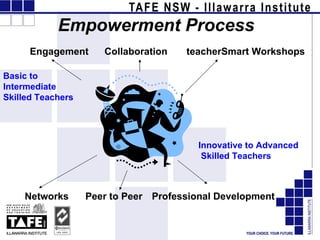
Empowerment Process Engagement Collaboration  teacherSmart Workshops Basic to Intermediate  Skilled Teachers Networks   Peer to Peer   Professional Development Innovative to Advanced   Skilled Teachers
CURRENT CHALLENGES The challenges we face as Teachers can be daunting: Fast pace of change in technology  Knowledge and Understanding  Time  Access
TECHNOLOGY AND CHANGE   Chalk and Blackboard  Whiteboard Overhead Projector Folders and Note Books Text Books Photocopier Powerpoint Latest Technologies : Wikis, Blogs, Podcasting The evolution in teaching and learning practices, has significantly impacting our working and learning life .
Teacher Skill Levels: Basic  – Not familiar using a computer. Intermediate   – Familiar with Word, Outlook Emailing and the Internet. Advanced   – Comfortable with utilizing technology, for work and creative use.  Innovative ‘Mavericks’  – A creative minority experimenting and utilizing new technologies at advanced level.
TEACHER PROFESSIONAL DEVELOPMENT TLRU engages the basic to intermediate skilled teacher and facilitates teacher  Professional Development through : Workplace training TLRU workshops Online courses
TLRU Workplace Training  Embracing New Technologies -  VIDEO TLRU trainers consult and facilitate the teacher on user friendly, accessible and innovative technologies for instructional design and application .**
TLRU MORNING WORKSHOPS Basic - Intermediate Teachers are invited to attend.  Morning workshops on a variety of key technologies .  Word Outlook- Email Digital camera Hot potatoes Powerpoint
TLRU ONLINE COURSES e.g. ‘Induction’   *Teachers can empower themselves with critical Institute information by working online at their own pace
TEACHERS MANAGING TECHNOLOGY Making The Leap “ Train a teacher to manage technology and they will be empowered”   We need to empower teachers to: Embrace new technology with ease Cope with future changes in technology Develop and deliver flexibly with new and exciting resources
TeacherSmart Training  is a 1-3 day Professional Development programme for teachers of all skills levels to learn new technologies for teaching practices. TeacherSmart   Desktop  is tool that  simplifies  the preparation of print, online and CD lessons. TeacherSmart  enables the teacher to easily  develop  and  deliver  quality instructional programs to promote learning and the engagement of students.
SKILL BUILDING We provide resources and technical support guiding teachers through a step-by-step process that challenges with hands on tasks: Working as a team Sourcing existing resources  Self directing Managing workflow
TLRU BEGINNER INTERMEDIATE ADVANCED 1 1 1 3 2 2 Determine skill   levels Brainstorm activity   ideas as a group Discuss use of   technologies  Allocate individuals   activities to achieve   aims. TEACHERS Group Task  eg. Create resource Empowerment Through Collaborative Group Based Learning
To begin Set Boundaries on Technology
www.creativecommons.org Source existing resources, why reinvent?
www.wikipedia.org - Free online Encyclopedia
1 1 1 3 2 2 BEGINNER INTERMEDIATE ADVANCED TLRU TEACHERS Hot potatoes quizzes Blogger Podcasting Creative commons Using Word Develop activities – Then Show and Tell
TeacherSmart - A tool to simplify Desktop SmartConvert
Teachers are empowered and often walk away with: The Awareness, confidence in their own abilities, and the skills and knowledge to source utilize and develop eLearning resources.  The impetus to become active participants of an online network of teachers to exchange ideas and information (peer to peer).
There is an explosion in Networking Technologies – Ride The Wave ‘ Collaborate with your peers  on lesson planning and materials development, as well as enrich your own professional and personal growth. As you build your collection of lessons, materials and resources for your own classes, you can share them with other teachers, and  everyone can get more work done with less effort.’ www.HotChalk.org
NETWORKING TECHNOLOGIES Web-based applications that enable links to be made between teachers and content for networking, research, teaching and learning. Examples  Blogs & online journals –  Blogger Wikis -  Wikispaces   Photo publish & sharing -  Flickr   Media hosting & publishing -  OurMedia , Web-based web feed readers -  Bloglines   Social networking sites -  Yahoo 360 ,  MySpace   More info: www.networklearning.blogspot.com
www.skype.com – Free! Free phonecalls! Share files Conference Chat
www.janison.com.au – Learning Management System Video conferencing
Sharing Capabilities  ideas and project work Sharing resources , workspaces, internet connection Sharing knowledge  and information,  Promotes team environments  and fosters commitment to work toward same goals for the benefit of all  The Benefits of Networking
Embrace The Maverick Ethic! If the innovation is useful it will flourish, otherwise it will not be adopted Despite the pace of change, we must examine and test each new technology. We must develop and disseminate technologies that significantly increase quality of learning and ‘ROI’ of teacher time.
SOLUTION  Organisations like the TLRU engage teachers with teacherSmart Professional Development to engage, develop and  empower teachers with network learning skills  to move with the times.
Conclusion “ Show one technology to a teacher; you have satisfied them for today. Guide the teacher to manage technology  and  to network with peers; then they will be empowered for the future.” www.networklearning.blogspot.com

Empowerment through technology

  • 1.
  • 2.
    We need tolive in both worlds… “… the classroom and the Web. The brave new world of net delivered and assisted training is exciting and real. [However], we strongly believe that it is not a replacement for classroom instruction but a critical extension of learning services." -- Elliott Masie, President of The MASIE Center, an international think tank focusing on learning and technology
  • 3.
    PAST IT, WEB Developers and Instructional Designers were responsible for creating and managing online delivery resources PRESENT teachers with Basic to Intermediate skills are able to gain empowerment through the use of tools ie: teacherSmart to design and develop their own resources FUTURE Moving into era where teachers are leading the way with teaching innovation to engage and utilise latest technologies through networks and collaboration
  • 4.
    Empowerment Process EngagementCollaboration teacherSmart Workshops Basic to Intermediate Skilled Teachers Networks Peer to Peer Professional Development Innovative to Advanced Skilled Teachers
  • 5.
    CURRENT CHALLENGES Thechallenges we face as Teachers can be daunting: Fast pace of change in technology Knowledge and Understanding Time Access
  • 6.
    TECHNOLOGY AND CHANGE Chalk and Blackboard Whiteboard Overhead Projector Folders and Note Books Text Books Photocopier Powerpoint Latest Technologies : Wikis, Blogs, Podcasting The evolution in teaching and learning practices, has significantly impacting our working and learning life .
  • 7.
    Teacher Skill Levels:Basic – Not familiar using a computer. Intermediate – Familiar with Word, Outlook Emailing and the Internet. Advanced – Comfortable with utilizing technology, for work and creative use. Innovative ‘Mavericks’ – A creative minority experimenting and utilizing new technologies at advanced level.
  • 8.
    TEACHER PROFESSIONAL DEVELOPMENTTLRU engages the basic to intermediate skilled teacher and facilitates teacher Professional Development through : Workplace training TLRU workshops Online courses
  • 9.
    TLRU Workplace Training Embracing New Technologies - VIDEO TLRU trainers consult and facilitate the teacher on user friendly, accessible and innovative technologies for instructional design and application .**
  • 10.
    TLRU MORNING WORKSHOPSBasic - Intermediate Teachers are invited to attend. Morning workshops on a variety of key technologies . Word Outlook- Email Digital camera Hot potatoes Powerpoint
  • 11.
    TLRU ONLINE COURSESe.g. ‘Induction’ *Teachers can empower themselves with critical Institute information by working online at their own pace
  • 12.
    TEACHERS MANAGING TECHNOLOGYMaking The Leap “ Train a teacher to manage technology and they will be empowered” We need to empower teachers to: Embrace new technology with ease Cope with future changes in technology Develop and deliver flexibly with new and exciting resources
  • 13.
    TeacherSmart Training is a 1-3 day Professional Development programme for teachers of all skills levels to learn new technologies for teaching practices. TeacherSmart Desktop is tool that simplifies the preparation of print, online and CD lessons. TeacherSmart enables the teacher to easily develop and deliver quality instructional programs to promote learning and the engagement of students.
  • 14.
    SKILL BUILDING Weprovide resources and technical support guiding teachers through a step-by-step process that challenges with hands on tasks: Working as a team Sourcing existing resources Self directing Managing workflow
  • 15.
    TLRU BEGINNER INTERMEDIATEADVANCED 1 1 1 3 2 2 Determine skill levels Brainstorm activity ideas as a group Discuss use of technologies Allocate individuals activities to achieve aims. TEACHERS Group Task eg. Create resource Empowerment Through Collaborative Group Based Learning
  • 16.
    To begin SetBoundaries on Technology
  • 17.
  • 18.
    www.wikipedia.org - Freeonline Encyclopedia
  • 19.
    1 1 13 2 2 BEGINNER INTERMEDIATE ADVANCED TLRU TEACHERS Hot potatoes quizzes Blogger Podcasting Creative commons Using Word Develop activities – Then Show and Tell
  • 20.
    TeacherSmart - Atool to simplify Desktop SmartConvert
  • 21.
    Teachers are empoweredand often walk away with: The Awareness, confidence in their own abilities, and the skills and knowledge to source utilize and develop eLearning resources. The impetus to become active participants of an online network of teachers to exchange ideas and information (peer to peer).
  • 22.
    There is anexplosion in Networking Technologies – Ride The Wave ‘ Collaborate with your peers on lesson planning and materials development, as well as enrich your own professional and personal growth. As you build your collection of lessons, materials and resources for your own classes, you can share them with other teachers, and everyone can get more work done with less effort.’ www.HotChalk.org
  • 23.
    NETWORKING TECHNOLOGIES Web-basedapplications that enable links to be made between teachers and content for networking, research, teaching and learning. Examples Blogs & online journals – Blogger Wikis - Wikispaces Photo publish & sharing - Flickr Media hosting & publishing - OurMedia , Web-based web feed readers - Bloglines Social networking sites - Yahoo 360 , MySpace More info: www.networklearning.blogspot.com
  • 24.
    www.skype.com – Free!Free phonecalls! Share files Conference Chat
  • 25.
    www.janison.com.au – LearningManagement System Video conferencing
  • 26.
    Sharing Capabilities ideas and project work Sharing resources , workspaces, internet connection Sharing knowledge and information, Promotes team environments and fosters commitment to work toward same goals for the benefit of all The Benefits of Networking
  • 27.
    Embrace The MaverickEthic! If the innovation is useful it will flourish, otherwise it will not be adopted Despite the pace of change, we must examine and test each new technology. We must develop and disseminate technologies that significantly increase quality of learning and ‘ROI’ of teacher time.
  • 28.
    SOLUTION Organisationslike the TLRU engage teachers with teacherSmart Professional Development to engage, develop and empower teachers with network learning skills to move with the times.
  • 29.
    Conclusion “ Showone technology to a teacher; you have satisfied them for today. Guide the teacher to manage technology and to network with peers; then they will be empowered for the future.” www.networklearning.blogspot.com

Editor's Notes

  • #2 1-Introduction Hello my name is Steven Parker, I am the Teaching and Learning Resource Development Administrator at the Illawarra Institute, Teaching and Learning Resource Unit in Wollongong. In my role I look into the research of new technologies and assess their viability to apply to a teaching and learning context. I then provide direction on the use of the technologies for both developing and delivering resources. It’s a job which is both challenging and rewarding but never dull. Today I will be discussing: *Changes technology has made for the teaching profession *What we are doing to implement and facilitate these new technologies for teachers with basic to advanced skills *How these teachers can find empowerment through professional development and peer to peer learning *The future After my presentation Julie Collareda, the TLRU Manager of Initiatives will present her talk on Sustainabiliy and driving change in TAFE policy and standards to achieve these aims.