

EMPOWERMENT
TECHNOLOGIES
MICROSOFT EXCEL, ADVANCED AND COMPLEX FORMULAS AND
COMPUTATIONS, PROPER WAY TO DO ONLINE RESEARCH
Microsoft Word
Is a word processor Microsoft which allows
users to create their own typing templates,
type, and save documents.
Similar to other word processors, it has
helpful tools to make documents.
Microsoft PowerPoint
Is a presentation program developed by
Microsoft. PowerPoint provides users with an
interface to design multimedia slides to be
displayed on a projection system or personal
computer.
The software incorporates images, sounds,
videos, text and charts to create an
interactive presentation.
Microsoft Excel
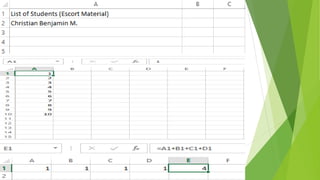
Is a software that displays an automated way of
displaying any statistical data.
It can be used to automatically compute for several
factors that are not easy to notice especially when
faced by a large data
***Note: Microsoft Excel includes several arithmetic
and basic functions that help you compute faster.***
With Microsoft Excel organizing and analysing data
is much more simpler because of its use of
conditional functions.
These functions work almost the same as Count,
Average, and Sum with the exception that you can
provide criteria where it is not met, the data is to
be ignored by the formula, and therefore not the
computer.
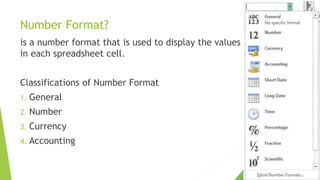
Number Format?
is a number format that is used to display the values
in each spreadsheet cell.
Classifications of Number Format
1. General
2. Number
3. Currency
4. Accounting
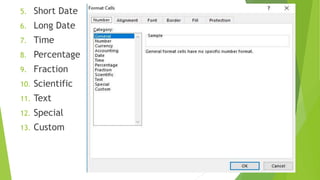
5. Short Date
6. Long Date
7. Time
8. Percentage
9. Fraction
10. Scientific
11. Text
12. Special
13. Custom
Excel Functions and Formulas
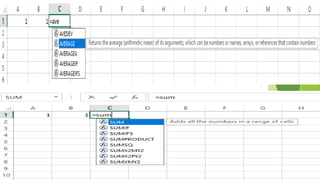
Are instructions for Excel to perform calculations.
They are usually used to count, get the sum or get
the average of a certain number of cell range.
Data Types in Excel
1. Labels
2. Values
3. Formulas
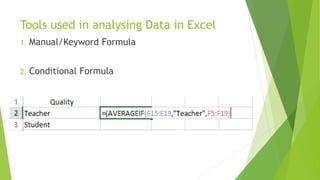
Tools used in analysing Data in Excel
1. Manual/Keyword Formula
2. Conditional Formula
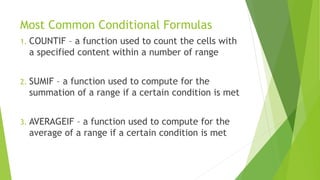
Most Common Conditional Formulas
1. COUNTIF – a function used to count the cells with
a specified content within a number of range
2. SUMIF – a function used to compute for the
summation of a range if a certain condition is met
3. AVERAGEIF – a function used to compute for the
average of a range if a certain condition is met
Proper Way to do Online Research
The information that we need is more likely already
in the internet. It is just a matter of how to look for
it and how to use information from the most
credible source. Here are some tips in conducting
online research:
1. Have a question in mind
2. 2. Narrow it down
3. 3. Advanced Search
4. 4. Look for a credible source
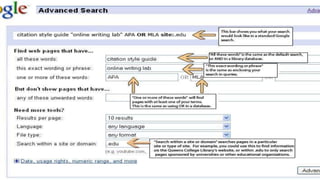
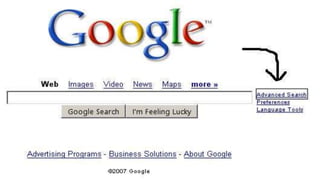
Advanced Search
+ - finds web pages that contains all the terms that
are preceded by the + symbol; allows you to include
terms that are usually ignored
“ “ – Finds the exact words in a phrase
() – Finds or excludes web pages that contain a
group of words
AND or & - Finds web pages that contain all the
terms or phrases.
NOT or - - Excludes web pages that contain a term
or phrase
OR or | - Finds web pages that contain either of the
terms or phrases.
Advanced Search Guidelines
1. By default, all searches are AND searches
2. You must capitalize the NOT and OR functions.
3. Stop words and all punctuation marks except for
the symbols noted in this topic, they are ignored
unless they are surrounded by quotation marks or
preceded by the +symbol
4. Only the first ten terms are used to get search
results.
5. Term grouping are supported in the following
order:
* Parenthesis
* Quotation Marks
* NOT
* AND
* OR
6. Because OR is the function with the lowest
precedence, enclose OR terms in parentheses
when combined with other operators in a search.
Empowerment Technologies Lecture 5 (Philippines SHS)

Empowerment Technologies Lecture 5 (Philippines SHS)

  • 1.
    EMPOWERMENT TECHNOLOGIES MICROSOFT EXCEL, ADVANCEDAND COMPLEX FORMULAS AND COMPUTATIONS, PROPER WAY TO DO ONLINE RESEARCH
  • 2.
    Microsoft Word Is aword processor Microsoft which allows users to create their own typing templates, type, and save documents. Similar to other word processors, it has helpful tools to make documents.
  • 3.
    Microsoft PowerPoint Is apresentation program developed by Microsoft. PowerPoint provides users with an interface to design multimedia slides to be displayed on a projection system or personal computer. The software incorporates images, sounds, videos, text and charts to create an interactive presentation.
  • 4.
    Microsoft Excel Is asoftware that displays an automated way of displaying any statistical data. It can be used to automatically compute for several factors that are not easy to notice especially when faced by a large data ***Note: Microsoft Excel includes several arithmetic and basic functions that help you compute faster.***
  • 5.
    With Microsoft Excelorganizing and analysing data is much more simpler because of its use of conditional functions. These functions work almost the same as Count, Average, and Sum with the exception that you can provide criteria where it is not met, the data is to be ignored by the formula, and therefore not the computer.
  • 6.
    Number Format? is anumber format that is used to display the values in each spreadsheet cell. Classifications of Number Format 1. General 2. Number 3. Currency 4. Accounting
  • 7.
    5. Short Date 6.Long Date 7. Time 8. Percentage 9. Fraction 10. Scientific 11. Text 12. Special 13. Custom
  • 8.
    Excel Functions andFormulas Are instructions for Excel to perform calculations. They are usually used to count, get the sum or get the average of a certain number of cell range. Data Types in Excel 1. Labels 2. Values 3. Formulas
  • 11.
    Tools used inanalysing Data in Excel 1. Manual/Keyword Formula 2. Conditional Formula
  • 12.
    Most Common ConditionalFormulas 1. COUNTIF – a function used to count the cells with a specified content within a number of range 2. SUMIF – a function used to compute for the summation of a range if a certain condition is met 3. AVERAGEIF – a function used to compute for the average of a range if a certain condition is met
  • 13.
    Proper Way todo Online Research The information that we need is more likely already in the internet. It is just a matter of how to look for it and how to use information from the most credible source. Here are some tips in conducting online research: 1. Have a question in mind
  • 14.
    2. 2. Narrowit down 3. 3. Advanced Search 4. 4. Look for a credible source
  • 15.
    Advanced Search + -finds web pages that contains all the terms that are preceded by the + symbol; allows you to include terms that are usually ignored “ “ – Finds the exact words in a phrase () – Finds or excludes web pages that contain a group of words AND or & - Finds web pages that contain all the terms or phrases.
  • 16.
    NOT or -- Excludes web pages that contain a term or phrase OR or | - Finds web pages that contain either of the terms or phrases.
  • 18.
    Advanced Search Guidelines 1.By default, all searches are AND searches 2. You must capitalize the NOT and OR functions. 3. Stop words and all punctuation marks except for the symbols noted in this topic, they are ignored unless they are surrounded by quotation marks or preceded by the +symbol
  • 19.
    4. Only thefirst ten terms are used to get search results. 5. Term grouping are supported in the following order: * Parenthesis * Quotation Marks * NOT * AND * OR 6. Because OR is the function with the lowest precedence, enclose OR terms in parentheses when combined with other operators in a search.