


EMPOWERMENT
TECHNOLOGIES
BASIC PRINCIPLES OF GRAPHICS AND LAYOUT
ONLINE FILE FORMATS FOR IMAGES AND TEXT PRINCIPLES
BASIC TECHNIQUES OF IMAGE MANIPULATION AND INFORGRAPHICS
What is Graphics?
A graphic is an image or visual representation of an
object. Therefore, computer graphics are simply
images displayed on a computer screen.
Graphics are often contrasted with text, which is
comprised of characters, such as numbers and
letters, rather than images.
Types of Computer Graphics
2D Graphics – Early computers only supported 2D
monochrome graphics, meaning they were black and
white (or black and green, depending on the
monitor).
Flavors of 2D Graphics
1. Raster
2. Vector
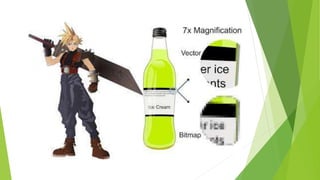
Raster
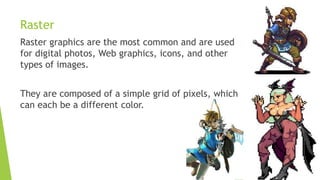
Raster graphics are the most common and are used
for digital photos, Web graphics, icons, and other
types of images.
They are composed of a simple grid of pixels, which
can each be a different color.
Vector
Vector graphics on are made up of paths, which may
be lines, shapes, letters, or other scalable objects.
They are often used for creating logos, signs, and
other types of drawings. Unlike raster graphics,
vector graphics can be scaled to a larger size
without losing quality.
3D graphics – is a kind of graphics that started to
become popular in the 1990s, along with 3D
rendering software such as CAD and 3D animation
programs.
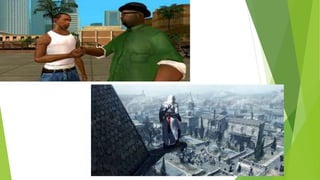
By the year 2000, many video games had begun
incorporating 3D graphics, since computers had
enough processing power to support them. Now
most computers now come with a 3D video
card that handles all the 3D processing.
This allows even basic home systems to support
advanced 3D games and applications.
What is Layout?
Refers to the arrangement of elements on a page
usually referring to specific placement of image,
text and style.
Understanding the layout of design is very
important. If the layout is not correctly understood,
there is a probability that the message you wanted
to convey will be lost and the cost of advertising
would go to waste.
(***Note:Proper layout enhances the look of the
particular object and the objects as a whole piece
of design in order to create a strong composition.
The success of a layout depends on the arrangement
of the individual visual elements and visual
hierarchy — formed between them.
All graphic designers must keep this in mind at all
times when creating advertisements, promotional
materials and works or art.***)
Basic Principles of Graphics and Layout
1. Balance – the visual weight of objects, texture,
colors, and space is evenly distributed on the
screen.
2. Emphasis – an area in the design that may appear
different is size, texture, shape, or color to
attract the viewer’s attention.
3. Movement – visual elements guide the viewer’s
eyes around the screen
4. Pattern, Repetition, and Rhythm – these are the
repeating visual element on an image or layout to
create unity in the layout or image. Rhythm is
achieved when visual elements create a sense of
organized movement.
5. Proportion – visual elements create a sense of
unity where they relate well with one another.
6. Variety – this uses several design elements to
draw a viewer’s attention.
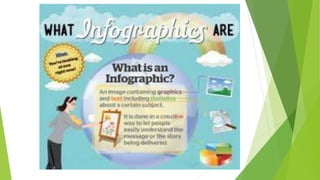
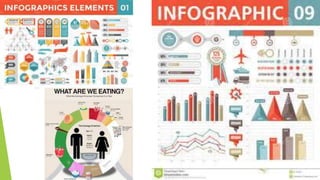
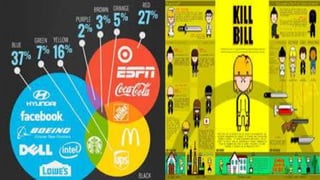
What is Infographics?
Information Graphics or Infographics are used to
represent information, statistical data, or
knowledge in a graphical manner usually done in a
creative way to attract the viewer’s attention.
Infographics make complex data more visually
appealing to an average user.
Empowerment Technologies Lecture 6 (Philippines SHS)

Empowerment Technologies Lecture 6 (Philippines SHS)

  • 1.
    EMPOWERMENT TECHNOLOGIES BASIC PRINCIPLES OFGRAPHICS AND LAYOUT ONLINE FILE FORMATS FOR IMAGES AND TEXT PRINCIPLES BASIC TECHNIQUES OF IMAGE MANIPULATION AND INFORGRAPHICS
  • 2.
    What is Graphics? Agraphic is an image or visual representation of an object. Therefore, computer graphics are simply images displayed on a computer screen. Graphics are often contrasted with text, which is comprised of characters, such as numbers and letters, rather than images.
  • 5.
    Types of ComputerGraphics 2D Graphics – Early computers only supported 2D monochrome graphics, meaning they were black and white (or black and green, depending on the monitor). Flavors of 2D Graphics 1. Raster 2. Vector
  • 6.
    Raster Raster graphics arethe most common and are used for digital photos, Web graphics, icons, and other types of images. They are composed of a simple grid of pixels, which can each be a different color.
  • 7.
    Vector Vector graphics onare made up of paths, which may be lines, shapes, letters, or other scalable objects. They are often used for creating logos, signs, and other types of drawings. Unlike raster graphics, vector graphics can be scaled to a larger size without losing quality.
  • 9.
    3D graphics –is a kind of graphics that started to become popular in the 1990s, along with 3D rendering software such as CAD and 3D animation programs. By the year 2000, many video games had begun incorporating 3D graphics, since computers had enough processing power to support them. Now most computers now come with a 3D video card that handles all the 3D processing. This allows even basic home systems to support advanced 3D games and applications.
  • 13.
    What is Layout? Refersto the arrangement of elements on a page usually referring to specific placement of image, text and style. Understanding the layout of design is very important. If the layout is not correctly understood, there is a probability that the message you wanted to convey will be lost and the cost of advertising would go to waste.
  • 15.
    (***Note:Proper layout enhancesthe look of the particular object and the objects as a whole piece of design in order to create a strong composition. The success of a layout depends on the arrangement of the individual visual elements and visual hierarchy — formed between them. All graphic designers must keep this in mind at all times when creating advertisements, promotional materials and works or art.***)
  • 16.
    Basic Principles ofGraphics and Layout 1. Balance – the visual weight of objects, texture, colors, and space is evenly distributed on the screen. 2. Emphasis – an area in the design that may appear different is size, texture, shape, or color to attract the viewer’s attention. 3. Movement – visual elements guide the viewer’s eyes around the screen
  • 18.
    4. Pattern, Repetition,and Rhythm – these are the repeating visual element on an image or layout to create unity in the layout or image. Rhythm is achieved when visual elements create a sense of organized movement. 5. Proportion – visual elements create a sense of unity where they relate well with one another. 6. Variety – this uses several design elements to draw a viewer’s attention.
  • 20.
    What is Infographics? InformationGraphics or Infographics are used to represent information, statistical data, or knowledge in a graphical manner usually done in a creative way to attract the viewer’s attention. Infographics make complex data more visually appealing to an average user.