PIC PROGRAMMING
IN C
DEPARTMENT OF ELECTRICAL ENGINEERING
POLITEKNIK SULTAN HAJI AHMAD SHAH
CHAPTER 5 – Part 1
EC501 EMBEDDED SYSTEM APPLICATIONS
Outcomes of today’s class
 Student should be able to:
1. Identify C programming languages for
PIC18
2. Explain the structure of C program for
PIC18
3. Discuss C Data type widely use by PIC
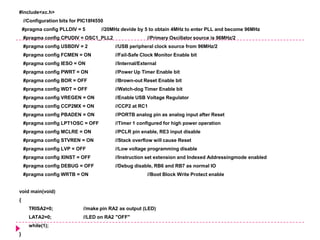
Review
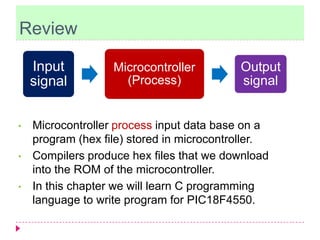
• Microcontroller process input data base on a
program (hex file) stored in microcontroller.
• Compilers produce hex files that we download
into the ROM of the microcontroller.
• In this chapter we will learn C programming
language to write program for PIC18F4550.
Input
signal
Microcontroller
(Process)
Output
signal
Why Program the PIC18 in C?
Reasons For Writing Programs In C Instead Of Assembly:
1. It is easier and less time consuming.
2. C is easier to modify and update.
3. You can use code available in function libraries.
4. C code is portable to other microcontrollers with
little or no modification.
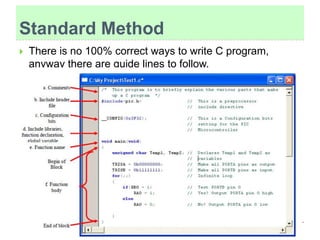
Standard Method
 There is no 100% correct ways to write C program,
anyway there are guide lines to follow.
Standard Method
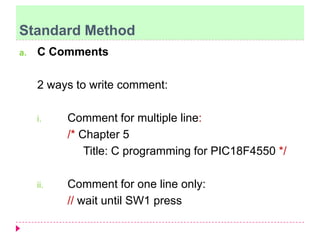
a. C Comments
2 ways to write comment:
i. Comment for multiple line:
/* Chapter 5
Title: C programming for PIC18F4550 */
ii. Comment for one line only:
// wait until SW1 press
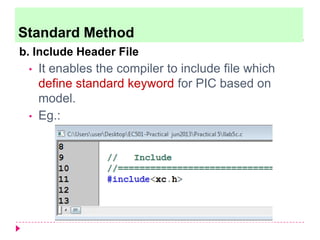
b. Include Header File
• It enables the compiler to include file which
define standard keyword for PIC based on
model.
• Eg.:
Standard Method
c. Configuration Bits
• A macro that writes a value into the special register that
controls the core executing operations of the
microcontroller.
• Configuration bit can be set in development software
(eg.: MPLAB IDE).
• If the configuration bits are not specified correctly, the
PIC MCUs might not run the application code properly
Standard Method
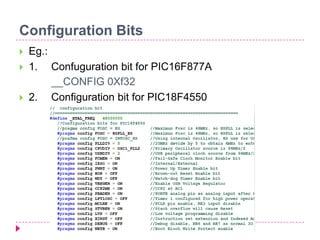
Configuration Bits
 Eg.:
 1. Confuguration bit for PIC16F877A
__CONFIG 0Xf32
 2. Configuration bit for PIC18F4550
 d. Include Libraries, Functions declaration and
Global variables
 Placed:
- include other header file,
- libraries,
- to declare functions prototype
- global variables.
 This section can be leaved blank depend on
program writer.
Standard Method
 e. Function Name
 It is the basic building block in C programming.
 C program must have at least the function
main( ).
 Eg.: void main (void)
 The void means the main( ) function doesn't
return any value when it exit (finish running).
Standard Method
 f. Function Body
 Every function, including main( ), must have a
body enclosed in braces { }.
 The curly braces are to signify the block of
codes belonging to main( ).
 Do take note that there MUST NOT be a
semicolon after the closing brace.
Basic rules for programming in C
Exercise
 Identify the following from the program above :
1. Comment
2. Include header file
3. Configuration bit
4. Function
5. Function body
Tem_str
#include<xc.h>
//Configuration bits for PIC18f4550
#pragma config PLLDIV = 5 //20MHz devide by 5 to obtain 4MHz to enter PLL and become 96MHz
#pragma config CPUDIV = OSC1_PLL2 //Primary Oscillator source is 96MHz/2
#pragma config USBDIV = 2 //USB peripheral clock source from 96MHz/2
#pragma config FCMEN = ON //Fail-Safe Clock Monitor Enable bit
#pragma config IESO = ON //Internal/External
#pragma config PWRT = ON //Power Up Timer Enable bit
#pragma config BOR = OFF //Brown-out Reset Enable bit
#pragma config WDT = OFF //Watch-dog Timer Enable bit
#pragma config VREGEN = ON //Enable USB Voltage Regulator
#pragma config CCP2MX = ON //CCP2 at RC1
#pragma config PBADEN = ON //PORTB analog pin as analog input after Reset
#pragma config LPT1OSC = OFF //Timer 1 configured for high power operation
#pragma config MCLRE = ON //PCLR pin enable, RE3 input disable
#pragma config STVREN = ON //Stack overflow will cause Reset
#pragma config LVP = OFF //Low voltage programming disable
#pragma config XINST = OFF //Instruction set extension and Indexed Addressingmode enabled
#pragma config DEBUG = OFF //Debug disable, RB6 and RB7 as normal IO
#pragma config WRTB = ON //Boot Block Write Protect enable
void main(void)
{
TRISA2=0; //make pin RA2 as output (LED)
LATA2=0; //LED on RA2 "OFF"
while(1);
}
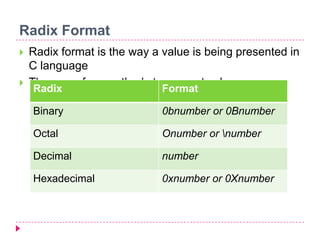
Radix Format
 Radix format is the way a value is being presented in
C language
 There are four methods to present value:
Radix Format
Binary 0bnumber or 0Bnumber
Octal Onumber or number
Decimal number
Hexadecimal 0xnumber or 0Xnumber
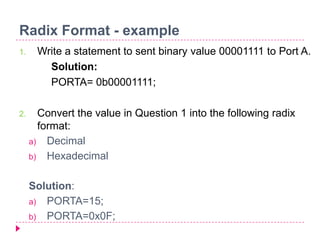
Radix Format - example
1. Write a statement to sent binary value 00001111 to Port A.
Solution:
PORTA= 0b00001111;
2. Convert the value in Question 1 into the following radix
format:
a) Decimal
b) Hexadecimal
Solution:
a) PORTA=15;
b) PORTA=0x0F;
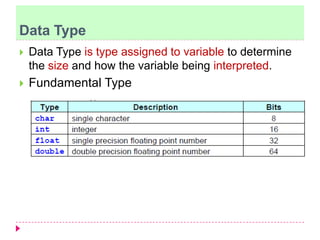
Data Type
 Data Type is type assigned to variable to determine
the size and how the variable being interpreted.
 Fundamental Type
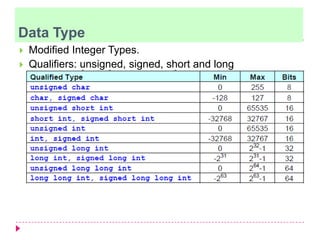
 Modified Integer Types.
 Qualifiers: unsigned, signed, short and long
Data Type
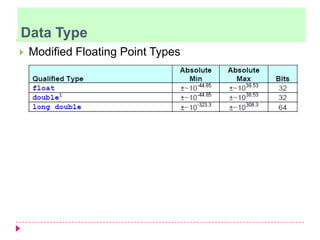
 Modified Floating Point Types
Data Type
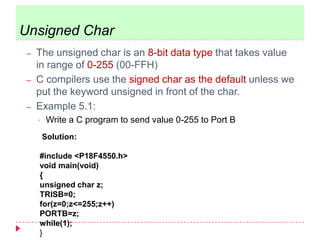
– The unsigned char is an 8-bit data type that takes value
in range of 0-255 (00-FFH)
– C compilers use the signed char as the default unless we
put the keyword unsigned in front of the char.
– Example 5.1:
• Write a C program to send value 0-255 to Port B
Solution:
#include <P18F4550.h>
void main(void)
{
unsigned char z;
TRISB=0;
for(z=0;z<=255;z++)
PORTB=z;
while(1);
}
Unsigned Char
Data Type - Unsigned Char
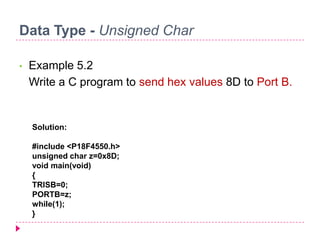
• Example 5.2
Write a C program to send hex values 8D to Port B.
Solution:
#include <P18F4550.h>
unsigned char z=0x8D;
void main(void)
{
TRISB=0;
PORTB=z;
while(1);
}
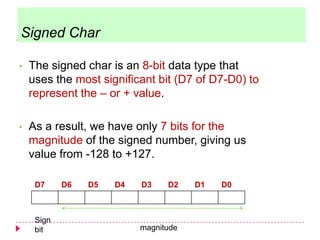
• The signed char is an 8-bit data type that
uses the most significant bit (D7 of D7-D0) to
represent the – or + value.
• As a result, we have only 7 bits for the
magnitude of the signed number, giving us
value from -128 to +127.
D7 D6 D5 D4 D3 D2 D1 D0
Sign
bit magnitude
Signed Char
Data Type - Signed Char
• Example 5-4
Write a C18 program to send values of -4 to
+4 to Port B.
Solution:
#include <P18F4550.h>
void main(void)
{
char mynum[ ]={+1,-1,+2,-2,+3,-3,+4,-4};
signed char z;
TRISB=0; //make Port B an output
for (z=0;z<8;z++)
{
PORTB=mynum[z];
}
while(1); //stay here forever
• The unsigned int is a 16-bit data type that takes a value
in the range of 0 to 65,535 (0000 – FFFFH).
• It also used to set counter value of more than 256.
• Example:
unsigned int i;
Data Type - Unsigned Int
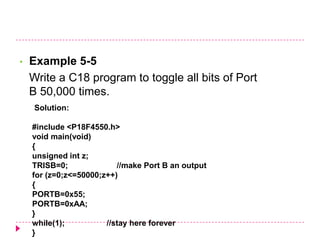
• Example 5-5
Write a C18 program to toggle all bits of Port
B 50,000 times.
Solution:
#include <P18F4550.h>
void main(void)
{
unsigned int z;
TRISB=0; //make Port B an output
for (z=0;z<=50000;z++)
{
PORTB=0x55;
PORTB=0xAA;
}
while(1); //stay here forever
}
• Signed int is a 16-bit data type that uses the most
significant bit (D15 of D15-D0) to represent the – or +
value. As a result, we have only 15bits for the magnitude
of the number, or value from -32,768 to + 32,767.
• Example:
signed int i;
Or
int i;
Signed Int
Other Data Types
• The unsigned int is limited to value 0-65,535
(0000 – FFFFH).
• The C18 C compiler supports both short long
and long data types, if we want values greater
than 16-bit.
• See Table 5.1. The short long value is 24 bits
wide, while the long value is 32 bits wide.
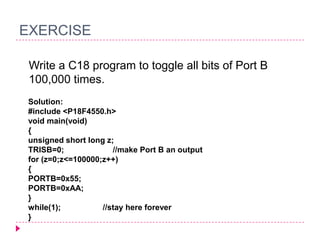
EXERCISE
Write a C18 program to toggle all bits of Port B
100,000 times.
Solution:
#include <P18F4550.h>
void main(void)
{
unsigned short long z;
TRISB=0; //make Port B an output
for (z=0;z<=100000;z++)
{
PORTB=0x55;
PORTB=0xAA;
}
while(1); //stay here forever
}
Review question
1. Give the reason why you choose C programming
instead of assembly?
2. Give the magnitude of unsigned char and signed
char data types.
3. If we declaring a variable for person’s age, we
should use the ___data type.
Conclusion – outcomes of the day
Students should be able to:
1. Identify C programming languages for PIC18
2. Explain the structure of C program for PIC18
3. Discuss C Data type widely use by PIC
Have you achieved the outcomes?

Embedded system (Chapter 5) part 1

  • 1.
    PIC PROGRAMMING IN C DEPARTMENTOF ELECTRICAL ENGINEERING POLITEKNIK SULTAN HAJI AHMAD SHAH CHAPTER 5 – Part 1 EC501 EMBEDDED SYSTEM APPLICATIONS
  • 2.
    Outcomes of today’sclass  Student should be able to: 1. Identify C programming languages for PIC18 2. Explain the structure of C program for PIC18 3. Discuss C Data type widely use by PIC
  • 3.
    Review • Microcontroller processinput data base on a program (hex file) stored in microcontroller. • Compilers produce hex files that we download into the ROM of the microcontroller. • In this chapter we will learn C programming language to write program for PIC18F4550. Input signal Microcontroller (Process) Output signal
  • 4.
    Why Program thePIC18 in C? Reasons For Writing Programs In C Instead Of Assembly: 1. It is easier and less time consuming. 2. C is easier to modify and update. 3. You can use code available in function libraries. 4. C code is portable to other microcontrollers with little or no modification.
  • 5.
    Standard Method  Thereis no 100% correct ways to write C program, anyway there are guide lines to follow.
  • 6.
    Standard Method a. CComments 2 ways to write comment: i. Comment for multiple line: /* Chapter 5 Title: C programming for PIC18F4550 */ ii. Comment for one line only: // wait until SW1 press
  • 7.
    b. Include HeaderFile • It enables the compiler to include file which define standard keyword for PIC based on model. • Eg.: Standard Method
  • 8.
    c. Configuration Bits •A macro that writes a value into the special register that controls the core executing operations of the microcontroller. • Configuration bit can be set in development software (eg.: MPLAB IDE). • If the configuration bits are not specified correctly, the PIC MCUs might not run the application code properly Standard Method
  • 9.
    Configuration Bits  Eg.: 1. Confuguration bit for PIC16F877A __CONFIG 0Xf32  2. Configuration bit for PIC18F4550
  • 10.
     d. IncludeLibraries, Functions declaration and Global variables  Placed: - include other header file, - libraries, - to declare functions prototype - global variables.  This section can be leaved blank depend on program writer. Standard Method
  • 11.
     e. FunctionName  It is the basic building block in C programming.  C program must have at least the function main( ).  Eg.: void main (void)  The void means the main( ) function doesn't return any value when it exit (finish running). Standard Method
  • 12.
     f. FunctionBody  Every function, including main( ), must have a body enclosed in braces { }.  The curly braces are to signify the block of codes belonging to main( ).  Do take note that there MUST NOT be a semicolon after the closing brace. Basic rules for programming in C
  • 13.
    Exercise  Identify thefollowing from the program above : 1. Comment 2. Include header file 3. Configuration bit 4. Function 5. Function body Tem_str
  • 14.
    #include<xc.h> //Configuration bits forPIC18f4550 #pragma config PLLDIV = 5 //20MHz devide by 5 to obtain 4MHz to enter PLL and become 96MHz #pragma config CPUDIV = OSC1_PLL2 //Primary Oscillator source is 96MHz/2 #pragma config USBDIV = 2 //USB peripheral clock source from 96MHz/2 #pragma config FCMEN = ON //Fail-Safe Clock Monitor Enable bit #pragma config IESO = ON //Internal/External #pragma config PWRT = ON //Power Up Timer Enable bit #pragma config BOR = OFF //Brown-out Reset Enable bit #pragma config WDT = OFF //Watch-dog Timer Enable bit #pragma config VREGEN = ON //Enable USB Voltage Regulator #pragma config CCP2MX = ON //CCP2 at RC1 #pragma config PBADEN = ON //PORTB analog pin as analog input after Reset #pragma config LPT1OSC = OFF //Timer 1 configured for high power operation #pragma config MCLRE = ON //PCLR pin enable, RE3 input disable #pragma config STVREN = ON //Stack overflow will cause Reset #pragma config LVP = OFF //Low voltage programming disable #pragma config XINST = OFF //Instruction set extension and Indexed Addressingmode enabled #pragma config DEBUG = OFF //Debug disable, RB6 and RB7 as normal IO #pragma config WRTB = ON //Boot Block Write Protect enable void main(void) { TRISA2=0; //make pin RA2 as output (LED) LATA2=0; //LED on RA2 "OFF" while(1); }
  • 15.
    Radix Format  Radixformat is the way a value is being presented in C language  There are four methods to present value: Radix Format Binary 0bnumber or 0Bnumber Octal Onumber or number Decimal number Hexadecimal 0xnumber or 0Xnumber
  • 16.
    Radix Format -example 1. Write a statement to sent binary value 00001111 to Port A. Solution: PORTA= 0b00001111; 2. Convert the value in Question 1 into the following radix format: a) Decimal b) Hexadecimal Solution: a) PORTA=15; b) PORTA=0x0F;
  • 17.
    Data Type  DataType is type assigned to variable to determine the size and how the variable being interpreted.  Fundamental Type
  • 18.
     Modified IntegerTypes.  Qualifiers: unsigned, signed, short and long Data Type
  • 19.
     Modified FloatingPoint Types Data Type
  • 20.
    – The unsignedchar is an 8-bit data type that takes value in range of 0-255 (00-FFH) – C compilers use the signed char as the default unless we put the keyword unsigned in front of the char. – Example 5.1: • Write a C program to send value 0-255 to Port B Solution: #include <P18F4550.h> void main(void) { unsigned char z; TRISB=0; for(z=0;z<=255;z++) PORTB=z; while(1); } Unsigned Char
  • 21.
    Data Type -Unsigned Char • Example 5.2 Write a C program to send hex values 8D to Port B. Solution: #include <P18F4550.h> unsigned char z=0x8D; void main(void) { TRISB=0; PORTB=z; while(1); }
  • 22.
    • The signedchar is an 8-bit data type that uses the most significant bit (D7 of D7-D0) to represent the – or + value. • As a result, we have only 7 bits for the magnitude of the signed number, giving us value from -128 to +127. D7 D6 D5 D4 D3 D2 D1 D0 Sign bit magnitude Signed Char
  • 23.
    Data Type -Signed Char • Example 5-4 Write a C18 program to send values of -4 to +4 to Port B. Solution: #include <P18F4550.h> void main(void) { char mynum[ ]={+1,-1,+2,-2,+3,-3,+4,-4}; signed char z; TRISB=0; //make Port B an output for (z=0;z<8;z++) { PORTB=mynum[z]; } while(1); //stay here forever
  • 24.
    • The unsignedint is a 16-bit data type that takes a value in the range of 0 to 65,535 (0000 – FFFFH). • It also used to set counter value of more than 256. • Example: unsigned int i; Data Type - Unsigned Int
  • 25.
    • Example 5-5 Writea C18 program to toggle all bits of Port B 50,000 times. Solution: #include <P18F4550.h> void main(void) { unsigned int z; TRISB=0; //make Port B an output for (z=0;z<=50000;z++) { PORTB=0x55; PORTB=0xAA; } while(1); //stay here forever }
  • 26.
    • Signed intis a 16-bit data type that uses the most significant bit (D15 of D15-D0) to represent the – or + value. As a result, we have only 15bits for the magnitude of the number, or value from -32,768 to + 32,767. • Example: signed int i; Or int i; Signed Int
  • 27.
    Other Data Types •The unsigned int is limited to value 0-65,535 (0000 – FFFFH). • The C18 C compiler supports both short long and long data types, if we want values greater than 16-bit. • See Table 5.1. The short long value is 24 bits wide, while the long value is 32 bits wide.
  • 28.
    EXERCISE Write a C18program to toggle all bits of Port B 100,000 times. Solution: #include <P18F4550.h> void main(void) { unsigned short long z; TRISB=0; //make Port B an output for (z=0;z<=100000;z++) { PORTB=0x55; PORTB=0xAA; } while(1); //stay here forever }
  • 29.
    Review question 1. Givethe reason why you choose C programming instead of assembly? 2. Give the magnitude of unsigned char and signed char data types. 3. If we declaring a variable for person’s age, we should use the ___data type.
  • 30.
    Conclusion – outcomesof the day Students should be able to: 1. Identify C programming languages for PIC18 2. Explain the structure of C program for PIC18 3. Discuss C Data type widely use by PIC Have you achieved the outcomes?