
COMMUNICATION:
E-MAIL ETIQUETTE
Abu Zafor Md. Shaleah
Senior Executive – HRD
Concord Group of Companies
OVERVIEW
• Communication
– What it is?
– How we do it?
– Is there any preferred ways?
– Research findings
• Electronic Mail
– Advantages vs. Disadvantages
– Types
• Effective Communication through e-mail
– 8 Common Mistakes
– 10 ways for Writing Effective E-mail
– Seven (07) things to Think in writing e-mail
– E-mail: Examples and Tips
• Managing Inbox
• Summary
GROUND RULES
COMMUNICATION:
DEFINITION
(American Heritage)
Com·mu·ni·ca·tion (noun)
• the Act or process of communicating;
fact of being communicated.
• The imparting or interchange of thoughts,
opinions, or information by speech,
writing, or signs.
• Something imparted, interchanged,
or transmitted.
• Document or message imparting news, views, information, etc.
“Communication takes place when one person transfers some
understandable data to another person.”
COMMUNICATION:
HOW WE DO IT?
How do we communicate with:
• Colleagues?
• Supervisors?
• Partners?
• Clients?
Do you have a preferred way of communicating?
Preferred way of communication:
• Face-to-face
• Phone
• Business Letter or Print Memo
• E-mail: noun (e·lec·tron·ic mail)
THERE IS NO FORMULA
FOR
PERFECT E-MAILING
AUTHENTIC
AND
HONEST MESSAGING WORKS
COMMUNICATION:
PERSONAL ETHICS
Communicator is responsible to be:
– Honest
– Clear
– Accurate
– Comprehensive
– Accessible
“Every instance of workplace writing occurs for a specific reason and is
intended for a particular individual or group... Although this may seem
obvious, awareness of purpose, audience, and tone is the single most
crucial factor in determining whether your communication will
succeed.” - George Searle.
COMMUNICATION:
RESEARCH FINDINGS
According to Carnegie Mellon Study, an employee:
• Receive 30-50 e-mails per day
• Immediately delete 29%
• Check e-mail 12 times per day
• Spend 2+ hrs. reading and responding to e-mail
• Keep 187 e-mails in their inbox (Some in study with over
500!)
COMMUNICATION:
RESEARCH FINDINGS
E-MAIL:
ADVANTAGES VS. DISADVANTAGES
ADVANTAGES:
• Fast
• Cheap
• Easy to use
• Digital (saves paper)
• Expands a businesses’
capability to communicate
with their customers
DISADVANTAGES:
• Digital divide
• For legal reasons, some
people need original hard
copies on letterhead
stationary, complete with
signatures.
• Some still PRINT emails
• Not all email formats are
made alike
EMAIL:
TYPES
Four common types of E-mail are:
1. Self-fulfilling: You tell the receiver something. There is no
reply.
Example: “Daughter is sick and will be out of the office for the
rest of the day”.
2. Inquiry: You need something from the receiver. The reply is
the desired outcome.
Example: “Request of colleague as to whether they achieved
proper permissions to move ahead on project from marketing”.
EMAIL:
TYPES
3. Open ended: Communication lines are open for future
purposes.
Example: “Working schedule about a new procedure or process”.
4. Action oriented: The goal is action on the part of the receiver,
not a reply.
Example: “Complete a particular form for HR and send if you
want to be a part of a new wellness program”.
EMAIL: TO ENSURE
EFFECTIVE COMMUNICATION
Things to be considered:
1. Personal efficiency
2. Corporate professionalism
3. Protection of potential liability issues
4. Create e-mails that will –
– be read by the receiver.
– be understood by the receiver.
– engage the receiver to achieve the intended purpose.
– not require too much time on the part of the receiver.
EMAIL: TO ENSURE
EFFECTIVE COMMUNICATION
“Most people know roughly what they want, but do not
take time to clearly think it through. This is how we end
up with pointless email … our thoughts are
disorganized, and we can easily confuse the reader.”
“E-MAIL ETIQUETTE ASKS YOU TO PUT YOUR READER’S NEEDS
FIRST, ESPECIALLY WHEN YOU WANT THE OTHER PERSON TO DO
SOMETHING FOR YOU.”
E-MAIL:
EIGHT COMMON MISTAKES
E-MAIL:
COMMON MISTAKES
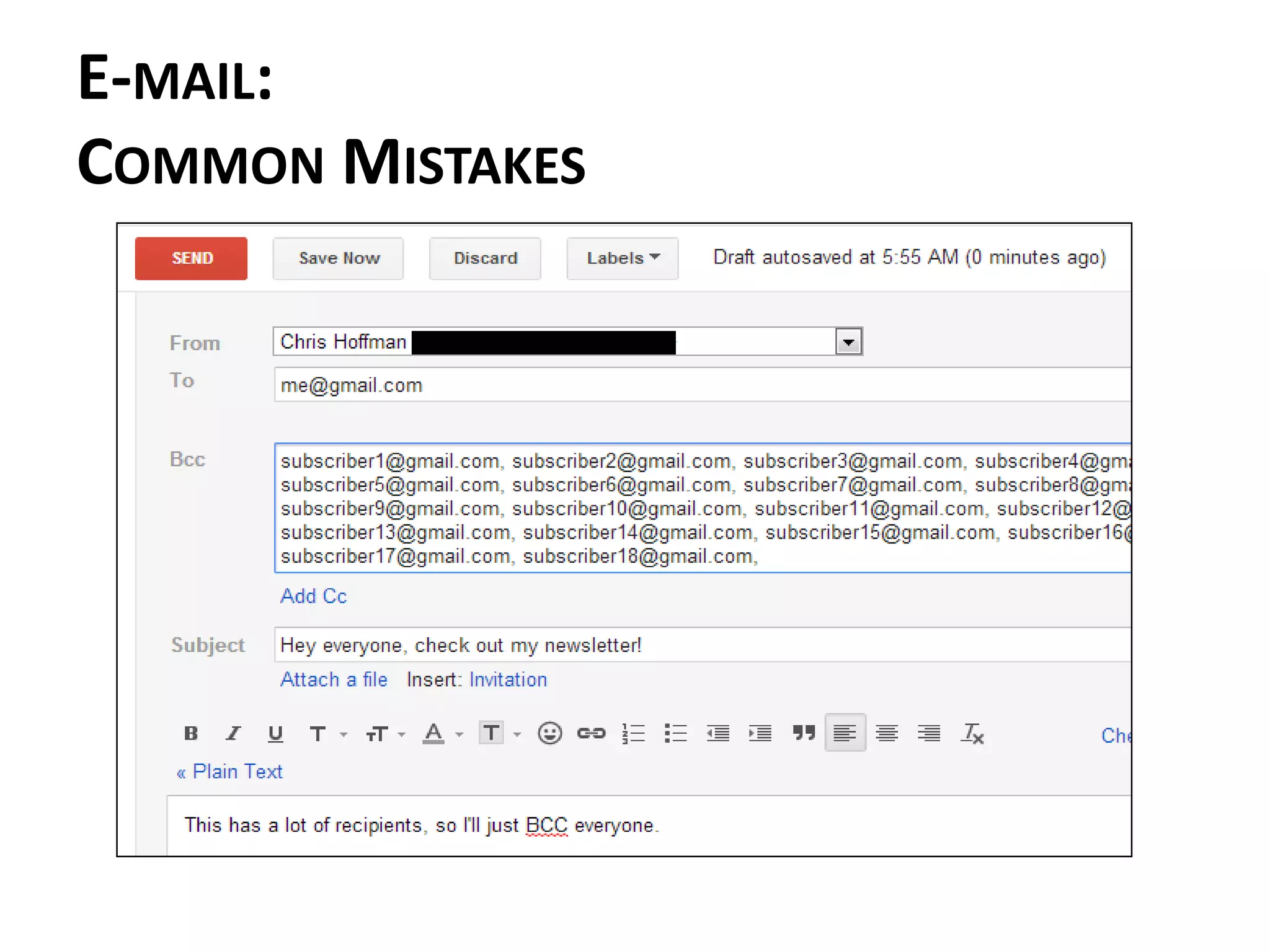
1. Over-copying people on emails (“reply all”)
2. Being relaxed about checking e-mail
3. Vague subject lines
4. Subject lines that don’t match the message
5. Sending one-liner responses
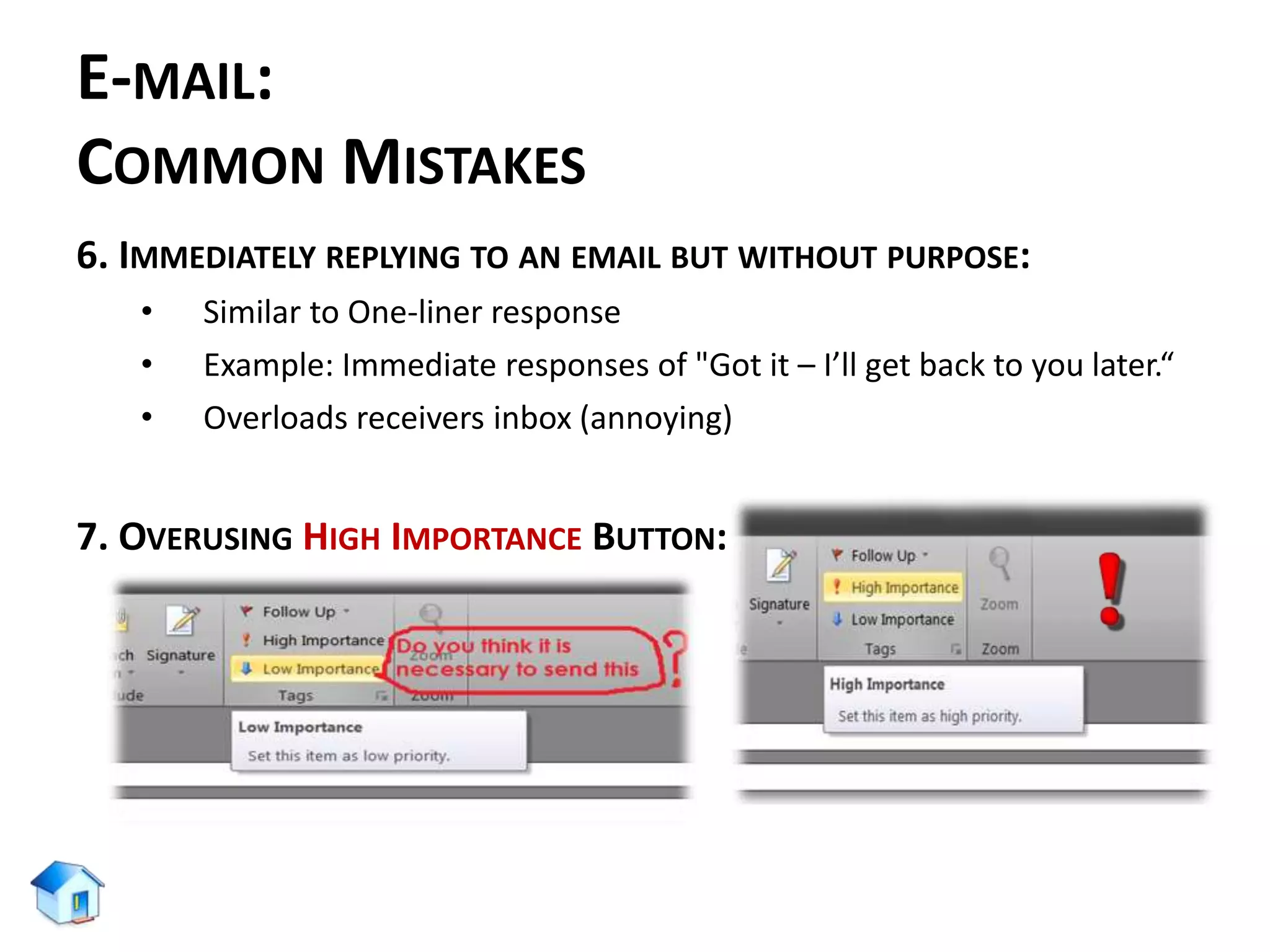
6. Immediately replying to an email but without purpose
7. Overusing the high priority button
8. Not including a signature
E-MAIL:
COMMON MISTAKES
1. OVER-COPYING PEOPLE ON EMAILS (“REPLY ALL”):
E-MAIL:
COMMON MISTAKES
E-MAIL:
COMMON MISTAKES
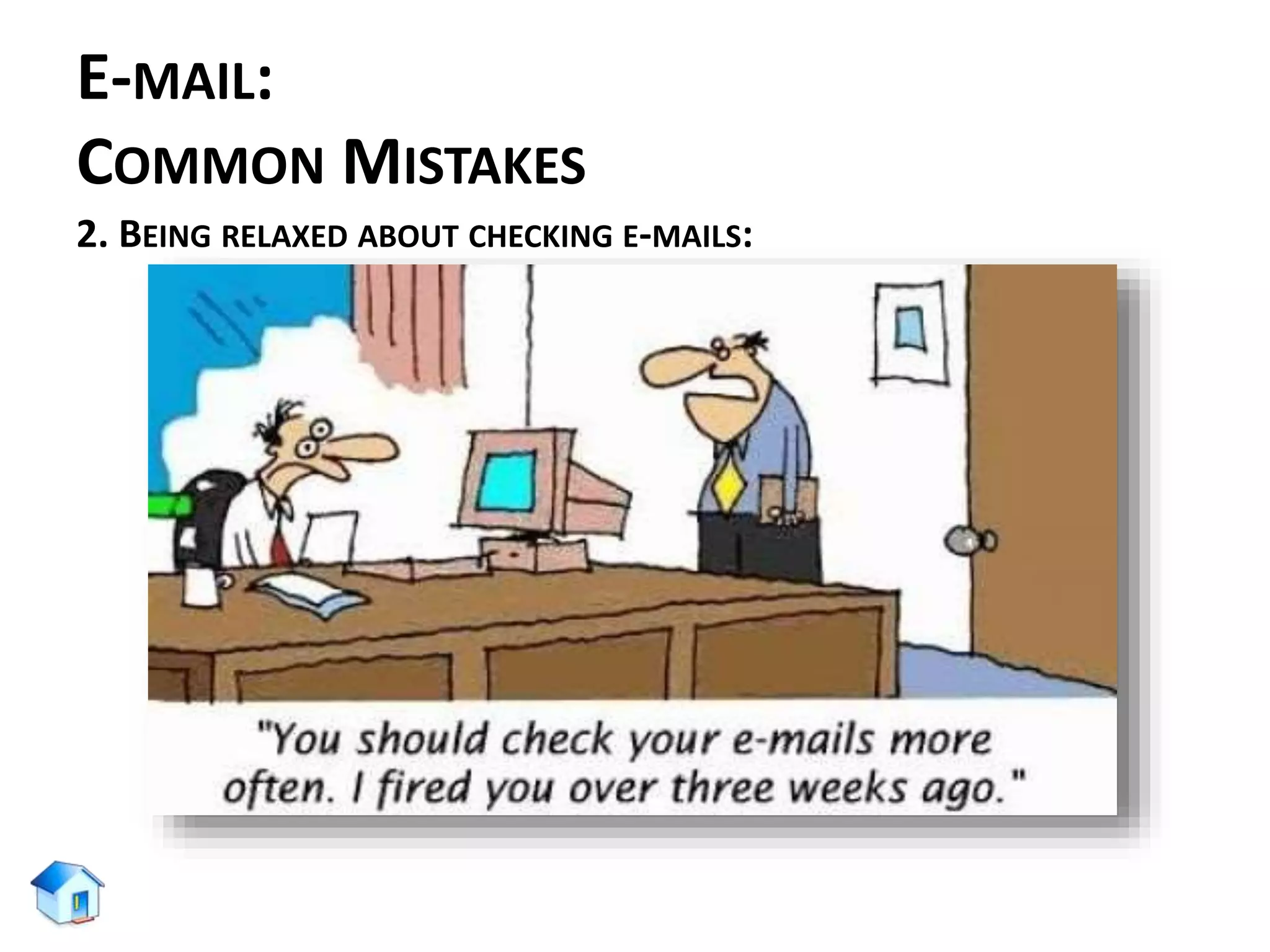
2. BEING RELAXED ABOUT CHECKING E-MAILS:
E-MAIL:
COMMON MISTAKES
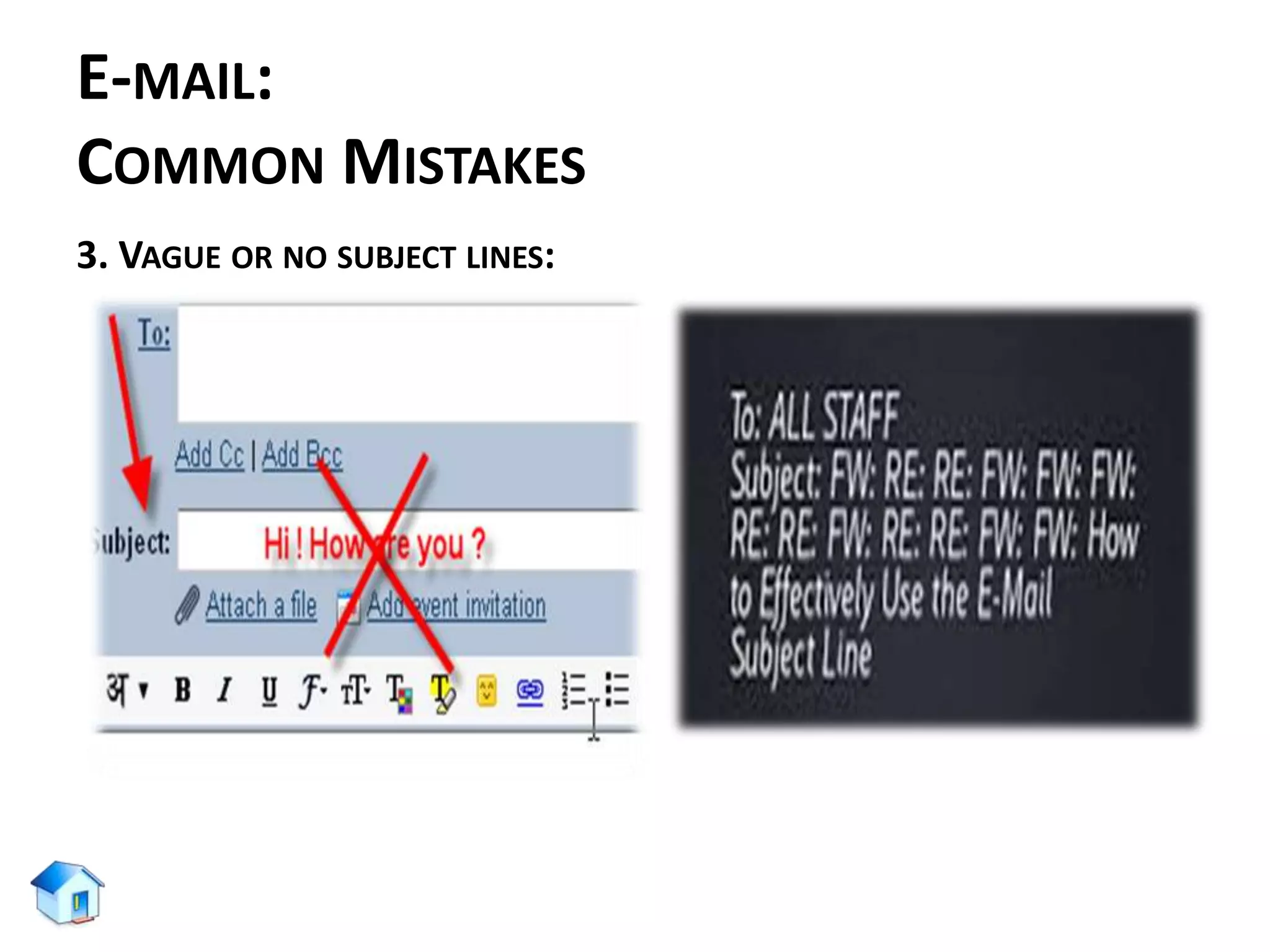
3. VAGUE OR NO SUBJECT LINES:
E-MAIL:
COMMON MISTAKES
E-MAIL:
COMMON MISTAKES
E-MAIL:
COMMON MISTAKES
E-MAIL:
COMMON MISTAKES
4. SUBJECT LINES THAT DON’T MATCH THE MESSAGE:
• Replying month long old e-mails (unrelated & confusing)
• Change subject line as soon as the content of the email chain
changes
5. SENDING ONE-LINER RESPONSES:
• Replying as:- "Thanks" or "OK" (not advances the conversation)
• It is not mandatory to answer every email
• Difficult to send an appropriate one-liner response
• To avoid being the victim of one-liner emails, it is good to add "no
reply necessary" at the top of an email if you don’t anticipate a
response.
E-MAIL:
COMMON MISTAKES
6. IMMEDIATELY REPLYING TO AN EMAIL BUT WITHOUT PURPOSE:
• Similar to One-liner response
• Example: Immediate responses of "Got it – I’ll get back to you later.“
• Overloads receivers inbox (annoying)
7. OVERUSING HIGH IMPORTANCE BUTTON:
E-MAIL:
COMMON MISTAKES
8. NO OR INAPPROPRIATE SIGNATURE:
No, he did not say that!
E-MAIL:
COMMON MISTAKES
MORE ABOUT E-MAIL SIGNATURE BODY:
Including own (same) e-mail address in the signature body.
E-MAIL:
COMMON MISTAKES
MORE ABOUT E-MAIL SIGNATURE BODY:
Including a FAX number: Most people are not living in 1994 or
1894 (riding horses to work)
E-MAIL:
COMMON MISTAKES
MORE ABOUT E-MAIL SIGNATURE BODY:
• Not including a phone number (since, it will work as a secondary way of
communication following an e-mail)
• Not including international prefix (country code)
– For example: in Bangladesh
• For telephone : +88 (02) XXXX XXX
• For mobile phone : +88 01712 XXX XXX
TEN WAYS OF
WRITING EFFECTIVE E-MAIL
EMAIL: TO ENSURE
WRITING EFFECTIVE E-MAIL
1. USE A MEANINGFUL SUBJECT.
Just as a meaningful title makes a reader read a blog post, a
meaningful subject of your email sets it apart from the crowd. A
meaningful subject saves time as the recipient can grasp your
idea quickly.
For example: If you want to post a guest article at Daily blog tips
and want to contact Mr. X, use the subject line as “Guest article”
rather than “Hello Mr. X”.
EMAIL: TO ENSURE
WRITING EFFECTIVE E-MAIL
2. SKIP THE INTRODUCTORY PARAGRAPHS, JUMP DIRECTLY TO THE POINT
• Keep the purpose in focus
• Do not add unnecessary introductions or links
• Avoid boring intros and jump directly to your point
• Save time at both ends
• Your recipient(s) may have dozens of unread e-mails
EMAIL: TO ENSURE
WRITING EFFECTIVE E-MAIL
3. USE SAVED TEMPLATES FOR ANSWERING COMMONLY ASKED QUESTIONS
• In case of Frequently Asked Questions (FAQs), make some
templates for further use.
4. ADD A HUMAN TOUCH. MAKE IT PERSONAL
• Do not overkill by making everything automated
• Some emails that will need personal attention
• Spend some time on providing some value, care
EMAIL: TO ENSURE
WRITING EFFECTIVE E-MAIL
5. NEVER WRITE IN CAPITAL CASE
• WRITING AN EMAIL IN CAPITAL CASE MAKES IT DIFFICULT
TO READ AND THE RECEIVER WILL GET ANNOYED FOR
SURE.
• Avoid writing email in capital letters or else your message
might end up in the trash folder.
EMAIL: TO ENSURE
WRITING EFFECTIVE E-MAIL
6. STICK TO THE PROPER MESSAGE THREAD
• Including earlier conversations in reply is a good habit
• Helps receiver to recall subject, earlier conversation
• Saves time for searching earlier threads of the
conversations
Gmail/Outlook, automatically includes the threads in “reply”
messages. While replying to an email conversation, its good to
click “reply” instead of composing a new email message.
EMAIL: TO ENSURE
WRITING EFFECTIVE E-MAIL
7. READ THE EMAIL BEFORE YOU SEND IT
• Before you hit the send button:
• Read what you have just typed
• Check for spelling & grammatical mistakes
• Read it from receiver’s angle
AN E-MAIL CAN MAKE OR BREAK A POTENTIAL OPPORTUNITY
SEND AND RESPOND WISELY!
EMAIL: TO ENSURE
WRITING EFFECTIVE E-MAIL
8. DON’T USE ABBREVIATIONS, SLANG AND EMOTICONS
• Business emails should be formal as they reflect the
posture of the organization/company
• Using unnecessary acronyms/smilies lowers the value of
e-mail & message
E-MAIL:
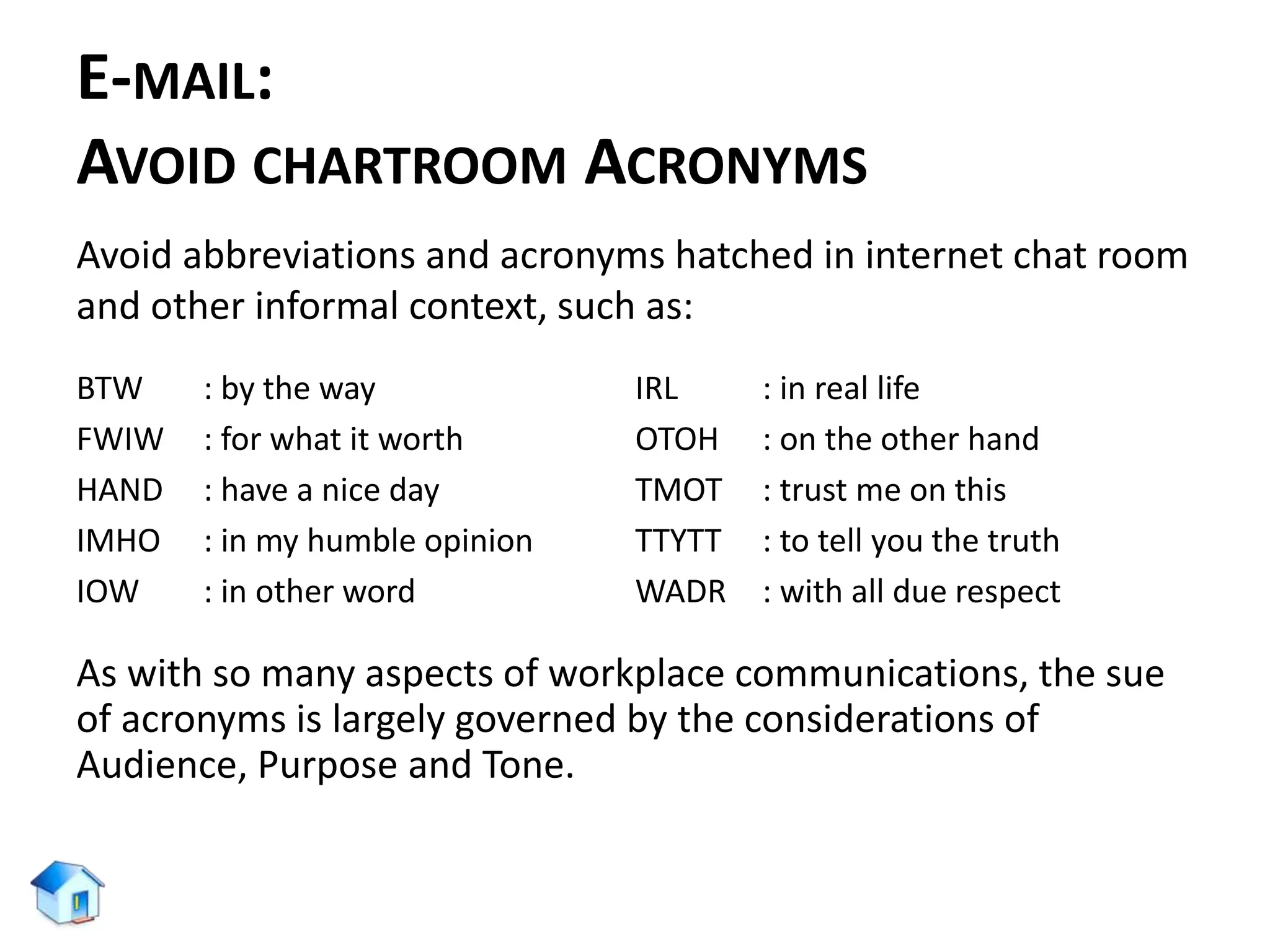
AVOID CHARTROOM ACRONYMS
Avoid abbreviations and acronyms hatched in internet chat room
and other informal context, such as:
BTW : by the way
FWIW : for what it worth
HAND : have a nice day
IMHO : in my humble opinion
IOW : in other word
IRL : in real life
OTOH : on the other hand
TMOT : trust me on this
TTYTT : to tell you the truth
WADR : with all due respect
As with so many aspects of workplace communications, the sue
of acronyms is largely governed by the considerations of
Audience, Purpose and Tone.
EMAIL: TO ENSURE
WRITING EFFECTIVE E-MAIL
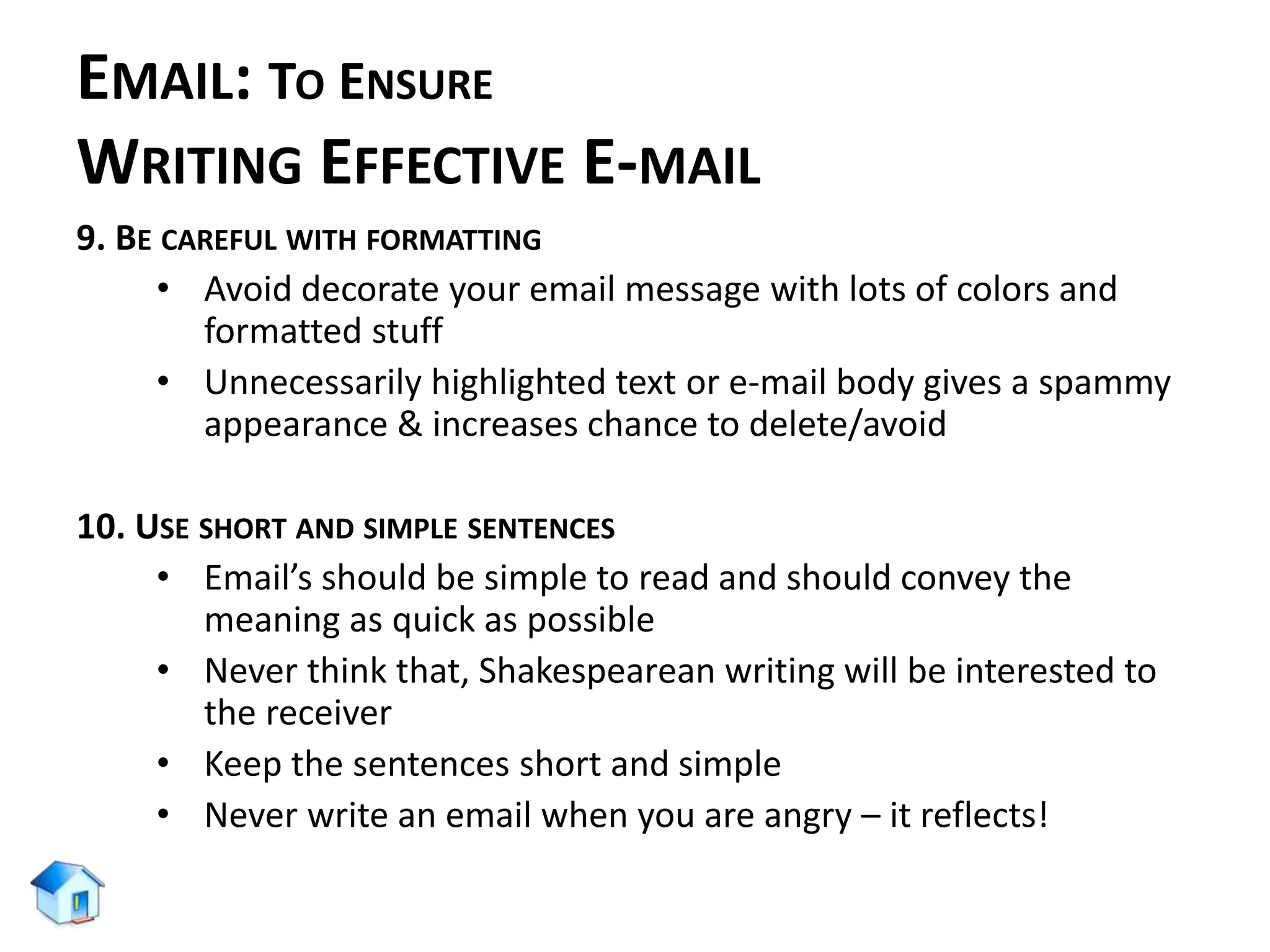
9. BE CAREFUL WITH FORMATTING
• Avoid decorate your email message with lots of colors and
formatted stuff
• Unnecessarily highlighted text or e-mail body gives a spammy
appearance & increases chance to delete/avoid
10. USE SHORT AND SIMPLE SENTENCES
• Email’s should be simple to read and should convey the
meaning as quick as possible
• Never think that, Shakespearean writing will be interested to
the receiver
• Keep the sentences short and simple
• Never write an email when you are angry – it reflects!
E-MAIL:
SEVEN THINGS TO THINK
1. THE FIRST IMPRESSION
THE FIRST IMPRESSION
2. SALUTATION
• Important for setting Tone
• To value and show respect
• Be careful about Title and name Spelling
• In case of Gender confusion, use first and last name together
3. TONE
• AFR: Approachable, Friendly, Respectful
• “no u didn’t rite ur tchr lyk dis. U r uskng 4 trbl” Bad…bad..bad!
• Avoid unnecessary use of UPPERCASE
• Read again before clicking “Send” button Remember
these ???
1 2
TONE: EXAMPLE 01
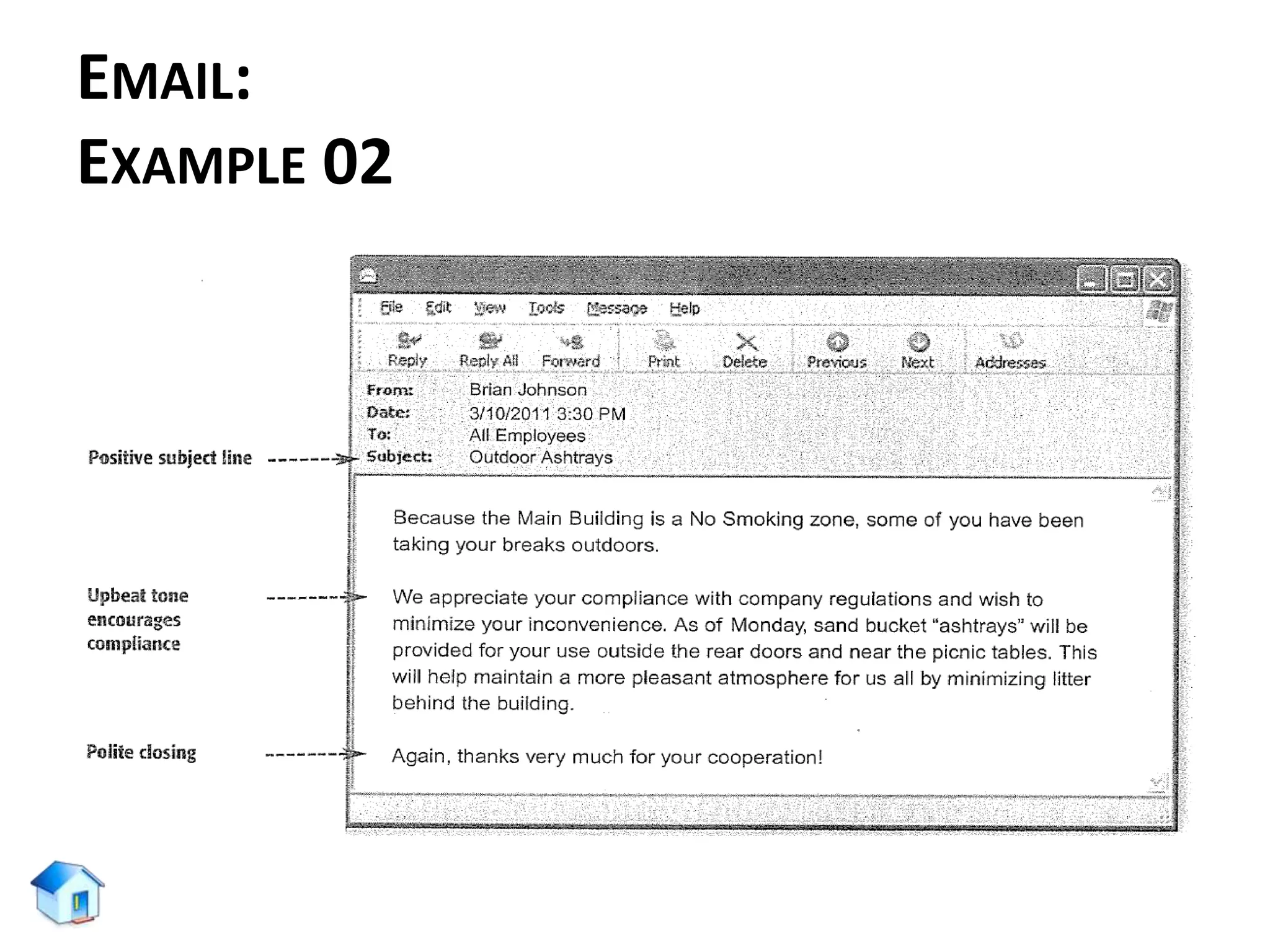
TONE: EXAMPLE 02
Dear Mrs. Crowley
When i was checking on home access tonight, i noticed that you entered a
zero in for the assignment due on 9/3. Although i turned the assignment in
late, i do have a reason that i would like to explain. I understand the policy,
but there were extenuation circumstance that night, and i turned the paper
into the basket later in the day. Could I possibly talk to you about this
sometimes soon? Let me know when you are free and i will come to your
room. Thank you for your time.
Subject: A Concern
4. LENGTH
Too
Short!
LENGTH
Too
Long!
5. FONT
• Natural • Easy to convert • Easy to read
Informal
6. WORDING:
NEGATIVE VS. POSITIVE
NEGATIVE:
• We cannot process your claim
because the necessary form
have not been completed.
• We do not take phone calls
after 5:30 PM.
• We closed your file because
we did not receive your
information requested in our
letter dated October 10, 2016.
POSITIVE:
• Your claims can be processed
as soon as you fill-up the
necessary forms.
• You may reach us by phone till
5:30 PM.
• Your file will be reactivated as
soon as you provide the
information requested in our
letter dated October 10, 2016
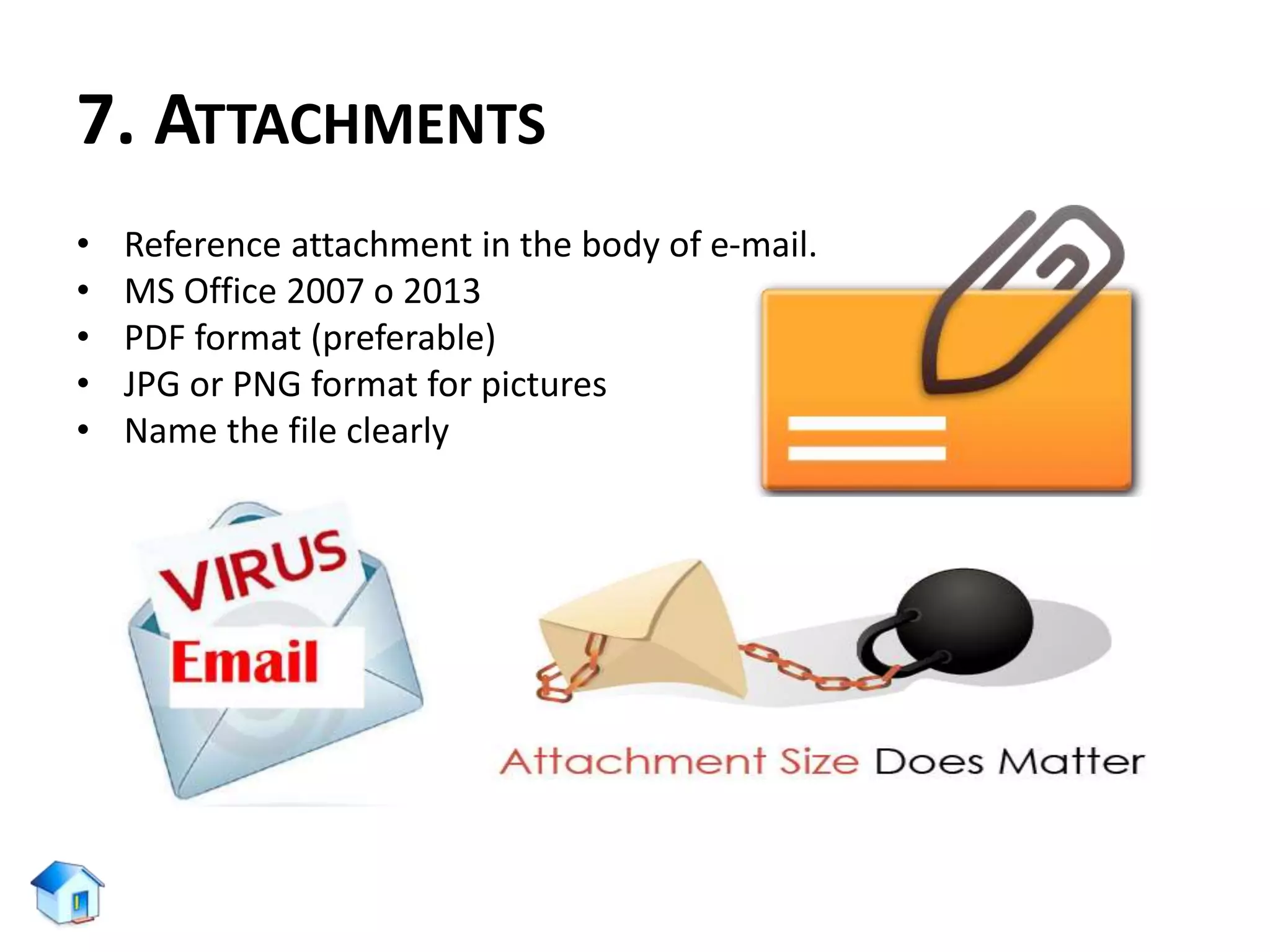
7. ATTACHMENTS
• Reference attachment in the body of e-mail.
• MS Office 2007 o 2013
• PDF format (preferable)
• JPG or PNG format for pictures
• Name the file clearly
EMAIL:
EXAMPLE 01
EMAIL:
EXAMPLE 02
EMAIL:
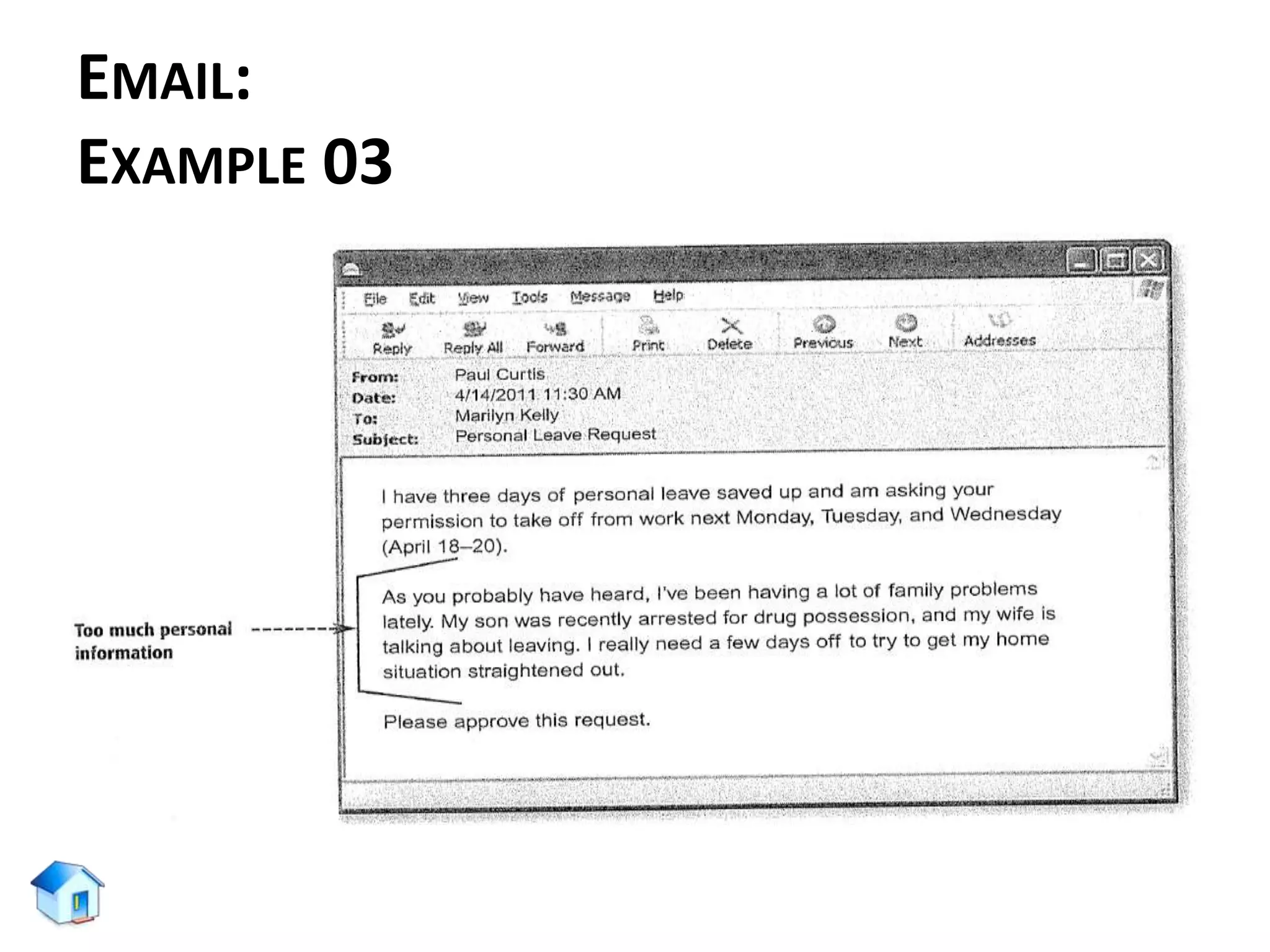
EXAMPLE 03
EMAIL:
EXAMPLE 04
E-MAIL:
TIPS
PARTS OF E-MAIL:
• From : Automatic
• To : Required
• CC : Optional
• BCC : Optional
• Date : Automatic
• Subject : Required
• Opening : Required
• Closing : Required
• Signature Block : Required
• Attachments : Optional
PARTS OF BUSINESS LETTER:
• Date
• Sender’s address
• Insider address
• Salutation
• Body
• Closing
• Enclosures
• Signature
MANAGING OWN INBOX
Before expecting GOOD from others, Be good at your own arena!
E-MAIL:
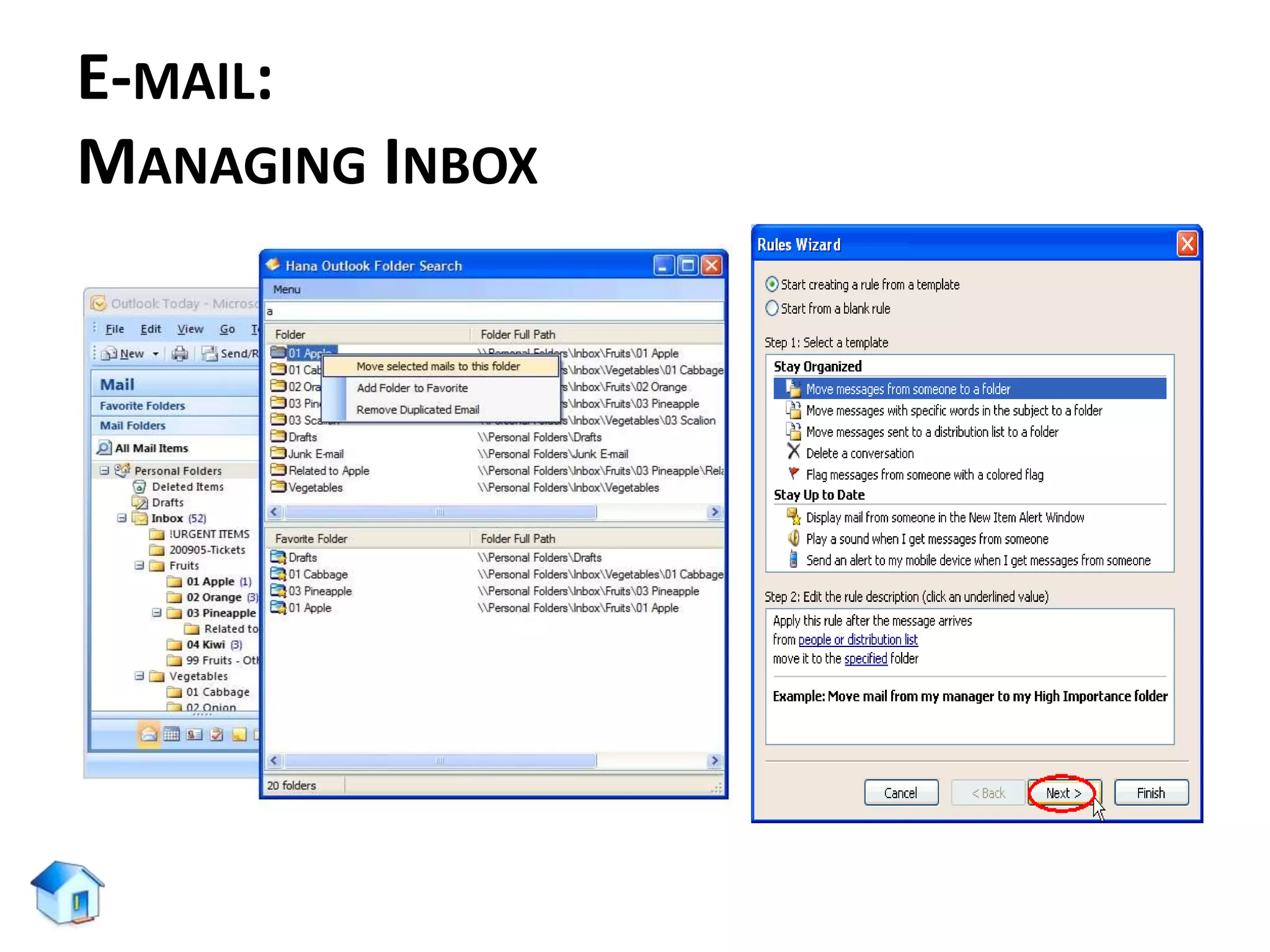
MANAGING INBOX
• Schedule a regular time to read, organize, and respond to
your emails.
• Use the “Four D’s for Decision Making” Model
– Delete it (29%)
– Do it (2 minutes or less)
– Delegate it
– Defer it
• Distinguish between reference and action information
– Reference: Not required to complete an action but
should be filed for later use
– Action: Required to complete an action
E-MAIL:
MANAGING INBOX
• Find a system for organization and stick with it:
– Filters
– Folders
– Search Functions
• Keep it Simple
– Today/This Week
– Reference/Action
– Payroll
– Personal
– Pending or Follow-up
– Projects
– Classes
E-MAIL:
MANAGING INBOX
E-MAIL:
MANAGING INBOX
• Pick up the phone or meet face-to-face. If your situation is
going to take multiple e-mails to resolve, call or meet instead
of e-mail.
• Separate personal from work.
– Give friends and family a separate e-mail address and
keep your work e-mail strictly for business.
– Don’t send subscription e-mails to your work address.
E-MAIL:
ATTITUDE TOWARDS THIS SESSION
• Did you discover something about your communication style?
• Did you discover something about how you write emails?
• Will you change anything?
• What will you keep the same?
• What three (03) things will you do to keep yourself organized?
LET’S SUMMARIZE …
THANK YOU!

E-mail communication

  • 1.
    COMMUNICATION: E-MAIL ETIQUETTE Abu ZaforMd. Shaleah Senior Executive – HRD Concord Group of Companies
  • 3.
    OVERVIEW • Communication – Whatit is? – How we do it? – Is there any preferred ways? – Research findings • Electronic Mail – Advantages vs. Disadvantages – Types • Effective Communication through e-mail – 8 Common Mistakes – 10 ways for Writing Effective E-mail – Seven (07) things to Think in writing e-mail – E-mail: Examples and Tips • Managing Inbox • Summary
  • 4.
  • 5.
    COMMUNICATION: DEFINITION (American Heritage) Com·mu·ni·ca·tion (noun) •the Act or process of communicating; fact of being communicated. • The imparting or interchange of thoughts, opinions, or information by speech, writing, or signs. • Something imparted, interchanged, or transmitted. • Document or message imparting news, views, information, etc. “Communication takes place when one person transfers some understandable data to another person.”
  • 6.
    COMMUNICATION: HOW WE DOIT? How do we communicate with: • Colleagues? • Supervisors? • Partners? • Clients? Do you have a preferred way of communicating? Preferred way of communication: • Face-to-face • Phone • Business Letter or Print Memo • E-mail: noun (e·lec·tron·ic mail)
  • 7.
    THERE IS NOFORMULA FOR PERFECT E-MAILING AUTHENTIC AND HONEST MESSAGING WORKS
  • 8.
    COMMUNICATION: PERSONAL ETHICS Communicator isresponsible to be: – Honest – Clear – Accurate – Comprehensive – Accessible “Every instance of workplace writing occurs for a specific reason and is intended for a particular individual or group... Although this may seem obvious, awareness of purpose, audience, and tone is the single most crucial factor in determining whether your communication will succeed.” - George Searle.
  • 9.
    COMMUNICATION: RESEARCH FINDINGS According toCarnegie Mellon Study, an employee: • Receive 30-50 e-mails per day • Immediately delete 29% • Check e-mail 12 times per day • Spend 2+ hrs. reading and responding to e-mail • Keep 187 e-mails in their inbox (Some in study with over 500!)
  • 10.
  • 11.
    E-MAIL: ADVANTAGES VS. DISADVANTAGES ADVANTAGES: •Fast • Cheap • Easy to use • Digital (saves paper) • Expands a businesses’ capability to communicate with their customers DISADVANTAGES: • Digital divide • For legal reasons, some people need original hard copies on letterhead stationary, complete with signatures. • Some still PRINT emails • Not all email formats are made alike
  • 12.
    EMAIL: TYPES Four common typesof E-mail are: 1. Self-fulfilling: You tell the receiver something. There is no reply. Example: “Daughter is sick and will be out of the office for the rest of the day”. 2. Inquiry: You need something from the receiver. The reply is the desired outcome. Example: “Request of colleague as to whether they achieved proper permissions to move ahead on project from marketing”.
  • 13.
    EMAIL: TYPES 3. Open ended:Communication lines are open for future purposes. Example: “Working schedule about a new procedure or process”. 4. Action oriented: The goal is action on the part of the receiver, not a reply. Example: “Complete a particular form for HR and send if you want to be a part of a new wellness program”.
  • 14.
    EMAIL: TO ENSURE EFFECTIVECOMMUNICATION Things to be considered: 1. Personal efficiency 2. Corporate professionalism 3. Protection of potential liability issues 4. Create e-mails that will – – be read by the receiver. – be understood by the receiver. – engage the receiver to achieve the intended purpose. – not require too much time on the part of the receiver.
  • 15.
    EMAIL: TO ENSURE EFFECTIVECOMMUNICATION “Most people know roughly what they want, but do not take time to clearly think it through. This is how we end up with pointless email … our thoughts are disorganized, and we can easily confuse the reader.” “E-MAIL ETIQUETTE ASKS YOU TO PUT YOUR READER’S NEEDS FIRST, ESPECIALLY WHEN YOU WANT THE OTHER PERSON TO DO SOMETHING FOR YOU.”
  • 16.
  • 17.
    E-MAIL: COMMON MISTAKES 1. Over-copyingpeople on emails (“reply all”) 2. Being relaxed about checking e-mail 3. Vague subject lines 4. Subject lines that don’t match the message 5. Sending one-liner responses 6. Immediately replying to an email but without purpose 7. Overusing the high priority button 8. Not including a signature
  • 18.
    E-MAIL: COMMON MISTAKES 1. OVER-COPYINGPEOPLE ON EMAILS (“REPLY ALL”):
  • 19.
  • 20.
    E-MAIL: COMMON MISTAKES 2. BEINGRELAXED ABOUT CHECKING E-MAILS:
  • 21.
  • 22.
  • 23.
  • 24.
  • 25.
    E-MAIL: COMMON MISTAKES 4. SUBJECTLINES THAT DON’T MATCH THE MESSAGE: • Replying month long old e-mails (unrelated & confusing) • Change subject line as soon as the content of the email chain changes 5. SENDING ONE-LINER RESPONSES: • Replying as:- "Thanks" or "OK" (not advances the conversation) • It is not mandatory to answer every email • Difficult to send an appropriate one-liner response • To avoid being the victim of one-liner emails, it is good to add "no reply necessary" at the top of an email if you don’t anticipate a response.
  • 26.
    E-MAIL: COMMON MISTAKES 6. IMMEDIATELYREPLYING TO AN EMAIL BUT WITHOUT PURPOSE: • Similar to One-liner response • Example: Immediate responses of "Got it – I’ll get back to you later.“ • Overloads receivers inbox (annoying) 7. OVERUSING HIGH IMPORTANCE BUTTON:
  • 27.
    E-MAIL: COMMON MISTAKES 8. NOOR INAPPROPRIATE SIGNATURE: No, he did not say that!
  • 28.
    E-MAIL: COMMON MISTAKES MORE ABOUTE-MAIL SIGNATURE BODY: Including own (same) e-mail address in the signature body.
  • 29.
    E-MAIL: COMMON MISTAKES MORE ABOUTE-MAIL SIGNATURE BODY: Including a FAX number: Most people are not living in 1994 or 1894 (riding horses to work)
  • 30.
    E-MAIL: COMMON MISTAKES MORE ABOUTE-MAIL SIGNATURE BODY: • Not including a phone number (since, it will work as a secondary way of communication following an e-mail) • Not including international prefix (country code) – For example: in Bangladesh • For telephone : +88 (02) XXXX XXX • For mobile phone : +88 01712 XXX XXX
  • 31.
    TEN WAYS OF WRITINGEFFECTIVE E-MAIL
  • 32.
    EMAIL: TO ENSURE WRITINGEFFECTIVE E-MAIL 1. USE A MEANINGFUL SUBJECT. Just as a meaningful title makes a reader read a blog post, a meaningful subject of your email sets it apart from the crowd. A meaningful subject saves time as the recipient can grasp your idea quickly. For example: If you want to post a guest article at Daily blog tips and want to contact Mr. X, use the subject line as “Guest article” rather than “Hello Mr. X”.
  • 33.
    EMAIL: TO ENSURE WRITINGEFFECTIVE E-MAIL 2. SKIP THE INTRODUCTORY PARAGRAPHS, JUMP DIRECTLY TO THE POINT • Keep the purpose in focus • Do not add unnecessary introductions or links • Avoid boring intros and jump directly to your point • Save time at both ends • Your recipient(s) may have dozens of unread e-mails
  • 34.
    EMAIL: TO ENSURE WRITINGEFFECTIVE E-MAIL 3. USE SAVED TEMPLATES FOR ANSWERING COMMONLY ASKED QUESTIONS • In case of Frequently Asked Questions (FAQs), make some templates for further use. 4. ADD A HUMAN TOUCH. MAKE IT PERSONAL • Do not overkill by making everything automated • Some emails that will need personal attention • Spend some time on providing some value, care
  • 35.
    EMAIL: TO ENSURE WRITINGEFFECTIVE E-MAIL 5. NEVER WRITE IN CAPITAL CASE • WRITING AN EMAIL IN CAPITAL CASE MAKES IT DIFFICULT TO READ AND THE RECEIVER WILL GET ANNOYED FOR SURE. • Avoid writing email in capital letters or else your message might end up in the trash folder.
  • 36.
    EMAIL: TO ENSURE WRITINGEFFECTIVE E-MAIL 6. STICK TO THE PROPER MESSAGE THREAD • Including earlier conversations in reply is a good habit • Helps receiver to recall subject, earlier conversation • Saves time for searching earlier threads of the conversations Gmail/Outlook, automatically includes the threads in “reply” messages. While replying to an email conversation, its good to click “reply” instead of composing a new email message.
  • 37.
    EMAIL: TO ENSURE WRITINGEFFECTIVE E-MAIL 7. READ THE EMAIL BEFORE YOU SEND IT • Before you hit the send button: • Read what you have just typed • Check for spelling & grammatical mistakes • Read it from receiver’s angle AN E-MAIL CAN MAKE OR BREAK A POTENTIAL OPPORTUNITY SEND AND RESPOND WISELY!
  • 38.
    EMAIL: TO ENSURE WRITINGEFFECTIVE E-MAIL 8. DON’T USE ABBREVIATIONS, SLANG AND EMOTICONS • Business emails should be formal as they reflect the posture of the organization/company • Using unnecessary acronyms/smilies lowers the value of e-mail & message
  • 39.
    E-MAIL: AVOID CHARTROOM ACRONYMS Avoidabbreviations and acronyms hatched in internet chat room and other informal context, such as: BTW : by the way FWIW : for what it worth HAND : have a nice day IMHO : in my humble opinion IOW : in other word IRL : in real life OTOH : on the other hand TMOT : trust me on this TTYTT : to tell you the truth WADR : with all due respect As with so many aspects of workplace communications, the sue of acronyms is largely governed by the considerations of Audience, Purpose and Tone.
  • 40.
    EMAIL: TO ENSURE WRITINGEFFECTIVE E-MAIL 9. BE CAREFUL WITH FORMATTING • Avoid decorate your email message with lots of colors and formatted stuff • Unnecessarily highlighted text or e-mail body gives a spammy appearance & increases chance to delete/avoid 10. USE SHORT AND SIMPLE SENTENCES • Email’s should be simple to read and should convey the meaning as quick as possible • Never think that, Shakespearean writing will be interested to the receiver • Keep the sentences short and simple • Never write an email when you are angry – it reflects!
  • 41.
  • 42.
    1. THE FIRSTIMPRESSION
  • 43.
  • 44.
    2. SALUTATION • Importantfor setting Tone • To value and show respect • Be careful about Title and name Spelling • In case of Gender confusion, use first and last name together
  • 45.
    3. TONE • AFR:Approachable, Friendly, Respectful • “no u didn’t rite ur tchr lyk dis. U r uskng 4 trbl” Bad…bad..bad! • Avoid unnecessary use of UPPERCASE • Read again before clicking “Send” button Remember these ??? 1 2
  • 46.
  • 47.
    TONE: EXAMPLE 02 DearMrs. Crowley When i was checking on home access tonight, i noticed that you entered a zero in for the assignment due on 9/3. Although i turned the assignment in late, i do have a reason that i would like to explain. I understand the policy, but there were extenuation circumstance that night, and i turned the paper into the basket later in the day. Could I possibly talk to you about this sometimes soon? Let me know when you are free and i will come to your room. Thank you for your time. Subject: A Concern
  • 48.
  • 49.
  • 50.
    5. FONT • Natural• Easy to convert • Easy to read Informal
  • 51.
    6. WORDING: NEGATIVE VS.POSITIVE NEGATIVE: • We cannot process your claim because the necessary form have not been completed. • We do not take phone calls after 5:30 PM. • We closed your file because we did not receive your information requested in our letter dated October 10, 2016. POSITIVE: • Your claims can be processed as soon as you fill-up the necessary forms. • You may reach us by phone till 5:30 PM. • Your file will be reactivated as soon as you provide the information requested in our letter dated October 10, 2016
  • 52.
    7. ATTACHMENTS • Referenceattachment in the body of e-mail. • MS Office 2007 o 2013 • PDF format (preferable) • JPG or PNG format for pictures • Name the file clearly
  • 53.
  • 54.
  • 55.
  • 56.
  • 57.
    E-MAIL: TIPS PARTS OF E-MAIL: •From : Automatic • To : Required • CC : Optional • BCC : Optional • Date : Automatic • Subject : Required • Opening : Required • Closing : Required • Signature Block : Required • Attachments : Optional PARTS OF BUSINESS LETTER: • Date • Sender’s address • Insider address • Salutation • Body • Closing • Enclosures • Signature
  • 58.
    MANAGING OWN INBOX Beforeexpecting GOOD from others, Be good at your own arena!
  • 59.
    E-MAIL: MANAGING INBOX • Schedulea regular time to read, organize, and respond to your emails. • Use the “Four D’s for Decision Making” Model – Delete it (29%) – Do it (2 minutes or less) – Delegate it – Defer it • Distinguish between reference and action information – Reference: Not required to complete an action but should be filed for later use – Action: Required to complete an action
  • 60.
    E-MAIL: MANAGING INBOX • Finda system for organization and stick with it: – Filters – Folders – Search Functions • Keep it Simple – Today/This Week – Reference/Action – Payroll – Personal – Pending or Follow-up – Projects – Classes
  • 61.
  • 62.
    E-MAIL: MANAGING INBOX • Pickup the phone or meet face-to-face. If your situation is going to take multiple e-mails to resolve, call or meet instead of e-mail. • Separate personal from work. – Give friends and family a separate e-mail address and keep your work e-mail strictly for business. – Don’t send subscription e-mails to your work address.
  • 63.
    E-MAIL: ATTITUDE TOWARDS THISSESSION • Did you discover something about your communication style? • Did you discover something about how you write emails? • Will you change anything? • What will you keep the same? • What three (03) things will you do to keep yourself organized?
  • 64.
  • 65.

Editor's Notes

  • #11 Source: https://www.marketingsherpa.com/article/case-study/customer-communication-by-channel