Efficient, Effective  E-mail Communication Karen Eckberg November 2011
Agenda Introductions Objectives: Effective communication Effective EMAIL communication MUSTs DOs and DON’Ts  Ways to organize your EMAIL Identifying 2 or 3 practices YOU’LL make
Definition  (American Heritage) Com·mu·ni·ca·tion (noun) the act or process of communicating;  fact of being communicated. the imparting or interchange of thoughts,  opinions, or information by speech,  writing, or signs. something imparted, interchanged,  or transmitted. document or message imparting news, views, information, etc.
EFFECTIVE COMMUNICATION “ Communication takes place when one person transfers some understandable data to another person.”
Real-life / typical day analysis How do you communicate with… Colleagues? Supervisors? Partners? Clients? Do you have a preferred way of communicating?
Communication preferences Face-to-face Phone Business Letter or Print Memo Email
Carnegie Mellon Study Receive 30-50 e-mails per day Immediately delete 29%  Check e-mail 12 times per day Spend 2+ hrs . reading and responding to e-mail Keep 187 e-mails in their inbox  (Some in study with over 500!)
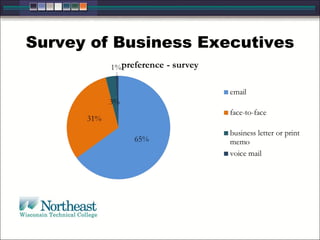
Survey of Business Executives
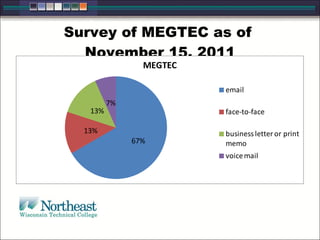
Survey of MEGTEC as of  November 15, 2011
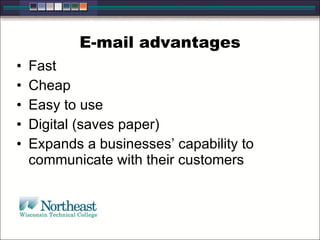
E-mail advantages Fast Cheap Easy to use Digital (saves paper) Expands a businesses’ capability to communicate with their customers
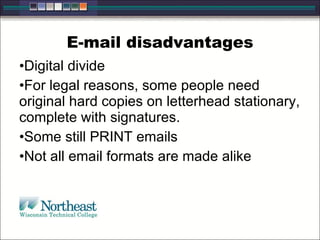
E-mail disadvantages Digital divide For legal reasons, some people need original hard copies on letterhead stationary, complete with signatures. Some still PRINT emails Not all email formats are made alike
IF WE ARE GOING TO USE EMAILS AS OUR MAIN METHOD OF COMMUNICATION… … Let’s make sure the emails we do write are effective means of communication.
We want to … Increase personal  efficiency Improve individual and corporate  professionalism Protect  yourself and your organization from potential liability issues
We want to … 4.  Create e-mails  that will… be read by the receiver. be understood by the receiver. engage the receiver to achieve the intended purpose. not require too much time on the part of the receiver.
Personal Ethics As a  communicator  it is your responsibility to be: Honest Clear Accurate Comprehensive Accessible
“ Every instance of workplace writing occurs for a specific reason and is intended for a particular individual or group... Although this may seem obvious, awareness of purpose, audience, and tone is the single most crucial factor in determining whether your communication will succeed.”  - George Searles   Understanding the  Writing Situation
Three Main Principles Purpose Audience Tone
Purpose Overall design that  governs  what writers do in their writing.  Reason  why a writer will even sit down to type an e-mail.  Specific  subject  and  strategies  writer uses to communicate the subject most effectively. Should  direct and control  all the decisions a writer makes.
Types of E-mail Self Fulfilling Inquiry Open-Ended Dialog Action
Self-Fulfilling You tell the receiver something.  There is no reply. Example:  Daughter is sick and will be out of the office for the rest of the day.
Inquiry You need something from the receiver.  The reply is the desired outcome. Example: Request of colleague as to whether they achieved proper permissions to move ahead on project from marketing.
Open-Ended Dialog You want to keep communication lines open for future purposes.  Example: Working schedule about a new procedure or process.
Action The goal is action on the part of the receiver, not a reply. Example: Complete a particular form for HR and send if you want to be a part of a new wellness program.
Audience “ Thoughtful and effective communication requires a sensitive understanding of an audience since the knowledge level and expectations of those who need information can vary widely.” - Nell Ann Pickett
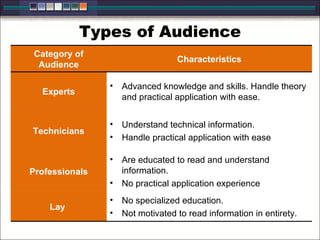
Types of Audience Category of Audience Characteristics Experts Advanced knowledge and skills. Handle theory and practical application with ease. Technicians Understand technical information.  Handle practical application with ease Professionals Are educated to read and understand information.  No practical application experience Lay  No specialized education.  Not motivated to read information in entirety.
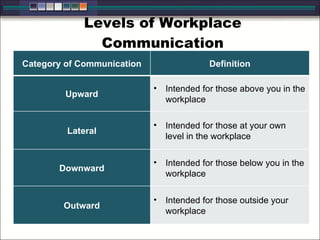
Levels of Workplace Communication Category of Communication Definition Upward Intended for those above you in the workplace Lateral Intended for those at your own level in the workplace Downward Intended for those below you in the workplace Outward Intended for those outside your workplace
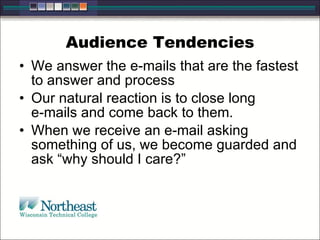
Audience Tendencies We answer the e-mails that are the fastest to answer and process  Our natural reaction is to close long  e-mails and come back to them. When we receive an e-mail asking something of us, we become guarded and ask “why should I care?”
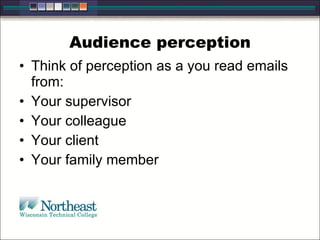
Audience perception Think of perception as a you read emails from: Your supervisor Your colleague Your client Your family member
Tone Tone indicates your attitude as a writer toward the subject and the audience.  It is what you say and how you say it.  Inappropriate tone can cause your reader to ignore, delete, misinterpret, or overreact to your message.
Setting the Right Tone Use words carefully. Choose an appropriate greeting and closing. Use personal pronouns. Write in the active voice.  Order information to maintain a professional tone.
Three Levels of Style – decides TONE Informal Style Semiformal Style Formal Style
Practical Applications Writer vs. Reader Centered Tone Negative vs. Positive Wording Tact
IDENTIFYING ISSUES IN AN EMAIL Exercise  on page 6.
Guidelines for Writing Effective E-mails “ E-mail etiquette asks you to put your reader’s needs first, especially when you want  the other person to do something for you.” “ Most people know roughly what they want, but do not take time to clearly think it through. This is how we end up with rambling email … our thoughts are disorganized, and we can easily confuse the reader.”
Writing Effective E-mails Begin with the end in mind.  Write a meaningful subject line.  Identify yourself clearly as if it were a face to face introduction. Be concise and to the point. Avoid attaching unnecessary files. In most cases, do not leave out message threads. Don’t assume privacy. Respond promptly  Show respect and restraint Read your e-mail before you send
What is the PURPOSE of the email? Going back to the PURPOSE, what is the PURPOSE of your email?  Response? FYI?
Meaningful Subject Lines DO “ Department Meeting is cancelled” “ 25 confirmed…larger room?” Don’t Leave the subject line blank “ Important! Read NOW!” “ Quick Question”
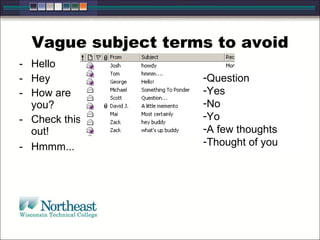
Vague subject terms to avoid Hello  Hey  How are you?  Check this out!  Hmmm...  Question  Yes  No  Yo  A few thoughts  Thought of you
Writing Effective E-mails 3. Identify yourself clearly as if it were a face to face introduction. When contacting someone, especially for the first time, always include your Name and Position Purpose for Contact Contact Information
Writing Effective E-mails 4. Be concise and to the point. Let your receivers know right away what you want or need from them. Make it clear what action you expect from them.  If no action is expected, state “No reply necessary.”
Writing Effective E-mails 5. Avoid attaching unnecessary files.  You want to limit the steps necessary for your receiver to act on your message.
Attachments Require Time to download Space on the receiver’s computer Complementary software on the receiver’s computer.
Writing Effective E-mails 6. In most cases, do not leave out message threads. Receivers read multiple e-mails every day and cannot possibly remember what every e-mail was about.  Deleting threads causes the receiver to spend extra time looking for the original message to reference.
Writing Effective E-mails 7. Don’t assume privacy. E-mail is  not secure.  Praise in public, but criticize in private.  Do not use e-mail to discuss confidential information
Writing Effective E-mails 8. Respond promptly  Give the appearance of always being available to your online correspondents even if you can’t help them right away.
Writing Effective E-mails 9. Show respect and restraint Don’t forward or copy a message without the permission of the original sender.  Don’t forward chain letters Don’t overuse reply to all Don’t send e-mail with offensive, racist, or obscene remarks
Writing Effective E-mails 10. Read your e-mail before you send it. Errors in grammar and mechanics cause your receiver to question your authority and professionalism.  Make sure all questions have been asked or answered and further questions preempted.
REVISION OF EXERCISE – PAGE 6
Concise E-mail: Do Number or bullet key points Use active voice and tone Divide substantial points into separate messages so your receiver can respond to them individually
Concise E-mail: Do Write in plain English Use standard grammar, spelling & punctuation Avoid long sentences Use proper structure and layout
Concise E-mail: Don’t Write in all CAPITALS Use distracting typefaces Use text messaging abbreviations Plain text … don’t assume HTML
Brevity is key! Remember who your audience is. Choose simple words.  Be polite and clear.  Make your message brief and direct by deleting redundant words.  Choose strong, active verbs.  Concise writing equals effective communication.
REVISION EXERCISE PAGE 10 Netiquette:  “Network etiquette” for  common rules  in the communication medium of  emails.
Managing Your Inbox 1. Schedule a regular time to read, organize, and respond to your emails.
Managing Your Inbox 2. Use the “Four D’s for Decision Making” Model Delete it (29%) Do it (2 minutes or less) Delegate it Defer it
Managing Your Inbox 3. Distinguish between reference and action information Reference: Not required to complete an action but should be filed for later use Action: Required to complete an action
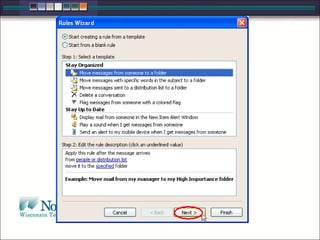
Managing Your Inbox 4. Find a system for organization and  stick with it Filters Folders Search Functions
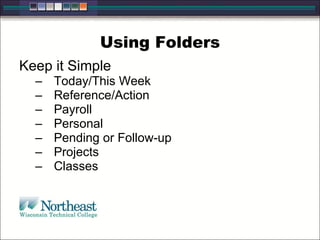
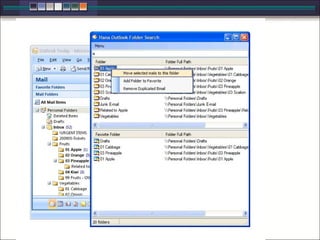
Using Folders Keep it Simple Today/This Week Reference/Action Payroll Personal Pending or Follow-up Projects Classes
 
 
Managing Your Inbox 5. Pick up the phone or meet face-to-face. If your situation is going to take multiple e-mails to resolve, call or meet instead of e-mail.
Managing Your Inbox 6. Separate personal from work.  Give friends and family a separate e-mail address and keep your work e-mail strictly for business.  Don’t send subscription e-mails to your work address.
Wrap up ….  Communication MORE than email Email can be an effective method of communication Purpose Audience Tone
What will you do? Did you discover something about your communication style? Did you discover something about how you write emails?  Will you change anything?
What will you do? What will you keep the same? What two things will you do to keep yourself organized?

Effective email communication

  • 1.
    Efficient, Effective E-mail Communication Karen Eckberg November 2011
  • 2.
    Agenda Introductions Objectives:Effective communication Effective EMAIL communication MUSTs DOs and DON’Ts Ways to organize your EMAIL Identifying 2 or 3 practices YOU’LL make
  • 3.
    Definition (AmericanHeritage) Com·mu·ni·ca·tion (noun) the act or process of communicating;  fact of being communicated. the imparting or interchange of thoughts,  opinions, or information by speech,  writing, or signs. something imparted, interchanged,  or transmitted. document or message imparting news, views, information, etc.
  • 4.
    EFFECTIVE COMMUNICATION “Communication takes place when one person transfers some understandable data to another person.”
  • 5.
    Real-life / typicalday analysis How do you communicate with… Colleagues? Supervisors? Partners? Clients? Do you have a preferred way of communicating?
  • 6.
    Communication preferences Face-to-facePhone Business Letter or Print Memo Email
  • 7.
    Carnegie Mellon StudyReceive 30-50 e-mails per day Immediately delete 29% Check e-mail 12 times per day Spend 2+ hrs . reading and responding to e-mail Keep 187 e-mails in their inbox (Some in study with over 500!)
  • 8.
  • 9.
    Survey of MEGTECas of November 15, 2011
  • 10.
    E-mail advantages FastCheap Easy to use Digital (saves paper) Expands a businesses’ capability to communicate with their customers
  • 11.
    E-mail disadvantages Digitaldivide For legal reasons, some people need original hard copies on letterhead stationary, complete with signatures. Some still PRINT emails Not all email formats are made alike
  • 12.
    IF WE AREGOING TO USE EMAILS AS OUR MAIN METHOD OF COMMUNICATION… … Let’s make sure the emails we do write are effective means of communication.
  • 13.
    We want to… Increase personal efficiency Improve individual and corporate professionalism Protect yourself and your organization from potential liability issues
  • 14.
    We want to… 4. Create e-mails that will… be read by the receiver. be understood by the receiver. engage the receiver to achieve the intended purpose. not require too much time on the part of the receiver.
  • 15.
    Personal Ethics Asa communicator it is your responsibility to be: Honest Clear Accurate Comprehensive Accessible
  • 16.
    “ Every instanceof workplace writing occurs for a specific reason and is intended for a particular individual or group... Although this may seem obvious, awareness of purpose, audience, and tone is the single most crucial factor in determining whether your communication will succeed.” - George Searles   Understanding the Writing Situation
  • 17.
    Three Main PrinciplesPurpose Audience Tone
  • 18.
    Purpose Overall designthat governs what writers do in their writing. Reason why a writer will even sit down to type an e-mail. Specific subject and strategies writer uses to communicate the subject most effectively. Should direct and control all the decisions a writer makes.
  • 19.
    Types of E-mailSelf Fulfilling Inquiry Open-Ended Dialog Action
  • 20.
    Self-Fulfilling You tellthe receiver something. There is no reply. Example: Daughter is sick and will be out of the office for the rest of the day.
  • 21.
    Inquiry You needsomething from the receiver. The reply is the desired outcome. Example: Request of colleague as to whether they achieved proper permissions to move ahead on project from marketing.
  • 22.
    Open-Ended Dialog Youwant to keep communication lines open for future purposes. Example: Working schedule about a new procedure or process.
  • 23.
    Action The goalis action on the part of the receiver, not a reply. Example: Complete a particular form for HR and send if you want to be a part of a new wellness program.
  • 24.
    Audience “ Thoughtfuland effective communication requires a sensitive understanding of an audience since the knowledge level and expectations of those who need information can vary widely.” - Nell Ann Pickett
  • 25.
    Types of AudienceCategory of Audience Characteristics Experts Advanced knowledge and skills. Handle theory and practical application with ease. Technicians Understand technical information. Handle practical application with ease Professionals Are educated to read and understand information. No practical application experience Lay No specialized education. Not motivated to read information in entirety.
  • 26.
    Levels of WorkplaceCommunication Category of Communication Definition Upward Intended for those above you in the workplace Lateral Intended for those at your own level in the workplace Downward Intended for those below you in the workplace Outward Intended for those outside your workplace
  • 27.
    Audience Tendencies Weanswer the e-mails that are the fastest to answer and process Our natural reaction is to close long e-mails and come back to them. When we receive an e-mail asking something of us, we become guarded and ask “why should I care?”
  • 28.
    Audience perception Thinkof perception as a you read emails from: Your supervisor Your colleague Your client Your family member
  • 29.
    Tone Tone indicatesyour attitude as a writer toward the subject and the audience. It is what you say and how you say it. Inappropriate tone can cause your reader to ignore, delete, misinterpret, or overreact to your message.
  • 30.
    Setting the RightTone Use words carefully. Choose an appropriate greeting and closing. Use personal pronouns. Write in the active voice. Order information to maintain a professional tone.
  • 31.
    Three Levels ofStyle – decides TONE Informal Style Semiformal Style Formal Style
  • 32.
    Practical Applications Writervs. Reader Centered Tone Negative vs. Positive Wording Tact
  • 33.
    IDENTIFYING ISSUES INAN EMAIL Exercise on page 6.
  • 34.
    Guidelines for WritingEffective E-mails “ E-mail etiquette asks you to put your reader’s needs first, especially when you want the other person to do something for you.” “ Most people know roughly what they want, but do not take time to clearly think it through. This is how we end up with rambling email … our thoughts are disorganized, and we can easily confuse the reader.”
  • 35.
    Writing Effective E-mailsBegin with the end in mind. Write a meaningful subject line. Identify yourself clearly as if it were a face to face introduction. Be concise and to the point. Avoid attaching unnecessary files. In most cases, do not leave out message threads. Don’t assume privacy. Respond promptly Show respect and restraint Read your e-mail before you send
  • 36.
    What is thePURPOSE of the email? Going back to the PURPOSE, what is the PURPOSE of your email? Response? FYI?
  • 37.
    Meaningful Subject LinesDO “ Department Meeting is cancelled” “ 25 confirmed…larger room?” Don’t Leave the subject line blank “ Important! Read NOW!” “ Quick Question”
  • 38.
    Vague subject termsto avoid Hello  Hey  How are you?  Check this out!  Hmmm...  Question  Yes  No  Yo  A few thoughts  Thought of you
  • 39.
    Writing Effective E-mails3. Identify yourself clearly as if it were a face to face introduction. When contacting someone, especially for the first time, always include your Name and Position Purpose for Contact Contact Information
  • 40.
    Writing Effective E-mails4. Be concise and to the point. Let your receivers know right away what you want or need from them. Make it clear what action you expect from them. If no action is expected, state “No reply necessary.”
  • 41.
    Writing Effective E-mails5. Avoid attaching unnecessary files. You want to limit the steps necessary for your receiver to act on your message.
  • 42.
    Attachments Require Timeto download Space on the receiver’s computer Complementary software on the receiver’s computer.
  • 43.
    Writing Effective E-mails6. In most cases, do not leave out message threads. Receivers read multiple e-mails every day and cannot possibly remember what every e-mail was about. Deleting threads causes the receiver to spend extra time looking for the original message to reference.
  • 44.
    Writing Effective E-mails7. Don’t assume privacy. E-mail is not secure. Praise in public, but criticize in private. Do not use e-mail to discuss confidential information
  • 45.
    Writing Effective E-mails8. Respond promptly Give the appearance of always being available to your online correspondents even if you can’t help them right away.
  • 46.
    Writing Effective E-mails9. Show respect and restraint Don’t forward or copy a message without the permission of the original sender. Don’t forward chain letters Don’t overuse reply to all Don’t send e-mail with offensive, racist, or obscene remarks
  • 47.
    Writing Effective E-mails10. Read your e-mail before you send it. Errors in grammar and mechanics cause your receiver to question your authority and professionalism. Make sure all questions have been asked or answered and further questions preempted.
  • 48.
  • 49.
    Concise E-mail: DoNumber or bullet key points Use active voice and tone Divide substantial points into separate messages so your receiver can respond to them individually
  • 50.
    Concise E-mail: DoWrite in plain English Use standard grammar, spelling & punctuation Avoid long sentences Use proper structure and layout
  • 51.
    Concise E-mail: Don’tWrite in all CAPITALS Use distracting typefaces Use text messaging abbreviations Plain text … don’t assume HTML
  • 52.
    Brevity is key!Remember who your audience is. Choose simple words. Be polite and clear. Make your message brief and direct by deleting redundant words. Choose strong, active verbs. Concise writing equals effective communication.
  • 53.
    REVISION EXERCISE PAGE10 Netiquette: “Network etiquette” for common rules in the communication medium of emails.
  • 54.
    Managing Your Inbox1. Schedule a regular time to read, organize, and respond to your emails.
  • 55.
    Managing Your Inbox2. Use the “Four D’s for Decision Making” Model Delete it (29%) Do it (2 minutes or less) Delegate it Defer it
  • 56.
    Managing Your Inbox3. Distinguish between reference and action information Reference: Not required to complete an action but should be filed for later use Action: Required to complete an action
  • 57.
    Managing Your Inbox4. Find a system for organization and stick with it Filters Folders Search Functions
  • 58.
    Using Folders Keepit Simple Today/This Week Reference/Action Payroll Personal Pending or Follow-up Projects Classes
  • 59.
  • 60.
  • 61.
    Managing Your Inbox5. Pick up the phone or meet face-to-face. If your situation is going to take multiple e-mails to resolve, call or meet instead of e-mail.
  • 62.
    Managing Your Inbox6. Separate personal from work. Give friends and family a separate e-mail address and keep your work e-mail strictly for business. Don’t send subscription e-mails to your work address.
  • 63.
    Wrap up …. Communication MORE than email Email can be an effective method of communication Purpose Audience Tone
  • 64.
    What will youdo? Did you discover something about your communication style? Did you discover something about how you write emails? Will you change anything?
  • 65.
    What will youdo? What will you keep the same? What two things will you do to keep yourself organized?

Editor's Notes

  • #5 http://www.easycommunication.info/characteristics-of-effective-communication
  • #8 Unknown exact name or nature of survey
  • #9 Unknown survey
  • #15 Don’t cause more questions!
  • #31 1.Save the whole story. Stick to the facts. Reminder: E-mail is easily forwarded and cannot be considered private. Choose an appropriate greeting and closing. Greetings establish a relationship with your reader. Closings indicate the end of the message and summarize key points. Use personal pronouns. Address your reader directly = you. Refer to yourself and your organization = I and we. Write in the active voice. Active voice makes your e-mail tone clearer and more direct. Active voice also makes the "doer" in the sentence clear. Order information to maintain a professional tone. The beginning of an e-mail message sets the tone and emphasizes the message’s content. Set a direct tone by communicating the most important information first.
  • #32 Note: Most business writing falls somewhere between informal and formal style.
  • #33 Tactfulness means treating the reader with respect, being concerned about and considerate of the reader’s feelings. It is basically exercising good manners.
  • #53 “ I suggest…” instead of “It would seem to me that we might…”