ELL Content PresentationLori S. CrumEDTECH541
Problem StatementTeachers face the challenge of a large population that does not speak English and have high transient rates. For this large population, becoming proficient in a new language is a very difficult transition. Students learning a new language need as much language support as possible.  English language learner (ELL) students need a variety of language experiences. They need to hear language, write language, speak language and read language.
StrategyComputers can play an integral part in providing ELL students with valuable language experiences as they learn a new language. Computer-assisted instruction (CAI) can be a supplemental teaching tool for teaching English language learners.
Internet for Instructionhowjsay.com- very neat website that will pronounce words for ELL students
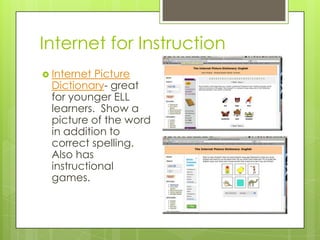
Internet for InstructionInternet Picture Dictionary- great for younger ELL learners.  Show a picture of the word in addition to correct spelling.  Also has instructional games.
Internet for InstructionBreaking News English- site that offers current events articles and exercises to improve reading comprehension
Problem StatementStudents can produce accurate communication in the classroom (usually as part of a scripted exercise) but are often unable to communicate successfully in English outside the classroom.
StrategyStudents needed to interact in the classroom more like they would under real-life circumstances.
Tool SoftwareReadable Blog- This blog exists to helpEnglish learners improve their English skills. Posts include easy-to-read stories, interesting current event information, links to downloadable MP3s of English stories, tips for good writing, websites with grammar quizzes, and lots more.
Tool SoftwareSkype- Skypeallows you to make calls to other Skype users.  This is a good tool to teach pronunciation or speaking skills.
Tool SoftwareSketchcast- It functions as an online "whiteboard" where you can record your explanation and have students practice their English writing by logging in and leaving comments about the sketches.  Looks like a blog.
Problem StatementMuch like multiplication facts, your ABC’s, addition and subtraction, language development is improved by repetition which can be dull and uninteresting.
StrategyUtilize computer vocabulary games to develop language skills.  You get the drill and practice in a more entertaining form.
Instructional Softwarewww.manythings.org- This website is for people studying English as a Second Language or English as a Foreign Language. There are quizzes, word games, word puzzles, slang expressions, anagrams, a random-sentence generator and other computer assisted language learning activities.
Instructional SoftwareESL Games World- ESL fun games for teachers and students
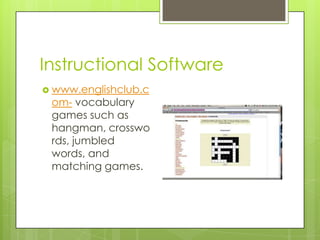
Instructional Softwarewww.englishclub.com- vocabulary games such as hangman, crosswords, jumbled words, and matching games.
Problem StatementThe most effective learning environments are those that are supportive and open, allow for mistakes without ridicule, and encourage students to try, even if they might make a mistake.
StrategyThe computer is an excellent resource for giving students the chance to practice English skills without worrying about the response of other classmates or even the teacher.
Productivity SoftwareAudacity- Audacity is free, open source software for recording and editing sounds. It is available for Mac and Windows operating systems.Click on link to view YouTube video of how Audacity can be used in the ELL Classroom
Productivity SoftwareEasy Writer:  This software lets students read and correct real compositions from other ESL students. This is the only software program that lets students work with authentic writing and authentic errors. Recommended for all intermediate to advanced ESL students.
Productivity SoftwareKidspiration- students organize their research using Kidspiration and then use their outlines to help them write sentences.
ResourcesEnglish Language Learner and Technology, SouthEast Initiatives Regional Technology in Education Consortium, 2005.http://www.ccsf.edu/Resources/Teaching_ESL_Using_Technology/resources.htmhttp://www.eslteachingandtechnology.com/

ELL

  • 1.
  • 2.
    Problem StatementTeachers facethe challenge of a large population that does not speak English and have high transient rates. For this large population, becoming proficient in a new language is a very difficult transition. Students learning a new language need as much language support as possible.  English language learner (ELL) students need a variety of language experiences. They need to hear language, write language, speak language and read language.
  • 3.
    StrategyComputers can playan integral part in providing ELL students with valuable language experiences as they learn a new language. Computer-assisted instruction (CAI) can be a supplemental teaching tool for teaching English language learners.
  • 4.
    Internet for Instructionhowjsay.com-very neat website that will pronounce words for ELL students
  • 5.
    Internet for InstructionInternetPicture Dictionary- great for younger ELL learners. Show a picture of the word in addition to correct spelling. Also has instructional games.
  • 6.
    Internet for InstructionBreakingNews English- site that offers current events articles and exercises to improve reading comprehension
  • 7.
    Problem StatementStudents canproduce accurate communication in the classroom (usually as part of a scripted exercise) but are often unable to communicate successfully in English outside the classroom.
  • 8.
    StrategyStudents needed tointeract in the classroom more like they would under real-life circumstances.
  • 9.
    Tool SoftwareReadable Blog-This blog exists to helpEnglish learners improve their English skills. Posts include easy-to-read stories, interesting current event information, links to downloadable MP3s of English stories, tips for good writing, websites with grammar quizzes, and lots more.
  • 10.
    Tool SoftwareSkype- Skypeallowsyou to make calls to other Skype users. This is a good tool to teach pronunciation or speaking skills.
  • 11.
    Tool SoftwareSketchcast- Itfunctions as an online "whiteboard" where you can record your explanation and have students practice their English writing by logging in and leaving comments about the sketches. Looks like a blog.
  • 12.
    Problem StatementMuch likemultiplication facts, your ABC’s, addition and subtraction, language development is improved by repetition which can be dull and uninteresting.
  • 13.
    StrategyUtilize computer vocabularygames to develop language skills. You get the drill and practice in a more entertaining form.
  • 14.
    Instructional Softwarewww.manythings.org- Thiswebsite is for people studying English as a Second Language or English as a Foreign Language. There are quizzes, word games, word puzzles, slang expressions, anagrams, a random-sentence generator and other computer assisted language learning activities.
  • 15.
    Instructional SoftwareESL GamesWorld- ESL fun games for teachers and students
  • 16.
    Instructional Softwarewww.englishclub.com- vocabularygames such as hangman, crosswords, jumbled words, and matching games.
  • 17.
    Problem StatementThe mosteffective learning environments are those that are supportive and open, allow for mistakes without ridicule, and encourage students to try, even if they might make a mistake.
  • 18.
    StrategyThe computer isan excellent resource for giving students the chance to practice English skills without worrying about the response of other classmates or even the teacher.
  • 19.
    Productivity SoftwareAudacity- Audacityis free, open source software for recording and editing sounds. It is available for Mac and Windows operating systems.Click on link to view YouTube video of how Audacity can be used in the ELL Classroom
  • 20.
    Productivity SoftwareEasy Writer: This software lets students read and correct real compositions from other ESL students. This is the only software program that lets students work with authentic writing and authentic errors. Recommended for all intermediate to advanced ESL students.
  • 21.
    Productivity SoftwareKidspiration- studentsorganize their research using Kidspiration and then use their outlines to help them write sentences.
  • 22.
    ResourcesEnglish Language Learnerand Technology, SouthEast Initiatives Regional Technology in Education Consortium, 2005.http://www.ccsf.edu/Resources/Teaching_ESL_Using_Technology/resources.htmhttp://www.eslteachingandtechnology.com/