10 Best Educational Apps
Excel Spreadsheet Link
Olivia Calaway and Amanda Tarrant’s
Excel spreadsheet ←(CLICK TO FOLLOW LINK
TO EXCEL SPREADSHEET)
● We have both selected our personal
top ten apps.
● Both selected 5 apps out of our
lists to focus on for our
presentation.
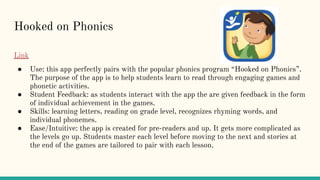
Hooked on Phonics
Link
● Use: this app perfectly pairs with the popular phonics program “Hooked on Phonics”.
The purpose of the app is to help students learn to read through engaging games and
phonetic activities.
● Student Feedback: as students interact with the app the are given feedback in the form
of individual achievement in the games.
● Skills: learning letters, reading on grade level, recognizes rhyming words, and
individual phonemes.
● Ease/Intuitive: the app is created for pre-readers and up. It gets more complicated as
the levels go up. Students master each level before moving to the next and stories at
the end of the games are tailored to pair with each lesson.
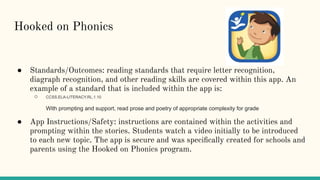
Hooked on Phonics
● Standards/Outcomes: reading standards that require letter recognition,
diagraph recognition, and other reading skills are covered within this app. An
example of a standard that is included within the app is:
○ CCSS.ELA-LITERACY.RL.1.10
With prompting and support, read prose and poetry of appropriate complexity for grade
● App Instructions/Safety: instructions are contained within the activities and
prompting within the stories. Students watch a video initially to be introduced
to each new topic. The app is secure and was specifically created for schools and
parents using the Hooked on Phonics program.
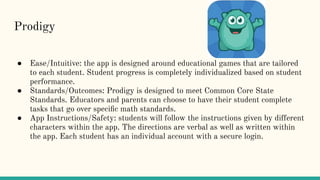
Prodigy
Link
● Use: Prodigy is a math app designed to help students achieve math proficiency.
The app is for educators as well as parents who want to keep up with their
students progress.
● Student Feedback: students are given feedback at each level as they work
through the educational games. Those monitoring student progress get updated
reports each time students participate in app activities.
● Skills: basic math knowledge and computation skills
Prodigy
● Ease/Intuitive: the app is designed around educational games that are tailored
to each student. Student progress is completely individualized based on student
performance.
● Standards/Outcomes: Prodigy is designed to meet Common Core State
Standards. Educators and parents can choose to have their student complete
tasks that go over specific math standards.
● App Instructions/Safety: students will follow the instructions given by different
characters within the app. The directions are verbal as well as written within
the app. Each student has an individual account with a secure login.
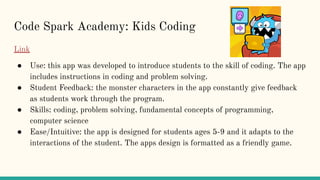
Code Spark Academy: Kids Coding
Link
● Use: this app was developed to introduce students to the skill of coding. The app
includes instructions in coding and problem solving.
● Student Feedback: the monster characters in the app constantly give feedback
as students work through the program.
● Skills: coding, problem solving, fundamental concepts of programming,
computer science
● Ease/Intuitive: the app is designed for students ages 5-9 and it adapts to the
interactions of the student. The apps design is formatted as a friendly game.
Code Spark Academy: Kids Coding
Link
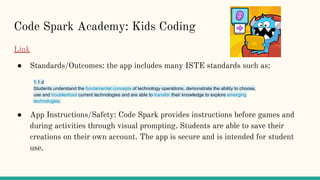
● Standards/Outcomes: the app includes many ISTE standards such as:
● App Instructions/Safety: Code Spark provides instructions before games and
during activities through visual prompting. Students are able to save their
creations on their own account. The app is secure and is intended for student
use.
1.1.d
Students understand the fundamental concepts of technology operations, demonstrate the ability to choose,
use and troubleshoot current technologies and are able to transfer their knowledge to explore emerging
technologies.
Spy Sam Reading
Link
● Use: Spy Sam Reading apps are stories created for dyslexic students. Each app is an exciting
story formatted and created specifically for ease of use for dyslexic students. Simple
vocabulary, screen design, and an intentional story plot make the apps unique.
● Student Feedback: this app is a reading app so feedback is given in the form of a student being
able to read and understand the content within the story. Students should be self-assessing as
they read.
● Skills: basic reading skills, understanding plot, fluency
● Ease/Intuitive: this app is a resource more than an intuitive program. It allows students who
struggle with reading to be able to read effectively because of the special features within the
text.
● Standards/Outcomes: grade level reading standards as well as standards covering decoding
skills are within this app.
● App Instructions/Safety: this app is completely safe because it is simply a special kind of
book.
Tappity
Link
● Use: provides interactive science lessons for students ages 4-10
● Student Feedback: feedback is received through playing various games
and receiving different achievements within the app. Instruction is given
as students interact with the app.
● Skills: Tappity teaches students how to explore their environment,
notetake, research, and follow the scientific method.
● Ease/Intuition: The app gives instructions to students and allows them to
interact with the app through games, journaling, and drawing. It is
designed for even younger students. Different lessons meet the needs of
varying ages of students.
Tappity
● Standards/Outcomes: the app contains over 100,000 lessons on various
science subjects meeting state standards. If a subject cannot be found,
app creators come up with a lesson on your desired subject within 90
days.
● App Instructions/Safety: Students are given verbal as well as written
instructions as they complete activities within the app, At each step
students are guided through the app. Each student has a private account
that is accessible only by the parent for safety.
● Student Feedback: Students really enjoy this app because they are able to move
and work at their own pace.
● Skills:
● Ease/Intuitive: For elementary students, the lessons are very easy with guided
practice, lesson aligned fluency and paper exit tickets. Badges are visible for
completion.
Zearn Math
● Use: FREE!! Elementary/Secondary program that is
used to help kids have a more engaging learning
experience with math. The lessons have a daily
diagnostic that will help with support.
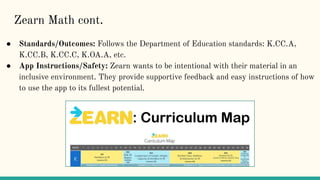
● Standards/Outcomes: Follows the Department of Education standards: K.CC.A,
K.CC.B, K.CC.C, K.OA.A, etc.
● App Instructions/Safety: Zearn wants to be intentional with their material in an
inclusive environment. They provide supportive feedback and easy instructions of how
to use the app to its fullest potential.
Zearn Math cont.
Khan Academy Kids
● Use and Skills: FREE!! Engages students in social emotional,
early literacy, reading, writing, language, and math. Utilizing
interactive activities, books, videos, games, and lessons.
● Student Feedback: Students enjoy this in the classroom and at home because it is
very engaging.
● Ease/Intuitive: Wide variety of videos, songs, and creative lessons to make it fun and
easy for kids as young as 2 to encourage early learning.
● Standards/Outcomes: Utilizing partnerships, like Illustrative Mathematics, to ensure
their material aligns with the Common Core standards.
● App Instructions/Safety: “We take extra precautions for our younger students under
the age of 13, including restricting child accounts to automatically block features that
would allow a child to post or disclose personal information.” -www.khanacademy.org
Teach Your Monster to Read
● Use: FREE!! Teaches your kids how to read with Phonics by covering letters and
sounds and helps build to read full sentences.
● Student Feedback: Students love that it is in a game format and that it is a student
lead instruction because they are needing to teach their monster to read.
● Skills: Learn through reading skills like matching letters to sounds, blending,
segmenting, tricky/red words, and reading full sentences.
● Ease/Intuitive: Students are easily using this app in the classroom and at home.
● Standards/Outcomes: Aligns with Common Core ELA standards
● App Instructions/Safety: Overall an easy app to use and prides itself on the safe
environment they can provide the students.
Mosaic by ACT (Formally ScootPad)
● Use: FREE!! This app provides educational information such as MAT and ELA
contact.
● Student Feedback: Student appreciate the clear and precious information and
feedback.
● Skills: Focuses on social emotional well being, self-management, responsible decision
making, relationship skills, and social awareness.
● Ease/Intuitive: The learning science of data driven learning makes this program to
easy to use to build knowledge of math, ELA, spelling, reading, writing, and science.
● Standards/Outcomes: Aligns with Common Core standards
● App Instructions/Safety: Very secure and safe app.
● Use: FREE!! GoNoodle is a free app that has been designed to help get
kids moving with short brain breaks and interactive videos.
● Student Feedback: Each time an activity is fulfilled or completed, their
GoNoodle character levels up until it is able to transform into a stronger
better version.
● Skills: GoNoodle is a great way for students to take a break and
re-energize themselves. The videos talk about social/emotional skills,
language arts, math, science, and social studies.
● Ease/Intuitive: The teacher is the main user.
● Standards/Outcomes: Promotes a healthy lifestyle while providing
videos that help with science, social studies, language arts, and math.
● App Instructions/Safety: Very easy to follow instructions for the kids.

10 best educational apps

  • 1.
  • 2.
    Excel Spreadsheet Link OliviaCalaway and Amanda Tarrant’s Excel spreadsheet ←(CLICK TO FOLLOW LINK TO EXCEL SPREADSHEET) ● We have both selected our personal top ten apps. ● Both selected 5 apps out of our lists to focus on for our presentation.
  • 3.
    Hooked on Phonics Link ●Use: this app perfectly pairs with the popular phonics program “Hooked on Phonics”. The purpose of the app is to help students learn to read through engaging games and phonetic activities. ● Student Feedback: as students interact with the app the are given feedback in the form of individual achievement in the games. ● Skills: learning letters, reading on grade level, recognizes rhyming words, and individual phonemes. ● Ease/Intuitive: the app is created for pre-readers and up. It gets more complicated as the levels go up. Students master each level before moving to the next and stories at the end of the games are tailored to pair with each lesson.
  • 4.
    Hooked on Phonics ●Standards/Outcomes: reading standards that require letter recognition, diagraph recognition, and other reading skills are covered within this app. An example of a standard that is included within the app is: ○ CCSS.ELA-LITERACY.RL.1.10 With prompting and support, read prose and poetry of appropriate complexity for grade ● App Instructions/Safety: instructions are contained within the activities and prompting within the stories. Students watch a video initially to be introduced to each new topic. The app is secure and was specifically created for schools and parents using the Hooked on Phonics program.
  • 5.
    Prodigy Link ● Use: Prodigyis a math app designed to help students achieve math proficiency. The app is for educators as well as parents who want to keep up with their students progress. ● Student Feedback: students are given feedback at each level as they work through the educational games. Those monitoring student progress get updated reports each time students participate in app activities. ● Skills: basic math knowledge and computation skills
  • 6.
    Prodigy ● Ease/Intuitive: theapp is designed around educational games that are tailored to each student. Student progress is completely individualized based on student performance. ● Standards/Outcomes: Prodigy is designed to meet Common Core State Standards. Educators and parents can choose to have their student complete tasks that go over specific math standards. ● App Instructions/Safety: students will follow the instructions given by different characters within the app. The directions are verbal as well as written within the app. Each student has an individual account with a secure login.
  • 7.
    Code Spark Academy:Kids Coding Link ● Use: this app was developed to introduce students to the skill of coding. The app includes instructions in coding and problem solving. ● Student Feedback: the monster characters in the app constantly give feedback as students work through the program. ● Skills: coding, problem solving, fundamental concepts of programming, computer science ● Ease/Intuitive: the app is designed for students ages 5-9 and it adapts to the interactions of the student. The apps design is formatted as a friendly game.
  • 8.
    Code Spark Academy:Kids Coding Link ● Standards/Outcomes: the app includes many ISTE standards such as: ● App Instructions/Safety: Code Spark provides instructions before games and during activities through visual prompting. Students are able to save their creations on their own account. The app is secure and is intended for student use. 1.1.d Students understand the fundamental concepts of technology operations, demonstrate the ability to choose, use and troubleshoot current technologies and are able to transfer their knowledge to explore emerging technologies.
  • 9.
    Spy Sam Reading Link ●Use: Spy Sam Reading apps are stories created for dyslexic students. Each app is an exciting story formatted and created specifically for ease of use for dyslexic students. Simple vocabulary, screen design, and an intentional story plot make the apps unique. ● Student Feedback: this app is a reading app so feedback is given in the form of a student being able to read and understand the content within the story. Students should be self-assessing as they read. ● Skills: basic reading skills, understanding plot, fluency ● Ease/Intuitive: this app is a resource more than an intuitive program. It allows students who struggle with reading to be able to read effectively because of the special features within the text. ● Standards/Outcomes: grade level reading standards as well as standards covering decoding skills are within this app. ● App Instructions/Safety: this app is completely safe because it is simply a special kind of book.
  • 10.
    Tappity Link ● Use: providesinteractive science lessons for students ages 4-10 ● Student Feedback: feedback is received through playing various games and receiving different achievements within the app. Instruction is given as students interact with the app. ● Skills: Tappity teaches students how to explore their environment, notetake, research, and follow the scientific method. ● Ease/Intuition: The app gives instructions to students and allows them to interact with the app through games, journaling, and drawing. It is designed for even younger students. Different lessons meet the needs of varying ages of students.
  • 11.
    Tappity ● Standards/Outcomes: theapp contains over 100,000 lessons on various science subjects meeting state standards. If a subject cannot be found, app creators come up with a lesson on your desired subject within 90 days. ● App Instructions/Safety: Students are given verbal as well as written instructions as they complete activities within the app, At each step students are guided through the app. Each student has a private account that is accessible only by the parent for safety.
  • 12.
    ● Student Feedback:Students really enjoy this app because they are able to move and work at their own pace. ● Skills: ● Ease/Intuitive: For elementary students, the lessons are very easy with guided practice, lesson aligned fluency and paper exit tickets. Badges are visible for completion. Zearn Math ● Use: FREE!! Elementary/Secondary program that is used to help kids have a more engaging learning experience with math. The lessons have a daily diagnostic that will help with support.
  • 13.
    ● Standards/Outcomes: Followsthe Department of Education standards: K.CC.A, K.CC.B, K.CC.C, K.OA.A, etc. ● App Instructions/Safety: Zearn wants to be intentional with their material in an inclusive environment. They provide supportive feedback and easy instructions of how to use the app to its fullest potential. Zearn Math cont.
  • 14.
    Khan Academy Kids ●Use and Skills: FREE!! Engages students in social emotional, early literacy, reading, writing, language, and math. Utilizing interactive activities, books, videos, games, and lessons. ● Student Feedback: Students enjoy this in the classroom and at home because it is very engaging. ● Ease/Intuitive: Wide variety of videos, songs, and creative lessons to make it fun and easy for kids as young as 2 to encourage early learning. ● Standards/Outcomes: Utilizing partnerships, like Illustrative Mathematics, to ensure their material aligns with the Common Core standards. ● App Instructions/Safety: “We take extra precautions for our younger students under the age of 13, including restricting child accounts to automatically block features that would allow a child to post or disclose personal information.” -www.khanacademy.org
  • 15.
    Teach Your Monsterto Read ● Use: FREE!! Teaches your kids how to read with Phonics by covering letters and sounds and helps build to read full sentences. ● Student Feedback: Students love that it is in a game format and that it is a student lead instruction because they are needing to teach their monster to read. ● Skills: Learn through reading skills like matching letters to sounds, blending, segmenting, tricky/red words, and reading full sentences. ● Ease/Intuitive: Students are easily using this app in the classroom and at home. ● Standards/Outcomes: Aligns with Common Core ELA standards ● App Instructions/Safety: Overall an easy app to use and prides itself on the safe environment they can provide the students.
  • 16.
    Mosaic by ACT(Formally ScootPad) ● Use: FREE!! This app provides educational information such as MAT and ELA contact. ● Student Feedback: Student appreciate the clear and precious information and feedback. ● Skills: Focuses on social emotional well being, self-management, responsible decision making, relationship skills, and social awareness. ● Ease/Intuitive: The learning science of data driven learning makes this program to easy to use to build knowledge of math, ELA, spelling, reading, writing, and science. ● Standards/Outcomes: Aligns with Common Core standards ● App Instructions/Safety: Very secure and safe app.
  • 17.
    ● Use: FREE!!GoNoodle is a free app that has been designed to help get kids moving with short brain breaks and interactive videos. ● Student Feedback: Each time an activity is fulfilled or completed, their GoNoodle character levels up until it is able to transform into a stronger better version. ● Skills: GoNoodle is a great way for students to take a break and re-energize themselves. The videos talk about social/emotional skills, language arts, math, science, and social studies. ● Ease/Intuitive: The teacher is the main user. ● Standards/Outcomes: Promotes a healthy lifestyle while providing videos that help with science, social studies, language arts, and math. ● App Instructions/Safety: Very easy to follow instructions for the kids.