
ELECTRONIC PAYMENT
SYSTEMS
INTRODUCTION TO INTERNET & OTHER EMERGING
TECCHNOLOGYUNIT I
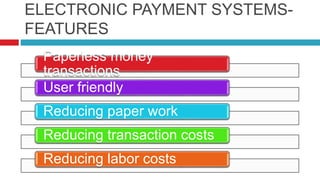
ELECTRONIC PAYMENT SYSTEMS-
FEATURES
Paperless money
transactions
User friendly
Reducing paper work
Reducing transaction costs
Reducing labor costs
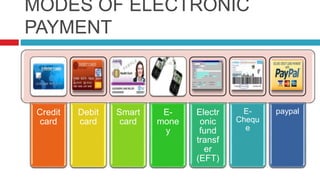
MODES OF ELECTRONIC
PAYMENT
Credit
card
Debit
card
Smart
card
E-
mone
y
Electr
onic
fund
transf
er
(EFT)
E-
Chequ
e
paypal
CREDIT CARD
 Most common mode
 It is a Small plastic card with
unique number attached with
an account
 Also has magnetic strip
embedded in it which is used
to read card by a machine
 After purchase Bank pays on
behalf of customer
 Customer has certain time
period to pay credit card bill
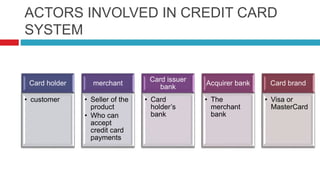
ACTORS INVOLVED IN CREDIT CARD
SYSTEM
Card holder
• customer
merchant
• Seller of the
product
• Who can
accept
credit card
payments
Card issuer
bank
• Card
holder’s
bank
Acquirer bank
• The
merchant
bank
Card brand
• Visa or
MasterCard
CREDIT CARD PAYMENT
SYSTEM
Step 1
• Bank issues
& activates
a credit card
to customer
on his/her
request
Step 2
• Customer
presents
credit card
information
to merchant
site or to
merchant
from whom
he/she want
to purchase
a
product/serv
ice
Step 3
• Merchant
validates
customer’s
identity by
asking for
approval
from card
brand
company
Step 4
• Card band
company
authenticate
s the credit
card & paid
the
transaction
by credit.
Merchant
keeps the
sales slip
Step 5
• Merchant
submits the
sales slip to
acquirer
banks &
gets the
service
charges
paid to
him/her
Step 6
• Acquirer
bank
requests the
card brand
company to
clear the
credit
amount &
gets the
payment
Step 7
• Now card
brand
company
asks to clear
amount from
the issuer
bank &
amount gets
transferred
to card
brand
company
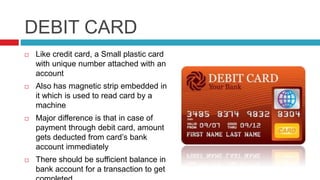
DEBIT CARD
 Like credit card, a Small plastic card
with unique number attached with an
account
 Also has magnetic strip embedded in
it which is used to read card by a
machine
 Major difference is that in case of
payment through debit card, amount
gets deducted from card’s bank
account immediately
 There should be sufficient balance in
bank account for a transaction to get
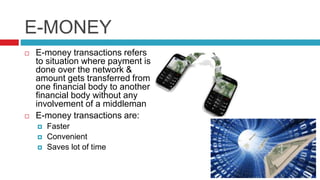
E-MONEY
 E-money transactions refers
to situation where payment is
done over the network &
amount gets transferred from
one financial body to another
financial body without any
involvement of a middleman
 E-money transactions are:
 Faster
 Convenient
 Saves lot of time
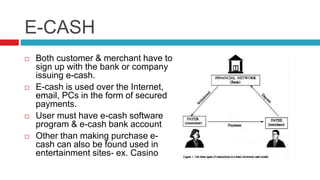
E-CASH
 Both customer & merchant have to
sign up with the bank or company
issuing e-cash.
 E-cash is used over the Internet,
email, PCs in the form of secured
payments.
 User must have e-cash software
program & e-cash bank account
 Other than making purchase e-
cash can also be found used in
entertainment sites- ex. Casino
ELECTRONIC FUND
TRANSFER
 Popular method to
transfer money
 Accounts can be in
the same bank or
different banks
 Fund transfer can be
done through ATM or
using computer
PAYPAL
 International money transfer
through internet
 Uses encryption software to
make it secure
 We can send funds to anyone
with an e-mail address,
whether or not they have a
PayPal account.
 To receive the funds, recipient
must have PayPal account
associated with that e-mail
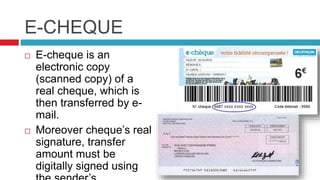
E-CHEQUE
 E-cheque is an
electronic copy
(scanned copy) of a
real cheque, which is
then transferred by e-
mail.
 Moreover cheque’s real
signature, transfer
amount must be
digitally signed using
DIGITAL CASH
 System that allows a person to pay
for goods or services by transmitting
a no. from one computer to another.
 Like the serial no.s on real bank
notes, the digital cash certificate no.s
are unique.
 Each digital cash is issued by a bank
& represents a specified sum of ‘real
money’.
 Key feature: like real cash, it is
anonymous & reusable.
 Only vender need to clear the
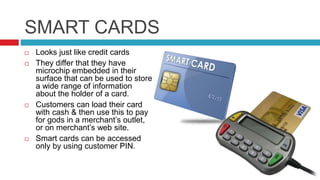
SMART CARDS
 Looks just like credit cards
 They differ that they have
microchip embedded in their
surface that can be used to store
a wide range of information
about the holder of a card.
 Customers can load their card
with cash & then use this to pay
for gods in a merchant’s outlet,
or on merchant’s web site.
 Smart cards can be accessed
only by using customer PIN.
SMART CARD EXAMPLE :
DOCTOR VISIT
 On arrival at the surgery, you
hand over your smart card to
the receptionist to check in.
 Once in seeing the doctor you
give him/her your card so
they can review & prescribe
medication.
 At the pharmacy, you hand
over your card to receive your
prescription, and to pay for it
as you can also use the smart
card as a credit or debit card.
THANK YOU!
-By Arti Gavas

Electronic payment systems

  • 1.
    ELECTRONIC PAYMENT SYSTEMS INTRODUCTION TOINTERNET & OTHER EMERGING TECCHNOLOGYUNIT I
  • 2.
    ELECTRONIC PAYMENT SYSTEMS- FEATURES Paperlessmoney transactions User friendly Reducing paper work Reducing transaction costs Reducing labor costs
  • 3.
  • 4.
    CREDIT CARD  Mostcommon mode  It is a Small plastic card with unique number attached with an account  Also has magnetic strip embedded in it which is used to read card by a machine  After purchase Bank pays on behalf of customer  Customer has certain time period to pay credit card bill
  • 5.
    ACTORS INVOLVED INCREDIT CARD SYSTEM Card holder • customer merchant • Seller of the product • Who can accept credit card payments Card issuer bank • Card holder’s bank Acquirer bank • The merchant bank Card brand • Visa or MasterCard
  • 6.
    CREDIT CARD PAYMENT SYSTEM Step1 • Bank issues & activates a credit card to customer on his/her request Step 2 • Customer presents credit card information to merchant site or to merchant from whom he/she want to purchase a product/serv ice Step 3 • Merchant validates customer’s identity by asking for approval from card brand company Step 4 • Card band company authenticate s the credit card & paid the transaction by credit. Merchant keeps the sales slip Step 5 • Merchant submits the sales slip to acquirer banks & gets the service charges paid to him/her Step 6 • Acquirer bank requests the card brand company to clear the credit amount & gets the payment Step 7 • Now card brand company asks to clear amount from the issuer bank & amount gets transferred to card brand company
  • 7.
    DEBIT CARD  Likecredit card, a Small plastic card with unique number attached with an account  Also has magnetic strip embedded in it which is used to read card by a machine  Major difference is that in case of payment through debit card, amount gets deducted from card’s bank account immediately  There should be sufficient balance in bank account for a transaction to get
  • 8.
    E-MONEY  E-money transactionsrefers to situation where payment is done over the network & amount gets transferred from one financial body to another financial body without any involvement of a middleman  E-money transactions are:  Faster  Convenient  Saves lot of time
  • 9.
    E-CASH  Both customer& merchant have to sign up with the bank or company issuing e-cash.  E-cash is used over the Internet, email, PCs in the form of secured payments.  User must have e-cash software program & e-cash bank account  Other than making purchase e- cash can also be found used in entertainment sites- ex. Casino
  • 10.
    ELECTRONIC FUND TRANSFER  Popularmethod to transfer money  Accounts can be in the same bank or different banks  Fund transfer can be done through ATM or using computer
  • 11.
    PAYPAL  International moneytransfer through internet  Uses encryption software to make it secure  We can send funds to anyone with an e-mail address, whether or not they have a PayPal account.  To receive the funds, recipient must have PayPal account associated with that e-mail
  • 12.
    E-CHEQUE  E-cheque isan electronic copy (scanned copy) of a real cheque, which is then transferred by e- mail.  Moreover cheque’s real signature, transfer amount must be digitally signed using
  • 13.
    DIGITAL CASH  Systemthat allows a person to pay for goods or services by transmitting a no. from one computer to another.  Like the serial no.s on real bank notes, the digital cash certificate no.s are unique.  Each digital cash is issued by a bank & represents a specified sum of ‘real money’.  Key feature: like real cash, it is anonymous & reusable.  Only vender need to clear the
  • 14.
    SMART CARDS  Looksjust like credit cards  They differ that they have microchip embedded in their surface that can be used to store a wide range of information about the holder of a card.  Customers can load their card with cash & then use this to pay for gods in a merchant’s outlet, or on merchant’s web site.  Smart cards can be accessed only by using customer PIN.
  • 15.
    SMART CARD EXAMPLE: DOCTOR VISIT  On arrival at the surgery, you hand over your smart card to the receptionist to check in.  Once in seeing the doctor you give him/her your card so they can review & prescribe medication.  At the pharmacy, you hand over your card to receive your prescription, and to pay for it as you can also use the smart card as a credit or debit card.
  • 16.