E-PAYMENT SYSTEMS
INTRODUCTION
 E payment is a subset of an e-commerce
transaction to include electronic payment for
buying and selling goods or services offered
through the Internet.
 Generally we think of electronic payments as
referring to online transactions on the internet, there
are actually many forms of electronic payments.
E-PAYMENT SYSTEMS
 To transfer money over the Internet
 Methods of traditional payment
 Check, credit card, or cash
 Methods of electronic payment
 Electronic cash, software wallets, smart cards, and credit/debit
cards
 Scrip is digital cash minted by third-party organizations
REQUIREMENTS FOR E-PAYMENTS
 Atomicity
 Money is not lost or created during a transfer
 Good atomicity
 Money and good are exchanged atomically
 Non-repudiation
 No party can deny its role in the transaction
 Digital signatures
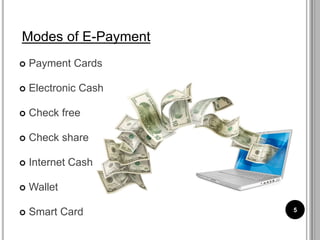
 Payment Cards
 Electronic Cash
 Check free
 Check share
 Internet Cash
 Wallet
 Smart Card 5
Modes of E-Payment
PAYMENT CARDS
 Payment cards are all types of plastic cards that
consumers use to make purchases:
 Credit cards
 such as a Visa or a MasterCard, has a preset
spending limit based on the user’s credit limit.
 Debit cards
 removes the amount of the charge from the
cardholder’s account and transfers it to the seller’s
bank.
 Charge cards
 such as one from American Express, carries no
preset spending limit.
6
PAYMENT ACCEPTANCE AND PROCESSING
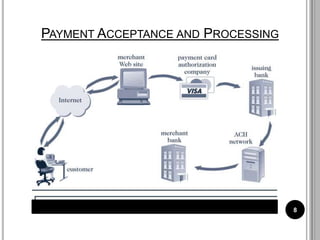
 Open and closed loop systems will accept and
process payment cards.
 A merchant bank or acquiring bank is a bank that
does business with merchants who want to accept
payment cards.
 Software packaged with your electronic commerce
software can handle payment card processing
automatically.
7
PAYMENT ACCEPTANCE AND PROCESSING
8
ADVANTAGES AND DISADVANTAGES
OF PAYMENT CARDS
 Advantages:
• Payment cards provide fraud protection.
• They have worldwide acceptance.
• They are good for online transactions.
 Disadvantages:
• Payment card service companies charge merchants
per-transaction fees and monthly processing fees.
9
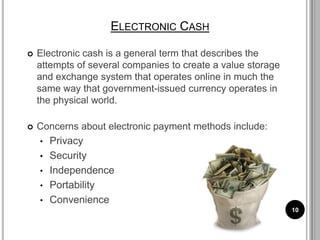
ELECTRONIC CASH
 Electronic cash is a general term that describes the
attempts of several companies to create a value storage
and exchange system that operates online in much the
same way that government-issued currency operates in
the physical world.
 Concerns about electronic payment methods include:
• Privacy
• Security
• Independence
• Portability
• Convenience
10
HOLDING ELECTRONIC CASH: ONLINE AND
OFFLINE CASH
 Two approaches to holding cash: online storage and
offline storage.
 Online cash storage means that an online bank is
involved in all transfers of electronic cash.
 Offline cash storage is the virtual equivalent of money
you keep in your wallet. However, it must prevent
double or fraudulent spending.
11
ADVANTAGES OF ELECTRONIC CASH
 Electronic cash transactions are more efficient and
less costly than other methods.
 The distance that an electronic transaction must
travel does not affect cost.
 The fixed cost of hardware to handle electronic
cash is nearly zero.
 Electronic cash does not require that one party
have any special authorization.
12
DISADVANTAGES OF ELECTRONIC CASH
 Electronic cash provides no audit trail.
 Because true electronic cash is not traceable,
money laundering is a problem.
 Electronic cash is susceptible to forgery.
 So far, electronic cash is a commercial flop.
13
CHECK FREE
 CheckFree provides online payment processing
services to both large corporations and individual
Internet users.
 CheckFree permits users to pay all their bills with
online electronic checks.
 CheckFree provides part of the technology that the
Web portal Yahoo! uses to provide its Yahoo! Bill
Pay service.
14
CHECK FREE
15
CLICK SHARE
 Clickshare is an electronic cash system aimed at
magazine and newspaper publishers.
 Users with an ISP that supports Clickshare are
automatically registered with Clickshare.
 Clickshare tracks users with the standard HTTP
Web protocol.
16
ELECTRONIC WALLETS
 An electronic wallet serves a function similar to a
physical wallet:
• holds credit cards, electronic cash, owner identification,
and owner contact information
• provides owner contact information at an electronic
commerce site’s checkout counter
 Some electronic wallets contain an address book.
17
ELECTRONIC WALLETS
 Electronic wallets make shopping more efficient.
 Electronic wallets fall into two categories based on
where they are stored:
• Server-side electronic wallet
• Client-side electronic wallet
 Electronic wallets store shipping and billing information,
including a consumer’s first and last names, street
address, city, state, country, and zip or postal code.
 E.g. Microsoft .NET passport ,yahoo! Wallet
18
HOW TO ACCESS E-WALLETS
USER
REGISTRATION
POST JOB IN
WORKROOM
SEE PROPOSAL
PUT MONEY
INTO E-WALLET
ACCEPT JOB
APPROVE
PAYMENT
REQUEST
RELAESE
FUNDS TO
PROJECT FROM
WALLET
 The W3C Electronic Commerce Interest
Group (ECIG) developed a set of standards called
the the Common Markup for Micropayment Per-
Fee-Links.
 This standard identifies existing system
micropayment types of online connections, stored-
value systems, and combined online-offline
systems.
THE W3C PROPOSED STANDARD
20
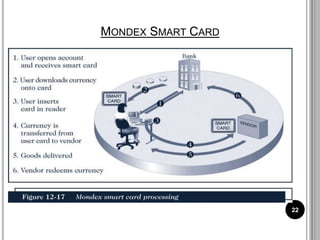
SMART CARD
 A smart card is a plastic card with an embedded microchip
containing information about you.
 A smart card can store about 100 times the amount of
information that a magnetic strip plastic card can store.
 A smart card contains private user information, such as
financial facts, private encryption keys, account
information, credit card numbers, health insurance
information, etc.
 E.g. Mondex smart card , Octopus smart card 21
MONDEX SMART CARD
22
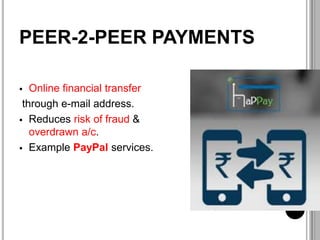
PEER-2-PEER PAYMENTS
 Online financial transfer
through e-mail address.
 Reduces risk of fraud &
overdrawn a/c.
 Example PayPal services.
E-PAYPAL SYSTEM
 It enables the merchants or individuals to withdraw cash
from their PayPal accounts.
 Allows customers to send their transaction money quickly &
safe to anyone.
 To use it one should must get registered themselves .
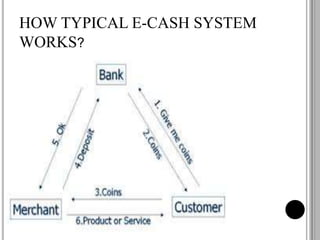
E-CASH
 Online payments via debit cards, credit cards or
smart card are the examples of e-money
transactions.
 E Cash is transferred directly from customer’s
desktop to the merchant’s site.
HOW TYPICAL E-CASH SYSTEM
WORKS?
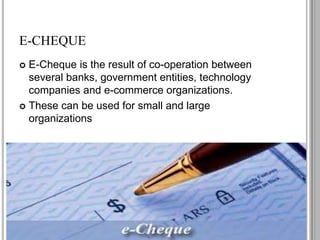
E-CHEQUE
 E-Cheque is the result of co-operation between
several banks, government entities, technology
companies and e-commerce organizations.
 These can be used for small and large
organizations
E-CHEQUE WORKING
ELECTRONIC FUND TRANSFER
 It is one of the oldest methods to transfer money.
 It is the groundwork of groundless and cheque-less
culture, it is used to transfer money without any
paper money changing hands.
BENEFITS OF EFT
Simplified accounting
Improved efficiency
Reduced administrative costs
Improved security
BENEFITS OF ELECTRONIC
PAYMENT SYSTEM
BENEFIT TO
BUYERS
BENEFITS TO
SELLERS
•Electronic payment methods provide a wide range of payment options and enhanced
financial management tools through which individuals can pay for numerous different
types of transactions ranging from parking payments to travel tickets pr payments in
foreign currency.
1. Convenience
of global
acceptance
•With electronic payment methods payments can be made over the phone, on the
internet, and through the post and accepted everywhere.
2. Universal
acceptance
•Electronic payment system is safe and secure as it follows strict encrypted secure
system for making payments keeping buyer’s identity and details completely
confidential and reduced liability for stolen or misused cards.
3. Greater
security
• The electronic payment system provides additional insurance by
facilitating disputes resolution in the case of unsatisfactory receipt
of goods and services .
4. Consumer
protection
•E-payment system allow consumers to transfer funds, purchase stocks,
and offer a variety of other services without having to handle physical
cash. Using credit card it is very easy to make payments.
4. Accessibility
to immediate
credit
•Electronic payment also provides the ability to control payment for goods
and services over time by allowing buyers to pay at will whenever they
want or have sufficient funds to make payments.
6. Better
control over
payments
BENEFITS TO SELLERS
•EPS ensure faster processing of transaction from verification and
authorization to clearing and settlement . It reduces the visibility
of information.
1. Speed and
security
•EPS provides companies freedom from more costly labour,
materials and accounting services hat are require in paper based
processing.
2. Reduces cost
•It leads to better management of cash flow, inventory and
financial planning due to swift bank payment.
3. Efficiency
•When used properly the electronic aspects of purchasing and
prepaid cards can increase internal controls over high volumes .
4. Better control
• It is used when you shop online at an e-commerce site,
such as Amazon .
1. A ONE TIME
CUSTOMER TO
VENDOR PAYMENT
• It is used when you pay a bill through a regularly
scheduled direct debit from your checking account or an
automatic charge to your credit card.
2. RECURRING
CUSTOMER TO
VENDOR PAYMENT
• In this, your bank offer a service called online bill pay.
3. AUTOMATIC
BANK TO VENDOR
PAYMENT
TYPES OF TRANSACTIONS IN EPS

E-payment Systems .pptx

  • 1.
  • 2.
    INTRODUCTION  E paymentis a subset of an e-commerce transaction to include electronic payment for buying and selling goods or services offered through the Internet.  Generally we think of electronic payments as referring to online transactions on the internet, there are actually many forms of electronic payments.
  • 3.
    E-PAYMENT SYSTEMS  Totransfer money over the Internet  Methods of traditional payment  Check, credit card, or cash  Methods of electronic payment  Electronic cash, software wallets, smart cards, and credit/debit cards  Scrip is digital cash minted by third-party organizations
  • 4.
    REQUIREMENTS FOR E-PAYMENTS Atomicity  Money is not lost or created during a transfer  Good atomicity  Money and good are exchanged atomically  Non-repudiation  No party can deny its role in the transaction  Digital signatures
  • 5.
     Payment Cards Electronic Cash  Check free  Check share  Internet Cash  Wallet  Smart Card 5 Modes of E-Payment
  • 6.
    PAYMENT CARDS  Paymentcards are all types of plastic cards that consumers use to make purchases:  Credit cards  such as a Visa or a MasterCard, has a preset spending limit based on the user’s credit limit.  Debit cards  removes the amount of the charge from the cardholder’s account and transfers it to the seller’s bank.  Charge cards  such as one from American Express, carries no preset spending limit. 6
  • 7.
    PAYMENT ACCEPTANCE ANDPROCESSING  Open and closed loop systems will accept and process payment cards.  A merchant bank or acquiring bank is a bank that does business with merchants who want to accept payment cards.  Software packaged with your electronic commerce software can handle payment card processing automatically. 7
  • 8.
  • 9.
    ADVANTAGES AND DISADVANTAGES OFPAYMENT CARDS  Advantages: • Payment cards provide fraud protection. • They have worldwide acceptance. • They are good for online transactions.  Disadvantages: • Payment card service companies charge merchants per-transaction fees and monthly processing fees. 9
  • 10.
    ELECTRONIC CASH  Electroniccash is a general term that describes the attempts of several companies to create a value storage and exchange system that operates online in much the same way that government-issued currency operates in the physical world.  Concerns about electronic payment methods include: • Privacy • Security • Independence • Portability • Convenience 10
  • 11.
    HOLDING ELECTRONIC CASH:ONLINE AND OFFLINE CASH  Two approaches to holding cash: online storage and offline storage.  Online cash storage means that an online bank is involved in all transfers of electronic cash.  Offline cash storage is the virtual equivalent of money you keep in your wallet. However, it must prevent double or fraudulent spending. 11
  • 12.
    ADVANTAGES OF ELECTRONICCASH  Electronic cash transactions are more efficient and less costly than other methods.  The distance that an electronic transaction must travel does not affect cost.  The fixed cost of hardware to handle electronic cash is nearly zero.  Electronic cash does not require that one party have any special authorization. 12
  • 13.
    DISADVANTAGES OF ELECTRONICCASH  Electronic cash provides no audit trail.  Because true electronic cash is not traceable, money laundering is a problem.  Electronic cash is susceptible to forgery.  So far, electronic cash is a commercial flop. 13
  • 14.
    CHECK FREE  CheckFreeprovides online payment processing services to both large corporations and individual Internet users.  CheckFree permits users to pay all their bills with online electronic checks.  CheckFree provides part of the technology that the Web portal Yahoo! uses to provide its Yahoo! Bill Pay service. 14
  • 15.
  • 16.
    CLICK SHARE  Clickshareis an electronic cash system aimed at magazine and newspaper publishers.  Users with an ISP that supports Clickshare are automatically registered with Clickshare.  Clickshare tracks users with the standard HTTP Web protocol. 16
  • 17.
    ELECTRONIC WALLETS  Anelectronic wallet serves a function similar to a physical wallet: • holds credit cards, electronic cash, owner identification, and owner contact information • provides owner contact information at an electronic commerce site’s checkout counter  Some electronic wallets contain an address book. 17
  • 18.
    ELECTRONIC WALLETS  Electronicwallets make shopping more efficient.  Electronic wallets fall into two categories based on where they are stored: • Server-side electronic wallet • Client-side electronic wallet  Electronic wallets store shipping and billing information, including a consumer’s first and last names, street address, city, state, country, and zip or postal code.  E.g. Microsoft .NET passport ,yahoo! Wallet 18
  • 19.
    HOW TO ACCESSE-WALLETS USER REGISTRATION POST JOB IN WORKROOM SEE PROPOSAL PUT MONEY INTO E-WALLET ACCEPT JOB APPROVE PAYMENT REQUEST RELAESE FUNDS TO PROJECT FROM WALLET
  • 20.
     The W3CElectronic Commerce Interest Group (ECIG) developed a set of standards called the the Common Markup for Micropayment Per- Fee-Links.  This standard identifies existing system micropayment types of online connections, stored- value systems, and combined online-offline systems. THE W3C PROPOSED STANDARD 20
  • 21.
    SMART CARD  Asmart card is a plastic card with an embedded microchip containing information about you.  A smart card can store about 100 times the amount of information that a magnetic strip plastic card can store.  A smart card contains private user information, such as financial facts, private encryption keys, account information, credit card numbers, health insurance information, etc.  E.g. Mondex smart card , Octopus smart card 21
  • 22.
  • 23.
    PEER-2-PEER PAYMENTS  Onlinefinancial transfer through e-mail address.  Reduces risk of fraud & overdrawn a/c.  Example PayPal services.
  • 24.
    E-PAYPAL SYSTEM  Itenables the merchants or individuals to withdraw cash from their PayPal accounts.  Allows customers to send their transaction money quickly & safe to anyone.  To use it one should must get registered themselves .
  • 25.
    E-CASH  Online paymentsvia debit cards, credit cards or smart card are the examples of e-money transactions.  E Cash is transferred directly from customer’s desktop to the merchant’s site.
  • 26.
    HOW TYPICAL E-CASHSYSTEM WORKS?
  • 27.
    E-CHEQUE  E-Cheque isthe result of co-operation between several banks, government entities, technology companies and e-commerce organizations.  These can be used for small and large organizations
  • 28.
  • 29.
    ELECTRONIC FUND TRANSFER It is one of the oldest methods to transfer money.  It is the groundwork of groundless and cheque-less culture, it is used to transfer money without any paper money changing hands.
  • 30.
    BENEFITS OF EFT Simplifiedaccounting Improved efficiency Reduced administrative costs Improved security
  • 31.
    BENEFITS OF ELECTRONIC PAYMENTSYSTEM BENEFIT TO BUYERS BENEFITS TO SELLERS
  • 32.
    •Electronic payment methodsprovide a wide range of payment options and enhanced financial management tools through which individuals can pay for numerous different types of transactions ranging from parking payments to travel tickets pr payments in foreign currency. 1. Convenience of global acceptance •With electronic payment methods payments can be made over the phone, on the internet, and through the post and accepted everywhere. 2. Universal acceptance •Electronic payment system is safe and secure as it follows strict encrypted secure system for making payments keeping buyer’s identity and details completely confidential and reduced liability for stolen or misused cards. 3. Greater security
  • 33.
    • The electronicpayment system provides additional insurance by facilitating disputes resolution in the case of unsatisfactory receipt of goods and services . 4. Consumer protection •E-payment system allow consumers to transfer funds, purchase stocks, and offer a variety of other services without having to handle physical cash. Using credit card it is very easy to make payments. 4. Accessibility to immediate credit •Electronic payment also provides the ability to control payment for goods and services over time by allowing buyers to pay at will whenever they want or have sufficient funds to make payments. 6. Better control over payments
  • 34.
    BENEFITS TO SELLERS •EPSensure faster processing of transaction from verification and authorization to clearing and settlement . It reduces the visibility of information. 1. Speed and security •EPS provides companies freedom from more costly labour, materials and accounting services hat are require in paper based processing. 2. Reduces cost •It leads to better management of cash flow, inventory and financial planning due to swift bank payment. 3. Efficiency •When used properly the electronic aspects of purchasing and prepaid cards can increase internal controls over high volumes . 4. Better control
  • 35.
    • It isused when you shop online at an e-commerce site, such as Amazon . 1. A ONE TIME CUSTOMER TO VENDOR PAYMENT • It is used when you pay a bill through a regularly scheduled direct debit from your checking account or an automatic charge to your credit card. 2. RECURRING CUSTOMER TO VENDOR PAYMENT • In this, your bank offer a service called online bill pay. 3. AUTOMATIC BANK TO VENDOR PAYMENT TYPES OF TRANSACTIONS IN EPS