
Prepared By:
Khurram shafique
Roll no 281
Payment Systems for
Electronic Commerce
Index
2
 Introduction to E-payment
 Modes of E-payment
 Payment cards-
 Intro to credit card, debit card & charge card
 Acceptance and processing
 Advantages and Disadvantages
 Electronic cash-
 Introduction and concern of cash
 Advantages
 Disadvantages
 Click Free
 Click Share
 Electronic Wallet
 Smart Card
Traditional Payment Methods
Payment: The transfer of money from one individual or legal
entity to another
 Cash
 Personal Cheques
 Money orders (Bank note)
3
Electronic Payment Systems
4
E-payment or Electronic payment is any digital financial
payment transaction involving currency transfer between two
or more parties
Implementation of electronic payment systems is in its
infancy and still evolving.
Electronic payments are far cheaper than the traditional
method of mailing out paper invoices and then processing
payments received.
5
 Payment Cards
 Electronic Cash
 Check free
 Check share
 Internet Cash
 Wallet
 Smart Card
Modes of E-Payment
Payment Cards
6
Payment cards are all types of plastic cards that consumers
use to make purchases:
Credit cards
such as a Visa or a MasterCard, has a preset spending limit based
on the user’s credit limit.
Debit cards
removes the amount of the charge from the cardholder’s account
and transfers it to the seller’s bank.
Charge cards
such as one from American Express, carries no preset spending
limit.
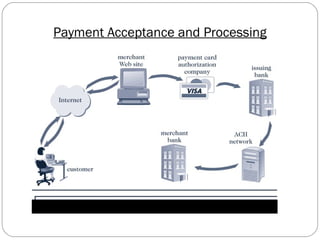
Payment Acceptance and Processing
7
Open and closed loop systems will accept and process
payment cards.
A merchant bank or acquiring bank is a bank that does
business with merchants who want to accept payment cards.
Software packaged with your electronic commerce software
can handle payment card processing automatically.
Payment Acceptance and Processing
8
Advantages and Disadvantages
of Payment Cards
9
Advantages:
• Payment cards provide fraud protection.
• They have worldwide acceptance.
• They are good for online transactions.
Disadvantages:
• Payment card service companies charge merchants per-
transaction fees and monthly processing fees.
Electronic Cash
10
Electronic cash is a general term that describes the attempts
of several companies to create a value storage and
exchange system that operates online in much the same
way that government-issued currency operates in the
physical world.
Concerns about electronic payment methods include:
• Privacy
• Security
• Independence
• Portability
• Convenience
Holding Electronic Cash: Online and Offline Cash
11
Two approaches to holding cash: online storage and offline
storage.
Online cash storage means that an online bank is involved
in all transfers of electronic cash.
Offline cash storage is the virtual equivalent of money you
keep in your wallet. However, it must prevent double or
fraudulent spending.
Advantages of Electronic Cash
12
Electronic cash transactions are more efficient and less costly
than other methods.
The distance that an electronic transaction must travel does
not affect cost.
The fixed cost of hardware to handle electronic cash is nearly
zero.
Electronic cash does not require that one party have any
special authorization.
Disadvantages of Electronic Cash
13
Electronic cash provides no audit trail.
Because true electronic cash is not traceable, money
laundering is a problem.
Electronic cash is susceptible to forgery.
So far, electronic cash is a commercial flop.
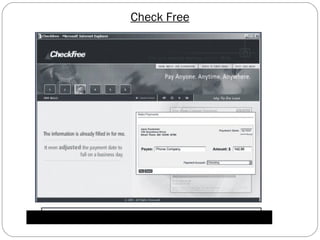
Check Free
14
Check Free provides online payment processing services to
both large corporations and individual Internet
users.
Check Free permits users to pay all their bills with online
electronic checks.
Check Free provides part of the technology that the Web
portal Yahoo! uses to provide its Yahoo! Bill Pay service.
Check Free
15
Click share
16
Click share is an electronic cash system aimed at magazine
and newspaper publishers.
Users with an ISP that supports Click share are automatically
registered with Click share.
Click share tracks users with the standard HTTP Web
protocol.
Electronic Wallets
17
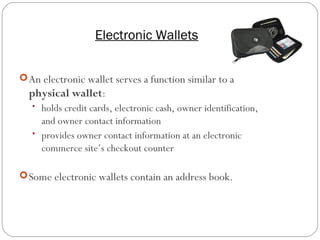
An electronic wallet serves a function similar to a
physical wallet:
• holds credit cards, electronic cash, owner identification,
and owner contact information
• provides owner contact information at an electronic
commerce site’s checkout counter
Some electronic wallets contain an address book.
Electronic Wallets
18
 Electronic wallets make shopping more efficient.
 Electronic wallets fall into two categories based on where they
are stored:
• Server-side electronic wallet
• Client-side electronic wallet
 Electronic wallets store shipping and billing information,
including a consumer’s first and last names, street address, city,
state, country, and zip or postal code.
 E.g. Microsoft .NET passport ,yahoo! Wallet
Mobile banking and Easypaisa
In 2008, Telenor acquired majority shares of Tameer
Microfinance Bank Limited for its mobile financial services
project.They named the branchless banking service
"Easypaisa" and launched it in October 2009.In a country of
over 180 million, with only 10,000 bank branches and
approximately 15 million bank accounts, easypaisa was
Pakistan's first branchess banking deployment aimed to
increase access to financial services for the people of
Pakistan. With over 25,000 easypaisa shops across the
country, Easypaisa was also quoted by CNN as the 'model to
follow' in Mobile Banking at launch.
19
Smart Card
20
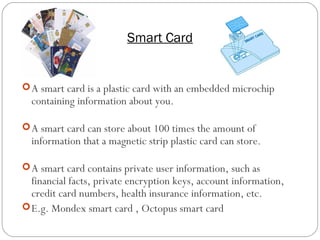
A smart card is a plastic card with an embedded microchip
containing information about you.
A smart card can store about 100 times the amount of
information that a magnetic strip plastic card can store.
A smart card contains private user information, such as
financial facts, private encryption keys, account information,
credit card numbers, health insurance information, etc.
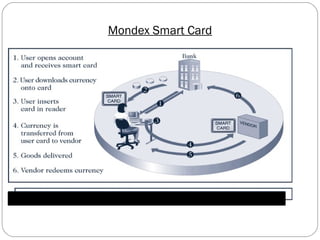
E.g. Mondex smart card , Octopus smart card
Mondex Smart Card
21
Setting up PayPal Account
22
Open PayPal Account https://www.paypal.com
Click on Sign up
A new page will open on screen where you select your
country and then you have two options.
i- PayPal for your personal use.
ii- PayPal for your business.
Now you will click on “Get started” either for personal use
or for business use.
23
A form will open where put information and then click on 
“Agree and Create Account”
After this, a new page will open where you will add payment
method. Here you can add you Bank Account and Credit
Card /Debit Card A/c and then click on Continue
Now your Bank A/C is your PayPal A/C. With the help of
your PayPal account you can pay and receive money
easily.
Now PayPal will give you some instructions and you will
read and follow them carefully. Mostly these are for testing
the function of your PayPal,
24
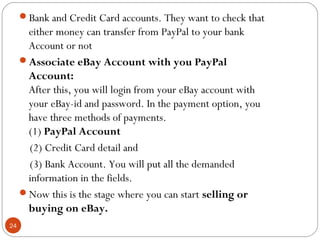
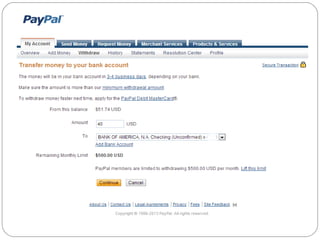
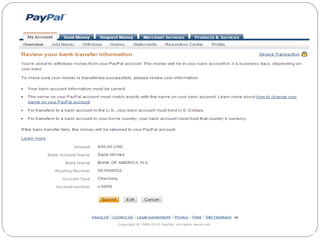
Bank and Credit Card accounts. They want to check that
either money can transfer from PayPal to your bank
Account or not
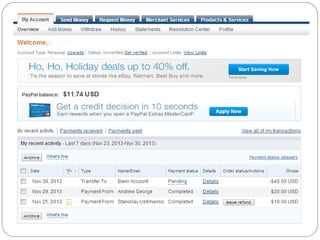
Associate eBay Account with you PayPal
Account:
After this, you will login from your eBay account with
your eBay-id and password. In the payment option, you
have three methods of payments.  
(1) PayPal Account
 (2) Credit Card detail and
(3) Bank Account. You will put all the demanded
information in the fields.
Now this is the stage where you can start selling or
buying on eBay.
25
26
27
28
29
30
Thank you!!
.
31

E payment methodss

  • 1.
    Prepared By: Khurram shafique Rollno 281 Payment Systems for Electronic Commerce
  • 2.
    Index 2  Introduction toE-payment  Modes of E-payment  Payment cards-  Intro to credit card, debit card & charge card  Acceptance and processing  Advantages and Disadvantages  Electronic cash-  Introduction and concern of cash  Advantages  Disadvantages  Click Free  Click Share  Electronic Wallet  Smart Card
  • 3.
    Traditional Payment Methods Payment:The transfer of money from one individual or legal entity to another  Cash  Personal Cheques  Money orders (Bank note) 3
  • 4.
    Electronic Payment Systems 4 E-paymentor Electronic payment is any digital financial payment transaction involving currency transfer between two or more parties Implementation of electronic payment systems is in its infancy and still evolving. Electronic payments are far cheaper than the traditional method of mailing out paper invoices and then processing payments received.
  • 5.
    5  Payment Cards Electronic Cash  Check free  Check share  Internet Cash  Wallet  Smart Card Modes of E-Payment
  • 6.
    Payment Cards 6 Payment cardsare all types of plastic cards that consumers use to make purchases: Credit cards such as a Visa or a MasterCard, has a preset spending limit based on the user’s credit limit. Debit cards removes the amount of the charge from the cardholder’s account and transfers it to the seller’s bank. Charge cards such as one from American Express, carries no preset spending limit.
  • 7.
    Payment Acceptance andProcessing 7 Open and closed loop systems will accept and process payment cards. A merchant bank or acquiring bank is a bank that does business with merchants who want to accept payment cards. Software packaged with your electronic commerce software can handle payment card processing automatically.
  • 8.
  • 9.
    Advantages and Disadvantages ofPayment Cards 9 Advantages: • Payment cards provide fraud protection. • They have worldwide acceptance. • They are good for online transactions. Disadvantages: • Payment card service companies charge merchants per- transaction fees and monthly processing fees.
  • 10.
    Electronic Cash 10 Electronic cashis a general term that describes the attempts of several companies to create a value storage and exchange system that operates online in much the same way that government-issued currency operates in the physical world. Concerns about electronic payment methods include: • Privacy • Security • Independence • Portability • Convenience
  • 11.
    Holding Electronic Cash:Online and Offline Cash 11 Two approaches to holding cash: online storage and offline storage. Online cash storage means that an online bank is involved in all transfers of electronic cash. Offline cash storage is the virtual equivalent of money you keep in your wallet. However, it must prevent double or fraudulent spending.
  • 12.
    Advantages of ElectronicCash 12 Electronic cash transactions are more efficient and less costly than other methods. The distance that an electronic transaction must travel does not affect cost. The fixed cost of hardware to handle electronic cash is nearly zero. Electronic cash does not require that one party have any special authorization.
  • 13.
    Disadvantages of ElectronicCash 13 Electronic cash provides no audit trail. Because true electronic cash is not traceable, money laundering is a problem. Electronic cash is susceptible to forgery. So far, electronic cash is a commercial flop.
  • 14.
    Check Free 14 Check Freeprovides online payment processing services to both large corporations and individual Internet users. Check Free permits users to pay all their bills with online electronic checks. Check Free provides part of the technology that the Web portal Yahoo! uses to provide its Yahoo! Bill Pay service.
  • 15.
  • 16.
    Click share 16 Click shareis an electronic cash system aimed at magazine and newspaper publishers. Users with an ISP that supports Click share are automatically registered with Click share. Click share tracks users with the standard HTTP Web protocol.
  • 17.
    Electronic Wallets 17 An electronicwallet serves a function similar to a physical wallet: • holds credit cards, electronic cash, owner identification, and owner contact information • provides owner contact information at an electronic commerce site’s checkout counter Some electronic wallets contain an address book.
  • 18.
    Electronic Wallets 18  Electronicwallets make shopping more efficient.  Electronic wallets fall into two categories based on where they are stored: • Server-side electronic wallet • Client-side electronic wallet  Electronic wallets store shipping and billing information, including a consumer’s first and last names, street address, city, state, country, and zip or postal code.  E.g. Microsoft .NET passport ,yahoo! Wallet
  • 19.
    Mobile banking andEasypaisa In 2008, Telenor acquired majority shares of Tameer Microfinance Bank Limited for its mobile financial services project.They named the branchless banking service "Easypaisa" and launched it in October 2009.In a country of over 180 million, with only 10,000 bank branches and approximately 15 million bank accounts, easypaisa was Pakistan's first branchess banking deployment aimed to increase access to financial services for the people of Pakistan. With over 25,000 easypaisa shops across the country, Easypaisa was also quoted by CNN as the 'model to follow' in Mobile Banking at launch. 19
  • 20.
    Smart Card 20 A smartcard is a plastic card with an embedded microchip containing information about you. A smart card can store about 100 times the amount of information that a magnetic strip plastic card can store. A smart card contains private user information, such as financial facts, private encryption keys, account information, credit card numbers, health insurance information, etc. E.g. Mondex smart card , Octopus smart card
  • 21.
  • 22.
    Setting up PayPalAccount 22 Open PayPal Account https://www.paypal.com Click on Sign up A new page will open on screen where you select your country and then you have two options. i- PayPal for your personal use. ii- PayPal for your business. Now you will click on “Get started” either for personal use or for business use.
  • 23.
    23 A form willopen where put information and then click on  “Agree and Create Account” After this, a new page will open where you will add payment method. Here you can add you Bank Account and Credit Card /Debit Card A/c and then click on Continue Now your Bank A/C is your PayPal A/C. With the help of your PayPal account you can pay and receive money easily. Now PayPal will give you some instructions and you will read and follow them carefully. Mostly these are for testing the function of your PayPal,
  • 24.
    24 Bank and CreditCard accounts. They want to check that either money can transfer from PayPal to your bank Account or not Associate eBay Account with you PayPal Account: After this, you will login from your eBay account with your eBay-id and password. In the payment option, you have three methods of payments.   (1) PayPal Account  (2) Credit Card detail and (3) Bank Account. You will put all the demanded information in the fields. Now this is the stage where you can start selling or buying on eBay.
  • 25.
  • 26.
  • 27.
  • 28.
  • 29.
  • 30.
  • 31.