#2 MOBILE
LEARNING
ELearning Trends 2015
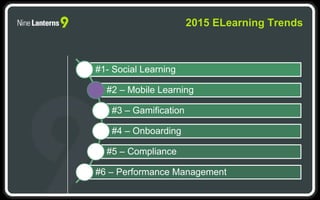
#1- Social Learning
#2 – Mobile Learning
#3 – Gamification
#4 – Onboarding
#5 – Compliance
#6 – Performance Management
2015 ELearning Trends
MILLENNIALS TAKE
OVER THE
WORKFORCE
Section 1
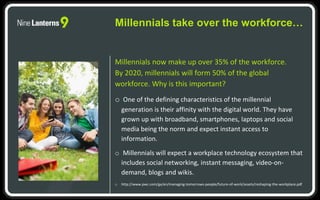
Millennials now make up over 35% of the workforce.
By 2020, millennials will form 50% of the global
workforce. Why is this important?
o One of the defining characteristics of the millennial
generation is their affinity with the digital world. They have
grown up with broadband, smartphones, laptops and social
media being the norm and expect instant access to
information.
o Millennials will expect a workplace technology ecosystem that
includes social networking, instant messaging, video-on-
demand, blogs and wikis.
o http://www.pwc.com/gx/en/managing-tomorrows-people/future-of-work/assets/reshaping-the-workplace.pdf
Millennials take over the workforce…
o Most Millennials are used to more interactive forms of
learning. HR teams need to incorporate technology-based
training and collaboration tools into their Millennial learning
plans.
o 22% of Millennials say that Training and Development would
be a desired benefit of their employment.
http://researchcareersblog.com/2015/04/28/strategies-for-engaging-millennials-in-the-
workplace/#sthash.Ho6P8NKH.dpuf
Millennials take over the workforce…
WHAT DO
MILLENNIALS HAVE TO
DO WITH MOBILE
LEARNING?
Section 2
Millennials and Devices
They prefer mobile
Australia’s mobile digital
economy
ACMA Communications report 2013–14
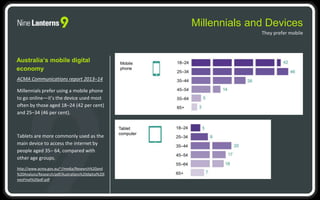
Millennials prefer using a mobile phone
to go online—it’s the device used most
often by those aged 18–24 (42 per cent)
and 25–34 (46 per cent).
Tablets are more commonly used as the
main device to access the internet by
people aged 35– 64, compared with
other age groups.
http://www.acma.gov.au/~/media/Research%20and
%20Analysis/Research/pdf/Australians%20digital%20l
ivesFinal%20pdf.pdf
Today over 6 billion people have access to
a connected mobile device and for every
one person who accesses the internet from
a computer, two do so from a mobile
device.
http://www.unesco.org/new/en/unesco/themes/icts/m4ed/
The world of mobile
Digital Life in Australia
Changing nature of consumer technology
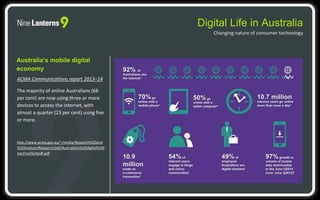
Australia’s mobile digital
economy
ACMA Communications report 2013–14
The majority of online Australians (68
per cent) are now using three or more
devices to access the internet, with
almost a quarter (23 per cent) using five
or more.
http://www.acma.gov.au/~/media/Research%20and
%20Analysis/Research/pdf/Australians%20digital%20l
ivesFinal%20pdf.pdf
Are we using mobile learning?
Mobile Learning in Australia
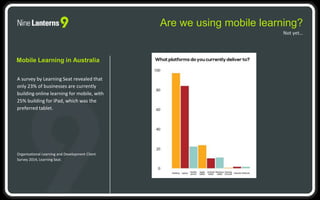
A survey by Learning Seat revealed that
only 23% of businesses are currently
building online learning for mobile, with
25% building for iPad, which was the
preferred tablet.
Organisational Learning and Development Client
Survey 2014, Learning Seat.
Not yet…
Are we using mobile learning?
Mobile Learning in Australia
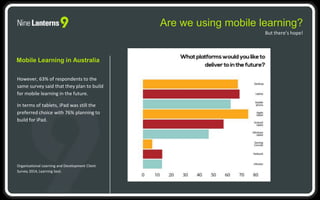
However, 63% of respondents to the
same survey said that they plan to build
for mobile learning in the future.
In terms of tablets, iPad was still the
preferred choice with 76% planning to
build for iPad.
Organisational Learning and Development Client
Survey 2014, Learning Seat.
But there’s hope!
WHAT ARE THE
IMPLICATIONS FOR
ONLINE LEARNING?
Section 3
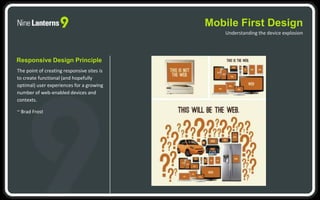
Mobile First Design
Understanding the device explosion
Responsive Design Principle
The point of creating responsive sites is
to create functional (and hopefully
optimal) user experiences for a growing
number of web-enabled devices and
contexts.
~ Brad Frost
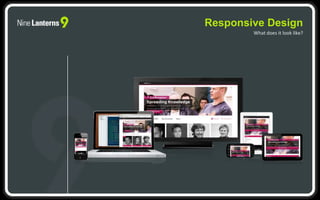
Responsive Design
What does it look like?
Flexible Delivery
• Learn on the go
• Bring your own device
• Location sensitive learning
• Placement based learning
• Augmented reality
• On demand access
• Shop-floor access
• Social/connected learning
Demands
Why do we need learning on mobile devices?
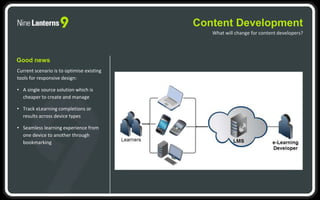
Content Development
What will change for content developers?
Good news
Current scenario is to optimise existing
tools for responsive design:
• A single source solution which is
cheaper to create and manage
• Track eLearning completions or
results across device types
• Seamless learning experience from
one device to another through
bookmarking
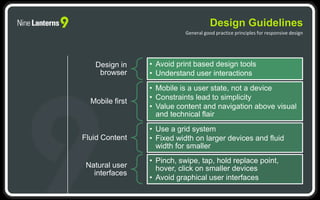
Design in
browser
• Avoid print based design tools
• Understand user interactions
Mobile first
• Mobile is a user state, not a device
• Constraints lead to simplicity
• Value content and navigation above visual
and technical flair
Fluid Content
• Use a grid system
• Fixed width on larger devices and fluid
width for smaller
Natural user
interfaces
• Pinch, swipe, tap, hold replace point,
hover, click on smaller devices
• Avoid graphical user interfaces
Design Guidelines
General good practice principles for responsive design
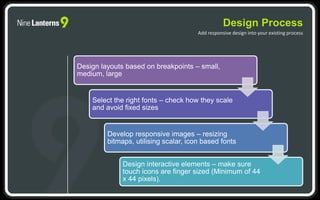
Design Process
Add responsive design into your existing process
Design layouts based on breakpoints – small,
medium, large
Select the right fonts – check how they scale
and avoid fixed sizes
Develop responsive images – resizing
bitmaps, utilising scalar, icon based fonts
Design interactive elements – make sure
touch icons are finger sized (Minimum of 44
x 44 pixels).
THANK YOU
2015 eLearning Trends
More information:
http://www.ninelanterns.com.au/
@ninelanterns OR join our new community
@9L_exchange
https://www.linkedin.com/ninelanterns

ELearning trends 2015: #2 Mobile learning

  • 1.
  • 2.
    #1- Social Learning #2– Mobile Learning #3 – Gamification #4 – Onboarding #5 – Compliance #6 – Performance Management 2015 ELearning Trends
  • 3.
  • 4.
    Millennials now makeup over 35% of the workforce. By 2020, millennials will form 50% of the global workforce. Why is this important? o One of the defining characteristics of the millennial generation is their affinity with the digital world. They have grown up with broadband, smartphones, laptops and social media being the norm and expect instant access to information. o Millennials will expect a workplace technology ecosystem that includes social networking, instant messaging, video-on- demand, blogs and wikis. o http://www.pwc.com/gx/en/managing-tomorrows-people/future-of-work/assets/reshaping-the-workplace.pdf Millennials take over the workforce…
  • 5.
    o Most Millennialsare used to more interactive forms of learning. HR teams need to incorporate technology-based training and collaboration tools into their Millennial learning plans. o 22% of Millennials say that Training and Development would be a desired benefit of their employment. http://researchcareersblog.com/2015/04/28/strategies-for-engaging-millennials-in-the- workplace/#sthash.Ho6P8NKH.dpuf Millennials take over the workforce…
  • 6.
    WHAT DO MILLENNIALS HAVETO DO WITH MOBILE LEARNING? Section 2
  • 7.
    Millennials and Devices Theyprefer mobile Australia’s mobile digital economy ACMA Communications report 2013–14 Millennials prefer using a mobile phone to go online—it’s the device used most often by those aged 18–24 (42 per cent) and 25–34 (46 per cent). Tablets are more commonly used as the main device to access the internet by people aged 35– 64, compared with other age groups. http://www.acma.gov.au/~/media/Research%20and %20Analysis/Research/pdf/Australians%20digital%20l ivesFinal%20pdf.pdf
  • 8.
    Today over 6billion people have access to a connected mobile device and for every one person who accesses the internet from a computer, two do so from a mobile device. http://www.unesco.org/new/en/unesco/themes/icts/m4ed/ The world of mobile
  • 9.
    Digital Life inAustralia Changing nature of consumer technology Australia’s mobile digital economy ACMA Communications report 2013–14 The majority of online Australians (68 per cent) are now using three or more devices to access the internet, with almost a quarter (23 per cent) using five or more. http://www.acma.gov.au/~/media/Research%20and %20Analysis/Research/pdf/Australians%20digital%20l ivesFinal%20pdf.pdf
  • 10.
    Are we usingmobile learning? Mobile Learning in Australia A survey by Learning Seat revealed that only 23% of businesses are currently building online learning for mobile, with 25% building for iPad, which was the preferred tablet. Organisational Learning and Development Client Survey 2014, Learning Seat. Not yet…
  • 11.
    Are we usingmobile learning? Mobile Learning in Australia However, 63% of respondents to the same survey said that they plan to build for mobile learning in the future. In terms of tablets, iPad was still the preferred choice with 76% planning to build for iPad. Organisational Learning and Development Client Survey 2014, Learning Seat. But there’s hope!
  • 12.
    WHAT ARE THE IMPLICATIONSFOR ONLINE LEARNING? Section 3
  • 13.
    Mobile First Design Understandingthe device explosion Responsive Design Principle The point of creating responsive sites is to create functional (and hopefully optimal) user experiences for a growing number of web-enabled devices and contexts. ~ Brad Frost
  • 14.
  • 15.
    Flexible Delivery • Learnon the go • Bring your own device • Location sensitive learning • Placement based learning • Augmented reality • On demand access • Shop-floor access • Social/connected learning Demands Why do we need learning on mobile devices?
  • 16.
    Content Development What willchange for content developers? Good news Current scenario is to optimise existing tools for responsive design: • A single source solution which is cheaper to create and manage • Track eLearning completions or results across device types • Seamless learning experience from one device to another through bookmarking
  • 17.
    Design in browser • Avoidprint based design tools • Understand user interactions Mobile first • Mobile is a user state, not a device • Constraints lead to simplicity • Value content and navigation above visual and technical flair Fluid Content • Use a grid system • Fixed width on larger devices and fluid width for smaller Natural user interfaces • Pinch, swipe, tap, hold replace point, hover, click on smaller devices • Avoid graphical user interfaces Design Guidelines General good practice principles for responsive design
  • 18.
    Design Process Add responsivedesign into your existing process Design layouts based on breakpoints – small, medium, large Select the right fonts – check how they scale and avoid fixed sizes Develop responsive images – resizing bitmaps, utilising scalar, icon based fonts Design interactive elements – make sure touch icons are finger sized (Minimum of 44 x 44 pixels).
  • 19.
    THANK YOU 2015 eLearningTrends More information: http://www.ninelanterns.com.au/ @ninelanterns OR join our new community @9L_exchange https://www.linkedin.com/ninelanterns