



© eG Innovations, Inc | www.eginnovations.com
eG Enterprise Logon Simulator for
Citrix XenApp & XenDesktop
Troubleshooting Slow Logon Problems in Citrix Environments
© eG Innovations, Inc | www.eginnovations.com
Moderator
Renne Bots
Area Sales Manager
eG Innovations
renne.bots@eginnovations.com
© eG Innovations, Inc | www.eginnovations.com
 Questions: please submit at any time during the
webinar using the questions panel.
 Recording: You will receive a link to the recording in
a few days.
 A copy of this presentation is posted on Slideshare:
http://www.slideshare.net/eginnovations/
Logistics
© eG Innovations, Inc | www.eginnovations.com
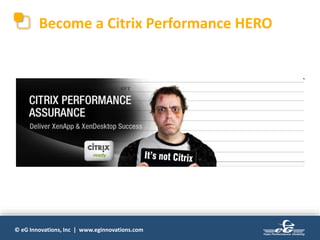
Become a Citrix Performance HERO
© eG Innovations, Inc | www.eginnovations.com
Easier
Said Than
Done!
Great Application Performance is
© eG Innovations, Inc | www.eginnovations.com
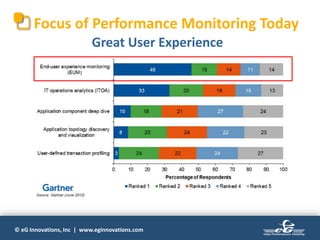
Focus of Performance Monitoring Today
Great User Experience
© eG Innovations, Inc | www.eginnovations.com
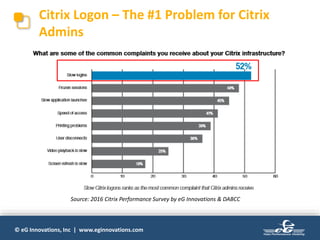
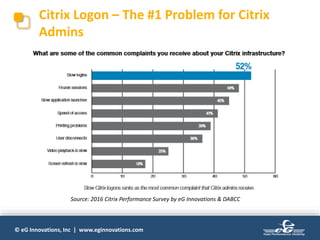
Citrix Logon – The #1 Problem for Citrix
Admins
Source: 2016 Citrix Performance Survey by eG Innovations & DABCC
© eG Innovations, Inc | www.eginnovations.com
Automated
Diagnosis
User
Experience
Management
Pre-emptive
Alerting
Total
Performance
Visibility
End User
Experience
Storage
Connection
Brokers
Profile Servers
Network
Applications
Virtualization
Infrastructure
Performance
Service
Performance
Online
Banking
Accounts
Trading
Patient
records
. . .
Infrastructure
Optimisation
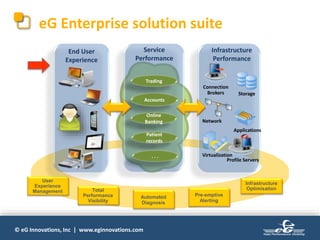
eG Enterprise solution suite
© eG Innovations, Inc | www.eginnovations.com
Today we focus on Citrix Logon Simulator for
XenApp and VDI:
 Deliver great user experience for Citrix users
 Pro actively detect Citrix Logon issues
 Speed up meantime to resolution (MTTR)
 Benchmarck and optimize your Citrix Infrastructure
 Complete visibility into Citrix logon performance
© eG Innovations, Inc | www.eginnovations.com
Today’s Presenter
Stuart Kennedy
Technical Services Manager
eG Innovations
stuart.kennedy@eginnovations.com
© eG Innovations, Inc | www.eginnovations.com
Agenda
• What is the eG Citrix Logon Simulator?
• How it works
• Key metrics monitored
• Features & benefits
• See it in action
• Q&A
3/31/2
017
Oracle Confidential –
Internal/Restricted/Highly Restricted
1
2
eG Citrix Logon Simulator
with eG Enterprise v6.2
© eG Innovations, Inc | www.eginnovations.com
Citrix Logon – The #1 Problem for Citrix
Admins
Source: 2016 Citrix Performance Survey by eG Innovations & DABCC
© eG Innovations, Inc | www.eginnovations.com
Monitoring Citrix Logons
• How eG Enterprise monitors Citrix Start-up:
– Watches real user logons
– Accesses Citrix Delivery Controller APIs to determine logon times
– Tracks session startup times on Citrix XenApp
– Determines when a logon was slow and why it was: profile
loading? AD authentication? GPOs?
• NEW Logon simulator:
– What if Citrix logon has a problem and no one is logging in?
– Baseline logon time & desktop or application launch from
different locations?
• Is application launching as expected? How long does it take?
© eG Innovations, Inc | www.eginnovations.com
What is the eG Citrix Logon Simulator?
• A tool that periodically simulates a logon session for Citrix
XenApp and XenDesktop environments
– Uses browser scripting in Internet Explorer and simulates the
exact process that the user goes through
– Black box approach; external view of the Citrix infrastructure
– Verifies that the entire Citrix delivery infrastructure is working
(StoreFront, DC, XenApp, PVS, License server…), the Citrix
session is established, and the application is about to launch.
• The simulated session helps detect logon issues
proactively, so Citrix administrators can solve them before
users notice/complain.
• Run 24/7 against a Citrix farm (XenApp/XenDesktop).
© eG Innovations, Inc | www.eginnovations.com
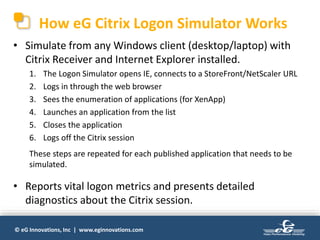
How eG Citrix Logon Simulator Works
• Simulate from any Windows client (desktop/laptop) with
Citrix Receiver and Internet Explorer installed.
1. The Logon Simulator opens IE, connects to a StoreFront/NetScaler URL
2. Logs in through the web browser
3. Sees the enumeration of applications (for XenApp)
4. Launches an application from the list
5. Closes the application
6. Logs off the Citrix session
These steps are repeated for each published application that needs to be
simulated.
• Reports vital logon metrics and presents detailed
diagnostics about the Citrix session.
© eG Innovations, Inc | www.eginnovations.com
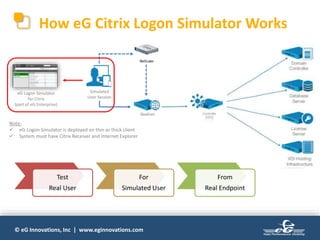
How eG Citrix Logon Simulator Works
Simulated
User Session
eG Logon Simulator
for Citrix
(part of eG Enterprise)
Note:
 eG Logon Simulator is deployed on thin or thick client
 System must have Citrix Receiver and Internet Explorer
Test
Real User
For
Simulated User
From
Real Endpoint
© eG Innovations, Inc | www.eginnovations.com
Supports Multiple Applications & Multiple
Users
• Supports multiple applications per user for logon
simulation.
• Supports multiple users from the same endpoint for
logon simulation.
• Can be run from multiple endpoints from any global
or remote location.
© eG Innovations, Inc | www.eginnovations.com
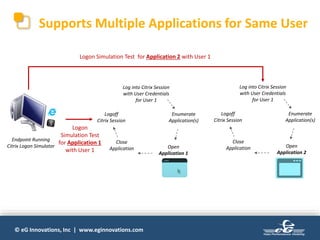
Supports Multiple Applications for Same User
Endpoint Running
Citrix Logon Simulator
Log into Citrix Session
with User Credentials
for User 1
Enumerate
Application(s)
Open
Application 2
Close
Application
Logoff
Citrix Session
Logon Simulation Test for Application 2 with User 1
Log into Citrix Session
with User Credentials
for User 1
Enumerate
Application(s)
Open
Application 1
Close
Application
Logoff
Citrix Session
Logon
Simulation Test
for Application 1
with User 1
© eG Innovations, Inc | www.eginnovations.com
Logon Metrics Monitored
• Logon availability
• Logon duration
• Application enumeration
availability
• Application enumeration
duration
• Application launch
availability
• Application launch
duration
• Logoff duration
You can also drill down for detailed diagnostics about the
Citrix session.
© eG Innovations, Inc | www.eginnovations.com
Key Problems Identified
• Identify slow session logon
• Session disconnect after
logon
• Logon authentication
failure
• Application unavailability
• Slow application
enumeration
• Slow application launch
• Citrix session not starting
after logon
Since the all tiers of the Citrix environment need to work in
concert for the logon operation, simulating logon helps test
the availability and readiness of entire Citrix delivery
infrastructure.
© eG Innovations, Inc | www.eginnovations.com
Feature Highlights
• Real-time simulation and
testing of user session
• Complete visibility of logon
process by testing entire
Citrix delivery
infrastructure
• Simulates exact same steps
of a real user
• 24/7 logon testing allows
simulation whenever and
wherever needed
• Can be run from local or
remote system
• Automated alerts
accurately pinpoint logon
issues
• Supports Citrix XenApp
versions 6.x and 7.x,
XenDesktop 7.x
• Simple to deploy – no
recording/scripting;
Deploy in minutes
3/31/2
017
Oracle Confidential –
Internal/Restricted/Highly Restricted
2
3
eG Citrix Logon Simulator
in Action…
3/31/2
017
Oracle Confidential –
Internal/Restricted/Highly Restricted
2
4
eG Citrix Logon Simulator
© eG Innovations, Inc | www.eginnovations.com
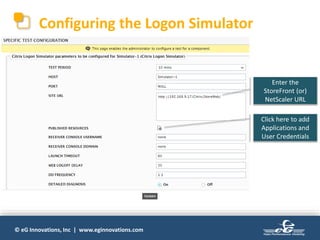
Configuring the Logon Simulator
Enter the
StoreFront (or)
NetScaler URL
Click here to add
Applications and
User Credentials
© eG Innovations, Inc | www.eginnovations.com
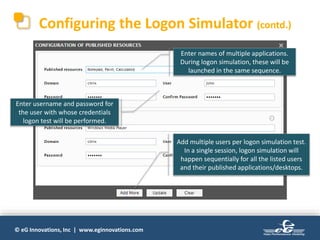
Configuring the Logon Simulator (contd.)
Enter username and password for
the user with whose credentials
logon test will be performed.
Enter names of multiple applications.
During logon simulation, these will be
launched in the same sequence.
Add multiple users per logon simulation test.
In a single session, logon simulation will
happen sequentially for all the listed users
and their published applications/desktops.
© eG Innovations, Inc | www.eginnovations.com
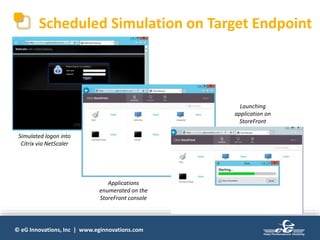
Scheduled Simulation on Target Endpoint
Simulated logon into
Citrix via NetScaler
Applications
enumerated on the
StoreFront console
Launching
application on
StoreFront
© eG Innovations, Inc | www.eginnovations.com
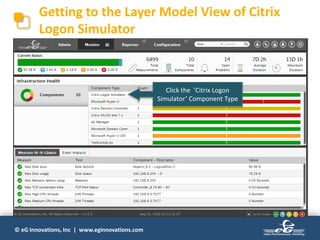
Getting to the Layer Model View of Citrix
Logon Simulator
Click the ‘Citrix Logon
Simulator’ Component Type
© eG Innovations, Inc | www.eginnovations.com
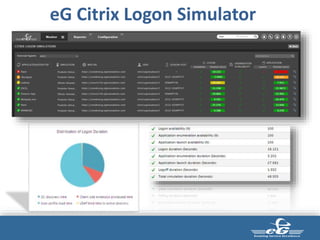
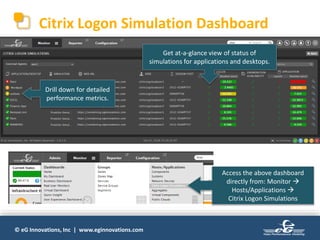
Citrix Logon Simulation Dashboard
Get at-a-glance view of status of
simulations for applications and desktops.
Access the above dashboard
directly from: Monitor 
Hosts/Applications 
Citrix Logon Simulations
Drill down for detailed
performance metrics.
© eG Innovations, Inc | www.eginnovations.com
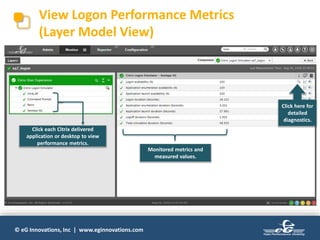
View Logon Performance Metrics
(Layer Model View)
Monitored metrics and
measured values.
Click here for
detailed
diagnostics.
Click each Citrix delivered
application or desktop to view
performance metrics.
© eG Innovations, Inc | www.eginnovations.com
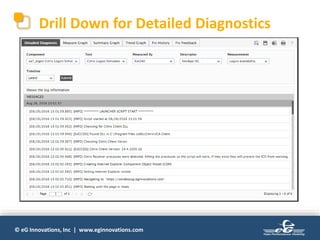
Drill Down for Detailed Diagnostics
© eG Innovations, Inc | www.eginnovations.com
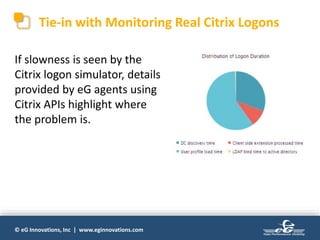
Tie-in with Monitoring Real Citrix Logons
If slowness is seen by the
Citrix logon simulator, details
provided by eG agents using
Citrix APIs highlight where
the problem is.
© eG Innovations, Inc | www.eginnovations.com
Customer Benefits
 Benchmark your Citrix infrastructure – know if any
changes (upgrades, patches) affect Citrix logon
experience
 Provides true end-to-end Citrix logon performance
measure by testing every element involved in the process
 Enables you to be alerted to problems before users
know about them
 Solve Citrix logon problems before users call the
helpdesk
 360o visibility into Citrix logon performance – real user
monitoring + simulated monitoring
© eG Innovations, Inc | www.eginnovations.com
Licensing & Deployment
• Citrix Logon Simulator is run by an eG external agent
• A dedicated external agent is required for logon
simulation (just like Itexis emulation)
– No other external tests from the same agent
– Browser/client windows will be opened by these tests so
the simulation system must be dedicated for these tests
• No third-party software dependencies
– Does not require Itexis (uses IE browser scripting)
• Can be deployed from multiple locations – one
external agent in each location
© eG Innovations, Inc | www.eginnovations.com
Licensing & Deployment (contd.)
• One external agent can test multiple StoreFront/
NetScaler logins
– Tests are run one after the other so they don’t interfere with
each other
– Licensed by external agents (not by simulation targets)
• Simple to get started:
– Specify the URL (StoreFront or NetScaler) to connect to
– Specify user/password/domain for simulation
– Indicate the application(s) to be launched
– No scripting/additional config—up and running in 2 mins
© eG Innovations, Inc | www.eginnovations.com
Pre-Requisites
• A dedicated eG external agent is required for Citrix Logon
Simulator.
• Citrix Receiver 4.0 (or above) should be installed on the
system hosting the external agent that performs the
simulation.
• The endpoint must have a user account (with admin rights)
always logged in for the simulation to run continuously.
• Supported Citrix platforms: XenApp 6.5 and 7.x, and
XenDesktop 7.x.
© eG Innovations, Inc | www.eginnovations.com
FAQ
• Will the logon simulation work when the screen is locked out
on the endpoint used for simulation?
– Even when the screen is locked, Citrix logon simulation will continue to
work as scheduled; but the user should remain logged in.
• Can client emulation with Itexis AppsMon and eG Citrix Logon
Simulator run on the same system?
– Yes. Both can run on the same system and use the same external agent.
But, it is to be noted that both of them cannot run at the same time.
They can function in a sequence where one executes after the other.
• Can eG Citrix Logon Simulator be used to monitor logon from
multiple Citrix farms?
– Yes, it is possible. But logon simulation will happen in a sequence.
© eG Innovations, Inc | www.eginnovations.com
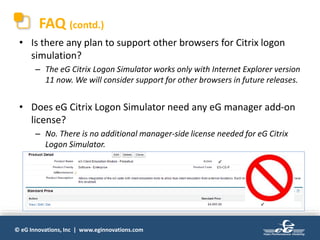
FAQ (contd.)
• Is there any plan to support other browsers for Citrix logon
simulation?
– The eG Citrix Logon Simulator works only with Internet Explorer version
11 now. We will consider support for other browsers in future releases.
• Does eG Citrix Logon Simulator need any eG manager add-on
license?
– No. There is no additional manager-side license needed for eG Citrix
Logon Simulator.
© eG Innovations, Inc | www.eginnovations.com
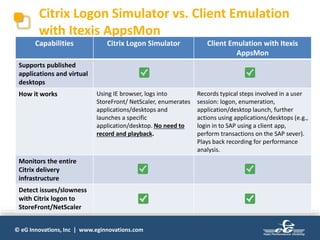
Citrix Logon Simulator vs. Client Emulation
with Itexis AppsMon
Capabilities Citrix Logon Simulator Client Emulation with Itexis
AppsMon
Supports published
applications and virtual
desktops
How it works Using IE browser, logs into
StoreFront/ NetScaler, enumerates
applications/desktops and
launches a specific
application/desktop. No need to
record and playback.
Records typical steps involved in a user
session: logon, enumeration,
application/desktop launch, further
actions using applications/desktops (e.g.,
login in to SAP using a client app,
perform transactions on the SAP sever).
Plays back recording for performance
analysis.
Monitors the entire
Citrix delivery
infrastructure
Detect issues/slowness
with Citrix logon to
StoreFront/NetScaler
© eG Innovations, Inc | www.eginnovations.com
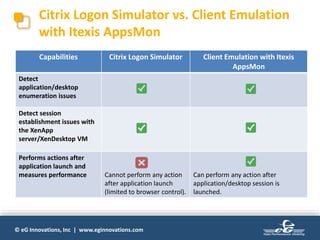
Citrix Logon Simulator vs. Client Emulation
with Itexis AppsMon
Capabilities Citrix Logon Simulator Client Emulation with Itexis
AppsMon
Detect
application/desktop
enumeration issues
Detect session
establishment issues with
the XenApp
server/XenDesktop VM
Performs actions after
application launch and
measures performance Cannot perform any action
after application launch
(limited to browser control).
Can perform any action after
application/desktop session is
launched.
© eG Innovations, Inc | www.eginnovations.com
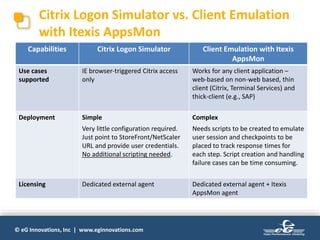
Citrix Logon Simulator vs. Client Emulation
with Itexis AppsMon
Capabilities Citrix Logon Simulator Client Emulation with Itexis
AppsMon
Use cases
supported
IE browser-triggered Citrix access
only
Works for any client application –
web-based on non-web based, thin
client (Citrix, Terminal Services) and
thick-client (e.g., SAP)
Deployment Simple
Very little configuration required.
Just point to StoreFront/NetScaler
URL and provide user credentials.
No additional scripting needed.
Complex
Needs scripts to be created to emulate
user session and checkpoints to be
placed to track response times for
each step. Script creation and handling
failure cases can be time consuming.
Licensing Dedicated external agent Dedicated external agent + Itexis
AppsMon agent
© eG Innovations, Inc | www.eginnovations.com
Free Trial
http://www.eginnovations.com/freetrial
Send an Email
info@eginnovations.com
Call Us
+31 (70) 2055210
Next Steps
© eG Innovations, Inc | www.eginnovations.com
&
© eG Innovations, Inc | www.eginnovations.com
Become a Citrix Performance HERO
© eG Innovations, Inc | www.eginnovations.com
Thank You!

eG Enterprise Logon Simulator for Citrix XenApp & XenDesktop

  • 1.
    © eG Innovations,Inc | www.eginnovations.com eG Enterprise Logon Simulator for Citrix XenApp & XenDesktop Troubleshooting Slow Logon Problems in Citrix Environments
  • 2.
    © eG Innovations,Inc | www.eginnovations.com Moderator Renne Bots Area Sales Manager eG Innovations renne.bots@eginnovations.com
  • 3.
    © eG Innovations,Inc | www.eginnovations.com  Questions: please submit at any time during the webinar using the questions panel.  Recording: You will receive a link to the recording in a few days.  A copy of this presentation is posted on Slideshare: http://www.slideshare.net/eginnovations/ Logistics
  • 4.
    © eG Innovations,Inc | www.eginnovations.com Become a Citrix Performance HERO
  • 5.
    © eG Innovations,Inc | www.eginnovations.com Easier Said Than Done! Great Application Performance is
  • 6.
    © eG Innovations,Inc | www.eginnovations.com Focus of Performance Monitoring Today Great User Experience
  • 7.
    © eG Innovations,Inc | www.eginnovations.com Citrix Logon – The #1 Problem for Citrix Admins Source: 2016 Citrix Performance Survey by eG Innovations & DABCC
  • 8.
    © eG Innovations,Inc | www.eginnovations.com Automated Diagnosis User Experience Management Pre-emptive Alerting Total Performance Visibility End User Experience Storage Connection Brokers Profile Servers Network Applications Virtualization Infrastructure Performance Service Performance Online Banking Accounts Trading Patient records . . . Infrastructure Optimisation eG Enterprise solution suite
  • 9.
    © eG Innovations,Inc | www.eginnovations.com Today we focus on Citrix Logon Simulator for XenApp and VDI:  Deliver great user experience for Citrix users  Pro actively detect Citrix Logon issues  Speed up meantime to resolution (MTTR)  Benchmarck and optimize your Citrix Infrastructure  Complete visibility into Citrix logon performance
  • 10.
    © eG Innovations,Inc | www.eginnovations.com Today’s Presenter Stuart Kennedy Technical Services Manager eG Innovations stuart.kennedy@eginnovations.com
  • 11.
    © eG Innovations,Inc | www.eginnovations.com Agenda • What is the eG Citrix Logon Simulator? • How it works • Key metrics monitored • Features & benefits • See it in action • Q&A
  • 12.
    3/31/2 017 Oracle Confidential – Internal/Restricted/HighlyRestricted 1 2 eG Citrix Logon Simulator with eG Enterprise v6.2
  • 13.
    © eG Innovations,Inc | www.eginnovations.com Citrix Logon – The #1 Problem for Citrix Admins Source: 2016 Citrix Performance Survey by eG Innovations & DABCC
  • 14.
    © eG Innovations,Inc | www.eginnovations.com Monitoring Citrix Logons • How eG Enterprise monitors Citrix Start-up: – Watches real user logons – Accesses Citrix Delivery Controller APIs to determine logon times – Tracks session startup times on Citrix XenApp – Determines when a logon was slow and why it was: profile loading? AD authentication? GPOs? • NEW Logon simulator: – What if Citrix logon has a problem and no one is logging in? – Baseline logon time & desktop or application launch from different locations? • Is application launching as expected? How long does it take?
  • 15.
    © eG Innovations,Inc | www.eginnovations.com What is the eG Citrix Logon Simulator? • A tool that periodically simulates a logon session for Citrix XenApp and XenDesktop environments – Uses browser scripting in Internet Explorer and simulates the exact process that the user goes through – Black box approach; external view of the Citrix infrastructure – Verifies that the entire Citrix delivery infrastructure is working (StoreFront, DC, XenApp, PVS, License server…), the Citrix session is established, and the application is about to launch. • The simulated session helps detect logon issues proactively, so Citrix administrators can solve them before users notice/complain. • Run 24/7 against a Citrix farm (XenApp/XenDesktop).
  • 16.
    © eG Innovations,Inc | www.eginnovations.com How eG Citrix Logon Simulator Works • Simulate from any Windows client (desktop/laptop) with Citrix Receiver and Internet Explorer installed. 1. The Logon Simulator opens IE, connects to a StoreFront/NetScaler URL 2. Logs in through the web browser 3. Sees the enumeration of applications (for XenApp) 4. Launches an application from the list 5. Closes the application 6. Logs off the Citrix session These steps are repeated for each published application that needs to be simulated. • Reports vital logon metrics and presents detailed diagnostics about the Citrix session.
  • 17.
    © eG Innovations,Inc | www.eginnovations.com How eG Citrix Logon Simulator Works Simulated User Session eG Logon Simulator for Citrix (part of eG Enterprise) Note:  eG Logon Simulator is deployed on thin or thick client  System must have Citrix Receiver and Internet Explorer Test Real User For Simulated User From Real Endpoint
  • 18.
    © eG Innovations,Inc | www.eginnovations.com Supports Multiple Applications & Multiple Users • Supports multiple applications per user for logon simulation. • Supports multiple users from the same endpoint for logon simulation. • Can be run from multiple endpoints from any global or remote location.
  • 19.
    © eG Innovations,Inc | www.eginnovations.com Supports Multiple Applications for Same User Endpoint Running Citrix Logon Simulator Log into Citrix Session with User Credentials for User 1 Enumerate Application(s) Open Application 2 Close Application Logoff Citrix Session Logon Simulation Test for Application 2 with User 1 Log into Citrix Session with User Credentials for User 1 Enumerate Application(s) Open Application 1 Close Application Logoff Citrix Session Logon Simulation Test for Application 1 with User 1
  • 20.
    © eG Innovations,Inc | www.eginnovations.com Logon Metrics Monitored • Logon availability • Logon duration • Application enumeration availability • Application enumeration duration • Application launch availability • Application launch duration • Logoff duration You can also drill down for detailed diagnostics about the Citrix session.
  • 21.
    © eG Innovations,Inc | www.eginnovations.com Key Problems Identified • Identify slow session logon • Session disconnect after logon • Logon authentication failure • Application unavailability • Slow application enumeration • Slow application launch • Citrix session not starting after logon Since the all tiers of the Citrix environment need to work in concert for the logon operation, simulating logon helps test the availability and readiness of entire Citrix delivery infrastructure.
  • 22.
    © eG Innovations,Inc | www.eginnovations.com Feature Highlights • Real-time simulation and testing of user session • Complete visibility of logon process by testing entire Citrix delivery infrastructure • Simulates exact same steps of a real user • 24/7 logon testing allows simulation whenever and wherever needed • Can be run from local or remote system • Automated alerts accurately pinpoint logon issues • Supports Citrix XenApp versions 6.x and 7.x, XenDesktop 7.x • Simple to deploy – no recording/scripting; Deploy in minutes
  • 23.
    3/31/2 017 Oracle Confidential – Internal/Restricted/HighlyRestricted 2 3 eG Citrix Logon Simulator in Action…
  • 24.
    3/31/2 017 Oracle Confidential – Internal/Restricted/HighlyRestricted 2 4 eG Citrix Logon Simulator
  • 25.
    © eG Innovations,Inc | www.eginnovations.com Configuring the Logon Simulator Enter the StoreFront (or) NetScaler URL Click here to add Applications and User Credentials
  • 26.
    © eG Innovations,Inc | www.eginnovations.com Configuring the Logon Simulator (contd.) Enter username and password for the user with whose credentials logon test will be performed. Enter names of multiple applications. During logon simulation, these will be launched in the same sequence. Add multiple users per logon simulation test. In a single session, logon simulation will happen sequentially for all the listed users and their published applications/desktops.
  • 27.
    © eG Innovations,Inc | www.eginnovations.com Scheduled Simulation on Target Endpoint Simulated logon into Citrix via NetScaler Applications enumerated on the StoreFront console Launching application on StoreFront
  • 28.
    © eG Innovations,Inc | www.eginnovations.com Getting to the Layer Model View of Citrix Logon Simulator Click the ‘Citrix Logon Simulator’ Component Type
  • 29.
    © eG Innovations,Inc | www.eginnovations.com Citrix Logon Simulation Dashboard Get at-a-glance view of status of simulations for applications and desktops. Access the above dashboard directly from: Monitor  Hosts/Applications  Citrix Logon Simulations Drill down for detailed performance metrics.
  • 30.
    © eG Innovations,Inc | www.eginnovations.com View Logon Performance Metrics (Layer Model View) Monitored metrics and measured values. Click here for detailed diagnostics. Click each Citrix delivered application or desktop to view performance metrics.
  • 31.
    © eG Innovations,Inc | www.eginnovations.com Drill Down for Detailed Diagnostics
  • 32.
    © eG Innovations,Inc | www.eginnovations.com Tie-in with Monitoring Real Citrix Logons If slowness is seen by the Citrix logon simulator, details provided by eG agents using Citrix APIs highlight where the problem is.
  • 33.
    © eG Innovations,Inc | www.eginnovations.com Customer Benefits  Benchmark your Citrix infrastructure – know if any changes (upgrades, patches) affect Citrix logon experience  Provides true end-to-end Citrix logon performance measure by testing every element involved in the process  Enables you to be alerted to problems before users know about them  Solve Citrix logon problems before users call the helpdesk  360o visibility into Citrix logon performance – real user monitoring + simulated monitoring
  • 34.
    © eG Innovations,Inc | www.eginnovations.com Licensing & Deployment • Citrix Logon Simulator is run by an eG external agent • A dedicated external agent is required for logon simulation (just like Itexis emulation) – No other external tests from the same agent – Browser/client windows will be opened by these tests so the simulation system must be dedicated for these tests • No third-party software dependencies – Does not require Itexis (uses IE browser scripting) • Can be deployed from multiple locations – one external agent in each location
  • 35.
    © eG Innovations,Inc | www.eginnovations.com Licensing & Deployment (contd.) • One external agent can test multiple StoreFront/ NetScaler logins – Tests are run one after the other so they don’t interfere with each other – Licensed by external agents (not by simulation targets) • Simple to get started: – Specify the URL (StoreFront or NetScaler) to connect to – Specify user/password/domain for simulation – Indicate the application(s) to be launched – No scripting/additional config—up and running in 2 mins
  • 36.
    © eG Innovations,Inc | www.eginnovations.com Pre-Requisites • A dedicated eG external agent is required for Citrix Logon Simulator. • Citrix Receiver 4.0 (or above) should be installed on the system hosting the external agent that performs the simulation. • The endpoint must have a user account (with admin rights) always logged in for the simulation to run continuously. • Supported Citrix platforms: XenApp 6.5 and 7.x, and XenDesktop 7.x.
  • 37.
    © eG Innovations,Inc | www.eginnovations.com FAQ • Will the logon simulation work when the screen is locked out on the endpoint used for simulation? – Even when the screen is locked, Citrix logon simulation will continue to work as scheduled; but the user should remain logged in. • Can client emulation with Itexis AppsMon and eG Citrix Logon Simulator run on the same system? – Yes. Both can run on the same system and use the same external agent. But, it is to be noted that both of them cannot run at the same time. They can function in a sequence where one executes after the other. • Can eG Citrix Logon Simulator be used to monitor logon from multiple Citrix farms? – Yes, it is possible. But logon simulation will happen in a sequence.
  • 38.
    © eG Innovations,Inc | www.eginnovations.com FAQ (contd.) • Is there any plan to support other browsers for Citrix logon simulation? – The eG Citrix Logon Simulator works only with Internet Explorer version 11 now. We will consider support for other browsers in future releases. • Does eG Citrix Logon Simulator need any eG manager add-on license? – No. There is no additional manager-side license needed for eG Citrix Logon Simulator.
  • 39.
    © eG Innovations,Inc | www.eginnovations.com Citrix Logon Simulator vs. Client Emulation with Itexis AppsMon Capabilities Citrix Logon Simulator Client Emulation with Itexis AppsMon Supports published applications and virtual desktops How it works Using IE browser, logs into StoreFront/ NetScaler, enumerates applications/desktops and launches a specific application/desktop. No need to record and playback. Records typical steps involved in a user session: logon, enumeration, application/desktop launch, further actions using applications/desktops (e.g., login in to SAP using a client app, perform transactions on the SAP sever). Plays back recording for performance analysis. Monitors the entire Citrix delivery infrastructure Detect issues/slowness with Citrix logon to StoreFront/NetScaler
  • 40.
    © eG Innovations,Inc | www.eginnovations.com Citrix Logon Simulator vs. Client Emulation with Itexis AppsMon Capabilities Citrix Logon Simulator Client Emulation with Itexis AppsMon Detect application/desktop enumeration issues Detect session establishment issues with the XenApp server/XenDesktop VM Performs actions after application launch and measures performance Cannot perform any action after application launch (limited to browser control). Can perform any action after application/desktop session is launched.
  • 41.
    © eG Innovations,Inc | www.eginnovations.com Citrix Logon Simulator vs. Client Emulation with Itexis AppsMon Capabilities Citrix Logon Simulator Client Emulation with Itexis AppsMon Use cases supported IE browser-triggered Citrix access only Works for any client application – web-based on non-web based, thin client (Citrix, Terminal Services) and thick-client (e.g., SAP) Deployment Simple Very little configuration required. Just point to StoreFront/NetScaler URL and provide user credentials. No additional scripting needed. Complex Needs scripts to be created to emulate user session and checkpoints to be placed to track response times for each step. Script creation and handling failure cases can be time consuming. Licensing Dedicated external agent Dedicated external agent + Itexis AppsMon agent
  • 42.
    © eG Innovations,Inc | www.eginnovations.com Free Trial http://www.eginnovations.com/freetrial Send an Email info@eginnovations.com Call Us +31 (70) 2055210 Next Steps
  • 43.
    © eG Innovations,Inc | www.eginnovations.com &
  • 44.
    © eG Innovations,Inc | www.eginnovations.com Become a Citrix Performance HERO
  • 45.
    © eG Innovations,Inc | www.eginnovations.com Thank You!