Presenters
Dennis Callaghan (451 Research)
Rick Ruskin (VDX)
BalaVaidhinathan (eG Innovations)
Citrix & Desktop
Migration Success
The 3 Secrets to
User Satisfaction
and ROI
• Migration and related challenges
• Keys to Successful Migration
• Real world case-studies
• Q & A
Agenda
• User experience issues
• Lack of visibility across silos
• Complex and/or slow issue identification
• Proactive problem solving
• Lack of representative baselines
Poll: What Are Your Biggest
Migration Performance Challenges?
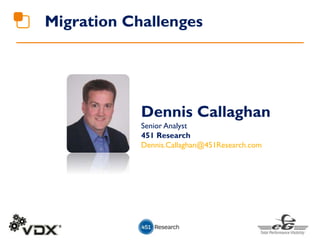
Migration Challenges
Dennis Callaghan
Senior Analyst
451 Research
Dennis.Callaghan@451Research.com
Significant change underway in today’s IT environments:
• Traditional desktop to virtual desktop (including upgrade XenApp
4.5 to 6.5, 6.5 to 7.5, Windows XP to Windows 7/8)
• Physical to cloud migration, including hybrid cloud. Don’t forget
software!
• Virtualization of infrastructure and app layers—some legacy apps not
designed for virtualization
• Moving off Windows Server 2003 and AIX. They’re still out there!
Users expect the same or better performance after the migration
as they had before the migration. And when performance
problems occur, the migration is blamed first.
Migration Trends
• Migration increases complexity of underlying IT
platforms—Dependencies discovered the hard way.
• Migration project delays due to unexpected
performance and availability issues
• Migration project cost overruns due to new
hardware and software demands/requirements
greater than original design
• Legacy applications running on legacy
infrastructure. Don’t know where to start.
• Configuration Drift: ITSM issue that leads to
performance issues
Common Migration Challenges
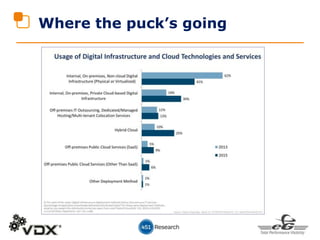
Where the puck’s going
Challenges ahead
• Where does my application reside? What services/infrastructure
does it depend on?
• Will my current monitoring tools work in new environments my
applications/infrastructure are moving to?
• Can I get a true “single pane of glass” of performance levels
from multiple monitoring tools?
• Can I maintain configuration integrity when changes are
constantly made?
• Can I maintain a consistent view of end-user experience as
applications and infrastructure migrate, especially with more
applications being accessed by mobile devices?
• Can I foster more collaboration/cooperation between developers
and operations teams (DevOps)
Keys to Successful Migration
BalaVaidhinathan
CTO, eG Innovations
bala@eginnovations.com
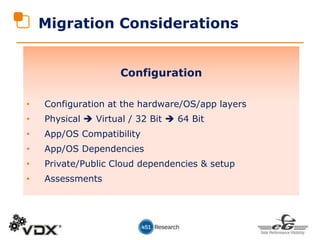
Migration Considerations
Configuration
• Configuration at the hardware/OS/app layers
• Physical  Virtual / 32 Bit  64 Bit
• App/OS Compatibility
• App/OS Dependencies
• Private/Public Cloud dependencies & setup
• Assessments
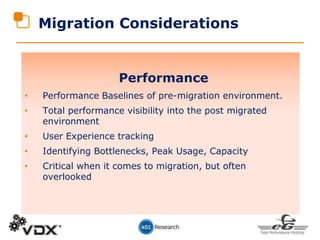
Migration Considerations
Performance
• Performance Baselines of pre-migration environment.
• Total performance visibility into the post migrated
environment
• User Experience tracking
• Identifying Bottlenecks, Peak Usage, Capacity
• Critical when it comes to migration, but often
overlooked
3 Keys to Success
Citrix & Desktop Migration
1
Citrix & Desktop Migration
Performance
Baselines
Performance Baselines
• How is the user experience in the pre-upgrade
environment?
• What are the current usage patterns in the pre-upgrade
environment?
• What are the consumption patterns in the pre-upgrade
environment?
• What are the baselines for the pre-upgrade environment
for user/app/OS/infrastructure performance?
• Ability to track all of the above in the post-upgrade
environment and compare
• Key to success is to get equal or better user experience
without compromising other KPIs
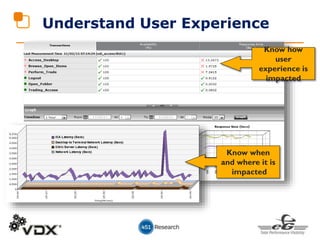
Understand User Experience
Know how
user
experience is
impacted
Know when
and where it is
impacted
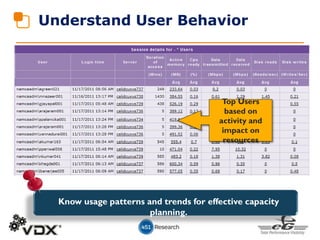
Understand User Behavior
Know usage patterns and trends for effective capacity
planning.
Top Users
based on
activity and
impact on
resources
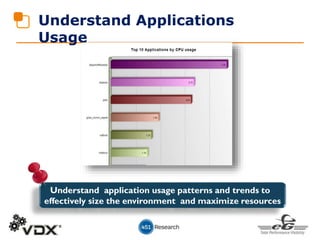
Understand Applications
Usage
Understand application usage patterns and trends to
effectively size the environment and maximize resources
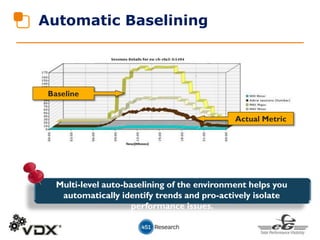
Baseline
Actual Metric
Multi-level auto-baselining of the environment helps you
automatically identify trends and pro-actively isolate
performance issues.
Automatic Baselining
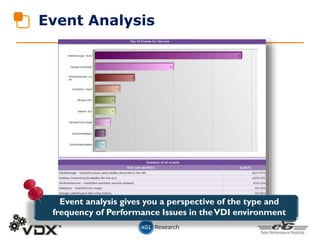
Event Analysis
Event analysis gives you a perspective of the type and
frequency of Performance Issues in theVDI environment
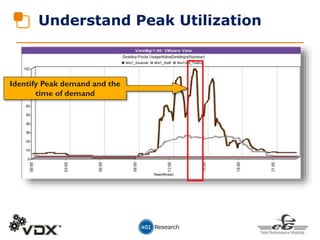
Understand Peak Utilization
Identify Peak demand and the
time of demand
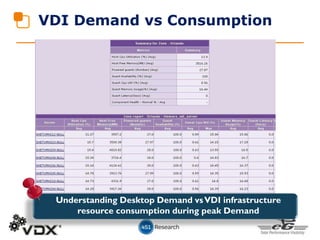
VDI Demand vs Consumption
Understanding Desktop Demand vsVDI infrastructure
resource consumption during peak Demand
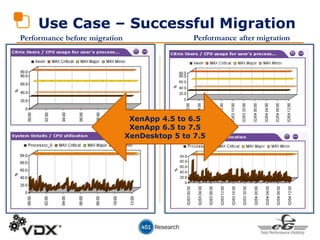
Use Case – Successful Migration
Performance before migration Performance after migration
XenApp 4.5 to 6.5
XenApp 6.5 to 7.5
XenDesktop 5 to 7.5
2
Citrix & Desktop Migration
Total Visibility
WhoWhat How
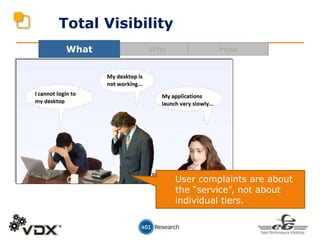
User complaints are about
the “service”, not about
individual tiers.
Total Visibility
WhoWhat How
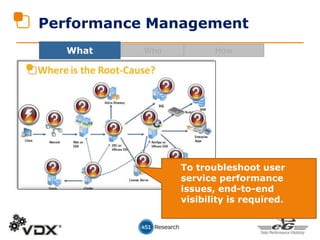
To troubleshoot user
service performance
issues, end-to-end
visibility is required.
Performance Management
WhoWhat How
Profile
Management
Sharefile
Control
Device
Manager
Citrix
Performanc
e
Managemen
t
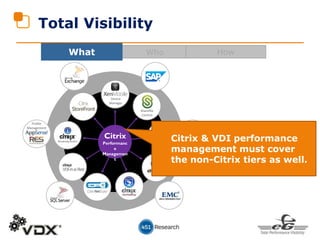
Citrix & VDI performance
management must cover
the non-Citrix tiers as well.
Total Visibility
A Real-World Example
without Total Visibility
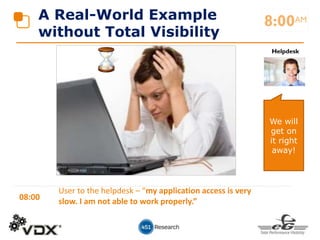
08:00
User to the helpdesk – “my application access is very
slow. I am not able to work properly.”
8:00AM
Helpdesk
We will
get on
it right
away!
A Real-World Example
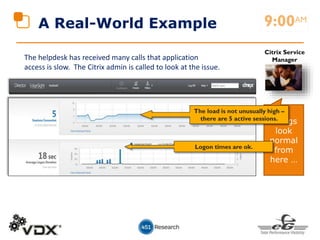
The helpdesk has received many calls that application
access is slow. The Citrix admin is called to look at the issue.
9:00AM
Things
look
normal
from
here …
Citrix Service
Manager
The load is not unusually high –
there are 5 active sessions.
Logon times are ok.
Citrix Service
Manager
A Real-World Example
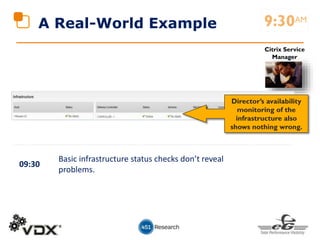
Director’s availability
monitoring of the
infrastructure also
shows nothing wrong.
9:30AM
09:30
Basic infrastructure status checks don’t reveal
problems.
Citrix Service
ManagerA Real-World Example
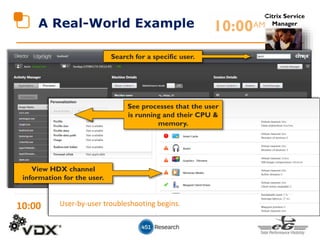
Search for a specific user.
See processes that the user
is running and their CPU &
memory.
View HDX channel
information for the user.
10:00AM
10:00 User-by-user troubleshooting begins.
What Follows …
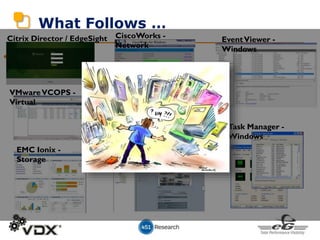
•
Citrix Director / EdgeSight
VMwareVCOPS -
Virtual
Task Manager -
Windows
EventViewer -
Windows
EMC Ionix -
Storage
Cisco UCS Manager -
Hardware
CiscoWorks -
Network
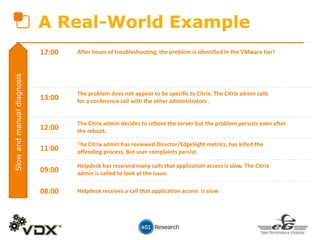
A Real-World Example
08:00 Helpdesk receives a call that application access is slow
09:00
Helpdesk has received many calls that application access is slow. The Citrix
admin is called to look at the issue.
11:00
The Citrix admin has reviewed Director/EdgeSight metrics, has killed the
offending process. But user complaints persist.
12:00
The Citrix admin decides to reboot the server but the problem persists even after
the reboot.
13:00
The problem does not appear to be specific to Citrix. The Citrix admin calls
for a conference call with the other administrators .
17:00 After hours of troubleshooting, the problem is identified in the VMware tier!
Slowandmanualdiagnosis
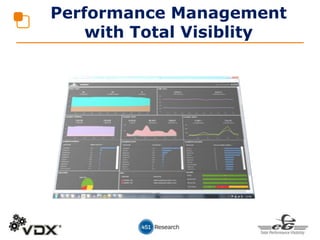
Performance Management
with Total Visiblity
•
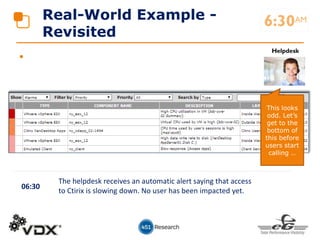
Real-World Example -
Revisited
06:30
The helpdesk receives an automatic alert saying that access
to Ctirix is slowing down. No user has been impacted yet.
6:30AM
Helpdesk
This looks
odd. Let’s
get to the
bottom of
this before
users start
calling …
•
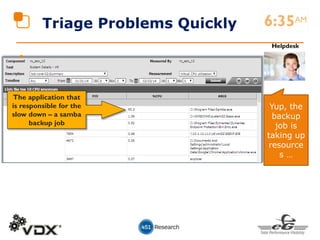
Triage Problems Quickly
The application that
is responsible for the
slow down – a samba
backup job
6:35AM
Helpdesk
Yup, the
backup
job is
taking up
resource
s …
•
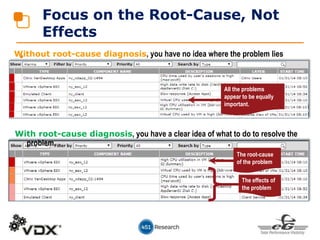
Focus on the Root-Cause, Not
Effects
Without root-cause diagnosis, you have no idea where the problem lies
With root-cause diagnosis, you have a clear idea of what to do to resolve the
problem.
All the problems
appear to be equally
important.
The root-cause
of the problem
The effects of
the problem
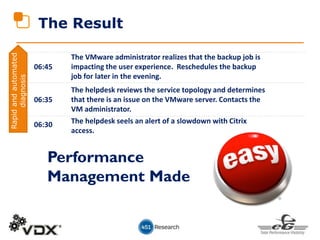
The Result
06:30 The helpdesk seels an alert of a slowdown with Citrix
access.
06:35
The helpdesk reviews the service topology and determines
that there is an issue on the VMware server. Contacts the
VM administrator.
06:45
The VMware administrator realizes that the backup job is
impacting the user experience. Reschedules the backup
job for later in the evening.
Performance
Management Made
Rapidandautomated
diagnosis
Profile
Management
Sharefile
Control
Device
Manager
Citrix
Performanc
e
Managemen
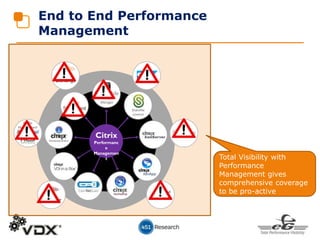
t Total Visibility with
Performance
Management gives
comprehensive coverage
to be pro-active
End to End Performance
Management
3
Citrix & Desktop Migration
Rightsizing for
ROI
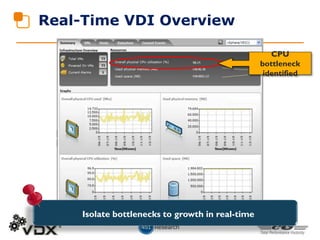
Real-Time VDI Overview
CPU
bottleneck
identified
Isolate bottlenecks to growth in real-time
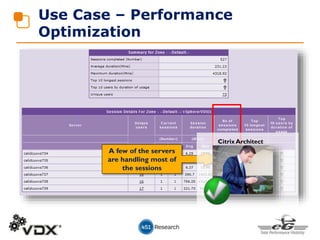
Use Case – Performance
Optimization
A few of the servers
are handling most of
the sessions
Citrix Architect
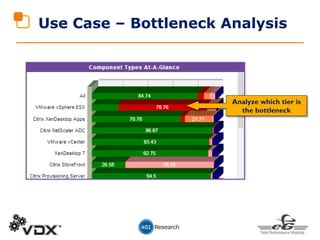
Use Case – Bottleneck Analysis
Analyze which tier is
the bottleneck
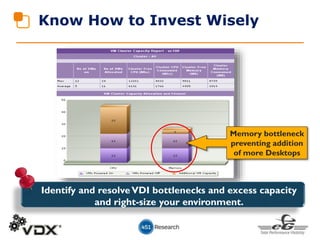
Know How to Invest Wisely
Memory bottleneck
preventing addition
of more Desktops
Identify and resolveVDI bottlenecks and excess capacity
and right-size your environment.
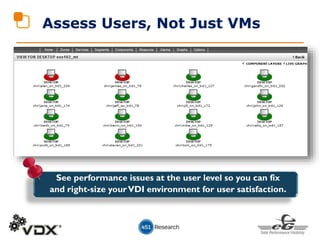
Assess Users, Not Just VMs
See performance issues at the user level so you can fix
and right-size yourVDI environment for user satisfaction.
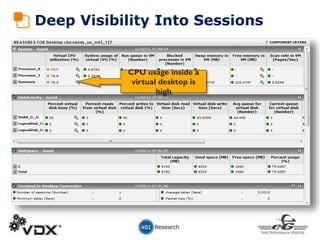
CPU usage inside a
virtual desktop is
high
Deep Visibility Into Sessions
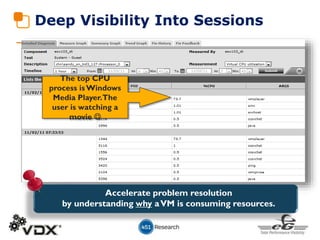
The top CPU
process isWindows
Media Player.The
user is watching a
movie 
Deep Visibility Into Sessions
Accelerate problem resolution
by understanding why aVM is consuming resources.
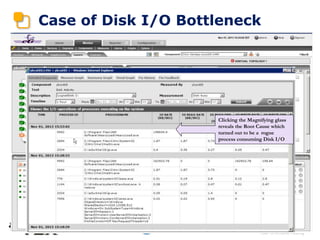
Case of Disk I/O Bottleneck
Clicking the Magnifying glass
reveals the Root Cause which
turned out to be a rogue
process consuming Disk I/O
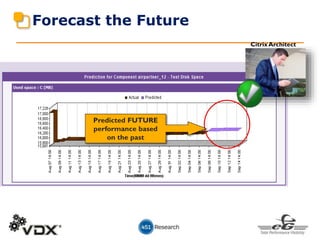
Forecast the Future
Predicted FUTURE
performance based
on the past
Citrix Architect
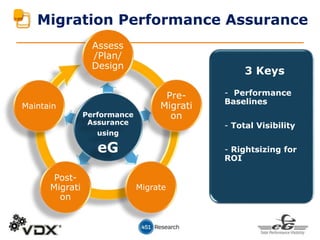
Assess
/Plan/
Design
Migrate
Post-
Migrati
on
Maintain
Migration Performance Assurance
3 Keys
- Performance
Baselines
- Total Visibility
- Rightsizing for
ROI
Performance
Assurance
using
eG
Pre-
Migrati
on
Real-World Migration Case Study
Rick Ruskin
Vice President Sales & Marketing
VDX
RRuskin@vdx.com
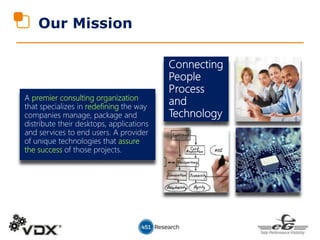
Our Mission
premier consulting organization
redefining
assure
the success
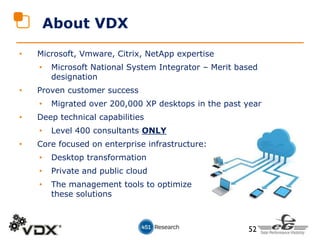
• Microsoft, Vmware, Citrix, NetApp expertise
• Microsoft National System Integrator – Merit based
designation
• Proven customer success
• Migrated over 200,000 XP desktops in the past year
• Deep technical capabilities
• Level 400 consultants ONLY
• Core focused on enterprise infrastructure:
• Desktop transformation
• Private and public cloud
• The management tools to optimize
these solutions
About VDX
52
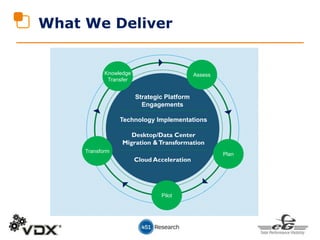
What We Deliver
Strategic Platform
Engagements
Technology Implementations
Desktop/Data Center
Migration &Transformation
Cloud Acceleration
AssessKnowledge
Transfer
Plan
Pilot
Transform
• High level goals in any of these migrations is to
upgrade as much of the infrastructure as
possible to avoid major architectural work every
time an upgrade needs to take place.
• Current major Migration initiatives in flight
today:
• XP End of Life
• Server 2003 End of Life
• Citrix 4.5 End of Life
Migrations
• Approximately 33% of Desktops still running XP
• Even if you are 80% migrated, there is considerable work
to be done
• Why is it imperative that you finish the migration process?
• Security upgrades WILL end soon
• Third party software companies will cease support soon
• No ability to acquire new hardware that supports XP
• The cost for extended support from Microsoft will
continue to increase over time
XP End-of-Life Migrations
• Build out of supporting infrastructure – upgrade to SC2012
• Re-packaging and virtualization of applications
so that at next O/S most of the work is done
• Profile management and performance management
technologies:
• Preserve user experience
• Decouple personna from physical devices
• Enablement of automation and self-service portal for application
download
• All this creates the foundation or BYOD and private cloud
Windows 7/8 Migration
56
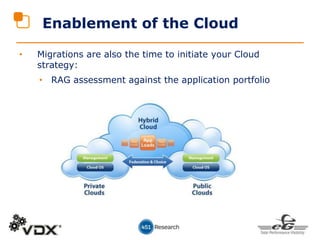
Enablement of the Cloud
• Migrations are also the time to initiate your Cloud
strategy:
• RAG assessment against the application portfolio
At the end of 2014, not only will
XP be eradicated from their
environment, but they will have
enabled over 30,000 users to
access any application, from any
worldwide location, from ANY
supported Device
Global Fortune 100
Health Insurance Company
• VDX decoupled personas
from desktops
• VDX virtualized all
applications across the
organization. Now virtually
O/S independent.
• VDX Build out a virtualized
XenApp infrastructure for all
apps that couldn’t be
virtualized.
• Enabled IT to more easily
support large user
community across all geo’s
In roughly One year, totally
transformed environment from
Physical with much EOL product,
to Modern, Up To Date, and
Cloud-Ready
Mortgage and Lending Leader
Massively parallel modernization
of entire desktop infrastructure
which included:
•Upgrading to System Center
2012
•Virtualizing and de-coupling of
user profiles
•Upgrading all desktops to
Windows 7 or 8
•Enabling folder redirection
•Virtualizing or repackaging of
1,000’s of applications and
building application catalogues
In less than 5 Months, the entire
Environment was transitioned from
Windows XP to Windows 7/8, and
NO Financial penalties were
incurred
Mid-Size Regional Bank
• Needed to get off XP before
April, 2014 deadline
• As of November 2013, no apps
had been migrated and all DT’s
were still running XP
• Built out SCCM 2012 so could
do “zero touch” upgrades
• Took “Virtualize First” approach
to applications and put the
others into Citrix
• Virtualized profiles to ensure
positive user experience
&
Ask the Experts
About eG Innovations
eG Innovations is the only enterprise-class performance
management solution that provides virtualization-
aware correlation and complete visibility across every
layer and every tier of dynamic & complex cloud, virtual,
and physical IT environments to reliably deliver mission-
critical business services.
Worldwide
Locations USA, UK, Netherlands, Singapore, Hong Kong, India
Customers Over 1000 customers
Certifications
Awards
& Recognition
Customer Success
• eG Innovations – www.eginnovations.com
• Bala Vaidhinathan - info@eginnovations.com
• eG Innovations Resources
• XenApp Monitor –
www.eginnovations.com/xenapp
• XenDesktop Monitor –
www.eginnovations.com/xendesktop
• Product Trial – www.eginnovations.com/trial
Resources, Q & A

Citrix and Desktop Migration Success

  • 1.
    Presenters Dennis Callaghan (451Research) Rick Ruskin (VDX) BalaVaidhinathan (eG Innovations) Citrix & Desktop Migration Success The 3 Secrets to User Satisfaction and ROI
  • 2.
    • Migration andrelated challenges • Keys to Successful Migration • Real world case-studies • Q & A Agenda
  • 3.
    • User experienceissues • Lack of visibility across silos • Complex and/or slow issue identification • Proactive problem solving • Lack of representative baselines Poll: What Are Your Biggest Migration Performance Challenges?
  • 4.
    Migration Challenges Dennis Callaghan SeniorAnalyst 451 Research Dennis.Callaghan@451Research.com
  • 5.
    Significant change underwayin today’s IT environments: • Traditional desktop to virtual desktop (including upgrade XenApp 4.5 to 6.5, 6.5 to 7.5, Windows XP to Windows 7/8) • Physical to cloud migration, including hybrid cloud. Don’t forget software! • Virtualization of infrastructure and app layers—some legacy apps not designed for virtualization • Moving off Windows Server 2003 and AIX. They’re still out there! Users expect the same or better performance after the migration as they had before the migration. And when performance problems occur, the migration is blamed first. Migration Trends
  • 6.
    • Migration increasescomplexity of underlying IT platforms—Dependencies discovered the hard way. • Migration project delays due to unexpected performance and availability issues • Migration project cost overruns due to new hardware and software demands/requirements greater than original design • Legacy applications running on legacy infrastructure. Don’t know where to start. • Configuration Drift: ITSM issue that leads to performance issues Common Migration Challenges
  • 7.
  • 8.
    Challenges ahead • Wheredoes my application reside? What services/infrastructure does it depend on? • Will my current monitoring tools work in new environments my applications/infrastructure are moving to? • Can I get a true “single pane of glass” of performance levels from multiple monitoring tools? • Can I maintain configuration integrity when changes are constantly made? • Can I maintain a consistent view of end-user experience as applications and infrastructure migrate, especially with more applications being accessed by mobile devices? • Can I foster more collaboration/cooperation between developers and operations teams (DevOps)
  • 9.
    Keys to SuccessfulMigration BalaVaidhinathan CTO, eG Innovations bala@eginnovations.com
  • 10.
    Migration Considerations Configuration • Configurationat the hardware/OS/app layers • Physical  Virtual / 32 Bit  64 Bit • App/OS Compatibility • App/OS Dependencies • Private/Public Cloud dependencies & setup • Assessments
  • 11.
    Migration Considerations Performance • PerformanceBaselines of pre-migration environment. • Total performance visibility into the post migrated environment • User Experience tracking • Identifying Bottlenecks, Peak Usage, Capacity • Critical when it comes to migration, but often overlooked
  • 12.
    3 Keys toSuccess Citrix & Desktop Migration
  • 13.
    1 Citrix & DesktopMigration Performance Baselines
  • 14.
    Performance Baselines • Howis the user experience in the pre-upgrade environment? • What are the current usage patterns in the pre-upgrade environment? • What are the consumption patterns in the pre-upgrade environment? • What are the baselines for the pre-upgrade environment for user/app/OS/infrastructure performance? • Ability to track all of the above in the post-upgrade environment and compare • Key to success is to get equal or better user experience without compromising other KPIs
  • 15.
    Understand User Experience Knowhow user experience is impacted Know when and where it is impacted
  • 16.
    Understand User Behavior Knowusage patterns and trends for effective capacity planning. Top Users based on activity and impact on resources
  • 17.
    Understand Applications Usage Understand applicationusage patterns and trends to effectively size the environment and maximize resources
  • 18.
    Baseline Actual Metric Multi-level auto-baseliningof the environment helps you automatically identify trends and pro-actively isolate performance issues. Automatic Baselining
  • 19.
    Event Analysis Event analysisgives you a perspective of the type and frequency of Performance Issues in theVDI environment
  • 20.
    Understand Peak Utilization IdentifyPeak demand and the time of demand
  • 21.
    VDI Demand vsConsumption Understanding Desktop Demand vsVDI infrastructure resource consumption during peak Demand
  • 22.
    Use Case –Successful Migration Performance before migration Performance after migration XenApp 4.5 to 6.5 XenApp 6.5 to 7.5 XenDesktop 5 to 7.5
  • 23.
    2 Citrix & DesktopMigration Total Visibility
  • 24.
    WhoWhat How User complaintsare about the “service”, not about individual tiers. Total Visibility
  • 25.
    WhoWhat How To troubleshootuser service performance issues, end-to-end visibility is required. Performance Management
  • 26.
    WhoWhat How Profile Management Sharefile Control Device Manager Citrix Performanc e Managemen t Citrix &VDI performance management must cover the non-Citrix tiers as well. Total Visibility
  • 27.
    A Real-World Example withoutTotal Visibility 08:00 User to the helpdesk – “my application access is very slow. I am not able to work properly.” 8:00AM Helpdesk We will get on it right away!
  • 28.
    A Real-World Example Thehelpdesk has received many calls that application access is slow. The Citrix admin is called to look at the issue. 9:00AM Things look normal from here … Citrix Service Manager The load is not unusually high – there are 5 active sessions. Logon times are ok.
  • 29.
    Citrix Service Manager A Real-WorldExample Director’s availability monitoring of the infrastructure also shows nothing wrong. 9:30AM 09:30 Basic infrastructure status checks don’t reveal problems.
  • 30.
    Citrix Service ManagerA Real-WorldExample Search for a specific user. See processes that the user is running and their CPU & memory. View HDX channel information for the user. 10:00AM 10:00 User-by-user troubleshooting begins.
  • 31.
    What Follows … • CitrixDirector / EdgeSight VMwareVCOPS - Virtual Task Manager - Windows EventViewer - Windows EMC Ionix - Storage Cisco UCS Manager - Hardware CiscoWorks - Network
  • 32.
    A Real-World Example 08:00Helpdesk receives a call that application access is slow 09:00 Helpdesk has received many calls that application access is slow. The Citrix admin is called to look at the issue. 11:00 The Citrix admin has reviewed Director/EdgeSight metrics, has killed the offending process. But user complaints persist. 12:00 The Citrix admin decides to reboot the server but the problem persists even after the reboot. 13:00 The problem does not appear to be specific to Citrix. The Citrix admin calls for a conference call with the other administrators . 17:00 After hours of troubleshooting, the problem is identified in the VMware tier! Slowandmanualdiagnosis
  • 33.
  • 34.
    • Real-World Example - Revisited 06:30 Thehelpdesk receives an automatic alert saying that access to Ctirix is slowing down. No user has been impacted yet. 6:30AM Helpdesk This looks odd. Let’s get to the bottom of this before users start calling …
  • 35.
    • Triage Problems Quickly Theapplication that is responsible for the slow down – a samba backup job 6:35AM Helpdesk Yup, the backup job is taking up resource s …
  • 36.
    • Focus on theRoot-Cause, Not Effects Without root-cause diagnosis, you have no idea where the problem lies With root-cause diagnosis, you have a clear idea of what to do to resolve the problem. All the problems appear to be equally important. The root-cause of the problem The effects of the problem
  • 37.
    The Result 06:30 Thehelpdesk seels an alert of a slowdown with Citrix access. 06:35 The helpdesk reviews the service topology and determines that there is an issue on the VMware server. Contacts the VM administrator. 06:45 The VMware administrator realizes that the backup job is impacting the user experience. Reschedules the backup job for later in the evening. Performance Management Made Rapidandautomated diagnosis
  • 38.
    Profile Management Sharefile Control Device Manager Citrix Performanc e Managemen t Total Visibilitywith Performance Management gives comprehensive coverage to be pro-active End to End Performance Management
  • 39.
    3 Citrix & DesktopMigration Rightsizing for ROI
  • 40.
  • 41.
    Use Case –Performance Optimization A few of the servers are handling most of the sessions Citrix Architect
  • 42.
    Use Case –Bottleneck Analysis Analyze which tier is the bottleneck
  • 43.
    Know How toInvest Wisely Memory bottleneck preventing addition of more Desktops Identify and resolveVDI bottlenecks and excess capacity and right-size your environment.
  • 44.
    Assess Users, NotJust VMs See performance issues at the user level so you can fix and right-size yourVDI environment for user satisfaction.
  • 45.
    CPU usage insidea virtual desktop is high Deep Visibility Into Sessions
  • 46.
    The top CPU processisWindows Media Player.The user is watching a movie  Deep Visibility Into Sessions Accelerate problem resolution by understanding why aVM is consuming resources.
  • 47.
    Case of DiskI/O Bottleneck Clicking the Magnifying glass reveals the Root Cause which turned out to be a rogue process consuming Disk I/O
  • 48.
    Forecast the Future PredictedFUTURE performance based on the past Citrix Architect
  • 49.
    Assess /Plan/ Design Migrate Post- Migrati on Maintain Migration Performance Assurance 3Keys - Performance Baselines - Total Visibility - Rightsizing for ROI Performance Assurance using eG Pre- Migrati on
  • 50.
    Real-World Migration CaseStudy Rick Ruskin Vice President Sales & Marketing VDX RRuskin@vdx.com
  • 51.
    Our Mission premier consultingorganization redefining assure the success
  • 52.
    • Microsoft, Vmware,Citrix, NetApp expertise • Microsoft National System Integrator – Merit based designation • Proven customer success • Migrated over 200,000 XP desktops in the past year • Deep technical capabilities • Level 400 consultants ONLY • Core focused on enterprise infrastructure: • Desktop transformation • Private and public cloud • The management tools to optimize these solutions About VDX 52
  • 53.
    What We Deliver StrategicPlatform Engagements Technology Implementations Desktop/Data Center Migration &Transformation Cloud Acceleration AssessKnowledge Transfer Plan Pilot Transform
  • 54.
    • High levelgoals in any of these migrations is to upgrade as much of the infrastructure as possible to avoid major architectural work every time an upgrade needs to take place. • Current major Migration initiatives in flight today: • XP End of Life • Server 2003 End of Life • Citrix 4.5 End of Life Migrations
  • 55.
    • Approximately 33%of Desktops still running XP • Even if you are 80% migrated, there is considerable work to be done • Why is it imperative that you finish the migration process? • Security upgrades WILL end soon • Third party software companies will cease support soon • No ability to acquire new hardware that supports XP • The cost for extended support from Microsoft will continue to increase over time XP End-of-Life Migrations
  • 56.
    • Build outof supporting infrastructure – upgrade to SC2012 • Re-packaging and virtualization of applications so that at next O/S most of the work is done • Profile management and performance management technologies: • Preserve user experience • Decouple personna from physical devices • Enablement of automation and self-service portal for application download • All this creates the foundation or BYOD and private cloud Windows 7/8 Migration 56
  • 57.
    Enablement of theCloud • Migrations are also the time to initiate your Cloud strategy: • RAG assessment against the application portfolio
  • 58.
    At the endof 2014, not only will XP be eradicated from their environment, but they will have enabled over 30,000 users to access any application, from any worldwide location, from ANY supported Device Global Fortune 100 Health Insurance Company • VDX decoupled personas from desktops • VDX virtualized all applications across the organization. Now virtually O/S independent. • VDX Build out a virtualized XenApp infrastructure for all apps that couldn’t be virtualized. • Enabled IT to more easily support large user community across all geo’s
  • 59.
    In roughly Oneyear, totally transformed environment from Physical with much EOL product, to Modern, Up To Date, and Cloud-Ready Mortgage and Lending Leader Massively parallel modernization of entire desktop infrastructure which included: •Upgrading to System Center 2012 •Virtualizing and de-coupling of user profiles •Upgrading all desktops to Windows 7 or 8 •Enabling folder redirection •Virtualizing or repackaging of 1,000’s of applications and building application catalogues
  • 60.
    In less than5 Months, the entire Environment was transitioned from Windows XP to Windows 7/8, and NO Financial penalties were incurred Mid-Size Regional Bank • Needed to get off XP before April, 2014 deadline • As of November 2013, no apps had been migrated and all DT’s were still running XP • Built out SCCM 2012 so could do “zero touch” upgrades • Took “Virtualize First” approach to applications and put the others into Citrix • Virtualized profiles to ensure positive user experience
  • 61.
  • 62.
    About eG Innovations eGInnovations is the only enterprise-class performance management solution that provides virtualization- aware correlation and complete visibility across every layer and every tier of dynamic & complex cloud, virtual, and physical IT environments to reliably deliver mission- critical business services. Worldwide Locations USA, UK, Netherlands, Singapore, Hong Kong, India Customers Over 1000 customers Certifications Awards & Recognition
  • 63.
  • 64.
    • eG Innovations– www.eginnovations.com • Bala Vaidhinathan - info@eginnovations.com • eG Innovations Resources • XenApp Monitor – www.eginnovations.com/xenapp • XenDesktop Monitor – www.eginnovations.com/xendesktop • Product Trial – www.eginnovations.com/trial Resources, Q & A