
© eG Innovations, Inc. | www.eginnovations.com
Lessons From The Field: What To Do & What Not To
7 Secrets to Becoming a CITRIX HERO
© eG Innovations, Inc. | www.eginnovations.com
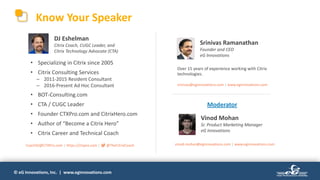
Know Your Speaker
Vinod Mohan
Sr. Product Marketing Manager
eG Innovations
Moderator
DJ Eshelman
Citrix Coach, CUGC Leader, and
Citrix Technology Advocate (CTA)
Srinivas Ramanathan
Founder and CEO
eG Innovations
Over 15 years of experience working with Citrix
technologies.
srinivas@eginnovations.com | www.eginnovations.com
• Specializing in Citrix since 2005
• Citrix Consulting Services
– 2011-2015 Resident Consultant
– 2016-Present Ad Hoc Consultant
• BOT-Consulting.com
• CTA / CUGC Leader
• Founder CTXPro.com and CitrixHero.com
• Author of “Become a Citrix Hero”
• Citrix Career and Technical Coach
CoachDJ@CTXPro.com | https://ctxpro.com | @TheCitrixCoach vinod.mohan@eginnovations.com | www.eginnovations.com
© eG Innovations, Inc. | www.eginnovations.com
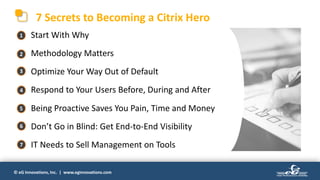
7 Secrets to Becoming a Citrix Hero
• Start With Why
• Methodology Matters
• Optimize Your Way Out of Default
• Respond to Your Users Before, During and After
• Being Proactive Saves You Pain, Time and Money
• Don’t Go in Blind: Get End-to-End Visibility
• IT Needs to Sell Management on Tools
1
2
3
4
5
6
7
© eG Innovations, Inc. | www.eginnovations.com
#1 Start With Why, Or Fail Before You Try
• Before making any non-
critical change, UNDERSTAND
the use case
• LISTEN to users
• ENGAGE with management
to understand business needs
DO THIS
© eG Innovations, Inc. | www.eginnovations.com
#1 Start With Why, Or Fail Before You Try
• Do things because a website or
whitepaper told you it was best
• Assume users are idiots that don’t
know what they are talking about
• Avoid management because they’ll
assume you’re not qualified
DON’T DO THIS
© eG Innovations, Inc. | www.eginnovations.com
#2 Methodology Matters: It’s Not Just About The Tech!
• Adopt a Services, ITIL-ish or DevOps-
ish Methodology as appropriate
• Get your team on-board
• Follow a well-thought out design
and watch for changes needed
proactively according to the process
• Develop, Test, Deploy...Repeat
DO THIS
© eG Innovations, Inc. | www.eginnovations.com
#2 Methodology Matters: It’s Not Just About The Tech!
• Randomly do work that is in front of
you or that you feel like doing first
• Do it alone
• Leap before you look
– Deploy with no design
– Don’t monitor
– Rush through the process
• Test in production
DON’T DO THIS
© eG Innovations, Inc. | www.eginnovations.com
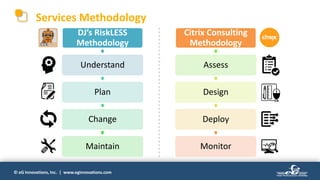
Services Methodology
DJ’s RiskLESS
Methodology
Understand
Plan
Change
Maintain
Citrix Consulting
Methodology
Assess
Design
Deploy
Monitor
© eG Innovations, Inc. | www.eginnovations.com
#3 Optimize Your Way Out of Default!
Default Settings are Costing Your Company $$
• Optimize the Operating System
– Use the Citrix Optimizer
– Keep in mind User needs
• Optimize NetScaler/Citrix ADC
– Defaults are used with the assumption
you will secure and optimize later
– Review quarterly
• Optimize your hardware/cloud
DO THIS
© eG Innovations, Inc. | www.eginnovations.com
#3 Optimize Your Way Out of Default!
Default Settings are Costing Your Company $$
• Trust the ‘out of box’ experience
• Blindly follow whitepapers on ‘best
practices’
• Throw VMs into a hypervisor and
trust it’ll sort them out
DON’T DO THIS
© eG Innovations, Inc. | www.eginnovations.com
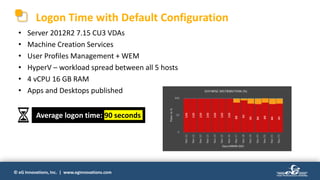
Logon Time with Default Configuration
• Server 2012R2 7.15 CU3 VDAs
• Machine Creation Services
• User Profiles Management + WEM
• HyperV – workload spread between all 5 hosts
• 4 vCPU 16 GB RAM
• Apps and Desktops published
Average logon time: 90 seconds
© eG Innovations, Inc. | www.eginnovations.com
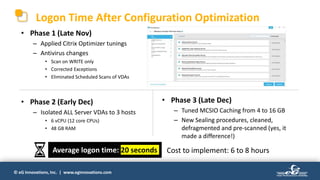
Logon Time After Configuration Optimization
• Phase 1 (Late Nov)
– Applied Citrix Optimizer tunings
– Antivirus changes
• Scan on WRITE only
• Corrected Exceptions
• Eliminated Scheduled Scans of VDAs
• Phase 2 (Early Dec)
– Isolated ALL Server VDAs to 3 hosts
• 6 vCPU (12 core CPUs)
• 48 GB RAM
• Phase 3 (Late Dec)
– Tuned MCSIO Caching from 4 to 16 GB
– New Sealing procedures, cleaned,
defragmented and pre-scanned (yes, it
made a difference!)
Average logon time: 20 seconds Cost to implement: 6 to 8 hours
© eG Innovations, Inc. | www.eginnovations.com
#4 Respond to Your Users Before, During and After
You Know What They Say If You Assume…
• Conduct design reviews with reps
from each user grouping
• Review trouble tickets and watch
for patterns
• Watch for workarounds and provide
a solution
• Monitor user activity proactively
DO THIS
© eG Innovations, Inc. | www.eginnovations.com
• Assume you know what users need
• Ignore trouble ticket trends. You don’t
have the time...
• Users will always do what they want
anyway, so why bother?
• Director is good enough. But I forgot
how to get to it.
DON’T DO THIS
#4 Respond to Your Users Before, During and After
You Know What They Say If You Assume…
© eG Innovations, Inc. | www.eginnovations.com
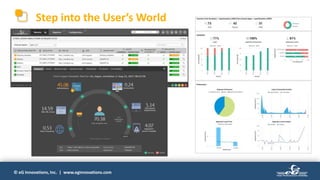
Step into the User’s World
© eG Innovations, Inc. | www.eginnovations.com
#5 Being Proactive Saves You Pain and Time
And Your Company’s Money
• LEARN LEADING PRACTICES
• The goal should be to know about
problems before your users do
• Be alerted to what matters
• Quick resolution
(Hint: It’s very rarely Citrix!)
• Be able to trace problems & trends
DO THIS
© eG Innovations, Inc. | www.eginnovations.com
• Assume it all works ‘out of the box’
• Helpdesk will let you know when
something is wrong
• Rely on service monitoring
• Stop what you’re doing and spend the
rest of the day searching for what caused
your SQL server to go down...
• Rely on your ‘experience’ to guide your
troubleshooting
#5 Being Proactive Saves You Pain and Time
And Your Company’s Money
DON’T DO THIS
© eG Innovations, Inc. | www.eginnovations.com
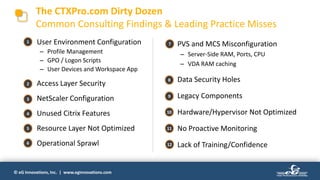
The CTXPro.com Dirty Dozen
Common Consulting Findings & Leading Practice Misses
• User Environment Configuration
– Profile Management
– GPO / Logon Scripts
– User Devices and Workspace App
• Access Layer Security
• NetScaler Configuration
• Unused Citrix Features
• Resource Layer Not Optimized
• Operational Sprawl
• PVS and MCS Misconfiguration
– Server-Side RAM, Ports, CPU
– VDA RAM caching
• Data Security Holes
• Legacy Components
• Hardware/Hypervisor Not Optimized
• No Proactive Monitoring
• Lack of Training/Confidence
1
2
3
4
5
6
7
8
9
10
11
12
© eG Innovations, Inc. | www.eginnovations.com
#6 Don’t Go In Blind: Get End-to-End Visibility
• Monitoring needs to be end-to-end
– Endpoint simulation
– Citrix experience
– Backend and Applications
• Document your environment so
others can help you
• Learn about features of new
releases before deploying
DO THIS
© eG Innovations, Inc. | www.eginnovations.com
• Just monitor Citrix and logon times
• Become used to being woken up at 2
am because you’re the only one who
knows the environment
• Just deploy updates and new releases.
There isn’t time to learn new things.
#6 Don’t Go In Blind: Get End-to-End Visibility
DON’T DO THIS
© eG Innovations, Inc. | www.eginnovations.com
You Need Real Data to Get Real Results
Before – Citrix VDAs wrote the most disk (~8 MB/sec each)
© eG Innovations, Inc. | www.eginnovations.com
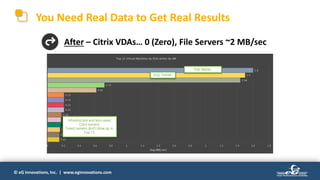
You Need Real Data to Get Real Results
After – Citrix VDAs… 0 (Zero), File Servers ~2 MB/sec
© eG Innovations, Inc. | www.eginnovations.com
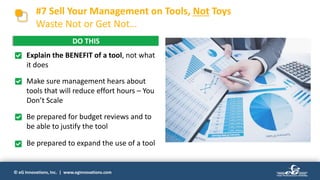
#7 Sell Your Management on Tools, Not Toys
Waste Not or Get Not…
• Explain the BENEFIT of a tool, not what
it does
• Make sure management hears about
tools that will reduce effort hours – You
Don’t Scale
• Be prepared for budget reviews and to
be able to justify the tool
• Be prepared to expand the use of a tool
DO THIS
© eG Innovations, Inc. | www.eginnovations.com
• Make demands or threats
• Hand your management someone
else’s presentation or a link to consider
• Results sell, not drama
• Get protective of YOUR TOOL (aka your
toy)
DON’T DO THIS
#7 Sell Your Management on Tools, Not Toys
Waste Not or Get Not…
© eG Innovations, Inc. | www.eginnovations.com
Top 3 Citrix Mistakes, Fixes and Tips
How to Become a Citrix Hero
EVERY Citrix environment has
something wrong with it. Avoid the big
Citrix mistakes and be a Citrix Hero.
https://ctxpro.com/egspecial
© eG Innovations, Inc. | www.eginnovations.com
How to Do Monitoring
The Right Way
Best Practices
from eG Innovations
© eG Innovations, Inc. | www.eginnovations.com
#10YearChallenge ─ How Citrix Architecture has Evolved
• Physical servers
• Virtual apps & desktops with
separate deployments
• XenApp server central to
remote access
• Access from thin client devices
and desktops
• Virtual servers and/or cloud, hybrid infra
• Unified deployment architecture for
virtual apps and desktops
• Multitude of tiers: Citrix ADC, StoreFront,
PVS, WEM, Delivery Controller, etc.
• Heterogeneous devices (mobiles, tablets)
and platforms (Linux)
© eG Innovations, Inc. | www.eginnovations.com
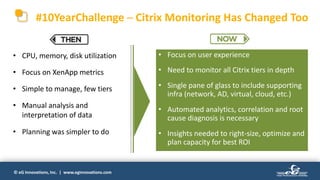
#10YearChallenge ─ Citrix Monitoring Has Changed Too
• CPU, memory, disk utilization
• Focus on XenApp metrics
• Simple to manage, few tiers
• Manual analysis and
interpretation of data
• Planning was simpler to do
• Focus on user experience
• Need to monitor all Citrix tiers in depth
• Single pane of glass to include supporting
infra (network, AD, virtual, cloud, etc.)
• Automated analytics, correlation and root
cause diagnosis is necessary
• Insights needed to right-size, optimize and
plan capacity for best ROI
© eG Innovations, Inc. | www.eginnovations.com
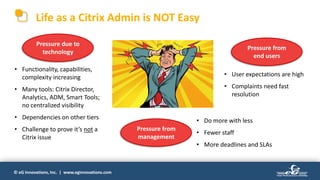
Life as a Citrix Admin is NOT Easy
Pressure due to
technology
Pressure from
management
Pressure from
end users
• Functionality, capabilities,
complexity increasing
• Many tools: Citrix Director,
Analytics, ADM, Smart Tools;
no centralized visibility
• Dependencies on other tiers
• Challenge to prove it’s not a
Citrix issue
• User expectations are high
• Complaints need fast
resolution
• Do more with less
• Fewer staff
• More deadlines and SLAs
© eG Innovations, Inc. | www.eginnovations.com
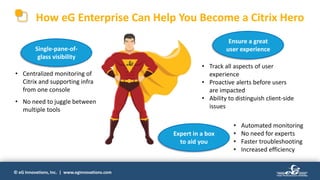
How eG Enterprise Can Help You Become a Citrix Hero
Single-pane-of-
glass visibility
Expert in a box
to aid you
Ensure a great
user experience
• Centralized monitoring of
Citrix and supporting infra
from one console
• No need to juggle between
multiple tools
• Track all aspects of user
experience
• Proactive alerts before users
are impacted
• Ability to distinguish client-side
issues
• Automated monitoring
• No need for experts
• Faster troubleshooting
• Increased efficiency
© eG Innovations, Inc. | www.eginnovations.com
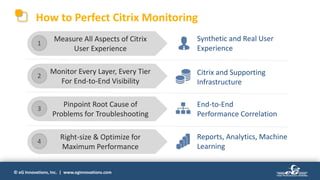
Synthetic and Real User
Experience
Citrix and Supporting
Infrastructure
End-to-End
Performance Correlation
Reports, Analytics, Machine
Learning
Monitor Every Layer, Every Tier
For End-to-End Visibility
Pinpoint Root Cause of
Problems for Troubleshooting
Right-size & Optimize for
Maximum Performance
Measure All Aspects of Citrix
User Experience
1
2
3
4
How to Perfect Citrix Monitoring
© eG Innovations, Inc. | www.eginnovations.com
Measure All Aspects of Citrix User Experience
 Emulates users
 Imposes the same workload again and
again
 Provides a measure of experience EVEN
when there is no real load
 Monitors real users
 Actual workloads
 Direct measure of what users are seeing
Synthetic Measurements
Real User Experience Measurements
User Experience
Measurement
 Simulate logon; launch
different applications
 Synthetic monitoring
from multiple locations
 Real user monitoring
from the client, network,
server
 Must use a combination
of both approaches
#1
© eG Innovations, Inc. | www.eginnovations.com
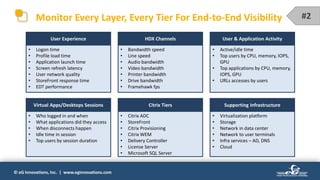
Monitor Every Layer, Every Tier For End-to-End Visibility
• Logon time
• Profile load time
• Application launch time
• Screen refresh latency
• User network quality
• StoreFront response time
• EDT performance
User Experience
• Bandwidth speed
• Line speed
• Audio bandwidth
• Video bandwidth
• Printer bandwidth
• Drive bandwidth
• Framehawk fps
HDX Channels
• Active/idle time
• Top users by CPU, memory, IOPS,
GPU
• Top applications by CPU, memory,
IOPS, GPU
• URLs accesses by users
User & Application Activity
• Who logged in and when
• What applications did they access
• When disconnects happen
• Idle time in session
• Top users by session duration
Virtual Apps/Desktops Sessions
• Citrix ADC
• StoreFront
• Citrix Provisioning
• Citrix WEM
• Delivery Controller
• License Server
• Microsoft SQL Server
Citrix Tiers
• Virtualization platform
• Storage
• Network in data center
• Network to user terminals
• Infra services – AD, DNS
• Cloud
Supporting Infrastructure
#2
© eG Innovations, Inc. | www.eginnovations.com
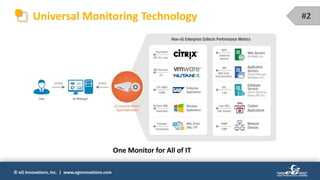
Universal Monitoring Technology
One Monitor for All of IT
#2
© eG Innovations, Inc. | www.eginnovations.com
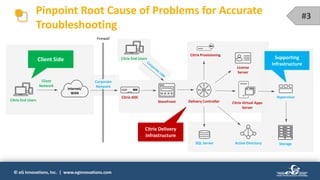
Pinpoint Root Cause of Problems for Accurate
Troubleshooting
StoreFront Delivery Controller
Citrix ADC
Citrix End Users
License
Server
Citrix Provisioning
Active DirectorySQL Server
Citrix Virtual Apps
Server
Hypervisor
Internet/
WAN
Storage
Client Side
Citrix Delivery
Infrastructure
Supporting
Infrastructure
Citrix End Users
Firewall
Corporate
Network
Client
Network
Corporate
Network
#3
© eG Innovations, Inc. | www.eginnovations.com
Right-size & Optimize for Maximum Performance
Right-Sizing
Planning
Auditing
Optimization
• Analyze usage patterns
• Load-balance your IT
infrastructure
• Measure resource utilization
against availability
• Get the most out of your
infrastructure
• Predict when you will run out
of resources
• Forecast future requirements
• Make information available for
audits
• Get reports for regulatory
compliance
Out-of-the-Box Analytics & Historical Reports
#4
© eG Innovations, Inc. | www.eginnovations.com
Right-Size Your Citrix Environment
Get insights for right sizing: Is the VM oversized?
© eG Innovations, Inc. | www.eginnovations.com
Migration Analysis: Comparing Performance Before and After
Before
Migration
After
Migration
Migration from XenApp 6.5
to Citrix Virtual Apps 7
© eG Innovations, Inc. | www.eginnovations.com
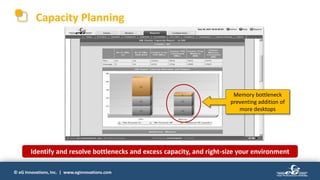
Capacity Planning
Memory bottleneck
preventing addition of
more desktops
Identify and resolve bottlenecks and excess capacity, and right-size your environment
© eG Innovations, Inc. | www.eginnovations.com
Thank You!
Contact eG Innovations for more
information on Citrix monitoring:
www.eginnovations.com
info@eginnovations.com
Contact DJ Eshelman about:
CitrixCoach.com
BOT-Consulting.com
Citrix coaching:
Citrix consulting:

7 Secrets to Becoming a Citrix Hero

  • 1.
    © eG Innovations,Inc. | www.eginnovations.com Lessons From The Field: What To Do & What Not To 7 Secrets to Becoming a CITRIX HERO
  • 2.
    © eG Innovations,Inc. | www.eginnovations.com Know Your Speaker Vinod Mohan Sr. Product Marketing Manager eG Innovations Moderator DJ Eshelman Citrix Coach, CUGC Leader, and Citrix Technology Advocate (CTA) Srinivas Ramanathan Founder and CEO eG Innovations Over 15 years of experience working with Citrix technologies. srinivas@eginnovations.com | www.eginnovations.com • Specializing in Citrix since 2005 • Citrix Consulting Services – 2011-2015 Resident Consultant – 2016-Present Ad Hoc Consultant • BOT-Consulting.com • CTA / CUGC Leader • Founder CTXPro.com and CitrixHero.com • Author of “Become a Citrix Hero” • Citrix Career and Technical Coach CoachDJ@CTXPro.com | https://ctxpro.com | @TheCitrixCoach vinod.mohan@eginnovations.com | www.eginnovations.com
  • 3.
    © eG Innovations,Inc. | www.eginnovations.com 7 Secrets to Becoming a Citrix Hero • Start With Why • Methodology Matters • Optimize Your Way Out of Default • Respond to Your Users Before, During and After • Being Proactive Saves You Pain, Time and Money • Don’t Go in Blind: Get End-to-End Visibility • IT Needs to Sell Management on Tools 1 2 3 4 5 6 7
  • 4.
    © eG Innovations,Inc. | www.eginnovations.com #1 Start With Why, Or Fail Before You Try • Before making any non- critical change, UNDERSTAND the use case • LISTEN to users • ENGAGE with management to understand business needs DO THIS
  • 5.
    © eG Innovations,Inc. | www.eginnovations.com #1 Start With Why, Or Fail Before You Try • Do things because a website or whitepaper told you it was best • Assume users are idiots that don’t know what they are talking about • Avoid management because they’ll assume you’re not qualified DON’T DO THIS
  • 6.
    © eG Innovations,Inc. | www.eginnovations.com #2 Methodology Matters: It’s Not Just About The Tech! • Adopt a Services, ITIL-ish or DevOps- ish Methodology as appropriate • Get your team on-board • Follow a well-thought out design and watch for changes needed proactively according to the process • Develop, Test, Deploy...Repeat DO THIS
  • 7.
    © eG Innovations,Inc. | www.eginnovations.com #2 Methodology Matters: It’s Not Just About The Tech! • Randomly do work that is in front of you or that you feel like doing first • Do it alone • Leap before you look – Deploy with no design – Don’t monitor – Rush through the process • Test in production DON’T DO THIS
  • 8.
    © eG Innovations,Inc. | www.eginnovations.com Services Methodology DJ’s RiskLESS Methodology Understand Plan Change Maintain Citrix Consulting Methodology Assess Design Deploy Monitor
  • 9.
    © eG Innovations,Inc. | www.eginnovations.com #3 Optimize Your Way Out of Default! Default Settings are Costing Your Company $$ • Optimize the Operating System – Use the Citrix Optimizer – Keep in mind User needs • Optimize NetScaler/Citrix ADC – Defaults are used with the assumption you will secure and optimize later – Review quarterly • Optimize your hardware/cloud DO THIS
  • 10.
    © eG Innovations,Inc. | www.eginnovations.com #3 Optimize Your Way Out of Default! Default Settings are Costing Your Company $$ • Trust the ‘out of box’ experience • Blindly follow whitepapers on ‘best practices’ • Throw VMs into a hypervisor and trust it’ll sort them out DON’T DO THIS
  • 11.
    © eG Innovations,Inc. | www.eginnovations.com Logon Time with Default Configuration • Server 2012R2 7.15 CU3 VDAs • Machine Creation Services • User Profiles Management + WEM • HyperV – workload spread between all 5 hosts • 4 vCPU 16 GB RAM • Apps and Desktops published Average logon time: 90 seconds
  • 12.
    © eG Innovations,Inc. | www.eginnovations.com Logon Time After Configuration Optimization • Phase 1 (Late Nov) – Applied Citrix Optimizer tunings – Antivirus changes • Scan on WRITE only • Corrected Exceptions • Eliminated Scheduled Scans of VDAs • Phase 2 (Early Dec) – Isolated ALL Server VDAs to 3 hosts • 6 vCPU (12 core CPUs) • 48 GB RAM • Phase 3 (Late Dec) – Tuned MCSIO Caching from 4 to 16 GB – New Sealing procedures, cleaned, defragmented and pre-scanned (yes, it made a difference!) Average logon time: 20 seconds Cost to implement: 6 to 8 hours
  • 13.
    © eG Innovations,Inc. | www.eginnovations.com #4 Respond to Your Users Before, During and After You Know What They Say If You Assume… • Conduct design reviews with reps from each user grouping • Review trouble tickets and watch for patterns • Watch for workarounds and provide a solution • Monitor user activity proactively DO THIS
  • 14.
    © eG Innovations,Inc. | www.eginnovations.com • Assume you know what users need • Ignore trouble ticket trends. You don’t have the time... • Users will always do what they want anyway, so why bother? • Director is good enough. But I forgot how to get to it. DON’T DO THIS #4 Respond to Your Users Before, During and After You Know What They Say If You Assume…
  • 15.
    © eG Innovations,Inc. | www.eginnovations.com Step into the User’s World
  • 16.
    © eG Innovations,Inc. | www.eginnovations.com #5 Being Proactive Saves You Pain and Time And Your Company’s Money • LEARN LEADING PRACTICES • The goal should be to know about problems before your users do • Be alerted to what matters • Quick resolution (Hint: It’s very rarely Citrix!) • Be able to trace problems & trends DO THIS
  • 17.
    © eG Innovations,Inc. | www.eginnovations.com • Assume it all works ‘out of the box’ • Helpdesk will let you know when something is wrong • Rely on service monitoring • Stop what you’re doing and spend the rest of the day searching for what caused your SQL server to go down... • Rely on your ‘experience’ to guide your troubleshooting #5 Being Proactive Saves You Pain and Time And Your Company’s Money DON’T DO THIS
  • 18.
    © eG Innovations,Inc. | www.eginnovations.com The CTXPro.com Dirty Dozen Common Consulting Findings & Leading Practice Misses • User Environment Configuration – Profile Management – GPO / Logon Scripts – User Devices and Workspace App • Access Layer Security • NetScaler Configuration • Unused Citrix Features • Resource Layer Not Optimized • Operational Sprawl • PVS and MCS Misconfiguration – Server-Side RAM, Ports, CPU – VDA RAM caching • Data Security Holes • Legacy Components • Hardware/Hypervisor Not Optimized • No Proactive Monitoring • Lack of Training/Confidence 1 2 3 4 5 6 7 8 9 10 11 12
  • 19.
    © eG Innovations,Inc. | www.eginnovations.com #6 Don’t Go In Blind: Get End-to-End Visibility • Monitoring needs to be end-to-end – Endpoint simulation – Citrix experience – Backend and Applications • Document your environment so others can help you • Learn about features of new releases before deploying DO THIS
  • 20.
    © eG Innovations,Inc. | www.eginnovations.com • Just monitor Citrix and logon times • Become used to being woken up at 2 am because you’re the only one who knows the environment • Just deploy updates and new releases. There isn’t time to learn new things. #6 Don’t Go In Blind: Get End-to-End Visibility DON’T DO THIS
  • 21.
    © eG Innovations,Inc. | www.eginnovations.com You Need Real Data to Get Real Results Before – Citrix VDAs wrote the most disk (~8 MB/sec each)
  • 22.
    © eG Innovations,Inc. | www.eginnovations.com You Need Real Data to Get Real Results After – Citrix VDAs… 0 (Zero), File Servers ~2 MB/sec
  • 23.
    © eG Innovations,Inc. | www.eginnovations.com #7 Sell Your Management on Tools, Not Toys Waste Not or Get Not… • Explain the BENEFIT of a tool, not what it does • Make sure management hears about tools that will reduce effort hours – You Don’t Scale • Be prepared for budget reviews and to be able to justify the tool • Be prepared to expand the use of a tool DO THIS
  • 24.
    © eG Innovations,Inc. | www.eginnovations.com • Make demands or threats • Hand your management someone else’s presentation or a link to consider • Results sell, not drama • Get protective of YOUR TOOL (aka your toy) DON’T DO THIS #7 Sell Your Management on Tools, Not Toys Waste Not or Get Not…
  • 25.
    © eG Innovations,Inc. | www.eginnovations.com Top 3 Citrix Mistakes, Fixes and Tips How to Become a Citrix Hero EVERY Citrix environment has something wrong with it. Avoid the big Citrix mistakes and be a Citrix Hero. https://ctxpro.com/egspecial
  • 26.
    © eG Innovations,Inc. | www.eginnovations.com How to Do Monitoring The Right Way Best Practices from eG Innovations
  • 27.
    © eG Innovations,Inc. | www.eginnovations.com #10YearChallenge ─ How Citrix Architecture has Evolved • Physical servers • Virtual apps & desktops with separate deployments • XenApp server central to remote access • Access from thin client devices and desktops • Virtual servers and/or cloud, hybrid infra • Unified deployment architecture for virtual apps and desktops • Multitude of tiers: Citrix ADC, StoreFront, PVS, WEM, Delivery Controller, etc. • Heterogeneous devices (mobiles, tablets) and platforms (Linux)
  • 28.
    © eG Innovations,Inc. | www.eginnovations.com #10YearChallenge ─ Citrix Monitoring Has Changed Too • CPU, memory, disk utilization • Focus on XenApp metrics • Simple to manage, few tiers • Manual analysis and interpretation of data • Planning was simpler to do • Focus on user experience • Need to monitor all Citrix tiers in depth • Single pane of glass to include supporting infra (network, AD, virtual, cloud, etc.) • Automated analytics, correlation and root cause diagnosis is necessary • Insights needed to right-size, optimize and plan capacity for best ROI
  • 29.
    © eG Innovations,Inc. | www.eginnovations.com Life as a Citrix Admin is NOT Easy Pressure due to technology Pressure from management Pressure from end users • Functionality, capabilities, complexity increasing • Many tools: Citrix Director, Analytics, ADM, Smart Tools; no centralized visibility • Dependencies on other tiers • Challenge to prove it’s not a Citrix issue • User expectations are high • Complaints need fast resolution • Do more with less • Fewer staff • More deadlines and SLAs
  • 30.
    © eG Innovations,Inc. | www.eginnovations.com How eG Enterprise Can Help You Become a Citrix Hero Single-pane-of- glass visibility Expert in a box to aid you Ensure a great user experience • Centralized monitoring of Citrix and supporting infra from one console • No need to juggle between multiple tools • Track all aspects of user experience • Proactive alerts before users are impacted • Ability to distinguish client-side issues • Automated monitoring • No need for experts • Faster troubleshooting • Increased efficiency
  • 31.
    © eG Innovations,Inc. | www.eginnovations.com Synthetic and Real User Experience Citrix and Supporting Infrastructure End-to-End Performance Correlation Reports, Analytics, Machine Learning Monitor Every Layer, Every Tier For End-to-End Visibility Pinpoint Root Cause of Problems for Troubleshooting Right-size & Optimize for Maximum Performance Measure All Aspects of Citrix User Experience 1 2 3 4 How to Perfect Citrix Monitoring
  • 32.
    © eG Innovations,Inc. | www.eginnovations.com Measure All Aspects of Citrix User Experience  Emulates users  Imposes the same workload again and again  Provides a measure of experience EVEN when there is no real load  Monitors real users  Actual workloads  Direct measure of what users are seeing Synthetic Measurements Real User Experience Measurements User Experience Measurement  Simulate logon; launch different applications  Synthetic monitoring from multiple locations  Real user monitoring from the client, network, server  Must use a combination of both approaches #1
  • 33.
    © eG Innovations,Inc. | www.eginnovations.com Monitor Every Layer, Every Tier For End-to-End Visibility • Logon time • Profile load time • Application launch time • Screen refresh latency • User network quality • StoreFront response time • EDT performance User Experience • Bandwidth speed • Line speed • Audio bandwidth • Video bandwidth • Printer bandwidth • Drive bandwidth • Framehawk fps HDX Channels • Active/idle time • Top users by CPU, memory, IOPS, GPU • Top applications by CPU, memory, IOPS, GPU • URLs accesses by users User & Application Activity • Who logged in and when • What applications did they access • When disconnects happen • Idle time in session • Top users by session duration Virtual Apps/Desktops Sessions • Citrix ADC • StoreFront • Citrix Provisioning • Citrix WEM • Delivery Controller • License Server • Microsoft SQL Server Citrix Tiers • Virtualization platform • Storage • Network in data center • Network to user terminals • Infra services – AD, DNS • Cloud Supporting Infrastructure #2
  • 34.
    © eG Innovations,Inc. | www.eginnovations.com Universal Monitoring Technology One Monitor for All of IT #2
  • 35.
    © eG Innovations,Inc. | www.eginnovations.com Pinpoint Root Cause of Problems for Accurate Troubleshooting StoreFront Delivery Controller Citrix ADC Citrix End Users License Server Citrix Provisioning Active DirectorySQL Server Citrix Virtual Apps Server Hypervisor Internet/ WAN Storage Client Side Citrix Delivery Infrastructure Supporting Infrastructure Citrix End Users Firewall Corporate Network Client Network Corporate Network #3
  • 36.
    © eG Innovations,Inc. | www.eginnovations.com Right-size & Optimize for Maximum Performance Right-Sizing Planning Auditing Optimization • Analyze usage patterns • Load-balance your IT infrastructure • Measure resource utilization against availability • Get the most out of your infrastructure • Predict when you will run out of resources • Forecast future requirements • Make information available for audits • Get reports for regulatory compliance Out-of-the-Box Analytics & Historical Reports #4
  • 37.
    © eG Innovations,Inc. | www.eginnovations.com Right-Size Your Citrix Environment Get insights for right sizing: Is the VM oversized?
  • 38.
    © eG Innovations,Inc. | www.eginnovations.com Migration Analysis: Comparing Performance Before and After Before Migration After Migration Migration from XenApp 6.5 to Citrix Virtual Apps 7
  • 39.
    © eG Innovations,Inc. | www.eginnovations.com Capacity Planning Memory bottleneck preventing addition of more desktops Identify and resolve bottlenecks and excess capacity, and right-size your environment
  • 40.
    © eG Innovations,Inc. | www.eginnovations.com
  • 41.
    © eG Innovations,Inc. | www.eginnovations.com Thank You! Contact eG Innovations for more information on Citrix monitoring: www.eginnovations.com info@eginnovations.com Contact DJ Eshelman about: CitrixCoach.com BOT-Consulting.com Citrix coaching: Citrix consulting:

Editor's Notes

  • #4 Today we’re going to focus on the story of an organization that I started independent consulting work for and how following what we discuss today has brought them from a point where employees were LITERALLY quitting because the systems were so bad and they couldn’t work. For them, their compensation is tied to how much they can process. So when they made the decision to consolidate their operations and most importantly their data to a central datacenter from 16 branch locations… they chose Citrix to deliver. I’d love to say it went well, but when I started working with them it was disorganized. I’ll tell you right now this story has a happy ending. Citrix is now transparent to the users (or in many cases they are glad it is there because it was working better than their branch servers were). The company is saving a few hundred thousands of dollars each year – which given their sub 500 employee size- is a HUGE deal! Today I’m going to show you how applying these principals made the difference.
  • #5 One of the most common things I see missed? A good solid reason WHY things were done the way they were. Listening to users is key – you’ll discover workarounds they are using, needs they have that may be a gap in the design Management hired you because you were qualified. They are more harmed by you avoiding them than you are. In the case of our friends – one of the largest problems was that while the IT team was aware that users were not happy, THEY NEVER TOOK THE TIME TO UNDERSTAND THE WORK. They never talked to the users and assumed that Citrix was the problem. They didn’t know what management needed. Or the users. They just had inherited this “Citrix” environment and didn’t know what to do. One of the first big mistakes I saw there is that they assumed that because they had recently consolidated, that they needed to maintain each server separately and assign users per server. That’s right. Single points of failure and some 30+ Delivery Groups to manage. But the users were all using the exact same app talking to the same database! The assumption of why was completely WRONG. So- we took them back to basics by using a specific methodology…
  • #6 One of the most common things I see missed? A good solid reason WHY things were done the way they were. Listening to users is key – you’ll discover workarounds they are using, needs they have that may be a gap in the design Management hired you because you were qualified. They are more harmed by you avoiding them than you are. In the case of our friends – one of the largest problems was that while the IT team was aware that users were not happy, THEY NEVER TOOK THE TIME TO UNDERSTAND THE WORK. They never talked to the users and assumed that Citrix was the problem. They didn’t know what management needed. Or the users. They just had inherited this “Citrix” environment and didn’t know what to do. One of the first big mistakes I saw there is that they assumed that because they had recently consolidated, that they needed to maintain each server separately and assign users per server. That’s right. Single points of failure and some 30+ Delivery Groups to manage. But the users were all using the exact same app talking to the same database! The assumption of why was completely WRONG. So- we took them back to basics by using a specific methodology…
  • #7 Sorry- we aren’t to the tech yet. Every organization that I have seen ignore these practices introduces risks to how much they spend, how happy their users are being there, how productive they are and… possibly worst of all- their organizations data. In the case of our friends- one of the biggest problems was they had no design; very little was documented and changes were made unannounced because there was so much pressure to roll out changes. So we took them thru a specific process…
  • #8 Sorry- we aren’t to the tech yet. Every organization that I have seen ignore these practices introduces risks to how much they spend, how happy their users are being there, how productive they are and… possibly worst of all- their organizations data. In the case of our friends- one of the biggest problems was they had no design; very little was documented and changes were made unannounced because there was so much pressure to roll out changes. So we took them thru a specific process…
  • #9 I have grown to really love Citrix’s methodology- it’s cyclical and I think works really well for project Will DevOps work? Sometimes. But these have little to no training and are a good place to start. IF YOU ARE DOING DEVELOPMENT. For our friends, they are serviced by a team that is spread across the US. They needed a clear way to understand where they were in the process and how my team fit in as consultants. Though at first they were frustrated that we went back and re-covered what they thought they had already covered… when they started seeing the results they were quite happy that they spent the time (and money) on taking the time to do it right.
  • #10 What’s the biggest way to fail in Citrix? Assume the default settings will be okay! The OS is not optimized by default… NetScaler is ‘out of the box’ open to accommodate installs and must be optimized and locked down. Despite what is often said, the Hypervisor very often does NOT properly balance workloads and almost ALWAYS servers come optimized for power savings, not performance. Dial back the Optimizer settings when it’s appropriate for the use case- remember... START WITH WHY. For example, Windows Search takes a lot of resources. But disabling it could make people using Outlook pretty upset. Our friends had issues they didn’t even know about. Their NetScalers were very insecure! But when I was first called in, oddly enough it was to evaluate if NetScaler Gateway was the right solution at all. Why? Because of a single checkbox that is not set by default- but was very much needed on their network. Without it, user sessions would disconnect and be bounced between NetScaler nodes.
  • #11 What’s the biggest way to fail in Citrix? Assume the default settings will be okay! The OS is not optimized by default… NetScaler is ‘out of the box’ open to accommodate installs and must be optimized and locked down. Despite what is often said, the Hypervisor very often does NOT properly balance workloads and almost ALWAYS servers come optimized for power savings, not performance. Dial back the Optimizer settings when it’s appropriate for the use case- remember... START WITH WHY. For example, Windows Search takes a lot of resources. But disabling it could make people using Outlook pretty upset. Our friends had issues they didn’t even know about. Their NetScalers were very insecure! But when I was first called in, oddly enough it was to evaluate if NetScaler Gateway was the right solution at all. Why? Because of a single checkbox that is not set by default- but was very much needed on their network. Without it, user sessions would disconnect and be bounced between NetScaler nodes.
  • #12 All the time I get people telling me that these things don’t really matter. (description of old reality) This is AFTER we’d gotten them from the 5 minute logons down to about 40 seconds by better UPM rules, WEM and deploying MCS. They were happy. But I had a feeling that things could be more improved. Unfortunately, not everyone was onboard with the methodology. Some changes were made that made the user experience decline. Logon times were up, queries were slower. When we put in eG to try and figure out what was going on- we found this was that there were a lot of issues contributing. We were initially confused because we had profile management tuned pretty well and the client felt there was enough resources. But thru the application of the tunings I talk about in the eBook – we went from 90 second logons down to 20 second logons. These settings matter- and the good news to them was we did this in under 20 hours as we investigated. You can deploy these settings in far less time – about 6 hours! First, we applied optimizations. As you can see in the graph above, this took their time in critical alarms down from a solid 100% to the mid-80s. Not pictured above is the results from Phase 2 which took them down to under 50. Then Phase 3 (we’ll talk about later) took them out of alarms altogether.
  • #13 All the time I get people telling me that these things don’t really matter. (description of old reality) This is AFTER we’d gotten them from the 5 minute logons down to about 40 seconds by better UPM rules, WEM and deploying MCS. They were happy. But I had a feeling that things could be more improved. Unfortunately, not everyone was onboard with the methodology. Some changes were made that made the user experience decline. Logon times were up, queries were slower. When we put in eG to try and figure out what was going on- we found this was that there were a lot of issues contributing. We were initially confused because we had profile management tuned pretty well and the client felt there was enough resources. But thru the application of the tunings I talk about in the eBook – we went from 90 second logons down to 20 second logons. These settings matter- and the good news to them was we did this in under 20 hours as we investigated. You can deploy these settings in far less time – about 6 hours! First, we applied optimizations. As you can see in the graph above, this took their time in critical alarms down from a solid 100% to the mid-80s. Not pictured above is the results from Phase 2 which took them down to under 50. Then Phase 3 (we’ll talk about later) took them out of alarms altogether.
  • #14 As I’d mentioned- our friends had no idea what their users really needed. So, I got on a plane and had them meet me at the main office to talk to management and who they felt were ‘representative’ users. Then we visited a few branches to see what the experience was really like. We found several issues we hadn’t even been aware of – but more importantly we observed users doing workarounds from problems that had been solved nearly a year ago! The users were miserable because they didn’t even know how to do things right. The IT services team had just assumed that users were being obstinant.
  • #15 As I’d mentioned- our friends had no idea what their users really needed. So, I got on a plane and had them meet me at the main office to talk to management and who they felt were ‘representative’ users. Then we visited a few branches to see what the experience was really like. We found several issues we hadn’t even been aware of – but more importantly we observed users doing workarounds from problems that had been solved nearly a year ago! The users were miserable because they didn’t even know how to do things right. The IT services team had just assumed that users were being obstinant.
  • #16 Pretty soon we’re going to talk about how we made some fine tunings with our friends. But how I found out there was actually a problem brewing was not because users were telling us. From their perspective things had never been better. But the reality was that user experience was steadily declining. Every time I logged on it seemed everything was fine. But then users started reporting issues at random times of the day. But we couldn’t see the issues. Couldn’t replicate them. Logon Simulator told us the user’s story in a whole new way. Once we realized where the variances in experience were coming from, we dove deeper in. We installed eGInnovations’ solution. But that’s a story we’ll get to later. The point here is that had we been using this free tool early on in our process, we would have realized the issues before the users even said anything!
  • #17 As I’d mentioned- our friends had no idea what their users really needed. So, I got on a plane and had them meet me at the main office to talk to management and who they felt were ‘representative’ users. Then we visited a few branches to see what the experience was really like. We found several issues we hadn’t even been aware of – but more importantly we observed users doing workarounds from problems that had been solved nearly a year ago! The users were miserable because they didn’t even know how to do things right. The IT services team had just assumed that users were being obstinant.
  • #18 As I’d mentioned- our friends had no idea what their users really needed. So, I got on a plane and had them meet me at the main office to talk to management and who they felt were ‘representative’ users. Then we visited a few branches to see what the experience was really like. We found several issues we hadn’t even been aware of – but more importantly we observed users doing workarounds from problems that had been solved nearly a year ago! The users were miserable because they didn’t even know how to do things right. The IT services team had just assumed that users were being obstinant.
  • #20 As I’d mentioned- our friends had no idea what their users really needed. So, I got on a plane and had them meet me at the main office to talk to management and who they felt were ‘representative’ users. Then we visited a few branches to see what the experience was really like. We found several issues we hadn’t even been aware of – but more importantly we observed users doing workarounds from problems that had been solved nearly a year ago! The users were miserable because they didn’t even know how to do things right. The IT services team had just assumed that users were being obstinant.
  • #21 As I’d mentioned- our friends had no idea what their users really needed. So, I got on a plane and had them meet me at the main office to talk to management and who they felt were ‘representative’ users. Then we visited a few branches to see what the experience was really like. We found several issues we hadn’t even been aware of – but more importantly we observed users doing workarounds from problems that had been solved nearly a year ago! The users were miserable because they didn’t even know how to do things right. The IT services team had just assumed that users were being obstinant.
  • #24 As I’d mentioned- our friends had no idea what their users really needed. So, I got on a plane and had them meet me at the main office to talk to management and who they felt were ‘representative’ users. Then we visited a few branches to see what the experience was really like. We found several issues we hadn’t even been aware of – but more importantly we observed users doing workarounds from problems that had been solved nearly a year ago! The users were miserable because they didn’t even know how to do things right. The IT services team had just assumed that users were being obstinant.
  • #25 As I’d mentioned- our friends had no idea what their users really needed. So, I got on a plane and had them meet me at the main office to talk to management and who they felt were ‘representative’ users. Then we visited a few branches to see what the experience was really like. We found several issues we hadn’t even been aware of – but more importantly we observed users doing workarounds from problems that had been solved nearly a year ago! The users were miserable because they didn’t even know how to do things right. The IT services team had just assumed that users were being obstinant.
  • #27 So, first let us understand the Citrix Logon Process itself and what is involved there, as well as the implications of logon slowness.
  • #34 Proactively detect logon issues and solve them before real users access the Citrix environment Benchmark logon performance with simulation, and use it as measure of comparison for when real users connect Compare logon performance from different locations Test application availability and whether all components of the Citrix delivery stream work in concert