




© eG Innovations, Inc. | www.eginnovations.com
Quantifying User Experience
in
Virtual Ecosystems
Wendy Howard
Technical Consultant
eG Innovations
© eG Innovations, Inc. | www.eginnovations.com
Agenda
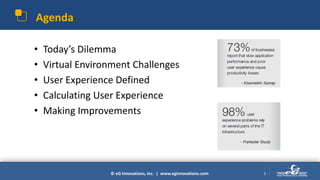
• Today’s Dilemma
• Virtual Environment Challenges
• User Experience Defined
• Calculating User Experience
• Making Improvements
2
© eG Innovations, Inc. | www.eginnovations.com
Today’s Dilemma
3
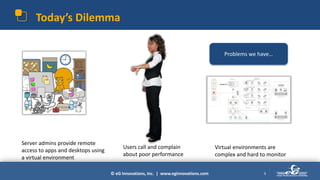
Server admins provide remote
access to apps and desktops using
a virtual environment
Users call and complain
about poor performance
Virtual environments are
complex and hard to monitor
Problems we have…
© eG Innovations, Inc. | www.eginnovations.com
User Experience: The Measure of IT Success
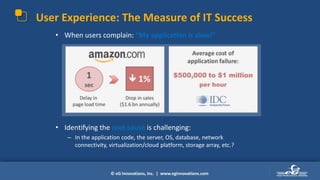
• When users complain: “My application is slow!”
• Identifying the root cause is challenging:
– In the application code, the server, OS, database, network
connectivity, virtualization/cloud platform, storage array, etc.?
© eG Innovations, Inc. | www.eginnovations.com 5
Virtual Environment Challenges
© eG Innovations, Inc. | www.eginnovations.com
What can impact the User Experience?
6
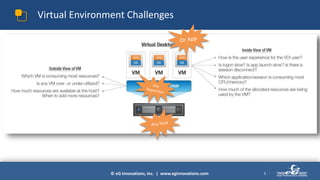
• Almost anything can impact a user’s
experience...
...performance Jokers are everywhere!!
Monitoring the performance of
the digital workspace ecosystem
has become mission-critical and
is a foundation for success
© eG Innovations, Inc. | www.eginnovations.com
Popular Virtualization Architectures
© eG Innovations, Inc. | www.eginnovations.com
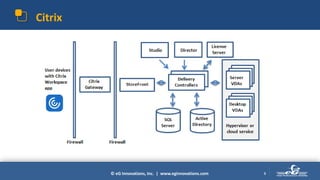
Citrix
8
© eG Innovations, Inc. | www.eginnovations.com
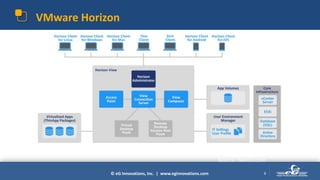
VMware Horizon
9
Source: Navico.com
© eG Innovations, Inc. | www.eginnovations.com
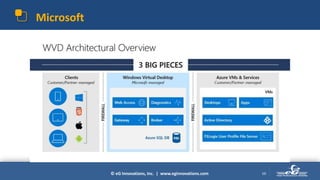
Microsoft
10
© eG Innovations, Inc. | www.eginnovations.com
What do they all have in common?
11
© eG Innovations, Inc. | www.eginnovations.com
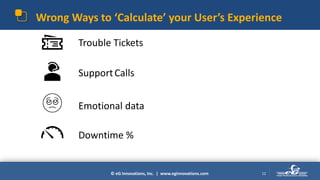
Wrong Ways to ‘Calculate’ your User’s Experience
Trouble Tickets
12
SupportCalls
Emotional data
Downtime %
© eG Innovations, Inc. | www.eginnovations.com
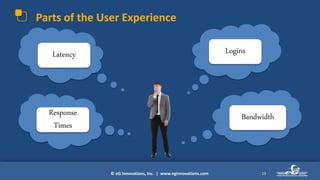
Parts of the User Experience
13
Can I log into work
quickly today?
Why does my
computer keep
freezing?
My cursor seems
slow….
This application is
moving at the speed
of molasses…
Latency Logins
Response
Times
Bandwidth
© eG Innovations, Inc. | www.eginnovations.com
Parts of the User Experience
14
Can I log into work
quickly today?
Why does my
computer keep
freezing?
My cursor seems
slow….
This application is
moving at the speed
of molasses…
15
Round Trip
© eG Innovations, Inc. | www.eginnovations.com
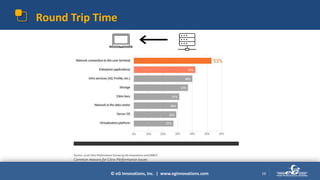
Round Trip Time
16
Source: 2016 Citrix Performance Survey by eG Innovations and DABCC
Common reasons for Citrix Performance Issues
© eG Innovations, Inc. | www.eginnovations.com
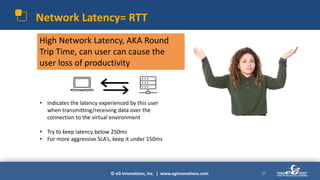
Network Latency= RTT
17
• Indicates the latency experienced by this user
when transmitting/receiving data over the
connection to the virtual environment
• Try to keep latency below 250ms
• For more aggressive SLA’s, keep it under 150ms
High Network Latency, AKA Round
Trip Time, can user can cause the
user loss of productivity
18
Logons
© eG Innovations, Inc. | www.eginnovations.com
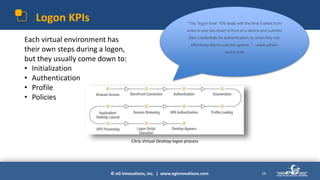
Logon KPIs
19
“The “logon time” KPI deals with the time it takes from
when a user sits down in front of a device and submits
their credentials for authentication, to when they can
effectively start to use the system. ” – www.james-
rankin.com
Each virtual environment has
their own steps during a logon,
but they usually come down to:
• Initialization
• Authentication
• Profile
• Policies
Citrix Virtual Desktop logon process
© eG Innovations, Inc. | www.eginnovations.com
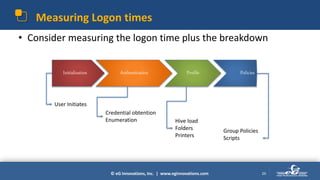
Measuring Logon times
• Consider measuring the logon time plus the breakdown
20
Initialization Authentication Profile Policies
User Initiates
Credential obtention
Enumeration
Group Policies
Scripts
Hive load
Folders
Printers
© eG Innovations, Inc. | www.eginnovations.com
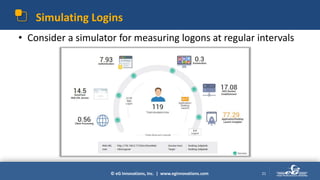
Simulating Logins
• Consider a simulator for measuring logons at regular intervals
21
22
Response
Times
© eG Innovations, Inc. | www.eginnovations.com
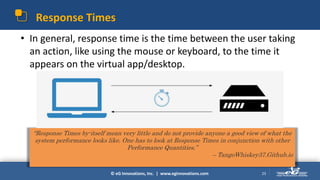
Response Times
• In general, response time is the time between the user taking
an action, like using the mouse or keyboard, to the time it
appears on the virtual app/desktop.
23
“Response Times by-itself mean very little and do not provide anyone a good view of what the
system performance looks like. One has to look at Response Times in conjunction with other
Performance Quantities.”
– TangoWhiskey37.Github.io
© eG Innovations, Inc. | www.eginnovations.com
Response Time = Latency
24
• RT = Wt + Qt [ Wt = Wait Time, Qt = Queuing
Time ]
• Try to keep Response time to less than 250ms
• Includes Latency of any protocol:
– ICA
– EDT
– PCoIP
– Blast
– TCP
25
Bandwidth
© eG Innovations, Inc. | www.eginnovations.com
Bandwidth Usage
26
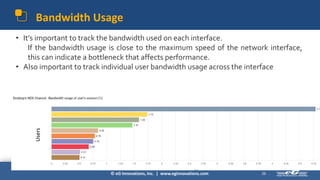
• It’s important to track the bandwidth used on each interface.
If the bandwidth usage is close to the maximum speed of the network interface,
this can indicate a bottleneck that affects performance.
• Also important to track individual user bandwidth usage across the interface
Users
Bandwidth Usage
27
• There is no indicator of bad or good bandwidth usage.
• Some users take up more than others
• Important to measure usage across all users
• Usually measured at a percentage of usage:
• Bandwidth usage =
• % of Bandwidth of User/total Bandwidth available
• Generally, if the bandwidth usage is low, and latency is high, there’s a
problem with the end-user’s network, resulting in poor user experience.
© eG Innovations, Inc. | www.eginnovations.com
User Experience and Connection Quality
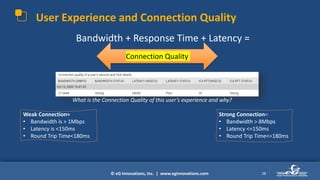
Bandwidth + Response Time + Latency =
28
What is the Connection Quality of this user’s experience and why?
Weak Connection=
• Bandwidth is > 1Mbps
• Latency is <150ms
• Round Trip Time<180ms
Strong Connection=
• Bandwidth > 8Mbps
• Latency <=150ms
• Round Trip Time<=180ms
Connection Quality
© eG Innovations, Inc. | www.eginnovations.com
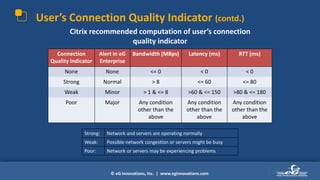
User’s Connection Quality Indicator (contd.)
Connection
Quality Indicator
Alert in eG
Enterprise
Bandwidth (MBps) Latency (ms) RTT (ms)
None None <= 0 < 0 < 0
Strong Normal > 8 <= 60 <= 80
Weak Minor > 1 & <= 8 >60 & <= 150 >80 & <= 180
Poor Major Any condition
other than the
above
Any condition
other than the
above
Any condition
other than the
above
Citrix recommended computation of user’s connection
quality indicator
Strong: Network and servers are operating normally
Weak: Possible network congestion or servers might be busy
Poor: Network or servers may be experiencing problems
© eG Innovations, Inc. | www.eginnovations.com
Do’s and Don’ts of Monitoring User Experience
© eG Innovations, Inc. | www.eginnovations.com
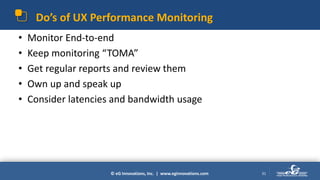
Do’s of UX Performance Monitoring
• Monitor End-to-end
• Keep monitoring “TOMA”
• Get regular reports and review them
• Own up and speak up
• Consider latencies and bandwidth usage
31
© eG Innovations, Inc. | www.eginnovations.com
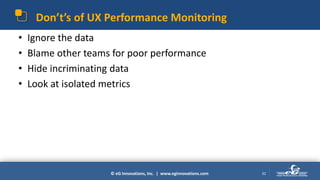
Don’t’s of UX Performance Monitoring
• Ignore the data
• Blame other teams for poor performance
• Hide incriminating data
• Look at isolated metrics
32
© eG Innovations, Inc. | www.eginnovations.com
Summary
• Users Experience is a sum of its individual parts
– Use Connection Quality equation and User Logon data
• Consider performance from all users
• Use a tool, like eG Innovations, for calculating Connection
Quality
• Keep logins under 30s
33
© eG Innovations, Inc. | www.eginnovations.com
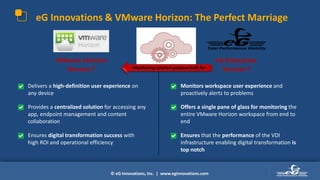
eG Innovations & VMware Horizon: The Perfect Marriage
eG Enterprise
Version 7
VMware Horizon
Version 7
• Monitors workspace user experience and
proactively alerts to problems
• Offers a single pane of glass for monitoring the
entire VMware Horizon workspace from end to
end
• Ensures that the performance of the VDI
infrastructure enabling digital transformation is
top notch
• Delivers a high-definition user experience on
any device
• Provides a centralized solution for accessing any
app, endpoint management and content
collaboration
• Ensures digital transformation success with
high ROI and operational efficiency
Monitoring solution purpose-built for
© eG Innovations, Inc. | www.eginnovations.com
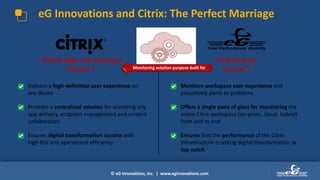
eG Innovations and Citrix: The Perfect Marriage
eG Enterprise
Version 7
Virtual Apps and Desktops
Version 7
• Monitors workspace user experience and
proactively alerts to problems
• Offers a single pane of glass for monitoring the
entire Citrix workspace (on-prem, cloud, hybrid)
from end to end
• Ensures that the performance of the Citrix
infrastructure enabling digital transformation is
top notch
• Delivers a high-definition user experience on
any device
• Provides a centralized solution for accessing any
app delivery, endpoint management and content
collaboration
• Ensures digital transformation success with
high ROI and operational efficiency
Monitoring solution purpose-built for
© eG Innovations, Inc. | www.eginnovations.com
+1 (866) 526 6700 www.eginnovations.comWendy.Howard@eginnovations.com
Thank You

Quantifying Genuine User Experience in Virtual Desktop Ecosystems

  • 1.
    © eG Innovations,Inc. | www.eginnovations.com Quantifying User Experience in Virtual Ecosystems Wendy Howard Technical Consultant eG Innovations
  • 2.
    © eG Innovations,Inc. | www.eginnovations.com Agenda • Today’s Dilemma • Virtual Environment Challenges • User Experience Defined • Calculating User Experience • Making Improvements 2
  • 3.
    © eG Innovations,Inc. | www.eginnovations.com Today’s Dilemma 3 Server admins provide remote access to apps and desktops using a virtual environment Users call and complain about poor performance Virtual environments are complex and hard to monitor Problems we have…
  • 4.
    © eG Innovations,Inc. | www.eginnovations.com User Experience: The Measure of IT Success • When users complain: “My application is slow!” • Identifying the root cause is challenging: – In the application code, the server, OS, database, network connectivity, virtualization/cloud platform, storage array, etc.?
  • 5.
    © eG Innovations,Inc. | www.eginnovations.com 5 Virtual Environment Challenges
  • 6.
    © eG Innovations,Inc. | www.eginnovations.com What can impact the User Experience? 6 • Almost anything can impact a user’s experience... ...performance Jokers are everywhere!! Monitoring the performance of the digital workspace ecosystem has become mission-critical and is a foundation for success
  • 7.
    © eG Innovations,Inc. | www.eginnovations.com Popular Virtualization Architectures
  • 8.
    © eG Innovations,Inc. | www.eginnovations.com Citrix 8
  • 9.
    © eG Innovations,Inc. | www.eginnovations.com VMware Horizon 9 Source: Navico.com
  • 10.
    © eG Innovations,Inc. | www.eginnovations.com Microsoft 10
  • 11.
    © eG Innovations,Inc. | www.eginnovations.com What do they all have in common? 11
  • 12.
    © eG Innovations,Inc. | www.eginnovations.com Wrong Ways to ‘Calculate’ your User’s Experience Trouble Tickets 12 SupportCalls Emotional data Downtime %
  • 13.
    © eG Innovations,Inc. | www.eginnovations.com Parts of the User Experience 13 Can I log into work quickly today? Why does my computer keep freezing? My cursor seems slow…. This application is moving at the speed of molasses… Latency Logins Response Times Bandwidth
  • 14.
    © eG Innovations,Inc. | www.eginnovations.com Parts of the User Experience 14 Can I log into work quickly today? Why does my computer keep freezing? My cursor seems slow…. This application is moving at the speed of molasses…
  • 15.
  • 16.
    © eG Innovations,Inc. | www.eginnovations.com Round Trip Time 16 Source: 2016 Citrix Performance Survey by eG Innovations and DABCC Common reasons for Citrix Performance Issues
  • 17.
    © eG Innovations,Inc. | www.eginnovations.com Network Latency= RTT 17 • Indicates the latency experienced by this user when transmitting/receiving data over the connection to the virtual environment • Try to keep latency below 250ms • For more aggressive SLA’s, keep it under 150ms High Network Latency, AKA Round Trip Time, can user can cause the user loss of productivity
  • 18.
  • 19.
    © eG Innovations,Inc. | www.eginnovations.com Logon KPIs 19 “The “logon time” KPI deals with the time it takes from when a user sits down in front of a device and submits their credentials for authentication, to when they can effectively start to use the system. ” – www.james- rankin.com Each virtual environment has their own steps during a logon, but they usually come down to: • Initialization • Authentication • Profile • Policies Citrix Virtual Desktop logon process
  • 20.
    © eG Innovations,Inc. | www.eginnovations.com Measuring Logon times • Consider measuring the logon time plus the breakdown 20 Initialization Authentication Profile Policies User Initiates Credential obtention Enumeration Group Policies Scripts Hive load Folders Printers
  • 21.
    © eG Innovations,Inc. | www.eginnovations.com Simulating Logins • Consider a simulator for measuring logons at regular intervals 21
  • 22.
  • 23.
    © eG Innovations,Inc. | www.eginnovations.com Response Times • In general, response time is the time between the user taking an action, like using the mouse or keyboard, to the time it appears on the virtual app/desktop. 23 “Response Times by-itself mean very little and do not provide anyone a good view of what the system performance looks like. One has to look at Response Times in conjunction with other Performance Quantities.” – TangoWhiskey37.Github.io
  • 24.
    © eG Innovations,Inc. | www.eginnovations.com Response Time = Latency 24 • RT = Wt + Qt [ Wt = Wait Time, Qt = Queuing Time ] • Try to keep Response time to less than 250ms • Includes Latency of any protocol: – ICA – EDT – PCoIP – Blast – TCP
  • 25.
  • 26.
    © eG Innovations,Inc. | www.eginnovations.com Bandwidth Usage 26 • It’s important to track the bandwidth used on each interface. If the bandwidth usage is close to the maximum speed of the network interface, this can indicate a bottleneck that affects performance. • Also important to track individual user bandwidth usage across the interface Users
  • 27.
    Bandwidth Usage 27 • Thereis no indicator of bad or good bandwidth usage. • Some users take up more than others • Important to measure usage across all users • Usually measured at a percentage of usage: • Bandwidth usage = • % of Bandwidth of User/total Bandwidth available • Generally, if the bandwidth usage is low, and latency is high, there’s a problem with the end-user’s network, resulting in poor user experience.
  • 28.
    © eG Innovations,Inc. | www.eginnovations.com User Experience and Connection Quality Bandwidth + Response Time + Latency = 28 What is the Connection Quality of this user’s experience and why? Weak Connection= • Bandwidth is > 1Mbps • Latency is <150ms • Round Trip Time<180ms Strong Connection= • Bandwidth > 8Mbps • Latency <=150ms • Round Trip Time<=180ms Connection Quality
  • 29.
    © eG Innovations,Inc. | www.eginnovations.com User’s Connection Quality Indicator (contd.) Connection Quality Indicator Alert in eG Enterprise Bandwidth (MBps) Latency (ms) RTT (ms) None None <= 0 < 0 < 0 Strong Normal > 8 <= 60 <= 80 Weak Minor > 1 & <= 8 >60 & <= 150 >80 & <= 180 Poor Major Any condition other than the above Any condition other than the above Any condition other than the above Citrix recommended computation of user’s connection quality indicator Strong: Network and servers are operating normally Weak: Possible network congestion or servers might be busy Poor: Network or servers may be experiencing problems
  • 30.
    © eG Innovations,Inc. | www.eginnovations.com Do’s and Don’ts of Monitoring User Experience
  • 31.
    © eG Innovations,Inc. | www.eginnovations.com Do’s of UX Performance Monitoring • Monitor End-to-end • Keep monitoring “TOMA” • Get regular reports and review them • Own up and speak up • Consider latencies and bandwidth usage 31
  • 32.
    © eG Innovations,Inc. | www.eginnovations.com Don’t’s of UX Performance Monitoring • Ignore the data • Blame other teams for poor performance • Hide incriminating data • Look at isolated metrics 32
  • 33.
    © eG Innovations,Inc. | www.eginnovations.com Summary • Users Experience is a sum of its individual parts – Use Connection Quality equation and User Logon data • Consider performance from all users • Use a tool, like eG Innovations, for calculating Connection Quality • Keep logins under 30s 33
  • 34.
    © eG Innovations,Inc. | www.eginnovations.com eG Innovations & VMware Horizon: The Perfect Marriage eG Enterprise Version 7 VMware Horizon Version 7 • Monitors workspace user experience and proactively alerts to problems • Offers a single pane of glass for monitoring the entire VMware Horizon workspace from end to end • Ensures that the performance of the VDI infrastructure enabling digital transformation is top notch • Delivers a high-definition user experience on any device • Provides a centralized solution for accessing any app, endpoint management and content collaboration • Ensures digital transformation success with high ROI and operational efficiency Monitoring solution purpose-built for
  • 35.
    © eG Innovations,Inc. | www.eginnovations.com eG Innovations and Citrix: The Perfect Marriage eG Enterprise Version 7 Virtual Apps and Desktops Version 7 • Monitors workspace user experience and proactively alerts to problems • Offers a single pane of glass for monitoring the entire Citrix workspace (on-prem, cloud, hybrid) from end to end • Ensures that the performance of the Citrix infrastructure enabling digital transformation is top notch • Delivers a high-definition user experience on any device • Provides a centralized solution for accessing any app delivery, endpoint management and content collaboration • Ensures digital transformation success with high ROI and operational efficiency Monitoring solution purpose-built for
  • 36.
    © eG Innovations,Inc. | www.eginnovations.com
  • 37.
    © eG Innovations,Inc. | www.eginnovations.com +1 (866) 526 6700 www.eginnovations.comWendy.Howard@eginnovations.com Thank You

Editor's Notes

  • #2 In this talk, I will attempt to explain at a basic level, how to measure User Experience in a virtual environment. I will focus on how UX affects users today that are working remotely on applications and virtual desktops and show a few common ways to improve the experience within out getting too technical and in the weeds.
  • #12 They are all complex, full of parts and you’re not sure where to start when there’s a problem.
  • #17 There are different types of Latencies, in this case, I am talking about the Network connection from the virtual machine to the user’s end point.
  • #18 Think of Client Network Latency as a ping check – it’s the RTT from the virtual machine to the end-user’s device and back.
  • #21 Total logon time is the sum of these parts
  • #22 Use a simulator like eG’s to launch desktops or applications throughout the day.
  • #24 This is extremely difficult to measure without the proper tool in place.
  • #27 Better if a tool automatically calculates the usage based on your max available bandwidth.
  • #29 This user has a poor connection when any of the indicators are breaching the threshold. I promised math and here it is. Measurements are averaged over a time interval
  • #30 EG enterprise has this built in and doesn’t require anything on the end-user’s side.this is just a suggestion and you can change it based on your protocols used for WVD, Horizon, or Citrix.