María José Díaz Villar CPR Gijón 8th March 2010
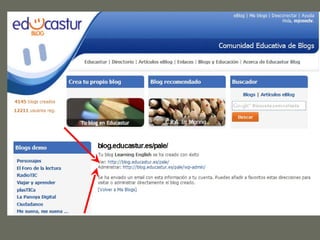
EDUCASTUR  BLOG   Creating a blog.   Changing the theme. Writing a post.  Adding an image. Inserting a link. Inserting a youtube video. Sending and moderating comments. Adding Pages. Adding Links. How to manage your blog.


EDUCASTUR  BLOG Creating a blog.  Changing the theme. Writing a post.  Adding an image. Inserting a link. Inserting a youtube video. Sending and moderating comments. Adding Pages. Adding Links. How to manage your blog.
 
 
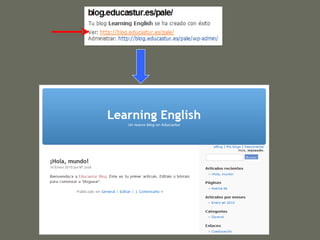
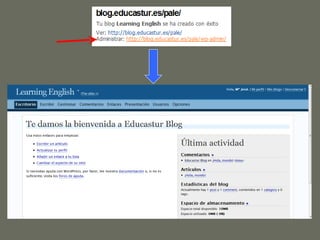
ACTIVITY  1 Create a blog (write the URL and give it a title). Choose a theme that you like.
EDUCASTUR  BLOG Creating a blog.  Changing the theme.   Writing a post.   Adding an image. Inserting a link. Inserting a youtube video. Sending and moderating comments. Adding Pages. Adding Links. How to manage your blog.


ACTIVITY  2 Write a post. Add a new category. Save the post in the new category. Allow comments, publish the post and see it on your blog.
EDUCASTUR  BLOG Creating a blog.  Changing the theme. Writing a post.    Adding an image. Inserting a link. Inserting a youtube video. Sending and moderating comments. Adding Pages. Adding Links. How to manage your blog.
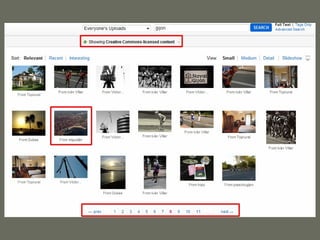
How to get an image on the net. http://creativecommons.org


EDUCASTUR  BLOG Creating a blog.  Changing the theme. Writing a post.  Adding an image. Inserting a link. Inserting a youtube video. Sending and moderating comments. Adding Pages. Adding Links. How to manage your blog.


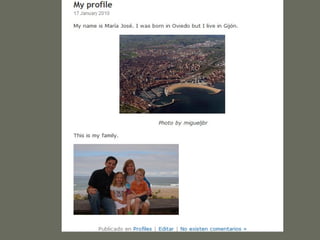
ACTIVITY  3  Insert a picture which has a creative commons licence in your post. Insert a link from the picture to a webpage. Insert a link from a word to a webpage.
EDUCASTUR  BLOG Creating a blog.  Changing the theme. Writing a post.  Adding an image. Inserting a link. Inserting a youtube video. Sending and moderating comments. Adding Pages. Adding Links. How to manage your blog.
 
 
ACTIVITY  4  Visit the youtube website and  choose a video for your blog. Write a new post and insert the video. See how it looks on the blog.
EDUCASTUR  BLOG Creating a blog.  Changing the theme. Writing a post.  Adding an image. Inserting a link. Inserting a youtube video. Sending and moderating comments. Adding Pages. Adding Links. How to manage your blog.


ACTIVITY 5 Write a comment to one of the posts on the blogs created here this morning.  Visit your administration panel and moderate your comment: edit and check it, then approve it.
EDUCASTUR  BLOG Creating a blog.  Changing the theme. Writing a post.  Adding an image. Inserting a link. Inserting a youtube video. Sending and moderating comments. Adding Pages. Adding Links. How to manage your blog.
 
EDUCASTUR  BLOG Creating a blog.  Changing the theme. Writing a post.  Adding an image. Inserting a link. Inserting a youtube video. Sending and moderating comments. Adding Pages. Adding Links. How to manage your blog.
 
ACTIVITY  6  Add a new page to your blog. Find an interesting site on the net and link it from your blog.
EDUCASTUR  BLOG Creating a blog.  Changing the theme. Writing a post.  Adding an image. Inserting a link. Inserting a youtube video. Sending and moderating comments. Adding Pages. Adding Links. How to manage your blog.
MANAGING POSTS, PAGES AND  CATEGORIES
MANAGING  LINKS
If you need further information go to http://blog.educastur.es/ayuda
Thank you …

educasturblog

  • 1.
    María José DíazVillar CPR Gijón 8th March 2010
  • 2.
    EDUCASTUR BLOG Creating a blog. Changing the theme. Writing a post. Adding an image. Inserting a link. Inserting a youtube video. Sending and moderating comments. Adding Pages. Adding Links. How to manage your blog.
  • 3.
  • 4.
  • 5.
  • 6.
  • 7.
  • 8.
  • 9.
  • 10.
    EDUCASTUR BLOGCreating a blog. Changing the theme. Writing a post. Adding an image. Inserting a link. Inserting a youtube video. Sending and moderating comments. Adding Pages. Adding Links. How to manage your blog.
  • 11.
  • 12.
  • 13.
    ACTIVITY 1Create a blog (write the URL and give it a title). Choose a theme that you like.
  • 14.
    EDUCASTUR BLOGCreating a blog. Changing the theme. Writing a post. Adding an image. Inserting a link. Inserting a youtube video. Sending and moderating comments. Adding Pages. Adding Links. How to manage your blog.
  • 15.
  • 16.
  • 17.
  • 18.
    ACTIVITY 2Write a post. Add a new category. Save the post in the new category. Allow comments, publish the post and see it on your blog.
  • 19.
    EDUCASTUR BLOGCreating a blog. Changing the theme. Writing a post. Adding an image. Inserting a link. Inserting a youtube video. Sending and moderating comments. Adding Pages. Adding Links. How to manage your blog.
  • 20.
    How to getan image on the net. http://creativecommons.org
  • 21.
  • 22.
  • 23.
  • 24.
  • 25.
  • 26.
  • 27.
  • 28.
  • 29.
  • 30.
  • 31.
  • 32.
  • 33.
    EDUCASTUR BLOGCreating a blog. Changing the theme. Writing a post. Adding an image. Inserting a link. Inserting a youtube video. Sending and moderating comments. Adding Pages. Adding Links. How to manage your blog.
  • 34.
  • 35.
  • 36.
  • 37.
  • 38.
  • 39.
    ACTIVITY 3 Insert a picture which has a creative commons licence in your post. Insert a link from the picture to a webpage. Insert a link from a word to a webpage.
  • 40.
    EDUCASTUR BLOGCreating a blog. Changing the theme. Writing a post. Adding an image. Inserting a link. Inserting a youtube video. Sending and moderating comments. Adding Pages. Adding Links. How to manage your blog.
  • 41.
  • 42.
  • 43.
    ACTIVITY 4 Visit the youtube website and choose a video for your blog. Write a new post and insert the video. See how it looks on the blog.
  • 44.
    EDUCASTUR BLOGCreating a blog. Changing the theme. Writing a post. Adding an image. Inserting a link. Inserting a youtube video. Sending and moderating comments. Adding Pages. Adding Links. How to manage your blog.
  • 45.
  • 46.
  • 47.
  • 48.
  • 49.
  • 50.
  • 51.
    ACTIVITY 5 Writea comment to one of the posts on the blogs created here this morning. Visit your administration panel and moderate your comment: edit and check it, then approve it.
  • 52.
    EDUCASTUR BLOGCreating a blog. Changing the theme. Writing a post. Adding an image. Inserting a link. Inserting a youtube video. Sending and moderating comments. Adding Pages. Adding Links. How to manage your blog.
  • 53.
  • 54.
    EDUCASTUR BLOGCreating a blog. Changing the theme. Writing a post. Adding an image. Inserting a link. Inserting a youtube video. Sending and moderating comments. Adding Pages. Adding Links. How to manage your blog.
  • 55.
  • 56.
    ACTIVITY 6 Add a new page to your blog. Find an interesting site on the net and link it from your blog.
  • 57.
    EDUCASTUR BLOGCreating a blog. Changing the theme. Writing a post. Adding an image. Inserting a link. Inserting a youtube video. Sending and moderating comments. Adding Pages. Adding Links. How to manage your blog.
  • 58.
    MANAGING POSTS, PAGESAND CATEGORIES
  • 59.
  • 60.
    If you needfurther information go to http://blog.educastur.es/ayuda
  • 61.