Twitter hashtags:
                                          @cybertext
                                            @astcnsw


                EDITING:
                It’s not as easy as it looks
November 2012   Rhonda Bracey
It’s not as easy as it looks…
2


    “Editing is just as difficult as writing.
    Probably even more difficult.
    Editing is a balancing act [between]
    cleaning up a piece of writing while keeping
    [it] true to its intentions.”
    From: http://scottnesbitt.net/weblog/2010/02/22/editing-the-secret-to-good-writing/


    © CyberText Consulting Pty Ltd                                          November 2012
3            Role of the editor
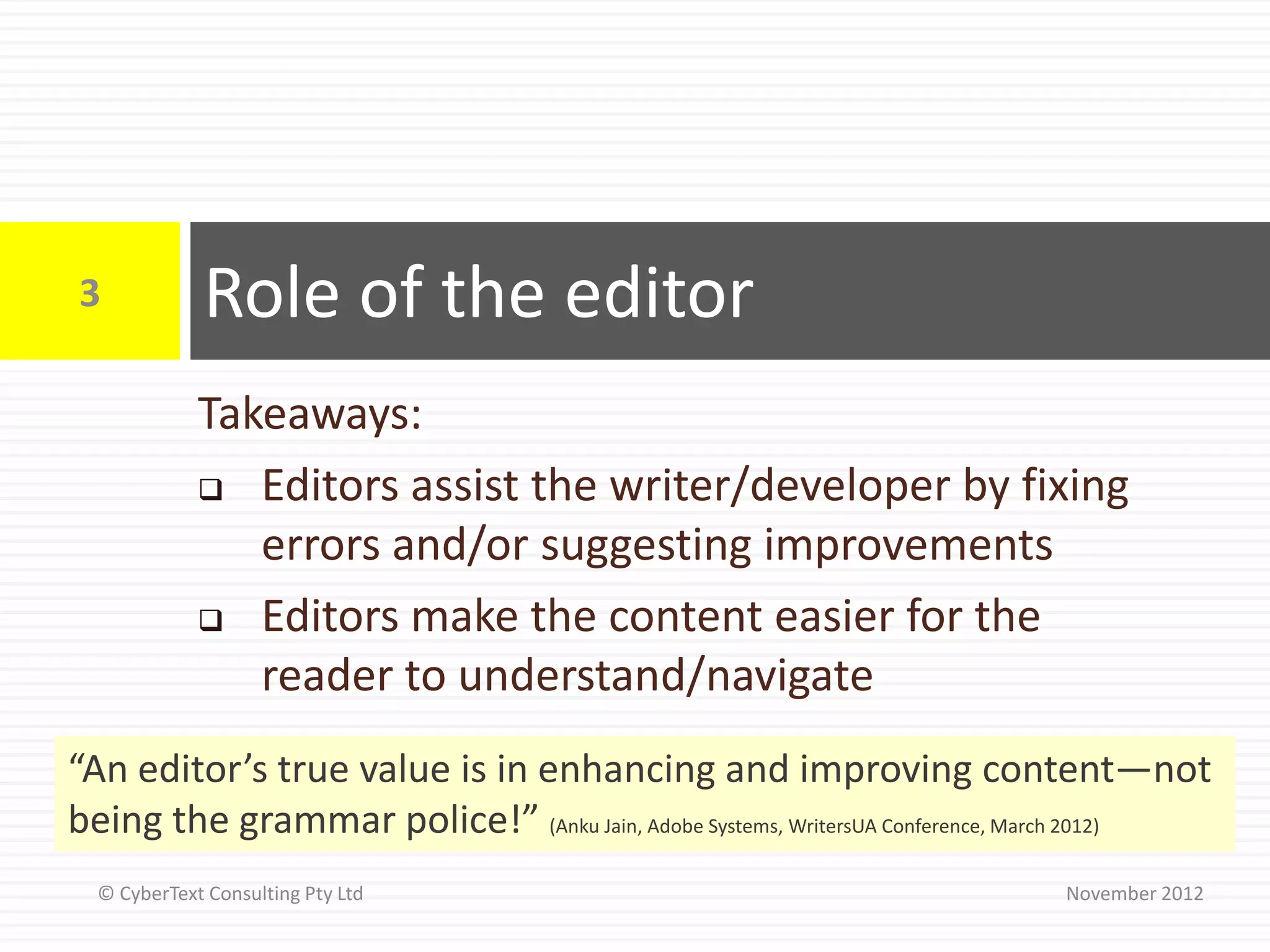
             Takeaways:
              Editors assist the writer/developer by fixing
                errors and/or suggesting improvements
              Editors make the content easier for the

                reader to understand/navigate
“An editor’s true value is in enhancing and improving content—not
being the grammar police!” (Anku Jain, Adobe Systems, WritersUA Conference, March 2012)
  © CyberText Consulting Pty Ltd                                           November 2012
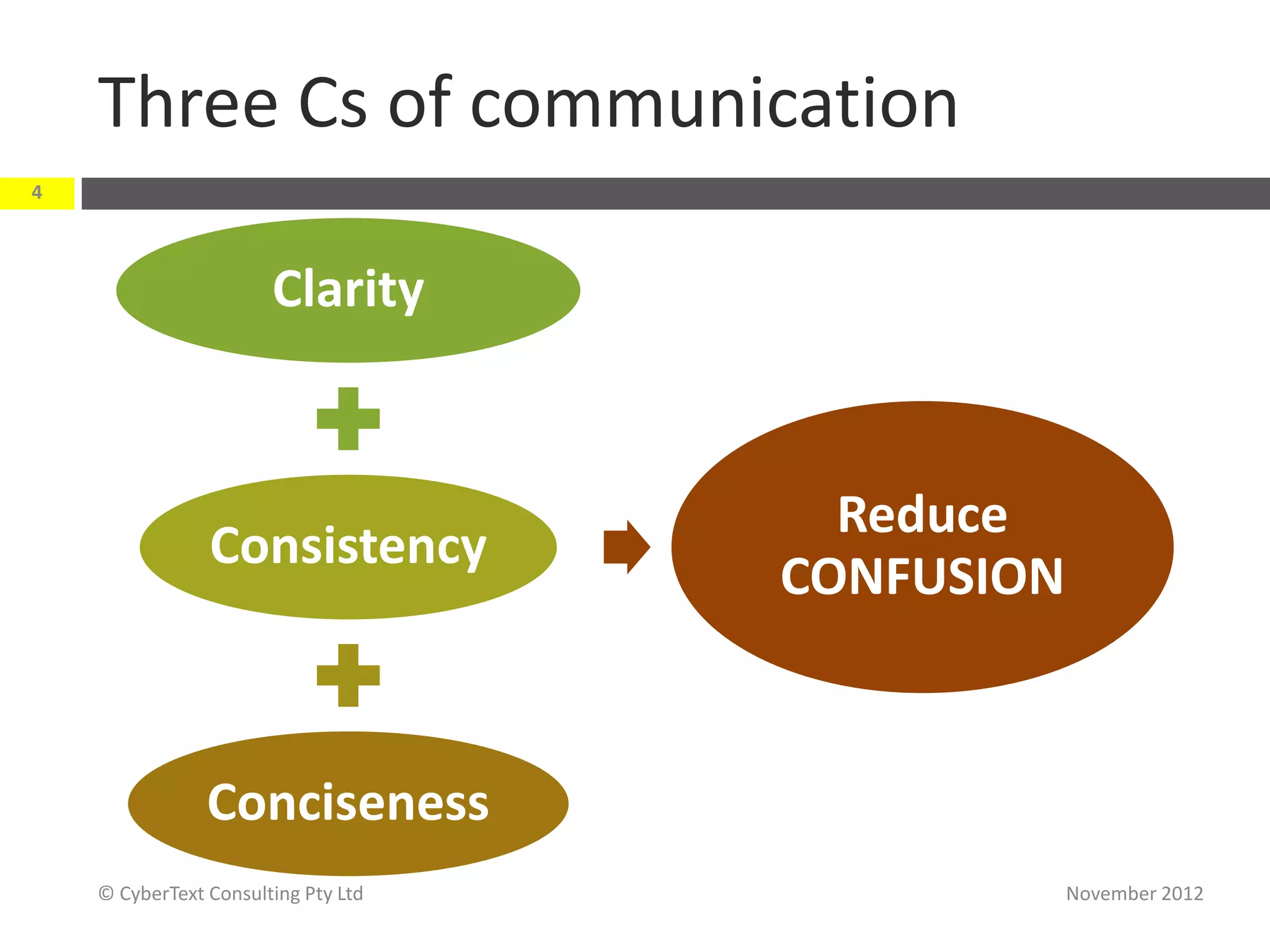
Three Cs of communication
4


                       Clarity


                                       Reduce
                Consistency
                                     CONFUSION


                Conciseness
    © CyberText Consulting Pty Ltd               November 2012
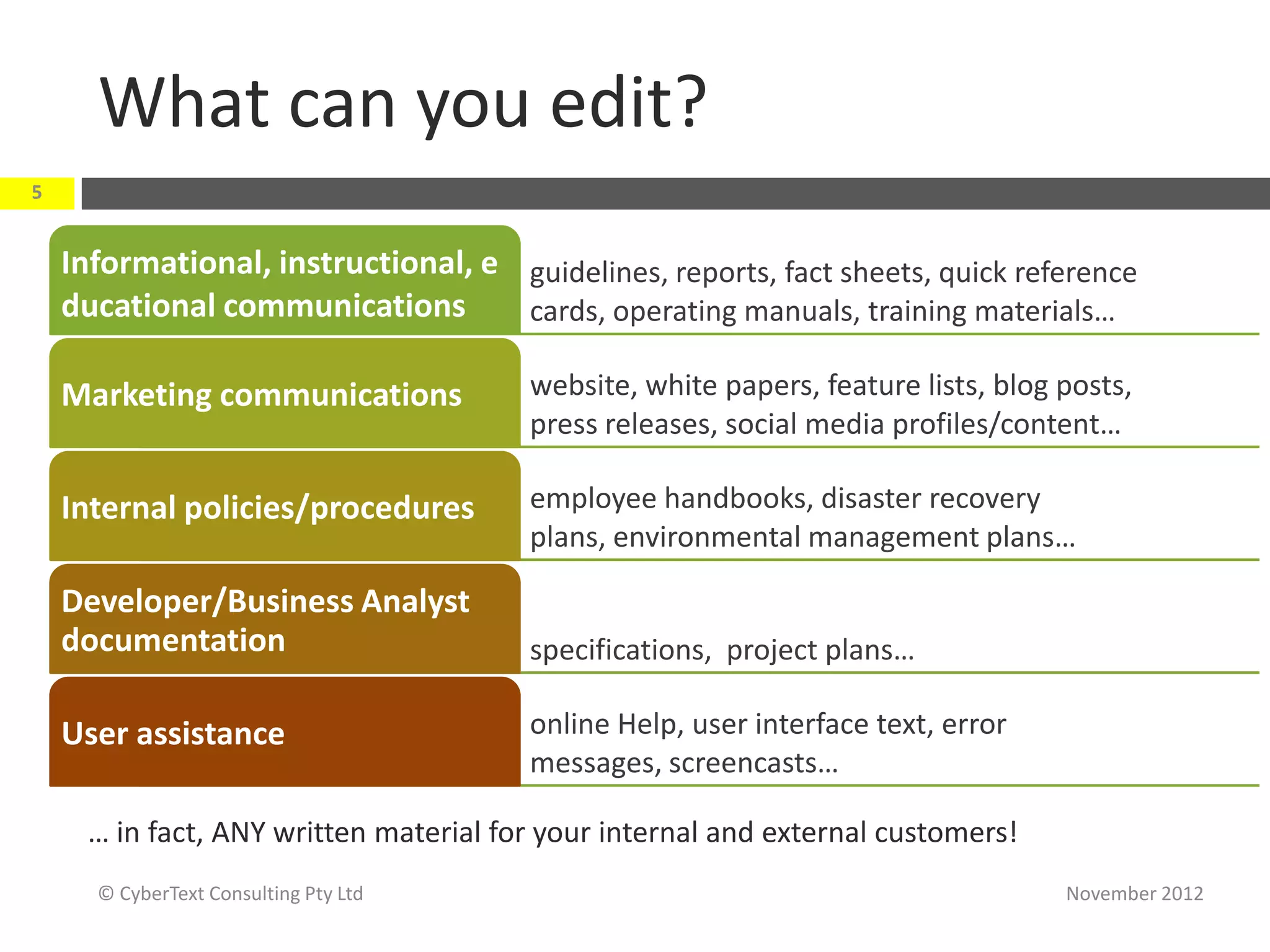
What can you edit?
5


    Informational, instructional, e guidelines, reports, fact sheets, quick reference
    ducational communications       cards, operating manuals, training materials…

    Marketing communications            website, white papers, feature lists, blog posts,
                                        press releases, social media profiles/content…

    Internal policies/procedures        employee handbooks, disaster recovery
                                        plans, environmental management plans…

    Developer/Business Analyst
    documentation                       specifications, project plans…

    User assistance                     online Help, user interface text, error
                                        messages, screencasts…

      … in fact, ANY written material for your internal and external customers!
      © CyberText Consulting Pty Ltd                                               November 2012
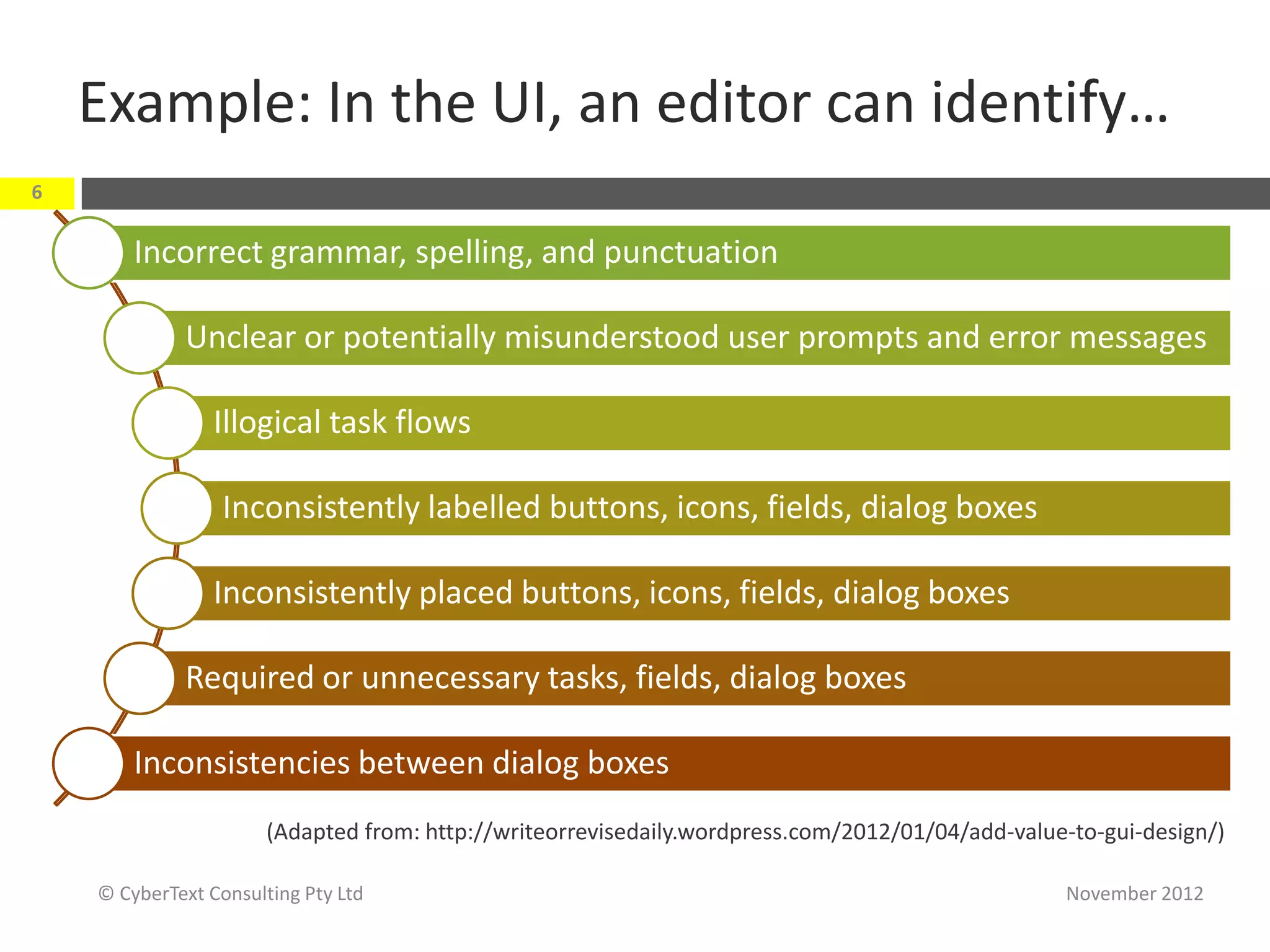
Example: In the UI, an editor can identify…
6


        Incorrect grammar, spelling, and punctuation

             Unclear or potentially misunderstood user prompts and error messages

                 Illogical task flows

                  Inconsistently labelled buttons, icons, fields, dialog boxes

                 Inconsistently placed buttons, icons, fields, dialog boxes

             Required or unnecessary tasks, fields, dialog boxes

        Inconsistencies between dialog boxes
                       (Adapted from: http://writeorrevisedaily.wordpress.com/2012/01/04/add-value-to-gui-design/)

    © CyberText Consulting Pty Ltd                                                                November 2012
7          Types of editing
           Takeaways:
            Rules-based (aka copy editing)

            Analysis-based (aka content editing or
              substantive editing)
            Technical editing


© CyberText Consulting Pty Ltd                        November 2012
‘Rules-based’ editing
8


        Uses internal/external standards and guidelines to
         make the content correct, consistent, accurate, and
         complete; e.g.:
             spelling, grammar, punctuation, capitalisation, hyphenation
             adherence to legal requirements (e.g. copyright, trademarks)
             design consistency (e.g. typography, layout)


        Editor’s role: Fix
                            (Adapted from Jean Weber: http://techwhirl.com/articles/working-with-a-technical-editor/)


    © CyberText Consulting Pty Ltd                                                                  November 2012
But…
9


                                       Rules-based
                                       editing is not
                                       enough—the
                                     content still may
                                     be inappropriate
                                     for the intended
                                         audience
    © CyberText Consulting Pty Ltd                       November 2012
‘Analysis-based’ editing
10


         Evaluates content to make it more functional and
          appropriate for its readers
         Looks at concept, content, organisation, flow, style

         Editor’s role: Suggest improvements rather than
          make corrections

       (Adapted from Jean Weber: http://techwhirl.com/articles/working-with-a-technical-editor/)


     © CyberText Consulting Pty Ltd                                               November 2012
Technical editing: Software/hardware
11


         Involves testing every step of every procedure in
          the UA/Help against the software/hardware
          product
         Must suspend existing knowledge of product and
          follow documented steps exactly
         Can take a LOT of time for a complex product

         Editor’s role: Report mismatches, inaccuracies to
          author/developer for correction
     © CyberText Consulting Pty Ltd                   November 2012
Technical editing: Domain knowledge
12


         Involves verifying all facts, statements
          made, analyses, citations/references, etc.
         Requires detailed existing knowledge of the
          domain; often done by subject matter experts
         Can take a LOT of time

         Editor’s role: Report
          mismatches, inaccuracies, inconsistencies to
          author for correction
     © CyberText Consulting Pty Ltd                      November 2012
13          Editing tasks
            Takeaways:
             Editing comprises many tasks—several

               passes are required to cover everything
             Editing is tiring—take regular breaks


 © CyberText Consulting Pty Ltd                          November 2012
It’s not a one-off task
14


         Several passes—one for
          each group of elements
          (e.g.
          spelling, layout, capitalisation, pun
          ctuation, legal, styles, abbreviation
          s…)
         Tackle one or only a few
          issues at a time
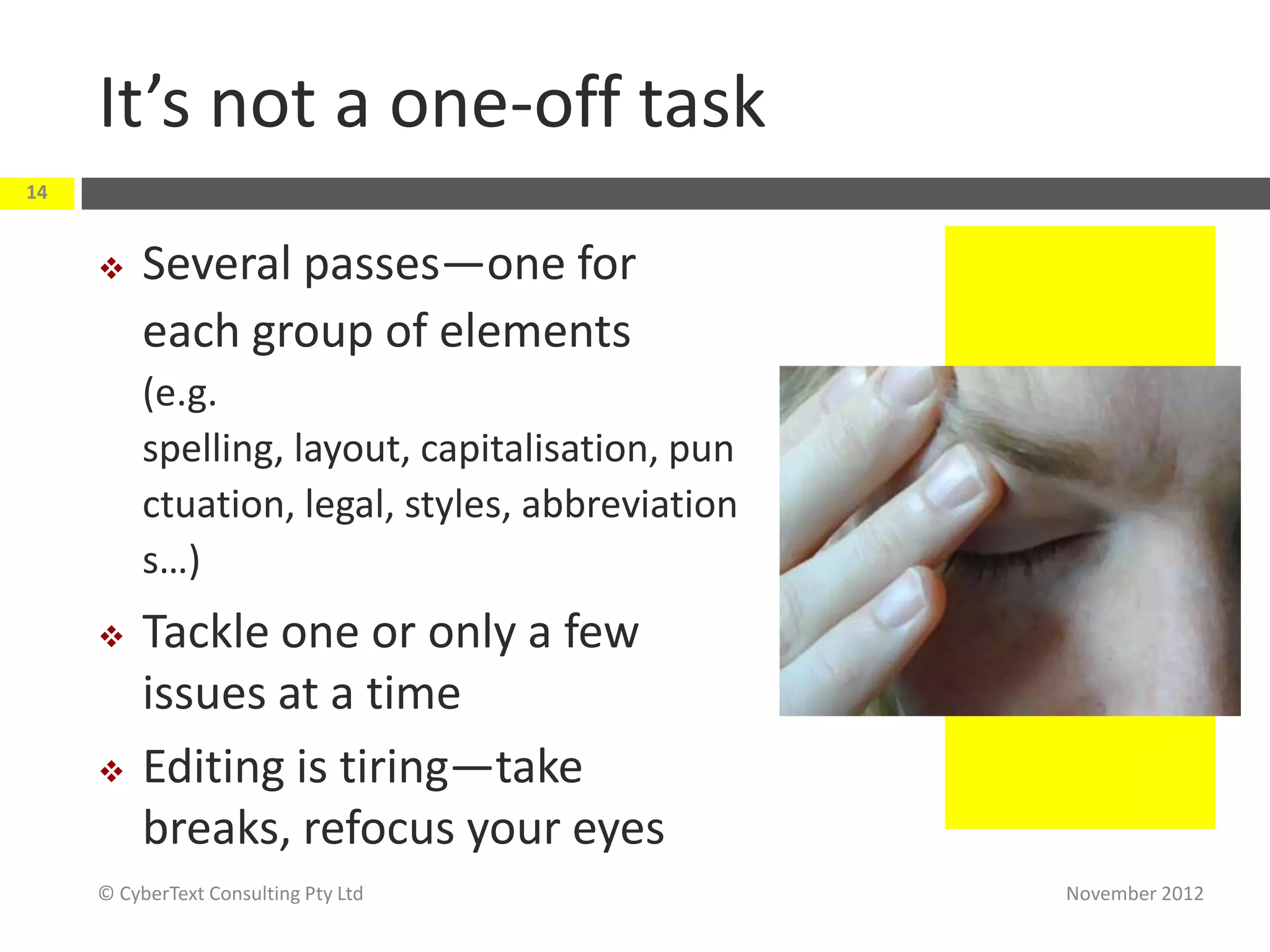
         Editing is tiring—take
          breaks, refocus your eyes
     © CyberText Consulting Pty Ltd               November 2012
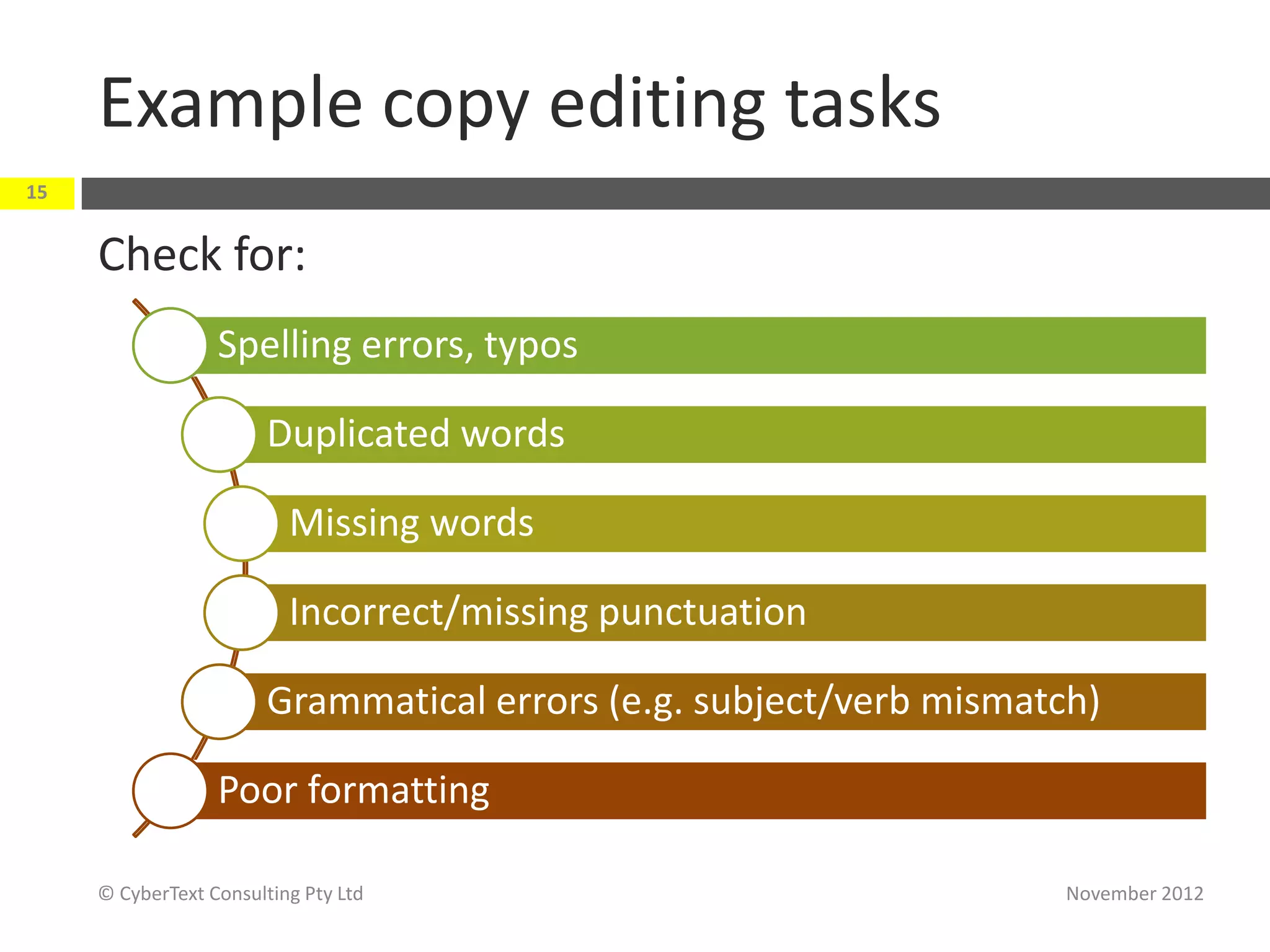
Example copy editing tasks
15


     Check for:
                  Spelling errors, typos

                        Duplicated words

                          Missing words

                          Incorrect/missing punctuation

                        Grammatical errors (e.g. subject/verb mismatch)

                  Poor formatting

     © CyberText Consulting Pty Ltd                                  November 2012
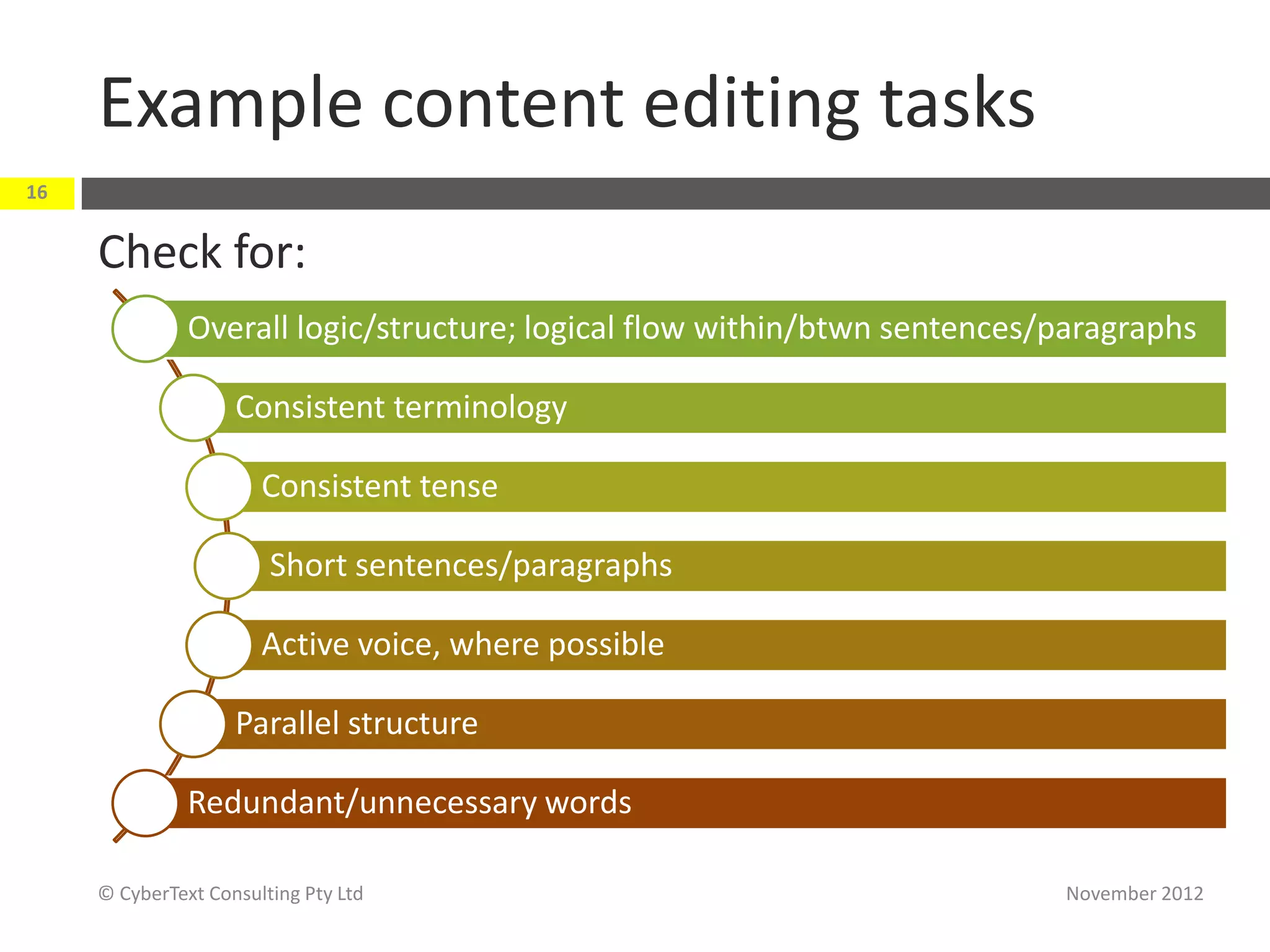
Example content editing tasks
16


     Check for:
               Overall logic/structure; logical flow within/btwn sentences/paragraphs

                    Consistent terminology

                       Consistent tense

                        Short sentences/paragraphs

                       Active voice, where possible

                    Parallel structure

               Redundant/unnecessary words

     © CyberText Consulting Pty Ltd                                        November 2012
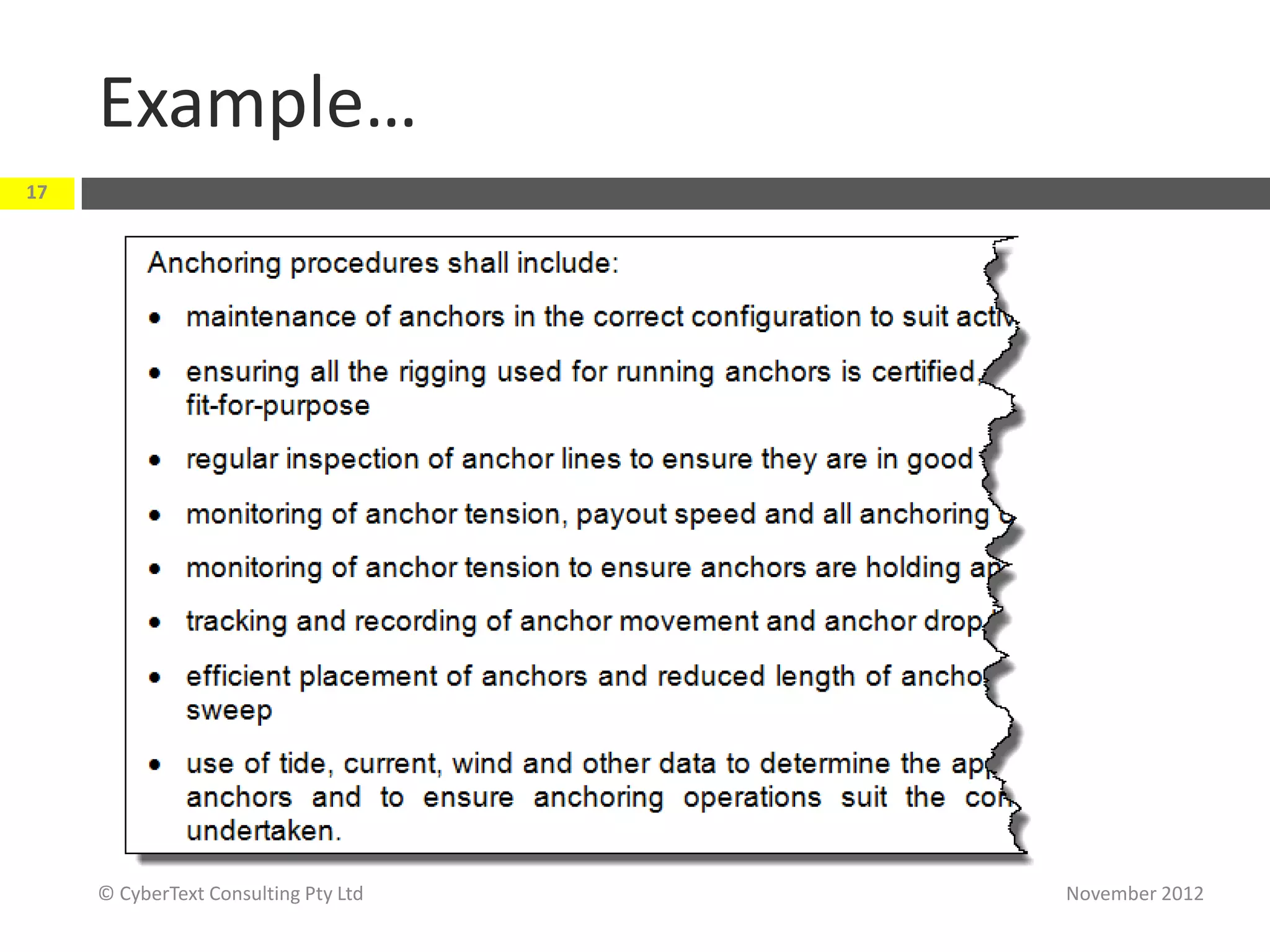
Example…
17


     © CyberText Consulting Pty Ltd   November 2012
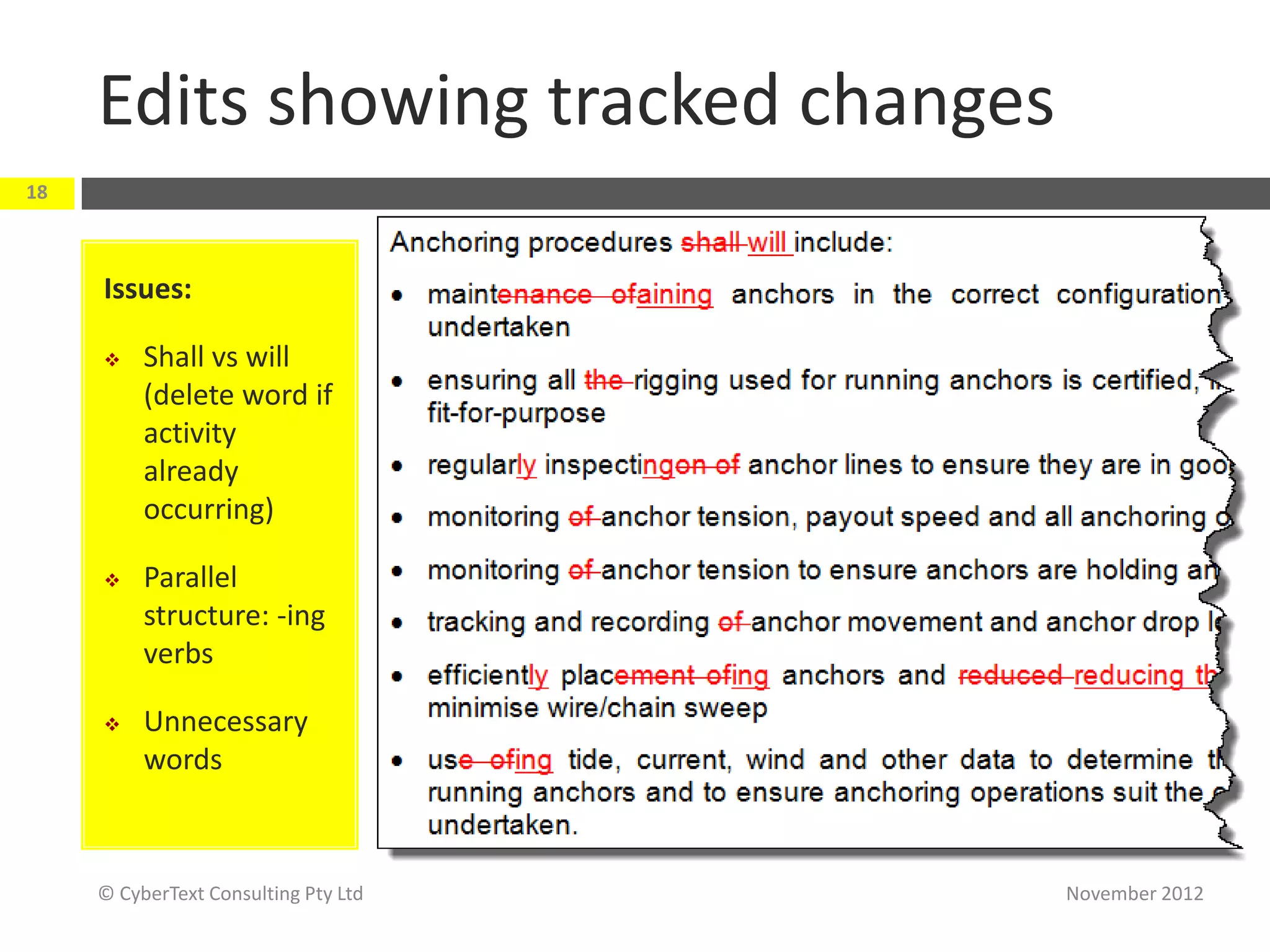
Edits showing tracked changes
18


     Issues:

         Shall vs will
          (delete word if
          activity
          already
          occurring)

         Parallel
          structure: -ing
          verbs

         Unnecessary
          words


     © CyberText Consulting Pty Ltd   November 2012
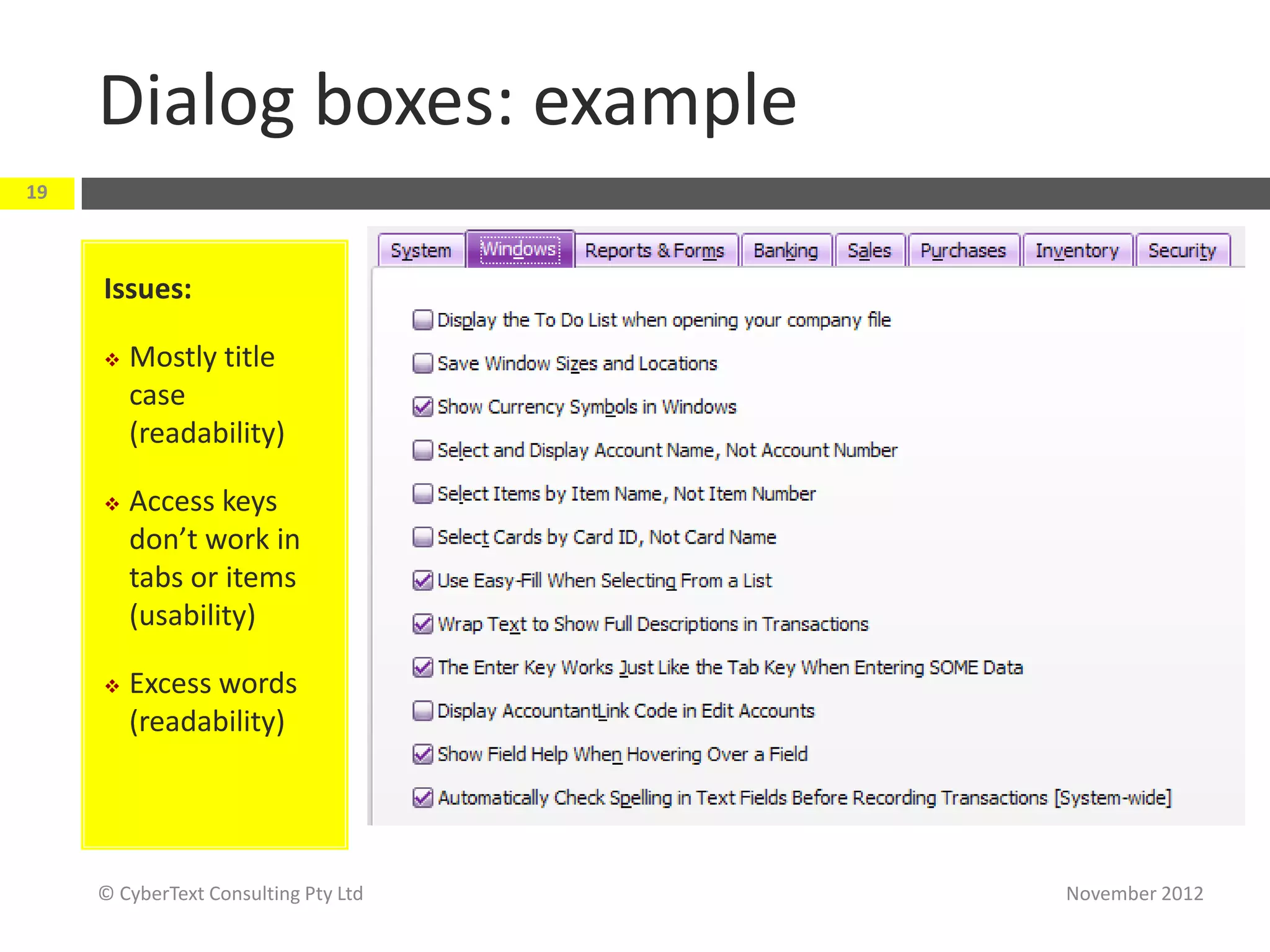
Dialog boxes: example
19


     Issues:

        Mostly title
         case
         (readability)

        Access keys
         don’t work in
         tabs or items
         (usability)

        Excess words
         (readability)


     © CyberText Consulting Pty Ltd   November 2012
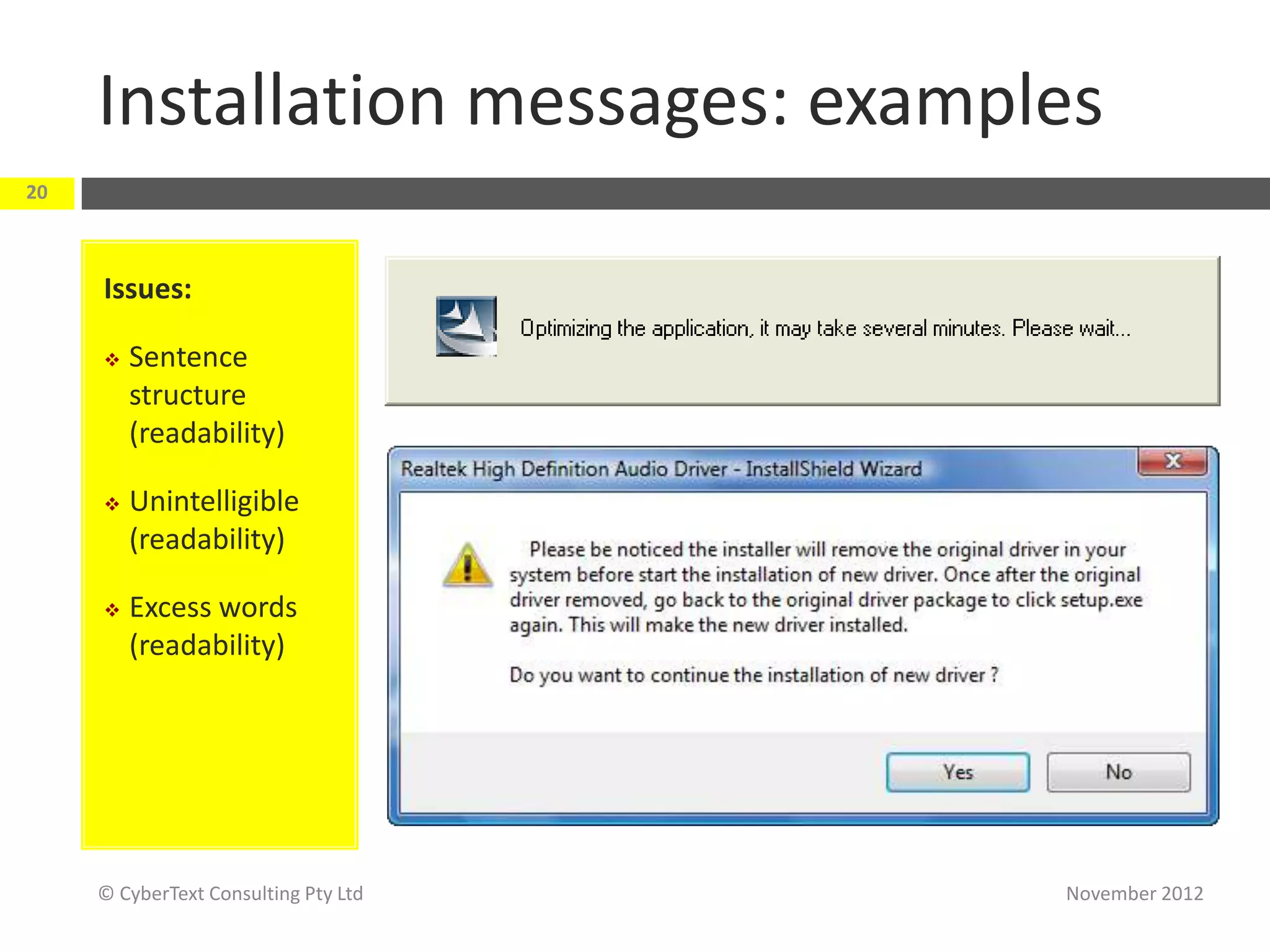
Installation messages: examples
20


     Issues:

        Sentence
         structure
         (readability)

        Unintelligible
         (readability)

        Excess words
         (readability)


     © CyberText Consulting Pty Ltd   November 2012
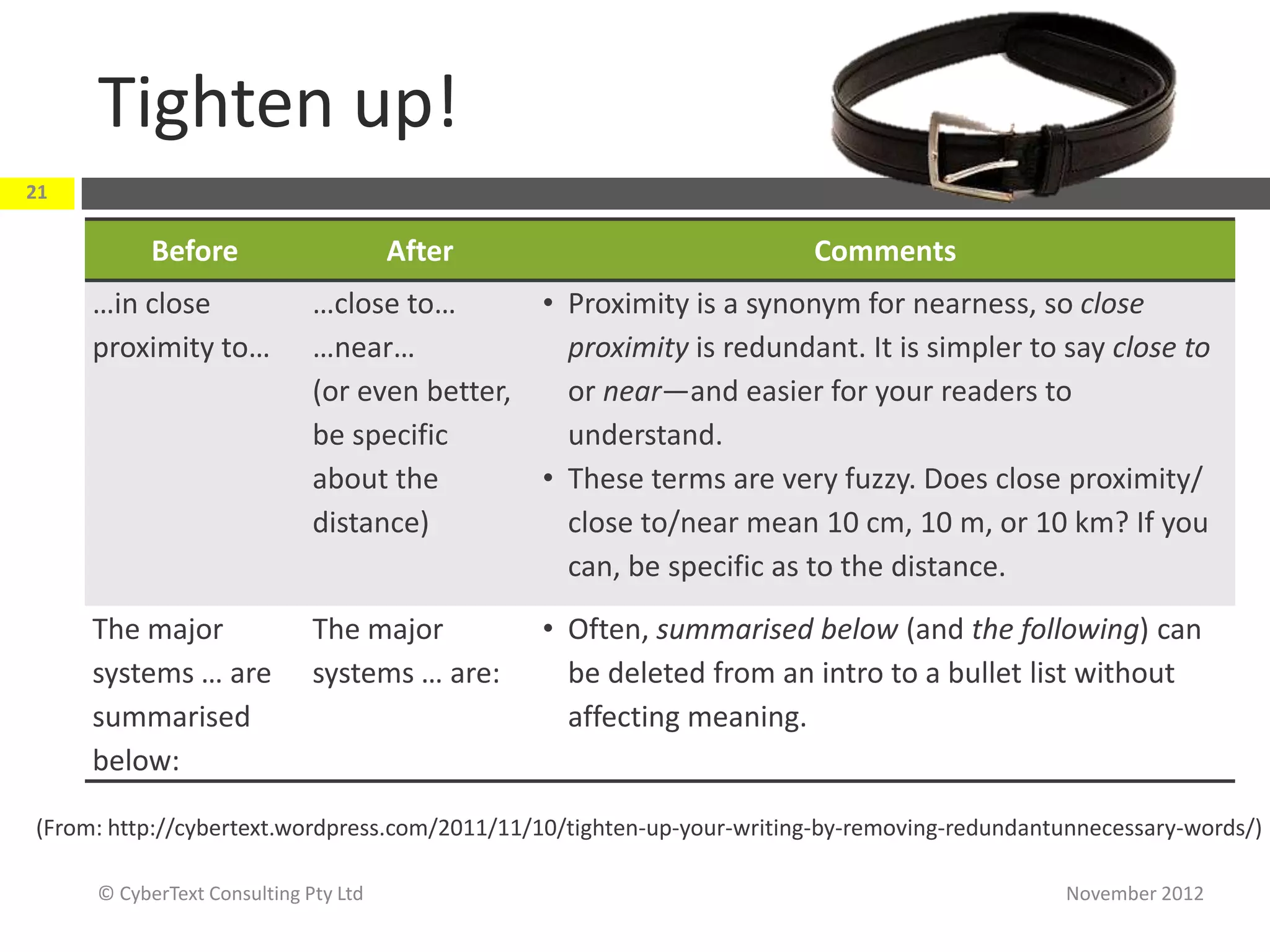
Tighten up!
21

           Before                     After                            Comments
     …in close               …close to…       • Proximity is a synonym for nearness, so close
     proximity to…           …near…             proximity is redundant. It is simpler to say close to
                             (or even better,   or near—and easier for your readers to
                             be specific        understand.
                             about the        • These terms are very fuzzy. Does close proximity/
                             distance)          close to/near mean 10 cm, 10 m, or 10 km? If you
                                                can, be specific as to the distance.
     The major               The major         • Often, summarised below (and the following) can
     systems … are           systems … are:      be deleted from an intro to a bullet list without
     summarised                                  affecting meaning.
     below:

(From: http://cybertext.wordpress.com/2011/11/10/tighten-up-your-writing-by-removing-redundantunnecessary-words/)

     © CyberText Consulting Pty Ltd                                                           November 2012
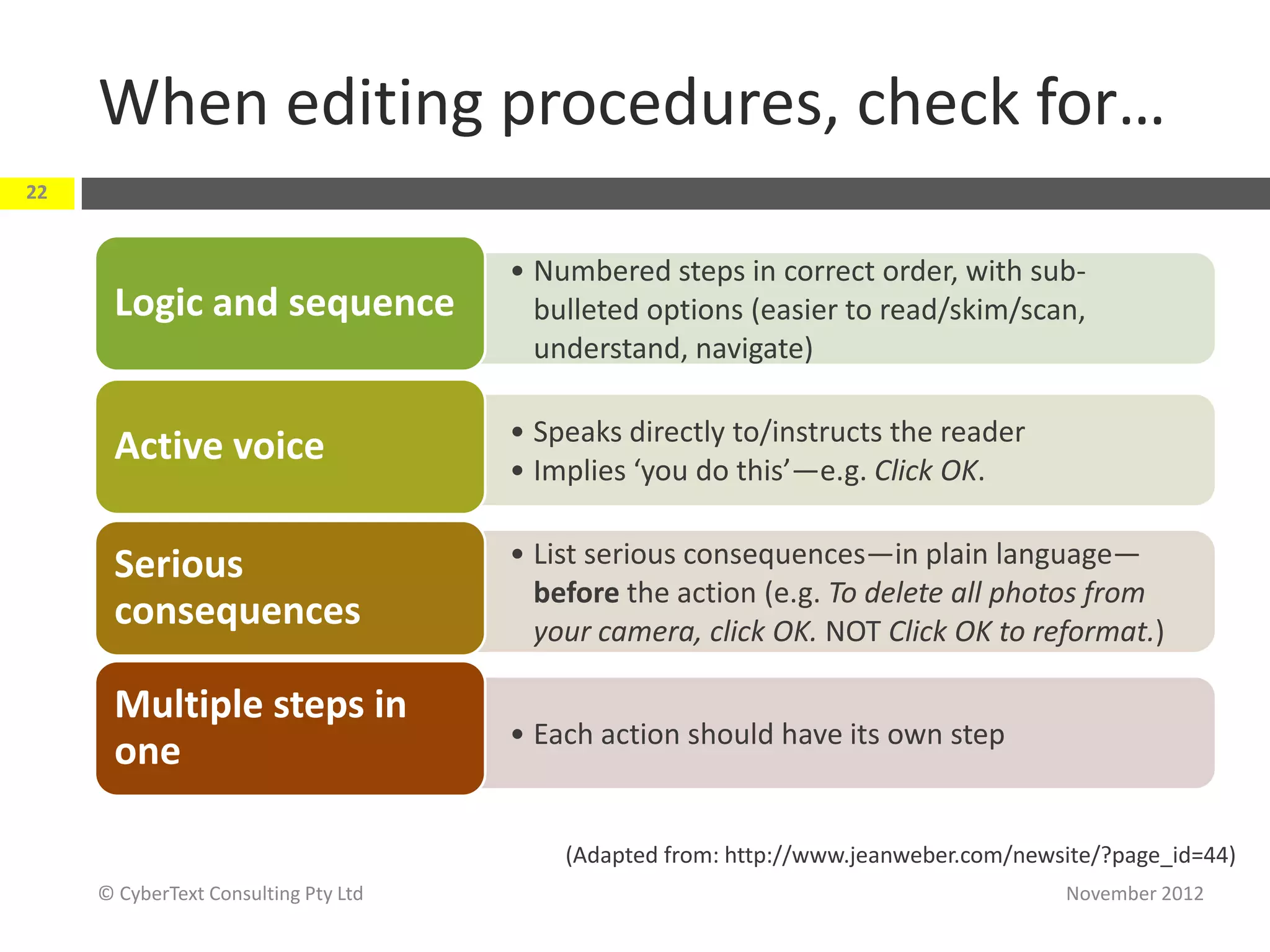
When editing procedures, check for…
22


                                      • Numbered steps in correct order, with sub-
      Logic and sequence                bulleted options (easier to read/skim/scan,
                                        understand, navigate)

                                      • Speaks directly to/instructs the reader
      Active voice
                                      • Implies ‘you do this’—e.g. Click OK.


      Serious                         • List serious consequences—in plain language—
                                        before the action (e.g. To delete all photos from
      consequences                      your camera, click OK. NOT Click OK to reformat.)

      Multiple steps in
                                      • Each action should have its own step
      one

                                          (Adapted from: http://www.jeanweber.com/newsite/?page_id=44)
     © CyberText Consulting Pty Ltd                                                   November 2012
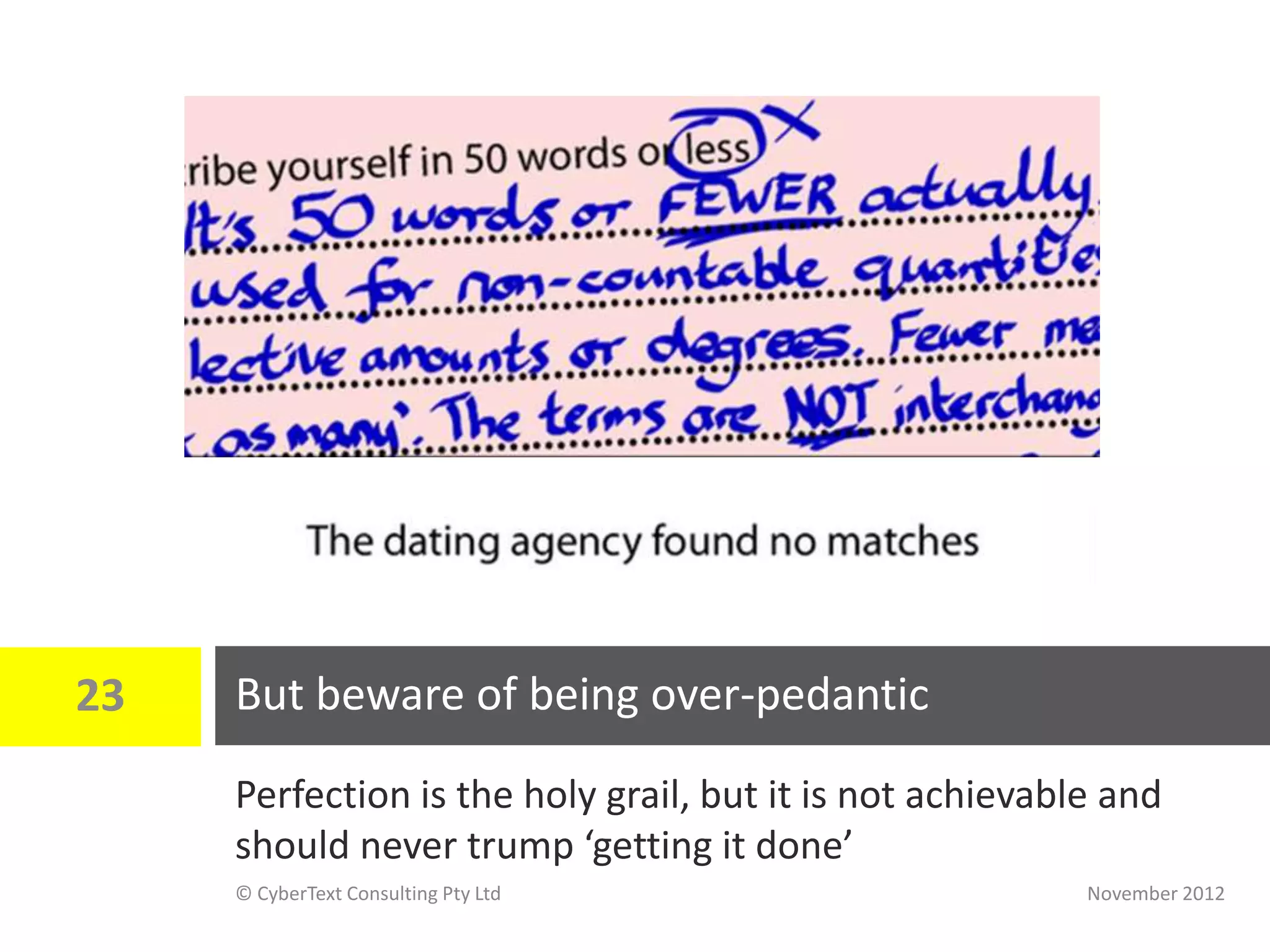
23   But beware of being over-pedantic
     Perfection is the holy grail, but it is not achievable and
     should never trump ‘getting it done’
     © CyberText Consulting Pty Ltd                       November 2012
24          Checklists and style sheets
            Takeaways:
             Use checklists and style sheets—you can’t

               remember to check everything, every time
             Style sheets help maintain consistency


 © CyberText Consulting Pty Ltd                     November 2012
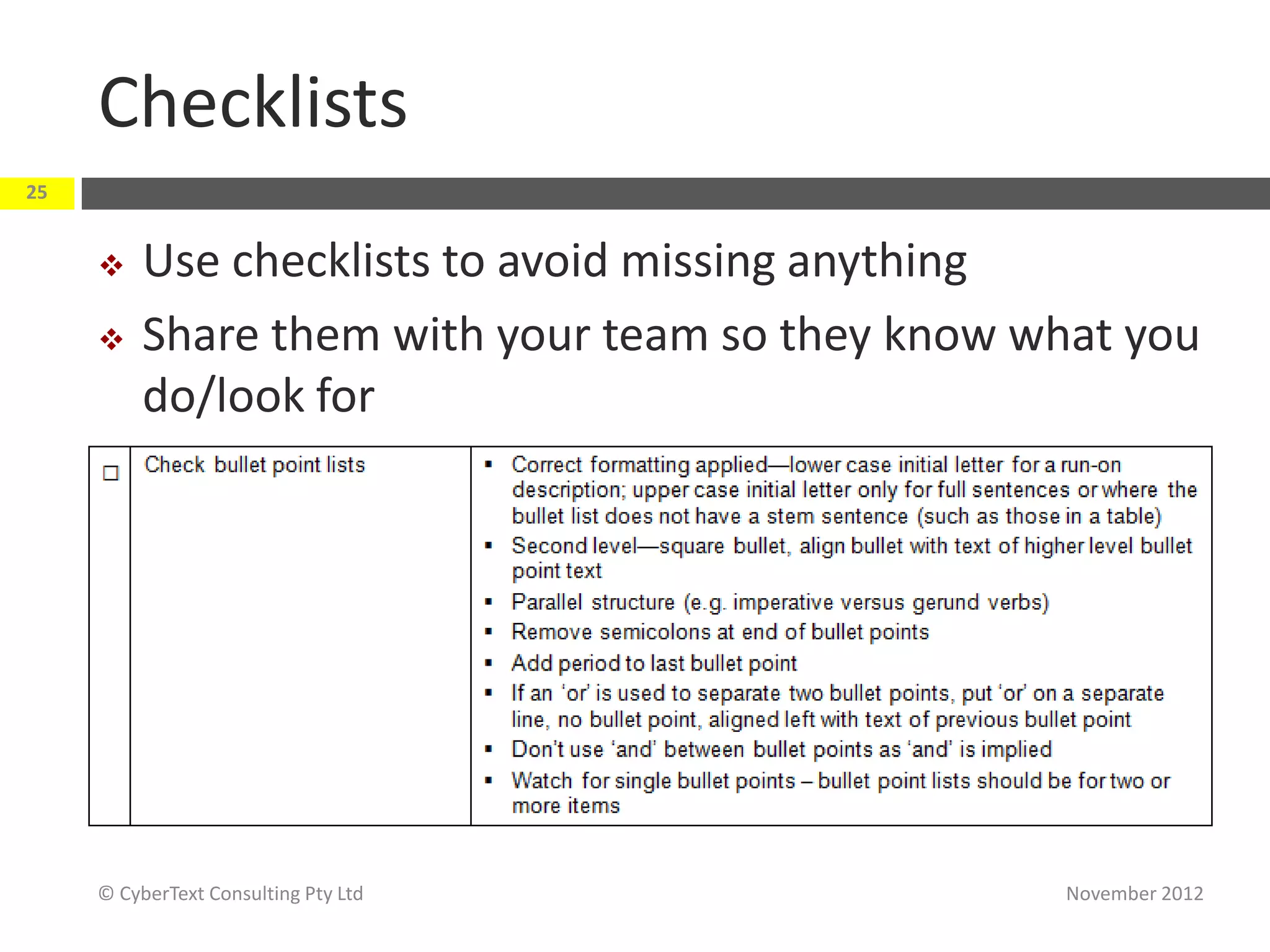
Checklists
25


         Use checklists to avoid missing anything
         Share them with your team so they know what you
          do/look for


     © CyberText Consulting Pty Ltd                November 2012
Style sheets
26


         Use a style sheet to document decisions that:
              differ from your style guide authority (e.g. Australian Style
               Manual, Chicago Manual of Style, Microsoft Manual of Style)
              are unique to your product/company
         Very useful for product- /company-specific terminology
              e.g. NetForms, Netforms, Net Forms, Net forms…
         Help maintain consistency of
          spelling, capitalisation, hyphenation, punctuation, etc.
         Detail treatment of specific types of elements—dialog box
          names, field names, menu paths, user-entered
          data, species names, cited titles, etc.
     © CyberText Consulting Pty Ltd                                    November 2012
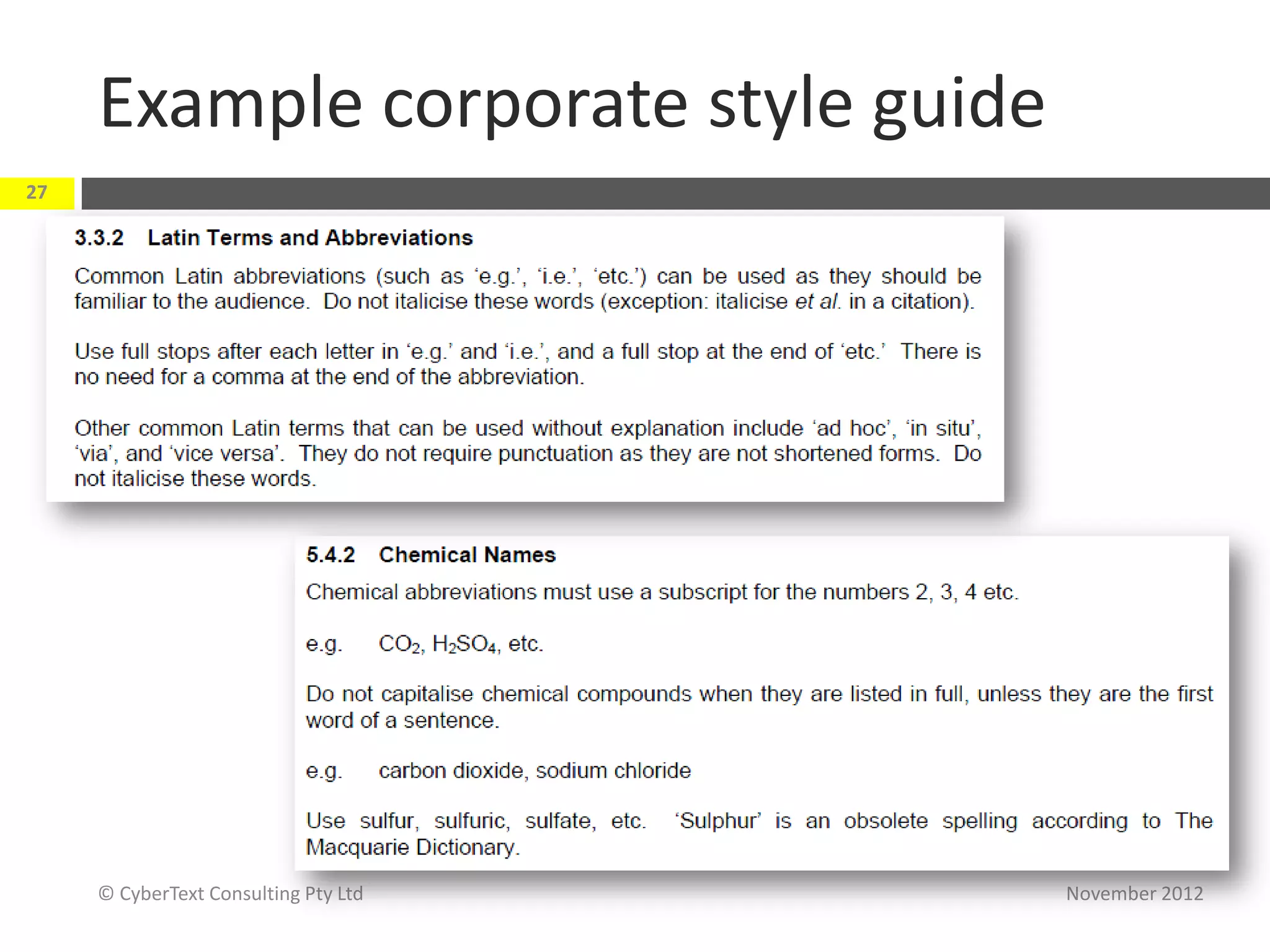
Example corporate style guide
27


     © CyberText Consulting Pty Ltd   November 2012
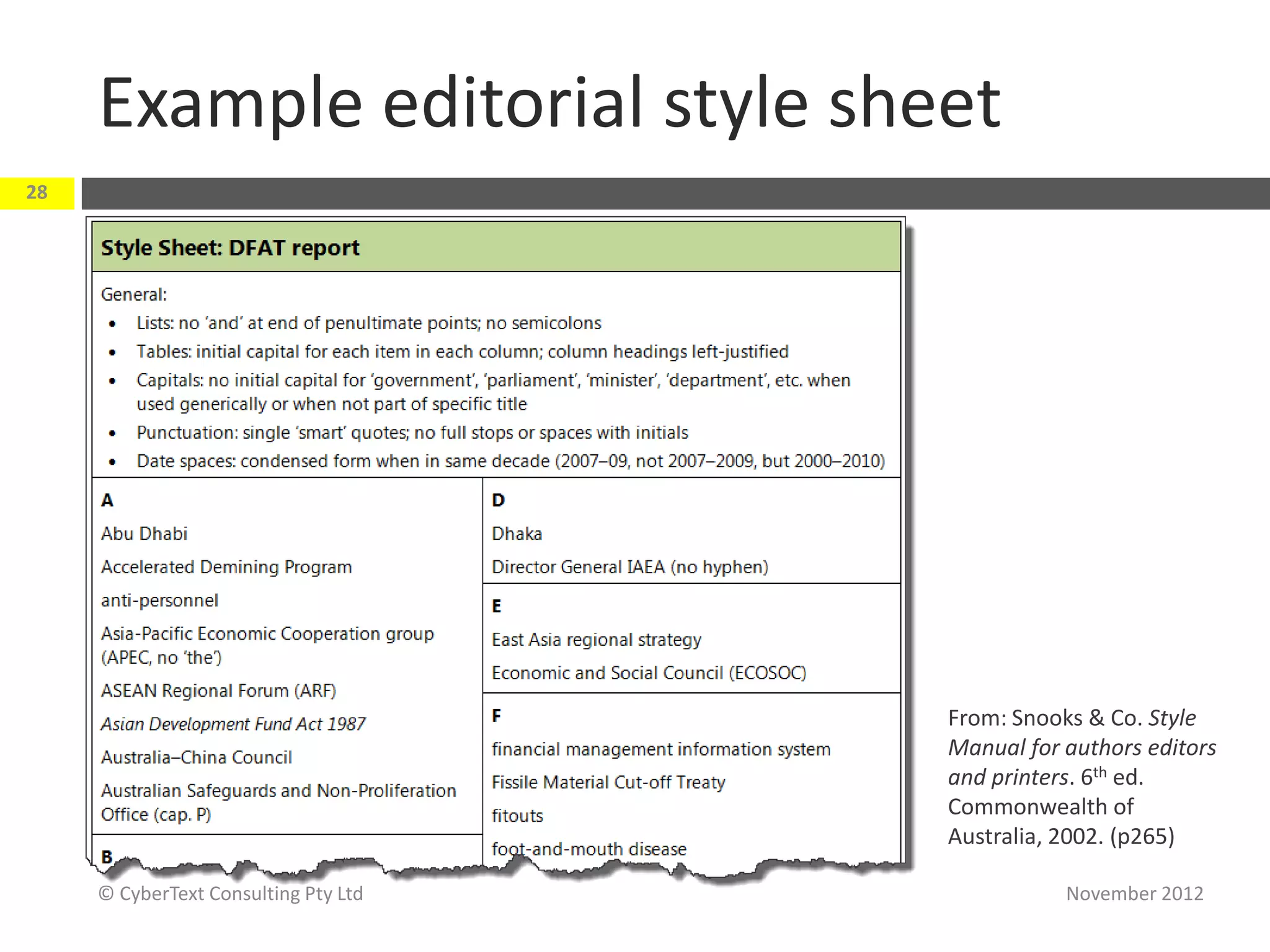
Example editorial style sheet
28


                                      From: Snooks & Co. Style
                                      Manual for authors editors
                                      and printers. 6th ed.
                                      Commonwealth of
                                      Australia, 2002. (p265)

     © CyberText Consulting Pty Ltd              November 2012
29          Tools and resources
            Takeaways:
             Tools may be useful, but …

             Your eyes and brain are the best tools you
               have!


 © CyberText Consulting Pty Ltd                       November 2012
About Word add-ins
30


         Many specialist editing tools are add-ins for
          Word only
         May have to publish content to Word, run the
          tool, then either republish changed Word file to
          the required output OR make suggested changes
          in authoring tool
         May be too hard! Use trial versions to see if
          worth it


     © CyberText Consulting Pty Ltd                  November 2012
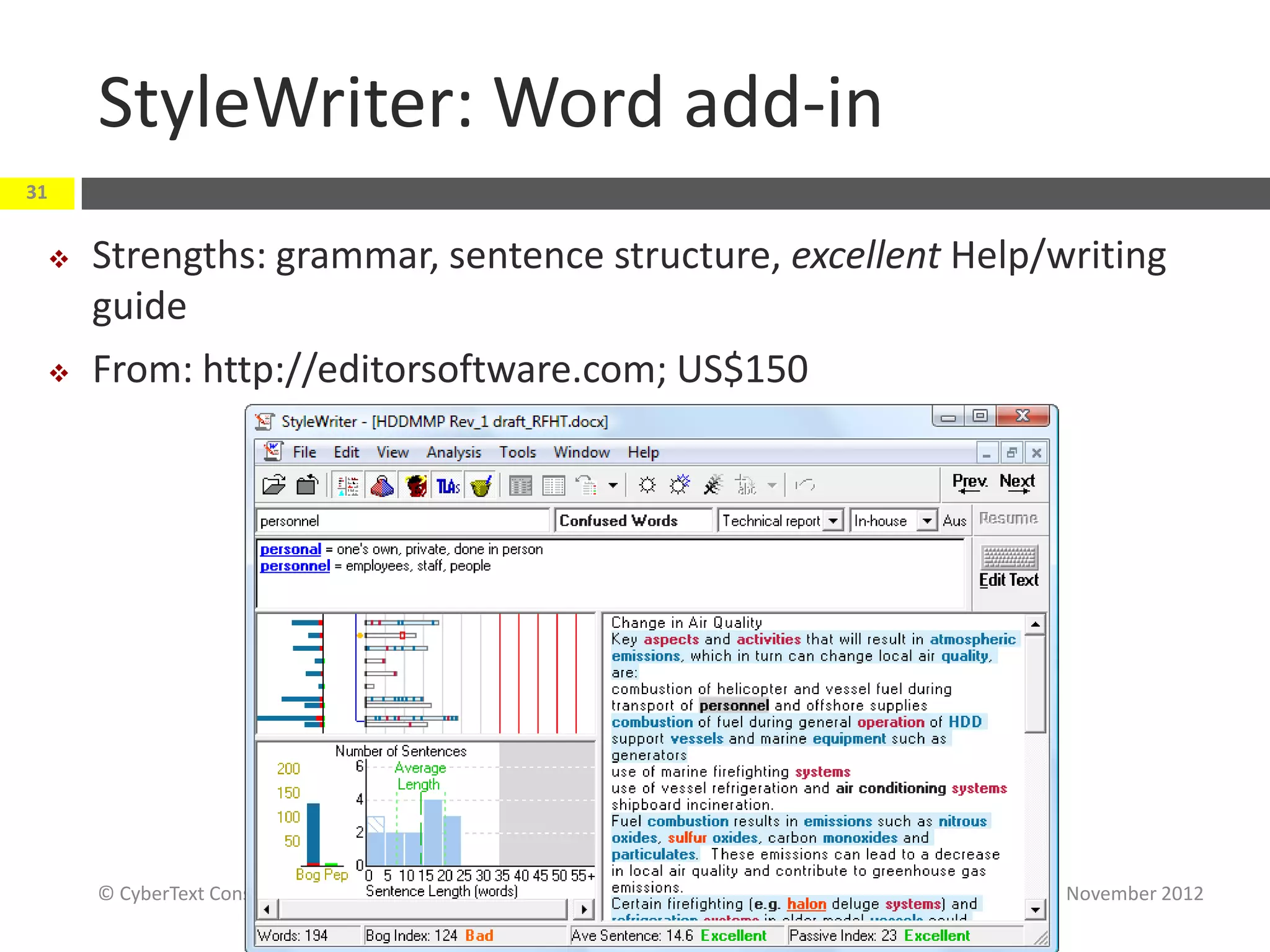
StyleWriter: Word add-in
31


    Strengths: grammar, sentence structure, excellent Help/writing
     guide
    From: http://editorsoftware.com; US$150


     © CyberText Consulting Pty Ltd                          November 2012
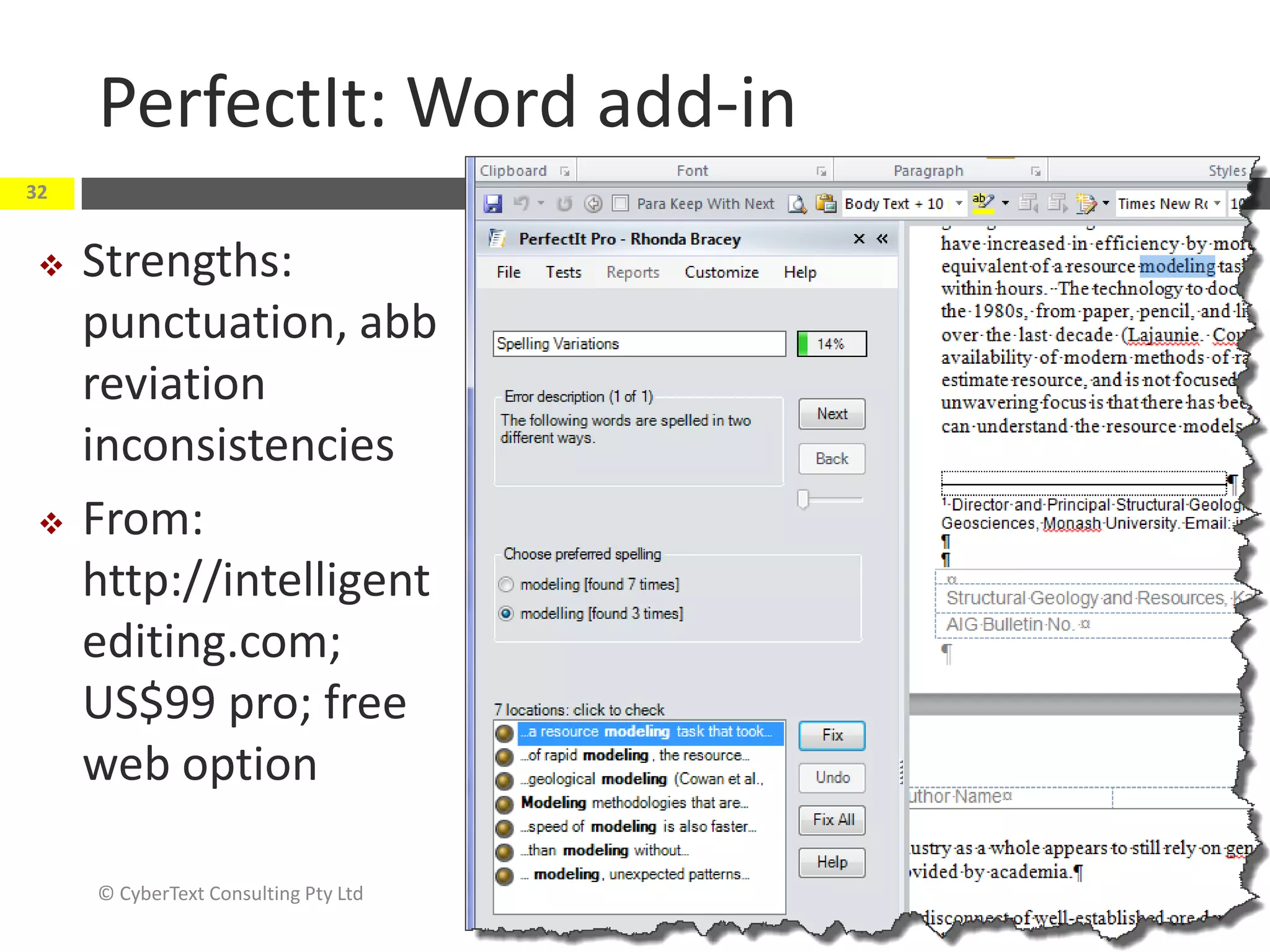
PerfectIt: Word add-in
32


    Strengths:
     punctuation, abb
     reviation
     inconsistencies
    From:
     http://intelligent
     editing.com;
     US$99 pro; free
     web option

     © CyberText Consulting Pty Ltd   November 2012
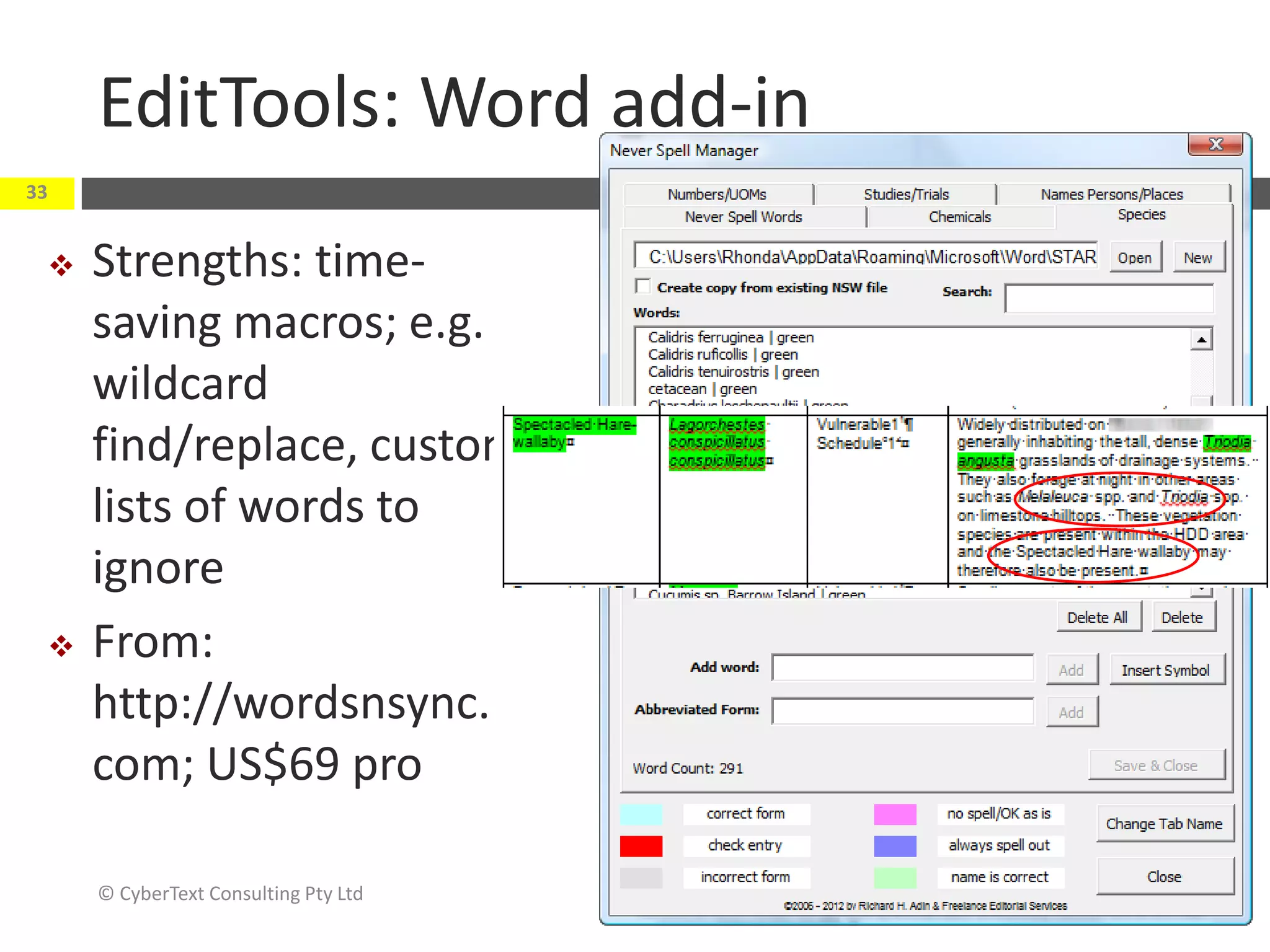
EditTools: Word add-in
33


    Strengths: time-
     saving macros; e.g.
     wildcard
     find/replace, custom
     lists of words to
     ignore
    From:
     http://wordsnsync.
     com; US$69 pro

     © CyberText Consulting Pty Ltd   November 2012
AP StyleGuard: Word add-in
34


         Strengths: checks against Associated Press (US)
          style
         From: http://www.apstylebook.com/?do=
          product&pid=style-guard; from US$50 per user
          (annual subs)


     © CyberText Consulting Pty Ltd                   November 2012
Other
35


         Spelling and grammar checkers
         Track
          Changes, Comments, AutoCorrect, Find/Replace
          (Word)
         PDF comments/markup (Acrobat)
         HTML spellcheckers, link checkers, validators (e.g.
          CSE HTML Validator; http://htmlvalidator.com)
         Style guides (general and specialist)
         Dictionaries, glossaries (general and specialist)
     © CyberText Consulting Pty Ltd                    November 2012
“Don’t uninstall your brain”
36

     "...tools can become crutches if they supplant rather than
     supplement human judgment. Spell-checking and grammar-checking
     programs ... and similar innovations to come will never replace the
     writer’s own critical eye (or an objective second opinion)...
     ...there is some evidence that using [tools] can cause [your] editing
     skills to deteriorate. Not only that, but less skilful writers can over
     rely on such tools, accept their sometimes flawed corrections
     without question, and otherwise ignore their shortcomings...
     ... By all means, buy [product] if it suits your needs. But don’t
     uninstall your brain."
                                      (From: http://www.dailywritingtips.com/ap-styleguard-and-the-death-of-editing/)


     © CyberText Consulting Pty Ltd                                                                 November 2012
Helpful links
37


         Editing tips, techniques and checklists:
          http://www.jeanweber.com/newsite/?page_id=5

         Working with a technical editor:
          http://techwhirl.com/articles/working-with-a-
          technical-editor/

         User Interface Text:
          http://www.cybertext.com.au/10435.htm (slides from
          presentation at WritersUA Conference, 2012)

     © CyberText Consulting Pty Ltd                       November 2012
38          Thank you…
            Any questions?

            Contact me:
             rhonda.bracey@cybertext.com.au

             http://www.cybertext.com.au

             http://cybertext.wordpress.com

             Twitter: @cybertext
 © CyberText Consulting Pty Ltd                November 2012

Editing: It's not as easy as it looks

  • 1.
    Twitter hashtags: @cybertext @astcnsw EDITING: It’s not as easy as it looks November 2012 Rhonda Bracey
  • 2.
    It’s not aseasy as it looks… 2 “Editing is just as difficult as writing. Probably even more difficult. Editing is a balancing act [between] cleaning up a piece of writing while keeping [it] true to its intentions.” From: http://scottnesbitt.net/weblog/2010/02/22/editing-the-secret-to-good-writing/ © CyberText Consulting Pty Ltd November 2012
  • 3.
    3 Role of the editor Takeaways:  Editors assist the writer/developer by fixing errors and/or suggesting improvements  Editors make the content easier for the reader to understand/navigate “An editor’s true value is in enhancing and improving content—not being the grammar police!” (Anku Jain, Adobe Systems, WritersUA Conference, March 2012) © CyberText Consulting Pty Ltd November 2012
  • 4.
    Three Cs ofcommunication 4 Clarity Reduce Consistency CONFUSION Conciseness © CyberText Consulting Pty Ltd November 2012
  • 5.
    What can youedit? 5 Informational, instructional, e guidelines, reports, fact sheets, quick reference ducational communications cards, operating manuals, training materials… Marketing communications website, white papers, feature lists, blog posts, press releases, social media profiles/content… Internal policies/procedures employee handbooks, disaster recovery plans, environmental management plans… Developer/Business Analyst documentation specifications, project plans… User assistance online Help, user interface text, error messages, screencasts… … in fact, ANY written material for your internal and external customers! © CyberText Consulting Pty Ltd November 2012
  • 6.
    Example: In theUI, an editor can identify… 6 Incorrect grammar, spelling, and punctuation Unclear or potentially misunderstood user prompts and error messages Illogical task flows Inconsistently labelled buttons, icons, fields, dialog boxes Inconsistently placed buttons, icons, fields, dialog boxes Required or unnecessary tasks, fields, dialog boxes Inconsistencies between dialog boxes (Adapted from: http://writeorrevisedaily.wordpress.com/2012/01/04/add-value-to-gui-design/) © CyberText Consulting Pty Ltd November 2012
  • 7.
    7 Types of editing Takeaways:  Rules-based (aka copy editing)  Analysis-based (aka content editing or substantive editing)  Technical editing © CyberText Consulting Pty Ltd November 2012
  • 8.
    ‘Rules-based’ editing 8  Uses internal/external standards and guidelines to make the content correct, consistent, accurate, and complete; e.g.:  spelling, grammar, punctuation, capitalisation, hyphenation  adherence to legal requirements (e.g. copyright, trademarks)  design consistency (e.g. typography, layout)  Editor’s role: Fix (Adapted from Jean Weber: http://techwhirl.com/articles/working-with-a-technical-editor/) © CyberText Consulting Pty Ltd November 2012
  • 9.
    But… 9 Rules-based editing is not enough—the content still may be inappropriate for the intended audience © CyberText Consulting Pty Ltd November 2012
  • 10.
    ‘Analysis-based’ editing 10  Evaluates content to make it more functional and appropriate for its readers  Looks at concept, content, organisation, flow, style  Editor’s role: Suggest improvements rather than make corrections (Adapted from Jean Weber: http://techwhirl.com/articles/working-with-a-technical-editor/) © CyberText Consulting Pty Ltd November 2012
  • 11.
    Technical editing: Software/hardware 11  Involves testing every step of every procedure in the UA/Help against the software/hardware product  Must suspend existing knowledge of product and follow documented steps exactly  Can take a LOT of time for a complex product  Editor’s role: Report mismatches, inaccuracies to author/developer for correction © CyberText Consulting Pty Ltd November 2012
  • 12.
    Technical editing: Domainknowledge 12  Involves verifying all facts, statements made, analyses, citations/references, etc.  Requires detailed existing knowledge of the domain; often done by subject matter experts  Can take a LOT of time  Editor’s role: Report mismatches, inaccuracies, inconsistencies to author for correction © CyberText Consulting Pty Ltd November 2012
  • 13.
    13 Editing tasks Takeaways:  Editing comprises many tasks—several passes are required to cover everything  Editing is tiring—take regular breaks © CyberText Consulting Pty Ltd November 2012
  • 14.
    It’s not aone-off task 14  Several passes—one for each group of elements (e.g. spelling, layout, capitalisation, pun ctuation, legal, styles, abbreviation s…)  Tackle one or only a few issues at a time  Editing is tiring—take breaks, refocus your eyes © CyberText Consulting Pty Ltd November 2012
  • 15.
    Example copy editingtasks 15 Check for: Spelling errors, typos Duplicated words Missing words Incorrect/missing punctuation Grammatical errors (e.g. subject/verb mismatch) Poor formatting © CyberText Consulting Pty Ltd November 2012
  • 16.
    Example content editingtasks 16 Check for: Overall logic/structure; logical flow within/btwn sentences/paragraphs Consistent terminology Consistent tense Short sentences/paragraphs Active voice, where possible Parallel structure Redundant/unnecessary words © CyberText Consulting Pty Ltd November 2012
  • 17.
    Example… 17 © CyberText Consulting Pty Ltd November 2012
  • 18.
    Edits showing trackedchanges 18 Issues:  Shall vs will (delete word if activity already occurring)  Parallel structure: -ing verbs  Unnecessary words © CyberText Consulting Pty Ltd November 2012
  • 19.
    Dialog boxes: example 19 Issues:  Mostly title case (readability)  Access keys don’t work in tabs or items (usability)  Excess words (readability) © CyberText Consulting Pty Ltd November 2012
  • 20.
    Installation messages: examples 20 Issues:  Sentence structure (readability)  Unintelligible (readability)  Excess words (readability) © CyberText Consulting Pty Ltd November 2012
  • 21.
    Tighten up! 21 Before After Comments …in close …close to… • Proximity is a synonym for nearness, so close proximity to… …near… proximity is redundant. It is simpler to say close to (or even better, or near—and easier for your readers to be specific understand. about the • These terms are very fuzzy. Does close proximity/ distance) close to/near mean 10 cm, 10 m, or 10 km? If you can, be specific as to the distance. The major The major • Often, summarised below (and the following) can systems … are systems … are: be deleted from an intro to a bullet list without summarised affecting meaning. below: (From: http://cybertext.wordpress.com/2011/11/10/tighten-up-your-writing-by-removing-redundantunnecessary-words/) © CyberText Consulting Pty Ltd November 2012
  • 22.
    When editing procedures,check for… 22 • Numbered steps in correct order, with sub- Logic and sequence bulleted options (easier to read/skim/scan, understand, navigate) • Speaks directly to/instructs the reader Active voice • Implies ‘you do this’—e.g. Click OK. Serious • List serious consequences—in plain language— before the action (e.g. To delete all photos from consequences your camera, click OK. NOT Click OK to reformat.) Multiple steps in • Each action should have its own step one (Adapted from: http://www.jeanweber.com/newsite/?page_id=44) © CyberText Consulting Pty Ltd November 2012
  • 23.
    23 But beware of being over-pedantic Perfection is the holy grail, but it is not achievable and should never trump ‘getting it done’ © CyberText Consulting Pty Ltd November 2012
  • 24.
    24 Checklists and style sheets Takeaways:  Use checklists and style sheets—you can’t remember to check everything, every time  Style sheets help maintain consistency © CyberText Consulting Pty Ltd November 2012
  • 25.
    Checklists 25  Use checklists to avoid missing anything  Share them with your team so they know what you do/look for © CyberText Consulting Pty Ltd November 2012
  • 26.
    Style sheets 26  Use a style sheet to document decisions that:  differ from your style guide authority (e.g. Australian Style Manual, Chicago Manual of Style, Microsoft Manual of Style)  are unique to your product/company  Very useful for product- /company-specific terminology  e.g. NetForms, Netforms, Net Forms, Net forms…  Help maintain consistency of spelling, capitalisation, hyphenation, punctuation, etc.  Detail treatment of specific types of elements—dialog box names, field names, menu paths, user-entered data, species names, cited titles, etc. © CyberText Consulting Pty Ltd November 2012
  • 27.
    Example corporate styleguide 27 © CyberText Consulting Pty Ltd November 2012
  • 28.
    Example editorial stylesheet 28 From: Snooks & Co. Style Manual for authors editors and printers. 6th ed. Commonwealth of Australia, 2002. (p265) © CyberText Consulting Pty Ltd November 2012
  • 29.
    29 Tools and resources Takeaways:  Tools may be useful, but …  Your eyes and brain are the best tools you have! © CyberText Consulting Pty Ltd November 2012
  • 30.
    About Word add-ins 30  Many specialist editing tools are add-ins for Word only  May have to publish content to Word, run the tool, then either republish changed Word file to the required output OR make suggested changes in authoring tool  May be too hard! Use trial versions to see if worth it © CyberText Consulting Pty Ltd November 2012
  • 31.
    StyleWriter: Word add-in 31  Strengths: grammar, sentence structure, excellent Help/writing guide  From: http://editorsoftware.com; US$150 © CyberText Consulting Pty Ltd November 2012
  • 32.
    PerfectIt: Word add-in 32  Strengths: punctuation, abb reviation inconsistencies  From: http://intelligent editing.com; US$99 pro; free web option © CyberText Consulting Pty Ltd November 2012
  • 33.
    EditTools: Word add-in 33  Strengths: time- saving macros; e.g. wildcard find/replace, custom lists of words to ignore  From: http://wordsnsync. com; US$69 pro © CyberText Consulting Pty Ltd November 2012
  • 34.
    AP StyleGuard: Wordadd-in 34  Strengths: checks against Associated Press (US) style  From: http://www.apstylebook.com/?do= product&pid=style-guard; from US$50 per user (annual subs) © CyberText Consulting Pty Ltd November 2012
  • 35.
    Other 35  Spelling and grammar checkers  Track Changes, Comments, AutoCorrect, Find/Replace (Word)  PDF comments/markup (Acrobat)  HTML spellcheckers, link checkers, validators (e.g. CSE HTML Validator; http://htmlvalidator.com)  Style guides (general and specialist)  Dictionaries, glossaries (general and specialist) © CyberText Consulting Pty Ltd November 2012
  • 36.
    “Don’t uninstall yourbrain” 36 "...tools can become crutches if they supplant rather than supplement human judgment. Spell-checking and grammar-checking programs ... and similar innovations to come will never replace the writer’s own critical eye (or an objective second opinion)... ...there is some evidence that using [tools] can cause [your] editing skills to deteriorate. Not only that, but less skilful writers can over rely on such tools, accept their sometimes flawed corrections without question, and otherwise ignore their shortcomings... ... By all means, buy [product] if it suits your needs. But don’t uninstall your brain." (From: http://www.dailywritingtips.com/ap-styleguard-and-the-death-of-editing/) © CyberText Consulting Pty Ltd November 2012
  • 37.
    Helpful links 37  Editing tips, techniques and checklists: http://www.jeanweber.com/newsite/?page_id=5  Working with a technical editor: http://techwhirl.com/articles/working-with-a- technical-editor/  User Interface Text: http://www.cybertext.com.au/10435.htm (slides from presentation at WritersUA Conference, 2012) © CyberText Consulting Pty Ltd November 2012
  • 38.
    38 Thank you… Any questions? Contact me:  rhonda.bracey@cybertext.com.au  http://www.cybertext.com.au  http://cybertext.wordpress.com  Twitter: @cybertext © CyberText Consulting Pty Ltd November 2012