CLEAR, CONCISE, CONSISTENT:
Reducing User Confusion
Rhonda BraceyWritersUA Conference
March 2014
Why bother? Company reputation
March 2014© CyberText Consulting Pty Ltd
2
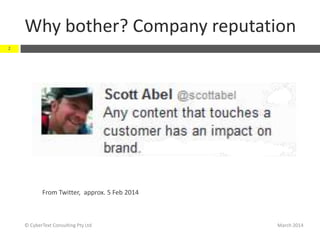
From Twitter, approx. 5 Feb 2014
Why bother? Company reputation
March 2014© CyberText Consulting Pty Ltd
3
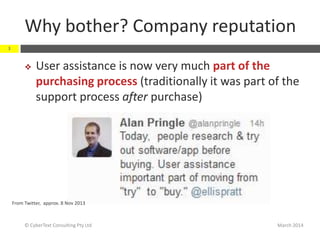
 User assistance is now very much part of the
purchasing process (traditionally it was part of the
support process after purchase)
From Twitter, approx. 8 Nov 2013
Why bother? Company reputation
March 2014© CyberText Consulting Pty Ltd
4
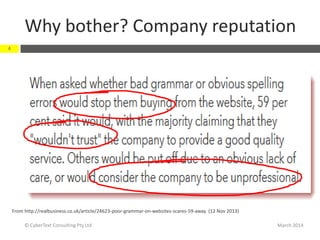
From http://realbusiness.co.uk/article/24623-poor-grammar-on-websites-scares-59-away (12 Nov 2013)
Common UI/UA issues
March 2014© CyberText Consulting Pty Ltd
5
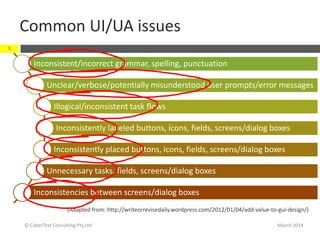
Inconsistent/incorrect grammar, spelling, punctuation
Unclear/verbose/potentially misunderstood user prompts/error messages
Illogical/inconsistent task flows
Inconsistently labeled buttons, icons, fields, screens/dialog boxes
Inconsistently placed buttons, icons, fields, screens/dialog boxes
Unnecessary tasks, fields, screens/dialog boxes
Inconsistencies between screens/dialog boxes
(Adapted from: http://writeorrevisedaily.wordpress.com/2012/01/04/add-value-to-gui-design/)
Three Cs of communication
March 2014© CyberText Consulting Pty Ltd
6
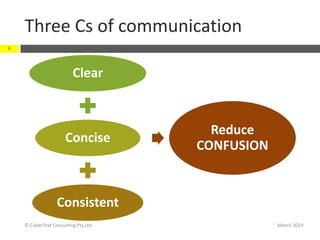
Clear
Concise
Consistent
Reduce
CONFUSION
Takeaways:
 Be specific
 Avoid vague, wishy-washy words
 Use commas to remove ambiguity
 Use plain language
Be clear
March 2014
7
© CyberText Consulting Pty Ltd
Be clear…
March 2014© CyberText Consulting Pty Ltd
8
Terminology (avoid vague words like ‘it’, ‘this’, ’they’, etc.)
Punctuation(use the serial [Oxford] comma to remove ambiguity)
Structure(write lists as dot points, numbered steps; word order)
Object/subject (who is doing what to whom?)
Plain language (how would you explain to a spouse/parent/child)
Dates/times (avoid relative words; be specific)
Be specific
March 2014© CyberText Consulting Pty Ltd
9
 What’s wrong with these words?:
 it, they, their
 this, these
 These words are meaningless unless it’s absolutely
clear what ‘it’ etc. refers to
 The bomb is connected to a red and to a blue wire. Cut it to
defuse it.
 Other vague words to avoid:
 Quite, mostly, slightly, sort of, somewhat, pretty (e.g. ‘pretty
hard to tighten’ vs ‘hard to tighten’)
Ban relativity!
March 2014© CyberText Consulting Pty Ltd
10
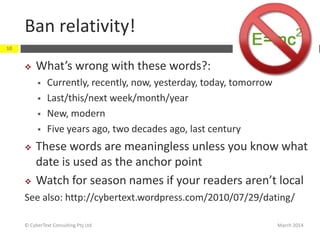
 What’s wrong with these words?:
 Currently, recently, now, yesterday, today, tomorrow
 Last/this/next week/month/year
 New, modern
 Five years ago, two decades ago, last century
 These words are meaningless unless you know what
date is used as the anchor point
 Watch for season names if your readers aren’t local
See also: http://cybertext.wordpress.com/2010/07/29/dating/
Use commas to remove ambiguity
March 2014© CyberText Consulting Pty Ltd
11
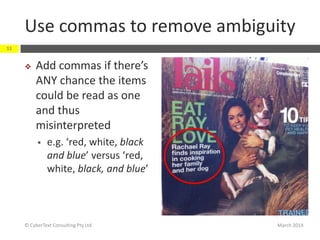
 Add commas if there’s
ANY chance the items
could be read as one
and thus
misinterpreted
 e.g. ‘red, white, black
and blue’ versus ‘red,
white, black, and blue’
Use commas…
March 2014© CyberText Consulting Pty Ltd
12
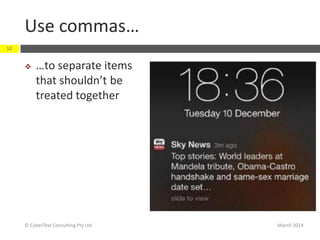
 …to separate items
that shouldn’t be
treated together
How commas can change meaning
March 2014© CyberText Consulting Pty Ltd
13
 No commas:
 This initial workshop identified the work scopes and phasing generated several
different sourcing strategies for those work scopes and proposed selection
criteria to compare the sourcing strategies to best benefit the [project].
 Single comma added (after ‘work scopes’):
 This initial workshop identified the work scopes, and phasing generated several
different sourcing strategies for those work scopes and proposed selection
criteria to compare the sourcing strategies to best benefit the [project].
 Multiple commas added:
 This initial workshop identified the work scopes and phasing, generated several
different sourcing strategies for those work scopes, and proposed selection
criteria to compare the sourcing strategies to best benefit the [project].
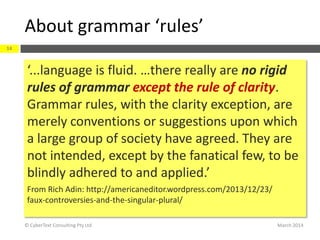
About grammar ‘rules’
March 2014© CyberText Consulting Pty Ltd
14
‘...language is fluid. …there really are no rigid
rules of grammar except the rule of clarity.
Grammar rules, with the clarity exception, are
merely conventions or suggestions upon which
a large group of society have agreed. They are
not intended, except by the fanatical few, to be
blindly adhered to and applied.’
From Rich Adin: http://americaneditor.wordpress.com/2013/12/23/
faux-controversies-and-the-singular-plural/
Takeaways:
 Get rid of words that don’t add meaning
(‘empty calories’)
 Use plain language
 Switch words around
Be concise
March 2014
15
© CyberText Consulting Pty Ltd
Be concise…
March 2014© CyberText Consulting Pty Ltd
16
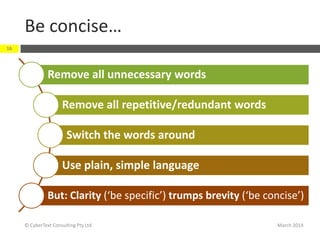
Remove all unnecessary words
Remove all repetitive/redundant words
Switch the words around
Use plain, simple language
But: Clarity (‘be specific’) trumps brevity (‘be concise’)
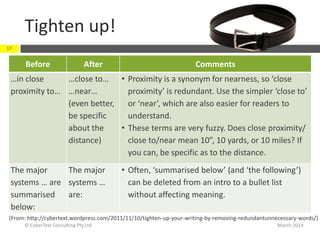
Tighten up!
Before After Comments
…in close
proximity to…
…close to…
…near…
(even better,
be specific
about the
distance)
• Proximity is a synonym for nearness, so ‘close
proximity’ is redundant. Use the simpler ‘close to’
or ‘near’, which are also easier for readers to
understand.
• These terms are very fuzzy. Does close proximity/
close to/near mean 10”, 10 yards, or 10 miles? If
you can, be specific as to the distance.
The major
systems … are
summarised
below:
The major
systems …
are:
• Often, ‘summarised below’ (and ‘the following’)
can be deleted from an intro to a bullet list
without affecting meaning.
March 2014© CyberText Consulting Pty Ltd
17
(From: http://cybertext.wordpress.com/2011/11/10/tighten-up-your-writing-by-removing-redundantunnecessary-words/)
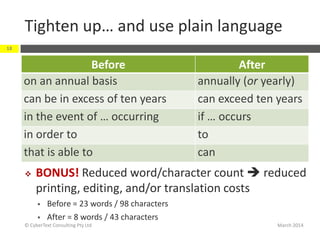
Tighten up… and use plain language
Before After
on an annual basis annually (or yearly)
can be in excess of ten years can exceed ten years
in the event of … occurring if … occurs
in order to to
that is able to can
March 2014© CyberText Consulting Pty Ltd
18
 BONUS! Reduced word/character count  reduced
printing, editing, and/or translation costs
 Before = 23 words / 98 characters
 After = 8 words / 43 characters
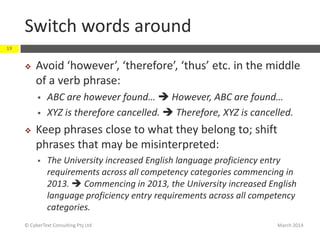
Switch words around
March 2014© CyberText Consulting Pty Ltd
19
 Avoid ‘however’, ‘therefore’, ‘thus’ etc. in the middle
of a verb phrase:
 ABC are however found…  However, ABC are found…
 XYZ is therefore cancelled.  Therefore, XYZ is cancelled.
 Keep phrases close to what they belong to; shift
phrases that may be misinterpreted:
 The University increased English language proficiency entry
requirements across all competency categories commencing in
2013.  Commencing in 2013, the University increased English
language proficiency entry requirements across all competency
categories.
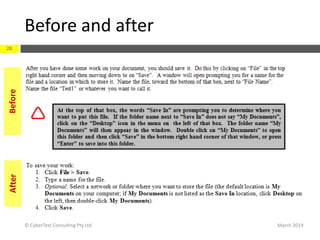
Before and after
March 2014© CyberText Consulting Pty Ltd
20
BeforeAfter
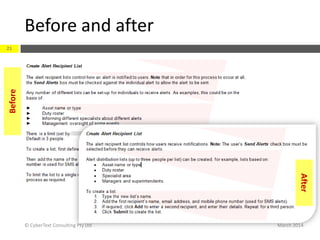
Before and after
March 2014© CyberText Consulting Pty Ltd
21
Before
After
Takeaways:
 A consistent document/interface (words,
structure, formatting) is easier to read
 Use style guides to help maintain consistency—
you can’t remember everything all the time
 Keep lists parallel
Be consistent
March 2014
22
© CyberText Consulting Pty Ltd
Be consistent in your use of…
March 2014© CyberText Consulting Pty Ltd
23
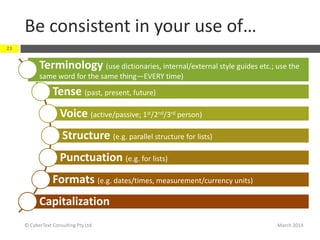
Terminology (use dictionaries, internal/external style guides etc.; use the
same word for the same thing—EVERY time)
Tense (past, present, future)
Voice (active/passive; 1st/2nd/3rd person)
Structure (e.g. parallel structure for lists)
Punctuation (e.g. for lists)
Formats (e.g. dates/times, measurement/currency units)
Capitalization
Inconsistency = User ‘frustration and
irritation’
March 2014© CyberText Consulting Pty Ltd
24
“When *behaviour+ is inconsistent and
erratic, it is difficult to know what to
expect, and occasional positive surprises
are not enough to overcome the
frustration and irritation caused by never
knowing quite what to expect.”
Donald A Norman Emotional Design: Why we love (and hate) everyday things (2007)
External style guides
March 2014© CyberText Consulting Pty Ltd
25
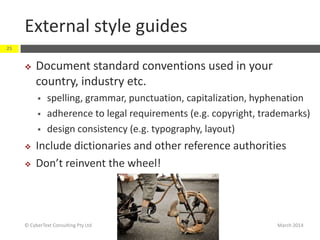
 Document standard conventions used in your
country, industry etc.
 spelling, grammar, punctuation, capitalization, hyphenation
 adherence to legal requirements (e.g. copyright, trademarks)
 design consistency (e.g. typography, layout)
 Include dictionaries and other reference authorities
 Don’t reinvent the wheel!
External style guides: Examples
March 2014© CyberText Consulting Pty Ltd
26
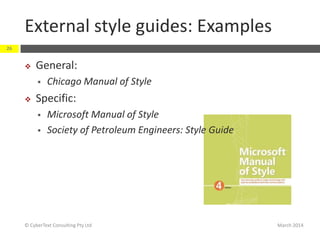
 General:
 Chicago Manual of Style
 Specific:
 Microsoft Manual of Style
 Society of Petroleum Engineers: Style Guide
Internal style guides
March 2014© CyberText Consulting Pty Ltd
27
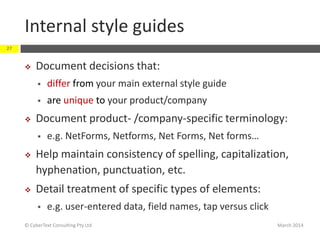
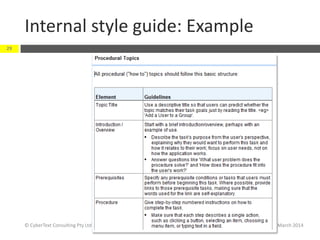
 Document decisions that:
 differ from your main external style guide
 are unique to your product/company
 Document product- /company-specific terminology:
 e.g. NetForms, Netforms, Net Forms, Net forms…
 Help maintain consistency of spelling, capitalization,
hyphenation, punctuation, etc.
 Detail treatment of specific types of elements:
 e.g. user-entered data, field names, tap versus click
Internal style guide: Example
March 2014© CyberText Consulting Pty Ltd
28
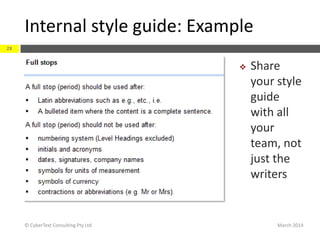
 Share
your style
guide
with all
your
team, not
just the
writers
Internal style guide: Example
March 2014© CyberText Consulting Pty Ltd
29
Keep lists parallel
March 2014© CyberText Consulting Pty Ltd
30
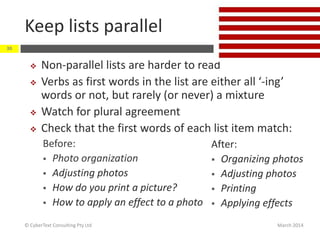
 Non-parallel lists are harder to read
 Verbs as first words in the list are either all ‘-ing’
words or not, but rarely (or never) a mixture
 Watch for plural agreement
 Check that the first words of each list item match:
Before:
 Photo organization
 Adjusting photos
 How do you print a picture?
 How to apply an effect to a photo
After:
 Organizing photos
 Adjusting photos
 Printing
 Applying effects
Examples
March 2014
31
© CyberText Consulting Pty Ltd
March 2014
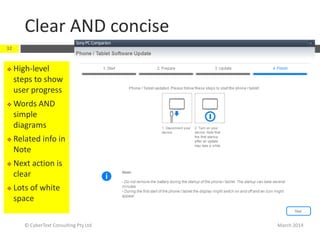
Clear AND concise
© CyberText Consulting Pty Ltd
32
 High-level
steps to show
user progress
 Words AND
simple
diagrams
 Related info in
Note
 Next action is
clear
 Lots of white
space
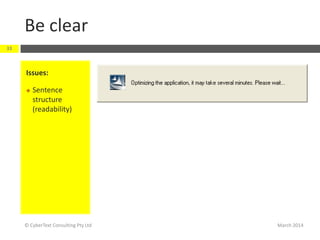
Be clear
March 2014© CyberText Consulting Pty Ltd
33
Issues:
 Sentence
structure
(readability)
Be clear AND concise
March 2014© CyberText Consulting Pty Ltd
34
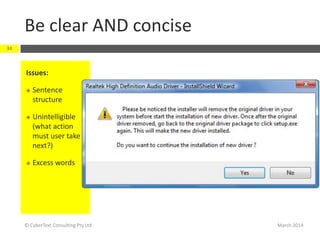
Issues:
 Sentence
structure
 Unintelligible
(what action
must user take
next?)
 Excess words
Be consistent
March 2014© CyberText Consulting Pty Ltd
35
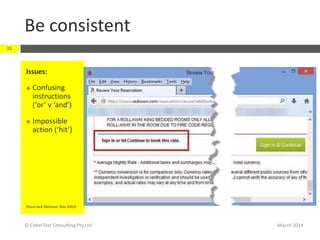
Issues:
 Confusing
instructions
(‘or’ v ‘and’)
 Impossible
action (‘hit’)
(from Jack Molisani, Nov 2013)
Be consistent AND clear AND concise
March 2014© CyberText Consulting Pty Ltd
36
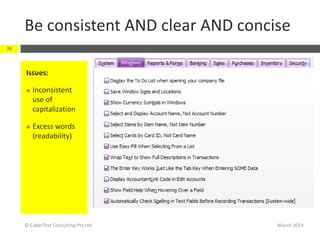
Issues:
 Inconsistent
use of
capitalization
 Excess words
(readability)
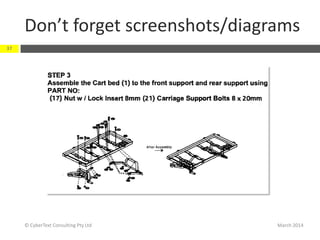
Don’t forget screenshots/diagrams
March 2014© CyberText Consulting Pty Ltd
37
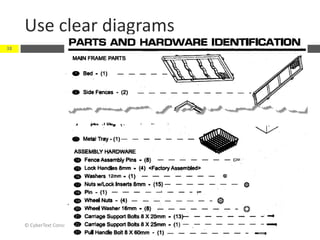
Use clear diagrams
March 2014© CyberText Consulting Pty Ltd
38
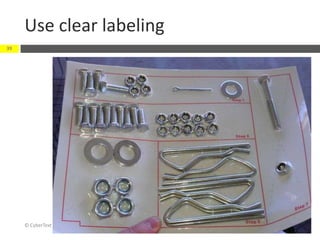
Use clear labeling
March 2014© CyberText Consulting Pty Ltd
39
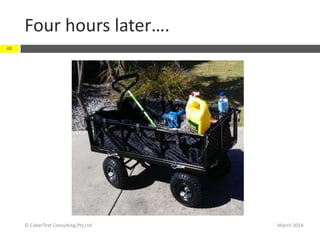
Four hours later….
March 2014© CyberText Consulting Pty Ltd
40
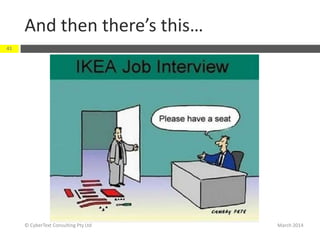
And then there’s this…
March 2014© CyberText Consulting Pty Ltd
41
Helpful resources
March 2014© CyberText Consulting Pty Ltd
42
 Writing/editing tips, techniques, and checklists:
http://www.jeanweber.com/newsite/?page_id=5
 http://www.plainlanguage.gov/howto/wordsugges
tions/index.cfm
 http://www.plainenglish.co.uk/free-guides.html
 Achtelig, Marc. Writing plain instructions. ISBN
978-3943860085
 Kohl, John R. The Global English Style Guide. ISBN
978-1599946573
The final word…
March 2014© CyberText Consulting Pty Ltd
43
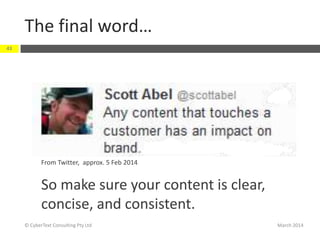
From Twitter, approx. 5 Feb 2014
So make sure your content is clear,
concise, and consistent.
Any questions?
Contact me:
 rhonda.bracey@cybertext.com.au
 http://www.cybertext.com.au
 Blog: http://cybertext.wordpress.com
 Twitter: @cybertext
Thank you…
March 2014
44
© CyberText Consulting Pty Ltd

Clear, Concise, Consistent: Reducing User Confusion

  • 1.
    CLEAR, CONCISE, CONSISTENT: ReducingUser Confusion Rhonda BraceyWritersUA Conference March 2014
  • 2.
    Why bother? Companyreputation March 2014© CyberText Consulting Pty Ltd 2 From Twitter, approx. 5 Feb 2014
  • 3.
    Why bother? Companyreputation March 2014© CyberText Consulting Pty Ltd 3  User assistance is now very much part of the purchasing process (traditionally it was part of the support process after purchase) From Twitter, approx. 8 Nov 2013
  • 4.
    Why bother? Companyreputation March 2014© CyberText Consulting Pty Ltd 4 From http://realbusiness.co.uk/article/24623-poor-grammar-on-websites-scares-59-away (12 Nov 2013)
  • 5.
    Common UI/UA issues March2014© CyberText Consulting Pty Ltd 5 Inconsistent/incorrect grammar, spelling, punctuation Unclear/verbose/potentially misunderstood user prompts/error messages Illogical/inconsistent task flows Inconsistently labeled buttons, icons, fields, screens/dialog boxes Inconsistently placed buttons, icons, fields, screens/dialog boxes Unnecessary tasks, fields, screens/dialog boxes Inconsistencies between screens/dialog boxes (Adapted from: http://writeorrevisedaily.wordpress.com/2012/01/04/add-value-to-gui-design/)
  • 6.
    Three Cs ofcommunication March 2014© CyberText Consulting Pty Ltd 6 Clear Concise Consistent Reduce CONFUSION
  • 7.
    Takeaways:  Be specific Avoid vague, wishy-washy words  Use commas to remove ambiguity  Use plain language Be clear March 2014 7 © CyberText Consulting Pty Ltd
  • 8.
    Be clear… March 2014©CyberText Consulting Pty Ltd 8 Terminology (avoid vague words like ‘it’, ‘this’, ’they’, etc.) Punctuation(use the serial [Oxford] comma to remove ambiguity) Structure(write lists as dot points, numbered steps; word order) Object/subject (who is doing what to whom?) Plain language (how would you explain to a spouse/parent/child) Dates/times (avoid relative words; be specific)
  • 9.
    Be specific March 2014©CyberText Consulting Pty Ltd 9  What’s wrong with these words?:  it, they, their  this, these  These words are meaningless unless it’s absolutely clear what ‘it’ etc. refers to  The bomb is connected to a red and to a blue wire. Cut it to defuse it.  Other vague words to avoid:  Quite, mostly, slightly, sort of, somewhat, pretty (e.g. ‘pretty hard to tighten’ vs ‘hard to tighten’)
  • 10.
    Ban relativity! March 2014©CyberText Consulting Pty Ltd 10  What’s wrong with these words?:  Currently, recently, now, yesterday, today, tomorrow  Last/this/next week/month/year  New, modern  Five years ago, two decades ago, last century  These words are meaningless unless you know what date is used as the anchor point  Watch for season names if your readers aren’t local See also: http://cybertext.wordpress.com/2010/07/29/dating/
  • 11.
    Use commas toremove ambiguity March 2014© CyberText Consulting Pty Ltd 11  Add commas if there’s ANY chance the items could be read as one and thus misinterpreted  e.g. ‘red, white, black and blue’ versus ‘red, white, black, and blue’
  • 12.
    Use commas… March 2014©CyberText Consulting Pty Ltd 12  …to separate items that shouldn’t be treated together
  • 13.
    How commas canchange meaning March 2014© CyberText Consulting Pty Ltd 13  No commas:  This initial workshop identified the work scopes and phasing generated several different sourcing strategies for those work scopes and proposed selection criteria to compare the sourcing strategies to best benefit the [project].  Single comma added (after ‘work scopes’):  This initial workshop identified the work scopes, and phasing generated several different sourcing strategies for those work scopes and proposed selection criteria to compare the sourcing strategies to best benefit the [project].  Multiple commas added:  This initial workshop identified the work scopes and phasing, generated several different sourcing strategies for those work scopes, and proposed selection criteria to compare the sourcing strategies to best benefit the [project].
  • 14.
    About grammar ‘rules’ March2014© CyberText Consulting Pty Ltd 14 ‘...language is fluid. …there really are no rigid rules of grammar except the rule of clarity. Grammar rules, with the clarity exception, are merely conventions or suggestions upon which a large group of society have agreed. They are not intended, except by the fanatical few, to be blindly adhered to and applied.’ From Rich Adin: http://americaneditor.wordpress.com/2013/12/23/ faux-controversies-and-the-singular-plural/
  • 15.
    Takeaways:  Get ridof words that don’t add meaning (‘empty calories’)  Use plain language  Switch words around Be concise March 2014 15 © CyberText Consulting Pty Ltd
  • 16.
    Be concise… March 2014©CyberText Consulting Pty Ltd 16 Remove all unnecessary words Remove all repetitive/redundant words Switch the words around Use plain, simple language But: Clarity (‘be specific’) trumps brevity (‘be concise’)
  • 17.
    Tighten up! Before AfterComments …in close proximity to… …close to… …near… (even better, be specific about the distance) • Proximity is a synonym for nearness, so ‘close proximity’ is redundant. Use the simpler ‘close to’ or ‘near’, which are also easier for readers to understand. • These terms are very fuzzy. Does close proximity/ close to/near mean 10”, 10 yards, or 10 miles? If you can, be specific as to the distance. The major systems … are summarised below: The major systems … are: • Often, ‘summarised below’ (and ‘the following’) can be deleted from an intro to a bullet list without affecting meaning. March 2014© CyberText Consulting Pty Ltd 17 (From: http://cybertext.wordpress.com/2011/11/10/tighten-up-your-writing-by-removing-redundantunnecessary-words/)
  • 18.
    Tighten up… anduse plain language Before After on an annual basis annually (or yearly) can be in excess of ten years can exceed ten years in the event of … occurring if … occurs in order to to that is able to can March 2014© CyberText Consulting Pty Ltd 18  BONUS! Reduced word/character count  reduced printing, editing, and/or translation costs  Before = 23 words / 98 characters  After = 8 words / 43 characters
  • 19.
    Switch words around March2014© CyberText Consulting Pty Ltd 19  Avoid ‘however’, ‘therefore’, ‘thus’ etc. in the middle of a verb phrase:  ABC are however found…  However, ABC are found…  XYZ is therefore cancelled.  Therefore, XYZ is cancelled.  Keep phrases close to what they belong to; shift phrases that may be misinterpreted:  The University increased English language proficiency entry requirements across all competency categories commencing in 2013.  Commencing in 2013, the University increased English language proficiency entry requirements across all competency categories.
  • 20.
    Before and after March2014© CyberText Consulting Pty Ltd 20 BeforeAfter
  • 21.
    Before and after March2014© CyberText Consulting Pty Ltd 21 Before After
  • 22.
    Takeaways:  A consistentdocument/interface (words, structure, formatting) is easier to read  Use style guides to help maintain consistency— you can’t remember everything all the time  Keep lists parallel Be consistent March 2014 22 © CyberText Consulting Pty Ltd
  • 23.
    Be consistent inyour use of… March 2014© CyberText Consulting Pty Ltd 23 Terminology (use dictionaries, internal/external style guides etc.; use the same word for the same thing—EVERY time) Tense (past, present, future) Voice (active/passive; 1st/2nd/3rd person) Structure (e.g. parallel structure for lists) Punctuation (e.g. for lists) Formats (e.g. dates/times, measurement/currency units) Capitalization
  • 24.
    Inconsistency = User‘frustration and irritation’ March 2014© CyberText Consulting Pty Ltd 24 “When *behaviour+ is inconsistent and erratic, it is difficult to know what to expect, and occasional positive surprises are not enough to overcome the frustration and irritation caused by never knowing quite what to expect.” Donald A Norman Emotional Design: Why we love (and hate) everyday things (2007)
  • 25.
    External style guides March2014© CyberText Consulting Pty Ltd 25  Document standard conventions used in your country, industry etc.  spelling, grammar, punctuation, capitalization, hyphenation  adherence to legal requirements (e.g. copyright, trademarks)  design consistency (e.g. typography, layout)  Include dictionaries and other reference authorities  Don’t reinvent the wheel!
  • 26.
    External style guides:Examples March 2014© CyberText Consulting Pty Ltd 26  General:  Chicago Manual of Style  Specific:  Microsoft Manual of Style  Society of Petroleum Engineers: Style Guide
  • 27.
    Internal style guides March2014© CyberText Consulting Pty Ltd 27  Document decisions that:  differ from your main external style guide  are unique to your product/company  Document product- /company-specific terminology:  e.g. NetForms, Netforms, Net Forms, Net forms…  Help maintain consistency of spelling, capitalization, hyphenation, punctuation, etc.  Detail treatment of specific types of elements:  e.g. user-entered data, field names, tap versus click
  • 28.
    Internal style guide:Example March 2014© CyberText Consulting Pty Ltd 28  Share your style guide with all your team, not just the writers
  • 29.
    Internal style guide:Example March 2014© CyberText Consulting Pty Ltd 29
  • 30.
    Keep lists parallel March2014© CyberText Consulting Pty Ltd 30  Non-parallel lists are harder to read  Verbs as first words in the list are either all ‘-ing’ words or not, but rarely (or never) a mixture  Watch for plural agreement  Check that the first words of each list item match: Before:  Photo organization  Adjusting photos  How do you print a picture?  How to apply an effect to a photo After:  Organizing photos  Adjusting photos  Printing  Applying effects
  • 31.
  • 32.
    March 2014 Clear ANDconcise © CyberText Consulting Pty Ltd 32  High-level steps to show user progress  Words AND simple diagrams  Related info in Note  Next action is clear  Lots of white space
  • 33.
    Be clear March 2014©CyberText Consulting Pty Ltd 33 Issues:  Sentence structure (readability)
  • 34.
    Be clear ANDconcise March 2014© CyberText Consulting Pty Ltd 34 Issues:  Sentence structure  Unintelligible (what action must user take next?)  Excess words
  • 35.
    Be consistent March 2014©CyberText Consulting Pty Ltd 35 Issues:  Confusing instructions (‘or’ v ‘and’)  Impossible action (‘hit’) (from Jack Molisani, Nov 2013)
  • 36.
    Be consistent ANDclear AND concise March 2014© CyberText Consulting Pty Ltd 36 Issues:  Inconsistent use of capitalization  Excess words (readability)
  • 37.
    Don’t forget screenshots/diagrams March2014© CyberText Consulting Pty Ltd 37
  • 38.
    Use clear diagrams March2014© CyberText Consulting Pty Ltd 38
  • 39.
    Use clear labeling March2014© CyberText Consulting Pty Ltd 39
  • 40.
    Four hours later…. March2014© CyberText Consulting Pty Ltd 40
  • 41.
    And then there’sthis… March 2014© CyberText Consulting Pty Ltd 41
  • 42.
    Helpful resources March 2014©CyberText Consulting Pty Ltd 42  Writing/editing tips, techniques, and checklists: http://www.jeanweber.com/newsite/?page_id=5  http://www.plainlanguage.gov/howto/wordsugges tions/index.cfm  http://www.plainenglish.co.uk/free-guides.html  Achtelig, Marc. Writing plain instructions. ISBN 978-3943860085  Kohl, John R. The Global English Style Guide. ISBN 978-1599946573
  • 43.
    The final word… March2014© CyberText Consulting Pty Ltd 43 From Twitter, approx. 5 Feb 2014 So make sure your content is clear, concise, and consistent.
  • 44.
    Any questions? Contact me: rhonda.bracey@cybertext.com.au  http://www.cybertext.com.au  Blog: http://cybertext.wordpress.com  Twitter: @cybertext Thank you… March 2014 44 © CyberText Consulting Pty Ltd