HBase Low Latency
Nick Dimiduk, Hortonworks (@xefyr)
Nicolas Liochon, Scaled Risk (@nkeywal)
HBaseCon May 5, 2014
Agenda
• Latency, what is it, how to measure it
• Write path
• Read path
• Next steps
What’s low latency
Latency is about percentiles
• Long tail issue
• There are often order of magnitudes between « average » and « 95
percentile »
• Post 99% = « magical 1% ». Work in progress here.
• Meaning from micro seconds (High Frequency
Trading) to seconds (interactive queries)
• In this talk milliseconds
Measure latency – during test
bin/hbase org.apache.hadoop.hbase.PerformanceEvaluation
• More options related to HBase: autoflush, replicas, …
• Latency measured in micro second
• Easier for internal analysis
• YCSB
• Useful for comparison between tools
• Set of workload already defined
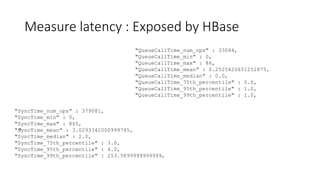
Measure latency : Exposed by HBase
"QueueCallTime_num_ops" : 33044,
"QueueCallTime_min" : 0,
"QueueCallTime_max" : 86,
"QueueCallTime_mean" : 0.2525420651252875,
"QueueCallTime_median" : 0.0,
"QueueCallTime_75th_percentile" : 0.0,
"QueueCallTime_95th_percentile" : 1.0,
"QueueCallTime_99th_percentile" : 1.0,
a
"SyncTime_num_ops" : 379081,
"SyncTime_min" : 0,
"SyncTime_max" : 865,
"SyncTime_mean" : 3.0293341000999785,
"SyncTime_median" : 2.0,
"SyncTime_75th_percentile" : 3.0,
"SyncTime_95th_percentile" : 4.0,
"SyncTime_99th_percentile" : 253.5899999999999,
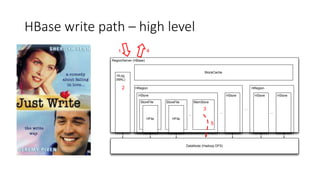
HBase write path – high level
RegionServer (HBase)
DataNode (Hadoop DFS)
HLog
(WAL)
HRegion
HStore
StoreFile
HFile
StoreFile
HFile
MemStore
...
...
HStore
BlockCache
HRegion
...
HStoreHStore
...
1
2
3
4
5
Deeper in the write path
• Two parts
• Single put (WAL)
• The client just sends the put
• Multiple puts from the client (new behavior since 0.96)
• The client is much smarter
• Four stages to look at for latency
• Start (establish tcp connections, etc.)
• Steady: when expected conditions are met
• Machine failure: expected as well
• Overloaded system: you may need to add machines or tune your workload
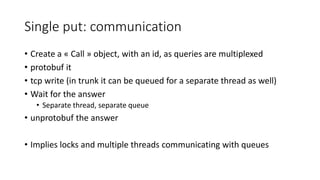
Single put: communication
• Create a « Call » object, with an id, as queries are multiplexed
• protobuf it
• tcp write (in trunk it can be queued for a separate thread as well)
• Wait for the answer
• Separate thread, separate queue
• unprotobuf the answer
• Implies locks and multiple threads communicating with queues
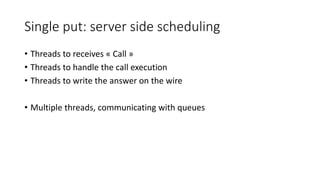
Single put: server side scheduling
• Threads to receives « Call »
• Threads to handle the call execution
• Threads to write the answer on the wire
• Multiple threads, communicating with queues
Single put: real work
• The server must
• Take a row lock (HBase strong consistency)
• Write into the WAL queue
• Write into the memstore
• Sync the queue (HDFS flush)
• Free the lock
• WALs queue is shared between all the regions/handlers
• Sync is avoided if another handlers did the work
• You may flush more than expected
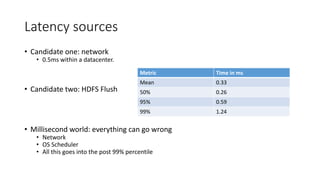
Latency sources
• Candidate one: network
• 0.5ms within a datacenter.
• Candidate two: HDFS Flush
• Millisecond world: everything can go wrong
• Network
• OS Scheduler
• All this goes into the post 99% percentile
Metric Time in ms
Mean 0.33
50% 0.26
95% 0.59
99% 1.24
Latency sources
• Split (and presplits)
• Autosharding is great!
• Puts have to wait
• Impacts: seconds
• Balance
• Regions move
• Triggers a retry for the client
• hbase.client.pause = 100ms since HBase 0.96
• Garbage Collection
• Impacts: 10’s of ms, even with a good config
• Covered with the read path of this talk
From steady to loaded and oveloaded
• Number of concurrent tasks is a factor of
• Number of cores
• Number of disks
• Number of remote machines used
• Difficult to estimate
• Queues are doomed to happen
• So for low latency
• Specific Scheduler since Hbase 0.98 (HBASE-8884). Requires specific code.
• Priorities: work in progress.
Loaded & overloaded
• Step 1: Loaded system
• Tasks are queued: creates latency
• Specific metric in HBase
• Step 2: Limit reached
• MemStore takes too much room: blocks until it’s flushed
• hbase.regionserver.global.memstore.size.lower.limit
• hbase.regionserver.global.memstore.size
• hbase.hregion.memstore.block.multiplier
• Too many Hfiles: blocks until compations keeps up
• hbase.hstore.blockingStoreFiles
• Too many WALs files
• Don’t change this
Machine failure
• Failure
• Dectect
• Reallocate
• Replay WAL
• Replaying WAL is NOT required for puts
• Failure = Dectect + Reallocate + Retry
• That’s in the range of ~1s for simple failures
• Silent failures leads puts you in the 10s range if the hardware does not help
Single puts
• Millisecond range
• Spikes do happen in steady mode
• 100ms
• Causes: GC, load, splits
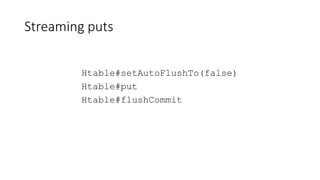
Streaming puts
Htable#setAutoFlushTo(false)
Htable#put
Htable#flushCommit
Streaming puts
• Write into a buffer
• When the buffer is full, in the background
• Select the puts that matches load conditions
• Send them
• Manage retries and delay
• The buffer is freed for other client operations
• Blocks only if there is an a not retryable error or if the buffer is full
Multiple puts
• hbase.client.max.total.tasks (default 100)
• hbase.client.max.perserver.tasks (default 5)
• hbase.client.max.perregion.tasks (default 1)
• Decouple the client from a latency peak of a region server
• Increase the throughput by 50%
• Does not solve the problem of an unbalanced cluster
• But makes split and GC more transparent
Conclusion on write path
• Single puts can be very fast
• It’s not a « hard real time » system: there are peaks
• Latency peaks can be hidden when streaming puts
• Including autosplits
And now for the read path
HBase read path – high level
RegionServer (HBase)
DataNode (Hadoop DFS)
HLog
(WAL)
HRegion
HStore
StoreFile
HFile
StoreFile
HFile
MemStore
...
...
HStore
BlockCache
HRegion
...
HStoreHStore
...
1 5
2
3
3
2
4
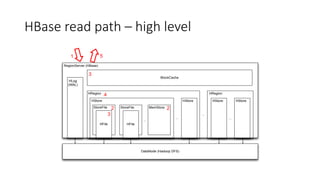
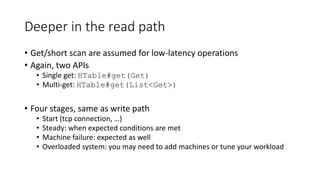
Deeper in the read path
• Get/short scan are assumed for low-latency operations
• Again, two APIs
• Single get: HTable#get(Get)
• Multi-get: HTable#get(List<Get>)
• Four stages, same as write path
• Start (tcp connection, …)
• Steady: when expected conditions are met
• Machine failure: expected as well
• Overloaded system: you may need to add machines or tune your workload
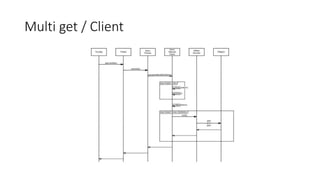
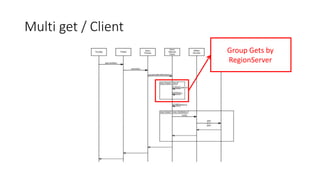
Multi get / Client
Multi get / Client
Group Gets by
RegionServer
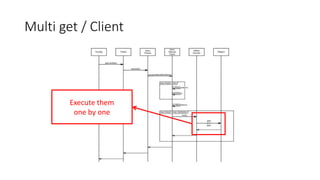
Multi get / Client
Execute them
one by one
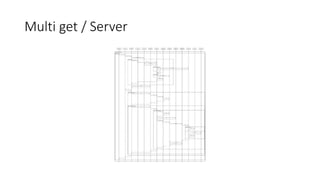
Multi get / Server
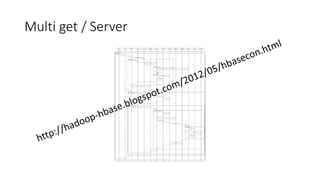
Multi get / Server
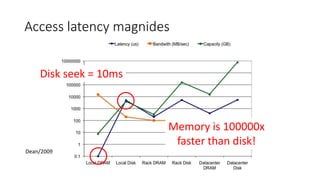
Access latency magnidesStorage hierarchy: a different view
Dean/2009
Memory is 100000x
faster than disk!
Disk seek = 10ms
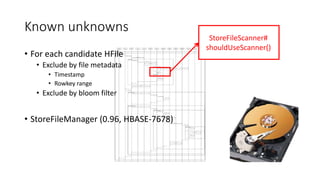
Known unknowns
• For each candidate HFile
• Exclude by file metadata
• Timestamp
• Rowkey range
• Exclude by bloom filter
• StoreFileManager (0.96, HBASE-7678)
StoreFileScanner#
shouldUseScanner()
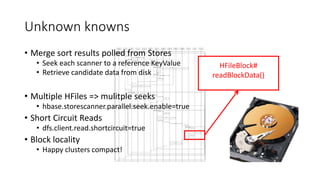
Unknown knowns
• Merge sort results polled from Stores
• Seek each scanner to a reference KeyValue
• Retrieve candidate data from disk
• Multiple HFiles => mulitple seeks
• hbase.storescanner.parallel.seek.enable=true
• Short Circuit Reads
• dfs.client.read.shortcircuit=true
• Block locality
• Happy clusters compact!
HFileBlock#
readBlockData()
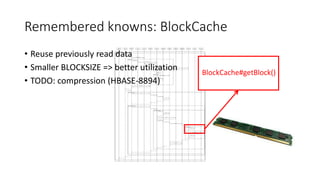
Remembered knowns: BlockCache
• Reuse previously read data
• Smaller BLOCKSIZE => better utilization
• TODO: compression (HBASE-8894)
BlockCache#getBlock()
BlockCache Showdown
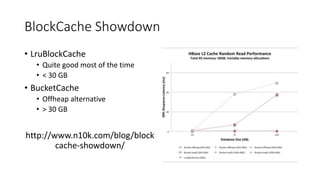
• LruBlockCache
• Quite good most of the time
• < 30 GB
• BucketCache
• Offheap alternative
• > 30 GB
http://www.n10k.com/blog/block
cache-showdown/
Latency enemies: Compactions
• Fewer HFiles => fewer seeks
• Evict data blocks!
• Evict Index blocks!!
• hfile.block.index.cacheonwrite
• Evict bloom blocks!!!
• hfile.block.bloom.cacheonwrite
• OS buffer cache to the rescue
• Compactected data is still fresh
• Better than going all the way back to disk
Latency enemies: Garbage Collection
• Use Heap. Not too much. With CMS.
• Max heap: 30GB, probably less
• Healthy cluster load
• regular, reliable collections
• 25-100ms pause on regular interval
• Overloaded RegionServer suffers GC overmuch
Off-heap to the rescue?
• BucketCache (0.96, HBASE-7404)
• Network interfaces (HBASE-9535)
• MemStore et al (HBASE-10191)
Failure
• Machine failure
• Detect + Reallocate + Replay
• Strong consistency requires replay
• Cache starts from scratch
Read latency in summary
• Steady mode
• Cache hit: < 1 ms
• Cache miss: + 10 ms per seek
• Writing while reading: cache churn
• GC: 25-100ms pause on regular interval
Network request + (1 - P(cache hit)) * 10 ms
• Same long tail issues as write
• Overloaded: same scheduling issues as write
• Partial failures hurt a lot
Hedging our bets
• HDFS Hedged reads (since HDFS 2.4)
• Strongly consistent
• Works at the HDFS level
• Timeline consistency (HBASE-10070)
• Reads on secondary regions
• If a region does not answer quickly enough, go
to another one
• Not strongly consistent
• Helps a lot latency for read path.
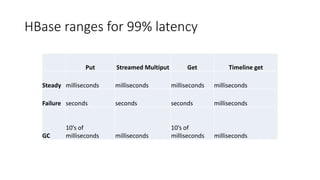
HBase ranges for 99% latency
Put Streamed Multiput Get Timeline get
Steady milliseconds milliseconds milliseconds milliseconds
Failure seconds seconds seconds milliseconds
GC
10’s of
milliseconds milliseconds
10’s of
milliseconds milliseconds
What’s next
• Less GC
• Use less objects
• Offheap
• Prefered location (HBASE-4755)
• The « magical 1% »
• Most tools stops at the 99% latency
• YCSB for example
• What happens after is much more complex
• But key to improve average
Thanks!
Nick Dimiduk, Hortonworks (@xefyr)
Nicolas Liochon, Scaled Risk (@nkeywal)
HBaseCon May 5, 2014

HBase: Where Online Meets Low Latency

  • 1.
    HBase Low Latency NickDimiduk, Hortonworks (@xefyr) Nicolas Liochon, Scaled Risk (@nkeywal) HBaseCon May 5, 2014
  • 2.
    Agenda • Latency, whatis it, how to measure it • Write path • Read path • Next steps
  • 3.
    What’s low latency Latencyis about percentiles • Long tail issue • There are often order of magnitudes between « average » and « 95 percentile » • Post 99% = « magical 1% ». Work in progress here. • Meaning from micro seconds (High Frequency Trading) to seconds (interactive queries) • In this talk milliseconds
  • 4.
    Measure latency –during test bin/hbase org.apache.hadoop.hbase.PerformanceEvaluation • More options related to HBase: autoflush, replicas, … • Latency measured in micro second • Easier for internal analysis • YCSB • Useful for comparison between tools • Set of workload already defined
  • 5.
    Measure latency :Exposed by HBase "QueueCallTime_num_ops" : 33044, "QueueCallTime_min" : 0, "QueueCallTime_max" : 86, "QueueCallTime_mean" : 0.2525420651252875, "QueueCallTime_median" : 0.0, "QueueCallTime_75th_percentile" : 0.0, "QueueCallTime_95th_percentile" : 1.0, "QueueCallTime_99th_percentile" : 1.0, a "SyncTime_num_ops" : 379081, "SyncTime_min" : 0, "SyncTime_max" : 865, "SyncTime_mean" : 3.0293341000999785, "SyncTime_median" : 2.0, "SyncTime_75th_percentile" : 3.0, "SyncTime_95th_percentile" : 4.0, "SyncTime_99th_percentile" : 253.5899999999999,
  • 6.
    HBase write path– high level RegionServer (HBase) DataNode (Hadoop DFS) HLog (WAL) HRegion HStore StoreFile HFile StoreFile HFile MemStore ... ... HStore BlockCache HRegion ... HStoreHStore ... 1 2 3 4 5
  • 7.
    Deeper in thewrite path • Two parts • Single put (WAL) • The client just sends the put • Multiple puts from the client (new behavior since 0.96) • The client is much smarter • Four stages to look at for latency • Start (establish tcp connections, etc.) • Steady: when expected conditions are met • Machine failure: expected as well • Overloaded system: you may need to add machines or tune your workload
  • 8.
    Single put: communication •Create a « Call » object, with an id, as queries are multiplexed • protobuf it • tcp write (in trunk it can be queued for a separate thread as well) • Wait for the answer • Separate thread, separate queue • unprotobuf the answer • Implies locks and multiple threads communicating with queues
  • 9.
    Single put: serverside scheduling • Threads to receives « Call » • Threads to handle the call execution • Threads to write the answer on the wire • Multiple threads, communicating with queues
  • 10.
    Single put: realwork • The server must • Take a row lock (HBase strong consistency) • Write into the WAL queue • Write into the memstore • Sync the queue (HDFS flush) • Free the lock • WALs queue is shared between all the regions/handlers • Sync is avoided if another handlers did the work • You may flush more than expected
  • 11.
    Latency sources • Candidateone: network • 0.5ms within a datacenter. • Candidate two: HDFS Flush • Millisecond world: everything can go wrong • Network • OS Scheduler • All this goes into the post 99% percentile Metric Time in ms Mean 0.33 50% 0.26 95% 0.59 99% 1.24
  • 12.
    Latency sources • Split(and presplits) • Autosharding is great! • Puts have to wait • Impacts: seconds • Balance • Regions move • Triggers a retry for the client • hbase.client.pause = 100ms since HBase 0.96 • Garbage Collection • Impacts: 10’s of ms, even with a good config • Covered with the read path of this talk
  • 13.
    From steady toloaded and oveloaded • Number of concurrent tasks is a factor of • Number of cores • Number of disks • Number of remote machines used • Difficult to estimate • Queues are doomed to happen • So for low latency • Specific Scheduler since Hbase 0.98 (HBASE-8884). Requires specific code. • Priorities: work in progress.
  • 14.
    Loaded & overloaded •Step 1: Loaded system • Tasks are queued: creates latency • Specific metric in HBase • Step 2: Limit reached • MemStore takes too much room: blocks until it’s flushed • hbase.regionserver.global.memstore.size.lower.limit • hbase.regionserver.global.memstore.size • hbase.hregion.memstore.block.multiplier • Too many Hfiles: blocks until compations keeps up • hbase.hstore.blockingStoreFiles • Too many WALs files • Don’t change this
  • 15.
    Machine failure • Failure •Dectect • Reallocate • Replay WAL • Replaying WAL is NOT required for puts • Failure = Dectect + Reallocate + Retry • That’s in the range of ~1s for simple failures • Silent failures leads puts you in the 10s range if the hardware does not help
  • 16.
    Single puts • Millisecondrange • Spikes do happen in steady mode • 100ms • Causes: GC, load, splits
  • 17.
  • 18.
    Streaming puts • Writeinto a buffer • When the buffer is full, in the background • Select the puts that matches load conditions • Send them • Manage retries and delay • The buffer is freed for other client operations • Blocks only if there is an a not retryable error or if the buffer is full
  • 19.
    Multiple puts • hbase.client.max.total.tasks(default 100) • hbase.client.max.perserver.tasks (default 5) • hbase.client.max.perregion.tasks (default 1) • Decouple the client from a latency peak of a region server • Increase the throughput by 50% • Does not solve the problem of an unbalanced cluster • But makes split and GC more transparent
  • 20.
    Conclusion on writepath • Single puts can be very fast • It’s not a « hard real time » system: there are peaks • Latency peaks can be hidden when streaming puts • Including autosplits
  • 21.
    And now forthe read path
  • 22.
    HBase read path– high level RegionServer (HBase) DataNode (Hadoop DFS) HLog (WAL) HRegion HStore StoreFile HFile StoreFile HFile MemStore ... ... HStore BlockCache HRegion ... HStoreHStore ... 1 5 2 3 3 2 4
  • 23.
    Deeper in theread path • Get/short scan are assumed for low-latency operations • Again, two APIs • Single get: HTable#get(Get) • Multi-get: HTable#get(List<Get>) • Four stages, same as write path • Start (tcp connection, …) • Steady: when expected conditions are met • Machine failure: expected as well • Overloaded system: you may need to add machines or tune your workload
  • 24.
  • 25.
    Multi get /Client Group Gets by RegionServer
  • 26.
    Multi get /Client Execute them one by one
  • 27.
  • 28.
  • 29.
    Access latency magnidesStoragehierarchy: a different view Dean/2009 Memory is 100000x faster than disk! Disk seek = 10ms
  • 30.
    Known unknowns • Foreach candidate HFile • Exclude by file metadata • Timestamp • Rowkey range • Exclude by bloom filter • StoreFileManager (0.96, HBASE-7678) StoreFileScanner# shouldUseScanner()
  • 31.
    Unknown knowns • Mergesort results polled from Stores • Seek each scanner to a reference KeyValue • Retrieve candidate data from disk • Multiple HFiles => mulitple seeks • hbase.storescanner.parallel.seek.enable=true • Short Circuit Reads • dfs.client.read.shortcircuit=true • Block locality • Happy clusters compact! HFileBlock# readBlockData()
  • 32.
    Remembered knowns: BlockCache •Reuse previously read data • Smaller BLOCKSIZE => better utilization • TODO: compression (HBASE-8894) BlockCache#getBlock()
  • 33.
    BlockCache Showdown • LruBlockCache •Quite good most of the time • < 30 GB • BucketCache • Offheap alternative • > 30 GB http://www.n10k.com/blog/block cache-showdown/
  • 34.
    Latency enemies: Compactions •Fewer HFiles => fewer seeks • Evict data blocks! • Evict Index blocks!! • hfile.block.index.cacheonwrite • Evict bloom blocks!!! • hfile.block.bloom.cacheonwrite • OS buffer cache to the rescue • Compactected data is still fresh • Better than going all the way back to disk
  • 35.
    Latency enemies: GarbageCollection • Use Heap. Not too much. With CMS. • Max heap: 30GB, probably less • Healthy cluster load • regular, reliable collections • 25-100ms pause on regular interval • Overloaded RegionServer suffers GC overmuch
  • 36.
    Off-heap to therescue? • BucketCache (0.96, HBASE-7404) • Network interfaces (HBASE-9535) • MemStore et al (HBASE-10191)
  • 37.
    Failure • Machine failure •Detect + Reallocate + Replay • Strong consistency requires replay • Cache starts from scratch
  • 38.
    Read latency insummary • Steady mode • Cache hit: < 1 ms • Cache miss: + 10 ms per seek • Writing while reading: cache churn • GC: 25-100ms pause on regular interval Network request + (1 - P(cache hit)) * 10 ms • Same long tail issues as write • Overloaded: same scheduling issues as write • Partial failures hurt a lot
  • 39.
    Hedging our bets •HDFS Hedged reads (since HDFS 2.4) • Strongly consistent • Works at the HDFS level • Timeline consistency (HBASE-10070) • Reads on secondary regions • If a region does not answer quickly enough, go to another one • Not strongly consistent • Helps a lot latency for read path.
  • 40.
    HBase ranges for99% latency Put Streamed Multiput Get Timeline get Steady milliseconds milliseconds milliseconds milliseconds Failure seconds seconds seconds milliseconds GC 10’s of milliseconds milliseconds 10’s of milliseconds milliseconds
  • 41.
    What’s next • LessGC • Use less objects • Offheap • Prefered location (HBASE-4755) • The « magical 1% » • Most tools stops at the 99% latency • YCSB for example • What happens after is much more complex • But key to improve average
  • 42.
    Thanks! Nick Dimiduk, Hortonworks(@xefyr) Nicolas Liochon, Scaled Risk (@nkeywal) HBaseCon May 5, 2014

Editor's Notes

  • #23 Recap – refresher on the read path Request received Scanners created over memstore and store files Data blocks read from cache or disk as appropriate Results merged by the region Response sent back to client
  • #30 Goal: avoid disk at all cost!
  • #31 Goal: don’t go to disk unless absolutely necessary. Tactic: Candidate HFile elimination. Regular compactions => only 3 files to seek Alternative: StoreFileManager cleverness
  • #35 Necessary for fewer hfiles and fewer seeks IO resource contention Buffer cache to the rescue