ECM & Records Management made easy with SharePointAugust 2010
Good information managementunderpins excellent operational performance
What’s New with SharePointJonathan Stuckey, MicrosoftSharePoint for Records Management?Michele Marsburg, RIMRecord 2.0 – Meeting RPA & ISO15489 with SharePointHomeStart Finance – Case StudyAnthony Woodward, RecordPointFrom Concept to Reality – Intergen’s EDRMS solutions and service offeringsSteve Lapwood, Intergen Programme
Enterprise Content ManagementJonathan StuckeySolution Specialist, Business Productivity
Microsoft SharePoint 2010The Business Collaboration Platform for the Enterprise and the WebSharePoint Foundation Services[Windows]SP2010 [Enterprise]CompositesSitesCommunitiesInsightsSearchContentSharePointServer 2010[Standard]
Ease of UseFlexible ComplianceCost Effectiveness
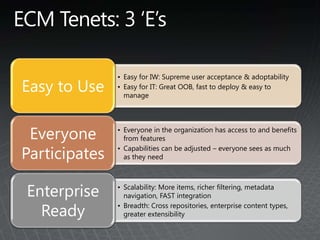
ECM Tenets: 3 ‘E’s
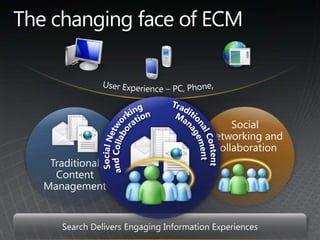
The changing face of ECMUser Experience – PC, Phone, BrowserTraditional Content ManagementSocial Networking and CollaborationSocial Networking and CollaborationTraditional Content ManagementSearch Delivers Engaging Information Experiences
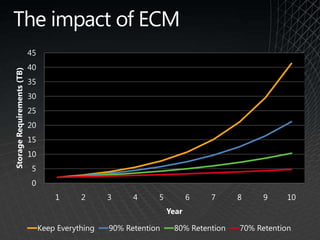
The impact of ECM
Demo
Ease of Use
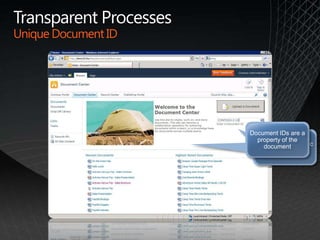
Transparent ProcessesUnique Document IDSearch for a specific Document IDDocument IDs are a property of the document
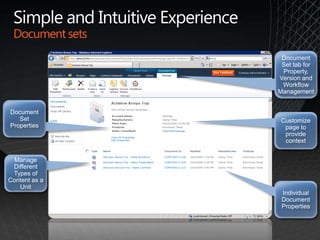
Simple and Intuitive ExperienceDocument setsDocument Set PropertiesIndividual Document PropertiesDocument Set tab for Property, Version and Workflow ManagementManage Different Types of Content as a UnitCustomize page to provide context
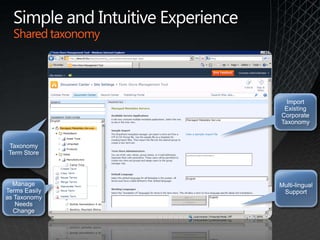
Simple and Intuitive ExperienceShared taxonomy Taxonomy Term StoreManage Terms Easily as Taxonomy Needs Change  Import Existing Corporate TaxonomyMulti-lingual Support
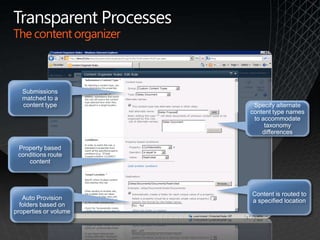
Transparent ProcessesThe content organizerAuto Provision folders based on properties or volumeProperty based conditions route contentContent is routed to a specified locationSubmissions matched to a content typeSpecify alternate content type names to accommodate taxonomy differences
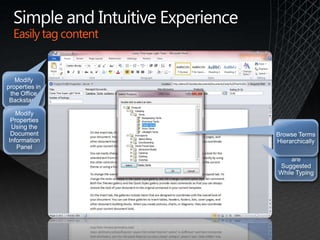
Simple and Intuitive ExperienceEasily tag contentModify properties in the Office BackstageKeywords are Suggested While TypingModify Properties Using the Document Information PanelBrowse Terms Hierarchically
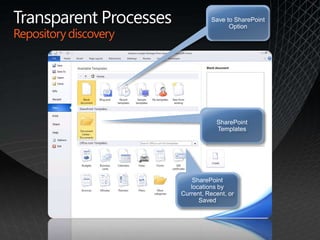
Transparent ProcessesRepository discoverySharePoint TemplatesSave to SharePoint OptionSharePoint locations by Current, Recent, or Saved
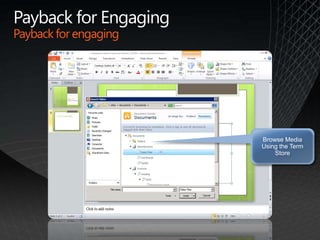
Payback for EngagingPayback for engagingBrowse Media Using the Term Store
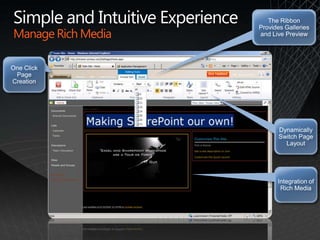
Simple and Intuitive ExperienceManage Rich MediaOne Click Page CreationDynamically Switch Page LayoutThe Ribbon Provides Galleries and Live PreviewIntegration of Rich Media
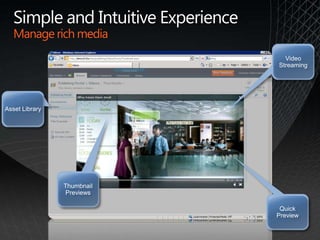
Simple and Intuitive ExperienceManage rich mediaAsset LibraryThumbnail PreviewsQuick PreviewVideo Streaming
FlexibleCompliance
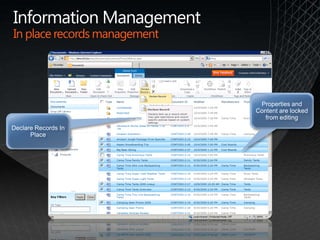
Information ManagementIn place records managementDeclare Records In PlaceProperties and Content are locked from editing
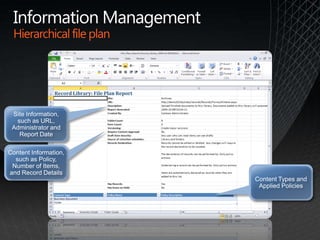
Information ManagementHierarchical file planSite Information, such as URL, Administrator and Report DateContent Information, such as Policy, Number of Items, and Record DetailsContent Types and Applied Policies
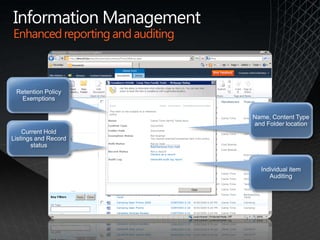
Information ManagementEnhanced reporting and auditingRetention Policy ExemptionsCurrent Hold Listings and Record statusIndividual item AuditingName, Content Type and Folder location
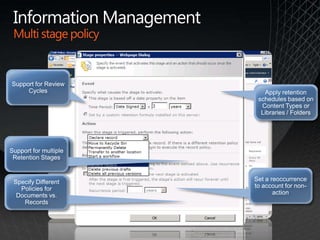
Information ManagementMulti stage policyMultiple Disposition OptionsSupport for Review CyclesSet a reoccurrence to account for non-actionApply retention schedules based on Content Types or Libraries / FoldersSupport for multiple Retention StagesSpecify Different Policies for Documents vs. Records
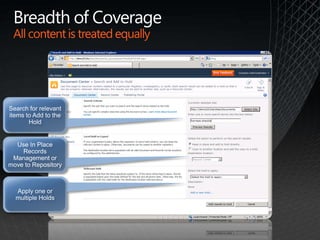
Breadth of CoverageAll content is treated equallySearch for relevant items to Add to the HoldUse In Place Records Management or move to RepositoryApply one or multiple Holds
Sharepoint 2010assessed against the ICA standard
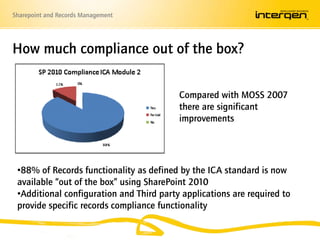
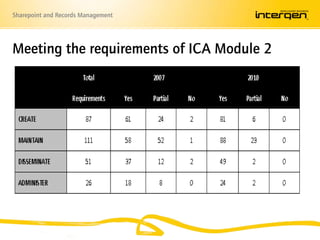
How much compliance out of the box?Compared with MOSS 2007 there are significant improvements 88% of Records functionality as defined by the ICA standard is now available “out of the box” using SharePoint 2010
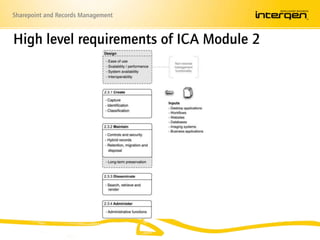
Additional configuration and Third party applications are required to provide specific records compliance functionality High level requirements of ICA Module 2
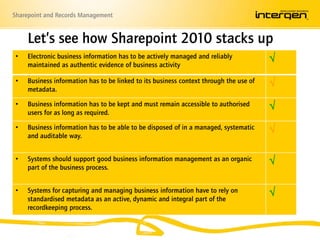
Let’s see how Sharepoint 2010 stacks up
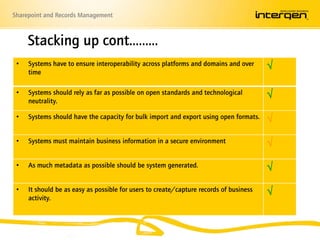
Stacking up cont.……..
Meeting the requirements of ICA Module 2
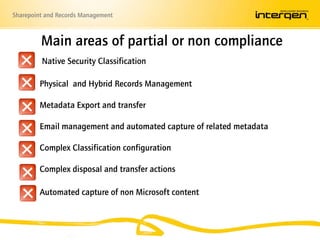
Main areas of partial or non compliance Native Security Classification       Physical  and Hybrid Records Management       Metadata Export and transfer       Email management and automated capture of related metadata       Complex Classification configurationComplex disposal and transfer actions       Automated capture of non Microsoft content
SharePoint 2010 and the PRA
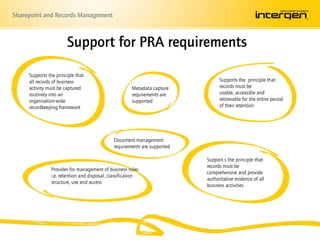
Support for PRA requirementsSupports the principle that  all records of business activity must be captured routinely into an organisation-wide recordkeeping frameworkSupports the  principle that records must be usable, accessible and retrievable for the entire period of their retentionMetadata capture requirements are supportedDocument management requirements are supportedSupport s the principle that  records must be comprehensive and provide authoritative evidence of all business activitiesProvides for management of business rules i.e. retention and disposal, classification structure, use and access
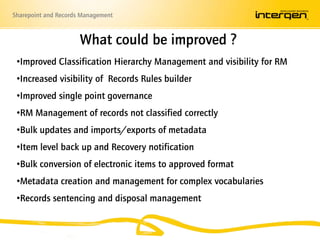
What could be improved ?Improved Classification Hierarchy Management and visibility for RM
Increased visibility of  Records Rules builder
Improved single point governance
RM Management of records not classified correctly
Bulk updates and imports/exports of metadata
Item level back up and Recovery notification
Bulk conversion of electronic items to approved format
Metadata creation and management for complex vocabularies
Records sentencing and disposal managementConclusions
ConclusionsSignificant progress has been made since the introduction of MOSS 2007 and 2010 is now a viable EDRMS alternative Third party applications built in Sharepoint still required for specific functionality especially email and fully compliant Records ManagementEase of use and collaboration features means this tool is likely to become an accepted solution in most business situations Good governance, Structure, Business rules, Training and Change Management still vitalPossibility to reduce cost, decrease technology breadth and mitigate risk of an EDRMS project by leveraging existing platform
Options for Deployment
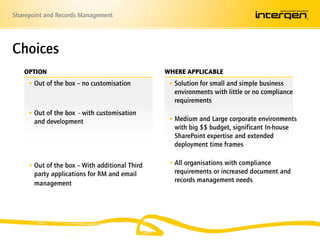
Choices Where applicableOptionOut of the box – no customisationOut of the box  - with customisation and developmentOut of the box – With additional Third party applications for RM and email management	Solution for small and simple business environments with little or no compliance requirementsMedium and Large corporate environments with big $$ budget, significant In-house SharePoint expertise and extended deployment time framesAll organisations with compliance requirements or increased document and records management needs
RecordPoint 2.0
RecordPoint Taking the pain away from complianceRecords Management Made Easy
About RecordPointOnly fully certified add-on for SharePoint5 Delivery PartnersMicrosoft Gold Certified in 8 competencies1 of 30 partners worldwide on Global Partner Advisory Council for SharePointDeveloping Records Management software since 2003Microsoft Partner of the Year 2009
RecordPoint 2.0 Overview
RecordPoint delivers a comprehensive PRA compliant records management solution built into SharePoint with a seamless end user experience
Lift the Burden from your End-Users
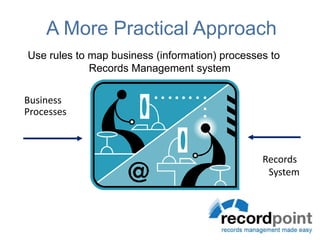
A More Practical ApproachUse rules to map business (information) processes to Records Management system  BusinessProcesses RecordsSystem
 Why RecordPoint is differentAll about the end user
Easy to use interface - Microsoft SharePoint
Familiar Business Language not RM Language
RP interprets User Inputs into RM Outputs
Maps user activities back to RM (not the other way around)
No Client software needed – all web based
Rich and extensive rules engine
Leverages industry leading Microsoft SharePoint platform
Single SharePoint platform – no need for 2 repositories.
Fully VERS Certified (1 through to 5)
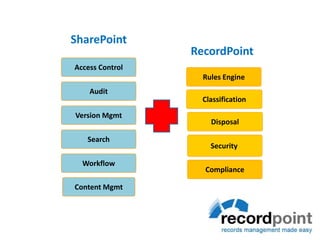
Local team with local supportSharePointAccess ControlRecordPointAuditRules EngineVersion MgmtClassificationSearchDisposalWorkflowSecurity ContentMgmtCompliance
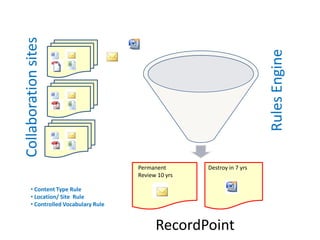
Rules EngineCollaboration sitesPermanent  Review 10 yrsDestroy in 7 yrs  Content Type Rule
 Location/ Site  Rule
 Controlled Vocabulary RuleRecordPoint
Demonstration Scenario: End UserElectronic and Physical FilesAdd a document to SharePoint
RP automatically will process the file
A user can see the summary
Add an e-mail to SharePoint
See centralised Records Control/ Rules
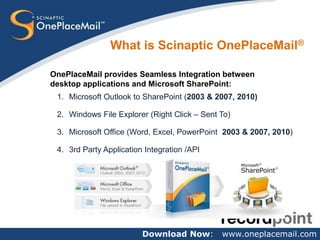
Create a physical recordDownload Now:   www.oneplacemail.comWhat is Scinaptic OnePlaceMail®OnePlaceMail provides Seamless Integration between desktop applications and Microsoft SharePoint:Microsoft Outlook to SharePoint (2003 & 2007, 2010)Windows File Explorer (Right Click – Sent To)Microsoft Office (Word, Excel, PowerPoint  2003 & 2007, 2010)3rd Party Application Integration /API
RecordPoint 3.0(scheduled for release December 2010)
RecordPoint 3.0 FeaturesTaxonomy ManagerAdvanced Rules engineRules BuilderLong term preservation functions - ICAClassification scheme ManagementCentrally managed Retention and DispositionAutomated Hybrid Electronic/ Paper RecordsSpace Management Box ManagementVERS Certification
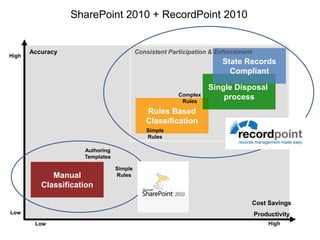
SharePoint 2010 + RecordPoint 2010AccuracyConsistent Participation & EnforcementState RecordsCompliantHighSingle Disposal processComplex RulesRules BasedClassificationAuthoring TemplatesManualClassificationSimple RulesCost SavingsProductivityLowHighLowSimple Rules
Statutory Authority of the South Australian GovernmentPurposeMaking home ownership possible.VisionLeading the nation in affordable housing finance solutions.Over 56,000 success stories and countingCurrently over 15,000 loans with value over 1.5bn
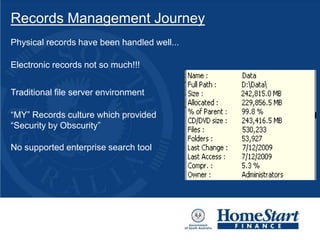
Records Management JourneyPhysical records have been handled well... Electronic records not so much!!!Traditional file server environment“MY” Records culture which provided “Security by Obscurity”No supported enterprise search tool
Records Management JourneyPrevious attempts focused on compliance and.......FAILED!Windows SharePoint Services (WSS)  demonstrated business contextSlowly senior management began to see the carrot AND the stickFinally received the green light to do it right!Worked with specialist RM consultants to:Undertake a self assessment which identified the gaps
Develop Information Management Framework, strategy and later policies

ECM & Records Management with SharePoint

  • 1.
    ECM & RecordsManagement made easy with SharePointAugust 2010
  • 2.
    Good information managementunderpinsexcellent operational performance
  • 3.
    What’s New withSharePointJonathan Stuckey, MicrosoftSharePoint for Records Management?Michele Marsburg, RIMRecord 2.0 – Meeting RPA & ISO15489 with SharePointHomeStart Finance – Case StudyAnthony Woodward, RecordPointFrom Concept to Reality – Intergen’s EDRMS solutions and service offeringsSteve Lapwood, Intergen Programme
  • 4.
    Enterprise Content ManagementJonathanStuckeySolution Specialist, Business Productivity
  • 5.
    Microsoft SharePoint 2010TheBusiness Collaboration Platform for the Enterprise and the WebSharePoint Foundation Services[Windows]SP2010 [Enterprise]CompositesSitesCommunitiesInsightsSearchContentSharePointServer 2010[Standard]
  • 6.
    Ease of UseFlexibleComplianceCost Effectiveness
  • 7.
  • 8.
    The changing faceof ECMUser Experience – PC, Phone, BrowserTraditional Content ManagementSocial Networking and CollaborationSocial Networking and CollaborationTraditional Content ManagementSearch Delivers Engaging Information Experiences
  • 9.
  • 10.
  • 11.
  • 12.
    Transparent ProcessesUnique DocumentIDSearch for a specific Document IDDocument IDs are a property of the document
  • 13.
    Simple and IntuitiveExperienceDocument setsDocument Set PropertiesIndividual Document PropertiesDocument Set tab for Property, Version and Workflow ManagementManage Different Types of Content as a UnitCustomize page to provide context
  • 14.
    Simple and IntuitiveExperienceShared taxonomy Taxonomy Term StoreManage Terms Easily as Taxonomy Needs Change Import Existing Corporate TaxonomyMulti-lingual Support
  • 15.
    Transparent ProcessesThe contentorganizerAuto Provision folders based on properties or volumeProperty based conditions route contentContent is routed to a specified locationSubmissions matched to a content typeSpecify alternate content type names to accommodate taxonomy differences
  • 16.
    Simple and IntuitiveExperienceEasily tag contentModify properties in the Office BackstageKeywords are Suggested While TypingModify Properties Using the Document Information PanelBrowse Terms Hierarchically
  • 17.
    Transparent ProcessesRepository discoverySharePointTemplatesSave to SharePoint OptionSharePoint locations by Current, Recent, or Saved
  • 18.
    Payback for EngagingPaybackfor engagingBrowse Media Using the Term Store
  • 19.
    Simple and IntuitiveExperienceManage Rich MediaOne Click Page CreationDynamically Switch Page LayoutThe Ribbon Provides Galleries and Live PreviewIntegration of Rich Media
  • 20.
    Simple and IntuitiveExperienceManage rich mediaAsset LibraryThumbnail PreviewsQuick PreviewVideo Streaming
  • 21.
  • 22.
    Information ManagementIn placerecords managementDeclare Records In PlaceProperties and Content are locked from editing
  • 23.
    Information ManagementHierarchical fileplanSite Information, such as URL, Administrator and Report DateContent Information, such as Policy, Number of Items, and Record DetailsContent Types and Applied Policies
  • 24.
    Information ManagementEnhanced reportingand auditingRetention Policy ExemptionsCurrent Hold Listings and Record statusIndividual item AuditingName, Content Type and Folder location
  • 25.
    Information ManagementMulti stagepolicyMultiple Disposition OptionsSupport for Review CyclesSet a reoccurrence to account for non-actionApply retention schedules based on Content Types or Libraries / FoldersSupport for multiple Retention StagesSpecify Different Policies for Documents vs. Records
  • 26.
    Breadth of CoverageAllcontent is treated equallySearch for relevant items to Add to the HoldUse In Place Records Management or move to RepositoryApply one or multiple Holds
  • 28.
  • 29.
    How much complianceout of the box?Compared with MOSS 2007 there are significant improvements 88% of Records functionality as defined by the ICA standard is now available “out of the box” using SharePoint 2010
  • 30.
    Additional configuration andThird party applications are required to provide specific records compliance functionality High level requirements of ICA Module 2
  • 31.
    Let’s see howSharepoint 2010 stacks up
  • 32.
  • 33.
  • 34.
    Main areas ofpartial or non compliance Native Security Classification Physical and Hybrid Records Management Metadata Export and transfer Email management and automated capture of related metadata Complex Classification configurationComplex disposal and transfer actions Automated capture of non Microsoft content
  • 35.
  • 36.
    Support for PRArequirementsSupports the principle that all records of business activity must be captured routinely into an organisation-wide recordkeeping frameworkSupports the principle that records must be usable, accessible and retrievable for the entire period of their retentionMetadata capture requirements are supportedDocument management requirements are supportedSupport s the principle that records must be comprehensive and provide authoritative evidence of all business activitiesProvides for management of business rules i.e. retention and disposal, classification structure, use and access
  • 37.
    What could beimproved ?Improved Classification Hierarchy Management and visibility for RM
  • 38.
    Increased visibility of Records Rules builder
  • 39.
  • 40.
    RM Management ofrecords not classified correctly
  • 41.
    Bulk updates andimports/exports of metadata
  • 42.
    Item level backup and Recovery notification
  • 43.
    Bulk conversion ofelectronic items to approved format
  • 44.
    Metadata creation andmanagement for complex vocabularies
  • 45.
    Records sentencing anddisposal managementConclusions
  • 46.
    ConclusionsSignificant progress hasbeen made since the introduction of MOSS 2007 and 2010 is now a viable EDRMS alternative Third party applications built in Sharepoint still required for specific functionality especially email and fully compliant Records ManagementEase of use and collaboration features means this tool is likely to become an accepted solution in most business situations Good governance, Structure, Business rules, Training and Change Management still vitalPossibility to reduce cost, decrease technology breadth and mitigate risk of an EDRMS project by leveraging existing platform
  • 47.
  • 48.
    Choices Where applicableOptionOutof the box – no customisationOut of the box - with customisation and developmentOut of the box – With additional Third party applications for RM and email management Solution for small and simple business environments with little or no compliance requirementsMedium and Large corporate environments with big $$ budget, significant In-house SharePoint expertise and extended deployment time framesAll organisations with compliance requirements or increased document and records management needs
  • 50.
  • 51.
    RecordPoint Taking thepain away from complianceRecords Management Made Easy
  • 52.
    About RecordPointOnly fullycertified add-on for SharePoint5 Delivery PartnersMicrosoft Gold Certified in 8 competencies1 of 30 partners worldwide on Global Partner Advisory Council for SharePointDeveloping Records Management software since 2003Microsoft Partner of the Year 2009
  • 54.
  • 55.
    RecordPoint delivers acomprehensive PRA compliant records management solution built into SharePoint with a seamless end user experience
  • 56.
    Lift the Burdenfrom your End-Users
  • 57.
    A More PracticalApproachUse rules to map business (information) processes to Records Management system BusinessProcesses RecordsSystem
  • 58.
    Why RecordPointis differentAll about the end user
  • 59.
    Easy to useinterface - Microsoft SharePoint
  • 60.
  • 61.
    RP interprets UserInputs into RM Outputs
  • 62.
    Maps user activitiesback to RM (not the other way around)
  • 63.
    No Client softwareneeded – all web based
  • 64.
    Rich and extensiverules engine
  • 65.
    Leverages industry leadingMicrosoft SharePoint platform
  • 66.
    Single SharePoint platform– no need for 2 repositories.
  • 67.
    Fully VERS Certified(1 through to 5)
  • 68.
    Local team withlocal supportSharePointAccess ControlRecordPointAuditRules EngineVersion MgmtClassificationSearchDisposalWorkflowSecurity ContentMgmtCompliance
  • 69.
    Rules EngineCollaboration sitesPermanent Review 10 yrsDestroy in 7 yrs Content Type Rule
  • 70.
  • 71.
    Controlled VocabularyRuleRecordPoint
  • 72.
    Demonstration Scenario: EndUserElectronic and Physical FilesAdd a document to SharePoint
  • 73.
    RP automatically willprocess the file
  • 74.
    A user cansee the summary
  • 75.
    Add an e-mailto SharePoint
  • 76.
  • 77.
    Create a physicalrecordDownload Now: www.oneplacemail.comWhat is Scinaptic OnePlaceMail®OnePlaceMail provides Seamless Integration between desktop applications and Microsoft SharePoint:Microsoft Outlook to SharePoint (2003 & 2007, 2010)Windows File Explorer (Right Click – Sent To)Microsoft Office (Word, Excel, PowerPoint 2003 & 2007, 2010)3rd Party Application Integration /API
  • 78.
    RecordPoint 3.0(scheduled forrelease December 2010)
  • 79.
    RecordPoint 3.0 FeaturesTaxonomyManagerAdvanced Rules engineRules BuilderLong term preservation functions - ICAClassification scheme ManagementCentrally managed Retention and DispositionAutomated Hybrid Electronic/ Paper RecordsSpace Management Box ManagementVERS Certification
  • 80.
    SharePoint 2010 +RecordPoint 2010AccuracyConsistent Participation & EnforcementState RecordsCompliantHighSingle Disposal processComplex RulesRules BasedClassificationAuthoring TemplatesManualClassificationSimple RulesCost SavingsProductivityLowHighLowSimple Rules
  • 81.
    Statutory Authority ofthe South Australian GovernmentPurposeMaking home ownership possible.VisionLeading the nation in affordable housing finance solutions.Over 56,000 success stories and countingCurrently over 15,000 loans with value over 1.5bn
  • 82.
    Records Management JourneyPhysicalrecords have been handled well... Electronic records not so much!!!Traditional file server environment“MY” Records culture which provided “Security by Obscurity”No supported enterprise search tool
  • 83.
    Records Management JourneyPreviousattempts focused on compliance and.......FAILED!Windows SharePoint Services (WSS) demonstrated business contextSlowly senior management began to see the carrot AND the stickFinally received the green light to do it right!Worked with specialist RM consultants to:Undertake a self assessment which identified the gaps
  • 84.
    Develop Information ManagementFramework, strategy and later policies

Editor's Notes

  • #6 License map – as per 2007 wheel.
  • #7 The SolutionSharePoint 2010 and Office 2010. Why are we different? Why can we deliver on the promise of ECM for the Masses?Ease of Use: Simplifying participation in the ECM processMaking key processes transparentMaking the user experience simpleHelping users realize the payback for engagingFlexible Compliance: Supporting both archiving and in-place management of content including records management and legal holdsCost Effective: Bringing the right balance of capabilities to market at the right price, ensuring customers can deploy ECM to the broadest set of users.
  • #11 Simple and Intuitive ExperienceTransparent ProcessPayback for Engaging
  • #13 I. Unique Document IDsWith Unique Document IDs every document can be identified and tracked individually. This makes it easier to find documents using the search or after moving the document to a new location, such as a records center.i. Key PointsUnique Document ID service provisions IDs for all contentSearch is aware of the Document IDThe Document ID Redirector will send the user to content even after it has moved or been renamed (Also known as Permalinks)Document IDs can be provisioned per document set as well as per documentii. Additional InformationThe Document ID is independent of metadata or locationYou can specify a Document ID prefix at the site collection level.
  • #14 I. Document SetsDocument sets make it easy to manage related work items as a cohesive unit, in order to streamline content management processes. Metadata, policy, versioning and workflow can all be managed as a document set or as individual documents within a set to reduce the number of steps needed to execute an action.i. Key PointsEasily manage related work productsInstitutionalize common processes e.g. RFP responseManage as a set as well as individual itemsMetadata can be tracked at the document or set levelii. Additional InformationDocument Sets can be exportedLanding page can be customized for describing related process and providing status
  • #15 I. Shared TaxonomyUsing the Taxonomy Term Store information is easier to find, share, reuse and repurpose. This is because it combines corporate taxonomy with social navigators to store as much context around information as possible. A. Social NavigatorsFind content based on (people or information?)relationshipsFind content based on ratings provided by site usersFind content based on end users tagging content (folksonomy)B. Taxonomy Term StoreCentral service for provisioning taxonomy across Farms and Site CollectionsOne or more Managed Metadata Services can be consumedManage multiple taxonomies in a single serviceSupport for multilingual terms – Language can be picked up from browser localC. Manage Terms as Taxonomy Needs ChangeSupport for synonymsSupport for open and closed terms sets – being able to add content or not – can specify permissions based on term setEasy to manage over time (copy, move, merge, delete, deprecate)Integrated with the social store – Can manage the social store as a “term set”
  • #16 I. The Content OrganizerA. Content Organizer RulesThe content organizer is so that end users do not have to remember specifically where content should be located. The end user can simply send everything to one location (Drop Off Library) and rely on predefined logic to route content to the correct library or folder. This built in logic also saves time for the site’s librarian or content manager; they will only have to review and route content that does not fit into the content organizer’s predefined logic.i. Key PointsRoute content submissions based on Content Type (document only), metadata or custom actionsFilter based on specific properties (up to six properties)Auto provision folders based on properties or volume of informationii. Additional InformationRoute content across Site CollectionsAutomatically require that the content organizer is used for all content uploaded to a siteSpecify how to handle duplicate submissions: use SharePoint versioning or append unique charactersB. The Content Organizer Rule ListNeed Copyi. Key PointsView / sort rules based on content type or library destinationSet the status and priority of rules in case content matches more than one criteria
  • #17 Office Integration: Easily Tag Content with the Term StoreUsing taxonomy from the Term Store in SharePoint 2010, users can easily tag content within Office, allowing them to work in a familiar context. This integration also brings content management into the authoring experience, so that people can utilize organizational taxonomy as part of a holistic creation process.Backstage PropertiesThe Office 2010 Backstage displays SharePoint properties and allows the user to fill out terms in a form like environment. Similarly, a user can modify a document’s properties and they will be reflected within SharePoint 2010. B. Suggested KeywordsWhen filling in taxonomy properties, keywords from the Term Store will be suggested while the user types. This promotes consistency through fewer taxonomy usage mistakes and also speed of data entry.C. Document Information PanelA document’s properties from SharePoint 2010 can be displayed in a panel at the top of the document. This allows for easier data entry by the end user and allows them to fill out properties as they work with a document, in a single user interface.D. Browse Terms HierarchicallyThe end user can enter document properties using the same hierarchical taxonomy browser as in SharePoint 2010. By using the same browser, users do not need to learn another user interface.
  • #18 Office IntegrationSharePoint 2010’s integration with Office 2010 makes it easier for users to save content to the correct location in SharePoint. This is done through the use of templates to reduce the need for the user to remember where to save a document and a Save to SharePoint quick links that automatically remember locations that you use frequently.A. Save to SharePointUsers can easily save directly to SharePoint sites from Office products in the Office 2010 backstage which saves them time. The list of sites listed in the Office 2010 backstage is populated based on site membership, user specification, or through a domain policy.B. TemplatesSharePoint templates are integrated into the Office authoring experience to provide a seamless user experience. SharePoint templates used with Content Types or the Content Organizer can save or route content to the correct location without end user intervention. The list of templates available for use in Office products, similar to sites, is dependent on site membership, user specification, or specified in a domain policy.i. Saving from Office Key PointsManually Connect document libraries to OfficeEasily manage Connected document libraries through user’s MySiteSave in the correct locationOffice routes content to the correct location based on templatesi. Additional InformationLocations can be pushed through domain policy or site membershipOffice displays relevant templates based on connected sitesOffice is aware of the content organizer
  • #19 Office IntegrationSharePoint 2010’s Rich Media Management capability combined with the Term Store for classification allow users to easily browse through media needed for Office 2010 documents. Users can also browse for content in the traditional file structure.Locate Media by Term StoreMedia can be quickly browsed, filtered and sorted from within the Office 2010 interface in a manner that is consistent with SharePoint 2010.
  • #20 Manage Rich MediaSharePoint 2010 makes it easy to dynamically author pages and integrate Rich Media. This interface provides the ability to change the page layout using a single click or to easily add stylistic elements to a page. Additionally, Rich Media such as a photo, video or Silverlight enhancement can be added to the page using a process similar to Office.A. Rich Content AuthoringSharePoint 2010 improves the user’s experience by providing browser based authoring to complete everyday tasks using an “Office-like” ribbon interface, to provide quick access to the tools users need most often. ii. Key PointsOne click page creationDynamic switching of Page LayoutRibbon provides Galleries and Live PreviewEasy integration of rich mediaEasy integration of dynamic content, such as Silverlight information display
  • #21 I. Office IntegrationA. Rich MediaPlayback optionsAdd shapes / commentary
  • #22 Flexible Compliance – Records Management in SharePoint Server 2010In SharePoint Server 2010, Records Management is flexible to match your organization’s information management culture and specific situations. With new features such as in place records management, more robust reporting capabilities, multi stage disposition, and support for defining hierarchical file plans with location based policy and metadata defaults, SharePoint Server 2010 can accommodate a spectrum of business needs. This power, combined with the ability to the manage the breadth of content types created in today’s day to day activities, such as blogs, wikis, website content and traditional documents, provides a solid records management foundation for any organization.
  • #23 I. Flexible Location of RecordsSharePoint Server 2010 supports both in place records management and archiving records to a repository. In place records management allows content to be stored in context with other information to allow for a more complete picture of content, so there isn’t a gap in the remaining documentation. Archiving of records allows the use of hierarchical file plans and the option to copy content, move it or leave a stub URL to the new location when moved. These choices allow for a balance between providing context and duplication of information.i. Key PointsSupport for in-place records management, allowing records to be declared and stored “in context”Support for archiving records to SharePoint record repositorySupport for defining hierarchical file plans with location based policy and metadata defaultsOptions for archiving include copy, move, move and leave stub
  • #24 Hierarchical File PlansHierarchical file plans allow administrators to set default metadata and policies for a library or folder so that the end user doesn’t need to take action on the information when moved. Policies help control and enforce the use of information in an organization. Examples of policies include multi stage disposition, access rights, and audit settings. Metadata provides options for action on information, and can trigger workflow, provide additional navigation options, and increases findability.Additional InformationExisting metadata cannot be overwritten; new columns / fields must be usedII. Enhanced Reporting and AuditingAuditing and Reporting help to enforce the use of information in an organization. The File Plan Report included in SharePoint Server 2010 allows administrators to understand at a glance information at the site, content, content type, and policy level.A. File Plan ReportThe file plan report allows an administrator to B. [On next slide – if shortening presentation mention here]Hold reportItem level auditing
  • #25 I. Enhanced Reporting and AuditingIn order to ensure compliance with organization policies an organization needs the ability to easily report their content. SharePoint 2010 allows compliance officers to easily see information such as hold listings, records status, content type, and location in a single report. These reports can be viewed at the item or hold level.
  • #26 Multi Stage Disposition PolicyA multi stage disposition policy allows for flexibility in managing your organization’s content. Simple, rule based policy creation allows a users to easily create rules for their specific disposition needs, which ultimately gets rid of old and outdated content. Getting rid of unneeded content is essential to decreasing liability and increasing findability. Additionally, the SharePoint interface makes it easy to view what retention policies are applied to content.Key PointsSupport for review cyclesExtensive disposition actions including move to recycle bin, delete, delete draft versions, delete previous published versions, initiate workflowDifferent policies for documents vs records (critical to support in place RM)Define policies and retention schedules based on content types or libraries / folders
  • #27 Breadth of Content CoverageYour company is liable for all information it produces, no matter if it is contained in a Word document, image, or wiki. When searching for content to hold due to a litigation, investigation or audit, SharePoint Server 2010 will evaluate all types of content, including blogs, wikis, and traditional documents.i. Key PointsHolds can be applied via a search for relevant itemsOption for in place records management or move to a repositoryApply one or multiple holdsii. Additional InformationSupport for advanced search and syntaxHold options are determined by
  • #30 With MOSS 2007 there was a 62% compliance to the standard an 88% compliance result, SharePoint 2010 is shown to be largely compliant, albeit with configuration still required to address specific records management functionsKey improvements reduce the complexity of configuration significantly compared with MOSS 2007, such as records declaration, improved audit trails, Content Organiser CO also meets specific requirements for bulk changes to document sets file plan and location based policiesmanaged metadata termsIn addition SharePoint 2010 has the advantages of improved ease of useautomated metadata captureimproved search and retrieval using this improved metadataSharePoint 2010 HAS managed metadata, term store, large volume metadata filtering, and improved facetted search and results preview to provide better search functionalityManagement of Web 2.0 content and other rich media formats SharePoint 2010 addresses the scaling limitations of MOSS 2007Improved usability – gives enhanced access to diverse sources of information, including “web 2.0” applications, line-of-business applications, and traditional document stores. Improved search and retrieve – able to find relevant information more easily due to the introduction of FAST search technologies. Improved organisational tools – facilitates organisation of information content in accordance with a variety of standardised or user-defined taxonomies; from metadata schema to user tagging. Improved management tools – provides management of data location and the information life cycle (i.e. disposal). There is a relatively small gap to be filled by add-on software and more complex configuration. Microsoft has made it clear that they do not intend to develop Sharepoint for all specific Records Management environments and that key partner applications will fill the gaps
  • #31 Create Maintain – Dispose as wellDisseminate – search and retrieveAdminister
  • #32 Records Declaration feature applies rules and policies to all information Retention policies are flexible and can be driven by the classificationDisposal Holds cover all contentContent Organiser can provide records declaration in an automated mannerCompliant event tracking provided SharePoint 2010 extends metadata and recordkeeping and now includes Web 2.0 objectsMetadata capabilities enhanced using to allow more meaningful metadata and business vocabularies to be used. Integration with Office is improved to simplify metadata capture in creating and the saving of Office documents. Document sets are introduced to multiple documents to be managed as a single record. However automated capture of email and its related metadata has to be managed via third party applications such as Colligo and OneplacemailSharePoint 2010 provides improved lifecycle policies to manage the retention of recordsThe Records Centre repository is improved in terms of scale and provides the ability to archive data to less expensive storage as required. Content organiser can be used to move documents automatically to the records repository based on metadata driven rules and policiesDocument generation facility used to convert or export to long term Open XML or PDF formats. SharePoint 2010 provides significantly enhanced disposal policies allowing a diverse range of electronic records to be managed through their lifecycle. System generated metadata and improved audit trails allow the complete recording of events through the life of a record. However complex disposal actions are better managed via third party applicationsEvent based, definitive version disposa;, case based etc all very messySharePoint 2010 provides extended records management functionsSharePoint 2010 allows a business view and records management view to coexistIn place records management is also introducedSharePoint 2010 and Office 2010 integration is improved to simplify the capture of metadataControlled vocabularies and taxonomies are supported in a centralised term store and managed metadata fields which can be applied to all content as required.
  • #33 SharePoint 2010 and Office 2010 provide standard capabilities that support export to Open XML and pdf formats. Content Organiser and external storage capabilities provide enhanced export and transfer capabilities SharePoint 2010 supports the CMIS interoperation standards allowing content to be transferred between alternate vendor systems Content Organiser can be used to apply rules to bulk imports and exports automatically adding metadata from sources such as share drives, and routing incoming information to correct locations based on metadata values and context although not all compliant formats can be created VERS encapsulated objects are better created via a third party applicationSharePoint 2010 supports a records declaration function designed to protect and ensure no authorised changes or deletions of records. Records can also be declared automatically based on metadata, location and business rules. Some of the more complex classification based security requirements are more compliantly managed via a third party Metadata can also be defaulted based on save location in SharePoint 2010. System generated metadata and events are expanded including record declarations and event history. Content Organiser is designed to route documents to file plan locations ensuring complete metadata recording. In this way recordkeeping metadata can be recorded with little or no user input. Users can work in their business areas and normal processes and records can be recorded automatically based on defined policies and metadata driven rules.So while this seems to stack up at the highest levels when you look in more detail at each of the specific requirements you will not that there are a number of non compliant and partially compliant areas
  • #34 Yes (Complies) - meets the functional specification either as a standard feature or with limited and standard configurationPartial - meets the requirements with more complex configuration, separate add-on software, or some development is required for full functionality No (Non-compliance) - where it does not meet the requirements without extensive additional development.
  • #35 All related to Sharepoint 2010Complex Security classifications – Native security classification and access control – despite having item level security SharePoint 2010 is unable to impose classifications on information, or to control access effectively. such as showing user nothing when searching for items they have no access to providing metadata only and access denied instruction provide existence by ID but no metadata ALSO in terms of the ICA requirements2. Allow access-permission security categorisation to be assigned: • at group level (be able to set up group access to specific aggregations, record classes security or clearance levels); • by organisational role; • at user level; and in combination(s) of the above. Security clearances not supported - Restrict access to electronic aggregations/records that have a security classification higher than a user’s security Be capable of preventing an electronic aggregation from having a lower security classification than any electronic record within that aggregation. Physical – Barcode printing and recognition and Hybrid - Physical and hybrid information management tools – SharePoint 2010 is focussed on electronic records and is unable to manage paper and other physical format information effectively. Volumes, Workflow required for this to “close” and “open” folders and other aggregations using permissions Including location management which can only be done by extensive customised development of workflow to track location of recordsAutomated data entry from BarcodesLocation ManagementTransfer managementMetadata export – additional configuration is required to Be able to export metadata for specified records and selected groups of records without affecting the metadata stored by the electronic records management system. Be able to include a copy of the entire metadata set associated with the records and aggregations that are transferred or exported from an electronic records management system. Third-party add-on tools required to support the print out of selected metadata. Standard requires the system to Allow the administrator to specify that all printouts of records have selected records management metadata elements appended to them, for example, title, registration number, date and security category. Ease of email capture – despite SharePoint supporting email enabled lists and libraries, third party Outlook add ins are still required to simplify user capture of email and automated capture of required metadata Complex configuration is required to allocate unique ids within a classification structureComplex Disposal actions - Be able to specify the frequency of a disposal authority report, the information reported and highlight exceptions such as overdue disposal Alert the administrator if an electronic aggregation that is due for destruction is referred to in a link from another aggregation and pause the destruction process to allow the following remedial action to be taken: • confirmation by the administrator to proceed with or cancel the process; and • generation of a report detailing the aggregation or record(s) concerned and all references or links for which it is a destination. Produce a report detailing any failure during a transfer, export or destruction. The report must identify any records destined for transfer that have generated processing errors, and any aggregations or records that are not successfully transferred, exported or destroyed. Provide a utility or conversion tool to support the conversion of records marked for transfer or export into a specified file transfer or export format. Third party tools support VERS and other export formats e.g. PDF/A2010 OOTB struggles with going beyond “time elapsed” – you need to extend the platform to allow for these for complianceCapture of non Microsoft content such as JPGE, TIFF, COREL AUTOCAD ETC
  • #37 As the PRA does not include a product specification applications are only able to support the processes and procedures to allow the delivery of compliant records management
  • #38 To meet the metadata best practice standards Sharepoint requires the use of a combined Record, Agent, Business and Mandate model to simplify configuration using Content Types. SharePoint 2010 has the advantage of a term store and managed metadata columns to provide the required hierarchical metadata schemes, as well as additional recordkeeping metadata as standard, improved auditing of events and improved retention policy functionality. Bulk conversion of electronic items to approved format for transfer and exportMetadata creation and management for complex large vocabulariesautomated tagging requirements, integration and standardisation of terms with other repositories
  • #40 Significant progress has been made since the introduction of MOSS 2007 and the availability of third party applications from Microsoft software partners has expanded the feature set to meet records management business requirements, while retaining ease of use and improved metadata captureOrganisations with Compliance to VERS, PRA etc will require more complex customisation and the addition of Microsoft partner third party tools to meet compliance requirements and provide an improved user experience Usability, ease of use, collaboration support and key features such as default or automated metadata and records classification, extended by SharePoint 2010 and Office 2010, means these tools are likely to become accepted solutions in many business situations. The recent SharePoint 2010 release significantly improves records management functionality and overcomes limitations in sizing and scale that limited MOSS 2007’s use as the central corporate information management repositoryGood Governance, Structure, business rules, training and change management are still required but the results are potentially better , realised sooner and more consistent than traditional EDRMS implementationsSo while Sharepoint is no silver bullet and is only as good as the Governance, Structure, business rules, training and change management Organisations with Sharepoint deployed can now leverage the investment in the platform and reduce cost and technology breadth, lower risk and increase user acceptance when using Sharepoint for less complex corporate document management functions
  • #54 So how does it work…….Organisations set up the SP sites as normal. There is sites for Finance, marketing, IT Services etc on the LHS. Here business areas collaborate and do all the things the users do on these sites. These sites are set up using content types with metadata familiar to the business area. What we have added is a rules engine….. This rules engine is organisation specific. It is a engine that maps active site content to a records management process. i.e. All Letters with complaint as a metadata field will be processed to Community Relations – Complaints in a folder that has to be kept for X years. This gives you a really nice compromise of a business view of the world and a records view of the world.
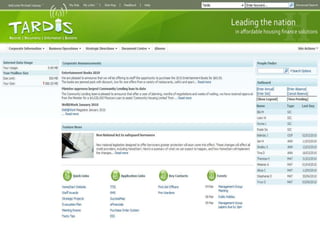
  • #60 We do this by developing affordable home financing solutions that are aimed at helping the low to moderate income segment or anyone struggling to source affordable mortgage financing56,000 customers realise their home ownership dreams
  • #61 Traditionally organisation has handled its Physical Records well, but until the recent project there was no focus on network file shares.In 2003 when I joined HomeStart the then PART TIME records officer was preaching to me and anyone who would listen about a need to handle our electronic records better. Problem was he continually came up against a strong “MY” documents culture because left unchecked users were able to use their unstructured network shares to create documents when they liked, call them what they liked, store them where they liked and share them with who they liked and secure them from who they didn't like.It just wasn't working – and suggesting implementing structure and compliance was failing to gain the peoples imagination and more importantly management support.
  • #62 Over in IT we were playing around with this new thing called Windows SharePoint Services (SharePoint’s baby brother that came free with Windows Server 2003. Although not the silver bullet for our problem it did however for the first time show the organisation the business benefits of creating and collaborating around documents in a central place. The organisation and more importantly management were beginning to see both the business benefit and compliance sides of the debate or the Carrot and the StickIt was at that time that we convinced the senior management team to provide us with a small project budget to engage specialist RM consultants to assist us to conduct a self assessment against State Records Adequacy.That assessment revealed gaps and through presenting them to the senior management team enabled us to secure the long term future of the project to work with the consultants to develop a framework and execute the strategy.This was the best part of 2008 which culminated in gathering requirements for a technology solution
  • #63 GM SPONSORSHIP – Ensures highest levels of supportManagement team as steering committee to ensure cross functional focusComposition: can’t be seen as an IT or IM project but rather a business projectHeld a competition to name the project as another way to raise awareness for the project.Also by giving the project a brand we could play down the compliance aspects and highlight the business benefits
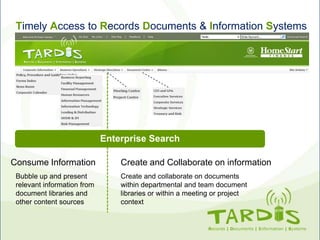
  • #64 DR Who fans know that the Tardis is something that from the outside looks quite small but once you are inside it can take you to anywhere you want to goBecause we were making this our one stop portal for all information this name seemed most appropriate
  • #65 Remember to say the Solution before the problemRegional based compliance outside of the USA
  • #66 Traditional RMSPitched at Large enterprise usersExpensive requiring specialist skills and knowledgeEnforces BCS on the front end user requiring them to have RM knowledgeUnfortunately we dont have time to go through the detailed comparisons that we went through between all of the systemsRecords management policy should be enforced via process and technology -- not people. Business records management must be driven by structured, time-tested, and repeatable processes that are backed by sophisticated and scalable automation
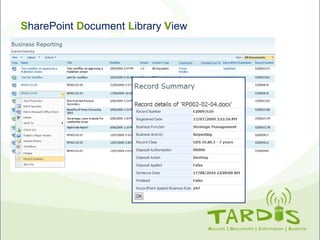
  • #69 Edit document in word, Check it out, start a workflow, or even set an alert on changes.But because this is records management conferenceRecord Number that has been assigned, Function and Activity, the Disposal, sentencing date and record point rule
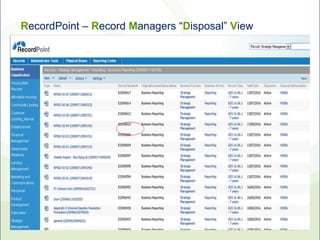
  • #70 Disposal View, can go in through the classifications and see the file