
RecordPoint
  Overview
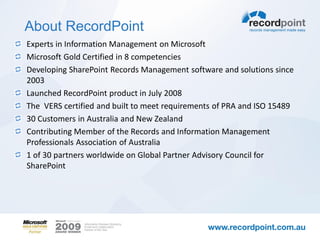
About RecordPoint
Experts in Information Management on Microsoft
Microsoft Gold Certified in 8 competencies
Developing SharePoint Records Management software and solutions since
2003
Launched RecordPoint product in July 2008
The VERS certified and built to meet requirements of PRA and ISO 15489
30 Customers in Australia and New Zealand
Contributing Member of the Records and Information Management
Professionals Association of Australia
1 of 30 partners worldwide on Global Partner Advisory Council for
SharePoint
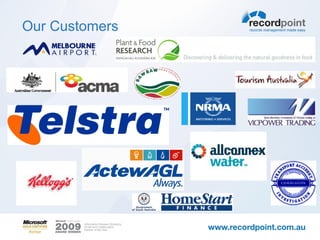
Our Customers
Why RecordPoint
Forester View


“Navigating the broad array of SharePoint partners can be complex. Microsoft lists six
technology partners that it perceives to be important in supplementing enterprise
records management scenarios with SharePoint 2010. These include:
• FileTrail - Provides physical records tracking and management
• Global 360 - Provides business process management and case management
• KnowledgeLake - Provides document imaging and capture technologies
• Metalogix Software - Provides advanced storage management, archiving, and
   migration tools
• Nintex - Provides advanced workflow and analytics tools
• RecordPoint - Provides support for Australian, New Zealand, and European
   regulatory requirements”

Forrester Research - Microsoft Makes Records Management Improvements With
SharePoint 2010
Why RecordPoint
Microsoft’s View


Adam Harmetz, the Lead Program Manager for the SharePoint Document and
Records Management engineering team at Microsoft said in a recent online interview
about Records in SharePoint 2010.

“We constantly get questions from around the world about how to deal with
local government and industry standards for information management. Let
me throw just a few at you… MOREQ2, VERS, ISO 15489, DOMEA, TNA,
ERKS the list goes on. Some of these standards are loosely based on one
another and some have contradictory elements. Rather than focus our
engineering efforts on addressing each of these standards in turn, we made
the choice to deliver the usability and innovation required to make records
management deployments successful and allow our partner ecosystem to
build out the SharePoint platform to deal with specific requirements for
those customers that are mandated to adhere to a specific standard.”
What do we mean by compliance
In Western Australia – Standards come from:
ISO 15489

ISO 16175:2011 – Principles and Functional Requirements for Records in Electronic
Office Environments (ICA Function Requirements)

STATE RECORDS ACT OF WESTERN AUSTRALIA, 2000

FREEDOM OF INFORMATION ACT, 1992

PRIVACY ACT, 1988

CRIMINAL CODE ACT, 1913

FINANCIAL ADMINISTRATION AND AUDIT ACT, 1985

RECORDS OF INDIGENOUS INDIVIDUALS, FAMILIES OR COMMUNITIES
Microsoft’s Research

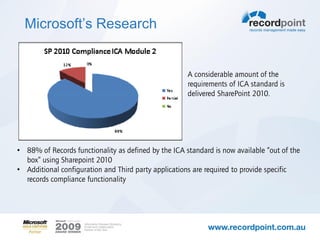
  Req - How much
  compliance out of the                               A considerable amount of the
  box?                                                requirements of ICA standard is
                                                      delivered SharePoint 2010.


• 88% of Records functionality as defined by the ICA standard is now available “out of the
  box” using Sharepoint 2010
• Additional configuration and Third party applications are required to provide specific
  records compliance functionality
SharePoint Gaps
 Physical and Hybrid Records Management

 Metadata Export and transfer

 Email management and automated capture of related
 metadata

 Complex Classification configuration

 Complex disposal and transfer actions

 Native Security Classification
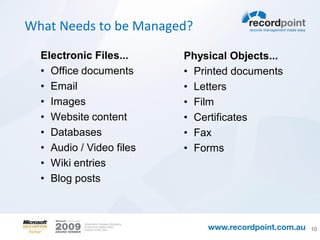
What Needs to be Managed?

  Electronic Files...     Physical Objects...
  • Office documents      • Printed documents
  • Email                 • Letters
  • Images                • Film
  • Website content       • Certificates
  • Databases             • Fax
  • Audio / Video files   • Forms
  • Wiki entries
  • Blog posts


                                                10
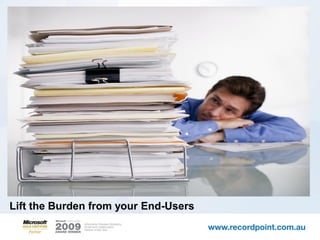
Lift the Burden from your End-Users
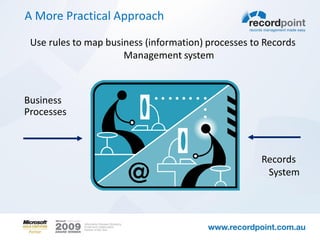
A More Practical Approach

 Use rules to map business (information) processes to Records
                      Management system


Business
Processes


                                                     Records
                                                      System
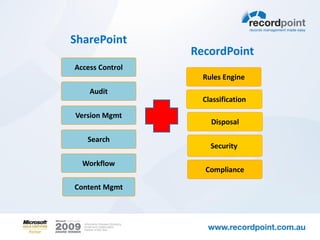
SharePoint
                 RecordPoint
Access Control
                   Rules Engine
    Audit
                   Classification
Version Mgmt
                     Disposal

   Search
                     Security

  Workflow
                   Compliance

Content Mgmt
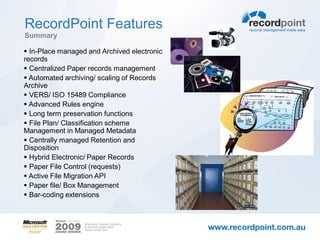
RecordPoint Features
Summary

 In-Place managed and Archived electronic
records
 Centralized Paper records management
 Automated archiving/ scaling of Records
Archive
 VERS/ ISO 15489 Compliance
 Advanced Rules engine
 Long term preservation functions
 File Plan/ Classification scheme
Management in Managed Metadata
 Centrally managed Retention and
Disposition
 Hybrid Electronic/ Paper Records
 Paper File Control (requests)
 Active File Migration API
 Paper file/ Box Management
 Bar-coding extensions
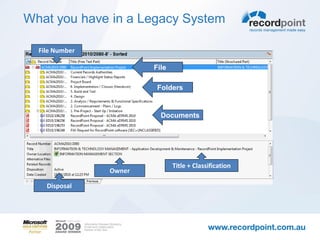
What you have in a Legacy System

  File Number

                        File

                         Folders


                          Documents


                               Title + Classification
                Owner

    Disposal
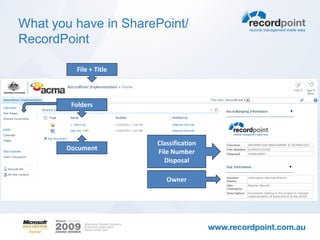
What you have in SharePoint/
RecordPoint

         File + Title


        Folders


                        Classification
       Document
                        File Number
                          Disposal

                           Owner
Demonstration –Electronic Records
Management in SharePoint with RecordPoint
Differences between a SharePoint 2010 records
    archive, in-place records and RecordPoint -
    Functional

Factor                                     Records archive       In-place records                    RecordPoint
Upload Retention schedules.                No upload tools       No upload tools available.          Best of all worlds – uses the RecordPoint Rules Engine (souped up
                                           available.                                                content organiser) and allows retention schedules to controlling
                                                                                                     different policies for records and active documents based on the
                                                                                                     current content type, location or metadata.

Classification and retention schedule      Retention schedules   Retention schedules managed         Centralised Retention schedules across the SharePoint farm,
exposed as Managed Metadata.               managed manually.     manually.                           Classification scheme and Retention schedules exposed as Managed
                                                                                                     Metadata.
Manage Physical Records                    No                    Can be setup as a flat list of      RecordPoint manages all physical Records centrally including the
                                                                 physical records (but does not      ability to generate physical records labels and track physical records
                                                                 include file tracking), this does   thru out their lifecycle.
                                                                 not scale well.
Ability to carry out complex disposal      No, requires custom   No, requires custom                 Built-in to RecordPoint disposal process – no custom development
processes e.g.. Transfer to Archives/      development.          development                         required.
Offsite
Nominate ‘file’ containers at various      No.                   No.                                 Built-in to RecordPoint is the ability to configure the ‘file’ container at
levels of aggregation e.g.. Sites/                                                                   an aggregation level e.g.. Site, Document library, Folder etc.
documents sets.


Manage a centralised retention             No.                   No.                                 Built-in and centrally controlled can be updated in one place and will
schedule against in-place controlled and                                                             flow thru to all new records based on that Record class.
archived records as described by ISO
15489
Output records in ADRI/ VERS or other      No.                   No.                                 Yes, built-in.
configurable XML formats
Hybrid Records                             No.                   No.                                 RecordPoint manages all Hybrid Records centrally.
Metadata Security controls on Records      No.                   No.                                 Yes.
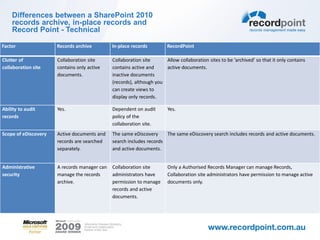
Differences between a SharePoint 2010
    records archive, in-place records and
    Record Point - Technical

Factor                 Records archive           In-place records           RecordPoint
Managing record        The content organizer     There may be different     Best of all worlds – uses the RecordPoint Rules Engine (based on
retention              automatically puts new    policies for records and   content organiser) and allows retention schedules to controlling
                       records in the correct    active documents           different policies for records and active documents based on the
                       folder in the archive’s   based on the current       current content type or location.
                       file plan, based on       content type or
                       metadata.                 location.
Restrict which users   Yes. The archive          No. Permissions do not     Configurable. By default permissions stay the same as when added to
can view records       specifies the             change when a              SharePoint. However, you can restrict which users can edit and delete
                       permissions for the       document becomes a         records.
                       record.                   record.
Ease of locating       Easier. All records are   Harder. Records are        Easiest, as Records are all in one location but also managed in-place.
records (for records   in one location.          spread across multiple
managers)                                        collaboration sites.
Maintain all document The user must              Automatic, assuming        Automatic, but includes the ability to ‘archive’ items automatically.
versions as records   explicitly send each       versioning is turned on.
                      version of a document
                      to the archive.
Ease of locating      Harder, although a link Easier.                       Easiest, as the record exists as a record in collaboration site and with
information (for team to the document can                                   a ‘stub’ in the archive.
collaborators)        be added to the
                      collaboration site when
                      the document
                      becomes a record.
Differences between a SharePoint 2010
    records archive, in-place records and
    Record Point - Technical

Factor                Records archive         In-place records         RecordPoint

Clutter of            Collaboration site      Collaboration site      Allow collaboration sites to be ‘archived’ so that it only contains
collaboration site    contains only active    contains active and     active documents.
                      documents.              inactive documents
                                              (records), although you
                                              can create views to
                                              display only records.

Ability to audit      Yes.                    Dependent on audit        Yes.
records                                       policy of the
                                              collaboration site.
Scope of eDiscovery   Active documents and    The same eDiscovery     The same eDiscovery search includes records and active documents.
                      records are searched    search includes records
                      separately.             and active documents.


Administrative        A records manager can   Collaboration site        Only a Authorised Records Manager can manage Records,
security              manage the records      administrators have       Collaboration site administrators have permission to manage active
                      archive.                permission to manage      documents only.
                                              records and active
                                              documents.
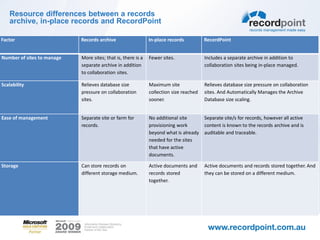
Resource differences between a records
   archive, in-place records and RecordPoint

Factor                      Records archive                   In-place records          RecordPoint


Number of sites to manage   More sites; that is, there is a   Fewer sites.              Includes a separate archive in addition to
                            separate archive in addition                                collaboration sites being in-place managed.
                            to collaboration sites.

Scalability                 Relieves database size            Maximum site              Relieves database size pressure on collaboration
                            pressure on collaboration         collection size reached   sites. And Automatically Manages the Archive
                            sites.                            sooner.                   Database size scaling.


Ease of management          Separate site or farm for         No additional site        Separate site/s for records, however all active
                            records.                          provisioning work         content is known to the records archive and is
                                                              beyond what is already    auditable and traceable.
                                                              needed for the sites
                                                              that have active
                                                              documents.

Storage                     Can store records on              Active documents and      Active documents and records stored together. And
                            different storage medium.         records stored            they can be stored on a different medium.
                                                              together.
Questions?
                          Anthony Woodward
               Product & Engineering Manager
email: anthony.woodward@recordpoint.com.au
                             Twitter: woodwa

RecordPoint Overview

  • 1.
  • 2.
    About RecordPoint Experts inInformation Management on Microsoft Microsoft Gold Certified in 8 competencies Developing SharePoint Records Management software and solutions since 2003 Launched RecordPoint product in July 2008 The VERS certified and built to meet requirements of PRA and ISO 15489 30 Customers in Australia and New Zealand Contributing Member of the Records and Information Management Professionals Association of Australia 1 of 30 partners worldwide on Global Partner Advisory Council for SharePoint
  • 3.
  • 4.
    Why RecordPoint Forester View “Navigatingthe broad array of SharePoint partners can be complex. Microsoft lists six technology partners that it perceives to be important in supplementing enterprise records management scenarios with SharePoint 2010. These include: • FileTrail - Provides physical records tracking and management • Global 360 - Provides business process management and case management • KnowledgeLake - Provides document imaging and capture technologies • Metalogix Software - Provides advanced storage management, archiving, and migration tools • Nintex - Provides advanced workflow and analytics tools • RecordPoint - Provides support for Australian, New Zealand, and European regulatory requirements” Forrester Research - Microsoft Makes Records Management Improvements With SharePoint 2010
  • 5.
    Why RecordPoint Microsoft’s View AdamHarmetz, the Lead Program Manager for the SharePoint Document and Records Management engineering team at Microsoft said in a recent online interview about Records in SharePoint 2010. “We constantly get questions from around the world about how to deal with local government and industry standards for information management. Let me throw just a few at you… MOREQ2, VERS, ISO 15489, DOMEA, TNA, ERKS the list goes on. Some of these standards are loosely based on one another and some have contradictory elements. Rather than focus our engineering efforts on addressing each of these standards in turn, we made the choice to deliver the usability and innovation required to make records management deployments successful and allow our partner ecosystem to build out the SharePoint platform to deal with specific requirements for those customers that are mandated to adhere to a specific standard.”
  • 6.
    What do wemean by compliance In Western Australia – Standards come from: ISO 15489 ISO 16175:2011 – Principles and Functional Requirements for Records in Electronic Office Environments (ICA Function Requirements) STATE RECORDS ACT OF WESTERN AUSTRALIA, 2000 FREEDOM OF INFORMATION ACT, 1992 PRIVACY ACT, 1988 CRIMINAL CODE ACT, 1913 FINANCIAL ADMINISTRATION AND AUDIT ACT, 1985 RECORDS OF INDIGENOUS INDIVIDUALS, FAMILIES OR COMMUNITIES
  • 7.
    Microsoft’s Research Req - How much compliance out of the A considerable amount of the box? requirements of ICA standard is delivered SharePoint 2010. • 88% of Records functionality as defined by the ICA standard is now available “out of the box” using Sharepoint 2010 • Additional configuration and Third party applications are required to provide specific records compliance functionality
  • 8.
    SharePoint Gaps Physicaland Hybrid Records Management Metadata Export and transfer Email management and automated capture of related metadata Complex Classification configuration Complex disposal and transfer actions Native Security Classification
  • 9.
    What Needs tobe Managed? Electronic Files... Physical Objects... • Office documents • Printed documents • Email • Letters • Images • Film • Website content • Certificates • Databases • Fax • Audio / Video files • Forms • Wiki entries • Blog posts 10
  • 10.
    Lift the Burdenfrom your End-Users
  • 11.
    A More PracticalApproach Use rules to map business (information) processes to Records Management system Business Processes Records System
  • 12.
    SharePoint RecordPoint Access Control Rules Engine Audit Classification Version Mgmt Disposal Search Security Workflow Compliance Content Mgmt
  • 13.
    RecordPoint Features Summary  In-Placemanaged and Archived electronic records  Centralized Paper records management  Automated archiving/ scaling of Records Archive  VERS/ ISO 15489 Compliance  Advanced Rules engine  Long term preservation functions  File Plan/ Classification scheme Management in Managed Metadata  Centrally managed Retention and Disposition  Hybrid Electronic/ Paper Records  Paper File Control (requests)  Active File Migration API  Paper file/ Box Management  Bar-coding extensions
  • 14.
    What you havein a Legacy System File Number File Folders Documents Title + Classification Owner Disposal
  • 15.
    What you havein SharePoint/ RecordPoint File + Title Folders Classification Document File Number Disposal Owner
  • 16.
    Demonstration –Electronic Records Managementin SharePoint with RecordPoint
  • 17.
    Differences between aSharePoint 2010 records archive, in-place records and RecordPoint - Functional Factor Records archive In-place records RecordPoint Upload Retention schedules. No upload tools No upload tools available. Best of all worlds – uses the RecordPoint Rules Engine (souped up available. content organiser) and allows retention schedules to controlling different policies for records and active documents based on the current content type, location or metadata. Classification and retention schedule Retention schedules Retention schedules managed Centralised Retention schedules across the SharePoint farm, exposed as Managed Metadata. managed manually. manually. Classification scheme and Retention schedules exposed as Managed Metadata. Manage Physical Records No Can be setup as a flat list of RecordPoint manages all physical Records centrally including the physical records (but does not ability to generate physical records labels and track physical records include file tracking), this does thru out their lifecycle. not scale well. Ability to carry out complex disposal No, requires custom No, requires custom Built-in to RecordPoint disposal process – no custom development processes e.g.. Transfer to Archives/ development. development required. Offsite Nominate ‘file’ containers at various No. No. Built-in to RecordPoint is the ability to configure the ‘file’ container at levels of aggregation e.g.. Sites/ an aggregation level e.g.. Site, Document library, Folder etc. documents sets. Manage a centralised retention No. No. Built-in and centrally controlled can be updated in one place and will schedule against in-place controlled and flow thru to all new records based on that Record class. archived records as described by ISO 15489 Output records in ADRI/ VERS or other No. No. Yes, built-in. configurable XML formats Hybrid Records No. No. RecordPoint manages all Hybrid Records centrally. Metadata Security controls on Records No. No. Yes.
  • 18.
    Differences between aSharePoint 2010 records archive, in-place records and Record Point - Technical Factor Records archive In-place records RecordPoint Managing record The content organizer There may be different Best of all worlds – uses the RecordPoint Rules Engine (based on retention automatically puts new policies for records and content organiser) and allows retention schedules to controlling records in the correct active documents different policies for records and active documents based on the folder in the archive’s based on the current current content type or location. file plan, based on content type or metadata. location. Restrict which users Yes. The archive No. Permissions do not Configurable. By default permissions stay the same as when added to can view records specifies the change when a SharePoint. However, you can restrict which users can edit and delete permissions for the document becomes a records. record. record. Ease of locating Easier. All records are Harder. Records are Easiest, as Records are all in one location but also managed in-place. records (for records in one location. spread across multiple managers) collaboration sites. Maintain all document The user must Automatic, assuming Automatic, but includes the ability to ‘archive’ items automatically. versions as records explicitly send each versioning is turned on. version of a document to the archive. Ease of locating Harder, although a link Easier. Easiest, as the record exists as a record in collaboration site and with information (for team to the document can a ‘stub’ in the archive. collaborators) be added to the collaboration site when the document becomes a record.
  • 19.
    Differences between aSharePoint 2010 records archive, in-place records and Record Point - Technical Factor Records archive In-place records RecordPoint Clutter of Collaboration site Collaboration site Allow collaboration sites to be ‘archived’ so that it only contains collaboration site contains only active contains active and active documents. documents. inactive documents (records), although you can create views to display only records. Ability to audit Yes. Dependent on audit Yes. records policy of the collaboration site. Scope of eDiscovery Active documents and The same eDiscovery The same eDiscovery search includes records and active documents. records are searched search includes records separately. and active documents. Administrative A records manager can Collaboration site Only a Authorised Records Manager can manage Records, security manage the records administrators have Collaboration site administrators have permission to manage active archive. permission to manage documents only. records and active documents.
  • 20.
    Resource differences betweena records archive, in-place records and RecordPoint Factor Records archive In-place records RecordPoint Number of sites to manage More sites; that is, there is a Fewer sites. Includes a separate archive in addition to separate archive in addition collaboration sites being in-place managed. to collaboration sites. Scalability Relieves database size Maximum site Relieves database size pressure on collaboration pressure on collaboration collection size reached sites. And Automatically Manages the Archive sites. sooner. Database size scaling. Ease of management Separate site or farm for No additional site Separate site/s for records, however all active records. provisioning work content is known to the records archive and is beyond what is already auditable and traceable. needed for the sites that have active documents. Storage Can store records on Active documents and Active documents and records stored together. And different storage medium. records stored they can be stored on a different medium. together.
  • 21.
    Questions? Anthony Woodward Product & Engineering Manager email: anthony.woodward@recordpoint.com.au Twitter: woodwa