Content Management  Using a Software Development Process (SDP)
Introduction Content Management   refers to a variety of tools and methods that are used together to collect, process, and deliver content of diverse types.  The scope of Content Management is broad, and its challenges are many.  This presentation presents an overview of Content Management, particularly as it relates to delivering content on the Web, and takes a high-level view, identifying the challenges of Content Management and the many activities it entails
Overview Organizations increasingly turn to the Web as a means of distributing information, communicating with their customers, and seeking to differentiate themselves from their competition.  However, simply uploading content to a Web site doesn’t ensure that it will reach the proper audience or meet their information needs.  The content must constantly be updated if it is to have ongoing value.  It needs to be processed to ensure that it’s ready for delivery to customers, and the delivery has to be designed such that users can locate what they need in a minimum number of steps.  The content provided to each user should be matched to the needs of that user’s business role; for example, technical documents to technical users.
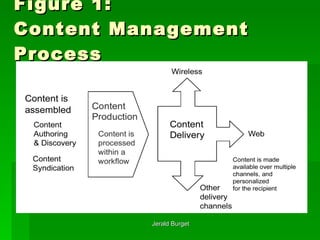
Collecting and processing content intended for a Web site is a more complex and time-sensitive process than many legacy Document Management systems are designed to handle.  .  A Content Management system may require integration with an existing Document Management systems or may require its own separate workflow.  There are many factors to consider. So, while the concept   of Content Management is not new, the implementation   of a Content Management project is still a challenge, one for which there are more products than processes. The following figure shows an overview of Content Management from the process perspective
Figure 1: Content Management Process
Later in this presentation we’ll look more closely at the Content Management aspects noted in Figure 1, but two key high-level points are worth mentioning here: The challenge presented by Unstructured Content The broad scope of a typical Content Management project.
The Challenge of Unstructured Content The Content Management process starts with aggregating content from a variety of sources.  Typically, some content exists in a  structured  form such as a database, but most of what needs to be delivered is  unstructured  content, such as articles, white papers, and marketing literature.  This is especially true as a result of the Web’s emergence as a delivery vehicle.  Organizing and maintaining collections of unstructured content that continually change is one of the chief challenges of Content Management.  A cursory examination of many Content Management products reveals that managing the workflow of activities related to  unstructured  content is an essential chore.
The tasks within that workflow (some of which require human input) include: Conditioning content  - This step involves preparing the content for entry into the Content Management system, including assigning keywords to facilitate categorization, searches, and personalization. Versioning” documents that have multiple contributors  - A document management issue related to  unstructured  content is that a content item may have multiple authors, or the editing process may require more than one person to be able to change a content item.  So that additions and changes can be made without losing the work of any of the contributors, documents must be checked out and in. In addition, it’s desirable to have a simple procedure for rolling a content item back to an earlier version.
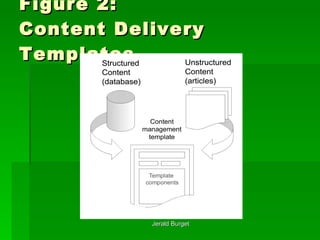
Integrating code and content  -  Unstructured  Content items may be associated with particular templates for delivery (as may  Structured  Content; see the next figure), or may need to contain or reference code (such as style sheets) that affects the delivery or behavior of the content.
Figure 2:  Content Delivery Templates
The Scope of a Content Management Project The many activities a Content Management project entails include: Assembling diverse types of content from multiple sources Using  templates  to make the content available through a variety of channels (including wireless devices, email, and fax as well as the Web), at the same time avoiding the need to create or manage redundant copies of the information in multiple formats Providing content in multiple human languages Using  workflow  (a predefined sequence of events) to administer the content throughout its lifecycle
Creating categories for cataloging the content Tagging content appropriately so that users can easily find what they need, either by having it provided to them based on who they are or by having it recommended because of other content they’ve accessed Identifying relationships and linking one piece of content to another Automatically notifying users when content changes or when there are special business opportunities related to new or updated content Integrating with other parts of an information system, such as Knowledge Management and Document Management
To summarize, Content Management is a broad undertaking that involves generating content of various types, delivering that content using applications that can meet (or even anticipate) the needs of various constituencies through a variety of delivery channels, and using workflow to administer the content.
SDP  and Content Management Content Management involves far more than buying or building a single application that manages the  Content Production  workflow (which we’ll call the  Workflow Application  in this presentation).  A Content Management solution is made up of database, workflow,  Content Delivery , and Web applications, developed as a group of related software projects.  This makes it a perfect candidate for an established SDP.  Reasons for using a SDP as the framework for Content Management projects include the following:
Content Management projects are software projects.  Content Management projects have a lot in common with other software development projects, and therefore much of what they need to address falls within a SDP’s existing disciplines.  Using a SDP precludes the need to start from scratch.  Content Management projects are complex.  A Content Management project typically involves a broad range of roles - business, technical, and creative - and it’s important that the framework for such a project be able to encompass the diverse needs of those constituencies.  A SDP is also well suited to handle the fact that parts of the Content Management solution (such as categorization and user-interface) will most likely evolve over the life of the project, leading to ongoing Iterations.
A SDP is a proven method with a large installed base.  The need for methods that have been demonstrated to work continues to be rediscovered.  Heroic effort does not scale, nor is it always successful.  A configurable process that provides a common point of reference for the diverse roles and disciplines has been shown to offer the greatest success.
To better understand the activities of any complex process, it’s useful to group the activities.  In SDP terms, Content Management is a  Discipline , and groups of related activities within a Discipline are called  Workflows .  Consistent with the process overview shown in Figure 1, the Workflows of the Content Management are: Content Development -  which addresses the standards, practices, and structure that govern the development of the Content Management solution, as well as the tools for dynamic content delivery (such as templates). Content Production -  which addresses the workflow of tasks that manage the content through its lifecycle. Content Delivery -  which addresses getting personalized content to users over multiple channels.
The Content Management Discipline This section elaborates on the function of each of the Content Management workflows (Content Development, Content Production, and Content Delivery), providing general guidelines, defining related terms, and listing basic activities along with corresponding types of artifacts. It presents typical challenges that might crop up in each area, and refers to the Acme case study (See the  Content Management Case Study  presentation) as an example; for an introduction to Acme and its Content Management-related problems.
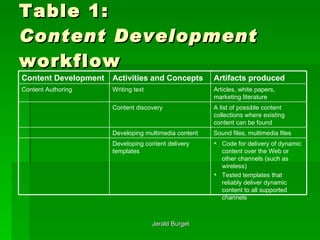
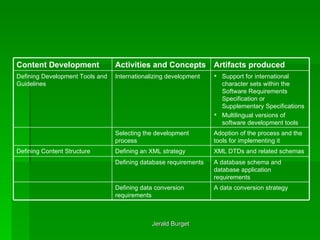
Content Management:  Content Development Content Development   consists of establishing the framework of tools, languages, file formats, and guidelines that will be involved in creating or editing the content, as well as the definition of the Content Delivery means (such as templates).  This workflow, which determines much of the architecture of the Content Management solution, can be divided into the areas listed in the next table.
Table 1: Content Development  workflow  Code for delivery of dynamic content over the Web or other channels (such as wireless) Tested templates that reliably deliver dynamic content to all supported channels  Developing content delivery templates  Sound files, multimedia files  Developing multimedia content  A list of possible content collections where existing content can be found  Content discovery  Articles, white papers, marketing literature  Writing text  Content Authoring  Artifacts produced Activities and Concepts   Content Development
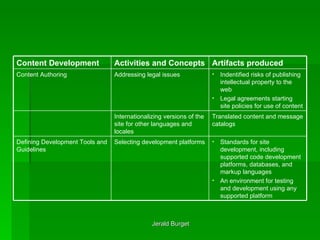
Standards for site development, including supported code development platforms, databases, and markup languages An environment for testing and development using any supported platform  Selecting development platforms  Defining Development Tools and Guidelines  Translated content and message catalogs  Internationalizing versions of the site for other languages and locales  Indentified risks of publishing intellectual property to the web Legal agreements starting site policies for use of content  Addressing legal issues  Content Authoring  Artifacts produced Activities and Concepts   Content Development
A database schema and database application requirements  Defining database requirements  A data conversion strategy  Defining data conversion requirements  XML DTDs and related schemas  Defining an XML strategy  Defining Content Structure  Adoption of the process and the tools for implementing it Selecting the development process Support for international character sets within the Software Requirements Specification or Supplementary Specifications Multilingual versions of software development tools  Internationalizing development  Defining Development Tools and Guidelines  Artifacts produced Activities and Concepts   Content Development
Content Authoring In addition to writing text, content authoring activities include recording audio or generating other multimedia content types, creating templates for dynamic content delivery, and identifying or managing intellectual property issues such as copyrights or patents.  In an international setting, translation of text to other languages falls in this area, as does the localization of data and time formats, sort order, and numeric representation.
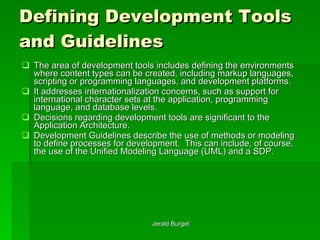
Defining Development Tools and Guidelines The area of development tools includes defining the environments where content types can be created, including markup languages, scripting or programming languages, and development platforms.  It addresses internationalization concerns, such as support for international character sets at the application, programming language, and database levels.  Decisions regarding development tools are significant to the Application Architecture. Development Guidelines describe the use of methods or modeling to define processes for development.  This can include, of course, the use of the Unified Modeling Language (UML) and a SDP.
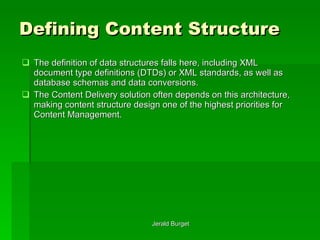
Defining Content Structure The definition of data structures falls here, including XML document type definitions (DTDs) or XML standards, as well as database schemas and data conversions.  The Content Delivery solution often depends on this architecture, making content structure design one of the highest priorities for Content Management.
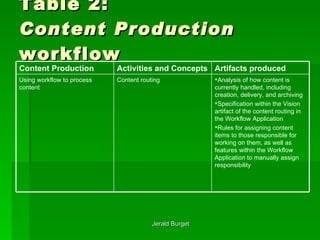
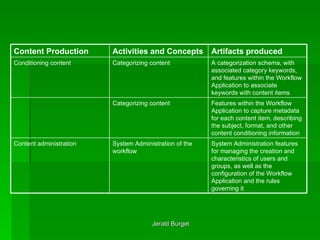
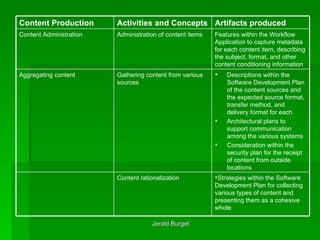
Content Management:  Content Production Content Production   refers to the processing of the content in preparation for publishing it.  The following table lists the areas covered by this workflow.
Table 2: Content Production  workflow  Analysis of how content is currently handled, including creation, delivery, and archiving Specification within the Vision artifact of the content routing in the Workflow Application Rules for assigning content items to those responsible for working on them, as well as features within the Workflow Application to manually assign responsibility Content routing  Using workflow to process content  Artifacts produced Activities and Concepts   Content Production
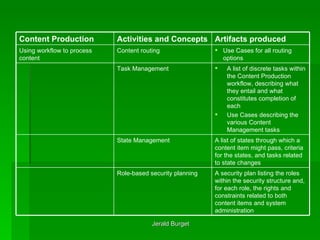
A list of states through which a content item might pass, criteria for the states, and tasks related to state changes  State Management  A security plan listing the roles within the security structure and, for each role, the rights and constraints related to both content items and system administration   Role-based security planning   Use Cases for all routing options Content routing  Using workflow to process content  A list of discrete tasks within the Content Production workflow, describing what they entail and what constitutes completion of each Use Cases describing the various Content Management tasks   Task Management   Artifacts produced Activities and Concepts   Content Production
System Administration features for managing the creation and characteristics of users and groups, as well as the configuration of the Workflow Application and the rules governing it  System Administration of the workflow Content administration  A categorization schema, with associated category keywords, and features within the Workflow Application to associate keywords with content items  Categorizing content  Conditioning content  Features within the Workflow Application to capture metadata for each content item, describing the subject, format, and other content conditioning information  Categorizing content  Artifacts produced Activities and Concepts   Content Production
Strategies within the Software Development Plan for collecting various types of content and presenting them as a cohesive whole Content rationalization  Features within the Workflow Application to capture metadata for each content item, describing the subject, format, and other content conditioning information  Administration of content items  Content Administration Descriptions within the Software Development Plan of the content sources and the expected source format, transfer method, and delivery format for each Architectural plans to support communication among the various systems Consideration within the security plan for the receipt of content from outside locations  Gathering content from various sources  Aggregating content  Artifacts produced Activities and Concepts   Content Production
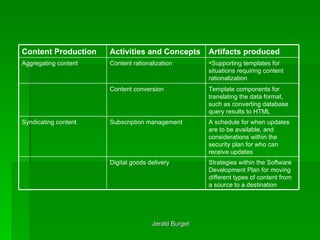
A schedule for when updates are to be available, and considerations within the security plan for who can receive updates  Subscription management  Syndicating content  Strategies within the Software Development Plan for moving different types of content from a source to a destination   Digital goods delivery   Supporting templates for situations requiring content rationalization  Content rationalization Aggregating content  Template components for translating the data format, such as converting database query results to HTML   Content conversion  Artifacts produced Activities and Concepts   Content Production
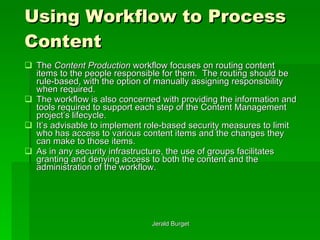
Using Workflow to Process Content The  Content Production  workflow focuses on routing content items to the people responsible for them.  The routing should be rule-based, with the option of manually assigning responsibility when required.  The workflow is also concerned with providing the information and tools required to support each step of the Content Management project’s lifecycle.  It’s advisable to implement role-based security measures to limit who has access to various content items and the changes they can make to those items.  As in any security infrastructure, the use of groups facilitates granting and denying access to both the content and the administration of the workflow.
Conditioning Content Conditioning   Content means adding information to or about a content item to facilitate searching and personalization (matching content to the needs of specific groups of users).  It uses categories that are established for these purposes - specifically, using  category keywords  (terms used for matching search criteria about the content) and  metadata  (information that describes the content).  Attaching metadata to content is also called  meta-tagging , referring to the tags used to include information about a document in the head of an HTML document. To describe the categories, there must be an accepted taxonomy   (a division into ordered groups) and corresponding descriptive nomenclature.  The taxonomy is used to create a category hierarchy, or tree, that can serve as a basis for a navigation scheme.
It’s not uncommon to have more than one way of describing the same thing, even within the same organization.  Content associated with more than category should be able to be located by navigating from different directions. Ideally, there’s a means of rating the suitability or importance of content to its categories.  An article describing how to install a network card, for example, might be associated with both installing hardware and installing drivers; a search from either direction would produce a hit.  If the article discusses hardware configuration in depth and barely touches on drivers, a rating system could weight the categorization accordingly. To enable content categorization to be automated, documents can carry metadata within them.  Examples of document formats that support this are HTML and XML.  In addition, a Content Management System can provide categorization for document types that don’t have a way of carrying their own metadata.
Content Administration Content Administration encompasses the administration of both the workflow and the content items themselves.  The needs associated with content administration include: Submitting content items for publication Locking content items to prevent access by more than one contributor at a time Versioning content (assigning version numbers) as a method of tracking changes Rejecting or approving content items for publication and sending approved content to the content delivery system Archiving content (maintaining copies of content items) Deleting content (or marking it for expiration) or replacing it with content that’s more current
One aspect of the content that’s important to manage is its state.  Examples of states include “incomplete,” “requires additional editing,” “ready for publication,” and “requires approval of the Legal department.”  Once content has been processed by a task within the workflow, the state of that content might automatically change.
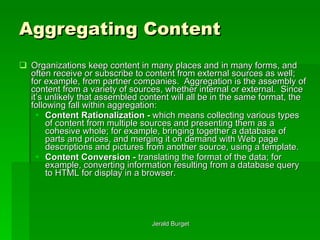
Aggregating Content Organizations keep content in many places and in many forms, and often receive or subscribe to content from external sources as well; for example, from partner companies.  Aggregation   is the assembly of content from a variety of sources, whether internal or external.  Since it’s unlikely that assembled content will all be in the same format, the following fall within aggregation: Content Rationalization -  which means collecting various types of content from multiple sources and presenting them as a cohesive whole; for example, bringing together a database of parts and prices, and merging it on demand with Web page descriptions and pictures from another source, using a template. Content Conversion -  translating the format of the data; for example, converting information resulting from a database query to HTML for display in a browser.
Syndicating Content Syndication   means providing the most current content to browsers that have been configured to receive scheduled updates for the site, or providing content to other Web sites.  It’s increasingly common for companies to share information about their Products and services with other companies for inclusion on their sites.  In addition, client subscription technologies allow users to have their browsers automatically download the latest version of a page from a site. Technologies that fall within syndication include: Subscription Management , which involves the scheduling of updates and the security considerations of syndication (who can receive the content and how frequently updates should be performed). Digital Goods Delivery , which addresses the fact that not all content is simple HTML, and that the Development Plan needs to include multiple strategies for moving content from a source to a destination.
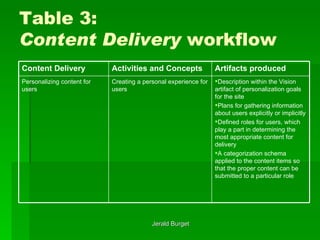
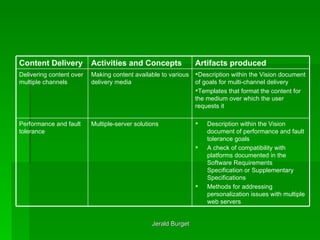
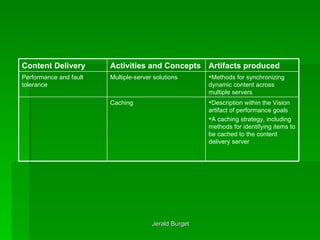
Content Management:  Content Delivery Content Delivery   describes those parts of the Content Management solution that have the greatest public visibility: the Web site and other delivery channels.  As shown in the following table, it refers to the methods by which content is made available to users, including personalization (matching content to information that has been discovered or recorded about the user) as well as actual delivery.  Since the performance of the site is an aspect of delivery that can be affected when content is provided dynamically, multiple-server solutions and caching are also included in the area of Content Delivery.
Table 3: Content Delivery  workflow Description within the Vision artifact of personalization goals for the site Plans for gathering information about users explicitly or implicitly Defined roles for users, which play a part in determining the most appropriate content for delivery A categorization schema applied to the content items so that the proper content can be submitted to a particular role  Creating a personal experience for users Personalizing content for users Artifacts produced Activities and Concepts   Content Delivery
Description within the Vision document of performance and fault tolerance goals A check of compatibility with platforms documented in the Software Requirements Specification or Supplementary Specifications Methods for addressing personalization issues with multiple web servers Multiple-server solutions   Performance and fault tolerance Description within the Vision document of goals for multi-channel delivery Templates that format the content for the medium over which the user requests it  Making content available to various delivery media Delivering content over multiple channels Artifacts produced Activities and Concepts   Content Delivery
Methods for synchronizing dynamic content across multiple servers  Multiple-server solutions  Performance and fault tolerance Description within the Vision artifact of performance goals A caching strategy, including methods for identifying items to be cached to the content delivery server  Caching Artifacts produced Activities and Concepts   Content Delivery
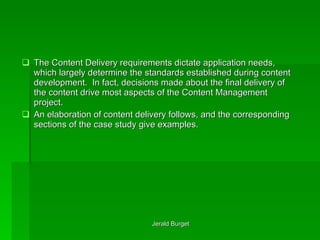
The Content Delivery requirements dictate application needs, which largely determine the standards established during content development.  In fact, decisions made about the final delivery of the content drive most aspects of the Content Management project. An elaboration of content delivery follows, and the corresponding sections of the case study give examples.
Personalizing Content for Users Personalization   means the creation of a personal experience for visitors to a site based on information gathered from them, whether by invitation and submission (explicit) or based on observation of their behavior (implicit).  Again, there’s a relationship between  Content Delivery  and other Content Management aspects, since the conditioning of the content (metadata and categorization) addressed within  Content Production  is based on the personalization design.
Delivering Content over Multiple Channels A channel   is a method of  Content Delivery , the default method being the Web.  Other methods might include e-mail, pager, cell phone, and personal digital assistant (PDA).  Wireless Application Protocol (WAP) is an example of technology that’s growing rapidly in some parts of the world.  The increased availability of broadband access implies a growth in technologies, such as streaming media, that depend on high bandwidth for effective use.
Performance and Fault Tolerance Given the complexity of  Content Delivery  applications, both performance and high availability are key concerns.  Fault tolerance   means the ability of a system to continue to operate despite the failure of some part of the system.  The use of redundant servers provides fault tolerance, as well as performance gains when all servers are operating optimally.  There are issues with server redundancy in  Content Delivery  systems that provide dynamic content, especially where personalization is concerned, and these issues need to be addressed in application and site design. Another method of improving performance is caching   - that is, keeping recently or frequently used pages in memory or on disk.  The dynamic page generation commonly employed in content delivery increases overhead, and caching is a strategy for making the static parts of a page template readily available, reducing the time it takes to build and deliver a page.
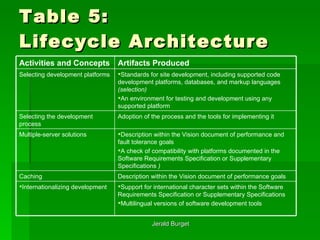
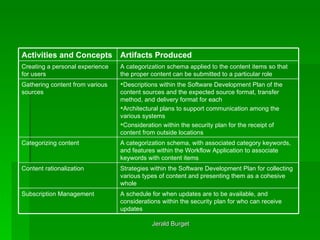
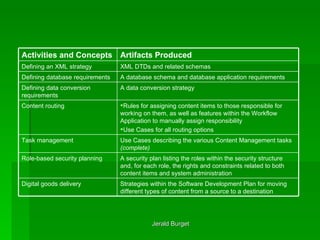
Mapping Content Management to a SDP’s Phases Here we examine the details of the Content Management discipline in the context of each of the four phases of a SDP: Inception, Elaboration, Construction, and Transition.  (These names are “borrowed” from a RUP-like development process.)  The activities and concepts, and the resulting artifacts, listed previously in Tables 1 through 3, for each of the workflows are mapped to a SDP’s phases - a one-to-one mapping except for a few cases (marked in italic) where work on a particular artifact is split between two phases.  As a result, the flow of a Content Management project emerges. Where applicable, evaluation criteria from a SDP are presented here, but these don’t include all of the criteria for assessing the phases of a project using a SDP.  The emphasis is on those criteria that are most applicable to a Content Management project.
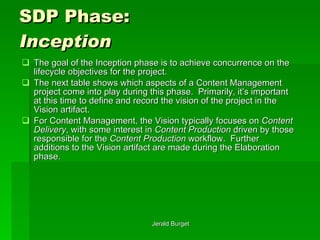
SDP Phase:  Inception The goal of the Inception phase is to achieve concurrence on the lifecycle objectives for the project.  The next table shows which aspects of a Content Management project come into play during this phase.  Primarily, it’s important at this time to define and record the vision of the project in the Vision artifact.  For Content Management, the Vision typically focuses on  Content Delivery , with some interest in  Content Production  driven by those responsible for the  Content Production  workflow.  Further additions to the Vision artifact are made during the Elaboration phase.
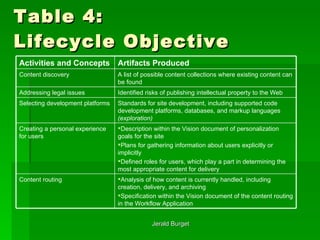
Table 4: Lifecycle Objective Analysis of how content is currently handled, including creation, delivery, and archiving Specification within the Vision document of the content routing in the Workflow Application  Content routing  Description within the Vision document of personalization goals for the site Plans for gathering information about users explicitly or implicitly Defined roles for users, which play a part in determining the most appropriate content for delivery  Creating a personal experience for users  Standards for site development, including supported code development platforms, databases, and markup languages  (exploration)   Selecting development platforms  Identified risks of publishing intellectual property to the Web  Addressing legal issues  A list of possible content collections where existing content can be found  Content discovery  Artifacts Produced   Activities and Concepts
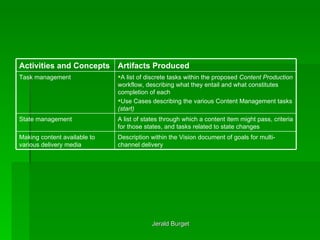
Description within the Vision document of goals for multi-channel delivery  Making content available to various delivery media  A list of states through which a content item might pass, criteria for those states, and tasks related to state changes  State management  A list of discrete tasks within the proposed  Content Production  workflow, describing what they entail and what constitutes completion of each Use Cases describing the various Content Management tasks  (start)   Task management  Artifacts Produced   Activities and Concepts
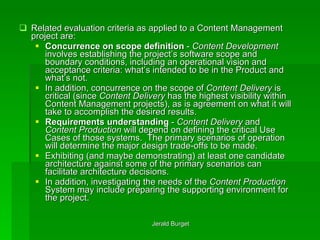
Related evaluation criteria as applied to a Content Management project are: Concurrence on scope definition  -  Content Development  involves establishing the project’s software scope and boundary conditions, including an operational vision and acceptance criteria: what’s intended to be in the Product and what’s not.  In addition, concurrence on the scope of  Content Delivery  is critical (since  Content Delivery  has the highest visibility within Content Management projects), as is agreement on what it will take to accomplish the desired results. Requirements understanding  -  Content Delivery  and  Content Production  will depend on defining the critical Use Cases of those systems.  The primary scenarios of operation will determine the major design trade-offs to be made.  Exhibiting (and maybe demonstrating) at least one candidate architecture against some of the primary scenarios can facilitate architecture decisions.  In addition, investigating the needs of the  Content Production  System may include preparing the supporting environment for the project.
SDP Phase:  Elaboration The goal of the Elaboration phase is to baseline the architecture of the system, providing a stable basis for the design and implementation efforts during the Construction phase (see the next table).  It should be demonstrated that the baseline architecture will support the requirements of the system at a reasonable cost and in a reasonable amount of time.
Table 5: Lifecycle Architecture Support for international character sets within the Software Requirements Specification or Supplementary Specifications Multilingual versions of software development tools  Internationalizing development  Description within the Vision document of performance goals  Caching  Description within the Vision document of performance and fault tolerance goals A check of compatibility with platforms documented in the Software Requirements Specification or Supplementary Specifications  )   Multiple-server solutions  Adoption of the process and the tools for implementing it  Selecting the development process  Standards for site development, including supported code development platforms, databases, and markup languages  (selection) An environment for testing and development using any supported platform  Selecting development platforms  Artifacts Produced   Activities and Concepts
Descriptions within the Software Development Plan of the content sources and the expected source format, transfer method, and delivery format for each Architectural plans to support communication among the various systems Consideration within the security plan for the receipt of content from outside locations Gathering content from various sources  A categorization schema, with associated category keywords, and features within the Workflow Application to associate keywords with content items  Categorizing content  Strategies within the Software Development Plan for collecting various types of content and presenting them as a cohesive whole  Content rationalization  A schedule for when updates are to be available, and considerations within the security plan for who can receive updates  Subscription Management  A categorization schema applied to the content items so that the proper content can be submitted to a particular role Creating a personal experience for users  Artifacts Produced   Activities and Concepts
A security plan listing the roles within the security structure and, for each role, the rights and constraints related to both content items and system administration  Role-based security planning  Use Cases describing the various Content Management tasks  (complete)   Task management  A database schema and database application requirements  Defining database requirements  A data conversion strategy  Defining data conversion requirements  Rules for assigning content items to those responsible for working on them, as well as features within the Workflow Application to manually assign responsibility Use Cases for all routing options  Content routing  Strategies within the Software Development Plan for moving different types of content from a source to a destination  Digital goods delivery  XML DTDs and related schemas  Defining an XML strategy  Artifacts Produced   Activities and Concepts
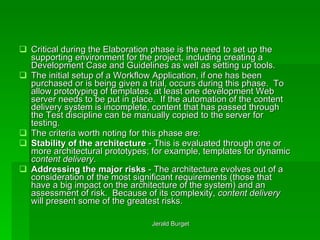
Critical during the Elaboration phase is the need to set up the supporting environment for the project, including creating a Development Case and Guidelines as well as setting up tools. The initial setup of a Workflow Application, if one has been purchased or is being given a trial, occurs during this phase.  To allow prototyping of templates, at least one development Web server needs to be put in place.  If the automation of the content delivery system is incomplete, content that has passed through the Test discipline can be manually copied to the server for testing. The criteria worth noting for this phase are: Stability of the architecture  - This is evaluated through one or more architectural prototypes; for example, templates for dynamic  content delivery . Addressing the major risks  - The architecture evolves out of a consideration of the most significant requirements (those that have a big impact on the architecture of the system) and an assessment of risk.  Because of its complexity,  content delivery  will present some of the greatest risks.
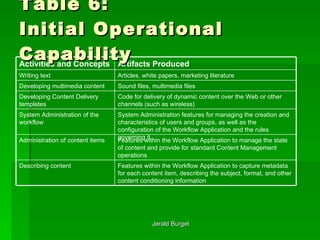
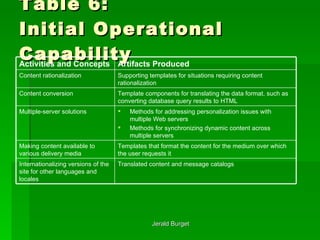
SDP Phase: Construction  The focus of the Construction phase is to clarify the remaining requirements and complete the development of the system based on the baseline architecture (see the following table).
Table 6: Initial Operational Capability System Administration features for managing the creation and characteristics of users and groups, as well as the configuration of the Workflow Application and the rules governing it System Administration of the workflow Code for delivery of dynamic content over the Web or other channels (such as wireless)  Developing Content Delivery templates  Features within the Workflow Application to capture metadata for each content item, describing the subject, format, and other content conditioning information   Describing content  Features within the Workflow Application to manage the state of content and provide for standard Content Management operations  Administration of content items Sound files, multimedia files  Developing multimedia content  Articles, white papers, marketing literature  Writing text  Artifacts Produced   Activities and Concepts
Table 6: Initial Operational Capability Templates that format the content for the medium over which the user requests it  Making content available to various delivery media  Methods for addressing personalization issues with multiple Web servers Methods for synchronizing dynamic content across multiple servers  Multiple-server solutions Translated content and message catalogs  Internationalizing versions of the site for other languages and locales  Template components for translating the data format, such as converting database query results to HTML  Content conversion  Supporting templates for situations requiring content rationalization  Content rationalization  Artifacts Produced   Activities and Concepts
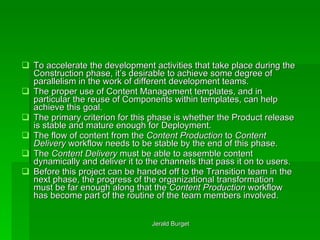
To accelerate the development activities that take place during the Construction phase, it’s desirable to achieve some degree of parallelism in the work of different development teams.  The proper use of Content Management templates, and in particular the reuse of Components within templates, can help achieve this goal. The primary criterion for this phase is whether the Product release is stable and mature enough for Deployment.  The flow of content from the  Content Production  to  Content Delivery  workflow needs to be stable by the end of this phase. The  Content Delivery  must be able to assemble content dynamically and deliver it to the channels that pass it on to users.  Before this project can be handed off to the Transition team in the next phase, the progress of the organizational transformation must be far enough along that the  Content Production  workflow has become part of the routine of the team members involved.
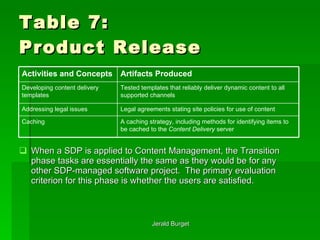
SDP Phase: Transition  The focus of the Transition phase is to ensure that the site is available for end users (see the following table).  This phase can span several Iterations, and it includes testing the site and making minor adjustments based on user feedback.  At this point in the project lifecycle, user feedback should focus mainly on fine-tuning; for example, on the effectiveness of personalization and ease of use.  All major structural issues should have been worked out much earlier in the lifecycle.
Table 7: Product Release When a SDP is applied to Content Management, the Transition phase tasks are essentially the same as they would be for any other SDP-managed software project.  The primary evaluation criterion for this phase is whether the users are satisfied. A caching strategy, including methods for identifying items to be cached to the  Content Delivery  server  Caching  Legal agreements stating site policies for use of content  Addressing legal issues  Tested templates that reliably deliver dynamic content to all supported channels  Developing content delivery templates  Artifacts Produced   Activities and Concepts
Summary Content Management covers a lot of territory, from defining the need to provide some type of content, to creating and delivering the content (including creating, configuring, and administering the delivery mechanism and translating the content for different delivery channels).  This presentation has presented the three workflows of the Content Management discipline –  Content Development, Content Production,  and  Content Delivery  - along with related definitions, objectives, and concerns.  (See the Content Management Case Study presentation for more information. We’ve also looked at some reasons why the best framework for Content Management projects is a SDP - a proven method and multidisciplinary approach to identifying and assigning activities and responsibilities as a project is iteratively delivered - and at how Content Management activities and concepts map to a SDP’s phases.

Content Management

  • 1.
    Content Management Using a Software Development Process (SDP)
  • 2.
    Introduction Content Management refers to a variety of tools and methods that are used together to collect, process, and deliver content of diverse types. The scope of Content Management is broad, and its challenges are many. This presentation presents an overview of Content Management, particularly as it relates to delivering content on the Web, and takes a high-level view, identifying the challenges of Content Management and the many activities it entails
  • 3.
    Overview Organizations increasinglyturn to the Web as a means of distributing information, communicating with their customers, and seeking to differentiate themselves from their competition. However, simply uploading content to a Web site doesn’t ensure that it will reach the proper audience or meet their information needs. The content must constantly be updated if it is to have ongoing value. It needs to be processed to ensure that it’s ready for delivery to customers, and the delivery has to be designed such that users can locate what they need in a minimum number of steps. The content provided to each user should be matched to the needs of that user’s business role; for example, technical documents to technical users.
  • 4.
    Collecting and processingcontent intended for a Web site is a more complex and time-sensitive process than many legacy Document Management systems are designed to handle. . A Content Management system may require integration with an existing Document Management systems or may require its own separate workflow. There are many factors to consider. So, while the concept of Content Management is not new, the implementation of a Content Management project is still a challenge, one for which there are more products than processes. The following figure shows an overview of Content Management from the process perspective
  • 5.
    Figure 1: ContentManagement Process
  • 6.
    Later in thispresentation we’ll look more closely at the Content Management aspects noted in Figure 1, but two key high-level points are worth mentioning here: The challenge presented by Unstructured Content The broad scope of a typical Content Management project.
  • 7.
    The Challenge ofUnstructured Content The Content Management process starts with aggregating content from a variety of sources. Typically, some content exists in a structured form such as a database, but most of what needs to be delivered is unstructured content, such as articles, white papers, and marketing literature. This is especially true as a result of the Web’s emergence as a delivery vehicle. Organizing and maintaining collections of unstructured content that continually change is one of the chief challenges of Content Management. A cursory examination of many Content Management products reveals that managing the workflow of activities related to unstructured content is an essential chore.
  • 8.
    The tasks withinthat workflow (some of which require human input) include: Conditioning content - This step involves preparing the content for entry into the Content Management system, including assigning keywords to facilitate categorization, searches, and personalization. Versioning” documents that have multiple contributors - A document management issue related to unstructured content is that a content item may have multiple authors, or the editing process may require more than one person to be able to change a content item. So that additions and changes can be made without losing the work of any of the contributors, documents must be checked out and in. In addition, it’s desirable to have a simple procedure for rolling a content item back to an earlier version.
  • 9.
    Integrating code andcontent - Unstructured Content items may be associated with particular templates for delivery (as may Structured Content; see the next figure), or may need to contain or reference code (such as style sheets) that affects the delivery or behavior of the content.
  • 10.
    Figure 2: Content Delivery Templates
  • 11.
    The Scope ofa Content Management Project The many activities a Content Management project entails include: Assembling diverse types of content from multiple sources Using templates to make the content available through a variety of channels (including wireless devices, email, and fax as well as the Web), at the same time avoiding the need to create or manage redundant copies of the information in multiple formats Providing content in multiple human languages Using workflow (a predefined sequence of events) to administer the content throughout its lifecycle
  • 12.
    Creating categories forcataloging the content Tagging content appropriately so that users can easily find what they need, either by having it provided to them based on who they are or by having it recommended because of other content they’ve accessed Identifying relationships and linking one piece of content to another Automatically notifying users when content changes or when there are special business opportunities related to new or updated content Integrating with other parts of an information system, such as Knowledge Management and Document Management
  • 13.
    To summarize, ContentManagement is a broad undertaking that involves generating content of various types, delivering that content using applications that can meet (or even anticipate) the needs of various constituencies through a variety of delivery channels, and using workflow to administer the content.
  • 14.
    SDP andContent Management Content Management involves far more than buying or building a single application that manages the Content Production workflow (which we’ll call the Workflow Application in this presentation). A Content Management solution is made up of database, workflow, Content Delivery , and Web applications, developed as a group of related software projects. This makes it a perfect candidate for an established SDP. Reasons for using a SDP as the framework for Content Management projects include the following:
  • 15.
    Content Management projectsare software projects. Content Management projects have a lot in common with other software development projects, and therefore much of what they need to address falls within a SDP’s existing disciplines. Using a SDP precludes the need to start from scratch. Content Management projects are complex. A Content Management project typically involves a broad range of roles - business, technical, and creative - and it’s important that the framework for such a project be able to encompass the diverse needs of those constituencies. A SDP is also well suited to handle the fact that parts of the Content Management solution (such as categorization and user-interface) will most likely evolve over the life of the project, leading to ongoing Iterations.
  • 16.
    A SDP isa proven method with a large installed base. The need for methods that have been demonstrated to work continues to be rediscovered. Heroic effort does not scale, nor is it always successful. A configurable process that provides a common point of reference for the diverse roles and disciplines has been shown to offer the greatest success.
  • 17.
    To better understandthe activities of any complex process, it’s useful to group the activities. In SDP terms, Content Management is a Discipline , and groups of related activities within a Discipline are called Workflows . Consistent with the process overview shown in Figure 1, the Workflows of the Content Management are: Content Development - which addresses the standards, practices, and structure that govern the development of the Content Management solution, as well as the tools for dynamic content delivery (such as templates). Content Production - which addresses the workflow of tasks that manage the content through its lifecycle. Content Delivery - which addresses getting personalized content to users over multiple channels.
  • 18.
    The Content ManagementDiscipline This section elaborates on the function of each of the Content Management workflows (Content Development, Content Production, and Content Delivery), providing general guidelines, defining related terms, and listing basic activities along with corresponding types of artifacts. It presents typical challenges that might crop up in each area, and refers to the Acme case study (See the Content Management Case Study presentation) as an example; for an introduction to Acme and its Content Management-related problems.
  • 19.
    Content Management: Content Development Content Development consists of establishing the framework of tools, languages, file formats, and guidelines that will be involved in creating or editing the content, as well as the definition of the Content Delivery means (such as templates). This workflow, which determines much of the architecture of the Content Management solution, can be divided into the areas listed in the next table.
  • 20.
    Table 1: ContentDevelopment workflow Code for delivery of dynamic content over the Web or other channels (such as wireless) Tested templates that reliably deliver dynamic content to all supported channels Developing content delivery templates Sound files, multimedia files Developing multimedia content A list of possible content collections where existing content can be found Content discovery Articles, white papers, marketing literature Writing text Content Authoring Artifacts produced Activities and Concepts Content Development
  • 21.
    Standards for sitedevelopment, including supported code development platforms, databases, and markup languages An environment for testing and development using any supported platform Selecting development platforms Defining Development Tools and Guidelines Translated content and message catalogs Internationalizing versions of the site for other languages and locales Indentified risks of publishing intellectual property to the web Legal agreements starting site policies for use of content Addressing legal issues Content Authoring Artifacts produced Activities and Concepts Content Development
  • 22.
    A database schemaand database application requirements Defining database requirements A data conversion strategy Defining data conversion requirements XML DTDs and related schemas Defining an XML strategy Defining Content Structure Adoption of the process and the tools for implementing it Selecting the development process Support for international character sets within the Software Requirements Specification or Supplementary Specifications Multilingual versions of software development tools Internationalizing development Defining Development Tools and Guidelines Artifacts produced Activities and Concepts Content Development
  • 23.
    Content Authoring Inaddition to writing text, content authoring activities include recording audio or generating other multimedia content types, creating templates for dynamic content delivery, and identifying or managing intellectual property issues such as copyrights or patents. In an international setting, translation of text to other languages falls in this area, as does the localization of data and time formats, sort order, and numeric representation.
  • 24.
    Defining Development Toolsand Guidelines The area of development tools includes defining the environments where content types can be created, including markup languages, scripting or programming languages, and development platforms. It addresses internationalization concerns, such as support for international character sets at the application, programming language, and database levels. Decisions regarding development tools are significant to the Application Architecture. Development Guidelines describe the use of methods or modeling to define processes for development. This can include, of course, the use of the Unified Modeling Language (UML) and a SDP.
  • 25.
    Defining Content StructureThe definition of data structures falls here, including XML document type definitions (DTDs) or XML standards, as well as database schemas and data conversions. The Content Delivery solution often depends on this architecture, making content structure design one of the highest priorities for Content Management.
  • 26.
    Content Management: Content Production Content Production refers to the processing of the content in preparation for publishing it. The following table lists the areas covered by this workflow.
  • 27.
    Table 2: ContentProduction workflow Analysis of how content is currently handled, including creation, delivery, and archiving Specification within the Vision artifact of the content routing in the Workflow Application Rules for assigning content items to those responsible for working on them, as well as features within the Workflow Application to manually assign responsibility Content routing Using workflow to process content Artifacts produced Activities and Concepts Content Production
  • 28.
    A list ofstates through which a content item might pass, criteria for the states, and tasks related to state changes State Management A security plan listing the roles within the security structure and, for each role, the rights and constraints related to both content items and system administration Role-based security planning Use Cases for all routing options Content routing Using workflow to process content A list of discrete tasks within the Content Production workflow, describing what they entail and what constitutes completion of each Use Cases describing the various Content Management tasks Task Management Artifacts produced Activities and Concepts Content Production
  • 29.
    System Administration featuresfor managing the creation and characteristics of users and groups, as well as the configuration of the Workflow Application and the rules governing it System Administration of the workflow Content administration A categorization schema, with associated category keywords, and features within the Workflow Application to associate keywords with content items Categorizing content Conditioning content Features within the Workflow Application to capture metadata for each content item, describing the subject, format, and other content conditioning information Categorizing content Artifacts produced Activities and Concepts Content Production
  • 30.
    Strategies within theSoftware Development Plan for collecting various types of content and presenting them as a cohesive whole Content rationalization Features within the Workflow Application to capture metadata for each content item, describing the subject, format, and other content conditioning information Administration of content items Content Administration Descriptions within the Software Development Plan of the content sources and the expected source format, transfer method, and delivery format for each Architectural plans to support communication among the various systems Consideration within the security plan for the receipt of content from outside locations Gathering content from various sources Aggregating content Artifacts produced Activities and Concepts Content Production
  • 31.
    A schedule forwhen updates are to be available, and considerations within the security plan for who can receive updates Subscription management Syndicating content Strategies within the Software Development Plan for moving different types of content from a source to a destination Digital goods delivery Supporting templates for situations requiring content rationalization Content rationalization Aggregating content Template components for translating the data format, such as converting database query results to HTML Content conversion Artifacts produced Activities and Concepts Content Production
  • 32.
    Using Workflow toProcess Content The Content Production workflow focuses on routing content items to the people responsible for them. The routing should be rule-based, with the option of manually assigning responsibility when required. The workflow is also concerned with providing the information and tools required to support each step of the Content Management project’s lifecycle. It’s advisable to implement role-based security measures to limit who has access to various content items and the changes they can make to those items. As in any security infrastructure, the use of groups facilitates granting and denying access to both the content and the administration of the workflow.
  • 33.
    Conditioning Content Conditioning Content means adding information to or about a content item to facilitate searching and personalization (matching content to the needs of specific groups of users). It uses categories that are established for these purposes - specifically, using category keywords (terms used for matching search criteria about the content) and metadata (information that describes the content). Attaching metadata to content is also called meta-tagging , referring to the tags used to include information about a document in the head of an HTML document. To describe the categories, there must be an accepted taxonomy (a division into ordered groups) and corresponding descriptive nomenclature. The taxonomy is used to create a category hierarchy, or tree, that can serve as a basis for a navigation scheme.
  • 34.
    It’s not uncommonto have more than one way of describing the same thing, even within the same organization. Content associated with more than category should be able to be located by navigating from different directions. Ideally, there’s a means of rating the suitability or importance of content to its categories. An article describing how to install a network card, for example, might be associated with both installing hardware and installing drivers; a search from either direction would produce a hit. If the article discusses hardware configuration in depth and barely touches on drivers, a rating system could weight the categorization accordingly. To enable content categorization to be automated, documents can carry metadata within them. Examples of document formats that support this are HTML and XML. In addition, a Content Management System can provide categorization for document types that don’t have a way of carrying their own metadata.
  • 35.
    Content Administration ContentAdministration encompasses the administration of both the workflow and the content items themselves. The needs associated with content administration include: Submitting content items for publication Locking content items to prevent access by more than one contributor at a time Versioning content (assigning version numbers) as a method of tracking changes Rejecting or approving content items for publication and sending approved content to the content delivery system Archiving content (maintaining copies of content items) Deleting content (or marking it for expiration) or replacing it with content that’s more current
  • 36.
    One aspect ofthe content that’s important to manage is its state. Examples of states include “incomplete,” “requires additional editing,” “ready for publication,” and “requires approval of the Legal department.” Once content has been processed by a task within the workflow, the state of that content might automatically change.
  • 37.
    Aggregating Content Organizationskeep content in many places and in many forms, and often receive or subscribe to content from external sources as well; for example, from partner companies. Aggregation is the assembly of content from a variety of sources, whether internal or external. Since it’s unlikely that assembled content will all be in the same format, the following fall within aggregation: Content Rationalization - which means collecting various types of content from multiple sources and presenting them as a cohesive whole; for example, bringing together a database of parts and prices, and merging it on demand with Web page descriptions and pictures from another source, using a template. Content Conversion - translating the format of the data; for example, converting information resulting from a database query to HTML for display in a browser.
  • 38.
    Syndicating Content Syndication means providing the most current content to browsers that have been configured to receive scheduled updates for the site, or providing content to other Web sites. It’s increasingly common for companies to share information about their Products and services with other companies for inclusion on their sites. In addition, client subscription technologies allow users to have their browsers automatically download the latest version of a page from a site. Technologies that fall within syndication include: Subscription Management , which involves the scheduling of updates and the security considerations of syndication (who can receive the content and how frequently updates should be performed). Digital Goods Delivery , which addresses the fact that not all content is simple HTML, and that the Development Plan needs to include multiple strategies for moving content from a source to a destination.
  • 39.
    Content Management: Content Delivery Content Delivery describes those parts of the Content Management solution that have the greatest public visibility: the Web site and other delivery channels. As shown in the following table, it refers to the methods by which content is made available to users, including personalization (matching content to information that has been discovered or recorded about the user) as well as actual delivery. Since the performance of the site is an aspect of delivery that can be affected when content is provided dynamically, multiple-server solutions and caching are also included in the area of Content Delivery.
  • 40.
    Table 3: ContentDelivery workflow Description within the Vision artifact of personalization goals for the site Plans for gathering information about users explicitly or implicitly Defined roles for users, which play a part in determining the most appropriate content for delivery A categorization schema applied to the content items so that the proper content can be submitted to a particular role Creating a personal experience for users Personalizing content for users Artifacts produced Activities and Concepts Content Delivery
  • 41.
    Description within theVision document of performance and fault tolerance goals A check of compatibility with platforms documented in the Software Requirements Specification or Supplementary Specifications Methods for addressing personalization issues with multiple web servers Multiple-server solutions Performance and fault tolerance Description within the Vision document of goals for multi-channel delivery Templates that format the content for the medium over which the user requests it Making content available to various delivery media Delivering content over multiple channels Artifacts produced Activities and Concepts Content Delivery
  • 42.
    Methods for synchronizingdynamic content across multiple servers Multiple-server solutions Performance and fault tolerance Description within the Vision artifact of performance goals A caching strategy, including methods for identifying items to be cached to the content delivery server Caching Artifacts produced Activities and Concepts Content Delivery
  • 43.
    The Content Deliveryrequirements dictate application needs, which largely determine the standards established during content development. In fact, decisions made about the final delivery of the content drive most aspects of the Content Management project. An elaboration of content delivery follows, and the corresponding sections of the case study give examples.
  • 44.
    Personalizing Content forUsers Personalization means the creation of a personal experience for visitors to a site based on information gathered from them, whether by invitation and submission (explicit) or based on observation of their behavior (implicit). Again, there’s a relationship between Content Delivery and other Content Management aspects, since the conditioning of the content (metadata and categorization) addressed within Content Production is based on the personalization design.
  • 45.
    Delivering Content overMultiple Channels A channel is a method of Content Delivery , the default method being the Web. Other methods might include e-mail, pager, cell phone, and personal digital assistant (PDA). Wireless Application Protocol (WAP) is an example of technology that’s growing rapidly in some parts of the world. The increased availability of broadband access implies a growth in technologies, such as streaming media, that depend on high bandwidth for effective use.
  • 46.
    Performance and FaultTolerance Given the complexity of Content Delivery applications, both performance and high availability are key concerns. Fault tolerance means the ability of a system to continue to operate despite the failure of some part of the system. The use of redundant servers provides fault tolerance, as well as performance gains when all servers are operating optimally. There are issues with server redundancy in Content Delivery systems that provide dynamic content, especially where personalization is concerned, and these issues need to be addressed in application and site design. Another method of improving performance is caching - that is, keeping recently or frequently used pages in memory or on disk. The dynamic page generation commonly employed in content delivery increases overhead, and caching is a strategy for making the static parts of a page template readily available, reducing the time it takes to build and deliver a page.
  • 47.
    Mapping Content Managementto a SDP’s Phases Here we examine the details of the Content Management discipline in the context of each of the four phases of a SDP: Inception, Elaboration, Construction, and Transition. (These names are “borrowed” from a RUP-like development process.) The activities and concepts, and the resulting artifacts, listed previously in Tables 1 through 3, for each of the workflows are mapped to a SDP’s phases - a one-to-one mapping except for a few cases (marked in italic) where work on a particular artifact is split between two phases. As a result, the flow of a Content Management project emerges. Where applicable, evaluation criteria from a SDP are presented here, but these don’t include all of the criteria for assessing the phases of a project using a SDP. The emphasis is on those criteria that are most applicable to a Content Management project.
  • 48.
    SDP Phase: Inception The goal of the Inception phase is to achieve concurrence on the lifecycle objectives for the project. The next table shows which aspects of a Content Management project come into play during this phase. Primarily, it’s important at this time to define and record the vision of the project in the Vision artifact. For Content Management, the Vision typically focuses on Content Delivery , with some interest in Content Production driven by those responsible for the Content Production workflow. Further additions to the Vision artifact are made during the Elaboration phase.
  • 49.
    Table 4: LifecycleObjective Analysis of how content is currently handled, including creation, delivery, and archiving Specification within the Vision document of the content routing in the Workflow Application Content routing Description within the Vision document of personalization goals for the site Plans for gathering information about users explicitly or implicitly Defined roles for users, which play a part in determining the most appropriate content for delivery Creating a personal experience for users Standards for site development, including supported code development platforms, databases, and markup languages (exploration) Selecting development platforms Identified risks of publishing intellectual property to the Web Addressing legal issues A list of possible content collections where existing content can be found Content discovery Artifacts Produced Activities and Concepts
  • 50.
    Description within theVision document of goals for multi-channel delivery Making content available to various delivery media A list of states through which a content item might pass, criteria for those states, and tasks related to state changes State management A list of discrete tasks within the proposed Content Production workflow, describing what they entail and what constitutes completion of each Use Cases describing the various Content Management tasks (start) Task management Artifacts Produced Activities and Concepts
  • 51.
    Related evaluation criteriaas applied to a Content Management project are: Concurrence on scope definition - Content Development involves establishing the project’s software scope and boundary conditions, including an operational vision and acceptance criteria: what’s intended to be in the Product and what’s not. In addition, concurrence on the scope of Content Delivery is critical (since Content Delivery has the highest visibility within Content Management projects), as is agreement on what it will take to accomplish the desired results. Requirements understanding - Content Delivery and Content Production will depend on defining the critical Use Cases of those systems. The primary scenarios of operation will determine the major design trade-offs to be made. Exhibiting (and maybe demonstrating) at least one candidate architecture against some of the primary scenarios can facilitate architecture decisions. In addition, investigating the needs of the Content Production System may include preparing the supporting environment for the project.
  • 52.
    SDP Phase: Elaboration The goal of the Elaboration phase is to baseline the architecture of the system, providing a stable basis for the design and implementation efforts during the Construction phase (see the next table). It should be demonstrated that the baseline architecture will support the requirements of the system at a reasonable cost and in a reasonable amount of time.
  • 53.
    Table 5: LifecycleArchitecture Support for international character sets within the Software Requirements Specification or Supplementary Specifications Multilingual versions of software development tools Internationalizing development Description within the Vision document of performance goals Caching Description within the Vision document of performance and fault tolerance goals A check of compatibility with platforms documented in the Software Requirements Specification or Supplementary Specifications ) Multiple-server solutions Adoption of the process and the tools for implementing it Selecting the development process Standards for site development, including supported code development platforms, databases, and markup languages (selection) An environment for testing and development using any supported platform Selecting development platforms Artifacts Produced Activities and Concepts
  • 54.
    Descriptions within theSoftware Development Plan of the content sources and the expected source format, transfer method, and delivery format for each Architectural plans to support communication among the various systems Consideration within the security plan for the receipt of content from outside locations Gathering content from various sources A categorization schema, with associated category keywords, and features within the Workflow Application to associate keywords with content items Categorizing content Strategies within the Software Development Plan for collecting various types of content and presenting them as a cohesive whole Content rationalization A schedule for when updates are to be available, and considerations within the security plan for who can receive updates Subscription Management A categorization schema applied to the content items so that the proper content can be submitted to a particular role Creating a personal experience for users Artifacts Produced Activities and Concepts
  • 55.
    A security planlisting the roles within the security structure and, for each role, the rights and constraints related to both content items and system administration Role-based security planning Use Cases describing the various Content Management tasks (complete) Task management A database schema and database application requirements Defining database requirements A data conversion strategy Defining data conversion requirements Rules for assigning content items to those responsible for working on them, as well as features within the Workflow Application to manually assign responsibility Use Cases for all routing options Content routing Strategies within the Software Development Plan for moving different types of content from a source to a destination Digital goods delivery XML DTDs and related schemas Defining an XML strategy Artifacts Produced Activities and Concepts
  • 56.
    Critical during theElaboration phase is the need to set up the supporting environment for the project, including creating a Development Case and Guidelines as well as setting up tools. The initial setup of a Workflow Application, if one has been purchased or is being given a trial, occurs during this phase. To allow prototyping of templates, at least one development Web server needs to be put in place. If the automation of the content delivery system is incomplete, content that has passed through the Test discipline can be manually copied to the server for testing. The criteria worth noting for this phase are: Stability of the architecture - This is evaluated through one or more architectural prototypes; for example, templates for dynamic content delivery . Addressing the major risks - The architecture evolves out of a consideration of the most significant requirements (those that have a big impact on the architecture of the system) and an assessment of risk. Because of its complexity, content delivery will present some of the greatest risks.
  • 57.
    SDP Phase: Construction The focus of the Construction phase is to clarify the remaining requirements and complete the development of the system based on the baseline architecture (see the following table).
  • 58.
    Table 6: InitialOperational Capability System Administration features for managing the creation and characteristics of users and groups, as well as the configuration of the Workflow Application and the rules governing it System Administration of the workflow Code for delivery of dynamic content over the Web or other channels (such as wireless) Developing Content Delivery templates Features within the Workflow Application to capture metadata for each content item, describing the subject, format, and other content conditioning information Describing content Features within the Workflow Application to manage the state of content and provide for standard Content Management operations Administration of content items Sound files, multimedia files Developing multimedia content Articles, white papers, marketing literature Writing text Artifacts Produced Activities and Concepts
  • 59.
    Table 6: InitialOperational Capability Templates that format the content for the medium over which the user requests it Making content available to various delivery media Methods for addressing personalization issues with multiple Web servers Methods for synchronizing dynamic content across multiple servers Multiple-server solutions Translated content and message catalogs Internationalizing versions of the site for other languages and locales Template components for translating the data format, such as converting database query results to HTML Content conversion Supporting templates for situations requiring content rationalization Content rationalization Artifacts Produced Activities and Concepts
  • 60.
    To accelerate thedevelopment activities that take place during the Construction phase, it’s desirable to achieve some degree of parallelism in the work of different development teams. The proper use of Content Management templates, and in particular the reuse of Components within templates, can help achieve this goal. The primary criterion for this phase is whether the Product release is stable and mature enough for Deployment. The flow of content from the Content Production to Content Delivery workflow needs to be stable by the end of this phase. The Content Delivery must be able to assemble content dynamically and deliver it to the channels that pass it on to users. Before this project can be handed off to the Transition team in the next phase, the progress of the organizational transformation must be far enough along that the Content Production workflow has become part of the routine of the team members involved.
  • 61.
    SDP Phase: Transition The focus of the Transition phase is to ensure that the site is available for end users (see the following table). This phase can span several Iterations, and it includes testing the site and making minor adjustments based on user feedback. At this point in the project lifecycle, user feedback should focus mainly on fine-tuning; for example, on the effectiveness of personalization and ease of use. All major structural issues should have been worked out much earlier in the lifecycle.
  • 62.
    Table 7: ProductRelease When a SDP is applied to Content Management, the Transition phase tasks are essentially the same as they would be for any other SDP-managed software project. The primary evaluation criterion for this phase is whether the users are satisfied. A caching strategy, including methods for identifying items to be cached to the Content Delivery server Caching Legal agreements stating site policies for use of content Addressing legal issues Tested templates that reliably deliver dynamic content to all supported channels Developing content delivery templates Artifacts Produced Activities and Concepts
  • 63.
    Summary Content Managementcovers a lot of territory, from defining the need to provide some type of content, to creating and delivering the content (including creating, configuring, and administering the delivery mechanism and translating the content for different delivery channels). This presentation has presented the three workflows of the Content Management discipline – Content Development, Content Production, and Content Delivery - along with related definitions, objectives, and concerns. (See the Content Management Case Study presentation for more information. We’ve also looked at some reasons why the best framework for Content Management projects is a SDP - a proven method and multidisciplinary approach to identifying and assigning activities and responsibilities as a project is iteratively delivered - and at how Content Management activities and concepts map to a SDP’s phases.