Basic Networking Concepts
1
 Communication Networks
 OSI Layers and Protocols Supported
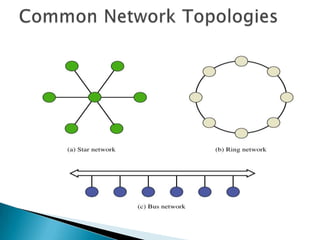
 Common Network Topologies
 Data Encapsulation
2
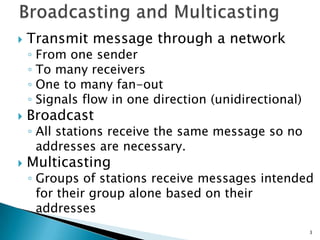
 Transmit message through a network
◦ From one sender
◦ To many receivers
◦ One to many fan-out
◦ Signals flow in one direction (unidirectional)
 Broadcast
◦ All stations receive the same message so no
addresses are necessary.
 Multicasting
◦ Groups of stations receive messages intended
for their group alone based on their
addresses
3
 Transmit message through a network
◦ From one sender
◦ To one receiver (one to one fan-out)
◦ One pair at a time
◦ Signals flow both direction (bidirectional)
 Addresses
◦ With only two stations - do not need
addresses (e.g. walkie talkie)
◦ With more than two stations - addresses are
needed to ensure messages are received by
the right station (e.g. cell phone)
4
 What is a broadcast?
 How are addresses used in multicast
communication over a network?
 How are addresses used in point-to-
point communication over a network?
5
 Packets
◦ Elemental components of a message from a
source to a destination
 Blocks and Frames
◦ Combinations of packets used to move data
from an intermediate source to an
intermediate destination
 Requirements
◦ Matching sending and receiving protocols at
each end of link to encode and decode the
information
6
 Protocols
◦ rules established for the users to gain control
of the network to exchange information
 Protocol stack
◦ set of protocols used by a system
 Layered network
◦ two or more independent protocol levels
 Topology
◦ architecture used to interconnect networking
equipment
7
 What is a message packet?
 What is a protocol stack?
 What is a layered network?
8
9
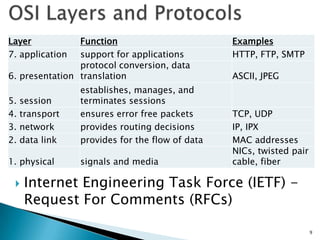
 Internet Engineering Task Force (IETF) -
Request For Comments (RFCs)
Layer Function Examples
7. application support for applications HTTP, FTP, SMTP
6. presentation
protocol conversion, data
translation ASCII, JPEG
5. session
establishes, manages, and
terminates sessions
4. transport ensures error free packets TCP, UDP
3. network provides routing decisions IP, IPX
2. data link provides for the flow of data MAC addresses
1. physical signals and media
NICs, twisted pair
cable, fiber
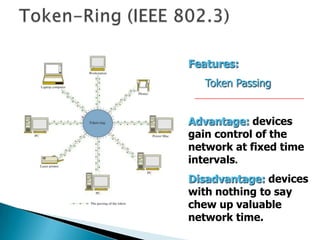
Features:
Token Passing
Advantage: devices
gain control of the
network at fixed time
intervals.
Disadvantage: devices
with nothing to say
chew up valuable
network time.
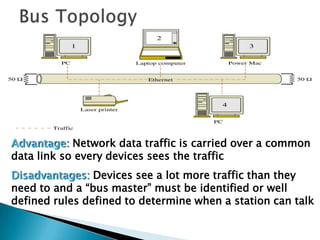
Advantage: Network data traffic is carried over a common
data link so every devices sees the traffic
Disadvantages: Devices see a lot more traffic than they
need to and a “bus master” must be identified or well
defined rules defined to determine when a station can talk
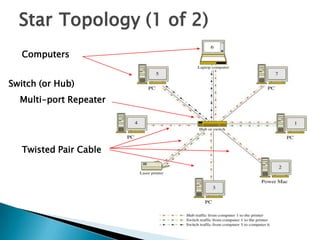
Star Topology (1 of 2)
Switch (or Hub)
Multi-port Repeater
Twisted Pair Cable
Computers
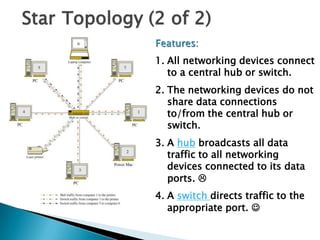
Star Topology (2 of 2)
Features:
1. All networking devices connect
to a central hub or switch.
2. The networking devices do not
share data connections
to/from the central hub or
switch.
3. A hub broadcasts all data
traffic to all networking
devices connected to its data
ports. 
4. A switch directs traffic to the
appropriate port. 
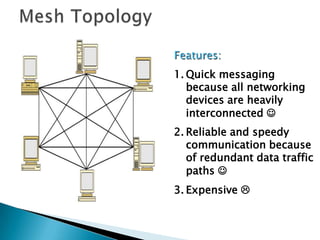
Features:
1. Quick messaging
because all networking
devices are heavily
interconnected 
2. Reliable and speedy
communication because
of redundant data traffic
paths 
3. Expensive 
 Any combination of two or more
topologies to form a larger, more
complex network
16
 Compare and contrast the functions
performed by each OSI layer.
 Describe the differences, advantages and
disadvantages of a star, ring, bus and mesh
network.
 Which network topology is the most
reliable?
 Which network topology is the least
efficient?
 How do devices on a bus topology decide
who gets to talk and when?
17
 How we package data for transport over a
communications link.
 In the OSI model, as a data packet moves
◦ From higher to lower layers - headers are
added
◦ From lower to upper layers - headers are
removed
 Format depends on
◦ Type of network used
◦ Equipment used
◦ Vendor
18
 Sometimes equipment is not
interoperable with other equipment
◦ Even though they are both have specified the
same encapsulation.
◦ In that case, another encapsulation format
can be used to make the direct connection.
19
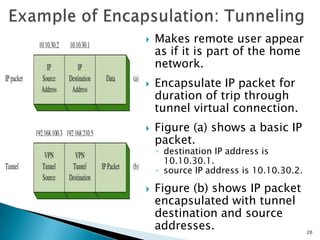
 Makes remote user appear
as if it is part of the home
network.
 Encapsulate IP packet for
duration of trip through
tunnel virtual connection.
 Figure (a) shows a basic IP
packet.
◦ destination IP address is
10.10.30.1.
◦ source IP address is 10.10.30.2.
 Figure (b) shows IP packet
encapsulated with tunnel
destination and source
addresses. 20
 What roles does encapsulation play in the
OSI model?
 In the OSI model, what happens as a data
packet moves from the highest to the
lowest protocol level?
 Describe some of the possible reasons
for communication equipment not being
able to properly talk to each other.
21
 Communication Networks
 OSI Layers and Protocols Supported
 Common Network Topologies
 Data Encapsulation
22

Ecet375 1 a - basic networking concepts

  • 1.
  • 2.
     Communication Networks OSI Layers and Protocols Supported  Common Network Topologies  Data Encapsulation 2
  • 3.
     Transmit messagethrough a network ◦ From one sender ◦ To many receivers ◦ One to many fan-out ◦ Signals flow in one direction (unidirectional)  Broadcast ◦ All stations receive the same message so no addresses are necessary.  Multicasting ◦ Groups of stations receive messages intended for their group alone based on their addresses 3
  • 4.
     Transmit messagethrough a network ◦ From one sender ◦ To one receiver (one to one fan-out) ◦ One pair at a time ◦ Signals flow both direction (bidirectional)  Addresses ◦ With only two stations - do not need addresses (e.g. walkie talkie) ◦ With more than two stations - addresses are needed to ensure messages are received by the right station (e.g. cell phone) 4
  • 5.
     What isa broadcast?  How are addresses used in multicast communication over a network?  How are addresses used in point-to- point communication over a network? 5
  • 6.
     Packets ◦ Elementalcomponents of a message from a source to a destination  Blocks and Frames ◦ Combinations of packets used to move data from an intermediate source to an intermediate destination  Requirements ◦ Matching sending and receiving protocols at each end of link to encode and decode the information 6
  • 7.
     Protocols ◦ rulesestablished for the users to gain control of the network to exchange information  Protocol stack ◦ set of protocols used by a system  Layered network ◦ two or more independent protocol levels  Topology ◦ architecture used to interconnect networking equipment 7
  • 8.
     What isa message packet?  What is a protocol stack?  What is a layered network? 8
  • 9.
    9  Internet EngineeringTask Force (IETF) - Request For Comments (RFCs) Layer Function Examples 7. application support for applications HTTP, FTP, SMTP 6. presentation protocol conversion, data translation ASCII, JPEG 5. session establishes, manages, and terminates sessions 4. transport ensures error free packets TCP, UDP 3. network provides routing decisions IP, IPX 2. data link provides for the flow of data MAC addresses 1. physical signals and media NICs, twisted pair cable, fiber
  • 11.
    Features: Token Passing Advantage: devices gaincontrol of the network at fixed time intervals. Disadvantage: devices with nothing to say chew up valuable network time.
  • 12.
    Advantage: Network datatraffic is carried over a common data link so every devices sees the traffic Disadvantages: Devices see a lot more traffic than they need to and a “bus master” must be identified or well defined rules defined to determine when a station can talk
  • 13.
    Star Topology (1of 2) Switch (or Hub) Multi-port Repeater Twisted Pair Cable Computers
  • 14.
    Star Topology (2of 2) Features: 1. All networking devices connect to a central hub or switch. 2. The networking devices do not share data connections to/from the central hub or switch. 3. A hub broadcasts all data traffic to all networking devices connected to its data ports.  4. A switch directs traffic to the appropriate port. 
  • 15.
    Features: 1. Quick messaging becauseall networking devices are heavily interconnected  2. Reliable and speedy communication because of redundant data traffic paths  3. Expensive 
  • 16.
     Any combinationof two or more topologies to form a larger, more complex network 16
  • 17.
     Compare andcontrast the functions performed by each OSI layer.  Describe the differences, advantages and disadvantages of a star, ring, bus and mesh network.  Which network topology is the most reliable?  Which network topology is the least efficient?  How do devices on a bus topology decide who gets to talk and when? 17
  • 18.
     How wepackage data for transport over a communications link.  In the OSI model, as a data packet moves ◦ From higher to lower layers - headers are added ◦ From lower to upper layers - headers are removed  Format depends on ◦ Type of network used ◦ Equipment used ◦ Vendor 18
  • 19.
     Sometimes equipmentis not interoperable with other equipment ◦ Even though they are both have specified the same encapsulation. ◦ In that case, another encapsulation format can be used to make the direct connection. 19
  • 20.
     Makes remoteuser appear as if it is part of the home network.  Encapsulate IP packet for duration of trip through tunnel virtual connection.  Figure (a) shows a basic IP packet. ◦ destination IP address is 10.10.30.1. ◦ source IP address is 10.10.30.2.  Figure (b) shows IP packet encapsulated with tunnel destination and source addresses. 20
  • 21.
     What rolesdoes encapsulation play in the OSI model?  In the OSI model, what happens as a data packet moves from the highest to the lowest protocol level?  Describe some of the possible reasons for communication equipment not being able to properly talk to each other. 21
  • 22.
     Communication Networks OSI Layers and Protocols Supported  Common Network Topologies  Data Encapsulation 22