EE4106 Computer Networking
Lecturer: Ismail Amin Ali
ECE, University of Duhok
Class/LAB Schedule
 4 Credits:
 One 90m lecture + One 45m lecture)/week
 One 120-minute Lab/week
2
Text Books
 Behrouz A. Farouzan, Data Communications and
Networking, 5th ed., McGraw Hill, 2013
 Tanenbaum, Andrew S., and David Wetherall.
Computer networks. 5th Edition, Harlow, Essex:
Pearson, 2014.
 Todd Lammle, CCNA: Cisco Certified Network
Associate Study Guide, 6th ed., 2006
3
Topics Covered
 Overview
 OSI Reference Model
 Network Models
 Physical Layer
 Transmission Media
 Data-Link Layer
 Data Link Control (DLC)
 Media Access Control (MAC)
 Wired LANs: Ethernet
 Wireless LANs
 Connecting Devices and VLANs
4
Topics Covered
 Network Layer
 Logical Addressing
 Internet Protocol
 Network-Layer Protocols (IP, ICMP)
 Debugging tools (ping, traceroute, tracert)
 Unicast Routing (Distance-Vector Routing, Link-State Routing)
 Transport Layer
 Transport Layer Services
 Transport-Layer Protocols (UDP, TCP, and SCTP)
 Application Layer
5
Assessment
 10% Homework
 10% Quizzes
 20% One mid term exam
 10% Lab. Reports, quizzes and examinations
 10% Lab. Final Exam
 40% Final examination
6
Data Communications
 We communicate to share information which can be local or
remote
 Telecommunication, which includes telephony, telegraphy,
and television, means communication at a distance (tele is
Greek for “far”).
 Data refers to information presented in whatever form is
agreed upon by the parties creating and using the data.
 Data communications are the exchange of data between
two devices via some form of transmission medium. For
data communications to occur, the communicating devices
must be part of a communication system made up of a
combination of hardware (physical equipment) and software
(programs).
7
Data Communications
 Communicating devices must be part of a communication
system made up of a combination of hardware and software.
 The effectiveness of a data communications system depends
on four fundamental characteristics:
 Delivery: The system must deliver data to the correct destination.
 Accuracy. The system must deliver the data accurately (errors).
 Timeliness. The system must deliver data in a timely manner. Data
delivered late are useless. In the case of video and audio, timely
delivery means delivering data as they are produced, in the same
order that they are produced, and without significant delay. This kind
of delivery is called real-time transmission.
 Jitter. Jitter refers to the variation in the packet arrival time. It is the
uneven delay in the delivery of audio or video packets. For example,
let us assume that video packets are sent every 30 ms. If some of the
packets arrive with 30-ms delay and others with 40-ms delay, an
uneven quality in the video is the result.
8
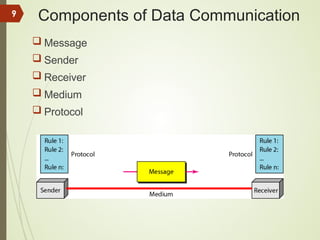
Components of Data Communication
 Message
 Sender
 Receiver
 Medium
 Protocol
9
Components of Data Communication
 Message: text, numbers, pictures, audio, or video
10
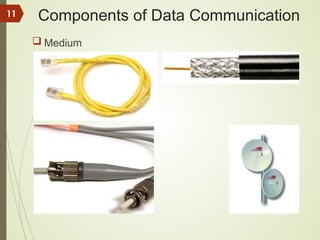
Components of Data Communication
 Medium
11
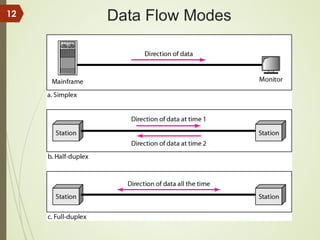
Data Flow Modes
12
What is a Network?
 A network is the interconnection of a set of
devices capable of communication.
 A device can be:
 a host such as a large computer, desktop, laptop, workstation,
phone, printer
 or a connecting device such (router, switch, modem, …).
 Devices in a network are connected using wired or
wireless transmission media.
13
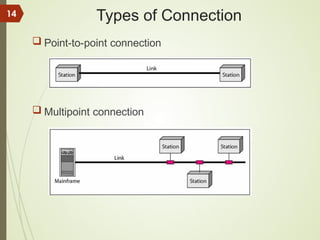
Types of Connection
 Point-to-point connection
 Multipoint connection
14
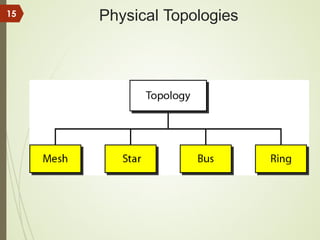
Physical Topologies
15
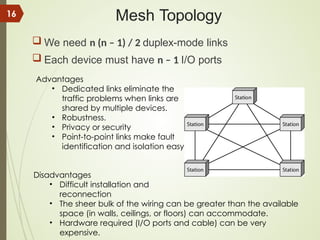
Mesh Topology
 We need n (n – 1) / 2 duplex-mode links
 Each device must have n – 1 I/O ports
Advantages
• Dedicated links eliminate the
traffic problems when links are
shared by multiple devices.
• Robustness.
• Privacy or security
• Point-to-point links make fault
identification and isolation easy
Disadvantages
• Difficult installation and
reconnection
• The sheer bulk of the wiring can be greater than the available
space (in walls, ceilings, or floors) can accommodate.
• Hardware required (I/O ports and cable) can be very
expensive.
16
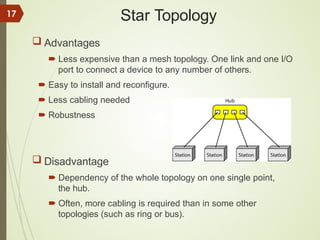
Star Topology
 Advantages
 Less expensive than a mesh topology. One link and one I/O
port to connect a device to any number of others.
 Easy to install and reconfigure.
 Less cabling needed
 Robustness
 Disadvantage
 Dependency of the whole topology on one single point,
the hub.
 Often, more cabling is required than in some other
topologies (such as ring or bus).
17
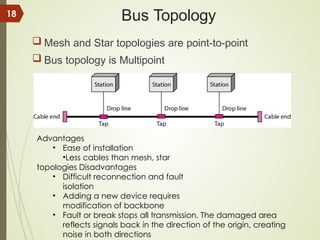
Bus Topology
 Mesh and Star topologies are point-to-point
 Bus topology is Multipoint
Advantages
• Ease of installation
•Less cables than mesh, star
topologies Disadvantages
• Difficult reconnection and fault
isolation
• Adding a new device requires
modification of backbone
• Fault or break stops all transmission. The damaged area
reflects signals back in the direction of the origin, creating
noise in both directions
18
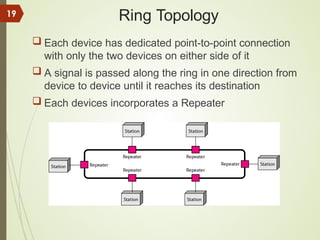
Ring Topology
 Each device has dedicated point-to-point connection
with only the two devices on either side of it
 A signal is passed along the ring in one direction from
device to device until it reaches its destination
 Each devices incorporates a Repeater
19
Ring Topology
 Advantages
Easy to install and reconfigure
Connect to immediate neighbors
Move two connections for any moving (Add/Delete)
Fault isolation is simple
 Disadvantage
Unidirectional, one broken device can disable the
entire network. This weakness can be solved by
using a dual ring or a switch capable of closing off the
break
20
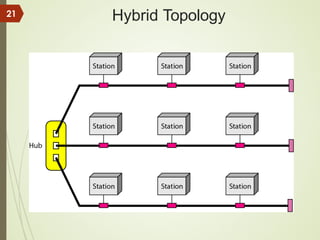
Hybrid Topology
21
Categories of Networks
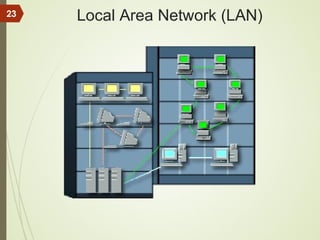
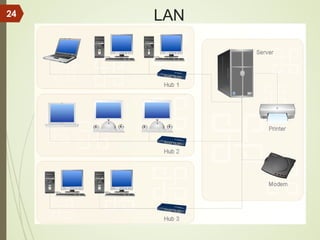
 Local Area Networks (LANs)
 Short distances
 Normally limited in size
 Designed to provide local interconnectivity
 A LAN interconnects hosts;
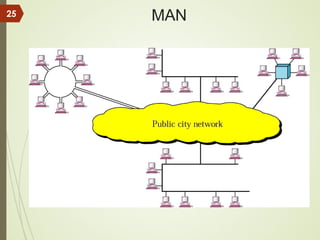
 Metropolitan Area Networks (MANs)
 Provide connectivity over areas such as a city, a campus
 Owned by private company or it may be a service provided by public company
( such as local tel.-company)
 May be single network such as a cable television network, or it may be
connected number of LANs into a large network so that resources may be
shared LAN-TO-LAN.
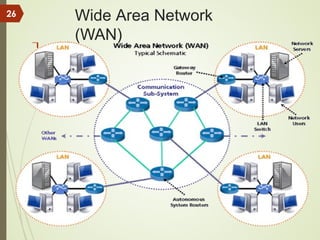
 Wide Area Networks (WANs)
 Long distances
 WAN has a wider geographical span than LAN, spanning a town, a state, a
country, or even the world
 Provide connectivity over large areas
 A WAN interconnects connecting devices such as switches, routers, or
modems
22
Local Area Network (LAN)
23
LAN
24
MAN
25
Wide Area Network
(WAN)

26
WAN
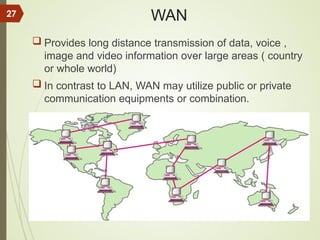
 Provides long distance transmission of data, voice ,
image and video information over large areas ( country
or whole world)
 In contrast to LAN, WAN may utilize public or private
communication equipments or combination.
27
Point to Point WAN
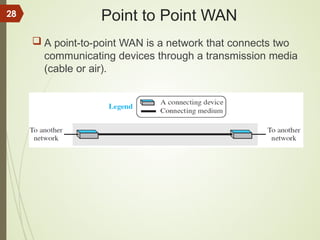
 A point-to-point WAN is a network that connects two
communicating devices through a transmission media
(cable or air).
28
Switched WAN
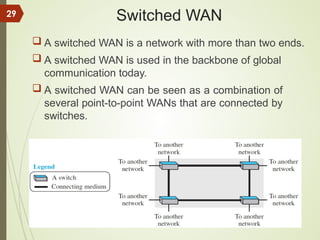
 A switched WAN is a network with more than two ends.
 A switched WAN is used in the backbone of global
communication today.
 A switched WAN can be seen as a combination of
several point-to-point WANs that are connected by
switches.
29
Internetwork
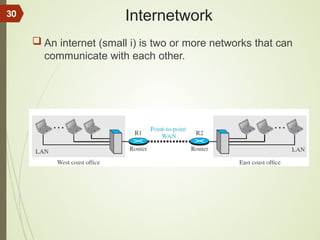
 An internet (small i) is two or more networks that can
communicate with each other.
30
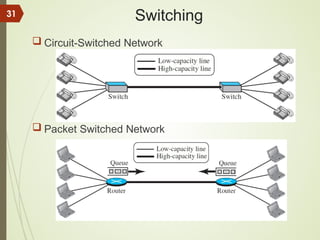
Switching
 Circuit-Switched Network
 Packet Switched Network
31
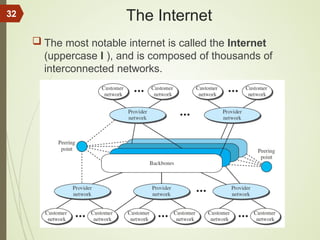
The Internet
 The most notable internet is called the Internet
(uppercase I ), and is composed of thousands of
interconnected networks.
32

This is about network basics and all required

  • 1.
    EE4106 Computer Networking Lecturer:Ismail Amin Ali ECE, University of Duhok
  • 2.
    Class/LAB Schedule  4Credits:  One 90m lecture + One 45m lecture)/week  One 120-minute Lab/week 2
  • 3.
    Text Books  BehrouzA. Farouzan, Data Communications and Networking, 5th ed., McGraw Hill, 2013  Tanenbaum, Andrew S., and David Wetherall. Computer networks. 5th Edition, Harlow, Essex: Pearson, 2014.  Todd Lammle, CCNA: Cisco Certified Network Associate Study Guide, 6th ed., 2006 3
  • 4.
    Topics Covered  Overview OSI Reference Model  Network Models  Physical Layer  Transmission Media  Data-Link Layer  Data Link Control (DLC)  Media Access Control (MAC)  Wired LANs: Ethernet  Wireless LANs  Connecting Devices and VLANs 4
  • 5.
    Topics Covered  NetworkLayer  Logical Addressing  Internet Protocol  Network-Layer Protocols (IP, ICMP)  Debugging tools (ping, traceroute, tracert)  Unicast Routing (Distance-Vector Routing, Link-State Routing)  Transport Layer  Transport Layer Services  Transport-Layer Protocols (UDP, TCP, and SCTP)  Application Layer 5
  • 6.
    Assessment  10% Homework 10% Quizzes  20% One mid term exam  10% Lab. Reports, quizzes and examinations  10% Lab. Final Exam  40% Final examination 6
  • 7.
    Data Communications  Wecommunicate to share information which can be local or remote  Telecommunication, which includes telephony, telegraphy, and television, means communication at a distance (tele is Greek for “far”).  Data refers to information presented in whatever form is agreed upon by the parties creating and using the data.  Data communications are the exchange of data between two devices via some form of transmission medium. For data communications to occur, the communicating devices must be part of a communication system made up of a combination of hardware (physical equipment) and software (programs). 7
  • 8.
    Data Communications  Communicatingdevices must be part of a communication system made up of a combination of hardware and software.  The effectiveness of a data communications system depends on four fundamental characteristics:  Delivery: The system must deliver data to the correct destination.  Accuracy. The system must deliver the data accurately (errors).  Timeliness. The system must deliver data in a timely manner. Data delivered late are useless. In the case of video and audio, timely delivery means delivering data as they are produced, in the same order that they are produced, and without significant delay. This kind of delivery is called real-time transmission.  Jitter. Jitter refers to the variation in the packet arrival time. It is the uneven delay in the delivery of audio or video packets. For example, let us assume that video packets are sent every 30 ms. If some of the packets arrive with 30-ms delay and others with 40-ms delay, an uneven quality in the video is the result. 8
  • 9.
    Components of DataCommunication  Message  Sender  Receiver  Medium  Protocol 9
  • 10.
    Components of DataCommunication  Message: text, numbers, pictures, audio, or video 10
  • 11.
    Components of DataCommunication  Medium 11
  • 12.
  • 13.
    What is aNetwork?  A network is the interconnection of a set of devices capable of communication.  A device can be:  a host such as a large computer, desktop, laptop, workstation, phone, printer  or a connecting device such (router, switch, modem, …).  Devices in a network are connected using wired or wireless transmission media. 13
  • 14.
    Types of Connection Point-to-point connection  Multipoint connection 14
  • 15.
  • 16.
    Mesh Topology  Weneed n (n – 1) / 2 duplex-mode links  Each device must have n – 1 I/O ports Advantages • Dedicated links eliminate the traffic problems when links are shared by multiple devices. • Robustness. • Privacy or security • Point-to-point links make fault identification and isolation easy Disadvantages • Difficult installation and reconnection • The sheer bulk of the wiring can be greater than the available space (in walls, ceilings, or floors) can accommodate. • Hardware required (I/O ports and cable) can be very expensive. 16
  • 17.
    Star Topology  Advantages Less expensive than a mesh topology. One link and one I/O port to connect a device to any number of others.  Easy to install and reconfigure.  Less cabling needed  Robustness  Disadvantage  Dependency of the whole topology on one single point, the hub.  Often, more cabling is required than in some other topologies (such as ring or bus). 17
  • 18.
    Bus Topology  Meshand Star topologies are point-to-point  Bus topology is Multipoint Advantages • Ease of installation •Less cables than mesh, star topologies Disadvantages • Difficult reconnection and fault isolation • Adding a new device requires modification of backbone • Fault or break stops all transmission. The damaged area reflects signals back in the direction of the origin, creating noise in both directions 18
  • 19.
    Ring Topology  Eachdevice has dedicated point-to-point connection with only the two devices on either side of it  A signal is passed along the ring in one direction from device to device until it reaches its destination  Each devices incorporates a Repeater 19
  • 20.
    Ring Topology  Advantages Easyto install and reconfigure Connect to immediate neighbors Move two connections for any moving (Add/Delete) Fault isolation is simple  Disadvantage Unidirectional, one broken device can disable the entire network. This weakness can be solved by using a dual ring or a switch capable of closing off the break 20
  • 21.
  • 22.
    Categories of Networks Local Area Networks (LANs)  Short distances  Normally limited in size  Designed to provide local interconnectivity  A LAN interconnects hosts;  Metropolitan Area Networks (MANs)  Provide connectivity over areas such as a city, a campus  Owned by private company or it may be a service provided by public company ( such as local tel.-company)  May be single network such as a cable television network, or it may be connected number of LANs into a large network so that resources may be shared LAN-TO-LAN.  Wide Area Networks (WANs)  Long distances  WAN has a wider geographical span than LAN, spanning a town, a state, a country, or even the world  Provide connectivity over large areas  A WAN interconnects connecting devices such as switches, routers, or modems 22
  • 23.
  • 24.
  • 25.
  • 26.
  • 27.
    WAN  Provides longdistance transmission of data, voice , image and video information over large areas ( country or whole world)  In contrast to LAN, WAN may utilize public or private communication equipments or combination. 27
  • 28.
    Point to PointWAN  A point-to-point WAN is a network that connects two communicating devices through a transmission media (cable or air). 28
  • 29.
    Switched WAN  Aswitched WAN is a network with more than two ends.  A switched WAN is used in the backbone of global communication today.  A switched WAN can be seen as a combination of several point-to-point WANs that are connected by switches. 29
  • 30.
    Internetwork  An internet(small i) is two or more networks that can communicate with each other. 30
  • 31.
  • 32.
    The Internet  Themost notable internet is called the Internet (uppercase I ), and is composed of thousands of interconnected networks. 32