An Easier Way to Create a
Bibliography!

http://www.easybib.com
EasyBib is an online tool that makes research, note taking, and creating a
works cited page very simple. EasyBib has both free and reasonably priced
premium accounts available.
1

2

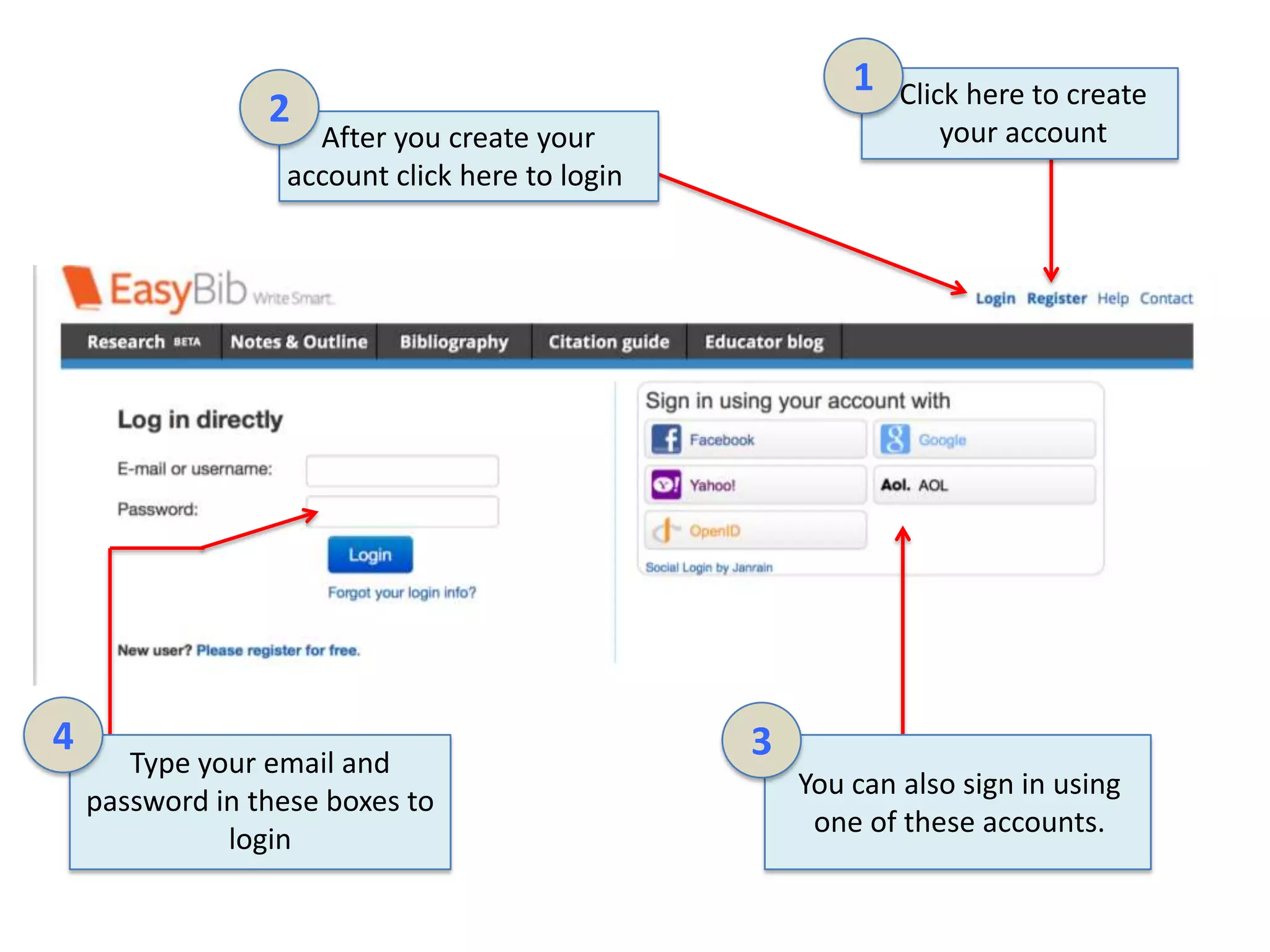
After you create your
account click here to login

4

Type your email and
password in these boxes to
login

Click here to create
your account

3
You can also sign in using
one of these accounts.
1

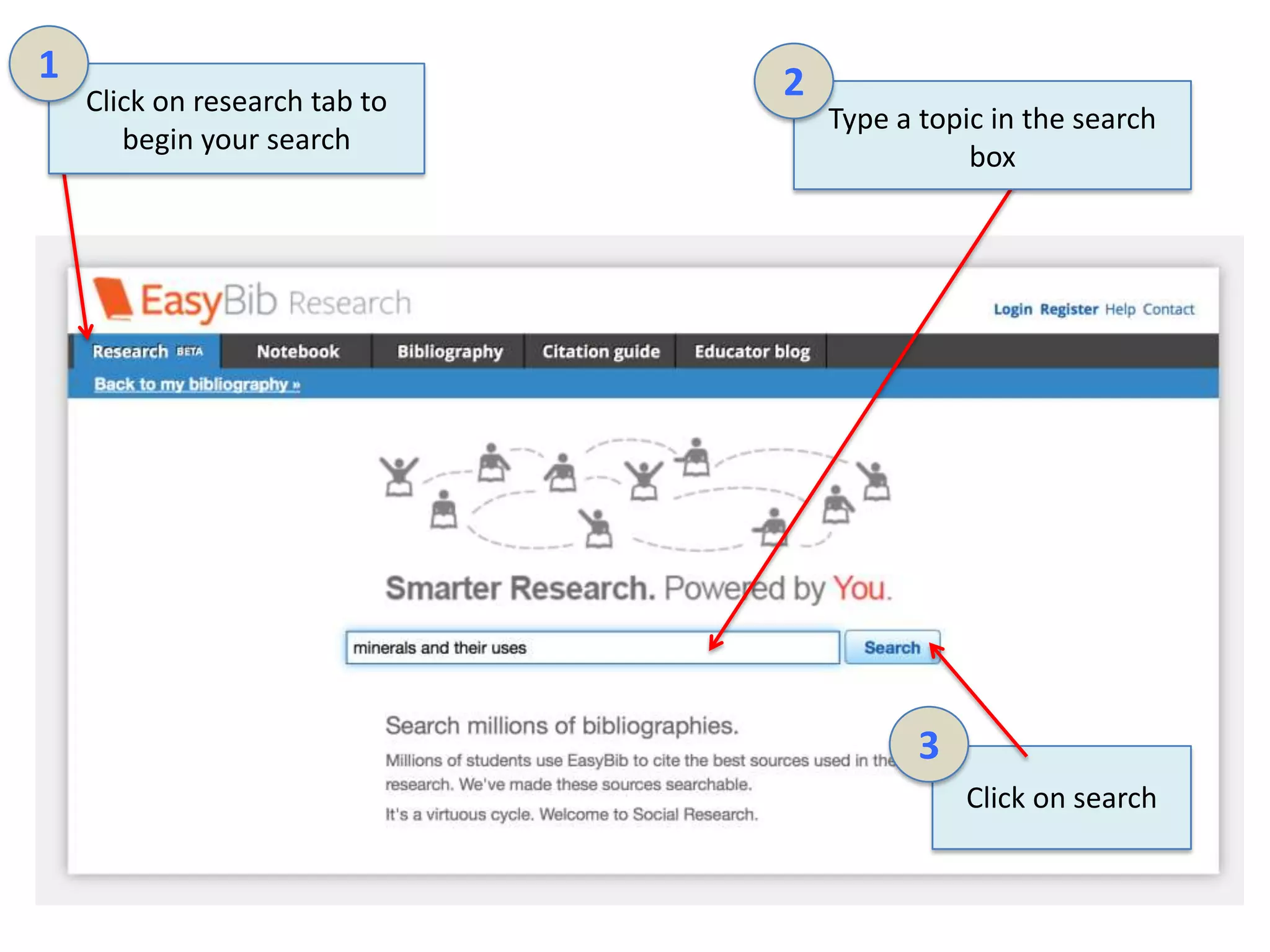
Click on research tab to
begin your search

2

Type a topic in the search
box

3
Click on search
1

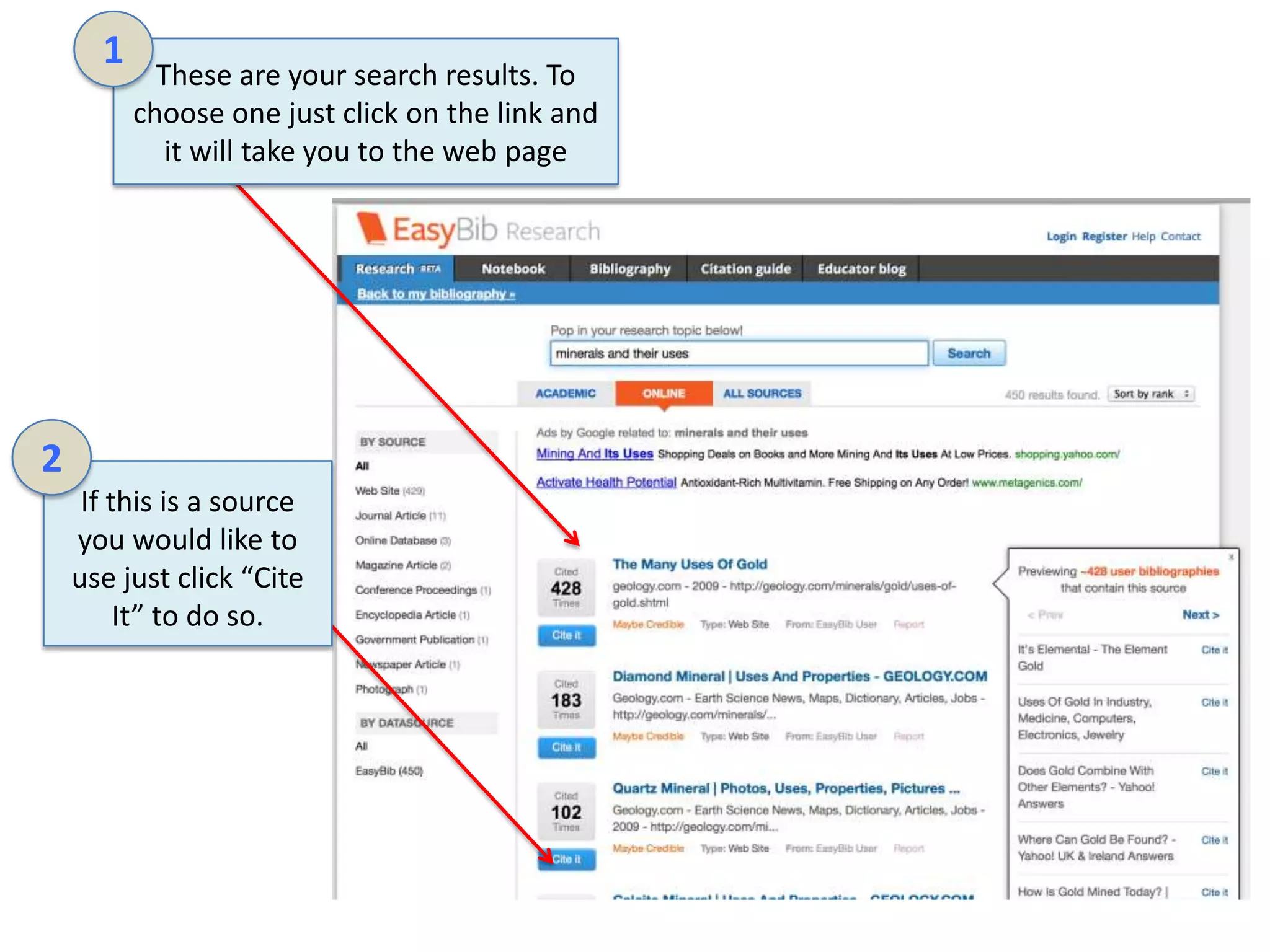
These are your search results. To
choose one just click on the link and
it will take you to the web page

2
If this is a source
you would like to
use just click “Cite
It” to do so.
1

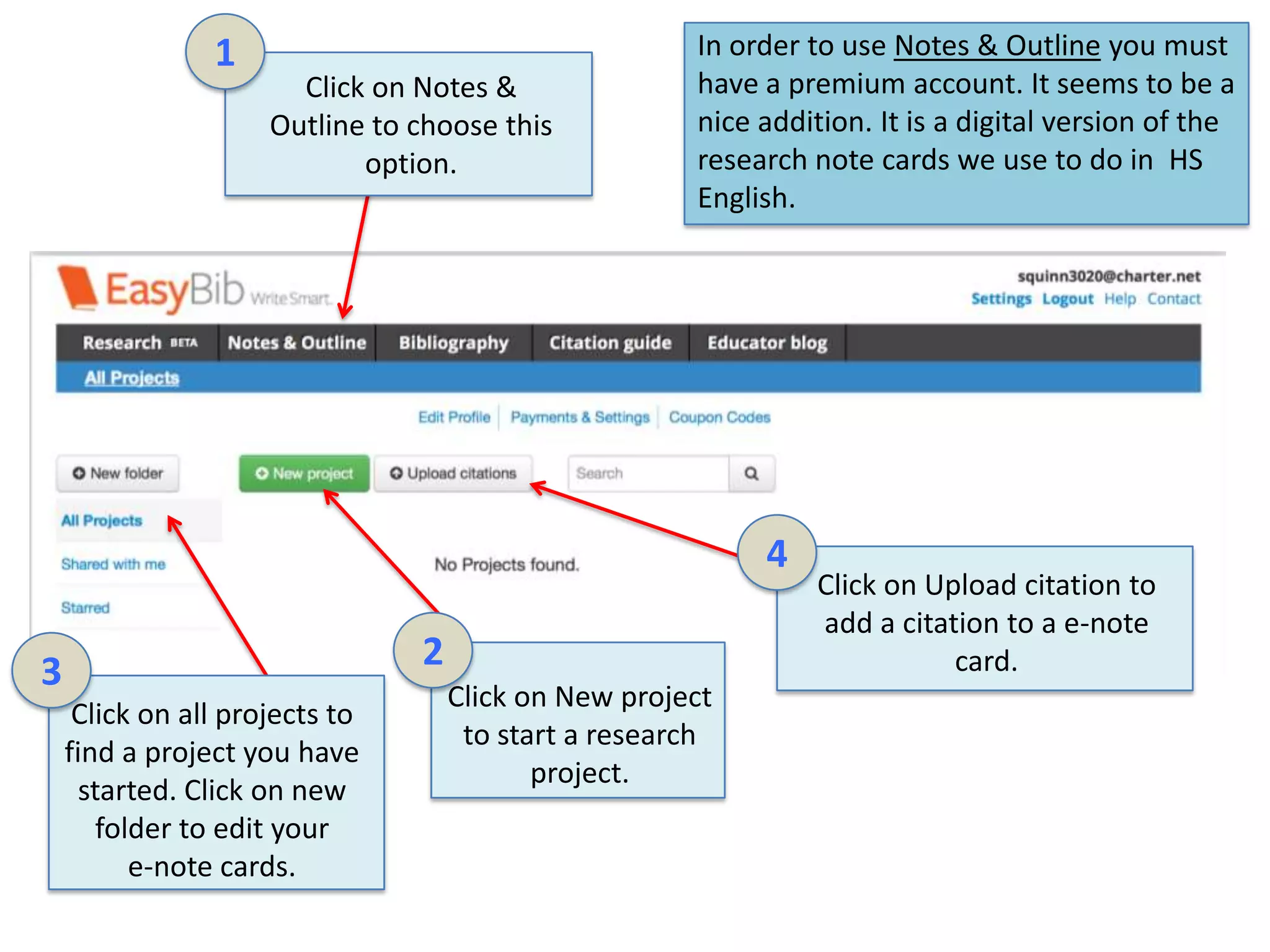
Click on Notes &
Outline to choose this
option.

In order to use Notes & Outline you must
have a premium account. It seems to be a
nice addition. It is a digital version of the
research note cards we use to do in HS
English.

4
2

3
Click on all projects to
find a project you have
started. Click on new
folder to edit your
e-note cards.

Click on New project
to start a research
project.

Click on Upload citation to
add a citation to a e-note
card.
2

1
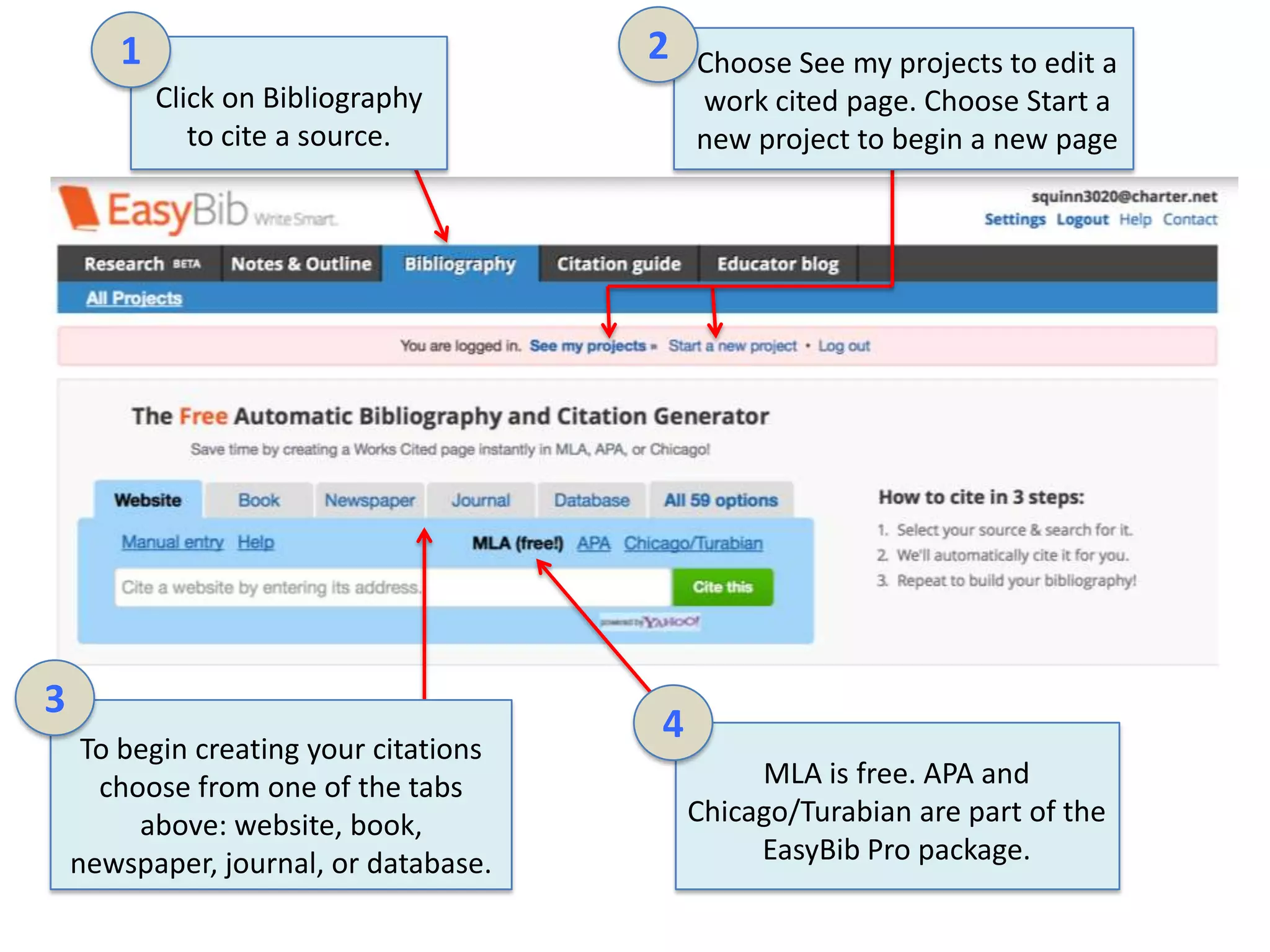
Click on Bibliography
to cite a source.

3
To begin creating your citations
choose from one of the tabs
above: website, book,
newspaper, journal, or database.

Choose See my projects to edit a
work cited page. Choose Start a
new project to begin a new page

4
MLA is free. APA and
Chicago/Turabian are part of the
EasyBib Pro package.
1
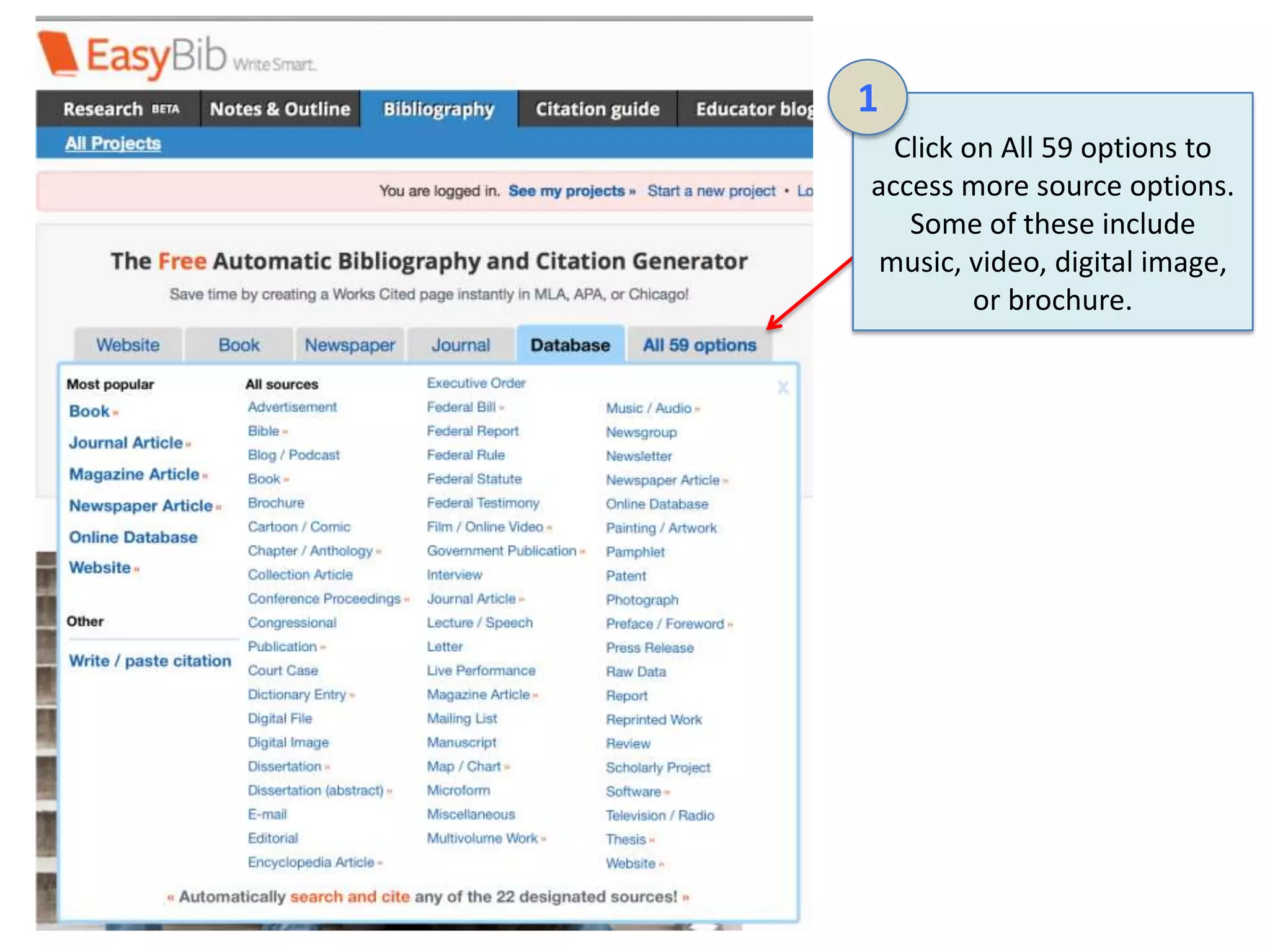
Click on All 59 options to
access more source options.
Some of these include
music, video, digital image,
or brochure.
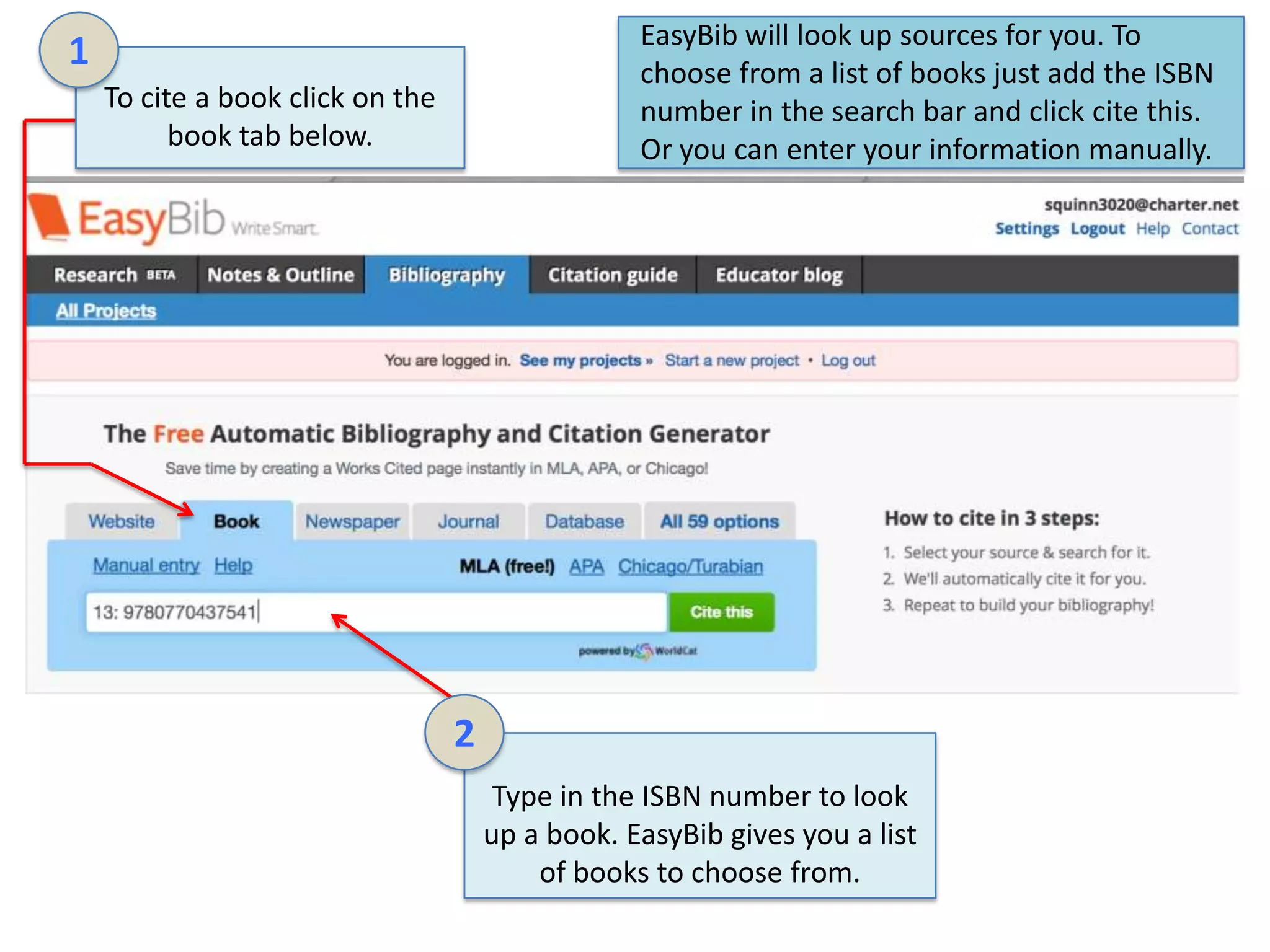
EasyBib will look up sources for you. To
choose from a list of books just add the ISBN
number in the search bar and click cite this.
Or you can enter your information manually.

1
To cite a book click on the
book tab below.

2
Type in the ISBN number to look
up a book. EasyBib gives you a list
of books to choose from.
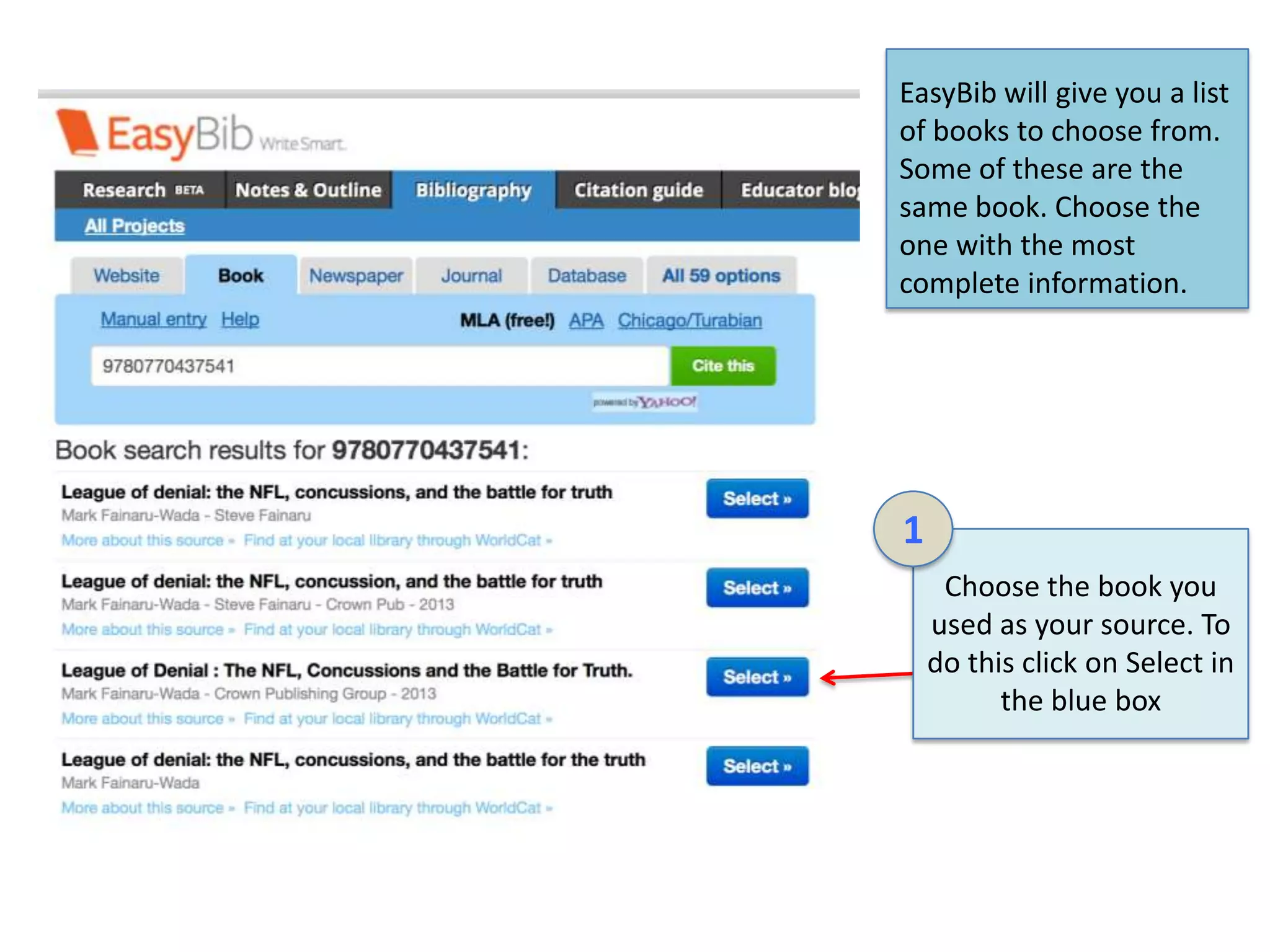
EasyBib will give you a list
of books to choose from.
Some of these are the
same book. Choose the
one with the most
complete information.

1
Choose the book you
used as your source. To
do this click on Select in
the blue box
1
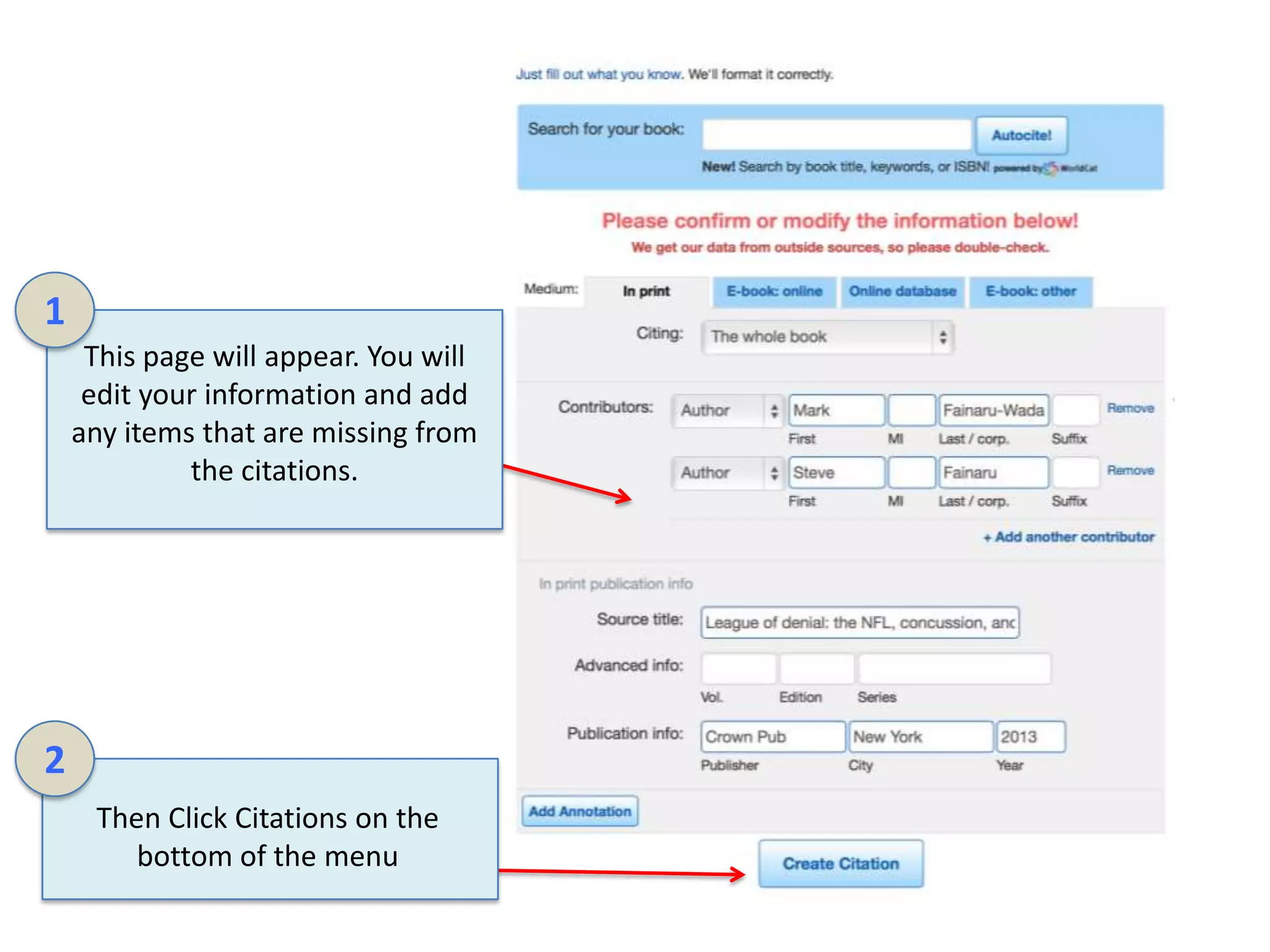
This page will appear. You will
edit your information and add
any items that are missing from
the citations.

2
Then Click Citations on the
bottom of the menu
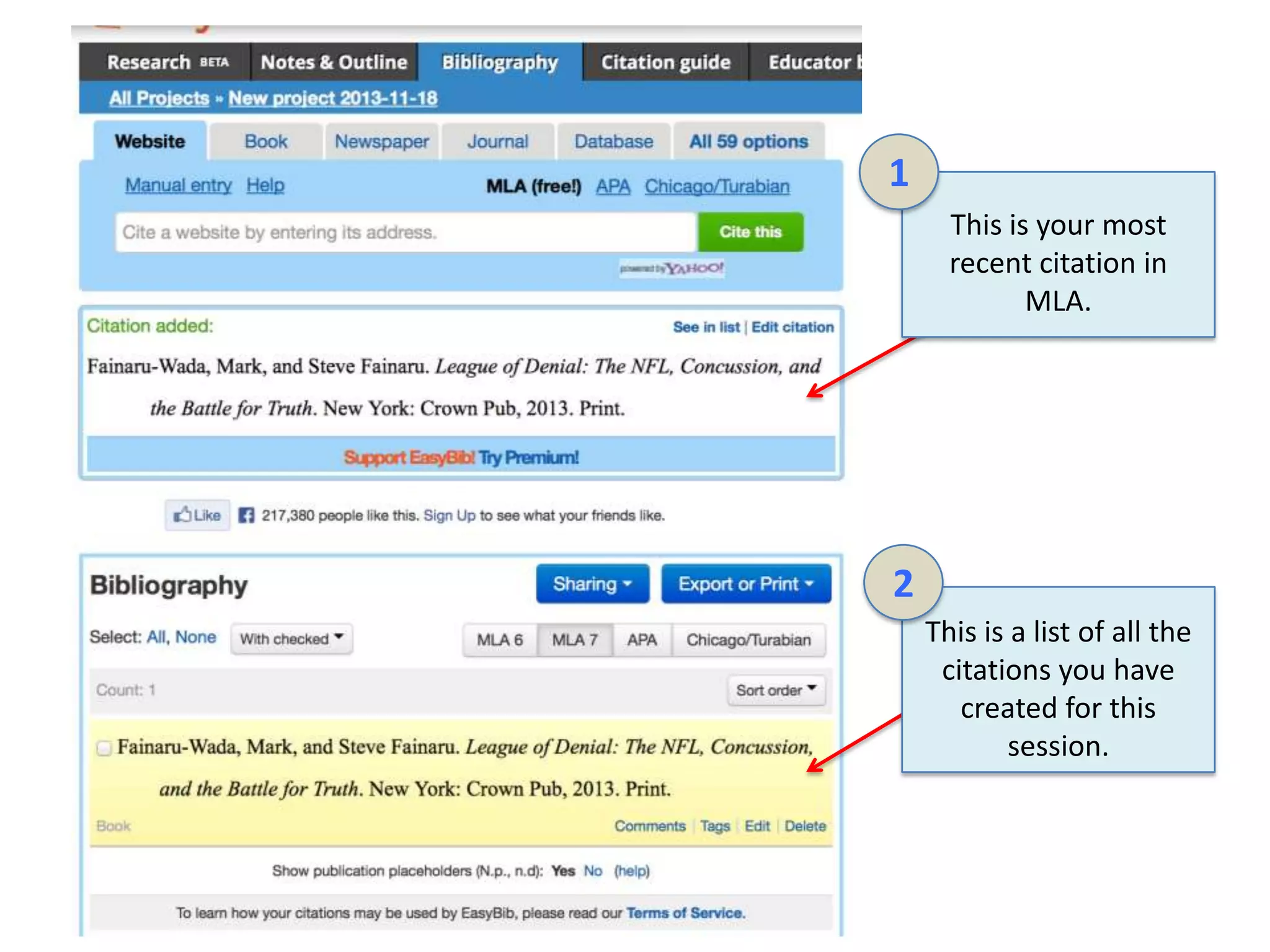
1
This is your most
recent citation in
MLA.

2
This is a list of all the
citations you have
created for this
session.
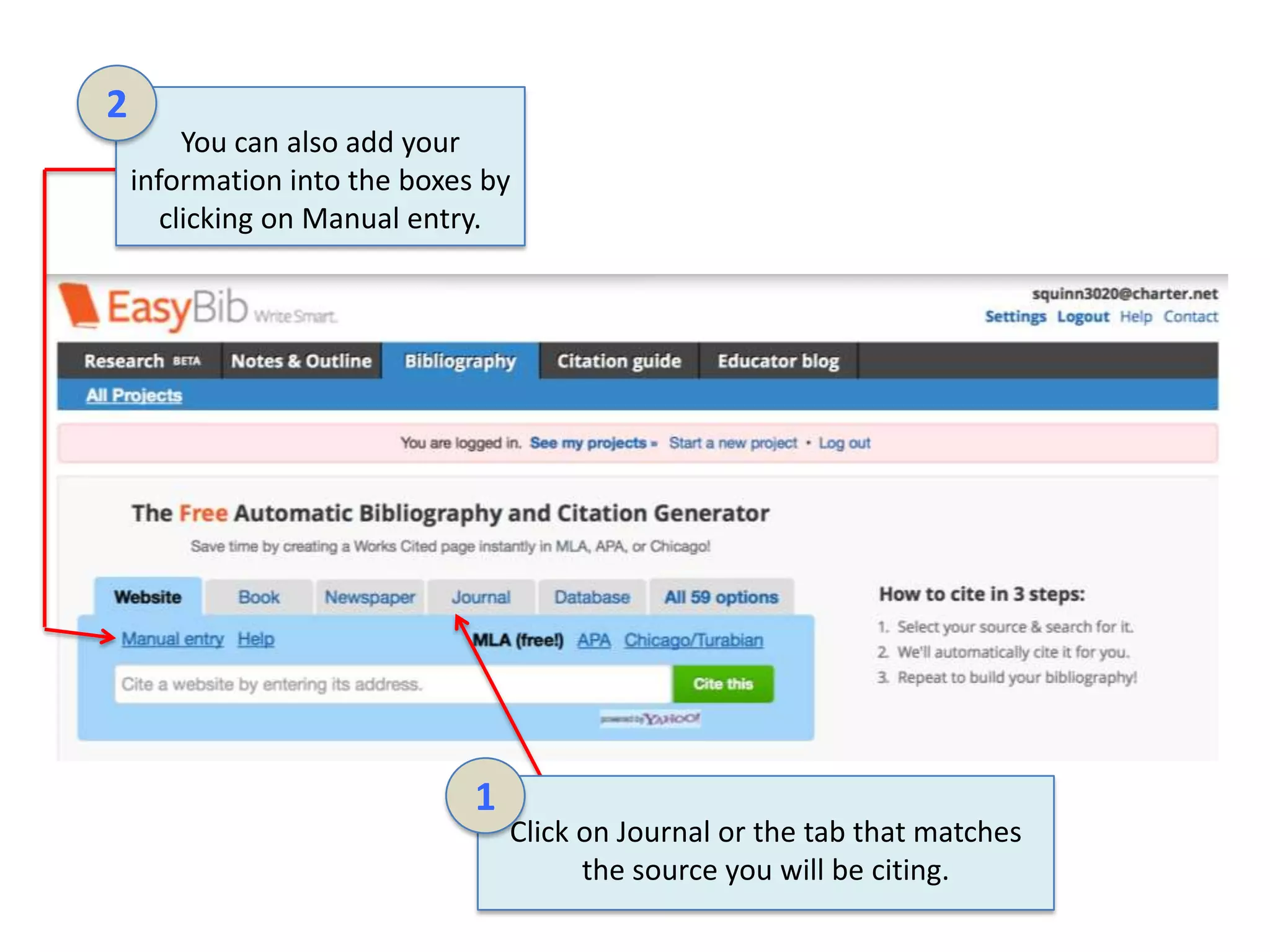
2
You can also add your
information into the boxes by
clicking on Manual entry.

1

Click on Journal or the tab that matches
the source you will be citing.
1
Type the
required
information in
the windows
provided.

2
Click Add
another
contributor to
add more
authors for
your journal
article

3
Once you have filled in
the required windows
click on Create Citation.
Once you have added all of
your sources there are several
options for the final works
cited page. Option 1 is Sharing.
Option 2 Export or Print

1
Click on Sharing to get
a drop down menu of
sharing options

2
This option allows you
to email your works
cited, invite others, or
share as a link.
1
Click on the other
option Export or
Print

2
You can print as a word
document, save to your
Google docs or SkyDrive.
Email the bibliography or
copy and paste into
another document.
Completed Work Cited Example

Your final work cited page will look like the example below. I like to export mine to a word document.
Then I can copy and paste the information into the format I am working with at the time.

Works Cited
Fainaru-Wada, Mark, and Steve Fainaru. League of Denial: The NFL, Concussion, and the Battle for
Truth. New York: Crown Pub, 2013. Print.
"League of Denial: The NFL’s Concussion Crisis." PBS. PBS, 8 Oct. 2013. Web. 25 Oct. 2013.
Mrazik, Martin, PhD, Constance Lebrun, and Joan M. White, PhD. "Does an Individual's Fitness Level
Affect Baseline Concussion Symptoms?" Journal of Athletic Training 48.5 (2013): 654-57. Print.

Olson, Eric. "New Nebraska Research Center to Study Concussions." College Football. Associate Press,
4 July 2013. Web. 18 Nov. 2013.

Easybib instructions

  • 1.
    An Easier Wayto Create a Bibliography! http://www.easybib.com EasyBib is an online tool that makes research, note taking, and creating a works cited page very simple. EasyBib has both free and reasonably priced premium accounts available.
  • 2.
    1 2 After you createyour account click here to login 4 Type your email and password in these boxes to login Click here to create your account 3 You can also sign in using one of these accounts.
  • 3.
    1 Click on researchtab to begin your search 2 Type a topic in the search box 3 Click on search
  • 4.
    1 These are yoursearch results. To choose one just click on the link and it will take you to the web page 2 If this is a source you would like to use just click “Cite It” to do so.
  • 5.
    1 Click on Notes& Outline to choose this option. In order to use Notes & Outline you must have a premium account. It seems to be a nice addition. It is a digital version of the research note cards we use to do in HS English. 4 2 3 Click on all projects to find a project you have started. Click on new folder to edit your e-note cards. Click on New project to start a research project. Click on Upload citation to add a citation to a e-note card.
  • 6.
    2 1 Click on Bibliography tocite a source. 3 To begin creating your citations choose from one of the tabs above: website, book, newspaper, journal, or database. Choose See my projects to edit a work cited page. Choose Start a new project to begin a new page 4 MLA is free. APA and Chicago/Turabian are part of the EasyBib Pro package.
  • 7.
    1 Click on All59 options to access more source options. Some of these include music, video, digital image, or brochure.
  • 8.
    EasyBib will lookup sources for you. To choose from a list of books just add the ISBN number in the search bar and click cite this. Or you can enter your information manually. 1 To cite a book click on the book tab below. 2 Type in the ISBN number to look up a book. EasyBib gives you a list of books to choose from.
  • 9.
    EasyBib will giveyou a list of books to choose from. Some of these are the same book. Choose the one with the most complete information. 1 Choose the book you used as your source. To do this click on Select in the blue box
  • 10.
    1 This page willappear. You will edit your information and add any items that are missing from the citations. 2 Then Click Citations on the bottom of the menu
  • 11.
    1 This is yourmost recent citation in MLA. 2 This is a list of all the citations you have created for this session.
  • 12.
    2 You can alsoadd your information into the boxes by clicking on Manual entry. 1 Click on Journal or the tab that matches the source you will be citing.
  • 13.
    1 Type the required information in thewindows provided. 2 Click Add another contributor to add more authors for your journal article 3 Once you have filled in the required windows click on Create Citation.
  • 14.
    Once you haveadded all of your sources there are several options for the final works cited page. Option 1 is Sharing. Option 2 Export or Print 1 Click on Sharing to get a drop down menu of sharing options 2 This option allows you to email your works cited, invite others, or share as a link.
  • 15.
    1 Click on theother option Export or Print 2 You can print as a word document, save to your Google docs or SkyDrive. Email the bibliography or copy and paste into another document.
  • 16.
    Completed Work CitedExample Your final work cited page will look like the example below. I like to export mine to a word document. Then I can copy and paste the information into the format I am working with at the time. Works Cited Fainaru-Wada, Mark, and Steve Fainaru. League of Denial: The NFL, Concussion, and the Battle for Truth. New York: Crown Pub, 2013. Print. "League of Denial: The NFL’s Concussion Crisis." PBS. PBS, 8 Oct. 2013. Web. 25 Oct. 2013. Mrazik, Martin, PhD, Constance Lebrun, and Joan M. White, PhD. "Does an Individual's Fitness Level Affect Baseline Concussion Symptoms?" Journal of Athletic Training 48.5 (2013): 654-57. Print. Olson, Eric. "New Nebraska Research Center to Study Concussions." College Football. Associate Press, 4 July 2013. Web. 18 Nov. 2013.