*‘*. 5!" 1'1;
' h ~.-
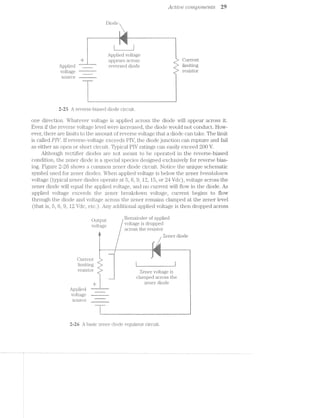
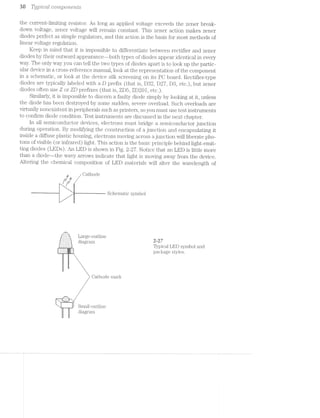
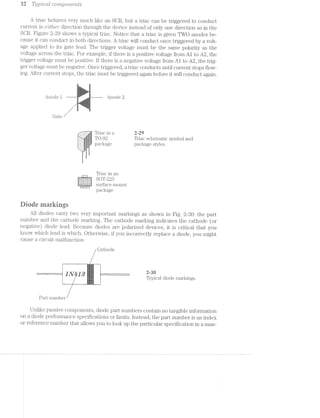
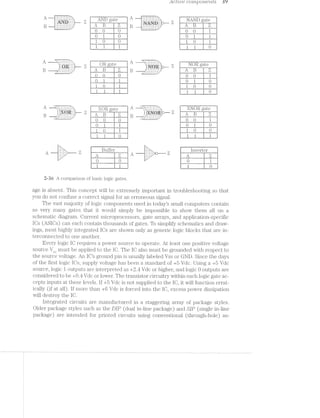
my. M: 31:‘-.~; >'_§‘='F‘2 M “-==i%=¢->s;,~‘q,~=:~% ¢e‘:' 1=s.s‘.-‘v .‘:=Iv', ::>'m :<,v,> i-.-V‘-< 1,:-11; :»:-"Vb "-‘.,r=, =
‘ §}_‘F¢I- _;i-‘-.=» :--,=.§;': {E15 2‘-31:1 =15}: if =I;,¢:
"‘“~i#> <7 '~'-5 '-"Y ‘i':‘-§- 1'‘i'i ‘I-Q51 5’-3"". -'1": -‘£5: 51,1‘: ' .-.3‘
""x§:q{,__ ’**¢._ .1?‘ 115$ -‘:'Z:‘fi!#1.~ -,1‘-1*:-‘-. =§>g<¥;:~‘ ',_ :-
Tiie eiecirophoiographic printer E
An overview 23
What is elecfiophotographic‘? 2
Features and specifications 2
Power requirements 3
Interface compatibility 5’
Print capacity 4
Print characteristics 4
Reliability/life information 5
Environmental information 6'
Physical information 6
Typical assemblies 6
The ac power supply 6
The clc power supply 7
High-voltage power supply '7
Fusing assembly '7
Eraselamp assembly 8
Main motor 8
Writing mechanism 8
Scannenmotor assembly 8
Paper-control assembly 8
Main logic assembly 9
EP cartridge assembly .9
Control-panel assembly 9
2
3
Typicai components i6
Mechanical parts 10
Gears J0
Pulleys 12
Rollers J8
Reducing friction 18
Electromechanical components J 4
Electrornagnetism J4
Relays J 5
Solenoids 16
Motors Z7
Passive components 18
Resistors 18
Reading resistors 20
Capacitors
Reading capacitors 24
Inductors 25
Active components 2'7
Diodes 27
Diode markings 82
Transistors 88
Transistor markings 87
Integrated circuits 88
Seiderrtg and test instruments 42
Small tools and materials 48
Hand tools 48
l/lat-erials -44
Soldering 45
Soldering bacl<gronnd 45
Irons and tips 45
Soldering 4'7
Surface~mount soldering i;8
Desoldering 50
l/Iultimeters 51
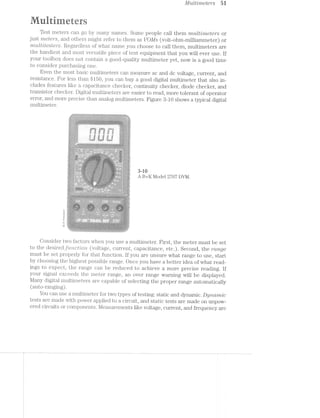
Measuring voltage 5,52
l/ieasuring current 52
Measuring frequency 54
Measuring resistance 54
Checkingacapacitor 55
Semiconductor checks 56
Logic probes 58
Oscilloscopes 59
Controls 60
Oscilloscope specifications 60
Oscilloscope startup procedures 6]
Voltage measurements 62
Time and frequency measurements 64
Service guideiiries 65
The troubleshooting cycle 65
Define your symptoms 66
identify and isolate 66
Repair or replace 6'7
Re-test 68
Gathering technical data 68
Electricity hazards 69
Static electricity '71
Static formation 72
Device damage '72
Controlling static electricity '78
Reassembly and disassembly hints '74
Housing disassembly '74
Electromechanical disassembly '74
Reassembly '75
Eiectrepiiutograpiiie teeitnolcgy 7'7
The electrophotographic approach 78
Cleaning '79
Charging 80
Writing 8]
Developing 82
Transfer 88
Fusing 84
Writing mechanisms 84
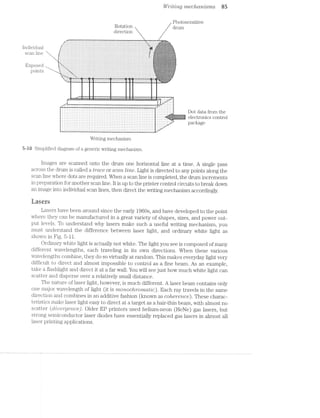
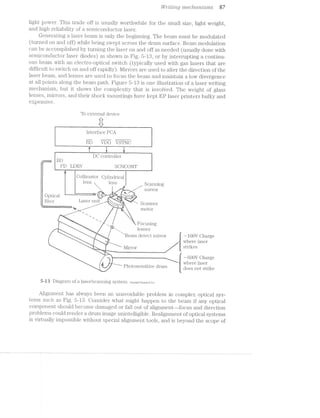
Lasers 85
LEDs 88
LCSs 89
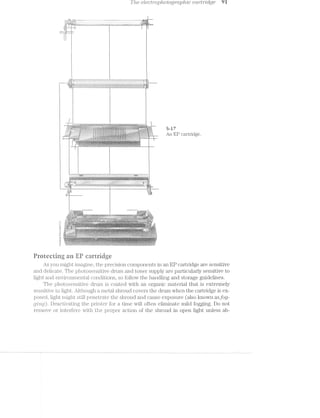
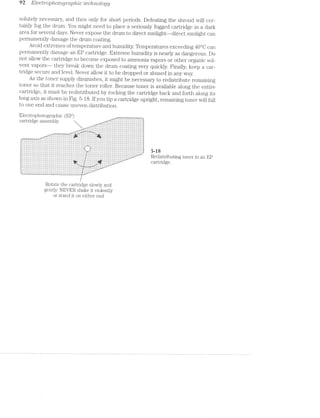
The electrophotographic cartridge 90
Protecting an EP cartridge 91
Power supplies 98
Power supplies—~ac and linear dc 94
Transformers 94
The ac power supplies 96
Rectifiers 96
Filters 98
Regulators 99
Troubleshooting ac and linear dc supplies 102
Construction and operation of dc switching supplies 107
Troubleshooting dc switching supplies 1 J 0
High~voltage supply troubleshooting 1 J4
irnagefliurntatiuri system tin
System start-up problems J 1 '7
Laser-delivery problems Z Z 9
Fusing-assembly problems Z22
image-formation problems 124
R/ieeiiariieai systerns rs?
Paper problems Z88
Sensor and interlock problems J46
Resistive sensors Z46
Mechanical sensors J4'7
Optical sensors J48
Troubleshooting sensors and interlocks J48
SC&l'll1@l‘-1I10llO1‘/11183111-I‘fiOtOI‘ problems J 50
EP cartridge problems J 51
Tire eleetrunie euntrui paeirage E54
Communication J 55 ‘
Printer communication background 1 56
ASCll explained J 56
Control codes Z 5'7
1lumber systems J 5'7
Binary digits J 58
Communication links 159
Communication standards Z 60
Parallel communication Z 60
Serial communication J 6.8
lsolating the communication interface J 64
Troubleshooting a parallel interface Z 64
Troubleshooting a serial interface J 6'7
Memory J 69
Permanent memory Z 69
Temporary memory J '70
Troubleshooting memory 1'7]
Control panel 1'71
Sealed switches 1'72
Troubleshooting a control panel 1'78
Main logic J 78
Microprocessor operations 1'74
The system clock 1'75
ASIC operations 1'75
Troubleshooting main logic 1 '76
APPENDTQES
A Typieai eieaning and inaintenanee E 78
R Qnnipreiiensiye trnublesiinuting guides E84
Q Vendors W2
Glcssary f%
index 268
. ‘
-.'F;i§-.-..
QHAPTER
"T11"-I-,~"?*HE7EE1§i‘-'-. ‘ C.‘K < Ni‘ I5?‘-I
~‘~. ..r'
n. _ _ -
I"':'
.=,i:,':-' "2-:‘ ~::-»* .‘=*==?‘:‘,.-- , it -».-.2-v‘:=
-saw -==.».=.= =1-i -.:I.-1 an-.<4» mi is»,-.4 ' ~ ‘.3 ‘Y.
<"’!""~'r
ark-3’>‘
_,.,.....M.w~¢3.
/1“?”
ti
arr"
11+
‘T’
is xi-.1
1-.~.? .~.i. at-'
}‘==::= er ‘~=* -as >i=‘.f+?. §?I-J5at E:-mi an *.LI'I1:~ :s;~.:
. ~'7iIi'=‘f~‘,-- H “I,- », ~i =I=1?3..= ,
‘ '
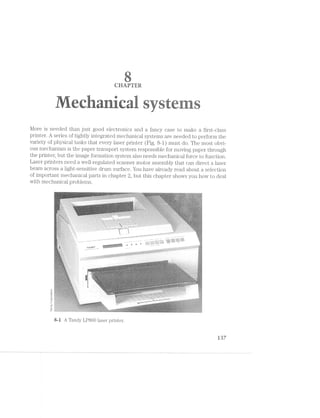
Laser printers (Fig. 1-1) have come a long way in the last few years. Not too long ago,
laser printers were expensive commodities restricted to the few serious businesses
that could afford them. However, the precision, speed, printing consistency, and im—
age quality offered by laser printers made them extremely attractive peripherals. As
computer designs continued to advance into the 1990s, laser printers also advanced
while printer prices plummeted. Today, laser printers are available for under $600
(US) and have become commonplace in homes and small businesses all over the
/2M ‘<
" '4/<;._.
- -V=:;i-.'=- 41"‘.'4§‘_ll§1_“{%Z;‘:’viivyfiv >141-2.‘/1us;-:i.;"i.2>R-PE~;>-.14:¢=sr£':-_;;-5'S%@:¥:1?‘?1$:":§£E‘;n-=>-=1-F-‘-1..-:1}?§:5:If%'E:EI15;i‘EI?E‘l17.*’ . . L ' '
, ‘»*»~~< . “ *"$*'~"*" “‘+ Liiii!-1‘‘:=i:~#¥1;1:1:1s:3:=£.i2?a=i¢&:i:i*i=3‘ '-¢:r?:;>1‘--,'::>=§>‘:G5lJ‘=a$1~=:§¢':$<<:e¥$w»¢E:§~§=:’15* -.5 .-;::>1;=»=:I1-1»=';:»1»:E:I=.=1-::> '~;>, "4 ' “~ /'_»_, ~ -, / Q.’  - ‘~;,:Z:;;{z‘;1.g2r::’5mu}lFs%%§§§};:';;-Q1;- ,.<-;:;:;,-’£.;:3.»:';3:13:-:=:=-Q2‘. $°Sa'r.~f$»//~ é~%¢~(¢¥~-(¢>~P >»/V ~ "” /7 ~' ‘ " ’ V’ 'rs v
<¢§0». _ - :' -’ . -.-v-r»: .~*'-:~--:=:--:-;-;---;»>»;:»<-=-:»;»;»:-:'---;-.=:»;-'--;-.-2:-:»:;-:---.1... 1:-»;.-:15 =:- »'I.-:15:214:5-':E.=:5:::1:£:I"-_=:§;:';"--:=,=;3.1"-311;;-5154;:-;‘=Q-$11-55{§§
-. '-: '<l'1~.'Iw.1':'lvin'<>’H.':¥£zZ"rI'. ~:_+:i.:~.::1~:-~:-;»- .<:=~~ :~'-.1 -Mes:-;'~>n:=a.“1%~‘?‘-».‘:<>1.¢1J:Is:i1€ ‘-‘-‘l>‘:=:=:~;=§ .;':1¥;1:':-:1='.1ii;1:=-I;-'=I=I$>?-->§§~>: '.§. ‘.:=".. “‘-:1*>.>AF' =:1;1":F;=:l:’-1*‘W111-11:-;-'I’ .?:/=--1%»v->FE111£1%f;1ErsE1--£1.>E11r'I!.=;P»:*%.1€'E-1:1‘5:"-¥:2=.'=.'>':'='-§.‘I:'¢1: ':
,-;-;;¢;~-i.:=;v-;.>.-,<-=.=.—=»~.->:-»>.a.' -- . .. i i . .< .
it-i<: -'-§:?.§7i‘~“1_'=£W:5§5??‘-(A!-*iL’@715'%$+."'-‘!'t:~"713331!<§§'§§5:-J?~‘$§1$131Z'§1$;Ei>}.5~§’§‘"§-'§>‘$‘*3:3. <‘s1$s<:~i~ »g--airs; "T.??¢:':I=':1:I:-9.=-15»s'j1?$?"£1£21215EI5i1iIZf;=EIiI:F;:35Ev.-.-=.-.i.i.i.».-,-.i.i.i.. ~" I ~ 1?? " i“W ' '“:_*" ”"' “$5
i = :».==:.;:~--».-_-_-.::»:»:»;-.-;;-;<»:».»:-;;;.»--: ;--.-~. V -.-:4-:-"5;:;;5;;;:;:;:;:;:;;-;»;.;:;;_:;:;;.;.;=,;=;.;.;;._.;.;._.;._.,.,,,,_;__ ,_
sr<e.'~2 - L11"""*3;Z=21:I:1?:I11:311'I1IJ;I:I‘=3111:?I:1:I:II5}:5:31:3:I:?:2Zl:1‘3i'-1:1. ..:1:I-1:‘-:1:-.. .‘:1;1:¢.I:':I:1;f.¢=1==>I'>I" I » »I~.5-<11»;1:,:=i-.,;;:I:;--.-:-:-;»:»:»=-::-: -i.is»:in:-:;;:»»»:-:-:-:.»:»:>a::;-;:;&21;:»=;=-.2:; =-2:»=. .,,__. , V ) .
4 .. Fl ' ~ .1 . ‘€~V 1, - .~ ~' v‘ -‘ - ' iii‘ ' ‘  “I“‘4»!}“ . “ A H _ WM ,,,, , it _,_, yr,’ <, ;,  ,;,-/,t-~,~~a»<: , / »~ »w .. 
’i'
,¢
,4 ’f*‘?.-s‘?>’
$0::;..<‘i'i,/,
. . i . . . , s >_». /~.-. L-‘-35 . --M /,.<» . ’»‘/'-¢'fl§‘S€3€~?"'I'I-‘-‘-1""I'I‘:.'Q(:"Z-‘-‘“VIII{.'I'.’§3§€‘.-§">§'i:;:1'."$:II-I-‘F3,
<1.»-.»$3:€Ei»‘<t~v:&~R~$Y:w:‘»i:§l:3:a-:5§?i:¢:%~:~:'~:1l7~:"-W-L—>'nil;'5¢‘i<?':%"i?i:1*$i§?€<5':R'lf§€$§:?‘§§?*Z?i?'3*¥*1@ ' '>i4.P}4.~‘-1?':¢:>9q:5‘§*:Q5='lk-‘l<$&i+>!tlziflttv;1!~"<<$‘?:E‘::§"'*1I?fltzi:??:%;=i£Fa=35?;bi_llZ*;$1:~3li‘~:?~£~>¢E=:%Ei§1¥§1i .-:-iiv‘!»:E'I:-:-‘$3:1.1:I'I51212511"?@513?-f@$Z'-§<Q$$$Q>~§x<‘K?‘Q’?€$§>J:?>5*§:':§l5§€¢3 . ‘:~2>;i‘_>.=1-'-W.» "‘ ».---':»;=s:€Ii%=.-;-;_::. :5.-1-:»:-.1gr»:;t,:,--,.»~ir;=;=1---s‘:-‘.1.--;;::r.=z?-.rrr.> rs‘ 
‘"/,"-*“=>‘*'i*»"i~‘-‘ -'~*~==.i-§s?~:?i-‘- V'f<‘»'.'.-"'.:Z-',-{.55;;5E=$$};=;==gE'5"3iZj:':I:'5":"E233$5.3%=;%1:":r;;;§_:j:;:";;?,:;i-I3.;.g-.15.g:€=-:i¢:;; - . -A..>.‘->;:2==5-iiia?<==1=€;ri¢§zgaura.:=>>t:=1ii2x<as_r==:.~~s=s§at>g{L<1a2:3sfires>v=>,:a@;-=5@ei££2i@sir' ~ '$%¢:}§;;:1:-I:>;:¢Er' .-=11;a€»:==.=;ss;=1;%=:1&§¢='=@E»;;e€-5:-{$11-=--Q "'*5‘¢»
1.>.:>.1i=,=-:z.='r¢=;§1=.~1inisi:-i2i1—w:;a=:.=~a:z»>;1;=s-=;=+s:»=‘=1/s==:ian-:»~:ir~sv-ee¢¢;'.::ins-1-..-;»:»a::=;;=>;»:.»=;-- " 1. r:.*.~.:-.~»r»2=;'.-as .-.>,.»<=~>. /’i:‘|w.‘.:II_'I"I.'-"'1 '1;--1+ -.»;:-;.i.-.:::¢,:;=-1.-1»i . 4)2-I-,'. - .. :'-;-:1 :
- 1 -_>:,,_,.,.,Q_,3wigWW€?,:,,,,,$_,.,,,,,_,,.,,.‘w,,,,i._,‘ ;_,_.,__..,._<‘ ,.. V , _ - -- - . _!."' -. . » _.x~,~,. M
K . ° , .
are
»iw‘z=§»"~ s
=3;5%
§j%
_<->“4’'.9
--,.vn» ..1-=2’0}”-*.~$98”$"
~'.-",v.».‘*/,it“)7”
/
~/u, .4’$¢"#-=
53>}.,.1,5
2
{V>3V
3,5/'
‘Q~/3".
-$5»
'/./~§»-"~
” />,/
‘v / ( ~
1,.  .» 1» . ~ ~ I. ._,~ -_—* ~‘   ‘ ~ .. . . ..‘ . . 5... 1
i >8 ‘ . =»= ,1-‘ .< :2:”»;gs?.-;@4‘.:z;ir3»r:@;$§- ‘<6’ X-,‘*»;;3-<—-1-;>.‘~:~»_~;-:5»-<-;/.n-:»m:;;;pq;_.:-,;;:~;-<;:p:5-.c¢I-.&r;*:' »:1._.-t;~-‘:1-*9 =-:+-.= ;;:-1;-#7,»;--;;-r»;;".; . _ ,_.g;=;;-;;g':.-.g» w ;.-_:- -.»,~;::;,;.-,. ,- - ~ . _ ,
;zii;ii;;.=.:!:_i;;.:»::'5~.:':?3;?E..- ., " - 1 -' =”" -~15»---X - 0’ S; Q 7‘wt ’(‘:A ;¢x'<" “-a A 4*.-<-»...__.. » if--i.-“<0 x '4 " "'= '"" '~'_ , .. ., .. _ . ...-;/'--/I »_,.i~». .. ---.~»=-.,,-.-:2:-- "i-":-‘-.~~-~re.ii;==,..=__.._=;>».i.~.:=r;§:¢~-;=>gi_ 'arman;'===:,:g~jai;:ege5i:;>-=;i-:,;.;.,.,..:..;:.:---'--»r::»~>I~:=-.-.»= 1 = ~ .- L?‘ - ' r~"<' “‘1~ '>>''~"
w:§;<¢¢$‘==,t:a~.-_<;=~--set-w*e>q'*>a;»sw<%-§;55‘¥;$z . -f''~7»>;'-;$'-“:2L7‘-I-I»'-Q-I(if5NEQKi-I-:$03%~i-2lZ>Q_I-L-7i‘I~$i¢-t-L-1-PQIK-I-E-J-J-@=.'>.g.+1,,,,.-,.‘ ii .;- V ~ .,- _.v. 5‘. -.  Q <1, ~ ,- .1=/-»Z{,~./ @-
» »:‘ K . 11*‘ ",-.'~~~r; - "~>v‘i ‘3>'s>n'<iiaje.,_ ‘"7: ;.2_';'.;;-;:,_ _ , _,~ - - '~ ,"‘;‘i~i-. ,1 ‘~.;'a;'~,,';:5<i»;,e:,:-ii»;._»_i_i. :~,:»,;=-‘=1;>:;.;:;;:;»q;;.,:¢i;;=,'=_:;v;51';;; ;;:»;».-~'~'~» V’ ,_ H-'~ -vi V >'~i 5- -- - ‘ ~,.",i;
;’i:~..~»:‘ . I/< r ”‘~ ‘vs ’°~§‘¢s~ k »*‘¢":~.< >~ ~. »_fi/ “:4 t ’. . ., _’- ‘  -" ’¥ ‘ '*~,
/Z?
.¢.,.s.». ;_<,~~»‘E=§,~.’‘~‘31‘r&‘<»,‘f*4i»‘§ '§“>}§/ ~. “¢'*~*~=< Yéjqé L‘ “* *>’t*‘,/‘ ' ~ I ~- i 0 fix W
‘ti, ~ .>, .. . ' v»=<~»i »~ / -»~
“'<e<~~"*¢~“~'*“~J ms» *~$’<““>‘:§‘/I ~-“}=“<‘*“’:){~7 5~”?'l, st.ii.’¥W’T3’5‘“"”‘”°*Aanm‘=1/'~ ‘s x ~<~  r L ~:s'$fs,’<."
s §§‘?""/;~='§’<sl~>“ §<l"~‘r€r'>">$*3*" '>l“"'~¢3-{'1 '7““"”’”""'¢§%$.»;;r,j ‘ ~" /1 =1 .  e7 ‘F/-=*¢§§' " ‘7;‘$§§§’{ "~;':
‘~‘s}/1 “figs “=2 _j‘§,'~f 17?‘ It‘.-‘§*,~,"4‘s>;’§~*y§-%?;s;< ;.“,““,',.‘- __‘ , _ we ""~'/>-»>.r<a>,'a_,s,,.;¥1 »a.a,<, V '»’i'€<¢, ,5 1 " , W’:'<'e<>==
 , »
3*
/‘K

5 .  ,   ., ’- V N ma.
tr nag» » ~*-~iz~. <ns1,»<“i 1,  11 4 A~,- ..i"°s/‘if-‘it. ‘., *3, &~<,, /~ QA  *~ .._TfJ._”_i»/.~__.».»,.,",,.~_(ant.e_?;n,...,:?>..>i»,>...?..::.:..,1......<arresis.;>~ Q6}: "’x¢+~§,;:*-z*<s/~.e;;..;;s~’*" _.,- em ‘~'. 9-é‘§§(JvQ% < ~- 0% ;.ji3,',4I,>:}:j'.I'j~.-_i‘_~¢';!.~';_;?§<ir;':/‘i%fi{:1;?{Q1‘:13$3.5;1:§1*:3*§7z£$¢~;:E$;§:f.@ZTi;.i11:!:1§5:¢z§~®1:'%‘I>:3,.Qik;$";;;1:},tit;in:§:?j$"1-j:~1E¢i:§2IEitiE§*'_-153$?5:5&1%*;"5I.“'1éIEI1'i?1E -I-.‘.?'£s‘i~>i!;¢'-‘I=T"=‘-" ~»- " "A-iv/1:3‘-:1?‘ 4 "Y ‘ 2'5?» . ' , ‘- -¥3'}» "
- ~ ‘* ~ J.-re:-:':-~:-->:~51.’--‘-:1‘-.~;'c~:=RIc>:-W$:~§*=:-;~;~:~;»:./:e:>,~=-:a'.§>An:-:-ta-'¥-1-;:~:~‘-:/co:~>:<-+:-2;;-f»:<¢~:»=:»%:-;§a»,»~L/:#Q'its::~:';';<»:-::~<$§d:~=rfi-*1“ea»:<»:‘-"L--4.=§Z?’/:L  ‘¢~»@;,$-45:»--Q5§>'{ -Q41; 3 / 63 §, ‘~ ~‘-;‘s¢ -_
sat? =~ ‘- ‘ -=:<:>~:r!s¢:~>*>-" ~ is a {S-945 Y -"H ‘ Vx - K9 -:-;=:~.~:‘<~..':=:-;'win 1r:»:~">,-: -‘~==*z-;/-»:~':=-2@“,=::i:x:~: -=;~=:»~~.: ¢~;*-.*‘I:~:i~ ,>.'~:=r:~!ai,--:->::<i-:-.';&:~s1-:>1w§~'>sn:»~2%-=<r:=s5§§=':1;2>Ii.=5-'~,<~-'-mi“$‘5>‘:~v~"'=-P21¢I-3-l'1;=§?:!=I;'=>:-2455;...<. 101;?‘/v “5§ 9" . ;§ 4' < -~,‘i{W-- 4 . ~ . 4.-1-  '§§ sh , .‘.~-<i...~<..i,<i/. ,.,- )' .. “set, . . we-<¢— i xi/->¥¢~ a 1~' ~ -, ' , '"1:=9$§=:2=:?:;1:1.':‘=§$. ~:‘1:= -§:'<"‘-:.-.*-= >3;-' 1"-"":1’*%§£.&<*1:$:1:$ 5'.'Qi:§:§5£-?iSfi§€f._:l'$-;'."'~:1‘_1$;5.~:i‘.;.;E‘§$§%:1"5i:}:fQ_.f‘*¢g;"?§'§I1 ;;:?,_»_~:1;;&:;'-1.?-55;$Eix{¢==?j: ;. <1-;'_¢.>: ,:¢:’;’-;'-;;-'~1=1;I{->' :>>~ , . _ ‘ ‘qriy-_4""'i' A I“-I':., N
._ 3<-,‘x_é'~___,. t: . ¢~. '/<10 .1, ,  ‘ _~ ». / as ~~w i ' / ~ ‘> "’ , r" ;. 33- , xi‘ 52,, - ~-
‘ '§'I  ~ w ‘ '6‘, i:’;.'-. 5;, Q. ,->1? vl ‘Q
H/('  .»:/ -A->~ '< <:  g A.
7” (Q?a ~ ~ :
A
23’
YaW,’Zr v
ff“<1;,.’
’<’
/-2%,
~;?"'@if‘<~7»:at’
'r
Z
vQ»/.<
,4,'£a",17<.
,‘%
¢~.
"4-§_g_‘Y’-§}<':*r‘W
/'
1*’ .-49/’7%
*6’s»
~_
».¥~
(’
see
Z? /
/f,..
V is
N/,.,,, 5%,fi
V:4:¢~
.W-.
31.3;Qfiliiil
' Y:»_#
I!{'9'/_
’ <'_B*w/
J¢*,% ;‘§g
..,.,,_/
s»~25?Kr
~”ti-4
-,.-..---r .-.'>:-' =.< ~-A -‘<- ' '3>1:1.‘.'E-.“'i.‘3l~I:'-11711‘?-I‘93$?"m11€"fi=."-‘I:-:i:'i‘dirt-??.£5§1?i1i?“"'§1‘=’$5I{=25>i§$3§3}5:5:i:?:;§&$-'5fkéti ' - ,1 ,_ »3.'.*-‘
. ~ ~ . ~: . V.
'—$:.*§‘T*’"‘§=*‘3"'5"."" T*§‘"~‘. ' “-2 '  T'.“:'F? Il~:i‘:‘<?I"“¥:-.41“"/»'¥*I*‘1‘*-‘:~*Q. i:»,IT.l'.~, ‘I:¢;1?£:»:Z-"~f>?:=. 'rem?111$F1=-Ffl1%ii1Z2113123:‘i31%‘l?"=%:5:1:;i1*-:~:->. ' - ' ' -' 5 3 
"tn '-‘.-é1='-,-<3‘ .' ' ::;!"::E:§:::E.::§§§:':::::‘;::ésj‘|::;':':it-7:Z'32.":§;::1:§E:§£:§fi>.:$E:%t§éZ13‘:§'§-:§‘:5§ii§§‘?:‘§éiF§??§i3;¢.;=.'-:-2~.';.'..“.-iii:":":‘El:'7'71$§3>T$53I3Y55171E5F5Qi1i'E3§il‘3€3§&Ei2i55i7:$?i‘§‘1'?I':>¥->‘-T€~:§EE§i3;7j3I3IF£;'I:31--i-1,».-i-K’ ‘- 4 ,~1~I;:>§;=»- ~--> _:l//-'9 ‘ eri4i,1.,5,I4‘i-.=I,;:~:;3€=I;s=:;~‘.;a:1;s;s%%~=@=-at:2.-"Ii3;:;;=,Ij;=&==§-i_;§;=-:t_'u$a “- :92
~=-<?i,; -- as §m  W, . s3~,.£,.
‘Y ~s"‘K"‘-'=1:§‘et2%"7f*>‘~> ' -7"> ‘ » ’ ‘ A» S‘ ~-‘$24
- i,--‘$1-2-§'t>*“> it .~ " - Y - 0  As ’
- ‘ ~34‘ati§i‘}t¢*fr2;‘:";§=§i*ti1.l.=-Tk  ~ i » wt I‘ ~* ~ ,<_-  - ~":.»’ *‘ ~-'r~~‘'1‘.»,.~  , -» 
~ ~ .< “¢"~~* (,~/‘,’,.,'-'/--i ./n  is - ~.i.>,4~~,»~,,‘/ . ,>’/ %~  ' t.1 ' , A   I  ..~ _ ,1 xv _,~  ~ ,.‘_ _ ¢
Q} A  V ‘ > J?‘  ‘,' ;.$.¢§( (C5;-_‘§>~ / MY  2 6,; .~,_ _ :) ~) §K:>.,_,‘§ Jggwi ix J _"‘};/._ 7‘ QQ
{$7 ti Q - ‘ '-‘~ M“ 1 *'"1 f "'~‘ //".' » ' ~ * iii» ~ w(¢@’ $ » ’>, _w3_ '} R  A 1 '6//;/49> A .< L .< 1 ~ , ~ ~ I ~ / <,r>/" fi~ »_~ ~, , __ ., A _ . ,. =..~,.~,.=»..1 ,.- ,,.,,,.,_.,1=_.._;:.<i.;.-. --11;-1:.-:55"-;i-4;-_-:‘:I;‘".=;I;1é~=.-$13:-5:1’--‘Z1111;+*I->1’iz1EJ:5;1>‘I:1:"'E;i:1'15.=1I§I:?:l:‘»Z1:1.-.':I-Iii?21:33:?11+=.1-:<';.».5"-J§:?.5¢ , ;(¢ '
, ;»*‘$s *1‘ -- +1‘ - .= -4.’ ---=-:<-1. -- “*5 ‘* ‘Q1 *1 . :~<~
'  '4 .. as . /. ,. 1». .. 1sr‘ .  ~4, 44 Y4 4 _ ___,_.,.__- .1, . R-. .. > < . .. v~
§;$.a,;>§.<<e;;zo4>¢. 3 2~.”,> ,% ~s'9<§:;_§*'~;l"’§<‘<‘¢-‘F- ~‘-P‘-'-"~‘*45$-2‘:R&I¢1~1-31'.;:=-»-/ ..-:u;:~:¢-=-zsns-:e>::»<,i<P~m<~.‘- .7‘:i-.~.~.~ "<8 -~., H *§,<r,»*»§,~$‘ 13<,<-_';§2€_;.~
' '- ' " ~' ' ' ' w -= ‘5'§31~;"'<‘3*-:1‘P5111:-1I;I5".5E=-2'4F1313-3’-'s»I:I:=:1=1:==I~' - -;:= I
A £?§$1)‘@§“/“£§i?~.»»$}3~.i}‘A‘ Q ",5 "‘~=»===-<--5:;--.f.=--.'Y‘ _‘<’/ '~'~"~.2£::1.'151:1‘;~-;5;-141:;:;:::::-;=»;:i=::;:£.;z<1~:;.,A é~.”.“’@ “> ~>-‘4
"_ ._ .- ‘ <, . - .,  . "Va-», .,~ <~‘fA~,,} ;:_;g$:;%*§*§<, gifig _ Q @+§> é
.4<=/?7‘- -<~v».".-"7“*- >' ‘~>:>~~.~ .. ’ Te» ,»,~<.~,*¥4$~§y.ere» .~.'*,'.»>~.,*,».<;a.~ in A
'~. =1 ye, - --. >1. z -<9 .> ‘<5 P-?§?%<* ~ ~>; '~~$'$$'-<>";~,;e-"’;r§I<**-
:_~~;~g;>s;s(,>,,~,<:, ‘§;‘r._-@}7ii-%§‘‘>'.'<4.3._$.~‘>.§$:-‘>‘,s~,,&»,<‘¢ X N . .., , . . ~°s<<-se-v=-.¢.=.- ‘v' ans ~~~=1->s-was-s-kéi-ss/45-/Z4 -sec:-le><r.§=$e1»1» “Xsins» ¢_ ."" »<<1.<y.~.-_---W-ii -is-,»,@‘~>, . ._..» raw»_a;,i;:t;,,s ;> ¢‘.’>~>="‘$'~$;" -air.-i. -ii ~' -'§,a$f'>'<z§<13--.-“ ;>, , 4% >-»~ -¢‘is;>r.' -' - ,-/iii-23%»‘ “Q as:<-:2?-<-=s<.~ we-~~n=§~;,»g~; ks;-<§3s ears. .i==;;=@:x=:=:=='==~;:time;:=sawnR4::n‘4"r§‘§2~wr¢>:a-:~;-». - .y~>$-¢.A , ..:‘<.‘<G'§$¢<‘? -its .3 , ,~~;>_./<>3¢,.,~@,~;5=_.;>_>*3;;»',3
V, 6' <>"‘~i'~’¢?=-ten,- »::;>i. -‘rs<~ -W--' 4*? -
» ..».~ "3z‘A < *-"e~'<< >*“s<>>-° ‘M *'/‘ ' -iii‘ T- 1'»,n‘4; r ./-=1-. »>':-. -‘> .- , _ ‘- . V - ' i _ _ w ' " -- :;.-:; .-.-.7. .v- .1: -;'~‘_'-' - » i -5»/... .- _:;._:,;. ', _. .... . .. . .. 9 x.‘ ____W?G_|_‘,_ X 5,  W. A, , ,, __,. _,_.,.,,_.,,,,._,.;@,Q,1
¢ . ‘ '-
R '  e
/
5/
1* iii-..¢,.';F-*r‘,§,<-g - - Q; -°¥~f"_">‘*;'=*;- 1"-I / -t  ,~>.<-~-~»~;<~
- st§it%>,;~ti$is~'"- " ”- ¢ ‘as’ =- I ¢ 9“ f ‘ ,, <:. ‘.7 _’.'>i.~,’~.,,', ="‘-€;;1¢;==:;:tg;gi~;,»E33,.-> -
rs, /wt)». 'v
Q~-.-.‘- -».- - ./I-.’-.1-I.-.‘-,.<.§~-K. ‘ - - . ~ , ---'-- ===-1'1-1'-'1-:-~:.‘ - ».- ».  L ‘ » - "4-@213‘ ‘e?-fir-'1:-.:?-411 1?‘-:1"
"=-~ '=' ' - iisfig ' -- * . T - » '-~ . ~ 4.,-<1 . - - ‘ii ‘ - >~ '-»~= '- ~
<~ i=~ e -*1 = ‘“*" -" ‘* ’* » ’ ‘ ’ "»/ ‘ ' . ~ -' »’ 1 ~ '-: ‘ ~ ‘ .' iIr»1ti..a=_i1,Jt.'=;irTrifa-=ui:a.~-.i. .../<‘ » I ', » =.-"7*==.'i"?=‘.‘;."-."='.'-*3’1lY~‘£I
g~' , 1 3% ti‘ . ~ ’’ ’
§:,{‘
¢¢2
av» er/’
‘U
atv~;X’“ 35>;I
7458'-'7
3'
~4§'<;»’§,
/
<5‘-,
'1-'
2%‘
 9, ti. ~ '7~ /r~§§,~>;.,-=-. - .e ’ ~ . ,1  Lfigpa My ::.= we <r'/t,m*)§=.-§,"#'-§“~e*2='1*»s-" we .. ; ~ .--¢"i:$=>.».P'~#>=>>:;1@s:@:=
.‘. ""‘ ’~=‘"5" ‘aw 4%g “.~,_gTg; -‘". .. es,-vs" r,- r -_ :*;<z,~$s¢:~<. ..-;->:~,-;>-.=-:-;-:$:.-Q9-atu->1;=-=->1-ing:=mn&>As>-/~. (~}?)‘1'/ - -*’, . :;2‘r'flér-1-'31}!-1241'Wl'rL,v‘-,9‘ —I,-‘Q5"'!h§lf.-=‘:1I‘y1"~_~ih$§*~-lkl, -1 _-F¢é'¥J'=Ji%‘-I;f'=EU3;=.n§“IQ-Z-1)‘)!-Ii—‘?})~ - -1 z --.>  - A->,~. .»--,¢.-‘~.~>.;Q- _}»}- _pgNewweis/an-im-aver:-ir~-irqin.-:31>:2»:-2':_:/J:}_;_“=_._‘-::_}A:'fifl‘:J;_':".u1{*]I,lb}:4‘!'Iv;v2|§<:I:'}§&I',“ .~‘1}. '¢/,j#‘{vf{;‘fil!:v$§$H‘$v‘$'* - ~.- i rm;-..¢a<@i=-,-at-,;<,;r-4.?§$,,,< ~.4-==<@-are-ezaiai-stair»->~=-.-=s=<>5,52» *1» -- M-$1», . ‘~45 ».in~¢~<.<s ~ »i,4_.>,.i=§m>—.;.§>/.~,;.;.;i.3;.;.-1-er»e-i<s-:-=>;<-4 ~./ , est.-wit--.-i i~ . ‘A‘ii‘u§'|‘H'/n‘v‘~‘5'YL‘vQwfm‘r':"{'§T—"55'4'*>'§W}§?'§'~‘}f5'|"'§ 1'1‘-'-W». 1 .~< - ‘ea . .. ~'-:=- cw -,$*.&§,<.;m(~~.;»;»;;.-';:<-;=-gin-:;:-:—_-4. »_-.:¢;s_=;.;:-,_-;-=<1-;:-q=:i<;¢<t;-%~-::-:-<< §> *1 ‘~ ~.‘n;s;-:-gem;-;-;*»-:i.-:- l i..;.>:i.i:-,, vi ' yr-ii-.'-?iiIv‘.~1_Y.*‘e;1§!f“Ui;jfiggtfbwél§§§~.;§;Y*{i-¥;,?‘EE;~¢QlR‘J}r{Z}{1!jfi§:_ ~,, in - -7’-4 , ~ 7- i§:!~ >~~: -. ‘ ‘I1-<.<':’-'l["'R}fi,?:E:;::$11G':I!$}i'.:::§k|§{.j|':
577 '
:22=:=-22;s=;n=:§¢==;;==:(::@;sai¢<2={s;5saw’-. -“-<.~'<><$§’* £4 -_ ;.-F-_ -~75-"e=3>§%£§*2-stirs-atraisin=¢5<;;$1;1=.$:%=r£s;=argrmfiarrijte2s:s;=:=;¢;;$5:1;:§;;5¥:5
- '— " » . » ‘5""..>--;=»:.;==-.‘~:-‘~ "" I -"7
‘  ¢~;‘-,-v/‘Q. ~ e.J=,5 ‘~1L A<':r'$l- cw :.-, _ 1 , _ in , 'q<,i,zz‘ 1 ><'~,.<: .-, , ‘ *  “I  Y‘ ‘<1"1'~> x~-‘>.- - w~“~‘ ;;.*2i'-$": N »1‘.' (( -  / * ’/m   ~ -tints _ -Q cg , J , 2. / $y.,< ,?A Q, _Q; Kt ‘¥~§~ Sh , 4),: (Us >>-*§"m N A, ., 1.1M“ .  H Y I ,1 I
, W < . > , xv _  H . . g
:=:=1-5:;-?=.:.::->1"? -. ,>-.;>-.%r-s1 ‘- --‘-"I'==. <"’-‘-‘ -::--.- .¢:::¢=1z1:';1' '-1..‘. W . ..;-;.».¢->.:  “ A - .».~¥--- - -- :1 »-..-.»:--, - . ' < - 3: ‘ >21 (
- _r H — -:;=l:';>$_:;:¢==>."g<-s-.*/ ,1 >-itfi3E5i’1'i¢*¢‘=*i§I5E12355'I?»i‘=§“i", .- - » . _ " ' -‘ --Y I‘ 7
’:.i;=1.;;; . . .  ; s;%;§i:...»I- ' - ._~_-.-;.'.,i»_¢-i.- f.;>i9',"4;'<-3'“K-§§”!i§>;5.g1,§=.§E':;'§:;j5§§j.3§;;i:§:jI-gr}:-.':fi " ’ ‘ ' ' ' --‘r - » ‘ »' - ', .
t:-5: ' ’»  3*-:=a>-‘;:.'§; .. '- ’ ' 1; :-:':’»"§'S:'.'>.»’5'-1.-'»’"£35175:$tI:7.7:11}i:?3§:§25§i{'4:P5I2EZ?:'"K-1?" ’ - w -- ».-....., 5:-egg-_;l;;:.:. / » _> 4;-»’'3 =.;_.q;._g_'.»:;.=-u‘.»"»~'-->:;------~:.<-2"‘ _ . glé - - _
-:5/-b
‘"2?
V,
<"$" -5Q1'5?‘
,5,
13?, .3
=--=1<:'¢-.~;=‘=:z' ....:'2-'1:-1;. . -" ' .. . . 2%»; . ' ' We ' ' ' ~ 3 ‘I 6 4. ’ I
..1i1;*-~~ -I.= 14% .4,» 1 » - ~ V 1$53:-§‘.2~X<:th.;;/'$»;: . <- -~~‘r""‘ »»?:Q?;i)§:1§1i$.’§filEE§ii'$- »- “ * , 1’ . R, , , . ,
.. .. . ' 1 . I ‘ ' '
arciC0.
84
- '--'--<-~-- -» - » '- . - .. -1.15» '1‘ ' .<<¢:-:1.  '1 "1". , Q-, ,- :“'¢='/»<:*<'<-izmii; al‘ / a»;=--'> 1:.----9;-.»>==-1->'>~~:, - 4 - -- ~ . » _ . -- . .. -' ~ t <> I . . -- » .,-»g=~ ~_.§;t;.; ;;.--- - . . — *1:12; l / -,~V;¢;<_¢5-_.;._;;_}_;-§_¢_¢;5_~__/,, , i -¢.;,;~,s;<.;; -11>-;,.;;@ - ,,,,-.1. < - » ~- »
 . . .i:-‘?.--I-.s-:1-:='»'.-PT?w--' » ‘“"'1-Eisién+:f=:2'2s<>i1.i;- 1"‘. - . . , . '~'*'»~ ' » §'*?2I$».f""' = ‘ 1“ * - '7 2 Til:
I ~ I ' .‘ i 1.1 i< i
» . ,,; ».».,-';;;~:-.:"-‘f-..-v , 1 .3“ .» I .
:-1-:1-11;-=-ii==:r:ss1_a:;=2a=’:2:;:zi§=ss=;. I =. _»_. L ' . - . . ' > - . .;.—_=; r »- . ." 3 ' ' /, » ~;-A 51-f :»¢ ~ . ,_
Hewe-Pack 1°81-:.-
'»';»-5*’?-.‘-"1,
vi.,, it
W
, ~'~ 7"?‘ Q ""'2'.’»§“ ~ l‘;/2?. ' J‘ ” ' "‘ °L i ‘~ ~ .~: /‘»~ ' -Z1"? {>1--‘.~I$~<:I=.‘.=¥'~*.‘<<.':'.~J / » > ‘.1=;£t1'~i€1;t1:‘.23*.-2';2.i§'i>€$i$I~£§i§2-355'.3?3f€1:':r*Zita.€=si5;‘€§{1.;l¢5¥‘.-11==~=Ii'=}¥2@:'E':'-4 ‘*1 /1 '.(‘,,,..~~= - $54»/< ix» Y‘/IQ -J 1‘ 7‘ ' A i‘ la . ~ ' 35;I."-.-::.;:éi¢'1;.-;2-111* of  ’ -,1;:.':¢z::;=<..>';-:¢;<-;;jz1;::::;:>;::s2.'2:;:<;'1-;<<2::.:_-5=;::;';1:.-:;a1:: <>::;~_:::,.~:-..'>!-. X; -~~,,Y_,..~.-is ' ~"- an ,3 ' 5'" .- » 2;. ,.  < '
'--<=<i"-~»=~»'1=~ 1 *~';1:~:I-I:»:>¢--':-.’:a:=.2-'1§;:<§:-1:191-=:='.=:1:z2’>.2=-=.=&i==1:11.-'51-1:1-;I>~u¥1.:E,i»-:t=.-t¥':'s-‘:-.=§~ -, . - ' '- '- ‘ ~."- .'~ 1- ' " P
""" =-‘l=1i‘.<.?1'I-'-‘i:'%?£i<=?'$i:‘%i' ' 1 " '  "<,;->==~—-*'~°“‘- r..--~"“ Q; 1:’ ..~.1 '~:~ _ ’ *
i ‘  ‘' i W ‘.>i;'~'<;£-1i:;'.1_-:'.~::1':<1'i$‘ ‘ .» ‘.‘< .‘<:>‘I:Q?-ii:==§§:'-$11132:2£.§';—?:=.¢i1-Ev;‘;€=-If¢l1>1'<'l$'Lre'=;;.;H x . 4* 7 at:~.:{x->:<i:.:-.-.<-:_-.' 2  4 vi-§l<<-.:IJPL-ix-.-."A41-§.'I'.i¥Z{->:§1_'1{;(~1-I-I5:zI->&-RLvI¢I"~/» "1   ~ ,;==;<==.--,1-..:-..:-_i:i.~.~:-'.=;...;: , ‘ar¢.,;>. ~ ~ ~ » 1 ~ ~ ~ - - -
ii
ii A Hewlett-Pacl<ard Lasenlet lll printer.
i
2 T/ize c?[8C7Z7i"'Op/‘2.i»OZOQ'i"CZ.QU/'Z»’ZlC? _];)'?""’Z1"lr'ZiZi6")"
world. This book shows you how modern laser printers work and explains how to
maintai.ii them effectively.
..-art verview
The intense competition between printer manufacturers has resulted in a stag-
gering variety of laser priiiter models—each with different sizes, shapes, and fea-
tures. ln spite of this physical diversity, every laser printer ever made performs the
same set of functions to 'f.l.'&l.l.SCl‘l.DO the output of a computer into some permanent
paper form. The process seems simple enough, right‘? in reality, however, it requires
a complex interacti.on of electncal, electronic, and mechanical parts all working to-
ether to make a practical laser printer. Stop for moment and consider some things
rat a laser printer must be capable of.
First, the laser printer can do nothing at all without a host computer to provide
data and control signals, so a conununication link must be established. To operate
with any computer system, the printer must be compatible with one or more standard
communication interfaces that have been developed. A printer must be able to use a
wide variety of paper types and thicknesses, which can include such things as en-
velopes and labels. it must be capable of printing a vast selection of type styles and
sizes, well. as gifaphics images, then mix those images together onto the same page.
The laser printer miist be fast. lt must communicate, process, and print infor-
riiation as quickly as possible. Laser printers must also be easy to use. Many features
and options are accessible with a few careful strokes of the control panel. Paper in-
put and output must be convenient. Expendable supplies such as toner should be
quick and easy to chaiige. Fiiilitll}/', laser printers must be reliable. They must produce
even and C.OlIl.SlSlI€1ill print over a long working life»-often more than 300,000 pages
(expendable items must be iI‘€plEtC€C;l more ;l’requently).
as-e*i.e
i it- -{*1 . -» 1 -- ..- T
'3 Er _ M .5 _ V -_ it @
You are pi'obably woiidering why people use the term eLccti"ophotogmpitic
_']3"7"’Zl’7"Z.Zi€7"‘ when talking about laser printers. ln truth, electrophotographic (or EP) is a
broad l1€lf'll1 that refers to a 131‘.ilj1il€1I‘ that functions using the electrophotographic
proces Laser" printers are electrophotographic printers that use a laser beam to
write image data, but there are also LED (light-emitting diode) page printers that
use a bar of mici*oscopic LEDs, instead of a laser beam, to write image data. Both
laser and LED printers are electrophotographic printers (although laser-type print»
ers more conunon). You can learn much more about the electrophotographic
process and see how laser and LED printers work in this book. In this book, the
terms EP];>rr"2Irrz.te1", l(Tt88"'l"])7"Z-"12.-t€'?"‘, and LED ];>r/2'/utc/2" are interchangeable.
U3
nQ51? nRifleatnr seeifieatis
Make it point to know your laser printer specifications and features before you
begin any repair. The specifications and features give you a good idea what the
Fca.tw"es cmd specifications 3
printer can do, which might help you to test it more thoroughly during and after your
repair. A listing of specifications is usually contained in an introductory section of
the printer instruction manual or at the end in an appendix. If you do not have a copy
of the printer documentation on hand, the manufacturer can often fax a copy of the
specifications directly to you. Remember that there is no standard format for listing
printer specifications. The format is up to the preferences of each manufacturer. Re-
gardless of how the specifications are listed, you will most often find the following
subjects: power requirements, interface compatibility, print capacity, print charac-
teristics, reliability/life information, environmental information, and physical infor-
mation. Each of these specifications has some importance, so you should be familiar
with them in detail.
Puwer requirements
As with any electrical device, a printer requires power to function. Voltage, fre-
quency, and power consumption are the three typical specifications that you will find
here. Domestic U.S. voltage can vary from I05 to I30 Vac (alternating-current volts)
at a frequency of 60 Hz (hertz). European voltage can range from 210 to 240 Vac at
50 Hz. Many current laser printers have a power selection switch that toggles the
printer between 120 and 240 V operation. Power consumption is rated in watts (W).
Depending on the particular model, laser printers can use up to 900 W during print-
ing. However, most models use an automatic power-down mode that shuts down the
major power-consuming components after the printer is idle for several minutes.
Chapter 6 discusses the operation and repair of laser printer power supplies.
interface cninnatihiiity
A printer is a pc’r'2Ip/teral device. That is, it serves no purpose at all unless it can
communicate (or Z/nterfctce) with a computer. A communication link between
printer and computer can be established in many different ways, but three interface
techniques have become standard: RS-232, Centronics, and IEEE 488. Only a prop-
erly wired and terminated cable is needed to connect the printer and computer.
Printer communication and troubleshooting are discussed in chapter 9.
RS-282 is a serial interface used to pass binary digits (or bits) one at a time be-
tween the computer and printer. Serial links of this type are very common, not just
for printers, but for other serial communication applications such as modems and
simple digital networks. RS-232 is popular due to its high speed, physical simplicity,
and its ability to handle data over long distances.
Ceittrom'cs is the standard for parallel communication. Although one used ex-
clusively by printers, parallel communication has become popular for other peripher-
als such as parallel-port tape drives and portable CD-ROIVI (compact disc read-only
memory) drives. Centronics is a de facto standard, so it is not officially endorsed by
standards organizations such as the IEEE (Institute of Electrical and Electronic En-
gineers), EIA (Electronic Industries Association), or CCITT (International Consulta-
tive Committee for Telephone and Telegraph). Instead of passing one bit at a time,
Centronics interfaces pass entire characters from the computer to the printer as sets
of bits. Centronics is popular because of its functional simplicity. Although parallel
4 The electrop/totog?/up/1'20 ]J7”Z7’?/Z6’?
connections require more interconnecting signal wires than an RS-232 cable, the
hardware required to handle parallel information is simpler.
[EEE 488, also known as GPIB (general-purpose interface bus), is an official
IEEE standard for parallel communication. It is not as widely used as Centronics or
RS-2-32, but GPIB supports network and bidirectional communication between in-
struments. The GPIB technique Was originally developed by Hewlett-Packard Goin-
pany, where it is still widely used in their line of printers and plotters.
Print capacity
Pi'"mt co;-pdc/tip is a generic term including several different laser printer specifi-
cations that outline what a printer can do. One of the most common print capacity
specifications is p7"’Z’7”?,l§ speed, which is measured in pages per minute (ppm). Inex-
pensive EP printers work at 4 ppm, but 8 to 10 ppm printers are available. Next, you
must be concerned with '1/'esoZ.ut'io"r"2., which is the number of individual dots that can
be placed per linear inch. Typical EP printers offer 300 >< 300 dpi (dots per inch) res-
olution (300 lines per inch at 300 dots per linear inch, or 90,000 dots per square inch).
A resolution this high is adequate for most business and personal graphics. The cur-
rent generation of laser and LED printers is capable of 600 >< 600 dpi resolution.
You might find a section on paper specrfijcdtions. Although dot matrix and ink
jet printers are very flexible in accepting a wide variety of paper thicknesses and fin-
ishes, the paper used in laser printers must fall within certain weights and finishes if
the EP process is to work correctly. In most cases, standard letter-size, Xerography-
grade paper (16-24 pound bond) will work. The paper also should have a plain fin-
ish. Shiny or gloss-finished papers will cause problems with the EP process. Most
laser printers will handle envelopes, transparencies, and labels. Before choosing
such materials, be certain that they are labeled as safe or tested with laser printers.
Poor-quality materials can jam and damage your printer.
Me’n'zio'r*p is another important specification for EP printers. Because laser print-
ers assemble images as full pages of individual bits, the more memory that is avail-
able, the larger and more complex an image can be printed. Typical laser printers
offer 512 K (kilobytes) to 1 l/lb (megabytes), but 2-8 Mb is required for full-page
graphic images that might be produced with software such as CorelDraw. l/lost laser
printers offer memory upgrade options.
Print ciiaracreristics
Print characteristics specify just how printer images will appear, how they will
be produced, or how characters from the printer will be interpreted. Fonts, software
emulation, and character sets are the three specifications that you should be most
familiar with.
Ajbrit is a style of type with certain visual characteristics that distinguish it from
other type styles. These characteristics might include differences in basic character
formation, accents, and decorative additions (that is, Courier versus Helvetica type).
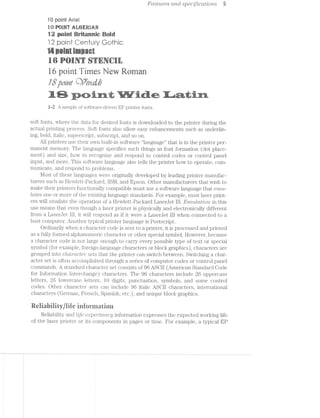
Figure l-.2 is an example of several basic printer fonts. Early laser printers relied on
font cartridges that contained ROl/is (read-only memories) that held the image data
for each font. To change a font, you changed the cartridge. However, with the rise of
Microsoft Windows and improved memory systems, most current laser printers use
Features and spec/zflcdt1lov'2,s 5
10 point Aria!
in-Win? aiifififii
in earinriiannie
4 F,»-..,, ,.=--..,, Q‘ 0
Qlfl l @ll Ul (Jfil ICkw»
5-»~.~..= "V-:'Y =-1-_--s.-. i‘-I?» fl P-.".' .<v.-. .<-r
£4 £“<"4;'jI§*u?I '33 15"’ -'1: -£1 -;1_“ 'i";;‘ ‘I§f" '-1'1‘; ‘(Pi =,€_'-1 ‘tr ES‘, '5'? -',.‘_ -A
‘ "iaié" i;-.»- rt: .t in W=§4?._? .=;.-<.l=‘
it r‘ii? 1»-3 ix-is -.=.‘~"- N 1:“: "£4 -‘an 1.-I-1 "F6; “"3 ‘n irirl
paint i imes pry ernanE Q 6
‘='~'r¢:i-i<=:*i:ig=s<n1?¢;=i=w1. '>r;,~.~. ,,-.-pg '=»,i{~_3? -1-3:-13 “v.~§‘='=='»~ ==.-E:-ii, ?§==v; ms»-' §=.r,>.-.>.- .§=::=@is. f¢.-.-my . ~-"'5' .=<=>w iv.-7,~§i ‘~‘,;:.-in.
1 2- _‘ 1 1 » - _) - 1
- samp c of soitvvaic di1vcn.E piin er on .s.
E
m
soft fonts, where the data for desired fonts is downloaded to the printer during the
actual printing process. Soft fonts also allow easy enhancements such as underlin-
ing, bold, italic, superscript, subscript, and so on.
All printers use their own built-in software “language” that is in the printer per-
manent memory. The language specifies such things as font formation (dot place-
ment) and size, h.ow to i'ecognize and respond to control codes or control panel
input, and more. This software language also tells the printer how to operate, coin-
nninicate, and respond to problems.
l/lost of these languages were originally developed by leading printer manufac-
turers such as Hewlett-Packard, IBM, and Epson. Other manufacturers that wish to
make their printers functionally compatible must use a software language that enm-
ldtes one or more of the existiiig language standai'ds. For example, most laser print-
ers will emulate the operatioir of a Hewlett-Packard Lasenlet lll. E~niitldt?lo'2r. in this
use means that even though a laser printer is physically and electronically different
from a LaserJet lll, it will respond as if it were Lasenlet lll when connected to a
host computer. Another typical printer language is Postscript.
Ordinarily when a character code is sent to a printer, it is processed and printed
as a fully formed alphanumeric character or other special symbol. However, because
a character code is not large enough to carry every possible type of text or special
symbol (for example, foreign-language characters or block graphics), characters are
grouped into Cf/ZCZ/)"CtCf€i" sets that the printer can switch between. Switching a char-
acter set is often accomplished through a series of computer codes or control panel
commands. A standard character set consists of 96 ASCII (American Standard Oode
for information Interchange) ch.aracters. The 96 characters include 26 uppercase
letters, 26 lowercase letters, l0 digits, punctuation, symbols, and some control
codes. Other character s can include 96 italic ASOll characters, international
characters (German, French, Spanish, etc.), and unique block graphics.
CD (D c-l~r
Reiiability/iife inierniarien
Reliability and life ea¢pectcmc;y information expresses the expected working life
of the laser printer or its components in pages or time. For example, a typical EP
0 1'/re etecwop/ziotog/mp/tic pm/rite*i"
toner cartridge is rated for 200»-250 pages, and the image-formation “engine” is rated
for up to 300,000 pages. Many printers are rated at 5,000 pages per month (about
200 pages per workday). You might see this same information expressed as MTBF
(mean time between failures).
Envirenrnentai inferinatien
Environmental specifications indicate the physical operating ranges of your
printer. Stomge Z€’l%]3€7"CLf2L’l/'8 and opercutmg rempemtitre are the two most
common environmental conditions. A typical laser printer can be stored in tern-
peratures between -10 and 50°C, but can only be used from 10 to 82°C (on aver-
age). It is a good idea to let your printer stabilize at the ambient temperature and
humidity for several hours before operating it. Reldtipe /in/n/2.vjd'1lty can often be al-
lowed to range from 10 to 90% during storage, but must be limited to a range of
40 to 70% during operation. Keep in mind that humidity limits are given as non-
condensing values. NO7ZCO'7Z-(.i€’l”L5i’)'Z-Q means that you cannot allow water vapor to
condense into liquid form. Liquid water in the laser printer would certainly dam-
age its image-formation system.
Your printer also might specify physical shoclr or mLb'2"dttoi"2, limits to indicate
the amount of abuse the printer can sustain before damage can occur. Shock or vi-
bration is usually rated in units of Q-force. Keep in mind that laser printers are re-
markably delicate devices; any substantial shock or vibration might disturb the
optics that direct the laser beam. LED printers are a bit more rugged, but also use
optics that can be damaged or misaligned by rough handling.
Pliysicai inforinatien
Physical information about a printer includes such routine data as the printer
height, width, depth, and weight. ln some cases, an operating noise level specifica-
tion is included to indicate just how loud the printer will be during operation and
standby. Noise specifications are usually given in dBA (A-weighted decibels).
icalasseies
No matter how diverse or unique EP printers might appear from one model to
another, their differences are primarily cosmetic. lt is true that each printer might
use different individual components, but every laser printer must perform a very
similar set of actions. As a result, most laser printers can be broken down into a se-
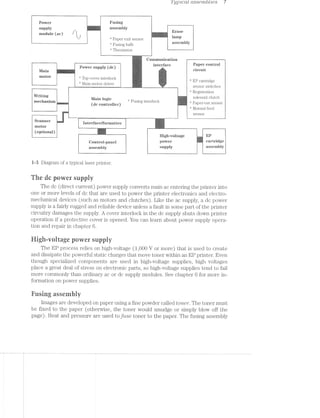
ries of typical sections, or functional areas as shown in Fig. 1-3. Before you trou-
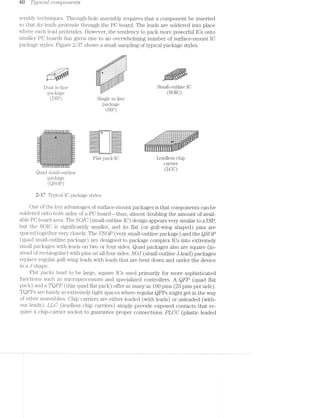
bleshoot a printer, you must understand the purpose of each area.
The ac pewer suppiy
An ac power supply is usually a simple electronic module that provides en-
ergy for the fusing assembly heaters and erase lamp assembly. There is typically
little that goes wrong with the ac supply unless a serious fault in the fuser or erase
assemblies damages the supply. You can learn about power supply operation and
repair in chapter 6.
Z fyptcctt ctsse'mb£'2;es 7
Power ; Fllgmg
gupply _ C “l assembly
if all r t rat: Erase
module (ac) * k , 0 mi
"- -’* Paper exit sensor lampi C . _, ».£  _
fir "‘ Fusing bulb a'§SQmmy
. ‘*‘ Thermistor
Conununrcation ~ ~~ ~
P°W@1'S11PP1Y (dfi) mmm
ll/lain ~
- Main-niotoi diivei ._
-‘"""""'—““""'" - —w_........... W.__ sensor switches
.v.
"‘ Registration
Writing solenoid clutch
11 ' Main lflgig ”‘ Fusing interlockA (dc €0n_n_OHeI_) Papei out scnsoi A
3 Manual feed
at
‘ sensor
W ).._-.1...-.-....».__<_-_-::i_-i-é-..>l-#»..__i..M_.. ___________________.._
“"“*“ =‘ ’
interface/formatter i.
motor
-am‘-‘~!~.';-Jr:-i,-‘,;i:t W:-'5(optronal)
Scanner
.-'i§_~:$i;~v.zm_:-
i y f . High-voltage El?
@0nn.O3_p£me1 pgvvgr cartridge
assembly impply agsemmy
i--3 Diagram of a typical laser printer.
The dc power supply
The dc (direct current) power supply converts main ac entering the printer into
one or more levels of dc that are used to power the printer electronics and electro-
mechanical devices (such as motors and clutches). Like the ac supply, a dc power
supply is a fairly rugged and reliable device unless a fault in some part of the printer
circuitry damages the supply. A cover interlock in the dc supply shuts down printer
operation if a protective cover is opened. You can learn about power supply opera-
tion and repair in chapter 6.
l-ligh-wvolrage power supply
The EP process relies on high-voltage (1,000 V or more) that is used to create
and dissipate the powerful static charges that move toner Within an EP printer. Even
though specialized components are used in high-voltage supplies, high voltages
place a great deal of stress on electronic parts, so high~voltage supplies tend to fail
more commonly than ordinary ac or dc supply modules. See chapter 6 for more in-
formation on power supplies.
Easing asseruhiy
images are developed on paper using a fine powder called toner. The toner must
be fixed to the paper (otherwise, the toner would smudge or simply blow off the
page). Heat and pressure are used to fuse toner to the paper. The fusing assembly
b '1 '/"L63 etectiop/totogiup/2;zc ];)’)“"’Z'7"Z~Z§€7"
uses a set of two rollers in compression, where the top roller is heated to melt the
toner. A paper‘ exit sensor detects the passage of paper through the printer, and the
thermistor sensor is used to regulate temperature in the heated fusing roller. Chap-
ters £5 and '7 present more detailed information about the fusing assembly.
Erase lamp assembly
The image that appears on a printed page has been transferred there as a latent
image written to a special photosensitive drum. Each time the drum rotates, the la-
tent image must be erased before a new image is written. The erase lamps clear the
drum thoroughly and allow the photosensitive surface to accept a new image. Erase
lamp failure is usually easy to spot as you can see in chapter 7.
lllain motor
EP printers rely on substantial mechanical activity. Paper must be drawn from a
supply tray, fed to the image formation system, fixed, then fed to the output tray. The
mechanical force needed to support all of these activities is provided by a single mo-
tor and mechanical drive assembly. Chapter 8 describes mechanical systems in detail.
Writing rneebariism
The data that makes up an image must be transferred (or “written”) to the pho-
tosensitive drum. As you can see in chapter 5, this transfer is achieved by directing
light across the drum surface. For a laser printer, writing is accomplished by scans
ning a laser beam across a drum. For an LED printer, the light generated by individ-
ual microscopic LEDs (one LED for every dot) transfers image data to the drum.
Writing is controlled by the main logic assembly (or ECP).
Scanner»-inotor assembly
When a laser is used as a writing mechanism, the beam must be scanned back
and forth across the drum surface. This scanning process uses a hexagonal mirror
that is rotated with a motor. Note that scanners are not needed for LED printers be~
cause there is no beam to scan across the drum. You can find more information on
scanner assemblies in chapter 8.
Papeneontrol assembly
Paper must be grabbed from the paper tray, registered with the latent image,
passed through the image foi‘niationl§ybten1, fused, and passed out of the printer. Al-
though the main motor turns constantly, not all portions of the paper handling sys-
tem can be in motion at all times. The paper control assembly provides the sensors
that detect the presence of paper in the paper tray, the presence of paper in the
manual feed slot, and the sensitivity of each EP cartridge for optimum printing. in
addition to sensors, the papencontrol assembly provides the paper pickup and reg»
istration roller clutches that grab and register the page during printing. Chapter 8
discusses the paper-handling assembly in detail.
Typ/Zeal assemblies 9
Main logic assembly
The main logic assembly (or electronic control package—-ECP) is the heart and
soul of your EP printer. The main logic assembly has most of the circuitry that oper-
ates the printer, including electronics that communicates with the computer and
control panel. l/lain logic is also responsible for checking and responding to input
provided by a variety of sensors. Problems that occur in main logic can range from
subtle problems to major malfunctions. Chapter 9 covers the main logic circuits
found in EP printers.
EP cartridge assembly
The Electrophotographic (EP) cartridge of a printer is a remarkable piece of en-
gineering that combines the toner supply and much of the printer image-formation
system into a single, replaceable cartridge. By replacing the EP cartridge, you also
replace delicate, wear-prone parts such as the primary corona, EP drum, and devel-
oper roller. The modularity of the cartridge simplifies the maintenance of your
printer and improves its overall reliability. The image-formation system is discussed
in chapter '7.
Qontrol-panel assembly
Users must be able to interface with the printer to select various options or op-
erating modes. llot only do current control panels provide multifunction buttons,
but most also provide an LCD display for printer status and menu prompts. The con-
trol panel is covered with main logic in chapter 9.
.-:5“
~">“'!~ . "sI.=Z':£jg-.». a -'<>,,;(:,1;,§.~.'.1,w,-ii-.»,,‘ ,>;f,;,;;
F ‘*2 ._
' ‘. . . nail . . - . .. .-.~it'
=%fi.l"i- "it"-Ew ' 4" .1-i:.-.=»=-=i=Z¥="~-. , irr ">5. ~.- "'19- ,».~ '=:-. _ >' ' -r~ . i---rm-. .--»r‘-W _.,r¢'-:».'i=¢;l',- /-‘,»" *>,'_,~., _~_i;v_-;»:-5 '»' “'5. » ,.r _-=i.“‘<~,‘s,-;., n,“:X::'£1h,-_d ,: 1
‘rm iA-Ii/~ -am,‘ r .,$ £13-4% .~. W.-1 <- '< -mi .€>.>>-i ‘-" mi :.x-< -A ii.-.~~ }€lu'§ p>.- Y.i.- <H"i‘ "V115 W-. -i-~'~ mi "A *'fl.-- »-“M M-1. Pr-Z1-.
‘=v.:'.~=i~.'1 '3' r: ='"i. ii-=f:».». “Mil  '71’?-‘ ¥iI="= '- ‘ti! '"l=°1-it =‘-"P-’ :‘-;- l ~.<‘=i Er‘:-:3 ‘."'-'.-‘»= :51“ <1‘~'=~ ‘=‘+=.z: ;‘.:.=5, ‘~'__~=§~; ‘>%:;+= lwi sir .=.!'-,-;~. -
iizisi .»%3<= -l‘=.-.=.-.v~:v=. .- 3531?: . In-.~.-i 13$. =-=i>;;: -:1-,‘,{ ii:-1:-L :.~>'<‘ as-Y iva, ,~.==< -;.-rm. - .=‘=;',='.< 2%; 1~ ::=-.-_-*-:¢¥é:=-.- 1,5-3* ,_.=?~'1 ..‘:-':~:>,.¢ ~4.:_=,;i;-.=-'- ‘fig;-':~"' ii.“-" v:W.~:-wt. ‘=-1*";:;;.=.r.= “Ir-,,_ ,,_:.<-‘ .=-.-.'!¢i.~_ ..'-:.-..~.-. ..-:-i-.<-.-M. =i;,.~;_;.;.,_;,=,-' '-':<,_ _»'w .~~,v.-.-.-.»v ‘~‘$§{?I-2:.--' i-Aw-.~-.~_. -=-Mm. "is;-= *_ -
To troubleshoot any electromechanical system, you must be familiar with the indi-
vidual electronic and mechanical components that you find inside. This chapter in-
troduces you to a cross-section of components found in most typical laser printers.
Your troubleshooting efforts are simplified if you can identify important components
on sight, understand their purpose, and spot any obvious defects. Keep in mind that
this chapter is by no means a complete review of every possible type of component,
but it will give you a good idea of what to expect.
1.. 1*» .Cv W I.-i yr ‘-r. iii
_ i af .a»L it F2; 2;; 3/‘ 11)‘;-.-.x%
For the purpose of this discussion, mechanical parts basically serve a single pur-
pose--to transfer force from one point to another. For example, a laser printer uses
a single motor to operate the printer paper transport and image-formation systems.
The physical force of a motor must be transferred to the paper, as well as to the var-
ious rollers and mechanisms that make the printer work. This transfer is accom-
plished through a series of gears, pulleys, rollers, and belts. Whenever mechanical
parts are in contact with one another, they produce friction that causes wear. Lubri-
cants, bushings, and bearings work to minimize the damaging effects of friction.
Chapter 8 presents troubleshooting procedures for mechanical systems.
Qears
Gears perform several important tasks. Their most common application is to
transfer mechanical force from one rotating shaft to another. The simplest arrange-
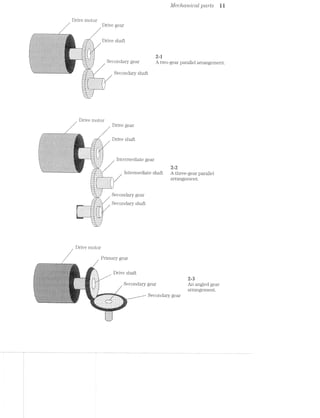
ment uses two gears in tandem as in Fig. 2-1. When two gears are used, the direction
of secoi'ic£cz.ry rotation is opposite that of-the p'rimcm"y shaft. If secondary direction
must be the same, a third gear can be added as shown in Fig. 2-2. The orientation of
applied force can be changed by using angled (or beoeled) gears shown in Fig. 2-8.
By varying the angles of both gears, force,,can be directed almost anywhere. Several
secondary gears can be run from a single drive gear to distribute force to multiple lo-
cations simultaneously, which is a critical feature for laser printer operation.
"ifi
Drive motor
//j/T:
///'/
1
Drive gear
Drive shaft
2-1
Secondary gear A 1;
Secondary shaft
Drive motor
.»$::>1::»v-->'§@£~>'<1~t<$'&*<1~f‘ts~$z:'::-1<§<sz~;‘;;.Q;az»:<:a~:a§’s::;<' ~,.'.‘* -'1~L‘2*l>-{"Kw?"-<>~<»-l*‘&U€ 'Y.{r.{~I?.*‘1e'.>-'' .-Q, '->0)-‘.<7~.~'I'7.~'*. 13{>;*lY -'I~1:‘I1'=
.n:¢'/.~g>--vn;.'». ~y.--.;.;~/vw.:;»~ "N iv '~-- ~. ~ .-.~.~,-~,-x».-,~.,.-.;:;,»,v
~>:-<<»;;i.>—,->_*»__:<.<;:~> '.y.;.-:;.::--.,_'-:<:_»:--<.':~e _ ~:‘.r+r-,.=>,~/.1.-yo: 1..-_. -‘»Jt~;;at
‘ -;~Z€..;-‘;'.-.*.-»<§’¢3/Q.--.<*-1-  v > ‘- 
1% - "‘z.
4. v‘ .-_ . .715-i ‘L 1-‘ “‘-‘ = ">11:,_, , r,-‘v, ': 5._.<.‘._ ~¢'-. V7127 '1‘ J.‘-‘y13f)_";»"i;~1{4}';.§.?-1»:1-.'~,"Q..§t:;'~$ ,1.‘ .‘
fir,‘/~#~‘?1~>, 1a_—'-;-'}£v-<>Z’~.5.’<7~)-‘F W1‘.-}f<'. I-><'r..".{=»5-’->3 '>Z~"‘/" ‘*" ’
. _. , -. 5j,;3;'rf{'.
~»x'»,'-.-.'.~;~:~ .- ~,,-'1-. 1-,»~-<.~.». ~:<-;-.~.~.¢<r,w ~.".$;~'.us"-*r&?;*~$?€ ~ l ,‘;i;.:.~‘.rQ1,:§::>';>‘§/§‘)<?rI}.‘:4 --;;_<>'~§-J5Q-Z~,-5+->.<_-5;:-;1,~"-<;-'~4.§/ :~».~ -.- .=
-1*:-»w<,~_-.~<-':*'~" ~'<a~»;*~: m »>:'<E-'-.‘>'r/st‘ -:20-;-'-I i i
Drive gear
Drive shaft. . xi
' ~.~1fi5€5353%
, .>.,_. . V §.§5:7_;::::::as»~.H,=<-,~a:-v;~:ew;¢ea1:a¢we/ -' - 1 ~» i “,4;-__ -_._<;,q;<:<:;>~s>-asp-;»;;a;.»/y>n<.5gw<vv.~.r¢.-<>~- "'>'é‘ ~>~ ~ -
=;<:~>.£";-*;<~;e@.»:,-:§:‘/~~*'t‘%->"' ’~’-' * ‘* ‘
r ~- ".3 121' .. V. . ,- '//,_:_»_.-' “J I-~ ,
. t.-. -. .~> -._,_,‘ .,.,_..- »,- '.!' .~ _ -_ "r/~-Q ~,..~.,._., .', , . , _, 1 .)_-!,»)¢7/1Q‘-'*._'v.d,'-Q<i‘>§3g:;f“ifigixg‘<?:<§§:f7‘&g):£%*§ZQQ%} ' , , : -‘ ---¢.-~~>: ,5.  K1.  ._ _, i __;. ..‘:tu-‘;,.~_-_‘.- -' //‘V. , h 1.,--~.3.,4t§-:13». ~=;;<>‘_'»:"<>¢~:>;~*“>-:k~s;-< .-'/ '
<i~>3'~'- ‘- re.-* '-».-at-.-:~: .». =1-'.= -* -2- -I"
~/t .,..-. .._ <,,...'- -' - 
'{3;Z'§;'r.';u~Z'.¢§~.§' 1-N-' >>' "" 1" ->1)
/ v / K
,¢ »
v  _ , 4 F???i‘1‘2¢‘=‘'-~§*»-4::->.~'rr.<;K:-N-r ‘$2-xx»;-::4@:c ;<.~ ~$:P’~*>;<:>-:7: '=$!<E‘@'~**<>t:>:..:<‘ =- (-1- '=i. . -4<‘~ ‘-v >.. .' ''<~ +~,~~_» .i.>.~:~-;/~ _ i~>¢w>,'=;-‘!"$*<;.-"FenW?-@¢$fl»-¥»~$>§-‘#35it-<§-f~¢:'§2>*>Ti%"*>~£'f§§ i'- -,- n *.»,.~, -1,<, 1-._>-_ <~.':=_: 4. 2:_'.‘:v-»'>;‘ '4. ’=.q- .-v’.~'.~-r~'-rv~ . L:--~::. .
QQ-1+1?/:<@i:<33<§%¢:~>é.K§==%Q~:zQ<:a'»~;;ft>=.~r-it-.»:—>.»‘<;=<-§»:~~,*§._r;’<.§<~, : =1:;,.;><=,-:;g'¢;:,;:-‘-~~1;:-432;:;;;g§¢;,n,1§¢&..g;<‘ ,~:-;:-.>:-ms;at-,;:'_>'6; s.-it ll It
<>,-—<)-:». =,~:;r<>v- ~-== =,v:--'-»’r.r~ ¢~1o.=>~:-:---> --*.<~*- .~ -1-:-v ~».-~_ ».l-.rm-.1~;:¢i¢;-mi.-.1.  , ii‘;/>~<~i‘:':‘:'f$;'t‘-'-VML
k . ~
,J.~‘_~‘;-‘~' -v
=':-.-‘—:_.-,;.~-.*, /
-.-..->111»<2-{gr>Siv2Iii:-.=:-.~%Y:e:I$155s$2¥®1k'€$:§is:>$$'¥>I'>T ‘--=~“ ' --rag-L/<__;:;;~,‘,-,.¢_;>-,~,-.;.¢.~.<->.<.v,-:1 r ‘ ~ - - ...“_,............_M_W-J .r-..,.a-r ........,.~.-_.
-i Intermediate gear
,,....1,_‘:::‘.::;;t
v_-—~v-3;? I.
_,.;.....,.3.‘.?>.
¢-,
fl/Iecitcmicctl pcrrts ll
wo-gear parallel arrangement.
2 2
Intermediate shaft A th" ‘ ‘i Iggafvaiszszi _
iee-gear parallel
wr» 1»:/,1;-:i~*:?-iiriik-5-<£r:>,< 7'
Secondary gear
, Secondary shaft
-9
TQii C
H,
~.»,
1/
In~12; :IT=:iT.~*’.I.~*‘§-’}~’)~’// .. zii 1.~==“- .V7,-,_,//_,.-I,--,. ~ » --.<
,,» II=é=fry 3/;.'».~.= <:.li,»,- I
vfr
ig’:
,. Y
-I-7. v-
“.$2LL1.*‘
Drive motor
r/'
1
.>
Primary gear
Drive shaftZ
/ Secondary gear
-na-
//// Secondary gear
g g ar 1 angement.
2-3
An angled gear
arrangement.
aw-1 i-Q T1Zj]3’Z»C?CLl1 CO'l"7’LpO7‘?,€7‘ZilfS
Not only can gears transfer force, they also can alter speed and amount of force
that is applied at the secondary shaft. Figure 2-4 shows the effects of simple gear ra-
tios. Gecrr ?"CtlL~’ZO8 are usually expressed as the ratio of the size of the primary gear to
that of the secondary gear (or of the number of gear teeth on the primary to that of
the secondary). For a Zirigli ratio, the primary gear is larger than the secondary gear.
As a result, the secondary gear will turn faster, but with less force. (For mechanical
parts that rotate, the force in the rotating parts is known as torqrue). The effect is
just the opposite for a low ratio. A small primary gear will turn a larger secondary
slower, but with more force. Finally, an equal ratio causes a primary and secondary
gear to turn at the same speed and force.
_‘m"‘~ ~ ~ ~'~ I |T‘-Ir
_.v‘. .’,'/"»'.'.'.'v'.'. -"2--_
. a .'.-‘I-.>'1-.‘-I>‘--.'4‘u “-17-I'T'I'~.
-- ' .-An:.j.:.j.:.:.:.:.:.:.j.:.::;.
......_.. ..-_ .-"<...........-...‘|-»_
...i, ‘H-»--¢.w_
In‘,','_' '_'_','_'_'_'_'_'_'_‘_'_'_'_'_‘_‘,'_‘_'_'_'(‘ :‘_"_'_'_'_'_‘_'_'_'_'_ 1"_ '_'_‘_'_'_‘_'_'_'_'_'_',‘_'_‘_'_‘,";
lL'>'-'. '¢'¢'v‘iA.'.v__»’-_.'.'.'_'.'~'.'.'.'.'.'.'~l .'-_-_.'.'-'.'.'.'.'.__ ‘I. . . . . . . I . . . - - . . . a . . .l.
-'-'-'-'. - - . . -‘J.'.‘.‘i'>’.‘.'.‘.'.'.‘.‘.‘.‘.'.'.'.'.'.'. ' . ‘ ‘ ' '.‘.'.‘.‘.‘.'.'.'.'.‘.‘.‘.‘.'.'.‘.'.'.‘.'.'.'.'.'.'L...-~----~-----»v>....i.». 5 " "" I l I
‘K
J".'.‘.‘.'.'.'.‘.‘.'.'.‘.'-‘-'-'.'.", |J.‘-'-‘-'.'.‘.'.‘.'.‘-'-'-3'.‘-'-‘.‘-'-'-‘.'.'.|‘,_._.‘._._.'._.'._._._-_-‘-_-_-_-_.|. -‘._-_-_-_-'._._._,,,_._._._._.|._.‘.___._._._._._.
5 5 8gens riiiiii§§§i§§§i§i§i§§§§iE§E;1"?iii*§l?*§‘i'§:§5§%§i§iii?§?§?§?ii§3i¥§::,1 ts:;:2:s:1:z:zi%as§:z:2:z:z:z:§;;.l '¢%;5z5;§z553232?;i§%1£Z‘??%ffi‘§':z5£552?532252523251
i;;E1_Z;E' ' ';Z;E;Z;1;E;E;E;E;E;E;Z;E;E;E;E;E;E;' ' ' ' ' ' 5;; ~-:.£.;_E;E;E;E;E;E§E;£;§§E;E;E;E;§:;;l-’ ‘-E,-E;E;E;E;E55;§;E;E;E;§;E;E;E;E;E;E;E;E;E;E;§-,2-'l‘. .. . . ._:‘:_:|:_:_:_:_:’:_:|:‘. . . . -._:J._._._.‘._.‘.'._._._._,." ‘q . . - . , , 1 » . . . . . - , . ~ - . | - ,'
... . . . . . . . .. 1' =.=;-:-:-:-:4-:~:-:-:-:-:-:-:~:-:-:-:-:-:;-1
‘u Z-I~I~I-I'1~I~I-I-I~Z-I '"-."~:-:-:-:-:-:-:-:-:~:-:-:~:-:-L»*"
.‘.'.'.‘.'.‘.‘.‘.'.'.‘. .-ufiiiliiiiiliiiiiIlliiiiliiiiiiiifliffr. "—‘_Z ' ‘ ' '_‘—"
. . . Y . . . . . . . . . . . . - .r -..".""~.......|.............,...... _--h'hhh-
-.‘.‘.'.'.'.'.‘.'.'.‘.'.‘_‘.‘.'.'.' f‘ I11311132111111!Iiliilliiiiliiiililiif 4-1"‘...ZI12Z1ZZZZZ31.'.“".r.
"‘-‘ ‘-‘-‘.‘.'.'.'.'.'.‘.‘ '._"' 1illiiiiiiliififiiiiiiiliiliiiiiifiliiiiii A ..-Ifli12III2I22IZ2ZZZ2ZZZiIIIT7_
d-_,_ - . . . . . - .1» .......-..................... _..|......H.......................»_
..v€‘!‘?f‘9f'.'i-_ -:'::::::::::::::::::::::::::::¢::::::::‘:~.
n..." 111211:§I1:ZZIZZ1ZIZ:II:II§1Z I‘;
I111 IIZIZII§ZIIZZZZ1IZZZIIZ1Il1Z. III‘.
B-In niuwvblnvvvulltcitiiivvlllllt uni
.-..
" ::::::::::::::::::::::::::::: “>
J.-ftitittti:!::1::::::?1-.L I1“... ......::::::::::::::::::::::::::::: ...-..I!-k
..:t$:::::::::::::::t::::::.» .:::::: ::::::::::::::::::::::::::::::::::: ::::::::_
JillIIIIZZZllillfiiliiiiiiiiiilh, EZZIIIII PZZZIIIIIHIZZZZIZIZIIliliiiiiiiiii :::::::::5 tn.“ "nu.|.n..."--...»-..||-4 --"I
£11172!1111121223!22331521222225} 251212ii......ZiI2I2Zl2£22ZIli:I22Z1I121222221122“-i.liiiiliiii ‘$151322IZZZZIIZIHI53111112325313:Iiliifiilillf
-45555555Eiiiiiiiiii§§§§§§§§§§§§§§§§§?- 22:17:::::::::::":::::t:::::t:"":::::'::":":""::::'::'::": 3:31““:=“:::":::“=:::=:=::“::::::“"=:::::
-==============.~, gi;;;;;;§22212;2;;;§;;§;l};;;I'1I.i.iII'I;;;;;;;;;;;§;;;;;;;;;;;;;;;i; fzaszzsziaaasass;azzsizzaieisszzsaaiaaasaaazzzzaaig
‘=="""*‘=“--i‘=‘I‘I‘EE=:-.'EEEEE5EEE=EE= -ZEEEEEEEEEEEESZEEZEEEEEEEE‘-:=E5?§E5E5E5E5i=--'EEHEEEEEEEEEEEEEEEEESEEEZ: 555555555!EEE535EEEZ"=5E3?E55?=55E==5E"EEEEEEEEEEEEEEEEEEEE:
Secondary .. .;,;.;;.;,;i;.;._.~ :::::::::::::::::::::f:f:§:§:1.'§:§:§:1'§:§:::::::::::::::::::::
I1 1222112211Uiliiiillliiilil. "5-?-I-Z'i'1<' JZZZZIIIIIZZZZZZZI2HIIIII? ‘““""""‘""“"“""“" “""""““““““"
6
gears 5555555EEEEEEEEEEEEEEEEEEEEEEEmiEEEEEEEEEEEEEEEEEEEEEEEE552355 'i,§35555555?515555?555555==---1============¢===========
» EgiéiiiiiiiiiiiEEEEEEEEEEEEEEEEEEEEEEEEEE55E"""555S5EEEEiEiii}? aaszs sisszazsaazsazszszsaaaazaaassszzaaazasii
""IJ_LLiii1€!3fi_1-I" ‘H21! lZZIIIZZZZZIIZIZZIHiiliiiiiiiiiiil 112221? 32212212:23222212122223:{HZ:llllZZZ_Z*"
'_"" ‘$31 1ZiiiiiiiilifllliiiHiiilliiiiiiili Sill?‘ 'Z!iZII;Zi32122222322211!11122212227-‘
"‘......ltiiiiiiiiiiitittiHIH21:2I:t:2Z£!....."'Y "£12111!11111211131123?!!I3ILL""
=1=sss2zszzassaassassszsss==ezsae2:==sss===z2= ~=1===============s===‘-F’
‘vsisszsas2222222222222222222222222222?’ ““~------"'
*--nggzsszsszsszassazssegizwr—¢u'-------u.|.-P
High ratio Low ratio Equal ratio
2-4 An example of gear ratios.
Fuiieys
Pulley assemblies are common in many laser printers. Like gears, they are used
to transfer force from one point to another. Instead of direct contact, however, pul-
leys are joined by a CIZ'7""Z'/U6 Z/miactge, which is usually a belt, wire, or chain. The action
is much the same as the fan belt in your automobile or the drive chain on your bicy-
cle. A basic pulley set is shown in Fig. 2-5. A motor turns a drive pulley that is con-
Drive pulley
---‘fl1'---------- ""‘ “ i i Hy: r>_f‘|:,=rs~,i:v<= .........rrn_
_;-$55: : ‘-*'~‘*‘”""‘-""“‘“ ‘ L ‘= ’ * “- -A-7’ ::::;_:.'.v-M-M.:.I_;::::?n
...2.-1 1:11:27‘ 222152] $111322
.mm._1_m“__.._.;::::...1 ::::f:mmmE::::
. . .. "'...i.~i.»-ms--I?i”‘
:1.<i.~ s-,;-ii; -‘<t'i'~~‘:"‘.'-!'il=‘':!- - -' - -' -' ~-»-_=z.»".i.'<;-1i>.r..~mi-==.ia@-1..-.'===i<w.~‘.. i..-4 ,'-.:-.=:i~~i-i ',":A‘ :1 i-we-..>= 4' _ ./.i.~'-.w:'=i.~i.-*~~: .-,1‘~1z.$l.id-7-tin‘ i‘ .-.2;--=:*.,.@,{.;,;,,m.,.;<W.ii-.i-m,<i,l;,i,.&t5,.i,u~i . . . . _. . ‘§‘‘$‘5“I"'<'*‘i~‘‘HI-w$"‘ vi...->.<
-'_.-‘_.-’_.-‘_.>'_~~’, .-".-".-".-".-".-‘
-‘.-‘.-'.-‘.-' . -,.».< 1"" 1'-"-‘-"_-'--'r..i=
7t3r1.)§~'ii.'T.-‘>"7."';~$~'w.‘>21! - -' ~- -' =~+:-ii E‘@'<v==1‘$~ii:i:*‘i*‘-t-iismiireeiA J_ X‘, . ,. ; )8 l t (‘
. -1.1.» .-,.=,=,-». -‘l‘,+wJ,‘I-‘q.’-¢[',:) ,‘.‘5-N5w.:~»:.;=i.», l'=.‘-'.“:‘;i‘;‘,*.l‘.¢.:“Z?"r‘~.~‘.'.', :=:»>i- ‘is;¥:;'?;i’
' " '--:-:-:-:;. Fl~';=‘.1i!‘.i='1‘-I.'*i'~I‘~l*.‘-=.‘I-"3'%~%ft~£?*§i?‘13'~§"a‘t~t5 Ehi55'>‘3liF%i‘I§{lif51;iQ¥" -:;>,:»~
;:;:-:~:-:-:~:-, ~-wt r=3;-‘.r.<=2:- ' - -:='-“>-:-'
|-.<I:¢:¢:i.,>§.kI.=.-.~_,-_3.3.5.3».-._-.g.1.;:-3.-4;». 5_._._-_._ ‘~“‘“=‘¢':‘.J';=~;~1;}§}:1§E,LEjeflfi";jEfJ.§f.§'i$4'L'~£3131“’" -.-.g.g._.~.-.1._ 5.3.1.
:§:1:1:?:71<:§:1:1:~3:$:fi-:7:=$:1:$:¥:»:¥:1:1:-:-:~:-.-:;.- .<.;.;.;.;.~._.;.¢.;.-..;:¢:;:-.-11:53:15:§:$:!.'§‘-E§:1:1:§E'$:§:§$:§$fi¥:§:E
'1i1‘¢§?=1§=:51E1§1i¢?‘¢'=§=513535€¢§1’1§=i1‘=E=§$‘=51E=fi§$=:I:"=:€¢'1$545515?=3'=‘=:1i5?i5<.‘=ii¢:=*315¢$:=‘¢$5¥*~:1€1"¥*:"‘i~*'1?'.D1 _ , -:1:§;;$-:-:-:9:->:~:-£3:-:-$:~:;:~::-Q-:-ii:-1-:»:7:-:-:-:-:-$:-:3‘>:-:lE-:-:~:-:»:-:~$_:5:»5:-:~5:»:€:»:-:?>:-t-:-:1:-:-15:-:i:;$fi~§1:$:-:1:-
tll T Q I i:-:-:-2:121:12!:1:1'1:1:21:1:!:¢:¢:4§;1:t;:I¢$:!:2=:k!§:1:121:-'¢:1:I:i:1:!:¥~¢:1:1:5:‘<-:§:!:1:1:5:?:¢t¢:§F:1$:=:=:1:f:i:E;F:1:1:-:?:1§$:3§:F:3:1:=
‘~— 1- ' 7:¥:5:1$1!:L¢:5$'$:5.'¢:=:1:"=:!:¥:-:§:¥:-:31:-:*9'1:36:!:5:7*$:5:$;l:1:¢:3§1:5:3:Z~.'-:%i'.5:7:i:¥:5:¥:7:5‘t¥;5:4:-:5'~.3:1:5$'5:1.-$'».1:*E¢:¥1 IJ.‘.*>.'.'.'-'-'/~'.’~'.'-'-E‘>'-xi‘?>"'-'.¢'$‘-'1'{~‘:'|'|::‘.')-(IR:-"'»'|‘|'-‘¢ 1'|)‘w'-‘v‘I(-ffb'|Q>'-'¢':‘>'J"gB_',}j):’|’-‘:'-'<:
-::-2-: .~:<-=-:-:-:-:;:-:-:~:;:~:-:;,-.;:-.':;:+:-:5~.-:-::;:-.‘:-:;; :-‘-:-.»:~.~:;:<=:-:~:<~:;.~:~:;:~:~:-/.-;_.-'».~:':-:-:-:-:<. ' .».-.-2:;-:¢:¢»
3:1:1:3:>.1:1;¢:1:?:15>:¥:!:=:-:1:1:-:1:-11:1"-12$:-<:=:51:-:1:1:1:-rikii'1:R:1:-:i:1:!:¢:21:-11:1:-z1<1'1'¢:=:-5§i:¢:i:*1:>"-:1:1:1:1:1'1:<5:5:=:1:
1:1$:1:1'¢11:?:1:=:F:i¢:1$:?:1$:1:=§2;$:1$$:55:?:=§:1:'§}:i:l$:RF:€i:$:I:5:1:¢:=:1$:i:$$:1$§$5:1:i:=:_>}:i§1*i3':=:l:i:§:I:$:i:I:I'¢:¢‘3:11;:§:§§:§:§:§fi:i:§:§:1:f:1 ::§'-:!:».I:§'I~i>j!§:I:1:1$§.;:~:§:1:§:5§Z:tI:izithgI:3:75:5'22?2&5!-¢§§:I:i'5t5:-:2???1:16-:1:-:55:7:23?’ 17-"J v$_,<__§.;_ fix. .’... $_:~..;.. . ;. .7_.. .,;. .;._.’ ..._,. ..,.
NV
> 5- :
.. ... . . --. _<,..§,..,,r.. - .. ..--- J. . IIOI .~...,... ._..-_..,.~. ....
-1»?-!~Z-I-1-1-1-. .-I-Z '.*1~.'I~.~1'I 11"‘-.-‘-1-.-.03141'?~.7'§'I1.'1~.>fIC'1PI'I~Z~_~I~ -I~§.C'.vI~III*f~f» 51" 1- .-'2.~I~.€1I~ ~I-Z~.~'I*"651
121:1:1:15:12?‘52355:!$:3:?:3:=:l:1E1:E3:3:1:=$'1:1'!:!:1:kI:5<:>:i'?<:i:1":¢:i‘1:$:1'i$1:=:P.-.-$:1'§*1:1:I'?'1'1:1:1'!51:2‘-311219121:~.;.;.~.-.;.-.-:;~.-.-.;;.-.-.-.-.;~.;.-.».4».».~.~>.»>.-.-.'.?:-_-.-g:-.-+‘¢.-_~*.;.».;.<;._.-.;.;§.;.;-.-:;.;:-.-.c-:¢-,,~:§~:~.-.-.;.~;.-.~».
:-,-.-:-zi.-:-:».-'-'-'~:~.-i~:~:~"-:-.->'».-:~:-:-:~;-:-:-:-:-§:-:~>.-:->'-:~.-“-'--:-:-:».-:-.»:-.--:-.-.~:-.-.-:~>¢.-:->:-:-:-'-.-:-.->'-:-:¢.~:-.-:+:-5:5;:;:;:;q:;:;:§:§t5:;:;:~:;:-$:;:;g:!:;§:;:;:»:;:-:~:->:i.;:~q:;:;:;$:1:~:§§:-:;:-i;g:-Q:;:§>:-:;>:-:->:~:-:;g:;>:-:;:§,‘-:r.§:-:§:-.;;:¢:;:io-'
i.~u.-J.v.~.-.-.~.'1'.~.C-.'l~b.'.-.€>.-.v<+.-C-!'Z<~?¢:,;.-,.-.;.-.-.-. -:'.-§.-./.-.-,-.;:-i~.<;;-it-:-:53 -¢>-.-z-
~1*;:!$:;I:I{:I:>$:1:¥1:5:523:13?13:31:33¢:1:¥:5:1:33:-:1:!:7:-:?§§:Y:Z$'?:Tx?21:15::{:=:1:-:1:~$$:-:~.!?~‘:-§:~é$:-:1:~:?:=:1:1?§'~:Y:§:;:F
- . E-:1:-$:z'¢1::1:=$:2:1:=:7:-Q1.-:1:?<'-'2-:-:1:l:I:?:1:?5:i:=:I:1:i:i*1:-:1:1:1:$-'t1:?:1:I:1‘7'1:i:-;I:1:>':&>l:i:l:I:E<;1:i:I:I:I'1:1:;¢'I:5¢t>¢<:lB it - t . ., -1 ., _ -:~:->:;3>:~.-:-;—>.~;-;;:-$:;5;:-2:§1*.t-:1:1:-:-:-:~:$-:~:-:~;;:-:-§<->1;::;;@-$.21:-g:-:-1-:_§E-:-fl§;:5-:->.;;;-:~;-:1;¢:-.-§;-:5§:€--
Q Q 7 € :;:;:1:;._:;§:;:;:;::;:;:_.;:-:;. ;:_-:-1:3:-1-:5-:;=:;.-:;~:5;.;:-:_ ;'~:-:;.;:-. .- -' 55;: ;:-:~:.-1-1;: - -:-';:;:-.;:_' -1.;
1 -' H1O O1 OI (- 1 1 1-Zr-=-rs-I-as-=s<-13¢?-1~=¥=~2#=5:i=§=;ri=§=;s=&as?Ea=s‘F$3>M=§=E=§=5'==-==$,;5fi$§§52==£¢-$§1ia<~a-:-:-.;:-r-.-:;:- .-.~,w.w>:;:--.1:-:~:4».-N.-,.-.b¢-> ,:_4~.-.-.-2-.-,;:»'»:¢>,.-.~>.
1:?:1:-:1$:1>:5§§5:1:!:?:5:k1':=:~:1:=:i:>:?:-:¢:=:7-¢-1:1~:5:1:I:I:-fitI:1:I:i<:-:Ii¢-I:1:I:I'=:i:I'?'1$:¢:i:<:I:¢<'1:-$"3:=$:>5:1'-:§:=:?;2¥:>2¥:~)1-52-1-Z-I-2-_~I-'-5'2-2&3-E2-I-1»:16-I-Z4-56%-5?:-2-2+:-I-1-:1I/-5:Q~2~3-:5!-t~'~!3‘-2-2553!-'-:-'-t-:-45‘-'-"t-‘o‘5'-'i'- -'-r-'2'-I*-'
--.-.'.'.'.r.' ":1: -4 i‘-.-.1.-.'.*.~.*.~ '.- - *.'.-.'.~.~.~.-.-.~.~.~.'.+.~.'_' -.-..~ '2‘.-;.'.-.-:)-'I~.'.0.-"2~C- "-.-Z"-;<;I'2I‘~1-‘<1-1-‘
g"-2'5:1:1:231:1:'cI?I{:€1:=:¥:Z$$:i:i§$:1iI_;'1:;‘;i:1£5:1:I:1:§§¢-i:33:1:l$2$;k1§I$§ritlzititk?:3:§:?:k3Z1:%¢?1§1at=_9$;'-:=$§~'?';;?'>‘ '-‘r-'-‘H-'-'-'4'-'1'-‘rs U‘!-Y In o'| .'.'(.'~'r.'.'- 7'). r.'fi'.'. (Ag. -'.'.;..'.'.'.'.', .'.' '.':§.'.'.'.,“- QPIQ“ '»
"1,’ ‘ ‘>'¢'» '<'~'-'¢'-'¢'-‘>‘-'~'>‘~'-3‘ '.' '- I '¢'.‘>'v‘-‘f ‘.'.'-'-H . -'-‘A .‘»'.'.'.‘- .'.'-'.¢.' I-2‘. .'-' .'I J"-,§...>._,......_.,.....».»-3'..r....._...a...._................-..........-3;.
'*‘ "-">1:1:15:12-:-:=:1:1:¢:1'1:1:21"1:1:1:I:1:1:4‘-$:l:>:1:1"1>:1F'¥'='1F:?$$:='=:=t1:1:=:=:='=:35?"
"=;2r<:=-is£21=$#=rs===r%=1=a;‘2E:=z==$rE>k¢z-g=fe=:»:+'-4*-»**....,,,,..... ., .,,,,i..-,--
2-5 Top view of a basic pulley set.
M8CflCZ7’?/ZCCLZ pciits 13
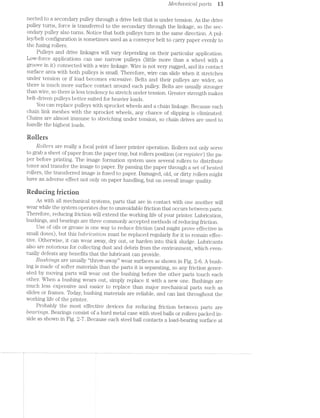
nected to a secondary pulley through a drive belt that is under tension. As the drive
pulley turns, force is transferred to the secondary through the linkage, so the sec-
ondary pulley also turns. Notice that both pulleys turn in the same direction. A pul-
ley/belt configuration is sometimes used as a conveyor belt to carry paper evenly to
the fusing rollers.
Pulleys and drive linkages will vary depending on their particular application.
Low-force applications can use narrow pulleys (little more than a wheel with a
groove in it) connected with a wire linkage. Wire is not very rugged, and its contact
surface area with both pulleys is small. Therefore, wire can slide when it stretches
under tension or if load becomes excessive. Belts and their pulleys are wider, so
there is much more surface contact around each pulley. Belts are usually stronger
than wire, so there is less tendency to stretch under tension. Greater strength makes
belt-driven pulleys better suited for heavier loads.
You can replace pulleys with sprocket wheels and a chain linkage. Because each
chain link meshes with the sprocket wheels, any chance of slipping is eliminated.
Chains are almost immune to stretching under tension, so chain drives are used to
handle the highest loads.
Boilers
Rollers are really a focal point of laser printer operation. Rollers not only serve
to grab a sheet of paper from the paper tray, but rollers position (or register) the pa-
per before printing. The image formation system uses several rollers to distribute
toner and transfer the image to paper. By passing the paper through a set of heated
rollers, the transferred image is fused to paper. Damaged, old, or dirty rollers might
have an adverse effect not only on paper handling, but on overall image quality.
Reducing fricrion
As with all mechanical systems, parts that are in contact with one another will
wear while the system operates due to unavoidable friction that occurs between parts.
Therefore, reducing friction will extend the working life of your printer. Lubrication,
bushings, and bearings are three commonly accepted methods of reducing friction.
Use of oils or grease is one way to reduce friction (and might prove effective in
small doses), but this Zabr'"iccttvLo'iv. must be replaced regularly for it to remain effec-
tive. Otherwise, it can wear away, dry out, or harden into thick sludge. Lubricants
also are notorious for collecting dust and debris from the environment, which even-
tually defeats any benefits that the lubricant can provide.
BU-S/’Z/Z71-Q8 are usually “throw-away” wear surfaces as shown in Fig. 2-6. A bush-
ing is made of softer materials than the parts it is separating, so any friction gener-
ated by moving parts will wear out the bushing before the other parts touch each
other. When a bushing wears out, simply replace it with a new one. Bushings are
much less expensive and easier to replace than major mechanical parts such as
slides or frames. Today, bushing materials are reliable, and can last throughout the
working life of the printer.
Probably the most effective devices for reducing friction between parts are
bearings. Bearings consist of a hard metal case with steel balls or rollers packed in-
side as shown in Fig. 2-7. Because each steel ball contacts a load-bearing surface at
M Typical CO77?,]9O7’L€’l’Z-15$
Roller
Frame  /
Shaft  .@
A bushing assembly.
/ -Bushing
F1‘alng ROll€l‘
'-'*-+:-- g .7 ..
-1-*r'—*'-"Ws:»'~"' '-'-='#a>: '=1<-‘*1-" "W-Y-'-1.,Shaft ~~-~ _. __. ;._v n . -4:3. -:;"g.~:- ~ ‘$3, :_ ~f 7_v. .= _ .-.', . :~ - .v .-» _.'1_.;~_,.»'}£ __ 4->.-~.¢.. $c;I.¢».'{:,‘~>
'|' 3.?» -~-=.i.=r..';.~ . ~"_ -" Y . 1’: -. » ' 1-‘3-.- -' ‘- » -.- - ‘ - ~ -.--' ‘ . :-.- ' 9., aw:-.‘ ._ -:' IN ~, 1-i-.=_~;1,'.;-.-J : ,/;'.}~_ 4 ,_- H ‘KER . ‘ .~_'l';:$§')‘:~ <. gfi , fi,‘_-,
‘]:;:;:;:;:;:;:;:;:;:;;; J‘ -. ;;:;:;1;;l1 .i _ 2“-7. __ .._._._._. --.-._ - -. A D __. ,,_ -, - . -; _ . -. .... H.-
/:/ .1;
' ‘ -‘YL“»‘;‘1§'i:='~:l-l‘ v 3 ‘ i ‘ '-. - ~ .‘* . **- :- ' .»‘*¢ 2*‘. -I1" -/' $51-“€':5l‘:‘*L"*“1‘ ' 51$:-,%Y"' ' "‘- ' ' ‘-. .- '~' ‘ 12». '- l“ ‘:"" ..--2 2?‘ w "‘-W-.
l '4‘ "‘~<.>=='»>- ’*> M - . . 2 '. - -- _ ,.>$$§"‘ '-:9 ,-<~" ~>.,- .' .-[ii -.1
J’ for * .13: ‘ ”%~»-5?" ll" -~ "R -
ea
-*-»&""'<§.~.....£v-V M?‘ l’ % A 3% *’§“$¢~ “f. . -‘
“‘ A beal lug assembly‘
Ball bearings
Case
only one point, friction (and Wear) is substantially lower than for bushings. Unfortu-
nately, bearing assemblies are often much more expensive than bushings, so bear-
ings are used only to handle heavy loads, or in places that Would be too difficult to
change bushings. Most laser printers avoid the expense of bearings in favor of inex-
pensive bushings.
lectrecaicalcets
Electromechcm"iccil co'mpo’2'tents are a particular class of devices that convert
electrical energy into mechanical force or rotation. Relays, solenoids, and motors are
three common electromechanical components that you should understand. Each of
these important devices relies on the principles of electromagnetism.
Electromagnetisrn
Whenever electrical current passes through a conductor, a magnetic field is gen-
erated around the circumference of that conductor as shown in Fig. 2-8. Such a mag-
netic field can exert a physical force O11p67"’l’l’L8CLbl8 materials (any materials that can
be magnetized). The strength of a magnetic field around a conductor is proportional
Magnetic
force
fines
Metal Direction of
conductor  — - X1 fl’ "H" T F’ current
l ___._.__l """""""%* I
11i;%.I ‘I1%;<11,gr::jj___%_j_i iilgj :1j_%_:1 <I__%_,I' $1.-. 1...: _ ... n-an
2-8 The magnetic field formed around a conductor.
EZGCWO’l*"l'Zi6?C?/'l»Ct’7’Z'tCCtZ» CO’l’l’Z];)O’l*‘2/671ZS i5
to the amount of current flowing through it. Higher amounts of current result in
stronger magnetic fields, and vice versa.
Unfortunately, it is virtually impossible to pass enough currentthrough atypical
wire to produce a magnetic field that is strong enough to do any useful work. The
magnetic field must somehow be concenitiated, usually by cro'tlrmg the wire as shown
in Fig. 2-9. When arranged in this way, the coil takes on magnetic poles just like a
permanent magnet. Notice how the direction of magnetic itlux always points to the
‘rt-O'7‘tlt pole of the coil. if the direction of current flow were reversed, the magnetic
poles of the coil also would be reversed.
Coil , l/jlagnetic force field
/___...._~---- -- ---.~........._%_
__..--~-“"“::---~;Z§:m_ ~- at --------~ --- MTWMIIQW-*-»-:““'"""~
l |" 1:” ~. -. .' , ._ . _ V.-. 1, i - — __.' " I
'=.___ '-____ -~ _,"@"‘=i W _ Ar T T“i-.r1“M_’f§-W" “__~/-_“‘ '
"-... ‘—-»-.... i ?< I-i £3 ' ’ 3'” w _,_,----—" -—
""'-_ '""‘--- _- L - l . 2 I i . 2 < s . ___, ----""'* __,_—'-'
'“_-‘--___ i “M” 4 i 5 ' 5 -an _._- ' ‘ ""~' ___--'~"'""'_
< —- ~ 1 r ; = V 3 , , .._ __---~
N a—i__w—_,_““_t_- -I ii 11 :1‘ V 5 "I" W ii .’ — ,,_____M____"_m___m
__-»-——" . - '- ""---M-“ "|:.~ I:-—‘ ‘ma 2"-.-._‘___ ~-‘S . ___ .1-.u.._’ _ ~‘W ‘ I 31, ___‘,' ‘I H l V,“ I _‘--,:_ 1 “I
. .__“ _,_r_N_ M ___
... "—._._ ___; _ “‘i-i-—..._._..... i_...,.~....._..._.._...,i---*""“—-—"""‘ -
'-_..____ __:=-“*—__._ “Q *_,_m_
_...i____ -——-——--ia——--—————-—~'“'"""'"""-"-——--_ __--__._ fig W... _ —
21-=9 The concentra.tion of magnetic force in a coil.
To concentrate magnetic forces even furtheif, a permeable core material can be
inserted into the coil center as in Fig. 2-10. Ty_3ica.lfly, iron, steel., and cobalt are con-
sidered the classical core materials, but iron-ceranuc blends are used as well. Coils
of wire such as these form the foundation of all electromechanical cleviceU2
lvlagnetic
G011 force
lines
area.-_i _ —7_
___-_" ___.-> _ ___
~>' --' "
!~‘.’1’=£"-2‘
. ._ -...:_: .__
' 7 " —' ¢..».;;.~.. ‘—-4» -'-____ _ . —'.-__ -w_
_.- __- 1 ———._..__ "'.._ -_
_..' _-." ___ _ ._ :-~;.;_. i a... ___ '*-_ -.._
.' -' -»‘“' _ Y ~~...‘-..- "' ' 'n .- .- .._. j
I E__ -:__ .5: . ,_, -V . ~ - A fmfis F-., _"':;- '11 '1: '3
'"--.u_"'-__ _; , _,_ J "t ..._j*g » "i »-—"‘"___-"' C0111"-3
”'"'"—-“II —~ 2 i if F -t it ‘T_:.---""_ 1'-—"“"_ -. .- --, 1-*._..._. ;, ii . ii _____*- , i11ate1ia..
N _i___ —~ W . it it -~--~_ _,_ s
_.---"“"___- ""11"" *1-~ ~ ~ t" '= "-~Tl-"ix: ___ '"'-—-~._-"H -"__ -"'-Q“ -- P‘-'=='-‘=2 .. L‘-., ‘I’ ___—-T 7. ;i7_V___ *__ T , Q";-' _ -—— _"""':_?a""-<_ -"1.
. 1 '-' ll‘ I ..._ '3'“'"1 . Z»;-'1.‘~..~',.x<~..,__,___»-» _ 'w“_"'__':| _:I 3|
flLzl~ $_%
a
l |‘ I, .-'“":'um' -.L ,_ __ -=,_ .9
._ -___ --_,_ ""' _,»r.___“ ..______ .....,____ I ,.. I -- T
aaaa
'*'*—.... _.==-vi ' ' WK-,_ I
Z2.-id Concentrating magnetic force with a permeable core.
Reiays
A relay is simply a mechanical switch that is actuated with the electromagnetic
force generated by an energized coil. A diagram of typical relay is shown in Fig.
2-ll. The switch (or coittctct set) can be normally open (NO) or normally closed
(NC) while the coil is de~energi:z.ed. When activated, the magnetic field of the coil
causes normally open contacts to close, or normally closed contacts to open. Con-
l@* C';§' T;y,p'tcrz.l conrtpo~iz.ei2.ts
Contacts
l l & 2-ll
_ . _ __ A schematic view of relay
*~ Co1.l *- 1- . -configurations.
Normally Normally
Open (NC) Closed (NC)
tacts are held in their actuated positions as long as the coil is energized. lf the coil is
turned off, contacts will return to their normally open or closed states. Keep in mind
that a coil might drive more than one set of contacts.
Relays are not always easy to recognize on sight. l/lost relays used in electronic
circuits are housed in small rectangular containers of metal or plastic. Low-power re-
lays are available in oversized lC (integrated circuit) style packages and soldered
right into a PC (printed circuit) board just like any other integrated circuit. Unless
the relay internal diagram is printed on its outer case, you will need a printer
schematic or mamifacturer’s data for the relay to determine the proper input and
output functions of each relay pin.
Ruienuiris
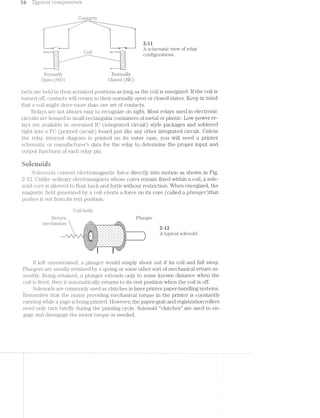
SOZ-8"l‘2.-O'Z(Tt-S convert electromagnetic force directly into motion as shown in Fig.
2-l2. Unlike ordinary electromagnets whose cores remain fixed within a coil, a sole-
noid core is allowed to float back and forth without restriction. When energized, the
magnetic field generated by a coil exerts a force on its core (called a ptim.ge"r')that
pushes it out f'i'om its rest position.
Coil body
T Return Plunger
mechanism h.g.;.g.~.-.~.'.~.'.~. - '.51.;<l,F._~,.,,,-1‘;-1-;|;q-;~_-_ - - - | > - . . -_-_-
.;.;.;.;.;.;.;.;.;.;.;-;.;.;. _. ,- _. . - . . - '-'. in_._._._._.,._._-_-_-_|_._-_-_|, . ~ ~ .' .' ~' .' .' .' 1-,
¢'|'~'¢'v'»'u' “ ‘J-'¢'|'~'v'| '- '- '- II '- 'u 'u '- '¢_. .. . ._. . . . . . . . . . .
 *2
Aia>raS@1e@e-
E
>:-:-:':- -:-:-:-:-:. ' . ' . ' . ' . ' . ' . ' . " . 1:
-' -" -' -' -'
I-I-1‘I*I~I;I;:;§;Z;I;I;I:I _ '._ '._ '._ -._ '._ '._ '._ '._ _i;:
‘ij§§E§iiE§§§E§§§E§i§§§§1i*= ' ' ' ' ' = -- .,'.-.-:1§¢§'. . ._ ( ............
'-I;I1Z;1;Z3Z§I§Z;§-' "Z;i;IjI;IjI;i;I;I-'-4&3}. 3,; . , - 1 . , .
r is
lf left unrestrained, a plunger would simply shoot out if its coil and fall away.
Flungers usually retained by a spring or some other sort of mechanical return as-
sembly. Being retained, a plunger extends only to some known distance when the
coil is fired; then it automatically returns to its rest position when the coil is off.
Solenoids are commonly used as clutches in laser printer paper-handling systems.
Remember that the motor providing mechanical torque in the printer is constantly
running while a. page is being printed. However, the paper-grab and registration rollers
need only turn briefly during the printing cycle. Solenoid “clutches” are used to en-
gage and disengage the motor torque as needed.
Electrom.ec/trim/tcctl componems i7
Meters
./l/[otors are an essential part of every laser printer manufactured today. Motors
operate the entire mechanical transport system. Chapter 8 presents a detailed dis-
cussion of mechanical systems and service. For now, concentrate on the motor itself.
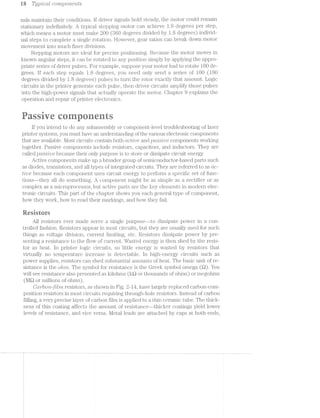
All motors convert electrical energy into rotating mechanical force (torque). ln
turn, that force can be distributed with mechanical parts to turn a roller or move a
belt. An "t"7’tCZ"L(.iCZ’Z-O71 motor provides torque through a series of powerful electromag-
nets (coils) around a permanent magnet core as shown in Fig. 2-13. The core
(known as a rotor) is little more than a shaft that is free to rotate as its poles en-
counter electromagnetic forces. Each coil (also called a phase or p/tctse 2.u“mct2Trtg) is
built into the motor stationary frame (or stcttor).
Motor housing
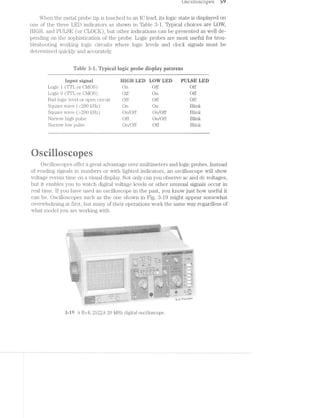
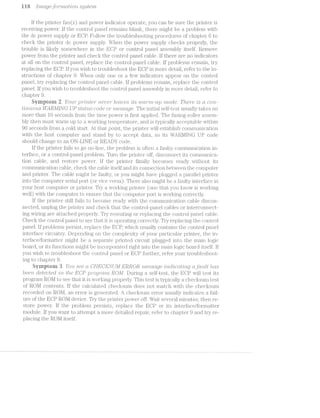
/ Motor shaft
4'“1** >2“r
- . - - - . ~ - ~ 4 - . 0 1 v - » - . - ~ . p - - . . - -- q - , v | 1 - . --‘- -'-.'-'-'-'.‘-'.'-'-’-',' ‘v'1'-'|’.'»'-'-‘~"‘.'-'-L‘-" I ‘IT
1|-1:1:.;.:.'11.:.'..{.;.;.:.;.;.:.~.'.;-'.;.'.'."'.'.'.'i'.' '4.‘J.:.;.1.‘.-.1.an‘.-'-'.'.'.'.'..'3.'.'.'.-.'_'.:.'{$1~.-».'.-.'.I.'.1.~_'.'.- '11-ii’I , , . .4-P '
_r|l'_-‘|:1_| ¢_|‘v:.'-_-1-_|_-_-_»_._¢_|:-1‘_-1-_':-fafa:-:~:v:|:11::|_.:4-,-_-'-Q:-1.:-Q|1;:-:-1.:-:-1.:-:1:|1,:-ffI-:5-:.'{.:-Q|:1:|:|‘-'.:-H-jf»' Q ' - ~ - - | - ‘§' -
1. In'~_|_1_4:v_1_u_u‘~_-.-'1,-'~_-.|_u‘-_¢‘4'o‘-5"-_u_u_u_u_|_|_>,v'-_v‘|'u_-‘Q.|_>_|_n‘r_¢_n_u_v_¢_q'u_-I. |_-3.‘:|:|_>_-_-_e_-_-_v_-_r_w:v:1_|_¢_- -If n 4 4 u u 1 | ~ 0 4 J‘__¢
_.jI§Z;I:1}:11;:;I;kZ;Z;Z;Z;l;I;Z;Z1I31:31l;I;i;Z;IEZ;Z{Z;i;I;Z;IjI;I;Z;I;I;:;I;I{I11'!;1;I;:j';Z;ZfI;'I;Z;:;;"-'1'-"Z11;$1:1:13:11;Z;I;I;I;Z;:-I" '~Z . ' - ' . " '. '. - ' < ' ~ ' - '- ' . 1"
.-:->:-:~:-1-:~:~:-:-:-:-:-'-:-:-:-:-:-:+:-:-:—:-:-:-:':':-:~:~:-:-:-:-:-:-:-:-x-:-:1'-:-:~:-:-:-:-:-:-:c-' " ~:-:-:-:-:-'-:i:-:-:-:-:-:-:-" ' ' '. '.
.~:-:-:-:-:-:-:-:-:-:-sq:-:-22-:-1;:-:-:~:-:-:-:c-:-:-:-:-:-:-:~:-:-:g-:-:-:+:-:-:-:-:§;<:c-:-:-:-:-:-:-:-:1‘ -:-:-:-:-:-:‘-%-:-:-:~:->-:- - - - - - - - - - - '_.1.1.3.1.;-1.1.3.1.:-;§.,._.5;::-3.» ¢.'.'.'.‘-'.~.-.','.~.-.~.* -z ' - ' ' ' ~- ' -.' ' ' ' ' ' ~ ' ‘|'-I‘ ' 1.3.;-;¢.§;.§_¢.;.;.§.; _ ' _ - ,- _ - _ - _ - _- '- ~ - ~ _ - - _- _ ~ _~ _ v _ - _ _-
.;-;-;.;-;-1-'.'.:.;.;.;.;.:.'.:.;,;._.;. .~.~.:.;.'.;.:...}:.:.-.;._ . . - . . . . ._1>:,._.~_.;:,~,.,_. '. . . . - . _.:.
.421:1:?:21:1§1§I:1:°:?$E:$5:1:1:!:=:3 ==$:1:I:<:¢:I:1:I:¥*“ -' ‘F._:;:;:;;;:;:;:;:;:;*~';:;:;.;.-:;:;' ' -;-:-:-:-$:-:-:-:-:-'-:-:-' '* .' -' ' - - - - -'f-_--.-_-_-_»_._Z'1,-_-._,'_-_ k 1' A ‘-5":-'J'|'1‘-‘-'|"'-‘¢' -1d-'. . . -Q" ." 7%.‘.-V. .'.'.f‘f . ,
M » N -;;:;:;:;‘??;i P€rn1ELl1(-BITE magnet
A " ~ :?:1:I:1:i€';..11::?‘;:L, ;:1I;1§1§1§1Er_: . .. . .- ~ x A ,5 ,+» 1, l—,..- -:.;;.,;;.,;_..;.;.;.-l‘ poles (1 otoi)rununa--I~' ' ' ' ' ' ' '1‘ 0' Fr:-'~;-:-;-1-3 '-;->1 - --.-.-.-.-.-.-.;.- ~ - - - .' .- .- .-;, .-x III .. '.-.'.-.'-".< .~ - ~ - ‘ - . -' - .--' - ~(25.3!;.;.;.;.;-;.;i;§‘Z_-_-_._,_._._-_.j. I;.;,.',;.;.;2;.-Z;.- . _-_-_-_-_ _.-'_.-_.-_.- z _ _  , _ _ _ _ .
I-C1!-1-Z-I->3-Z-..-.-I-I-Z-‘-C-I-2-I»!-Z 'w'~1-'-'>'-‘-'3'-' ' - - - ~ - -' ' ' ’ -' ' ' ' Eli“ - - -Ax-.~.-.'-‘-'.'_'.'.--'.'>€'.'.-.~.'.*. 'I'.'I~'-""2-'-' - I v 1 -' -' - ~ ~
-:-3:-:+:-:-:-:~:-'-'-'~:-:-:-:-:-:-:-:..... -‘—'-:-:>.<:I:-'1'! ' - - ' ' - - ' - ~;.;..;.;.;.;:;:;:;.;.;ig--;:;:;;;.;:;-3:145-;.;.;. '> a ;2;l;.;.;.;.;.;I;I; . . . . . . .-'_ -'_. . - - - -
:==sEaraas==i====ia=2:-=:=2:zi:2 2 Er5>I=E1E==1‘==$= -' -. - _- 1 ‘I.I-I‘I:I‘l‘II-0')‘I-1-1:I‘l‘I‘I,q‘D'I‘l:I‘l.I‘l.l‘l_l'I'v:| V -1,-_“_v:1f|:w:u v ‘ D ' I ' D ' _ - -' _.' _-' _~' _- l ' ' ‘ _' . ' _ ' -
inn_._._._,--_,-|.--_"_‘._._-|-nu. -...--Hr . - - - - J
:a:~:1:Q._-_|_u)11-n:r:|:a:Q-_|:q‘|}_|_¢:|:u):o:|:n;n’$ if :-1-:-:o:u:n:p:¢'|: ‘ _ ' I ' ‘ ' .‘ u n’ -0' Q. _n' ‘p_ '~ I4‘ I 0' ‘l' 3 ¢,w‘_§;_'5 ' I ‘ _ ‘ ‘ “
;.;.;.;.;.'-;-;.;.;.;.g.;.-'.-»;.-;.;,;.;.;.~.;.;.;.-.3. v .~.-.-.;.;.;.;.;Z;._ . . . . . .-la .-'.- —4-- '5 - .- _,l;.‘,.,~ . . .'. .
-:-:-:-:-11'-:+:-:~:-:-:$:?:-'1:-:-:-:-:-:t-'-'-t?:-:- J‘ .». W‘ / ~:!.'!:Q-:-:-:-:-:-:- -‘l 'I-'- ' ' - ' '.;.;.5;.;i}:;.34.1.;.;.;.;.g.;2;.;.;.;;;.;.;-;2$;5-5; ‘w a 2 ‘C ;.g.;.;;-:5-.~.;.3{;, . . . . . ..-fr‘ .;.* .+:I;'<‘i.'.'.‘.'. .
.'.'.-.~.'..'.'-~.-.1-"A.-.w.-.1-'-'. -'.'.'.'<‘> .'.'. _'.'.'.Z '3'-'..'. .1 ' ' '  ' "'1 =75‘-*‘ ~ ' ' ' ~- _|_.-_._._._,- _._-_._._._,_-._-_._._._.".. _-._-..; _-_._._._._ - . . . . .r ' ,..==;~ . J-
'~'§-:-21:-:-:-:;E;:;?':-:-:-:-:-:-a-:~:-:~:-: __ ~ :1:-:15:-E-:~:-:-:-:-: 4 Ea N - '1' '“
P", -"'2, ."a.*"“ ' ."',.+'l"' e
'._ TIj3IIC/3
__ _____ ,_______ _ _,* . . -__._._.,..,._. . . . . . ., . . L . . 1
‘@:;=,=;>j=;=;;=;;t=;=3=;=;r;;=, * ~ , “’ =;=jr;=;:;t=;=g;;1-,,;.;.;_;.;.;:-,_j-. .;.;.;I-.;.;,%i
‘P-i=5523E;5;E;E;t5;Eg§tE§§;I,. . . ....3 -‘-'-'-'---'- A r.---v.'. -~-J‘
' Vvi]-1
Ml (stator)
3111
";.1;:fi;Z
I_I;IjI;-
1'33:
..-¢;.;.
".:~:~:-' _.~:!:j-:5:
*’Ifijljl
5:21;}
'55:3: -a;.;.;.
1.3:’f7:-:-
"~Z-2'1
3+;-r _._._.4.1.;
I521:1:
<_.,.,.
.-..;.;..;.-
25525.I04;-;-:1
eI-I-2' a-as--2+13-#32
.;.-.-.-_.;.;.-:-:-:;::1:-':-:.;.;.;.1*!-1-I
'~.1.-1;.
i-.-K
L'I;l;I;I
331':
.N.;.;.;
.1E1515! ..;.-.;
111.11
.*-.1515" .,r-
-'- .- ...
..-- iA-I.U.
Alv-
-.. .1I~'.'.
2»-i3 Simplified view of a typical induction motor.
By powering each phase in its proper order, the rotor can be made to turn with
some amount of force. The amount of angular force generated by a motor is known
as torque. lnduction motors generally require two ac signals separated by a 90 de-
gree phase difference. These sinusoidal driving signals vary the strength of each
phase evenly to create smooth rotation. lnduction motors are rarely used in today’s
commercial printers because they do not lend themselves to the precise positioning
requirements of most printers. lnstead, a close cousin of the induction motor is used,
and the motor is called a ctc servo motor.
The dc servos are powered by bipolar dc signals rather than by sinusoidal ac.
Like the induction motor, a dc servo is turned by bipolar driver signals in rapid suc-
cession. Although dc servos are not very precise for positioning, they can hold a con-
stant speed very accurately. This characteristic makes dc servos ideal for driving the
scanner mirrors in laser printers that must rotate at a precise rate.
A popular variation of the dc servo motor is called a SZ§€].’)j_lJ’Z7’tQ motor. Physically,
a stepping motor (or stepper) is very similar to a dc servo, but the rotor/stator
arrangement is much more intricate. Like dc servos, stepper motors are driven by a
series of square wave pulses separated by a phase difference. The sudden shift in
drive signals coupled with the intricate mechanical arrangement causes the rotor to
jump (or step) in certain angular increments, not a smooth, continuous rotation.
Once the rotor has reached its next step, it will hold its position as long as driver sig-
i% Typiccil covrzpo'rze'mis
nals maintain their conditions. If driver? signals hold steady, the motor could remain
stationary indelimitely. A typical stepping motor can achieve 1.8 degrees per step,
which means a motor must make 200 (360 degrees divided by 1.8 degrees) individ-
ual steps to complete a single rotation. lilovvever, gear ratios can break down motor
movement into much finer divisions.
Stepping motors are ideal for precise positioning. Because the motor moves in
knovvn angular steps, it can be rotated to any position simply by applying the appro-
priate series of driver pulses. For example, suppose your motor had to rotate 180 de-
grees. ll’ each step equals l.8 degrees, you need only send a series ol’ lOO (180
degrees divided by 1.8 degrees) pulses to turn the rotor exactly that amount. Logic
circuits in the printer generate each pulse, then driver circuits amplify those pulses
into the high-power signals that actually operate the motor. Chapter 9 explains the
operation and repair of printer electronics.
h=_ _:,4-' - , ~,_ ._, ‘ »_‘ _, . ,‘»¢3,‘ . -V.
it .>.§;~_-.< =->. .~ ll is tr it 5::as-., it w ‘ii e 15='_ g; .4‘ rt,
li you intend to do any subassembly or component-level troubleshooting of laser
printer systems, you must have an unde1;'stan<;ling of the various electronic components
that are available. l/lost circuits contain both a.c:t"Z’ve and ,pcr».s.s/we components working
together. Passive components include resistors, capacitors, and inductors. They are
called pcissiue because their only purpose is to store or dissipate circuit energy.
Active components make up broader group of semiconductor-based parts such
as diodes, transistors, and all types of integrated circuits. They are referred to as ac-
tive because each component uses circuit energy to perform a specific set of func-
tions—they all do something. A component might be as simple as a recti.i’ier or as
complex as a microprocessor, but active parts are the key elements in modern elec-
tronic circuits. This part of the chapter shows you each general type of component,
how they Work, hovv to read their markiiigs, and how they fail.
Resistors
All resistors ever made serve a single purpose--to dissipate povver in a con-
trolled fashion. Resistors appear in most circuits, but they are usually used for such
things as voltage division, current limiting, etc. Resistoiis dissipate power by pre-
senting a resistance to the flovv of current. Wasted energy is then shed by the resis-
tor as heat. ln printer logic circuits, so little energy is Wasted by resistors that
virtually no temperature increase is detectable. ln high-energy circuits such as
power supplies, resistors can shed substantial amounts of heat. The basic unit of re-
sistance is the ohm. The symbol for resistance is the Greek symbol omega (Q). You
will see resistance also presented as kilohins (lrtl or thousands of ohms) or megohms
(Mil or nullions of ohms).
CCL7*"bO'7'L—f’ll7?'Z resistors, as shown in Fig. 2-14, have largely replaced carbon-com-
position resistors in most circuits requiring through-hole resistors. instead of carbon
filling, a very precise layer of carbon film is applied to a thin ceramic tube. The thick-
ness of this coating al’l’ects the amount ol’ resistance--thicker coatings yield lovver
levels of resistance, and vice versa. l/letal leads are attached by caps at both ends,
1 i-ooo1,~c=n: L/L)!/L1./U‘Ibt7'l(/bib 17
Leads
,~,'_§r'|;,;-.‘_,;@;1~.',&_ ,‘-1Yr!‘M_;
»f@_.!<,§-§,@¢§;*;j§;;i'f-= =- ~'=l_§=:-3-=_.'_.-.»-zr-.¢"lI§,§:~,
l!,§-ffiwiérraiiggin»stain;-i55;;Hsgi@1!§“§r§w5¥w#s=§~%e»h»!e‘!~$1r=irilvriii,,‘_‘.-=i_‘,:=~___..'-- '-i _=»~ ~.- .-' '~.1 :5 1-,: -1.-1.-1 sq‘, '=5 vw. 1» ' '-.=|“~
':;:5:5:5:35:3:5:;:;§:5;;:5:§:§:5:5:3;5:5:5:§:;;§15;;:;:5:§:§:§:3;;§:§:§;§:5:5;§:§:;$ -1 F)
$3:5:315:5=5=E$15=51515:?1551215155=55=ErE=?é=E=E=£15=33=E=E=E:§:E=E:EsE=E:E=5sE: s...“ -1,;I{Z111::I31};:1;1::;I11;Z;I;Z;1;Z;!;ZfijZ11:I11}111;}!11;:;i;§;I;§;Z;I;I;I;Z;!;Z;IjI§;;._ ,
1 -:-:+:-:-:-'-'-:-:-'-:->1-:-:-:-:-:-:-:-:~:-:-:-:-1-:-:»:-:~:-'-;-:-:~:~:-:»:-'-:-:»:-:-:-: Ti ' ' ‘
‘w:-.@- 2-:-'-:-;-:1:3:-:~:5:»:-:-:-:-'-:-:~:-:-:-'-:-:-:-:-:-:-:-:-:-:f:-:-:-:-:~:-:-:!:-:-:»:-:-:- ~ . r -
===E3:515:512:=:E=E=5:1=E===§%=§=Esti1==:=¢==5=E=2=5=E=E=E===1=E:==£=§=iE===¥=¢==== /1 U S S "- S € C -lQnc1. V1€ W O 8.- ?:-:-:-:-;-:1:-:-'~:?~:1:-:-:-:»:¢:15:21:!:"-:-:-:-I-:-:-:¥:1:-:1:-:-:~:~:¢:I:I:1:1:'i '-:-:-:':-:-:-:5:-:it-:->:-:-I-:-t-:-:-:-:-. "1-I-I-I-EI-C73-I-I->1-I-I-2'2-1'24
;.,Qil“Qi=. _'==.~.<.-ea ‘.',<l"':;'=I=_‘-"'-,115-§'i§“7fl‘Q§Tl‘$"l!F1!“-Qiififl, =$U.~§v,lj='rv_-‘—.'.0.'~ ,_~.r,4,.l'~‘<I|'l1!-.114. >,~,.'.'-->~.-1.-,.l=Yl_‘>‘rIv,:-lmg;.._,;_¢.,,,1¢ .._q,v-._|z-.=-~-9 '4-"._q,~.|z-'.i,¢,_=~.g,-:,,.-,1. '1,I"1l-_ l',!.-_p-P—.,Ir.;.,l; ‘qv“-:-A";‘TL,,“:‘:_E‘|‘ no.3->,p.v,§~,,.'-.,_=r,_:¢,§=-vi,
1“. ,_., , . , , . . .. .. _ .. ._ ..i,.,.~ _ .,. ,,.,.,‘,., carbon-film resistor.
Epoxy covering
Metal cap
Resistive layer
Ceramic core
andlluienurefnushedaueennflyischppedinegxuqrorceranuc.Carbonefihnresumors
are generally more accurate than carbon composition resistors because a film can be
deposited very precisely during manufacture.
A swij‘crce-'n2..oin/2r2._t resistor is shown in Fig. 2-15. As with carbon-film resistors,
surface-mount resistors are formed by depositing a layer of carbon film onto a thin
ceramic substrate. Metal tabs are attached at both ends of the Wafer. Surface-mount
resistors a.re soldered directly on the top or bottom sides of a printed circuit board
instead of using leads to penetijate the PC board. Surface-mount resistors are in-
credibly small devices (only a few square millimeters in area), yet they offer very
tight tolerances. Surfa.ce-mount resistors are used extensively in computers and
printers.
. . .'. . . . . - .‘-'. i .‘.'J. .*.'.‘3.1.‘.‘-'.'3.‘.*'fi‘Jl‘.=.‘<'.‘.*.*.'.‘.'.'-'.‘.'.'E"H.---nu,»H".--...-H...-.--H-'----.........
.;.;.;.;.;.;.;-_~;.;.;.;.;.1»;-1.1.;.;.;.;.;.;.;.;.j.;.;-;-j,;.;-§.;,;.;.;.;,;-;‘;v;.;.;=;._.._.........---..HH--.“,......---..-........
1I||v| nu Iii§IvI§III>lIIblII!lIllIIlI1lJ -|u-~. .-| hill--11VIIVIllIVIIVliIi---
'1'-'1'I'I'Z'Z'I'I'I'Z'31‘:-I-1'1"?§'I'I'I~1~‘~I-I-I-1'1-I'l'I'I=I'I-I-I'I'I'II'I~I'!'I*. ‘~.'.'.'.'.'.~.'.'.'_'.>.'.~.'.'.-A.-.'.~.-.'.*I'.'.'.'.'.'.-.'.'.*.'.‘.-.-.-.~ -.' - ' ' '
.'.'.'-'.'.'.'§'.'.-.'.-.-.-.-.x~.~.'.-.'-'.'v'.‘-'.*.1.-.-.~.-,'.'.'.~.*.~.~l~Z'. i- 1 1 - - ,-_-_.,_._._._-_-_. ‘
.I‘I'I"I‘I_I’I|Y‘l.n
~'.'-'.'.'.'.'.'.=.'
I*I'I'1'I'I'Z'I'§'I" ‘-_-_-,»_,_._._.,.._._
3-'3.‘ '-'-'|‘¢'~‘-| - v 0'0 I 0 0 I Q
.'.'~'.'.'.~.'.>.'.'
~'-"~‘.'.‘.‘~'.'.'.' ‘_-_~ ._._._. _-_._.
'.'»"|°.‘'_ l '.-.-.-.-,-. . ;k ;.;.;.;.;.;¢.
.'-':.'.;:; ‘
" .1.
1
‘:4’‘* .‘.s'.-m
Z'I'I'§'I'I"_, ._._._.,.,.~| ' ~ - .
‘l__..__
Resistive layer 2“ 15
Highly magnit'ied view of a
surface-mount resistor.
Ceramic substrate
- ‘l'T‘FI"lT‘"rrI:1I'l'If'Y"’:"""T| . . ?fiTF T'|'rrfi ‘
-.,---..----.---..E..-...~.--..---...--~.. 1--‘.--..-.-.----.--....-...»>-.-..--.---.-----.7l-..'--,----.-.-.-..------...--.-.-...».-.-.---..- --..........-.-..........--.-....-¢..--....-...,--.-¢»--.-..---...---..........-|---..»-¢-.--..-¢-¢-i---......‘..»,---.----.-....-.-.-.--..->---.-.-..¢--'.‘---.....-...'--...----.....-.-...---.,.~-..-.-.‘---¢..-.-..-....-.---.------.--.---.--iv--..-I---»,-.-1-»-..---......¢-.,-.....-|---.-.-..-->.....-.....-----.-..---.....~¢.1..-<.-.---.--,..-..-.---..-..-.-..---.-...--.-......i...-..----.-.---|---i-».--.......-.--.----,..-...1-.i<---.--......-.--..-.....-.-.....-..-'--.1-~---.....-<-.-.--....---.------.....-.-.-.---..i..-..-.-..|...--|---1---.....--..,---...-.-.-....--.-.--......¢-¢....---..»~--.......¢--..--.--...¢-.-.-..--,,.--.--..-i-4...-<-.....--.-.----...-v.-...~..1.-...-~,..;.--...--.--.-v--....-...-...---...,--.1.----.-.--i...-1-.....-..--.,-.-..---..-.-.-.-.-,1--...---I.--I.---..---...-.......-.......‘--.-.-...-¢.--..----‘.--.---....
Metal tabs
LU 1 LL}/p‘L(jLLL (jU'1'I’Z/_[J()‘/L(3‘)‘£-Li-S
Adjustable resistors, lrnown pote'2'z.t'io'metors or ’i"r'?,€OS'l§CL'L'S, are usually used in
laser printers to adjust contrast by varying the level of high voltage. A typical poten-
tiometer consists of a movable metal wiper resting on a layer of resistive film. Al-
though the total resistance of the film, end-to-end, will remain unchanged, resistance
between either end and the wiper blade will vary as the wiper is moved. There are two
typical types of adjustable resistor: knob-type, where the wiper is turned clockwise or
counterclockwise using a rotating metal shaft, or slide-type, where the wiper is
moved back and forth in a straight line.
ln addition to value and tolerance, resistors also are rated by their power-handling
capacity. Power is normally measured in watts (W) and depends on the amount of cur-
rent (I) and voltage (V) applied to the resistor as given by Ohms law (P : I >< V]. Re-
sistors are typically mamifactured in %@, %, %, ‘A, 1, 2, and 5 W sizes to handle a wide
variety of power conditions. Size is directly related to power dissipation ability, so larger
resistors usually can handle more power than a smaller resistor of the same value.
As long as power dissipation is below its rating, a resistor should hold its resis-
tance value and perform indefinitely. However, when a resistor is forced to exceed its
power rating, it cannot shed heat fast enough to maintain a stable temperature. Ulti-
mately, the resistor will overheat and burn out. in all cases, a burned-out resistor
forms an open circuit. A faulty resistor might appear slightly discolored, or it might
appear burned and cracked. lt really depends on the severity and duration of its
overheating. Extreme overheating can burn a printed circuit board, and possibly
damage the printed copper traces.
Failures among potentiometers usually take the form of intermittent connec-
tions between the wiper blade and resistive film. Remember that film slowly wears
away as the wiper moves back and forth across it. Over time, enough film can wear
away that the wiper cannot make good contact at certain points. The poor contact
can cause all types of erratic or intermittent operation. With EP printers, it is rarely
necessary to contimially adjust printing contrast once optimum levels are found, so
it is unlikely for adjustable resistors to wear out in laser printers, but dust and debris
might collect and cause intermittent operation when adjustment is needed. Try
cleaning an intermittent potentionieter with a high-quality electronic contact
cleaner. Replace any intermitt.ent potentiometers or rheostats.
Reading resistors
Every resistor is marked. with its proper value. l/larking allows resistors to be
identified on sight and compared versus schematics or part layout drawings. Now that
you know what resistors look like, you shou.ld know how to identify their value with-
out having to rely on test equipment. There are three ways to mark a resistor: explicit
marking, color coding, and numerical marking. lt is important to decipher all three
types of marks because many circuits use resistors with a mix of marking schemes.
Explicit marking is just as the name implies--the actual value of the part is writ-
ten right on the part. Large, ceranu'c power resistors often use explicit marking. Their
long, rectangular bodies are usually large enough to hold clearly printed characters.
Color coding has long been a popular marking scheme for carbon-film resistors
that are simply too small to hold explicit markings. The twelve colors used in color
I
Passive components 21
coding are shown in Table 2-1. The first ten colors (black through white) are used as
no.1/ue and 'multtpZte'r' colors. Silver and gold colors serve as tolercmce indicators.
Table 2.-1. The standard resistor color code
€e1or lst Band 2nd Band Multiplier Tolerance
Black 0 0 1
Brown 1 1 1 0
Red 100
Orange 1,000
Yellow 10,000
Green 100,000
Blue 1,000,000
Violet 10,000,000
Gray 100,000,000
White --—
(None) 1 20%
Silver 1-. 10%
Gold 1 5%
<LDO3"'103C3“l>-l>C»0L'J QQOOQC'3U‘!|-l>~OJ>L'J
The color code approach uses a series of colored bands as shown in Fig. 2-16.
Band number 1 is always located closest to the end of the resistor. Bands one and
two are the value bands, and band three is the multiplier. A forth band (if present)
will be silver or gold to indicate the resistor tolerance. On rare occasions, you might
encounter a fifth band that indicates the reliability of a resistor (and is used only for
military- and aerospace-grade resistors).
Value band 1
Value band 2
Multiplier band 2--16
/ Resistor color-coding scheme.
i -
: .~
As an example of color coding, suppose the resistor of Fig. 2-16 offered a color
sequence of brown, black, and red. Note from Table 2-1 that brownzl, blacl<=0, and
red:l00 (because the red band occupies the multiplier position). The sequence
would be read as [band 1]{band 2] >< [band 3] or 1 0 >< 100, or 1,000 Q; (1 l<Q). lf the
first three color bands of a resistor read red, red, orange, the resistor would be read
as 2 2 >< 1,000, or 22,000 £2 (22 l<Q), and so on.
When a forth band is found, it shows the resistor tolerance. A gold band repre-
sents an excellent tolerance of i5% of rated value. A silver band represents a fair tol-
erance of 110%, and no tolerance band indicates a poor tolerance of 120%. When a
faulty resistor must be replaced, it should be replaced with a resistor of equal or
smaller tolerance whenever possible.
if-K-1'H¢v'MinQXQX $Gfl'e~"’{"4'!>"€"
22 Ti/pzlcctl CO’7’1Z]JO7*Z€?77,Z1S
Color-coded resistors are rapidly being replaced by surface-iiiount (SM) resis-
tors. SM resistors are far too small for clear color coding. lnstead, a three-digit nu-
merical code is used (even though you might need a small magnifyiiig glass to see it).
Each digit corresponds to the first three bands of the color code shown in Fig.
2-16. The first two numbers are 'oo.lru.c digits, &1’l(ll1l1€l1l1l1‘Cl11ll1lll)€t1‘1S11110’l7’t7,tlli’Zlj3t7;€?"’.
The multiplier digit indicates how many places to the 7/12./‘(J//iii; that the values decimal
place must be shifted. For the example of 2-17, a numerical code of 102 denotes
a value of 10 with 2 zeros added on to make the number 1,000 (1 l<t?.). A inarlring of
331 is read as 830 Q, and so on.
Metal
leads
/
. We
. . .  ' ‘ '2 P : : ‘1 1).
Resistive material 10 A 100 Q ALMS) }1’%OU“
on ceramic substrate " ‘“‘
2-17 Surface-mount resistor inarkings.
fiapaeitors
Capacitors are simply energy-storage devices. They store energy in the forin of
an electrical charge. By themselves, capacitors have little practical use, but the ca-
pacitor principle has important applications when combined with. other components
in filters, resonant or timiiig circuits, and power supplies. Capacitance is measured
inj‘cz.rrctcts (F). ln actual practice, a farad is a very large amount of capacitance, so
most normal capacitors measure in the microfarad (uF or millionths of a farad) and
picofarad (pF or inillionths of millioiuih of a farad) range.
In principle, av capacitor is little more than two conductive plates separated by an
insulator (called a £1/Z€t€Ct'1"”ZC) as shown i.n Fig. 2-18. The amount of capacitance pro-
vided by this type of assembly depends on the area of each plate, their distance apart,
and the dielectric material that separates thern. Even larger values of capacitance can
be created by rolling up a plate/dielectric assembly and housing it in a cylinder.
When voltage is applied to a capacitor, electrons will flow into it until it is fully
charged. At that point, current stops flowing (even though voltage might still be
applied), and voltage across the capacitor will equal its applied voltage. lf applied
voltage is removed, the capacitor will tend to retain the charge of electrons de-
posited on its plates. Just how long it can do this depends on the specific materi-
als used to construct the capacitor, as well as its overall size. lnternal resistance
through the dielectric material will eventually bleed off any charge. For the pur-
poses of this book, all you really need to remember is that capacitors are built to
store electrical charge.
.Pctss/toe CO?'l?.];707"t€7'2$S 23
P1818 Plate
Dielectric
, ,_ _ Epoxy 1
Eisiiiigi-ikgzzii,-5 i
:: gap. ' _:§:;_. ,-
”..aaaaaaaa»___ . .. . . §::::::;:;::; £5 1-. 1-» ,,, ’-"’-"1-'§‘II::i§§i-,-it ‘;;§:;-:,:i!'i§-
__ _ -.—?'7-‘T1771-I-I-Z~I' ~I-I-1-I-I-i~I-I~Z-I-I §§§i§EEaiaiiaiiigiiliiiigggl i§i§ili§‘.g"::',;5.,-.-,.. . iii;:§;§§Li;-;g§;l§;§§§§;'i;i___.‘._T;rj:_: 2:::::::::::::::::::::::. :::::::::::::::::::::1: _{:i§§§§::§%:::i giigigi-E:_§:'§3i§i§ iii; i:§§.1§"§=.é~E,“_ .- . .-, -. ¢ 1-. -4-.‘ mi... -
ii *1" 1 1 | E 1 i ‘ ii I lisi-:::': lb:-:' ::‘:
.-.~.-.-:-:-:-:<:-:~:-:- as?iii?siii???asssiiisssatlailsitsiEelsls§sia:i§ili=§iil;iiiis -1:, ..tilirisiisiislliiigziiilliiisa.=-.....=..-.-ensue==a-==;.ui=a.;a;.=;.;a=....i:::::::::::::::::::::*::'::::l*::':::::::::::::~::"::‘:§::: :-:§.*i:i!:'-... .:i::'z::::.'::z::.::: 1: mi.
: i : i : : : » » I 1 1'=;::::::::::::::::s::: :2.amx.::.::::::::'::::.::¢§:: ::::: i:i::lt:::: :5. .-".-'2/.1-.-'.-".r'_»-’.»‘- 1'3‘!-W36: '$:::1:l: :':'".:I - - - - - - - ¢¢:u-»u‘““-¢--»ul-|.‘"3----.3»-»;».i;»|»¢|-in 1»-~--i-up IQ 11:; ' ,-1-1---I----1!,-H gnulgqili
;;.:::::::.::::§:::§::;::§.;: §§::§..§:-,'-i "-§§;"§i';" ‘ ':' xlglgl , ,1 1 ,:: 5 H , sl q ,5,
~ -. : 1
Q I ll ll?! ll IIIIOI I II I O_' I I I I liiljlll ll Iii!!! ‘I I Ollllll ill I I [OI. . . . . . . -Ill nuance nl n on 0 n n 1- -¢ nlcqnl uh“ nu» nun > 4_ | o 20 “in I 1- u I n : 1 nun p u an | n
*"-"Q-"‘”'-»'*'-*'~M"1':::lE::::: mu: ::'::: '::..:: ::.:::::::s:m.:':::.::::l::'::.: 1-E‘-‘ .’i:'l::‘:: ‘Er-::§:l5i"l“5‘§"i‘§‘*3*l‘i‘§“§i‘*=i‘"§il:!t.__. . . . . . . - . . . . . . . . . . . . . . . . . . . . . - . . . . . :un|ln-tuna-K unniuuiunauhnnI1-:=-nu‘:tluuuun-¢i|n~ gm .5; neg: iui, {fin : ll.::::n:.|'::“. _;_:“_;::_H;‘ 3 si-
;::::::::::::::.i:::=:;::..:::m::::;:: :.*:::::.: z:::::::: :,:::* -..": .- .. .....:: : :.....-:1... ... 5“... ...... ..: :.-,_- - v - ~ - - ~ ~ ~ - - - - - - - - ~ - - ~ - ~ - ~ » - ~ - - O:iIlzI!¥II:1:l4I~l|1:IIIIIuunn n n cupu nu-nan 1 I ll
. 2 ,1 -, -... ..:.§. ...:....5..,,: ., ,,:_,,,,,,g,,,;.,,-»_ iii:i::52::?:2:::i=::::E::§:§::iE::5E:E:lEiiE:i:§:li_E§i‘1""fi iii?alirliizaies==ss1§saia=i=ias:==i=~§==i===-="==-=a~-_ . . . . . . . . . . . . . . . . . . . . _ . .. .. . ...1.........::..:.....:.:.. ..:.n.......:.::..:.-1-..._.‘_§ . . . . . . . . . . . . - . . . . - - ~.-mu n "-1- in--In -»-In un~u_|_g_g-X1 ’-- 1- ~ 0!|NI4ltuncllolllpliilrqiu -4 Q - u - 1 inf_._ . . . . . . - . . - - - - - , . mu"In-L-nuhupinilv¢|:u_:;_y_nn== 1: lI:¥:I1Ill1llIt:lI u1::un!_:;:.‘n1§o‘i ::d::§a|::.|.
"“"'*""----'' 1 ' ' ' ' ' ' ‘"=“"“"""""‘""" “" "5-1::§§iEi"i‘i:E§l::§'-‘E.'::':zi:'E:: '§:::::§5:“'"
-iii! ::'::EE:5:::::;:;i1§;:E::i::::i::::E:::;5:::;
‘-': ::l~:5:§:Ezizniziizzi'i::::i::'x::!:l':=::-1: on §--: nu---in-1--:1’: -,unb:uu|u-1
:. ::l.:;.1:::::'.:::.::.:,:Z::g;'::,::;::z:§'
as "4iiiii!l!i§§1555§=Ei§%;:liE:F" iii"""-1-=-iiiiizitm =' ‘
-/Plate
Leads
Top view Side view
2-18 Sectional view of a conventional plate capacitor.
There are generally two types of capacitors that you should be familiar with. The
types can be categorized as fliirecl or electrolytic. A selection of capacitor types is
shown in Fig. 2-19. Fixecl capacitors are nonpolarized devices-—they can be inserted
into a circuit regardless of their lead orientation. Many fixed capacitors are assem-
bled as small wafers or disks. Each conductive plate is typically aluminum foil. Coin-
mon dielectrics include paper, inica, and various ceramic materials. The complete
assembly is then coated in hard plastic, epoxy, or ceramic housing to keep out hu-
a---...-.._..._._.i_
'-““m_"‘“'1_' Alinniriiiin
Ll * l‘* electrolytic
---—----—~r—' capacitor
(axial)
Alumimim
electrolytic
capacitor
(radial)
l,_,l
Tantalum
F‘ 1| electrolytic
‘T1 1 capacitor
(radial)
Surface-mount
capacitor
2-19 Outlines of various capacitor types.
I . 1‘
E
2 E
'
I"! 9-‘ll
1, ,|
1 1
--»=m=<]l_
_
I" I
...._.__..-
51:11
lW —
I .1!
‘
~
Mylar
capacitor
(radial)
Ceramic
monolitluc
capacitor
(axial)
Ceramic
monolithic
capacitor
(DIP)
Ceramic
disk
capacitor
2a T3/ptcctt coirn;poirte'i"its
midity. Larger capacitors can be assembled into large, hermetically sealed canisters.
Fixed capacitors also are designed in surface-mount form. 0
Electrolytic capacitors are polarized components--they must be inserted into a
circuit in the proper orientation with respect to the applied signal voltage. Tantalum
capacitors are often found in dipped (or tectrolrop) shape, or as small canisters.
Aluminum electrolytic capacitors are usually used in general-purpose applications
where polarized devices are needed. The difference between fixed and electrolytic
capacitors is primarily in their materials, but the principles and purpose of capaci-
tance remain the same.
Capacitors also are designated as cimzlctl. or rctoltctl devices, which indicates the
capacitor lead configuration. When both leads emerge from the same end of the ca-
pacitor, the device is said to be moltctl. lf the leads emerge from either side, the ca-
pacitor is known as axial.
Surface-mount capacitors are usually fixed ceramic devices using a dielectric
core capped by electrodes at both ends. lf an electrolytic capacitor is needed, a sur-
face-mount tantalum device is typically used. Although the construction of a sur-
face-mount tantalum capacitor differs substantially from a ceramic surface-mount
capacitor, they both appear very similar to the unaided eye. All polarized capacitors
are marked with some type of polai'ity indicator.
Like resistors, most capacitors tend to be rugged and reliable devices. Because
they only store energy (not dissipate it), it is virtually impossible to burn them out.
You can damage or destroy capacitors if you exceed their working voltage (WV) rat-
ing or reverse the orientation of a polarized device. Damage can occur if a failure
elsewhere in a circuit causes excessive energy to be applied across a capacitor, or if
you should install a new electrolytic capacitor incorrectly.
Reading capacitors
Like resistors, all capacitors carry markings that identify their value. Once you
understand the markings, you can determine capacitor values on sight. Capacitors
are typically marked in two ways: explicit marking and numerical codes.
E;tlj;7l’t-Cit '7‘7"tCt'1*"/Z{3'Z’1‘?.,Q is used with capacitors that are physically large enough to
carry their printed value. Large, ceramic disk, mylar, and electrolytic capacitors have
plenty of surface area to hold readable markings. Note that all polarized capacitors,
regardless of size, must show which of their two leads are positive or negative. Be
certain to pay close attention to polarizer markings whenever you are testing or re-
placing capacitors.
Small, nonpolarized capacitors and many sizes of surface-mount capacitors now
make use of numerical coding schemes. The pattern of numerical markings is easy to
follow because it is very similar to the marking technique used with numerically
coded resistors. A series of three numbers is used—the first two numbers are the
value digits, and the third number is the multiplier digit (how many zeros are added
to the value digits). Capacitor numerical marking is shown in Fig. 2-20.
Most capacitor numerical markings are based on picofarad measurements. Thus,
the capacitor marked 150 would be read as a value of 15 with no zeros added (15
pE). A marking of 151 is 15 with one zero added (150 pll‘). The marking 152 would
Pctssiliie componeitts 25
Value
l/lultiplier (number of zeros)
* =:i:i:3:i:i:3:3:7:1r '1:i:!:3:!:!:!:i:i
ian 15 PF = 0.000015 ail“:-:-:-:-:-:-:-:-:-: , ; :;:;:;:;:;:;:;:;:;: ,
2"?“r Z'I'Z'i'I';'Z'Z'I'I ‘ I-I-1"?!-1-1-1-I . .
. Reading the numerical markings
H l l A A l on a capacitor.
151 150 pF m 0.00015 uF
152 1500 pF I 0.0015 uF
153 15000 pl?‘ 2 0.015 ul?‘
be 15 with two zeros added (1,500 pli‘), and so on. A marking of 224 would be 22 with
four zeros (220,000 pF). The decimal p1a.ce is always shifted to the right.
Although this marking system is based on picofarads, every value can be ex-
pressed as microfarads (uF) simply by dividing the picofarad value by 1 million. For
example, a 15 pF capacitor could be called a 0.000015 uF (15/1,000,000) capacitor.
Of course, there is no advantage in marking such a small capacitor in the microfarad
range when 15 pl?‘ is such a convenient value, but the conversion is a simple one. The
15,000 pl? capacitor also could be shown as 0.015 uF (15,000/1,000,000). Capacitors
with large picofarad values are often expressed more effectively as microfarads. To
confirm your estimates, you can measure the capacitor with a capacitance meter.
inducrnrs
Like capacitors, inductors are energy-storage devices. Unlike capacitors, induc-
tors store energy in the form of a magnetic field. Before the introduction of inte-
grated circuits, inductors served a key role with capacitors in the formation of filters
and resonant (tuned) circuits. Although advances in solid-state electronics have
made inductors virtually obsolete in traditional applications, they remain invaluable
for high-energy circuits such as power supplies. Inductors also are used in trans-
formers, motors, and relays. Inductance is measured in item/‘gs (H), but smaller in-
ductors can be found in the millihenry (mli) or microhenry (nil) range.
Coils are available in many shapes and sizes as shown in Fig. 2-21. The particular
size and shape will depend on the amount of energy that must be stored, and the mag-
netic characteristics desired. Laser printers use coils in their ac, dc, or high-voltage
power supplies. Small coils also are available in surface-mount or leaded packages.
A t'rr?msjormer is actually a combination of inductors working in tandem. As Fig.
2-22 shows, a transformer is composed of three important elements: a prrlmdrjg (or
input) winding, a seco/2‘2.uZcm"y (or output) winding, and a core structure of some type.
Transformers are used to alter (or transform) ac voltage and current levels in a cir-
cuit, as well as to isolate one circuit from another. An ac signal is applied to the pri-
mary winding. Because the magnitude of this input signal is constantly changing, the
magnetic field it generates will constantly fluctuate as well. When this fluctuating
as Tijp’2lCCtfi CO’2‘7’Z,pO?"Z,€’}"2,ZS
Encapsulating Core
inaterial _
Coil wraps &| !;,.-z}}:s
-"—--———----I ~ 3'1
I '-.,‘*.,"._ "., '-.,_*. ‘._ ,
%%~i?f
Core ” " JET “J511- "L,'~. C H’)
Coil E E
Conventional coil Torroid coil
2-21 Two typical inductor designs.
Core
].- ¢ *.~ ".'*".' .» .- .- .- .- .- .- .- .~ .+~.*-—;*" .= ' .
1.» .~ I .- J .- .-- .- .- .- .- .- .- .- .- .- .-. . . . . . . . . . . . . . ._ _ ._ _ ~_ ' ._ _ ._ _ ._ ._ ._ _ ._ ._ _.__.,
‘ .0 ‘v _- _n' '-' _; ‘Q -u' .0 n J ’' v‘ u I' | 1 c
Current flow U) ——w .." ' "' --'---re"""""""""" i - -
'"r__~L '-
ET?-.- 01“
." 1" '1' .1’"
"-1*-ml‘. _
.Prima.ry =;-=.._;.. P .-
winding 3"":-I -"'5 Sewndaly
' L %.='¢,..T:.-I'f j-~_‘j:Z,,,I~ winding».-3, '5
." .' '74
‘F1
,1.Q
‘ .-""2:-L-v
""a._ '5 '. __ '<_ ‘K
’ .7""r' -70-:-'.. '
__ ._' ._ -_‘ . __..-._-........._...__...
- " I " . ‘ 1- l:—'~ii' '.|' - - E §*=“"!'*““l 2 : —r ' . "',. _. _- _‘ ,- .. _. _. _- _. _. _. _- _. _. _- _. _ I _.
". ". "- ". "- "- "- '1 "- ". '". "- ". "- "- ". '-
- ___ '_, J‘ __- '_~ '_. __. ',- __- '_- __- J,-
~ . - - .. ". ''- ‘- ‘‘ '- ". "- "- ". I'I ". '‘- '- ”- ' .LI . J_. X_. ,_. I_. I. 1_. l,» t|. _. _. _. _;,_. Q_. _. _. _. _. _.
‘ .___ 1-__-——- -— ' ’ ‘-
Z-Z2 Diagram of a transformer.
field intersects the secondary coil, another ac signal is created (or mduced) across
it. This principle is known as mctgnet/Z0 coupling. Any secondary ac signal will du-
plicate the original signal. Prima.ry and secondary windings are often wound around
the same core structure that provides a common structure and efficient magnetic
coupling from p1"ili1ElI‘y to secondary.
The actual amount of voltage and current induced on a secondary coil depends
on the ratio of the number of primary windings to the number of secondary windings.
This relationship is called the L"Z,(.-’i""‘7'Z-S "ru:t’io. lf the secondary coil has more windings
than the primary coil, then the voltage induced across the secondary coil will be
greater than the primary voltage. For example, if the transformer has 1,000 primary
windings and 2,000 secondary windings, the turns ratio is 1,000:2,000 (1:2). With 10
Vac applied to the primary, the secondary will output roughly
410- or 20 Vac
(2)
Such an arrangement is known as a step-up transformer. lf the situation were re-
versed where the primary coil had 2,000 windings with 1,000 windings in the sec-
Active compon-cuts 27
ondai‘y, the turns ratio would then be 2,000:1,000 (2:1). lf you apply 30 Vac to the
pi"imai"y, the secondary output would be
or 15 Vac
fr)
This transformer is known as a step-cZ,o'2rm transformer.
Current also is stepped in a transformer, but opposite to the proportion of volt-
age steps. lf voltage is stepped down by the factor of a turns ratio, current is stepped
up by the same factor. This relationship ensures that power out of a transformer is
about equal to the power into the transformer.
Because inductors are energy-storage devices, they should not dissipate any
power by themselves. l—lowever, the wire resistance in each coil, combined with nat-
ural magnetic losses in the core, does allow some power to be lost as heat. Heat
buildup is the leading cause of inductor failure. Long-term exposure to heat can
eventually break down the tough enamel insulating each winding and cause a short
circuit. Short circuits lower the overall resistance of the core so it draws even more
current. Brealrdown accelerates until the coil is destroyed.
r@~imaaae runners
Diodes, transistors, and integrated circuits make up a much broader and more
powerful group of CLCIFZ:-’l.1€ components. Such components are referred to as active
because each part actually does something. Active components use circuit energy to
accom_plish specific, pi1'actical functions. The next part of this chapter provides an
overview of common active components, an.d shows you what each family of parts
can do.
Diaries
The classical diode is a two-terminal semiconductor device that allows current
to flow in one direction (']30f»Cl.r7""Z'/Zfjij) only, but not in the other. This one-way property
is l.<nown as ’i"6’Cl§’ffZC7CtZt-O'7‘2i-. As demonstrated in chapter 6, rectification is absolutely
essential to the basic operation of every power supply.
Diodes are available in a wide array of case styles as shown in Fig. 2-23. The size
and materials used in a diode case will depend on the amount of current that must be
carried. Glass-cased diodes, normally made from silicon, are generally used for low-
power (or srmn..l.l S"‘Zi-_Q""l"Z,Ct[) a.pplica.ti.ons. Plastic or ceramic cased diodes are typically
used for low or medium power applications like power supplies, circuit isolation, or
inductive tlyback protection. Diodes also are available in surface-mount packages. A
diode has two 1§€ll'lfi'l§l.1'l£<llS. The (mode is its positive terminal, and the ccttliode is its neg-
ative terminal. Note that a diode cath.ode is always marked with a solid stripe or bar.
Whenever you work with rectifier diodes (regardless of the case size or style),
you should be concerned with. two major diode specifications: forward current ([1,)
and peak inverse voltage (PIV). Choose replacement diodes with If and PIV values
28 Typrical comprments
Anode  (Jathode
Schematic symbol
Plastiocased diode
2-23
A sampling of diode case styles.
"jaw--__ Glass-cased diode
Surface~mount diode
...‘:- F“ - .
that closely match the part to be replaced. When a silicon diode is forward biased as
shown in Fig. 2-24, the diode develops a constant voltage drop of about 0.6 Vdc. The
remainder of applied voltage will drop across the current~limiting resistor. Because a
diode dissipates power, it is important that you choose a current-limiting resistor
that Will restrict forward current to a safe level. If you do not restrict current to a safe
level, the diode can be destroyed by excess heat.
Forward~bias voltage
drop of 0.6 Vdc
E
+ Current»-
Apph-Qd __,________ limiting
Vgltagg "'—-_____'j_"""— resistor
source
Forward
current
2-“J24 A forward-biased diode circuit.
A reverse-biased diode, such as the one shown in Fig. 2-25, acts much like an
open switch-—no current is allowed to flow in the circuit. This characteristic also
demonstrates the essential principle of rectification; diode current will flow in only
Acttoe com;oorz,ents 29
Diode
2
1, ii?
A|A‘
. . ____ . ___ _ .______ __ m',:.‘_Y,;:§.’.'r-aj1<~¢~§2>¢.. _.___._.7__._.._
mm *7" "’*"'"' ' v '
=i
,
€_l
Applied voltage
+ appears across CUI'l“@I‘1l7
Applied. _.,___“___W reversed diode lilllifi-11%’;
mitage --------M 23*" resistor
source L-
2-25 A reverse-biased diode circuit.
one direction. Whatever voltage is applied across the diode will appear across it.
Even if the reverse voltage level were increased, the diode would not conduct. How»-
ever, there are limits to the amount of reverse voltage that a diode can take. The limit
is called PH/. lf reverse-voltage exceeds PIV, the diode junction can rupture and fail
as either an open or short circu.i.t. Typical PIV ratings can easily exceed 200 V.
Although rectifier diodes not meant to be operated in the reverse-biased
condition, the zener diode is a special species designed exclusively for reverse bias-
ing. Figure 2-26 shows common zener diode circuit. Notice the unique schematic
symbol used for zener diodes. When applied voltage is below the zener bred/rdown
voltage (typical zener diodes operate at 5, 6, 9, l2, l5, or 24 Vdc), voltage across the
Zener diode will equal the applied voltage, and no current will flow in the diode. As
applied voltage exceeds the zener ibreakdovvn voltage, current begins to flow
through the diode and voltage across the zener remains clamped at the zener level
(that is, 6, 6, 9, 12 Vdc, etc.) Any additional applied voltage is then dropped across
- - Remainder of appliedOutput p __ _ _
VO1mg€ voltage is dropped
across the resistor
Zener diode
i
l l i .
- 44L,'>"':!i';‘r:=‘gi:,‘i
Quiz}
'1
Current
limiting jjjs I . 1 I
1'eS1St'O1' Zener voltage is
clamped across the
+ zener diode 
Applied i
voltage _----~
source
2-26 A basic zener diode regulator circuit.
36 Typ'2lcal components
the current-limiting resistor. As long as applied voltage exceeds the zener break-
down voltage, zener voltage will remain constant. This zener action makes zener
diodes perfect as simple regulators, and this action is the basis for most methods of
linear voltage regulation.
Keep in mind that it is impossible to differentiate between rectifier and zener
diodes by their outward appearance--both types of diodes appear identical in every
way. The only way you can tell the two types of diodes apart is to look up the partic-
ular device in a cross-reference manual, look at the representation of the component
in a schematic, or look at the device silk screening on its PC board. Rectifier-type
diodes are typically labeled with a D prefix (that is, D32, D27, D8, etc.), but Zener
diodes often use Z or ZD prefixes (that is, ZD5, ZD20l, etc.).
Similarly, it is impossible to discern a faulty diode simply by looking at it, unless
the diode has been destroyed by some sudden, severe overload. Such overloads are
virtually nonexistent in peripherals such as printers, so you must use test instruments
to confirm diode condition. Test instruments are discussed in the next chapter.
ln all semiconductor devices, electrons must bridge a semiconductor junction
during operation. By modifying the construction of a junction and encapsulating it
inside a diffuse plastic housing, electrons moving across a junction will liberate pho-
tons of visible (or infrared) light. This action is the basic principle behind light-emit-
ting diodes (LEDs). An LED is shown in Fig. 2-2'7. Notice that an LED is little more
than a diode—-the wavy arrows indicate that light is moving away from the device.
Altering the chemical composition of LED materials will alter the wavelength of
__,_,, Cathode
|‘Il"‘I‘ '
Schematic symbol
,...'-1-._
,.g'?§E;E§§§§'g., Large-outline
|-',:;§z§z§:§z§2;i diagram M7
-:-:I:I;I:I Typical LED symbol and
|II§III§I§I§§I. package styles.
Oathod.e mark
__.r-a._,-..,
N
~ Small-outline
diagram
Active comporicnts 3i
emitted light (i.e. yellow, orange, red, green, blue, infrared, etc.). Like ordinary
diodes, LE-Ds are intended to be ifoifward biased, but LED voltage drops are higher
(0.8 to Vdc), and LEDs often require 1.0 to 35 mA (milliamperes) of current to
generate the optimum amount of light.
There are two other diode-based devices that you should be familiar with: the
SCB. (silicon-controlled ii'ec'tifier) and the triac. You might encounter either of
these elements in your printer power supply. An SCR is shown in Fig. 2-28. Notice
that SCl~33.s are three-terminal devices. in addition to an cmoclc and a cathode, a
gate terminal is added to control the SCH. An ordinary diode turns on whenever
it is forward biased. An SCF. also must be forward biased, as well as trrlggcrccl by
applying a positive voltage (or t'r"2lgg]er' stgrtctl-_) to the gate. Once triggered, a.n SCB.
will continue to conduct as long as current is flowing through the SCR. Removing
the gate voltage will not stop the SCB from conducting once it has started. lf cur-
rent stops after the gate voltage is removed, the SCR will have to be retriggered.
Because SCRs are three-terminal devices, they are often packaged in a fashion
very similar to transistors. lvlost low or medium power SCBs are even packaged in
surface-mount packages.
Gate
‘= V
,
_ _ ~.-»~=¢. =-*=+--=<=<i-.-.-.,w- -
W, ,, ,7,
1p,'>7r(/125%-¢-7'
.U?U‘-1%
E-. ~, -14.-in-. -»: 1.4).-»-; Q;
:‘
<~.~;§-pf» »(-u.,:#1.
, “CB schematic
nibol
Ii
‘F’
iiK"%_%_1+‘5‘E;ii-%‘
-+~€--1»'-2--r ,575%"‘*‘~§~'f-i~‘*Z*‘*‘-i<'*"4=
§%+%_J,
-,_:,§,__,,§,..m:<
-um-"‘?F“'i1“ ._n=u'T'“u e I 0 0 w "3
at-:-1-:-:-:-1-i SCR ini at| I: , 8‘
]2=:'::::::':"-§:;€‘:i§ T992
“‘ is
1.) at package
+»§~ -%*_§,§'
sir ~%;§_
_ 4'
. . . . . _§_
.'..'.',’. ; -§-
. . . . >1
--rig
E» ~ . = -_
X i I I i
‘Emu » - - 1,
. . .£41
F‘. I:1 .5:g
~.‘§';_§;%'
:p3;.rglm‘?1-J;n.:-:.-“era-'1r:<’;::z..~‘. -{H
:a
=-.-_¢.-;::zv.v2:»;¢:a=~2r.1>
6' 5913111 all
SGT-223
»§55§5555§§535_55555§ surface-in.ount
p3.(";l<;}1,g@
2-26 SCB schematic symbol and package styles.
32. Tillfltrictl. CO’?’l"'Z.j30’l"’L6'7’tZ§S
A triac behaves very much like an SCR, but a triac can be triggered to conduct
current in cit/?.c'r direction through the device instead of only one direction as in the
SCR. Figure 2-29 shows a typical triac. Notice that a triac is given TWO anodes be-
cause it can conduct in both directions. A triac will conduct once triggered by a volt-
age applied to its gate lead. The trigger voltage must be the same polarity as the
voltage across the triac. For example, if there is a positive voltage from Al to A2, the
trigger voltage must be positive. if there is a negative voltage from Al to A2, the trig-
ger voltage must be negative. Once triggered, a triac conducts until current stops flow-
ing. After current stops, the triac must be triggered again before it will conduct again.
;'A _.
" ix .==:‘i>" ...A1'10 Cl?‘ 1 AllOCl€
FF; ,...airvs?=:vi:r;r<i:ii%raii§Z-< ~-.(~.»;-,»=r.;.,i..'..i,.;.Ms.-,,,;;-ti»
“~. '1>;'C!-'-:‘*"' >f‘i‘i'-;i:+.:..-:-‘E1i~§
‘P
.
Gate
Triac in a 2.-29
TO-92 Triac schematic symbol and
package package styles.+ 4-‘*4
3%"
i’~I-I-I-PI-I-1'1-I-.
_._.~._.~._...’-_.
“ii=';<~§+‘¢__r:§fil"'
%
‘Es
Triac in ani
SOTQ23
iii
package
Dinrie markings
All diodes carry two very important markings as shown in Fig. 2-80: the part
number and the cathode marking. The cathode marking indicates the cathode (or
negative) diode lead. Because diodes are polarized devices, it is critical that you
know which lead is which. Otherwise, if you incorrectly replace a diode, you might
cause a circuit malfunction.
‘Y .., _
Cathode
assEZVAH3
fypical diode markings.l’-a='.;»a.!'-‘e
*:"ii'§, _... . ii!-_»|,. ..=.- .. .
Part number
Unlike passive components, diode part numbers contain no tangible information
on a diode performance specifications or limits. Instead, the part number is an index
or reference number that allows you to look up the particular specification in a inan-
Acnkue CiO’l’l’L];)O’l"Z,63'7*"Z,t.S 3&3
ufacturers or cross-reference data book. Classical diode part numbers begin. with
the prefix lN, followed by anywhere from one to four digits. The JN pi"efi:>r is used
by the JEDEC (Joint Electron Devices Engineering Council) in the United States to
indicate devices with one semiconductor junction (diodes). Classical Japanese diode
part numbers begin with the prefix 1SS, where SS means smctll S’Z1Q'l’2.-Ctfi.
You will almost certainly encounter diodes with many unique and arcane mark-
ings. Fortunately, there are many clues to guide you along. Your first clue will be the
white (or gray) cathode band—at least you can identify the part as a diode. The sec-
ond identifier will be the silk-screen lettering on the PC board. Diodes are usually as-
signed D or ZD numbering prefixes to denote a rectifier-type or zener diode. Once
you are confident that you have identified a diode, use a cross-reference index to look
up the suspect part replacement or equivalent. The specifications you find for the
equivalent part in a cross-reference manual will closely (if not exactly) match those
for the original part. There are many semiconductor cross-references available.
Transistors
A trams/2lsto'2" is a three-terminal semiconductor device whose output signal is di-
rectly controlled by its input signal. With passive components, a transistor can be
configured to perform either amplification or switching tasks. Unfortunately, there is
just not enough room in this book to discuss the theory and characteristics of tran-
sistors, but it is important that you know the most important concepts of transistors,
and understand their various uses.
There are two major transistor families: bipolar and PET (field-effect transis-
tor). Bipolar transistors are common, inexpensive, gener'al-purpose devices that can
be made to handle amplification and switching tasks with equal ease. The three leads
of a bipolar transistor are the base, emitter, and collector. In most applications, the
base serves as the transistor input--that is where the input signal is applied. The
emitter is typically tied to ground (usually through one or more values of resis-
tance), and the collector provides the output signal. The transistor also can be con.-
figured with the input signal supplied to the collector, the base is grounded, and the
output appears on the emitter.
There are two species of bipolar transistor: NPN and PNP. For an NPN transis-
tor, base and collector voltages must be positive (with respect to the emitter). As
base voltage increases, the transistor is turned on and current begins to flow from
collector to emitter. As base voltage increases further, the transistor continues to
turn on and allow more current into the collector until the transistor finally sa‘l3u-
rates. A saturated transistor cannot be turned on any further. A PNP transistor re-
quires negative base and collector voltages (with respect to the emitter) to cause the
transistor to turn on and conduct current. As base voltage becomes more negative,
the transistor turns on harder until it saturates. By far, NPN transistors are more
commonly used in small electronics.
When a bipolar transistor is used in a svvitching circuit (also known as a (Q17/'}"’L'-'l.>(,’-7"‘
circuit), the arrangement is often simpler as shown in Fig. 2-81. Unlike a transistor
amplifier whose output signal varies in direct proportion to its input, a switching cir-
cuit is either on or off--very much like a mechanical switch. Laser printers make ex-
tensive use of switching circuits to operate LEDs, solenoid clutches, and motors. The
Iii Tj’_Zj]3’iCCt-Z CO’i‘7?,j;90’l"ZL6’7“'2.l»I§S
+i/dc
lnput .
signal A simple transistor driver circuit.
LT Vclc
-~— 0 Vdc.
Cutput “W
signal _
-rfifi
ag: ,r“-
fl}i-_-L
|'’|'|“.
‘I
typical computer switching circuit uses a digital signal from an lC as the control sig-
nal.. When the control signal is at a logic O, the transistor (and its load) remains off.
When a logic i signal is supplied to the driver, the transistor turns on fully (satu-
rates). Current flows through the load, into the collector, through the transistor to
the emitter, then to ground. A base resistor is added to limit current into the base
from the signal source. An additional resistor might need to be placed in the collec-
tor circuit to limit current if the load is too large.
P/tototunzs'2Istors are a unique variation of bipolar transistors. instead of an elec-
trical signal being used to control the transistor", photons of light provide the base
sigiial. Light enters the plioto‘l;ransi.stor through a clear quartz or plastic window on
the ti‘a.nsistoi' body. Light that strikes the transistor base liberates electrons that be-
come base current. The more light that enters the phototransistor, the more base
current is produced, and vice versa. Although phototransistors can be operated as
linear a.mplifiei's, they are most often found in switching circuits that detect the ab-
sence or presence of light.
Although pl;iot.otr*ansistors can detect light from a wide variety of sources, it is
norinal to use an LED to supply a known, constant light source. When a phototran-
sistor an<;l LED are matched together in this way, an o,ptocoupZer' (or optorlsoldtor)
is forined as shown in Fig. Notice the new schemal;ic symbol for a phototran-
sistor. The »vav_y lines indicate that light is entering at the base. Optocouplers are
used in printers to detect the presence or absence of paper, or to detect whether the
printer‘ enclosures are closed completely. Optocouplers also can be fabricated to-
gether on the same inte ted circuit to provide circuit isolation.U0.9-P! Q-.3
5'-.*?'““Ii*?iz.m1,
fi-fig‘
:5‘:5"
jg;"Ha.
I"tr"...-4.-..-‘..‘...‘..‘.':,...::-'21.‘;l
1’ :::::::::::::::::::~=-: z : a 1.. : :2
l 1 1
{'1 l 5 _|
LED SGumE, Phototransistor
T... receiver
.
F: 1
l
H}
l 1*-: 1 __ ._ l» _ - -_-_._....................| |
... » ;.; _
'-I
5
H
:-hfl§3!%l€!l£2M$lH‘$!%fl'£133%IIIRRHESSI-I]-I111'->2unnuno II. 1.4u":11.- upclus0.1-0Iv- u
Cptoisolator
assembly
2-32 Cross-sectional diagram of an optoisolator.
Actioe CO77?,]JO7"L€7’Zl5S 35
Field-effect transistors (FE'l‘s) are constructed in a radically different fashion
from bipolar transistors. Although FETs make use of the same basic materials and
can operate as either amplifiers or switches, they require biasing components of
much higher value to set the proper operating conditions. FETs are either N-chan-
nel or P-channel devices as shown in Fig. 2-33. The difference in transistor types de-
pends on the materials used to construct the particular FET. An FET has three
terminals: a sow-rr*ce, gate, and a olrcz/in. These leads correspond to the emitter,
base, and collector of a bipolar transistor. The gate is typically used for the input or
control signal. The source is normally tied to ground (sometimes through one or
more values of resistance), and the drain supplies the output signal.
N-channel FET P-channel FET
Drain Drain
_____ ...__" ___- ...
.~' '-,
.2: . - .4“ . 15‘;--‘,<‘.><‘.¢‘ I ‘»7(v$'lQL;; I
‘1 ',<'5I§[i* “|| ‘J-:1“-§§=a | '"““ “
/I I ll I
l i I x I
Gate ‘ , ~ | Gate » ; I
ii ,1 ~ i Ii
. i I J '>>‘*‘"‘ I..»i>r.» a ma-is 1
J =,<i:;ge§ =r<v-=;:.,
:!;g:.'i-: mm:
J
an .
_. _ "-_. _.-""‘
Source Source
2-33 FET Schematic symbols.
When no voltage is applied to an FET gate, current flows freely from drain to
source. Any necessary current limiting must be provided by inserting a resistor in se-
ries into the drain or source circuit. By adjusting the control voltage at the gate, cur-
rent flow in the drain and source can be controlled. For an N-channel FET, control
voltage must be a negative voltage. As gate voltage is made more negative, channel
current is restricted further until it is cut off entirely. For a P-channel FET, a positive
control voltage is needed. Higher positive gate voltage restricts channel current fur-
ther until the channel is cut off.
A variation of the FET is the MOSFET (metal-oxide semiconductor FET). lt is
unlikely that you will ever encounter discrete MOSFET devices in your small com-
puter, but many sophisticated digital integrated circuits make extensive use of MOS-
FETS. One of the few undesirable characteristics of FETs and l/lOSFETs is their
sensitivity to damage by electrostatic discharge (ESD). You can learn about ESD in
chapter 4.
There are a variety of electrical specifications that describe the performance
and characteristics of particular transistors. When you discover that a transistor
must be replaced, it is always wise to use an exact replacement part. That way, you
are sure the replacement part will behave as expected. Under some circumstances,
however, an exact replacement part might take too long to get, or not even be avail-
able. You can then use manufacturers or cross-reference data to locate substitute
parts with specifications similar to the original part. Keep in mind that substituting
parts with a different part—even when specifications are very similar—might have
an unforeseeable impact on the circuit. Do not attempt to use “close” replacement
at Tyjailcctl CO’772Q30'7"L€’i'ZI§S
parts unless you have a keen understanding of transistor principles and specifica-
tions, and you know exactly what the part does in a circuit.
Transistors are available in a wide variety of case styles and sizes depending on
the power that must be handled. Figure 2-34 shows a selection of five popular case
styles. Low-power, general-purpose devices are often packaged in the small, plastic
TO-92 cases. The TO-1S metal case also is used for low-power devices, but the TO-
l8 shown houses a phototransistor. Note the quartz window on the case top that al-
lows light to enter the device. For regular transistor applications, the TO-18 “top
hat” case is all metal.
TO-18 case
(low power)
phototransistor
opening shown
.. . . . . :1!-:-"
.-
"=E>I=E=5; -:-:-:-:-:- -:-:-:-:-:-:-:-:-:
seas: :-:-:-:-:-: :-:-:-:~:-:-:-:-:-1135111; .'.'-'.'.'. {fl .'.‘.'.‘.'.'.'.‘.' $1
:-:;:-:-:-' l' "'-I-.;._.;.;.; . . . . _,.
S1‘
__,L ..
TO-92 case
(low power)
'§jE;I;Z; '.‘.:.:
TO-220 case
-=.—.-_-we-'1
(medium to
high power)
,,i
SOT-223
surface-mount
package 2-34
Typical transistor case styles
n‘.‘-'g'|'n-.-....UUGOGIU.......‘_._._._.
...
--~
'00
....
yr-__-;Z;3;€;I;-' . . . . . . . .
- -'1‘-'-'-'-' ' I v ' ' I - I I '
_€;.;.;.;.;.;.;.;.;". . -_-_-_-_-_~_-_'_~
_."-;.[,;.].§g.;~_-_-_ . - . - . . . s .
Ix,-~-,-,-,,,, --------
___§,;;;:--_- _ , , _ _
:::;:;:>;- '_'_',~,~_' . . . - . . . .
-:-:~z~:-;.:.;.§-I . » . . . .
F
I -I‘
.»-'-P’ "S
.
SOT-143
surface-mount
package
- - - . - ¢ - . =-
- - | - . - . ‘ . ..
- . ~ - - | . . - --
I - - . . - | - .~
Mediuin-power transistors use the larger plastic TO-128 or TO-220 cases. The
TO-128 uses a thin metal heat sink molded into the top of the device. TO-220
cases use a large metal mounting flange/heat sink located directly behind the
plastic case. The flange provides mechanical strength, as well as a secure thermal
path for an external heat sink. An all-metal TO-3 case (not shown) is used for
high-power transistors. Two mounting holes are provided to bolt the device to a
chassis or external heat sink. Usually, case size is proportional to the power ca-
pacity of the transistor.
Transistors also can be manufactured in surface-mount cases. Two typical sur-
face-mount small-outline transistor (SOT) case styles are shown in Fig. 2-34. Due to
Acirzloe covi2;poi'2.ents 37
their small size, Sl/[T transistors cannot dissipate very much power, but they are
ideal for small, low-power systems such as computers or printers.
Transistur niarkings
As shown in Fig. 2-35, a transistor part numliier is merely an index or reference
number that allows you to l.ook up the equivalent components or specifications for a
part in a data book or cross-reference manual. The number itself contains no useful
information about the actual performance characteristics or limits of the part. Clas-
sical bipolar transistor part numbers begin with the prefix 2N, followed by up to five
digits. The 2N prefix is used by JEDEO in the United States to denote devices with
two semiconductor junctions. Classical Japanese transistor part numbers begin with
any of four prefixes: f:5’i5L¢l (high-frequency PNP transistor), QSTB (low-frequency PNP
transistor), ZSC (higl.i-frequency NPN transistor), and 2.51) (low-frequency NPN
transistor). JEDEO uses the prefix SN to denote FETs or Junction FETs (JFETs).
The prefixes .351] (P-channel JFl~1l1‘),.i3S.[&’ (N-channel JFET), and SSK (N or P chan-
nel l/IOSFE-Ts) have been used in Japan.
Z‘.-'.‘—".i.‘—.‘-.“~.'-’.-.‘-.‘-l-.‘-.‘-.‘~.‘¥.‘-.‘7.‘-.‘~.’?.‘-.~.‘5.‘-.‘-.‘-.“~V-.'-T5.‘-.‘-.‘-.'-.‘-.‘-.‘-.“-fill
-.'.‘.‘.‘.‘.‘.'.'.'.‘.'.'.'.'»'-'.'.'.'.'.'.'.'.'.'.'.'.'.'.'.'.'.'.'.'.‘.'.'.'.‘
4-
....
.1‘
¢--
I
.. - I I>
<
.. -¢< ,... ,...,-.----..----I-----------.-...... ----yll
i---»-.-...-.......-.......-.-.-.. --»»----i-----..--..-.......-...‘---- -.-.-.-...-.......--~.........-»-|-i--1--..'1;¢--~.---.---.---.......----i.‘-=.......‘..-...4...--<.-.-.-.-.-.-.....-------.-.
-----.-.-,.......-.-..'-.--.-.-...-i--|--‘-~---.-.............-¢.-~-i--.--.-.-.;----..-...........---1-.......-.-<-1~i-“<4-¢-.--.-.-.-...-.-...-----.-.--.--.-.;,-.-.-......,.--.-.-.-.-.-.-.---»»>»,--I1---------..-....................------..~
Q
,5
_>.
awe»
3lV.:ir".r.ir.r
H i , Piirt numb
JEDEQ /’ ‘E2 ~ ‘ “- suffix
transistor . _ g
pmfiv g ,; (up to five digits)
i 1l l
l
l
l l
_............l i .i.
2335 JEDEO transistor markings.
You also might encounter many transistors with arcane or nonstandard markings.
ln almost all cases, you can identify replacement transistors and look up performance
specifications using mani.iifacturer’s data or a cross-reference guide. Although the
specifications found in a cross-reference guide are for the replacement parts, they
will generally match the original part specifications very closely.
38 ’]‘ypi-cal. CO’7'7’2.]907"Z8’}"Z-Z19
As with diodes, transistors rarely show any outward signs of failure unless they
have melted or shattered from an extreme overload. You generally must use test
equipment to identify faulty transistors. Testing can be accomplished by measuring
the device while the circuit is running, or removing the device from the circuit and
measuring its characteristics out of circuit.
integrated circuits
integrated circuits (lCs) are by far the most diverse and powerful group of elec-
tronic components that you will ever deal with. They have rapidly become the fun-
damental building blocks of modern electronic circuits. Amplifiers, memories,
nucroprocessors, digital logic arrays, oscillators, timers, regulators, and a myriad of
other complex functions can all be manufactured as lCs. Circuits that only a decade
ago would have required an entire PC board in a printer are now being fabricated on
a single lC. Although you can often estimate the complexity (and importance) of an
integrated circuit from the number of pins that it has, it is virtually impossible to pre-
dict precisely what an .lC does just by looking at it. You will need a schematic of the
circuit or manufacturers data of a particular IC to determine what the lC does.
Every integrated circuit--whether analog or digital—-usually is made up of mi-
croscopic transistors, diodes, capacitors, and resistors that are fabricated onto an lC
die. l/lany capacitors and inductors cannot be fabricated on lCs, so conventional
parts can be attached to an lC through one or more external leads. Your printer is al-
most entirely a digital system. That is, most of the lCs are designed to work with bi-
nary signals. The microprocessor, memory, and most of the controller lCs in your
laser printer, are digital logic components. Other lCs, however, are intended to work
with analog signal levels. Serial communication lCs and driver lCs are only some ana-
log devices that you will find in a printer.
A logic gate is a circuit that produces a binary result based on one or more bi-
nary inputs. A single integrated circuit can hold as few as one logic gate or thousands
of logic gates depending on the complexity of the particular IO. There are eight ba-
sic types of logic gates; AND, OR, NAND, NOR, INVERTER, BUFFER, XOR (exclu-
sive OR), and XNOR (exclusive NOR). Each gate uses its own particular logic symbol
as shown in Fig. 2-36. Beside each symbol is the truth table for the particular gate.
A truth table shows gate output for every possible combination of inputs. For the
sake of simplicity, no more than two inputs are shown, but individual gates can have
four, eight, or more inputs.
Flip-flops are slightly more involved than general-purpose gates, but they are
such flexible logic building blocks, that flip-flops are usually considered to be logic
gates. ln the simplest sense, flip-flops are memory devices, because they can “re-
member” the various logic states in a circuit. Flip-flops also are ideal for working
with logical sequences. You will often find flip-flops used around counter-timer cir-
cuits. There are three classical variations of flip-flops: the D flip-flop, the SR flip-flop,
and the JK flip-flop.
As you look over the symbols in Fig. 2-36, you might notice that some of the in-
puts have a bubble at the device. Whenever you see a bubble, it indicates active-low
logic. In conventional (active-high) Boolean logic, a true signal indicates an ON con-
dition, or the presence of a voltage. ln active-low logic, a true signal is OFF, and volt-
Actwe co'iri'2.po'i'Lents 5*}
l--*l—‘CD<:D:> >-—'@>-—* i-~f_‘>@€'.DN
Q}.
{>3
t-‘>-c>c:»D>%
l
---ll----*1»-1
_0 r
l léwm
A is .~§ ‘ A
B iaaasae~Z A¥?&“e image rt” Dlfii *
/3. 1"-.3}I-1-I-I-I-I-I-I-IQ-I-'1-».__ ' t " '
, O. A tr
O“stile 7 Z M ~ KB __B .. ' U W ‘V----.---.-i-a _ _
_‘(-._._._.'._._._.'._._._ _(. .. . _ . . . . . . . .,-
V . . . .. . . . . . ..
33» C3
U3 ;3>.
aUfiiw
Us
l---1[N(-D
_'_._._._.v._._._._._._._._. ._.. V WV, .;~—1—~—;~ ——~ ———_—
J .
P-—-
I>—-‘l---4l---*
1
l Cl 5.
A~+fia§§§si Xaatgs A~#§§§§§a “txNor§EE$T
iiirrrrri-Z - s“f€ dB lraair—*1 Arr‘ ,;;j.......-.-.-.-:-:-:»;.;;.= J7:O W __T-Z2117:3:?:1:?:?:1t7:T:3:3:3§i5':" '
i--4*"-‘C'CD>>’ l——*CDP—--* F311-*>—~*C3N
(L7
>-*C_Df'__'Dl-~——*
»____._ J W if
C>i'Ll +-‘N
',._...J. C'
2&5 A comparison of basic logic gates.
age is absent. This concept will be extremely important in troubleshooting so that
you do not confuse a correct signal for an erroneous signal.
The vast inajority of logic coniponents used in today’s small coinputers contain
so very many gates that it would simply be impossible to shovv them all. on a
schematic CllH.gI'Eii11. Current inicropiocessors, gate arrays, and application-specific
lCs (ASlCs) can each contain thousands of gates. To simplify schematics and draw-
ings, most highly integrated lCs are shovvn only as generic logic blocks that are in-
terconnected to one another.
Every logic IC requires a povver source to operate. At least one positive voltage
source VCC inust be applied to the IC. The IO also must be grounded With respect to
the source voltage. ./~;n lC’s ground pin is usually labeled Vss or GND. Since the days
of the first logic lCs, supply voltage has been a standard of +5 Vdc. Using a +5 Vdc
source, logic 1 outputs are interpreted as +2.4 Vdc or higher, and logic O outputs are
considered to be +0.4 Vdc or lower. The transistor circuitry vvithin each logic gate ac-
cepts inputs at these levels. If +5 Vdc is not supplied to the IC, it will function errat-
ically (if at all). ll’ more than +6 Vdc is forced into the IC, excess povver dissipation
will destroy the IO.
Integrated circuits are inanufactured in a staggering array of package styles.
Older package styles such as the DIP (dual in-line package) and SIP (single in-line
package) are intended for printed circuits using conventional (through-hole) as“
Q9 T;z./p/zlcdl. compo’r2.ev'2.ts
sembly techniques. Through~hole assembly requires that a component be inserted
so that its leads protrude through the PO board. The leads are soldered into place
where each lead protrudes. However, the tendency to pack more powerful lOs onto
smaller PO boards has given rise to an overwhelming number of surface-mount lO
package styles. Figure 2-3'7 shows a small sampling of typical package styles.
1'..¢ .
fi:1:'""~.
,..f.;,>‘<?;§fi.¥f?“:-;»:-:-:-:~:~:-1-:
_ _ , _ _ ,,;=;=:1-=9:-.-:-:~:-:-:~:-:-:-:-:-:-:-:-:-:3 ,, _
_,_-_<:~;-;=;.-~-' _=:»:i:§r¢‘.“-:-:-:-:-:-:-:-:-:-:-:-:-:-:~:-:-:_=:__._~'.‘._._. .__ f .2$:.:.I.:.:.:.:.:.:.:.:.:.:.:,-,.. . 5
llll
5151;?‘ 1-I-I-I-' '::~:€:::: .
'1!-._;I .'
Dua1jn_1in@ . Small-outline IO
package (S016)
(DIP) Single in-line
package
C J
3 I I . I - - I . . ‘ . Hi _
I H I I -1 ~ -I I» I I - 1- *"_‘ #3 are252555&255225552222;2522522522252222522;;£255";--i 1..........N..."..-..-...........................
-‘:5$'~':?:1:Y>3.§1:T:f:1'1:7F$r$$:1:7:1:512=:¥:>if'137f::3%‘:T:1'¢:1$:!: i|. '-"""""-' 1:32:-:"':::::::::::::::::::E::iE::::::::::::::::--
1 q-m--1 u—-u-nun» ,-:11:1Hzitiii1:::11::::::::::::::::::::::::::::::ii,__ '
-i 4*1'1:-:1:=:~;1$>>:=:=:->52?-. .-:=:=:i:t=:1.i:=:1:-*1!-I:=<:§=;=;=:=;1; 1|‘ ..:::::::::::::::::::::::::::::::::::::::::::::::::--V5--.’,:;:;q:5;a-3531;»:32}-¢.;:;:;rz;z;:;:;:;q.g:;:;;};£:;:;;a;:;s:;:;: . -1-""""" .1':’:::::::::::::::::::::::::::::::::::::::::::::::'. -
-' ='=$~¢-1+1-Q<->¢-5><*Y-=<->¢“=-='=~1~1¢-="=~= "1-=='=~'~k=~:-=4:-' 1‘ mu-m-_ a-n-mm .1f:::::::::::::::::::::::::::::::§3§:::::::::::3: -.~ §~ ---525:5;.;.;¢.-.-.1,;.;;)3.;¢.;.;.;4I:.{$}:.;.:.}Z§._.;.;.-4.3, . ,.;...........-'.....-.--...--U..." .-........ - I 5
II Q, =lI u-—-n ,.c::::::::::::::::::::::::::::::::::::::::::'"'" wf-§~‘ at 5
-I ” $:=;=§:'r.=:1r=¥2<§§1'$:53$45311:1:F:5‘<§’:§’-;¢:¢:1§=:‘*5‘E 1|‘ """""""""""" 1'1‘-' N _ ‘ W -- 5 5 "
n 3:-:;:;::-:»:-:=:_<a->:1:~:-:-:<%+:-:-:<-11>:-s~:~>:§§k» . >9’ ' $:;:+.-.,- . - -*II; ill 1'-1 _ § E § ? :3 Q F Q 3
i . .. ...:->1:-:-i-:-.~:~_:-'- . uuunnnunn -——-- .
I! :1:-1-3?:-'~5:-1-:-:+>5:-:-:3-25::-t<'Q:~ii:1:$‘-:P:-:E3'?§7§3§-411'-::‘:$~::§: II § 5 § g ' $ § é i § Y.‘-"
- :=:=:1:=:€1-=1::=:=:n=;<:r:=:=:=s;=-=s:--=-11$-=<~1;&$:=:=<:=%r;1<3-1<-:- .- il-I - ~' 5 * ~- -' ‘-vI31 -;;:-:;:;:;:2~:;.~:<:5;:§:g;:§;:;Q:2~'-13$:-efir-2?.-{:44-$;<1:~;?:-:I>:=:R=~= ill ,__i
‘I 1==é=:=s$55:zriaaz:-:a==i=§n5=iia=i=3E==€$i§€fi=ii$i=E&=3=r= I """"""""'515:3:§:£§:}:§:;3525:;:=q$:E:5:=$:1:1:1§$$:1:1£:¥:%=5:-:k1:=:¥:1:15:=:k2-i§ :I_
-I 313152’ *' ' ‘ 3‘:3:3:3:?:€3§3§E$:1§!§§5!55555315135525192553513???» ill
_ _|'_& ____ B >:__‘.,-5._,< - IiW~-I UvIII4|_n|l‘:'§ vl.. ':~'¢:1:- -.1-5;-;.jv; -.;..',:".-a.~.~.~2*.- -1-P. ~1'2'.'Z‘Z<'>,-I"2-I- i ‘ ii
- :c-:~:;:- :-:->1-:-:.-:-:-:-.¢:=‘:-$32121:=:I:-:1E:>.=:=:&k~:i:-at-.~. I ._ £11 ' e 8, e C. ""“ ' . . .'| » 3'1" 1'?'Z'Z'I" I'$'*Z‘Zv2'2'IIZ‘1'I’-‘-*"II'§"'Z‘I*§'QF'l‘ . I (_, J ’ ‘
II- A :i:»:-::-:-:-:<;=§-'11-:-:¥§+:1:-:-:-:--:~:=:'-:1:"--:--:2-.~:~.'~‘~: = ' '
~“ ."ll‘ ;._5;5?§<t§:§:§1§32§E5I§I§5FZ{:f5;fZ¥'<3:§:3:§§£?:Z§{$:§5:325I§Z3Z7!:§513I5Z3 ll
iiiiiiiiiiiifliiiiiiiiii
IIIIIIIIIIIII
Quadsnuubouflume
package
(QSOP)
f2;=37 Typical IO package styles.
One of the key advantages of surface-mount packages is that components can be
soldered onto both. sides of a PO board--thus, almost doubling the amount of avail-
able PO board area. The SOIC (small-outline IO) design appears very similar to a DIP,
but the SOlO is significantly smaller, and its flat (or gull~wing shaped) pins are
spaced together very closely. The l/SOP (very small-outline package) and the QSOP
(quad small-outline package) are designed to package complex lOs into extremely
small packages with leads on two or four sides. Quad packages also are square (in~
stead of rectangular) with pins on all four sides. SOJ (small-outline J-lead) packages
replace regular gull~wing leads with leads that are bent down and under the device
in a J shape.
Flat packs tend to be large, square lOs used primarily for more sophisticated
functions such as microprocessors and specialized controllers. A QFP (quad flat
pack) and a TQFP (thin quad flat pack) offer as many as 100 pins (25 pins per side).
TQFPs are handy in extremely tight spaces Where regular QFPs might get in the way
of other assemblies. Ohip carriers are either leaded (with leads) or unleaded (with-
out leads). L./LC (leadless chip carriers) simply provide exposed contacts that re-
quire a chip-carrier socket to guarantee proper connections. PLCC (plastic leaded
Actvloe components if
chip carrier) packages offer J-shaped pins that can either be surface mounted di-
rectly to a PO board or inserted into a chip-carrier socket. The PGA (pin grid array)
is one of the most sophisticated packaging schemes in use today. PGAs can provide
hundreds of leads on an IO. Sophisticated microprocessors such as Intel’s 804-86 are
packaged in PGAs exceeding 150 pins. PG/ks also require the use of sockets to en-
sure proper contact for all pins. Take extreme care to prevent damage to pine
when inserting and extracting PGAs..
It is exceptionally rare for any type of IO to show outward signs of failure, so it is
very important for you to check carefully any suspect IOs using appropriate test
equipment and data while the IO is actually operating in the system. Gather all the
information you can about an IO before replacing it, because IO replacement always
carries an element of risk. You risk damage to the PO board during IO removal, and
damage to the new IO during installation.
.<1"5'
' fill.‘-22$-.v-E7.‘
3%‘‘~.-,._.<m'-i’
QHAPTER
. . ~11’ -mfg /:2-.'~’e
_.» _ . -'1
<24’ “Q 1
as 15$‘
W "1 iv =1 ii.-.i +1. ~iiv-"1. 1:. ‘.7 .- ‘%'=- ..r=~* l“.
.,r,-1,;-.1~, ».,._.i:~. M» ;§fJ_'; .-ii, 1 ‘-I;I, ii,.- N; 2"‘l. 76;: ‘Kit “I-ail 5" up ea, iii;-: = , (+9
=3‘-4 ii» <i’=~‘=. 3-an i"‘-’-in an ta‘; 1&5 Q-.. Pi‘-;~‘ in. ii»-‘-‘. ‘-=-in
ll-'
’:F"“" 1,5 t.-,. '/'45;
F
. ,_ @ .‘ 1r- v‘ -‘<-
- .. .. at ., ‘:’~ - ,fJ , Y In ~ . er..(?.»,i;.';,...~, 3*“ fix I .¢»,,,~q ..- . W .ll=;i,,. ZS: ~.:‘-5‘-‘§;"==' ~~f== .15 I » -A ,._...;-+.-,5 _..-1-.-i;,;‘_>_, . _ ..  __» = E‘ W
1.
‘»r7$.?‘e.;:.-
.i.W fig
xi?"
'4'?’
A
“A. _- . I» 1»; Y-mm i..,.i| . . >5-  H ii».-» M’:--‘ -.=»
ii»:-». *=>'::.+ 3.1,: qr <- , I. g,¢-gs» "W1 -‘--1-=1 -‘r.-:‘ 3'F.‘i s'":""
' i‘:..=' ;-‘ “.4”: ‘~5'»- "M-'-'=~1~'-*1. ~:--‘A Wis}, it/it i:_':1‘ iiéfl FM :;=,-,-5 ___ ,_->4‘-i F-‘st n : 5-s-=¢ *'-~¢I=.>>-»+ :.<;,».. ,.».1=.< 1: '1 »r~r= .=w,; '~"-21:‘-.1i = I.
Up to now, you have seen the features and specifications of laser printers, with a va-
riety of typical subassemblies. You know about their major electrical and mechanical
components (Fig. 3-l). This chapter inti'oduces you to the tools and test equipment
needed for successful laser printer‘ troubleshooting. If you are unfamiliar with test
equipment, take some time and read this chapter carefully. Experienced trou-
bleshooters can skip this chapter, but might need to refer to it later for reference.
. kg
,_ayisffi
41$
»r’;<?r
~>.
/~"
,£9
H»-._ >.>.- 1 »-<,, /‘r'$ »¢.¢<w»~  5V)2|~o $ >.1--. / I! I
M
/
.1;
’*/v;,  </>'*,~<:_ - '1'w‘?i:j‘ s>'-‘xiv ' ‘ '‘"~/f::_.1'~ ’* "icy/“P 1- 1' ";‘~‘Q" Y‘1.=<;;>.- -:-2>',§;,-':‘~2‘=;’>>»‘-‘u<i;:;=;.§.-;;:;£%1:r~~=:i:1:I:=:,:§:;:-'-.=rs:1:1:I>2;1:'»=::;:z:iri-;21;1i '-am3;=:r:1r1sz§z3=:&=':z:1s5"1&2rrs:I:Is<r:=-=:=:=s-:=;=:~:-;5==:¢' :I:=;'~:1:ii:1:I::=~§>122:31:22Q=:1:1:;2=:Iswat’<:;¢>¢=;1;1=1;:=s:1:r;I:nzw:I:g=1=: ;::;;5s;1::=§;;>j§:2r§$€@
.' -~ ~ _ ‘ ‘ , %-‘=- ‘>1 -Hi,’ ea '-‘>~
‘ § ‘ -Q» . ‘ $9 ;‘#4§ _;
' » ~‘ ' ' “ ’ “‘ 5 :. *1» ‘ a~ ">1'»,“ ‘~’<""’¢"r". an ‘ ‘ -'1. '57!'5§5"'4:-.15¢IF:I'7""Z3‘5$:Z€:-5I7I5:3'*~{l:§7F, , ‘3-~ " ‘  . ~~‘:"*v?"A‘/<S»"‘~¢,'~'1.»/,°= »§ in W J A./r’~ °> '=' ’1>'_:T>~g;
.. . . c. .
/-
~‘> 4, 1; ‘ < ‘ ¢. '» .. .. .. A. ~ . . . :-».- .~,- . .~ '--/v ' -~--- ./-'
> ~ a ~‘ . ...4...-.it.......>....1.;..::a:@======:r;is:zrE=t=its22¢?=£=:=§$1z=r=s=E§=2s>;~;;2:s5:35:2is=::s:2:.Ee:2>t==:z=2:252:15:5:2:21212%::>:1i==was21:=:1ir:1>==':fi=:1¢<5=1=11:21:1>'='=‘:==>r%':1==:=‘=-=->-"II "==i%i.%$'~ r><<;1<-=-=.>=‘.&+*‘§>'-IVE.-'.:2=:=%=='12>:-'=.--_4?<;
;, ‘ ~_i,' .§’I‘{-,l§I;'.fI§f'Ii§5,§i5':IPI§'5;§$jIZiiiijr3:{Z111fj"§I§I-§I;f;If:§25§§IfI'§3.f:I=}j{:-§3j§}§:}3§:§If{-§§E§§5533;‘f:=13fi1:7:3=‘:3§'§3I3:V23551:3311:1i¢:323=I=§f¢i:lE-i1:1:‘.i¢$"if-Z‘? .- """"“’"¥:T‘I?lt*-'-.1:I;121515.1.-.'»1;?--2'"! '-zipi " ‘w, 2 '4-» <‘s‘--r:§¥=-I~1-=="<<-~==>f=§-IR-'"1-=j'-1}-'-- ~ 1', ,~ , ’*_ } "5 _
§. “Q!30- "‘<-ai‘:-iI;i=i~€.if=' .»;.._~._~3_i=_:_11;ar1}=,;_-=.iw»=~‘I.=;=i='2‘::~;E»<;I5==‘-11?-I11;:3-I-1?‘;5:'?;~I';-112':-:=.:1-1'4‘;-115;:--;a1_;1;'i‘:¢;-:--;.i-.. "I2i1:z12¥;¥'{firi;ieEei@€zEEzr.i‘»&gQa’‘  ~ A <_».;.1:}:;:5-Y . .. . .. . ,. , ,..:.-'11'};»’;'_:'.'.I»’,f.--':.,:'.:'.3',:'.-:'§jQ:-j;';‘-‘,7’Z-3':-‘»}'».§'1'I.'¢;I4'* ~21-~§> -> "’*.'j;r;=;3;:;5;-=.;;;Z(_-==/~,.5 .3 .~,,. ~ >3“ V ~ ".i.$‘.{" . ‘ 2» Q7 '1-5.41;;g=§§;c~¢§>=-3.--'‘4gr , ,u 4:1£§§iI::€:':I" v,- gr >’~. ‘ * ‘Ex21,’. I §=§’>2§’-> ‘ 5/ ~é§, ~ <'§§§Q""}.75;~ 5,; ~’ 
$r 12 ‘MQ. "N _ 4.’>:>:>jfj.‘ ~${ ‘ X ‘ “§"%»<'*  .,s:=p  .<»~~»—r"  ,§,Q 4% S Q,/‘I -: ,‘§‘---'~~/ -./>/_
~‘ I » v . ' < ” . ‘ an ‘¥a~<*- . »¢.i».>§$» re =.>'..i'~'f%‘>§>‘2“i& »~~‘> »..>.e'*:»s(<‘ ““~ 1 .»/~ * '
»m=sa¢~vw'“
'9»aé /r
‘w A5%
.a
.-»@.w~,
w,¢,_.1-R921 .'}’%",%:.°.Mfr=5-?;:;,i..:>>.**>r.~/grxy‘-.:‘<M.<-,v»-~ J‘_‘;.,,a*§§''9”.‘-,.~_
3/» - -» » -. .» ~ » » _ - '. 1 “C; ,. - 1..<.::;/~ -‘=1 ;1;1-.2;;1;g;;-=:{==:;._-_,‘;j- ‘. __ ‘I ;_. ‘.':~“',/ . ‘ . ~<-~/,,, , .
-. »- Y. ~ 4:2:-s»;»:> " ».=;r;1;=;'=.1;:;=;-'. $2» -~ .~w- ,~  si
I“ ° ax -¥f~'1:i13¢?i". -~-»~;'=»=@.i ’  .4 Hi, “'-»._. .1, -:- ~ ' ‘.'::‘.'*#'if~.$‘3'{',R,,v‘:j '.Y?;;,'.-1'-;i;-: -..=:;'»5: '“;¢:;:>;=./>;>r».-.~.§<,9 .+ - - </- “I551 , ' * :¢~;~'-5:i.~ '>=;>.;:};f<>n<‘?3"<;-Ii
P‘ »@'r,i.* ~ ti:-an ..»._?%;>.»-.. i <- c '5. air’* - ='~ ' -<#:~1;:'. ',<-.._:==-ri.‘a,~~'~Mia-':;w ‘;.'*72Nz%?tt$§¢‘YQ?§i7i'3$i‘I¢3)'13'$QG=2¢'i$355>“bE‘$[4‘¥§lti!€$’%371‘*7‘$‘1€'?ml¢-@7~?""L"-"’fi‘i}¥!*{1J:‘$®C'&1!}-E-TSQQ-‘l =1-.2: ~=r<='=2z2=¢:;:;=;=;:;:;-:2‘Ni r . av s '» i» / -».i';;'
=. - ..~.-..Q;:11;:=-=1;-3a;;-;;:=;;¢:¢;-'=r==::;-'1 =7~‘.'l:i:§1:1;E1:1:§<:l£=:-:-..7',‘ .;__ - r . ~ )4 I -. it .-,.;;-=$==¢s
*‘ * -i " i» hiI - .' vi?'L¢"7AI-i;}v:(*§»)1£¢}'31f_'f!q2~:r‘fQr:;¢i(¢- -‘‘a'1". .- ,~_~;:?>>.€€'Z~Z~§Q1-72-}$'>L-)H1-715>'-1-j-1-1{~Z~§I’-715€>;>[-1-141*[€%-ffl-4}f'.(¢:€~£q1j>I>§'."-119.3%-§j4}I’ »»»;-.~.¢»;»;. .;.1.;.;1.~,.;.;.;=_._.1-aw “Q ~ ,. - A?’ »;r.
» >‘?¢*-*-§r>'*1='-===11’= T,»'~-i'='g=::i&;i».~:1:¢2;:-::~>°7:E§I:1:aI:15?:3§i:I$1IthifsfaY5‘:Fii11:1-t’€':1$:¢£F:35:%3¢:1:1:1:¢>'$3:4%¢:31$i-?'=:i=-55:‘:?:='I§§$~1i=1I'fzf-1-f~fi:=:£hI£';I'1'=-I"=F ‘ ,& #29“ '
' ’ ~I »i<i=ii52Ez?F~'I1I - ' —"=.‘z . 5» >-' .+>‘~ -‘--.- *-».*=-f;:»j=‘:;>E: . _ , ?1:E’=:?'E 5:;-I  Egg-_( - ‘ -9,
_ Q , :;=;*£ ' ""é;§z§z§;{&§;;‘;£;§;;=;: <~;;q§>,§;:i; ‘
= . §fr'/ i 4' "
Qgl uplgzfiizmllzjzggfitém ' :1:E3'11:E5%1:':?€3:IE'2=-2' ‘ "Q" § 'Z'<'@3»§§_A . ;;,»;,;;.;;,;*.,k;;;,.,;.,3..;.,._,,,.,.v _ _ =.=a;.;a.&;=.;.»,.;g,,&._ Z»
, .:}:I;i:’_;.,.... "5-‘=13?'ii'f‘i§?"i'i'?'1-'-‘YT-'3- " 1‘5'*“§51=l5f5‘v17i??" .»="'%¢‘ “C9 I '<’%-
ién. "5"':’*.:."’§"':‘fl‘77;‘.1"I"_l3-':'*§;." l'5I35?§1}‘§'ff5"i:~§
W1  :t ‘ ,_;;;:;;;: - _ . ;_.1,¢¢;,-.;.§~ ,,@i=>_i,33Qg);-,;:;r»,¢;.,;‘
‘;_':-‘ZIE5:1:=:"‘ -.:..;: .. ., <,. H . » - » £§‘+'i;.>=:e>I<f'¢l.’-1§1s¢r--I<i=~i
.-‘ ",=¥s1&%§sis===»;.; . I.’."1:‘“Q4’I‘1-inV.;;$€‘I1€§:§*7Y'1§‘%{7;:::3A .~ ~ . "
, _ .. . <:v‘:~%"':?=§£:==>=‘5":%‘"."if Y . . »
* ‘~ “':1i1';YE¢%"' - ~ . -1* ~
I‘ ' ‘~::'=:;=z:»:..;..».; ' ( . ~ ' * ‘* ‘ I i: ;».*-:»=-:-:-:-.- ‘ ' .» . . . ' Ii’.-"2'. . - ':~‘r.=-=<>.~;==.:-‘;<'->.~:=
,/51 ». - /‘ ' . . _ .. . . . . .» - " ' ' -"'E=‘1,§g.{-‘:'-,=;_~¢‘?i=i. . , . _. . __ Y , . -'11:,:.§,__i.,a_._u..
<> <v'»>-I-2:-r»1-'~ ; . - 1 _ I ]"Q.;‘gj1‘3‘-‘;I?ii7:l'l§v
-:»:,:;:;:;.-j.¢:5 . .- » ~ . .. . . . . . ., .. >§.. "2-§=;*§'.‘¥' L.
1 - _ . . ., .
.
" '
/ H
=?.i’1~I1:i11i'3?%i‘?- i Q?av‘-£1’-‘<»¢-e;::v1-;.',:':-,~.-:- v/P ‘¢.2-"‘. VJresyam~<<=»$,<=.=»v=<=-.1-: is-’. >2 .-
, gy _. _~§3>_,
"%:~1
iii,-<>».ag
er
L. Z52.»
'<i2l~3-:
r>’*‘%‘a>/
22*»,Q3
/~=‘ ~.€’§ ~'=?
< %~"~“.'-‘~‘::.}i:i:§7§:5:;' ~.=»:.¢a:"<’ ‘M.-“'>x A5
:-‘§:<{P;>.1.‘§1-I~i1'§-¥‘a~‘.-=;-;.;::=5.;:;: _.;w.. .- - .: ~=---.5-,> ,)‘»>,§ 9:‘Q-.~}1>>-‘.1./€j:;~;:’{j.‘»/'4'-Zdfl‘ =.--. 1 -- .- ~;».»-,----~ :- ~» .- .a3$~%_ »
>.§-.v1<4-1‘>.-1£<-1;£~::/§x-»;-;-»- » - » ' » 1 ~w~ -‘ ;.»;<:<;.~?<=<~“ Vi: ~;‘¢»y.‘-3g <.,m}§
. . . . .:.z-3-II: 1 .»*:»'..=:.¢Q<<,>*~‘3/f:;;§s’§.€;,=E
-=2-::w.=:-.'1¢:¢f:1>:ri¢..?r:f'+X = >- :- '1-:~-r‘ 4'.-‘.__--,.'v.¢>i-,.:}4:',’2c';:fl;'{:-E?‘t¥$3'X‘ = ; 7‘ . .-;;;;;:;;»; ~ . »»*2=gq'rg;=;5;==:_:_.,, ;;.:.;.;;;».'-.' ' .», . ,:
11-»::=.::;-.:..;-.>.<»-.-:»::=-112=111»:-:1;:1':2:::.'».a:»>»»-":':r:»='»=.=."2 "‘Iii .;;2<§;:;.;=.,-:.-> ~ ;.;;==.-;»;>:rg?'>:,_.. .. .,.. .< W... ..  H 4‘. 4 ,_,_,_,’.M>s.,, ,,_ Kc -}§ ,. _t_._, _ .§3Q, ( _. 4%) ,,.
“_* '5 r-{w'&"- - '?‘< »"‘- '_.__.:.~-._$1 -"';.'I';:>;'-*" ~ ‘ Q - '3> "X 3 A ‘ 1»
at
M?
ca3%
'/F
1/~’
-av/1,.
’ m’
P».. .<r~'tr’->.Y4-,.hi.2»;
911..
e.1,»if. »*=;r‘*‘é%~r-‘/~’"»= '-es:' '1ae
.~'_11/,
.-,'1/KN'~;/459$tame’" JIMa2 -'3"-’-'~“~.~.4_-2,->_¢-i~/->.
i.&‘%’i1*;.
i....-ya".-$”;¢ ?~,-3,.
‘A'-/-1*1.1"!
9;,_
~»-.»--’'.¢J’?4""§é
/an.'°‘“ v» / %/.{~43‘/I&
TandyOorpora
_..~,‘-.-1-2;::§$-I-.;;-‘tits;-.-2~;;._,- _. . . . . . r . ’ 1* ,1;“- ;=...' wwwl‘-‘~"“"w. "1= ~ ~ ~ » _ , ~ _
r . » .» » , aw -':-5 .. ~ at e .. hi)1)"-:=:<:-:1:i;[-:-3 '..<_;. . . . . . .. .. .. ._.. ..=,..,,<»,,,4,,_.,.....»...,. ...,........_,,.,..,,.,,,...ii,,.,..a_t~.~<.ai.._,.,‘....,,,,!,4.,“.i:,‘*=.. >  ,_ (._._.,_.,a, 9 . .
"2':24?"13?:25I‘315$?’71=§¢ZIi§§§:hI§I'&§;i55:1}-‘ii. ’ ‘ >>;;;=<a1:s.1I:&i:‘=:i;=.1-1':-» xi;=-1;!/’>51:1;!-E;1:l<:?.1:15:t1;s-:-:==5»ran-:».:»::; ~‘ . --~'»-' .--ii!’-Wit1iL7>Ti%h~i15£'E<mfi>5‘=&W’§:§=1‘w&§1i3$==!{wLd!@Mil?i%1"#‘l.:+"&=¥$1-l‘§£iF=P>:‘< gee» - - Ir.->:1'-km - ~;=/~.¢14-»:i»->-<-:-1->1:-1-:-i:-1+»-»-.-~..»-. » . »-:-.-.».»:-»=.=-;~-;-.~;:-.-.-.-I->5 - _ U» -~-1> '~ ' ;:--.-:-:‘:->:--'1»;>:=;:i-tf-¥=kw!<-1' . ,:‘;>";.‘qI-1>fi$<>.éw:Q{@&i£-nwnqr=v1;=,;r15$9?-ark-w-1pQq+u;;1§w=;;¢':'¢g@$~F%'~Q>‘ *-;é---~--"-"~ i .~ -.<§ > »J.¢>- _4-:¢’-_£5;:5§2§u-f>-<>§~_~;*»'j;'2' -- -:_-»:-2.1»;--*4--~;;»-~_'»-4,. * *,=,<r . ~ r ~ >-" »="~*' - -* ~ ~ ’.@<=P-1/.%~".~f»==. *
" »‘»=*¥".§3-». l . K
~ ‘ ~>’ 1. ~§ .=;.r»i==‘.’ri»"” " ». 3- »- _- ;
 3‘ ’ ~ ... ":.. . . ‘ . » . Nara ’
H ‘ ‘ r . .-.I.f-1-FE-_»;j.I.,.. - . .. >.““‘II‘> .- . . . ’ ’ .. ;,-o6<vx“§':“ H
I -H. . _ , >,,.A.,-_»;:» (4-1»;-~§%*'.‘.‘.‘»‘.» ;;.- :»,-- - »» .- _
. . . .. . _.; - ,,;jI_iji‘-.;--1‘ .
‘ I .‘:“_‘*i>>l‘';i;7>"i’€;-%V;&$3;$£$:)‘;‘fA;¢fi:T‘::‘ I ’ .». .3 .- - . . »- a2:5:;-5-§=3;}:&;=§=E:ii§¥I"Q 015%’ 8“5~».=-'.155:=;:E:;r4f-:‘31.=»'». ' » . . »» ‘»;».»»=»-/.-:I~:+‘>'¢-if’.'.';" 1; - = v 5 -..=»'.'-.-.»,.»;;r,;,=;i=r§gzi»*»1’°?*¢?“7“I’»-- ~ 11--J -» ‘.5:1»»_I;v'{1iE:?Q;&fiztifiéfl-El:5§:»:-:15$1515?*‘§2El:125‘E355li!5i5f5 - - ~._./’~%:
~ ;;,>a;a§s%¥k1+@i“““‘”’"i‘*' " M’, .¢.l7"€i§ .
» '
1
~ - » - - ' ' . ,= -'."i:' -. I'1. . l. -. .1- .» ---4 .4" '$,‘{‘,=:e..kI;:1I11Ei5Y;’:'§§5E=> .. =‘;r~».-.-112-.--;;»-. .- ,. . .. » - .. - >.-.--» _-;<--~ '- . - .-~z->~. ~. '~§~_,, - > 2-.»;-2c~-.<;§--.»>;-@,~>-;-;--.:- < .. » ,.:_._.-,,E_:,_,.. _ ‘_1-Li:-I:;:€;;§;§?%:$fi;§€§_;§g%g>ff fifi 3§_K/2 :1... ,_h. ,§,:~§ C
-1-: ' ~‘»,.¢: ' » W» "fie.
 ~ . gpggl ' = ' .9
:I » - “ ~r»...=,>e< . -i .-L-.Ei»e=1€‘£l‘¥$;‘k"‘$“'' . -—-I 1 "—):I(§I—)"—‘7'—‘¥'1311-1?’-I-j/Liffik'v-$11»:k-;(:'(’F_q'§E;_»1}_Q,§, §;fg~ ¥ "<;g:~- > - __ .5. L:-,»'r,¥§§?ffi‘-lP-_q§'l,l§3‘¢H£'vV}J.¢.,_.i/r e1»>:;-<.-,,-<-¢~>,_.~i>.;Q¢=_ii;3Y»-Q~ ~  -'-""-‘-I:5i’:F3ib'<-1M1-2-?!*1-1+3:>12'Q-:4/*"-'-'-I»L>‘~Ji-‘-"04&3“-'‘ -- > ,~’<r’*< "¢v.v.-I:w»-‘W.-'-l:i:1‘fl=~€'"'“M ‘- ~' ~, "-2.:--=1: '--<>.-s:1~.>E>.<-:»-/»:~-:§h¢;e=;-<->~1»>s-iii. . ;.».-.-.;.;4.;» / >l-‘~"'-".-/_'.>>_'.'-.--):_~.-.-.y~_-in--.-,'1».~.'.-'!A~?§~;<-.§2L~-<§- .1.+§§»,~,.q.<».~ » q ,.-...<m;>,.i=¢~--ivyi.~~.»..i-¢»~-:1--“ea /'!;$,~1,.--'>,§i7‘/,:'.-:.~_v~,--:55.-]H>.~_~-i'.-.>):_u>f'/,»
- -'-1-re:-:4:-4:§¢$;~/9*»:-$T<-Pact£9-:15;-:<<<»,-_>i»: »-'-._.-, ,»-.<,- -. V ,- gt.-,lj._')I>?'-H§HJ1';:1T;‘*'¢l-w3&1§1‘§.'_ - ' 1;y£§<fi1{§;};5?'§§fli§£25fi-;’¢j;{1§§-I¢,‘;ii;$'-13115.1-$1131
I-ea; ~ . ~;.~..-1 -.<:§*_‘f"
. * ~ . ..-J-,::..;.-._.-5.5.::e:;:a>:=:-=.:are-:i::~-z:a2z:-:1?==:<-="-"’ >
._;1.1-5.3;, » _ ,._,,i;=:;=g.1--1» ~- _;,-.5; =.:;:;:;:--s--1-n‘-"~" ~' ,‘.j.§-:¥<‘_:-'-=I',;‘ '~'¢;iiJi'~$>; 1-. ' ‘ ‘.‘=“.=1.~ L""'~':1"."33$---11:‘7§;§E7"{.'“l¢"Q_J5f¥"Y-]Ew>:§‘Il‘<‘- .» _ .1:->'-3>5;$-1¢r;;.§u;§;:;e;@;;;2;:1::;z-~ 11;;: i I-’-I-1-‘/§1'-’2’.-.I>’ . ». . -. - . . .. .- J:§,i‘*3"{¢4gt» - ~~ <-~ -._~w--Y -. ~... -- . - - "1 !" ii, ..~  ~r 5'€?1{)')~.'|';1-.52-}.»,¢'.’.-.-<-‘.§';.v::-F»::70" .-r. . - . P .» ». .. -- - "fig =i-_»;a~'- ‘ i av‘ '~*~=» Q; ‘r ..’ ":~aw¢» H ‘W-‘z~£_i= 2;»;,». . v x ,~:-r ~*-/' ‘";=‘ ‘>
§ 2'? »~
¢_, 1-». 9 ')5;A(y -v-';w‘_Y ‘A4 k_~.(,‘>,_;,< ' it
.. .. .. . - 4-" ‘< xx ‘ _  ex. i ;§i‘{=€_.w.~'5>...M'<<i».- "' >-‘ »arr-.'-_~:1>-:1:--;":>£:3:z§*-:--iii:-1:521"'~ . :-‘E/ ' :r~= . -  . . -  *4 ct -. -8 “"1-f:-' -=<~: ---'.".=.-.-.’i'-.¢~t~’} r lv -;-.:-r:=.1;:r>.>.fi-11-'».:-=»:-:-:-:>i<;<-.-.@--L‘ ~* 2;:
~ r i; .;.-I 1 .<~.5*=§'}-*~i§‘*>>§: -:.’ -F; , . »
"3. ‘Jew’é t ' ‘ - » '""‘~'-‘r“'1*"i»'<<:e§rr‘*‘ ~'*’~* ‘i /..°<~;»§<~e1<.<~<.'.:.§.~:'<~‘.:m~i~m.»—r>~1.;§z§a»»m@ A. §/ §‘§% *1
- .< . . .- .. ‘~, ~- .. .~a - Q < tn,.@;E:>1£z1E-BE-;'¢:'¥-I1?‘<-<4--=1Y *- . ;s=.. =. 3. -. §><>- ' ' /, ~ . 1. '§t'=~‘§ =- WSW - - “ .- » aéai
".:s;:»-»: =amt?=1.-i>;§f¢3i;&:i§1:£i»>W»=(--i"Y~(era cy .§‘v; ’ - , ‘ - ‘ ‘ J , " - ‘ - _ _$»'.»'.<g.*‘j-‘.1’.‘.<;j5E;i3E:iI§53'~i ‘ ‘ . , ;£
. ( ‘k 3'9 '§z»?* ‘ ‘ @§‘ * ' " ' '. II) .  . ,., A .,...i~ ....  n,, /I/&~/'~. § }1?:}(=§q; - . »     . 1*-';I
3-l A Tandy LP4-OO laser printer.
Q -=“W=*~_>'%l<'-.‘ re;’“i<’:»'i¥?&.‘:s‘:=-.'i:~:;,‘*;‘_x€2.., str2.;~..iT.<i, ,, . . ‘ ‘ *1 ..
""21;-=-1. . .. ...H.:2».-.5»-:25.».».=;:.=..1>.;::-;:If:.-f'55:1-:15:-~;<= =-*'=:"=- 1~ .“~ “lw . :“, 13* ."'* >‘s?"§%‘/"‘='?-?€:=A."’?‘I '-1“ --I>-1“?.*-1I"-"":-t?'-- *’i»<%’}“:»~‘-a'A1’*»‘=‘--‘ '-_ (757 r “ii - 1,9,‘ ¢<, in Q t;°~*€,/s_§.2f~};v,’i>$<,,{=i< is -in . . .
~§%?a§*'" K *1-)‘Y ~
Iii
b"i'7'ZCLtL tools ctrncl mc1.terzdls 43
" ®
It might sound strange, but hand tools can often make or break your repair ef-
fort. If you have ever started a repair and been delayed by one missing screwdriver,
pliers, or wrench (you knew it was there last week), then you know how much time
and frustration can be saved by gathering the proper tools before beginning--not af-
ter. Oheck your toolbox now! If you do not have a toolbox just yet, now is a good time
to consider the supplies and tools you need for mechanical and electronic repairs.
Hand teois
Sc'rei.0clr'i'vers are always good tools to begin with. Figure 3-2 shows five types
of screw heads. A healthy variety of both regular and Phillips-type screwdrivers will
go a long way for basic assembly, disassembly, and adjustment tasks. Avoid exces-
sively large or unusually small screwdrivers unless there is a specific need for them.
Several short-shaft screwdrivers can come in handy when working in confined ar-
eas-—printer assemblies can be very densely packaged. Allen-head (hexagonal hole)
screws also are common, so include a set of Allen keys in your toolbox. Watch for
specialty screws. Spline and Torx-type screws are growing in popularity as manufac-
turers seek to keep untrained personnel out of their equipment. Large mail-order
and retail hardware stores usually stock Spline and Torx drivers.
Regular
(flat blade)
Phillips
(cross blade)
Allen
(hexagonal) 312 _
Five typical screw-head types.
.. —-'._ _— —.. .. -. -1-‘-—. _—i‘--.
.-" "*. .-"‘ '“'-. .-" "-. ."' I‘-. -~" "~.
,4 ' .1 . -. .- = .- i. .= -.1I ' In 1 1 | I '| 4|
l . *1 ' " ll 31' ‘I ' ' ‘ I
kl 1} RI A I EH-Wm ll '1 It ll 3 E llax‘ II,1 1"‘ ‘lo n,‘ “'F“ J: ||_ ' ~ ‘a ll I ‘ In
~. -.
, _ _ _: |_ _r |_ _|' ‘r, 1‘
‘.__ _-> ~- _.~ -- _»- '-,_ ,-.' -.__ ,4‘
"_ --- -.-. ..~ - _'~ -_. -.~ ‘.__ -.-
Spline/F
Torex
Oonsider three types of pliers. A garden variety pair of mechanics pliers is useful
for keeping tight hold on any nut, bolt, or other pesky part. Two pairs of needle-nose
pliers (one short nose, one long nose) will round out the collection. Needle-nose pli-
ers are great for grabbing and holding parts in tight spaces.
A set of small, electronics-grade, open-end wrenches work well to hold small
nuts during assembly and disassembly. Wrenches should have thin bodies (for
tight spaces) and should be below {At inch (or 8 mm for metric sizes). If you have
the choice between metric or U.S. wrenches, get metric. Most laser printers are
made in the Pacific Riin (that is, Japan, Korea, Singapore, Hong Kong, and so on)
where metric parts are standard. A small adjustable wrench is always a good ad-
dition to a toolbox.
Lia SO[Ct6'?""ZrTZ.,§] Ct‘l*"2,-(T1'.- test ’Z'-"MSI’}""Z.t’l'7'Z€"l"LZS
Because you are working with electronic systems, have on hand two sizes of wire
cutters (one small. and one medium) to cut jumper wires or trim replacement corn-
ponent leads. Include a separate wire stripper to remove insulation from wires or
components. Resist the temptation to strip insulation using wire cutters. Even if in-
sulation is l‘€IlIlOV€Cl successfully, cutting blades can often leave a nick or pinch in the
conductor that might later fatigue and break. If you plan to make or repair connec-
tors, you might need special crimp or insertion tools to do the job. Use your judg-
ment regarding exactly what tools you need for connector repair.
Any wiring or circuit work is going to require a SOtCf€i"’Zl"l’Z/Q ’z?ron. Invest in a good-
quality soldering pe-ncrzil.--iii the range of 20 to 25 W (80 W maximum). Avoid heavy-
duty, high-power soldering gems. They might work just fine for plumbers, but that
much power can easily destroy printed circuit boards, wire insulation, and compo-
nents. Always be sure to have one or two spare soldering tips on hand.
Remember that soldering irons exceed 500°F at the tip. Not only are these tem-
peratures a serious hazard to your personal safety, but they are a serious fire hazard
as well. Be sure to park a hot soldering iron in a strong, wire-frame holder. NEVER
leave an iron unattended on a bench or table.
Materiais
To use a soldering iron, you also going to need an ample supply of solder. Use
a 60% tin, 4.0% lead. (60./40) solder containing a rosin cleaning agent. Never use paste
flux containing acids or solvents, or use solder containing acid flux (sometimes
called CtC’l’-d coir-2 or pZ/u/mbe'2r"’s .S‘OlCIl6”}"‘). I-Iarsh solvents destroy delicate component
leads and circuit traces.
spool of %'2..oo/it-up ‘Z»U’L_i"e3 can serve a variety of uses ranging from printed circuit
repair and wire splices, to make shift test leads. Solid wire (I8 to 20 gauge) is often
easiest to work vidth, but stranded wire can be used just as well. You might find it eas-
ier to keep several smaller spools of different-colored wire so you have color-coded
wire for different purposes (for example, red for dc voltage, blue for dc ground, and
yellow for signal wires).
Include a set of Ctlili-,C]Ct-ZC)?"" Z-QCLCZS. Alligator leads are available in a selection of
lengths, colors, and wire gauges. Alligator leads handy for temporaryjumping of sig-
nals during a repair, or to test the reaction of another signal in a circuit. A set of small
alligator leads and a set of large alligator leads will cover you under most circumstances.
I.1Tl(IllVlClUEi.l crlligdtor cl-rips make excellent heat sinks to conduct heat away from compo-
nents when you solder or desolder.
HIQCZ/PS/'&'7*""2l’i"'Z;/{T t*riz.b/mg provides quick, clean, and effective insulation for exposed
wiring or splices. l/[lost geiieral-purpose electronics supply stores sell heat shrink
tubing in foot lengths, or in packages of assorted sizes. Use a heat gun to shrink the
tubing, although you could use a blow drier. I-Ieat-shrink tubing is available in a se-
lection of colors.
These tools and materials are only a few more common supplies that you will
need to get started. The list is by no means complete. Hundreds of general and spe-
cial purpose tools are available to help you in your repairs--far too many to cover
completel.y. Experience is your best guide in deciding which tools and materials are
best for you.
~_J _/ r.~'_.u,» r L"! L.-3 “F0
3‘: zélug‘ Es E
,5 gt 17$ ii 1:. 2 >-
11 Ii‘ 511; i"K. " ~2 P :1: *‘a- 2-h ll i~v,:;,
Soldering is the most commonly used method of connecting wires and compo-
nents in an electrical or electronic circuit. ln soldering, metal surfaces (component
leads, wires, or printed circuit traces]: are heated to high temperatures, then joined
with a layer of compatible molten metal. When done correctly, soldering forms a last-
ing, corrosion-resistant, intermolecular bond that is mechanically strong and electri-
cally sound. All that is needed is an appropriate soldering iron and electronics-grade
(6C*/40) solder. This section covers both regular soldering and surface-mount soldering.
aoidering background
By strict definition, sololerrmg is a process of bonding metals together. There are
three distinct types of soldering: brazing, silver soldering, and soft soldering. Brazing
and silver soldering are used for hard or precious metals, but soft soldering is the
technique of choice for electronics work.
To bonc. wire and component leads (typically made of copper), a third metal
must be added while in its molten state. The bonding metal is known simply as sol-
der. Several different types of solder are available to handle each soldering tech-
nique, but the chosen solder must be compatible with the molecular characteristics
of the meta;s to be bonded—-otherwise a bond will not form. Lead and tin are two
common, inexpensive metals that adhere very well to copper. Unfortunately, neither
metal by itself has the strength, hardness, and melting-point characteristics to make
them useful. Therefore, lead and tin are combined into an alloy. A ratio of approxi-
mately 60% tin and 40% lead yields an alloy that is pliable, has reasonable hardness,
and a low melting point that is ideal for electronics work. This mixture is the solder
that you should use.
Although solder adheres very well to copper, it does not adhere well at all to the
oxides that form naturally on copper. Although conductors might Look‘ clean and
clear, some amount of oxidization is always present. Remove oxides before soldering
to get a good bond. Apply a rosin cleaning agent (calledjilagr) to conductors before
soldering. Although rosin is chemically inactive at room temperature, it becomes ex-
tremely active when heated to soldering temperatures. Active flux combines with
oxide and strips it away, leaving clean copper surfaces for molten solder. As a com-
pleted solder joint cools, any residual rosin cools and returns to an inactive state.
Never use acid or solvent-based flux to prepare conductors. They can clean away ox-
ides as well as rosin, but acids and solvents remain active after the joint cools. Over
time, the residue will dissolve copper wires and connections, and eventually cause a
circuit failure. You can get rosin flux as a paste that can be brushed into conductors
before soldering, but most electronic solders have a core of rosin manufactured right
into the solder strand itself. The rosin cleans the joint as solder is applied. Such
rosrlrn-cor'e solder is much more convenient than working with flux paste.
irons and tips
A soldering iron is little more than a resistive heating element built into the end
of a long steel tube as shown in the cross-sectional diagram of Fig. 8-3. When ac volt-
'-G-U LJL/L-L.L=C/I LILU LL-{cit LL. Q1. crtutl L.LIIL.l_,.-’IL=L.-L)
Til) Cold-drawn
¥Ie ate1* 111(i‘l1Etl till’) 6 F
. 120 Vac
coil
Jiiiiliiifiiiiiz-;1§=3=:=§$§=§§§1:'>‘-'-G -'-‘:1-'~'|'-‘-‘V A
:<»:-:-’-:1<-:-:-:--‘-*~:> :-
~ .--:-.~:- -:-:-'-"-.~:-:~:»:-:-1-'-'~:~1»:-2-'-:-:-:-’-:-!-.--.-.--w.-.-.--.-:4:*-121:‘-. I ...;.;-;.-’-;.;.;.;' -2-.~{;.;.;.; -~.5;J;.;.- - >.;.~;&.;.--.Q.;.--i;,;-.-1'--.;:;C;.—_-¢-.;.~.-.¢. E. _. _:;.. .-' .._.._;_._.,.;.,w. ._._. -._.~ .1» _l .._._ . .>,,. _-, .37-_. ."_: ___ -_-_ _»-- »-
1,, .-i. gr K—K .-E:E=:;=:===$=EI-/t==E.’£E<=E=7 __ _ _____ _I;I;?¢-¢!§!E$;5gi‘;-’$;i;i;1>7;. ‘E2;2;!;1§;K;EI;1>152;25$$51-;E25;;;I;qI;25;¢;Z7;-1211;251:553‘;'!-13$»;>‘:3§»:1:l;1:;'k!:-;7';§5;!:3;-;7:!;1§5:i'¢,'"if?",1?-xi:-;:¥:-:-:~:-1+:-:-:-it-:-5*~,('m‘5,"$3“-;§",'$:3.‘-Y-if;-..‘.:Z -
-=_" §-;I--11--;i--;I3-113;I-{I313--(I--;1-;Z--ji-jj--jl-1 _' . W." _ ,j";;; " '* *~""" K . ~ -___ . -- ____;;;ji e-KKKKKKK .,...._ ;;;;jii, — "K K _::..'-. I -'-- -' ~'-'-'-' »‘ -' ...___, ,_ I. .i..,,T___ _T_ _ __ __ _ __ __T.,_____ ___" ,__‘ _ _-_-- _ _
K‘ ~ ' ‘ ‘K K K K KK;-------- - ==u2,==>=;.1===§¢=:;:=:;; :;:§,;:§cy;---1-'32:Q13!-32;:-:-:-';>»:;>‘<;:;nI§-E:=2;-1%-1'19>1:-2:;:?:;:»;§!=!=1:!;:;:;'§$;§!~'~’%§!-§;=4;1:!<-<$:1§§$?4¢-1*!-=:!:¢:41:=5-1:!-3?-‘-5!¢>>I'$2-.+'~‘..1:;1¢"':-R‘~:.v..'.-u-'...'.},. . ...,..rC"<.<. ....-...-:.<-»..v...-..€. 1...;-Q./..-..._,......,.1.-..$-.-.2‘.-. ..:1-. .4....¢.y,r.,_. V; '-yi; .-._ __.,_.=;§v . M.
===-'/.>:~<==s===:=>'=l§r¥;= -¢==ian3,;gas;=zr='1=s==s:,~i;¢s->=$s:=-",3!-==1:-,-,¢s:=*,,-rs,-=-:,ii:-53,-_,-<-»>:~g:»:+~->-,i=,»,<=i<» - ,- -£4-2'!-2*!-I-I-I-G5-2*C‘!-P "---'-'~' ‘ ‘ " ‘ 'Q‘ ., ;.-.;.;.;.;>;.-,.;._-1»--;
=:>§::’:=i;:1='.-=a5$:=¢&=':~:¢-:;:;:-:->;:-:-:;:;:;:;:»<;':;§:;.-.;g¢:;.;:-:-.;.-.».-;.;:_
1  1 '1 ; 4 _Y ' Q 1 1 1 W ' ‘I
3-3 Cross-sectional view of a typica so c. eimg 11011.
age is applied to the heater, it warms the base of a tip. Any heat conducted down the
cool-down tube is dissipated harmlessly to the surrounding air. Dissipating the heat
keeps the handle temperature low enough to hold comfortably.
Most of the heat is channeled into a soldering tip similar to the one shown in Fig.
3-ll. Tips often have a core of copper that is pl.ated with iron. The tip is coated with a
layer of nickel to stop high-temperature corrosion, then plated with chromium. A
chromium coating renders the tip nomoettctble--solder will not stick. Because sol-
der must stick at the tip end, that end is plated with tin. A tin coating makes the end
'wettctbZe. Tips are available in a wide range of shapes and sizes. Before you select the
best tip for the job, you must understand ideal soldering conditions.
Chrome (nonwetted)
Tin (wetted) Coating
1 E255
ii 1
I . ‘ #fi“ " 7 7 7
__ _.;:;:§:§:§: ..1- "' r ' .1‘.
_.;.;.;.;.;.;.*.= - .4-_. -zi.-;,-wag;--F!1,i1<c:»5;n1my -:-=a~i.:~::~i‘-tin :33;
_.);|;-;-'.' ‘___"_.-_.'_ -I-_,,-_=_.‘-_-_-3_-_<_-H - _, - _._:,_-_-:;_._-_¢ ..-" i
:-:-:-' .,|-1- :-:- :-:-:-:-:-:-:-:-:-'-:-:<.. . . ...:-.-:-7-:.-:-:- :2::1.....
1:5:5:';".-' -:5‘" ' " ‘ ' ' ' ' 21:235:15:1§:515:5:!'5:§:5:?:$:!:!:5t!:5$:! A - <~:$:1>':-‘:7:5:1:5:5:5 ..::::::::::
:3‘ ’ ‘ ' ‘,_ . F" ‘*1 EE5E5E5E55E@E5E3‘ JEEEEEEEEEEE.;.;.;.;.;-__ *1;-‘_"-2*; ~;~.-H;-2-2-1"-I-I-2-2-2*;-‘ .' 1- ,;-I-ii-Z*Z~i-i'¢4§;;;;;;g;;;;;;
‘-"3-2;I;Z;I;2;»;~_._ "-.;;. "‘*“‘¢§':»l‘.i <1:-J" .i21i~r.=.=..';~:Kwj~.='r1'~~'.T~. i:»s<=l-‘1“ "H--H-'~-~~~
-'.'.;.-.-.v.;. ... .- .- .- .' . . . .2I!2Z!1I15ZZ""‘' .";.;¢;._.;-;-,-_ 1-; .' J ~' .‘ : -' .- .- .- ..-“.-.-..n
' '.~.;.;-;.' -;.,._
' " ‘
l

Nickél hon inner
body 905151118 Copper core
3-Ll Soldering iron tip.
The very best electronic soldering connections are made within only a narrow
span of time and temperature. A solder joint heated between 500 to 550°F for 1 to 2
seconds will make the best connections. You must select your soldering iron wattage
and tip to achieve these conditions. The entire purpose of soldering irons is not to
melt solder. instead, a soldering iron is supposed to deliver heat to a jOiI1t--l1h€,]'O?l7’L'£
will melt solder. A larger joint (with more numerous or larger conductors) requires a
larger iron and tip than a small joint (with fewer or smaller conductors). If you use a
small iron to heat a large joint, the joint can dissipate heat faster than the iron can
deliver it, so the joint might not reach an acceptable soldering temperature. Con-
versely, using a large iron to heat a small joint will overheat the joint. Overheating
can melt wire insulation and damage printed circuit board runs. l/latch wattage to
the application. l/lost general-purpose electronics work can be soldered using an iron
with a rating below 30 W.
iS‘ol/dc?"/2l'2K/rig KW
Because the end of a. tip actually contacts the joint to be soldered, its shape and
size can assist heat transfer. When heat must be applied across a wide area (such as
a wire splice), a wide area tip should be used. A screwdriver (orj‘/at blctole) tip such
as shown in Fig. 3-5 is a good choice. lf heat must be directed with pinpoint accuracy
for small, tight joints or printed circuits, a narrow blade or conical tip is the best. Two
tips for surface-mount desoldering also are shown in Fig. S-5.
Width
1-one-v»->»o-»»n»v-04
-.--.
iét J2
-‘"‘*.~;¢ -a;’~/552
.>.,.$= E» X
v§»:<a§-sgi";
j§,§1.*t-.§-
Flat tip (screwdriver)
*<’~Y‘f-'~'-., -1 ‘rs;  ~ .
. 4"» , .§. ,Q.j>< <,~< § x. ..¢,_».~~ ¢» ;_ -,6 ~?$r;:=~ "Q_§'/1}:-Yi’x:, 3. , ‘Q-,'$7»~‘: ">;,
' re,  ».. 1 * ,§‘.><’Q-_>‘
{jgwz§<¢> 11%;‘.
F
l
Width
./“H
1/ -
r- -‘i,“'-7$<~,--W"-5/,
.f§{<;;3_§C;.<i
=:?*~i<i/Y;§rki
£_?§1§j,<»€i>1
19/Y1 as ’>.
i/»~~>/’~.-_,1
l.
i Mi
Conical tip
'" “< zwmw...-A. -537-3’i'1‘*.¥';?"-IX1~'i’&_?.?-‘='?C if Pl K ~*‘z;,:‘<$,w@5-<e1q,w>:.*sr-.@~*)§3;,e>g§.'>@-g>i§w3%;
. r,K,;~.»§?;;,».- --»;.-‘w-.> >5, Q:/.~ ~-6" ,-
/ »1».ax  > 3
~ ».+~->@,<-'1~i-~#.>&=:<=w-a:<'>.<K ., r,..;- *~-1.’-,.;,+-n, ,,,.. .. .. '—, ., '> ..< V,-. -4 =::¢;<>.:<»:-:~;~*i“ ’=-.~&:"v;‘~4
in :.~;:i "-v ~»6 ~ =="*= '»>=:-§:<>'.~<>’<>,“<.,<»w>.;;=;,hr», ~<-;>re,§-.=~~'~<:><;=>:- i “
hv .: V, we .~ . ;.--". - '~' é"I° *$'~}'_'<;~/1-1.§$,’q,,“n ‘4_.'Q§‘1,,%_%;,{‘<§~;>¢,-%E=}}1 - . .‘(r<-,‘l7lj*,"'l_:"-‘ .11; _‘.7'/%".'¢f,§3:l'-_/KY,1";n;‘§?§’3i%w°7~§§:—;5{’:.
. it V .' " " -It as .~‘-4%~*-<~‘.*X*»:;‘>>~=~ ~"~°>;*n ] - - - i»:%'--:-1 :1->"-.‘.~’-5=K:-'e<‘-‘%~r§»;~"~
. . ,- nu.» ww ¢‘:;1. M» Q. $<-:v>.r,<. a2¢’>>'<.{wA,i.~Q~'=,.-459$/Q ‘.,?7/(— “>4 v J <=".--‘~,,i-M» /,3>;/»__~, t,._r.,~»s,.¢_,.,".-,i
§ '>“'-‘ ‘°“"*“=°
' 1
.< W: ’<‘&‘>‘:-9'-‘-.>:< K~'1L:~l479!15T':*?"?95‘-'7$:‘?I$<¢?'I1El' -.,~.<,.,,.m-
.€ C5¥'b“i:+§f1~‘Q1%§,>'£¢,,'u$¢-;¢§§§n$=4$
.~:a=a'»?$r#>:»»i-mi».-winz=>4r&;i§<$rsr~!¥ri>a*+>s=>:
 - .-,._j.' ' ",_=;.,;.- ‘-.>_‘ *4"; $51:
$_¢,&§;,‘.%.-:—_€g_ >374 .5’1,-é,z,¢.
--~ 1.». Q -.,.,,, ~., ~,.. .,
~'.<“¢‘»*'.-2~~.{~.:»-a¢v:s.¢=‘:1w‘<>?,-&~.'<£<~ <'.i1'=~Z4£"I.°'-,~¢'>€~'1s~5»,~,.Q ‘*5 '3
Surface-mount desoldering tip Surface-mount desoldering tip
for small-outline lCs for chip components such as
resistors, capacitors, a.nd
transistors
3-5 An assortment of conventional and surface-mount tips.
Snlrlering
SAFETY FlRST--always park your soldering iron in a secure holder while it is on.
Never allow a hot iron to sit freely on a table or anything flam.m.a.ble. l/lake it a point
to ALWAYS wear safety glasses when soldering. Active rosin or molten solder can eas-
ily flick off the iron or joint and do permanent damage to the tissue in your eyes.
Give your soldering iron plenty of time to warm up (5 minutes is usually ade-
quate). Once the iron is at its working temperature, you should coat the wettable
portion of the tip with fresh solder (this is known as Z???/7’?/Zl’)'2,Q the iron). Rub the tip
into a sponge soaked in clean water to wipe away any accumulations of debris or car-
bon that might have formed, then apply a thin coating of fresh solder to the tip end.
Solder penetrates the tip to a molecular level and forms a cushion of molten solder
that aids heat transfer. Re-tin the iron any time its tip becomes blackened--perhaps
every few minutes or after several joints.
Tin each conductor before actually making the complete joint. To tin a wire, pre-
pare it by stripping away %;i to %-l inch of insulation. As you strip insulation, be sure
as SO[Ci€'7“"’Z1’l‘Z,Q drird test in-sfirm-rz»e'nts
not to nick or damage the conductor. Heat the exposed copper for about 1 second,
then apply solder into the vvire--not into the iron. ll‘ the iron and tip are appropriate,
solder should flow evenly and smoothly into the conductor. Apply enough solder to
bond each exposed strand of a stranded Wire. When tinning a solid wire or compo-
nent lead, apply just enough solder to lightly coat the conductor surface. Conductors
heat l"aster and solder lilovvs better when all parts of a joint are tinned in advance.
Maldng a complete solder joint is just as easy. Bring together each of your conduc-
tors as necessary to form the joint. For example, if you are soldering a component into
a printed circuit board, insert the component leads into their appropriate locations.
Place the iron against conductors to be heated as shown in Fig. 3-6. For a printed cir-
cuit board, heat the printed trace and component lead together. After about 1 second,
llovv solder gently into the conductors—-not the iron. Be sure that solder flows cleanly
and evenly into the joint. Apply solder for another l or 2 seconds; then remove both sol-
der and iron. Do not touch or move the joint until molten solder has set after several sec-
onds. lf the joint requires additional solder, reheat the joint and flow in a bit more solder.
Soldering
~ . 1*» 3» .. ""2"
11 _$,.<“>7Y:$}'e us‘ w, "x
. f fix .*‘Y_ 4"“ w’ A.
I
~>;,s,_ -.
{#1Ji~'
"If.
_-
.4
y‘.
"1.
/-*”~
x'2,
#31*‘
-1».xM,
4"-¢’KI
‘u“P-.‘3
7"/‘A"J ~¢.,4~<,>>_
~.,f‘.*‘.
1,1‘1.
.,_‘1*~,
3%<<
7,,-
~»
‘r
5l 44 ' A
‘..'=.~,->.,». .¢
- Solder
- 17/ 7
"Y.
X) » / A‘ 7v 1 _
x -. a :/V
.~“'»-' X‘ J‘ w’ .1!”
as ~<~. ~. ~. . ‘~.- (
.Pr1nted- . .1-. ~. ’~x=*'. . ,,*,’,»' ,9 ,e= _-'- ,3,"
c1.1<.u1t . <-»-;;_1—~_~;- . i >,.;,,..-*b ‘ __ 1 Wx J£,,m,%..‘, 1;. LO Q Q1 1 Q
oar C ~. .e2§2~s*s'1 _.<‘:;;:::;:,:.*‘_,. --—¢—<§1§ Z’ ’ ' *“"~>‘W" ~, .,e.r..-.ev_-_-.: ..:.ac;-;:;:;:-::::v::;¢::¢:¢::.4.... -,.__.:--.5-.-:
W - _‘ ".;@:.~..,.:::;.** """ .1-»:-.--v»+<<;.' g’.-»<¢<w> ‘-
., ‘P 1? :2: ::;.v.°' i
' ‘=:v.5t::1.>; _ss:>'w¢'<». ."
A‘ * A (1 at ~" ‘ .-
/L)1.~]. _ uc .01. - ~ . aw..—= ¢~¢-"'?‘.'- mr.<,'$;;‘, ,. .<2_i* -,.. 1? '__ '_,-~ " ~é¢,‘_.,>;_,;5-_,§,;§,»‘_!¢(,<,,v.,.(,-_,>,,_ 1- i
M, ‘»~..,_m,f-*-.~:i¢,<<~.-a¢’<¥~:»:>% "J ,
g‘ 
_M_,.. K, .
,..~”* ,1-"' ,=~t~'-*_'_,..r _,,~*"‘ ,..z' ' ,1-
=-~~ ,,--'" s
El/> ' »“" -" Me,_,_z'.B ___? A-. F».4‘>ll ,.. ,.. ,_.,_».» gt . Q...~,- - ..¢ ,... . ,2"
...~="‘ ’.e<‘?, ---.4-<" " M -' '_ 4-v4‘ _¢<“ ~:‘
ii. -<.~<' 4:‘-‘”», i__,_;=- ,<»" J-
._>>>_. _ _',_.,-» _,.,~- _: Q
’ ' K -99"“. ~*-"' ,.-J" ' ,4-.__._,_.,..._..... 5;“ ' ' _ ‘___,.»~
. be............._.......-....31....... . . . . 1an J
»»»»,. ’!
"i,,,,,,,..........._.i
as Soldering typical printed-circuit junction.
You can ideiiti.i‘y a good solder joint by its smooth, even, silvery-gray appearance.
Any Cl'i&I"l‘(:E‘.Cl or carbonized flux on the joint indicates that your soldering tempera-
ture is too high (or that heat is being applied for too long). Remember that solder can
not iilovv unless the joint. is hot. If it is not, solder will cool before it bonds. The result
is a rough, built-up, dull.-gray or black mound that does not adhere very Well. The
mound is knovvn as a crolcft solder joint. You can usually correct a cold joint by re-
heating the joint properly and applying fresh solder.
atrriace.-irieiiiit soiriering
Conventional printed-circuit boards use through-hole components. Parts are in-
serted on one side of the PC board, and their leads are soldered to printed traces on
the other side. Siirtace-inounted components do not penetrate a PG board. lnstead,
the components rest on only one side of the board as shown in Fig. 3-7. Metal tabs
replace component lead Wires. Surface-mount components range from discrete com-
ponents such as resistors and capacitors to active parts such as transistors and inte-
Solciermg $9
Discrete chip
Small-outline component
transistor (SOT) (resistors,
capacitors etc.)
./v"1"'r'r~z'“='"1"'!." *v'-r,"a"*z'~“w1*-w"v"z'~v-':"=#*v*i:"*¢"¥"~@'°¢"s'*e"v*'e-v*'s ."r"s'"a"v~'s"*r"v*'r-v"r-1~v~v'.>"1"'#':'“A1‘}£i1J,b|1.).Qr(J(>-iI.|tXO.().0'~b>I£l~ -o,1)~0xa~‘~t:>|r1iApo<>!
r¢>¢1>..»»+i».-=<-;¢=»r».<.-i,<Q»@<><.~=.<,~..,,...¢~i»-<>»~x,¢,»..........-...-.......,......... . .- ,._<-- ¢~e~:~'~~ *~'*e-'.:2v::1-.~-e~w.~+,+"(‘)(O()kXI(»)Ivlxflilll}1).Ql(?-i’lv|)_0Ité(it-(I.§X§-().§Jl>ZOl‘h'
_.-1-=<»¢1,v.».<~w~.. _.:1--><><~~<»-~@<,¢~1-5;;-.-m._=¢ (2fl¢,Y¢‘(PlYd‘,}{,,,~,.i,..a+<.t.i_,.:< _.~ .i-.i...»..,¢.¢,,5.» ,_,-.».,/.-.,»,.».<>.,.,,-
,;1lx;.n:<;¢>.+<><-,,» ,,-< >=x><>oz»|4» we >9»:-|¢:~.@<»a~»<}
¢»+» v-e->11’.-~ _,,, .-¢~- -,>»~..~--.~-».~<r-.- -19¢-¢~-~-----5I/*,‘..’-,<.,<..<».» .~l()-Yllikéti es»->~‘-».>¢i!
1/1:»;-¢<»¢#.¢<y=r. . =<'~+va>,¢v.>¢>: -¢‘&ac-<.~e»»1-yo-tarxk
3-5.-,¢,.,.-.».....,i,, _,,»g.-,,_.,.,.‘,,.._,._4=..<.-.,-,i...,...<¢:~<»<--<,.a<>+>.o ».<:1->:¢<=¢><¢->¢<»<-><>¢»-<><».><.».1.-
!:"‘)‘{1,‘€? Y+v>¢ '¢"“', <-.-+~»¢---|<.~-¢:-Q>=~,<r¢~-,A_¢>->»>~-,,.,4!--<¢..,.~.. ....»i.....-»>..¢<»~r-4i-........» »-+<~»i»»»+<,.(Mm-.-<9
.-
<-‘»|4>.e(ae,1-1 Q-asr»»»,<,¢v4<>¢<1r»y~><><->or»-peauye-<’i<=<,¢v3 '
,¢Aa4(-qqg» 1QAVA-,7ffi§>Q<~{I§1vr>v1('¢1»f§5QyqQI-A‘(!5f|:1v_‘
».i..t>@.<.@»~» l>i>4l¢‘(?.l~'.a(39114->¢~i($.01-I4-)<O3(I-K14>l104-K0t(‘-1%. - = <».-. Q < 1- » V............_ma=¢;=.===;;>.a-,°»»,=,e~,=====e=i-K-,=;:@==<<rev. t>‘€ » < Y‘) 1 » 1 - ll < ,- ev. -, < no 2 W,..,;,...,,., _ ......».i.,.¢.».-,»...‘.._,,,'»>;».,.<a<,;. ,2’ >@i».»».<...~.~~....1>.e1,=»-= YE75‘-‘,. .’/",$!~'t'.'P*'~Y$l"‘*,90''11‘Q'.'K1510‘-)(AO‘&K’ - “re -..‘..,~i>¢.»..~»..~s<.,z
, .e.>i,.»‘,,,.= __» ,J.'ll)‘$C§(-)‘Ol>(*Y$(Y&K§£g’ .,..¢..¢~-44 _-- _(-15,-»+~+.»=--Q.‘-‘Q;-Ava»...
,1-v'“‘r( ,..r>¢.,~ " -.. ,($O<l¢>P()oK:1>~Q>J4)<I‘,§‘ .-.1-5,~ _w __,4~».<<,- --»<,>»+<,.4,...,........M..._..~i.~,._._--m..W.,,»a».-..~.....~..,.a. _ ..-..»i»<, i-.,...i.+<,
.,i..Y5H.. _ , .. . :"€Y‘9()0Y.3 )(‘<§(>¢‘£b<_).‘,.<<,,.,._.,-..- ,_.5 ,.~.;<-l5., _ _-A...-..._<.. ,....».....N,,r»~.@<,¢<»<.¢ ;l‘{,1',;-:_-‘_;]‘§'-,‘Q.';,! »>|<¢~> .<‘<>-.<»¢>.~,4¢
_-év-,-.»@<><-a<>..=--.i;_§5~ -‘. Q - ..)l“<hl'{‘Z >¢<><v@<~,
'o~.¢v-w<:o~o4-Q--w _»._ . » -...»...»,> ..,<.‘...§
_z‘(Yt~K)<)t):ulqI9‘x)(1.9!IQ*(~>!Q€)1k')<Ylv;a<.i4)(-yg (qg4|¢x,-‘—-{V¢$4~l<l¢Ufl1/my -,..,~,,,.@,,--,,,., ,..,,_ .. ,~.s»,.__-rrv<»$,.<»v.i¢.>».i~’.r.>.~.,<...,..»i,.».»....»~-. " .i.<.-.>.r-+.,7‘)L24?¥*0‘:'l1»t<7(K‘)Y|!t¢)I‘{I(19(l(“(>()QlY('/'!f> ,(~,<,,<»<
,4:‘¢¢..‘..>»1>..¢1>..>i>.‘-1. ¢=‘~“%-.e--i»<'i~<,.‘~.+.>.-<,< ¢».i',»'-_,.J"“'
-»~=-.,'y+-.>@»»‘>¢»,<-+~.-._,;:?-~ "»=.,_,__,,,_A__.,,-...¢ .<,¢<,¢ »,,' CV51‘;.......i..,........<._,,,.... .,...-...k=...........i..i. .i.."..., '4<)0 -.>. rn~(!t#1lt-<0(! (Y?<>/0.x.'.‘,“.‘.’.‘.~..F__»-an ~ ., ....... .... wfi'0-0 )viJIyQ'w,0“ T ‘Ta-A‘A"h”4£J>v4;l <nIKI;T
'3'_!¢',|Lfi¢0<v#' »=,._,,.:>¢va<»@*,<,,,,,..,_i~ i.,..~.i..i,...
5' ,,°i.=<»<>¢<»§
»_.,<=<-~-¢,=_~-;v,<o4~¢:r|,- .
‘ear.-§,4.~.=a.,-=~'*'*‘*=@,*.’,*t
Small-outline
IG (SOIC)
3-7 Simplified view of a surface-mount PC board.
grated circuits. Even sophisticated lCs like microprocessors and ASlCs can be found
in surface-mount packages.
During manufacture, surface-mount parts are glued into place on a PC board,
then the board is brought quickly up to soldering temperature in a special chamber.
Molten solder is flowed over the board where it adheres to heated component leads
and PC traces. The remainder of the board is chemically and physically masked be-
fore soldering to prevent molten solder from sticking elsewhere. The finished board
is then cooled slowly to prevent thermal shock to the components, masks are
stripped away, and the board can be tested (or any through-hole parts can be added).
This type of fabrication is called waive soZder2lr2.g, and it is similar to the principle
used to mass-solder“ through-hole PC boards. A different manufacturing technique
applies a layer of solder paste to a masked PC board before components are applied,
then the board is heated to flow solder into PC trace. After components are glued
into place, the board is quickly reheated so solder Will adhere to each component
lead. The finished board is then cooled slowly. This process is known as reflow sol-
cleirrrng. Figure 3-8 shows a close-up view of an SMT (surface-mount technology)
solder connection.
1,-:‘::::::::::::::: :1::::::::::::::::::::::::::::::::::::::::::::§_;,;;.::.:1-111??"
.-.1'E:EEiEE5Ei§EEEE‘““ .....555EiEEEEEEEEEEEEEEEEEEEEEEEEEEEEE““*J,i-§ET!“:::::EEE§EEEEEE
-rm-mm-:T!T::::::-:":::::::::: :::--:----:::~~:::::::::--1-:-"um"-4‘?iT=::::::::::::::::::::::
.1-.»....."%:-:-::‘.'!“::::::::::::::::::::::5:E§:::::::::: :::5§:55E5:::EE:::::'"-‘i+H?!‘:::::§5E:::E::::::::::::::::::::::
__....1*.':::::::::::::::12:::::::::::::::::::::::::::::::: ::::::::::::::::~':.:zm:!?!E:~:::::::::::::::::::::::::::::::::::::::
r:‘f:::::::::::::::::::::::::::::::::::::::::::::::::::::::::::: ::::::-"--4+:‘!?:::::::::::::5:::::::::::::::::::::::::::::::::::::::
-§. *:;...;.....-5:... — " ...:::2:::::::::::::-----::::::::::::::::::::::::::
lilblililhllllllllbl - ' ""‘ .
12121211222322; 22 2:2 ZZZ I1 Ziiiiiiiiiiliiiiiii|,,,,,,,,,,,,......... 1
ZZIZIZZIIZKZ
E===::=====
=55=15=5=5- =1
''=====1==5=' =11111315111 -»-»-ii .
=2========I ::::::: =============
.':i:E5€EEEEE: iiiiiii 555555555555;,3: : : : :: :: :: ::: :: ::: :: : :; :; :; :: 1: :1:3: 3: :2 : : : :1 .. . . . .. ;.l:;.:‘-<_.,:_'ig;=,v,<_.:,.;,».;q:'~~335.5;~;::»::;~;j;g=;':;.;»h;u ,=.=:~‘~.~.~._~ . .. .- - . -¢ u -.
::::::;::::::: ;;;;;S2ES5" __;.-;;;;;5.5555555555551---<---------~ .-........Z2 yi.fi,‘_j-’;i,l,3.,l§_‘::§'._‘1‘_,‘-Q{;JJl§@}FQ{if,l§§jiffit"lb’ -.;3;.;.;.;.;t;<;.;.;........_u....>--
-::::::::::::: :::::::::::: -:-.-:-:¢-:-:-:'-:~::
"'::::::::::::::: :::::::::::::::::::::::::::::::::::::::::::::::: ::::::::::::::: -:;:-$-11:1: 7;§:!:?:!:5:!:1§5:5'$:¢:5:5:- fia-v-~----nqyqoo ‘asap.--------1|.4v|-||u¢.~¢-------------,4|:u:¢ .-.-----|¢,.,¢v " -"33. - --‘-'-'. '1-'|'»'|':'»'~'»"-'n'n'
»~-'.--->?'-"5---- -------- 2- |
.......<._ ~...,,,.. ,||.,....-_-,_“_H_.,..,._“&u.,....5 | |",..,... ..- " "
H T PC lQO&1‘Cl trace
Solder fillet
SMT component lead
SMT component
3-8 Close-up view of an SMT solder connection.
5% Solcieirrlng cz/rid test '2;’}5"2,S2§’7‘2.l/l'77,€"li"?,ZS
Although the specific methods of surface-mount soldering will have little impact
on your troubleshooting, you should understand how surface-moiint components
are assembled so that you can disassemble them properly during your repair.
Ueseiriering
ldeally, desoldering a connection involves removing the intermolecular bond
that has been formed during soldering. ln reality, however, this is virtually impossi-
ble. The best that you can hope for is to remove enough solder to gently break the
connection apart without destroying the joint. Desoldering is a game of removing as
much solder as possible.
You will find some connections very easy to remove. For instance, a wire in-
serted into a printed circuit board can be removed just by reheating the joint and
gently withdrawing the wire from its hole once solder is molten. You can use desol-
dering tools to clear away the solder itself after the connection is broken.
Surface-mount components present a special problem, because it is impossible
to move the part until it is desol.dered completely. By using special desoldering tips
as shown in Fig. 3-5, you can heat all leads simultaneously so the part can be sepa-
rated in one quick motion. There also are special tips for desoldering a selection of
IO packages. Once a part is clear, excess solder ca.n be removed with conventional
desoldering tools such as a solder/5 "ucz.c?.1/m"ri or solder wick.
Desoldering through-hole components is n.ot as ea.sy as it looks. You must heat
each solder joint in turn, and use a desoldering tool to remove as much solder as pos-
sible. Once each lead is clear, you will probably have to break each lead free as shown
in Fig. 3-9. Grab hold of each lead and wiggle it back and forth gently until it breaks
free. An alternate method is to heat each joint while withdrawing the lead with a pair
of needle-nose pliers, then clean up any excess solder later. Unfortunately, this
process cannot be used with all components. Experience will teach you the finer
points of desoldering.
blD0000OIb1O|OAOIOOIlIlObOllOIOblOitbtlltlltll ‘‘
IIIIIIIIIICIOIIIIQIIIIIIIIIIIIIIIIIIQIISIIIQII ' ’ '
0loannloootonqouaoloboncuvoacono0o|~0|no~oIono ". ‘
mannaI4-A-A--1-pull-nulanonunaqnnva-Annunnn I
............|...,.....-.-..........1..."..-" |..................-...........................i
.............................................. ei
..............................................
..............................................
. . . . . . . . . . . . . . . . . . . . . . . . '.":".**.-*. . *.'.";~"." *.*‘.-‘L~*.-*.fi%T%‘L¥‘.%“.i‘LWWY@fi -
.".-“.11"".-".-".-".-".-".3.-1',-" -",-"_-"',-",-",-" -",-"_-"_-",-'I-",-",-"_~"_~"_-",-" -" - -"/' -" J’: " 2' -" -" <" 1' ." ." -" 9‘ ~>'," -" .~' ." ." ." i~' ." .",- I .1‘ .~' .-‘ .1‘ .-‘‘.4 _,-I ,- II. I. _,. J. ’._.._..'_J__. f. _. I. _- _-'0. _. _. _. _- _. _. ,, ‘. .. _. ,.- _.~ ;. _.' _.".: '2 '.~ ,.~ _.- ,: _.-..-_--_.-‘.".' _.' V. _.- ’.'_.".-.-_.-'.~,.~ ,4 .. _ _.-_.'..'§-' ..'
' .< .' .- .- .-‘,» z .- .- .' .~ 4» .~ .-‘.~'.»‘ .-‘ .~' .~' .".-‘I.-'.-‘ '-.~‘ .<'.-‘. .-'.~'.~‘ .-‘ ." .-‘.-‘.~'.~'.~'.-'-' -' .- .-'.-‘.-'.~'." ' .-‘ .-..... ......................_... .._._. ._.{_¢._._._.....-_._/_/,._-_,,<_. _-_-,;,3_‘.,_._
-¢%_......_._...
5:55 1 :=:l:>.=.
5:“-:=:=;-.=;-. j;:T.<==:=.<~E=:
T 3 ii. . 33
1- 5- >4 - ‘,5. »_1 1,
.-.-. .-. n. .-. . .'. .'. .
_-:1}-5;-jr~_ -1,1-5‘-I-{,}|_
2-‘.i:k=;§:>3:l‘= 1:1.-:§:3:1:=:=:,-.;,-.;._.;<.-- -.
. I I - 1 I - ~
Freeing a stubborn through-hole
solder connection.;:;:;:;:;.~:-:»:-:»:-> '-:-:-.~:»:-:-:-:-:-:-:~-.;.~.~.-.-:~:-'-:-:-:-:v ._.-:-:-:»>:-:-:-:»:~-+
1:-:¢:i:1:!:I ’:1.'1:111 '-:1:5:I:§~;:1:!:7:'¢$:1
/:»:1:-:-:3!;:~:l:1t-.‘!I:- .':§it3:i$:I:I:3:7§:¢:1.
E-51;.:-:-:-_3:3
t
fr i 3
{ >_ 4*-
.a'.'.- A vs. ~ .- .~, '.'.-. .'.'.'.'.'.'I~
-=:?;5=5>"§Z,‘s:;;"<;¢2=.<.
E:-:1:-$2-:12-:?:k~.1:-:3}: E121zifizifiz-:51:-1?:-:35:
11:"?-‘:"121:1:1:11!:":-: 1":1:?:'<1:"~'?:1:1:1:1:I:P
2:2>iss’:s:t¢;:::s:;:?:§==*_;:5:-‘_:11§f;§§:'<5:3:5:§:3§:1:3: ‘$515:5$5:7:5:3:3t5:3:3:3:3:5: N J j 3
1'3-.-In-.~.-f'I~I'I~.‘! ~I~I' --i-I-5".-I'Z*III~§'!*!-1+1'-I - i .__ ._
995 Q 1105(-
'
>
1
“ V .2’ ff
‘V
WW 1"‘ 1.
'1 ‘I
~.-.»Z+Z'_;§~1-.4-Z-5*!-Z-I ‘-‘ ' ‘ “I-!~I-Z*1;,1'Y-2;!-1'!-2-{Z'.'.'-'55 -'.'-'.'.'.-.2‘ 'r(-'- .'.'. -".'/0',‘
:-:-:;:;__¢;:;._~;:5:;:- .::::::. '-.;q:;:;:;:;:;:».;:-:-. ' ,
-:;t?=-:~:':-:-:-:-:-r- :::::::::: -:-:-:~'¢:-:->*.-:=.<:- i) S{._.{.{.;.5.§.{_'.{..§. . . . . . . . . . . . . .;.f_~'. -'.}.5§.fq.;
-1-:<~:¢:-:-:~:i:-:-: :::::: ::: :1 : .:-:$:?:~:':~-:~ .;.;.;.;.).;.;.;.;.;.;._ . . . . . . . . . . _-;.;-;.;.;.;.;._ av
.~;-;-:-:-:-:-:~:-:~;-. ~:2: :: :: :- .-:-:-:~;-- ;~:-:-:-11:1';:;:;:;:;:-a-1*.-:»:-:-. - - -- -- _~>:~:-2-:-:5-:-:-:-:-:
~.-.-.-:1:~',c-:-:;:~:- ..¢-:~:~'-'-:-:-'-:-:-:-:-:
.1:1-1:1'I:1:$-21:1:-:=:¢:~:1:1. :-:=:1'1:1:'. 'I:1:$I:=:I-1:1.""§,¢.;,'.'.~,:.'.~<'.‘:.; .31.-Z*.'.'-'5--".--'.-.'§*
_-1'§~.'.'1'I'Z'.'I'Z"'.-. ".-C-"I""I-"'f"'Z':'I~i"
-.;.;.5.;.5.-.;.;._~y:-.1.
,5‘ =1-1*.-:->c~:1:3:1: i:§:=:»:¥:'<1',-:1" ¢'-1.
».. .-'-:':";:;:»":- :-.-:-:-;-:-:~'- ..::
_i!:::::..""~"='= "="=:i:¥|‘:'?§::::::a
GIZIZIZIIZ TIZIIIZZIZ.
'i::::::::::i' "':::::::::!“|_’,1......_...,.
1555355355? ‘$355555?
3=iEiEEEEE"';;,.....r »
Mulrilmeicrs 51
irieiers
Test meters can go by many names. Some people call them "multvjmctcrs or
just 'mcter"s, and others might refer to them as l/OMs (volt-ohm-milliammeter) or
'n"i"uZr1/itesters. Regardless of what name you choose to call them, multimeters are
the handiest and most versatile piece of test equipment that you will ever use. If
your toolbox does not contain a good-quality multimeter yet, now is a good time
to consider purchasing one.
Even the most basic multimeters can measure ac and dc voltage, current, and
resistance. For less than $1.50, you can buy a good digital multimeter that also in-
cludes features like a capacitance checker, continuity checker, diode checker, and
,...--4.. 1 ‘J -5 "ier to read, more tolerant of operatortransistor checker. Dlglf.-8.l111Llltl1l1€1Ll'S ar (1. cas 5 ¢
error, and more precise than analog multimeters. Figure 8-10 shows a typical digital
multimeter.
___;;>>§§:;‘Q§%):r-B533-"»<1<;§5};:;;p§5 2:‘g:;1:§!f<,"'-47i'-‘Z- ," 'r'5-!$g¢:<»*>2__-.'~'/'145~>_:-:-_‘.~_'-1-:,'</:'' ;,;§:-I>: "g/‘,~-1-'-"-1-' *-;¢ "-);§”<'._
*4><~<<~~>v=- "~‘§" *e*~'-‘?~@'<=-%~" - -- v>,>-<»»»/.=¢r>.»a~i>.=£;u=<<-irvwa-fig"<--‘»>‘r'-“<i‘~<§
arena .
;<:-:"‘~¢'§* ~§'I~'." '
v *='~;/z5~,}-‘l(~$<5-<---"'. -‘ .1 .-5. 5
1% 1.1» ~ ,= ti - 5* -*»:‘*»>=-*
..- :~.:- ~ v-;.?“€.
~;t;>,<~:;<’~‘2i§<<$"**‘*r¥<‘>~ J'::i;‘; er v-/3-area-'»)» ‘
§.. . .__/. /4 v ..g. .ms ":»1— ,-'.4;=q=*-§>¢&.*Q.»-4» .-ma--> --1. > S? ?-:5: er-. ; .» .-‘Zr ¢::-'<s-;.;' at
Q """§‘ T '“".‘ “Q 5"“(9 ' ‘) "" T‘
1 /-.-4---;t,-;- : * _ * -_ . g -~,’. , , ~-/ ~ < :" --.<;';._;;: _.;
- V 3  '
Q -.3we
I vs“ 1 A
‘E.-4'
5 ___ ,_,,,,._.¢X K
 5 r
§<4§‘>‘/ ~‘i"'Y> viii gr-=?*~:.~_ ».
. » . Y .5 -:T'-‘."‘.“"'I"’ ’-.:"§§§:“s 72'
i~a2'“""’>¢s.»
. .,-
x/‘1Z"<" }<
/=a 9/<
5- , ’> .2:22‘ _ _ .1...‘-,1
1.; -it f Q "'25
1% ,. ‘.'-34.<5%';'*<-i ~=>.=ai.<:a -'» :=,=I‘*-2->:s=:>z:rs¢3=:<¢:a=v@=2>-1 =1 <»=a=> 2-=~.-_ ~ .?>:-,~;,,,;-,-».-= 1:--.-> 2-2': -‘-.‘~‘.=:-.»>~-- 9‘§~:-.-.-- -;,,;,.>;-.—.;i ..:-//bi 4-ex-<'~ - .5-.~~'./ *1 1 » ~ -- -_.,.,>_.c,~Zi._;§i,,.;,.>i.c,<§W;§,_,,@._,§;,,%,___§¥,,._,,§§ > §,?,<:>>._
<<&‘*=1.‘ Ir »>,> 5 /
‘ T‘4(~%./
é{<,‘,.§;..‘:a';'<§.<-£3:-.>$.-5.,Ni? ,4,’ I) 5‘: V ,5 ,{Q‘ ‘<5,,5-;;;_>§1j-.,> j~;,§<,> w
§ I  t ‘ 3‘ / Q " :4} ;-J ~ , SQ)’ -~ §~"~:'§.“‘ 1,1‘: 1‘.'_=_»;-°,-2,~,=.;f_§‘
5*;) * W ~  » ,§=~' Kw ‘ < ' {‘- - - '>»» *;;5.5<-'f_i;-<'=;'_,
ai?"Q
_. , _ . . . -.. . ‘<5
Xi-’ ‘F3’ ‘B "" '7 ~'1-t- r»
.1»/gkggt;tg‘z%¢.,;..5.-,_;t._.*_.>$ ~><§ wk/8,. . mtg Q22}
£7 -ax
=:s.:» . 1;; <<=»<<H: .*‘-if-*.*‘¢':':“::'::>:‘:-' €*»%:"~s V1.._>*“¢~'
X 
fe.»?..>¢.. “) ~/re N >-
‘ 1 :1 <-/W~>g.. .2<gl%z’&;~
1- >‘-~- ..~*~< /M . ‘ "~97
-. .-“. --:-, 1.:-. ~.1-». ' . : » '4“ , -
i‘ ~ 3’ I “‘i ‘H ‘= *4; Q.’ , “Y ~§?‘<~v
   /0
3”“ ’%< '1 " $ ; l §1} ergggy I <,/g  gs, 9, $2, (A5,
~. -51- >, ".==E-'::iT'>n.2r= 1“-"i ~.’ - ‘
N3;- :-:/~ , “Y1”, ,6;
"Si? _' §.»‘£='?'.’ Q
I‘ . -,_-°TI>;> ‘ .*-I;;:.*.-;~».'=v*=‘;*<:.' +12: .-ti =”»-’¢:“<. -_,. ._~.-1  I 3,; ' ~»;_~_._.»;':,i_<-~;',,_:'.;.-:5-5/,.,: _»_"--*>,.,'»t~._,;
‘-3"; - -Q» ,2‘ xx"-=3»-,/.-(»~;_-_,_ .q-..,' '.',»-5;?-. if .,---.-4.-.-.':'. ,3»:-_.-..<. ~ .;>_.-;;__
3 »  ,

;3
~
8.
.
~x$-f)? ‘
cso
42/~
+<F“i?*
K
B
W4.
.+/“
‘M.
  4
15-1.5 /~, A /a
.. ""/M‘ ‘>< /414- * ‘~.I §-‘M54 ,.'+.>;- '+-'.=4->."_>' . ~‘¢n";r="' ' »:.-"'.;' .1~¢=--".- "5-"‘~ $ “ ‘  »¢ . -' .. ~:-,- .
v
- ->1(‘£!-".='-{.'.-27§v‘,¥l'"¢1§°.).‘5‘ ~~3<3-war:-w:;?P<= '. '5'-§33§$;‘<~§>§kQ 1:1., $§‘-92>>~:;€<'-El :,'~‘t¥'i>¥"'?.':-‘.‘:'~!'§.-‘:"~.TzRQEQ~'¢.+-» .- " Q-v.-.'.‘$==Y.fr<<'~§:P,'¥:~» '"‘*"-//.~'K>'”~'~'; in
:¢.’=’ ' ‘>.~' Z>‘r'=="r~3t:/Y»-‘:I’»>w_=-‘4 *75'F'*37"§§‘- ~*““§3'-"%‘s=u>*=1‘>§x»=-(~»‘~<1.§f/4{§'‘'¥.--§§‘-I»r>§?@‘4<%‘/.‘ - ’5> 1.~:~:5. .“.k'»1§"4='.?.55l' -,=.§>s~‘- .'?-21‘;N;§-5'47 2:; '.~*/'1-"--1' . '-_
*
  ‘ ,;. W  '§ flu’   XL, ‘fix

, S , z‘
3*
** .. / . .. /. ¢ Ax */ E
> § *’* §§g>(’< 1*i.<‘
~/* :~=:f.T:i;»‘~;;;§1:'<*“r=:==aa"i=si=.1:;l~1=i"=a;’i§1%I:¥f*:1t;=’s1.Ii:,2‘;Pz?a°*>~ ~ ~» ’___ :v& lg
. ,1 - -w - .». .'
 T ‘ ‘1’§_"’:V ~'*, . - ~ -
 @ in . , . 
K . >  ." _§§$"3z‘*=»'.~-‘~‘~‘.,.“>-,"3>i '° -'~.~¢*: "2ii. *»;A'.~ >.i=.>.-»._~»_ S A2--:-x-,1S:-:-a.4;:i-.v§?;~@»3' .- -;=--,:-:>‘:.- .-"‘~3<'>
z, &,
"$41/"°'r
K B  ‘Pu - >
W» M 4* * r Igr‘ @449’ <4 I
Q/5;-*1 ' raj“'~s‘¢1¢»<m5 > >
=1-' “'9'. P’-'~'-. r.‘ . Q 1;
ia ' an. keg vggga..> .. ,.,.>-.~./.t',,>=., - ..
» , ‘ "*5.9'15-"j~"i‘1‘1€_.‘_=" -<2“ _'<_v;E
’ " ‘<"'VN 9:’/5”" ( / ‘ <‘ "> B"
232/ ~z,. ¢ :P~.,_._. / _‘ esog §/ _.
Y)‘,‘, ,::;~K, , 5v.,:». §., ‘I ,_
' Q59: - ' ' / ' “ ”*
§/ -/g)%§/$¥~§%>%?§$,,_@,>~ xxfggxé A %,,
mfl‘ V ~:§'§.3*‘*'_,
W /A J‘ . ‘~‘. 3',l,._$-'-_ >"-2;".-7.-
‘, -'1 .' 9 ~,~ >9 ~b~~§:-
. -. . l ‘?'~- '
§§§~ /"  0.,‘ ->.~<r_-.,, »_.1}'§/t.|)'~§{>é“:(‘S'> -4‘.-ii» .r..<.. .. . . ~,3 V'---1;
>-<{Y¢¢<,-‘» =*~; $§')'§‘<"‘?-1}’-;7€’{"$€!7§L7ffi§i‘}3'¥?"‘»I->{'75£?"§%—£‘@'€ ‘$3’-/»i
.1-:»a-ge§~ are-» a
inn‘ r-<~*.~tr /-';¢'e.=~f:1v-.;*-I ~ ~.~<=5- ‘/' - q--.-<'- -~.‘f*1'§~.-*$><u1‘- ><..*,,.‘./ .r*4¢/s. -,;§4?' :§§<.~'-5-.:5. .‘i»‘< " '§§?",=~~._ -., I-~./>.;~y<~.5,-,3-;<¢~,,§5-,;_ “A rs)-%;_;-=~~? ~‘§a$)_,,;_a-<;,¢ .-_;~,5. W »ea-;,
"' * *1 =‘<:‘!-‘-5"é'¢$>fF§.*_/<'“-¢:%;7'<=F‘1>¢l“-» ~ :>'<e=-.--~>.» egg. ~ '~;£~:§%(<§?>§{’5“i.’-‘-‘Y§»?£'.$,$<§96‘&)§3%§>{§¢:§§’/-5¢§:=§/%AY+vz':~"i5~3'g>})€}lire‘-:5;-.-'=:7".:‘§/;§_§3-{¢{%/ ¢§,~.=
-—~
~ .~:'%.~"- '- *1 »~:: -“‘aw-2=-=$f-;§ii=>>=i-. 4:"
§R?‘5I:- ."F ,
--<' ~ ¢ <=.~<
5:?-"1. ., i. .,,
re, ,_..,
are$1 Z ‘Ran l§  %} i
, Q4 x  1,4,; t-are ;_:..<g,>%»
V 7*» 533*“ it-an ;g,.i~;,§,.,~yr Qla--as
s{“_2§‘:~>:_v'E>§><§‘7’S'.--,. 1;; ->.q,’i~§ T‘ =§§-I.
3-ifi
A B+K Model 2707 DVM.
Consider two factors when you use a multimeter. First, the meter must be set
to the desiredfZ,(.5’i"Z.-CZ5'Z§O7’Zi (voltage, current, capacitance, etc.). Second, the 1/rmge
must be set properly for that function. If you are unsure what range to use, start
by choosing the highest possible range. Once you have a better idea of what read-
ings to expect, the range can be reduced to achieve a more precise reading. If
your signal exceeds the meter range, an over range warning will be displayed.
Many digital multimeter's are capable of selecting the proper range automatically
(auto-ranging) .
You can use a multimeter for two types of testing: static and dynamic. Dyna:/rmlc
tests are made with power applied to a circuit, and static tests are made on unpow-
ered circuits or co.mponents. Measurements like voltage, current, and frequency are
52. SoLcier2'r2.g cmd test /msWu/merz.ts
dynamic tests; most other tests such as resistance/continuity, capacitance, diode
and transistor junction quality are static tests. The following is a review of basic mul-
timeter measurement techniques.
Measuring vuirage
Multimeters can measure both dc voltage (marked DOV or Vdc) and ac voltage
(marked ACV or Vac). Remember that all voltage (either ac or dc) must be measured
in pctmlleli with the desired circuit or component. Never interrupt a circuit and at-
tempt to measure voltage in series with other components. Any such reading would
be meaningless, and your circuit might not even function.
Set your multimeter to its appropriate function (DOV or ACV), then select the
proper range. lf you are unsure what range to use, start at the /rig/te.st range to pre~
vent possible damage to the meter. An auto-ranging multimeter will select its own
range. Place your test leads across (in parallel) with the part under test as shown in
Fig. 3~.ll, and read voltage directly from the digital display. The dc voltage readings
are polarity sensitive, so if you read +5 Vdc and then reverse the test leads, you will
see -5 Vdc. The ac voltage readings are not polarity sensitive.
_......_._.__..._.___..._......._...._._.._.__
;§;f<!-‘-fir?!-I-‘r'~2~.-51-.-Z<~Z~Z<!~'~3-I-1+2».-I-2-Ii-ii-Z-Z~Z~¢I-14>>1~2~I;I; ;§;C;I'3<.-1~!-E-‘:55;-5-' /2~Z~Z~f-3~)-I-Z-C-7-1-Z-¢,-..->I->2->1-!-!-.-$-I- Mg. 1
‘-1 2: :1: 51*
v .>.> .
I .~: 1% 4:5 5
it dii ii flCl fl€~' ~1- -;~: .-: l.;! 2;: 1;:-, f1; l
:5eggg;:3;~;;@?,:;=;1;;;;::§e;==Inger:;=;;$i§:53:5:;r:5:;:;; lI4-2'31 -1- "§'i*i-Z'Z~I"~' 2-" ‘<"2~2~¢~'t-'-‘ I-‘*‘-I '1‘-"2';-I -.-‘*2-i-C-. ." '~I 1.‘-I.-'-I-2<I-'-2s1-Ill-I-“-Ii>"Z-"-2-I-.-e‘. ¢‘ ""2-' .-
;:;:-:;:;:E:;:§E:-:;:;:;:;1;:?:§-'f_;-1':-1-_.’»:;:;:;:§$;:§:§:§:§:;:;:; - - _ 2 =:5'§;§;§)=§:$:§§'.5§:1'$""1-vTv.§";:5:?:'~:3fi§§:-‘§5§'i‘5¥_;_;::.;,;:;;;_;:=1§_:_:,:,;_:[» _.._._.w._. . 1., If ,, - - , >-- - - ---_ _ __ __ -_-,.,._ _._-_._._-,~_-_¢§;|F':< . . . . . '.'.‘;;-_‘.:.>:lE:'§I{:-
1 I'E;‘§1E>.===§;1E12=iE='4‘ ->-e~;:;=;¢==;=;:;=;:;l.l€E1.Sl.ll lllg Llfi .»1-:-:-:-:-:-:-?-.1 .;._..;.;.;.;.;._.;.;.; [|-_ - ~ ;.;,~¢;.;.;.;.;.;.;. -:'.-.-.-.-.~'.':-.¢.-:~ ‘|- - < - - - - - -J ¢.-.-.-:;<¥;>;.-:
1&5‘-:=:§:=:I:=:k1:‘ "|'.'.'." 1:=:~:i:1:?$.<:I$~ I'I'I'?""".i'I'I'.'
i:5:5:§<§:5:;.‘*-:§:5 1 - - ;1E==?E-<I<E2=:=*é' E:-z===:=E=:>?='s:=.
r.'.'.'§'~r-:‘
;;;;;uE:;éE:E§E=;§:;:;.,,", '.' .". ' .' . ' .‘ .' .2 .,:§1:§:§:;E§:i:§:§:Z' 1 E .-.-.' .-. ' .'.-.< .1 ,;-5-1'-:=:='j;=:‘$‘J;-.._..g.;.; .;._.;.v_;_;.;. _ .;_-_-_-_-_-_-_-__I;§;,;,;.;_;.;.;_;.;.;_; 1-3.1.;.j.§.;¢._'.3.:-3.:-5 |_. . . . . - . ._1 .:.;.}.:-5_¢{1§.;;;
-.~5‘-1-.v‘v.~.=-.-.1.-.-.<.~.‘L . . - .-.-.-.6-.-.~.~f-tut->.v '-.-'.~.'2"_*,-vi-.' -.' ' I I - -r . '.;.>."Z*.'".' .;-12:13.32-;-+3.;-5-1-;-:4-1, -'__.-"¢.;-.-.;.;.~.;.-.~_-.--~-~ *'~:~:3:-:'-:=."-:~:~."<-:-;~:- "vi--" .':<-‘§.-:-f‘Y.-:=“~:!:~:-
<>:-:»:~:i:-:1:-:~:~:-:~:-1-'-:-:~:=.'c<.--i-,;1=:-£1:-C:--1:I:-'-:1:-:I$;1$ 1?!-’¢-1'5‘-2&5-1»!-'-1-H -'=5'v vfir-I-1-‘-'--’-'5i-1-$3-'8-'~b-~.-.;-.-.~.-.~:-.v,- .-.;;-.-.-.-:-.,.-.q.~:~.I-.;r-.-r.-mr:-.-> .3.-.-2/Q.-'<-.-",3.-.. .
:5:-:.331:-:<-:-:-5:»:v:~:<<:~'-:k~:~:-:~:<:<+:-:-:¢-:;$>:-:~:~:~:~:%-: :5:-:1:1:1:%1>'?:‘1&$$'?*:-:$$:Z=.¢:~:1:?§=‘.¥:1$:-:7$3-'$:¥%'¢¢:Yi¥ 1
"""§l‘1i">3:l+=:l:i~' "?:I:!:I:!:i:7:I:I:!:I:1:-:I:I$::--___ >.-3:~:+.~‘$:<'W'-:r§;;;;-'1;-ice;-=--:>-'-'<-'»3‘"-§-~,‘:_ .._,. . . A _ _ Q. Q _- Il _ -1 »|_|v -_4|| -
K , it _ __ :_..:_ "-.-1-:5; ;:-. .-:-' 4-.-2; '-zc-:--2;-/2,-.5:-:-: .
*+ t <=>.r=f51;1;-. =1#2:!-=2-1s:=:I::213Y:Y:  l~-:1:t- .-?1:Y:=:1,>v-3+.~.-t~:-:»‘-:-:~:~: .-:-'»:~:~2:-‘:-:3:':»:1;~:+:-:~1‘:-.-.4-.~: 1:1.<:I:¢:>. :i:i-i<>.i:-¢-:I:=:I z-:¢:I:=:='§i:I:=:1:>.’-14:1:-:=5:=$:i$:I:Is='I'i
I l l l ui ea us| 1 | | 1 | 1 |1| u 1| 1| | 1: | |‘| n
': 1' '4 1' ‘I ........_...._._._.......4' ': 1"! :' ‘n _...._._......J '5 |' ‘n u‘ '| ._..........._.........4 I I | 1 : I | 1 I I I | I 1 1 1 1|| u u u n ll 1| 1| u| I I | a n v | 1
Measuring voltage across
Van a component
J-
.1$:7:i:1:I1-:I:-:~?1:?:1:§;i(,':-‘~' '-'-* .'r'~'~'o'u,v'o":"~'v"~' I 1 1 I 1 | ‘I '-'v''u'u‘u'|'~'¢'v'‘ ' -3 ‘
-~.-.-.-..-.;. ~. . . . . . .~ I 1 ¢ W
‘».Y:1:I:=:=:>.-:=:Y:‘<=:'4"§-.~.*.' - .-.‘,"’s:=:=:=:=:===:>.=:>.= l __ (3 (_,
Eiiifiliiiliiiil“-EIEIE ' Ei=E=!=E1E=E=€=EE l '
l-:-:-:1. ..-:-:-:|
-:1:1.'1:YzE1'¥:?:=>‘~¢:-‘ .' . 2|‘ *:i:3:='1'='¢:1:1:$' ‘T O 6:;;;:;:;:;.-$:,:-:-:=‘.;:§~ I - - - - - --' fq:§;:;E=:=:-:-:-:-' *9 ‘C;
:4-:-2-vi:-:-$155:-:-:> “-. .~:7:-:-:-:-:1:5:5$:!:=:'
5-3-1-14;:-:~;¢-1-:-t-.-1. '-:.' ‘,:..-I-' .-3-I4-;-2¢2-Z-¢-2-I~I<-2-A. .3.;._-;;-_.-.;¢'-;.,-y .3. ‘Q -‘v;.;.~.;.;-;-'.;¢.~.-<--~
$:{t;;-:-:;:->:&-51;:->:-:§t;:<§!§:g:I:5:v:E1:-:-§:I:-:-:1:-xvi:-11:!rv 'a‘< ‘B’-‘|‘~'n '1‘-'1 I ‘ II |‘| -‘>‘P|‘~'v'4'-‘~‘-‘<'|''-'-'v'.'4'-
‘ ‘:=:¥:?:¢~'~"?:7:I:15:1:5}-:3‘5357'?:1‘1:?:1:i:=$:‘:T":?'1:1:Y'1:1:!:$:1tE-.;.-.-.-.-:<.~:+ - .-:~ --~§
=:=:=;:-:=:===.4:=:=.< _,+.=:===;=;=>".=:=:5=s's:=:f=$;3:=
- ‘~-
./" "I-
- |
'r_ '|_|' _|'
3--l l l/leasuring voltage.
Measuring current
l/lost general-purpose multimeters allow you to measure ac current (ACA or
lac) and dc current (DOA or ldc) in a circuit, although there are often few ranges
to choose from. As with voltage measurements, current is measured in a working
circuit with power applied, but current must be measured /zlrrz. S€’?"’Z€S with the cir-
Multrmeters 53
cuit or component under test. Inserting a meter in series, however, is not always
an easy task. In many cases, you must physically interrupt a circuit at the point
you wish to measure, then connect test leads across the break. Although it might
be easy to interrupt a circuit, keep in mind that you also must put the circuit back
together, so use care when choosing a point to break. Never try to read current
in parallel. Current meters, by their nature, exhibit very low resistance across
their leads (sometimes below 0.1 Q). Placing a current meter in parallel can cause
a short circuit across a component that can damage the part, the circuit under
test, or your multimeter.
Set your multimeter to the desired function (DCA or AGA) and select the ap-
propriate range. lf you are unsure about proper range, set the meter to its highest
range. You might need to plug one of your test leads into a different current input
jack on the meter. Unless your multimeter is protected by an internal fuse, it can be
damaged by excessive current. Make sure that the meter can handle the amount of
current you are expecting.
Turn eff aii power to a circuit before inserting a current meter. This pre-
caution prevents unpredictable circuit operation. lf you Wish to measure power-sup~
ply current feeding a circuit as shown in Fig. 3~12, open the power supply line at any
convenient point (often at the supply or circuit board connectors). lnsert the meter
and reapply power. Read current directly from the display. This procedure also can
be used for measuring current within a circuit.
 <.~=<15:*3'$?¢$§~>-E"
er-"==z:~'-='<r=‘-rug
,
‘C'-
*-: 0' ‘<2
viruses“
gag/me l/leasuring power
"‘ --'=='- -:;*~.- *l_ ;._=_.-*=*»<. . '- "- ‘-supply cuii ent
~'r.»'@=:z:I;=::1=z:s:‘:~.r%:»r
-_ =:_f:1:I:?2TfT:?:?:§;r’
,;;- - ,' . ';- =1-$»'3-cg: >"I<.".. 1. "$2.-‘~. . . .1-1%. ¢§§_.~._.'.~.,.i-$..
: '.-<6‘ ~ .-. ' <'1’;"$"§ .' ~. 1c ~. .. :‘-fig‘-2M<-‘j§:‘~.- l .3?‘? , ,1 1
==~-*=---* " T‘.
+ J ,_, CiI‘CU.it
——~e I under
Power T
‘ t 1;
supply Break 1 es
wuawuuae '
iac/Ede F _
_- ; Measuring current
ll» r 3 in a circuit...,...B~,._ .........|‘rY§ »
,~.;*¢-¢'~", L - >-€§,,-
§*4‘ a.-/.;:_ .__;_.''-c *3’..43--:'
.e
~:1-“Z
a-L“E<.‘=~v_;3-'3
3--
_1: -‘Ix’1‘
_=;;.-==,ur=_ -:-:-:-._-.-:
l~'-¢¢£,,g<;,§</. ‘=<;;;-:-:;'_'- 1--*~.z-egg? - N" ».¢=i'§‘¢*~'»<t§s-are’-='
~:...:.~ ~.,_ ‘"5’ a-'5' /‘»_"
——r* E ‘i’ '=_
Break
H R2——--—u* .
i _ . . _ ___ /"'., _.I"‘-., _.-"-._
I‘I If I‘!
3-12 Measuring current.
sr S‘olcZer"mg cmd. test M2.-Si‘7"’Z.L’7'7'2€’7’Zl$5
Measuring frequency
Some multimeters offer a frequency counter (f or Hz) that can read frequency
directly. The ranges available depend on your particular meter. Simple hand-held
meters can often read up to 100 kl-la, and bench-top multimeters can handle l0 MI-la
or more. Frequency measurements are dynamic readings made rlni pcmultel. across
component or circuit.
Set your multimeter to its frequency counter function and select the appropri-
ate range. If you are unsure just what frequency to expect, start at its '2'm:t:r'i'imtm
frequency range. Place your test leads across the signal source as shown in Fig. 8-18,
and read frequency directly from the display.
1.,. ..(. . . . . . . . . . “"'"""""""'""". . . . . ._ .........................
. ‘|" ' 4 :-:11 l
I r 1:1; ; .:.-1
lr-:-' -1 - -:3
= =-= i* Ha =~=':I:' :1:-. .~.;;:‘v -‘w i
- ,-, >—----i +1? 7 - *-~~—~-—:#=-’—* - _-< i
I '1'. - ~~ r '~r-:"§~r~rv~z":'n-'v~v-'rx~r-r=*1-re'~vs i L .:E"ll
- :-:1:-:-:,_l:-:-1.:-:-1.:-1-I.1.51.:-:-:-5:.:1.:':.:.:.1-:.:.1-Q.:1:.:.:-:.:-1-:;:»:.:;f;:..::l‘ i
~-:-:-:-:-:-:-:~:-:-:-:-:-:-:»:~$:-:-:-:~:-:~:~:-:~:~:-:-:~:~:»:-:~:~:-:-:-:-:-:-:-:~:-:-:-:-: .
‘>-
1 1 -‘v ‘.-‘. ..- _ -'- -_ .-‘.-
.1.1.1.1.3.:.;.:.:.§.§.§.',j.j.jI" '4 ...'~:-":“-*..-.__'€"" "1:1}::If_I_'§§j:j§§'l§I§I::;I§L'
-1-Z-I-I-1-I-I-I-1'1-Z-I1!-I-' .~IT.‘.‘.'.‘.'-a. '-I'I'Z*1'Z~Z-I4-I~I*¢~I~Il1.1.:.:.:.:.:.:.}§»j-1.5.: ft - - . . . . I. 14.1.1.1-j-j.j.:.j.j.'l
.'-.'.;.;-;.'.;.'.'.-.-.3: .'- ' - - - - ' - '. r,t§.;.;.;.-.-.-.-.'.-:1
- 1::;::j.:.:.::‘-::::::::f“ i ' . ' . ' . ' . ' . ‘ . ' . ' . ' . I i;.{.;.;IjI;ZjZjI§I;I5
t -:-:-:-:-:-:-:1:~:-:-:-' I. ' . '. '. '--"L -. ' .' . 4 '-:-:-:-:-:-:-:-:-:-1.3.;-§.;.;.§w;.g.;.;.g . . . * ' . . . .;.;.;.;.;.;.;.;.g.;.l_l ..i.--...... . . ..i . . .........q
ll 1 I
2 "I
_ _ _ _ _ _ ._._._.v._._._._._..
:.:.;.§.§.§.:.:.:.j.:.§ . . . . __ - . . 3.:-1.;-§¢§=:.:.:..'.
ll I ;I;Z_.;Z§I;1;Z;I;I;C;I;I;l ll ' . ' . ' . ' . ’ . ' . ' . ' 1 F;I;IgI;Z;Z;I;C§Z;I§I§‘.!3
. .;.;.;»g.;.;.;.'.;.;.;,.j.*€, .~ ' *_~_ 1;-; -,-_- ~ . ,§;.'.;.~.g.-.;.;.;.;.;.;l
I 1.1.1.51.j.:.§§§.j.§.'.:I; '.:.‘. , 5&3‘ . . .'P‘zip:.;I§.:Z§..jI:..:-1.1.:-'..,
1 -:-:-:-1-:-:-:1:-:-Effr-|,,'»: . ' . ' . ' . ' .-1" .-:~:~:~:-:~:-:-:-:-:':~:¢:lV j-j.:,;.{~j.;.;q.;.;.:._.? “'... is ..."- .,-ff1.;.;.§.§.§.;.;.;.;.'.;.:-:4E
' ' " :-:-:-:-:-:-:-:-:~:-:15:-.=.,.,,.,.,.,,.-#5:-:-:-:-:-:-:-:-:-:-:-:-:¢:-:-:-:;
'1-I-i-I-1-I'§'§'I'§'I1I§~I-.'.'.-..vI'I-1'1'I-I'3-1‘!-I-*I'I'I-I-I-I-‘I-C-I-I-é* l-,_ ..--........ -...-.............. . ._-_-_-_-_-_»__-,._»_-,-_._._-_-_._._.,._._._-_-_._._._._._,_._.:._.j.§.:.:._..% ;
~_-,._:_._. ._._. ._.‘._._._._._._._._.._._._-_._._._._._._._._._._._._.“
N _.;¢_-hf“ ‘ii?-_-_-_._._._-_._._._.§.'.‘._._._.;.;.‘-.5-_-v-'T.,
1, -'-'.‘.'< ['1-:,'-‘-'~'-'-‘»'»‘~‘-‘»'-"-'~“.'v'-'-'»'-"»‘~".'.“
~f-Z-I-I-1% . ~51.-I-.-I-I-I-I-I.-1-I-I-H I-I-Z-I-I11-ll .u_a_~_|_n_--u~¢¢_~|-.¢--»-¢»- ---"1-It
"-‘-"-'-‘I’-2 '-'-‘-'-'-'-'-'-'-'-'-'-‘-H -'-‘,‘<"-'-‘ l 1
T T Measuring frequency.
-..._......
ruuu‘ “Wu.. ..<
. I. 5
I 1
a‘ ii {I ‘:1
1‘! 5 i '1
i"u“t__.l l | E-@i'u‘L__.:‘ l|“§ k I E
1;’ I I 91
': l. J‘ i‘. . ..__. __-
Id‘_ .--II-
- ..T.
Frequency source
ii/ieasuring resistance
Resistance (in ohms) is the most common static measurement that you can take
with a multimeter. Measuring resistance is a handy function, n.ot only for checking
resistors, but for checking other resistive elements such as wires, connectors, mo-
tors, solenoids, and some semiconductor components. Resistance is measured /in
pctrctllvel across components with all circuit power OFF as shown in Fig. 3-14. You
might need to remove at least one component lead from its circuit to prevent inter-
connections with other components from causing false readings.
Ordinary resistors can be checked simply by switching to a resistance function
and selecting the proper range. Many multimeters can reliably measure resistance
up to 20 MQ. Place your test leads across the component and read resistance di-
rectly from the display. if resista.nce exceeds the selected range, the display will in-
dicate an over range or infinite resistance condition.
Cont/iv/z..uit;y checks are made to ensure a reliable, low-resistance connection be-
tween two points. For example, you could check the continuity of a cable between
two connectors to ensure that both ends are connected properly. Set your multime-
Mult’i1neters 55
$_
_.v.».¢. . . . . . . .. . .» ..... . -1
4- -:i:
1'3 '$:
5' 33511 ;r 5;» 1
*5 3*-‘8» 4'1"
...$t=....... . ....""".....!..¢I
-:-1-:Q-:4-I->.--5‘-:~:-:»i~>>:-:-:-:+:-1->3-'+: '-:-:-:-'-:-:x:»:x2:-2-:-:4»:-1
§;=:=;=;=*<=:=:€&=;=s=1a=a2=<~'~'=-'~'-'-$:r=?=r==£=s;=s§;=r;=;as
>_..-;;;:-;:»§"-:;.;*'-' - - -
x'"~.
:-33-r-:?:~:f:§§§~:-¥,l - - - 1‘.!:!:1:3:1:T:-:-:/}:1
~=;=;=;=.~'/*=;1:=;'<=; Few ==r==;1.¢;>.'<=;-;==-:->:-1%:-:-.~.~ 1. .*.-.-.- -:<~--:1.-;-:-;-2-:($5-n..... R F A-
M. ,9:-.:-_..$ =. Fr >r
._ ._.___._._...,.,. . . . .— . . . . __.- J__;i;.;.;.;.;.
- -:-:-:-:-'~>:~:-:~. .'. ' . -. ' . ' . ' . ' .' . - .-:->:+>:-:»:-:-:-:
'3"':'$".'.:':.':':':.. .'.'.'.'.'.'.‘.:- .»:5:3:3:.-55:-23%;:;-:.;.;.;.g;;.;-;~ ;>;.g.g.g_;._-.._. . . . . '-}‘.;;:{.':.‘.'4'.-.. 1> .- .. . . .__“
:-‘:15:15'-:3'1:T:?:!$#5:%5:&""‘--_‘- --. .1:'<r-r:=:'-r==rr:I:=.-~£’:=
"§:1:5:*:€i£:1:!:E1:¢:I:§$£e1;f,§§z'xc'%-‘£11:§:$:=§$:I:I:§:!:¢i§:1:1-r’.-1-3;}I-2-l~l-i~I~‘-'<>-.<.-if! /.<.-144;;-5*:-Z62-I>5x-2-H~i{i~Z‘;-.;}¢I-.-2'2
3:3:1:1t,:1*'§',¢:5:1:I§1:?:3:3' ' "'521:1:1:121:21:!:1:i:1:I:¢:i-5:7:-:23:-: "'3: "‘
are ear-¢;=;I== :¢1;a~'¢:;:=r=:*-=1s=:=-a=§;1=>1->1-1-5?»_._~_.+ +,._-_.:.'~_._.,_ ,-_.,. . . . 1 .n . . ..'>.(. - -5:-'¢,~. '-
s==;;:z:==' NIGELSurin 1_e Sstanc ei
it
ter to low resistance scale, then ‘place your test leads across both points to mea-
sure. ldeally, good continuity should be about O £2.
fiiieciring a capacirur
There are two methods of checking a capacitor using your multimeter. lf your
meter has a built-in capacitance checker, all you need to do is select the capacitance
function and set the desired range. You might have to place test probes in parallel
across the capacitor under test, or you might have to remove the capacitor from the
circuit and insert it into special fixture on the meter face. A capacitance checker
will usually display capacitance directly in nucrofarads (uF) or picofarads (pf). As
long as your reading is within the tolerance of the marked value of the capacitor, you
know the part is good.
lf your inultimeter is not equipped with an internal capacitor checker, you could
use the resistance ranges to approximate the quality of a capacitor. This type of check
provides a “quick and dirty” judgment of whether the capacitor is good or bad. The prin-
ciple beliind this is simple--all ohmmeter ranges use an internal battery to supply cur-
rent for the component under test. When that current is supplied to a working capacitor
as shown in Fig. 8-15, it will charge the capacitor. Charge accumulates as the ohmme-
ter is left connected, and can be seen as changing resistance on the ohmmeter display.
,Open
Small value
Medium value
, / / / Large value
. £>' 3:1 i 1
1 Q ;:, , ,1=‘*“-'"~'““
1 _:; ;:;. r:/‘i 3 , ' .1~'
F 1, l /
‘V
J
%
.‘. .>. V 3:
_ Ii ll
iE=-1:1:r==-===§=1=r;s-':r==>==<~==11¢===5='":2:is$1=:I<:'-'1?-s=’='-r=’nu--=11: ‘
1~§$i:IF:7:1;§:]:;:»:!:=:="' .-—-"'1"?--. ‘=15$E1§1:=5¢§$:?:1E1-I:- “
a=:===-<>;==::=$=>3;1'¢'-'-'-"-'1- 9%-:-1-:|.'.‘.‘.'. ' -:~:-'-:-:-:-.:-:
=;:;§=f=:=%g».;r_l'q= '=1~'E'¢:;>.?====;=
" L I Y V. D7 ._._._._._ . . . . . . . .1"-;.~.;~.;_.
=§3£rI~€r:a:r=E- -,.,- ,~1?:~=r=i‘.=‘=1=1=: 1l;§;2;:;‘,;:~1;._f;I§?;!f.4,‘.|'.‘.’.'. . .'.'.'.'| l:;:;:_~:_c;:;:;:;:;._.
:;.g.;;:;:_?:;:;:;:>-4:-;~. 3~ .~.-.'. ".".".' ,e ~!=:;:_1.-‘-:-;~:-:-:~;-;.. ., V 1 1 ' *1_ _ ,. :_.;.., . . . . . . _r-._,_~1;.;-,-,>_-_,. > 1 _‘ . .1 flmpfiqw
W 1 - '3 =1 w->*.-
Ear:=§<=I3=:z<:2:?é%:=:2!QIs:an?;E§3E:=§a,;§:sE1r5§$>%E=§5 Q fill: 3.-1l(_, 6 _i,.¢v-"""'H} ' ' ' ' ' ,- ’ ’ ' ’ ’/' Q1 .,.._,..x_, .. ,_,.__.,} , V, WA
,1, K ear, ‘i»1§a",=,&" ~>>r <,
,.. ., ~.; ,=,..-_. - 1 1 _. .. ..--1-<1-':I,I--:1;i-;i-3:1-;:I-3&5-;:I .-_:I-;:>;:l;:I-:I;:>;:'_;'_.I-;. .' 1-=1.-.-.-:¥:1:1:-‘:15 - 1 .1 1-".-'./.-"._:;.;:-'-. .-§$:;:;:_-:;:;:;:;.-i ;!§-‘»:;:§:;;;:g:g:;:-"E}:1'1c¥'<,->.>:;:-:-~:;'~ - - = _. _ .-‘ -'. .,.. .-wt. .....- . 1'): .‘-_ .. .2~. . .~.~.-..‘.-:-.2- O 5 _ '_ (__,.:_,_(,’,.i_,.:__..__€_.'__|;,__»’_.__.-1,.
1; _- _ _. _»_,_»_.-_,-__.-_,-_,__.-',-_._/ .-' V, _,./, ,1
>111 ' 1 .- .-.-'.-‘,-'/'.-_.- .-_.-1'.-'_.-' 1’ -"W _ .,.
11 .-".-"./'.-'1"-".-“='.-".~".~"/‘.-" -"./ -" -" -' -’ -" -"'
lit; 9 . ’ ’ / ’ .»
ti 1 . » *
1-11. Q - .r .-'3.".P‘.-“.~".-"."'.~".".»'J.»'_/'."'."'.~".-" /7 f / '1 1-"."'.-".-"I-".-“.4-’.-' .1’:-".-"
gr; .' x _ _ _,~1_.-'_.-j_.-',-1_.-,;.-1,.-;_.-;.-1
ti»: 1' ,,:; " / .1 ,-‘.-‘.-'.-".-'_-1.‘-/'.»'.-'.-*.-_.-"_-
1i; 1 < .- ./.».-'.-/ .»'_.- .-‘»'.- /»'x.-_.»‘,- .-., V .,.-,.- _1 _.'_.'_.-_2 ,'_.‘,: _/ _.'_.-_.'_.- _.- _.-’.-_. t, / _.'_/ _.-_,.~).- _.-_,,-_.-,.- 3, _. /~’:_
. J ,
1‘2’
5 /1.-.'.'v-.~.'.-.-.-.':~.-.'.~. I - - - I - - - - ¢ u | I ¢ 1 | > v" I‘ n".-"-4‘{|"."n"'~"_-' 1‘. F‘-‘fl -'
- ,1 1 _.~_.' .- .~_.-_.* _a _.-_.- _.-_.- ,' .-_.- .- _.- .-'.- I ,1 :_.-_.-_.~_.- .-‘; ,.~ .»_.' .- .- .- .-
£:u.fl .€'1:1'.'~v-,.~ :-'V- g--.4-1.-‘¢.. “1k1‘1l1'Yl n:...r-. '1-:.~.-1.‘.-.1-'-1<~ - 1*?"-'01 rm-1.1¢n -.1~rv-w1‘11.--.‘11-‘-1>1--.
. lime
C5Ll3?1Cill~O1‘ Resistance readings versus
time
3-l5 Measuring capacitance with an ohmmeter.
56 SOlCi€’)"“'2;’iZ_C] CL’i'ZCZ test mstr'tm2,e'2rzts
When first connected across an ohmmeter, the capacitor will draw a relatively
large amount of current——this indicates low resistance. As the capacitor charges, it
draws less an.d less current, so resistance appears to increase. Ideally, a fully charged
capacitor draws no current, so your resistance reading should climb to infinity. When
a capacitor behaves this way, it is probably good.
Understand that you are not actually measuring resistance or capacitance here,
but only the profile of the charging characteristic of a capacitor. If the capacitor is
extremely small, or is open circuited, it will not charge substantially, so it will in-
stantly read infinity. if a capacitor is partially (or totally) short~circuited, it will not
hold a charge, so you might read zero ohms (or resistance can climb to some level
below infinity and remain there). in either case, the capacitor is probably defective.
lf you doubt your readings, check several other capacitors of the same value and
compare readings. Be sure to make this test on a moderate to high resistance scale.
A low resistance scale can charge to infinity too quickly for a clear reading.
seiniconduernr ciiecirs
Many multimeters offer a semiconductor junction checker for diodes and tran-
sistors. Meters equipped with a diode range in their resistance function can be used
to measure the static resistance of most common diodes in their forward or reverse-
biased conditions as shown in Fig.
. Set multimeter to a
diode resistance scale
ii to ensure best--1 I'-
D@1'1’O1‘111a11C@-:-:-:-:-:-:-1-:-:-:‘.~:':-:-:-:-:-:-:~:-:-:-:-:-:-:-:¢~:-:-:':-:»:-:-:-:-.-.-. . ..._:-<.s..‘,.-.....:¥5_.|i. _;£"-=.--..-...
.;I;._I;-;I;._Z;Z;1;I;.;§;Z;i;Z;i-' ' _....-I--n.._r ' '~I;I;Z;I;I;I;I;I;1;I;I; _‘;
=I=I-III-1-I-I'Z-I-Z=-f-K-3-' .1-'.'.'.'.'. 1". '-Z'I=I-I-I-I-I-I~ZZ-I’?
.;.;.;.-.;.;.;.;.;.f'|~ . . . . . . . . .-I‘[..;.;.;.;..;.;.;.;.;.;.;
" ~ 2:1:!:i:=:!:i:i:= ~I:1:1:1.-:1":!:1:= ,1
§;I'§;§;Z}Z;§:I' '='.'. 1 I. . - - ':'§'§'I:§'i'l§'IjI: ii
- -_-:-_-_,_-_-_-:1‘. §¢ - - ¢ 'l_-'- - - u 1 ‘_v:~:u:»:¢:-:.:._-h
" --. :':'I'I;I;Z;§::;§;.qiI'.'.'.'.' . ' . '.'.'.l iy-!'!~Z~!-I-1-1;:-I-Ir 1
_-:1:-Q-:-:|:|_-_-'-‘:3, ‘; a ¢ 1 | . - - -1' -3-:-:-:.:-:-I-:-:»:;
-:-:-:-:-:-:-:<-;.:..~;-1:3: » - - - - -' -..-.-.-.~.~.-.-.-.-.-.-.*§'.'. '9. ' .. ' . ' . ' . '_,_I%'Z-I-I-2-Z-Z-2-I-Z-I-2*....... --..-... _ IIIIIII ..-.... . . . . . .... . . . i. . . . - . .'§~.'-'-'.*.'.'.'.*.."v' "'-L=-L -*.'.'.'.'-'.'.'C'.'.'. . ._...-..--U"...-...-vi. .@~....,............Illlllilllillllllll .,,. -P "..- .---........_.
' -5-1-1'2-H-Z~Z*2~2-2-!-1'!-2-E-I-I-I-I-.-.‘*“."."."'*’..-.=Z-1-I4'1-3-3-f-I~I-I-I-I-I-I-I-I-.-1 ---nun-H"..-."-1Inu.“-“....5..-"---u
i -'-*-'.'q.~.'.*.'.~.-.'.-.'.-.-.;.-..-.‘-'.'-'.~.'.'.'.'.-.'.'.'.'.-.-.-.-.. .'.;-;.=.*-'-'-'.
I ~I'I'§'I' i ' "I-1-1-7;:-I'I'I'I'‘Ii"'1'1‘I'1=§'§'Z'Z'Z'§'1-1'I-3-I-I-5*!-C-.".'§~I'Z'§'I' 'i .7 ;.g..g.- 1-.;.;._.;.;.;.;.+ +.3.1.3.';.;.;..;.§.;.;.;.;.;.3.;.;.;.;.;.;.;.;.;.;.;..;1 -.. ........| |..................---H...._-_.‘ . _._._-_-,-_-_-_+ +_.,._.,._._._._._._. . . - - - -_._._._._.,-_.,._._..... IIIIIIII “..-... ..............- IIIIIIIOI ......... "..-".... . .. . . . . .5 .=.;.;.;.; ;..;.;..:I:I;I;I;I;l:I;I _ I;Z;Z;§;!;Z;I;I;I;i a I'1'§*Z'§'§'I'Z'§~I~I i_ 3% 6
r Performing a diode check.
Forward check1..sf‘: ii>;i=.».,¢,555$ ?~‘l5Fi‘JI 2"-'-1. .
=.=ii.'i='s‘;‘_-‘>!':";=.~.
‘E~,v~,i ~“'» -
-‘ ~ - -'<-“i.-.i?L‘:i1~:'=‘;‘-‘.~=.=.mi;:s:m=::=-F-:11?, , 
a
_ / Reverse check
"'|"i W :!'.','.' i—».-.-.~-.u»~.>.'-my: I‘ '
- '-:*»i=.:!&i:-= "'
=<.!.>."<1
J.i 1‘-2‘
Select the diode range from your meter resistance function and place test leads
across the diode in the forward direction. A working silicon diode should exhibit a re-
sistance between about 450 and 700 Q that will read directly on your meter. Reverse
your test leads to reverse-bias the diode. Because a working diode should not con-
duct at all in the reverse direction, you should read infinite resistance.
IV] 'Z,LLZ'L'7’)'?/8Z8‘VS 5 /
A shorted diode will exhibit a very low resistance in the forward and reverse-bias
directions. This symptom indicates a shorted semiconductor junction. Be certain
that at least one of the two diode leads is removed from the circuit before testing.
This will prevent its interconnections with other components from causing a faulty
reading. An opened diode will exhibit very high resistance (usually infinity) in both
its forward and reverse directions. in this case, the semiconductor junction is open-
circuited. lf you feel unsure how to interpret your measurements, test several other
comparable diodes and compare readings.
Transistors can be checked in several ways. Some multimeters feature a built-in
transistor checker that measures transistor gain (or it1,6) directly. lf your meter offers
a transistor checker, insert your transistor into the test fixture on the meter face in
its correct lead orientation (emitter, base, and collector). l/la1nifacturei"s specifica-
tions can tell you whether a gain reading is correct for a particular part. A low (or
zero) reading indicates a shorted transistor, and a high (or infinite) reading suggests
an open-circuited transistor.
Your meters diode checking feature also can be used to check a bipolar transis-
tor base-emitter and base-collector junctions as shown in Fig. 3-17. Each junction
acts just like a diode junction. Test one junction at a time. Set your multimeter to its
diode range, then place its test leads across the base-collector junction. lf your tran-
sistor is NPN, place the positive test lead at the base. This arrangement should for-
ward bias the base~collector junction and cause a normal amount of diode resistance.
Reverse your test leads across the base-collector junction. The transistor should now
be reverse-biased and show infinite resistance. Repeat this procedure for the base-
emitter junction.
v I
j Set multimeter to a diode
ii;:-:~:-:-:-.'~:-:-:~:-:-:-:-:~:-:-:->:-.-:-:-i:-:-:~:-:-:-:-:4-rc-.~:-:-:-:-:-:-:-:55; e S S 8 C e S C e tO € 1.e
best performance
:‘-:12}:-$:1:11$:i:=$,*h-:;:-:¢:-:1E~:-:~:;:;:;g:;:-2?:-:-:;:. :-:-:/,:~:-:-s:-ac-:-:
:?:1:~:1:?:¢§:~:3:1'1:-*2'F:~$:1:¥:3'1:1-H1-H-"'31-2?:-:1-?:§='!¢=:!:1:!:?:¢:;1:1:
'-"‘:‘.'-'''-'-5 I’-'»" '-' "-‘-.-‘" "~'-N‘-‘o"v4-'v"‘i'-‘-"R4---.---V.-vi an - . .-r. ....,......... i
§:;:§$:3§:§:§q:§:§§:,' ‘.1’.'.' .'.'. ' . "E-.' "3:§;,¢:§:=:‘=:i$:§:=I§ri 1.-‘)’:-‘lug’ '0-1,‘ _ I o I 0 u I 0 0 I ‘ ,sI:uj~:I:o;:u,l: 1
;:-:;:;§:§‘:-,:‘;‘§;:E;;;:~§' I .' .'.‘. ' .'.' .' .'. ‘I 5?:;:§:;:;:-:;:;:;;;:; i
<31:-:-:-:-:~:-:-:¢-' .'.'.',-4-;.'.'.".' '-:1:-:-:3:-:;:-:-:-I
1:-:4-'-:-:-:-:-c»:-'¢ 13:3:-:¢:-:=:¥:=;.;¢;§‘;s;.;¢;»[-'-_ - | - . I ~ ~ ;_.$.'<:.¢.;.;.-
. -:-:-:-.-:-:-:~>:-:1*:- -.'.'.'."| .-:-:-.-:;.-:-:-:;:. -.-.--.-<-up.-.~.-.4 . . . . . . . . )~.~-.-,;..;.;.-.'.-
i :-=-'3'-w '-*-11.: I, . - - . - - . -j ;-',-3-,-' -,-3-_-3 .. . .....___..__
3 -:1:!:I:=:I'=?-'r?:='-:=q§' I fig:-'-:-"ii:-:-'-~.,,..~aa'...~..fi . .....~,..-sq.
1 -».=:1:=:=:§:1:¥:¢:§:=;-*¢:-., -J.-‘-‘~'-'»..1"' .-:=$:=:Y:1:=:¥'.F:=:1:5:-:“ -'v'o'-‘-5 "'5'. I"-‘v -'-~ -';-J-JP“ ¢'.‘.'.'.'.'r‘v“-"-'-‘-'-5';l‘ ‘:_...... _-1...‘-<::.:':,:_ ;{::,.:',:,,.:---.-. _
‘a :-:=31EI’=I<Z§:=?E=3=E=:=EE~$:€-:1:$*v='"...-.-.-35-:-E-E451‘-$E-1E==-Eris?%E=E I F .. . i.-:-:-:-zit-'~:-1-:-'-:-:~:--'-ow:-:-:-:-:1:-:-:-:»>:»:-:-:-:-:&-:-=:-:1:--$:-:i:-:- 1 ‘ Q V O (-3 Q
'¢=.=' '<:£=,;=K=.i=+¥s.=;.==.i=.;=;.a=.=:=:=$.:.=s1:=:i=. i J ~ ' ‘9'}. .--~*-1'.;.-3 5-.-Q.-9--e.~.-.-.-',-.-Z§,-.~.--I~Z~1i'-,'
-:=:>.- . -:=:=:=:=:="~2=.+ +:=.F;-:='.'<1:=:=:=:=:=~=:k=:=:-'=:¥:¢:='=:=:=:=:= -
=:=:=:=:‘-: :=:Y:=:=.¢:=:=5:=~;-'=:=:2=r==§:z=s~='viz:=$==t;=:=-=:=2=-=:=;=:= j to Che Ck P t1~cLnS1StOl~¢;__._...___ _ _7 ¢ 1 (, , _
G . _..
 Con€C1.O1. (NPN transistor)
2 '-3%‘, ’
Base
_ (PNP transistor)
Base
Emitter
3»-i7 Performing a transistor check.
C) 6 O O LCL€‘}"'L"? Lg CL? LCL L83Z Z-'}°LS ['I"’Ll.-'N'L€'l 21f/S
lf your transistor is PNP, your test lead placement must be reversed. For exam-
ple, a forward-biased junction in an NPll transistor is reverse-biased in a PNP tran-
sistor. You can refer to manufacturers specification sheets to determine which leads
in the transistor are the base, emitter, and collector.
As a final check, measure the resistance from emitter to collector. Note that you
should read infinite resistance in both directions. Although this is not a diode junc-
tion, short circuits can develop during a transistor failure that might not appear
across normal junctions. Replace any diode with an open or shorted junction, or a
short from emitter to collector.
*1 » - »- .. '1
‘:35? <5 “ii "an “-i‘ tit F1»in .~ >:= -E; ,1 ~<, 5:, ';'= - F,-,5
;<=:- i =-¢. ~‘- ,2’ r-4-. A"
1:
The problem with most multimeters is that they do not work well with digital
logic circuits. A multimeter can certainly measure whether a logic voltage is on or
off, but if that logic level changes quickly, a dc voltmeter function cannot track it
properly. Logic probes provide a fast and easy means of detecting steady-state or al-
ternating logic levels. Some logic probes can detect logic pulses faster than 50 MHZ.
Logic probes are rather simple-looking devices as shown in Fig. 3-18. A probe
can be powered from its own internal battery, or from the circuit under test. Oon-
nect the probe ground lead to convenient circuit ground. lf a probe is powered
from the circuit under test, attach its power lead to a logic supply voltage in the
circuit. A small panel on the probe body holds several LED indicators and a switch
that allows the probe to work with two common logic families: TTL (transistor-
transistor logic) and CMOS (coinplementary metal-oxide semiconductor). You
might find TTL and C-MOS devices mixed into the same circuit, but one family will
usually dominate.
.. ~_~§’.1," ' 5' '1
- W1» - -. - .‘*-‘é;7":=;.% ‘ “
- --. » A 4'-'c'.§‘-( Wm
.. t- -wmwQ%w
1-_;;,§5,§,.,g¢ u ' -, ~. was '¢.:;$;-,4$':t- ’:’<-
, _, "- '-'-';:1;;;*.<?¥§?'¢*‘2~_(/
..§»i-.<.»‘1'=r~>‘:='~'e' .1? 1»,-5;.--j='5:» ;:_-;-,-;71;: :;_=-.-- = , , 1,. jq‘}z(,_:_=§i . , ~~‘<i&~_ -,&‘-sue
ah -re-1=-1*“-.>;<<<>‘"~s. *'<=‘<=$“"-*’-lwi.i$ (S ‘r.<§~;>» Q ~ "¢~.~.</.';¢,
" .3 ’.'.'.-;_--.i;1,i>,:z:--,-r=;$;.;:.:‘3;:._gzz.}}:;-:1;'::§,y$*-'-"'-< (Q '1 .; ,.9¢.?-‘='~;Q=,-- _»~,;_,-;_ ,, - ,_-:_._;_1,_,,< ".('§(g(x ' ;.
i3:=ii5.{r:{."I::i»I;1'-1-i-.'IE-Iii-15.1‘:-‘.$55':";%*;3‘ v" ' 'i*§$.»,:'1:.-'1.;::}_:;"‘-§.;’» . _ "iv ~ .. ~»_- .;. _L fig,“ . -,
~ in his’»l:{}3;;_:;_};{~’.3:’;‘_Z"§1v1'.'-3:5:.!~§| Q >"':+{'%"<’§'i;‘?~'§";'
“.. '.v§ ‘ =11125355.},-;_:1,j.'.112;,' 9;‘ c<.;‘,j._;-‘ 1;-.‘~$;= >»»-;:,».,;-;_;>-,____ j. _
-‘T’555EiE3£=E5.5»i=1»=I1"-‘TX.' *.-" "‘5‘ 7* ‘- ' ~"‘~‘§1‘“<§:-*!~’<§% ‘ '{ a;‘§%f)e,w . ‘S,.,.,‘,,.,,v.v,v_:,:s‘ __ ,.,/I
4-/» Q. $1,
" "<'r:- » 5. -is‘-a,-_ cg.’--,-,‘§/‘ ';;_;.i( ,_ '_ A' : ' »'-';,;;.;;,._H ‘ -_.,
j»§:1r§~:’;?}§:{=§5tI;:;1:,:,-,::};.,/>_,‘_ ;§§§}§Q$€_.;:;;;,-;@;._. wqkqvi ark,»
2' '-‘£=:I:'=.‘i1Z1I"-i":I:1'"/.":1;.' ~;,1.""  ¢>~-‘- rain ., V; .-,, ' 5;.‘ -, '-=:=i1:=» V "
is~~~<ueua’ r»aea@s
Z
 < i
in  5‘
.:Q}‘}"'
>'-'=g.;‘»:;:-:g;;.;,1»;-i:-_;->;.=.:=;.} -- ~,. 2 .|?~ " . ,.;;- i~ ‘X,-,
~' ‘*-1f5;:,:;z§.:}'5.¢:.z:i'*»$';:;._ - ..»"~: 3* ~ ' : _%'." w ":'».;.-j:-;, ‘ = . '-
"===z¥;.12::>a:;11:::111:5».xz - »‘T' ~’ %”"1-..'-:1»-.=";:?-:1:->1.-:»;..»;:.@=»., ~,. ~=- ,.,§>:;<$~Q:;~’_;',i=:&=>,_<,._._<- _.~'i;.-,.=-__ -- . 3,
' ~ ‘Q":-5<>:I;=:r-';'=;»».:;;---. -c. "~ . . an .-»_<_=;<-,'-1~ a;¢.si. », ":1>I'1- > --.
"II’%E%?:?ia‘£=;’.i&E’::1£’?131:=... “."1‘<ié:.:; ‘ » “*=*»'£:5>2:IIEFTI1‘3;T§£3JT§IT§,Z3.313I251?'='»i':1:r=-.-.-,,..
*anaauananwwwa~iweee sanwsnreaaa»"“k’iii").?'".~‘1_f;};2§5:;",:‘@‘ ._,._-=>- =._; : --i.~'-I-is.» 1 .. - =~=-» 11:.».3. , a,§§.‘%§,<=~:_§,:,,§<,_a-=;:‘.=.;“?j-<~"§ I-={*é.‘ir3l.-.i..,,§.F {H ~,a/ gi. -.‘vi "-<=‘}..=;-.-.g.=I. Y?“-‘=-‘:I."';§T<-‘J~’—l]$-‘— , »;-11:2 ‘-EL‘? -)9.'='§¥>1 -‘,,;,:_
~ riser:-"=-I.  1-.;<:>_,~ .=1.;i,* ~ '
"1:§§~= r - ix _/'—* » v" .¢,.. .
'- * s
-'12:£:2.;:r:z-1.I:§>:’E-l*3=.;». . .,-.. fl»-i<F" "‘”-“"*‘l"'~'"- 71?"-1'“ -"‘ '
73:45“ ».é"P:§n?%=~5§4:-12¢:ai:¢$2»:€a~!§k»:ei&3s$sEi:$.gi§{§r¢.- ,~.;'/- i-.95‘
»-:1 -- 0 
2 5?»
J‘
5%’ » '51 rfis kw S’
,. K Va
v% r;i‘is?2%-if, 'r*f>¢i';,_ ~"5:?s%‘§iYf;. '-.3/4.: .-_ ;:.;._2;- _,_ , .- _, -1-~-;-‘=: 1-v-.~i;K;<-1-.-2 --1-=.~:-: rt>.':; __."v'>:1:¢<§ '5' - -3151;‘ : ; X?-:-1-E12-:;.‘ .;;:;:;;;£$;£"ii:_g?;;gE;I’-5515;‘ .1: >3;
I
-. <".’~',. -.1‘1i1_;;.r..._ .._.:;";;I<:;'.j->£F >_:;;»;=;.;s=,
'='-»~I¢:€:i=;-.5II»r:EI-’-‘J51;-1. i?§T;.~§:‘;'=:L*w.j¢I:§J;X%'-‘ “ _4§§§Q( ' ,,_.;.;.,¢;:;»E5;;;1;;1;;<§£9 ,.-:H;1;11:'¢'-:
.
‘ ' ' '-: M-I-,'i"<'7+.1§'-~‘i“i'T-_~_; :Z‘Y '-' - " -. -=- -31'» 1»;-I;-'.-. ,wsii--S5:>11;2Ii:11-.5,£35»;5:;1;I;;:=-:-;::=» ~'j.;_.;.:-5.-:'-';'x>;_. r ..¢-$5§,;gg._.,.1:g;g.;;;=;r;-»'~‘= . _~3;»-;
-». =11-’:»>'<=:-»‘»:=:»:’i€"w§=:"=F3"-t9“i¥‘=-55°-7“ Q’ -‘-=:{*‘*3 '- » - . -t-'==.~:;:¢=:;-=:l:1:r,;~»=.-».-.~. , , . .:..;-,-1,--.--éi~ .--an:->=2-:<-i;-;-;-;-ator ‘-.-.¢,».»_ -r
.--. i-<:f~'.=I~.':- ' ,.-'-,.," ah -.5511-.<,~. -?:e>‘=*-"- -‘ :1;-1--.. , - .. -"-1'-'* .¢.,.,:=:,;i;-.-.-13131511:$21:3;-=_>:;;;;¢¢~a;"- . - -
‘M215155:112:21-'»"5I?f< sf: , ‘($2, §%‘§N.§4;;>2-'1.-i:<».;.,;..,E_I_.;.;;.gI5¢j-.=;1-='-=1§?§<- ,,..f_':;>,:-5.-;;11>‘:_’"
‘*4-“‘! =<i1*=-1* " ’w~:;-;1-::'»;»:":-'~--' %¢‘»*'-¢§-iii-5=~‘=4§~?@i'¢2?»xs%-=.§*'T*r;~=$ ' -:‘ B Wis:-';r>’:’:‘.-l‘¢;>'-'>'-%?*-=<»-M.. . .-;<».»>=s:.:=.1==;-rear:-rfi/‘+’¥?:'
. ri-.;:>.s-'1-':1=-i~$}'s‘-~'+§»' <‘{'>.>»'~>:='»=&'<§- "-"~" .¢i{¥=-4:..-1'r:*» :1»:--1-».:;—r—.=:¢"-.<>.—;.>@>~ ‘ ->.»;q-
‘ >1-2:-:"E*’.»'.’--‘I 5‘:-s/5g'q_‘-."§’),.:,'¢§§<-f+,‘~§'¢€.>.'<”'-'’§=¢' .;<;Q',vi~j;_,; .» .. ‘""~=*¢~1~1:>-.~:5;i,-5ii.1;.,: ;..;i:,;.-s.».=-si;==a¢%*"" ',
‘»’v‘ii§'r W $53’-ire 2-; .=.=¥=_ -2‘-QIQ‘,
Tribe, ~' ~ " >f<~Yiii<1‘ ~‘- ..=P1'>5*¥i1W=§*4.*§$=&<" ' --:ir'£-1 1'15-E5-1:7
*.'S’3~. . - -A==“§‘§t55l ““1§;%$r¢3-¥ii"@=5'*7‘=!5l§?¥$“ .. i—~?$>‘ii‘i is-";:;"-"F
' .. -—;»~s.-'-=.=:"§:=-.'i‘=-.-F22-3§~»'i _- ,;:1.~;:*'> - .;1Wi, . §~x'_L .; .~2{=‘~vFx.-i=l.-~.~1'-:¢<
"! . . - d- - . X I)
i,-=<:..~:l ~ ‘-‘ i -~=>. >1-;.->.<
'9 fliiirk ‘ .'~.-2:;-;=:-5' ' jgfim; 1r - . ,_ -‘I:-.1¢.,,,_
Y‘ '7;§§-,_ ' . -.-=i.=:¢5§>‘;_ (1%-“"35-i"‘-‘ii-.<>:=
<¢*§:"=- . -'1; 1' ';;:'¢.':Li ~'<‘34:{»‘§§§= :_=;* v»
/Q, r »
Qinarfin wanes -i/‘S,/_ .'_lZ, _ _
Of) -. ~ --.~
3-i8 A B+K DP-51 50 MHZ logic probe.
USC’LLLOSGOp€S 5‘)
When the metal probe tip is touched to an lO lead, its logic state is displayed on
one of the three LED indicators shown in Tabl.e 8-1.. Typical choices are LOW,
HIGH, and PULSE (or CLOCK), but other indications can be presented as well de-
pending on the sophistication of the probe. Logic probes are most useful for trou-
bleshooting working logic circuits where logic levels and clock signals must be
determined quickly and accurately.
Taliie 3-i. Typical lugic probe display patterns
input signai iiifliii LED LOW LED PULSE LED
Logic l (T’lT‘l_i or OMOS) On Off Off
Logic O (TTL or OMOS) Off On Off
Bad logic level or open circuit Off Off Off
Square wave (<:2OO kHz) On On Blink
Square wave (>.2OO kl~lz) On/Off On/Off Blink
ilarrow high pulse Off On/Off Blink
Narrow low pulse On/Off Off Blink
®
Oscilloscopes offer a great advantage over multimeters and logic probes. Instead
of reading signals in numbers or with lighted indicators, an oscilloscope will show
voltage versus time on a visual display. Not only can you observe ac and dc voltages,
but it enables you to watch digital voltage levels or other unusual signals occur in
real time. if you have used an oscilloscope in the past, you know just how useful it
can be. Oscilloscopes such as the one shown in Fig. 3-19 might appear somewhat
overwhelming at first, but many of their operations work the same way regardless of
what model you are working with.
/-,,.», V‘ xv/,§_.3§§:>,;8§<
., ___....._.._.,;.;;.-;;,.v:1-;:_:_:-.;':r.11'.¢I¢:'5.¢I£1§E£='¢i1¥.:§-E==»= "'-'743_?">3.:E‘2'{'r'>"~5’*2$€y{,r‘".-k-I ~4i*~' i;;¢,l....._..,,,, ,1;-,_:;¢;1~§i§,za;s,/'.~?_.
. ....--..~-»---.»;-:»;;=;=v:».»:»r»=1.125‘?‘#1121-'$:Y=;'&225*;-1’-;'-'1*‘;-'-"'<1Y""%€‘*""-"‘-¥ "Rf ‘£5 ‘ " ' ‘ A» "Q‘~ ‘ ' --*‘.k,?5 “$§<‘.=i'£:I»‘é=1:':E=‘:11;1'=e:;=.I:=;IE'5'¥3=Ee:E%?‘*§‘°f"2*?‘
ii -115)ii <>¢u"s.- w/i‘v ~w>~;.-.§-:»+.-.--~r QM ,.~ ~&>'<§~ . ~ '~-< -~ »». V 'RQQ:“v‘5Q4"z"‘!~‘4§¥"‘:‘:<"$:}‘S&‘ .'.':-:-5.0'1Y:-.-.~‘wazos-:<-$.':'J¢'*“*3”?~................x>.%>sx i~§.=.~s.i*~*<»;,,§,-sa<»,‘/:i,i,@».,i,-.>,,~. -*~>¢ > N. . in -'-".{¢.-M~~.—.'.'1<.75!">*.*'.;;-It->l-.~:~-Y;£~-_-1;,-< i i .1.-xi -4:<:~ .-‘*1 ~> ¢=>"»¢:1;=<~ ~. 1, .,..'. - -‘ ;<.~~— » _. , -- -w 'i:4%g('S, Q:-rs" $?‘3)‘‘?'‘;-,R$3§Qq“:$i_$!;;;f3§§).p5k*iZE@‘Z72~_-R ''1!§:-:;'- >.~r;-=-:=;;»=;1:-;-;ua.1;;1;:==;:="=s;';. .. -' :"_;;%>'*"';<:";"'~_s* "’<i,~* ii ~ , 5. A/.;@k?~§’ $;>,,_u;u<'~** .; ’ '. W ' < “ ' ,,i",_
.» ii ®?;=%“~3s‘%<:‘ W ~-, » V ,, »* . - Kg -../;,_.._ . r.,--,».;=_ 2-.-.-i “_~ 5-.§’,'~'-.-i-.,--'i.~>,.,.~;;.;-:-:-.@=- ,,2:-:;:='¢.;1r:;.--.-:1;;:=;-;=-f;;I»;';-..'.»'----”=-"""»
I:-1'5:'11-:'1I:-EI211;1:I:' '9~‘i 3‘¢'Q-’>‘ 'h'-*>§?'-l"‘~$.~ v“*%A" 'v 5' ~5‘§> ”-'—'~§"<-'>‘5~*g‘*€1='i-¥¥¢* ‘Qv*5‘%~‘»l"*~<§L'?1"l"<""‘Q xgm‘ ..c..2.s~2!:~>1-fies:1111:-¢$a2Ef:*I=-I'5.i*v:':I=5-13.1%v:¢.»iE:';1;:';:':I.f:-zv.'3'
I--:1:I:;'§'1s;1:=:5;=g::1;' »X.3-.-.7..-Ev..-3-$'5if3:7F:E~323:53?5:'1}5-III753?11$?:2111:E33'$1Irj5:§:¥§€';1:?;':1:1.';=':I}:';1;--"l=':1:1-1I.‘;'.>I§:':l_?:-:':j::1:':I". <.
r ’ as
21:-.-;'32:52?-EF151:§:=::::i?5§%1i?F==-5:=?-if;¥:a:1=:*' i=i=r:'r-i=:=-i= §>
1;. ~.,1-
:7-'>.I'.‘»'-‘.2-IIii‘:I-I-.11-5Z1:¥>§.(-f~I-I-1%?-1'2»:-2-'1;i':'L'I-I-I-E=:!»f»!»Z2-:-S-1-I-1-H1-1=:!»}I-'»I5-$731:5-I-.=;*7-1»:7:'i>I$:5;-I-2-2-‘I-E:3:1:i=ii!»2‘.'13I5:15:i:i:i2I»I»!-I-I7:=.55-2-I-1&t»:E2L523é§l!1:115.3f13‘§§t1'?"'3‘5¥*i*’3i’5‘3‘3"' ='»"'»=-'1‘1‘£1.15::=.1E-i:I;;'a'I;=:::»"»'»'»-="-'1’ '1E=1V£121:-:E'£5§:5IiE5-I.-. ~ 5%
*1I51I?515-?-iii5153515’???55:5525‘5‘T‘5¥l?5:5=3‘?’i5i1‘$5551355??355‘?3’???Ffiiifiiééfi5253531555E5i?:5i?iEE535$552555 €3525535335-?§Iiifiiiiiiif?
»_:2;;‘;§;;;-51 E"_:‘.:.f:?i.: '. . :‘ I 21.. ‘.1>:2.:'51E1:.1';-‘.1?,:}_I.=j-;';_;I;;.141:1Is1,13-i-2.3.1:EiZ:;151455;?i3igfif>*'F:1';€Y‘§i"'F3T*{f§E5Z"
..,¢ ‘1Q13:;2-gt;Egg:-Q27£ql-Z§-751141:T’ .-.-:1 ‘ _ .' §@,,_,_,;_;,;;,,.;-,.,.:$§.1j-‘.
- -.. .. . l ..  gw. . ..
,
,. ...,........ ............  . .,. . ~. J..... '..,..: .»
21:1;1;22:;1:1;::;r;2=:=-=::=;1§;::;=;..-»- - I‘ ' . .- » »- "“~'-1;: §:I:j'§,'§{'2li‘:;'fi;l¢’§i:'§"¢9?;1'i:1’1:'i:,""’f e’-5.5-1123;;2'15-215;1-;;1':;q¢;;;-:;:':g:s3_Ra‘: "'.-/<1:-;=. 1" - . 129;;iazl:='£'E:%Eii:i553%:%§F=i=1rE1¢1E¢5IE=‘=;'-1‘
5?‘E.13::"<i:§'>%5-5213:1211.-"'15I . .. . , .» . .. ;»;:r_:.; =,*.=?_._.;?;‘__ri.;;:-_.§’§7.?.;-1i1.;:;;,;1,;.g-5.-';;_.--.;:.<;-;§~5;3f¥>,)$32;§¥s)‘ Qi&.~‘-‘rt-5:-£5511-i“-»'-;::-1€::;: -- -’
’ >/>i i
£535 1.1“? hr 0 *>‘<' 9” ;-;‘§‘I:ii§Ei?.’= §I5.IEi§:’='I‘I3:‘§?51-:5‘ -
=.-r=- “ 'E’}E'f='I1iI'1’P21E3‘Z2111E?-111"'»:5iii;iiii:'I1‘?E‘?511512151525‘iiIEFE‘E7l3£‘EI1*<€=21‘?€‘€={f2'EIE14=l*3i@?E¢fil€¥}I‘?35!¥'57  - ‘-i'??2$:firiééii5151;?=E11122512251213?=’i1=131.%'1>
~ ‘@1:s=z=:a=;:1:;:::»»:.~=;::=;=: z=;':»-‘figs./.=i>--.~,§§§"<
it if :55 *3 5. . .. s» ..=»=:=2% " 'E:?zizi§:=%'».:>52's=::»?;::£4¥z:'*"i'i.2.. < -.
P . Ii’-E?.7i”‘i’f’:5.1".’l if),q-»:--»'-'»»---4--3*->-=-/ ~.? 'w,-:»-;------.»=-»----~;-;-:---- -=:;i;=v,=--é4»!-Qf>‘- ~-»<-;-.~;-.;»:»:1-- ?---=r~»->~- <-.<-s'~- . %§ E-»<-/we --,~.-'§.->-=--'-1-:»:»:-1-.:.¢-:»-:-.-:.->;- .- -
}>‘3'<-:'€~'15Ii:‘‘:!7":§-':~ :;‘4-:';l‘:i:i:"::»'»-‘ii 32~:l“"i5:7:l‘T4?'51'3":-§"11.".5". ‘ " "":l’:?»':'-‘><,:¢*i;; *1‘ <‘ "6'-":1 5: »_-.-‘-‘Tl! w; -*l:>I“,"‘Ii: .1; 4 .~-1-.-!E3:';7:‘:3fZ. --3‘7t»"’>. ‘)1-"-1 ~ '. -"$1.113 '3' ' -.1f1i:iI§5:7:'7:&Zi*:1'5<'3‘:??-‘E5:-135$:"3
='-,,'f¢§r§1»:-5'52=II:£»'-.2-I: .=:=:=::--1a:=»==<= .».:2=>,-1&2:a§=&=§%<a;§=2=i:1;=ae¥.:£s1>2{a$si is-I,asslfigfifi:;:@:.::;==:;a~a::z=aa4ir:r:-»sas
- "'%1': ">1 % -1-2:1--. ?:§I:1.=;1-:!:I§%§1i§I¥§I§Ifi:!:?;»§'.».‘.I::‘}?:-'-:!9$:%‘$'.@¢'-5-3-:a'3?‘~51§I§€§'§i¥-F15%1R55bbhqsiiE???if‘:3’-'i‘;7i"i3'-1:-“ii-5"?4“§*:"7' arm-
6 §>’
. .. . . . . . , .<r .'-.8 ~r~ -.‘>=f1*=*> < '-‘:11.1-Est-€;<-.-1:-¢=1:§ .. 1; :1::.-'-;>»¥/<>~r)a-at-ia%'f‘1;‘*i¥1-Ia’-:i'2:%:"11:116:21iris’/5'--=1’#1‘1¢“is- ""%*%':1';'=1= =
r=.-:==‘::1:>=:.’.:a:1s>a=:= an = -I-‘-,é.:/"1I'(~‘-t'§Y|’@-Q’-f»>PI<;I-I’~i!i§>'1fi¢§I~'.-‘-‘-t>1’l>I_.'-at2+‘-:-4:§§:-I .4 ..._. .; ..,._4_.§-.-;;;_-:»;»».;;._.;.
. . -. .. » . .~..- . _- ii >.;.'->9?-:1:-.-:1. .. :’?;‘§-:-:§>::'»175513PE?-§Z{fiE§$$>_§§§§!;-233?;-fi$$I5:151ii?Q11:-:15:I51:1.1:11!:2»Q»:I:-339$.liiziaifiailz-:2=>f>£><L'>‘ g?";=;-.-;
“W4 *'>?;.r---¢.~>. , (my.
""5’5?5“.3':5l*i§I""E'5.'=.‘§I‘T5 " ‘ff-5'5i5.55¥5§?'?§5i?§ '4 .. 3'.5=<§‘2'<T'e‘23°<>I?;‘Z 33$ - '15 ">-;;,;»~.-=»;-»..> ;:?;r.-.<-;»:--i--->-;:~-~ ' §'¢¢'>2 ,> ‘ Q yh
..~._.:‘:‘i:="-‘P *ii=5'31‘Z5?3*ii?‘5=£?F%-:»:=»=-1Z§€E5=5='i»*1'
;;.,=;:;:;;,:j.;:,¢;;;.:';.' 111*1-£“".’iF:}E=‘r;55$ fI;;‘c,§-¢._>'-_.I/ii-I»: --5512121II;Ii=’5=E'F=j=;-if-2?’? » -'§;?':'5E=‘ ‘_'_at5~“;§5?§?E»ilE§E5;1E§E;':f-'i__ ;;§~j’:;:,l»~;:E;:I;=;-5,
. » , Q. M» " “ z ' - ~ ' » (-5£352I555:15113:5315135255555552555%E5E5Ei:55EiiiEI55:E551z‘f%§§I5E5E‘;I£5I':If='-i:~::»~.1:1-1. _ _ - 5--.-2:3-=~:>=~*'<~'-'*-'> » ' - <;'»'.'%<;'.-A->j¢#_z~<-;;ii;§::ji<> _‘:,§z»;»> =1 3'13m§»‘i»{¢7:<¥§;<;;a;Q§;>.-;;:%;.;-'-:1:-5-’;-:;-:9r.;r=>;-'- ;;q;r;l-’-=“‘~~;
l " - '
;;EY?i1*5“31'”7 ‘ ‘Z F ‘ 1 r A‘ ’ )"‘P’"l7%":’?*I5¥’:5mi’ ’ "- - ' . ,. ~ "I;-'1'.‘ 1/ .'2- 1»; .»»:;-73?“? ..;’-. ‘if-'.~}~..,5.+, .;.-'-.151-1; /.;‘E;I_‘ __-'1_._¢.€-;f‘r‘:.-' _» ',>.-$".‘,t_ " _"._.-.-1;: _-;}‘;{.'_*1i _.1 ., "_I—.§ ;;;;-1_{—;’."
,, .-1:-';1__»';j;§{1§‘>v%1'2'.¢:,t<E ‘Q13“?5;i=.;.;,;-.r;1»;;;.5;=;' " :1; :--_.;;;- ::.';:£;f,S:,g:$§;§;?_;.;.,>_-R;.--iii.» -— ». .. . ;-. » _, - »» ,
. - . ii -. _;-:-.-'-‘-1:/.-. .- ---..;,~_s-ii '_;.;.;_;Yj1_._I('._..,‘.._.;.£fl,:I.jy_@j(‘§;;__._~._;_’;;._.._q.'.~.-Z"'r“;'TI',Y _, >_ 3 ' _ ’b Q PI e@iSlOi'l
1 5, .5- ~‘i' r a 1- ‘ r ' ‘
".==~* -3
.2
1
. xi" “_
DO1Ur1 L:iI [O1 CD. DO “X3-- A l3+l&_ J MHZ digital oscilloscope.
on b‘oL(iei"/mg and test mstruments
Quntreis
ln spite of their wide variations of features and complexity, most controls are coin-
mon to every oscilloscope. Controls fall into four categories: horizontal (time base) con-
trol, vertical signal control, housekeeping controls, and optional (enhanced) controls.
House/Zceepmg controls handle such things as oscilloscope power, trace inten-
sity, graticule intensity, trace magnification, horizontal trace offset, vertical trace off-
set, and trace finder. Any control that effects the quality and visibility of a display.
Because an oscilloscope displays voltage versus time, adjusting either voltage or
time settings will alter the display. Horizontal controls manipulate the left-to-right
time appearance (sweep) of the voltage signal. Your oscilloscope master time base is
adjusted using a TIME/DIV knob or button. This setting establishes the rate at which
voltage signals are swept onto the screen. Smaller settings allow shorter events to be
displayed more clearly, and vice versa. Remaining horizontal controls include a hor-
izontal display-mode selector, sweep trigger selection and sensitivity, trigger cou-
pling selection, and trigger source selection. Your particular oscilloscope might offer
additional controls.
An adjustment to an oscilloscope voltage sensitivity also will alter your display.
Vertical controls effect the deflection (up-to-down) appearance of your signal. An
oscilloscope vertical sensitivity is controlled with the VOLTS/DIV knob. When sensi-
tivity is increased (VOLTS/DlV becomes smaller), signals will appear larger verti-
cally. Reducing sensitivity will make signals appear smaller vertically. Other vertical
controls include coupling selection, vertical mode selection, and a display inverter
switch.
Your oscilloscope might have any number of optional controls depending on its
cost and complexity, but cursor and storage controls are some of the most common.
Many scopes offer horizontal and vertical on-screen cursors to aid in the evaluation
of waveforms. Panel controls allow each cursor to be moved around the screen. The
distance between cursors is then converted to a corresponding voltage, time, or fre-
quency value, and that number is displayed on the screen in appropriate units. Stor-
age oscilloscopes allow a screen display to be held right on-screen, or in memory
within the scope to be recalled on demand.
Oscilioscepe specifications
Oscilloscopes have a variety of important specifications that you should be fa-
miliar with when choosing and using an oscilloscope. The first specification to know
is bcmdwidth. Bandwidth represents the range of frequencies that the scope can
work with. The bandwidth specification does not necessarily mean that all signals
within that bandwidth can be displayed accurately. Bandwidth is usually rated from
dc to some maximum frequency (often in megahertz--MHZ). For example, an inex-
pensive oscilloscope might cover dc to 20 MHz, and a more expensive model might
work up to 150 MHz or more. Good bandwidth is very expensive—more so than any
other feature.
The nertijcdi deflection. (or vertical sensitivity) is another important specification.
Deflection is listed as the minimum to maximum VOLTS/DIV settings that are offered,
and the number of steps that are available within that range. A typical model might
provide vertical sensitivity from 5 mV/DIV to 5 V/DIV broken down into 10 steps.
Oscilloscopes 61
A time base (or sweep range) specification represents the minimum to maxi-
mum time base rates that an oscilloscope can produce, and the number of incre-
ments that are available. A range of 0.1 us/DIV (microseconds per division) to 0.2
s/DIV in 20 steps is not unusual. You will typically find more time-base increments
than sensitivity increments.
You must observe a maximum voltage input that can be applied to an oscillo~
scope input. A maximum voltage input of 400 V (dc or peak ac) is common for most
basic models, but more sophisticated models can accept inputs better than 1,000 V.
An oscilloscope input will present a load to whatever circuit or component it is
placed across. This characteristic is called tn];>tz..t impcctcmce, and is usually ex-
pressed as a value of resistance and capacitance. To guarantee proper operation over
the entire bandwidth of a model, select a probe with load characteristics to those of
the oscilloscope. l/lost oscilloscopes have an input impedance of l MQ with l0 to 50
pl?‘ of capacitance.
The accuracy of an oscilloscope represents the vertical and horizontal accuracy
of the final CRT (cathode ray tube) display. ln general, oscilloscopes are not as ac~
curate as dedicated voltage or frequency meters. A typical model can provide 13%
accuracy, so a l V measurement can be displayed between 0.97 V to 1.08 V. Keep in
mind that this does not consider human errors in reading the CRT marks (or gr/*cttic—
tiles). However, because the strength of an oscilloscope is its ability to display com~
plex and fast signals graphically, 3% accuracy is usually adequate.
fiscilioscope startup procedures
Before you begin taking measurements, get a clear stable trace (if not already
visible). lf a trace is not visible, make sure that any CRT screen storage modes are
off, and that intensity is turned up at least 50%. Set triggering to its automatic mode
and adjust the horizontal and vertical offset controls to the center of their ranges. Be
sure to select an internal trigger source, then adjust the trigger level until a trace is
visible. Vary your vertical offset if necessary to center the trace across the CRT.
if a trace is not yet visible, use the beam finder to reveal its location. A beam
finder simply compresses the vertical and horizontal ranges. The compression forces
a trace onto the display and gives you a rough idea of its relative position. After your
trace is moved into position, adjust your focus and intensity controls to obtain a
crisp, sharp trace. Keep intensity as low as possible to improve display accuracy, and
preserve phosphors in the CRT.
Your oscilloscope probe must be calibrated before use. Calibration is a quick and
straightforward operation that requires only a low-amplitude, low-frequency square
wave. Many models have a built-in calibration signal generator (a l kHz, 300 mV
square wave with a 50% duty cycle). Attach your probe to the desired input jack,
then place it across the calibration signal. Adjust your horizontal (TIME/DIV) and
vertical (VOLTS/DIV) controls so that one or two complete cycles are clearly shown
on the CRT.
Observe the characteristics of your test signal as shown in Fig. 3-20. If the
square wave corners appear rounded, there might not be enough probe capacitance
(Cprobe). Spiked square wave corners suggest too much capacitance in the probe.
Either way, the scope and probe are not matched properly. You must adjust the
62 S‘olcle'1i""mg cmol test mstrume'i'2.ts
‘
L
I l
, li I
Too LITTLE probe
capacitance __ ‘
(Cprobe)
:4
~:
//
~%:<i»%£3i4%Mm
ll l
Undershoot
:1!Q‘-4-, .1 ‘F-Ti},
"~:~'Er» l i>4_>-i~-‘l l 41-19.»! It-:4--;:'t».1-1'1-‘i==*.‘»':~=1.-4»-<a!_’>:-.1 r=~.'.-.zi~:1'.»:. L.-.~;=,.--.i=,-.‘.<.,.i=~.-.
l
ll
Too MUCH )l'OlJ€1.
capacitance — — ~ - -~~
(Cprobe)
i li
.:4*“4-;"—’.wEE AA»-<=.-:5 ‘-15 ~' ,1;2’ E...__.~.“_ii..#.4_-=-.-‘A»-:'~<""‘ -~4-1'L'7l' ;-:1).‘kw
1Ir:
e 14
._or1%..4A....,..1.-JewMn,-1i§§;s%gmg4§W3.3,@W:1;~.§mfi?I$5.%-’£"-‘F’-A-‘~L¢"—‘§3q@'¥F@-m9i-;-%
42
Overshoot
»
3
,2“l
l
ll . . l .
til .<.vim-;i:_'1~r.1*r-r-. j
Iv .i l l.
H1 | l
1 lE ,
CORRECT probe
capacitance —— " - - - - A -
(Cprobe)
. n ~'"/TR'."3‘1i‘~'‘?:‘»'4!‘-iv¢"’~‘.i>“-K‘-lziv 'w*'>‘~‘i,'.'I<Iii?it‘il5Z€5.‘f¥ll2-Wit,I:i‘~"T‘l'
3-20 Oscilloscope calibration waveforms.
probe capacitance to establish a good electrical match-—otherwise, signal distortion
might result. Slowly adjust the variable capacitance on your probe until the corners
of your calibration signal are as square as possible. if you cannot achieve a clean
square wave, try a different probe.
Voitage measurements
The first step in any voltage measurement is to set your normal trace (or base-
Z/me) where you want it. Normally, a baseline is placed along the center of the gratic-
ule during start-up, but it could be placed anywhere so long as it is visible. To
establish a baseline, switch your input coupling control to its ground position. This
action disconnects the input signal and grounds the channel to ensure a zero read-
ing. Adjust the vertical offset control to shift the baseline wherever the zero reading
is to be. lf you have no particular preference, simply center it in the CRT.
To measure dc, set your input coupling switch to its dc position, then adjust the
VOLTS/DIV control to provide the desired amount of sensitivity. lf you a.re unsure
just which sensitivity is appropriate, start with a very low sensitivity (a large VOLTS/
DlV setting), then carefully increase the sensitivity (reduce the VOLTS/DIV setting)
after your signal is connected. This action previents a trace from simply jumping off
Oscilloscopes 63
the display when an unknown signal is first applied. If your signal does happen to
leave the visible display, you could reduce sensitivity (increase the VOLTS/DIV set-
ting) to make the trace visible again.
For example, suppose you were measuring a +5 Vdc power supply output. If
VOLTS/DlV is set to 5 V/DIV, each major vertical division represents 5 V, so your +5 Vdc
signal should appear l full division above your baseline (5 V/DIV >< l division : 5 V) as
shown in Fig. S-21. At a VOLTS/DlV setting of 2 V/DIV, the same +5 V signal would now
appear divisions above your baseline (2 V/DTV >< 2.5 divisions : 5 V). lf your input
signal were a negative voltage, the trace would appear below the baseline, but it would
read the same way.
V
CDC)“
ii N)»-l>C.TiCT»
<§
. . . .. .. . . . ' ,- " ._._.Q _, _.._ _
|IE1.3’:Z1.:1:11%=$¥:1$:1::&E=.:=§:bt=’-=:=%:=$:=$:=r='$*:=<:>;.%.~k»~i~!L;'-is-!;=.~€»>ig!;.%>;=I~!g-15%,!-€'e»?¥*=:§g.-=-
;:;;,§-:2::;;-:;;.;:-.-:;:5-:;__:45-'~~.-.'~:~:-Q:-.;:-.-.->» '-.» 5.56;» :'-'-' - ' -E~:!§$.-“-9... < ... .. '> ">. aw"-’~ .-’~.. .. .,
cit‘ i'l:1:5:I:l:Ia~:<:1».-zozizn-612:5:-:-$&' :Z.~:-:1.~4.».- <?‘3"'35‘-' I‘i.-:i:-§t-"<:i'-:‘;;,'2',>,;>'- . ‘E-.
1£'~3'§$>1x1-Z-'Z-Z-b:M-:-:-:¢-t-b1-2'1-H"-5-21»:-I-i -:->$>:-‘ ..~$::Pc-*5?-'?'=:’$’.-:-:-1-;.»'$' .¢:-:-.-:~: .-
-:;:;:-:-§:-:~:-:-:-:;:-:-:;;;:~:<-:-:-:<-:-:;:-:;:;:-I;<1-:-:-:-1:-:-~:-. .-:-1+:-1;:-:-:-::->:ZQ¢:~:-:-:-:->1-:-r-:<;:-:4-2+:-:~:-.-:-;-,-1-use-:-5:4 2-:245-1-2-tgqw-2%,-$:-:1>1-Q:-:5$g:3>ei2»$=I31:é’€t:-:,2!;>;'-:%;.;.5;E>{*,;‘;,z2:;;_ _':~;;;;,=¢§,-5% ,.-:-:2;._._.;.;._.;.;5.;.;._;,;._:_;.;q.;;.;.;.;._:;.{_:;,,.;.;.;;.;.;;<.;. .;.;.;.;.;.;,;.;.-._<.;.;.-.9-.-=._. ;>;:E€;,__~:;._/_:$.::3,,__;-_5,§::,rfih _ ' ~_;.:$,_,_,_ ___ ,_ ____ ____ _ __, ,__________,_,v____,~__-_v_'__»_v‘,- ___¢_v_~_1_-‘-_-_-_._,_-_,_._._._v-----~- }
~.~ . . . . . . .9 . . . ;. . . . .1? . -. . . . . . -qwéfi . ._,-.;a Av .. . . ,._._.,_., _.,,___._.,_¢,,, _ . ,. ., _;,_. .,=__: Qa. J .,,.,, 4. ._._.,_,_,_. {.__ _ ._ .. =.»{.
:c-:-:4-:-:4‘:~:-zk-:-1-$1-:-:-:-:-:-:-:2Q-:-:0:-1-:-zcé-:-:-:It~:-:-:-1§-:+1-1-:-:1:->1-:-1-:-$:<?:¥?:-:-:-:-:-:-:c¢~:-:-:-S:-:-:2?-:-z-2-:-1-2-:-:2-:-5:-5 ->:-:-:-:‘:~:-:<+:-:-:~>::4-?‘:»:&&-ac-:1:-ik~>.»:»$:-.-:-.2-i.~.¢n‘:<-:¢¢*-*->-:=:J>:--as-.3 9:‘.-2--.-.c~cJ>:’®$
i t t
cl
5 Vol.ts/division scale 2 Volts/division scale
3-2i. i/leasuring dc voltages with an oscilloscope.
You also can read ac signals directly from the oscilloscope. Switch your input
coupling control to the ac position, then set a baseline just as you would for dc mea-
surements. lf you are unsure how to set the vertical sensitivity, start with a low sen-
sitivity (a large VOLTS/DlV setting), then slowly increase the sensitivity (reduce the
VOLTS/DIV scale) after a signal is connected. Keep in mind that ac voltage mea-
surements on an oscilloscope will not match ac voltage readings on a multimeter. An
oscilloscope displays instantaneous peak values for a waveform, and ac voltmeters
measure in 'i'*"ms (root inean square) values. To convert an rms value to peak, multi-
ply rms by 1.414. To convert a peak voltage reading to rms, divide peak by 1.414.
When actually measuring an signal, it might be necessary to adjust the os-
cilloscope trigger level control to obtain. a stable (still) trace. As Fig. 3-22 shows,
signal voltages can be measured directly from the display. For example, the sinu-
soidal waveforiii of Fig. Z3-22 varies from -10 to +10 V. if scope sensitivity were set
to 5 V/DIV, its peaks would be two divisions above and below the baseline. Be-
cause this is a peak ll1€Ei.S'Lll‘€l1l€flll, an ac voltmeter would show the signal as
peak/L414 (l0/l.4ll4l) or 7.07 V rms.
V V
= -‘re:-—' *-arr"-"~ -"1 j -!:;:§I;:5- »}:;:;:;:;:§ kc-:-15% 4: :‘ - -- .__. . .
‘ .~:-:-:~:;:-:-:-. ii 1-<<-:-:/.~:-:-:,:-.-I-1-I-2+!-Z-Z~. _~1*I~I~Z~I*I-I-Ia .~I~2'<2‘.+H~_ l § -I;'}1*2~‘-1’.-I-I-.~Z i
F’ ---.-.-.*w.s-4. .~.'.v_'.-.<-.'. .-:~'-'-'-'-'»'~ _ 4 7- i _._.;.;.f.;.;.'.;.;.;. 2
j . . *- . . .. v K r, r¢r.1.;..~.-.2 '_'-‘-'s'v‘-‘W-N‘ . - ii u0_<>+a;n ~ - —i :5-:4-.-:-2-:-:i:~: -:~-:-:-:-:-:~:-:'. :-:»:-:»:-:~:~:-:-:i: 1- :->:-.1.~:».-:->:-:-. *-;.§:-:;:g;:;:;:;:; ;:-:§:;:;:a;:;:;:;. -:-:;:_c':;:;:;:v:'> ;:-:;:,:¢:<:-:-:;:-.g,
-:1=¢=~’:=:=:=:I:a=;1~ 1:i=.=:=:¢:=:Y;=:=;'-:' =:1-=¢-we-=-It i:~:-:-'.~:-:-:-.-: -:-:-:-:-:~>:-:-:-:-: :-:1>‘>':?.~:->:Y:?:? 1:’ -:1:¢:-:»:1>.1:»'
-:»'5:~>:-:-:-:~:-:-:- -:-:.;.:-:-:-:<<:->1-" -:~:';-:':-:-:-:-:-:-:- =5 :-?-'$:-:-:-:-:~:~:-:- F_~w___ __ _ _ ______ -- ==..i,,._» q‘-1-AL L''Yl‘-'L'/E'~' i.,, .-iv’/_v‘.‘.Y-v7.5‘,iA r~r::,1=L-'-Kw. ':V'v:'-'1('-:>l'"L*‘/—‘v4i 2:4» -I - ».
:-:1:1:3:1:1:1:1 3:1:5:1:1$:=:1:!:1$:1 Q-:-:-;1$:=:1;1:I:‘€? 12$:-:1:1:¢:7:1$:1$~I~Z~I'1'I~Z-Z-I ‘<1-I-.>I~' 21511212 I-I-Iv!-‘.~I*I'1vI~I~Z~_ Ii-I-I>‘—I~I-Z-‘ 3!-1'
21s=s:z==ise 'z=a=2e=s€=aa==:s--:~:~t~:-.-:-.~ -:-:~:~:c-:-:~:~>:- <~:':/1+:-:-:-:»:~: ~:->~:~:»>:-:»'.~:-:~ - '
f" ?:1~1:1:’<1:1:- 1:1:¥:1:i:¢:1:I;1:¢:I >$:¢:1:!:1:1:¢:=:1:1 >.¢:¥:1:1$$:1:1:1:1 ,
HF... ':"!.*.. . “W. '_._._._._._¢_._._ |.,r;._-_-35.‘ ,_r ;._.;.;w.-.;._-3
;:;:;3;.;:;:; ;.;:;.;.;.;.;.;.; —.'.;.jq.-.;.~.;’ -,;,'.‘§'2-2*.-‘-.
"U= OQ.»7
§-'.~.-:;;~:-I-2-1;? :1:-:-’-11:4: ‘:<=:1'?:?:='7:' 1
5 Volts/division scale 2 Volts/division scale
Ii-22 lvleasuring voltages with an oscilloscope.
64 Soldermg Cfil/I}/2/(TL test mst'2"'2.tme/ms
Time and irequeney measurements
An oscilloscope is perfect for measuring critical signal parameters such as pulse
width, duty cycle, and frequency. The horizontal sensitivity (TIME/DIV) control
comes into play with time and frequency measurements. Before making any mea-
surements, you must first obtain a clear baseline as you would for voltage measure-
ments. When a baseline is established and a signal is connected, adjust the TIME/DIV
control to display one or two complete cycles of the signal.
Figure 3-23 shows two typical period measurements. With VOLTS/DIV set to
5 ms/DIV, the sinusoidal waveform repeats every 2 divisions. This wave represents a
period of 10 ms (5 ms/DlV >< 2 divisions). Because frequency is the simple reciprocal
of the period, you can calculate frequency directly from period. A period of 10 ms
represents frequency of 100 Hz (1/10 ms). This process also works for square
waves and other waveforms that are not sinusoidal. The square wave in Fig. 3-23 re-
peats every 4 divisions. At a Tll/1E/DIV setting of 1 ms/DIV, its period is 4 ms. This pe-
riod corresponds to a frequency of 250 Hz.
5 ms/div 1 ms/div
v v
1 0 W H V W V 7.4, -f:;:;.;:;:'| _.;:;:§;._ 4 ‘‘-'1-“‘:‘.l-“EVA-LHR l I -.f,}rivF-11%;‘!-.-, e.~.,.==.~_
_-,~_-;-_.-| _~'.;.;a,.~._ _.;.;.j-,;._ 5: ._._._._._-<_.__~_. L; it . _._ _.,., 4- H
-$:¥:=>‘.=§: <€r»<;=?-;- -2=;=;=r-;==- .<:1;1:=.<=€=:=-=-'<= 11.: $;¥>'>t”-:1:=.<;=3- i
¢%;¥:1:1$*1:¥. :1$:¢:1'1'I:¢:3‘ :1:1:1‘5:I:='1'7' '7'i'?'=°'%1’J31$ '3‘; iif’ 1 ~~. <.-. -.;.-.-:-.-.‘:-:-:- '-:A:<:-:~:-,-.-:~:~.- .>' ii .»(.~.-:<;._. _,-.- =1.3 I‘ . . _ ... --....... F . .. .... .. >_, :3-.;»;.;.;.;.;.;.;.; ii .;.;.;.;.;>._.;_.;>; 1,
r 1 -'~'.'-'~,.-.~.'-‘re .-.~.._.-.1».-. .-.-..-.;,-.-.-.~. , - rs "‘" ;-‘ J. " "“' ii. ~;-_;.;--';~r_~v'-; .;.;~(.;.,-;-_ 1; 1. ;._.;.-,;,;._._»;.;.;. L: __-_._._._ '1 vi ._.,._ . .__._._ t
»:~2r:'<;¢i%=;22= z i ==r=if;=>r=~,=§=:= 1 :===;=3=2=:=>'>';=== 1
:==>.=:=:>?-£=s::;éia :=:=5=:=E=a=~5$E=£=;= = 1¢5r=r=>.-;==;¢»a< ii :5;=:=§==1>'-,.5=-&=§~.~.--.__-._ - 3.; .3-;.;.;.;.;-~; .;.; .1--.;.;2_.g. , ;; .-.;.;.;.;._~.;. .-1' 11. 1:; ._ .-._.;. ,4: =;
0 -:k$:¢:@:$§=:~:1 _:;:-:-:»:‘:~7$§-*1:~:-“ :3$a¢'-:1:-'7?-:l$:=‘ _ _V_‘__ __"W :3:-¢--:—':§=::¥’5;,“  “M ‘I :-?1;lE—>"~:€-;~'¥-' _v
ti:-.~:-.~:~:-:4 §;i:§:1:5:5:7:§.<:f:=:¢: ':?'2*?%:=:=:?:'“ ' ' ' ‘ '. _ . .. ._. . _$~_:,“._ l ‘ I I I t
Q >
3’ )' J‘.
w > /
, , -. | ,. ---.<--u P4 -'-‘-‘-'-'.' 2'-‘nu
i:i:1:-:i:¥'-:-:1 . ':».I:1:1:1:1 $:3:=:1:-':?:?'f:t1:¥: '1-3'1:-EI~I‘§:I'!'I'1:I-5-‘~!2<2-F -: '-:-:-¢:~:--._,-:-' :-*<:-:-:-::,-:-:T:- -:¢:§;-'-:Y:Y:~:?:!$:~ 4
-1,}.-N ',-1-A ._,-.. "..- um. <.... -.'..-
:;!;.;Z;I;!-:;* . I .—' 1&2-I '-1-..~!-Z ‘ :-15:;-153+!-:-2 3.1.3.1.-:.:.g.3.;.g.g
-.-:-*-:-.~:*:-'-:1: WW -:-.‘.-:-'.->:¢-r- W ;:-:-:-:+:-:~:-:-:~
;:-,;,1:;._._: ~.~.~:-:~. :~. :-: :~:~ --—~ 5
=1?==€=E* ‘$515151 '¢I<E:E=3='
— 10 F ‘*-wk-*'W,
10 ms A I100 Hz 4 ms = 250 Hz
5 ms/division scale 1 ms/division scale
3-23 Measuring timing with an oscilloscope.
Instead of measuring the entire period of a pulse cycle, you also can read the
time between any two points of interest. For the square wave in Fig. 3-23, you could
read its pulse width to be 1 ms. You also could read the low portion of the cycle as a
pulse width of 8 ms (added together for its total period of 4 ms). A signal duty cycle
is simply the ratio of a signal ON time to its total period expressed as a percentage.
For example, a square wave on for 2 ms and off for 2 ms would have a duty cycle of
50% [2 ms/(2 ms + 2 ms) X 100%). For an on time of 1 ms and an off time of 8 ms, its
duty cycle would be 25% [1 ms/(1 ms + 3 ms) >< 100%]. Use caution in duty-eyele
measurements.
CHAPTER
».'> ' ;;v ,-.: r1,~"-'.<
ii‘-:~'£~,v., ,.~"w, ...»=. 1:-< -.=.==.-~- -... . 1», my. 1-.-.. .~ -i..,_. .,..,..e . ,,, .,;i--- ,-:,:,L¢. .l- -~. -"i5‘:;- 44-'5 _,;-v~._. 4, --,.,_ ,,
; -.11: . .:--:1: .. . _.aa ii;-it git; we-:,~, , at are - K 5»?>-r~......-=' ‘~'»v.~‘,.i:-;-;.-.-:=' aw‘--'=<~~--. 1-1: ~»<-"5ii.~_ "-mt.-:-:5-i" '-'r;v,=,=;;_..<" ‘l_.;},l?‘~;‘;lZ{:i_ll;:, ~4;;-,i=:- we-“ -1.-it->:=' ;)§?'r=' i=‘¢5='.-,z1,_.-..~ ._...,-,.~.<;<=,.... _-,;exu..,. ..i,=.='»,i_-.. .»,v."}'<i.., --¢;<.,;-,,,,1~-' he ‘ J-
-'. ‘ H: fly"-:":‘1I
Electronic troubleshooting is a strange pursuit; it is an activity that falls somewhere
between art and science. Success in troubleshooting depends largely on a thorough,
logical troubleshooting approach and the right type of test equipment, as well as an
element of intuition anc. luck. This chapter shows you how to evaluate and deter-
mine printer problems, locate technical data, and present a series of service guide-
lines that can ease your worl<.
. “
Regardless of how complex your particular circuit or system might be, a reliable
troubleshooting procedure can be broken down into four basic steps as shown in Fig.
4-1: (1) define your symptoms, (2) identify and isolate the potential source (or loca-
Define your I
‘ symptoms
l
Eli‘
it
ii
; . ldentify and
isolate
1 1
, ls! 1
1
*.
11
.111;
Repair or 4-"1 _
1‘€I)1a_C€ The universal troubleshooting
process.
Re-test
0 Problem RQU-11“l1 17-O___ ____ / _
"'--._____g Qh/‘Q S€1'VlCE3
65
at :5’Q3/7T"'Z..P'Z-(lit? g'z.r/zlrcleZ/zl'2rz.es
tion) of the problem, (13) replace or repair the suspected component or subassembly,
and (4) re-test the system thoroughly to be sure that you have solved the problem. if
you have not solved the problem, begin again from step 1. The procedure is a univer-
sal. procedure you can use for any troubleshooting—-not just for laser printers.
Heiine yeur syrripteins
Sooner or later, a laser printer is going to break down. The problem might be as
simple a sticky gear or as complica.ted as an extensive electronic failure. However,
before you open the toolbox, you must have a firm understanding of the symptoms.
You must do more than to simply say, “lt’s busted.” Think about its symptoms care-
fully. Ask yourself what is (or is not) happening. Consider when it is happening. If
this installation new, ask yourself if the computer is set up properly, or if the right
cables are being used, or if DIP switches are set up correctly. if you have used your
printer for while, do you remember the last time you cleaned and lubricated it? ls
the print light, dark, or completely missing‘? ls the paper advancing freely‘? By rec-
ognizing and understanding your symptoms, you will find it easier to trace a problem
to the appropriate subsection or components.
Use your senses and write down many syinptoms as you can-—whatever you
smell, see, or hear. Writing symptoms might sound tedious now, but when you are up
to your elbows in repair work, a written record of symptoms and circumstances will
keep you focused on the task at hand. Writing symptoms is even more important if
you are a novice troubleshooter.
itieritiiy and isuiate
Befoi;"e you try to isolate a problem in the laser printer, first be sure that the
printer is, in fact, causing the problem. In many circumstances, printer problems will
be obvious, but there are some situations that might appear ambiguous (no print
with power on, erratic pri.ntiiig, not enough contrast, etc.) Always remember that a
printer is just a subsection of a larger system including your computer, laser printer,
and in.terconnecting cable. Especially in new installations, a computer failure, soft-
ware incompatibility, or cable problem might be causing your symptoms.
An easy application of the universal troubleshooting procedure follows. Once
you have carefully iden'ti.;fied your symptoms, isolate the printer. You can isolate a
printer by removing it from its communication. cable. You can replace it by testing it
on another computer system with a working printer (one that you know is working
well). A friend or colleague might let you test your printer on their computer system.
Because various computers can be set up to conununicate in different fashions, you
might have to alter the internal settings of your printer to match those of the work-
ing printer. When printing from an operating system such as l/licrosoft Windows, you
nuglu: have to select and configure a new printer driver to support your printer. lf
your printer exhibits the same symptoms on another computer, there is an excellent
chance that the problem is within the printer. You can then proceed with specific
troubleshooting procedures. lf, however, those symptoms disappear and your
printer works properly, you should suspect a problem in your computer, software
configuration, DIP switch settings, printer driver, or interconnecting cable.
T/te troublesh.o0t'mg cycle 67
Another test is to try a working printer on your computer system. As before, you
might need to select another printer driver to operate the working printer properly
on your existing system. lf another printer works properly, it verifies that the coin-
puter, software configuration, and cable are intact. If a working printer fails to work
on your system, check the computer communication interface, software settings,
and interconnecting cable. Complete this check in addition to testing your question-
able printer on another system.
When you are confident that the printer is at fault, you can begin to identify any
possible problem areas. Start at the subsection level. You might recall from chapter l
that a laser printer consists of several major subsections. Your printer fault will be lo-
cated in at least one of these subsections or suba.ssemblies. The troubleshooting pro-
cedures of chapters 6 through 9 will aid you in deciding which subsections are at fault.
Once you have identified a potential problem, you can begin the actual repair process.
ln many cases, your repair will involve replacing a defective subassembly. For skilled
technicians, the repair might include tracking a defect to the component level.
Repair or repiaee
Once you have an understanding of what is wrong and where to look, you might
begin the actual repair procedures that you think will correct the symptoms. Some
procedures require only simple adjustments or cleaning, and others might require
the exchange of electrical or mechanical parts. All procedures are important and
should be foiiowed very carefuiiy.
Parts are usually classified as CO’fl2]30’i‘Z€'lZl§S or subcrssemblrles. A component part
is the smallest possible individual part that you can work with. Components can serve
many different purposes in a printer. Resistors, capacitors, gears, belts, motors, and in-
tegrated circuits are just a few types of component parts. Usually, components contain
no serviceable parts—the components themselves must be replaced. A subassembly is
composed of a variety of individual components. Unlike components, a complete sub-
assembly serves a single, specific purpose in a printer, but it too can be repaired by lo-
cating and replacing any faulty components. Repairing a defective subassembly simply
by instalbng a new one in the printer is certainly an acceptable solution.
All technicians must make the cost/performance tradeoff when performing a re-
pair. Component parts are much less expensive than subassemblies, but components
are often specialized and can be difficult to get. You also might need test equipment
and time to troubleshoot to the component level. Replacing subassemblies is faster
and easier than tracing component faults, even though assemblies are more expen-
sive. Subassembly service makes good sense for individuals who lack the time, expe-
rience, or test equipment to worry about component-level faults.
Replacement electronic components might often be purchased from several dif-
ferent sources, but keep in mind that many mechanical parts and fittings might only
be available through the manufacturer or distributor. l/lany of the mail-order compa-
nies listed at the end of this book will send you their complete catalogs or product list-
ings at your request. Going to the manufacturer for subassemblies or components is
often somewhat of a calculated risk-—-they might do business only with their affiliated
service centers, or refuse to sell parts directly to consumers. If you find a manufac-
ts S6?‘7""l.?’Z:C€ Q’Ll,2ICl€l’ll7“?,€S
turer willing to sell you parts, you must often know the manufacturer’s exact part
number or code. Remember that many mamifacturers are ill equipped to deal with
consumers directly, so be patient and be prepared to make several different calls.
During repair, you might reach a roadblock that requires you to leave the
printer for a day or two (or longer). The delay is typical when you have diagnosed a
failure and are waiting for parts. Make it a point to reassemble the printer as much
as possible before leaving it. Place any loose parts into plastic bags and seal them
shut. Reassembly will prevent a playful pet, curious child, or well-meaning spouse
from accidentally misplacing or discarding parts while the printer sits on your work-
aench. Making loose parts secure is twice as important if your workspace is in a well-
traveled or family area. You also will remember how to put it back together later on.
*../lake notes to remind yourself what parts go where.
Re-rest
When repair is complete, carefully reassemble the laser printer and test it before
connecting it to a computer. Run a thorough self-test to check printer operation. The
self-test checks the image-formation system, paper pickup and registration, fusing
assembly, power supply, and much of the printer electronics. lf symptoms persist,
you will have to re-evaluate them and narrow the problem to another part. If normal
operation is restored (or significantly improved), test the printer with a computer
and interconnecting cable. When you can verify that your symptoms have stopped
during actual operation, the printer can be returned to service.
Do not be discouraged if the printer still malfunctions. Simply walk away, clear
your head, and start again by defining your symptoms. Never continue with a repair
if you are tired or frustrated—-tomorrow is another day. For technicians trou-
bleshooting to the component level, also realize that there might be more than one
bad component to deal with. Remember that a laser printer is just a collection of as-
semblies, and each assembly is a collection of components. Normally, everything
works together, but when one part fails, it might cause one or more interconnected
parts to fail as well. Be prepared to make several repair attempts before the printer
is repaired completely.
@ e
H" 1-‘: :- 1--: V‘-‘l .=-1*. -. ‘r--iv-.. ‘:-1 in =: =1» is :'f _'-5-. ‘-my $3 Y-1~Z-Y‘-‘
Technical information is perhaps your m.ost valuable tool in tackling a printer re-
pair. Just how much information you actually need will depend on the particular prob-
lems you are facing. Simple adjustments and cleaning might be accomplished with
little or no specific technical information [except your own observations and common
sense judgment), but complex electronic troubleshooting might require a complete
set of schematics. Parts lists will be needed to order new mechanical components and
all types of subassemblies. More intricate repair procedures generally need more
comprehensive technical literature. Luckily, there are some avenues of information.
Your user’s manual is always a good place for basic printer information. A users
manual describes how to set up and operate the printer, outlines its important spec-
ifications and communication interface, and points out its major assemblies and con-
Electrtcrltylicr.c"c1,r(ls 69
trols. lf you are unfamiliar with the printer or unaccustomed to changing its config-
urations, a users manual can keep you out of trouble. Some users manuals also pre-
sent a short selection of very basic troubleshooting and maintenance procedures,
but these are almost always related to the printer setup and operation—not to its in-
ternal circuitry or mechanics.
You can find technical information on many individual components on data sheets
published by the component manufacturer. For example, if you want a pin diagram of
an lO manufactured by Motorola, you could refer to a l/lotorola data book containing
information on that particular component. The data book tells you what the part is,
what it does, what purpose each pin performs, and what its electrical specifications
are. Although data books bear no direct relationship to your particular printer, they
can give you much insight on the purpose and functions of individual components.
However, if you intend to pursue detailed electronic repairs, you will need a set
of schematics. A complete set of schematics can quickly and efficiently guide you
through even the most complicated printer. lf you are working on an older printer,
there might be a complete documentation package published by Howard W. Sams &
Oo. Their comprehensive Sams P/"z,otofa.ct series has long been an indispensable part
of the electronic service industry. The address and phone number for Howard W.
Sams & Oo. are listed in appendix O. A manufacturers maintenance manual also of-
fers parts lists and mechanical diagrams that clarify how the printer is assembled.
Your printer manufacturer can be a key source of information, but not all manu-
facturers are willing to sell technical information to individuals or private organiza-
tions. Start by checking directly with the manufacturer. Their phone number is
usually listed somewhere in the users manual. lf no user manual is available, you can
probably find the manufacturer in appendix O. You can try to contact their technical
literature, parts order, or service departments to order a service or repair manual.
Service information can be expensive (as much as $50 or more) so be prepared.
lf you cannot get satisfaction from the manufacturer, check with a local dealer
(not a retail store) that sells for that manufacturer. The Yellow Pages of your local
telephone book can give you good leads. A reputable dealer can get parts and tech-
nical information that you cannot. Finally, try contacting a service organization that
repairs your type of printer. They might be willing to order a copy for you, but some
organizations prefer that you bring the printer in for their repair services.
ectriciry are
No matter how harmless your printer might appear, always remember that po-
tential shock hazards exist. Once the printer is disassembled, there can be several lo-
cations where live ac voltage is exposed and easily accessible. Domestic electronic
equipment operates on 120 Vac at 60 Hz. Some European countries use 240 Vac at
50 Hz. When voltage of this level establishes a path through your body, it causes a
flow of current that might be large enough to stop your heart. Because it only takes
about 100 mA (milliamperes) to trigger cardiac arrest, and a typical printer fuse is
rated for 1 or 2 A, fuses and circuit breakers will NOT protect you. The high voltage
available in laser printers also present serious shock hazards.
/ U o'er/"'02/ce Q'Z.t'Z/C1§6£'Z/758$
The resistance of your skin limits the flow of current through the body. Accord-
ing to Omfs law, any voltage, current flow increases as resistance drops (and vice
versa). Dry skin exhibits a high resistance of several hundred thousand ohms; and
moist, cut, or wet skin can drop to only several hundred ohms. This means that even
comparatively low voltages can produce a shock if your skin resistance is low
enough. Some examples help to demonstrate this action.
Suppose your hands contact a live 120 Vac circuit. lf your skin is dry (say 120
kQ), you would experience an electrical shock of 1 mA (120 Vac/120,000 Q). The re-
sult would be harmless—probably a brief, tingling sensation. After a hard day’s work,
perspiration could decrease skin resistance (perhaps to 12 kfl). This would allow a
far more substantial shock of 10 mA (120 Vac/12,000 Q). At that level, the shock can
paralyze the victim and make it difficult or impossible to let go of the “live” conduc-
tors. A burn (perhaps serious) could result at the points of contact, but it probably
would not be fatal. Consider a worker whose hands or clothing are wet. The effective
skin resistance can drop very low (1.2 kt) for example). At 120 V, the resulting shock
of 100 mA (120 Vac/1,200 £2) would often be instantly fatal unless immediate CPR is
administered. Use EXTREME caution Whenever Wurlting areund circuitry
with live power exposed.
Electrostatic printers use high-voltage power supplies that are even more dan-
gerous. l/lost can produce voltage easily exceeding —2,000 Vdc. Based on the exam-
ples you just read, even dry skin at 200,000 Q could receive a paralyzing shock of 10
mA (2,000 Vdc/200 l<Q). Fortunately, high-voltage power supplies are not designed
to allow significant current to flow, but serious burns can be delivered with ease. Not
only is there a great risk of injury, but normal test probes (such as multimeter test
leads) only provide insulation to about 600 V. Testing high voltages With standard
test leads could electrocute you right through the lead insulation! Be sure to use spe-
cially designed high-voltage probes when measuring high-voltage points. Take the
following steps to protect yourself from injury:
1. Keep the printer unplugged (net just turned off) as much as
pessible during disassembly and repair. When you must perform a
service procedure that requires power to be applied, plug in the printer just
long enough to perform your procedure, then unplug it again. This makes
the printer safer for you, as well as your spouse, child, and pets that might
happen along. For added safety, plug in your printer through an ijsolcmjon
Z§?"CL’f'LSfO’i""l7’L6’}" (Fig. 4-2).
2. lllflienever you must WOK°l€ on a pewer supply, Wear rubber gloves.
The gloves will insulate your hands just like insulation on a wire. You might
think that rubber gloves are inconvenient and uncomfortable, but they are
far better than the inconvenience and discomfort of an electric shock. l/lake
it a point to wear a long-sleeved shirt with sleeves rolled down, which will
insulate your forearms.
8. lf you absolutely cannot Wear rubber gloves for one reason or another,
remove all metal jewelry and work with one hand behind your back. The
metals in your jewelry are excellent cenductors. Should your ring
or watchband hook onto a live ac line, jewelry can conduct current
directly to your skin. By keeping one hand behind your back, you cannot
Electivlcity /i.d.acti"cls 7i
. ...........,,.___.,_..w . .. ,, . iy...
ff-}1~-"""-'1~I.'. = '1“
~-;.;.=-,=-5;:;I:1.i5-§T§3EiE3131:I""‘*§’T,§ié::=" 5' ".7$>g;1=;~.,
Iiii521?ii?ii535535@53155E333111?3:Pi£€f»§¥§§§5€§¥§?"1if
=.»:--:1-1*.»:»:-.-:-:»¢.¢.=.-in-¢-.---.»::-:- 1-»::-'-'.'>=»:-'-—.-:-'.='»:.'»:»:-:.';:;»:»:..»::-'-:;»:-:-’-:-1::»-....~!:i'¢i‘~“" -v*;-§»‘-'
*"-‘<~Jr=‘:t=z%ii;.15.i;>iz:::225=:=.11;‘;’zi:Ia:z?£=£ 211?-i=I:Ef=.>s.%:»;%=1=I:£*ri5ire?1551%11;::;E¢&“-*1‘*’*"“"1"”V ""=:~=:I-'1-’3-<=;='IF1"""11;1?:::i§e1;¥z;=5&?:%=:_.-.. -‘ ‘*5
. '
=;5»:as;e=215viiJ=iare5=in:11z==::1:rs;2=1=:z2::=;>;::=.=:1:1.:=@e>&:z=z:§-{re ‘*2;. -"'.?3»I3'¢':-:'?-:-’i’5551:1¥§I§1§5.5§1f1§=?5:??§:I§??Y-.:"i'
4: '' '-I3‘-’:1"3I{‘-1‘5:1"?:?:-i1:1:':I':1$;§.1:§:}::';'=."¢'5:1";;-E=_I23:3:-'1S:-’=Z;i:1:'_{:7:;;,.,'1T5‘fiFI‘!§.'15: 49-‘.-I-1;1:15:1;E;;;;1;};1,=;;;5=.;.;:;-,:g_u.ta5?w?sa;
. '1-‘517III-EIII1Z?5I-11-‘I‘i‘I1'1?-I-'5'31E’11»1:1'-I-31>‘-*I’r'r§:-:i:I*:1:-2r:=:-::»:¢:-:5‘'$‘L<§‘>'*P.YJE> "1‘1=i=1l:»t-:-:-;-:=’-:1>:-'-:-:~a:-:"-L'::
. - ‘"1:-2-:1rs.:12:2:::;.:»::.s:.:;-:=--.=.:=1»:;:=:~;@¢s1:¢'=<»:;;1;@¢;¢:=====~i:.;;.-;=;¢;-in ‘:41‘,§'>.‘-w’=.1:I:1:1:-11SI:1;1:I:1;I-I==31:?;?:!:.>~“:"I-'- in 4.:/ - ..-. _ *2 w_Y.¢.'Q,‘ E.-;.,a,-,.;., --.;.-.;.;.».;.;.;.;:=.;.».,,;,,,_,_,, 4-E-,4..*,~fL,<ly.;,_-= '.".'.’-.'J-I5:l':7I'I-I-‘:1’.'I'7I'I-1':-,-.'»I'-'3-1'1-I1>’>Ii-‘-T.'.3I>II>:I1‘-}I--.732-.-I-Z» i -:1-,-~.. =:.>‘<~~i,» 1. 11;‘:-~:»@=.~;-:#' -rs" <1,-§=;; -Y-n'§.,‘7-.‘-‘$2, ~.-,'.-:_z;;,';;:;:<;:;:-,1>.j»;»:;:;.;.;:;:5.»:5.;:-::;:»3,»:;:-;-;.:--;:»;.:»;.;'==5-':¢:-:-1-:4-31,5, §‘,,[‘>'-QIi'“:':‘r,<,‘V'4~:;:,§5.“ - -.-..."'>;;-:<=:s1;1;"=.;i;§e:1'-'-iziiiwe‘ ;;,.';:,-1-;>.-.__
~ '"5‘IiiII"$131-.7'.2'-'»§-Il.’123?:E-‘I131-1{I;IfI'1:L11E.:1:I:£1EI-1I.:;:§%1I:l1':':I:';I:I>§;Z;.~-.‘;s:= ‘;';:~:-..-siwr-it. ._».;.;.-;_-._».»_.;.;.__
" ‘-2 ;- -':=--%‘*' ' K -- 11l‘ . T5--I, 1.-'1» -I -:i..-25;.1.-..-;1;:=;I.»:-.f:?;r;I.»' ‘ll-‘ -'1'-_?:<,>,~,, ;><;.-.-;5; ,¢;--.»':-:
ti ‘B *' ll; <7 "~ .
‘- ..Q"i$$‘ * '~ ‘ _; _.;_:_'_:>;.-§_-.,.,.;:_;;;:.;;;;;;-.21-gs;:5;;;3-;:;I::»'.;1;.-; ,"»1-'5,-j _j;'
. . . ~,~ . - .. i >.'f‘l‘I55 S ‘wt > Xx:
‘ 1-3} . 1: ‘£313 -.1-,g_‘,,.>>:>,>,_,,_‘_.>.»>.;;:-'.:.: .23‘; » . H > --
B+<Jrecson
///W/".‘*’
,.,/,1;’r,“-$5.).‘-.">l~‘~"‘,;.fig‘/-‘,.*z’-.
.-»,'
._.»'.-‘g~<:""'~.-.p*»<<§<f,.;(”,,5;;/-'45.-2-"
,:_}/(5,)!_.‘%_,,§;,.,§_./J
P2,."--,<-‘;:'-.¢;_- ~;‘:22-r2~*“,A9
Asa;:..?"“s~:,____~_
'-rale».
9§§§‘§(__-;._'-.,,,..'-;~_;¢:-.;~(._‘-T,‘M;355,1?’.w,
_A}?-5;fig.___-95‘-t__j
$2"-Q-"X".'?:'i1.-an-¢i£?§’T‘l‘*-;,’e'.*'#i':~‘/*.'.'.§.<i-‘-'5I-1;? _,,;-,5"._r;s’>-s£(:)jg~“1.'.
Inn,,././-342-gsfi= ___.-:__.-.-',%4_.,.~.~.',4‘-$31-
Ww,.‘-A-.-A-,u-,
r2*'.;r-£5‘):‘r.'rA/-.'1'~‘><1:-;-.5.-,/.,?_.-r’1,-_..1!’-
.A§‘.~)‘-=-('1-:.-“‘§@1$1:-‘$I$»2f'£H'<!'fY"-')4<.‘3~.¢_»-.21»/_i=5"»'“‘¢‘
Qélx.§.4.;,_~gg»(,,.~;i;.»;.,(?~.=,~.;1,>~/¢.—‘,7,-._,
:§'=l‘?"§%i‘~.
awn-'5?2?;=2'5:I:“If
-isi}1'3"
-"V,/féjlcI‘-""iz:'111111'
.2l¢_t+1E:_/Imp:-II‘
ig."R_E~a..&¢-;_._E_(,,:~.,v...:W-‘-51.‘3:?Jr.fv_;§'_-.1;1.: "-»~T:':'“.550‘
%e»is2-_~I::
,¢%-1=_z:ns§1a-§.;;.§;,..e:':=.'.»;-Z'f'Q'IZ‘L'fLf4_:i_T-4-A:-=--
mw..3*..-F.’/'-..:..—.....»,»-=._.s=~__;;;,|,~/
E
‘l, . . ii‘
ii, ii, 5%,
‘~’>'1-.zi=.
e~,£$“i,1.);-*9», -J-~41-t--.~'-''-:_-=~==.'- 51?.»~¥$,-19%_>,-;¢-»;~:‘¢
_.,7......
, 4/"_-sslwv~"shad“,,,as-
4399
,;_W%‘9‘
‘ .‘¢- >Q‘.'¢'*--
.-‘ .~._ . . -,m,»=§;-it-3-t!,1<*~»»"?.....,~ . .31,
g ‘ "‘ =-t >s~“*»‘>.‘?i‘°2 i. '4 §b A. 53%,;
  K
c
' i 53%
air... A B+K 1604 isolation_ giR $5“ M I _ _
as "{:"‘<‘'*“i< * » - snarl l§l"clIlSfOl’lll€1'.
: , aw-.Q-‘Qt§%=_i-r‘_Si;~».~§
, _-_ _; “ ’_~€_‘ ,‘ ;{,_, Q32 L‘: i ‘
.~. -.¢-. » , - A 1 xv -¢>.,~'r ~ ->1 1* . . - V -
.3 in (=,~l%.e%:3:-i '~'q§2*R%a~"- L0‘ uni. ._.fi§ 1 ' as ~wk .- -
-K rt-:,;~"~=i~*=.'."?;>--=»*; tn‘ is =@?¢*~-¢a=r?3‘>¥?>r-Y 1 V - g -~
‘K - '
 ».-L-~;-)‘-"~. P-':,_;'-._..“,_ ('1, '~;~;_‘~' . f;5z;:j‘=>1~‘;-7:‘, '-.'-.=.‘.;".§§.P5‘.~'-'.:===1-»_§;."=';'.‘ , .- - '.
_”,,__ .“-_,>,»__ 5&1‘-<§mi“. = ._ _ _ ._ _ , A
°.‘<,>-,";;_ -v -uh i , . , . ~ -. . 2-:
I - it it-2,&‘§>‘i<*~:-.»'=:<;;w ' 4, <>

1;1 .. .~
.24.. _< .1 .,x__,_ __,t_,§§...__ _ .
.Q-- J i" I _'_,Xr‘9
:**.l5
7 xiii‘~.
-- ,‘i;i_-,,';‘;;§f;§:'>"I ~*.~:i>,.‘ ‘
grasp both ends of a live ac line to complete a strong current path
through your heart.
4. lnspect your test probes carefully before testing high-voltage circuitry.
Standard “uiif-tire-sheltl” probes do not necessarily have the
insulating properties (called dielectric strength) to protect you. If
you must make powered tests on a high-voltage circuit, be sure to use test
leads that offer sufficient protection.
5. Work dryl Do not work with wet hands or clothing. Do not work in wet or
damp environments. l/lake sure that any available fire extinguishing
equipment is suitable for electrical fires.
6. Treat electricity with the proper respect. Whenever electronic circuitry is
exposed (especially power supply circuitry), a shock hazard exists.
Remember that it is the flow of current through your body, not the voltage
potential, that can injure you. insulate yourself as much as possible
from any exposed Wiring.
Static electricity
Another troubleshooting hazard can come from static voltages accumulated on
your body or tools. if you have ever walked across a carpeted floor on a dry winter day,
you have probably experienced the effects of ESD (electrostatic discharge) first hand
while reaching for a metal object. Under the right conditions, your body can accumu-
late static charge potentials greater than 20,000 V. When you provide a conductive path
for electrons to flow, that built-up charge rushes away from your body at the point clos-
est to the object. The result is often a brief, stinging shock. Such a jolt can be startling
and annoying, but is generally harmless to people. Semiconductor devices, however,
are highly susceptible to damage from ESD while you handle or replace circuit boards
and components. This section introduces you to static electricity, and shows you how
to prevent ESD damage during your repairs.
/ Z. i)8i"‘l.-“L678 Q'Z.»L‘LC1/(3!/L‘7L€S
Static ioriuatiun
When two dissimilar materials are rubbed together, the force of friction causes
electrons to move from one material to another. The excess (or lack) of electrons
cause a cliaige to develop on each material. Because electrons are not flowing, there
no current, so the charge is said to be static. However, the charge does exhibit a
voltage potential. As materials continue to rub together, their charges increase—-
sometinies to potentials of thousands of volts.
ln a human, static charges can be developed by normal everyday activities such
walking on a carpet. Friction between the carpet and shoe soles cause opposing
charges to be developed. The charge on the shoe induces an equal (but opposite)
charge in your body, which acts as a capacitor. Sliding across a vinyl car seat, pulling
a sweater on or off, or taking clothes out of a dryer are just some of the ways that a
static charge can appear in the body.
Device darnage
ESD poses a serious threat to virtually all modern semiconductor devices. Huge
static voltages that build up in the environment (or in your body) can find their way
into all types of advanced lCs. lf that happens, the result for the component can be
catastrophic. Static discharge can damage bipolar transistors, TTL devices, ECL
(emitter-coupled logic) devices, operational amplifiers, SCRs (silicon-controlled rec-
tifiers), and JFETs (junction field-effect transistors). Certainly the most susceptible
components are those fabricated using MOS (metal-oxide semiconductor) technol-
ogy. A typical MOS transistor is shown in Fig. 4-3.
Silicon
dioxide Gate
layer
!'1""P‘!"V'f"§'‘ - PQWTPFT1 “4l‘l#‘fQ'0
1:15:15:1:I:Y:1$:?:?:i:l:1:I5:1:1:2!:12!:Izi:3:11!:>11513:113:1:1:1:!:1:3:i:¥:¥:1:1:l .~:1'-:1:-:¢:-:1:t!:F:1:i:i:i:I:!:i:5:-'i!1:¥:=:K:3'1$'-1:1"!:-:1:-'5'?-'-31' "1:- ‘w.-.'.-:*-:~:w.- ~.-:—:<~:-.-:-.-<-.-
"2-1513?. g>=.w_w v.=r-..|».<I=1.I.:2Iei:aw ».= ».I.:“-.!'.f~‘.R-'l 2:52:92
_. . . . . 1 1 . 1 1 1_. . ._1.1'.|-‘._._ -:;:;:::::;!, :‘-,.»w-1.,1,T;1;.;-1.<i‘.i1,‘:‘-1--1;§i1§1§1,§1;1p+; 1:31,-;§'l . 1 . 1 - 1 1 1 . . 1'1 1 1 1 . . . . .
Ivvvrlllli II i1:<_1P')E_‘I'tT—,I2»%"J¥r,li v IIIIIIIIIII ollulloo
. . . . 1 . . . . 1.1_.‘._._...'1|.‘.‘._ ;:;:;.;.;.4 ='i.,,:-;..§.:5!,:1§1:1'%1-:1i;'¢;v,;1;1;1;§1,5; _;3::I}-;.j‘. 1 1 1 1 1 1 1 1'1‘. .‘. . . 1 1 1 1 ._.luruuvunzan 1: -,‘:;,_‘,€h;‘i:__‘>l.?~‘I--_‘jmgl‘§‘=:$ib- IIIIII hl CIIIIIO
1 1 - - 1 - . . 1 1 1 1 1 . . 1 1 - . 1 . . .;.:-$1.51 v.1-:511-1§1=:1>~1~12:1-w.~1ii1‘.-.~:1=;.»:.'# -;.'-;.;¢.;. . . . .'1'1 1 1 1 .'1 1 1 1 1 1 1 1 1 1...........11.1111111. _11_.... .~1_,...1....1.1.11.111111
1: . . . . . . . . . :.:-:-.-.-:-:- -:-3 . . . ."
r ‘ ~‘ t 3A .*.---.--;_:_;~ - i 1-1
. 1 . 1 1 1 . 1 1 1 1 1 1 1 1 1 1 1 1 1 1 1 1 1 1 1 1 1 1 1 1 p' 1 1 1 1 1 1 1 1 1 1 1 1 1 1 1 1
1 1 . 1 1 1 1 1 1 1 1 1 1 1 1 1 Q.i-"1';-.;,_i=.11>=,‘¢_.—.1'.»5:1.5-»!:~;1ir., 1 1 1 1 1 1 1 1 1 1 1 1 1 1 1 "[5l::!1'Q§YI,!f‘!‘H!l7!"_I‘=K y 1 1 1 1 1 1 1 1 1 1 1 1 1 1 1 1 . j '
11,11-.g-eg:-lg:-,5 ig..~.,1..,1.~.q..i1,i¢g5¢s;!. 3. 1_.».,1..1.-.~,g.».-gq -.‘g-.-11,“ 1,1. pg .. I _. 1 . 1 - 1 1 1 1 1 1 1 1 1 1 1 %Eiq_i,,,'9,J-11..5__5,.HM,-.5‘!1 1 1 1 1 1 1 1 1 1 1 1 1 1 . ..,fl;i;5.i;._1,-111.‘: f 1 1 1 1 1 1 1 1 1 1 1 1 1 1 1 V 1 7
1 1 1 . . 1 . 1 1 1 1 1 1 1 1 1 'p_uj4j;:-xii-;>'1=*zz]i.;fl§i#"!1[§Q;fi;~:,1 1 1 1 1 1 1 1 1 1 1 1 1 1 1 =.1;'»iq'»-'.§'-""n'!‘11"l-'u':§'ij~‘i 1 1 1 1 1 1 1 1 1 1 1 1 1 1 1 la ‘ I I O 84 1.
-'--l"l'rI»,p‘..l¢¢»1:!~l!Ir'ilifist 3-ivy 1121 .|:|u:1>-11 1 . . 1 1 . . . - 1 1 1 1 1 1 1 i.~:<£r.~‘;,~.;!'.+,,,‘..mi-q;;:§;r;~ri,¢i'g . 1 . 1 1 1 1 1 1 1 1 1 1 1 1 L‘§FkV5iv>?‘:‘:!TiI:".L:‘ 1 1 1 1 1 1 1 1 1 1 1 1 1 1 1-... ...1<,,..H1 . E
. . . . . . . . . . . . . . .5-.!'1'»'=;%‘,?1fi,d:!?ir!i:5i§;5’ . . . . . . . . . . . . ‘l . . . . . . . . . . . . . .1 -
. . . ~ . . . . . . U"l.I1S1SlLOI‘. 1 1 . . .1 1... .11111 ,' 1111111 1 -
I I I I I II I) IIIIII attugnliill IV Ollfliiiblllllli [L L‘ '
1 1 1 1 . 1 1 1 1 1 1 1 1 1 1 1 1 1 1 1 1 1 1 1 1 1 1 1 1 1 1 1 1 1 1 1 1 1 1 1 11 -1 111111 111111
- 1 1 1 1 . 1 1 1 1 1 1 1 1 1 1 1 1 1 1 1 - 1 1 1 1 1 1 1 1 . 1 1 1 1 1 1 1 1 1 1 1 1 1 . 1 1 1 1 1 1 1 11
. 1 . . . . - 1 1 1 1 1 1 1 1 1 1 1 1 1 1 - 1 . . . . . . . 1 . 1 . . . 1 1 1 1 1 1 1 . . . 1 1 1 1 1 1 1 1 . 11
i . . . . . . . . 1 1 . . 1 . 1 1 1 . 1 1 1 . . . . . . . . . . 1 1 1 1 - 1 1 1 1 1 1 1 1 1 1 1 . 1 1 1 1 1 . . . . . . . . . . 1 1 1 1 1 1 1 1 1 1 11
. 1 - 1 . . . . . . . . . 1 . . . 1 1 1 . . . . 1 1 . . . . . 1 1 1 . 1 1 1 . 1 1 1 1 1 1 1 1 . . 1 1 1 . . . . . . . . . . . . . . - . 1 . . . .1
l . 1 , . . . . . . . . . . 1 . . . . . . 1 . 1 1 1 . . . . . . . . . . 1 . 1 . . . . . . . . . 1 . 1 1 . . . - - - . . . . . . . . 1 1 . - - 1 1 . .1
1 - ¢ . . . . . . . . . . . 1 . . . . . . 1 1 1 . . . . . . . . . . . . . . . . . . . . 1 . 1 1 1 1 - 1 . . . . . . . . . . . . . . . . 1 . . 1.
1 1 ¢ . 1 . . . . . . . . 1 . . . . . . . . . . . - - . . . . . . . . . . . 1 . . . . . . . . . . . . 1 . . . - - . . . . . . . . . . - - . . . 1.
. . . 1 . . . . . . . . 1 . . 1 . . . . . . 1 . 1 - 1 . . . - . . . . 1 1 . . . . . . . . . . 1 1 1 1 . . . . . . . - 1 . . . . . . . . - 1 1 . 1.
. . 1 - . . . . - . . . . . . - . . . . - 1 1 . . . - . . . - . . . . . . . . . . 1 1 . . - - - . . . . . . . . 1.
. . 1 1 1 . . . . . . . . . . . . . . . . . . . 1 1 1 1 . . . .1-1. ..-... 1.11..-..-... 1.1-1‘
. . . . 1 1 . . . - . . . . . . . . . . . . . . . 1 1 1 1 . . . . . . . . . . . . . . - . . . . . . . . . . 1 . . . . . . . . - - . . . . . . .-
. . 1 1 1 1 1 1 . 1 1 1 1 1 . . 1 1 1 1 1 1 1 1 . 1 1 1 1 . 1 1 1 . - 1 1 1 . 1 . . . . - 1 1 1 . . 1 1 1 1 » . . 1 1 . . 1 1 1 1 1 1 1 1 1 . . 1 1
 N-type substrate
Drain Source
MOS devices (PMOS, llMOS, HMOS, CMOS, etc.) have become the cornerstone
of high-performance lCs as memories, high-speed logic, microprocessors, and
other advanced digital components. l/lOS technologies offer high-speed, high
component density, and low power consumption. Typical MOS lCs can easily cram
over 1 million transistors onto a single lC. Every part of the transistor must be
made continually smaller to keep pace with the demands for higher levels of inte-
gration. As each part of the transistor shrinks, however, breakdown voltages drop,
and ESD damage problems escalate.
Elect/1/"dc/Zt;y hazards 73
A typical MOS transistor breakdown is shown in Fig. 4~4. Notice the areas of pos-
itive and negative semiconductor material that forms its three-terminals: source,
gate, and drain. The _gcufe is isolated from other parts of the transistor by a thin film
of silicon dioxide (sometimes called the oartole lcti/er). Unfortunately, this layer is ex-
tremely thin, and it can be easily overcome by high voltages like those from static
discharges. Once this happens, the oxide layer is punctured. This renders the entire
transistor (and the whole IO) permanently defective.
Source Drain
>;¢'~i~'=YJ1ll'<1-:15? -:1-::==~.~:-=11 ,,>
II-IIIII II--,-o , _ ' ‘_,.._._ _. ._._.._.._._._._._._._. _ _ _ _ _ _ __: _ _ L t
I:3;I$12;I;1;}:I;I:I;I;I;I;1:1;I;I;.;I;I:$:i:I:I:.;..;.¢..;.:I;I:I;I;.;.;.;.;,.. I . . . ._._._._._. . . .._.._._._._. . .. . ._._,_._._._._._._._._._._._._._
. -."'I-I-I-I-I-.-.-.v.-I-III-.-.-.-.-.'I-I-I-I-.-.-.-.-.-.'.-.-.-.-.-.-.-.-.-. . .
I 55555555E55=3E=E5E5E55555351255555E5E5E5E5§Ei=E5E5§E5E52=E=E=E5§E5E5E5E55=
'i;§:=:=:=:=:=:1:!:=:=:1:=:=:=:I:I:=:=:=:1:=:=:=:55:=:1:1:1:1:=:1:=:i:=:=:=;I:§;;'
/ Gate
Silicon
dioxide -
H ..._
I
I .-‘
I _..l
t I
i.» -Z_
..._ _.
I ‘-
I ' .-‘
I “J
' I
I
I I
' I:
I 2
I
|i g 1 F _ R
Electrostatic discharge
" . .. -
‘ =S=5=E=S=E=E=E=E=E=E===iE===E=E=E== I=£=E:E=E=E=E$=E=E=E=E=E=E=E=EE=E=E=E= _ -
1 .11.111611O11‘I-3-Z-I-I-5-I-I'I'I'1':-Z-I'.'I-I-1+1-1'1-1-I'Z*I'Z'l-1-1-I-I-S-i-1'1'1-1'? r
='-1:131:21;1:1;I;C;I;Z;Z;Z;I;Z;I§Z"I'I-1;!-I-I-3;I;I;Z;Z;I-Z'§;I}Z;I'Z-I-§§I~I-'1I._. . . . . - . . . . . . . . . .-.-.-. .-.~.r. .. . . . .-.'. . . .-.-.-. .3‘
Permanently damaged
_' MOS junction
44 The effect of MOS breakdown.
Qonrroiling static eiectricity
Do not underestimate the importance of static control during your printer re-
pairs. Without realizing it, you could destroy a new lO or circuit assembly before you
even have a chance to install it~—and you would never even know that static damage
has occurred. All it takes is the careless touch of a charged hand, tool, or piece of
clothing. Take the necessary steps to ensure the safe handling and replacement of
your sensitive (and expensive) electronics.
One way to control static is to keep charges from boards and lOs. This sta~
tic control is often a part of device packaging and the shipping container. lOs are usu-
ally packed in a specially-made conductive foam. Carbon granules are compounded
right into the polyethylene foam to achieve conductivity of about 8,000 Q/cm (ohms
per centimeter). Foam prevents bending of IO leads, absorbs vibrations and shocks,
2
74 S6'7""U'Z-C6 ,c]'tz.i'2l<i£cl.mcs
and its conductivity helps to keep every IO lead at the same potential (also called
€(]’LL'Z;].')Ol§€?'7‘Zl§'2;Ctl OO'l'?,Cl?;’l‘2,Q). Conductive foam is reusable, so you can insert lOs for safe
keeping, then remove them as needed. You can purchase conductive foam from al~
most any electronics retail store.
Oircuit boards are normally held in conductive plastic bags that dissipate static
charges before damage can occur. Antistatic bags are made up of different layei‘s-W
each with varying amounts of conductivity. The bag acts as a Fdmolag./ cage for the
device it contains. Electrons from an ESD will dissipate along the surface layers of
the bag instead of passing through the bag to its contents. Bags also are available
through many electronics retail outlets.
Whenever you work with sensitive electronics, it is a good idea to dissipate
charges that might have accumulated on your body. A conductive fabric wrist strap
that is soundly connected to an earth ground will bleed away all charges from your
skin. Avoid grabbing hold of a ground directly. Although grabbing the ground will dis-
charge you, it can result in a sizable jolt if you have picked up a large charge.
Remember to make careful use of your static controls. Keep lOs and circuit
boards in their antistatic containers at all times. Newer place parts onto synthetic
materials (such as plastic cabinets or fabric coverings) that could hold a charge.
Handle static sensitive parts carefully and avoid touching their metal pins if possible.
Be sure to use a wrist strap connected to a reliable earth ground.
~ e '
wi -i .- -4 -". ‘-‘-<= " . ‘F ~ i, ‘-3 ,~‘ ‘:1? ‘-52 we ‘-is L: T"-J». ‘ 5-: '1‘ 5'-1
“‘ '-"~ 1‘ ‘$5 "Q -'2 I *1, 5" 3" "Y >5 E11 "5 5“ "R E3
Sooner or later, you will have to disassemble your laser printer to some extent to
perform your repair. Although the actual process of disassembly and reassembly is
usually pretty straightforward, there are some important points for you to keep in
mind during your procedures.
iieusirig disassernbiy
Most laser printer enclosures are designed as a series of covers that are latched
together. By opening the top cover, some assemblies should be exposed. This gives
you quick and easy access to replaceable parts (such as the EP cartridge). in many
cases, however, you will have to remove additional housing components to access
major assemblies (such as power supplies, the fuser, and main logic). Examine your
enclosure very carefully before beginning the disassembly. Some enclosures are held
together with simple screws in an obvious, easily accessible fashion. Other types of
enclosures use unusual screw patterns such as Spline or Torx. They also can incor-
porate cleverly hidden internal clips that latch the enclosures together and provide
a sccmz..Zfcss appearance. Seamless housings might need special tools to disengage
these internal latches before housings can be separated. You might like to get an~
other persons assistance when disassembling this type of housing.
Eieetrenieeiiariieai disasseiribiy
Safety is critically important whenever you are working with electronic circuitry,
se be sure to ENPLUG ‘THE ?RiN"i‘ER before starting any work. Plug it in
Rcdsscmbly and disassembly lzmts 75
only long enough to follow your particular troubleshooting and testing procedures,
then unplug it again.
Laser printers contain a wide array of electrical connectors handling everything
from ac line voltage to laser control signals. During disassembly, you might have to re~
move one or more connectors to free a circuit board or other subassembly. Never re-
move a connector by yanking on its wires~—many connector shells use keys or latches
to hold them in place. Always remove a connector by holding its shell. Take careful note
of each connector location and orientation. Some connectors are keyed so they can
only be reinserted in their proper orientation, but other types of connectors might not
be this foolproof. Make a sketch of where everything goes before taking things apart.
Take careful note of physical parts as well, especially when you must disassem-
ble complex drive trains of gears or pulleys. It will help you tremendously when it
comes time to reassemble the system. Mark your parts before disassembly with an
indelible felt-tip marker. Feel free to use any kind of markings that are clear to you,
but marks should show how each part is mounted in relation to its adjacent parts.
Fig. 4-5 is just one simple example.
..-.~=":*T.‘-7'72-.-.. Z Geart1“ai1"1
-I ._.. _.r..........-.-I.._
................._
,-- . . . . ..............
I:-_-__‘ _ :1 J.|r..._.............
'1-II Iu||roIQnvIInL*Il‘I -.5 -I ..-...-I.--.I..L.
|--I-- III, ~I. -I-.I.-I.-IIIIII.
'.'.'.'-'.'. I-.-..-. -..'.'.'.' I".'... ""'°""'.'."""
IAIII DGIIIIUIQ IIIII blllb ll
‘1..... .. I
InIvI IIoI»IovIII-IIIoIIQI ~IllQUIIDIlllIIII III
alt: IIIIIIIIIIIIIIIIIIIII Illnornou-I|aIIII|¢n II’
IIQI ICOIIIIIIDIIIIQIIIIQU lIIInI~IIIIIInvnIIIcu Ill
I¢uI¢ QIIIIIIIQIIIIIIIIIIIOi4IUVIllOIIIbIIIIlIII‘ ll
..-..... .I..-..-‘.-‘...-..I....-I. .-..-I...-..--I-..-I. I........ .-I... .._., -......--I... -..........I-....-..- I..-I
I... I‘IIUIéI:I.I'l‘1|DIIIQIIIIII II...-..II....I-....I. IIII
IIIQI IIIIII,O'].I‘I'I.tIIlII!IIQlIl QI,IIIIIIIII-1;-|¢ul_III,-IIIIIIII
I... .II... -I.-‘I .....-...... .-.....-..- . ...-..-.--.
IIICI .....-.;I;-'._......-II- I.II...I.-III.,PI'.-.:.{.;.-"l,..II.....-I.
IIII zIIIIIIII‘wIIIIoIIIIIIIIIIQIIII'I'I'IIIIIIIIIIIIIIIII
.....,II... -I....-a.I.I,....-..I.. I.-I.I...--
I.-I -.II.......I.-.._.... .. .....-I -I5.-._._.-.;._' -III...-... _..I-- III0lIyIIIIll|IIIIIIl .-.........;}_:F.;.5_::;;.'I'........-..
I... Q4IIIIII4IIIIIIll1III ..-.....-.. .... ..-I....... ',.... nnieg-- -.I..II. .......I -.--.--I...-.'-.-.'.'..-.......-I.-
;II ......II -III-III| IIIIII.IIII.'I'I".II.IIIIIIII
Y‘ ..-I..... -I..... I...-..-I... --.I..-I----.
‘I :.:.:.:. :.:.:.:.:.,I‘ 1;.:.:.I.I.2.'.'.'.:.:.:.:.:.:.:.:.:.:.'.'. '.-.:.:.;; n’1EL11S
|" i;|‘ |-III IIIIIIIIIII II‘
III IIII IIIIIII-III »I
I IIIDI IIIIIIIIIII I||
-.1 I-...I.--I-I P 1 II.-
1 -I'I'n.I'I'I-I.I'I'I'I'I' ' I I I I I I I I I I I III. ‘II.
"IIlbIlIlIII1IIICIr lllényuulul I 11'
_I.II~II-»IIII~II_ IQIIIIIIIID II_I'
.._. . . . . . . . . . .._. .._._,_; . - I I . . ._.__,... J . - . - I I I I_._._- I - I ,:_TIT._. .—I__
-*-.1' ' '-'- . . . . . .'.'.'.'I._
-‘, I I . . . . . ...,,-I";-In ...........,..,,_ . . . . . .._,_..)_._._.
IIICIIQIDIIIIIII}
IIIIIIIIIIo¢IIIE
!IIIIoIII¢IIIIIII
..-.-I.,._._.r_ IIIIII
I_I....I-......-._I
IIIIDIOIIIOIIII‘
...I-I.»-......
_ I I I I I I I I I I _
nu:-l I . I I I _ I I I _ I ‘I&:‘_~
I-UL I I I _|_uI
5;»-5 Making alignment marks before disassembly.
Reassembiy
Whenever you must replace IOs on a through-hole printed circuit board, always
solder an IO holder in its place, then plug the replacement IO into its holder. Printed
circuit boards (especially complex boards) are very delicate, and printed traces can
be damaged by excessive or repeated heating. If you install an IO holder in its place,
you will never have to desolder those points again. To replace that IO in the future,
just unplug it and install a new one. Keep in mind there might not be enough room
to install an IO socket if the board is located close to an enclosure of another assem-
bly. Use your best judgment to decide if there is enough room for a socket.
I Always double check your connector locations and orientations before applying
power. If a connector is engaged backward or is skipping pins, your circuits can be
seriously damaged. If you have made orientation marks on the connectors before
disassembly, they should be a snap to install properly.
76 S€’l"'?)’Z'rC8 guicIcl'zZne.s
Metal shields or shrouds are often added to limit RF (radio-frequency) interfer-
ence between circuits. Switching-regulated power supplies and high-speed devices
such as microprocessors are often shielded thoroughly. This prevents noise gener-
ated in one circuit from causing false signals in another circuit. If you have ever seen
or heard radio or television reception near a computer, then you have probably wit-
nessed the effects of RF noise. Because a printer uses many of the same electronic
components that a computer does, it too can generate noise. Be certain that all RF
noise shielding is installed and secured properly. You can add metal or plastic guards
to protect physical parts such as drive trains. Be sure you replace all protective cov-
ers before re-testing your laser printer.
CHTER
~i Pr~ "'i-'L!:""ii““ -I‘-"W-=-'~ -M '-1-at-1 ‘>‘:’-3 @'2'F<'v 3‘ '-7?» :T.>.$- in
=‘=“:<';< ‘I I r-;'='-‘ <
.»;.= ' Ir" .-'
it ‘nagEl-'<-'1‘ ‘I rilsri -its =~i.~: ‘mm-. .==1-it 1&1:-I; :-mz. :'?;!‘~‘=‘ ¢>$~.<<? We an .=-.i.>.~v i;-1»-J l-“ti iii‘-E H3? 1.-.'=.:-‘ :;>:>;- ,-,-,4; /airfie-‘I <l!=;~ Mi.‘-""--"“*‘ §.t}.'j gl-,5; fir? _"i‘l{ .§)';I L-‘$1. t,n;‘:;i i-‘LI-L h".'.':‘ r3CU.$ 11'-‘*5 ‘.-‘ill f-I‘-‘-‘ ix}: _.‘-3". "F.-:13: -:.~‘,‘1Z 1,413,’; ‘;I_l§§l _:3,9,‘,' E-mi
-=.'.>“== its-I in F1-1'.'=% liiili trier M3 =».i=..= <»=.r.<. =','»i‘=;»' ‘J-.‘?§=T ..=r ‘B;-:1-Ii mi’: ;1~‘-an Kira at
‘ ;=.>:ii il‘¢il- ‘-.1"-=-=<I. 111::-: it-if-5 sir: =:“l .-‘=1? rib?! :-11-is i;»::v ti-‘I Mfr . “WY *-"WI i‘?/:1‘ ai Irv: ‘M21,
, .
1'1 ,.-#5“
..<.-nu-:,-~ ‘I. , .i.—.-=-.-.=-=~..
<.-..v"z . '.=.i.=.~"§
. I.-ta.‘
"'-‘*'~1.¥I:"“"‘ ‘:‘-Iii, :='=,=:=a -:-in ' ‘='I=:Z-1-, "'-In-!='-, {;;;.‘ 1;,-V: .119 at w':>i':‘" =._'i§;‘,, E
fl;-ii " via ':.=~ri¥ sin :'§1;" t':1i= .§~;.>‘i=' rliili is-.1 ‘iilY‘. .-‘ah‘: -‘i1-'>‘.'-- . ...1» -:~n»~ __=' .=.-.75‘. *?:.‘ arm n“Y:l-E-‘ I».--it‘ :-I-.; .1)‘,-i ;,:r_v -5,» ~.>i,.- v-.=.:;, I.~.-.-; ,.~,, I, .I.- .-, 1.1,, - . »‘.__ .. ‘I; ,. ,>:l‘lVIl. ,_I.~.i, ..,-N -fir A l.'- ;
!I‘'l: 1-tel .;i,=:~v 5!;-‘:~ ?;.»I: .»i;.3w 1-I‘, ~:-;a ,1-
‘=1'i:=.-‘v» "-rah‘:-Ii=rr'-“ =~.¥*I¢'¢-~ .-»“-ii-111‘-., .~:J=4~::» W-';:=Y:é‘-a. "-ii» W. .=‘=~" ‘Wt-‘F:-‘r'i».!5t-1.'= In‘- ‘I - - - - - - ~- A - _ I‘i;‘J:'-“‘§i'{:,:_
it re .~'>. i‘
2+. .: -I>4». ..-‘ M
Electrophotographic (EP) printers are different from other types of printers that
you might be familiar with (such as dot matrix or ink jet printers). Those conven-
tional printers develop dots as a one-step process using impact, heat, or ink. EP
printers (Fig. 5-1) are not nearly as simple. EP images are formed by a complex and
delicate interaction of light, static electricity, chemistry, pressure, and heat--all
guided by a sophisticated electronic control package (EOP). This chapter details the
background of EP technology, and explains the operation of the image-formation
system of your laser printer.
5-i
A Hewlett-Packard Lasenlet IV
printer. '
ckardCo
PaI
.._.
fin
—€eve
77
78 ElecWopltotogmp/7/ic tcclmologrg
1, .- ,» >
Fri‘ '15 Ii, ;:~. ii 1:7 ii-2 5: ;»;- .3; an lr. *1; ‘ 571 ='I eh, 11-, -1- $5
{$11 S-I -5: .1 <_~; n »:~. -ii -:4 1' 1 '1 J I; -11 ‘Ia 15¢ $1 ‘C-F pl :-E .<i1— '12 it
-- .-‘ . i. - ,5 > 4.-» -. . I » ,,.3,,», . _ .. i H . ~
As a result of the interaction of elements, EP printing is accomplished through a
piroccss rather than through a print head. The collection of components that per-
forms the EP printing process is called an IFS (image-formation system). An IFS is
made up of eight distinctive areas (see Fig. 5-2): a photosensitive drum (14), clean-
ing blade, erasure lamp (3), primary corona (4), writing mechanism (5 and 6), toner,
transfer corona (13), and fusing rollers (18 and 19). Each of these parts play an im-
portant role in the proper operation of an IFS.
V
!A
@l
it
1
on
QR l'f‘
A
‘ '2’ i H7 _ _.,.,m=-_ A ~ _ —— I ” A‘
fiWmmmWi*u~+
J -- , »fit-- -@Jll _ "V l l l ‘i l
1‘ 1-, -" I
5 <. ah W__ ____ _ _ ____________ :T:.._ _:_ *VT:I_II—III<IP‘~17V:V7?W:rT:If . I ~ .. .-.Ii~,. ._ .. ~ . . .. ".i..,... 1.8--M‘.-.-.
gr;-qUmC/J
N)fi_I§---l,1I-fa Qwwaemewww
1. Delivery assembly Registration rollers
2. Face-down tray 1 Transfer corona roller
. Erase lamp assembly 1 Transfer corona assembly
Primary corona 1 Photosensitive EP drum
. Beam-to-drum mirror EP drum protective shield
. Laser/scanning assembly 1 . Feed guide assembly
. 1/lain body covers - Lower main body
. Paper tray Upper fusing roller
9. Separation pad Lower pressure roller
10. Feed roller assembly Face-up output tray (closed)
5-2 Oross-sectional diagram of a laser printer. Hewlett-Paci<a:'ciCo.
A photosensitive drum, such as the one shown in Fig. 5-3, is considered the
heart of any IFS. An extruded aluminum cylinder is coated with a nontoxic organic
compound that exhibits photoconductive properties. That is, the coating will con-
duct electricity when exposed to light. The aluminum base cylinder is connected to
ground of the high-voltage power supply.
lg‘; it i Q * “"0
.Mi s» - Mmgn I
l aen»ui . awe mmi . I . -"
I --— - ......i .£1 O .--—. > " ' 1‘ '-_ _» -v~
I
The 6’l€Cl§’i=”O_]3/Z0l§OQ’l”(it];)/2/2:6 (.TL]f)]3’}~"'OCLC/"L 79
Photosensitive
outer layer :,_,,¢,__¢:;;.j;",§;"'";;;_:;';*;;'1;;,,1?
.‘.‘...,..
A""--’_.,'_I:§:Z:E:7:E$:
-»:':g;:;'
2
~
';1:!:Y:!:?:1:1:!:1*-':_‘=*'-' - ¢EI?5Y‘1‘3E$*".'i.-1;}-'
—-'*¢‘.‘-:-'-;-¢-:-:
' .;.;.;.:.;.;.;.: .':'I‘I-:':':'I" ..__2;.
.Aluminu1n J i
structure ;~.-.-
I- _.;z.‘_;;;._ .~j;;§=;;5
-I :<:==a= .s=2:>==2>s =a=z2:2:s -:- -:-:-:-:4:~:-:~:-:-:-:-:~. "'—=.<;e ;=;==r;-21-,=: r=>';z== 1'“ '1
-. :1:?:1S:- 1:T:1:1:1: H
1- 525255255! .isEz¥£E§5=* 1-" :~:~:-:-:-:-:-:-:-:-:-:- 3 3- _-.:-:»:- ./ ' I, -:-:-:-:-: - - - ~ ~ - - - - < ~ - -
Diag'i.‘a.1"n Oi a photosensitive
(EP) drum.
'~-__-,,-.".".-.-.-.-.- gr’ ~—“'
High-voltage
povver supply MW
, assembly ‘
l‘; is the drum that actually receives an image from a wrilt/mg /meclz/cm'zIsm, de»
velops the image With toner, then transfers the developed image to paper. Although
you might think that this constitutes a print head because it delivers an image to pa»
per, the image is not yet permanent--otlier operations must be performed by the
lFS. Complete image development. is a six-step process that involves all eight IFS
components: cleaning, charging, Writing, developing, trans;i"'ei;', and fusing. To under~
stand the IFS, you should knovv each of these steps in detail.
Qieaning
Before a new printing cycle can begin, the photosensitive druin must be physi-
cally cleaned and electrically erased. Cleaning might sound like an unimportant step,
but not even the best drum will transfer every microscopic granule of toner to a page
every time. A rubber cleaning blade is applied across the entire length of the drum
to gently scrape away any residual toner that might remain from previous image. If
residual toner Were not cleaned, it could adhere to subsequent pages and appear
random black sgaeckies. Toner that is removed from the drum is deposited into ade-
bris cavity as shown in Fig. 5»-4. Keep in mind that cleaning must be accomplished
Without scratching or nicking the drum. Any damage to the photosensitive drum sur~
Photosensitive
. outer laver
Rubber cleaning "
blade
v-»FI_‘fi_I_I-1
'-'-'*-I":-..-.~' +153:-':>.<:r$155=s:::2=e1:=s$:I:r:<=£5€2¢+ IV-_‘_“l‘AA_--- - - .r.f-:-:-s:-:-s:-'-:+:-:+::»:-5»:-:-:-:~:-:->:-:-r-2:-:-:3:-1, - - -'-.
- '- ' 1»k¢:=-5§=E=§¢§$=E€=E1E=3=¢*'?"“"""'" ' -1--' - »' ~Z?‘£3I3.'7l:I1§-I-Z12H- ».'-:-:-:-:-:':»5:-:-:i~t.,‘- -
' . ' __-$1:-:;:;:;;:-"-7* ‘J:--:-:~:-:-'-r-:1:-. ' .' .
Cavity Simpliiied diagram of a drum
ii 1, 5 J 52'
.._.--.-‘--._ ..-.-.1:-;~:-M-:~:-§2-4;....;._~.;_.~,.;.'~7:¥'!:1:1:5:1:I:7:i<5:‘:1:~:-:1:-:,l;.;2;.p-<-.-.a-.~2-.-.-.-4.5.1.1.
>'I,-‘F
- ,,-rm.
 ttE,-
2
=E=E>I:-:-:Waste . . :z;.=;s;s;a;s .-:<;t;:;:;:;._ '-__ _.;:;§:;:;:-
T - . g:-:¢.=:s:s-z:z;a ; .¢z2=z:srs:s~i-:-ze
Y ' " .- l ‘ ".".‘E:E:E:}:;:E:§:j __-' "-._ j;§;=:§:§:E;§:'w‘.'." '
’ ,.-"».-:-:'e=22=s=s=s§a:'
, .- -A -' "-'-I-'.'"‘=E£§£§E§£;i;i;-. _.sE§i55;E5a;~I==-'_'-I-'-"
* " ‘ ’ " "‘ “'4
"~=-=:-:- -:=-1-'
—._,;.‘.:-:._,_. Ha . .-.-.~.-,_:-"
-»__,. . .'.'.'.-.-,;..-—-
ii-L’ ‘ ' ‘nl~I"
8% E[€CZ‘7"'O];)/‘Z10ZOQ'7"Ct1U/‘Z'ZC tec/'2.r2r2.ol,ogy
face would become a permanent mark that would appear on every subsequent page.
Some EP printer designs actually return scrap toner back to the toner supply for re-
use. This kind of recycling technique can extend the life of your electrophotographic
(EP) cartridge and eliminate the need for a large debris cavity.
images are written to a drum surface as horizontal rows of electrical charges
that correspond to the image being printed. A dot of light causes a relatively positive
charge that point. The dot of light corresponds to a visual dot in the completed im-
age. Absence of light allows a relatively negative charge to remain and no dots are
generated. The charges caused by light must be removed before any new images can
be VTl'ltt€llM~m~OlTll€1'VlS€ images would overwrite and superimpose on one another.
A series of erase Lcimps are placed near the drum surface. Their light is filtered
to allow only effective wavelengths to pass. Erase light bleeds away any charges
along the drum. Charges are carried to ground through the aluminum cylinder as
shown in Fig. 5-5. After erasure, the drum surface is completely neutral»~—it contains
no charges at all.
Erase la.mp
Photosensitive
0011901 " / outer la+-fl.........J_'.1:v:|-b- 13/551“. . .<'.-.-.~ +;5!F3=:s:=:311;:;=;=;r=;=E=s=1;=:=;=:§!n,- .--
—, w w t .
V-S ~. 1‘.-":',' :3r:5:?J:1:=:>:7:?:1$"*'> :'%:$:I3:1$§i§E "xi"-_.—-. ".-‘ - .-:-:-:-:-:¢-:-:-:;;;4-*" "H-1;:--:<;'-:->:-.-. -
' ' ,-. _.;r:-:;:;:;r_:;:;;r~ 4.';:-.-:-:-:-:-:-:-.
I Aluminum-. .- .115’:-5:1? "-. .-‘ .1:=:=§:1:?'3:$-'- K
.__" * *-r==a;§>_=» .
i;__,:i.~:=r§;::%a=; i structure
.~_. rt-1 ht-1:?-F35: I-:1
-|l"1'k-._ I-I 3315151513 "i1:=E=EE=:=? $513533 I-I
tatic 3 ..
"1_I- 1-.“€§E=E§i;5ji§;;.-:_ ;¢.;.3%'>'5i?;EEE=' '.- I -I_r"
. "E-:-:-:-:~>E:?}»,§,-, ..v:-15%-:-:~:>!-Z-:»' .'.'.,?
Cllali‘O £3S ._, , - . ,,._.,3.,.1._-g,_.,._.,-_._.,,,>_,$'0;-3-3,'-1". . ‘,-
tj "-." -' - "-"¥:k7'1.’~:1:3$3:1:1$;=:$:' 'i:1:1:$?;;'<%?.?*5£=*'::" - ‘ - ‘.-"-~:,_- . I . 1 . "¢*§-Q-:-:-E;:;:;:; :;:;:;:;:-‘E-.15-;q|* . ' . ' . ' ,_'.--
.,_,_0
-.,,......414i .....'.',;-"
-'-;,_'.'.'.'.'., .'.'.'.'.';..-
.-__-
can-Q
-.1
5~5 Discharging the EP drum with an erase lamp.
Charging
The neutral drum surface is no longer receptive to light from the writing mecha-
nisin. New images cannot be written until the drum is charged again. To charge (or
CO'i‘Z.-CZ1'i1Z’ZO'i"Z») the drum, a uniform electrical charge must be applied evenly across its en-
tire surface. Surface charging is accomplished by applying a tremendous negative volt-
age (often more than —6,000 V) to a solid wire called a prilmciry coroner located close
to the drum. Because the drum and high-voltage power supply share the same ground,
an electrical field is established between the corona wire and drum as in Fig. 5-6.
At low voltages, the air gap between a corona wire and drum would act as an in-
sulator. With thousands of volts of potential, however, the insulating strength of air
breaks down and an electric coroitct forms. A corona ionizes any air molecules sur-
rounding the wire, so negative charges migrate to the drum surface.
The trouble with ionized gas is that it exhibits a very low resistance to current
flow. Once a corona is established, there is essentially a short circuit between the
The eliectrop/totogmplz/to CLj;7]97”OC?,(3/Z 8i
l~ligh-voltage
power supply
Primary corona assembly
_g i i i 6 kv Charging
voltage
Primary grid
g , ,_ Regulating
ilElllillillllllllrlIHllIl!lllIll'kll*1'r - ~ - -- V Voltage
|'_|lt — —— ‘ll _|'}I
..'-;-;.:.;.;._.;.~.-~ . . . . . . . . - < - . -*.-.;.;.;.;.;.~.-.521‘ .
- - - -;a'=’s':==:=5='<2&~'t‘~.-:-'-:-:-:-:-: :~2-t-:-:~:-: :-:-:-:-:-:-:~:7?*r%==z=s:z§5és==-
PllOi,OS€llSll}lV@
drum --—~
' 'rl'...... _’____,________ . . -|' ""'--i‘::::::::;q|._-_._._._._. __ H‘ ~. ._-_-_-_-'._."¢gEE§;::
»fi:s=:=:=r~:-:-:~:-: ' *"—5- -4*
:§§§§§§si;§;: :3,-| ‘_:__F___~ USQ Of 8 COl1L1*()l §,*1‘lCl
-:-:-:-: - - - - - __A _ V ____Mi!''''''''' -‘ii _______ Elf-iii? V
on the drums surface
5-6 Conditioning the drum with the primary corona.
wire and drum. The short circuit is not good for a high-voltage power supply. A pi"?L-
’7"7Z.~Ct'}”’LZ] Q’?"’Zd (part of the primary corona assembly) is added between the wire and
drum. By applying a negative voltage to the grid, charging voltage and current to the
drum can be carefully regulated. This 7"‘6_Q?,l,lCiJ?2l’)*’LQ grid ‘voltage (often -600 to -1 ,0OO
V) sets the charge level actually applied to the drum that is typically equal to the reg-
ulating voltage (-6OO to -1,0(lO V). The drum is now ready to receive a new image.
Writing
To form a latent image on a drum surface, the uniform charge that has condi-
tioned the drum must be discharged in the precise points where images are to be
produced. images are written using light. Any points on the drum exposed to light
will discharge to a very low level (about -100 V), and any areas left unexposed retain
their conditioning charge (-600 to —l,O0O V). The device that produces and directs
light to the drum surface is called a. ’2.mi'"zlt2P2-t2.g ‘T7266f2rCl/7‘?/Z:S’I?Z.
Because images are formed as a series of individual dots, a higher number of
dots per area allows finer resolution (and higher quality) of the image. For example,
suppose a writing mechanism can place 300 dots per inch on a single horizontal line
on the drum, and the drum can rotate in increments of 1/soc of an inch. Using these
specifications, your printer can develop images with a resolution of 300 >< 300 dots
per inch (dpi). Current EP printers are reaching 600 >< 600 dpi.
Lasers have been traditionally used as writing mechanisms (thus the name
“laser printer”), and are still used in many EP printer designs, but new printers are
replacing lasers with bars of light-emitting diodes (LEDs) or arrays of liquid crystal
shutters (LCSs) to direct light as needed. (Writing mechanisms are covered more
extensively in this chapter.) Once an image has been written to a drum, that image
must be developed.
$2 Electrrop/totogirctpfzic rec/mology
fieveloping
lmages Written to the drum by laser or LED are initially invisible---merely an ar-
ray oi’ electrostatic charges on the drum surface. There are lovv charges Where the
light strikes, and high charges Where the light skips. The latent image must be de-
veloped into a visible one before it can be tiiansferired to paper. Tone";/* is used for this
purpose. Toner itself is an extremely fine povvder of pla.stic resin and organic com-
pounds bonded to iron particles. You can see the individual granules under extreme
magnification of a microscope.
Toner is applied using a toner cylinder (or cteaeloper‘ ’)"'OlZ€’}") as shown in Fig.
5-'7. A toner cylinder is a long metal sleeve containing a permanent niagnet. The
cylinder is mounted inside the toner supply trough. When the cylinder turns, iron in
the toner attracts it to the cylinder. Once attracted, toner acquires a negative static
charge provided by the high-voltage povver supply. This static charge level falls be—
tween the levels oi‘ the exposed a.nd unexposed charge levels oi’ the photosensitive
drum. The drum levels can be from ~2OO to -5OO V depending on the intensity con-
trol setting. A restricting blade l.imits toner on the cylinder to a single layer.
Photosensitive
Chum li.estricting
m blade
. I""3§j§E=E=E=i=§=3=:=:Y‘!=.w,.‘_1_._1_1_1_1' :i1:§:;1|:;1_€:;:;:::;:_:;_‘r .......................__~.,».1....T..............................fi..".._.._k_._....“V...........................~_..,_._..,...... ........................ Q
1 1 1 1 1 1 1 . 1 1 1*L;h:j1§1;1'-315131;. 1 ;1 1 1 1 1 - 1 - - 1 1 ;‘;:1j1,1,1_»|1'1_ 3
:-'-2-":0:-:-_ 1
l
~.-.-.-'s;=;=.<;=;=-===. *‘___...-11--11'1.11r1xq:;:::1;:§:$‘~1 I
"1"" ‘-H"-I-Z’. "-1., . . . . 1 . . . . 1.-1-1-2-.-.-:1‘.
"-;. .~ “ " *.‘.'.‘.‘.‘.‘:|hl~1‘;Z;§iEI;:i1l 1 “*1 1.: “ if F‘? ‘, " ‘,
-g I I - -..'.-.;.; : _ H :2 Ii :
. '. '.-.'$:¢:I:¢:¥:I§‘ ““ 1. {~51-:¥:I5:I:='1'I"""""""*>1*$:I§I:I:-:14? ‘F "1 .1 ' . ' . _ . _ . _ . . ;i_~1;.£:;.;‘_Ji  ii i E “ _.;1;1{.§§ :.§1;1§.'._ 5 1:
. . . ' 1 1 '1'.‘ 1.. '1'1".".'. ' » 1». 1 » l
‘J-‘-'-'-'.‘1‘1':'l-:§3E~I'<i '2-§:g-'-29%.-:'.‘.‘.'.‘.'.’."'7-:'-Z~'-Z-I-I-I-.,~f1,*“*.. i| 1 1 1 1 1 1 ¥-15,1;-11;-§ l _.g.;.;$,4*'_.*1 1 1 1 1 . 1 . . 1 v._ ~.2_1.§.g._ .» .; » = . -= u 1. , ,3. . . . 1 1 .1.”-,:_,1_1 l 1: _1_1_:‘1 J-1 1 . 1 1 1 1 1 1 1 1 1 11-. 1_1_¢,1_ r, J» V, _,
1 :~_-_'_' ' - 'y;.'1_.'1'1'l _ 1.--‘1'-‘fl * * ' * ' ' ‘ ~ ' ‘ " ' "1 '1--1-1 .- .‘,- _: ~ ,4.
1, 1' . . -:~.-:-:~.| 1",:-:-:-:-:-. 1 .-:~:-:-:-~ .- .» -' ’. T .. J1 1 0 ~ - - '-""-'- ' 3'1‘-‘I 1*. 1 1 I . 1 1 . . . 1 11‘. '2-'1‘. /‘J P " ‘-' ‘ ‘* 1‘- ‘ ‘ l'
I 1 . . . 1 1 15'1". 5 >1’: I. 1 1 1'. 1 _'v'-r‘._ 1 . . 1'1 .1 K,‘-“.-' ,' _ " - .‘."~ ,~ r- .
| 1 - 1 1 . 1 1:-{1;,"3 _ri!§.)1;1"r|. . . . 1 F11 1 1 . 1‘-.. 1 . . . . :‘7".1.;.j ,. ;v,- _._=_,-‘.~_.r“ '1 ,3:i 11-111 ‘:13-_ .51,-_111111)-11111-1n-111-.:  _. _ .1_!
__L ~" ;:;:;: :;:;:; 1- ,.... L‘ I 1_-.._1_-_1. :.::$:. u 1:$::: i1'1'..._1‘_1.1'1‘1'1_1_1'._1'1'_1'.'1'§ :::::: ‘ ’__"__,:_,;i~ _~ ,,.-J ,. . ‘git .
.1 : ;:;:;:. . 1 . 1 1_._1_. . . . . . ., ., . . . . ._._._ K... _ _.~ . . F p.... ......._._._._. S _.._. ... . ..... ,.
1.4 ...... -.-.-.-, .........r-... .... .-.-.- .~.,.-w1-q 1......‘-.1i.'.*1 *1;)'- 111.1... 1.1.1..11,- 111111 1;1_,»;1;s w la 1_-:1;].1..¢1¢1 1.1.1.‘;-3 ~'.'w.~’~:-,_-‘ ,1_:_. t _1_1_1_1_1_ _:_:_:‘5 an 8 Ii -,:_:,_ t_1'1_1'1'1_1_1'1 1_1_1_-_1_1'1l __:‘:_1 V, ‘ l;A,,v». I,1v{é _,, _ 3.‘,
{ 1 -_1 1 1 3413111; ,1 u ;1;1:1;&l,. 1 . 1 1 1 . 1 1 1 . . 1 1. 1 . 1 1 , r sis’.-- .--_-,1,-,1, ,--111111111111-..., .
.-* J:-:-1-:-:~I1$E=2=z:s==:1 ‘s¥sEz===1.'=:-1-:-1-:-:-:r:-1-:-:-:-:-:-:-:~'i'.=-EE=====. TO‘ E‘ " S 3 El Y“ I‘ l r ly 3a§§<¢»¥** 1 . 1 1 1 . |;1_.;1;.{1A ~.'.',g.§ . . . 1 . . 1 1 . 1 . ,."_,§;-;._ ~ .1 '
1*" £'.'.*.'.'.'.+.-zr:-:-:-:1 '-:-:-1-."-: '.-" .-:-J~:~' ~* I '-.2 -- 1 . 1 1 _1-11:-3' .~.~11"» . 1 1 . 1 . 1 1 ‘ 1 ~.~.-1-1 V »-' ' '=-* .1r. 1 1 . . 1 4-1'1... .» ‘iii’? — xxgzfifa-' r
‘ *;“;'I.§§:iL;i};f.L“__;‘ _ 7 3 ~ Q '~ ' ~~
- . C‘ L Opu 10 61_ “.'.'.'.'.'.'.'.'.-:~:¢:5:;:1:3:}'11 ~‘ i *
_ q— ‘§:;:;;§:g:;:=-1;, , ~11111-111111. _1_1_1_1_1_.JllIIlInIO"Ic‘i.V‘I.l ~
‘-$i:Z:25'3;3$$;{‘ l/[qo1'1(31 Qgre1 1 1 1 1 “U . . . . 1'. .,;gfZ;.;.;;.;§.;;L* ll l C-'6 J -1
.'.'.'.'._;.e§:;:;:§:;:;:;:5f ;
.‘.‘.'1‘1‘1‘ .'.'1’ $'1§¢$gi;i3I'§"]i~‘ .. 1 1 1 1 1 ._fi1|.1;|fJ<,1;_.;.$1_:;I:; i.
' ' ' - ' ' i. '1-1-1-1'1-11'.'.-1--*1’* ~ ' ~11.-1-.*.'.~.~.;.;.;.;.-,3;.1 1' 1 .-.~1>.*.'.'. 1 . .1‘. ...--~'..__ - ._
:';:;1;:*:~:-';:;:§¥-:§:~e1:5:-;;§:£'*"' ,-" 1"'| '-,
-.».-.=:-:~: .' '- = | 1 1-.-~.'.~ -‘$41 r I i ‘ 1'
5 .- l3ooster1 I I 3 ‘ ‘ " '
Q T bias (ac)
m_......... g _.
W iii: it--A-» n cnsl y
ll .1‘ ‘1 ' “z
WL bias (dc)
af-A
5--7 Applying toner to a charged EP druni.
Charged toner on the cylinder now rotates close to the exposecl drum. Any
points on the drum that are not exposed vv"il.l have a strong negative charge. This
charge repels toner that remains on the toner cylinder and is returned to the supply.
Any points on the drum that are exposed novv have a much lower charge than the
toner particles. This charge attracts toner from the cylinder to corresponding points
on the drum. Toner “fills-in” the latent image to form a visible (or developed) image.
Tire @l,€Cl;"'l~"'()p/2,0ZOQ'l"Ct]3/'L’ZlC dpproctclz 83
Notice that air ac boostei' (nioi.*e than l.,bOO X/pm) is added in series to the dc
intensity The ac causes strong fluctuations in the toner charge level. As the ac
signal goes positive, the intensity level increases to help toner particles overcome at~
traction of the permanent magnet of the cylinder. As the ac signal goes negative, in-
tensity levels decrease to pull bacl< any toner particles that might have falsely
jumped to unexposed areas. This technique improves print density and image con-
trast. The developed image can now be applied to paper.
Transier
At this point, the developed toner image on the drum must be transferred onto
paper. Because toner is now attracted to the drum, it must be pried away by apply-
ing an even larger attractive charge to the page. A tlrcmsfer corona wire charges the
page as shown in Fig. 5-8. The theory behind the operation of a transfer corona is ex~
actly the same that for a primary corona~»-except that the potential is now posi~
tive. This places a powerful positive charge on paper, which attracts the negatively
charged toner particles. R-€lll.€~El.'I.il‘)@i‘ that this is not a perfect proce —not all toner
is transferred to paper. This is why a cleaning process is needed.
U3 U3
Photosensitive
druj1.n %~ii..
i§i§?§1;1§I§1§1§I§1.lL ‘?.;§I§1§I§1§;-?' JJEIEI IEIEIZI 1»
1:3:3:3:3:?:T: '""““" 13:3:-.-:3:1:i “ --au "-
ii. u r 53:?'r7$!- , ~:3.":' II
£533: :3:1:§:'II<:§:g:;"._|._1_.’._141_ 1 . . . . 1 1 {,5-1.‘ ,;
P~:;:;:;. -:-:-:-:-:-:-",s;s;=-= -
L 4
31: — 3 1- .
1 ~ll~"~r1- ‘**~+iia=i1;1;r;r;1;1¢ 1:1:;:;:1=;=;=1:-an Toner. :,;;::g:;1_§,_._1_1_._._ _ _ 1,..__ _.a 1 1 1 1 1 1 1;fl;1;$i;;J:
_- - , - _.;.;.:.;,;._ 1 . . . 1 . . 1 .'1._ _.:‘.‘.'.'.'.‘.‘.‘.‘.‘.'.'_.;¢gl;2gl;., 1
(110 1.l€l- -I-I-I-T'1—.—~1... ...;-.-."*T-1'1-I-I-I’?I-I-I-I-I-_I,;;E§;E§§§;¥'j,;‘ paytlglgg
1 ,_ _. '-:;:;:;:;:_ y:-'=';:§:1;e' 3
‘ 1';i.]"<J 1.) “s:;;z=z;?§i;;:_ t_-:~:-:-.~.-.-:-:-:-:~:-:-:-:-:-:-:-:-:-:-:-:-:-:-:-:~:-:-' "
Cl ‘ UL
-- 1" _
"v-~-_."-*1“ ' _._-»-—“—11.1..__ I H H 2 :1 " —
"_"_-1?“ n I u n H // _-1-“-""'_-—_
'--'i"""W1 ‘L ml ° '1 " “E; an B}: n y __ ,,_.__ ‘T |__
A T” * A To l W -1 1-I-1___. "- 1 I “"-._
1% _ + '1' =+,'»,—l— +,- 3‘2-_--1"“ I‘: ~'-. 1“. |'.
"1_'~‘ '1__ L __1' '.|_1'
.._ I: 3 ___.
1-@-
~ + l ~lo1i.izecl air
Static/ l . ___ l
elin;unator ; Tl"<11'1$f61'llllllllllllll
comb ; corona.
assembly1; “W .. ~- - .. .. 1,.1.11..‘.i..,_- . 1,-.-.,1.1,,,a,“i¢-¢..=..1.=,..1_=.,,=.,.1».
- l
.. U» /High. voltage It A
power supply “"""'"""""'"""""*'":l
assembly ...
§“'“"'i
5-8 Transferring the developed image to paper.
Caution is needed here. Because the negatively charged drum and positively
charged paper attract each other, it is possible that paper could wrap around the
drum. Even though the smal..l»diameter drum and natural stiffness of paper tend to
prevent wrapping, a static charge eliminator (or <el*zlm/matter comb) is included to
counteract positive charges and remove the attractive force between paper and
84 Electropltotogmpizic tecltiiology
drum immecliately after toner is ti.'ansfei'red. The paper now has no net charge. The
drum can be cleaned and prepared for a new image.
Fusing
Once the toner image has reached paper, it is only held to the page by gravity
and weak electrostatic attraction--toner is still in its powder form. Toner must be
fixed permanently (Ol‘,]F7,L.S‘6Cl) to the page before it can be handled. Fusing is accom-
plished with a heat and pressure assembly ljilre the one shown in Fig. 5-9. A high-in-
tensity quartz lamp heats a nonsticlr roller to about l8()"O. Pressure is applied with
a pliable rubber roller. When a developed page passes between these two rollers,
heat from the top roller melts the toner, and pressure from the bottom roller
squeezes molten toner into the paper fibers. in the fiber, the toner cools and adheres
permanently. The finished page is then fed to an output tray. Note that both rollers
are calledji.tsi"r2,g "rolilers, even though only the heated top roller actually fuses.
_ _ Cleaning pad
Quartz heat1..ng
lamp 
Heated roller / Temperature'§§;i-:- _ ‘__. u
“H S € S O £1
H3, i }3gg_y/
_""“-~—~_i. Toner
‘_'—_—-5—_-§_‘|-—£I...._»;- _na___m / particles
;§é§:5tl¥“' ___.
Fused toner /
Pressure roller 2 Pa-1361"
"=5E5E§!tr.;,“
-;~"—""B.. ... .U,
.,1-1=-P--'=1-
5-9 Fusing the transferred image to paper.
To prevent toner particles from sticlniig to a fusing roller, it is coated with a non-
stick material such as TeflonT1“. A cleaning pad is added to wipe away any toner that
might yet adhere. The pad also applies a thin coating of silicon oil to prevent further
sticking.
Fusing temperature must be carefully controlled. Often a thermistor is used
to regulate current through the quartiz. lamp to maintain a constant temperature.
A snap-action thermal switch also is included as a safety interlock to prevent
damage in case the lamp temperature should rise out of control. if temperature
is net centreiied earefuiliy, a faiiure ceuid resuit in printer damage, or
even a fire hazard.
T r @ it
iii7 fiti fifidiiiaa
After charging, the photosensitive drum contains a uniform electrostatic charge
across its surface. To form a latent image, the drum must be discharged at any points
that comprise the image. Light is used to discharge the drum as needed. Such a writ-
ing mechanism is shown in Fig. 5-l0.
Individual ;:‘§;.;.
- . -'5 :-:-' ..;:1:;.-;
sc in n '-:-:-:-:-:-
C G F:-:-:-:-:-I -:-:-:~: ii»
;:;:z:z: z:§:s:2:2%,’“+"-~~",,iEvposed i,;;E;;,j-:;
lJOi11l~5 *='3:§:§:;:;.;._ ;:;:;:;:; ;:;:;:;:;:;:;:;: :§:3:3:3:3:
I/I/rvjtiing mechctmisms 85
Photosensitive
ROl;alZ1OI"1 drum}
direction
" :1.-~-;'. . . . . . . . . . . - - . . . . . . . . . . . . - . . - . - - . . . . . . . . - - . . . . . . ._ _.
. . . . . . . - . . . . . . - . . . . . . . . . r...-u.(.1:. . - . ' . . - - . . ‘ - ' . ' . . ' . ' - ' - . . . ' . ° - ' . ‘ . ' - ' - . . . ' - ' . ' . ' . . . . . . ' - ' . ' . ~ - - .' ;-;.;.'_'..'.::EL"l‘$l;:f%
. . . . . . _ . . . --
;l' r ‘..-
s I
$1'4'3.
.;..'*C_$-
I‘I‘II‘:1:-51:?--
'-‘~a:-*."=-
:;.__.'-.;._.'figs‘
“3.|:'z'~"'-.-.-vim
~1
. . . . . ‘-.-.?%. -;..r’|
. ... ..-....-...............................-.... ..._
~.~-- .1-» ~-- ~~~---v-----u~~-11—'1Y“,_‘,‘v.-¢¢I.I;- - - .. ~~ 3:15;; 4.‘;-._=_i: ._, — — Wsj '-__i_*' ;_g~_~i .. W .-_;'-,::"_-1,’ _- I ‘
'-_,‘_.... ..--. ...-.....-....._... ;;----........ .."<_-M,
.,. .. l ; . . .; V . __, - .~_ ~- I-
= 1: é =' ? % i.5 ,1 § s i 1 = ;= F.= i. i I . '1 : i w it
5 ‘ *5 r E = Q‘ z ';
t 2
- = e A -: ,‘ 4
I =. . . . . ,. T .5 1 2 4 2 ; ‘, 5 z
T ‘= ‘- 1 2 =?
l r a : 1; l, '1
2‘ f I ‘-. *1 I l: ' J .-
__,._ — — 1-‘ ~—— ...:v.i'".__'__— —~ '1: :=|..,..:‘i""" "_V;____V '———7 1: ' - - - - y-:1 .
—— 7"" 77"" __ 7' ‘Ir
-
v ¢ . - . | ¢ - . - . | - . - - ¢ - - » . > - - - - ; s ¢ --'-'7'-"T-Q-q-;-q-n-';"'T' - . -
. . . . . . . . . . ..I IL
- . . . . - . . . -.
. . . . . . . . . . - . . . . . . . . . . . . . . . . . . . . . . . . . . . . . . . . . . . . . . . . . . . . . . . . . . . . . . . ..
u I u v I o n q - Q n l u n u 0 I n I I I : u O r I I Q I I I o > n n I I 0 a 0 I u n I I 0 I n n u I I I n 0 I u I v 0 I I I n I n I u d
. . . . . . . . . . . . . . . . . . . . . . . . . . . . . . . . . . . . . . . . . . . . - . . . . . . . . . . . . . . . . . . . . . ..
. . . . . . . . . . - . . . . . . . . . . . . . . . . . . . . . . . . . . . . . . . . . . . . . . . . . . . . . . . . . . . . ... _
. .,- .__. _ .. . . . . . . . . . . . . . . . . . . . . . . . . . . . . . - . . . . . . . . . . . . . . . . . - . . . . . . . . . . . . .. ._: _ e 1 S
. . . . . . . . . . . . . . . . . . . . . . . . . . . . . . . . . . . . . . . . . . . . . . . . . . . . . . . . . . . . . .. $5 egg 1Qu 0 | I I o n I I 0 u ¢ u I I 0 I Q I n I I Q 0 I I I I I O I 0 I I I | n I 4 I I | I v n 0 I Q I Q I J O I Q O I I n Q I I I II '
. - . . . . . . . . - . . . . . . . . . . . . . . . . . . . . . . . . . . . . . . . . . . - . . . . . . . . . . ..
. . . . . . . . . . . . . . . . . . . . . . . . . . . . . . . . . . . . . . . . . . . . . . . . . . . . . . .._|.-
u ¢ | Q | a n - u I u e J a u u n n ~ n | u - n | v u u n u n u n : n u - - u c - a u u | ¢ | u n n - I 1-“-'
c 0 I I 0 Q I I I I q 0 I I I I I l A 0 Q I I u n 0 | n I u | a I | Q O Q I I Q I I I I I I I Q I 0 00:31:‘
I O I I I u I Q I I I I I I O 1 I I q I I 0 I u I I Q I | I I Q I O I 0 A Q I a I I 0 O I I I c IQ;-‘-
. . . . . . . - . . . . . . . . . . . . . . . . . . - . . . . . . . . . . . . . . . - . . . . ..,,.
. . - - - Q - ¢ - . . . - . - ¢ - - - ¢ | u I - - . - - . - - . - ¢ . ~ ¢ - - = - ~ - n - - Q ~ - | ~ u - - - . . -_.-
Writing mechanism
5 ifl Simplified diagram of a generic writing mechanism.
images are scanned onto the drum one horizontal line at a time. A single pass
across the drum is called a trace or scam Mine. Light is directed to any points along the
scan line where dots are required. When a scan line is completed, the drum increments
in preparation for another scan line. It is up to the printer control circuits to break down
an image into individual scan lines, then direct the writing mechanism accordingly.
Lasers
Lasers have been around since the early 1960s, and have developed to the point
where they can be manufactured in a great variety of shapes, sizes, and power out-
put levels. To understand why lasers make such a useful writing mechanism, you
must understand the difference between laser light, and ordinary white light as
shown in Fig. 5-l l.
Ordinary White light is actually not white. The light you see is composed of many
different wavelengths, each traveling in its own directions. When these various
wavelengths combine, they do so virtually at random. This makes everyday light very
difficult to direct and almost impossible to control as a fine beam. As an example,
take a flashlight and direct it at a far wall. You will see just how much white light can
scatter and disperse over a relatively small distance.
The nature of laser light, however, is much different. A laser beam contains only
one major wavelength of light (it is monochromatic). Each ray travels in the same
direction and combines in an additive fashion (known as coherence). These charac-
teristics make laser light easy to direct at a target as a hair-thin beam, with almost no
scatter (_d?joei"g/e/12-ce). Older EP printers used helium-neon (HeNe) gas lasers, but
strong semiconductor laser diodes have essentially replaced gas lasers in almost all
laser printing applications.
J/Z0l'OQ'?"Ctp/Z’2l(? Z1eclmoZogg/86 EZectro,yI . .
H". ."|
1!‘.
I I
I
I
. _." »_
DI. ‘,4
‘ I
1 I
I
____..___
_-“ '-., I 1I, ' ...‘ la 1‘
' ' 5 I' I
I' ‘I
T Ordinary ligl‘I.t
Pt-2i.l'lCIOlfl'l wavelen.gths o
intei:'i'a.cing light1 ‘ll-"-uni.‘
1 I
' * patterns
fl!‘ "kl 1|‘ ",1! ‘i Ii I
I I I I I I II II ii I, ,1 I, I
II It III I" Ill ‘J ti! 1"
f
- ' fl. 51"‘
I,’ E; ll
‘I, I I I I
I I I
I I I II I I
Ill II! ‘nu Jr‘;
"I, ,--‘I . ‘I ll",_'“_-_'_.-‘ "'-___-...-w.-V ___‘-'-~_~ I *1
"'1 "1'; "Kit
I
‘J -K h '-
1 ‘Q '
fl. “I I
1] II
“'1' li @‘ht
,1
3
I I II I
I _
, _ % Lase. .0
"5 ___._.~' /’
"" ei ent pattc
I I. I'll. I, i
II I II ‘I 2‘
I I I I I I
I I I
II III II 1‘ 1]: lg Ill I I
‘I,’ ‘{1} '1" I'll ‘Li Rf '| ;' /
I ".__“"_-_"__." ".,_'_i_.~___,." ‘Q _ //
'~ I / (¢)U1‘1‘/ .' , J W .
ii‘ ‘I, /" monochromatic light
‘I I‘/ wavel.engths (one
; 
erns of
‘*1 .
|" '5‘
1I
.' all ‘I
'1"iavelengths)
I‘ all Ii‘
| I I
I I‘{II ‘ill I’! I
I i I I I
I I I I I I
II I II I Ii I ll
,1 I,‘ I5 i, ‘I "I, II"1 1I I I
l_ III
._ __,
5-l l Ordinary light versus laser light.
Laser diodes very similar to ordinary light-eiiiittirig diodes in Fig. £5-l2.
When the appropriate ainount of voltage and current is applied to a laser diode,
photons of light will be liberated that have the clI.aracteristics of laser light (co~
herent, monochromatic, and low divergence). A small lens winclow (or (ftpe/I'*t'iI,i1»"e)
allows light to escape, and helps to focus the beam. Laser diodes are not ‘very ef-
ficient devices: they require a lot of power to generate a much smaller" ainount oi
Laser. diode Laser beam
. _ .
l'" *====saezez2zs =¥=¥s¥= I
I iil IIllliIlllillliilllllllllllliiillilllIIH v
Monitor diode  ,...,.
‘ ' ' -e ierture 2 -15- - '
F) '...
1) __
Laser a1.
heat sink
might be needed
diode Laser diode
(schemaiic view)
Laser .
(package view)
" ’ " 'l's “ .'E1.Il'l of a typical laser diode.clieinatic L iagi
--—~——<:j;I
5-i2. Package and s
W/"zit/t"2’2._g mec:/'t<.mvjsms 87
light power. This trade off is usually worthwhile for the small size, light weight,
and high reliability of a semiconductor laser.
Generating a laser beam is only the beginning. The beam must be modulated
(turned on and off) while being swept across the drum surface. Beam modulation
can be accomplished by turning the laser on and off as needed (usually done with
semiconductor laser diodes) as shown in Fig. 5-l8, or by interrupting a continu-
ous beam with an electro-optical switch (typically used with gas lasers that are
difficult to switch on and off rapidly). l/lirrors are used to alter the direction of the
laser beam, and lenses are used to focus the beam and ma.intain a low divergence
at all points along the beam path. Fl.gl1I‘€ 5:3-18 is one illustration of a laser writing
mechanism, but it shows the complexity that is involved. The weight of glass
lenses, mirrors, and their shock mountings h.ave kept EP laser printers bulky and
expensive.
To external device
.......... .
lnterface POA I
-e% %--MI-'4' %---=
V1?@"S(1‘N@- I.
ii,""""""""""" ~~~~~~~——~“--"-'--"--r----~:%:::-------- ---------------------- -------:“~~~~~~~~~~“~.~- _.-:1; —:—::-:-:--=~-~=w~--~---~----w:--wi-<
I I DO controller
. IBD II
II I Pn tnnv scnconrI; rim-.............:.r..l.z.W................W:M.c.-....=,_.ma.........n,:_c....i,.......%.s , ................ .........“II
I,’ (Lollimator Cylindrical
I i lens 16115 i Scanning
III 1 ._ mirror‘I ' =‘=i_3_,x Ir H‘ M l 1
fr Optical I ‘ I ‘ r ‘““"‘-&'Iir'
"*1 4"‘»~—'I-—.‘ ii'1"-r
, :_
-1"‘,
2%
4
- . i . I .5
libel List Scanner
‘
‘W motor
_‘ <  ‘
.< aw  -.~ ya“  .
. ‘ 
wt, 
r . Focusing
- . g fi len.ses
Beamdeieclm11ioI; -~l()OV Oharge
, where laser
I O1 i SllI'l.l{@S
.=.,,5M.‘'
,
I
-4?;-a4=»;i-i-4-i-1mg-TgFM
‘khm .__
, -------- ____ --------------------- , — 600V Charge
1 ‘“°“~=<I where laser
l llOtOb€llSll-lVL. drum Ewes net Strlke
It
5-i3 Diagram of a laser/scanning system. Hewielt-Pacinard Co.
Alignment has always been an unavoidable problem in complex optical sys-
tems such as Fig. 5-18. Oonsider what might happen to the beam if any optical
component should become damaged or fall out of alignment--focus and direction
problems could render a drum image unintelligible. Realignment of optical systems
is virtually impossible without special alignment tools, and is beyond the scope of
66 El-6Ci'7”O]3/7,0I§OQ'i"(1]Q/'Zi’ZCI386/'2fl’LOtOQ'@j
this book. Finally, printing speed is limited by the speed of moving parts, and the
rate at which the laser beam can be modulated and moved.
Lhifis
Fortunately, a photosensitive drum is receptive to light from many different
sources. Even light from light-emitting diodes (LEDs) can expose the drum. By fab-
ricating a series of microscopic LEDs into a single scan line as shown in Fig. 5-14, an
LED can be provided for every possible dot in a scan line. For example, the ROHM
JE-30088802 is an LED print bar containing 2,560 microscopic LEDs over 8.53
inches. This number of LEDs equates to 300 dots per inch. Each LED is just
50 >< 65 micrometers (um), and they are spaced 84.6 uni apart.
1 ..
- - LED print bai
@3545‘-mblyer’Y WI
‘V ..!-
": I-I I IN I‘fu'>' ‘ I I
.....EE§E2EEEEEEEEEEEEEiE£E§E%£2EEEEEEEEEEEEEEEEEEEEEEEEEEEEEEEEEEEEEEEEEE£EEE3EE2EEEE..... -F“!-‘F V!fl‘:':¢E:E:E:€:E:::E:::§::§E:§=E:
::::::::::::::::::::::::::::::::::::::::::::::::::::::::::::::::::::::::::::::::::::::::::: II-*' 1' ':1$z?§1:1:-:1:1:1:1:$:$:?:1:-:1:¥:1:1
_ +H-f-O++iH+i+RHi+HH+fH+H+H+H++H+Hfl+H+fl*H1+H+HHi++rH+ *' v.,._._._:<;§:§:§:§:§:§:§:§:3;§:§:§:§:§:§:§:f:§Z:'
5EE:EEEEE:EEEEEEE§EEEEEEE§E£EEEE£E£E5525222532EEEESE535255532EEEEEESEEEEEEEEEEEEEEEEEE
ZIIIICIIZIZIZIIIZZI222312IIZIZIIIIZZIIZIZZIIZ21221212Iiiiliiiililiillii2ZIZZZZIZZ“"‘ .2...'-'-‘1I-I-I-II-I-I~*~Ir‘~>'-2-‘......-.. ...........................................-.---...--...."I-.-"I.-.-“.... .;.;.;.;Z;i;S1.;4-;.;.;.;Z;»;2;.;Z;.$......... .........-......-.-.-...-....-.-‘.....l......................................|.....-1 lib!Il1QlAt:lniAlAQ:llilllillIIDIIIIIIDIIIIIIIIIIIIIIOIDIlIQUIIIlIQI4IllQI:: .,3._-31¢._-_n_-_,_.;._-_>_._._.,._.
.I..........."-......................................IIIIIOIUI OI IO b -Q-...,.-----.......--p---'---v-~44--Q #4I-R5"'I~'|'1'.’-‘-'-'-'|"‘-‘>‘¢‘-‘fif-
.;-<Iq----.--.---.- IIQIIDiIIOIIQOlfilililfiillqilllfiblbllll '.‘.'-'- '-‘-"'.'.'_'.' '-'.'.'_‘-'
I _- or , " ____lndividualP I 1 ___.---—" _ I
- l1 ht beams8
. . . . . . . .. . . .. . . .. . . . . . . .. .. .. . . . . . ,
['1 ' ' ' ' '_'_'_'_ _' '_' - ' ' ' ' ' ' ' ' ' ~ - - - - - - - ~ - - - ' - =r.I':? -‘<I'1‘» ' - .'I'Z‘I':'I'Z{':'I'l'I'H'l':':':v
'I_.:.'_._.:.:._.:.:._.'.‘. . . . . . . ._.__""~'-:-:c;:;:;§¢:;:;§;:;:;§;§|
[.........................‘.I....-.............'.'.'." ..........31.:q-'1:_}C;.;l;.'.-.'.:.;.;.;.;.¢.$.;.;.;.:. S -'1 3
-:-:-:-:-:-:-:-:-:-:-:- :-:-:-:-:-:-:-:-: C31-ll 111L:j:.:‘:.:. ‘-'-.-.4'I ‘l.D‘I'i'D.l.D.l.¥' I 0 I I I I 0 I I I u v I I :':.:.:':‘I.
.:.:.i.:.: :§:§:§:§:§;§:§:§:§:§
‘*' -:
e@==-semiwmn I====-»=I » , %%====== =-=I===.==1 *==="===
-I-I'I'I-Ii E1:=3=:5:1:=Z¢E13!E= ¢=Eil=$1E=§:=:1E=:
2 .1. I .1 .1. .- . -. - .-. ._.;:;:;:;:;:;:;:;:;:_ _:;:;:;:;:;:;.;:;:;-z
.-.- .- .-.-.-.- . 1-1-1- 1- I-1- 5IEIE$EIEI=IE!3E=§!g.+:?E=E=E=€IEi=§=E=%E=5II 4 ~ < v I - . . . . . - .‘~'.P.'.','.' '-‘P.-'4')!-''-'-'-'2'-'-'-‘w
11 - - - - - - - - - ~ - - ~ - -:-:-:-:-:-:1:-:=:-Q:-:<-:-:-v-:-:-:~:-:»:-:-:-:-
.'.'.'.'.'.'.FE:-:5-:5-:-:-:4-:~:-:-:-:-:-:-:1:-:~:-:4-:1? ~— 3 ~ -|» 0 I ~ 0 : u 0 ¢ I I 0 n 1 Q I 'v'u|'lI'c'I'I'I'I‘'o"I"|"I'v'1'I' --
|'._..._._._....._ _ _ . . - . . .'|.;-;.;.;.;.;.;.;.};.;-;.f;.;{;.;{;.;$.;.f Ig
1.; . - .'. '. ' . -. ' .'. ' .' .' '. ' . '.'. '. ' .'*.=:1:E:§:§:?.E:§:§:§:§:§:§:§:§:§:§:§:!:I‘
'._ . . . . . - /. .'.'. | - . | - - ¢ . - 1 ~ - I . I - . - - . . . .:§|2:I:I‘-E::::::::sfI:I:w-_--.-».r-»- . Q - I - . - . . . . . . . . . . - . - - - - - - ¢ . . . I-...._,.;-_._._.._._.,.-_;......... . - . - - - . . . . . . . .. _ ~ , . - | . - - . . - . - - - ---.-..|ub:._fi“|-I ~
5-lit Diagram of an LED print bar in operation.
The operation of an LED print bar such as the one shown in Fig. 5-15 is remarkably
straightforward. An entire series of data bits corresponding to each possible dot in a
horizontal line is shifted into internal digital circuitry within the print bar. Dots that will
be visible are represented by logic 1, and dots that are not visible will remain at logic
0. For a device such as the JE3008SS02, 2,560 bits must be entered for each scan line.
After a complete line of data has been loaded through the DIN (data in) pin, the
LEDs must be fired. This is performed in segments to reduce the power surges that
would be generated if every LED were fired together. The JE3008SS02 is divided
into four segments of 640 dots. A trigger signal (or strobe) can be applied to STR1
through STR4. The signal passes data to driver circuits of each segment. LEDs that
illuminate will discharge latent points on the drum surface. LEDs that do not light
will have no effect. Each strobe is fired sequentially until all four segments have been
strobed. All 2,560 dots can be scanned in under 2.5 milliseconds (ms). The drum is
incremented 1/at of an inch, and a new scan line can be loaded into the print bar.
You can probably see the advantages of an LED print bar system over a laser ap-
proach. There are no moving parts involved in light delivery—-no mirror motor to jam
or wear out. The printer can operate at much higher speeds because it does not have
to overcome the dynamic limitations of moving parts. There is only one focusing lens
Ccmnector A
V
-"DD
Connector B
STR1
STR2
STRS
STR4
LA
GLK
DIN
L-GND
VI/'1"/itmg mac/'2,ct'2'c2xZsms 89
.41. 41-
ii5-* @
Iv-J-
?
_ _ ____ __ ________ __ _4 __ i_ .*._*i:._ ..........._._,.___ 7 M» ___.____.. __, _ _____ ____ _ V V »~;;- _ __;_;_
R
I ________._______,_ ___ __________ . __...........M: 11,, ____, 1, i. ..--...___ all
-'%“
it
5»-l5 Partial schematic of an LED print bar. FIOHM Corporation.
between the print bar and drum. This greatly simplifies the optics assembly, and re-
moves substantial Weight and bulk from the printer. An LED system overcomes al—
most all alignment problems? so a defective assembly can be replaced or aligned
quickly and easily.
L€Ss
A print bar does not necessarily have to generate its own light. Liquid crystal
shutters (LCSs) control the transfer of light from a single fluorescent lamp source to
the drum surface as shown in Fig. 5-16. lnstead of LEDs, an array of individual liquid
crystal shutters is fabricated into a single scan line-—one shutter for every possible
J Fluorescent light
'5' "1 SOl.lI'C€
- " 1 .. 1 . i ' __ '_. . . . . . . . . . ._. ._. ._. . . . . . . . . . . . . . . 31.11“ 11....... . 1 . 1 1 . . 1 1 1 1 . 1 1 . 1 1 . 1 . 1 1 1 1 1 1 1 1.111 ..1..111 .
_..-1'.'.' -.'.*.'.",:;<;;.;:;:;¢:;:;:;:;
_‘.. . .4:;§;:;:;,;;:;:;:;:;:;;;:;;;:;;Q; 7'
.—1 1 —~_———¢+:+—;'——<:_—;;—_<:;—;;__¢;¢;,<;—;:,— _ _ _ ,—_—_—;__,;»_»~_-;_ ;—~ _.;.;1;.;,;-;1;.;,;.;.;1;1;1;1;1;1;.;.; C
..-‘2".'1‘.'1'.‘.'.‘.'1‘.'.'.'.'.'.'.‘.'.'.'.‘.'.'.'.'.'.‘.'.'.'.‘.‘.'.‘.'.‘.‘. . '.‘.‘.'.‘.'.' "-Ii);-5I-Z‘I-I-'~1-I-2-I-I~Z-'+ '-_.1111.111111..1111.1..11.1.1.11.1...11..... 1.1.11115.11-.;.'.;i_'._.5;.;.¢1§.fi{.;.g1§1;1{.g?;.;‘.11-11-1.11111.111».11111111111111111111111 11111,-;i$,_1;-_1;1,;;,1_1_ 1_1_1{1_1_1_1_1_1_1_1,1_1_1_
.-‘: '.>.'4:-.-:~:-:-:-:-:-:-:-:-.-:»:-:~;-.i'~:-:-:-:~:-:-:-:-":-:-:-11‘! 1 1 1 1 1 1 1 1 1 1 1 1 1 1 1 1 1 1 1 1 1 1 1 1 1 1 1 1 1 1 1 1 1 1 1 1 1 1 1 1 1 1 1 1 1 1 {'1'1'1‘1’-‘1'1‘1'1'1'.'1'1‘1‘1'1‘1‘1"1 '1'1'1'1' '1"'1' '1'
" . _ ‘I’ 3.1.3.51:.51}4.1.11’.g1;1g1'.;1{.:.[.;.;1;.‘. '1'.g1-I{.'i;1'I5.
..' .' .'L‘.' .''. .' .'.' .' .'.‘5'. .'‘. .' . .‘I.' .'.' .‘ .'E.“'. .'.'.'‘..‘ .'.' .'.' '..‘.'.' .'3_‘.'.'*. .' .'.' .' .‘ .'.". .' E.' .'E E.' .'E .' .'.*‘..' .'.* E.' .'1‘..' .' .' .'.* .' .' .'.'. . . .. ..... ;:;:g:;:§;:;:;:;E;:§:;:;:;:§:;1;:;:;:;t;s;:;:;,._ ‘¢:-'”-IF’
.-' '”' 5‘
~1I‘"l"!‘?'$1-1
—-T::::::::::T
-'T~.._P““-1 ‘.5:-._ .-Ir--1 ....1 1'1'1'1'i ‘ _%... .11'1'1l 111l ..“'51 '1'1'1'.l .-......A ‘1111l 1.3.... '..‘.’.A 3.1.1.1.3 -1.1.1.0I1,__ 1-""::::::...
"H1-1-i.......::.
""'"“-:-l‘.-':1:-|.l"‘.~.-'.-.-
=
*'$:=:1:1:fi5:j"'N
1-;E==”-2121531555;
I11-§;ZI;"I;'
v<;:}:;:§:;§§:-'
:;:;:_~:;:;:-'- .
1*
1.2ZZZ!IIIIZIIIZZIIIIIII}!{IIIZZIIIZZZZIIII!22212132212121!232121223!Z2!!1!!!Z2Z1!!ZI -2,3232_.v!gigI;C;!;I;1;i;!;Zgi;2;I;Z;2-I5! ' ' _ 14- .,
.2;zzzszazszzzszszas22222222222222zzasszzssaazzsssezszzzs22222222222222a22sseaz2s======= l11Cl1V1LlLl€il Sl1l.1l.l-61 S3' :¢:5:P:?:¢'1:'l:§:§'::§:?:§:§§:§:;7§
g =
5 ; Ke E i
r 1 I 4 5 E 5 - ,
1 _ Focusinglens
lndividual
_ light beams
‘11.11111111111--111111111111111111111.111.111111.11.111.111;1_._.__"1'.§1;1;1;1_.;1;1;._1;1;.;
:1 1 . . . 1 1 1 1 1 . 1 . 1 1 1 1 1 1 1 1 1 1 1 1 . . . 1 1 1 .'. . . 1 .'1‘.‘.'.'..'.'.'.'.'1'.'.‘-'.'.‘.‘-'.'.'.'.'.' ;};.;I§;;§:Z;.;.;._.__'"-'-Z'I;I;I:2;Z;Z;g
1 1 . 1 . 1 1 1 1 1 1 . 1 1 1 1 1 1 . . . . 1 1 . 1 1 1 1 1 1 1 1 1 1 1 1 1 1 1 1 1‘1'1'1'1'1'1'1'1'1 1 1 1 1 1 1 '1-1‘1‘1¢1'r~'1‘1'1'(l'1'1'1/'r1'1‘1'1 — '
- - - ~ - - - - - :55:if:;:§:§‘j'E:i:§q:§:§:>§:=:j'§:§:§§§:}:_.;. 1 -
:;:;:;:;:;:;:;:;:;:;:;:;: .:':;:;:;:;:-I-3-1-1-I-I-2-: -:-:-:-:- :-:-: :-:-:-:-:-:-:-:-:~:- »SC€;l.ll llll€
' ' ' ' ' ' ' ' ' ' ' ' " ' ' " ‘ ' :-:-:-:-:-: z;z;:;z;zs;a_;;:;2;= =;;;z;s;;s;e;;;a;z;z-
I-I~I -1- I -I -Z~ 1-1- I~I-
.'.'.‘1'.'. '.'.'.'.‘.' I~Z'2'I-1'!-I'M-I~ -I-1'?-1'2‘!-I-1'!
:=:?:=:i$:?$:?:3:1: :=:i:i:1:$:§f-$11:
I I I I:: : I: ' . ‘ .'. ‘ . '. " §:§:§:§§:§;§:§;§:§:3$,",1!:§:§:f:Z:Z:1:§:§:E:§:§
- P1 1 -1 .
'1-I33; "IO ZOSEHSI ]lV€.mmWWW$
‘ drum- ;i:----------------------- _- ________7 _ _g_-;"_ ----------------------------------- ____ -,V~,i_-i-_-5as-,'-$:;:;:;g:-:-',-zf
5-is Diagram of an LCS print bar in operation.
90 Etectrop/totogrczp/mic tec/mology
dot in a scan line. When a shutter is on (open), light is allowed through at that point.
If the shutter is off (closed) light at that point is blocked off.
Data is loaded and triggered in an LCS print bar in much the sa.me way as for
LED systems. An entire horizontal scan line of data is loaded into the print bar. One
bit of data is supplied for each shutter. Visible dots can be represented by a logic l,
and invisible dots can be represented by a logic 0. The scan line is triggered in seg-
ments by a series of strobe signals sent by the printer EDP.
At the time of this writing, liquid crystal shutters suffer from several important
drawbaclrs. First, the light source is very critical to proper drum exposure. If the flu-
orescent light source becomes old or dirty, it might shed light unevenly, so light in-
tensity can vary along its length. Uneven light directly results in uneven drum
exposure--even if the LCS print bar is working fine. Liquid crystal has a relatively
slow response time (the time for a shutter to fully open or close) compared to laser
or LED scanning. As a result, maximum practical printing speed is severely limited
to just a few pages per minute. Finally, resolution also is limited. Current liquid crys-
tal fabrication techniques allow no more than S00 dots per inch. Unless these limita-
tions are overcome, LCS technology will never reach the acceptance that LED print
bars have enjoyed.
ii: <3 ‘s is3-5, ~1r§,_ == 5 - .£§ '5:-,, i». 4,, 3;‘ 15: ,.- 15;;
ké ‘ii. M ii ..#‘ .121 =.»“ . it if !'l'= l'll‘<=-, . . '41». $3 ¢~.--' " ‘ 1,3; » i V *- I 1:1-;~_;§ 5.,» ~ 1.. _ ~,_»,. l -~ ' xi-.»4-mi
-4. - v i,,. - i
Electrostatic printers mandate the use of extremely tight manufacturing toler-
ances to ensure precise, consistent operation. A defect of even a few thousandths of
an inch could cause unacceptable image formation. Even the effects of normal me-
chanical wear can have an adverse effect on print quality. Many key IFS components
would have to be replaced every 5,000 to l0,000 pages to maintain acceptable per-
formance. Glearly it would be undesirable to send your printer away for a complete
(and time-consuming) overhaul every 10,000 pages.
To ease manufa.cturing difficulties and provide fast, affordable maintenance
to every ES printer user, critical components of the IFS, as well as a supply of
toner, are assembled into a replaceable electrophotographic (or EP) cartridge. As
Fig. 5-17 shows, a typical EP cartridge contains the toner roller, toner supply, de-
bris cavity, primary corona (and primary grid), photosensitive drum, and cleaning
blade assembly. All necessaify electrical connectors and drive gears are included.
By assembling sensitive components into a single replaceable cartridge, printer
reliability is substantially improved by preventing problems before they become
noticeable. The cost of an EP cartridge is low enough to consider it a disposable
part.
A typical EP cartridge can produce 200 to 5,000 printed pages. The exact
number varies depending upon just how much toner is available, and which criti-
cal parts are placed in the cartridge——highly integrated EP cartridges will last
longer than simple cartridges. Because toner is comprised partially of organic ma-
terials, it has a limited useful life (often six months after the cartridge is removed
from its sealed container).
’[/te etectrop/totogiuplttc cctrt~r'zIdge 91
"_ ,
‘X‘.i;'_.:::_-":§-13:?;;"Ly»ai9:f:_.¢="; ' . ' . . - - , _ ;;:_§ 4~-;.;_- Ql Q1;
.-. _. ,. 3 , ., >. . W:
.l'_‘.Z'-‘Q ’/.‘-;-',=i'l-337-Z-5:-tl:§=$;i>5‘ :-1%-:1-.i:?:»:-:-:1:-:=~:-3':v»:--1:':=-:3-:f=-’=l;v;':-:-:=¢>;-L;-2&5»;_ ~  ~;':~:->:-;~;':':-§.v,;i —--i
r)’i‘»"Y%*$§§?5i€§?%i§1i$€$*‘~ / L Y‘ Q‘ I~ / J‘I ~<< /¢i5§>f§~'$fi%$:fi- =1i&'1‘§'{¢§‘»’-
1 1 ¢.7$L3’l*.5-' ‘
mg:-'g
-— :'¥=?=*_—?
l——l—
~:>a=».‘;T -' /  2+: »-ma;_§,__‘a;},/,.>. }_ .__ _ .. . /~.,
é,i§'i£i?._
i
 ~ ~ < -  ‘(W
Q ~'-‘.»i>i=1<_',- "“"""""**'~-'-“*""*?“*-*~'~‘?*'F*?#->~1¢’->:E< ~ -~ st /W-MS$12inQN:24I5::-cc-24ma-HG:1:-t=»t1§»&</.3:(l>Zi=$<-7!-<¥2¢>Z,  ,. xrnm <-»,j-,_-;;>.g;,==;_,c_~,,.-.-;
1 1
T ~/ l
‘ arrr%Y>=es'<1r‘=f‘r'*=r;v*=il. .‘/1.;/./?'~.n4}.§<4-¢6~4$*'&;é§7)l(‘3}-?$*1Q;?,’->.P§y£'~fi;f}€‘J-'-I!-5.1-a‘-U‘:i<‘Y-51-'51%>2€-:23?“-3(‘RM”'(‘?§:I>$"Vi“‘J1-"-5'4)?-<%¢“1§I7('93(;-<‘l,€Q$5‘-‘éy-.‘Q"““‘", ~:' ;;‘§r<:<.»<-V
i I "
s .-
l an1‘ :1 iji‘ »<"3§;‘§. ;=> , " R; ‘", > '= ii
»~-W-<1>>: .v':':.~;=-,.r-r.~'~=-1s;-'.~,-=-=>.=1-l->;:--'5-L 2 1- :~' -; 2-;--¢' r . :-  1- - »<~ -_- ' , ;- ,~,_1 ~,<w1:i—.>.,<~>.».-='.~..r- '.->;:-:v>:~-=»»::;-:- z~2<<~v~.i—-
ta. .< F l D
_,Z_..i_./ “; §*;;:;§§-€j__ff-___ Qqyf -56,: g ; 5:; <L.-:§‘:7-_Z<~‘-‘vIJ':I=-I-~:~i'I:I<§I~I'vI~‘ -
H -“‘ " " J ; ii k ~
5
.
, -,i';;_!_ .;>.,i;>~,'1-1:.‘-i=1 ¢~;=;~a=,',;;;;¢_ »  , -.4-, _ 1- ,_-,._-A K,-‘-5,, . =1;-,~.,‘,=.-;;,',__-_, ,.;< 1-.>-_ ,£ ..1-i_,-e, ,-r,_</ .-
‘K'{¢ I . . - . ‘>?11§»i¢ =5» -..- -,4 ,~.¢~ ‘M--~ -as»-..:>~»~sri=>1 A.-H -
l I "’ ' 355%-Trzr=>~" ad}-;t‘~2 " {'1 “-7 Ia?Ew$=, ~,~r2-if i‘>.~'+ V 1.-‘3r~.’E$>“Y .-
. , I i ,
l‘ l
’Wé5”*}§'?"”’ r*a¢r?l.’l“Ifl"“ *>=a¢<§>‘§"“""" Mwwwwfi
l .-..-_-. .»., .- . .
i'1.;.f.f5,';.;;111;;11}?;~§112ji}3§=.jgiijgfii,:§§,i?J§1§i§3§1§;j5Ei{§f's;;i;&i£§1§;;'§;i§i;;j5}1j;5.§.§£'i;I551;;I;1i§i}§J§1}:‘1§1.‘;j3f1,5}?;i1;,fji3';;11‘;1§§i'i§'E':1;'.iii5:13.555;i1i5IE:P1Z;:2‘;i.{tZi155;§;'5§2L553:53j5;‘§§iEiE£f:':Ej5;£z55552E:-£¥.Ei;EiI§€.i3‘.5.1;?-.;>,,_-=_.agi.E§';1%1.'5;'5.§'§zI1,5§;'55';;j=§;L:iIj§;» =, .;._~;w~,,-tag:-¢3.1-~.;f.~>§'t;~;:./.;;¢_:Q» ~_i;;.~¢,,I--§~§».;¢.~~~»)'Qg.,q~.~f;5;~2;{gig-,4;¢»- i,1:;,¢-;‘~:$::;3_,~'-.;;»~z-we A.'»~:>=@~';_;>_ 1
. “XL, ; F.
l .. fil
,2,5I5’5,51f-155'55;5:5315;$55;5553532}3:E5E515;3£55;§;i»5;';{=f'§5;},12;;-3 ;»_i3j,;- i-iJI_-=,; I 1-I 111=-TF1’:=’r;1'-‘iii-1»’<’-1*-»'11:’1-1I=’=1-'='-$4? 1'?.. .. .. .. . . . .. .v .1 -‘I‘."'1I‘.-'3'“»"1'I-I-I*w“$$1'~1‘=wI£"'.--I-I~.I~I'1'I'Z-‘I-I*~"'1-III"1."I3""fI1'3-3""-1'»':'.3"."5":'73'3I3'5"*'":5‘3I3I3I13I:3'13".3l':¢"'3'21 ‘r "> = -;;[-.»"-1**~I3"7-'-I-Ii/'I'.'§-'-I-I-1-‘£01'2-I£~?ZG?$f-I->I{-3?:-11I-I-‘a’F}I'§I-I-E<:l'1'ZE1:7-‘I>E3'V'I-3Iii‘I1'If'3-‘rI">I'I'I~I"I-I’f:F§l‘I->!'T'$.1?'~1_'ZiiY:26I'P5’I'PI-I-I-23Ii3I-I'F1'I'Ii>I-EI-Z31£3/:2I>EI">I-13.i1I>}L>L3I-233‘§Ii5ET-F$51?Q51?-I'7‘.15I'15.‘I'.~II>’5I"':7I'Ic’i>I7r?-n4‘.
1 -» ‘iil &<‘§'>~’§-.-£2;§Q;>;yN};§;:;(§4;$§k‘Y;;-I-’;‘_Qi{4:4;§i§‘£y;Q;$;*lQLi:;r'-;-Fae};-;*;ki&1£':~LI(|1;::’;Q:423.’:-.'~7:’IQ-Eslflzlv-J-1/:1&9}rf4v:2:3;;:I-I.-1*~55-‘/>~>i::I';.':aI:‘.’Z~‘.~3:."f-.§g§i':-[S-:v¥.'vIv’:'~I'4‘~¥I~':fEl‘lifl'12:‘-Z"1“-,¥- ,, H
‘iv/>*L;':_~ 4
_ . .. ...l _ _..._.._ ___._.___ _ ll1.. .
.,- .,.-,»,, , ‘
.0 ‘J‘
‘W ~
.-1‘.=1-.’~:?=£é"~E>!' ‘$5-*>-. 1 - i 97 >;¢"'->">-
... 4:
- _~.;.».;.'.;:;:§»§'; . ;< {.., -.,._.; =3 ~ ““' vsx. . lg‘ I F“ ' “*3 -‘E55§:;?5E=:§§:i§:}§é§§:§E§1gr<~“T5 YE?"
,til"?/‘55?=  “‘*<-iii "~. ‘~‘-r  l 1*-"1: .*-»>:»i>."<1'»—~.<?~‘."‘3.>'~'<=*v,'=-air.-Ki ‘Zr
._ .."‘1,~~.f_'.»t=:;> I-.¢.Q‘1§~Lfiizi333:;:}:;$3:f151aiv.;2E§.;Iv:,:;:-=;-.=-.>;$:r§~;g:§.'.;r§.5;¢.gzr;.g,»/, iv-, -.y,_.,,..~¢L._.-¢.-.-.;.;»:-.:,.;=.,3;:--;;1;.-give:92-:=~;1a;fi.¢/i I~01-2'.-.-,~'¢;:::;::€w:-:1.-1: ~5."‘Td: .5
!3$R%$'>V"'=-" -?E'§~It5- 'l~';"~;-I-:-:-?1'1'I~'-I‘-¥.3»;?';-I‘!-:13-IQ5-I-I:-1‘:'»E?31'L=:I-l>§¢-5:3.-I1-3Y-'-§'$$"?5 !5b"§>1¥: 13;’:-2112125!-‘:I'I:‘>':>2I7¢;iIZ-i?>!Z’T:3:-:3'.i-I4:=:5:3;»:-id-5152':-55:5?a5:i§{5$4§"7‘%‘%"-‘%"Z7!.'t:$*T£?f-I=:::-‘Z:I95:-I-2:3" ?'. <- >. ‘Yb J
__ §§';1;§5;gigI;f;Ig3i¢Ij;Z'L'1-Z-1» -& l. *7» Q,‘h<§'§,w@/Ti, ')>£‘:~;€€€’%‘Fv>§!%~%‘3$;>%§%i' <f_§{'-;*v;¢§/'g(";;;*= ’5_7*é1¥_§,€:§'‘;'t§‘K§ *,"5- *1? 3
.
i}, t 3; 4 g 1
~Pac‘a"clCo
.
‘W/‘$1
an ><‘~<v
>
-. ~ ,- , = » .~ - -=-<.~:-. -=-. .=;=;.»»».=:'~r=*-1'-re-1:1»""1=r"~"1<i=r>’~‘-‘ F=.
--~§.-:-;>».~"» ~.=r<‘<~‘~:~'§‘-;>;~:','__. *1{:'»‘=;rg~,~1;.~¥$:--<s*§~'I‘ “J '9}-';r~’3§>‘& ' I‘*@»»_§,'‘ ‘- :$;?../ Q ' - §&;;‘/‘4>'*2'.%.'».~,; ' -':> ¥ . $5 ~ 4-*‘
. -I:=:».=§=§=zX%:==->‘.1r>.-.=. '>iH?» --->,»'<> .'.»$5?-:-‘<};%**»21<:.-="=§"Q§*%'~'=. if-{€‘-'.=?-3-‘./»-‘./Q1:-'-4.<§1:‘~';>=.~ -- 1;; -=V<1*~ ' '-I-1 .=' /.42/z‘-i=,..1-=-'.-='-=:'-1
__
~‘ ’. . rs‘ .-"-_~ ’-¥1"‘==‘->1=‘""‘* Y '-. . .§ . . .... “é
3
j~ 1 ¢ 5 , < s .»”
.' -‘;'-§>E"<‘2‘8$:§‘<>’<‘$¥;=@X7I{55§®l§%Qg»f&4;<>}Ik;§’¥‘f4z<#/;'-:=;:&§}§§}§§;»"»/~>&*»~v'§~{:f§§,,>*¢,~,a§>we_,»?,,~§><sv§,;1g air-le
Fratecting an YEP caistridge
As you might imagi.ne, the precision components in an EP cartridge are sensitive
and delicate. The photosensitive drum and toner supply are particularly sensitive to
light and environmental conditions, so follow the handling and storage guidelines.
The photosensitive drum is coated with an organic material that is extremely
sensitive to light. Although a nietal shroud covers the drum when the cartridge is ex-
posed, light might still penetrate the slufoud a.nd cause exposure (also l<nown asfog-
g'zl"r'zigi). Deactivating the jpr.inter for a time will often eliminate mild fogging. Do not
r.-'l*i-..-1 Citl,remove or interfere with " ' proper action of the shroud in open light unless ab-
92 Electr*op/iotogrctp/tic tecl'mologg/
solutely necessary, and then only for short periods. Defeating the shroud will cer-
tainly fog the drum. You might need to place a seriously fogged cartridge in a dark
area for several days. Never expose the drum to direct sunlight-direct sunlight can
permanently damage the drum coating.
Avoid extremes of temperature and humidity. Temperatures exceeding Ii-0°C can
permanently damage an EP cartridge. Extreme humidity is nearly as dangerous. Do
not allow the cartridge to become exposed to ammonia vapors or other organic sol-
vent vapors-— they break down the drum coating very quickly. Finally, keep a car-
tridge secure and level. Never allow it to be dropped or abused in any way.
As the toner supply diminishes, it might be necessary to redistribute remaining
toner so that it reaches the toner roller. Because toner is available along the entire
cartridge, it must be redistributed by rocking the cartridge back and forth along its
long axis as shown in Fig. 5-18. If you tip a cartridge upright, remaining toner will fall
to one end and cause uneven distribution.
Electrophotographic (EP)
cartridge assembly 
_.-.-ff‘-:0:-:-:-:-:-:~:-:-:-:
...-|":'.'.'.'.'.'.'.'.‘.'.‘.'.‘.'.'.'-‘.‘-'.’.'.'.
_r....:’__H...-......
""?'t"'."t**"":*7'7':-r-T-I-1-I‘-%-.-I*I-Z-I-I-I-I-I-I~I-1+I-7'2 -I-I-I-2'1-I-I-I-3
-I‘ "' <1»-_.---.-~~~»|._.
-:-:-:-1-:-:-:-:-:-:-:-:-:-:-:3:3;-:-:-:-:~:-:-:-:-:-:~:1:3:3:1:-: '
i ;i;%;i;?ii§§%§i§i€%?iiiiiiii5.155555ii525§§i%%i§ii§%i§i§?%§;i;%;&atséiiiiiiE5555E?i§ii§§%i§%iiiiiiiii‘*‘"" Refllistribiltilis M11161‘ in an EP
E;E;E;E;E;E;E;5;@gE;E55533535;}£;E;E1E1ErEI§r§I§1EIEIEIZEIEIEIEIEIEri;§§;ii#>“”‘ Qg1,1~t1~iQlg@_f-1.: 1:11::1:1:11:11:§_.::f§-:":j::::I ':§:I::::‘Q1121:-'1-$f:‘:.:::::§':‘:‘:':;;,Q-:'
5.1. -._--.‘.'.'.'.'.'.*.'.'._-_.:--"'
_:_:_:':_:. _-_._-_-‘._._._-_<_..._-_ '._.|.‘-_._._.'.'._._- .__‘-.~"‘
‘Ir 1‘ '1-1-Iqvttura
..-...-..... .......-..__‘-_‘_~‘-‘-_- .............._.
-_14uo-»I|n4 IQIIOIIDI ---'-‘pi;-|-v-"H"
.:.:.:.:.:.:.:.:. 1.:.:.:.:.:.:.:.:Z:.:.:.:.'.:.:.:.:.:.: :.:.'.'.~.'.:.:.- '.'.'.;,:,-"-'
-‘;_5_;..--. .._..-:.-.....~...:_ ......-.-‘-‘“‘
Rotate the cartridge slowly and
gently. NEVER shake it violently
or stand it on either end
-1-
.-
rf
EggsP-11
r. 1*-3"’; I
ii l YTEE
-- e
-‘” “ti” 45". ‘Kiri Y! »
1..-‘ ~ ‘,.~., -‘ii ' '1? - - F‘ ...‘;-._‘ V, ~ -'.=,~;, i ' 1&1-i “-~~‘i ~..<'1 ;--V'.~r-. . ..»1=;=1<~ 1-_i‘,_;.~.-.».,
1'“ '1 "'-.i -‘ ".5.-_ 1 ‘- 2 . '---E. WV; :9,5<l ‘>.‘=»i 3/W5 =I£?-_- lag! :‘s'-iii ‘1':<"'» .4'-/2% ‘- qg -:--.<-.- ‘$3; 1 9*‘, s mi»?-s. hi;-. aw ;.--1-1< -"1: am iséiz i Ar
A -R3?» <-.~ "’}~_ -‘ ‘.__ J‘ '7-“=5‘:‘~l=V-'i ,_,._-5+?! ,__,;i~‘ _,,-;~1i=;-., _ --'.*.’-<,j@.‘...- Fa , ,_-7'
.' 4:: _ ..-5%.. .
aE
All electrical and electronic components in your laser printer" (Fig. 6-l), as well as
every other piece of electronic equipment, require electrical energy to function. En-
ergy is always supplied in the form of voltage and current, and there must be ade-
quate amounts of both to ensure the proper operation of each component.
Unfortunately, ac power available in your home, shop, or office, is not directly com-
patible with the components in your printer. As a result, line power must be manip-
ulated and converted into values of voltage and current that are suitable for your
specific equipment. Conversion is the task of a power supplfl/. You will find three
types of power supplies in your laser printer: a dc supply, an ac supply, and a high-
voltage supply.
1 .3. 1' ‘I
' i» > - -M ~‘+ > -‘~ V _4¢@.=rs-> an/s'.~._->-.¢:‘-‘=:=§1='<=i» 2-. ,-‘>.1.<a¢1$-.»F2.-$-531};-§>;:<;-.9;-<,;.;< ;.~.~.;-;»_;.;»;:,»;,-,,»,-.1>§gaV >,.~Q9,.;$<_q5;;.,§~@->m,m>A-cqqmgqn;-===<$ »-;-r~.~:ii»i:-:4-:<-is>@::V:¢:>§$§§>q§ar>&4>-e~;§;"$>;;e§1a<;§s-- -,.~,_'-.>»--4v--<~<~,s-g-:1:-,,£._. .-~,5~,-M:&'%-2=¢-as-:-:¢=-W:-:-;»;=':V=:-1-;< 1.
.—=$.1~.<§g '=1.1;1;>=:=.<;¢=V::=:¢=w¢w=w.<-<5?z‘¢>)>->.r3>@'1i%:r;<=@%§1&=-.-:&~‘z>*{fw$:'-?z* -iii‘-§=»-={-1:"--IV.‘ .-‘; $5 '¢~»’~/>&/A>-=-in-:¢~:¢:;=;:==;==11»;-=::====.<>=.=»:1:'-:1:1-I-f»=='
‘é-*>'r*i1e®.’;‘> =s-Vz.e':1;2.2:-:i;:=:z:s=:===w‘a, Kama?.-.=:V-.~V,==V=s=@=.:;V;V::;==:<s&iY“a*<~- -"-<1; ,>.=rg§.§V» ».= 23*-:1:::i1-"~-‘.3TE'>I--“ff.F>':I>'5.‘r1:':{T1>f'?f‘5**I-I3>?%2?*€5!‘5=5-2‘5$§¥Xs:#9=33?i§;$WE;-4$§>f:'<;‘¥€$/1%1%"El“==I¢XE$iiiifiiilil3EiiEIiI3ii5='i5:I?-’=L‘.11V;1,1ii-~<&=i~,us~Q¢‘ :V¢:¢V-.:.'V-=-V.=;1V'=-¢V=:-sa§==-Q -E *5 ¢>» v »'»:in-r=>$»an:1:22=12'a®»i¥%>%L.->:w>fiL<-*'@=‘@‘*;’~§$*-w¢:¢~1:;-¢:=-=:=:rss»:I:=I==-1:'<=:i»=-:.V..»-3‘-‘X1 ,~ an »:-:-:»>:=_--.==:1-:-1-:-:-¢i>%>, R 9_<-wew-V»4x>@4¢.e>;-=-xii:nswi.-i ¢~§; ; --..;; =;'. v ,"'1I"-'>'-'~_<~?~->):§@Pi=:2=xye7‘;9f‘.X: s~/-.,.;.;.;.»_..,;.,;.;.;,,.;,.;i,,.,up2 ..‘s.i}_,,,g¢.,;.y,<¢.».-.:,.>-.,;.-_;.,,,,;;..;.,.h t ,» ; - . .,. 1- .- ,1 . ; ._ . ,--§-rs.-.-.=.;-W--,.4,-/-‘=-2114>&;‘4-4%‘0';I>112:'=-3-;/,;=;.;:_>;:;;&§/@Q,“QJQ~&»@fi-:£;§sg-rgagisfiziuzfi:q2;;¢5;§:;;E:-1’ ,- - '_ ,_»:}2:§5 “‘*<,-""»»' ~ - (“ ~ » I 1 - .- »- " W-‘* "'§- 4“-4% '33:‘?-Q¥3:5=-I5iI:1:1.=:=.=5-:-.~.-.-
-I1E_?;:;I-2,-,';IgZ;£;£§':1F%<{-'&'€§/ég:4_/§'5.7@§;<-43%$43(iii-Riv-Q)Ii‘f5@;I-I-l+?;J-;;I - V - V$5 Vs .. 1-1» V. .. .§<”€¢'id;»7:-;-:11-155»;-:;1_:;';I
- » '< x_ 2 ,
1'51?-‘S5-'l§¢E?E=E'J‘¢2(§,‘ ."_ 1-=-.-3----Vzai’-.~'.>-w ,1-5.; -1:, V: - r _§_§":v~?~s5::5:>’§"A7'.;»>,~:.:..._ »
£1} sisrsszv,-y.€==.{=i1;.:é=&:=->‘~s ~& -Qz,,.. ~¥=>'<<':a’=i>:>¢'>i:2:='i::2.ai:s:=¥:;=:Vz;Yr=-1 i-1." - -.7.’-3*=fl:.:#~>>.a+-=:»-»»-1;»-":1'.-1 3.:-Y1V"'1“"'V**‘~'*.:.:~- -,‘< “><'"$*i5z""V~'1¢1l"‘1'?""--rw _;_;._~.~,;.;;.- _->~- ~,.. ,. ~. + ('!~',q2"1%.-‘-.p-§,;.;.¢;;=;.;.;.,-1,;;¢,;;_=;; 5-;_ - » 1; -’ -.1:-:I:».'-;T;‘.T:'-'_1r=11-1=:>4:I9:-'-‘+22->:?&:»:»:E-:-ti:¥:21§$§4.,- .‘&‘:=‘§>.-V;'-:I:'-:>_§l’_-"Y
""'1 1‘ " i " 1'-ts Aw =:;:§"~I ;?.V",..*j>‘~,Y/; 3%‘, ~<>g,<_,%‘_,;5;_I;;I5I;a; '.<-V ".1-‘Y avg"‘:I=1£=ErE;E;§$§§;E;£;;§;E;'.~=-(2,-s‘.:¢'=>,''*,;=- <. -,v*i=;".» :§"»-,5’ :11;.-.;~:»;»:¢-1-1-1‘-i ~3»iF§;=:*.=:':'»:i:‘;?:-:2!:‘=f.-I':»;f:I:155-E3.-"-*I1:»'-
; ‘.5-¢ -¢.>>!~§(’{'43§>&~_$§§2<<§¥=@s Q by '._;5;=<,;~;;<<*§*-;~.=>1§'E‘..;-;;; :--;-:.'-;.'.:':r;'-'=-'-.-_:11I'I * Qwé :¢:;::::1.=<'-;:==;=-/::-‘:31333:;1:;3;,$r>;.;:_:;;‘Vz;;;E;
%?.__ ~ ' _ -- ‘-;p|~  AC‘? i .- V. , -»_=;-;-.-_/.s;=.V;~;-;-;-i= »?»I'.‘-I-I-I-1‘ _V~..-.--.V-.'.'V¢¢V
‘fa?,1 3.":-‘1_'I':'"I-':I'1~‘77511‘5‘-E1€i1r.1~V‘.-‘7*‘;r‘ 3"*"'?’--"7103"’ 5%‘ ‘Q=:53""?"*5‘:55’55*553’5 ~ /K 1 . 1 ll N5 Y {N / :V:§_:5-_.
k §§ .
Q‘ )1
/C - . . ;-.>-. 2-,; . < ~.¢-:. 1 - .i1-;1:111;=.=:1:=$.:I;:»r:1'I_1;1:-;=‘.1.--'~:.;a--'1'» .'?'."‘-"":»I-I » ',’ -.5 l:-"1" ‘lb? ' V'V'.' V13! ' ‘Z51255j§§'§:§5I55;'§"S§:§‘5E?
‘~ "-' 1->2 *‘ =1.-1»-§:.;:-." -'--Iii -1'1'.?Vi»':V:-5->IIJ; $3‘ ..-:='3:l‘=’§{'2§='3i5I»§i5»5:5-3'55”
:<*V';;11:Ii:~~i1~1 -‘£111 ~31I=§.535»‘1‘£Pfi:lf.:31~: ~:‘;-* . " -> » * ,,_ __-;»;:;:j=;-»:;q;;;;.VV :1.» ii-.25.-{§,=;;'='-;::;:;=,»;».t..._r! ;»':13.:I~1~' ,;:-5£‘1?£1i1525-‘2i=1i"“'-gr ».':.-1';1'5r115:1:i:?;i:§2i1:r;2a:n::%3 Q"S
.-.->r - ,~--5. ,; ' ‘v ' ' ~ .;;:;:;:-:§¢;;,;::;:;:;:I ./ - V " ' - .3-;:-;;§.4;,>.,;;~.;5».._ .,., , .1 _ . _ _ »r_._1-:5.-j;;::»-.--~ ...», i.1'.¢;z1-»-i;i:».,t-,'.,:==:‘=;;=;~‘~*1?-1:1-=5?:f:2>I:1»;»~
5335 ‘..;.";::» 1V.V~:i:;11i=.c=V=V-.~:-:.... V I - V -.:;:=1::a~.=;:=.1i--1:;_ r¢,v~,vr;*._¢ c is;;;:->;.:.:;;;;;;:;.;:- :,::- .»_ ,- .» :,=-=;:~::¢=:»:;~==/.13,V,-z>;z=¢:§:r;==:. v ~1~: 1 H I.-1.1-1.1:»:~'-11-1' =-‘=2-1-;-;'=-:=1-I: ' -
z =iii‘51‘1‘.‘i*Z*?’ r‘ 3525::EE1E?’15E55‘?53lE?T3¥§‘§*f%é§ ?.='5=‘1**>i=i“="VVV
’.- in‘ f.hfi‘&§}él;g§"¥7§Z1I52¥?:{:"'%i‘§i:'I1:':.¢""*:*»-'-I‘.'?f" f
~..%:3>;_;5‘%§.»; "3 ‘>-53; V‘,-__: .,.._-;;¥-a ,5-V .--;.'--;'f§Q-*/.5?‘ -- ’ "'---**-*'=:;;;4z§;-;_:=;=5¢;;;=5;51;».
"  /
1 ' 1.r<-i‘.<§'=>.i;i¢-I-;;¢:;;r=:_~~-,1,-_-1,::.;»-;;»:;;;:. .....-:'1s<-',r;"3"y1:12», V ""1"-'~"'1=11 11-rI:r;.-.-.».».
, ~ I 1'->>.~:'.'¢‘§zrV..E:<=Y‘=¢ ~ -= , ~ ' .. . . ~..¢»s::==:=;;::iV~V;'=.@;=V:V1=:=-1 »§'i~:§¢=;=.-.§.>,=.1;:;§::’;’;';j-1959151-I¢:*;{+:=5<2;;;;j$»;=.I;;:g;};1;s;;;;_;:,;=.;::j»:1_:-j.=.»;1;;r.;;;'.-1.; .1 » » » ' =21-.=’:1:IE:--‘.1>-1--V-;='=i;<=.=I:i<:' -Y -'5?'lL5"'%1‘§?:3l?'?;?§§ 5.} W§Axi$§.~;'1|'l;'j§:,;I_-_-__L‘_.v._ ~= ~ i , 1, - 
;-»*¢~*i W
_ . . .V . 1 V - ;-;;.-;;-;.-.»..»;:<»;.- 2-:‘}.’;~_'L-.-
:-wt-.:V:-‘. ~.>-:3 - ., ".3. :_.'.~:;;:;;;._:;;§:;;:;.;._,, -. r ~ -. V- - 1-:-1:.‘-:1"»::»:1»:-;.-.:'»:" ' ‘:>:>=.1-‘<1-In->1 I»
’/__ - 4 3 -" I "~. r r I-~ (Q1?
1 ." -
Qw Qj:15}?XifiI5-:I;E5§{§5E,;§;:2;»;‘3@X:""iV112%;§5;’&=l§L§I5V{5-i1I§5§§' -_;;»;2-15$F'==-ii};§E2§f;E;5j$.€;1=E§E=§;E - _
l‘ '1 1“; M “ "'1-.;:Qz;1;;;:;.;.;=,a_»;»:;1;:,g:;:4;;5:;»:;:;>-_::;::;: j;?}'{.:'.-;:'_'I5II{:5_';'j:'.';';';; ~ ;I--_._ 3.3.5.1:--1:1‘;-,;.;;;:;:';;=;=;1:':V:;-::jV2,>:;:,1:v;:g:;;:;.;»;j-;._;, "-'_:;.;=;;§=_'-:;;3:5:'»:;' :£:3'.{:3=1=j:§=§:}? -‘FE-5£2é2i;!;i>;===I-:I$’; III-'1'-=1‘; ..
 i " ‘ ’ ‘U 7%;5I'Z-I'Pb§I'I'?-:'.‘.‘.".*,'1'."'1 : :. }--3:;»:-’¢'.-.=,u>,>.-1-:;=;1-.>'»;1=13-1=5-;»;=;;1:-;:;.;';:,?=j1;I{:==3€PI5551?-E=Z5;I5»E;€-;=E=;?iiZ$=ZE 11>: '1: '§:-5'11 5'=I'§'5?{i:}':'Z1‘V;‘;5E 5 :11-
,_,_ 11;;:$5:1§jS§;§g=;;5;;;g;;:=.='-;=:";§§:1sI:I:'3=§=i:5;1i-:5:1:I;I;{;j;g§:'§:{:$;F; »;-;;.- 1_;:.r;I5.
- »»:-'< ";- -=f»-:==¢=§=§:1-'=»<V...:.=-;.»:-V1.. . ..».;r . ' .. "---*‘-;2E2:1:-i-=;.a-'.2--1£:a%'¢1~1:2; ~~"~-=‘=»»:»r<:a:===-====~:=~:==
bl~ t. ufi . 1 .,» $5‘ ~,~34» . ' '@. A, _ :, .. ,_r.(. A, . . .1 1 .,|,,11, ,. .1 1. .42. ..
745w.’-.s~.'f.1‘ ' $fii“1‘;‘4»‘I_‘¢!.§-1:if{;'i_:¢-_;_ *1’ it-‘->-"'3.‘-‘J,-1i';§-‘E.’--»’»"' I-.1‘--.‘.‘if>'.T=>“1-I'ff-';$f;?:i3°‘i~§=“I:z-151%;-111$’
l~;‘<>:5~;..f$'§-;/ Y-§;‘¢,-‘i»>-_:,:,;~>_;,g;5;» 35*-5* , 3 I=-;»;-.=-;-34;;-;-;.».-;.,.»» 1» -1 *» 2 . '- 1
‘-M‘. ._"»=<~. =1rs» = at .. I *1
'15:1&3N"-'Q5ilU!7§vh1m:@§i'4* x,'}h.=~,>a$&:$:R;1::;s:»>:..i'.=;<-.:s»-i;-;=;-.:>.r--=;';=.»;-rs»-air;---,>..- -, . ‘Fir’/1:-'=s“!i$};.-1&1=-I112-:2-:2:=>:.1;>2»'-.=-fi<“(¢;.a§:2--. .2I.'a=E:».‘-.1.12%%<-.1 .‘" ' -. -¥:3‘i*‘ ‘§>< ‘*§>'-*§>-§~*/‘-‘:»~'=1;~n1¢e>;=I;r¢21=
i,-.131“lI>=il:>*§?;*at=$l%‘§sii§'vX :-?-_- "4-2=¢$§r~j;=;:;;;=r5g;;;;3;;;;;;;g,,;1»1§;.j:-='-I1;-;;»:j:.;:.;.;?I-j;_;;-g»I»I»i.;§;;.is . . <§'a3r;».2:9E;>=411:iniisranrs:I$>=15Q;;>51:1sass;=;=;;ti;>='=.';=;=;'{2-.=;-»=.=-5: 12>->.""‘$1 'F*1-“~Y'>‘§‘5‘,§'&5%{>2Z1$’?>'?é?1»'
' 1%.!-,“-'5,’-"-*>*‘<2>'1§‘-'1;-‘i » — '>I‘r'i-':*‘5"’-"i= i".5-1'3"»"*3"=?§a'L 1 ..>.:-$€?%»:=-'51;=1-;»»‘;E1:':'=-=f
V . _ ._~'_.=-,-. :, _"_.-v_:_»*>,.,-._~3.--1-»~:_ -.,.V»-.,, ~_» ~-..<V-,_.- V ._.- _. 1-1.-1'»-.1..»;:.-=.'.<»--1 ¢-- :-*»1'-<a'-:->-'¢-:- »:. - ' ' ' '
1 fiy
fin
‘ ~¢~5;<"$”‘

onAnerca
¢.}~§~.’=<’";”""'
 ~ /~ ,;< .., .. .. I . .__._.. .. ,  __ Y . ,_ -/-»~-.-1-:-:-::.».».» -1 1 . ~ -.
an ' A, ._ ,:§'- 1-‘_rl-:‘:.‘::1'§fv‘)|:Q:"-ll;1l<i1‘J‘: - 2 “ ‘E -;::= ‘I=;1E-E1212¢*E5E§?22E'E:>‘I5111*.f=.*’"'=E='§§ ‘*-€.¢f=%:;<§:z-<:z>;<:=§.i§:;:;:::<?-';==-=-:5--:;:».=s¢:=--Vvri--.-...1..
5; ~ ~ I" '
V ~ . -‘K “‘~“< '>. - sea -~~s-~-.-.i-> 1*-'>‘V>~:-.:-».¢.=.=::.»=.:':~.... :.V.V=->2-=:> ~ »<..»-- ~-.. 1 ~ » ’<~'~
5 . ». V‘$ 5&3 -'7 -.1-' *1‘ ‘ - ‘- ' ;J<3§'.*<.§I;*'v.}=' z'r.'<{‘-'.': ,. V 7“ "I-£>1Q~‘4»E'-T: ifi.‘-§?>,g$If-.I;‘£-5%.‘ . .i i‘l5>§'."€2?~5 El.<l."- .. /V ,‘,¥@>}-1 -" ' ' ’;i’i%>' -‘4'f;»A1 '~,.> ‘xiii -1 ,.-g. -.»,,;£w$§; -' ~ 1-§=."~'4‘~","--1.-,.~'>i'éi A -'“Am1:1:;:.»==::=;s§:'==.==;--'.»;: .»-.<-V-:-s->».»"é>*<!-'-:%-2 -- ' 1 *9
.--?;:==V.->‘ ‘R<;§x'°Q§¥-§<’.§§{.§§:-g{u>i::t€>§;~3;;;§-%<»;,'e({;‘~ ~ -$f"l5-‘)_1%'g~ ' ~’>r{F;<;'.-:-;-;-.1-‘-<<',; »--_-'=;:~:»g»;;55-K.:>:;;;;.-.»;»;n;§a;;-. .(<»;;-.1'?-‘~,>=§'»-;=»:-- =; ~ 1 - 1.2‘. . -1-:i.'.;.»--=7!-»-1.1 *.».I>'
""s¢§/'<>'1§<'~">4strfi-$’§§4;3/--&:<<§,>»t¢%#'-:%-z- ~. '§"3’*'- !¢~1-?y:‘§ V - ."»§<‘-'4 335;;-5;32;:;:§;j:;;3}1§:j:§!:};;:g55
=*.=§?;‘.~*-§¥;"'1r5'>;§,‘>~>*.>‘?a>%§§» ' -5$‘¥1=1‘==*=~"'V~n 'N~4g;-.§;$i;=,*.>:.-;=I-:12»-»»;-=“.» 1» . -1..‘<52-I‘in,/him?)/qééwrr==>:®-:'§p-- --"-:»'-+21‘-;t-=’-3:‘-an
1
* ~,z»a ; ‘I  ‘Q 33“, /‘ , gig‘! ‘ *2 v"~~" * 1 i§§_’:_E;;i€;-;}.§':=,a3»§;§:iz‘2j=i.I2':::?>z'&,;,=;;-i>""’“'" ' " r~» ‘“»*-i1'.‘;=..’€V'-@~ -1 Ii " ~'~ ~. ‘ ‘<* :-Z>.== . . -
x
_ ,; *  -='_;:~.;3*.» ‘~ ’ - in "1 -l " - ‘"~“~;=i*‘b'-f.""’IE;'§:=
EIJS
The name ]JO‘Z.U6'7” s'u;1.3pZ»y is niisleading. A PS (power supply) does not actually
create power. lnstead, it converts commercially generated ac power into one or
more voltage levels better suited to particular tasks and components. Power supplies
F3
94- PO"Z.L.F87" supplrzles
are generally rugged and reliable devices--so much so that they are often over-
looked or disregarded as possible problem sources. Luckily, most supplies are rea-
sonably simple to follow, and can be repaired or replaced with ease. Before you
attempt a power-supply repair, he sure to review the haaards of liigh-vein
age electricity outlined in chapter d.
Many different PS circuits exist. Each is designed to best suit the needs of the
specific circuits that they must supply. in spite of the array of PS arrangements,
there are only two typical operating mocles--lmectii/' and srzmjtc/2i'zIug. Both modes re-
fer to the way a supply controls its output(s). This chapter shows you the construc-
tion, operation, characteristics, and repair considerations for both power supply
types. Background for high-voltage supplies is not discussed here because of the
dangers and stringent component requirements associated with high-voltage sys-
tems, but troubleshooting information for the supplies is presented.
@ @ 1*
t tr it tirrixt at wiritt ta
The term Lvlnecw" means line or straight. As shown in the block diagram of Fig.
6-2, a. linear PS operates in essentially a straight line from ac input to dc output. Gom-
ponents and power capacity can vary between maiui.fa.cturers and models, but all linear
dc power supplies will contain the same three basic subsections: a ti-"cm-'zVsfo1"/met", reclai-
filer, andj-‘Lite-r‘. The r'eguVlcttor block also is found in the majority of linear power sup-
plies, but it is not mandatory for a1niniini.ui1 working supply. Alternatingcurrent power
supplies are generally simple transformers to provide one or more levels of ac to heat
the fusing assembly.
FLlSG
‘I’I'’II'I'I7I'‘‘- _. -. " :-:-. ~'~:-:-:-:-:<-:-:-1-:-:-:-:~:~:-:-;-:-.-:-'-:-:->'-:-:-:->:-2:-:-:-:-.-:-:~'-:-:-: -:->:-:»:-:-:-.-1;:-:-:-5?:-:-:-:-:-'-1-'-:-:-'~"¢:~"’3'.-._.-:-':-':>”-1;:-':-2-':-':-'-c-:" "~ v * 5:1: 5:1:¥:1:1:1:1:=:1:111:15:1:?:1:1:3:3:§:It§§Y:Y¢1:‘€1:1:k1:1:1:¥:;§;1:%1:?:€3:I:5t =:1:1:1:=:1:F:5;1:-:5:3:5:1:5:1:?:1:I:$:¢§=:i;$:2Z=t-$1:2-:1:-:1:=:9:=:i§=:
" " " ' " »‘ '" "- 5:1: 5:1"5:!‘!:1:=:5.‘1:=:¥:¥:5:1:1'9:i:1:I:-:3:-:55:5:¥:¢:7:=<:5‘1:5:-:-:¥:1:=:1:1:1:1:1: -:2R$:1:=$:-:15:E1:1:7:!:1:!:5:5:5'i:F3:!:=:='1:!"=:5:-:1:=:1'2¢:1:?:1:1:!:1:5: it
'~' .-.- > '~ “' " ~ " ~ *‘ :=:I: 1'15!:1ii:I:1:1$:I5:1:I:¥:EI$$:1:1:1:I:1:1:?:I:!:I:!Ii:$:1:i:i:=:i$:I:1:!:¥:I: 1:1:I:1:1:!:E1:1:=:1:=:1:¢:I:1:1:I:I:3I:§1:¢:¢:;§i:1§I$:>$:15§=:¥:=:I>?1:¥$:¢.
4'-5 4 > -*- -I’ ~ -:-:- :1:-,'-:~:~:->:—:-:-:~t-:-1-:-'-:-:-:¢:~:-:-:-2+:-2-:-:~:-:-:~:-:¢-:-'-'-'-:~:r:- :-:-:~:-:<z-;;:;:-:-:->:-:-:-:»:-:-:-:-.-:-:~:-:i:-:-:-:-:-:-:-'-:-1-:;;;,u:~>:-:
;.'.- .-.'.-;.;.~ ;-;.;.-.14.»!-.'.;.;.;.;.;.;.;.-<--;;.;.;.-;.;.';~-I175-.-;.; .;.-;.;.;.;.g _. .-.-.1¢.~.;.;.;.;.;.;q-3.;-_ -;.¢-.;.;.;-.;Z-;.;._. -- ;.~__ .. " > > -:I:¢ .’-:1:15:15-:-:13-:-:-:¢'-:-:¥:=:!:-:-:-:-:-:-:-:=:¢-i-' :-:?:'1:->:=E-:1-:»:¥:!:-: :-:13:-:~:-:-:6:1-=--:-:1:<-:-:-:-:-'-'-:~':§¥:~:-3:-:-:~==:~:=E-:-:-£315-‘=3:_.-" '-._ A 4 -¢ “‘ > "* / > '-:-: -:-:-:-:~:-:-:~:-:-:;:;¢:;:-:-:-:-:-:-:-:a-:-:-:-$:~:§:¢:~:-:-:-:-:1:-:-:-:~>-: -:-:-z-:5-:-:-:-:»:l.’~‘.-:-:-:-:»:-:;:-$:;-$:;:-:-:-:-:-:-$:~:-§:;_:;:;:-:»:-:k;:
.-.  ~ .-= >~ ~ E It * 15111 E-*3553:5=E=E=E=§=§==£:':Eé=£=:=*$E=tEr?==E=5=£=E=:=?Ei=ErS1&rEr§é=E==:=i: B5151==:51§§E=§==:=:1:=:=i5=E=sE$=:$%=¢==:=?5=s§=§:E=a:>=$E=:=:=>' ‘ ' 1 ‘ Y ‘~ v :-:1: -:-:-:-:<-:-:~:-:—:-:~:-9-'-:-:-$:-:-:-:-:-?'-:-:~:-:-:-:-:-:-:-:—:<-:-:-:+:-: -:~:-:1:-:~:-:-z-'-:-:-:-:-:-:9:-:+:-:-:-:<$:-:~$:~:-:1:-1-2-:-:-i~:~:->:-: - ,
11:3; 55:1:1:15:15:22!:1"7:1§$:?$$:?$$E=:1:§1:5:?:5:=:=:1:1:1:¢:1:=:1:5:1:I:1:i" 1:1$:?:=:1:1:=:$:!$:!:1:1:-§:¢:I'¢:15$:1:=:F:5:=:1:=:?:21:='='2=:1§1:i:3$:¢: L C’*;:-:~ :-:-:-:-:-::-:-:-:-:-:§:-:¢~:-:-:-:-:-:-:-:-:-.-:;;-:-:-:-:-:-:-:;:5-:-:-:~:-:-:-:- :-:-:-:-:-:-:-:-:~:-:-:-:-s:-:;:;:-ix-3:-z;$-:;:;:;:;:-:-:;:'$f:;:~:-:-3:-:-:, ; | , *~ > > " #4" 5’ "" " 3:!:3:f:3:7§55231351§5£§I§1§?:3§!5§7§!§1§3§1:3:i:i:$:3§3§:1§!:!:'>§1§1§5§5!1:!!!: 7:5§§7§$§1§!57:1:?:3:5;!:55:I:i:3:!:1:ii:};}$?:!:!:5:!§?§!:5:3$§3:5:;;5:I:¢§- - .-'. -.-.-.'.'-'-'~.~.~-.'.'-'.'.'.'.'.-.'-".-.'.-.'.v~'-'..'-'-'¢'.'.'i'.-.-'. '-'-.'.~.'-‘/.>-'-m.'.--'.'"<'.¢.-.. -'-'-A-.~.g,~.'<.' .'.'. .v ~.I ~_~ 1 > )  J. .->~. -.'.v.-:2-.-C-.-.'Z~.v.-.-.-.-.'.-.--‘Zn-.~ -.-..v.'.-.~.€-.-.~.-.--.-.-.-5-. -.-.-.'.'.-.-.-.-.-.-.~.~.~.-.-‘K-_~.;,;.~.>-.-..;.*.~.-. .- "--~.-.>.-eiv.
I. .1 x / > ~:-:~ :-:-:-:~:-:-:-:4-:~:-:-:-:»:-:-:-:-:-:-:-:-:-:-$:-:~:<-:»:-:-:»:-:-:-:-'-:-:-:-:-:- :-:-:-:-:-:-:-:-:-:-:<>>:-:~:<-:-:-*--.-‘-.-:~:-:~.-:~:-:-:'¥:e'-:~:->:-:-> I
'- -~" " 2 as .» ;,~ "' 1:I:1 5:15:1:k>=:=:=:15:=:1:=:1:¢:1:=:¢:€=:¢:1:=:1:1;1:¢:¢'l:='=:=:=:¥:!:=E=:=:=:k=:¢ :¢:=:=$:=:=:¥:=:I:=:=:='=:=:=-=:1$5$51:=§=:¢:1:%I:=:21'$:=E‘~:<:2-:§=:=:='K:=:=- ..." V v V‘. " " '7' 3.; .;.[.14-3.1!;-;-1.;.}.;.;.;.;-§.;.;.*:.-.;.'.;-an'.-.-.-.€'-‘#5.;-.'.*.'.'.-i" .'.~.'-'-'-~'.'.~'..':'-*.'5.".'.'-'-'.". .~.-.-.-.-.-----.-.'.-3-iv.»
2 r , G
.. ...... . . .. .- . 2%.. . .r.<. .... .;;:- :-;;:;:-2;;-:-:-:-:-:-:-;:-:-2-:-:-$:-:-:3:-:-:-:-:;:-:;:-:-:-:=.-:-:-:-:-:-:-:%- :-:-:-:~:-:-E1:-§-:-xi:-:3-:-2-Q:2:2:$$:-:-u-:$:;:=:¢§~:;:~3:<-3:;$¢-i-- -: :-' :-:-:-:-:-.-:-.-:-:~:-:-:-:-:-'-:-:-:--: -:-:-:-:-:-:-:-:-:-:-:-:-:-:-.-:-:-.-:-.- .-: :-:-.-:~.;.;-g.;.,,._._.:¢~ _._.; ._._._¢;._._§.._._._._._._.;~_._.;-§.$;._._._._._._._._._._._.._.,_.;._._._.;._ ._._._._._._.,_.,._._._._._._ -_,._.._¢_.,Z:Z_-,-,-,-15,..,,._ ~._._.;._.;.;.;.(< ~. > 1  2 Z» .> 4' >> . .'»‘-'¢‘-‘-‘-'-'-'| 5 -' JV‘ 5‘ V -;;'< '-','-'-‘-'1'. -'.'-'.'¢‘v‘-'|'.'.'|'.'- -'-'~‘.'-'-U-'1'-'-‘|'. -‘.'.'.‘v'-'>-<'-'| -‘J-‘-'-‘~‘.'<5'."-'-'|'-‘-'| - .'.'- »‘-'-'-‘.%:i-'-"5 .5‘. . {AN -N I-'1., ~._ .,_ :,:,:_:_:$,:,-_:_:_ > 3, ,_ ¢ _, . .-.-.-9..-......--..."..."......->-"...
"10 OL1I‘CL~ S O
/
-u
‘L
v
-5» - )
25' 5} ‘V F ‘,5r
N
- . . . - - - - . - . . . - . - . . . . . - - - . - - - . . . . - '-'-V"-'"-R‘.'-'.'-'.'.‘.'-XV-'>'-'-'.' '- -"5°.‘-*-'v‘-V.‘-'.'.'-'-' <‘I .‘, |._._.-._.;.;.- . .. ... .,_. . ._ ._. . . ... . ._._.<,. ._.'._._._.;.;. ._._~ ._ ... . .. . . . ._-'-‘-_. ... - .. - WY ._. .. ._._.‘._._..._._._._- . -_ .. .. . ... . 1 2. . ~. .
~"~ ‘- §;§.;,-¢;;;,;,;:;;>‘;§;;;;;;;;;§53;; , "‘ 3 -' ‘-' " 25;. ;.;:;.;:;:§:;:;:;:;:;:».;.-:1.5>;.;.;.,;¢.;:¢.-.;:;:-:-:-:---:-:-:-:~:-:-.-.-.-.-. ' '-~:-:-:-:2:-:'»* 3,
,__ _ _ __ . __ ,_ _ __ _._._.,¢.,_.,._._....-_._ ._»_-_._._. .. . ._._-_._,_._._._._._. .. _. .,. _.;.;Zg> -. .. - ._.;Iv '1!71-2-2-39!‘Z'$I'¢~Z'-'I'I'1~.'I~ =:1:= :1:1:1>:-:-:-:6:<§I:1:=:¥:=:1:k-1-:1:-:-:~:15-:-:-:-:-:-:-:~:-:-:~:-:1:=:I:=:-:~ :-:-'~'"-:i:1:l:1:-:-:-:-:-:~:-:-:-:-$$:i-:$:-: :<-:-:1‘l:=;1:=:5:‘=:-:-:-.. -. .~.-.w.'.-.~.~ -.2 -.--..'.----.-.. .. -e w .w.-~.-.-.<.-.~.----.-,-4“ -"Z": av.---. -.-.* .'-.~.-.'.'.-.-.-.- -.-.--.-.~.-.~.-.----,-.'--v .-r .-.~.-.-.-.--.=.-.'.'.'.'.-.'.w. -.>.- -'---1-..---‘.-'-'
/ Rectifier Regulator
Transformer Filter
6-2 Block diagram of a linear power supply.
Transformers
A trcmsfo/rmer is used to alter the ac voltage and current characteristics of ac
input power, allowing ac to be converted into more useful levels of voltage and cur-
rent. This important process of transformation is accomplished through the princi-
ples of ’)‘7ZCt§/?'?,€Zl’Z:C co'iqoI.'t'"r2.V,g as shown in the schematic of Fig. 6-3.
Transformers use two coils of solid wire wrapped along opposite sides of a corn-
mon metal structure (called a core). Although Fig. 6-3 only shows two leads for each
coil, many transformers offer available leads (or taps) from both the primary and
secondary coils. The core is often built from l.aminated plates of permeable material
Pow-2?" S'L!,]9pl’Z8S———CtC c1.v'2d liitecm" dc 95
FUSE, Traiisformer
ac output
_w
...“. il~._..l- -|- _.' '-_
""- |=”"'1" 5 ‘I 5 r
1; 1 ‘I Ii J m:'. 2:“ ' I Q 6 a C;
, '-___.‘ I $5“ [ . . 0
-1: ::- Principles oi transformer
/“Tm ‘Z '" -F operation.
/Ean--‘.‘-‘.-
.....,...,.,,.............___-_._-_-
-1....-~
Il_,,'‘I
r/‘ii
J
...-..
II-Hun um“ _=‘
ac input Secondary winding
voltage  ‘Solid core
Priinary winding
(metal that can be magnetized). The core serves not only as a physical base, but it is
critical in concentrating magnetic fields around the transformer as well.
An ac voltage (or gpr/zlmcz/ry collage), usually 120 Vac, is applied across the primary
winding of a transformer. Alternating current "voltage will cause current to fluctuate
through the primary winding. in turn, this sets up a varying magnetic force field in the
primary. The core concentrates this magnetic field and helps to transfer magnetic force
to the secondary winding. Note that a solid core is not mandatory—-magnetic coupling
between two coils can occur across an air gap—~but solid cores make coupling much
more eificieiit. This fluctuating magnetic field in the core cuts across the secondary
winding, where it induces a secondary ac voltage between its terminals. Figure 6-3
shows an ac voltmeter measuring this voltage and shows the transibrmer principle.
Voltage across the secondary wii.1ding is directly proportional to the ratio of pri-
mary-to-secondary windings. For example, ii" there are 1,000 turns of wire in the pri-
mary coil and .lOO turns of wire in the secondary coil, the ratio (called tut"?/2.3 'r'ctt'io)
would be l0: l. Because there are fevvser secondary windings than primary windings,
that transformer will be known as a step-ciow/2*z, transformer. If 120 Vac were applied
across the piifimary, its secondary would ideally yield
120 Vac
12 Vac.
1
if the ratio were reversed with 100 primary turns and 1,000 secondary turns, the
transformer would be a l:lO step-up device. An input of 12 Vac to this primary would
result in an output oi’
T 12 Vac
120 Vac k “L
10
across the secondary. An iisolcwivorz. trcmsfo/r"n2.er has a lzl turns ratio--the number
of primary and secondary turns is equal, so secondary voltage will ideally equal pri-
mary voltage.
A tra.nsformer also steps current, but current is stepped in reverse of the voltage
ratio. ll’ voltage is stepped up, current is stepped down by that same ratio, and vice
versa. in this way, power taken from a transformer secondary will roughly equal the
power provided to its primary.
96 Po'we1'* su/pplvles
As an example, suppose the transformer of Fig. 6-3 has 120 Vac at 0.1 A supplied
to its primary. Primary power would then be (P:[ >< V) or
12 W (120 Vac >< 0.1 A).
With a 10:1 step~down transformer, secondary voltage would be 12 Vac, but
1A [oi ><
of current would be available. This results in a secondary power of
12 W (12 Vac >< 1A).
On paper, power output always equals the power input. In reality, however, output
power is always slightly less than input power due to losses in the core and coil re-
sistance. Severe losses can cause excessive heating in the transformer. The ratio of
output power to input power (PO/P,) is known as €ffZlC’L€'7’LC_’g. l/lost solid-core trans-
formers can reach 80 to 95% efficiency—-but never 100%.
You might wonder why tiansforiners will not step dc voltages. After all, dc can
produce a strong magnetic field in solenoids (impact print wires for example). Al-
though dc can produce a field, a magnetic field must fluctuate as a function of time
to induce a pozfientictl. (voltage) on another conductor. Direct current would certainly
magnetize the primary winding, but without constant fluctuation, no voltage would
be induced across the secondary winding.
The ac pewer suppiies
Now that you understand how a transformer works, you have the essential
luiowledge to understand the concepts of an ac power supply that is little more than
the output from a transfonner. As you saw in the last chapter, heat is needed to fuse
toner to the paper. Heat is typically provided by a quartz lamp inserted into the up-
per of two fusing rollers. Heat requires substantial power. Ti'ansfor‘mers are efficient
devices capable of handling large amounts of power, so the heating lamps are almost
always powered by ac provided from a transformer. Keep in mind that ac might be
supplied by stand-alone transformer, or taken from a tap off the transformer pow-
ering your printers dc supply. Because ac sources and dc supplies are so often inte-
grated into the same assemblies, symptoms and solutions to ac supply problems will
be covered with dc linear supply problems.
Recrifiers
Voltage across the transformer secondary is still in an ac form--that is, the po-
larity swings between positive and negative voltages. Alternating current must be
converted into dc before it can be used by most electronic components. This con-
version is known as "F66[’ZfZCCZ.Z?lO’?'2/, where only one polarity of the input is allowed
to reach the output. Although a rectifier output varies greatly, the polarity of its
signal will always remain within one polarity--thus the term p'u.lscz.t'mg dc. Diodes
are ideal for use in rectifier circuits because they only allow current to flow in one
direction. You will encounter three classical types of rectifier circuits: half wave,
full wave, and diode bridge.
Power S'LLp]3l?l€.‘5---Ct-(3 cmd L/med?" dc 97
A l2.cz.U'-r2.t>r:1.o@, rectifier circuit is shown in Fig. 6-11. lt is the simplest and rnost
straightforward type of rectifier circuit because it only requires one diode. As sec-
ondary ac voltage exceeds the turn-on voltage of the diode (about 0.6 V for a silicon
diode), it begins to conduct current. The current generates an output. that mimics the
positive half of the ac input. if the diode were reversed, its output would be reversed.
The disadvantage of this type of rectifier is that it is inefficient--it only deals with half
of its ac in.put--the other half is basically ignored. The resulting gap between pulses
results in a lower average output and a higher amount of rilpple (ac noise) contained
in the final dc signal. Half-wave rectifiers are rarely used in modern power supplies.
Pulsating dc
_ output voltage
ac input Diode
w’
. i§5§5§5§E§?£?§?§?§?§3 *-§¥33§5§E§EE§?§?§¥§I*
$1, —! . 3., =;=;=;=;=;=;=;=:1:¢:1E1_,_ g E-_=;=;=;r;:;==1¢:===§
»"=-3:2:-is “i "1 1 5. .5 5. ‘
.1.{.'-gr-1.1.1. ‘ ‘ ‘E._.¢_.,.,._._.§ -. .- - -
1:1:I‘:5'37 -:-::;’.~:5:1‘:51,3::-'-:-
21:41 -c;:;:;:515$ ~:-:?:-
—=-. .-=-
i ‘i
. ,
F’
:~:-:- .755535.: - l_.
l‘ransformer
6-4 A half-wave rectifier circuit.
Full.-wcwe rectifiers such as the one shown in Fig. 6-5 offer some substantial
performance advantages over the half-wave design. By using two diodes in the con-
figuration shown, both polarities of the ac secondary voltage input can be rectified
into pulsating dc. Because a diode is at each terminal of the secondary, polaristies at
each diode will be opposite as shown. When the ac signal is positive, the upper diode
conducts, but the lower diode is cut off. When the ac signal becomes negative, the
lower diode conducts, but the upper diode is cut off. One diode is always conduct-
ing, so there are no gaps in the final output signal. Ripple levels are lower and the av-
erage dc output voltage is higher. The disadvantage to a full-wave i;‘ectifier is its
transformer requirement. A center-tapped secondary is needed to provide a ground
reference for the supply, which often takes a larger transformer. Large transformers
are not popular with printe1' designers trying to reduce weight and bulk.
Pulsating dc
output voltage
ac input
signal
.1-. *:F:?:=:?:I:-:-:I:i:l I.-:-:':-:-1-:':1:1.1 *.1:1:-11:15:-:-:1? *.-:-:-:-:-:=:-:-:':I
igiéii E5E3E5i5E;é§€5EgE5E5§ figigigigigigigégigigi EiE5':;E5E3EgE;EgE5i;.1§5E5E§E§§5E;5§E3E§§
,1. _:;:;:;: I _, I V :;:;:;:;:;:;:;:;:;:;;§:;:;:;:;:;:5;3:55}:5;:-:;§;;§;;:;:§E:;:;:;:;:;:;:;:;:;:;:§1_
-.-.-1+:-,q "_‘_‘_ | : : i ' ' ' '
: ‘:31P Va. 3 I I
1 1 1
|:¢.~:~:-:-:-. : : ' ' 7. .: 1. .:
§:¥:I:I:3:7:» ' . . ' '. .' '. :vffuf-f¢_vfu_ ,~ 1 - ~ I
_:;f;¢;:;:;:;:;:;._ -._ _.- '. : '. :
.¢E1Er‘~“-5-=~E¢I<E --Y ~-. ' '~ -'
5§$§$l7§1§=:.=§¢? "' "'-"I'I'?I'I'I'I'I'Z'I .| |.
._ _)._ _. ._.'._._. ":._ .3 "
1:1:-:1<1:1:‘¢1:i:I:¥ .' I.
*:i:5.¢:¥:?§1:5:1:I: --II .I—;.¢.;.;.;.1_.;.;.;.; ~ ' ...---.
-:-:-t-:-:-:-:-:»:- .~ '. ...
-:--:-:-:+:-:- - -
3-..J_.
E'._.;~_._._._,_._.'-1
"l‘ransformer D10deg
6-5 A full-wave rectifier circuit.
98 .PO’Z.U€'7" supplstes
Diode f')'?"'Z'-CZ-Q6? i'ectifiers use four rectifier diodes to provide fullwave rectifica-
tion without the troubles of a center-tapped transfornier. Figure 6~6 shows atypical
bridge rectifier stage. .£5il‘l1€l‘ll.8.tlllg ciirrent froin the transfornier secondary is con»-
nected to series of diodes arranged in a l/V/teu,t.sto"rte brrldge fashion. Diodes D1 and
D2 provide the forwai‘d current paths, and D3 and D4 offer isolation between sec-
ondary voltage and corninon reference point that serves as ground. When ac volt-
age is positive, diode Dl conducts because it i.s forward biased, and D4 provides
isolation versus ground. As voltage becomes negative, D2 conducts while D8 sup-
plies isolation versus ground. The coniplete bridge generates a full-wave pulsating dc
output. Bridges are by far the niost popular type of rectifier circuit.
Pulsating dc
output voltage
ac input
' . _ r*l;4>g.;,5_(-2‘: 31-.-<._'.;.;I»2'1‘1 v"'.§;.;.g.g.f{: ..g.£1.5.¢.;.-'51
51011-1} -3:- r;;=¢~,:==¢ra ’-{‘:;=;r<::=-':=>*
£_'§E3E3E5i§E§£§5q -L J =, f §- -5 =5
" i. '
izsazzazzsazi _:-- -=_ ';i§iii§%%¥%i§%§%§¥§i% _11 -rI_ ' "
I1: -if .
"I" if ‘
Tra.i.isf'orn'1ei" Ijig[153
as A bridge rectifier circuit.
Filters
By strict technical rlef'inition., pulsating dc is dc because voltage polarity remains
coiisisteiit (even if its magnitude does change). Unfortunately, even pulsating dc is
unsuitable for any type of electronics power source. Voltage levels inust be constant
over tiine to opei'ate electronic devices properly. A filter" is used to achieve a
sinoothed dc voltage as shown in Fig. 6-7.
Capacitors are typically used as filter elements because they act as voltage stor-
age devices---ali‘nost like l.ight-duty batteries. When pulsating dc is applied to a capac~
itive filter‘ as in Fig. 6-7, the cajpacitor charges with current supplied from the rectifier.
Ultiinately, the capacitor cliarges to the pealr value of pulsating dc. When a. pulse falls
off its peali (back towaifd zero), the capacitor will continue to supply current to a load.
This action tends to hold up the output voltage over timer-—dc is filtered.
H()W€V@i‘, filtering is not a perfect process. As current is drained away from the
capacitor by its load, voltage across the filter also will drop. Voltage continues to drop
until a new pulse of dc recharges the filter for another cycle. This repetitive charge
and discharge results in regular fluctuations of the filter output. These fluctuations
are known as ripple. Ripple is an undesirable coniponent of a smoothed dc output.
Figure 637 also shows a graph of voltage versus time for a typical filter circuit.
The ideal dc output would siniply be a constant, flat line at all points in time. ln real~
ity, there will always be some aniount of filter ripple. Just how much ripple depends
upon the load. For a light load (a high resistance that draws relatively little current),
discharge is less between pulses, so ripple also is lower. A large load (a low resistance
Power suppltes-~ac cmcl li7*’Z'(5?Cl.i7" dc 99
Pulsating
dc input Smoothed
- . dc output
Voltage / voltage Rll3l31€-1 5
+ .-"'—“""’---_ .""_""*"—-_. .-"r-h"""'--_
'-' _"'-’ "'"' H“ W
s x
,r,<-gs:-:-._:~>,.¢:;:;:1, ,r_:;:-:1:¢;;.,;;;§-»:-1-:»s, ,:;f:?;~ -51:-5:1:§:;:11,
*;:=;';=:f:;;:t§;u~.=>*g1 t-.==g>.*v~a;=g:=-:;2=::~=a
. .-:».-:q.;.;:»:_.;:_~:;:-:~.-.- -'.;. :2,-:=:~:='R»:.-.-:-. 243:1: -:‘¢ ~.:=:-:I:-.;1:1-S:-'-:‘+11
'=:=:1:=‘¢:‘*-~>'i>* 2-:1:1 :1:-* ‘a-‘ :=:¢'$‘“=:=-"=:i:""-:" >t1:i¢"’:>.='=~1'=‘:5='5'52~. -:
.-.-.;.>~:;3;,*1>>:~;,;¢.;i~.~§:<.-a_.. §:;.,~:-.~:~.-:~.;:;,=.2-».~:;.§:~.."9 , ._ 0 -.' _.-.) . .. ;v'n.;._ ,4:  v :2-_.;.<y.'.-._.'.}~.;. 4.
__.;>.Q£E-_-C_:f:_Q-_:;‘,.;,_.;'. 2§;*§,:;§;.1>_._:_E.,.§*%,<:-$¢_¢ 3%.» ._.;E .;.1.;.,,€.$,.‘$3 .
.-21'-:" '-:"?¢~.-1-I:-:-:~§':-:‘~' ‘ix-'~:-'1"-"1'~."I:--.'-'~:"¢. ..'-:=:=§!i¢.¢'=¢:I*!:¢: 51:--.52
:=¢§'%.<s3.<.<¢=ss§*<;>-:¥I<.<== .===¢=r‘¢==t.<.$.'<===-.u¢;=;='< *-3¢=:=::=:=:=:~’-=?Z=:=s:1?“;=.‘-1:1:
2-4-fi=~va?s?am§'":=_T%
L I.
ldeal dc
Voltage dc, light load
5 _/ /dc, heavy load
-— ‘ .- ‘___.- .__ 3 .- '____.- __ _ .- ___.-' ._ __,_ _, ' __,;.-___.-~ ._ ___
.._____ J, .._____ F‘, .._____ 3,. ___ _.____- J, .._____‘
..._:;_‘d', ._‘ ..__:¢“_ ', ._. ...__;__‘ ', .' -__=__ tf ~_
»N*§$1§u¥Kl~E“>——'>3E37-
_"__.....-
Pulsating
1 dc input
1 W I Z 1 F‘ Z
6-7 Effects of a capacitive filter stage.
that draws substantial current) requires greater current, so discharge (and ripple) is
greater between pulses. The relationship of dc pulses is shown for reference.
Additional filtering can be accomplished by adding more capacitance to the filter
stage. l/lore capacitance holds more charge, so load can be supplied with less discliaige.
As a general rule, more capacitance results in less ripple and vice versa. Although this
is true in theory, there are some practical limits to just how much capacitance can be
used in a power filter. Size is always a big concern. Capacitors larger than 4,700 u.F are
large and cumbersome. Above 10,000 u.F, a filter can accept so much charging current
on its initial charge (known as turns/1 ctzxrremt) that it might seem like a short circuit.
Excessive inrush current can blow a fuse or even damage the rectifier stage.
Before attempting to work on a power supply, you must understand the
potential for a filter shoclr hazard. Power capacitors accumulate a suhstaru
tial amount of electrical charge and hold it for a long tirne. ll“ you touch the
leads of a charged capacitor, current will flow through your hody. Although
this is almost never dangerous, it can be very uncomfortable or result in a slight
burn.
To remove any stored charge in your filter stage, the charge must be bled away in
a controlled fashion as shown in Fig. 6-8. A large-value resistor (called a bleecler rest-s~
tor) can be connected across the filter. The resistor will slowly drain away any remain-
ing charge. Note that some filter capacitors might already be built with a bleeder
resistor. lf a load remains connected across the filter, that also will discharge the filter
after power is removed. Never attempt to discharge a capacitor using a screwdriver or
wire. The sudden release of energy can actually weld a wire or screwdriver blade right
to the capacitor terminals, as well as damage the capacitor internal structure.
Wu Po/z.t>e/2*‘ suppl/ales
Bleeder resistor
/ (> 1 l/LO)
I‘ II I} ‘I I] I
__...........4 1‘ In 1. || u‘ 'i____.
.' I I I I I I '
..~|""' *. -.""- ...-1- -. -."“'-_
' . ' . ‘ . ...~.-.-.-.~.~.-.av.-.-.-.-.'.~.-._.. ' . ' . ‘___‘ . _*.. .‘._.;._.._._._._._._.,._._.:_.._..~ >_,. ._. . ___‘:-
.|,~rl"l‘.'- "-"T-. '-E3:t!:1:¢§?:=:Y:3:=:!:1:¥:$§-:1§=:1§!$?1:1 ""-‘."“"~." -.-:1-.,.
:5:-:=:I:=:1:1: 5:?$:?:=:¥:=:l:-:i$:l:=:?:=:1:i$:t=:i$:i .* .-' ¢:i:i:i:1:-:13_.:-:-:':u:.:|:~: :- -_ I‘ -_ ;_ flu:'-:|:':'n:»:n):|:'»:'-"1-}:':1: ._ O. |_ n :":v‘s:::_-I»
-:-:-:-:-:~:»;-:-:-5-; ' . ' . ' . :;:5.E:~;€i§-‘5:-:-:-;~§:;§=:§§-:-:-§1§~;- . ' . ' . ' . -T~??§-:§-:-*.;>:i:-
"1:=:I:l:1:=:¥:¥:I:=:-.. " -' -‘ ..-:~:=:-:=:1:':=::1:=:=§.-.'-$:-:':"“4-i:=:- ~' " -‘ -=:¥:1$:=:fc=:-'=:="
i '-'-:-:-:-:~:~:-:01:-;-‘"'.-.->f'm£-:Z=!€-:-:-:9:-:3:54?-:-:-:-:-'-’?:-'-;-§-§$:=:¢-:=:-:=1'Mr.'r~t'"$3§’*:-;g:<-:-'1:-'1'
'- f*==2=-1:::=;==i=:=:=;=:=::s¢:=r;=::=:2=:=:-=:==-:fi:$:=:=-e532$->=;=:=:1:1:=¢=:2=;=-=;=;=:=$?¢r3=-:s;=§:z-=e1¢‘.‘. . . 4.*_h.J:_.,._.,-_._,_.'.'...I,_.‘. ...._.;._.'._.<.'.._._1_. _.-_ -;.;._. '.._.._.-._:.‘._.','...._¢;..- @ - .
1: _. Z .j . 1. j. o. _+}o;.§-;;;-;:»:~:1:-:-:~:;:;:;:§:;:§:;:;:;:$;:§:§:;:;:g:§i-:’c-5-:1"&';f_g;g¢;.a§|g-a-‘fffff .1. :. :1 / C ElC O1“ 6 — 8
35525252;}325353525255gigigigE;i;i;E;§;5;£;E;E;i;255525335;53551533555355gig}; Discharging a capacitor.
I'I:I:I;I:I:' ' ':fjIjl11:11:11§I:I:IjI:IjIjIjI:Ijljljljljlj III;
r—s4.4.T .~...1
F .'.'- ‘.‘-'-'.'. .‘.‘-‘.'-'.‘.'
i .'.'. '.'.'.'-'- .'.'-'.'.'.'.'H.-__-.-..- . v.-_--.---.--~-.-.-----1
i-I1....--.---‘..>....-..-..-----Q.---|
‘.1,-'-'.'-'.'.'.'-'-'.'...'.'-'-'-'-','.'.'.-»'1'-'.'-'-'-'¢'.'-'--J.‘
-_,......-....-...............--..-‘_-
-_|'.-.---...--.1<-.-44--»-Q-|--;__.
_.i_..-..-........-..........._b_
;|-...-.»-- , - - . - » . - . -Q‘;--i
---‘_;__4_ | - - - . - . --___;___;_|-......-
Regulators
A transformer, rectifier, and filter are the essentials of every linear power supply.
These parts coinbined will successfully convert ac into dc that can drive inost basic
electrical and electronic components. There are several troubles with these simple wt-
re_g'2.z.lctted supplies that make thein undesirable. First, ripple is always present at a fil-
ter output. Under some circumstances, this can cause erratic operation in even the
most forgiving lCs (integrated circuits). Second, output voltage varies with load. While
load is fairly light, this effect might be negligible, but the effects of heavy loads also can
cause unpredictable circuit performance. The filter output must be stabilized to elimi-
nate effects of ripple and loading. Stabilizing the output is the task of a regulator.
Linear regulation is as its naine iniplies—-current flows from the regulator input
to the outputs as shown in Fig. 6~9. Voltage that is supplied to the regulator input
rnust be somewhat higher than the desired output voltage (usually by several volts).
lnteriial circuitry within the regulator manipulates input voltage to produce a steady,
consistent. output level over a fairly wide range of loads and input voltages. If input
voltage drops below some rniniinurn value, the regulator falls out of regulation. In
that case, the output signal follows the input signal-—including ripple.
Filtered dc
Desired dc Regulated do
output voltage
input Output
_. | —___'_‘1 —-. | -~..._
l Regulator "
stage ..____
6--9 Block diagram of a generic regulator.
Power" su;ppl.t'es-ac (mail Z/mean" dc li0i
To maintaiii a constant output voltage, the linear regulating circuit (or IC) will
throw away extra energy provided by the filter in the form of heat. To carry away the
energy, most regulators are often attached to large metal heat sinlrs. Heat S’Z.l’l"'2,/{TS
carry heat to the surrounding air. Although linear regulation provides a simple and.
reliable method of operation, it also is very wasteful and inefficient. Typical linear
regulators are only up to 50% efficient. For every 10 W of power provided to the sup-
ply, only 5 W is provided to the load. l/luch of this waste occurs in the regulation
process. Switching regulation is much more efficient, but that subject is covered.
later in this chapter.
You might encounter many various types of regulator circuits. Figure 6-l0
shows a very simple series voltage regulator constructed with discrete parts. ln»
put voltage is applied to the zener diode (Zd) through a current-limiting resistor
(R2). The zener diode clcirmps voltage to its zener level. In turn, this zener poten-
tial turns on the power transistor that allows load current to flow. Output voltage
equals zener voltage minus a small voltage drop (usually 0.5 to 0.7 V) from the
transistor base-emitter junction. You can set the output voltage by changing the
zener diode.
. .. Power
Current l;un.1t1ng __ ,. . , ,_
V‘ ' L JO i .. ' '
mgiqt 1 (R ) transistor
Z (Q)
e@
amirwrfi-ii
an _ :7 ____". / ......... . .
I I I I '""‘|'!'|' H
' ' ‘ ___“, ,___.. dc output
dc input ' voltage (l/(M)
VOl~ta<‘?$e (V111) Zener diode / ‘ 7 M . M
as _ ‘ __ -------------------- l’ out“ Vz Vine
~ “‘ l/Z Zener voltage
‘*‘l/he Base»-e1n.itter voltage
drop in a silicon transistor
are Diagram of a discrete series voltage regulator.
For the example of Fig. 6—l0, suppose that input voltage is 1.0 V and you are
using a V zeiiier diode. When power is applied to the circuit, zener voltage will
be clamped at V. Because input voltage is 10 V, the difference of 4i/4i V (l0 V -
5.6 V) will appear across the current-liiniting resistor R2. Zener voltage saturates
the transistor, so its output will be 5.6 V minus the transistor base-emitter drop of
0.6 V, or 5.0 Vdc. long as input voltage remains above the zener voltage, output
voltage should remain steady regardless of load-—-output should be regulated.
Load current can be substantial, so you will often find a power transistor used as
the regulating transistor.
Regulator circuits can easily be fabricated as integrated circuits as shown in
Fig. 6-l l. ./»dditional performance features such as autoinatic current limiting and
102 PO‘Z.U€‘l" su;upZ:t'es
a;g;§;;;s2==.==ssza:s:s=?iz:a=iis=s=z:a=:======a=s:2=a==a:=as;=;a;s Metal heat sinku 1 I I ' 4'...’ I '
¥:=:5:1:1; :=$:°:-.-
.;.§.;.; ..- :4,‘ 43$.
an new mar'I'I'I "' . I-2 . "‘It -‘ :35,-
:-:-:-:~$ " ~:-:-:-:-.-:-:-5;:-: ‘-0-’ '
J
4
I‘I I‘!
-v,- v -,_~. _».,»:i-.-i=i=.-».-. _---=-:-,-.»..=_'-_--. ,--lqu
:§:;:;:§-'. . . . . . . . . . . . . . .-:¢'-:-.-._._._._. ............... ;.;€;.;-¢
._._._.__. . . - . . . . . . . . . .. ._._...‘..
._._._.., . . . . . . . . . . . . . . ,i._-5;-_.
_._..-_~._. . . . . . ... . . . . .. .~.':_._.‘.
-‘¢_-:u_n_00>‘-1|-q-u--.-“-I.’
._._._-_._. . . . . . . . . . . . - - -_-_._._.,
----- -..-.......... .._.._..;.;.;.;.;. . . . . . . . .. . . - . . .;.;._.;._.
.._._._....--
:-I IO voltage regulator
" ' '-.1:-‘:5:
i i "1’;K 1’
" .» '::::::::::::::::::::::H’:
» » . :1:3:1:3:1:1:1:1:?:3:i:3:1iiéiié-=
Filtered dc input R@6u15‘~l3ed dc
Vgltage (tr-rm) -~—— its output voltage
T U/out)
CF "' ":7 CF *
vi"-_~ .-..._i._.
___ ___.-
“‘ High-frequency filter capacitors
6-1 1 An lO voltage regulator.
over-temperature shutdown circuitry can be included to improve regulator relia-
bility. lnput voltage must still exceed some minimum level. to achieve a steady out-
put, but lO regulators are much simpler to use. One additional consideration for
lO regulators is the addition of high-frequency filter capacitors at both the input
and output. The capacitors filter out any high-frequency noise or signals that
could interfere with regulator operation. HF(high-frequency) filters are generally
small-value, nonpolarized capacitors (0.01 uF or 0.1 uF). A complete linear power
supply is shovm in Fig. 6-12.
Tra.nsformer Regulator
Fuse _
Diodes -:»:-:~:-:~:>:>.-. y-.;.;»;-;.;:;.;:-... . .* _
at "t
.,.,¢_. _. ._._r_. . ,.,_. ..;.;.;._,;Q.g2- ~.-.;.;Z;D;'i--.;.f;€~.-.;2;{
,. T a.> aaaaahua.
------n 1; -- ¢—-------~ - ._ as?§;i£2=§:::a=::§:-<;:=-';=;=;i:-" :-:-:~2-:-:;:-:¢:-:-:;:-:-:;:§-:I‘$.§;:-:-
:1:>:!:1:1:’/»:=:-:=:=:-:1:‘-:-1'!-181:-:~.-:1-1
‘:>=§§=E¢tE=="Z<E=£=?€=Eé=.-Efi=3i=E=E=E
§:$.».3:i¢:5§?c1'5:1:31¢:1:I:3:1:I:~%!:3:1:.-.~:-:~:->>:-:-:1:-z»:-:--:-:-:-:-:='~:-:-'-:-:-:-:-:-:-:-:;:»:-:-§:-:-:-:-'<¢:-:-:>:-$3-:-:-5:-:-:-:-.-:~:-:':-:-:~:-:>:-'-:-:15
_____ _ _ dc output
' Ii Ti c or or
ac input 1 ._ ._ _,
A 2r
tr‘ l——"
l iltci capacitors
6-12; Schematic of a basic linear dc power supply.
Trottblesftootmg ac (moi lrlneu/2" dc s2.tppl/zles W3
... ., , .. _ ~»=' , i
i @ @ , ‘t1: is ' ii "111 .':'= F ‘"1: .1 1 ‘x u 3,‘ =~‘ -5.2 "t "U  " ‘Y Z.2:1‘. i
~_= , it
Under most circumstances, linear power supplies are reasonably simple and
straightforward to troubleshoot. A sound procedure is to use your voltmeter (or os-
cilloscope) to trace the presence of voltage through the supply. ll’ an output has
failed, start your measurements at the output and work back until you find the ap-
propriate signal again. The following; symptoms and troubleshooting procedures
present more details. ll“ you should determine a power supply to he olefeetiye,
renieniher that it is always aceeptahle to replaee the supply outright.
Syrnptoin i Powe1"stz.].ipl;z) is completely ctedcl. LCLSG7” p’//rlnte/r does not oper-
ate cmd no power /zlnclrlcutors are lit. Before you begin to disassemble the printer,
check to make sure that you are receiving an appropriate amount of ac line voltage
into the power supply. Use your multuneter to measure ac voltage at the wall outlet
powering your printer. Normally, you should read between 105 and 130 Vac (210 to
240 Vac in Europe) for a power supply to operate properly. More or less ac line volt-
age can cause the power supply to malfunction. Exercise extreme eaution when-
eyer measuring ae line voltage levels. Review the hazards of eleetrieity as
discussed in chapter l.
When you determine that an appropriate amount of ac is available at the printer,
the fault probably exists at the printer. Check the printer power switch to be sure
that it is turned on. Even though it sounds silly, this really lS a common oversight.
Next, check the printer main line fuse that is often located closely to the ac line cord
connector. Unplug the printer befo"1"e removing the fuse for examination. You should
find the fusible link intact, but it is not always possible to see the entire link. Use your
multimeter to measure continuity across the fuse. llormally, a working fuse should
read as a short circuit (O Q). if you read infinite resistance, the fuse is defective and
should be replaced. llse caution when replaeing fuses. llse only fuses of the
same rating. lf a new fuse fails immediately when replaced, it suggests serious
failure (such as a short circuit) elsewhere in the power supply or printer. Do not con-
tinue to replace fuses if they continually fail.
lf ac voltage and the fuse is intact, you must disassemble your printer and work
on the power supply. ‘lake all precautions to protest yourself from ae and
high-voltage hazards. Check all connectors and wiring leading to or from the sup-
ply to rule out a broken wire or loose connector.
Turn on printer power and use your multimeter to measure dc output voltage(s)
from the supply. l/lost printed circuit markings will give you some indication of what
voltage should exist at each respective output. A low or nonexistent output indicates a
problem. l/lake sure that the output is not being shorted by its load. Disconnect the
supply from its load and measure its output(s) again. lf your readings climb up to a. nor-
mal level, there nught be a short circuit somewhere in the printer electronics. if read-
ings remain low, you will have to troubleshoot the supply. If you do not have the
inclination or skill to test the supply in more detail, replace the entire supply assembly.
For this procedure, refer to the diagram of Fig. 6-12. if the voltage output is coin-
pletely zero, check for the presence of a dc (low voltage) protection fuse in the out-
put circuit. Some might be normally sized fuses in the power supply, but other fuses
might be installed in the printer electronic control package (EOP). if supply outputs
l its Powe/1r' sruipplrzles
measure okay but the printer still does not function, look carefully for any subminia-
tuie or p/zlco fuses (resembling carbon film resistors) that might be defective.
Of all the components in your supply, the regulator has the greatest stress. Use
your multimeter to measure the dc input to the regulator. You should read several
volts greater than the expected output. For example, a regulator with an output of
+5 Vdc requires an input of +7 or +8 Vdc. When the regulator input voltage is cor-
rect, but its output is not, the regulator is probably defective and should be replaced.
A low or nonexistent regulator input suggests a faulty filter or rectifier.
A shorted power filter capacitor can pull down the output from a rectifier. Un-
plug the printer, remove least one capacitor lead from its circuit, and test the ca-
pacitor as discussed in the test equipment section of chapter 3. Replace any filter
capacitor that appears open or shorted. Any power capacitor that appears hot or
smells strange is a clear indication of trouble.
inspect the rectifier circuit; carefully. A faulty rectifier diode can completely dis-
able your supply. Unplug the printer and test each rectifier diode as discussed in the
test equipment section of chapter 3. When a bridge rectifier fails, you will usually
find the two forward diodes open circuited. Replace any diodes that appear open or
short circuited. if your rectifier is built into a potted bridge module, the entire mod-
ule must be replaced.
Finally, turn on printer power and check the ac voltages at the transformer pri-
mary and secondary windings. Use caution when measuring ac. You should find
about 120 Vac across the primary and some lower amount of ac (usually between 8
and 30 Vac) across the secondary. An open circuit in either winding can prevent any
secondary output. Be careful to check for shorted transformer windings. Be suspi-
cious of at transformer that becomes very hot after a short period of use, or one that
emits an audible 60 Hz hum. Such a transformer might be developing a short circuit.
Consider the possibility of a PC board failure, especially if the laser printer
failed after being dropped or abused. Faulty soldering at the factory (or on a pre-
vious repair bench) also can cause a PG board problem. As Fig. 6-13 shows, there
are three different kinds of problems that can plague a printed circuit: lead pull-
through, trace break, and board crack.
Lead p/u.ll-tlr2.v'*o'u.gl2. occurs when a component lead or wire is ripped away from
its through hole. Often, the soldering at the printed circuit pad might appear per-
fectly normal, but there will be a hole in the middle where the lead was. The lead also
might remain within its printed circuit hole, but not be fully connected. This kind of
problem can easily result in bizarre, intermittent behavior, but it can be repaired sim-
ply by reheating the solder joint to reconnect the lead.
Trace b'}"6?Ctf£T occurs commonly around large or awkward components that are
too well anchored to the PC board to experience lead pull-through. instead, physical
force will break the solder pad away from its trace. Trace breaks are difficult because
they are usually so fine and clean that you might not see them upon a visual inspec-
tion. You have to spot them by wiggling each lead individually. When a solder pad
moves, but its trace does not, you will'see the break location. Jumper between two
adjacent solder pads to reliably repair this failure. Do not attempt to solder or
jumper across the break itself. Chemical coatings applied to printed circuit boards
prevent solder from sticking to trace areas.
Tro'u,ble.sl2,ooting ac anal liiteai" olc supplies W5
PG board and
trace cracked
- e&:.~,;.~;.1,<;>,'is,~.>.i'o;>,-».=,=:=
'~‘:'1‘-,~¢~,~<-?;5:,~':‘.<i"-I,$'
e ‘:?%-A-'4'-‘.‘I:'l‘y‘w=.“i‘l‘*,“:"-“>‘:‘1L"“'El, ,_.. . ..
“
,-
ll:_:q:_:;_._:_:_:_:5;____:%::;:_}:_:_._:_(:_:_:$< El |  _- iv‘1'w-,'-71.Fh‘<‘.~-".'(v‘~" .
€ J8. 1
gl
XQ C H
l
. ! ..- '-l;v§1‘_‘.¥,i,'l-,LI*§lw,é?*fil
:5:3:-.:5:7:3:'.':-:F:5§3:-. .-:5:§:5:!:5§i:!:1:!:5:-:1: ._ '1 '.-.-.- .-.-.- .v.-1-.-.-.~.'..-i-..-.--.-.-.-.-.-.-.-.-.-.-.. . - -‘ .- ,-=-W5;-;>.
-:-:-§-'-:-:15-2-:»:»:-:-' :-:->:-:-:-:3-:--:-:-:-'-:-:-: -:- ‘,- ‘ll _.-~....-,.., .._.. ...... ..~..._..s..... . fl _..i.-.-.-.-.;.-¢-.-.-.;._.-.;,-.».;,-.-. - - ~- ~ -~‘l it -'i..'.mw-:‘ ' '1'-‘J-'-'-'0.‘I-'19.‘ '.'.' '. .55‘... . J. J '. .' '. it
' ' ' A-2: '<H‘!.‘.‘.'"5'."'.'.I*.‘.'.*.I-'.'§C'.*nIf. ,l_ ‘.~<3
":1:=:$:1:!5'1:1:iziiiziziiizizizlzi-3:1:1:1:1:21:29-: '“ '="tit --.... ......---.~:*¢;:»:-xi:-:4-:-:-:-:-:-:-:-:-$:-:-:-:-:-:-:-t-.-:- W_. — r
l N:-If ;-' :f :n:a'o:|:>:n:-If :-:v:-:-:4:-1.:-:-'¢.1:-:5-'-1s:-: '1 I; »_-.__
3‘-I-'5-2::-2::-'~!:'1;'-'-‘-2$-2-i~:;!-1-I-I--'5'-‘-I-2-‘T'¢'-5 I llll 1: ---___.:Y:;:1:?:-5:-:I:¥:~:1:‘.!:1:=>:1:-:-:-.-:;:-:-995$:-:-:>:¢;§:-: . I ll;1.
=;===>'g.*-s.<-<€$:§?-;g3$$a§;;==3g:=¢;:=g:=;=:;:=:= llall
£1E=53It="IE1E="E§=§fi=E1E==$I3i5I==1=1E1E$1iIE'§E=E$ " .~-'.'<~.*.'§.- . . -. .v.'.v .;,-.-.-. .-.;.~.v.-.-.-.-.' i‘ ‘ ,
l‘;l‘l ‘
I
l l‘
C O 1 e §1"'<-:-:-:':-:-$1:-:-:-:-:-:-:-:-:<-:-':-.-'-:-:-.-:-:-:-:-.-. % it§.
pulled through 3 g PC EH60 bumcd
___ . c i "
eII"_-L-;;—;;;
4:5,...
-- ___ away from board
.__ ..-it:-:= , .
EZ%Il1‘*3Fl*23‘i!§G5il¥tI§§*' ‘ .2-'T~I?""-'i%';' .w£i1i‘¢.. .
‘ ..-" ti.-v.,é.-‘r".l‘=.“».l:":‘1:1‘l~E='-‘“""' .-ljr“ .
l --" .==- - 11:‘
--"' l -T
.. * ' '--._ "-
—__. ._._ ___ 7 V , ;_ . . . _. _ _* 1"‘ =-,=:»i1=§=areii~Wi:‘$‘.2!¢.1<itsWiilmiilliitfiig#111tiijii2.=i1§5§ia;w;=;z3
W .___.,-, 3,,,,._.,;l'T‘5f“T‘Q;;J‘Q1€"FE:§F"§:i: "<:w.-=.r=»;.~,i~
":1-1“~“l'l-4:1-I‘.ii.‘.>"‘,‘v“iC“¥“1$Fi:l '-'%.'.'=£‘-.‘-.‘-r;-. .==.»-1-‘1~:'::
=‘1"»i''3'-‘~*T:I§‘?‘l%{r$¥‘=i.ie=I.1€i.i..~.v.1i3§é;'*=*‘ ‘-“l"“"‘
PC trace fractured
6*-13 Typical failures in PC boards.
Boar/‘d. crac/its accompany such physical traumas as drops or other abuse. im-
pact forces can actually crack the circuit board, which can split any traces that might
run across the crack. Luckily, board cracks are relatively easy to spot. As with trace
breaks, you must jumper between two adjacent solder pads to make a reliable repair.
Sympteni 2 Supply opercmlcm is mte'rm'itte"n,t. Printer" (.)]363?"CtZ§’ZO7’Z, cuts /in
and out along 'z.u'iz§h the supply. Begin by inspecting the ac line voltage powering
your printer. If your line cord is loose at the wall plug or printer, it can play havoc
with printer operation. Use extreme caution when dealing with ac iine voit-=
ages to prevent injuries frem electricai shack. Check the integrity of any ac
connections attached to the printer power supply. Also check the dc output connec-
tors attached to the printer internal circuitry. Tighten or replace any connectors that
appear to be loose.
Check the power supply PC board for any signs of f8.llLlI‘€---@Sp€Cl&lly if the
printer has begun malfunctioning after a drop or other physical abuse. Faulty sol»
dering connections from the factory (or from your workbench) also can cause
printed circuit failures. Review Fig. 6-13 for three typical printed circuit problems.
Lead pull-through is a fault that occurs anywhere a component lead or wire is
soldered into a through hole. Sudden, sharp force applied to the lead can overcome
connection strength and rip the lead right away from its solder joint. Ripping out a
lead might or might not pull the lead from its hole entirely. Trace breaks can happen
anywhere a round solder pad meets a printed trace. Sudden impacts that do not
cause lead pull-through might cause a hairline fracture between the solder pad and
its printed trace. Hairline fractures can be particularly difficult problems because
res Powe2i* supplies
you might not be able to see trace breaks on visual inspection. You might have to wig-
gle each solder pad gently to reveal any trace breaks. Board cracks are fairly obvious
problems, but large cracks can sever many traces--it really depends on the crack
size and board compleirity. Usually, breaks or cracks can be corrected by soldering
jumpers between the solder pads across each defect. Of course, you might decide to
replace the supply outright rather than try to repair PO board probl.ems.
Consider the possibility of thermal intermittents if your printer works fine when
it is first turned on but fails after some period of operation. Often, the printer must
then sit for a time with all power off before it can be used. Test for thermally inter-
mittent components by spraying suspect parts with a liquid refrigerant (available
from almost any electronics parts store or mail-order house).
Begin by e.Xposing the power supply. Apply power and operate the printer until it
fails. Use your multimeter to measure each supply output before AND after it fails, so
you will know which outputs are failing. When you have identified a faulty output,
check its regulator for excessive heat. Never touch live components that might be hot
or carrying high vsol.tages--it is a certain opportunity for injury! lnstead, smell around
the regulator for any trace of smoke or unusually heated air. Spray the regulator with
refrigerant, wait a moment, and recheck your output voltage. lf normal voltage re-
turns temporarily, you have isolated the problem. Replace the faulty regulator. Keep
in mind that you might have to spray a component several times to cool it properly.
Filter components and rectifier diodes are rarely subject to thermal problems.
Transformer windings can open or short due to excessive heat, but only after a long
period of breakdown. Use your multimeter to measure voltages through the remain-
der of the supply to track down any further problems. if your tests are inconciu-
sive, you might decide to replace the supply.
Syrnptoni 3 Laser ,pi"mte'2i"* '21s not O]3€’l"Cll?;'l’lQ properly. ll; might beftmct"lo'it-
’l’l’Z.iQ eri-'"i"ctticu.lly or not at all. Power ’l’l’l~Cl’l-CCll;O7"S 'm’zlgl"2,t or "m/lgltt not be lit. Use your
multimeter to measure the ac line voltage reaching the printer. Under normal cir-
cumstances, you should measure 105 to 130 Vac (some European countries use 210
to 240 Vac). On the average, 120 Vac should be available. If line voltage drops below
1.05 Vac, power supply outputs can begin to fall out of regulation. As a result, printer
circuits might not receive enough voltage or current to ensure proper operation,
which can cause erratic operation that can disable (or even damage) the printer.
High input voltages (over l8O Vac) can force more current into the supply than de-
sirable. Additional current generates heat that can cause premature breakdowns in
the power supply.
Unplug the laser printer and check for any loose connectors or wiring that might
be interrupting circuit operation. The connectors might have been improperly in-
stalled at the factory, or you might have re-installed them incorrectly during a previ-
ous repair effort. Turn on printer power and use your nuiltimeter and measure voltage
at each supply output. lf you locate a defective output, troubleshoot the supply from
its output, back to its transformer as discussed below. lf all supply outputs appear cor-
rect, there might be fault in the printer electronic control package, so troubleshoot
your printer electronics according to the procedures outlined in chapter 9.
lf you detect a faulty supply output, use your multimeter to measure input volt-
age at that regulator. lt should be several volts higher than the expected regulator
Coiistr2.lct"loii cmcl O]3€'7"Cl,l"lO’l’l of dc sii2'itcli..i/mg silpplies l07
output. When a regulator input appears normal, but its output does not, try replac-
ing the regulator. Low regulator input voltage (or no input voltage) might be caused
by a fault in the filter or rectifier stages. Unplug the printer and check your filter ca-
pacitor(s) for open or short circuits as discussed in the test equipment section of
chapter 3. Replace any filter capacitors that appear defective. If the filter capaci-
torts) appear intact, check each rectifier diode. Replace any rectifier diodes that ap-
pear faulty. You also might replace the power supply outright.
Symptom 4 F'll-S’l'l'lQ qilalit;y is ?§'l"Z1l87"7’l/Z»’lf.ll8’l’ll or poor (toner smilclges easily),
or fuse/2"_fa'ils to "reach ope'rat/mg tempeiulim"'e io'2l23/"iiii 60 to J20 secoiiols. Toner
must be heated to about 180°C to bond to paper properly. Normally, voltage supplied
from the ac power supply will allow the quartz lamp to heat. If ac is low or intermittent,
the quartz lamp might not be able to reach or hold its operating temperature. Ideally,
you should be able to run your finger tips across the surface of a printed page without
smudging the page. If the print smudges, the toner is not being heated enough. There
might be several reasons for this. The quartz lamp might be failing, the electronic tem-
perature control. or sensor might be faulty, or the ac supply might be low.
Unplug the printer, expose the ac supply area, and make sure that all connec-
tions are secure. Apply power to the printer and use your voltmeter to measure
the ac voltage being provided to the quartz lamp. Use extreme caution to avoid
receiving an electric shock er a burn from the quartz lamp--remember
that temperatures can approach lS0°C.. The correct ac voltage level will usu-
ally be marked on the transformer output. If voltage is correct, the problem is
probably in the la.mp or temperature control (refer to chapter '7 for more details).
If the ac voltage level is low or absent, measure the ac input that should be ap-
proximately I20 Vac (220 Vac in many European countries). If ac input is low, or
if ac input is correct but ac output is low or absent, replace the ac power module
or transformer.
If the ac supply is absent, the quartz lamp has failed, or the electronic temperature
control or sensor has failed completely, the fuser will not even approach its operating
temperature. This problem will usually result in an error code being displayed on the
laser printer control panel during initialization. Chapter 7 deals with fuser problems in
more detail.
strcti erti
csitci sies
The great disadvantage of linear power supplies is their tremendous waste. At
least half of all power provided to a linear supply is literally thrown away as heat—
most of this waste occurs in a regulator. Ideally, if there were just enough energy
supplied to the regulator to achieve a stable output voltage for any given load, regu-
lator waste could be reduced almost entirely.
Instead of throwing away extra input energy, a switching power supply senses
the output voltage provided to a load, then switches the ac primary (or secondary)
voltage on or off as needed to maintain steady levels. A block diagram of a typical
switching power supply is shown in Fig. 6-I4. There are many configurations possi-
we Q3 @© Powe’;l** swpplrles
Primary Primary Solid-state Transformer Secondary Secondary
rectifiei;' filter switch rectifier filter
""“"“"""" '7"'7‘7'7"r"_' ""' 7'7"T'i;T ‘7'7'.'." "" .'.'.'...>... ---...‘-..-I-----' '|.'.‘..’..'..'.‘..'..'.
- - ' '-;-:~:-:-:A:-:-:$4-4-1_..._..;:-::-:-:-:-:-:~:-:~:-1-:-:-:»:i_- :~:-:-:-:-:-:-:':-:-:-:-:1;3:-:s--- :5:§:3:§:§1§:""' f:f:§:[:f:f: "--“--'fi---'-~—l§
.:.:.:.:.:.:.:.:.:.:.:.:.:.:.:.i ,:.:.:.:.:.: .1.:.:.:.:.:.:l ..:.:.:.:.fi;.j.:.:.:.%:.:.:., 12.:.:.:.:.:.:.'.-.~.~.-.:.:.:.:. 1::21:-.'.~.'.'.'.~.-.::;::::1 §:::::::'.'.' -'.'.::§:::§
-:-:~:-:-:-:-:»: :~:-:-:~:- 1:-:-:- :-:-:-:-:i i»:-:-:~:-a-as-;-;-ail-;-e-:-1-:-T .l .- .‘_ _’~' ._....,_,_,_,>,' ‘... ‘ _. . . . . , . . . , . - - . - . . - l
1; _. ., '1‘ 1.:,:.:.:.:.:.l.: .:.:.:.:.§.:.1.§ :.:.:.:-:.:.:. ' ' “ ' ‘ '
| I H > _ _ _ . . . ..._._._. ...‘._._._,_. i
1_ 1, ,1 1 ‘.‘.'.'.',_ ... _,< _ _ . . . . . > . . .
/T--_~2§;§2§z§&§2¥2%si2§;§2§;§;§;§;§;--1iizizizizisi ¢%=%1;:§;§;;:§-M1izizizizisiziziziiziiisisizisis---1§;§2§2§?==1‘ ziziaisisizi----,§;§;§;§;§z§:§. IIYIIIIIII QIZIIIIIIIIIII ZIIIIIIIZII _ 'I'I~I:I: IIIIIZIIIZQIIIZ IIZIIIQIZIZI :I~I'§'I FPIIIZIIII l:I:I:I:I""" ""':I:I:I:
VG. .-ElO'€ _ . , ,
C Sw1.tc.;ung , 1 1
pulses - _.
Sensing/ a— 6 ~— is
S‘.-m—_Qi»1;11g Voltage sense signal
circuit
6»-is Block dia@'rain of switching‘ aower sou 3 3lV.C3 C) D
ble, but Fig. 6-14 shows one possible design. You can see the similarities and differ-
ences between a switching supply, and the linear supply shown in Fig. 6-2.
Alteriiating-current line voltage entering the supply is immediately converted to
pulsating dc; then it filtered to provide a primary dc voltage. Notice that ac is not
transformed before rectification, so primary dc can reach levels approaching 1'70 V.
Remember that ac is at least 120 V rms. Because capacitors charge to the peak volt-
age (peak 2 rms >< 1.414), dc levels can be higher than your ac voltmeter readings.
This level sf‘ de is as dangerous as ae iine voltage, and shouid be treated
vvitii extreme cautien.
On start up, the switching transistor is turned on and off at a high frequency
(usually 20 to 4-O kHz), and long duty cycle. The switching transistor breaks up this
primary dc into chopped dc that can now be used as the primary signal for a step-
dovvn transformer. The duty cycle of chopped dc will effect the ac voltage level gen-
erated on the transformer secondary. A long duty cycle means a larger output
voltage (for heavy loads) and a short duty cycle means lower output voltage (for
light loads). Duty cg/ole itself refers to the amount of time that a signal is on com-
pared to its overall cycle. Duty cycle is continuously adjusted by the sensing/switch-
ing circuit. You can use an oscilloscope to view switching and chopped dc signals.
Altei'nating-current. voltage produced on the transformer secondary winding
(typically a step-down transformer) is not a pure sine wave, but it alternates regu-
larly enough to be treated as ac by the remainder of the supply. Secondary voltage is
rectified and filtered again to foiin a secondary dc voltage that is actually applied to
the load. Output voltage is sensed by the sensing/switching circuit that constantly
adjusts the chopped dc duty cycle. Figure 6-15 shows a more practical circuit for the
classical switching supply.
As load increases on the secondary circuit (more current is drawn by the load),
output voltage tends to drop. This is perfectly normal-~the same thing happens in
every unregulated supply. However, a sensing circuit; detects this voltage drop and
increases the switching duty cycle. in turn, the duty cycle for chopped dc increases,
Coitstructijorz. and operation, of dc stuitchrlvtg supplies W9
‘I Lil Ill i —r~——Jn-_J—“_- -1
'-.__; '1; i
I i__ Switching I
""~-._____ t1';3,n3i3tQr
A Q é we
ac input L‘ E '1 J dc output
voltage T _"‘“' Voltage
is . . "
I '-___" "' ' ' "*-
.1
2
I
ill l F l A
. g@nSmg/ Voltage sense
H18h~fI'@q1l@1l<?Y SW-,'tCh_m~ F Fifi, F,. . .2, . - Bswitching Cimun. “___
pulses “I”
6-l5 Schematic diagram of a basic switching power supply.
which increases the voltage produced by the secondary winding. Output voltage
climbs back up again to its desired value—-output voltage is regulated.
The reverse will happen as load decreases on the secondary circuit (less current
is drawn. by the load). A smaller load will tend to make output voltage climb. Again,
the same actions happen in an unregulated supply. The sensing/switching circuit de-
tects this increase in voltage and reduces the switching duty cycle. As a result, the
duty cycle for chopped dc decreases, and transformer secondary voltage decreases.
Output voltage drops back to its desired value—output voltage remains regulated.
Consider the advantages of a circuit such as Fig. 6-15. Current is only drawn in
the primary circuit when its switching transistor is on, so very little power is wasted
in the primary circuit. The secondary circuit will supply just enough power to keep
load voltage constant (regulated), but very little power is wasted by the secondary
rectifier, filter, or switching circuit. Switching power supplies can reach efficiencies
higher than 85%, which is 35% more efficient than most comparable linear" supplies.
l/lore efficiency means less heat is generated by the supply, so components can be
smaller and packaged more tightly.
Unfortunately, there are several disadvantages to switching supplies that you
must be aware of. First, switching supplies tend to act as radio transmitters. Their 20
to 40 kHz operating frequencies can interfere with radio and television reception and
with circuits inside the printer. This potential problem is prevented in most switch-
ing supplies by covering or shielding with a metal casing. lt is important that you re-
place any shielding removed during your repair. Strong EMI (electromagnetic
interference) can disturb the printer. Second, the output voltage will always contain
some high-frequency ripple. in many applications, this is not enough noise to pre-
sent interference to the load. In fact, a great many printers use switching power sup-
plies. Finally, a switching supply often contains more components and is more difficult
to troubleshoot than a linear supply. This disadvantage is often outweighed by the
smaller, lighter packaging of a switching supply, but replacement rather than repair
is usually an economical decision.
i~==* I-==-1* © Pow suipplries
Sensing and switching functions can be fabricated right onto an integrated cir-
cuit. lC-based switching circuits allow simple, inexpensive circuits to be built as
shown in Fig. 6-16. Notice how similar this looks to a linear supply. All1€l‘l1EtlJl1’lg-C111“-
rent line voltage is transformed (usually stepped down), then it is rectified and fil-
tered before reaching a switch regulating IC. The IO chops dc voltage at a duty cycle
that will provide adequate power to the load. C-hopped dc from the switching regu-
lator is filtered by the combination of choke and output filter capacitor to reform a
steady dc signal at the output. The output voltage is sampled back at the IC that con-
stantly adjusts the chopped dc duty cycle.
ac input dc output
voltagee voltage
I": -2"; Jg___J_____r_____ ..............._........__..__._.._..__.. ....
‘ I," ,1 L h Q
I I l
l____»_'~_ Ftigg """'""-'""'-""“""' "3, Qhgke
U ~22“? ~ I % i L ,,
_.:I:| l ‘ ‘
,_, _ _:; -;;_ V Switch 1
regulating 1 Output
153 fflter
Primary filter f—l
If
6-l6 Schematic of a simple l.G-based switching supply.
ruiesti cswitcig s ies
Troubleshooting a switching power supply can be a complex and time-con-
suiniiig task. Although the operation of rectifier and filter sections are reasonably
stiaiglitforward, sensing/switching circuits can be complex oscillators that are dif-
ficult to follow without a. schematic. Subassembly replacement of dc switching
supplies are common. For this troubleshooting discussion, consider the IO-based
switching supply of Fig. 6-1'7.
The S’TK’7 is a switching regulator IC manufactured as a 16-pin SIP (single
in.-line package). lt offers a dual output of 24 Vdc and 5 Vdc. Notice that BOTH out-
ft?@
put waveforms from the STK7554 are 38 V square waves, but it is the duty cycle of
those square waves that sets the desired output levels. The square wave amplitude
simply provides energy to the filter circuits. Filters made from coils (or chokes) and
high-value polarized capacitors smooth the square-Wave input (actually a form of
pulsating dc) into a steady source of dc. There will be some small amount of high-fre-
quency ripple on each dc output. Smaller, nonpolarized capacitors on each output
act to filter out high-frequency components of the dc output. Finally, note the resis-
tor-capacitor-diode combinations on each output. The combinations form a surge
and flyback protector that prevents energy stored in the choke from re-entering the
lC and damaging it. Refer to Fig. 6-1'7 for the following symptoms.
pws jmzmi fameTroublesfzoot'mQ dc '9/Z/(.2/Zf/£6}?/IZQ7/2/‘_(.7 S'tl,jDpl»’2l6S
1 O Vac
input
as v-ii ea v-1 -.
' 24- V sense -»__
'1, -T. 7 .-.- -_-._____ —_ '-""-
I ‘I 2 ‘ ‘R l
- LIHI g 1"-I it
FIf?u-3 ___;
+
: '12 ~ ' 4
7 _ _ ; /, _:-*' .-..._..._..__
13%-—-i1I1_____l,-~*'-L-'C"—*~| W --.‘ ..- I 11'-'1:--~-L)]* V 5 -----—--~ ‘L 1ir!——i-—~i
‘ i 4‘: Ill ll! .1 “:51 :22:-_ .& AL E1‘ V
13' ‘iii “=3 F srr "Fri i R3 -=31 F. _ _ . . I:I * ' i:r_ llg wg q I ;tfi)3 * _¢= [)€; (J8 ¥ §)9
Ll I l ‘ D4 ()1 IL
m lL 5:1.» .-" ‘ '“" _'. .9‘. _ -
‘Er’; R1  (‘.41.
in _._-‘M W / ‘ I
Parts list ii " M 5  ‘~19
l
....,—,;,..._..gu=.
z
I31 to D6 Rectifier diodes ” Y Output
Surge supressor D ' Sense
Tl T1'ansi’o1'1ne1'
L2,L3, L4 Cliokes
5 ni 10 kfl vi w 5i ) 1
lg; 112, as ~17 id) 1 w 1 3b WC}! | R3. iii _+ +nil .. _.—" - -» - _.
9m¢m9g,:nag--M paan00cf.c-if" P3,-~@—~'Q>~—*
1
.>Ji—‘~J "EE
“J‘J
,§.:.:.w.w../.-.-.»__-_-.»p.=w......11s>sm‘..,_...,.,=;-;7.i-waxes;->:.=-;»;%~»?<_se5ih.¢;='
C»‘O
C"+L23
.._____I
;. K 1 I
:2:'-
égl (_:1. (5000 pr“ , C16 K (37 I
I Q _ W _-
3, U4, U1 OD]. pl?
5, C6, C8 1000 ill?
1 use 3;
ii,5 1 Siwtching re.gr1lat.or El
l STK 7554
6-i7 Schematic of a dual-output, lC-based switching DC power supply.
Syniptein i Power" supply is CJO77'Z];)l63?§€l-§.j dead. Laser" p’}”?i-’l’ZJ}(3’}"‘ does not opera‘-
cite, cmd no power ’Zl’)'Z,CZ’2lCCLZO’l"S are lit. As with linear supplies, check the ac line volt-
age entering the printer before beginning any major repair work. Use your i'i1I.lllI-ll'll€l]€fi“
to measure the ac line voltage available at the wall outlet powering your printer. Else
extreme eautien whenever measuring ac iine "veitage leveis. Review the
hazards er‘ electricity as diseusseei in chapter i. Norinally, you should read be-
tween l.O5 and 130 Vac to ensure proper supply operation. if you find either very
high or low ac voltage, try the printer in an outlet that provides the correct amouiit
of ac voltage. Unusual line voltage levels might dainage your power supply, so pro-
ceed cautiously.
if ac line voltage is normal, suspect the main power fuse at the pi;'in.ter. l/lost
power fuses are accessible ;froin the rear of the printer near the ac line cord, but
some fuses might only be accessible by disassembling the printer. Unplug the printer
and remove the fuse from its holder. You should find the fusible l.inl.< intact, but use
your multimeter to measure continuity across the fuse. A good fuse should 1n.e-asure
as a short circuit (0 Q), and failed fuse will measure as an open circuit (infiiuty).
Replace any failed fuse and re-test the printer. if the fuse continually fails, there is a
serious defect elsewhere within the power supply or other printer circuits. if your
printer has an ac selector switch. that sets the supply for l2O Vac or 2410 Vac opera.-
tion, be sure that switch is in the proper position.
Unplug the printer and disassemble it enough to expose the power supply
clearly. Turn on the printer and measure each dc output with your inultimeter or os-
cilloscope. lf each output measures correctly, then your trouble lies outside the sup~
ply--perhaps in some connector or wiring that provides power tc the printer
i i 2 PO"Z.U€’l" supp/.rzie.s*
electienics package. A low output voltage suggests a problem within the supply it-
self. Oheck each connector and all interconnecting wiring leading to or from the sup-
ply. hik.iii.y switching supplies must be attached to a load for proper switching to
occur. If the load circuit is disconnected from its supply, the voltage signal could shut
down or oscillate wildly.
When supply outputs continue to measure incorrectly with all connectors and
wiring intact, chances are that your problem is inside the supply. With a linear sup-
ply, you begin testing at the output, then work back toward the ac input. For a
switching supply, you should begin testing at the ac input, then work toward the de-
fective output. You could also replace the supply module outright.
Measure the pri.mary ac voltage applied across the transformer. Use extreme
eautien when measuring high-veitage ac. The value should be approximately
1.20 Vac. If voltage has been interrupted in that primary circuit, you will read O Vac.
Oheck the primary circuit for any fault that might interrupt power. l/Ieasure sec-
ondary ac voltage supplying the rectifier stage. It should read higher than the high-
est output voltage that you expect. For the example of Fig. 6-17, the highest
expected dc output is 24 V, so ac secondary voltage should be several volts higher
than this (for example, 28 Va.c). If primary voltage reads correctly and secondary
voltage does not, you might have an open circuit in the primary or secondary trans-
former winding. Replace the transformer or replace the entire supply.
Next, check the preswitched dc voltage supplying the switching IO. Use your
inultimeter or oscilloscope to measure this dc level. You should read approximately
the peak value of whatever secondary ac voltage you just measured. For Fig. 6-17, a
secondary voltage of 28 Vac should yield a dc voltage of about 38 Vdc (28 Vac rms ><
1.414) Vdc. If this voltage is low or nonexistent, unplug the printer and check each
i;'ectifier diode, then inspect the filter capacitor. Oomponent testing techniques are
shown in chapter
Use your oscilloscope to measure each chopped dc output signal. You should
find a high-frequency square wave at each output (20 to 40 kHz) with an amplitude
approxiiiiiately equal to the preswitched dc level (88 to 89 V in this case). Set your
oscilloscope to time base of 5 or 10 us/DIV and start your VOLTS/DIV setting at
IO VOLTS/DIV. Once you have established a clear trace, adjust the time base and
vertical sensitivity to optimize the display.
If you do not read chopped dc output from the switching IO, either the IO is de-
li'ective, or one (or more) of the polarized output filter capacitors might be shorted.
Unplug the printer and inspect each questionable filter capacitor as discussed in
chapter Replace any capacitors that appear shorted. Usually, filter capacitors fail
more readily in switching supplies than in linear supplies because of high-frequency
electrical stress, and the smaller physical size of most switching supply components.
If all filter capacitors check out correctly, replace the switching IO or replace the en-
tire supply. Use care when desoldering the old regulator. Install an IO socket (if pos-
sible) to prevent repeat soldering work, then just plug in the new IO.
Syrnpteni 2. S'z.tp,pl-jg O]J€7"CLZ?lO'7'2.l 'mter'2'r2/ittent. [laser printer operation cuts
ii/22. cmril. out welt/2. the suppllg/. Begin by inspecting the ac line voltage into your
printer. Be sure that the ac line cord is secured properly at the wall outlet and
printer. i/lake sure that the power fuse is installed securely. If the printer comes on
TroubZes/rziooting do s’z.mjtcltmg supplies H3
at all, the fuse must be intact. Unplug the printer and expose your power supply. In»-
spect every connector or interconnecting wire leading into or out of the supply. A
loose or improperly installed connector can play havoc with a printer operation. Pay
particular attention to any output connections. l/lost often, a switching power supply
must be connected to its load circuit to operate. Without a load, the supply might cut
out or oscillate wildly.
Often, intermittent operation might be the result of a PC board problem such as
the ones shown in Fig. 6-13. PG board problems are often the result of physical abuse
or impact, but they also can be caused by accidental damage during a repair. Lead
pull-through occurs when a wire or component lead is pulled away from its solder
joint, usually through its hole in the PC board. This type of defect can easily be re»
paired by re-inserting the pulled lead and properly resoldering the defective joint.
Trace breaks are hairline fractures between a solder pad and its printed trace. Such
breaks can usually make a circuit inoperative, and they are almost impossible to spot
without a careful visual inspection. Board cracks can sever any number of printed
traces, but they are often very easy to spot. The best method for repairing trace
breaks and board cracks is to solder jumper wires across the damage between two
adjacent solder pads. You also might simply replace the power supply outright.
Some forms of intermittent failures are time or temperature related. if your
printer works just fine when first turned on, but fails only after a period of use, then
spontaneously returns to operation later on (or after it has been off for a while), you
might be faced with a thermally intermittent component. A component might work
when cool, but fail later on after reaching or exceeding its working temperature. Ail
ter a printer quits, check for any unusually hot components. Never touch an operat-
ing circuit with your fingersm—injury is almost certain. Instead, smell around the
circuit for any trace of burning semiconductor or unusually heated air. if you detect
an overheated component, spray it with a liquid refrigerant. Spray in short bursts for
the best cooling. lf normal operation returns, then you have isolated the defective
component. Replace any components that behave intermittently or replace the en-
tire supply. lf operation does not return, test any other unusually warm components.
Syrriptorri 3 Laser 1;)’i"’Zl’7“Z1Z§(9'7"‘ is '7"Z,OZJ ope/2"ctt?l'2'2,,g prcipe-'2r'"Z;y. It '2'mlgh.t be fz.m.ct2ion-
ivrzlg e’i'"ra.t'icciiZ-lg or ‘ROI at all. .Powe/2" /mc?l'i(3ciito1/‘s W2/ig/*2.t o1"m'ig/it not be lit. Use your
imiltimeter and check the ac line voltage first. llorma.lly, domestic U.S. laser printers
require a line voltage between lO5 to L30 Vac to ensure proper operation. lf line volt-
age is low, the supply output(s) might not be able to maintain regulation. As voltage
falls, circuitry in the printer might begin to behave erratically or not at all--it could
even damage some delicate printer circuits.
Check all wiring and connectors leading to and from the power supply to be sure
that everything is tight and installed correctly. Pay particular attention to connector
orientation. Loose, missing, or incorrectly inserted connectors can easily disable
your printer, or at least cause unpredictable operation. Switching power supplies
usually require a load circuit to be connected. Otherwise, its output(s) might oscil—
late out of control or shut down totally.
Many switching power supplies are contained in a metal enclosure or shroud
that is wired to chassis (earth) ground. The ground blocks (or atterz/ucttes) any
electromagnetic interference (El/ll) generated by the supply. l/lake sure that all
i i4 Power supplies
original shielding is in place and securely wired to ground. lf it is not, EMI might
interfere with the operation of other printer circuits to cause erratic or random
behavior.
Use your multimeter or oscilloscope to measure each supply output. lf all out-
puts measure correctly, then your trouble is most likely in the printer electronics.
Refer to the troubleshooting procedures for electronic circuits contained in chapter
9. Outputs that are low or nonexistent suggest a problem in the power supply itself.
Trace the supply from ac input to dc output(s) or replace the supply.
Measure the ac voltage across your transformer primary winding. Under normal
circumstances, it should read approximately 120 Vac. Oheck the secondary ac volt-
age from the transformer. You should measure an ac level that is higher than your
largest expected dc output. For Fig. 6-1'7, the secondary voltage should be about 28
Vac. if the secondary voltage appears low or nonexistent, the transformer primary or
secondary windings might be defective.
Measure the filtered dc voltage entering the switching circuit. You should read a
voltage level approximately equal to the peak secondary voltage. in Fig. 6-1'7, your dc
reading should be about 39 Vdc (28 Vac >< L414). lf this voltage is low or non-existent,
unplug the printer and check all rectifier diodes and the filter capacitor as discussed
in chapter Replace any rectifier or filter components that you find defective or re-
place the supply; then re-test the printer.
Use your oscilloscope to observe any chopped dc output(s) from the switching
lO. You should find high-frequency square waves (20 to 40 kHz) with a.n amplitude
approximately equal to the preswitched dc level. This level would be about 38 V for
Fig. 6-1'7. Set your oscilloscope to a time base of 5 to 10 us/DIV, with a vertical sen-
sitivity of at least 10 VOLTS/DIV. Adjust these settings as necessary to establish a
cleartrace.
if you do not read chopped dc, then either your switching regulator lO has failed,
or one (or more) polarized filter capacitors have shorted. Unplug the printer and test
each filter capacitor as shown in chapter 8. Replace any capacitor that appears to be
shorted, then retest the supply. lf all filter capacitors check correctly, replace the
switching IO. Use care when desok.lering the old IO to prevent any accidental PO board
damage. Solder in an lO holder (if possible), then just plug in the new switching IO.
.. . ~».; -z <..
9 5; Siii’ “'3 -:- v ’-' - -=-3 . :~. - < .. "‘ - - ..- -1 < - l i-l< =: 1*. - -~'»:- 4 .~:.-. ii >1 = R ‘ii. i< ~ _. .. Q: l: . ,~ =,- it -=, - , ) 2‘ .~ iv
A high-voltage power supply is needed to provide the excitation that energizes
the printer primary and transfer coronas, as well as the development roller. This
book does not cover high-voltage supply background because of the safety dangers
involved. The electrical stress on high-voltage components requires rather special-
ized components. For the purposes of this book, a defective high-voltage supply
should be replaced rather than repaired.
Syniptcrn i Lcz.se'r jartv/2.t'mg is too Z/zlg/it or too ClCt'7"R?. As you saw in chapter 5,
high voltage is critical element of the laser printer image-formation system. High
voltage is needed on the primary corona to provide a uniform charge to the drum
surface. lf high voltage drops off or fails completely, the resulting image will be light
or nonexistent. The same thing is true of the development roller and transfer corona
[~[igl2.i-/voltage s'z.z.ppZiy t*2“‘oublesh,oot2l'2nzg l E5
assemblies. If lllgl'lX7Oll§&1.g€? fail.s, toner will not transfer to the druin, and little (if any)
toner that juinps to the clrinii will actually ttansfei" to the page.
As a sanity check, try adjusting; the COIUI-l‘2tS’[. setting. An extremely low setting
might appear to have these symptoms. If the problenis persist with a high contrast
setting, replace the high-vol.ta.ge power supply.
Symptom 2 C(jt"7'tZ.-'}'Z1OZi CO"TZ'ZJ'}"‘c)l lCtS€'7"" p'i"mtel2'* co'2'z,t*2‘*o,st. In most cases, you should
be able to optimize the 1)l‘lllll€l" contrast by adjusting the conti"ast control. When a
new EP caitridge is installed, contrast should be sliglitly reduced to compensate for
the abundant supply of fl‘€Sl'l toner. As the EP cai*t1idge is consumed, COl1l11'8.Sl1 can be
increased to 1nal<e up for the giadual loss of toner. li’cont1*ast cannot be adjusted, the
conti*ast conti'ol knob might be defective. Because the contrast COl11;I'Ol is integrated
with the high-voltage supply, replacing the high-Volta pply will replace the con-
trast control.
CIO.(D toC
EJ
,1.
,
QHAPTER
s ea1:3, -
¢.»-.'i-*- _~vg-.-.~». c ‘-2+ ..;. . ,.=. = ‘~~ %§§%&._ ,-‘ ‘M -< , . ,.1 J-21-l~~.~ -=§./-3; A *1-u ah g ...’ -.>-*" 1., A 6 ‘Q.-. w ' sag?‘ ~ V . ., ,;;‘?l‘§ h-r "s_ .....:.;,,,_ ,....-.>;:1_.;'._
',=-;i=:§' tsp; 2:4 W - 5:-.;, mi __‘,5 is - lat: ‘ ~ . H W‘, " |,,.;. -<5 ~i‘.;:-_ gm: £45,; =.-...-._ =13; = Rm. .‘-at ,r,*;g <=:<.;=;;‘.;. .},§._*.;‘
'+lt mm we. in-1 1.-Am <.=v .@-.-.»-. aw? - (gag mg N‘ it -Rh .-‘?“ <~ "4? ~ M ms §;g>; ~,~. ’}1:i: +.w*¢»-.s we Jvlllf -v~- ‘..., ‘M ‘...,
l=3~“1'- i»:2~1l {W ‘.~’..~¢ e ‘*5 #“ E -mi ;¢-‘. 4:34 ,3. Late ¢‘$l»- U1? - i Yer; Alt. ‘iv .,.'.§. fie lgsr 4>.;~‘,<_l.1v,. .- ~i>.;‘;::¢q. ‘sag;-. ;»:<>=,. Z-¢:> ‘amma »-::.=- .-MI at >;»-i-.'~ it’-.. we ea tits i..‘i ;<=& as-.-: "jail ‘--me: rs:-.=;i :;;=a'.
‘:13’ ‘ W _l
:3
HY
1111,14 are.
“mg
1*’
As discussed in chapter" £5, electrophotographic (EP) printers (Fig. '7—l) use a coin-
plex combination of light, static electricity, heat, cheinistry, and pressure, all guided
by a coniplex ECP (electronic control package). ’l“here is no single part responsible
for applying print-EP printers use a series oi’ individual assemblies that make up its
IFS (iinage-formation s‘ em). Because EP image forination uses a process rather
than a print head, there are inany more variable conditions that Will affect the ulti-
mate print quality and appearance. You have read abou't how EP printers Work; this
chapter presents detailed explanations and troubleshooting procedures specifically
for EP (LED or laser) printers.
ti; C/3‘ -‘.__?
{A /I
14 °1
.§
>>-I)‘
, 3""1
4
¢f§‘$~/J’
.€/
3‘$5-¢3""»<4'y
Q4:fit
»:a>.?§,-'a
/$2-/>2
‘ER,,/-
»->¢¢¢>,§¢
gaps 1
,._/
2
.,vY%,,~§;4$...»...:?,’;
Q2“
~¢‘/
‘3;*,.<?" .4‘-I;‘
,.
$2 3‘ -'2 ~-0‘ _., V; w 8&5
~ ~ ‘, ‘tr ~"<“ ‘K 3 % 3 :§“<' 0 ~ ~“3(> $51
‘ .. § 6 ~»*” a ‘ (§v~ r ear» ='~<»..~i.’E».:;‘?“‘r‘". ~ ~» '. '
i ' --
1 ". >1 .
i la ."""‘*.';‘1r:.~;-"~’vii--av-?‘*~§* 2.‘ » ' 2,.._:€%:§_~:~51-"iV2~":Iif‘ITI?§I?f$5§§:3:{?r§§"§i:§.zE;i§i" ",' _ _ .- i"-‘ -~';-z ‘_>.;.;,_j_;_'_>~11 .-I "1'1'1:"j'_f§I_I.';_.;=1;.;.'.;.;:.';:-f;-I:{'}'§:;1;:-:_:'='i;.I:j;‘.;="":I:‘;Z-'2‘, , _ - ‘ "" 7*‘-‘=;=“"";"'“
.<<».¢. ,_
_:'{{f7""l"’_¢~/Q’
_,>I//~
is"
Isa???’.§
a K
/.
,, a
,.
awnI<-¢4;» .~»av
,5?’
>)4”
4Q‘?~
Q1»~
ai - Jiv ,3“ =_ A I ';-1 ‘xii 1:? - ‘Q7'-$>;:3./_i%,§,' %.,.¢ .  A -$5’

is r »~ r r= a? ea. ,1».4/4,
‘=‘~*<~ ~~ »a‘.a<.a:';’ '!’?‘l  -:.¢~i*‘»*f" »<§=;ia<» .. A,_ ~.  as .. /'»/;*//“xi,/M. ~;¢.A .~s.,.:., ;.<~<s yt.~..,/>~..a~;.a< “<1:e »~ -is » ~ ¢ ~ <>- "Q ‘a~ee.- ii?-»».~>'>~ >*»> W.fie ...», W»; »s>.. es: ast  M . av =>.1>~ §&=¢ ';“V >s=;%» »~ :‘ i /~ — <*~ 4 /ex‘ .;;<-.~;<=‘ ii ~»/ 1 as we ~.* " ~' » -_ 5 : v <»~>‘~» '-is luv» ’ ~/‘w*w1<>‘ $1 ‘1w,s~.=>=‘-ss .9, » .~;;>=> $1 hi; ‘H -‘** 5*» §,,.,<.¢:¢'.>.am-. ia .3,» _ '~§’-Y‘1:"s‘§;:<*§§$¢5‘£<1»" ~._ ,‘ "5 a  '*l),,._ "‘ . :.* tag’ 3 _‘7‘~ .,:,-,;.~’j‘~ ‘ ‘ ,‘§‘ I "~ j¢’—‘~, fa
, N  .. .. . .. r.. 1 . ./
_ , 2“ {£1/<,':-;:$'§._;-,$g$_{;,-,.-;~..- -: . » - .. »- .,»;;;;.-;.»_...- -. :‘§p3~.',>§> v@ ,
'~ .-> .. ’ *‘ -- ‘ ' . . -_ .2 :>11. . -
>,~,;:_$_m X ,~/I}?!I _. V _v.N_,_.'m_g;é,.;.;.=<....¢ , _ _. €;;ag.§fl.§f @:‘,»
x Q. ~ < 0.» Q. . V Q. ’ Q
3K -.~,~ /4 » >55 .v ,</.0 '~~ I 3"-I/34¢) ,,,.,,.-» -~"“ “N . 7'“
>.<<=~.=~ -l'~‘,§%§<-Jr " ~
9% ‘ ,,§~.§,3§§.§§,.;,¢.y, . I. '-cu,» i ‘fa,-> <
. .v .
wig, l,,°$)>$/Q) t
*'r>Yq/;;>*=;5.. ';>f»""RV
9'/':%<%
.W.
Q'd
is"
1"/~.."?'2,A“if?”
3§
>2».
’/<3“
<-
_ Q ~ 'v- _ ~"~~/.>7..' ~ <x-» . ¢ .»1 . .. 3*-» . . . .. 4. ; ' aw".-‘71:l:_“
' J ~ _ ~ '92» '%>.4=*;;~‘».'§.,§‘9.<$:‘~&>k-$;s‘,,-J5 ¢~fi*§:»_ 1- ' - _ , ¢._.q,,»,¢1atw@,~%‘H;$:.§§¢§$$::;'1'5If-':'I73-'1='-.:1:';'.<;--1»-',v::;:.3§  §('~"t?1'§i§‘~'r‘P;3'
~ is  i V
~{ ‘Q .2?,<,~a-fie‘ V V . ..=@iv. =1- V. . ' 1- ~ ‘ ~ s» /‘I"Y ‘-all  §,'/-Lk,IQ:5¢;;--¢"/tv‘=15--@’<g§%,1.».'.»I».»----.=»=¢»’£-’ >1‘ “‘E¢T'~L'>}l=Z<&L$§¥Q;~g2§i§€:kq"'=¢@=¥;$,,-('51‘!-wiiiéP“¢:‘i¢P;§s§>i~@*5'»&yI'~. " ‘I;'j;2?1"§f.{:1,1:}Z.i.1j,§.f.§¢j:;§:§:{5§§§1:j::.;"_1|§-13%;?
" ‘ - ~.'&f>43%§>'$’@%<_§¢s:>~121%-imae.;.¢>§~@»=-saz&<<)¥m>§a:§§e s-»-'-1*’: "Q5;$€7>'“‘~:"7i*I‘:‘1-1??!-’=1i:4‘E:=@};</$E¥?'iii)£:¢‘¥~~'-§}}§¢;$1v51.{1Yl'd,§l§>:~.;;>i$m&;Q§g,!* .
i v - V“.tassh;;=#*éss‘>=."*%=I~>1s§k%s§w~'fi><sWwK&%§"€V V "'-=-js;?;5335£_E, :.as;.=.».;.:;< a
»' R . ~ - , , , » , .
' *>
_$¥ ,>»
main?
  / , ,§ _ . , , , .;,;3¢ ...., .... . <..~._@v!».f;s -1' . Q,_~,- ‘._.
. . - - - "z I1‘_;'33’_'-/¢'1)'¢ ",-‘ ‘~*K@.~*‘>; 4.>.'.-.'>>,~- . . v %‘:“’.€€=<.“=' “°‘=‘»TQt!";;¢>~l'2f_"".‘§t=u'fi$'*1; .. 5;.2;5;3_»,;; ;;:_,-,:,;,;.': '-,7
A '  M, ' -;~‘=~<z1-_»» _s,,z,r1 ,~7=.'E:E~*-1'».>'»->2:‘ - . ~. ~* *=»~‘<.’ ' e-.<=» - J 1-M ‘E’i.v>'.‘:~21.'rt’.<t:"~“.~;a§'; ‘Ev-'+*>»':1>.'2#¢1:<w1:"=> :<f-:;z'5-ir{='1E1£.i%:=5; $552‘-5-?»‘&:("M ":~.~@»v“-k-kfé/a={§>~;/.. gQ,~:(.»,-¥<~%»~><».§Ys.z~<‘>*>>-sari.» -» ~ ~ . s, was We -.<>M=.;s~w,:>.m.-.1.->»‘.12.;-¢>m.w~»fi=;;.== _,1.~h‘Q3,,. .. ma -§,-=,<¢.-.@_C§=s§:¢,e3.@@;;$m,_<=_.~=iu24sr§§-;¢;4a<§sW.;_.-_.-,»,: . - . q» :'>~:21$€;,¢:‘§‘34‘?’@Z§§Q=~{;-rg.<‘ria'tlfiiqiiF“:-235-!l;;‘2}:%;i> =».;-.1; .:.»;1,.-;,.»;;<;-.1;-;<-,.;;;.;_'._»;.-.*;<4§<. Q,
’ ~’ . $’€@}$£§;:<<>/saasisifgiz§§§;»@¢<:g~§>w%%;s;§>z1w%$agaszérs1»...~.~-/ ~, ">,-' <w-'.~»s,§>;,>§ ‘seaitsii>;;»:Q&§;a75<i%§m»1::I;:-::.:s:;=:r=:zes~..=.==-Y=~~- > .-~ .
‘I’/11"4"="5$~‘."i3'-'Q‘~'~I>Q/"2§$:If'.-"J1.:.I‘»IQ’wz-‘ . ‘..{<>~¢.‘»;¢.<-§‘a,- -$li1§s$¢<¢>ei-;1:'ss»;:s=s1:=eiag§»gsM» s».-1=<1;:._-... - .
i £3~>I‘-%€‘¢;"'>.-visa’;-< iis - - <“ >‘1'-‘ ta‘?<?;*%<*=¢i;“=W**@*P*7“"‘*‘"="'~* >*’"--in ~/,=_ »~~,§<.,<;+>-éz";<s@~.~§~‘ '§'?<‘}§¢§>‘i¢‘.>/-1%?‘EQ%?:§I$?‘7§5§§(('$@§$?}§}%‘;'::'.:';'.'II-3;‘Z .‘-, I-*‘¢§/-e».a>~.. - {~,§-W; ..,as=1as;;=;;:;.;-.-s.;:.;...eé:%~e--=~. . 4,'-=¢;:';1'~>;2.- <1.~ . » )~/.-=>~A>-v ~._-.‘ -~:N~<~'§_4:¢s’-' is‘ 'Q2>;§~.m‘*$A§3Q;§%_/gg:~:;€>§;;;;;;.;~._~_'_;~ -. ~ . Q, q<§ .‘s¢<..i;.*.-*7‘-tar?-‘Q . . _ »§.;,~§_> 0. <~.~ Q‘ HI
iif 1 ’A{_,,";)~::‘:€'¢%,§<v §*>.=W’:1.k;'-‘-.=»<»f-‘o. ’--5-1:1:-".-K "'(/1-‘-‘--'~.4i-- ~~4<-flv/.< ~ ~vu' ~“»>'.~‘.<‘¢-Lei.‘ ..-.-.__-.-.Y;»>>:.:r-1:-'>';1»:¢:;rr¢r.'»:<;1.r.-1-:1=»=-"" ' .- V ...-.»-~>~<*°» ~ Q _,
~ ~ vi.» ,'~,-_>—%>».%-~r<»§-."."*E-‘ ~'<;$3~./‘».4:=“‘,“*‘:1.‘§ ‘1';“*.'¢<;§;-j‘¥§.1s »:-,:,:;-_:._».-1.--.,;.:: ' .,, ; ,_.;;:.5;s.;!3;';=_;.;;;<;.;';;;;~;-;2-.>.=;=»=.:--='3-_ . _ ~ » »_~».-- *§ - -‘$;,,;.,.>--;-,=,».~_:-;.-=~ .? _'
%~ “ ‘~?~*$>3~~~‘°*"’*1'§*»~~§ :~'>‘“3“°¢"‘< ' *“'*“"‘ 1 “‘’ /~".."';L¢5' »=,"4¢ ,;&<‘ 0/< ~. 1
“.‘- . "1. ¢.'=' ‘I’-‘=1
<<>»:¢..e..-- -"<-z- .: / .. H <1? ..~ xe ‘ - - 7' »-. u ' , 21¢ '. ~ ‘ "’ 9*; .>'>&'=!'/~T.‘>£5‘~"I"':542~‘i7#.~‘€£lI*5=;;.%.=;5~;;.g:r.';;;5»; M v ‘-*;->‘i:-'%5:z<%;£s;;&=é-'-;;-*>=:;=EEi§’€§r=:*‘g»¢*" '$-*.~"* A .92 - F“<?:>'~*§'<:_ . v,:1;-.~-"~:-:=:.1:%=:1=.<:1E';r'::-=§;:r5=.=; 4 Q ' i _~-,.»-‘ G 7 Q - a FL €
§;<>A ,4/ _._.~.~., ,.=s:'?fi;q.:;s%$¢;._=;.;;,;;.:V ~.=;.;~.1;.;.;.§~;;§;z€; ,V L 1 C C 1
Q >. N ./:;Q a, ~ ~ 4¢ » _a _ s 5» >
set‘a
W0:
/I'§'
"»>,,
"fix.<,='§-.,M
i
4>.areah?an
"Q.
"/
f
1/.
,.,_.,W. ., Qis /A. ".4"
. ,
/Ir .:“’-.9‘
e_,,,,/
-. . . , . . . ~ - ~ ~ . . =~ . .~ ~ =.- .>1%==:-:-'s$=§tI"Ea»%.-{=5'112-:1I»:»E=E'5:=:Y:"'i‘ .--"<>‘§§t,¥_,§‘(2 4%, _, <.€.;s<:1'/ €§_‘_~,:i/)2=_-¢<fV§¢,_.,'>_:’_€,1£>~,_ I} ‘_T‘,§- {Q :__._. __ 3_§;,~ %> cg ~{ -/5 s
=~..
Q.,;._,,:¢‘
. Q)
as
<
H‘¢ ,,,<>:*»<:I’
.
a:
.
ca
<
,; I.v
_'T¢’é<"£ 3”‘-,".’;"z//»¢“§’£‘>~z'~' _,
(K
if /<<
rs. § 5?,4.
M . . .>.. -» . »‘»"-§¢~I.". > . ..s=~=. ii .2 > .. . -. ~=~ (4; i**'= -. .
= . M.’ ' ' " ' “ ‘ " ‘,»; Q. Wgga, 3;, ~ _,%f.,.2;‘ ,p,_.?_,,<5,,,,,,‘.=.,W,_ . Bi. J( k C _
-'1} 3 -ins’ .~*/>{»'» ' - ---‘-'"=.>“1‘=-:"""<'.*"*“~ ‘¢§'=;>'.';?‘:':§EY:1';'."i>-'i*i" T ‘ ' ' ’ l '2- »/jag. = ~‘i}{§§»-'I»<_~>'.~’;_~‘$:§»%%/§;!Q¢'»'>>12~}§§}'}‘- - -.‘>>- -:1 _ "5, ,- . ~,:;,a;§a<=e¢.-;:.;~,,.'1;,-.'» , ._ - >.-:=:» =“<' . <"-we - an -1..“ .V-q_’"‘¢y~?‘§:‘¢£*->-$>Z:-.€‘<@*R<'-:'$.$5_'~¢w.$l'%%;;-$~x1rQ~:*» "°5.>./r--:-'r$-.‘ . - ax.;f$§>”*~§f3g@?-1;-22::<>=.=¢:-;=-»;» 1..-»;=;:;-;-:»;:»';-.-;-.;::>;:;=.r;-=1.-I - '.-' ' J:§§@4*§¥‘- 53*“ K * e.-.s»*s§$3:/-94>?‘->!~€‘-.Q,-?‘s%2'&§fi:<>§="§$§§>;>e]>‘*“2<¢’vw§ii¢=->?< ~1i~=i-w::i;:§5~. is M/:1 4. % » - , v“'<.v€,L=: --/4§ .-;;§?I ./Q ':2;.~':£§§-,‘Eats-a‘.;1‘,<; "51R'=.-Q?‘/‘ 3, -4.._~$;§§§, = I;-»v-r J g ;-1:’ ’ 12.,» 4 -' ._
. . - =- w, ' ..=-1 "’J.">.."-.§‘41}§9§>9“2{93'l%%‘:¥$§.(§1'*W> >;u_v .-> ....1~<':-a*.:.f:>»§<".Y<<=-:es~. V avinmyfi Z" Wen
ma-; ?_ -<11 . - ~. <~.$m<s»»§>eaM§$;.,-ss<an..:a;s=eia >'§~~.<.?{":°“ gQ~~~ 1?“? . ~.i.._ -, ~s'¥>».~>:<§-'1°"1@'<.:F*~ M .»"..-@%><<».- . . 1'39». §;~‘:’e>=‘."$»~,-}¢>,,‘-“,'>.’:;'-l:$$:e$411%;:5e:$>~<;s;2r;w;=;, ' sm 59/»  3% 1 who < Q1»
6 ’ ‘ ’"‘ *1}, " ' " ‘ '
.:-'>'
gig;."/,
_._<,wAe-‘.r¢_,w.
-»:_“/‘ma/.§/-.-‘" .'-53'/‘ft-:{/‘;V_
an1.>»
’??”“is
>5§*1‘
2&3? “ta
S
Qlf
1%“
£5lbw
5~
{Q»
f
/.>§z
Q» qy§/% ’“‘<' T 1:‘. =1 ‘I' - , v . ~~ ~= >.~» >, 1 s4 Q * ~<{ . 1-// “‘> .'€5?3E‘,»‘§§3~3555:?555?5i“5>5i?:3‘5"‘5$*<-§é€%=§ 3->":':§ t:1:»9‘P3’1i‘I"'T"."’5ETEw@< ""’*’ ‘ii/i V. . R .~ "‘»*‘*>/>"" /< './V as». es’ '~v»z~»».1/>.;~>'~‘*‘"-"1-Aw ->s>%<~'.<~‘--i ma“-"“‘“ -- w 4*‘. .>.‘<-
‘R %:%"-1.;
i
~/7»
<>,V'
§ » - -».s".:..e.>'- - '~'=' -”.-* -1 . .- -"-<= . <-*<*::=*". 5. ':l§";;¢é11'."::=§1»=.=: s.-,:».<..-.-'T...»-.11:-‘:.<.==..:.»;:..-:.:-a:-4.2:1;=;::¥ii<§,»->£e¢~;; ».,_.
_ ,. . ~ -“aw
. .1.-:-. ~=:- -~ , ‘ ~i '
“§‘<'{.f§""1'§}»§"”*>>>" mi"? 5’:f’-“:Q{.':N- "1‘('~.5.§-M-‘i '$‘ - - ~ 1.=¢»»~ A Wm..- .-....1.-.»;~~. 1.1 r -r ~
it . is _ W» gm
s'=‘'/%.; ii. ".;¢ _' ' _  A », "</1*.-:». 1 >"./~i@? 2 anas;-;.:.§;2sgiizgéf;;=s;==:=:¥:&$>I»&iri;:l:I¥:i~;=5:1=;':¥'='j"-1»:i:=r=“::<.'_., / 9*?-’iI»“».~.~_.»-/'>I’s>I=~.‘.-.-::~ <.‘.-'<:1:=-r.-‘{7-'>,.;>%  ?’~ .-we (*.‘»-we. ¥§'5§Q§€§§-"' §~{:*?¢.- n’-R. 'sassI-1*"-:4*z>f>§'<t.¢%§Z§=?r:es;-:>=$»--~=-;:2-11>--*-A-»~:;'>1=.'¢.:;.'.'.r: - 2. -> 1»,-.;,':.+-e. .--.->}.3S=-3;/$1;-.:=?%.~§;--a
~.'-'=-‘=.->.;;-= it i 4. . < . ’§:% _.»_‘!:,§;.;"‘< .,'-;»;.:».t=.=-:..»==:z:::::.:.z;,‘@-=%;%¢4_~¢~%ll! 3’ 5 Q >9; _ _.  -~»&'-:35;-.-.'-7; >>.;§.-¢;:.$z;»,*.->;¢.,-- , fig; <3 hgy
.‘-. ->/,  »§g < » Q ,_/ M,»
Q" - ’ .. -.»I;:1¢.
I‘ ~»
"s ' -‘/‘>1, M ,_
lag.‘ ‘~1".
;/~
/§"“f,1
‘/»/,y ':4;
rm?
...z£.>0
. .. .. > .._.. ...... . ......-,».~_..»-. -~~ - .. -.~».».»251’-'.T'i_l'i:’-; -.3‘.-’§:i:i:"3: .'-;'»"'i"’:3'. ‘ ‘»_ ":7 I ... 3‘
was / ;— -=..='=¢ =;:.:.¢=z=:11i222:=:2=§:s:;:e¢r=z=s:=:iI=@s:=s2=1&=-.». -11-~=1:.>~ :1"; / - :.:a;i1si>>.=-»~-A...~ .2. ._ -, .. ts “’§‘>*§&-é~ , ;-§;'»§,g2¢;‘~flsséss»-:-1:12::s:=-2==¢s:fi':2i2¢~ris-zéiahna:;r'§s:§Z~::;>1:'.‘5$.:;>i‘;1-.*;¢¢;-M*¢Y’5>_1' i';=:»:I»;.: e.: -- »:. ;=;=:>.=;:;<=:=;.{€<<-‘$*.Z%?.k7fi}3>§§5(
:A $5- = ‘ Ix’ ‘@~,I'£.§Y3‘r(“*}°?43>é>-:1-4<32"?£351?$1191‘£%i-Ef3?~3*11§z1'Z:%=2£15511-1»;I5§E';:i1i<2.'1.11I1-T<:>i1'?YiF-5.?I=s.i-‘£11:-€=E-s==.1*r3:1-Y1-'==~?f»r--‘r='=:--»=1f»>r1-==f=*~l->5-E=;~5’I:E1;1i1E'£$:I“:E:5:£-‘:1 :=:1=:;2=::e:>1<’:’~1* "1 » 2
1 ~. _{}§_ ..<_-;.,<,.._ _ , .;;.,. ,__,‘7. ,1“,-.a ;:._._.i--:;i,- 3‘ . “‘~‘»~ .2’: / >...r._:.¥ »=.=:.=..= »><:=.:=..:+.- .» 2:.:.;<%2=':2?X'~"'§'s ;a>’*‘<',%?§’<;
< . * ~ 1 1  it»'~ Q :_-  3} ,. ----:»;-.=>:-;-:-.-;::»;»:: :»-:-::-:':~:-:~;»:-:-’-'/=-'-:~>:-:-;-~=1~':--’ »
t-$5
.KY1
.MW,_
Q“-5%/av
Ms’’
2/ A_;»§¢
#5?"’”r»>'“
ifs aw ;>-_2
fi"‘»’=~”
’$? a
W
“>3.‘
/'/’:
/ e§3°'3’
W
5>2? i
'2
iM' g"
>~<>,‘
Henet-Pas<ardCo
. w '- - . -- . — .r*t>:r:.==:= ='»=;:5:::z.'=*I 1'»E‘1*?.=“-'i"> ""' %‘.*"‘i‘5?€q"
$4. :§§“§l‘‘§§‘%>@,Kl§f'* “ . ".-:1.»-i1'€».l:.i§1.£=taxi;-Ii’ _
"':=*I#-:i::s:=ira==?swx-P?=’ ~ T " 2> ‘~€~ v§>'*>e¢x ‘ * I ».. ~ t ‘ Q1 » s ”¢ .n.<%§;* . 
§’~“"3“§““""‘ .. -4 ‘~gX'-?.,@§; IQs~‘<—
- . _ . . 3- .. I - . .. lE=::-'5';3E3}i’~?;327E:ilEl'2iiE»E3332Z32?I5E351E:IE:i:;Q3:3f;i:E:§E3:5.E:£§;EEl:E:5g;:€E£:~EEEg:§f"$§§"-3‘/:if -<
- ’ = <1; “ '11“-‘ a:2?3a;$~>1;1.:<::1';;.:1.1;;—';-.$1,»-;:»;-.;, ' ' ;g;;;;;;;j:j»;;-355.1gr;1;11;;.;;;;I:;;=:<=;:;;=;=;=; '»;*.1;= 1-r;;:;:>g-1-';=-5-’ >,1:'.;_>. ...; > *~.¢‘>=I ‘=-§"*5:I;1E=;I;I:»'=""15-E2-=:3E='é'E!;= EI;1;i»'=i=E=i=;=; ~ :»:—;~» 1_£;.;; '~?.z-‘{;'3»"!"»~'-.4‘¢<‘
. -'
gs.»-;:32;as;;z;=.:=.:i;;;:%&:==2~$‘v=1~:~'-t..:=;:;22 r:‘1."':»-1.1.;;.-:>§*;;§<.‘# 4-p .~ '=»>.-l;=i’¥=.s=-Ei:<.~..-e., -‘ <‘-=~‘ - .=:1'<=-.'»>_‘._ . -~.-.<i.-..~.w.:1:5-saw.-,t ;,-,-..’1-§_i:¢:=,:a-._=1;»s.:-:=rma=.: a $2-,,>Z~. i<~§ , , - ~ ~<- §~&>> <;y1/:..»/-:»&-- -,,-~..;-’.-»- »4;"~ 5-~--»<w.~--I.-cc? . ~ M,->
_ .,  .,
1, .. -3. ._ ;:-:>.—,-‘I.i_<.1.;?5;,j.:' " -..:- ,3 .- . . . _. -. -. ;, ~¢,l,.,,;,,,;;,,- ,_.,._(,,;_¢Q<-,,‘_¢
'=. - - - '-‘J'4i"~‘—5i'- ---~~~¢=‘=¢1+:>.@'~a~.1>='->  . . '— .1‘->"E'I‘J';1I{.51-»:-.=?E1'11:ii12=211-;¢i3;€rE2=3;1EI1{E::=;=iks;.. . .»-@..:;:-f.<:= M" . ‘/~ -va ‘s. >'". -;<?:' -'-'-T-='*‘<’1‘@:“¢">‘¢-=.~§*».-»..&:_.R__ _-» .“P.'=§¢Tall!“.-*:iJ)*<"7;fl:w'-v‘§‘l;.$$J‘('  .», ,.-.,»__. ,l 4" , _Q<»}> ,1‘/44., ¢'..,,g>_,._., , -¢~>._..»;.;_.¢-., 5 >.Y-é,~., ,4;
:5_ _,.- 9.; 4 >;":-_:i~,~-M,-11-.»1_»1-‘-' .~. -.,i: -»~,‘-;~;<§,.*.-:;';.;_-~.1._ .,. - . .-g.4:;>;»;;:;;-;;:=.;;»;»:;:-,1¢;»;»;;;:<¢,»»;-;-:,~;;;=,- .,_._,.,,i.~;.1,;'.,-. <» _ _z ,_,_2<-~ _;>.¥_-* ~»,$:=,_K, .., rs .», §$;.(.,».,_._=._=_-,_§;,...
i =- .- s ' ‘ ‘ 1. ¢»- ~Z 4-‘:11’ 2211* .' ‘ » » 1. .I"’“— ~‘»;<~**¢~- . .=-
.“-‘M <?’**i’§*s >~t§.>i'**v - /r..~i §"'s=*@“s£*.gv§*Q“ <<~‘>,-s‘>§¢>‘§%?““1~<%*¢ has = 6“‘(~§;)v1>,:“'‘ Y; '
q . . ~. 1. , .~. - "-+:-" s- v . », - ‘ -. "- " ~ 7- " _. '- -"*1: ‘ U --=-031,- ' <-' 1 '- F‘
. - .~'»?~~.-=»**" A /3;*~‘>a'=.>:-:'=r<= M‘ " < <.'*’“z.3_ .'§~"~*-Y >1-§'~,3<"§§‘§-">§*%T¢.§?» - “Zia-~>w t..‘*€ - >. .' if.-. 3.‘
- .-.~~<:_.._-*~;_..._~-is, . a-=_, -. I - ,>,.,¢;; . I _‘ V4,“). V; .__;<_¢.,_7.¢,_;,.-is-.1 .iv._,~, , , ._,h._;»; . ». V ': Y». ¢,=; ., 4;" * - -- -:*
its i ~. . "
.;- ‘E-w-.,~-*1.-.2%-»;,, am = L: ’ “I1 # '_~>:*§'v.1_‘_;¢>~»2'-‘*“  3%.» ‘ <5 Q??? »? )%¥," es» @~ ’ ‘”>' " "V-‘?El‘.“ - . .
Mo
.92. stem start-'2.¢, 9 .9i"oble'ms 1 l7J
Your printer IFS (image-formation system) is composed of eight major compo-
nents as shown in Fig. 7-2: a photosensitive drum and developer assembly, cleaning
blade, erase lamps, a primary corona assembly, a writing mechanism (a laser beam
or LED array), transfer corona, static eliminator teeth, and a fusing assembly. Each
element has to work properly to produce high-quality print. When a fault occurs in
any of these areas, the resulting print will be adversely affected.
Writing
mechanism
Primary corona it
_ , Photosensitive drum
Erase lamps
...-' i
'.,.; i / Developer roller
‘—'HW-i-um": ,1 l"._.."|"'|l' _l'Fl§:'-'.;.;.j.E5l"."Z;rn,. :_, ----_- » .._.
. ‘i J -1 ".'.'.'.' -5.1.1 .3.-.11-.'.".;.{.__ _--" WWW M
‘- -'--==i=.-=:-.-=i=‘="":'.'i :='-'=~='~'2=:=z=z=;==-=== ’" ~
l K Fmlel .
-===§=-“' .-I-I-I-I-I-I-I-I-I-I-I-I-I-I-.";Ef'§;E§:= ,__
‘ *"§5:§§i§4?:3:3:3:3:13313:?:3:3:3:3:3:1:3:3:3:?%§§iE§f* ..=:a="’”-:‘f:-Fir-rz”-“I‘i'é':z:¢.. . iii
‘:::t :I:I',3"‘ "'3,'I:I:I:I:I:I:I:I: |?.:I:I:I;.3**"*,"I:I:I: "][""7.':j'._->:="i'i_'i':“ti‘f§‘j'LIvj..i]°§f1_f'if;-,;I§‘[‘f'jfj1f_}fj‘i
i _[j.j.j.
-1.,‘ . . . - . - . .'-_ .'. - . . . . . . . .;.;.: . . . .'-J . . - - ‘.-*,.~‘v,1'_,- .-" ‘__"_-"_.'V.","_."‘ ‘
>I§§§E§E5!§-I-EI-1'1'1':-P1-I-I-1'1-I-I-I-I-I-;,!§§§§§§E§i “=:;:-,'_-I~I-I~I-I~I-l:;:- fff.7l;f'.<- Tjfi’
_.,-—__ _‘= V W“ -'--;:;;;:' I’,~_'_'_'_'_'_'_‘,*_-,-_ ~;»-:;:'-;." . _;>‘ -' .~ ' .»,,.-_ ‘
§ E4 ! w» ;i
.~*-En»-.
2, e J *1‘
Fmmg Toners Transfer corona.
Static eh'1ninator
7-2 Components of an image-formation system.
ystestrt rues
EP printers perform a self-test on start up to ensure that the ECP is active and
responding normally. The self-test also checks communication between the printer
and host computer. After the self-test is passed, the fusing assembly must reach up-
wards of 180°C within 90 seconds. When a self-test and warm up occur normally, the
printer is generally ready to operate as long as paper and toner are detected. Unfor-
tunately, printer start ups are not always so smooth. This part of the chapter details
the symptoms and solutions for the most perplexing start-up problems.
§yinptein i Notlrmg ltctppens wlten power" is tw»/‘*2/teci on. You should hear
the printer respond as soon as power is turned on. You should see a power indicator
on the control panel (alphanumeric displays will typically indicate a self-test). You
also should hear and feel the printer cooling fan(s) in operation. lf the printer re-
mains dead, there is probably trouble with the ac power. Check the ac line cord for
proper connection with the printer and wall outlet. Also check the printer main ac
fuse. When the ac and fuse check properly, there is probably a problem with the
printer power supply. Refer to chapter 6 for power-supply troubleshooting.
i i 3 [’r7'Z(.Tt_§/GJD'l"'7’7"Z<;?l.Z;’ZlO‘?‘Z- sg/stein
lf the printer fan(s) and power indicator operate, you can be sure the printer is
receiving power. lf the con.trol panel remains blanlr, there mi.gl;it be a problem with
the dc power supply or EGP. Follow the troubleshooting procedures of chapter 6 to
check the printer dc power supply. When the power supply checks properly, the
trouble is lilrely somewhere in the ECP or control panel. assembly itself. Remove
power from the printer‘ and check the control panel. cable. if there are no indicators
at all on the control panel, replace the control.-panel cable. lf problems i"emain, try
replacing the EDP. if you wish to troubleshoot the EDP in more detail, refer to the in-
structions of chapter 9. When only one or a few indicators appear on the contr'ol
panel, try replacing the control panel cable. lf problems remain, replace the control
panel. if you wish to troubleshoot the control panel assembly in more detail, refer to
chapter 9.
Syiriptoru 2 l/0'2!/7" pr"zlrz.tier ")"Z-(:?'U€?'l"' treaties its 2um"nz.-'2.tp mode. '1‘/"zero /is o. (iron.-
t'zIn>u.ous ll/ARMZNG UP strains code or messtige. 'l‘he initial self-test usually takes no
more than l0 seconds from the time power is first applied. ’l‘he ;i’usi.ng-roller assem-
bly then must warm up to a worlcing temperature, and is typically acceptable within
90 seconds from a cold start. At that point, the printer will establish conununication
with the host computer and sitancl by to accept data, so its ‘WAl:l.l/ll..llG code
should change to an Oll-LlllE or R.EA.DY code.
if the pl‘l.l1l;-€l.‘ fails to go on-line, the problem is often a iiaiilty communication in-
terface, or a control-panel problem. TLl1"l"l the _Dl'll.il1€3l" off, disconnect its con*ununica-
tion cable, and restore power. lf the prinitei" finally becomes ready W1ll1l*l(}‘il'l1 its
communication cable, check the cable itself and its connection between the computer
and printer. The cable might be faulty, or you might have plugged a parallel. printer
into the computer serial port (or vice versa). There also might be a ;f'aulty interiface in
your host computer or printer. Try a woi.'l<.ing printer (one that you l.<llOVlT is working
well) with the computer to ensure that the computer port is working correctly.
if the printer still fails to become rea.dy vntlti the communication cable discon-
nected, unplug the printer and check that the conti'ol-jpanel cables or ii.iterconnect-
ing wiring are attached properly. Try reseating or replac.iing the coritrol. panel cable.
C-heclr the control panel to see tha.t it is opei'-ating correctly. Try repl.acin.g the C()l"l.'fJl§‘Cil
panel. lf problems persist, replace the BOP, which usually contains the control panel
interface circuitry. Depending on the COll'.‘l.13l€X.ll1y of your particular printer, the in-
terface/jfoi'matter might be ‘ - yaii‘iéii;e printed circuit plugged irito the main logicti» or Ob---I
board, or its functions might be incor{poi'a;ted right into the main logic board itselgf. lf
you wish to troubleshoot the control panel. or EDP hirther, refer your trou.bleshoot-
ting to chapter.“ 9.
Symptom 3 You see ct CHECl§’SZ;./ll/[ ER!-iiOR in/z..es.sctge '21’;Kid/216Ct'i§‘t»'I"Zi_Q ctfa.-alt /was
bee/2i’z.. detected. rlirrizi ll/“Z.-6 GPp‘PDQ?"Ct-’l""l'2.- ROM. Dui1‘ing a self-te the EDP will test its
program R.Ol/l to see that it is working properly. This test is typically a checltsum
of ROl/l contents. lf the ca.lcu.l.ated checltsum does not match with the checlzsum
recorded on ROM, an error is generated. A checltsum error usually indicates fail-
ure of the ECP ROl/l device. Try the printeir power ofilf'. Wait several minutes; then re-
store power. lf the problem persists, replace the EDP or its interface/formatter
module. lf you want to attempt a more detailed repair, lj‘@f@1i‘ to chapter 9 and try re-
placing the ROl/l itself.
LCL-.S'€’}"—CZ6’t’Zl"L)€'7”y problems i W
§yi"riprorn A l”o'2.t see oi/2t"2.erri'o1-/‘Izliitrjitzlc?cz,Zi/my con'mtt.m-11ccttrlon ]§)7~"‘Ot)t€'l7’Z,-3 between
the ]9'?"i"'Z:’}7,[€"i"" Cl/l”tCt GO’?‘7?.]j)’2.tfie??? The printer and computer are not coinmunicating prop-
erly. This symptom is typical in serial coinmunication setups when baud rates or ser-
ial transfer protocols do not match exactly (refer to chapter 9 for detailed information
on serial communication and transfer protocols). Check your serial cominunication
cable first. l/lake sure that the cable is installed properly. Also make sure that it is the
correct type and is wired properly for your printer. Keep in mind that pins 2 and 3 on
the printer cable might need to be reversed for proper operation. If the pins must be
reversed, use rmll modem (available from almost any consumer electronics store)
on the printer end of the cable. Also be aware of the cable length. Serial communica-
tion cables are typically limited to lb meters (50 feet) , and Centronics (parallel) ca-
bles are limited to Z3 meters (l0 feet). Try a shorter cable if necessary.
There are five conuminication para.m.eters that must match between the host
computer and printer: stoyrt bits, stop bits, data bits, jQCt7"’Z-[Q type, and bcruol rate. lf
any one of these parameters do not match, communication will not take place. At the
printer end, there are usually DIP switch settings or control-panel key sequences
that define each parameter (you might need to refer to the users manual for your
printer to determine how each para.meter is set). At the computer end, you can usu-
ally set conununication parameters directly through the application software that is
doin.g the printing. Change parameters if necessary to set both printer and computer
to the same parameters. Reboot the printer and computer.
Check to make sure that both the printer and computer are using the same ser-
ial flow control. Flow control is importaiit because the host computer often must
wait for the printer to catch up. XON/XOFF (software) and DTR/DSR (hardware)
flow control are typically used. Adjust the printer or computer so that both use the
same transfer protocol. Reboot the printer" and computer.
If the printer still fails to operate (and you are certain that the computer is com-
municating properly), the conuiiunications port is probably defective. Try replacing
the EC]? or interface module.
@ T
355, rf 9‘! "iii ‘ff "‘ xii “.5 1?.
*.-':,,.,» "{‘(,N. :2 ‘.- ;.~ V1 v 8/ T 1'?Q Qiffi EQQE @:[I1§“'
Once the photosensitive drum gets a uniform electi;'ical charge from the primary
corona, a laten.t image is written to the drum surface. Writing is accomplished by dis-
charging desired points along the drum surface with directed light. The classical
method of writing is to scan a laser beam across the drum surface as shown in Fig.
7-3. This process is where the term lCLS(~3'?"‘ pr"2L'i'tter' comes from. The laser beam orig-
inates at a single stationary point in the printer, and is directed at a hexagonal mir-
ror that is rotated at high speed. As mirror rotates, the laser beam is directed (or
scrcz./mi2.<2cZ_) through a compensating lens and across the drum surface. By turning the
laser beam on and off corresponding to the presence or absence of dots along any
one scan line, the desired bit image is written one line at a. time. Typical laser print-
ers can turn the laser on or off 300 times in any inch of scan line. When a scan line is
completed, the drum rotates V.-at inch, and the next scan line begins. This process de-
termines the printer overall resolution (SOO >< 800 dpi in this example).
i2® .[’mctge~forirzctl;'2lo/it system
Hexagonal
Laser diode H1iI'1'O1‘........4
i
‘.
|_‘
I.1.|,1-
'l'|v'<'~'v'u
.,9_=‘:=§..'~..'
'-_'~I'I-1'1-
"~.'.'.'_'
'-4,"
._._-_._..._._
Beam
detector 
haser Cable  *~ 1 1° '1 -
. Q - -_;__ ___.
driver _w'F‘§$ *"-u_..i. . W _ _---—"
K ._._._.;._.;;~ ..........,...........-.>-H-|..-‘...--“... ........... ...............
E7.i=>_~._.£: $1:1:7:1.5:111:13;:-:~-:-.~:-:-:-:-:4-: ::::::::::: ::::: :::::: :1:::: 22III :21:2 :1::: 22113111211 ~'::::::::-
,_/._..run.‘wJw~mu>fi§19
'9E
.-:?.1:5:5:§:1:-Z:1'11i:§:§t§::?:‘w:m. ::::::: :Z2::I: :::::; :::::: ::::::o ::::;:: ::::::: :;;:::: ::::::: ::::::: 12111:: -5.'_;::::
--J»
.-,5 ,,,, .....,,, ,,, ,,...,.,.,, "ff‘",‘,2‘f"|’|‘|"ZIZZJLKZIZZLZZZTZIZIZIlZZZZii22I2l'f',‘,"‘,‘|'|'“'"‘|‘|'|"',f',‘|"f'|L'
E lilf-§’,ll'llI—'EO VOl.l12§tg€  Ph()ij,Qg@11gjt,jv(g
signa converter (l1'L11"fl
R -§.'._-_.|._.‘v.-_"-3;-‘-'|; *—— — — ———--77 ’ """ '
§§§§§§§§§‘:‘:‘*:‘:‘: Beam-detect
signal ECP
151555‘ l (main logic)
Laser control
it "tn" signal
"7-3 Scanning a laser beam across the drum surface.
Remember that the following symptoms and solutions are intended for laser
printers because the laser and optical assemblies needed to implement a writing
mechanism are particularly delicate. Remember that the error messages you see on
your particular printer nught not appear exactly as shown below—refer to your
users manual to compare your error code to the problem types shown.
Syinptorn i You. see ct BEA/l/I DETECTION er/'ro1'.' At the beginning of every
scan line, the laser beam strikes an optical beam sensor. This registers the start of a
new scan line and ensures that the data composing the new scan line is synchronized
with the beam. Usually, the beam sensor is the only feedback that synchronizes the
scan line and tells the laser printer that its laser is working. From time to time, un-
expected variations in mirror rotation speed, age of the laser source, or the eventual
buildup of dust or debris on laser optics might cause the beam to miss its sensor.
These problems will cause the printer to register an error—that scan line will prob-
ably be missing on the printed page, but the error is usually recoverable.
lf you find that the printer registering random and occasional beam detection
errors, check the printer optics. Printers with long service lifetimes might have ac-
cumulated enough dust or debris on the optics or beam sensor face to reduce beam
power just enough to produce intermittent problems. Use a can of photography-
grade compressed air and gently try blowing the dust away. lf you cannot clear the
contamination, use lint-free, photography-grade wipes lightly dampened with high-
quality, photography-grade lens cleaners to wipe the lenses. Remember to be very
gentle--ta.l<e your time and let the wipe do the work. lf you knock optics out of align-
ment, it will be virtually impossible to realign them again without factory service. If
LCtS6’}’°-Cl€t‘Zl’tJ€?"@] ]_9’}"Ob[€’l7’2.-.5‘ Ii2;i
you mark the lens, it will be permanent, and you will need to have the lens replaced
and realigned.
if the optics look good, the laser source might be failuig. Older laser printers use a
small, gas-filled helium-neon la.ser to produce the beam. With time, the helium-neon
gas will escape and laser power will fall off. lf the gas has escaped, the laser will have
to be replaced and realigned (which requii'es factory service). l/lost current laser print-
ers use solid-state laser diodes as the laser source. The semiconductor laser is coin-
bined with. some switching and control circuitry and incorporated into a laser assembly
with the scanning mirror and scanner motor as shown in Fig. '7-4». This assembly is
called the L/S laser scanning assembly. Because the L/S assembly is completely pre-
fabricated and designed as a replaceable component, it can be replaced outright with
little risk of alignment problems.
Fiberoptic Fib@1'@.l3l?i<3
,, SCREW cable cable .
7  I ‘V PW’ "Vt J7 H 4' Screvv
U ___ A u’ A A A’ Laser driver - “ , Q
Q F‘. , Q ll. ‘ ‘ (Under »l D :j ii 11 L  1 J M_ ,-
. i:.~::::Y-1, my y; . £1001‘ " l
//Qw "Pi N H i l Jrlrl if [
'l°’¢:-._-.~:_'iIL‘ ‘A ‘ » 1 it P V In
A, I i, X Door sci €V
Q
at
-_.;L7{Ear I
"» w"4
tan :7
I
L
7-ii An installed laser/scanning assembly. Hewlett-Pacl<a:'dCo.
Use EXTREME cautien whenever weriting with laser beams. Although
the beam is invisible to the human eye and contains only a few milliwatts (mW) of
power, looking directly at the beam (or reflections of the beam from other objects)
can cause eye injury. Refer to warnings listed on the laser/scaniiing assembly for spe-
cific instructions.
Byrnptorn 2 Yott see ct BEAM LOST e'nro'r: Although intermittent beam loss
might result in a recoverable beam detection error, a prolonged loss of the laser
beam (more than two seconds) will result in a more severe printer fault. There
are many possible causes of laser loss. Begin by checking each voltage at the dc
power supply. l/lost supplies mark their output levels, so you can check each out-
put with a multimeter. lf any dc level is low or absent, you can troubleshoot the
supply as shown in chapter 6, or replace the dc supply outright. Check all con-
nectors between the laser/scanning assembly and the printer to be sure that each
is seated properly. Pay particular attention to the fiberoptic cable running from
the L/S assembly to the ECP. This cable is the one that carries laser light to the
izl ./'?"l‘ZCLQ6:11?'7"‘W2-CLl§’Z,C)’l“Z.- s;yste'rr2..
detector. lf this cable is loose, damaged, or disconnected, little or no laser signal
Will be delivered to the ECP.
There is a mechanical interlock (a shutter) that blocks the laser aperture When-
ever the printer case i.s opened. if the mechanical interlock becomes stuck or dam-
aged, no laser beam vvill be available. Check the mechanical interlock carefully. You
might have to remove the laser/scan_nin.g assembly to check the interlock. if the in-
terlock is damaged, it vvill have to be replaced.
Usually, the solid-state laser diode in the laser/scanning assembly has failed, or
the scanning mirror motor had stopped working. Replace the L/S assembly outright,
and make sure to reattach each cable properly and completely.
Syniptorn 3 You see d S61/<lN BUFFER cw/*o'2rr: Remember that the laser beam
must be turned on and off as the beam is scanned across the drum surface. Each dot
across the image corresponds to the presence or absence of a bit in memory (called
the laser" b'z1fjei"). As the laser sweeps across the drum, contents of the laser buffer
are used t.o turn the laser on and off. if there a problem with laser buffer memory,
an error message will be generated. Usually, this is an intermittent fault that occurs
randomly. Simply" power clovvn the printer, allow several minutes for it to clear, and
reboot the printer again. lf the problem persists, replace the ECP. ll’ you Wish to trou-
bleshoot the ECP, refer to chapter 9.
av * ‘»
Once a toner image has been transferred from the drum to the page, toner
must be pei'manently fixed (or fused) to the paper fiber. Fusing uses heat and
pressui'e produced by a fusiiig assembly as shown in Fig. '7~5. ln its simplest form,
a fusing assembly is composed of five major parts: a heating roller, a pressure
roller, a quartz heating lainp, a cleaning pad, and a temperature sensor. Although
there is certainly other halrdvvare in the assembly, these are the parts that are ac-
tually doing the Work.
Fusing
1‘O1l@1‘ Fuser
 bulb
[
1 x
___ was “
. .. - qmiflqflm.. l mm l A.-»~_4..l._.--1~¢ -1“-->~'i~-‘--lii:-<1-~'~‘~~ ~unfl .._-.>|-- "*"":%flm¥¢=1¢em&2@'r~"‘**xmmw%=@2@»;=£v&W:@ *W*==~=“ 43 fill < - — '- - i M
“., ._ _~»._..._;§,_'<,,._,}__bmI“ 4.... ...“-.1‘ 2...» ,».~ ’EH__‘ ‘I
l i...,,,._.2;u...,... _. ,1
(‘ll i i
L
l .' "““?>1r?~.
‘-. 0%}-’—1>-.
l
3‘
N ‘L
. .. rig; -,. .~ ..',_,, _.. .. _. -.-. . e - ,7 .1 ..., .._.“.-. -..... '-K-‘-1-In _ .. -i. . W... .»m._,.‘_
‘*-, .1" “ “" _
"""' ‘ " 4:-~=.-J-1»>-=w. it ~.' ""-"'-'-"""1<>- ~w~ w-~-~-~ -W‘ '=-‘~'=~'-‘~-_..~@‘ "1,
-T ‘v ~.
, ‘z ‘$-
| i
1 lJ
i l {
r2
.1 /,,1A1
/-~1.i
1
l1
. - l < "r A--i ; Y M’. .. . .. ‘ "Y- "
l i @ J '@ i 4
, §‘.'.'.‘-."i~_f.'.l.‘.4."';.._.'§-1".'L‘. .11; ti»--r
E f
" ~  <mw_--=---~>~_—._—;=---- -@~-_:~==-------~~-» -»---~ ~_— — ——* — — i »~‘<--“—-'>*— -4-H H--e'~1*:~—-:=@"“!"!1“""““'"‘“"““““=$'l*“£'“i”'P‘“““‘“‘;‘”P “ "‘ " ‘ '”'
Z
—-121 "2-S41-=.
l hermo )l70lI€Clf.C)r .
1 Thermistor
'7-5 A fusing/sensor assembly. Hem/ielt“Pac§<arclCo.
> ii‘-~ - 15$,-,4,-,~ .-muflE,,=,@-a~fl,,;<__ . .» -1% ‘.... .. .. . . .- ~ ’V"H -v -. *1 .--- -1' ‘M f~ vw ~=- - ='1'-.g : ...~ ..-‘ “~ 4- 7% PW ._ .._.-*wmmw@w mni K-_ .. ‘ ' _ _ ‘ Q,“ ,~_'_l.,.-~- v___ i-... .._-.=. ",.,.., 3
g = ‘.7-1‘L"7'l ~ 1. »-. ~ ~~ ~ 7-» an -, ,y¢;A;, 1 ;,_ Q 5' i - 
‘t -M.-... ..<- ..-. .. ...-, .-...-<. 'l , .. i . ,~ ,~.~ L94 ...‘.-.-. '—' ...‘. ~"u’zv'~Yv'-V .. l 1»-i 1; ' ’ avg '_$z  1 j ; k
‘ ......-.. ,= .-.-...~._.-=-.-,1. v..~,,“-- ... .. ii-.. .-.. imam‘. ~-::.9“='-. W... .. .<  1 . lfl J 59"" " ""' K ‘_"""""" 'm““w"'N ‘H Mm‘ J "J~‘M“""“: " '
' 1'-~‘= P ;_v,,»»,,.. .. . .. 1 'v‘!¢'2'=.'Vw'- i
1* “LL-=5"!/l&Q—(iL5S6'l”I’ZiOLy p'l"Oi‘)!/€‘l"l'2,S iii
Paper passes l3€"l1?‘v"£:‘.€%i‘l. the two rollers. The bottom roller simply provides pres-
sure against the top roljleif. The top roller is heated from the inside by a long, thin
qriartz; lamp powered by your lJl"lll.ll€1" ac supply. Although the top roller is made with
a material that prevents toner from sticl.<ing, some toner particles will inevitably
stick. lf those particles not cleaned away, they could stick on later parts of the
page and cause probleins. A cleaning pad is included in the fusing assembly to wipe
off any toner particles from the heating roller. l/lany manufacturers provide an easily
1repla.ceable cleaning pad that can be clianged when a new toner cartridge is in-
stalled. Finalliy, temperature sensor (usually a thermistor) is included with the as-
ibly to regulate the heat being applied to the page.
byinptoni l/but see at SERVICE ewor /incl?jc:citm_g ctfiisrzlng mdljimction. Fus-
ing is important to the successful operation of any El? printer. Toner that is not fused
successfully remains powder or crust that can flake or rub off on your hands or
other pages. l»’lain logic interprets the temperature signal developed by the thermis-
tor and modulates ac power to the quartz lamp. Three conditions will generate a fus-
ing malfunction error: (1) fusing-roller temperature falls below about 14-0°C, (2)
fusing-roller temperature climbs above 280°C-, or (3) fusing-roller temperature does
not reach l.65°C in 90 seconds after the printer is powered up. Your particular
printer might use slightly different temperature and timing parameters. When such.
an error occurs, your first action should be to power down the printer and reboot.
Ilote that a fusing error will often remain with a printer for 10 minutes or so after it
is powered dowii, so be sure to allow plenty of time for the system to cool before re-
booting after a fusing error‘.
lf the error persists, power down the printer and examine the installation of your
fusing assembly. Check to see that all wiring and connectors are tight and seated
properly. An ac power supply is often equipped with fuse or circuit breaker that
protects the plj'.l.Il.l§€l". if this fuse or circuit breaker is open, replace your fuse or reset
your circuit breaker, tljl.€l§'l. re-test the printer. Remember to clear the error, or allow
enough tiirie for the error to clear by itself. if the fuse or breaker trips again during
re-test, you have a serious short circuit in your fusing assembly or ac power supply.
You can attempt to isolate the short circuit, or simply replace your suspected as-
semblies——ac power supply first, then the fusing assembly.
Unplug the prfinter and check your temperature sensor thermistor by mea-
suring its resistance with a niiultimeter. At room temperature, the thermistor
should read about 1. kéi (depending on the particular thermistor). lf the printer
has been at running temperatui"e, thermistor resistance might be much lower. lf
the tliermistor appears open or shorted, replace it with an EXACT replacement
part and re-test the prin.ter.
A thermal switch (sometimes called a tf2.ei"'mo,prorector) is added in series
with the fusing lamp. if a thermistor or main-l.ogic failure should allow tempera-
ture to climb out of control, the thermal switch will open and break the circuit
once it senses temperatur'es over its preset threshold. This switch protects the
printer from severe da.n.iage--and possibly a fire hazard. Unplug the printer", dis-
connect the th.erma.l switch from the fusing lamp circuit, and measure its conti-
nuity with a multimeter- Tlie switch should normally be closed. If you find an open
switch, replace it. Clieck the qua.i‘i:2. lamp next by measuring continuity across the
U3 (D5
1 A..‘+ 1 //titty cf) (J) “I I‘Z.=(-L-Z.-FL-()"l A 511.51.-er’)'H.~
bulb itself. lf you read an open circuit, replace the quartz lamp (or the entire fus-
ing assembly). Be sure to secure any disconnected wires.
lf the printer still does not reach its desired temperature, or continuously opens
the thermal switch, there is probably a fault in the ECP. Try replacing the ECP. lf you
wish to troubleshoot the BOP, refer to chapter 8 for a discussion of sensors, or chap-
ter 9 for detailed information about the ECP.
m
"léi "‘i¥l 1-‘ F‘=fz not ‘s. "'1‘ 1 "i>l =4: :-:' ‘ii “1‘»- if
-4
A5 -2-‘ '§- ‘*1:-_ m ‘_'2;§_:1< "i, ~' as , lt. .5’ ii I»‘:1,_=‘ "=: ‘r. *' rs‘. gr», In
There are many variables at work in the formation of an electrophotographic
image, so even though the printer might be operating within safe limits where no
error messages are generated, the printed image might not be formed properly.
Although print quality is always a subjective decision, there are certain. physical
characteristics in EP printing that signal trouble in image formation. lt is virtually
impossible to define every possible image formation problem, but this part of the
chapter illustrates a broad range of basic: symptoms that can tell you where to
look for trouble.
Syniptoni i Pages are co/mpletel_y bide/red out, and might 6L]J]D(3CI/I" blotc/red
w/W2. can ‘Ll/l"Z-Cl(3fZ:7‘Z(:?Cl fDO’l"Cl'.-67"‘ (Fig. '7-6). Unplug the printer, remove the EP car-
tridge, and examine its primary corona wire. Remember from chapter 5 that apri-
mary corona applies an even charge across a drum surface. This charge readily
repels toner--except at those points exposed to light by the writing mechanism
that attract; toner. A failure in the pi.'imary corona will prevent charge develop-
ment on the drum. As a result, the entire drum surface will attract toner (even if
your writing mechanism works perfectly). lf the entire surface attracts toner, the
image will be totally black. lf you find a broken or fouled corona wire, clean the
wire or replace the EP cartridge.
7-6
Printed page is blacked out.
[’}’7’21Ci/§/Gift)&""27’2,CtZitO’i‘Z- probLe"ms 125
If your blacked-out page shows print With sharp, clearly defined borders, your
Writing mechanism might be running out of control. LEDs in a solid-state print bar or
laser beam might be shorted in an ON condition, or receiving erroneous data bits
from its control circuitry (all logic ls). ln this example, the primary corona is Work-
ing just fine, but a Writing i"nechanism that is alvvays on vvill effectively expose the en-
tire drum and discharge vvhatever charge was applied by the primary corona. The
net result of attracting toner would be the same, but WlTl.&?Lll€V€l‘ image is formed
would probably appear crisper~—more deliberate.
Your best course here is simply to replace the EGP. lf you choose to troubleshoot
the ECP, use your oscilloscope to measure the data signals reaching your writing
mechanism during a print cycle. You should find a semirandom square Wave repre-
senting the ls and Os composing the image. If you find only one logic state, trou-
bleshoot your main logic and driving circuits handling the data. if data entering the
Writing mechanism appears normal, replace your Writing mechanism.
Symptom 2 P/rmt "215 "UG"l"j§/f(t’Z'/1?./.£ ('F/ig. ’7-'7). Before attempting anything else,
try adjusting the printer contrast control. if that. fails to help, unplug the printer, re-
move the EP cartridge, and try redistributing toner in the cartridge. Your user’s man-
ual probably offers preferred instructions for redistributi.ng toner. Keep in mind that
toner is largely organic--as such, it has only a linuted shelf and useful life. if redis-
tribution temporarily or partially improves the iima.ge, or if the El?’ cartridge has been
in service for more than six months, replace the EP cartridge. if you are using a pa-
per with a moisture content, finish, or conductivity that is not acceptable, image for-
mation might not take place properly.
l
. _ . . . - . . . . . . . . . . . . . ..
Q - - . .-
. - - - . . n . . n - . --
. - . - . - u - - » - , - --
. . . - < - » - ~ - » - t .
1
---------1 , Pi*i.nted page is very faint.
Check your transfer corona. The transfer corona an )ll@S charge to 321 l>€%1“ thatl (_.
pulls toner off the drum. A weak transfer corona might n.ot apply enough charge to
attract all the toner in a drum image. This low charge can result in very faint images.
Un Jlu the Jrinter Etll()W&1l.'l'll)l.@ time for the hi ‘h-voltage Jower su) Jl to discharge7 _L e ED
H6 [marge-joiii‘/mar.r2lo'i"2. ,S”§,/Sf€’}‘7t'2.»
completely, then inspect all wiring and connections at the transfer" corona. lf the
monofilament line encircling the transfer corona is damaged, replace the transfer
corona assembly, or attempt to rethread the monofilament line. lf faint images per-
sist, repair or replace the high-voltage power supply assembly.
Finally, check the drum ground contacts to be sure that they are secure. Dirty or
damaged ground contacts will not readily allow exposed drum areas to discharge. As
a result, very little toner will be attracted and only faint images will result.
Syniptoni 3 P'2*"Z/m appears speclrled ("Fiig 7-8). Your first step should be to
turn off printer power and check the cleaning pad on the fusing roller. A pad that is
old or worn will not wipe the roller properly and should be replaced. Replace the
cleaning pad if necessary and re-test the printer.
__ _ ~ .. ___? W. .,
— '--*..'=‘.=.-'~'.='
1 -ii} *1-~ 15%". '- -
l~.'-~.--'=-'.-:-: -:
' priri1:. a}:|pes-.1" ;~_ijri,=ai"l=;e|:l
,, .'=~',‘i§-§F'i‘1’:=*1§}IHE=1Z1l=I.1rErI1. Thli-1» ‘$.55-5~ -1211711-»L—'=I"i
l.-.-:1 ',‘_-‘;_§.f.'.’. _ _ ' l
l-'.?';I_',‘1:1“;“;='.}:1!I,ii-‘_i_'.?!.§f.‘ 1321 jfl_§]§IlI'CI]?I11EI'.['.L 111 ii-11E!
.~._ .: :5 ;_ .,_." T
, n|'- '4' ;:. ‘:_C;:'_1.'i _ |_‘ ' ' l
1*-
rl .- . |
" -'1. .._-:-_-"7 l
.‘.-9».¢.=:-'.-~»=,- ."J _: ; ;-_'-_ _ ‘¢ .
ll-1'11? |II].iI'1fifiI'l.i;~§lEé].lg,. }ZI=f1.II3.
t.l1s~. l".Ll:_-'!i§i'l:-lI“l§§i:"':'§“1:I11F::1I'. 7,3
-t'~?L.§'1%;?E;».-, ' , . .
":§"._I-,i,j_.=.;j;j_1i:,iS- 1 The print has a speckled or dirty
I'EiIII11f4.¥IIlI'.L lI-l".Ul‘- 1111513.1111'}.5% ii appg31111]C@_
. l= ~ |-r:'l I
- __ - .. - _ -
. . -. . . 1- -‘ - - '- 0 -- - _-_ . .- -I; I’; _ - l-- -1
- -'.:' .:'-f="=‘. '
_,_';i;';.::_1_t-;L,§§i_f'*';,.r‘ »::1e=ar'i1i'i;e; the l“i»E+e1."i2;1'r*.i;;.=.~;1 ‘| ‘f ‘II I "‘ ' "- ' _ ' nun
C‘
=a:5::z:s:i"ril:1l§,.r ii r-.-*-wit.‘ for
lij“-_11-3:§=*;i;.§.,§*I§ ‘YIE1 ¥.1I'ii1Z- if-I13 Iitiiwill.HH:
.'-:*.
, .'_‘-f$"_-v;a‘_:.f‘ 1;:
...'.S_..';Ljr_-‘. * _ ‘ .
1' ~a:.i-.:~.'-- *--. 1 1-. _ .. _ '_|1_|_t,J‘__*...'~ _ .
-l'.|F.‘ |:',.__ - ,
..-_ - .~| 4. .
1.1.-'.J“"’I~‘:". I. ~
. ' ..'1"' I
.'..—_--3.', ." “ u
, ll. .
lf the cleaning pad checks out, speckled print is probably the result of a fault in
your primary corona grid. A grid is essentially a fine wire mesh between the primary
corona and drum surface. A constant voltage applied across the grid serves to regu-
late the charge applied to the drum to establish a more consistent charge distribu-
tion. Grid failure will allow much higher charge levels to be applied unevenly. The
higher charge results in dark splotches in the print. Because the primary grid as-
sembly is part of the EP cartridge, replace the EP cartridge and re-test the printer.
If speckled print persists, repair or replace the high.-voltage power supply assembly.
Syinptnin d There are one or ni?,o'2"e ’LP€7”fi?lCCtZ¢ w/mite st¢"ec1,l»;'s "(in the prmt (Fig.
7-9). Begin by checking your toner level. Toner might be distributed unevenly along
the cartridge length. Unplug the printer, remove the EP cartridge, and redistribute
the toner. Follow your manufacturer‘s recommendations when handling the EP car-
tridge. lf this improves your print quality (at least temporarily), you know that the
EP cartridge must be replaced soon.
Next, examine your transfer corona for areas of blockage or extreme contami-
nation. Such faults would prevent. the transfer corona. from generating an even
.[inctge-format/zloiz. problems M7
Lil ii: u
:5:i:.r‘eial=;
r:ir"ir1te
ijf :5:r;,_.ri:'
112:: sfl 1
lei.-Hal.
‘ Tin}? ri
C1 E4.1771 I‘1
l iZl'iE@i'IZ<
‘ii-l"ni< III}
=§irirI5IE11'i'i
t.l*ir"—; as
fit ' ' H 1 "_ Tl
ire: r.n2r"t.i1::= *-.--.rl“ii't-=2 .
§:=+a=ar' in tl l
;:"_-.,-;e. Ti1i:i: pipe: i
"ii is i_1.:5:i_ie gr 1:11.16. T,
I“ LlI133T~--T511 1-Ililliifl“ i
A 7-9
The print contains one or more
lI‘=i1’E- IT T-1 it f=¥*~i11i= vertical white streaks.
' be er. lain ;=; in
irig the
er" l=a:2:er",.~":: =aru'iii'ig
'l"i"j§..;" =::le:: iiriga; i
"‘ l
rjiligr
. ___ __., _ i _l
charge a§-ong its length--corrosion. acts as an insulator that reduces the corona elec-
tric field. Uncharged page areas will not attract toner from the drum, so those page
areas will remain white. Clean the transfer corona very carefully with a clean cotton
swab. lf your printer comes with a corona cleaning tool, use that instead. When
cl.eaning, be sure to avoid the monofilament line wrapped around the transfer corona
assembly. lf the line breaks, you will need to rewrap it or replace the entire transfer
corona. assembly.
Check the optics for any accumulated dust or debris that could block out sec-
tions of light. Because ES drums are only scanned as fine horizontal lines, it would
take little more than a fragment of debris to block light through a focusing lens. Gen-
tly blow off any dust or debris with a can of high-quality, photography-grade com-
pressed air available from any photography store. For stains or stubborn debris,
clean the afflicted lens gently with high.-quality, lint-free wipes and lens cleaner from
any photography store. Be very careful n.ot to dislodge the lens from its mounting.
Never blow on a lens or 1ll.ilf'I’O1l‘ yourself! Breath vapor and particles can condense
and dry on a lens to cause even more problems in the future.
Byniptein 5 .R'ZQ/ILZ§—/'2.1Ct-’l'LCIl text (ti/;)].')€?CL?"'S irzrissmg oi"diIsto1"ted (Fig. '7-10). Usu-
ally, this is simply result of low toner in your Bl? cartridge. if any area of the devel-
opment roller receives insufficient toner, it will result in very light or missing image
areas. Unplug the printer, remove the EP cartridge, and redistribute the toner. Fol-
low your manufacturer’s recommendations for toner redistribution. If you see an im-
provement in image quality (at least temporarily), replace the EP cartridge.
Examine the mountings that support your writing mechanism. The mechanism,
along with its associated optics, is usually mounted to a removable cover. l/lake sure
that the writing mechanism (laser, LED, or LCS) is mounted correctly, and that its
cover is closed completely. lf the writing mechanism is not mounted correctly, scan
lines might not be delivered to the proper drum locations. Try replacing the writing
mechanism.
l2.8 [ti/I}/2/CZ/‘Q,-jg.-‘j_‘O7;‘/2;?/’Z'CZI’[;/ZC)?’-lg S@jSZ€’i?’2/
l Tl1E.'- I'i;§jl'1’£- l1=E1.E'ilIl ti-1§1I~Ii;
to he r;;1i:5::5:i1"i;;-; er" |:li:5:t=: -""
This: t.j,rpe at }:=i"=:|l::lei-n
15-1lI'1:"1lIl¢5r‘t. :Eil‘"-.-'-.="=E"1.§.|“"1Er =3 1'x"rE=:.I" ' ‘-
i =l=it-iIZ|1;1 Elf ii-111 E].-7' 1ZI=§1.I't-I"iII3r'*
pI“E1lI1lEI“x‘i. ‘D
7--lfl
"T? ""-=.";'-7"::" .1"-. -1’ l -. . - . -T1 1_‘~l—*11'~~111-:1 til’: ET Right-handprintappears missing
1::=ar"t.i;'i|:1;g;e. It the p1":::'- 1 OTCHSBO1-t@d_
per":::1:z:t.:i:_, the pr'::rl:=1e1'.:"1. -"
he in the 151.I§i*3I'|i"1Ii11II=iI'l3:1' .
y ;:1.::::-_-21:11 1 11-111.-*.
If you are using a laser Writing mechanism, pay special attention to the installa-
tion and alignment of the laser/scanning assembly. If the assembly is not installed
with the correct ailignment, the scanning beam might start or stop at different points
along the drum. An end portion of the image might be distorted or missing. Reseat
or replace any incorrectly positioned laser/scanning assembly. lf you are Working
with an older laser printer, check the alignment of the scanning mirror.
Syniptoni 6 l’ott covals"zlistemliy encow‘2,terjtmlty imcitge '2'"e1g?lstr'cz,t?Jon (Fig.
T-l 1). Paper sheets are clrawn into the printer by a pickup roller, and held by a set of
registration rollers until a drum image is ready to be transferred to paper. Under nor-
mal circuiristances, the leading edge of paper will be matched (or regzlstev/'ec£) pre-
cisely With the beginning of a drum image. Poor paper quality, mechanical wear, and
paper path obstructions can all contribute to registration problems.
-11%:-1%f=t.iE?rl~1ll=E=-’t.lEiIr§'-la}55:’1ii:aiI"1tEZ1E-E
HIr"“I"_:*""_ -;-_‘ _ _. J
irneag-;e. The p=a}:1er 1'ne.==.r he
Elf li-l'1E= ‘-.-'~.~"'I“I3I'i;;.'; ‘Y.-'-.*‘rE1i;2;l"ili-_, fiI'iir5rl1_,
I31" IT'.L|IIlI§I1_lTE1 *I1lI*I'.Ll1-E111ll. T1'*3-.7‘
r1e'-.»-.-* peiper" in the }:|2"ir1ter.
If the p1"|:|l:|1erh per"ei:i:t.:5:__ 72.1 1
=:=h-:-=:r1=: the regi:2=t-r=:=it-iitin The image does not register
e.r5::5:e1'1'i1:@l§.r fer" |:1eh:1=a;g;e 1:11" properly.
*-.--rear. TI"_'fJ’ reple|::ir1g the
r'e;_;;-;i:5:t.r"et.itch 1:-1:a::§:er11l:|1"§,.r
[’l'i’2..-CLQ63ft)'}"’?"’l'2.iCtl;’Z10'7’2, p'r'c1bl.e"ms T2‘?
Begin by inspecting your paper and paper tray assembly. Unusual. or specialized
paper might not work properly in your paper transport system (tliis also can lead to
PAPER JAM errors as discussed in chapter 8). Check the paper specifications for
your printer listed in your users manual. lf you find that your paper is nonst.anda.rd,
try about 50 sheets of standard-bond Xer'ographic paper and re-test the printer". Be-
cause paper is fed from a central paper tray, any obstructions or damage to the tray
can adversely affect page registration (or even cause paper jams). Examine your
tray carefully. Correct any damage or restrictions that you might find, or replace the
entire tray outright.
lf registration is still incorrect, it usually suggests mechanical wear in your paper
feed assembly. Check the pickup roller assembly first. Look for signs of excessive
roller wear. Remove your printer housings to expose the paper transport system. You
will have to defeat any housing interlock switches, and perhaps the EP cartridge sen-
sitivity switches. Perform self-test and watch paper as it moves through the
printer. The paper pickup roller should grab a page and move it about 8 inches or
more into the printer before registration rollers activate. lf the pickup roller clutch
solenoid turns on, but the pickup roller fails to turn immediately, your pickup as-
sembly is worn out. The reconunended procedure is simply to replace the pickup as-
sembly, but you might be able to adjust the pickup roller or clutch tension to improve
somewhat. printer performance.
Another common problem is wear in the registration roller assembly. lf this
set of rollers does not grab the waiting page and pull it through evenly at the
proper time, the image on the paper might not be correct. As you initiate printer
self-test, watch the action of your 1i‘@§,lSl1l"E.tUl.OIl rollers. The rollers should engage
immediately after the pickup roller" stops turning. lf the registration clutch sole-
noid activates, but paper does not move immediately, your registration roller as-
sembly is worn out. The recommended procedure simply is to replace the
registration assembly, but you might be able to adjust torsion spring tensions to
somewhat improve printer performance.
Pay particular attention to the components in your drive train assembly. Dirty or
damaged gears can jam or slip, which leads to erratic paper movement and faulty
registration. Clean your drive train gears with a clean, soft cloth. Use a cotton swab
to clean gear teeth and tight spaces. Remove any objects or debris that might block
the drive train, and replace any gears that are damaged.
Symptom 7 You 672,CO’?,L’l"'2,l§€?" /lro'm7.<zovr2,iicr.l blaclt ltrzres spacer]. ~rcr;2~rz.domZ.;y f?/2,T'O’L»(.,_(]/’2.-
the prt'"rz.-t (Fig. '7-J2). Remember" that black areas are ultimately the result of light
striking the drum. lf your printer uses a laser writing mechanisiin, a defective or im~
properly seated beam detector could send false scan timing signals to the main logic.
The laser would make its scan line while main logic waits to send its data. At the be-
ginning of each scan cycle, the laser beam strikes a detector. The detector carries
laser light through an optical fiber to a circuit that converts light into an electronic
logic signal that is compatible with main logic. l/lain logic interprets this bea/m-clel;ect
stgvzcrll and knows the scanner mirror is properly aligned to begin a new scan. Main
logic then modulates the laser beam on and off corresponding to the presence or ab-
sence of dots in the scan line.
Positioning and alignment are critical here. lf the beam detector is misa.ligned or
loose, the printer motor vibrations might cause the detector to occasionally miss the
i 35ti hrrzidge-Jocz..roril2.. syster/'2.
I k"i E741“ ti“ -‘j 'E"'i:| if‘ {*1 ‘t"' ':'Z'.“i"'! -L’: i ‘fl l ""':j F" £;'
l1l}:"ra€rIir Iirtlliiliriiiji 1t"'='f1I'rIIlIf3i"r'il.“'§;.?‘
% i:.iii"oi.i;;.-;l"r the j:|rii1t.e::1 peg;-.-;e.
; }nmflehiia'umaeHy due ha
. er pi"|::l::1“.rri *=.-~.l1i;.li the lee-er" ff‘ p __[:“ __. . . . .
lIn~E<si"~i.1“r‘i :i1E.i"i:5:1:rr' I31" iiltilt-iIZ1=1“il _,
5 /st?
‘ ::i:1:. T1‘1r 2*: Iii sir e ‘tr e F “H ~ - -
g 1 W, W1‘ “U L‘-‘ , U There are horizontal bla.ck lines in
--,,_.,-.,.¢-,,,,-,,.,i...,i,a.3-,3"_ .:-,,,_..-g~~,-,—,-E—,+-r~, ».l..;'_; -- _. . , the print.
g;u; n1wp@35Eg;|r.x:1~» Q;E ;-”‘_j!mn.=<w.-4mumy€|_yf5gu_mn2qw-<:'y51{<;1_{»:v——»---1be-@~§»»»~+;ffj—vx;1g§.3g¢4y;5.~ *1 *Q-,3-5-—w -.v.1 J
beam. l./lain logic responds to this by activating the laser full-time in an effort to syn-
chronize itself Reseat or replace the beam detector and optical fiber.
loose or misaligned laser/scaiuung assembly also can cause this type of prob-
lem. Vil3li‘H.tiOl'l.S in the mirror might; occasio;nal.ly deflect the beam around the detec-
tor. Realign, rieseat, or replace the laser/scanning assembly.
eyiiiptoni h P'7“""Z;"7“2.-I is slr~r2lgz’ttrZly f(Tt'?.f-'l"“Z.i1'.?. Print that is only slightly faint does not
necessarily suggest serious proll:>l.ern. There are a series of simple checks that can
narrgoiv clown the problem. Check the print contrast control dial. Turn the dial to a
lower‘ setting to i_il.Cij‘€2?iS€ contrast (or whatever darker setting there is for your par-
l1iCi'L‘l.l.2.i.l‘pI'Ill1lI-Eilj‘). lf the cc>i.'itn'.i.s1i. control has little or no effect, your high-voltage power
St.'1_p1)l.}" is probably fa.iling. Replace your high.-voltage power supply.
Glieck your paper supply Umisual. or specially coated paper might cause
fused toi.ier images to appear faiiirt. lf you are unsure about the paper currently in
the printer, iiisert a goocil.-cjuali'ty, standard-weight Xerographic paper and test the
printer a.ga.in.
Ci"1€C2l{ your toner level. Unplug the printer, remove the EP cartridge, and redis-
t.ril.iute toner. F(j)l..lO'-V a.ll mariu..fa.cturer“s recommendations when it comes to redis-
tribiitiing toner. The toner supply might just be slightly low at the developing roller.
Unplug your" prir.iterf and examiiie the EP cartridge sensitivity switch settings.
These microswitches are actuated by molded tabs attached to your EP cartridge.
This tab coiifigurati.on represents the relative sensitivity of the drum. Main logic uses
this code to set th aower level of its writing mechanism to ensure optimum print
quality. These swncli s also tell main logic whether an EP cartridge is installed at all.
lf one of these tabs are broken, or if a switch has failed, the drum might not be re-
ceiving enough light energy to achieve proper contrast. Check your sensitivity
swiiiclies outlined for a NO EP CA.RTRlDG-E error shown in chapter 8.
Over time, na.tura.l dust particles in the air will be attracted to the transfer
corona and accumulate there. The dust eventually causes a layer of debris to form on
FD
['mcr.ge-lorii’z.cr,t'ilo'2rz, pro{)1/€"l’l’2,S i3 l
the wire. This type of accumulation cuts down on transfer corona effectiveness,
which places less of a charge on paper. Less toner is pulled from the drum, so the re-
sulting image appears fainter. Unplug the printer, allow time for the high-voltage
power supply to discharge, then gently clean the transfer corona with a clean cotton
swab or corona cleaning tool. Be very careful not to break the monofilament line
wrapped about the transfer corona assembly. lf this line does break, the transfer
corona assembly will have to be revvrapped or replaced.
Symptom if PM/2r.t lids ct rough or suede ctppedrcmce (F-rig. 7-J5’). Usually,
suede print is the result of a serious failure in the main logic system (EGP). The writ-
ing mechanism is being allowed to turn on and off randomly during its scanning cy-
cles. This type of symptom is dominant in laser printers where a faulty laser driver
can allow the beam to act erratically. Your best course is usually to replace the ECP
outright. lf you wish to troubleshoot the ECP, use your oscilloscope to trace the print
data signal from the writing mechanism into main logic circuitry. You will need a
schematic diagram of your printer for this troubleshooting.
. .-..-....“......“...-............................ ...................,................
.-...----u - .-» ill ---- IIOIIOlIIIIOIIIIDIOlUOI IIIAIIVIIIIIIIIIIIIIIIIDIQIIIIIVIIII
--H. I001 “.1 ... IOIIIIII .. ...“... ....-...... -.-......................--.... ..-...........
......... .. ..... ....- -.-.-<--- ..-... .... -. .._...." ...... .. .-.-.-......
-.------.-- .- .... .... ............. . ... .. .. "... .. =
..."... . .................... .... .... .................. ... . .. ........... ..-. -...... - . . ........IZ.Z.!..I2ZZI I1 r‘ ‘
§§§§§i5“‘ia:i?2£52ii'=§2’52€i§§§i‘§§i5:§Esééiiééééiiié‘§€§a§i§§§§“"5"“‘ §§sE=§i1z5i§1‘§§§==== ii Phi?) 31'1ITE- 1135 ‘T 5ll€d@
“waelarancec. C:----; --- - - - - --- --- ~.- . u IUIOIII - 4-. IIIIDIIIIIOI ..-...~- OI ..- ...-...-nu I 1
nu Inirutlvuo lvvlvoulv
nu"-“...-um-»u..n... Qtlliilil . ...".-
Symptom ifl P?/"Z;’l’LZ appears $’l7"?,6’(.Tt7"‘€Cl or /zlmproperlyfltsecl (Fig. '7»-J41). Tem-
perature and pressure are two key variables of the EP printing process. Toner must
be melted and bonded to a page to fix an image permanently. lf fusing temperature
or roller pressure is too low during the fusing operation, toner might remain in its
powder form. Resulting images can be smeared or smudged with touch.
Perform a simple fusing check by running several continuous self-tests (the
printer does not have to be disassembled for this). After about ten printouts, place
the first and last printout on firm surface and rub both surfaces with your finger-
tips. No smearing should occur. lf your fusing level varies between pages (one page
might smear, and another might not), clean the thermistor temperature sensor and
repeat this test. Remember to wait 10 minutes or so and unplug the printer before
working on the fusing assembly. lf fusing performance does not improve, replace the
isz; 1’;*7LCZ,_gGJO"1""?7ZCtZ§'2,(J'TL sg./sziem
» The pfinnt up em
er fu irnpmiy.
l The fusim an is 1
‘gsum Try
Q repianing the rueiw
ay. ; 7,14
Print smears or appears
improperly fused.
l1 ,_, _ ,, __ ,,_,___ z_" K,’ I
thernustor and troubleshoot its signal conditioning circuit. If smearing persists, re-
place the fusing assembly and cleaning pads.
Static teeth just beyond your transfer corona are used to discharge the paper
once toner has been attracted away from the drum. This helps paper to clear the
drum without being attracted to it. An even charge is needed to discharge paper
evenly, otherwise, some portions of the page might keep a local charge. As paper
moves toward the fusing assembly, remaining charge forces might shift some toner
resulting in an image that does not smear to the touch, but has a smeared or pulled
appearance. Examine the static discharge comb once the printer is unplugged and
discharged. If any of its teeth are bent or missing, replace the comb.
A cleaning pad rubs against the fusing roller to Wipe away any accumulations of
toner particles or dust. if this pad is worn out or missing, contamination of the fusing
roller can be transferred to the page, resulting in smeared print. Check your cleaning
pad in the fusing assembly. Worn out or missing pads should be replaced immediately.
inspect your drive train for any gears that show signs of damage or excessive
wear. Slipping gears could allow the EP drum and paper to move at different speeds.
The different speeds can easily cause portions of an image to appear smudged~—
such areas would appear bolder or darker than other portions of the image. Replace
any gears that you find to be defective. lf you do not find any defective drive train
components, try replacing the EP cartridge.
Fiiially, a foreign object in the paper path can rub against a toner powder image
and smudge it before fusing. Check the paper path and remove any debris or paper
fragments that might be interfering with the image.
Syrnprein i i P/2~"m..tec£ rjimctges cqopecm" to be clistov/"ted (Fig. '7-15). D2I.sto~rt21on
is at best a vague term when applied to printed images, but for the purpose of this
symptom, you might see one of two types of distortion: image size distortion, and
scanning distortion.
Image size distortion is indicated when characters appear too large or too small
in the vertical direction. Large (or stretc/'zed) characters suggest that some portion
of the pickup or registration assemblies is failing, or that there is some obstruction in
.1 ’)”f'ZCL_Q8 C) ?'LCLZ?"Z/C)'l“Z, TOD 1/8")‘72,5 i. iii ‘:5
l
Erneee eiet-ertien ie eheerri
he ehereeeere erhieh
l epgeeer tee lerge er ernell
. in the eertieel eireetien
H ... H 7“15
"""""" The image appears distorted.
the paper path causing excessive drag on the paper. Characters that are too small (or
SC]’Z.L(t-S/Z-(3617,) suggest a main motor problemfiit might be moving the drum too fast.
Examine your pickup and registration assemblies for signs of unusual wear and
replace any rollers or other mechanics that appear worn or damaged. Also inspect
your EP cartridge. lf the cartridge is very new or very old, it might be worth trying a
replacement cartridge. if characters appear compressed, check your main motor and
motor drive signals. Finally, look for any debris or obstructions that might interfere
with drive train operation. Remove any obstructions immediately.
SCCL7’Z’l’Zi?1’7‘Z;Q' Cl"Z1SZO'7"‘Z§’Z»O'l’Z (found in laser printers) is indicated by wavy, irregularly-
shaped characters. This wavy distortion also can be seen in the page margins. Usu-
ally, a marginal scanning motor causes minor variations in scanning speed (the
motor speeds up and slows down erratically). For example, consecutive horizontal
scan lines will not appear parallel. If all connectors and interconiiecting wiring to the
laser/scanning assembly appear correct, simply replace the laser/scanning assembly
outright. if you are working on an older laser printer, you can probably ;i'eplace the
mii'i'or scanner assembly a separate unit.
Symptom i2 P'?"2i’}“Zif shows ’7"€Q?,Lf-CL?" or 7"E3];")€Z?§£i'ZJ€ clefeczis (Fig. W16). Repeti~
tive defects are problems that occur at regular intervals along a page (as opposed to
random defects) and are most often the result of roller problems. Rollers have fixed
circumferences, so paper moves through the printer, any one point on a roller
might reach a page several times. For example, if a drum has a circumference (not a
diameter) of inches, any one point on the drum will reach a standard 8.5 inches ><
ll inches page up to 3 times. lf the drum is damaged or marked at that point, those
irnpeufectn1ns‘ndllrepeeu;regrdarhriniflielinishcxiiniage.
Many repetitive defects take place in the EP cartridge that contains the photo-
sensitive drum and developing roller. A typical drum has a Ci1‘Cl.l1T|.f€I‘(i‘.l.lC€ of about
3.75 inches. Defects that occur at that interval can often be attributed to a drum
defect. A developing roller has a circumference of about 2 inches, so problems that
repeat every 2 inches are usually associated with the developing roller. ln either
case, replace the EP cartridg<5: and re-test the printer.
151% 1 mrr,ge-yr)» "i}‘Z.i(Il.-fl.-()‘?2.. S;2_./.5!-L’/l‘ilZ..
1 P5'.e}:u:~.t.it.i*-.Fe ::1ei’e1::t.:5: 1:~i::|::1_1r .
‘ *-.---.-*her1 ri:»lle<i".~:: iri t.l"1e pr'ii'iti:—=I‘
l are =:1:ai:"rieige~:1 or i'=:u..i1e|:1 ,
“=.---.-*it.h |:ie1:=i:'is or 1:-1:¥I“1l3I_
T1115 iiiiziiizt. :511Z|1LliI-i|Z1I"1 i251 ill]
l§1E!tEfIE'I'I'J.iI_.LEf t-h=E~r pr|:i1:i1err1. 7 R 6
T 1‘:'_‘:_"§‘t1':'_n~' than '::1E*'E‘n t'hE" u Repetitive defects appearing in
|:irte;i'i=:l1i1g roller ur I'E1}I11EuI1IE< m@131.im-
tiie roller ::u_1t-rigl'it..
A fusing roller has a circumference of about 3 inches. lmage marks or defects at
that interval suggest a dirty or damaged fusion roller. Unplug the printer, allow at
least 10 minutes for the fusion assembly to cool, then gently clean the fusion rollers.
lf you find that the fusion rollers are physically damaged or cant clean them effec-
tively, replace the fusing-roller assembly.
Any roller that is fouled with debris or toner particles can contribute to a re-
peating pattern of defects. Make sure to examine each of your rollers carefully. Clean
or replace any roller that you find to be causing marks.
Symptoni i3 The _pu.ge a.ppeav/‘s completely block: except for /torrlzontal
"Z.i(.._l/"Z-'2'.»lL-6‘ (Fig. 7'-J 7). This symptom indicates an intermittent loss of the laser
beam either in the laser/sca.nning assembly itself or in the fiberoptic detector cable.
7-17
Th‘? 133-Q9 i5 blacked 9111- 5‘-X@@l3t
101 1 andom W1 me SL1 113%-
“11‘.%?.‘ ».‘?iiititiii?‘<3:Fritl‘*£e:=i*=:-Refit'.='.-.I2r‘=2.-'T_-1‘-.1‘:.i‘;?‘J3;;=I:u:ii;:§gw.i:_;5i:;a ‘1;{_,!;T;§-‘i_‘-3'-.» ~=:‘.==.=»"i:§,=‘-;,'=;= 1-;
‘~ * ‘%.-'~‘=“?";i‘:':-.2‘-‘~lI=.-~I~ ‘Y T:1l.l‘i"-‘ i1:i~,‘= i-‘.-‘.‘.1i'~‘<;<:1.‘J i '-‘.'~“1l'Ii‘:‘ 1'i’i-‘H~‘~ ‘."-'--1i"1"-‘=“<§'.'-"3-'5":'i.‘3??-%‘:?;“-$1.“t?¥i?i¥§.i‘§§'?l‘5DE ‘=‘i-1“-rt’-=."‘%_';'»'=:=:~.:-we-:1»-:.i.1:~-;~we rI=a‘.'-‘-‘:~.=L*‘-'2 =.-'l‘='-:'- 1-‘L5 ¢'=l';i'*Ii-'=‘»'»3-: ta‘, V
|11‘.'t5'1.-: '*-!t= :E<-rt"-1-~ 4W:Fi:=@"<r1.:=-Hitsum-sum‘?vat->!=11i;'e=&fi€-=1"1+e1:!i=a%.=;_';i;~a_‘.r=n:;ci;.=as:-1§g.~gr,,;:i;;a-.;i;:_.-myr-,;;¢,=,y,-A =_=
it ~ <'-‘:~»'»:<~‘-* 1htiwrlwtre-l1‘.-r:er: 1‘11‘,'-'3'=.i'Ei‘‘,‘u“‘.‘$15191371'h‘Li51$‘l§€§‘¥*‘“‘-‘J“Iii-flHi“‘§T‘.‘Fi§?:§§:?;liv:vU».1‘;%_1i1;;;f;§7‘.}§‘.1i‘;§i;I_.iI‘T{;,iY_i;g;.lkglufli--L;;§§~_;;ling.-guy,-5,.i_-, .;.ui;;;_4,,,i=;,,,1;, ,+~.~.1 ; ~-~~».~.‘ Y. ¢.i:.>...-i ~.-.» ~.~- -...,.»..n-t-,-i,,....,, __ -.. _.-M._ino¢...n,,.,,.,‘,,,,,.;,_”_.,_,__,,._, _, _,,__.‘.,_,,.,_=_,, U,
tr '-=i-1 <=~i-1-=-- '-<-»==~=‘- =»»‘~ -_.,l-_..,@».=‘. .-.;.ll ‘~.-_. Ni. ,;l'_.=:;; ';r,i~$_iP;é'-¢31??lif,!I§:3t".=Lf=?fi‘T§Q7§_ $1
=-ye"es;ru:are'=-1-seweg-=5;-=2:-'_‘:",'_‘.:vT,‘,E‘'i“,?55-‘i::Tl L‘,!=v-,';?,~j‘-§iiy;_,“§y,:;iiF§i.?< ‘.3.;:;¢;.a,;;ii;;.g.mi 1-,'i'j.';,';§.‘,‘,§’,z,-.‘,3i§Qgi,lglpj;1Q3§§g4Eii»Gishi!#lfi=d~tTv?l~n:rul .":1ii‘:=~<.: ii’-.t~,=v.='.-‘=l".~.i: =‘:-;:1.‘-.-f:-ii;-1:‘;-r‘:fl.‘-?'=""':l.'.'€'.~‘:-.*-~:"->,~;'-'.'.‘, ,<li‘Etkilfijgj:,l;LQ»f;li,l%?r1Sd§:15;“1.i;;j'y1il.I ‘,“,‘Q‘-'[."i_;-§v_1-1‘-‘Q-I_l:‘_:'i_i__-I,‘;§t;§§5Pll&,li‘,7§it;7j§j:§I§<;f‘}_J‘.}Qflfifij}VQiijffiflglliyLuz‘§£ha§1Q‘i;:§JLF5;Zf;fi51
l-'R'l"‘-' 7.~.<.'w:::w:wiwL- 3 ,-3-in-xi-."~'-—‘ Hi --qmrw '7".-V(‘-‘r:‘-‘ -_u'v|4i;, mgr.-n.-‘:,w.,~.-H‘miww-~;.,v».i~.»>-we u--. I‘I‘<VIlYIfllq'Jl“ ~,_,.,r _‘Y“-ll vi.-,~-. ~_-u  ~ WIIY
~.~.v.-i. *~!.1-."-. ‘“IN“F”-“Qt;HAg‘-@'H‘.:n.v$L‘§1-1J§'§*‘f‘""§'*5T-":yI;L1lQJ'-ha i;:=-;.;w_l;i_~..:-.-.‘-.. ‘4'l'-‘}_'i-"W-i -'.‘-.1"Ti‘i'i‘§1&“T*‘hfii€'.Rl‘1-l“QH‘i1@‘-12):.£7 .-..w-:<>.-_‘.-.-.;‘-i-i >--='~»l.j~'-=':i:i‘.'',1 ?;l,‘{-Iii"-IQS 1-,; In
-W‘-‘Y -1? i’=' rT~‘l€=:‘-:i=.=*=<;: "~'~<=:r:;1r=¢r.<=-ii»='s:>1-‘gr=:au::;=u¢*il@:.i1:;=¢.c<ii -: ‘§T.""-‘;1.l.'i"--~.-L-‘-.‘-.:=.iasrt-wit1:f;<%3$:§$2¢i£-Lamb£13gay..jt:ii2§‘fv;ta;t:%:eti;:E§‘:, :>.l'1‘-1:‘ ‘#1.;-(N. =‘F‘>“'.~‘ "“:L‘'-‘:1i"'4">'-“‘l'1:;:'~‘lk{i-:rvi¥E@r"‘::§li“Qi‘F“%CUk;‘£HiJFTR-‘]i(Y,?!i'."dQ .~n,-:==.>.-'.-=;-,;~_.;A,i;yr;i;;»i;:=ia¢en:i:=l=;;,;;r;,.~i.;:i.,o_i.im__,,_=;_-Q.,,i,,35,5y;%;,,~s;~;;;;~_~u,1,1w‘"?‘F<i§.=: .~"7i.£=4=.}=‘.'l'-i:~1 ii":--‘:-'.'.il»‘:i1-.~':‘*.:P4»:-'rs>:‘t1.;1'&rv;:i=i'=zt‘~1~5:=.<in-»='§;<<t+-1'$,i1,2:¢.uL~;=,+;' .~ twin‘-}‘_‘.l“;'i‘,--."_.y.-";L~i$;1i;5il¥'ii1iJ=~1‘i;§jE-i“t‘-1,2“‘v‘fJ4%§£:i:5?_l£:=fSi;‘a:p‘Ti-‘iijiwi1f5:r{$+i?i,:;;,~;;";g13:; ;=
vii?-ti '1=u'"=.i‘.‘ "ire,-1‘.-F1;its-‘1.11ir£1:;?i!tii=-1 I1I-iwiéed"<3--=;ii£;>;rr;¢,§e:Eiaw-=~.;i:@J:=-:¢:ni*.1%;itre;i=‘fi'.=~‘t.i‘a$;ii$€:~@?:r3.* ‘(xi :‘.‘::i..“»T=’-‘<.v"_$.~.‘~‘-=.i. _‘1;‘.=5;-rue}mgiiigfiirieu=.a=,}'¢:2}:=:ra ii
<5-‘E“.»L’»:{:-‘iii ‘W-l-‘-.'~iI-R‘7T‘§v1'¢i$.H5g£$il“i@ieiliiiiilitfiiiiliiiil£3.311“-€*.'il§:l'l.'i.?$>:Ji5.1931"iilil:Ti5F§I5"vii?”-77$!}‘='t~:‘§3ii§‘-Uliflfi‘Q’~ii:i:i35':£$5i¥§l§3W1h5‘i¥i=I1“-Eh5l3¥t2€*"i?‘?i7fiT3i‘i‘F.1'f1ii%1 FT
‘tic’ imp‘:iii"5:5‘c==g;§‘-:t=$r'i-iiwlr?-Ede!‘ slit"izmiiiribliiGirs‘r}5:*§1m‘:.~‘ ‘~‘iT.:»u“-.7->',.~'.i':<.-“‘:“==‘:i=‘,=1.1-1'. t-'_‘.'i,‘.11-;<.".l_’-{Mil,-EH31?‘=<j_=;~§*;iE.gf .1‘-;-._-.91.;=i1;3:;:irq.@a;i;;-,i<;t;{=5,am.};i=_,;~,;-_>,;:~_~,‘,-,:_;,-‘_.;1 1-;
"=4?-' will-‘:‘»"'ii'-'l'?.:1~v:"-=..='; "F5*¥"W=T';v'i=§l§J‘$f4=l-$13‘ ‘-'1‘$=1“"':3‘§‘Ifnr.M; .=-‘-:.i.“L,-‘.=1+Lu»:;zi5§=gi=:j==r=~;~;aw:~te.,i.~';:m*;»:;i;@1»=;<--=;=.z$=:.m sir “‘i'i.-“Int-'i,'u_l‘;‘,i1i‘; ‘.1-¢;:,~.‘:i=iQi;;iu.,~-Mia ;.
€".{*,l;‘ :‘.=;:i_:-in 1» ii-Lu,-.~:=-.-9'. =1.-".l;r.~=< issire?)‘-=a:::95's@~2=‘-%i=iii: n'>'€:1,‘€§:IUQi§§i‘1l1‘}@ ;.-,‘,-,;i{,_.-,=-=1-:,,-2,-.;-.'-;;.:.»-;-.;a;;,:, ;,.;»,=-::_.-.__@;!;-.-. -,=».;.,:-,;=5_.,-.;i;,..;_M;.qasZaw,;,¢,;,_¢,_;¢.I.j%,; H. ~, -i== ii» »~,'-=-:-;=.'¢.--: -ii‘-.."-'-=»~.~==*:»-:-I-:; :<;‘-1";LW511;I=FI5‘{uE§-Mt[i vs wt-.~~-_=,it mu‘:-:'~ ..-;=; -es-at-1:mi:-at-;=;<.;i'L':h_."7g‘ =‘.~.;»:_»;.r1=: <1; :1-.35-. ~.,;-:;..=.:=;;-‘;l;.~.1..i =.= 1.1
@
~-ie-ea
%
'“‘=%‘
-1 '1' 5 '1">’= ““<" fl‘-"-"'"i***’*“*=**?itsries?We+=~i:+ui=un:rn:n@:ivi:am=n: vi'2:§“CT7fi€§E%5'l4i'fi?§fi?fiTiQ@541WAi¥‘*xI$§“1w‘?§L§‘TEQn in -.-.weisarming;;.ir>;e.:~i;' ;.,‘=~.<i..-,-.-.-;<';,-=,=-in ,-,. -,.-_. .. l4-i ilii, >.‘-‘~¢l'==.-iI~_~1* it-'l1§$:g.’?:'{":j1-'~iii“!5?$*3?¥&$?:15§'¥i§T‘5?3I‘ii-1~tnlirt:1i:eP;1=<e~iir¢ i“.'l=‘i="'€.:i.~'.t-?-1-:~>‘:;"‘ i‘.‘:‘>.E1':‘T'.i§'=l€:-9".‘ :15it1¢=!:n:1@nWet is
Y l .- 1-‘ l‘~11:-"~*~' -‘*1-‘-‘-'1"!-,‘=‘=‘-"'¥1~<~'*.-::l*iP12:-ni:.;:~ii;*i~1-I~1t‘:c-=e1¥+1:~‘i1i=l;<=:ifi=;ut~,saria;1 1~,;$-.=:-.~=-;';~. as-rust2ia;+:4;<i>;;»;;=;§ _fl,‘,‘-_Q-§>“-'i'4£'IiE5'-'hii1W?;i§11Ii1Li‘:§5l"vl,RimQ-It‘,.:$.1..i;F=,.'.£'1C,i.-35¢‘Qih ii‘-,,L,}-¢;‘§?: 1»225“ “-1‘u:.$‘I5§1f"T7‘}“§"1%‘Zi9T-i:Q4l‘£lPl:~“:i "'-Iii‘ ‘~i1fi=li1=L*-<=~€ElJ~“‘:i i:».-F1‘.-1=»=:"=-all‘£<;=;>Fiinwélii-fits-=+I;tr11 - l‘."i‘I>.5-,-;‘‘_=-,.'‘;'~.i‘ -‘tr-:;;~ ;»lii.¢.¢ih;t.*:=9:;.An1-2 -"1";'.i.i;i-,--_:.-.-.z_.~:,=;=.: ,.-.;»;,=_~_.,~=» .i
. it ,‘.-12,-=.-‘,‘ ‘ii -.-=:=:~ei --1131$-P‘=r=s"F‘l='¢wjuiil=z#-fi==5rtii.iMit-1i=ilfir=::3;i2tii. i.':=-1?.‘-t<=~:'~1.~:~=:=» ¥‘.‘:1_- ‘.-_l‘-‘=-‘.'t?'l:1*‘~;.1.'=‘-.* :.»:-2-.-'-1‘,-"‘~-‘.=;-' -.-.~;:.'i=.-L}‘;:i1=J=.vi’r~1=r,< ‘:.~=. u5:s.i -‘+1.i'.-=,,‘:_-.'ii_11--.‘_»‘4-.i; -.2 iil.-.-...=.- i.s._i-.=,-.-..;-i,-.-.u.>i,-~.. i,.,~.- ’ik‘'‘l, .,, ...‘...-,.-. i,..s»,~,,~=~....» M ~.->.~.-~ Ml , ,,,., _, ,_,_., ,‘lii‘ i'1:‘1-1'-“i‘1Hi;' *5)‘--E354?':‘dl"'l3‘1l‘J*5E‘W;7,t3iPv'-<"F*'F"Pi i-->~--»~»---»-vi:.-mi;;;;,-in,i=:,a4a,~r:;-we.i;5i;‘:3:~-M:i=1:‘*~~~ - "~‘v‘" '* " - in-' "~ ".1'ii:‘y‘_‘-‘v‘.'."“-_‘T625???‘iii‘ itMi, 1“ “f'-“§t‘.‘."-,1?“i5‘Ffli?‘1‘:'L§€1l*;%-ilfil i:i‘<“-I?.=.i»'Y:1;.:,‘-l~‘>i‘,"i.‘.1-,m“j:>>i‘:-3'4?Mei‘ ‘-:;>'}'i.='=-,=.“:'= =:==-;.i*i.~.--is ‘-3.-;-1-;§i:‘»‘1‘,—:‘ ll“
. :~ we-‘;ev~1‘ ‘1'!:‘ii‘-‘-l'i'T§‘ii‘1'“E€f:]§Ii"(iQ:ih; i.-.1-.i.~'.v~‘i.-~~:~r.".=».;~;i ;:-:{‘u‘.!l§££.;<¢1y;i;£;l;1=‘?ir§;ii;!-5 =.;.-.~'.i1-.‘~.‘=.'=i'»:<.==in;-giiia, :-' ~=.'.‘<:-.--~»~ Lt;-7-I,-".91-ii‘u'.J1,Z‘T.-‘l'~u.;‘, -i-ti-.=.>=>s.,u:r~=.s‘.-r,:. :_i.~~i.~-.;-.~ <'I'|'F%}l,1:i-"iv-llhfvjv ~i‘ i Lafiil?-}¥§%i;;‘-‘._w‘,‘_v'E_"'§.'Q_!',l§‘;Z .'-avi5“;=,lag:-.1»i<r»-i-,-1-M;-i,_.,~i;:;‘;=vW<;.,e -.11.-.i-.-:.:-~w~~~;{' H L
g i
1 ‘ lI i * ‘ “t ‘i8 it
, i i::w:=; "“;,“"l'1‘iV¢‘l“iv 1...~:v,'=w:.=-_~ :""u'H‘¥“K"'l'Q‘i'€.w[‘5"“‘-,i;'Yhii,-:"Jv!,(,,'Fv.5 “ivii;-Lil-Hn..?!:i‘.f; i
r. ‘.
L " ' il
i
'
l i01.: =»=.-ms-,1-J=¢~1-‘ii §‘E‘-_'-3-‘1"l'<‘l7r"l5‘v'?‘¢“».i‘~‘<“y 33-3'§Y~'§h"-!73‘il$fii$?:§€17Z?i5%Lfi¢£:§{ij'ig$IW'it; 5-,;-55'-.=:»,~?<‘:..'
['mdge¢formctli/z}c>"1*2, ];r2"0ble/was i35
If the printer cannot detect the laser bearu, the laser will fire i’ull~duty as the printer
tries to re-establish synchronization. This will expose the drurn and result in black
print. The white lines indicate that synchronization is briefly restored. Your first ac-
tion should be to check the fiberoptic cable between the laser/scaiuiing assembly
and the ECP. if the cable appears to be connected properly, it should be replaced.
Note that you also might see a BEM/l DETECTION error with this type of problem.
lf the problern persists, the trouble is probably due to a defect in the laser/scanner
assembly. Try replacing the laser/scanner assembly outright.
Syrripturn M The /zlmctge CL]J]J€(§L"i”‘S S/Z{36’LU€C[, (Fig. '7-.18). lmage skew is usually
the result of a probleni in the paper path“-W-»~soniei;l1ing is happening as paper travels
through the printer. Begin by checking the paper tray. l/lake sure that the right type
and weight of paper is installed properly in the tray (the tray might have too much
paper). Remove and reseat the paper tray to be sure that it is inserted evenly and
completely. Try switching trays with another conipatible printer.
i T1151 iI'r"i=E1;§§E¢ r5IE:EITi1E: 1113 135 »
131i=;|E*-*-.-'-E’E¢|Zi at l:lI'lEf I211“ I'i'i1I|I'|3
. p::|irit.:§: =al::=r1;;.-; the. ]5:|ei;a;e.
This is 1_1e1_1eil1=§,.r t.h.e< r'e:i:i_1lt.
 C11? :i~11III"1""1i3 :5:::u't. UT pl'iT,.?':Er1iZrE:.1
i »-11---:-<1" 1-"'1 1 -'"-1" cw1-*1 v" -' Cl 1-a-:1 1-"-::.1 1-" i
1 I_l _|.__1.;;. l__. _|_ |_.;1_. l_.j_l_:1_ j_ _1__1_ 1_ i__|-_';1,J:__|r'_;:_1 1
. ' '" 7»-i8
}"iein1:1i1r'i;2; p:;=i1:.1"i. . 1, . , , _ _ _ _ _
— ; "lhe image appears skewed at one
T _, 1 or more points.
L.-he.»::l=; t-hi"3 }I1E4.}3¥E1I' p=5it.i1
F-+I"-l-I2'].
E=iI"i|Z3. lIi].E':fifiI' 5§iI'J.T;.7 Bib15:12.1“1_1|I:’£.iI31:'i:§:
, tl;'iat *_3,.n:n_1 ]I'I'J.E4.‘§-,.? fiiiri.
if the paper and tray both appear intact, unplug the printer, and open the outer
covers. inspect the paper pickup roller for signs oi unusual or uneven wear. ll’ the
pickup roller is uneven, paper will walk (or sltew) before it reaches the registration
rollers. When you find a worn or damaged paper pickup roller, you inight be able to
adjust the roller tension inechanisin to compensate, but you are usually best advised
siinply to replace the paper pickup asseinloly.
if the paper pickup assembly looks good, check the registration roller asseinbly
next. Registration rollers hold the page in place until the latent drum image is posi-
tioned properly for the page. As with the paper pickup, a worn or daniaged registra~
tion assembly will allow the page to skip or walk as it is being passed through the
printer. Note that the registration assembly uses torsion springs to ensure even pres-
sure across the rollers. A missing or defective spring can result in uneven pressure. lf
you find uneven pressure, you can readjust the torsion springs, but your best course
(especially for older printers) is to replace the registration roller assembly outright.
ran ./'i7'2.,(TLLC]e?¢fC)"7"’i’7"2.-»(.Ttt’iO'i""Z,- sg/sierra
if the problem pei*si.sts, there is probably an obstruction somewhere in the paper
patli. You will. need to exai.n.ine the paper path very carefully to look for obstructions.
Stucl< labels and paper fragments are typical causes. Gently clear any obstructions
that you .find----be very careful not to damage any rollers or mechanisms in the
process of clearing an obstruction.
Symprein lid The »z':u2.a-ge "is siziered ’Zl’i"l'2/,1)’}"O]D6’)"‘l@j. The EP printer control circuitry
sizes an image based on the paper in the tray. Printers use a series of microswitches
that are actuated by a specially shaped tab attached to each tray, and each tray uses
a differently shaped tab to actuate these tmg/-detect switches in a unique sequence.
l./lake sure that each tray is fitted with the proper tab for the tray being used.
lf the tray is fitted with the proper tab, there might be a problem with the printer
tray-detect inicroswitches. Either the switches or ECP might. be at fault. If you wish
to troubleshoot the paper size microswitches, refer to the procedures in chapter 8.
Syinptein in T/2.i6?’3"(2 are uerzi/zlccil. blCI..~C/{F sired-/ts 2'/it the ijmage (Fig. '?1~J 9). This
symptom is indicated by one or more dark vertical lines. Each line might be a differ»
ent width, but the width of each line will remain constant throughout the length of
the page. Usually, you will find that the primary corona. is dirty. Remember from
chapter that any gunk or debris that ac:cuinula.t.es on the primary corona will pre-
vent an even charge distribution. Fortunately, this problem can be rectified simply
by cleaning the pirimary corona wire. Use care when cleaning the primary corona. lf
it breaks, the EP cartridge will have to be replaced. If the primary corona is clean but
the problem persists, there might be a mariufacturing problem with the EP cartridge
itself. Nicks or manufacturing defects around the development roller can allow much
more toner in proirinuty of the drum. Try new EP cartridge.
T
r»zizsg,-aw:
...l-.5'ei'i;.iit1:al blen::l=; :§:f"e-a.l;:
%Ei}I*p#£1=i€a3;" in ’i:.l-re: iifnnge. T1" :5:
1""1:1a% ‘inf :§:§..ri"i1pt.i:ii"i ;a1ri"n:~:5:t7
;E~'il"'.-'-.P'= I lIi1_11|_;=:i'E* {l‘1Ei‘3' H1
pzrirri "T II"IIl'J.=1. : rt
I
......~..._.-.-i-a.-._......»,i-.=.m,,.r,-,,,»--,--.-.,3§-.¢-s;,;ar,'i<;?=L=-_»-q=y-
‘“"“I-1‘‘T?y—=,.~.!—'-.__.
"»-I.
' ___1
;_:I H Ill
...|
. L.
i"_
....
.‘-1’-
|._.:.
'=1-'€i.'"
_.
'_I..
1.
'. ‘-1
+1;..;.<w@§%;.;em;%~3%/j?l‘-:§v.z>:'~*>F,'1;.,-,-,m-~
Eflfiif A ‘ii 1"-hiii }IlI"iI'x1C “ii.-* 1IriI=3:‘EII' -
|IIE1I"E'i¢f.. " 7”}? _
Vertical black streaks appear in
the image.
l
For LED printers, there might be a problem with the scan line buffer memory. A
scan. line buffer holds the individual pixels that will ultimately appear in the line. lf a
new EP cartridge does not solve the problem, try replacing the EOP to exchange the
scan lin.e memory. lf you wish to try troubleshooting the ECP in detail, refer to the
procedures of chapter 9.
‘J ii.
.5"'.u*Qf"1 3-n
-=,»“-,_,
,r:‘ ‘ ’-‘mar
=:‘ -i.ii;
‘zzin
crirrn
~ ;,.;.'~..‘, 1 ‘~:::.; §;.1;§§r l‘ ».
5 luv.-E -
.i-
.D'>4‘. 1  *1 ..-1. .- .‘;~,. -. V. .i_ .. ~=.- .-¢-.».-=1 '=x= as .-.r..y-..-.~. .<, ~-= "rm ‘>~< -- .s-V.-1 --~ -i
=. - ;,,;;». :;1;r: vi-iiu V. u§ ...;;/_/Q, .=:-if ‘.5 I 41'-€:*1'rv¢4 aw“? 9-,..., . i 42'» Em rm»
<¢.~
_ '-‘lF':“‘
. . .. ..  . .  '~ , *1. ,.:< ..-.»
sin. ;~'::=,=i ti» la-'=~ '8‘: 'l’v‘1‘£)§‘ =%.=;F~ ‘ =-"r -'*‘
.~,.‘_.
'12-:
_an
M0?‘
~./.M.» .__.
..,,,_'
'~“{$=
;
s-I5?‘:6’3>.»- /‘
-.-.».~. , ,... -- I .. ~a;;. 1- Y‘ ~ ,~ V .=‘-.1:-ti - ... ii »"-- rxvt ‘='=~'~. W s.£€ ~,
:~:*»:<==.=1- at t-<»1= 1»=.<= i-.1‘: rein M‘ .*> ’%'$~s==i ' - ~ ~ 9'»-I-it -‘=1:-' ~.==-we W ,.-.-sf flth we it r" tilt is-=>‘1r his iii?"-1 in -
. E6 _ -'1.=;;,<,-;_,,. H='Vi::_':':'l§=';.t~"‘ '>-'- 'r1.1;g.y,,. '=='-'- M1 ‘*"—‘r‘~‘ _ A ire:-_ , =4.§2' E, 2.} -wk -‘—'=lr» , M 5515 §?2.~'§ II 3;:.“- "‘rlc€_.
/at
J £9»--2-‘-‘
.;=>=
Qé
‘,5,
.. ., i. .<.<.. , _. ~,.<;_.=~ _,;w.....- _,,,:,,'._ v
sf
m‘ ‘
More is needed than just good electronics and a fancy case to make a first-class
printer. A series of tightly integrated mechanical systems are needed to perform the
variety of physical tasks that every laser printer (Fig. 8-1) must do. The most obvi-
ous mechanism is the paper transport system responsible for moving paper through
the printer, but the image formation system also needs mechanical force to function.
Laser printers need a well-regulated scanner motor assembly that can direct a laser
beam across a light-sensitive drum surface. You have already read about a selection
of important mechanical parts in chapter 2, but this chapter shows you how to deal
with mechanical problems.
, ‘P V K‘- av7. X
' ,6
,~‘Z'é
,<<,,,.
..-.~,_
i7
‘<1,’-
“>22
v~/~
EH2
i->’!53-‘-.;.f'¢1">»"‘.¥iimviiifiii-§4§Vw‘97?3iW?3‘$3:(Ei%%¥fiT-.“=“*:—»>' >:-;-"E!"¥§¢.J:15:~*"=’i"4 '1‘. ‘-:-~i»..'- ~r»>»~:».-:--.. 1'/~ '- '- -- -' '- v-‘ ->2 “ ~, ¢1‘'-7%‘:--:r*~' . V . - - ~ . > - -- . . , ..
'1} <»~ er A r‘-‘aA~'»':£5;§E ’<= '~>‘“?&”+‘=' "§&.<~.w‘-~ =~<=~=<-n?=¢.:2~r'-“= :¢=' i ->.-"I- --"" ~.. .~. - -2i: '-‘*“”‘,1>'*,>$t¢. " " mi ‘ "_~..'.~-.~,»-.>,»...i. _.-~: J‘_i§‘-""U>“<'.L‘L: »».».'>,_-.~>» .-/- A I-‘>1--<‘.><--M-‘~ .- ~<- -»‘v-../.$>{--:<.“w.fl-‘igni-.». -a--/4?  ->~ » "'-,<‘.¢~<¥> -  *} “ iv » ‘Q 3|)''}. *» -> '- ».1.1:-$~:;»"?i<'§¢.-*:We1F¢a‘<@.>i'n>=<’wi%l:fc¥r€‘~"i~Y;"“"L.-asivi;m:5-av>1-2an:'&fl>g~Y<;a~a<>=r;¥;%m:;r:;a-Em.wig /»79$;’4‘*I~“X);‘£§é‘Q1¢$,¢~"'@‘9Y;£}=.+!£T<?§':.a‘3'5""..-." .:‘%?a=‘/-’1$>~1?V*“Q " ~ ’§~: < >'-*<n-"*3; c‘,;§~~'!<i'°"“ ° ' ‘<
~“-*.=~‘1‘>=“.<:1~‘-‘a"i‘e»l;'<‘1:='*“>""i »‘~‘-" " er-~Z».<'><*W="$»w¢>~>M¥~<¢- ~~ . _ ¢/,4"$m>‘;§>>§_._;. gr‘ yr /¢;'§-%y/ "5 Q?» '95;  “r ‘ ‘
’ ’ ‘ , ‘, ~»' . ,_ ~,‘ ;"_=~.3g’ * ‘P . ,_¢ '11 ' ' '*. ~, 1
'-'<>{..»<> ;§*$=' ~- >“"/- ..,-0 _ . ' ,.~ . ~l> -11-~; V ._ 1.-x :-_;.,_ .__§ »_
’ ;. ,>‘..' ,
.-,/6%;/(5
.~ .'/7i
i’
~5->elfééf’'<;,
(}‘91-15%
3'/y
z=.<¢a~%@1”/v?'=~e?'
ail‘.0 *¢
*1"4),?"
-$1ya/.-.-
1/‘Q,
‘f*.‘€.;'a
m1%/,
Z-;;g.,?';.¢;,§§,{e/“' ¢.‘-"_,
/§“~f34/:“($2'193*A'/9‘‘fi§W;§7:‘<"’
,..
<s>>..ii“.~’.‘-<-F-~ »?»'”a-.’=$%"4‘~z¢/iv,_"324<‘3a$r,;,$2
'5,/J.‘/_
...M,
». ~.».‘ V. - . . - ;-,:--;-.-_-;-.-;- '.»:- ‘*,;-»- . ,.- .- -:‘- " A ‘ 21"‘ .i- ‘*i'l-w¢'§":
=;'»:I-If{F1112£:?:%i==?-.'r‘E£’.I‘$114352Iii123215112515113131-l?=?EE1E="3E§1$?$€5‘?=é$I$9§?'.'i~$f*>%Yt>3*~*‘3-"I-'“‘T?"-'I"-5.:I;E:--'.I.I'»=.=-I-If-‘.5»=I=.';<3‘i»";.I:1‘--.'¢.'=':’:’:='=£15-$1121311-’!.1:1'15IT--1»:'1'1?§-5:¢E'EI3':IE3'55-:'»II.1§-iii-1'.....‘.I'=»E1E1EI5I5I-1-17»» ‘P - -, "-:"./-1 * <E~>'“".=>=*< '<¢. »‘-.5: ll.  ' ’ / / /~/~ iv  ., fig‘ ‘ *. ..t : 34 <,‘Q:;:;:;:{$v§;&E$5=2?35$:iii$55:'6:EE-:2155:3E;!5;%I:f:1;Q=-M21‘W‘:-'j{‘;{z‘“"1"T,-‘~ ';-,;:zjzjf-3'}:1'1-".:1"I.y:;:’:§;:§";:$1511;':§-§;-1-':¢,1;?3:§':'.2'.if::’:1‘-'-’f5;Z:?=I:1f'-’::31'1-'»;;';'ig33;l:Zf§1_{l§1}@‘§ $,;3:;-$4.g"- - ‘3? - " <9 R,-v,-'<‘§.,=.~§,'~‘$’-z.»‘iI-.'A-.~ ‘-2 ’* . ?‘§'>
W iyw" .
z>
N >  5 ~ -‘A,--é L ¢_- --_-w<‘- ‘§4» i. . -.- . .. . . . / .- . . .. - 7.. . :-..~-,,~.<.-=‘<?~ in;-.*N _:~»/..~~.~i':»:'.:‘.@ .,, ~; . r.»-5 »~ '>;>-.;~,/,, »t.<»=>.+,,'-“{‘- " .1*-‘ njqv‘.1-3‘;.;¢$;.;.;.;.;.};.;.;7.-.;,-.;;.;_;:;:-;_¢3_»,;,;,'-» _- ». -_ >-_»‘,. .,,¢=q:;@~:5;,‘~*:;=?q>@$,:319;:-1;3;<="q~!~}::§§+$‘==‘¢%= -: .'I.<=:"' ‘~ -‘.‘). )‘$R.¢-4s»'1.'- .~‘.‘% 3- P."
:{<:1:¢,§:?€.1.{f.*;{:».:;:;:5;;i;;>:;:gr:ai$5249‘i -.,.ant1-§-~E1521;E31?$$.€3i>$iP,$:;>~§t‘%i&$§§5§‘3?E;?l-5§§=::i3:.1iiI1%‘EEIE513%511{$51}5:13:;{¢3;:1i§$tfnl:W:l:¥§Ei%§n,-§ J ; ~z»~ =,'v,>,4>,-,>9-- :4 ._== “4"‘».,2,-5‘-*;-;~>*~<;1,-,§"-~:<;' . ~».~;»~'r'-:-=1" -‘>;:;:-;'».:;;.-'.~'»;v;i.~~:+F1=:-:-:+:~:n-:-:-. V-1:3-'!f-:~ ‘-‘~_¢‘-5-:v'' *$'~‘"**fF}§~21'7'Z§~si-I1-Fe.€5?:'|;é~.§7}>-?;h€‘g‘ '.~:I=K>.';l$R~'.-E12;-i‘ i-2-:F.1r»:>.'-mi. _>¢-=:~ ':'§-"I==.“ ;3:‘<'>¢$621{iv{H;!-$13i~Ii<g?14%§<Z~bl7Z-11;’?E-7!§3§>_(§7;-,":j~'Y.n 5-" :~’~‘(<‘~ . ~%"$'-1. "Y-K‘? § "5.
<.~ ..Jimiixz‘ ‘ ‘;;?1:=§f=?~; " :§.-' :5;-.~'=11:a:5;we;;r=:§E$£1i1z%>;:3»%:¥4> 3“,  éfia 1'/'=*;*4n:=.~.§&;»/>',-§_. .='_‘§ V .v<=§§' "
§1,1f%§-;_‘ :1 1-;-,;;:;=_ivs;4;._»1:.new:i:;@aav1=:;r;=%¢u::a=u=§;,:;g;isz,¢:i¢¢;g's:a::;cez>.%arwigrnmagaweein@;3.==gags:=y;;;,1srs:ay4I::i1@12; =g<t~<~¢-'>>.;5r:m<:?n~@=$515:=3anE=*===£i$:3%=:=£:¥¥$:¢a§i? kw-><>,§‘»7-.=>;>>:1-$e“¢?-/'-/.-:. $3. f. .. Na
- ?~~‘i=*£>i-‘f= ‘-"~=>é-'&':<‘5=‘3.(€*,~1.’=%£"i‘€<5" '° 434* . -
1 . ~-: <<-§">§+;s=><~.%“a
Y!";a€i""I‘:+ I. Qt; walla. ‘*-A:-eta §lii§3‘~'I‘>'fi
- 24‘.
‘R ,§§,v,‘,,.,,%.,,_,,{_,_.,,_._,:,,€,._.. _ ‘ ‘;~,,‘,.,_,._ _ , , . ,3. .,,, .:_.:.,.:....45....,.;..,...91..-.-.-.-)Q,-...,k,,;,,:_._,,. -.,;.», ;;;-;~,::,,9 -§-<=§:~4§=a;q;=;;;-;;=;:,;5;;=;;,;5--- <-;'-M A: ;?,,_.~,_ 2&4}
~. -e
.' "' '
u
-c 4
»/1‘ _})
,.=>?¢:».:
,.
..~,¢*
‘*3’
5‘
*2.-'4'-;¢’
"E,;_ZP"‘
-"#2
<»~{¢;>/,
._»;.
°I’
3-, ~ ~ ~ . .i.,gs:22:5;:=:f;5¢:i;1=.%lis%;%z.%3§:%=f=¥@=i=;;;zi1i=.=i.:i~ . »~ ~> ’
: ‘ I: ' MI ‘§?:=’i“*‘ -
~;_"-"§'-$.11_2-2%:5I:1?!;2;i-;1@?;§:1f:t‘:f:?.» "F.-fl ~ ‘ . ‘ .15‘-F2111? ‘-£51111=':é'»f:¥}I:f:':f:i§F§.‘ ~:‘.11-5:é1.K119;;=;=;.3152:;=5:;::=2.rs=1:1;.as==:=:w=====;=;==;i ’:i53IiiF311:€111$33ZIZ215IEZ1iiZIE1;=Eii'§§?1§51?1E1E:73,'I55IE=fEiE1IITi:fitENI3115:55»if»1K1'15iI:1:I:1E1:15é>3E’EI:IE1EI3‘I1I11‘IiiIIEii?Z$5$21F?ifIIiPE=5?EElfIiiliiiifififiiiiiiiirfiQR ‘ »:&i€%%1iii;I:F:1:i41%‘a‘:2§I-1:I:1;iY;i i=‘5f‘<¥~?;-'1‘-:-‘<9~=%?‘?~:a‘
‘>’it ..-: '>;"'.~>.1-41::-'-:_-;-;-11a»-» -.-'=-:-;';1.»:-». ' ~ . 2 ‘ ~~ -:-»:;'=":.'»:»:-:-:=>>-:»:~:» .. 1»;-=-:»;.-.»-=;=,¢-;».--1---1:-is ‘-1->a1-.':-.-:f""'1':-I-I-11+. ‘»I'I-7-i-I=.':»:-1--ulq»::.:-3;;-1-;»;1-;-1:14--"~* I-I-.-I-':N'I'I'I-I-Z?'$I'I-1-I-I-Idii'>:-I-I--LI'i'3'I'I'I'I{'I>IQ'f'§-I-1 » - -:;~°-;- “4>~Z;'i‘G5‘?iN§-I-Ii-I-I~I~I-I-1*‘9' §¢<'
~ J ~ q ' :1:5===51§i'i;5'-r£:35=--':?;¢5¢§:I‘i=iI?:Q -‘=‘1‘1"‘=""""“’1'1""'“" .. . i.:»~.~:<-5»;5j=E%I'3‘=515=55?=:i=i%1i15=5‘:‘%'5¢?F£‘=‘='¥*1‘* ‘1“"‘ - " " 3'133%>‘§3£§=‘ii$i5IEE551i§!E&E5F=‘=if-I~'.‘E->€IE=£=€=§1: "‘I" ‘»I:;<li-1?“ "->=::>34.19;<;.$;g:-mi:-.'-':~:¢~:1' » ~ » ‘ ,, , <1:-:‘I11-¢1'¢1='»1‘:I,= ‘- ,":I.=-§.¢;I,:?;I:§<¢'¢I;I;1;=5’:;; ' -' '.,_¢.--=;=~1:~e;¢??F:1:31:?:-:I:i '-.'iI-".‘~f~:’- -' ~:f:-';1;1:1;';I:k>.=: A ‘Q ,
_ , ~ ‘ . " ~ ";,iM~'~>-=1‘r**”""“""" “ ' ' ' Q;

‘>
1--it Xv. <61.-.:.'.;..=?z»ee;=;:-.st. . _ ~ 5 $,z_;=_=.:¢;~;T¢i.»,;»=:;+a;=2=;:=:;»:1==riIFf11=»1Y=1" i_;,‘~ ~ ~ ' . .. ' ’ ‘-¢t<;:1=.=-?=£:z=;.1's» 2-I-2:: ink‘
II‘ . * ~~ ‘ " ~-%¢a=r=:=i=:z2as:2.s=s":a<@z=:;-:‘=>:;. 2-:1:s:s=-=:r :»=@=.=¢@- *<
~'I~.~~ . .5151e5:1;;i=§@:%a€:==1‘:i1&iaif§-i==~ ‘~ i V“"JAG..
:/»~'-e?“
-//2'-r~:.
~ ~
ea» i1(§fl$;-§-,~,:/gas:;sa:-:;;=,-a,y,'"1-. ~ .~. ~ ,,_,,.i.,.?-m-;a>.“._'.=;-;;:r_:;=;';-;-,-;;.-: _-~:=;i,2.~:-:-;.-::4-3-.=»>»-::---:->:<¢._~ ,, » - _‘,..-a~,@=’-v;§v.;;;.;;,';.».;.;;-;»,».».---Y - »-S‘-‘av s:=<,'-.131paI:1;z;@;a;g1»:;{:i:¢'¢1:+:4:/: 1- 0 , W ' ,, V fly
;>1;‘¢@~'..»ri»sareaga¢gr=;==:1;¢e:&2:==z.=.>-: ,- r » ‘~.
::~e:~.=suse:1a:a:;:§>;z=as:=;==zs:z:;=2=;:;::=@aa. ~ ...a,-~=»=-~=*'¢<‘f»‘»’»='-;'-2=’?":-:-'-:1’-1'1l'='='""*'"""" ' ' -~'~‘- "‘ 'PIE?1$§:':1$i:1:-fi$1“;:?:I-£15»k1>I;-2>l-1i~i+5- ,_,_,_.,. ,. * .i=-,-5»;-1:»:».=; :~:»:»';ai~.i: - =flilfijjéijfié?22213.‘7€KI;E{1;3jl;32;;fi:{;§§:§1f$ ~ _ ,.,..-»_¢-»'~~:"~ .» ' - >1 '~' 1:;-:9-~'~ "-~~:':=~-v:- 31¢/.~I-~‘;
IQ!’
<,: /
_-...._
~ “....-.-.~ -<~"““ V . ~ ‘ ’ .~;i:-¢;:;:;::=-. 5-;'~.‘-:-“a1E~‘, 3‘
-~51it:421$:-:-:-=;=:Is:=$:1::I:'-'-1;;I;I:T;»;'-'-iv,:~~:‘~ .....“-.~.---V--'--‘» ' ,.;> ' "‘ '=:;:;:;:¢:;:;r;,; .<y;:;:;:;:¢:;:;:_-s $I:1:-:>1;'-'4; a'12.~'+'=~''3u‘»' .,_.,,__;.;;.¢.,;.;;5.;,=,.».;.;,;.,.;.,,_._.. , _, WM...» ~ _ ..,. Y0‘ (........, ,._..._..... ->-.->,. ..../.».»
' <3I~:¥1§5i:3$:>i:i:1§c7;15'7'7 “:5.-‘E’-7-*"-‘ff-*§I:=3.: . " ‘~" . - 11’-:1:5:7§5{3*1;I '7’,=*5?513‘3" 3f£i&‘2~'~"*_' 1‘ ’ . ;.-~.4,=‘. < - w,- 1"‘ s - V VL“; ‘ ,. _,_ ‘ V V, _ A W Q ,. 2 ‘. _ _ _‘' > » M .1 ‘ , ..~» ~'~**" ‘>- .,»;,_ ;,,,,/,;:-.;,;;,,;;,,;-:3;1v_;.;,,;;;.;.-,_.-,_;.;.;.;,;. , W ’ P- ‘ ' ._ V ~ 4I .,
7Q:‘?" ‘~j:U334:21s:I:2@;=':=;=;r;;:z1~ .5151-,-ia?r;:E-i»I;:’5-' ~- =~ §¥?€ 4 '~ .....-.-»>;»:..;rE1Ei=*={=1:=$:?'é=1‘1:1"
“;»~.‘:% es: ‘-’i=5:I11:3:E!5:k§1$:I:t>;!£:I:f:=: - :1-:->1-1 ~" . > '. =~ , ‘ - i <61-, -* - __...-.>.~-:bi>’€3‘3‘3‘:q5’;’:5‘:‘1"*it:}I5'1-f~§'§'['F:f-£1112‘§&'¢§§
'"‘~*‘“3‘.. ‘ ” »A‘>3113;}?ii53L15:533::3E$r:1E=E=i:;;.¢~ ‘ . ,,._.'.¢<=- r-~"~""" " , ,___,,;<.;sq;3;55:1::§£{=5§5=:E1$5:3i{=2;€r§%5%§:;;i1i1E=E3£=Eii1E§i'E=E=E=E%E'¥=' .>‘~>'1'»"1’-‘-r'*="'-*' '. §Z-5:5-:9:-_':=:5:7>>(!55$:l;5:3:?;;i>':~ :2»';:,:;:- - M-¢_.;;;:¢'>$i:y:;v:;:;;:;t;-w;[:91-“2:-.;1;3§§&:-115$;-;i!;:5t=$:I:I:1:I-1'-:1*'i-1'-I‘ r <-
‘aw .-'3 ‘<":1€¢1iE1€¥§'Zii=I=i=I‘viiI;2-£15:r1:%I1'r;I:;?f=»>=I ,. ..ti=>;~;"-c"::~1;;'I=1:‘rife*=E=51§YE2'=Ei15i$:‘ZE=§?€¢:1$-‘-Far;'-i=:5>%?$§'Y¢;$5%:-.=f:‘:‘:*f-3:':'-.:31» J‘:
‘l '~ - ~ - -'~ .-;.;_.;;~:_:;,: :~:;;-1;.:v.g.;.-.-;--:.: ___;_._.,.._=»;=~;;:;:-:;>a{Pj1'- -_.;;-‘:56. _:_;,_;-§_.‘-'_~'- 5' '- _ :»= I
(L3,.-.;;,;_-_» A -L _;» -_-gt x 2,,H,>33-Q.’-’>’-’:;i:_I:1é'Ji_>L5ISiffil£‘%§-fit:§if‘III;};§;§§3{{Q:'G)’$fi.§::.-K".11:: » . ,. , i-.
‘-‘;T¢I;s::??E¢’aé¢i:~1*.»;=~':-i=-*=-_ . r ,,. i .x5=g,1"~ >.__-- P-. ;~ _. _ , . . ~. _ ,» ,”.~.:-.-.-.-.-,.~.,->.< .-<- . ., . . .- :-
’s;e;>:»-¢';%=<‘=»~"~ ‘ = *~ “ ' * " . - 1‘ ~ -5
3. , 4.-> .=_¢.::.:;==,-_:_;»_:»_».;., ; »w '-<»~'<».'.=;1;=;:;1¢;»s .~C .
wfi_.;.7=?fi-"1;-‘.353
2 ,. /‘i
Z5215, 592- 7' '7 7 » - -:.7.':’;,.,»;»;,..-;:."' ;- I.ji'> _ _>:.':.- ' >
. . ' 1- I ‘ ‘ 3 . " » .~ "~~ -~ . . .. - ; . --..=..>.~+~-,§i;.~.~§=,3=w5t~ ---:-.-1»sue-:2an-.I;=;=;=;r;.~ .:~ 42;:
, "%€<§‘e _ ~__ - , ~ la
KB ."'*"“’*"' ‘V " Q < 
3:-  -<
J, ,5»?5/‘N;aY.<.Q‘?-*& er
,,_ ,
. .. " .‘--...:.'i.<'-.-'2--.+ " " .-‘ '-vi-.'/*f(i§¥W31‘-*‘3=9
., ..-in - -.~=_='._-»‘» $3.‘:-§~‘-§~§ ‘*=r i‘,r.-‘xii-.%>._<~=~1=@;a§>r>a$r>;-
*-‘ ' Ti‘ "' :'T=- ‘u
ii-;~ , ea
Ra.
» 3 ; ' y »~ - _ Q >~;<<§->. . - - ~ -~ ~ Y-w---= 14.‘ ' -. -M K--~ 44:-,.   - - .. - » . » ..., NipL)}:I'I;)§:QT-‘L--I'I'.3.h7li'§%L?;§“§5£JW'I'1L">'¢'Qr‘: .~i Q!‘ ".‘$_3.4,.4'> We  §£<§
* . <- ::r&= ‘~ ' ' . . 'I-1fi3ii'1“3:Z§'fi=5T*l‘§§‘$1?£{‘i*E§kfi7'?'*f§‘l;E3:"'?'11'3":$a‘:2a“5Y:$‘F§§=3§"‘“ .. -"=1~~‘~ *‘f:‘T¢:§"><...:~‘.?=€~ .
t . . -  ~.,=P .§...w~1, .-.-.-.s.»i.. i<. . . . . .. .-.,.-.--._ .,< , . .-><--. . -.
' " " " ' ' " ‘ “‘ "'>$’» ' -‘ 'f=1-""*""''/~"~=="- in ~. t'‘:3 At“--.< 4%
awv:"*<r‘'' -3§'p<¢% <_,
“Z’vr.'{°’:-/if">
...‘’*-'
'.' /7?»’’:“$s'*41r
_.
~.»'/," ,
.~@-‘EA‘~:~?m'
.--‘-1.__¢<,{(/‘Vv~'“c,§~
59><'/~.'?~!¢'<
»i€=-‘=:»9€ti;e;§1§1%
-.1kg?
;¢~<»'
I354 ./Z:
.5),3
Q:
215'
,.
"-3
4-:<':’¢-"Z9 .01:
/<>/,2"!
.
/A?5-'6
,.
.,:#awe
,,;._4:1
,/7
:5?“.-»;?’¢r
»?i-2}M,/Z93
K
.;~;#.
2'34'3’-€§*f4"§"""‘”‘~'i-;<-iwaar.a§,=:§‘%<:'~/
.,,¢
#%§%
.-i/»‘r;<_.~‘»Ra§>*§lL§~,s7" 1.34-
rt"
»¢<z'§3‘
1): _ . . i. ‘ iIE;§;E;5;..—.:'.-.,,I_ . . =3§:;’:}i;g;
b * “‘""‘ ‘r  :§‘ -~~'===5a:£:=>.:;z:.:E::f.-;==-;2- ~..::=&:&:&-2:
" i 4. Z.  “ii l-ff -as i . ._ -». . W ., U... . . ..>.  »~ . e v.'~.=:< -' ~ -" -: "W '~ -' < ‘-iii»‘»:-5'11.-.»=-1-.':?:?'f:>.r0 ~- ~ '~~ --
’ - , - ~, ,-.n,.¢,;, .@3~_1~ ~ iv ma; q-~{~'>‘l~?'_-~ é",“¢‘- <- W» - 5~‘.-§‘"*J¥@ :33-=~ WW/“<,!I‘ "5.-> -,-‘Q <>s~<‘<~‘r@ <’»1!;<}¥§.~§}-~. {fat Q‘ I I ‘ - .
’"'<-
/
FI0
..’._,,./$_,
fijzi4%~_%
.‘
-
I
~44,?5:*‘;r?,.’~“¢}'§‘§E?1.I;;aT§¢
.15 9
'.
ff"
“#9
X,.n
F- $2’
. . an (1 . . .....». <.~.~¢~,,(» .<-.,..c . ‘#1 M-V-.-.~1~'-¢>*)==*=i~' =- <~ w<.~ W .R§~q> ‘A 1-‘J-2  5i5‘l‘1?=5E!-r- »:.<~ ~ — a==>'=%.*ealwar:ia=;=¢=-aremaria;,r;§rae=@:;r-'~*:mama .-1 -_-=*<~&-=<='=-€“=~a~==-<».».= ‘V‘ire-i,&%¢&rs?:é=;@=':%¥?E.-= '*-§<%*r~>'~=§-zs-"*<>‘*re‘ ~.“’»~ . =
’z- -r's:.Yv‘: r. , '; ¢:t=-c--~{./'1->-M 5-‘. ' ;:,.;z;.»>:i=:;:;z=;-u.‘». '. < ( , ,.. _._.:-C 3,‘, ._:_g ,._,._, ...,,,>>_;§_, X JV , if ,, sf‘ z, < git 43»; _
, . 1 >.
. a ’-7"-I e,’..‘~=,—», /~. -.-~.. . i- sq; '1‘“‘~"»_§,"'$ ‘*‘;,$r,E, . 5;,aw». . l .~~= _ M Q ,_r,;.__.;_, ;-.3 s -.
_;;,<._».-;,.¢:..» ,5;-§~»:};_,;;=_ Q v~ .3;
~? ==. _~_~ "I ..'5;"‘ . -
C» ~‘t~i __l - _I-- ‘i’
. . . ’.
~~,',{$,1é<<¢>.,~,1--=~§’f#.z$.;'~‘ a Y -1:.-.~~:: i.-' ea vi-#.~~"‘" “ - . ~*»- . M.-r;:~.< Z~'-'<:-{M->“<¥'-~ a r " - ~* r '~ " .- ls’ ‘tee--=-"'=».w .'»& ..  . ,¢~:'._.i<‘-pf-.wwia---*>w~ --we . - 4, ‘-in . -l-‘.1, M
__ ’ . .. n.$‘%|:‘Li’!"b€$5$%t>'w{J|" .,<».¢.-:5=,-’.&.' '+.a‘,fi-r.<=-.-.»-"< ;>',==,;;~-;3::;.rm1an-13,3,:-:§§=-Qlu-*'$<:k-Q‘ ($2-Q ‘.1-'¢'¢==<<-?~';_--1--"=,_‘'<-, .¢»g.—-_¢:i_..>;$:-;-.55’1' '-1:<z=-=?.'<-,.b <.'Z~~- ~40 ‘. . . . fii-f:-:39‘-§§ii%',¢<_»;.{.i;,;;-74$ .,.§_*,,¢a.-,r<=->.‘§-r;-H-i.,-< .-.»;-_v>*~ .<'&‘}-?a:’i§~; ilk-:1-2-‘.Q-'4'$4i<®‘:§-Ih¢';=r¥k--“l€!53<-E-$ .~,<~</<<i<i:<z--.-*/_%>*<~'=-(.--h~' >x-!<*<e‘.~>_:'~».‘-*=-<#w<.x-.~==-:~:-N "W. ".~¢<~J<‘<--- ._ . , , » » .,~.~§~3,<,i»,/1.¥~,-;,.;. _a~)_.~;1g»-fim 5;. 11:3-i_w,g 'm§~'.'r-;<'-_» 'S:§759§Q§¢"$‘l1§-$'-11b$'§2;N&*i?§A'§'§@@~-!};I7v'$¥%€%:L§;Z§I;5'i:%% =*>_€'<<-..~'Z».»:».<~*.=.'-:'.=~=-.4; =‘-.~' . -%>3.15~r‘¢>'‘.=-=.+I'-'€22=;?»‘?i>.*;4w%>’ /@»§@_ .‘{4%-‘IRE’ >.- '-m>.g;f~'
~55 ea Q ea;-'9&1-r$,;§-‘ca-&:%~ax4-»n.r<>2-u$*¢a,=.;.(§-/e -:/{.~k1.w--ma-.»~.ame,iia.w<&q$m=§§>.;aaw:¢(§i:~a.&R+a:¢.»q:m+~u:=¢x=~- ac-."o..' -page-.~"'-,<*-in-.;;,_§= -.~'-&.b:.=v-:§ $ -.¢.q- ac)"  ~~ -»;>-=1.
,Q,-
-,
4
/digvi‘-,.-.2'“F52”e“ x",5%
‘ft 7:
1‘ .~.<'
1
@5429.-?Y’
. . - . -i v- - .. -. -~.-.--mi-==;»§a--:5-_¢_3=.~a-.;r._:;-Ma.;¢a.;;~.'w ';Ii~1v!;T~§‘£'$_;J£§'I'EI-"-$5‘!-1!‘v‘>"v“§-‘-$;2’-‘I-;z¥€)~."-4v::2¢-;fi§.~fi'l-:I<IfF§‘-‘| ,-» I ,>‘;i_.~,4;<4-<.-:-.;:-.-:-.--'$.=-.<.,_--:->'a§-;-=- -< 1». , >-.
 » - . gr‘tii, »*"~*'~”"~1
W I -_ /b».,,i‘ i,g-.M,- . 1-t~:<:%:a:J;:;~l-;>~3;l;%-gag%:§-§‘&g;,;§;‘:r%Sf:$§§<z?éfi-;~¢5_((;§§‘.,
 :‘=»~, vie '
rator
ff
.>_¢
,£er‘I
>>r__/
.5,
$1”
~ .1 '.
-."
it
. .. agi,
- ‘ 'é*er'- ~"*ea-W‘-" E
‘
<'
2'
.."- "' - ~ ’ ' = D
. - '~ - - ~ .9 IA";'-='---“-"~‘¢' _ .' t~:.i.:.:~,-51%--4%*5.‘<:i-.-4§$f%E5‘»~??§* 5"-;'>f 1*" "miL .‘:-.:-:-I-»:-?=-:I$§:<Y-f;115:?IE?IEI‘I?-‘5IEI5'E35I'i>;‘*;%I“‘>I=§'E21‘*?1?E1E1;;i1§:¢:-».21>?1<E-:‘--:-.Z*?5'¢>!5:ii:5:-.-§‘2él?»FI§=EI;'; >5-
“ . ' _
-.>:~ .-P.-.-1.».-.».~.~.< » 1 -: , ' .. . .- /-..»./://. <._..._.,»_,<..,..,,.,._._.p -_..;;;.-.>¢a.,‘;f{:-.,~_;;,¢-5-g-1 _ , ‘,.
" r ‘ ‘
2
. .1 (--.2» K ,, ___, _~ _ -- .- -.~:¢»¢-_~1e>“=i>'flalesn-:/--r-~‘ --:->1’--‘~ -¢--1-;=:-;~:>.<>r~:~:->r--'-'-*=~->'13 '-»=‘ ,:- -3; . -, -.="4> ,-~;:§:::<;>>a;-~->-i<-:----»- :¢;. -.-ma:-.-'~}-../>:fi5-:-::¥-~.»~:-;=§:~>??-b<:<s~¢-=::;1~§‘¢>=-'- '- - » r
TansyCorpo
>2»;
.
/(‘V‘‘ ,3:7-.,¢, 4:2/~
/“"a. <91)1),’ .rig.
.3‘'1.-F‘(4. .~'.v4~1
r11'
'9'»»’»_<'-”
~;¢"j;;;¢_.¥' >>~.(
,"~._.<
i.5-‘' 1; 1:5>¥1’7".’/,5
IP42
F
4'4:
/1‘.-:Z"§A;;(Ivy:
£14/.3
.>’ arae”/are .1?“/2~*5 aaéagerwv </4/
41-’’,6*-<2”
441.‘$3-’
==s'*'*2'~'<=Y"-'-'/‘=‘=‘--rut 9' at ' / a < ' H-—  1*»:-’ §3/ /<"-.'-=.>.=.-J11-or-&>;?i'."*>:;;;._>- -,1 r , ' -. ‘ _" .~,_ »fi,"‘;_§>—i_- ,. . . ~ » _ -,;>»~,'>.,",, |< are ,¢-“'4 ,_:
- ' ,. a-m...s~
"'-Q-5§.<§,. -‘Sh-‘aw. .<=,->>%~?-=’~*"." I ' we.--*"""" V. ,,,,,~4>.¢:-.».{€';&V . ‘ t," - {,~>:~v1<=’$
- ..- -iv}, i-*->1="‘~" . -- > Rt‘ up ->:¢$>;%;‘:<.=?£1~e>=1'%3=;:¢4z1§if$2¢$&5&$:=.§:1x>‘i2~i11:Y::%'1¥¢'$>¢‘ ‘ "‘ '- ' r-4' %2A - " . ' ¢~f">??,--¥F¢:'~£-.~@€-:'*=-'“1§¥'*=2»5$$~§§’§$§$Z 4, " r.""%~<~ - =¢§.’Q*k§’r$_ --'1’-hié-i1{PI5§-11E-i4q5f{r(Q-‘fifilghi1-§§'.§E-1~1i}{§'r}'£(>_ - = K» > - , ~ - . - -*1-i{;l1§>1{!47-!l$v'~~‘..{p¥‘ ---ms-=Q/.-‘n ¢~§p¢.wi»!,¢-:,;<.-:q,>><>:~. -. , ,_<~,,- 1 .1 ‘IQ-'9;
{M1:-.-'/~==-=fv:/ ->-»/' ---* ‘ " ~=';t*i~-¢-=- - ‘ 2‘-‘=»-*1»-=;<=::=::/>:<-:>:1¢:=1%=:‘-I-rsléarlzv-:41+:¢>-:&<-3-1»rs-<:?¥";<~=2>§'::¢=.1<a‘§::§??§“<¢;5i%>"aw 4~' F. /- ‘-5%--5"’ z’<~' %’~!' . ' #1:-<$=':-“:¥‘=.=".¢§=i‘5=,‘:1:"A:X~!=.? ‘+1->:x*¢}.-s!?<w ~.-.$.==;~!;?~'-“<~$'a‘I'- z>’*-'.‘¥=€-"».!‘.??: -“vii 9- ‘$2 -/:"~”‘-XS-‘ ‘. .‘-‘nr./.
{J Q. ='=?C}! V.‘ g_, 2
8-i A Tandy LPSOO laser printer.
i?i7
w an Qn fl/f6C?/‘Z.-CW2»ZCICLZ» SjZjSZi3€?"l"'Z-S
rig . . . '§ ..
aper rerns
Before you jump right into paper detection and handling symptoms, you should
have a solid understanding of how paper is handled in a typical EP printer. Paper" in
a paper tray is loaded into the printer. A pCLp€’i"~Cll€Z€CZ sensor makes sure that paper
is available in the tray, and the tray itself actuates a series of tray size micro-
switches. Each tray size actuates a different sequence of switches that tell the EOP
just which tray size is now installed, which allows the printer to automatically size
the image according to the paper tray being used.
When a. printing cycle begins, the main motor turns, which causes mechanical
linkages to turn the EP drum, fusing rollers, and any feed rollers that carry the pa-
per along. The only two n;1echa.nisms that do not turn are the paper pic/{up roller
a.nd the regismtt2lo'2rz. 'l“OZ-t€'7"'S. Their actions are regulated by solenoid-driven clutches
that remain open. When the printing cycle is ready to receive a page, the pickup
roller clutch engages. The notched pickup roller grabs the top page and draws it into
the printer about 7.5 centimeters (about 3 inches), which is about the circumference
of the pickup roller. After one turn, the pickup-roller clutch disengages, and the page
rests against the registration rollers. A rubber S(3pCL’}"CLZ’ZO’7‘Z pad just below the pickup
roller prevents more than one page at a time from entering the printer.
When the developed drum image is properly positioned in relation to the page,
the i.‘egistration roller clutch engages and starts the page into the image formation
system. Once the registration rollers start, they will remain engaged until the paper
has exited the printer. Feed rollers guide the page while the latent image is trans-
ferred to it, then gently transfer the page to the fusing assembly where the toner im-
age is fixed. As the paper emerges from the fusing rollers, a paper emit sensor is
actuated. When the page has left the printer, the sensor assumes i.ts original condi-
tion, and the printer EOP knows that the page has left the printer. The main motor
can now stop (or a new page can enter the printer for another cycle).
Syrnptem i You fii"l‘ZCt ct PAPER OUT message. When the printer generates a
PAPER OUT message, either the paper tray is empty or the paper tray has been re-
moved. When a paper tray is inserted, a series of metal or plastic tabs contact a set
of microswitches as shown in Fig. 8-2. The presence or absence of tabs will form a
Paper tray
Tray ID-.-.~:-:-:-:~:-:-:-:-:-:-:-:-:-: -:-:-:-:-:-:»:-:-:-:-:- -:-:-:-:-?~ ,
. ..3:T:3. . . 3'34:313:3:3:3:3:1:3:?:i:3:1;?:~.~. .3:1:i:3:?;liiQ~'-'-=-Z i:3:T:3:3:?i7f S€IlSOi'
'-I-1'1-I-I-I-I-I-1-I :-:»:»:-:~;~:-:~. -:~:-1-I-:-:-:i:-1-:-:-:-:-:-:;;¢¢-*" ~'-;;~:»:~:-I-:- 1---i..i.>....... ......_-. ............ -..........‘-i-'_" 'I"."‘ A I
3.~13::;;-1-1:55:15-':‘.3-;:;:;: - . - . - . . . . . . . . . . . . . . . . . . . . . . . ,&_,,-I- 11'. 1 t 1 G 1
1595:1:35$;¢;=:?$§§:=i=§B:=:§§=>. '.._'_1-P" R1 S 1.C 1 S S 2
'
V~:;:;3:;:;:;:§g;$:;:;:5:;:5%:-:~:-1-A -.__
2 f
. , Q» r ea ‘ ‘ 1 L.‘"11321?;13515115151315-.1515-II=:-IE=E=3¢Ek-. , ' ' " 1
'-123:4:I"173:7:1:3:izi"'1!it"1:1:i:3:I:?*1:¥:-. "-. "-. " . ' ' . - . - . ' I
' .' "‘"'5131221315I§=3¥i=5Eliiitiiliféliiz-. ”"~. ' '~.".'I-1'}-I-1-13'?-. ;' I ' ' ' I I. .
"1:135:¢:¥:i:=;1:¢:1:5:i:1:=:1:?3§1;$:1:'.>:~. | r """' "
'-1:!.>1'1:=:!:f:21:1:I:§=:1:1:I:I:1:=:I§:k%>~. ‘- ‘ ' |
~*. I._. -.-} ix ,5 _!,- X’ V _.- 5?. ;
K
H-—“s~
-;*3'¢'E§'-1r_ag
--._. n +m4-mrh+1;»‘<;.;.}:;.$;.;.;.;.§;.;.;.;.;._.¢<;.;:g .,.;:;._.~: ¢.;.1:;.;.~:1.;.;;;.ii+.'2-.~:-.1,-:-.-:<-'-:-:;;;£:~;;;;>>:5:t‘<-:¢.<=:<~_>t-¢:-:-:~:;.3-.;.;.2-'¢.;.-.§<§,-;;;;;-.-:;;7?:~:-L352-:-.-:-»-;-:4~;-:-;->:-:-:-:-:-:=:;:~:;:-.-- ;:,;.»:<;~:-:-~:-"-:_. ,
'~:;:;:55-:;:;:;:-:;:-2-1-1;:at-1.§;: :<;;:-5: '-31;-:;;;‘£i:5;';:lrI:!$q:§_§.‘:;:§:§:i:5:§:;.§1<-:;:I$5:1:5:1§:1:-:!:?:11-:¥:I>:I:15:-1-:1:-:-:I:-.;$§*:;6:<:~§:I:~§-I:!$$:I:I:5:1:§§3$135155:}:323:11iti!1:;:1:-zfilni-:-:1$:;7:Ii¢:=?: - I I1 I 53- L,
'-:-:-$:-:;:-Q:-:-$5;-:-:-:§;:-:-: ',-E-:-:¥.’-:-.-;.».-,- ° >‘:-:-:5:-:-:»:+:-:-E§;1:-:-:;;$1;-:-:Y:~:~¢:-:-.'>:5.‘;;$%-:3:‘:-23:25:7:i:1:1:¢:?:=:1:i:1:1:1:1>:51?<-:3:3:1:5£fi:!:;$5:§:1:15:$:?:-:-S>:<-:l:-:-:1:i:i:i:1:3:;:=§;¥.¢$i-:15:-:;;1:3:¥:k§.<i--:;:;:;.;:;.;:;>:-,:->:; 1+1; .;:;:;::-:;>.~:;.;:v $9:<;:;:;:;:;:;:-:-.;:-:;;-.;:-:;,~:-:;.-:+.-:-:-:-:+. .;2;§;Z;;-2-Z;Zi-1;.~}-Ii;:-14*:-2'~;~2~Q3-_?+Z~2;2-2-1-.~Z-2;.-H-.-€-H-!~Z{§+I-‘-2'Z'5-H-1-1-Y-1-.-.-Z .,-:;-xq.-:~,;~.'>:w - _.-
.-.->2w‘.'.-.'-.'Z<*-'}.'Zj,;1vZ'};.'Z£-f¢>1~i~{-1*’!-‘~-Iiy-1-5*I-vi->2"~I-I-i"-2.-'~'-'¢"'.'2'1-2-2'Z'»~€'I*i~Z~F~Z"*2*.'Z;;$2-‘-1'1-I-'-WI'-I-Z-'-2' '--:-_:-:~.-:-:.~'~:—:¢:--. '. 1'->_:;:~:-:;:-:-:;:-:;:;:- ;:<=.~_:-:;:~:-:;:;:-: _-'1__:-:;§:;:-:41;:;:;:;:-:~:».;.;:;:;§(:;':7.’:;:-:;;:¢;¢:>:3-:~:-;:~:?:-:~.-:->1<;:-34$;-:<§:;-$’¢=:-riwg->:~:~:-:»>:;:~2:;:>¢:~ :1:-"-:;z4-f;:;<l<:,¢~¢:-:¢§:’-.-:-:-:~:-:<§.-:$-:é- -. - If :1:
‘-:$:;1:==;=x===: areirksfizssérrt=2=§==:i=:=§¥:=5-§;==3$?é:=;====a:=§::=2r§====z;$=g¢==?=;%rsartsgs==sarerir=i=:r=;5t§==Q;raxar:3s£;>t%¢~,‘Ez%a>:=;r€z§i;r§rs?g$§§?arise ‘Ii , , - ===~!-:-:-_ @»:-:- »:-:-:-:i:~:-:-'-:+:-:1.-:-2-: .~:-;;:-:;:-'»c-. ~:-.-:-;-:-:-.-:~:-:-.-:-:-:-:-:-:-':-:--:~:- '4»:--:-.-'-:-:~:-"/-2 .-:->:~:-:-.-:-:-2':-z»-.-:1"‘-:--'~:-:-:-"':1:<--:-: 5».-:-:~'-:-:.-:. .-:-:-"-:-: - | . :-;.,-_._.__:_._. .__ ;,-,._:.,._._,_._,_.__._ .3._._. ..,.._._._._._._._._._._-_,_._.;~._4._._4.g. .¢._ .¢._._ --~...._._._.-...,.._ ._..g>_'._/.*._- _-fv{_»_-,.§;|_¢_-1_,p:.1.§4_.'):._.j.~_..-,-, .>_.- -,.¢'_._. . |. _.
'~!:§:1:-:i$ 1:151$:$:=:§-:I'1:-Eh!:21:1:=:l:7:¥:1I<:};I:§ii1£:=~15-1:¢:¢:l:1:I:!:¥'=:f‘~:$:=‘1$$ii=:3:§I:? ""’ifiriziifiil§§:$':1:%'21f§:1:i'9:1F'1*$'=<¢'1:1:1:&R*§'?§5:1?-:§:»f'?}-'E¢:?§E7:i:E1°<"I:k51I:21 ‘If 1‘ :
;=;=;=s a==-1a===:=s:=%r5z=;=ss;=;e=s;==rs=e=ss==a%=g;::ws=€=a=;§5z-:=;zasa=;a=Y >=;=;2£1;a=s;=a<rearares21:;3=§a§*33i=s§;z=;é>sse<nn=$s;5:¢:=?%¥;2=E=:s ‘-,_| '-~<~:1:- :-¢:;:;:;:-:<»-:-:~.>:»:;~:;:;:»;:;.:;:;:;:;:~.;1;:-';:g:;.;:;.;:$-:<:-:-:;.-11:;,¢.-:~:-:g;:;.<-:;:~: < '-:~:-:-:-:;:;,:-1;:-:-.;:;:;:;z:;.¢z:»3;:;.;.g:;~:-.->z;:-:-:Q¢:~:;:-.-:;:-as-.»'-3-'-:~‘.;:-:$<
"3 > ~:!:$5:€1:i§:!$E1:I:1Z5:!:1:$121:=:1§€33?=:€2§;I:I§:2I;I:I:2¢:¥:$‘ ’ :3???23:3:1:1:I:I$:1:1:¢:I:!:!:1:l§Y:¥:?R1$§32%;21517:1:1;I:7:21:I:1:€1§;i:=§1:?:7:!:!:1
Tray ID tabs
R-2 Paper tray lD (identification) switch configuration.
Paper" ]J’}“‘Ob/,(3'?*"7"2,S H9
code that is tiniqrre to that particular paper size. Microsvvitclies are activated by the
presence or tabs. l/lain logic interprets this paper type code, and knows autoniati~
cally What kind of media (paper, envelopes, etc.) that it is Working vvith. Table 8-l
shovvs a typical paper code.
Table 8-1.
Typical tray switch configurations
Tray type SW1 SW2 SW3
Executive 1 1
A4 1 1
Legal O 0
Envelope O l
Letter 1 O
No tray O 0 O
1 : on (e1'1gz1gecli).
O : oll’ (clise1'1gagecl).
The presence of paper is detected by a inechanical sensing lever as shown in Fig.
When paper is available, lever rests on the paper. A metal or plastic shaft links
this lever to a thin plastic flag. While paper is available, this flag is clear of the paper-
out sensor. If the tray becomes empty, this lever falls tl1r"o1-1gl1 a slot in the tray, which
-‘‘.-'3‘ v1-5 I‘,-7"v§>"‘: v“7}i:,'>‘,‘:‘ ‘> '
¢=gwiritlli:m%$1§'m§753§
Papeiesensirag arm * ‘
% , Optoisolator
. .-. .-. 5;-.-=1-aw:=‘=<;;i
1 ;'Z'I'l'I'§ 'I~1:~*“;5i‘4"€i":<5‘
.‘.'.*.'.'-'-'.'. .'. 55:21 ‘res-i‘ w,~1»:/'
‘*1
{;:j:;:;:§:::;:;;£::;!,“F i~1;s.=fi.1':"~'.1;'I<<:;‘1.=.z=:
'4§;iEl:I;Z;ZE;:;I;._~;-'
"=¢
.~ » ¢ 0 » - ~ .
>l~I~I~I-Z-1'31‘!-1'..----nun .
' '~:-:~:-:-:-:-:-:-:
""==:=:?:=:=:1t5:=: =:?:¢"¢i$1$:nw
-:-:-:-:-::;:;;l' *1;:;:;:;.;._.;.;
E4-:#:»-:i:1:-:1:-:1:!:!:-:1:-:-35::-r
::.:;;-3;:-:-:;:;:;:;:;:;:;:;:;:;:;:;§!I!g:-1..L§_;_;éh2i:-_-_-_-_-3:-:~_-[~§._-:1,-|'
Ii-I-|'I-I-Z;Z;.;.;I;.;I;.§fI;s;.,.
*1 I
g it Paper avai..labl.e
Paper
P£1])(-3l‘—S€1lSll“1g arm _ tray
-;-3-;
-:-:-:-:-:-'
__ iiii- , _
“H. it tray empty
“R
8% Operation of a pape1‘~se1'1si.ng arm.
ran 11/L760/'Z.»CL-7"'Z/Z-C(LlS@]Sl§€'7’7'ZiS
rotates its flag into the paper-out sensor, which shows that paper is exhausted. The
paper-out sensor is usually mounted on an auxiliary PC board (known as the paper-
corz.r2"oZ. board).
Begin your check by removing the paper tray. Be sure that there is paper in
the tray, and that any ID (identification) tabs on the tray are intact--especially if
you have just recently dropped the tray. Re-insert the filled paper tray carefully
and completely. if the PAPER. OUT message continues, then there is either a
problem with your paper tray lD microswitches, paper sensing lever, or the paper-
out optoisolator.
You can check the paper ID microswitches by removing the paper tray and actu-
ating the paper sensing lever by hand (so the printer thinks that paper is available).
Refer to Table 8-l and actuate each switch in turn using an eraser of a pencil. Actu-
ate one switch at a time and observe the printer display. The PAPER OUT error
should go away whenever at least one microswitch is pressed. If the error remains
when a switch is pressed, that switch is probably defective. Unplug the printer and
use your multimeter to check continuity across the suspect switch as you actuate it.
Replace any defective switch or switch assembly. lnspect the paper-out lever and op-
toisolator next.
When paper is available, the paper-out lever should move its plastic flag clear of
the optoisolator. When paper is empty, the lever should place its flag into the op-
toisolator slot. Note: this logic might be reversed depending on the particular logic of
the printer. Actuate the paper-out l.ever by hand and see that it moves freely and
completely. This check confirms that the paper sensing arm works properly lf you
see the lever mechanism jairuned or bent, repair or replace the mechanism. lf the
problem persists, replace the paper-out optoisolator (or replace the paper handling
PC board). lf the problem still continues, replace the defective ECP.
Syniprern 2 You see ct R1lPER JAM message. The EP printer must detect and
report ])Etp€l'—j2.i.li1 condition. For most printers, a jrrirr occurs when any one of the
four followiiig situations do not take place. First, a sheet of paper must reach the fus-
ing assembly within some amount of time after the printing cycle starts (usually un-
der 3O seconds). Paper reaching the fusing assembly actu-ates the paper exit sensor.
Second, paper that reaches the fusing assembly, must clear the fusing assembly
within some amount of time (also about SO seconds, but it depends on the paper
size). The actuated paper sensor returns to its original state when paper passes.
Third, paper that is present in the fusing assembly must be present when fusing tern-
perature is above some minimum temperature (about 150°C). If any one of these
three conditions is false, a paper jam will be registered.
As shown in Fig. 8-4, the electrostatic paper transport system is much more so-
phisticated than those used in more conventional serial or line printers. As a result
of this additio.nal complexity, main-logic circuitry must detect whether or not paper
enters and exits the paper path as expected. For this discussion, assume that a jam
can occur in three general areas: the paper-feed area, the registration and transfer
area, and the fusing area.
Begin by checking paper in the paper tray. lf a jam condition is shown, but there
is no paper, it shows that your paper sensing lever is not functioning properly. lt
might be broken, bent, or jammed. When there is ample paper available, take a mo-
Paper" p/2“obler/'z.s M-i
L'J LD CO
mg? 2.7
fl _. E _-is .. .-_. x-
l* 1
1 1 P ‘ '4, I; ,___,,,.?,*_-1-; -._..;1- i
22 1,7,. _, -_m _ 5;&,_
l.?' C3‘!
.../ ii@/
8-ii A cross-sectional diagram showing the paper path. Hewlett-Pao1<ardCo.
ment to be sure that paper is the right size, texture, and weight for your printer. Un-
usual or special paper might not be picked up reliably. lf you are uncertain as to the
correct paper type, remove it and insert a quantity of good-quality xerographic pa-
per. This type of paper usually has the weight and texture characteristics ideal for
ES printing. lf the error continues, look at potential jam locations—-paper-feed area,
registration/transfer area, and exit area-—as described below.
Paper-feed area The paper-feed area consists of the paper tray (and paper),
pickup roller mechanical assembly, and electromechanical clutch as shown in Fig.
8-5. if paper is not reaching your registration rollers, the trouble is probably in
this area.
i/lechanical
_m_ / drive train
~.*E?EEE55EEE5E§E':-
............-..--~..L -'............. ~ L 3" '1‘ ‘
...---....~........--L .1...-...~“-".2211... -<11.“ uvoc .
....“ ...-nu...--..-.. .-<-nunu“-.-......»---.. ...----......~-...Iqlouoo ..---"...........-r _|...1-.......-“...”...-...-.-. H.-->-....---‘-ilbblbb ....-H-...-...-¢-| 4-.............................-~ -"nu-........
_| ~......::-.........:::|_ _.~.........-...-“...-u-..-_ L..."-.1."-1.-...I1.!
dr»---. r|a4rnnn|QIn0lltllh J‘-:1:>1“>-I-:1“:-pnnoiiozi‘ :iI;Z2I2..:..:.:::il
I§............ .--..-........1| in..............-..-...."-...... ..--.-........-
we " "
3 Q
::n:0:-:q||n4|: ‘onnzvlIn::::::::::0:|nqIv0vnIonn> ' lllI:b|llI ’
-alnuolcaooq |unnnnanuIl|p JQQIOQIIOOIIIIIIIIIGQIIDIOIIIIIIIUI Lu > ‘ .—
......-...... .............. ..-................................
........................--.-"... ..........-"..., -,--.............. Jh..“........................... ...........-... E.--......"-...
fiiq *1? ii
H..-..<--u--.-.::-"nuvilli; Z---~-1|-Z1112-3* 4 onc;;:=;;:::=:
................ ................ ..,.,..,_IQ'lUIIIIO{II¢lIIIlDOIIIlIlIl Qibililllillillll llinlllynhhltlill -ff||nvapY- 1
--..-~~.....-...“......--. QQQQOIIIOIIViliblllllilllilllblllll .1--....-.....r. Q _ _ _ _ , _ _ , _ _ _..-....“...----....-......, ....-...-....“N-......“-.-...... _.'|...-......-..-Hr-_ -. _. _. _. _. _. _.-_. _. _. _. .1 _.-.-----.-......"--....-...,. -..............................---- _...-..-............... ~ ._,_._._._.,._._.,..,.......................,. .-......".-“......--.-......... .......-...............-._ ,__._._. _._. _._._.
",,_...............,...,. _................................. .......................-"5 ,_. _. _. _. _. ,. _. _. _. ,
“Hl|0O00000ct(-.' '1--"....N.-»~-.....-~~---n ...."-.--...»nnn.-.... ' ' »' ~ >
__~u_“_. .... ... mm. ..
.,_ ,. I-._...-......-.-“......”-.,2 ...-"... -_.~_.'_.-_.-_.-_.~
..........-.....--.- ...».-.~ _. ._ _a_._._.,.
_“_.....<<_u... ......... E ~;,.-.¢-..,~=~;-».-Y, »~..~= i'}‘’n'A_--v'-Iit‘ . a _. _. _. _. _. _._._ ..m:m i ,.,. , _.
|:: : :::: :: "~----~-- -. ' .r ,- xv‘! _ . .. ~‘ ' -‘ ~' " ".-‘.-IIIIIIQI-5‘|QU'CIlWIiOIIllIy v‘,fi:y4H‘ ' ...". '-:.»,:.-;-_',;,.i;¢tm_'.;:"V-.->7, .,.' -' .' .' I . ,
"3 in. W4‘ r . . I -1 --1|nun-an."-unu»--u-. -~»~-nun-nu" H '*.~'~<> J
. ............... 1‘-1. ‘ .- .-‘.-'.-' -'.-'
,, 5-ijiii§§§§§555§§E§§§§§:E§§’ "”e;;@§;}:;i,&?§;E;.»:i9;At; 5
CL .-'- -—._ *4,::::::::::::::::::::* .::::::::::::::::::::::::::.
"~ .--" '. '¢.';::::::::::::" .::::::::::::::::::::::::::::::. . . . . . . . . .-." | “.... i-.n-‘ .......----....“»...-....r----- =':$ ‘;'"i“‘.‘-l'i_1_¥‘i: 1% '
_.- | 1-.,,-...,“ i,;-L-,=]-,-:1, .<...............................- -
I .:::2:1::::::t::::::::::::::::::t!!.‘.1-ii.-l‘+r~‘=’>T:
I1 ::::::::::::::::::::::::::::::::::::
;-;';~=:-c:';1.':~1,1;,:-::;=_=: .:::::::::::::::- -1+--1: :::: :::::::::. '=.c.i:-11‘-'==.~;,=_=.;.sz:'.
-' ', t:::1::::::::::{ "'§:::::::::::::::
via;-1‘rinM1iii=*"1r!!=%3>s;s~1a= .-‘ ""1"" 5"“:-1. 4-: “iiiiiiiiiiii -
.-" ' '§§§§:55:33::7:5-;‘:'f';-15:7"ii§§§§E§§' l;)lc1* 3
.135?»-'-?’tl:i;'i‘$§i;¥5€ii»us. _--" ' ::::::::::::::::::::::::::::::::::::  , L
1* -‘ 1%’.-L':=t?ii.ii»lIh1li-F'i_ ::::::::::::::::::::::::::::::::::
'i=I=1I=1=1 =1: ii===1: =1:=1=1 ::::
' l'Oii(°.I'"-1.?i~‘i1:'~_1_=".r.§'E1‘J‘I.:*‘:i=;g@ .l‘Y5];1;:- -I-FF ".-'-155.‘,-" - _.=:;;“;-1.4. -~--:1: :1. . ... ....... ... ":§‘;:g%f::§|;i‘.11Q1i§U}w;jl
“ - ‘L. 5.‘ »-1; ;;55E;;5&5 ;;==*~-.".'-‘.1‘.'.%'. ,=~:‘.==r_.‘;1.-,»:'-‘_?‘-‘;§:‘-‘I',§ |_ “’l~,7,';-‘T,{].1Er,i‘,'§,1;li‘53E;3.,, , .. .... ,, at-"=1.‘.‘.“L<: :'.‘:».'.~"t‘.‘:1-.'_.~~
~3"’-*1-it’-N11-Ti=;§ii!:§i"‘ ' I. i ?1i“.';.‘r-l=‘:‘ "':;i,“;1-I‘1r;~“'a'_&:1.'-‘tzi (ti:-.1.i=11-,r>.,f;E*%=j~§~a's 1-‘;:l;=g'1jr¢g¢j:r,~:;1,ie$
‘...—- ' "~_ =‘.1:k-Li» '
"'— ’ ---_ "*-'.‘,i‘-"3!-.'.‘'§'“'I1;=;.._- '_--... "-.
=i§§;?§3"E§ _“ "
.'4'¢,¢ ='=;={-1-=1: =i-.1t:5r=wl?»1.-.:Y»'==~‘-in=<»:=11;1-1» . " -'-:-'-: ~'-.-:-:~:».-'-:-:':-:- :-:-:-:-:<-:-at-:~:-.-:-:-:-.-:~:-:-:-::-:----.~:-2:-1-2;:-:-:-2+§1Hi;§{.;§,1‘§5,y$§§;j*1,§1¢j‘i5‘J‘Fl‘.% ‘ 52-:-:-:!.:<:;:;x-1;:-:i!1?1$¢',§&;-_23:13:~>:-an-:;YI:<-:-v:4I>r§:;:§:;:;:,:-1;:-:;:45*‘-:;1-:;:;:§:g;:;:;:;:;:;>:;:;:-Q:-:g-2-:2%'§:;:;:;:;;:;_;:;:;:;-
. -'§' w-
. ~====§====g$?g=;$%=:=$B=-==:=r§;=?E§=!=a=_$‘4}¢=~==£$s¥=2¢gE====Ez€=¢=;s=:;:==i1=====as==éi=:=;=i¢;s;<===ss=2r=a;=x==::==;=:ss=:=::
S . . ' . ~ .<.'a-::>'»s,-=:==ir=e%=¥;1s:=a:&a:=::me=r§$!nx¥>?¥§=2*?=>s;.5as:=$s:a=:====n=a==:i=====¢===23====ie==e===:===;=::;@s==1-?:~.v1':-‘-:;-i QUsklan.irgggii_;.,3g;¢i;eii::a;r e -:'.~:~:»:-*-~:-:-:-:-:~.-"'-:-:r-:~.-:~ :.~‘-:-‘-:-:1'~.-"-..~:-.-:<<-;-:~:-.= . '- .—.-1"-2-.-:44-:~:~.-:~:-.-.-‘:~‘-11¢-:-:-:-:-:-.-:-:-:-.-:~:<-:':-:~:-:-:-:-
$1-‘ii-:r_,,;7:~.'=-1i<;< 8» ,:;:-:~:-:1?-:-:-:-*-:-'1'Z->=:»:->:1§-act-2>:~'-:3‘-:t~:-:c-1-:;:;x-2;:-:-:-:3-iakt "---.>:»:-:~'~:;:-:->235:-1-:1:-:-ti}:1zgg:;:;:;:;:¢:-:-zi-1-1-2».= =1-1 =v=~1= i -»=-nil -r ~ V is; 1‘-'.-.“=-1‘ 1 --6'2§'1'Qf;Z-141'i:5:Z»I'I7I-I'Jl'O'Z*2QI'I'f:I'Z7Z-'Z§§$'C'I;,;Z‘I*£$'I-fI'Z:§£-Q1-.-. .,1?|;|;4;:1'.-.~:-:~:-:-:-:-:-;:-:-:-.-y.-.;-.-(.-.-.-x<-:-:-:~:~.'=:=<'~w-,.;.=;ig§.».;..L-nu;g:;;ri:gg:.>‘ ;,;.;.(.§.._.-.;.;.;.-;.;.-.~.;.;.;,;.;.>~._.*,;.;.~.;.-._..-.;. .-._.;.;.;._./;.;.-.;.;.;._.-.;.;.,.-5 . __ -».' 1.3.1.;.;._.-.5.-.~._.;.;.'.;.;.;.;.;.;.;.-.;./;.;.;.;.
-5.1;-:_>:1=.=_ - ~ .<:-.,:-- -_-.-<-:-.-.-~~-a~>.-.-a»:-.-2-:;:-.-:-:;-.-.;.=-»-.~:;.-.,.-.->.‘.-.v-2+»-.»._. __ -.-.;.;.;.;:;.¢.;.;.;._
.1='-:.-we ‘7."‘-T‘TiE5.'ILf¢$*b§:¥:f -" '5,-.,,_1~ - ' - 1»:<~:-:-:-:-:-::-*+:-*' -:-:-:-:~:-:-:+:-:-:-.-. :-:-.21:-:-: .~:-:~:-:i: . .+;+,¢-:-:->:-:-:-:-:-:-:-:-:-.
(" ?§¢:1;1:-“.?:7.;;“-'»:¥!-f;Q-*<*.:.'Qi:;"“-'3<'?"'=:1§i:‘:=:15:3:I:¢§I:1:=:$:$:=:?$:§:§:§$$$:=$§:1:!:5§1:§1:I:3=:!:§1:=:?:i:I;¢$:i:I»:-.-.-:>§g¥;?"1'1$:?:?:1:1
:I'I:,l§i:I'I:?'1.¢:5E=§=E1§¢¥:=E¢'.-t>.-'».=5%$"""'3-E-31313¢E$§IEE§I:1Q@:-'1:1$:E1Fa-zii151411:$3:=:>:%=:l:='1:¢:I:I$:1:I$:i‘$=:¢:-:?:-:1:=§!$§':':"
:1?»:$i3:1§:?:§:1:I$?:=t1:1:='1:!§$:1?:>:1:I$; ":§?<'7:$:1:‘1$:!:3§3:§;5$>:5:§:1:=:;:2:1§>:?:’;:€:1:15:1:1:!i5:1:?:¢:5:¢I?:1$?1F:7:7:Y$:!:?:1:1:F:1:¢:!:1
:115:}:I21$:1:1:=:;'§;1:;$:§:§>?$§§:1§:31:§;_>$:I:5:1:§:1>:~:§.»:;.- :2<=z:§:5}:$35;1:1:-:I:tf:1:§:§:I:§:§:§:1:§:1:ES:§:§:=:1:7:i:§:3?:;§:§:§:§:§:"
:Z;-:~:?.=$:=:=:§-.-'2-zk-ac*5:-1E;1:-:1:;-:=:¢:¢:=:<=;§:5-3-5:-:7<F:-:-r.- . .~l;q,‘.'}o‘;:c-'-'~:1:-:-:-1%:I:5:1§;§:-:41:~:-;-$51:-;t~;»:“:1$:<-:1:-:4-1-:<-;
:»:5:1:3i§5!§i:-:?:1':1fi::§¢:i:i:‘-:!:~:1:if1:-13:3:if’-2311;:-z-ti:-:1$:3:§$!i:°§:1§1t?:-1;-:-.i: -*i:1:1:5:1:1:2-:-:5:¥:3:I$ a5:i§:5:5:1t,?:5!3:3:1:
.~:-:-:~ :-.>:;:~:-:;:,-_:-:;“ -'-:-'¢'_'-:-'g~:».-'415;:-:;:;':-:.-:-'-'=-:-:<;:5-.-:~:-q:-:-.- . ' '~:-:-=:-:-:-:-',:'-:-' :-:-:;.-:;:-:;.;:;:;:;:;:__ - _ - J""5"'1:iE:'-.§$:§:$1:-:;-:-:-;:-:-:-
¢ ~ I -.-:-'.-:;.».-.~ . .->' -:-:-:-:..-. .-:w.-. .-:-:-:-:- -:--:e O 1-:‘-M?‘-315533-5:5:-:1!-:-:;~:~.-'- :1» :-:¥:~:-'-'- :~:-:-'-:-:»=:<-:~:~:-:-"-55'-"-:-:-:2-:-zq:-:-:~:-:-:--:-'-11:--/.-V- -
,_:_~..~. . ,>¢..=:. ,. .-wk“ r q __ "-'-'-I-1:15-123555;"2:) ' "';;~.-:;.->:~:->q~_:-:;:-:k-$'-'-:-:-'-:-.-$:;:$:~:-:-£4-.-E36:-:-:»:$:-:15-.;§-2-:<-:-:-:~:-'-:-:-:v;¢<;.-$:-.-:-.;f-:~§:-:-¢ --
.;:;:;_;:g:;§;:_t;;;.;:;:»',;:_Z9_';:;:§>_§:5;,;. _-:-:>:-:5-2->:-.»:$:-33-:-:-1:~.-:<~:-:<g-:-:’¢:-:-:;;->.-:~>§;>:-.->2-_<5- :-2-1-:-:-:24-:~.~. ........ .. .............. .'.-.~.-.-. -.~.--.- .-,'-;.;'.-.;.;.-.;'..-.;.;.;.;<_. ;.;.;.;.;_.;.-.~-;.-._- ;.;.;.;.;.;.,:.;.;.;.;.;.;.;._._.1. : S . ..,2-E7:I:Z:1'!:-:'-I§¥i?:l:!:i5:1:I5$:i:$-159:1:>.'I:¢:I:k15:35:53:7:-:I-~$‘->-:1:-§¥:¥-1:->:-:-:-:Z?-:-:-:-:-:-:-1115!:-$:-2 :-:-:-:-:-:-:-:-:-:-:-:~:-:~:-:--
Paper tray
Paper
8-5 Simplified diagram of a paper pickup/feed mechanism.
lit-2 ./l/L76‘?C/‘Z/CL-‘l"Z.r*Z-CtftZ S1/S‘£6'}*7’Z-S
Inspect your paper tray carefully. Although the tray might seem foolproof, it ac-
tually plays an important role in paper feed. If the plastic tray housing is cracked or
damaged, replace it with a new tray and re-test the printer. Note the movable metal
plate in the tray bottom. This lift mechanism keeps paper positioned against the
pickup roller at all times. Remove the tray and paper. l/lake sure that this plate can
move freely replace your paper tray if it does not. Observe this lift plate as you in-
sert it into the printer. The printer should lift this plate up as the tra.y is inserted. If
this does not happen, repair or replace the printer lift mechanism assembly. Add
some fresh paper (50 sheets or so) and gently insert the paper tray. Be sure to insert
the tray fully and squarely. lf there is any obstruction (or the tray does not seat
squarely), find and remove the obstruction.
Next, make sure that your main motor is functioning. Keep in mind that the main
motor drives all rollers in the printer, as well as the photosensitive drum. If this motor
has failed, paper will not be drawn into the printer at all. You can observe the main
motor and its gear-train assembly by turning the printer on, opening an access cover,
defeating the associated interlock switch (if any), defeating EP cartridge sensitivity
switches, and initiating a printer self-test. lf the fusing roller temperature is above its
lower temperature limit, you should see motor operation immediately. lf the main mo-
tor fails to operate, replace the main motor driver circuit or EOP as required. if the
ilj18.l1'll"llO’tOl‘ continues to malfunction, replace the main motor assembly.
The main motor turns when a print signal is first generated in main logic. lt con-
tinues turning as long there is paper in the feed path. However, even though the
main motor supplies the force to operate every roller, pickup and registration rollers
are operated only briefly during each print cycle. An electromagnetic clutch (also
shown in Fig. 8-6) is used to switch the pickup roller on and off at desired times.
i/lain logic generates a clutch control signal that is amplified by driver circuits be-
fore being fed to the electromagnet. When deactivated, the plunger disengages the
.-.1-v-rn-...
. . l/lechan.ic.al
Pl10l1OS€11S1l;1V€ - (’4- -LI F -
drive train225222:sssz=v“4=z=2==:===2=i _ [......:::..
:::::::::::... ..::::::::::: __1-m-1»_Q 1 U111_ _ 1.....“.--“....-............| ‘.1...--...“...-.....r.r
5::::;::::::::::::::::::::::? _.--..:::::::::::::::::::::::.:._
-;::::1::::::::::::::::::::9.11:::::::::::1:::::::::::::::::::'»yr.nu-1|N-.N-nu.-'?a-...-........|----.~~-"----H.»-..|-L
'.,.................‘_._....--..--<in--....-........~.».l....2.n_
.. "~.'.:'""'_'.l-P ».:::::::::::::::: :::Z::§::I1I::::.xM,W_g§:n5;re;;’g,,,;;:_ -IJAQL .5.-<..-....--"... ................r.|
en--‘~ , ' :................... ..................J
-. .».-:-:15:5:5:1:1:?:1:?:=:=:=:1:1:1:=:1:?:1:7:-1+:-:-.-. . M»: ' ' ' " ' ' ' ' ' ' *' ' ' ' ' ' ' " ' ‘ " ' ' ' '“...-.._._,,._._.,._._<,._-_-,-,_._.,-_¢..,._-._... .~ ~-'"-~-"-~~- "'""~"~-~~
. 1 . :: ::: 2 ::: 2: :: : ::: : : ::: :1: :::.|1-1-;~:1;-1:-:-;-_<1-1-;.;.1-;-;.;.;.5;.3-;-;.;11-;.;.;-;:g.;.;.;.;.g:;5: . . . . .- . - . . . . . . . . . . . . . . . . . . . . . .
-.-.-.-.-.-2-l-2~!<~2-I-1-I-1-I-I-2'5I-2'1-bi-2-I'€-1'1-Z-3'2-It-2~2<'i~I~2-E3-I-24-2-. - -- - ~- - - -3 -5 - -3 ""‘ - - ~ J - ~ - ~ ~ ~ - - 3 -1.3.14.5.1.3.5.ya.;w,-.~-1.‘.-r.-.~-'.-.-.-.5.3.‘-7'--w,-.~.-.~v.-.-.-.-.g.<.~.~.'.w-.-. . . . . . - ~ . . . ~ . . - . 3 E . . . . . . . . . . . . . . .
.<.-w.-.~.-.-.->1-.-1':-:-.-2:i:-:-:-:-1-::~.-.<:-:-:-:-:-:>:-:-:~:-:-:-:-:-.-:-:-:~:-:»:-:-'- ; :: : : : : : : '. : : : : : ; ; : 1 : ; ; ; ; 1 : : : : :
,_,,__:§:§t§:§:§1§:i:§:§:§:i:§:E:5:5:§:§:}:!:§:§:}:!:§:!:I:i:3:i125:5:I155:l:I§$:1:!:i:l:1:1:4:!:1§i_... . ::::::::::::::: 77 ::::::::::t:t::
~','.’.'.',",',‘.','.*,',*.'.=,*,~,~,<,-,~,-,¢, :I:1[-Iu}:~:{;:1:~:~}:-j~]v:-I-Zn:-I-5211-:-I o o v - 0 r 1 o 1 r - o o v - - I - ~ 1 0 u 1 ¢ I > - | - 4
-:-:-:-:-:-:-:-:-:-:-:~:»:~:~:-:-:-was-. . .. ....u:-'-:-'~:~:~:-:-:-'~:+:»:~:-:-:-'~:-:~:-:-:5-;.;.;<;.;.;.;.;.§;-;.;.;-;.;.;g|a+....11.1..3.“....-Q-.§;.;.;.;.;.5!;.;.;.g.;a.~.;I;.;.;.-.3. Liiiiiillilllli I21“:-.IIZIi5'1
...'.*.‘.'~'.~.'.'J.'.~_-.*.=.' ~ ‘|'IIl"llIllI1O'IOv o -,0~,'_-_-_v,|_-f-§,-_‘_~,>1--v| l-U nu"---.-nu. v-nan-<|~4“
.-.-.~~.-.-:.-.-,~,»,-_-,~_-,<_-_- .-...............-,-u~~|- ~;-_._-,-_._“-_~,-,v ~_>_-1-;-'-; 1;‘? nun...-~-.. ----»---....“_._-_._-;»_._._-_..._._._._.,._,.,. ..~~~~.-..--"N-.........-. .'.‘.,.,.'._.'._._._.;.,._._-_.;._._ F.“-»-..---n ..............'
_.1.1.;.;.1.;¢.;.;.-.-.;.;.-.-,;)-.- --....:::.:::::,..,..,:....--: -.-,_-,~,-,;-,~_-,~,-,-.-_-_~_-,1, .A: ,...........,i ---»~n.....|
2IZ22221...}.....12iZ1I:.21IZIi-12 "I~I'1~¢I-Z-5'2-1~I~C-3-1'1-W P222122"‘“'.....................ZZ!1iIi2fIZZ‘
E§§1§§;§§j§§§§§§;};;§§}:§:j .;:::::::::::::=:::::::::::::::::::§:; 1:3:5:§$:§;§:§:§:§:§:3§:§:§:§:_ '1_::::: ::::::::::::::::::::::::::::::::_r' ...,
:§:}:§:§:§:{:{:§:§:{:}315,4::::::::::::::::::::::::::::::::::::::::#12:1:1:T:E?:1:?:i:!:1:T:Y:! '~-:: ::::::::::::::::::::::::;::::7rL..i.....n . .____;_:_;_:_,_,_,_,_,_,_,_:,,::::,m::;::....... .. .:,¢:,m:::: ._:_:;:;._:;:;.;:;:;:;,_}>
.1:1:f:=:!$:!:f:=:=:Y:1i:1:'Ifiilirirrirrrr ::::::::::::: ';='!~!:==I-I-I-1~:-2-:-: -_-;:::::::::::::::::::::::;;..::::::::::::::::::::!-. . .,_,_ .i........... .;.;..,.;.;.;¢.;.;.;. .._,.....-....-..-v-".._. »......................a 1LJ_“n'
.34.;.g.-r-.;.~.-.~.'.-.-.~ -------¢-~----U ,- -| ~--.-...-“... ._._>)._-_._>_._._-_.,. ..-".............|,.. 1........-...“-......-..a ii;-‘, _.~_. _. _. _. K
-.;.;.;.;:;:;.;:;:;:;:;:;:;:z::::::::::::::: ;;:::::::::::: ;;-:;>_:;:;z;;;;-;-:;: -~-an---— K‘-~~--' - - - - -
:::::::::....: L A ::::::::::.... .-.-.-.-¢.-:-'.-:-.<-:_ w .-P
is?aieisEziaizizisiaiziaiaiz 5; ii 3-"I3-:I3-:21-:13-:I3~‘E:§:§:§:§:§:§:§:§:§$§;§._§§§{§§§§§§§§§;: ;;§;§§§;::::: ;::;:;:;:;:§:;:§:';:§:§: :::::: -j.-'1.-‘j.-‘j.-"j.-'j_ _ _::::::
' '“"""""""""':3:-:21!11iii!IIii!1}I212CIIZZII2212K211222222I‘gt-I-1-I-1->1-I-t~I>:'Z-l-2-£534’ 5----~ *1" -“ -' -' -' -‘ " - - - - -"- -
*1 15‘ E=E1E=E1E1E1E:E1E=E=E..
.. - *1
W1 <1-l3 blutch.;.;.;»:.;.;.;.1-1-3.3.5;.3.3.;.;.;.gag.1.3:.-.-.-.-;~2>2-1-15%-L-L-2'Z‘£-I-2-1~.-I':-;~1-:- " “* '"'"
§
L
""~"-:-:-:-:-:+:-:-:-:-1-:-:-it-:-:-:1:1:?:?:1:1:!:=:!:<21:1:1:1:!:!‘¥:i:1:1:1:t1:1- "imi IP53?
51312151E1515155121S=kE=E=E=E1S1E=E=E:E:5:252E:2:5:E:?:E=E=E1E=£ri$5:2:==' 5 E555552235 :5:5
'1'i:1:1:I:2I:~:1:i:¢:?:IS:I:I:¢:I;1:1:1:I:I:i:1:I:¥:i;=;l:f:I;I:=:1+ =¢:1:‘-Fr" ::::21: :::: ::::
*.=:i:?'5:1:1$:5;§1:!;i:I§_5;!:3;<;1'l‘"" ‘ : : 2 1 2 2 2 1 2 2
""3'3'3'3'5'1'5'1'T'5"' ".-..-.饑‘~"‘:"‘ =‘l1:‘li-‘ I‘; ' " r .-.v.‘=L*':.=i 1'???-if
. i *~ws.¢@aF.er==i=‘
"“““““*—_“ "1W -- ---'=‘~'~ ‘=*.-‘.‘.1'5.i-‘;~'. I S ; ,-:i.Trj»'. .*I»r‘1:w§:5-1*‘-1;‘.'T‘.-““>1.>i.--.
" E »iilwtfrlwailrit-11-jwifiérsi-r1tr
-; r
' (3 1i I r ~ '<."‘§“.‘>.‘€-;7l1"“L'C'*'§“‘-‘f-‘Z _» .» 1 J LQ.-.».:-.-¢.<.-'=.~,-:-.-.-.',‘; .»: »;:-<=<~.=,,;..»;,;- , , , ‘ _ ,, l,.._.;',r~.'..~_.- .,,»_»-.-.;._~ ~_-.-.,~.,-.~.;=i~~;;,;,._,.,
; 1 (1115 Q1
I 1 ' ' ' Eli-.‘=iii‘dz?lltN?Ell$il~‘§?‘= .
....‘, _ , x , . . J l
,1 _ Transfer
l i ansfei Corona
rofler
at Simplified diagrain of a registration/transfer area.
.PCt"_].’)€’2*"" 3;)-roole/ms‘ M3
pickup roller from the drive train. When activated, the plunger engages the pi.cl.<up
roller, which causes the pickup roller asseinbl.y to tiiiin and grab the next avail ~ le piece
of paper. A separation pad beneath the pickup roller prevents more than one st - tfrom
being taken at any one time. Paper stops when it reaches the idle registifation rollers.
Notice how paper vidll bOV this is a normal and harmless function iii. the paper path.
lf the main motor operates, but the pickup rol.ler does not turn (you can see this
during an open-cover test print), inspect the pickup roller clutch solenoid. Note
there are probably two major solenoids~—one for the pi.cln.ip roller, and one for the
registration rollers. When printing starts, one of the two solenoids (the pickup sole-
noid) should engage immediately. lf no solenoid engages, there is an el.ectronic prob-
lem. lf the pickup solenoid engages, but your pickup roller does not turn. (or does not
turn properly), repair or replace the pickup mechanical. assembly. There niiight be a
faulty clutch or other mechanical defect.
When the pickup solenoid fails to actuate, use your mul.tii.neter to measure volt-
age across the solenoid. You should see voltage toggle on and off as the solenoid is
switched. If voltage changes, but the solenoid does not function, replace the sole-
noid. lf voltage remains at zero (or does not switch from some other voltage), there
is probably a fault in the solenoid driver circuit. Troubleshoot the solenoid signal
back into main logic. You also might simply replace the pickup clutch PG board. lf the
problem persists, replace the ECP.
Finally, you can check for feed roller wear by measuring the distance beiliween
the trailing edge of the paper and the end of the paper tray just as the sheet stops.
This time occurs between the point where the pickup roller stops, and the registra-
tion rollers start. llorinal.ly, this trailing edge should advance about 3 inches or niore.
lf it does not advance this far, your _pickup roller is probably worn out. Replace the
pickup roller assembly and separation pad.
Registration/trarisier area l§%egisti'ation. rollers hold on to lzhe page uiitil its lead-
ing edge is aligned with the druni image. Force is supplied by the niaiiri inotor, but an-
other electromagnetic clutch switches the registration rollers on and oil’ at the
appropriate time. Once paper and the drui.n inrage properly aligned, main logic
sends a clutcli control signal that is amplified by driver circuits to operate the registra-
tion clutch solenoid. Aftei;' the clutch is engaged, registration rollers will carry the page
forward to receive the developed toner image. The i’€glSlli"ELl]iOl'l/lll'&llSf€?i' assembly usu-
ally consists of registration rollers, the <;l1“ive train, a ifegistration clutch SOl€f[l.Ol.Cl, a
transfer guide, and the transfer corona assembly as shown in Fig. 8-6. if paper enters
the printer but does not reach the fusing rollers, your fault is _probably in this area.
You can see registration roller operation by opening a housing, clefeating any
corresponding interlocks, and defeating any cartridge sen.sitivity switches, then
initiating a self-test. ilse extreme eaution to prevent injury i?i“@B."it higi"i~--"veitage
or optieai radiation froin the Writing rnechanisin---espeeiaiiy tiroin lasers.
Watch the paper path and drive train very carefully. If you see an obstruction in the
paper path or in the drive train, unplug the printer and allow 10 l1'lll1li'l1<53S for the fus-
ing assembly to cool before attempting to clear the obstruction! Replace any gears or
bushings that appear damaged or worn. Pay close attention to any tension equalizing
springs (called ZO’?'”'S'?;-O72, springs) attached to the registration rollers. Reseat or re-
place any torsion springs that might be damaged or out of position.
>-—-»C-Jr—}QC?“(D
|=---i eea Mec/r2.o:2r2/Zcal s;z)ste/mis
Carefully inspect the n.ionoi‘ilament line encircling the transfer corona. l/lake
sure that the line is intact, and not inter*fering with your paper path. Do not approach
the corona with your hands or any metal tool! if you see signs of physical interfer-
ence, unplug the printer and allow high-voltage to discharge before replacing the
inonofilament line or transfer corona assembly.
lf your main motor and drive train operate, but registration rollers do not turn
(or turn properly), inspect the registration solenoid clutch. it will usually be adja-
cent to the pickup solenoid clutch. The solenoid should engage moments after the
pickup roller disengages. if the registration solenoid does not engage, there is an
electrical problem. if the solenoid does engage, but registration rollers do not turn,
your mechanical clutch or registration rollers are probably worn out. Replace the
mechanical registration assembly.
When your registration solenoid fails to actuate, measure the signal driving the
solenoid. You should see the signal toggle on and off with the solenoid. lf the signal
changes, but the solenoid does not fire, replace the jammed or defective solenoid. lf
voltage does not change, there is probably a fault in the solenoid driver circuit or
main logic. Troubleshoot the solenoid signal back into your main logic. You might re-
place the registration clutch PG board. lif the problem persists, replace the ECP.
lirrit area At the exit area, a page has been completely developed with a toner
powder image. The page must now be compressed between a set of fusing rollers~—
one provides heat, and the other applies pressure. Heat melts the toner powder, and
roller pressure forces molten toner permanently into the paper fibers to fix the im-
age. As a fiiziecl page leaves the rollers, it might stick to the fusion roller. A set of
evenly spaced separation pawls pry away the finished page, which is delivered to the
output tray. This step completes the paper feed process as shown in Fig. 8-7. Main
motor .fo1.*ce is delivered to the fusion rollers by a geared drive train. There are no
clutches involved in exit area operations, so the drive train moves throughout the
entire ];)1"il1'l1lIl,§, cycle.
it is important that the printer detect when paper enters and leaves the exit
area. Based. on paper size and fusion roller speed, page has only a set amount of
... i.i,.-,=,=¢,v.@;.i,.  A ,,__;,,._,,
. . . ;<.-rel>w‘<’-vi .-:1"?I‘1'1'I'¥'>Z'I-I-I'I'H'I'Z'r "*3 ‘I'¥i'm
- - ._ Q F 1 i
'“= sense a+flm@“W
pawls T *‘ * i
H T , . wt P1i@i@S@nS@1‘l. 2.-ip<;‘1.' / '~‘, E
I. '~Z-1-H-.~Ii-1'2~2-S-I-2-I-I-1+1-1+!-1-1’
I -i_ -:-:':-:-:;:-:-:;§;:;:;:-:;:;:-:-:-:-:':-:
.¢=e.';}!;.‘-1?t$f4='=ii;:mm. ‘ ' - -i‘:!l:,~'[;I|_m‘rN'-‘,' ,-I:v"~ll-Clll‘--Eu-?-l-‘-lflfidvin. '- i =-ii-i--'-la. _i.~..-,."Il;1)E?.‘-<fi'?11‘fiflffi?"?11:"¥%i'§iE3¥§-1,‘ ~ ~'u=‘-~:-,3‘,-1:-:._:;:;=,r.'..'<'~:.;,i},'ifjfiiw<1¢fn-1'-Wq5,iE§(i“-2 —,.&,.=.~¢,.,-,..,...~.. ._.=.>~...-i M >1v' . ..,.,».» ,
i
i%$§fi§%§fi%%
In . , .-,.. 11 . tarresrssseeass aha“ — — "1-7‘=1"-'.=I'i"2?.' 1II:IIlII"""'J':l::::::: ¥'l‘5"5L‘l":‘.'*ll§~:
it ‘T “Sim L’ r‘ O in Q‘ Paper-flag‘::::::::::::':::"::":".:::::::::::::::::::::::‘:-.
hmmmmmnmrmmmnmemma 1 ~
12252222222222.2:522:22:2:zszzzzzzszzzzzszsszzi. @V(Z1
"nmnnmawmmmmwwwwwm-.,‘|‘,“‘<“i‘:"i,‘v",;i,!QUJ!Q'fffi;QI§QZm'];ff‘ . . . .. .. .. .. ::: :::::::::::::::: ::.
‘wnmwwmmmmflywmmmaaezmu" ‘h!lIl-hUII1III- ---<11-01-in-0-0 ~l¢¢¢|-new--ensl-
.-‘-nu-~.n-~->-n¢-u--¢|-...... J-.--..-u-1---..¢L
MmmmwmmmmmrmmmmmgI-
‘ ' ' ‘F1“5“=11"=5"===‘EE§E5EEEEE§Ej:35EEEESEEEZEEEZEEEEEEEET
D1-We tlm-1-1
“*5---****i**§**ii“”"
8-7 Simplified diagram of the fusing/exit area.
Paper p~i*'obLe'ms M5
time to enter and leave the exit ar'eabe1for'e a PAPER JAM is initiated. To detect the
flow of paper, an optoisolator is usually actuated by a Weighted plastic lever. An ex-
ample lever assembly is shown in Fig. 8-'7.
ilormal.ly, a paper-flag lever protrudes down through a slot in the empty paper
path, Which leaves the optoisolatoi' clear". its ifesulting logic output indicates no pa-
per. When paper reaches the lever, it is pushed up to the paper level. This action, in
turn, moves the flag into the optoisolator slot, causing logic change that shows pa-
per is present-a timer is started in main logic. When everything vvorks properly, pa-
per moves through the fusion roller assembly. As paper passes, the lever falls again,
returning the optoisolator to its original logic state. if the optoisolator returns to its
initial value before the timer expires, it means that paper has moved through the exit
area properly. if paper remains, a PAPER JAM is indicated.
A long-term timer vvas started at the beginning of the printing cycle. if this long-
term timer expires before paper reaches the paper flag lever, a PAPER. JAl/I also is
generated. As you might suspect, there are a variety of problems that can cause a
jam error.
Begin by checking the paper path for any obstructions. Unplug the printer and
vvait l0 minutes for the assembly to cool before exposing the fusing assembly. lt might
be necessary to remove secondary safety guards covering the heater roller. Remove
any obstructions or debris that you find to be interfering With the paper. l/lake sure
that your plastic separation pavvls are correctly attached. Clean the pavvls if they ap-
pear dirty. inspect the paper flag lever carefully to be sure that it moves freely. Replace
the flag lever assembly if it appears damaged or Worn-out. Also check all intercon-
necting cables and Wiring to see that the paper lever optoisolator is attached.
The drive gears that run your fusion rollers are often attached to a door housing.
ln tlus .vay, fusing rollers are disengaged Whenever that access door is opened. This set
of gears is sometimes called the CZG/,"'Z:7...?(2’}’t"LZj C()?.il.§l3[-'2'/HQ assembly. if these gears are not en-
gaging properly because of vveai' or damage, the fusion rollers will not operate (or op-
erate only intei‘n.u'ttently). Repair or replace any faulty delivery coupling components.
if the l1'l€Ch.£11li.CS of your exit area appear to be operating correctly, you should
examine the oper‘a.tion of the paper flag optoisolator. Replace any safety guards for
the fusing assembly. Turn. on the printer and use your multimeter to measure voltage
across the optoisolator output. Note that you might have to defeat any open cover in-
terlocks to ensure proper voltage in the printer. Use extreme eautien when mea-
suring, and stay vveii eiear er‘ the high-vuitage eerenas. l/love the paper lever
to actuate the optoiisolator. You should see the output voltage toggle on and off as the
optoisolator is actuated. if output voltage does not change, replace the faulty op-
toisolator. lif voltage changes expected, but paper jams are still indicated, trou-
bleshoot your sensor signal back into the main logic circuit. if the problem persists,
replace the E-GP.
Syinpturri Si The jJ'7"”Zi~"lZ/Z1636], "inzictge appears ‘amt/'2. ct smuciged bcmcl and over-
prim (Fig. 8-8). This type of symptom is usually the result of a Worn or damaged pa-
per-pickup assembly. A vvorn pickup assembly can allow the pickup roller to rotate
past its idle position such that it is pressing slightly on the page. lf this happens While
the registration rollers try to transfer the page into the printer, friction can delay pa-
per movement for a moment. This delay results in a dark band that appears rather like
is-ti ./1/[GO/2.,Ct’i"Z-'2lCCt-Z systeorrrzis
. i. . ii_ 1 xi. . . -W _ . - in ,
. . . . . . . . . . . . . . . . ........_...i........ ...........v~.  J.’-'.'.'.-.'.'.'. U,‘ . - 1'.-.v.~.'.-.-.v.'.'.'.'.'.*.~~'- .'.'.'.-.‘.'. Q .~. . .'.=.-.'.'.'.'./I'.'.-~.-.'.-.'.'.'.-.-.-.'.-.'.'.>..'.-.'c.*.'-'-=.'.*.-.'.'.'.*.~.-.~.§.;. ,
2 .'.-.-‘J. .
.;»;- V
J..gJ. =Z1E~i'i.'i=;_, :5ri“r"i1_l1Zi§§.;E.lI1 i"i=I1I“iE1I1I‘i1‘I.1§i1
1:::Eir'i|Ii =5i}I'}Z¥1~E!;l-=ir":£: 111 'iI.i"iE:1
}:|r"1r"it.e1:i page. Tl‘ie:i:"e i'i'i::r_g.r
15155 i-:~- . 5- -:--".'--.-"-.:-.- "" 1" T -"-'-'"-— '-"“ -v '1“ ‘
‘1:1:-:~:-:-2-i ‘-:11-:I1-:~15:~E-:-:1:-:-:~:-:5:-:-ii-:-:1:'1»'~t-:~:::~§-'-:3:-E-'-:3:-:»E-:¢:-:-:-;»:- »:-E "i:-:5:-:-:-:3;-:<:-§5t':¢I-§-:- -:-E-:-:-:1:-“'1-I-:-:-za
--'~:;:-:':-:-31:-::-:»:-:-:-;-:-:-:4-:-:~:-:¢~>:¢~:-:-*-'>'--~-:-:-:1:-:':-:2-:4-:-:-:-*"" * *' ' :-;-:-:-:-:-:-:-:-:-:~;-:-:-.-.».~.~:»:~:-:-: ' '* " '
‘:::‘3"1‘:':':':""";':'1'?‘1':';'§'1‘:‘:"§*:':‘§ Q-:‘:':‘:":':'H§':':‘:" :'Z':':" “:‘1-:':":“:C‘Z':':':':':':‘;':'Z':':‘:'I-1*
‘ii-"I-Iv52'I-Z'I~I:I:Y-I-Z-I-l':I-2-Z-'~2-l"1~I-2-l*I- *1-2':-:-:-:-:-2:»:-2-:—:3 -:~:-:-:3 I‘Ii-I-1'I-3*Zel-I-I-IG2-I-1'1-'!12'I-I>I>i-2-|._,_-_.-‘...;.-v.--s.-_.:,-; .-..-<_.-_,_v.--“___.-.._-_ ‘__.._...-...-_,-"..-:.~» _ __- ._,_.,
'1': L. *. .'. '_.' '....‘: : J. - *. '...' I .'. '-6 ‘...' ‘..-: '1 ‘_.I kl‘ ‘...! : .2 1 .‘. '...... H“: ‘
:::. |___.| .§.:.
K‘:
iI‘i:'iEi;§E_. T1115: ii: 15<ii2t'r"irZ1:i:1'I.
=;=; :z=a=,
:al"<.-'-.r=a'*=,.r:z: this: tn er r:=r|:il:=l=t;1i"ri iri
" . ' ziziél gig
the paper pi|;:l=;1_1p ia:i::ser-i"il:|lu. _ ,53:; »~ -' ;;§§l ‘i . -i 7- -f _ ...; .- 4, . ,. . , .
3;, bmudged i1Ul.lLOill.8ti band and
overprint.
l
l
i l
an overprinted smudge. The solution to this problem is to replace the entire picku.p
assembly. You also might wish to replace the pickup ifoller clutch. Check the associ-
ated gear train to make sure there are no obstructions or damaged components.
esuranti iuteriueit prluhieriis
Sensors play a major role in iii’ printer operation. With so many variables in the
outside vvorld influencing the ultimate print quality that you in finished page, it
is vital that an EP printer‘ detect the physical. conditions vvithin the }_f)lI'Illi.t€I‘. For the
purposes of this book, the pi*imary iiiiterest is in moiiitoriiig teiiiiperature, as vvell as
the state of physical contacts. There are three types of sensors used for these pur-
poses: resistive sensors, mechanical sensors, and optical sensors.
iiesisrive serisers
Electrostatic printers use a fusion-roller assembly to apply heat and pressure to
fix a toner image on paper. Fusion temperature must be carefully l'.ll&i.i‘k.i1E:tll“i€Ci at
about l80°C to achieve an optinuirn. toner melt. To control tempei'at'u1;*e, it is neces-
sary to detect temperature, which is the job of a l;l*2.eirm"2l.stor‘. Ti*2.e1"n2.risto/rs (thermal
resistors) are resistors Whose values change in proportion to their temperature. De-
pending on their foriuulati.on, thermistors can be constructed to increase or de-
crease vvith temperature. For the purpose of this book, a thermistor is assumed to
increase its value vvith temperature.
A simple temperature alarm is showri in Fig. 8-9. The adjustable resistor (l¢i.,.,,,_,)
sets the alarm trip point, and the thermistor (T) forms a voltage divider vvith the
fixed resistor (R). Y/Vlrile temperature is below the alarm setting, V , ._ exceeds '/__ . sosens rel’ “’
the output is about +V as s.hovvn. When temperature rises above the alarm setting,
Vsens drops belovv /M, so the output drops to about ground (O V).
Because thermistor value is roughly proportional to temperatoure, it can be
used in a proportioning circuit to regulate such things as fusion roller temperature.
iS’e'i*2.so/i*' Ct"i’2,d ‘NZ-l§€?"lOG/ii _p’2r*oble/ms iii-7
.ermisto1;*
.-.-.'.;. :4:;!£4: -;.;.;,;.;.;.;.;.;.;.;<;.;.;‘;.;-;.;.;.;.;.;.;.;.;.;.;.;.;.;.;.;.;,;.;.;.;-;.;.;.;.;.;.;.;.;<;.;.
:.-.~.-1-’-'-u'.'A'0-n'4.'.'-v.x'.*.'.'..'.‘.'.~.'-'.',*.'.ax".'.'.'.'.‘.-.-.*:.'.'-Y.-.1.
"I
r....._» p-....-.1 ,_.J
'-" ::— "'1! ,
 -'-" : I;
I "-__ I 5;
I l
' +V Operational
V amplifier
§ fgh Q 3933 :§ag_ I
§:§:§ . .'_‘......_'}':;_.__w ,»= __ ,__,,.._,..:-_,_.__- :.:.:.:.:.:'I-_--7 _ b
$5PifiiiiiliiiiililifE151E1i¢E1§1E=E1i=E151f=i¢E151EIEliliiilifiiiiiiiiiiiiii H £3‘ I D ' ‘P “_._? t
" sens ' “ -‘v. al
T ' .................... .. ®~§r@§.--------u
V _ o ' f / voltage My
. "‘!"e1np l H @ tgmp.L i. Ht. "vmwwj
ln mt - Output]..' -+_ Y/ :|“| I?! 15.:
‘E i
ti»-9 Schematic of a simple temperature-alarm circuit.
A proporti.oning circuit is shown in Fig. ti-10. As temperature increases, the oscilla-
tor will produce shorter pulses, and vice versa. The output can be detected by ami-
croprocessor or .ASlfG, or used to drive a heater control circuit directly.
Thei;‘i.ui.sl;oi.‘
:5:1$:I:1:1:1i1§¥:1:=:I:I:1:15:1:1:111:?:1:1:iii:?:1515575135151}!E312111:15:!;1:=§i§IE=§1Z=i§§§§§ ii.
|‘1 '| - ‘if 1': |'u |'x__.___. . ..<-.-7.“. ,*_._ 1 ', ,' ',-‘ |' ‘, ‘ ', J ', ,' " ‘--............._..__
;_:_; .- .- |_||__.-uni kn! z": 1| .1 I"!
.;-j. ‘F 1 | 1 1 |
in (R1) .24 an (122) i,r' 12- Es‘ 15:}:
35;! 1 __~‘ 1 151$
:-1-: I "-. I ‘ " -.§;. --._ .55.
!, ~=::j_ ,i Proportionedat ~_.~ ‘n
"-L l output
l .1 T ”°‘1.f ill . I 1gt)DJ_/
-I~I:~'-:-:-:~:-:-:-:-:~:-:-1-:-:-:-:-:-:-:-:-;»:-:~:';~:~:i:-:~:-:~:-'-: ‘ - i =
1 ‘ "5
1
q i l<.Q (iii) A- T. |
-. -. 1. ~__ »__ :-
 | 1 e -__ -.._l “J: ali ‘in I‘, ‘I: 1" .__:___ ._ .__=_-_|
*,*""i“"""' 1  n a | :' .- ~.-I " _- ~..-, 1': I‘! |‘| ’_ ___
j ciyiois
.............W 151 .- -
D1 100 E}u.-I5? (Cl)
Inna:
Scjhematic of a siimple tern Jerature-'aroiiortionin " circuit.. l l L.
F-===ipa-2lzeaée ii?:9-*3 C?) ti‘? Wit/ieeiia . i. isurs
When position or presence must be detected, a simple mechanical switch can
be used. set of mechanical contacts might be normally open or closed, then ac-
tuated by the presence of paper, the paper tray, closed housings, etc. The condi-
tion of each switch (whether used individually or in sets) is often detected and
acted upon direct.ly by a. logic circuit. The switches used in a printers control
M8 ../l/[aci'2o0"zxiccitZ sg/stems
panel often are considered to be mechanical sensors because they are detecting
your input froin the outside World.
Uptieai sensers
Mechanical sensors generally lack reliability over long-terni use. Electrical con~
tacts wear out through use and environinental corrosion. Contacts also are subject
to electrical ’l""2.='}'Z._Q-~&ll output that nlight vary on and off for several. milliseconds be-
fore reaching a stable condition. Optical sensors are iininune to these problems.
A basic optical sensor (called an opto2'solcttor') is shown in Fig. 8-ll. An op-
toisolator consist oi’ two parts: (1.) a transinitter, and (2) a receiver. Both are sepa-
rated by a physical. gap. The transmitter is usually an [R (infrared) LED kept on at
all tunes. The receiver is typically a photosensitive transistor that is most sensitive to
light Wavelengths generated by the LED. When. its gap is clear, light passes through
unobstructed and saturates the phototransistor, in turn producing a logic O output
signal. ll‘ an object (such as paper or the carriage) interrupts the light path, the p§"io-
totransistor Wl.l.l turn off and allovv a logic l output signal. There are no moving parts
in an optoisolator, so it can operate at high speeds, and it will never Wear out ine-
chanically. Your printer paper supply and paper exit sensors are typically optical.
'l‘i'a.1is1'iu't.tei‘ M P5ll3@1'
/ Receiverii
$8
ll
_
§ §§§i§§§i§i‘§§§§§§§§§§§§§i:‘§§?/OntoisOlatol"
.§2§z§l§;§z§z§§§;§:§;§2 ;:;;§;; £2533;§z§zl§§5§z§5§&§&§§§2§z§§ assembly
I:l::‘:I:'::.;.‘fl Ah. P7. "
P11.“‘—-
' ' ' ' ' ' ‘“-" - L . .
I*:‘:':'I‘:':‘1‘ PP}: l’ '1' .'
|
J..-I>. ....‘.‘| -I-:-1+:-1
‘.‘.'-'.‘.'.'.'.‘ ‘.‘.'.‘. >, ‘.'. .'. . '.'.'.'.'.‘.'.‘.'.'
IO)AiiI§ ... =. ................
--~>~»-, .~~. s 1.-.~ »~-..<-.~‘
.'. -‘.‘.'.'.'.‘.'. ‘J4’. . -rw- .'.‘.'.‘.'. .'. .'.‘.'.'.'-‘.‘.
....................................-
:-:-: :~:-1-:-:-:-:-:- :-:~;-:-:-:-1-:-1-:-:~:-:-:-:-:-:-:-:- -I-Z~I-1'2-I-I-I11:
1:?:3:?:5:i:3:?:3:i:T: 3:3:¥13:1:1:3:1:i:3: : :3:1:'-:i:3:?:3l:¥‘ unup_-_v.<>'_-_'_. v_<_-_.‘-.._-3:-I-I :.:-I-‘-I.’ ' ' ‘ ‘ ' ' ' ' ' ' ' ' . .l-’._-U ' ‘.:.:-:-Z-I. -'- -_-..I.'-_-'-.i’-_-_-_~_¢.._-_~ ,
-:-'.‘.:.‘.:-'.'.’.'.'.'.'.‘.'.‘.'. .'.‘.'.‘.' .'.'.‘.'.'. '.'.‘.'.‘.:.‘.'.‘.'.:.‘.‘.'.‘.:.:.:.'.'.:.:.:.: 1 01
~_.:.:-_-:._.:.:-:':~:.:<:.:~:.:1:><:.:.:~:.: :.j.:.j.j.:.:.:.j.:.:. I-:.:.:>:._-I-:~:.:~_-I-:.:~:,>._-_-IQ._-_._~_
-:»:-:-:‘:-:-:-:-:-;-:-:-:-:-:-:~:~»:-:-:-:-: .-.-.-:-:-:-:-:-:‘:-:-:-:-:-. .-.-:-:-:-:-:-:~:»:-:-:-:-:‘:-:-:-:i:-:»:-:~:-:-:-: / 7 Q <4 ‘_ LA-J-A-'_' ,'_‘_' '_l_‘_ ‘_/_'__'-Jn»(_’_‘ '_' ‘___’ ‘ ' ‘ ' ’ ‘ ' "' I g
ll+'"va@ = _ in I +Vdc
Pullup _ — 1
resistor i
soc in (R1) 011111111“
gig} 3 .._ QEN CD404-9LED Qfi / on ter (papei ) (ICU
Qlear (paper QUE‘) 3
7 Qutput Wavei‘"'or"ni
g-i i Siniplilied dia.grani of an optical sensor.
F l '~‘ "‘ r " <5 4 Q? ‘ ii.‘ "Fa. i @ ‘ .1
iroiesorin sesrs an interinclrs
Before periforining sensor checks, make it a point to examine any connectors or
in‘terconnecting vviring that tie the sensor into its conditioning circuit. Be certain
that all cabling is installed correctly and completely before proceeding. Also reine1n-
T’i"’(J't_i'.¢l1")Z88/ZlE£C>OZ?’t’l‘2,Q Ct"i’2;(fZ- ’Z1'i"Ei¢ZIe?’l"ZOC/{IS Iili-9
ber that niost sensors are mounted on snrall PC board aissei'n.l>lies 'l1ll2Etl.-11“l“i_l.§,lll] contain
other sensors or elect.ifonics. ll?‘ you do not have the scl"iernati.cs or ~ t i.nst.runieiits to
checlr a sensor diisci;is;sed belovv, it is acceptable sin.ip.ly to replace that sensor PC
board outiright. if you do check. the sensoi;' and it Clli-3Cil{S properly (anti; its condition-
ing ciifcuit appea.rs to be *function.a.l), there is lilrely pii'obleni with the Iiillillf’.
§>'ifii'liL§li’ttliii?; i l’fO'Z..-ti ct .PzlPER OUT’ '.l’l"Z-i’3SS(.L§]€? 81.167’? 2. K/Z,C)'Z..l»_(];Z’Z» pCTt:]3e.?"i" is cz.rzi<;r2lZ-
able. Also, the errirroir‘ *2rml_glz.iZt virziot ctp;oeritr "EU/'2.-(-T?"l'2.» ]JC't]3€'l" is e;tr.‘/sz..cmsteal. if your paper
sensor is a niechanicafi svvitch, place your inultiin.eter across leads and try actuat-
ing it by hand. You should see the voltage reading sliift ibeetWeei'i a logic l. and logic O
C"‘§‘(3 U3
Jl.
ou trigger the switch. ll’ you ineasure some voltage across the SViTll1Cl.l but it does
not respond (or responds only interinittently} vvhen actuated, replace the defective
switcli. lf it responds expected, checl: its contact vvith paper to be sure tliat it is
actuated >vlien. paper is present. You niight have to adjust the switch position or
thread paper through again to achieve better contact.
Check. an optical paper sensor by pl_acing your inultiineter acr “ he photosensi-
tive output; then, try to a.c.tuate the sensor by hand.. You nught neec place a piece
oi’ paper or cardboard in the gap between t.i'a.ns‘nritter and receiver. You should see the
phototransistor output. sliiit lietvveeii logic l and logic O as you trigger the optoisoia.-
tor. ll" it does not respond, check for the presence of dust or cebiis that might block
the light path. lit’ excitation. voltage is present, but the phototran.sistor does riot re-
SpOlfl.Cl, it is probably defective. l%ieplace the optoisolator or sensor PC board assembly.
When sensor responds corr ly, the trouble is probafbily in your ECP. ll’ you do not
.l"i&'i.-"G. scheiinatics or test insti*uinents to ti.'oubl.eshoot in detail, SIi.i“i'l§3l§,?* replace tlie ESP.
hyrnpteiii F’Z..£.iS'2l-'l"2.»__(] Z3€*'l“‘i"2.5]38’}“‘(TLZ§’Z£/7%? co'2'z.Z1'2r"oli ils 'zIr'2-'z.ie;1‘]ectitre. .r[<?’;'~"i'tjJ€’r"CLt'2.t'7"e? 'i2rz.e'z.>e'2"
<;¢Z.r2l'mbs, or Cflt-"i‘7"Z/Z28 out of cfoiztrol. T87’/"'2.-]362"'l"‘(ftZi'2,(.-‘Fe?"_fZ2.tC3lT’Z..tCtlI’Z:-C)7"2,S rirffecrt q'z.tcr.Z/iZ1g/ or
“ZEN/Z1tit(lit/l/Z;>5(TtIf’ZOr'%‘Z,jIC>‘7" EP p-rirrnrz.-tsrs. Ui1.ipl.ug the printer and allow least i0 niinutes for
the printer‘ to cool and discharge. Discoiinect the tlierinistor at its connector; Use your
i1Tl.l§tllT.lll1“i€'t€i‘ to measure its r'esista.n.ce. A shoift or open Clii.‘Ci.ll.l1 r*eading niight indicate a
faulty thernii.stor*, so replace any suspect part. if you get some resistance reading,
vvarin the thernustor with your“ l’i.;i.igers and see that the readii"ig changes (even. a little
bit). readi.iig that does not cliiange at all suggests a faulty therrnistor. Never touch a
hot therniistor With. your il?'ingei*sl You inight have to reijilace the th.ei:'inis'toi" PC board.
if the lIll€l“jl.l'ilSl§Ol§‘ is intact, the problern is likely in the GP.Recoiinect the ther-
niistor, restore printer prniver, and use your‘ oscilloscope to check the outpt.rt of the
theriiii.sl.:or cond;itioning circuit; on the lilGP. ll" you do not have scliie.rnat.i.cs or test in-
struments to checlr the ESP in detail, ireplace the EC?‘ outright.
s3yi"np"teiii $2 llr'b2.z.. see ct PRINTER OPEN /rr2..es*su._ge. Printei‘s can be opened to
perforni routine cleaning and El?’ cartridge repl.acenien;t. T.h.e cover(s) that can be
opened to cessyour ]3l1‘llll]£Zl' are usu.a.ll.y interlocked with the Wrfi.tii.iig inechanisrii
and high-voltage poiver supply to prevent possible injury fll"<3l.'i§'l. laser light, hisiiig
heat, or high-voltages Wll.l.l€ the printer is opened. i/~i typica.l. in.terlocl< assenibly is
sliovvn in Fig. 8-12. The top cover (or soine other cover a bly) uses a siinple
pushrod to actuate an electrical switch When the top cover is opened, the interloclr
si>vit.cli opens, and the printer driver voltage (+2»4l» Vdc is slioiivn) i cut oii ;ii'rorn all
other circuits. ln some printers, l.'l.l§,l'l-VC)l.l}8g€ is cut off directly, whic ;ii'iliecti."vely dis-
ables printer operation. When the top cover is closed again, tl erlocl: switcli is
reactivated, and printer operation restored.
Q3U3 r<
C C/3
P-,+___ clC‘k
("Q (“U 1-?"
co on FD v--4 3
!___.FD W1>—- £r:‘Jl"'GO
r""' (D
Mu flil-8C/‘Z»Ct'7"'2.»?lC(Ll systen"z.s
/ Top cover
I l
Pushrod--L
u mmas§rmem &fi§I ‘I
. rt‘ 1
. r 1 l
1 __ . .__,__ ,. -L--.-_.-__ - . 1
 _ Z a_| ~-~--T---5---i
W - v / _ 7 V ii 3 ‘ l 3 ‘
lnterlock svi/itch /l +24 Vdc . Cl“ 1~)Ol7‘m
in E r E 51lli>l3l3’ l.
Switch shown * 1
norinally open .
(N9) 1 l
8-all Sini.pl.ified dia.grain of cover interlock asseinbly.
l?‘ir'st, rnalre sure that your cover(_s) are all slfiut securely (try openi.n.g and re-
closing each cover finnly). inspect any actuating levers or pushrods carefully. Ee-
place any bent, brolren, or nu’ssi.ng 1116-)Cl12l.l.'ll.C£tl. levers. Unplug the printer and
observe how each interlocl< is actuated (it niight be necessary to CllSé1SS€l‘i1l3l.€ other
covers to observe interlocl: operation). Adjust the pu.shrods or swigtcli positions if
necessary to ensure firm contact.
Unplug the printer and use your rnu.l.tinieter to ineasure coi{itinui.ty across any
questionable intei.*locl< svvitches. lt inight be l1l€C§€SSEtlI’y to reinove at least one vvir"e
from the svvitcl'i to prevent false readings. Actuate the svvitch by hand to be sure that
it Works properly. Replace any defective interloclr svvitcli, re-attach. all corinect.ors
and interconnecting iviifing, and re-test the pifintei;'.
lf a svvitch l.l1S@lfWOI’l{S COI‘l‘€Cl'.1l.Y, checlr the signals feeding the SViTlftCli.. Checlri the
dc voltage at the svvitch. lf the voltage is low or absent, trace the voltage bacl< to the
povver supply or other signal. source at the ECP. lf signals are not beh.a.viiig as
pected, or PRlll'l‘ER. OPEN message i'einai.ns, trace the interloclr signal. into 'l1ll€%IlllEl.lll.
logic board and troubleshoot your electronics. lf you do not have scheinatics or test
instrunients, you should replace the ESP outright.
fie’ rm-iie e@ F @Ecariner-ernr/ins r r prehier
Delivering an accurate, vv'ell--tinied, inodulated laser beard to a druni surface is
no easy feat. Laser printers have evolved over the last decade froin large, heavy,
clunky (and delicate) inechanisins With discrete lasers, inirrors, and optics, into
svelte, rugged vvorkhorses that. integrate the laser, scanner, a.nd some optics and
electronics right into a single, easily replaceable laser/scanner assembly. You learned
how to deal Wit.li laser delivery problems in chapter '7. Here, you will see how to deal
tvith scanner and main inotor problenis. Keep in mind that laser/scan.n.er assenibly
is orzly needed for ES printers using laser vvriting inechanisins. LED or LCS Wi'itiug
inechanisins do not use scanning iniirrors.
EP ccn"ti"’id,ge ]_7’}"Of)[677LS l5 l
Syinptoni i You see ct ge'i"2.emZ. SCANNER ERROR ’i'n.essu.ge. The scanner is an
optical-grade hexagoiial mirror driven by a small, brushless dc motor that operates in-
dependently of the main motor‘. Printing will only be enabled after the scanner has
reached its proper operating speed. The scanner is engaged at the begi.nning of a print-
ing cycle. For‘ many laser printers, you will recognize the scanner motor by a somewhat
distinctive sound. Hewlett-Paclrard calls it a 'Z)Ct'l"’ZCtt)[€ pitch. r2.r>/zit?/'i/“mtg norlse. Motor
speed is constantly monitored and controlled by main logic. if the motor fails to turn
when power is applied, or at any point during the printing process, SCAllllER ER-
ROR is generated. There are two sources of problems here. Either the laser/scanner
assembly has failed, or the ECP motor control circuit has developed fault.
Unplug the printer, open its housings, and carefully inspect connectors and in-
terconnecting wiring between the laser/scanning unit and main logic circuits. Reseat
any connectors or wiring that appears to be loose. if the problem seems intermittent,
try a new cable assembly. The scanner is usually tested briefly during printer initial-
ization. if you cannot hear the scanner motor, use your multimeter to measure the dc
excitation voltage across the motor. A correct voltage reading suggests a defective
scanner motor, so replace the entire laser/scanning assembly. A low or missing exci-
tation voltage indicates a defect in your main logic or driving circuitry that switches
its motor voltage on and off. Troubleshoot the excitation voltage and switching cir-
cuitry back into the main logic board. Remember that you might have to defeat cover
interlocks to enable the printer low-voltage power supply. if your readings are incon-
clusive or you can’t troubleshoot the main logic circuits, replace the EGP.
§yinptoin 2 The '2?/tam/2. motor does not tv.z/ru., or t'2.mrr2..s “Z:-’l"?,tc?'}"7’i’Litt67’Lt[@j. The
main motor is responsible for providing all of the mechanical force that drives an EP
printer. if the niain motor fails to work, or works only intermittently, all printer op-
eration will cease. Open the printer and defeat the cover interlocl<(s) as required to
allow the printer to work. Use extreme caution to prevent sheeirs or burns
during printer operation. l/lake sure that the motors cables are attached com-
pletely and correctly.
lf the motor is properly connected, check motor opei'ation during a self-test.
When the motor turns but the gears and other mechanics do not, there is a problem
with the mechanical assemblies. Something is loose, jammed, or damaged. Find and
clear any jam that you might find. if you locate a damaged component, replace the
defective mechanical assembly. if the motor itself does not turn, check each output
from the dc power supply. A low supply voltage can result in motor problems. if you
find a low or absent output, replace the dc power supply. You also might trou-
bleshoot the supply as in chapter 6. if all supply voltages appear correct, replace the
main motor assembly outright. Use care when reassembling the mechanical compo-
nents. lf the trouble persists, the fault is in the ECP. Try replacing the ECP.
The electrophotographic (EP) cartridge plays an important role in the operation
of your printer. An EP cartridge contains the photosensitive drum, primary corona,
development roller, and toner supply. By placing these vital components into an easily
replaceable assembly, it is a simple matter to maintain the printer—all the major coin-
ponents that develop the image are exchanged every time the EP cartridge is replaced.
i52 Mecl2nx2i2..'2j.<;rall sg/stems
One attribute of the photosensitive drum is that not all drums have the same
sensitivity. When a drum is maniifac'tured, its sensitivity is tested, and tabs are
placed on the EP cartridge. When the cartridge is installed, its tabs actuate a set of
microswitches in the printer. The EOP reads the settings of these micr'oswitches to
set laser power. Lower‘-sensitivity cartridges use higher laser power, and higher-sere
sitivity carti.*idges use lower laser power.
Byinptona i You see ct NO EP Oi4lRTR[DGE message. An electrophotographic
(EP) cartridge assembly uses several tabs (known as S6’7"LS'21t’?l’L?’itZ,/ tabs) to register its
presence, as well as inform the printer about the relative sensitivity level of the
drum. l/lain logic regulates the output power of its writing mechanism based on
these tab arrangements (that is, high-power, medium-power, low-power, or no-
power»--l.lO CARTRIDGE). Sensitivity tabs are used to actuate microswitches lo-
cated on a secondary PO board. The sequence of switch contacts forms a code that
is interpreted by main logic.
Begin by checking the installation of your current EP cartridge. Make sure that
it is in place and seated properly. Oheck to be sure that at least one tab is actuating
a sensor switch. lf there are no tabs on the EP cartridge, replace it with a new or cor-
rect-model El? cartridge having at least one tab. Re-test the printer. if your NO EP
CARTRlDGli] error persists, check all sensitivity switches.
Unplug the printer and use your multimeter to measure continuity across each
seiisitivity switch. lt might be necessary to remove at least one wire from each switch
to prevent false continuity readings. Actuate each switch by hand and see that each
one works properly. Replace any microswitch that appears defective or intermittent.
Replace any connectors or interconnecting wiring, and re-test the printer.
if you still receive an €l‘i‘C)I' message, tr*oubleshoot each switch signal into the
main logic board. There might be a problem with your signal conditioning circuits or
main logic components. You might simply replace the BOP outright.
Byniptoni Z l/on. see ct TONER LOW ’i7'Z(3SS(jL_Cj8 CO’?'ZSZO,’l"Ll;[jy, or the e’r')"o/2" 7'Zi(3?,.7€7"
ritgapect-rs. A toner sensor is located within the EP cartridge itself. Functionally, the
sensor is little more than an antenna receiving a signal from the high-voltage ac de-
veloper bias as shown in Fig. When toner is plentiful, much of the electromag-
netic field generated by the presence of high-voltage ac is blocked. As a result, the
toner sensor only generates a small voltage. This weak signal is often conditioned by
an amplifier using some type of operational amplifier circuit that compares sensed
voltage to a preset reference voltage. For the comparator of Fig. 8-13, sensed volt-
age is normally below the reference voltage, its output is a logic O. l/lain logic would
interpret this signal as a satisfactory toner supply. As toner volume decreases, more
high-voltage energy is picked up by the toner sensor, in turn developing a higher
voltage signal. When toner is too l.ow, sensed voltage will exceed the reference, and
the comparators output will switch to a logic l. This operation is handled in main
logic, and a TOllEP. LOW warning is produced.
Unfortunately, there is no good way to test the toner sensor. High voltage is very
dangerous to measure directly without the appropriate test probes, and the signals
picked up at the receiving wire are too small to measure without a sensitive meter or
oscilloscope. Begin your check by shaking the toner to redistribute the toner supply
(or insert a fresh EP cartridge). Refer to the user’s manual for your particular printer
EP CC!/l"Z§’7"‘t»d-Q6 jJ?"Ot)l,6’?*"?2'S l§3
Toner supply
Toner blocks signarl ‘
procluce<;l by l.'1igl'1-
. - ‘I1-'11‘. - 1- - ._,. .r-.1-,=-re’-7:I33:23:15;?1353:253I3E1312?31133113511332
V9.11121-(%€ ‘c1-C bk}.-S Z:if15:352:-.W,-.<ewwwcfiiEE$351;115353551Firmri1:1?:1@2151?:II3:11?:1:::?313:1?1:121?:11:ti?51:1?::1?:i::I§::I§;:I§:r-"I-"Q"f-"-"I-".-".-".-":~":~'jI-'1:-{I{I-'11-“II~~j~'§§-‘II-f:-fl‘:-'j:-{I-jI-jI-jI-{I»~jI--II->1}II-'1-fl-I:--II-‘Iii}-IFY:-'I:~'§:~'II-'1:--I:»{:~'j1-‘II-‘IE:-'1I-{I-‘II-{I-"II-‘I.-"I.-'j.—y
@1111E1151115211E:I1i:I?E:iiiiitiiz11::i1:1I1:111::I1;1I1:i1:1i1:1?1::I1::I1::1¢::11::i:1i1:111::11:1I1::i%:I1:I11;:IE:i1::11:11::ii::1?::I1::I§I?::i::i::I1::i1::i%:I?::11; 1;:1i;:I1::Y1::I1;:i1::it'9’ “ "
.1fiiifiiifiLIE:if:1if::§:;If:1I§:IIE:LI}-$5:23-11211;I3':I1-I13-:2? :13-:1?-:21-:I3~:I3-'3 [;;II;;I§;:I?;:If;;I§;:
1,1:jI::jI:jI:%ljjI%jf:§II:jI§:jI::jI:1jI:: ~jjI::jI~:jI:;jI»;j-;jl
:1§§:I§§:1';Z:r;:1{§§15§E§§§1§E§I{E§1§§§1I§E:§ _ ::§E:1§§IiE:
3551155111l1§§1?§§I1§§I?§§I?§§. . . . . .I?§I1E§I¥§ . . 5511551151. . . (....Z1?§§I?§§11§§I?E§I1§§I1E§I155115?
:33-1:1-123'£3-:2?-3I-:13-:21-:I?:I1~:I3' I~::1-5-:1-:31-:13:3I':13~:I1-:13-:13-:3-:1?-i3~; :23-:i3:I3~:I?:I3'i3':I1-:1?II?-:1?-:22‘=t_.-;:.-;:>-;:»;:.-;:.-;:>-;:.-;:.-;:.-;:>-;:. . .. .- .. . -
1. . :I?':I3-:I3':I 1-:“r.1‘*i?*.%*:?‘¥?‘.?'"TE?‘#'i€1&t1i3*!*:i*3?%*:?€?-ftltiiffl11%?’*"’"”**‘“"“*:?€-': l~:I-T.-:3-.
TO 11 6)} I; O ;jIl_jI1:jI§;;¥jIl;;I1;jI§jI3;jIY;jI1;jI1jI IE11;jZ1;;l?1jI1;jI§§I1;jZ3-jII;jZI;jI1;jI1;jIi;jZiji}jI}jIi;1Ii;;Il;;I ';;I1;jI1j :::I:::f::I::;
‘P111-:1?-:1-:Ii-:11-:11-:I3':I3 ’ " ' ' " ":Ii-:1l-:Ii-:11-:I5:I1-:I1;:ii~:ii-:1?-:2-;:IltI?;i1 " " ’ ' :i1;:I3;:I1;:i11.__‘. .-,.. -.-....2...... .;.......
‘ .
' *‘ .". “J >" Y. -‘ .' )1-1-5.: .A A . . . ‘ A7‘ .__ _('.:_:_:: Eve“
Toner OK
" developing
voltage
_ (high-voltage)
Alarm refererrce
voltlage
$33 Simplfiiecl scllerrrstic of a. toner sensor.
to find the reconm'1e11cled pr‘oceclure for1'eclis*tril;>utihgtoner, then re»-test the printer.
If the error message persists, try r'eple..ch1g the EP cartridge.
Your next option is to repair or replace the high-voltage power supply. If you
have the proper test ir1st.ru1hents to mea.sure lriglr-voltage safely, check the higlr
voltage level at your developing-bias cormector. ll’ this voltzsge is absent or low, repair
or replace the high~vol'tage supply. Use errtreree eerrtlerr rrherr etterrrptirrg e
high-reltege repair? Allerv plenty or‘ time fer the supply re <rliselrs.r"ge hefere
fiisasserrrhlirrg the printer; lf the power supply ELp]_l)€2l.I‘S defective, you should re~
place the high-voltage supply outright. If your lrlgh-vol't;age system checks correctly,
there is }p3r‘ol;»sbly a fault in the ECP. Replace the ECP.
Regardless of hovv simple or how sophisticated your electropho1;ographic printer
might be (Fig. 9-l), every operation is controlled by a set of electronic circuits
, V. ed the covVm"oll.e'1" or ECP (electronic control package) The
specific architecture and components used in EGPs varies between printer mod-
els and manufacture" s, but the basic set of operations to be perfornied are re-
that is commonly v
1:2-' ‘ts _
M
_ .J‘%p
QHAFTER
.1‘ i. -as .4its‘? ‘ *r,¢- , . s _. - W. ,.-r:~:’ .._ -. ... - , , - -,.-
¥E-.-< w~ :2. Mi “-. *1» »~.~w-.-. .-=w ~£<==- ~-.V/. . >~w%~i ‘V ~.
===‘»* -'-"1" " 4“
.~»:,§=r1g<
,<2*a:- Yéif .J.. ‘_.. rm?.. . 1"; - .... . 1... W '."§=‘-. >.--it =-.'-F »~.-.eé r.s='= =1“
~:.'~' .-.».~ 2: =C~h =-.---I sx i ».~i-.V. wt ,--¥. ..<<;. ...-.-M .~=- .-.~.'. .1... .,-,/.~ '-2-“.1tart‘: as il“<{§ -we -L-as -:~'e..» 2-»='~ +4=?.~“= =-“-in g=‘~‘ *-#5 '~'=’>=h
.,
Vs>=~=~
- -, mi . .. ‘Pm .. .,w‘ - -- ._,; _,.-.-V-;‘.'- _.',-W. .., - Jr '- Q '/9 N .w'<.:- ‘“. ,-.q~' Y; ‘"1:-:9 ‘W’ ‘ V ?:a=,:=- Am ~,~
rte rt" til W W r ~ VV V '
 ’ 4.
,.1‘-‘»¢~'-ml’
82 -|-»1@¢<1
ii.
<6‘.
-'/.-1-1.D
- ‘~:- M» .-.: .. . -ii?-‘l . '-V.~». ~15?“ =55‘:-'5". v‘:-~ :.- .» J .. .~.-sea--<—' '=-‘*2._ M... .....a~>- =:¢.-§>:»< .M€.. > .1?" .,.<;<$,,.. =;_.,,a" '.ig;1.=»‘ ...!V=¢-‘e "|‘!‘<‘=Y:.-. ;.~1~'V-*-- -VV-’-’~"--* -'-1-r ~'
I-4 '.‘-’:1-I>1-.a,L"- ”“"= '-'
iii W
I V,  31’; _._ V- . 51/'5» 5 . .. '4‘.'TEz_ 1-1:5; . 15.? .
_n
i..........J}-_-4
1»-4
rnarkably siinilar.
l51Il
V1~';»'< '-:V'p:< - >- ‘.<4‘§ _~'- ‘.1, qw ',‘ V . <.:> ' ..2.».v..‘:'~.~ “... l,-__-=,,;; t. ~ E. A.=>.,. < -.-- .-5 '» gw - '11 1 - my 1,; ~ . V..-V.¢ -,» W,“ r -V,¢¢a*.=$s:uwa?s®w-e‘¢~Ah-i*t§§2~ ‘-~' .->_‘->.'“<,>.:=:.¢- ».-.;..v»>>-.,,g. i V¢M:».- >>»», Y . ~ @»=.r . .4 ,. .. !~l,§*-7‘?-1}4$6 =<~ ’w>..+.‘~ ‘ A >~ Y“ "* ' *
aei~7=%f.s>3§ ‘°.<¥r¥~/‘?’.t%>@.-e;.‘»>¢* *1 -‘1~ *~ ea: t*. . t . ~. .
J. fig.ix’ 4:3!
7}‘
<“
i
"é.
/3' 11%;-,,.. 2. . . ., _ . .. V . - , . . V .. .<; 4,: .< .f ‘=,.1~Vs.A-),s.»='-.».<,<>_.,;‘:.'*'<;5-;";€='>§'§s;.'<;='.-r.‘{ .<r4i;$?§4F%£€§?£¥k§>$i§~€:{R-3<$1@§§E-figsc r -_ .» V -. I “- '
..y.- -. ;a~V=,.<g~;=*. 1;-:5;-1,. ks; .4,‘-, zr:1,~'.~.~.»;>.-;, ..._._r¢.=.-c,<=;~.=;=>~;»:1;=' a?V;¢'=1§=.'c?i5,'F1S:§3!&¢}1b-*iZ=Lzkf$i?¥N~N&7;¢§/?<i;Z"=%?.fihtlf _:;3g¥¢qp:;;§5<>¢§i-e.zQ§.-$qsgq1‘3:-n¢»§:s::<~>_A259»:-sQr;-:~;¢1w§~:-1,r;Ek.-marwgigqg, ;;.‘;.'a‘.§r-w-,»~';<g;~.-‘=::,l~::.=-.-_~srV->~§p&<;;r.-s-21:12-:»::31:;<-;;;.1.;,=;:;s.;.;-1;=;¢.>;:;:;.¢:;:;¢:¢.;.-,;.a;r;¢.;.;.-:;.;:;;;;;.;:,._E:,_‘<.. -,?_1;:~>>?§;;%k)_$,-:$.~_:§5(@;r¢¢§,);,_.~¢3.-;;:3;;;g1;;5;~;;.;.g;.:~¢ ,_;=;,.<_,;.g;~q4.;;q$- 1,.-<a1s,;H,;3£;,°“gn;.;»;
=iV= =:IK=.*1»--l-=*='-'V~'s= ti'>-:s:Vv=><‘$»'/1:’-T#».*..~ 2‘w=w<.:;!~r&v.~we:~.:r% »@>..=;:~;=%¢'*W'*(¢i=%:2w'N:sVtz<.,:.-a~<-3;&,§,_eVi4.=em.q¢§1Ai¢"<;-:' 4V»--_>-g~@1=a.;{~1-5>;:-§.e1~'-:;:;:;»:.:=<44;<;<;:,;;;:~;;;.V-- '- -~ :1:j:l;1C~.1:fi:‘-1-’»‘f‘.‘w:'w§‘¢j7f7¢§j._._..| _ -- +<- ‘Q-Iv).%3;,§~.~;:~5f‘?.§¥;¢§"‘<$+‘;$f-"l‘¥';'>§§31E¥H1"3t§kE<;;-ft§~q~q_;‘Q<§»ui€q‘-~:¢i{Km
2"2'=~*§=%~x1'*:¢~?¢;i»$.§*$§#=<>e:<>;-nrM:a=gw;>AvMw<n<+w~l»-->$s,w>V»>_Q-@~¢r1>;m4§. '=&;:.45»:=‘<.<u:=>fi»::?~w=~§1i'1=:~*1$WA.V4<=*>=1?we-’&l*1==sx-efééfs-5*e‘~s¢,s‘§.&ssJ<;l1 .=:.=-:-:--.»:. 11;;-:::V1=':'.=;-;--.'=:V.=:--.¢.=1 '1'IVif:21:3;Ir77-23232517:35:3;-toE1VI(V:3:-I-71::-5-Z-.-.~_¢c “*‘Y3i'£Q§-S;¢pIS¥F§$.:$‘3‘Q71-Nan¥all-,i&;-£.;:'"->'-;%7:[,;Y‘£‘)%;§‘I¥§?‘M5{;;.§§.q{.§:.-.5-. :.x~.».~._¢~sag~,<..-+>1;!¢.-4*:=m»~x--> gm Hi:->1 ¢.~;.-.~_..~,;;._ ~ .'|;§-;Ajr-Q},-.'>'-'.'_ -_r-1.,.-<~M_¢.4;.- ,5;;Q‘;(‘--yq-j¢v_:§V~<¢,L1:§v-%},Q§~.-;@'r}§;;-_‘-§.(;{-}J;_<,<*;i.4):,.‘}3;§‘Q_'f-n §.-, 1 ~ -.v,._,;;.,.=;.;.;.;._.;;..;.;.-=._.__;.;,_;_;;;,».;.;.¢,.;,;.;.;,,.;.; .:.:.¢.;.;,,,;,;.;gs;;.;.;<<<_;.;.;.;.:.,‘.;.;;.,.>:._.,u,,v,_v ..,_,_,:,.,§; k,,,.,.g1._ 3.-.1}. .:,;_,;;;.~‘_ _;,_4;;,_¢,, .,:_.:,}_H. <.:..L.,4‘.;,_.;,..,|.,~®.:':=->-=-'»:¢;<'%~*Nv:<~+-ad.‘§‘z< ~¢2QT,'¢.5%é‘%1"‘.;k51E5"¢§.‘ié§‘>><'‘"b‘;§;%1.’P~‘~§X1;*~2¢‘§‘E'E:--'AEaflvaw;:$-N1-($051.3Rv?--v».,;.p§rl"Q3’g~P.;§k»‘4Y-;$§:§;§-4‘  '=~.<- ~~x.,.;.;.=.-.-,. .,.&am,_,-§‘a.-,=.» <5-N ;.=V,',.;<1.ss.-.-.N~;...n~<.};<.>.N;;._< -,$'lj.'{~Qllfli-E$g,-I¢l!§‘3“I{‘§I;FQ*§t£!':§3"§‘:r?;iZ'f4? ""Qlsg?-L.¢Z4":‘§§.>‘¥&"l;k‘;;?’L*§fE;)‘;>'<¥!'§:' --~;.<,P~>¥::l<<V»'-:‘=:,/.=>_>.§~ih~:p=.4+ z(%_- .-g;¢.<g~,<= as-.:>%;-3 >.<»¢-<~*<».:>==§§Yq1; ,»;v.--;-;-'.‘=.»-I.f--3-1':--t.;=,»:-_V.;.;1:.5;-;=;I_=:-3~11I;-1'5I1,=,=;-1-:2-"--5.f.~'-.~-:»=~ ¢ /~‘,1;lI~':'?:I:-:2'z-1-1-IV‘-I-:Es:/.V:;-:1:I:&;»:»:»:-:;:-g:;:;;1<-.;.. ’> '- I-:€§</'§3&Y~3Q.¢7§§g,-ti-¢R£4'm§.£44117/~<§ ~q».‘~.~7<..,~ ..¢-.<.-,.»4.~><.1~.»¥.»- ;'.».:§-- ~-M4-Ir .¢=._~, is--.z-M'>-.Q...~;1.~i; <..,~»1V.;3,..£<.<4.q.;W,,§».:.¢;~~'<-Q4“-~;$§-lS<;‘@.~.,,; .‘ .>§;u;._¢».<.r5_$4-~<,_~.~> - V - , -.._..-;,H v_ _ ..; <jg'?‘§@{“.._qqQ‘2-:,>q'g3§ m-.?~,;.-‘-,-
ea:W:1i‘;awnm~:a&f:§a$r3:¢:a<-Es¥We<:;?w;+2-s*~e<r%~1~§<*¥=»1l*~a=% »z;<a.as>~m=.%i~=_»<-~*m¥*a'»V:-1%-'~v%~1§m.@we>~»=-=V~=e=r~¢s¥»<<w% -ea.-.=-:=.x w-.;'VV;;V.;..;>V1»-V.:--=s;.;.V.;----..>=rV1===§:'V..'V-;:--V >V.<;-:-:->:11V;.:i=1--1%»;-;-1-==,.>;==-11+::1-:--:--...-....---i»~nk;~;¢V"w; m€‘~.'‘-1§=:9}$5‘z.'-Y-:~"'@A~s§>-w<v*&lk~'i@$*4%='#‘-.=1-.:»:;V:-:--.-r QQ ,3,’VV-‘w=V.V:V:-,--=:-=V.1:<1;r===::;-,'=.-'-;: ~ . , ‘ "---"'V'"".r;:;»=:-re;:Vr.=-:-=.=¢:»sq-v.=;r‘:;;i::=:=§:>¢=;--.-.-:< “”‘~‘.‘§3.$-;<)<>‘*2‘-'~.'¢‘}'tr:-(>‘:"¢'Q'.'~§:-!§.*V->‘i‘~‘§"ifitéi€~:=¥<1l‘~§f;'vq=<§1§‘¥‘3:43132$“~di'§v¥.~7€N;E~:I§u1?1@'I5%21:%§h>;Q11+:.1(;%3l’‘Q@?'<f$~$93-?3Iii=§¢z§'$37Y'?‘?)i§§:§§§%‘Ni%‘>'§3N‘l§§".224:¥?:I;I~1-i"3< -::'-;-:.I;::.-.VI.r.»'>'*;‘ '..~z‘.... ~~ -> ~.~.-V. 'W;-'11.-:V.V:Ir=:I-:aV:V:I-I-I-"i<V;11.r:;" .. .. . . . V~IV-=1-'~=’*>V"-"===';='=-:"=1-:V'"1;11;;51121:12:;21s;==2=-lea;V=-=2-1s:»¢%;:-1.1.»1:... '.~./‘_.-2,*.x*r;.,;4;;r,,t*';.»3¥,‘1-z2Q:VR~:1.y@ y;#&;--$‘I.¥§“$V>:E:zI~!<‘:F-at-1'-:m_»*:'&1‘i!l¢-;N;'h:l'4@.?t1>E§¢k?i#V~*Wtw’ ¢g:~><:-<.~.'»¢=-:~-.1~-.¢.’4.¢>2~;- ..-~<~.V ~.-S>::z.—.;1aaq.-:ag' __.-:1-:-.:<':.:-'22%;;.>:.;=.<-:.;.;.>>;=: at ~,~.~;.-.~=sZ»~,- 9 < .31.-‘b>ge,. .~.-» --3»:I»'»'»:-:»:<-:1-:£:':_::1;<1;Itr!§Z-'7‘~i~§5$§-:-1-1-:e:V:V:-1-I-Hid»1. ~.i!_15‘<~7>_-rQ-&'i'»<<w*2.(*¢AD:te?é'.%‘/var-&,»¢'rvs:-§'~(R~{;~>Q~1:(d4:r’_§.=.- 1., ';v_~;}-.',;(<).+‘Q. .,-.‘.»;.>.-.~. §;.'»».'.~.-w_.»._¢:i fi¢‘»».?1_-r:_~_»_.~,' -<.-,V»»-<.<r.=. .,..».».,.-.».;-.».'.~.;.,-,,{ .<s»>»,.<¢¢.>;>_, 521 at‘; . .¢. ... -. ¢,;.;.,.;.,¢.,.¢.>H.-.;;.-.¢...,.,=;.;.§.;,.;.,.;_;.,.,=&-:-.'#.*1w-*.$.=¢q~-=<<r.’-’-= ‘-'?"~.‘?~¢“§§l§:°>$¢51.¢Q§»"—I":"‘§'$“§-“§Y*“33<?}‘¢Q‘»1)5kA4¢‘§$:~<'$§> 4¥<:>»V-=;~>¢<'~.sane-~.>. ~‘Z.~:w»..»- -1,-.->:é¥V;~13V-;;=':¢/. __..=:;_-,.~.;.;.».-‘;.~.- $_.@_<>.;;:;==.-.-.~:>.,-.-.... K .~.~.-:5 < Ks Ha... €$‘—>v ,;_.;,..,, . .__ .;.,;.;.;...;..;.,1.Q.,.=.3.;.;.=.;.;.,.;..;.;.,.,.;.-.,¢.».
~"»¢r'V““*"¢'¢R’~‘-'--*-1=¢-">»*-wt-$&§&:§$‘“reap-er::>Iq~;C>~¢$;W~;1-Qisfvwfir“'a;~;Zw<§-1?‘>=-'<»§H#3!>$~€;~:%"-=:2V<@1PxE~V»'=§‘-*$m"-'~*¢§@#'*-&;P7(~s>-;-V.-.-.a.'r=VV:1:€-‘21 =1:>:§:<<-;-;-.¢:~<>.s=>>;¢4 »».<_:»we112.-:V1;zsss=-<==..:§:s='-,... - s~»:*¢‘>--~> . I I .,;.,.;.;.;<.; F147‘23:1:33I17$:3iii:I274155‘I11;it35;33;5§$¥¥4@/*$’L'i47"‘REY1:2???iiiizifilfi;7:?Z:Ei5§7:IF:2lirlizikii15%-,-§-‘$$?;~I7;§1->a¢.a,~¢.‘V--<~-ya. , ~ M11.-l-r .
- »..,>§$-,q&.f_Q‘;a;;;§.1W;;%<§$§&;§§y3§i§,-£$M<¢- ‘agi,ig,;~,5;,3;;;'Y<g;.»=s§;5-.-v~;~§ Q;~-£*§¢§;:é24+:;:l;I-r;:a=;§:;:=;:;1;;;:5:-1£;i=»351;:~54-;¢$¢1é=~trt=1-1-=:-:9:-911:4-:~.z~._~.:-:V:->V._. he. . » =
~ M :0
A}
:<
‘Z1
1 @-
»
‘e
¢¢%,‘/rw/';
Mf,
,
(P‘ '5
,
$3
.
,
.11W
~‘re/1*>4,/'1.
/<0»$1,(W
<1’-14¢
"
:~¢.#>*»r..
; v
1&4’6/’/’_,_/2},
4’!fi
.24. . . . 6 as =3,ff V. < Q“ r "V V
.-==::I2i%‘l%§l’*=‘*i‘7’V*i~??E?§?5??”‘V‘Y‘_‘:*5"<‘§E?f§i§=i'*=V'@="=‘V"*V"""‘*‘"iii - ,'53’%¥¥?F§E§??if2zI=}i%iiV§?"“"‘*‘%‘;1i1i:=:1:f;I;.P~1"*1"»P ,.=;.;.;.-;:;~;1;;-. '.VV.-:" - . -- ' ~* » " :11.1.--.'.:11.--5::-..V.;,->‘.-.- V1»
.'- "“‘¢=~'-I» ‘* 1-f ’~*‘<"‘~3 Pa t"¢ s.» Q.* '<»“*s$'>§>I <='~>&< .»¢SE1’131&33/3=155:5‘5:;-I1:.V1-1.-;3:'3i¥1'-:V ‘ :15 '-E';1:I:VE‘»{£1E=*»i-‘Eli~ “ rZ'Z'55j=I='.i'1I151V3'=E5fl+}7:1V=Ei§€$<€EZ§I--I:2..>r-R; ¢ . , » . .,1’5§g§§,}‘£~:<’{"j>’ s>§3§:{r%_ .~ ~.3--.,_~§.-» $5‘/,-,-,:-iI;'55.i'EI'=j Vg=1§;-3:».:;.;s,1:.:V.:1:‘=;1’v .. , ~ _;~=’=:=.-VV" . »
“<;"' ‘. ~ ,:J-:-.=:-V.2.=.:I:1V&.V ‘ ' , "1-' 1" ' I ~ ..‘ .;;,:-;-;.;:_£v.::_=:--- :‘#,‘¢:-'1-;<=--,.emV.V::-,=';::;1z=-1-1):.»...w1;,;.;.;1;:.;»,...__A
,><*§=;;=;.;js:;g$.~e~.;s.s, 33% 1» e§-I:’VZ3:VZ1'3‘3:':-'5'" r . I , ' ' ' 1 .. .:.-.';:;.:V'-;=.~.-V1-= _.='.-.V.;:;.1.=.-.=.=;.V;V;Vg$:;;;=:;=<1;;Vahrarwz--:;gV;¢;.==$;{;:¢:.;;=.-:-'s;1:-:5.qr;i‘}§~_@, ~ -. Ax ’ LE.;;;:;:.;;:5=.;:;i53...=. , » , 1. ..,_.»;~,.,;,_M_ . , ' -‘ _;::;5.z_.;:_:=_;:;:~:.5 ,5€,:,}.;,lE35_.;>,v:.;>_>:_:.5.;mQ3;;a,;_§;§.;;53;2:;7i_..;;|::;.3_;.-€;_;¢4.-i;:.;:;.,;§.<
~§"< lr>:;1:;V>:1.=.:V='V‘-V>= ' ~‘ _.. . - , yr .-.=!.=;f=zV1::1;V.-V;'V5:1 :1.z:‘I~;&1a2-1: 1»11:;2:1=3xv:11:»:5E1235:%V@:i-;iV¢§1’»f=::=$@~‘<= =:.V-1.»1 "¥5‘*‘>*;=3"'=s‘-§¥3’-°‘zV~> *%’§1w "§ -&§</"?*’“ r:-12¢’-V==-1-1" $1-.»V.¢.=:/. . .. ~1@;»»~ ~:=».-.-_ . “ -"§=-e==‘="§V~>1r1-:--:; ;.-=.'s~‘?.-=~1~:V:--V='*r::;v.¢..::.:.vs.=>¢_1e==# . -@.‘?,$$a»¢...{_<>>V. ,»§5,a_ Y<'$.>'=.x~‘;’§‘>‘§-’4;;'-.j<'}2'-§Z~§‘§-,"<§.‘§5%,§3>< ».~.=.V..;»; V.»,...» .=:.<=.¢.~,. i V*~~,., _ V» '-=~<» . , .:-';g=.1.:'.»';1f::¢v;§351?:V::--;:<<;':'V-"%-;.-;;3.5.9 K .; .~"§‘~=*~*r'-1‘$§Q3¥£§"3§.r »‘9'12&&*- "’-=‘-W5‘ ‘»'=§#»-¢»<°~~_)*‘~>z~ ~. NA: :'¢“:~§ < ?~ »_ -‘I.-,..V1V.-.=:'-5;-'.-'.. , ; - “ '*~‘ ‘- ~“.~ - " '-=-¢=--,-. ,, ~'.'-'»J;>¢.. ., 9"/»<-r. .- V <-':-‘;1:1:".'--;:-:-;.»V;-:- I--1 ---,-V:-I V:'vI:::<-:'.V'»£‘3:»:-:_:;;;: , 4; -
9% V'€éE-,r,z>?- "ir%l~=i%wv7i?%a‘-sz%”>~‘-3’> Y' -file“ Vac ‘.‘>¢;<V - V ~ . . » ~.~—-.1 . "':-'»~.. . '»/-.-‘ V . .V: ‘M-+=¢... ' " 4 V-=1;-.<-V.-=-=V_.;.--§~.1.:>‘<=V$.'-wVs’ werfié; .‘,‘>;§;r~g4:*'t'>~ .;;--..,;.V;V._V;;.- V ~.-5;».-;:vf.;;,V--._.._. - " ."<-r@..-», .-‘ -1: ~,. . . ( '>fT-‘--.V’SSII.12-§'_I'I.7.'.-'_'V:‘_‘_‘_IV.V_V,VI?{§:;“ff-'3‘q;;_’-V!E;‘.'-I;’_.;.f'V.'§*§’:§-l§:3§;';fVISK7 _Q_<_<,~?»g
W5? ':>=‘<l>'<<~'-={(t§;é<s'.44"», .’-‘ -',.‘:.-=-.15‘,-1:rV2:-" -.1'V;1V1'-;‘>§<<s:=~..;.- .V V" . . .».;..‘,f . -‘ V 1.11 =’-!v‘.:‘1V:»-».-». ‘~§}>.-‘<1!-'~i-'1-"-'=-35:1,;.;=:,=V:1.<'.1=1.-:::»,.='=-;-5-=5-*2-.:;.F€'=1.><:~a~.-?--*,Fr¢.¢-?---i-.1=:.;=" -. '14; . >95» "» A‘= ~=_"I‘11-~3;§,=< i-.*-‘€§‘_‘”-‘4‘T‘s'¥_Z>§-‘‘1/ ~“;Q- ‘st-.> ‘ 3 .‘ '-V11-:-;-"..1‘.?'=r-‘¢:r::;~--;-» . - - » V Vr=A:21>;-:z¢;1¢€§>‘("§i.$‘¢'~ ~‘l;.9.-~ .»;----f7¢.'#-::4~.';»"1=V»:-VI.-:'VT:>=:*:--'-‘.1-:=;-v, .. c.1 ->)-$13*‘§1€> ‘ -"‘V “‘. ' :5‘ 5 . r 15>" ~ tr.V:-';=}:-;= -.'.11-'-1§§:¥>?>"-:V.,. _. _. . . V V1:-:-':;:;:;=:>;==.-1=::I:I- .' ~.‘* '- v .,-‘ " ‘W ’ '_ .1-V1-1 . :1».-".1--';:;';I--.V2.: -'7:"‘~"*~1:413‘-.-’%I:I5.1:1.51?" ‘~'-"-. ' '29. -"- ‘3
~ r .-/.' JV ~ -».,»~“ if ’ " P‘ ; V .;ry1y.V;_.<==;iV‘1;=a_;&;_g;,;,;;=:;~V 5;‘!3:;';:.»;;'.'V;,;,:1_1 ’ V=>.V;;..=.=;2;1&;>V;:-‘ "a<.§‘ta“@.e>i;.§e..>= ~ ' -°’ -~ “$1.~:~>~;I_V.=.:.:‘:;.»;.=»:._;..¢..; V ‘ VV..»~’ 4’ »:V.==.=.*/ ‘ are»,a,*.-at-,~<:§,< (f§q>‘§'v""§':§§ ~ ’~ ~.». ‘ax. ?z§¢V;;..;;;;,».,»,‘,..;..V.V»;>;‘.V.~>.V ~ . . xi _,,.;.,,. ‘,
§'<=»<‘%E*§'>‘*5‘~>?{?%’4*‘*§"’§*”“<**>@.- ~ “i - '- “ .. "3§§“?a~.§~.;~,@, . /< <w Q .":'-’?$‘:'.<=.'.)_I-iv .. .- /.--7-;_4=,V. ‘V :1.-VV»=;"»:-';»;-i;:€¥x§~g;.<1: .4. .~ <¢'$"1,>.;2i-»*.+:?¢£;_;>;,V$§,‘%
gm‘ ~--' Q 4 ,‘.V-=5-11li.V:{rjri:1:=.1:1-211?:-:;!§§§:'.V;.V:- ' r=§.i1>;;.V.,.; ' .. .V -- (=“;_;-,.V_~:;.~:.=_.-V;:" V'VjVi;-;-_;-.;.;;:_:;§-;-..;.;;;.;;$;:;5.--".':;,.'_'.--_-..V,,V,;_ .€§g-_~ > gé ¢§§;V:.V_:.>-5.‘;-I V;E-$5::é;_3;5:¢;}.;§:v£.:v;.-3,.‘ ,-:_‘.>,v;_,,; 1 ‘V--=..
' P ~ + ~ V" ' V‘ V Y
. z : =u, .1 4%) ‘~ ‘-'&.<'>;=.-=;:,-.~,:».V»;~...: ‘ ;;;’.:iV¢-1%»;~-~»~:;;,5;¢;,1;@;.;.;_;.;;_,;=_..»,
‘*7‘§ R ‘ .‘e>.2J+-'?‘@> M is ».»<1~3R'<- 2- :1;-e-::¢:é:‘, re""*1‘I’='?'45a;¥:&r{=i:-Psi. ' .1 - - ...V*.'II :".V:'i-F’EI".5f‘?’£“¢=r1>=i>,;~.-...-..I-§<"" 3"i"*5"??f?i5E55135=-;,¢.~...1.-.1:=.VF“ J15-"1 a.1'-2==-W‘ I , ‘.'-¢==-‘¢“é¢-§V‘V-?¥'€1'l§‘r<<~§5-,}<.»-' e -ya--k’§».,.,V.<;§~~ ,=~_. 1» Q».-.V...~ v »-_- <» . -- Q, .- >1 ,,/_W_~.s;Q<-§. a.;..<~ ' ~ i .~ - ‘x~»k~>.-.-.:-“/‘  v->§:'§'>1~~ "-1 :2-i<~".~;-7V ;-.-:1::V.'-;-; $.-- - ;_w,.~.V, »....>V.~, - --:-=='1:-:-zcizw.~ - .-1-;»:» -" : o'- <-  .-‘'~=z%'.~$;§-‘M1-$1‘-'>-!~. ----»~:{
’ ""‘ Q»; ‘5"-:'~1-3 {£1 “‘‘I’->1???-&~';=:I:§;;i;%;:§,’";:;:2-1:1. 4i:1:I:;-;::=5=.1;>;;.V1;:,=';VI;=_=;=::_=;-.»V.;-:-‘- . - ?2;='=>'-.---V:::-:‘::~V>;:;;‘.v;_-_..j. I,1='.I=:rV2v':->;».-,--.:I:-$5.12».-2', ." 15% ‘*<»4TgXa"§-%i§$~"=§§<?s»§*‘; X»
, .. .. .. “.3 t ...“ ~2,..  - > .. _ .. ....,,...a' .. , .. .. . _ ... ' ,. 1.. x ...
"13’-‘ >>~§$§f*§>"R~,’$*'}$.5=3= °-='~Y:=:-';I5:‘-£= ¢?I:1VI>::1-:;=F... 7‘ “‘-“"1:r::=.=.a@.V':.:2-V:=-"=-::1;=.V:=.=&:=:1;1;-:=.1:". , _ VV /14'.,'.I:{Q-I;??Z=:I:5?:(§*????~"{'"%¥!V'-Y;==;3_:~-..V"'j';"‘;"‘e5.’[V-';V,;§" ‘*1’-i>§‘!'v.*‘ ° .-
"".‘***‘>“>’T s  . * V
2-‘ .;;_~,- _ .. .5.,,,».¢;:;~:=::123'211%‘?iii;1iii:5z1;PI5Ie1%s>z1z...;.;,-.. I~1:'-V?;f=‘;"-‘=-:V»;P4+"g'<z:~¢;...<%."-I=2:~-" V" 9% -I 1 K~.,, , .,~;.-,;.;.¢. . . . . . . ~ , §  . ~1§_ 1, 3;,  ¢ t
( K‘-’,‘9‘.§ “Q I §- ‘ 'w.  - ‘ 1-3:: < <5 W ~. / 3*» rag . <» H if .» xflk N '6 ‘<3§§<~.§  3;
3 r(,&- ,‘.., .‘_ '),n'.<. ;“°
W" ~'§$ < 4 ‘<~*>‘}$.‘.‘'»"§~' ‘~ ‘  ‘W
7
w
Y.'Z'1-Y//
'a-
“$@
/Y?
,‘;‘_K£€.:_%/{,JA>.,-.4,
,>5».,f;=-.“-;/‘-’'/
J7,.¢
areL .4! kt3,?
argae
'~i'v-
..
~=>'-_;-1?
:l7'§;{->1
.t
53>’ "W.6
15*-"J,_,~s,
'3? ,:.11,)y /.($3: .."@r§>%>9.’$!vs%13,4»/.;'/V‘- ">7
3ff’
3*?‘
,'3' K»-
Xi? 3'
,
§
/3.
/W,
"%i2~
:/Q’
.31. < is 'x»~.»<> 1~'~v~<t . "»>:>-~,~=¢ s ‘W “Q “V-gs. K-,9 ~ *_._.Q» ~ 1%»; v) "/air W .< s ~:_=.¢ ,._ ’~'@¢,:s¢¥~3‘* <
i~ 4‘ ’.-, - /~ ._ k-1‘ » _.{;.4‘./3>"'“V»'*5" "'"'ji;=;};?1;5£;E;£:53r:=x1=3:E:5:51r§;%;5;:j¢;_;=:‘...:. _ - '-':> .1" "*""*5II;1:1;}-Iit53-52-3?:2'5:3:;:5ii-§;;§§;==2;1;-;:1;I:§_, , ' I -‘ es;I."'1E11.511!.j.‘I.:&;E?I;;‘IIi'..T’Z..--.;" v *1’ l:-. 'rs“=' *-*:~’%;(r.< ., -:§T:1-<
§.:w~¢=‘,,~§‘§§1,/¢;*>»~¢,=§¢ >5i§2?"';. . V 1 ’*+~ “‘ ‘~.<“"1§§ *}7§‘@'L ‘>“~"@‘><?=<-“1§‘g‘/‘- . "-‘§4?.>'=.§</>1-Eg$‘i<=f"§,%s,>‘: .’ *?'/.‘~.=:1:~':§.V_I:;:§.~ , r;-.=;-':1:=::¢-:1:-5.::1:.;1;=;5:I:»:»:Vs=;;-;a;g;I:»§;;;;1¢%..i% ' .<¢'.‘~is1;1V==-1.3;;5.11.1.-'-:2'.:V;.:-1":-1.;-:V:1.=:.:-==:--.=.1:' - V» V - 'V ‘.'7‘V$:3is£i:E-:-b;,___. . 4‘§1.,"'-€- §‘<‘§’§ 7§.;f~“n-‘%2:;<,‘<-.{32b1<;*1'?-:=¥'>‘?.'$§’~V‘.<-'~{§4i$9#-§'¢{v¢~¢.‘i§§». $§1~’-$&<,'@.sj*-.§$>;> ~§>~5V"J<=:‘§$" .>§<<1;,-“ -$51-:1:.:V:¢:-; ’ ’=‘IV>111-;=§15EriIE:-1=;=x::V:=>:-:-i¢:='::1:=<:-aVWk ‘€'-- Mt»;=”V:¢:1I=-1:1:1:2I-I1:=1I:2:=:=.=:1=:I:§.=.=-*.<I:I:V1.:. .' ' - - ' w:; .26‘ fiegggxi-. Ink i<' ‘-=>}.§:>.P3>>=?;>.~';1:=::;’=~:$‘,'>,:§£<e
'=2VIV1Isir;1=2:331is3:I=§;£1£1iiiE:I%I=;i:E=5====r=-1.,.§% 0*->- ~V ">a¢-:--;;.:.;::;.=:1-1i¢;i._.;:3:;:3a:=:->1-:=:-1 ~ H . ..‘V*>.>=-as
' W ”- " '~*V‘*V=~"=~"~""‘*"*'"?ea2aV22=25:2:2:2:zsi.>5==::;::¢.:.~.:..A Q V ‘<<<<1<152::v.V=~:.a:¢sz:;.¢=;>aV ‘ ‘ . V .‘~'~»**‘<‘ " "v-=$>>,._“=.~‘,'~: .'- -.< - ‘- 4*‘ .’““’.‘ ,.-/»>=“--,A * 41:1;=:1:1;1V..:-;~ V1=V21:15.;5;?;=1I5¢I:I:$5»:-:aa'!;»:»:=;=-15.»,,:..* . 4/" "V';1-1;r.»':i;'»;1V;:'=“’- . V ' T :1.- 5‘ -. ‘.':‘< -1.5-;3'~‘»
.. 'V ~ .~' V’ ‘ »'» -‘ ‘»‘ ~ -:- ‘.»;:‘ '- -;:1:-:~;£=.. ' ....-.1.»':'»:iIVi1==;I,V. V'-~'-'-'<-"~'-"'="’;I:1I:111:'<=;I;I;=;1:=;=;$:I;:r1:-:-.-..., ,.- .-_.-1;:-_:;:;.; * ' ';;;;;;-;;.- ' - _ M ." _- '  , - ‘.1,
11.1:
{Q’%?/5'. ?¢
/I
as
e91 /42%
».-»
a
‘ ..=-1
Q
/flyIffiR
sf’/
~> ./Z;
- ii‘_,..
Y/
”’..»~=;.~::.-1'1‘?Eh
aw, .  ~ M ,.-...;._.;‘{>¥ 53;?»~;' -¢;‘£s?Q._ 2?: :i',§ -1=-§_ R;)l;=.-_<:i‘_--{-.§;y -
,<> §“')’'~ A :9, 1 » ~/,)"{, * *‘ ~, f' ~<* .. . , -_ _.V_;,.;»-s:;g.;;;;:;;:¢;;;;.;:g:§;1;f'§;:i1- ~~ , ;-{:1-§¢“ V r "~=";5é --‘ ‘-2-,. '-L-‘Z ; r ~‘V;'5>f¢-"~' ‘-‘I
*- » . -‘iii;52=:r;=5=;:r:s(=2=£=£;= si.1*VV-'=V-A >1 .:..:;:.<-- ' - ,,»_._..,;,. ’ ~ ' '-.. . ‘arr.== -==-==.- - ~==:r: =.
. ' , . »'?.V;I‘ l 2’~, ,, ':=~3-‘:::-'. , . -e. “-‘ ‘5~.=! ».-"=1;,‘=;:'¢;$»4,~.=¢’¢<=§-‘
r - >1&,, 1/;=5--1:;~;;;;;;5:;:;.5:a5VV~..-/1*, .2~.’:.:':';:»§/q;=~{e*i2*-.5:=.::==;:=:==;&s....... . - , . ~2=:-Es; -..»>._ 1 we ~ . ‘ii-:'-..,-._".;,= s~.$V
i=1-;<¢:V'->;-§:as<‘*="“‘1 ’ - -3* '5-“=‘V*“"V’ ,. ,. ‘ — . ' ' .°“H‘% wa
_. » .1. =;-- -- f;.;$.’2'§T‘RS:'-"2 W . V-'~V==;;;:-.;.;;»;=.;...:»V:V._. '-""*-“" é-ti"/;.2I‘ail?151»iii.3_....-;a5s:.:-= - ' , -~-iv v~ ,
§Z%?’“5?’fi“:$§?§ A K ' i ‘ , Q }A/’>§%<’='§‘g’§'>:_>"‘;3?::::rzwiizl i  ' %m“:'}sFM ‘ '% I. . . . V, V’ ‘ . - =.V='=‘=;'-‘:>‘.". .. -» s x 1 ~~ ' ‘M
.»9’~'§?/4
-.14:
/**“‘=>"=&5“"
~5l-_’r1':_"v- ."-‘4.'-w-7
Y5:
"F4171-
>l§.<e,~1=_£zK"£ "/»~< “ *5
C’I‘
Q-:215:’'*:'§‘i.f}§’<,§ 1 >1» r -w . $'~.~,}§§‘:»§~ §3""'§
t ..=. =.--.<--_V;-=.=‘».V..V . .~Vz=;=;=, --R - =' ".~.: '"<.-.-=-»;:< l .*--= .'=2:‘V <21»-r . *%’“ ks. Y¢%’¢4<~, ' ,4;&;:=;;§z;;r=>;;:::;2;;;=r?:€%=:%t?4?v¢;;..VV .:.;.-,__ ‘ ~ ;,;&;;§;;‘s %i*l21.‘¢' ail‘ "1-:‘* §*“<%‘v ,.. -_ ., . .. .. A An...-. ¢ m_~.~.~t4». .- ; . -. t v. ~ >..;.s' ' p _ ' V - , __j.‘<1V:'.:1=;:-.>'.":: ’-"£(<11.4;‘V?,'E;-;T§s_.. 1.. "=1-¥*;;;5:1V=.'5:';:!._ '- ' ' .1;-;3E1%5;i;5'£1E;£=s;;;;:,;;.=-' ' ' -'—I;:j: -T" 1‘v,.: .-=$;’€=‘.:§“ ~'+.l.~.: ‘F2;- »-1 - : ,. ,3’-4
V ' » ' . ~- VI» .»..».».‘.---5::-’:.-.;¢¢;r: ‘ :-—.'--.;;‘.c~>- --.':»:-;.»:1;,,:1 :7 ,.< ’ - it I3.»  1-: '~ -. , .1 . -‘PH V‘. *
~ - =’1V . '- _. p ';-1~1;';:;V';=-¢.;=_.;,:,,,_.,;;;;;,=;;-¢~"~" * 1 _~<_ .=i. "1--.--1.4-_Vr ;~;1 :-.<-5 - V , _ r l Né zjim g   .  x .  . .-‘.:¢ ‘
,_ . 4 _ Q; 7% ~ ,s<>&..»..- ,.I ~ M - ff .-~ ~s.;;wa“l’ .
, .’~ s QQ‘ -0' - ~_ ' ' ' t “
K
. 4 _
.e,- "- . it » ~~',:= =. , __ ._ 7 ~-'. §‘3“‘- .‘3"$<?%;
f , " V‘ V‘ 5'. t
1.
,"v‘_,f,
r:F
Iv
0/4. ) . ,, .-“‘»» . ,V - V, ,=.'- - j§ '1‘: "‘:~;:‘7':~'3I!#%:<-. -_-!»:>_:-:-:-::»;»:-:;:§-3;’-3;:-1-; ;=‘1:¢;I;¢:. =‘~"'-5".-' _ i. “l.'.;~>.i<..g:._.__
. . ; . . .-U-s~§e.» °<<>e§‘#““ 'i‘:l’*‘*'3I'fJ?E*3I'1;'£:'.1.2.::_ >21. =:_:--= -' 115.";-iI;S:=1’§¢V1V';*:?s<<%%%;..:';:- " ' ' ' ' ‘V. flue ‘ _9~ - ‘I:‘;:':'§h::::f{::;".‘“££'».»-:* V-..1.-:2.=-_ ;' ; -=:1e,s§',=‘ ‘ ,2, -‘ ' 3:,/4¢*;3;»l-is-5:':Y'=§;i,-;~7.~1. » ~" -- - »- .; ,_ _ ~ J ~ . .~_- A ;-_ - 1,. . .;1_~,-;- -< _ -__>.,_. ~
  r‘ I-gr.
»/. ii?’
@&$1/7*fi
<¢,-
W‘)l/7’ ,,»;~“"s
»:1#‘,g;‘q_
~44.
5!?’‘>
/$4-
}4.._.
£7
.4B-;*//:/E
W.
,>~,a><1§Y5§§_§'
'-)!Q3:‘@_“;:v
‘
xja...
Kn-
.. . . V - . 16- . . - < '7; ~ %a’=§iz%e‘~t1~%i‘ ‘Ma-. r -‘ > so. V . V‘ ‘ V .. .-¢i'’iv<?>..** . - - ft“ ‘~¢1:%:@:@:s=s==@:~==;=¢V=--: "V.:‘V:1-.. ,== ~- i .. Wrs‘>r121ses=1a=@a§:;%;:;.:;:
-- .- , . . . -;;';'e=>':--,. .. ' -:V>>>: :.. am r. _- .>_;»_< _ 1 ~ ~ ' . ».. ¢‘ ~ ' -‘ 41-, 4*-1;1;IV=:5V;-5-'-1_;;= 2 ' ; -'"'- - ‘ ,"=§:-'.1;fI-f;'<=='.z¢:r=;==;;.5:¢¢;§.
z¥%§’§ -"V V‘ V’ ».- <smt<.n ...,’ .,-.-‘. VV ~*'"" ‘ ’?~ < ~¢§» A. 7 . - "“ ' I L  T Z /""“'1 . .2 I. .. <</,...,.,,..- . -1 .. - ..=< - ¢,B.1~:»;. . 1 . V=-<<~.<..- ~~<:;,.».>V'.»‘1;>». * . . <* -'> ./I11‘-3.>‘**i"~‘.->--.“*:l'“-?<+,.‘1=~" ' ,V»:<;>. -' . _ ,- ;'a<.§"°' , » '=._-=3: .. ‘ "1--};~"==2V..-.2.‘-:z‘>>>"i€%§>v’~;sé‘z=?. =.-*2» _-'» ?> . 3- 2' ‘shit -"P-2». -‘ '.. . 2'1“ V~n.~ "'
.%I::.=i»=_“~’ J . .. . V 2 »1é°*<§-fag‘~'§‘=*P.-*3’/*‘”’¥*. . 1;. ~- 1- ~ >$.. .- ..s V» ».~>.» V- * .. .. V " r ;
~ ~‘ ‘
x
V‘  -.,~ s .:~..4. .><-.2..>a~.-<<¢>: ’1 / '3-H Z» :.‘_§2>‘new"'»:wV=??s2>?§’ -we
. ’ ,_; ‘ _ > H , _ . , _ .. tsp§§g;;§-%;5;‘s2;g;z5»Q¢:~%;;;r;;2>;";;':::;j-V;;;R5;,°3§;%;.;.:'-2% ' ._ fi~§;_:.__>QV 1:---;=.->5»:
’ /ff*_%
_ . . . .» - “K ‘.>)..>>‘,':: 3‘ § <-¢»¢.;->.:.-.,.~--.»:;->.‘:;;:~'V-V».= :~ -- . ’ » , 6*.-ax-<<._'>:$l_1.i-£1<:-:.':ik5§§ *".§:V¢<1-e§(1¥§3?;r3>;;-£51-"3‘rm 1‘i1~:>3.“x.-*‘. :3». ’ -,'»_-&'§‘?‘§—>’-"'- “-1:19-. '1? '.7~<:'<-3r. .#,:&'z~:iKE=:=s-=r"¥?-453:1:
@:>3-.>.N»/=:sI=3;<;:;==;-,;;;;- ' V:»~'11§$;>2~ma£s¥wz-ié&?é¢e:<%¢-w . ~ ’,:_-;;.;,;;;¢.;;;.,Vr ~~ ~:‘-:@>.I£:-.5;a,;;=;;;:=;=s&>§s?g3z .‘.§-%»'§< .4' V- "=>.=i1-E;==R":'~- .=~/¢:?._/)5» ‘ ->,-;¢:- :12}.->>g ix(mag;.-51?;5:1';V‘;:':¢>e$@:i.Isf¢s§:§;=;,g;:r
~* » 5...<t=::=z:.:2@-=s::;=a:1i==;1::*V1<==-" ~<::~<~z:=V.VVe=z=r-es:;‘:12-l ,~  a=:=;:;Ve:=;-1%;:==::ase:§V:e;aKs&sfi%e-I-séé;%.v%¢ss.=-.1;=.:=r=:' ‘<15$%¥;I';IV‘;:=1:;ag-:33:1s.isiziii!E$?:;a:2{:;<;=;;E;:¢;é{
. .- V‘ , =0
9-fl All Epson ActionLaser 1500 laser printer.
EpsomAmerca
L/OWE/I’}’L'Ll/iZ51/(}(§Ll/Z»()‘i L E 3 3
Air EC]? iiugist coinniuinicate vvitli. the outside vvorld (the user as Well as the com-
puter), and translate conununicated data—often in the ASCII forinat-—-into charac-
ters or pt1t't€l‘1lS of dots that are used to ;f'orrn an image. The EGP also directs such
physical l'.PtSl(S as paper pi.cl.<;up and high--voltage control. lt interprets sensor infor-
rnation regar'ding paper supply, EP cartridge condition, and fusing teni.per'ature. Fi-
nal.l.y, each of these tasl<s (and1inor'e) nrust be coordinated to vvork together.
typical ECP can be broken down into four functional areas: (lf) coinniunica-
tion (or ’Zl-'7’Z.-l76?'i'jlTZ.C7€), (2) ineinory, (3) control panel, and (ii) niain logic. Figure 9-2 is
a bloclr di.a.gra.rn. for typical EDP printer. Note that these functions often can be fab-
ricated onto a single PC board. Before you begin troubleshooting an EGP, you should
tlioroughljy underst.and the operations and cornponenits in each of these sections.
Optical fiber
. bcanner
t.‘_»o1u1‘0l motor"
panel “WWW
§---~'--—--—-—-D
WWW! Laser diode
=i ___“ .__. .*...
’"“ “'1 ---W Prilnzny corona/g1"i<;l bias i. 1 ‘ . . ..
l
i "l isfer corona ii
nu
ifi -CdI-"
. eont1'ol.ler ulu _ _’ _ _. _. _
1 1 . r . ~*»——— 3 l-)e-Veloplngblas
ii.‘ .1‘. ‘ ‘Z 3 . ..
l fix" V IV-lrgli-voltage
l ‘ i “vii
d@"1L'@ ‘E in-~_. |..i...,.....1 Static chzirge i
1 ---~  eli1ni.nat01' l
l »---------»----»-=-—~
if l i
I y 1 . oner sensor
1 it .
3 i D1'iver/
mw'“W"""'“ ‘ " sensor @* le11c>itlsi
l p(* """-'_"‘*‘"'"
ll in 1 y _ _ p % "-i‘
g 7 sa_,~...: 1nte1'iac.e :.u~......_..,,;.,, i i---—----<---'-—-—--—--——~i
I
-..-..--,0.“-..¢_.a
l...wg; _ _ _ ._ . . . — -- — -——7_:_:
1 I "
i l
,, __W,__.,___J .
l/__ _',~.._.;1‘i
i ;gl?1cl<-1.1p rolieri IV “hm 1- LAIE
Low-voltage V _ _ _ V -A y
pC.M,el. Supplw by lria.11| motel‘ i?‘i'(VJ(_f()llLlli.-wlilllg
mMO1. dgiWG1. c.'posure lanlps
.1.-max i ml.....
_; El('.‘. ]]O--’E§l' =
:".r:>~'~,.-""1 '1 on er sii,th (Ii n.lmmIe . .;=.-..i_
QB- “»?~=~;;r_.:____-.~ g ~_-.-_---.__.-._..__a...§ Fuser roller heat'.e1*
9-2 Diagrarn of a typical laser printer. 1—iewEeu-Packarci Co.
@®ii7i}i”iitir”ii€t‘ii.”i.itiiii.
Your printer rnust conunu.ni.cate with the outside World to receive the characters
or graphics data that i.t must print. Binary data representing this information is sent
froni the host coinputer to your printer more than one of several possible communi-
rue 1 ‘/ e1.¢~?ct.»"'oi2.‘z..tir (_‘.J(1NZ»-/.!'<.')Z.- iL)<ItC.?/‘i.ft!.;£]€
cation links. The computer‘ also receives conunand.s and status inforinatiori back
from the printer‘. These l‘€lL'l..ilf'lIl signais are used to regulate the flow of data. Although
there are maii.iy v‘a.i‘iatioiis of coinmuiiication liiiks, d.ata. is transferred using either
se‘2i""/ml or y'll)Ct.-'i"’(T{.-Z.l-GK; lI€Cl.“il.l.lQ_tl<'i‘.. lf>a.t.a. is sent over a parallel link as whole chai"acters--»
that is, all the binary cl.igi.'ts (_oi‘ bits) that compose a character are sent at the same
time over inultiple sigiial wires. .../-l senal link transfers data one bit at a tiine over a
single wire. Before you see the specil"ics of parallel or serial coininunication, some
backgroiind infoi.‘r.iia.‘tion is iii O."i‘Cl.€l§'. liiiperieiicecl troubleshooters can skip the next
few sections.
i-2%
5‘:
;%%¥ gififis <5fix sat’IE we as
I"“‘JW P../'1 ‘ atQ1?s 5""AVT‘_ 2»)-.11”,
we
Q’ 5
iwi iii ii‘
1 ruur eariuri grurid
A coniputer can send ee types ofinformation to a printer: (1) text characters,
(2) control codes, -and (3 “~“y;ihics data. Keep in mi.nd that not all. printers will ac-
cept character or gjrapl ’ "- "0 or i1iterpi‘et them, in the same way. Character data
represents teirt--le'ttei‘s (in any language), numbers, punctuation, or other text
symbols. Control codes are used to send coin.niands to the printer. Control codes can
set general operating modes such font style, enhancements, or pitch, but they also
can direct ininiedi.ate operations such as form feed or line feed. Using control codes
elirninates the need to opeciate control panel inanually while a docuinent prints.
Other control cod irovide the printer‘ with graphic data.U3 F2"-:4
{Ti@ihm-ii
Before any coi1;i‘u;uunication. can take place, both the printer and computer must
speak the same la1i,g‘uage--whei‘i coni_putei' sends out the character H, its printer
must i‘ecogiii2‘.e that Cll&?tl'23.Cl1€l‘ as an H. Otherwise, it Will just print unintelligible
garbage. Becaiise each cli.ai‘a.cter and control iiistruction is represeiited by its own
unique l§l.'tll§l.'l€l'lC£1i code, both printers and compi.itei‘s must use a common set of
codes that describe some ll‘lli“l.l.lll.'l.i1ill. number of codes. in the early days of computers,
each manufacturer hacl its own code set. You can probably imagine how dilTficul‘t it
was to ccunjbine eo_uu_;iii.ient made by dififerent .ma.n.ufa.cturers. As the electronics in-
dustry inatui‘ed and pl."il1lljers became more COll1l'il.O1‘l}§)l.ElC€, the demand for equip-
ment compatibility forced i.nanufa.cturers to accept a standard character code set.
The .anier‘icai.i S‘lZ&.l1Cl.El.ll‘Ci C»oc.le for infoi‘mati<3n interchange (known as ASCII) has
come to repi‘esent a single, standard code set for computer/printer conununication.
The st;ancai‘d ASCill code covers letters (upper- and lowercase), numloers, simple
symbols for pLl_i"iCl1ll23fl1lOlTl and math functions, and a few basic control codes. For ex-
ample, if you wa.i‘it to prin't an uppe;i.‘case D, your‘ computermust send the. number 68
to the printier. The prii.iter ‘woukl then lf.l'Z:l.l."l.Sl.€tl](';‘ into a dot pattern that reflects the
selected font, charact- pitch, and €i1l1£i.I‘lC({:Ei'll€l1l1S to form the letter D. To print the
word “Hello,” conipuiier must send a series ol'rui.mbe11‘s: 721, l0l, 108, 108, and ill.
Pure (origina.l) ASC-ll uses codes 0 to l2’7.
35§ecause of the way chara.cter codes are actually sent, however, most computers
also can use codes ranging from 128 to 255, but keep in mind that any code over 1.27
is not pure .aSCll. instead, codes from L12? to 955 are sometimes called an Ctl‘Z6’l"'l’?.6LZ‘€
,......;...,.
,_-53
1*-:
i.
, L
just duplicate codes O to 127. If your computer sends a code from 128 to 255, you
P’l"t?“2,I§€?”‘ cO’l"7t7??,2.!,7*“2.’z1CCLZ1072,’ bdclrgromarl i57
C/?,Ct’}"Cl.-CZ§€'7"' set. Such an ali;ei;'nate character set can contain. single-block graphic char-
acters, Giieelr symbols, or other language characters. In some cases codes I28 to 25 )_l
might be printing characters that are different from those on your computer screen.
Control codes
Not only must a computer specify what to print, it al.so must specify how to print.
llorm feeds, font styles, and enhancements a.re some of the controls that a computer
must exercise to automate the printing process. Just imagine the confusion if you
stand by your printer to change these modes manually while a document was print-
ing! Unfortunately, control codes are often the cause of some incompatibilities be-
tween computers and printers.
When ASCII was first developed, printers were extremely primitive by today’s
standards. Multiple fonts a.nd type sizes, graphics, and letter-quality print had not
even been considered. Few controls were needed to operate these early printers, so
only those few critical controls were incorporated into ASCII. You might recognize
such controls as form feed (FF), line feed (LP), or carriage return (CR).
With the inclusion of advanced electronic circuitry, a greater amount of intelli~
gence became available in printers (especially EP printers). This intelligence has
made so many current printer features possible. ASCII codes are still standard, but
there simply are not enough unused codes to handle the wide variety of commands
that are needed. llIanufacturers faced the choice of replacing .ASCII (and obsoleting
a long-established and growing customer base), or developing a new scheme to deal
with advanced control functions. Ultimately, manufacturers responded to this by de-
vising a series of multi~code coiitrol sequences. These were known as escape se-
qu.e'i2.,ces because the ASCII code 27 (escape) is used a prefix. EP printers malre
extensive use of escape sequences.
Printer capabilities can vary greatly between models and manufacture1“s. As a
result, escape codes are n.ot standard. If computer software is not written or config-
ured properly for its particular printer", control codes sent by the computer might
cause erratic or unwanted printer operation.
Escape sequences are typically two or three ASCII codes long, and each begins
with ASCII code 2'7. The escape character tells the printer to accept subsequent
characters as part of a control code. For‘ example, to set a laser printer to SELF-
TEST, a computer might have to send an ASCII code 2'7, followed by an ASCII code
122 (.2). Software in the printer‘ main logic would interpret this code sequence and
alter the appropriate modes of operation accordingly. l/Iulti-code sequences will cer-
tainly become more cornmon printers get even more sophisticated.
Nnrriiier systems
Not only must a computer and printer exchange codes that they understand, but
every code must be sent using a number system that is compatible with electronic
(digital) circuitry. You already know the decimal (or base 10) number system. The
symbols O through 9 are used in combinations that can express any quantity. The
symbols themselves are irrelevant~-—ten other symbols could as easily have been used,
ind 51'/are €L63CZ§'i"(')"}‘Z-‘Z6 co'22.t2*0Z. ;g.ia.ckrcr.,ge
but 0 through 9 are the ones accepted down through the centuries. What is important
is the quantity of characters in a iuunber system. in decimal, one character can ex-
press 10 unique levels or magnitudes (0-9). When the magnitude to be expressed ex-
ceeds the capacity of single cliaracter, the number carries over into a higher
representative place, which is equal to the base of the system raised to the power of
that place. For exam.pl.e, the number‘ 2'76 has a 2 in the hundreds place, a 7 in the tens
place, and a 6 in the ones place. You have worlred with this since grammar school.
If electronic circuits could recognize ten different levels for a single digit, then dig-
ital electronics would be directly compatible with the luiman decimal system, and
ASCII codes would be exchanged directly in their decimal form. However, digital elec-
tronics can only recognize two signal levels. These conditions are ON or OFF (true or
false). This system is the b'aln.c1.rjg (or base 2) number system. Because only two condi-
tions can be expressed, only two symbols are needed to represent them. The symbols
0 (OFF) and 1 (ON) have come to represent the two possible conditions for a binary
digit (commonly called a bit). ASCII codes must be sen.t as sets of binary digits.
As with the decimal number system, when a quantity to be expressed exceeds
the capacity of a character (here the character is a I) the number carries over into a
higher place, which is equal to the base of the system (base 2) raised. to the power of
the place. You have probably seen binary signals expressed as 2“, where it is the bit
place position. As Fig. 9-3 shows, the decimal number 20 equals the binary number
10110. A lower-case it with an ASCII code of I17’ would be expressed as 1110101 in
a digital system. Keep in mind that seven bits can express numbers from 0 to I27.
Eight bits can express numbers up to 255.
1? s s s a_2 i_»a
2 2 2 2 2 at 2 it
128 fifl 32 ifi 8 ¢ E 1
......-__.._.____._.-.__,.,_._._-_--.-_.._.....-___---...-_-._..--..__._._----_.._._.
A. ---.-. _-E l==‘" E Q
eaean E2532 ewamwm %@%$@m
2% decimal
i i 1 E i M 1 I: I '-
wfiwfiwwee HKKXEEK ¥=**I"¢=I&IZ=§i=*'L'-.1f§”i mfinmwwfi
fififiéks -....
ii? decimal
9-3 Converting binary numbers into decimal numbers.
binary digits
To have any meaning at all in electronic circuits, there must be a clearly defined
relationship between a binary digit and a voltage level. Because a binary 1. is consid-
ered to be an OlI condition, it usually indicates the presence of a voltage. A binary 0
is considered OFF, so it denotes the absence of a voltage. In reality, the actual amount
.P'}="'Z»’l"2.-256'?“cfO’7>'l’Z.-‘mi.r/1'2;‘Z1-C(itt’t-O’l“2. bd.c:lrgro'tmd id‘)
of voltage that describes a I or 0 depends upon the logic family in use. Common digi-
tal circuits using cojnventional TTL (transistor-transistor logic) ICs classify a logic 0 as
0.0 to +0.8 Vdc, and a logic 1 as -1-2.4i to —l-W/II, (the voltage powering the IC).
fioniniuiiicatioii iiiilirs
Ini’orma.tion, in the form of binary digits, must traverse the physical distance be-
tween compuiyer and printer by a comnuuii.cation. linl<--a. wire cable. The con-
struction and characteristics of this cable will depend upon which method of
communication is in use. There are two dominant methods of sending printer infor-
mation: serial and paraHel.. A pct.../i"crZZ.el linlr is easiest to un<;lerstand because of its
strai.gl.1'trforward operation. lIotice that eight bits of an ASCII code are transferred si-
multaneously (D0 through D7). Data lines alone, however, are not enough to trans-
ferinformation successfully. Both the computer and printer must be synchronized so
that the printer will accept data when it is offered, or asl< the computer to wait until
it is ready. Synchronization of a parall.el linlr is accom_plished_ using several control
wires, in a.d.dition to data lines. Some control lines si.gnal. the printer, and others will
signal the computer. This mutual coordin.at.iioin is lrnown as /Y.-Ct’lZCIlS)"Z/CL/{I?l?’Z,Q.
P‘(1l‘Eill€l operast.i.on. is reasonably fast. The printer will accept information as fast
as the computer ca.n send it, often opera.ting speeds exceeding 1,000 CPS (char-
acters per second). At eight bits per chari'acter, that amounts to more than 8,000 bits
per second. The main disadva.inta.ge to pai1‘al.lellinl<s is its l;'uni.ted cable distance. With
so many higli-speed data signal.s runniiig together" in the saine cable, its effective
length is few meters. 1l3€§7‘OIlCl that, electrical noise and losses can cause distortion
and loss of parallel Eiéifliét.
A S8’?-""‘Z1(Tt-Zill1l<l1l§il§§,l1‘t appear‘ Sl.l1ll.pl.€fi'lD€C£Etll.S€ of the sim.plified wiring requirement,
but its actual operation is soi.nevvha;t inore involved. Two wires are used to transfer
informatioiii. One of these wires carries cilata from computer to p.rinter, and the other
carries data froiii. printer to computer. Because data can travel. in both directions,
this is known as b/z1d'zlr2r'*ect’2Ior2.cr.li clata linlr. Only one wire is available to send (or re-
ceive), so chaiactei.‘ iiiust. be sent one bit at a time. Serial data also must be syn-
chronized be veen the computer and printer. To accomplish this over single wire,
synchrori tion bits are added the beginning and end of each cliaracter. An extra
bit (lrnown a p(Tt'l"”"ZllZf2_j bit) also iinight be included to allow error checlring.
Serial liandshalring can be provided either through haifdware or software. Soft-
ware hanclsl1al<hi.g talres aclvantage of the bi.directi.onal nature of serial communica-
tion by allowing the pi;*inter to tra:nsmit control codes back to the computer. Two
codes used commonlly for software handshal<iing are XOlI and XOFF. Older serial
han.dsha.l<:ing might the codes FIFX and ACi<§, but El?’ printers rarely use that con-
vention any more.
I*Iardwa.ire har.i.cls,iia.l<iiig does not support data stra.n.sfer from printer to computer.
Instead, serial handshalre line signals tliie computer that the printer is busy. Some
interfaces carry more than one handshal.<ing line. Usually, you can expect to see a va-
riety of lia.ndsl;ia.l<;ing schemes between printer generations, so pay pa.rticular atten-
tion to the wiring in your serial printer cable. In spite of their added operating
coinplexisty, serial conununication is extremely popular because of its bidirectional
nature, flexibility, and its ability to worlr well over long distances.
}_....l- N
rt
169 T/is 6l€OZT‘7*"O7‘Z?.i-C CO’l'Z.,l§’}"O[, pcic/irctge
Qoniinanicatien standiiitis
Th.ei'e are litei*ally hundreds of Ways that you can iniplenient a coniinunication
interface. You can believe that great many ve1'sion.s have been tried and abandoned
since the early days of coininei"cia.l printers. The evolution of technology favors the
best methods and techniques, so those that vvorla vvell and grovv with advances in
technology can sometimes develop into standaids that other inanufac't1ii'eii"s adopt in
the flll1Lli'€. Standai'ds aie basically a detailed set of rules and peiforinance Cl"l2lI‘EtC~
te1“ist1i.cs that clearly dei’ine the constniction, connection, and operation oi’ a cii"cuit
or syste1n--in this case, a coinniunication interface. By adopting an established sta.n-
dard, inanuii‘actu1‘ers can be Stll"@llllflfllpl‘l1l.l1€1‘l)l'&l.l1ClY will operate fine with coinpiitei"
brand X, and vice versa.
Pairallei eoinninnieatioii
A parallel coniniunication linlt l“€qLl.l.1'“€S tvvo sets oi’ signal vvires as shown in Fig.
9--i. One data line is needed for each bit of parallel data (usually eight lines). A
ground Wire is oiften supplied as a separate return path for each data line. The llovv
of data also must be cooi'dinated with the coni_pntei'. The coordination is accom-
plished through a series oi’ [ZCI/,}4ZC£S/)2/(zikp/£7V2/Q lines. Both liandshaking and data vviring is
routed to a l’einale COl1l1€?CtC)l" inounted on the printer. This connector is attached to
the coinput-e1:'ovei' ainnlticonductoi‘ cable. The diagiain of Fig. 9-5 shows parallel in-
terface hardiva.i'e in more detail.
_ ;l11itial_ize WA
Stmbe
l 9 T T “T T’
l i ~5rW1@1?@@<l it " it
%g_ Ei'i'o1{_W _ p
lg Select _ fii
C3oinpul;ei' ‘Q c_t y_ A-‘C1'--.11‘i>~"’1§(1§i@, H__ P1"inte1'
- Bnsv
as
l
‘ l1 l
‘ DL'l‘1 Q bits ‘. A . _ .1 . L IL ,_>._‘ I
. 7 > i ‘ was ‘ l'=<i%“'-“-14v '--'">. ">-‘~?v."=H-' -1» -11:»‘4'~f=»=‘-»’im颒~~; win»».-,w:~".r-'=-,~ ‘Iv-Y 1-;v,=v~.>:1¢ -';».-:>,:-W-.. -1 ' ,-ml-‘= '.m J ~1'¢‘.:»‘v‘~-::~;m.7,:'s:i ,-‘ix 1- :v~;~r~_~>-.~' =1:w“.:~,-1 ,~.-.‘~i1, .
*1‘! I-='»":~'~'¢i'>w~.’-ills>:l%»-111:--??@"I1=s.‘ v»..~:>.a=1>lz'13it2i%2:~isi‘e “=t‘::~l,1.-:=~E-‘=i.';:i=:=1~‘¢>:z=m1»»w¢¢&>i5i:>x<1amrzll=. lvlzziltil v-i11i1‘=~=>.=:"~:I'£:»~w=
i
E11?“
Gi'ound
9-i Data and hanclsl‘ial<ing lines of a 1)El.I‘El.ll.€l poi't.
When the computer sends out a cha.1‘acte1', it places all eight bits of the chai'-
actei" on data line DO through D7. Data fi‘O].'l1 the computer‘ follovvs the standard
conventions established for TTL devices. A logic O is I’€pll'€S€l'lll€(1l by a voltage
level between 0.0 and +0.8 Vdc, and a logic l is 1'epi'esented by a voltage betvveen
+2.6 and +4.9 Vdc. You can easily ineasuie these voltages with a logic probe or os-
cilloscope. The timing diagram in Fig. 9-6 provides a good illustration of parallel
port operation.
L1on,necto1_‘ L + ..l-*'(_1¢-_ E
P'7""Z:-’l‘Z.-Ke?'7" C30’?‘}“'2/l‘7’Z-’Z..t»’7‘2,»’Z1CCt-ZI'2:-O‘?'"Zl Z)(TLC?/{IQ‘TO'2.t/T2‘-Ct
“)0 _ e - __._l‘______ii
-,/I to-
,,,,,,,,,,,
l
.-
4
Q
._Q,-'
‘ ~. 5% s l“' m ‘M’ T Pal a
»./~_.'=
1l l 1 _ 3 _ . 1 > ,-
. latch 5 T i Abus _
Ty? .
i. . “is
as iiiiiiiiii - .
gL_*_ Auto l.il1_"' _ _
;_, ---v" ‘ p "" " * I sq A;
" O tiuil
lsal1Pl'11 I U 1)
ls g ~_meiia.li.>le
’‘{*T(f} Paper out lllllllllllllV 919$‘_%_______._ ___ ~ K I . . . .
llli‘:-153:1-lz“ - Supp<:>i‘t.i1ig
l i~'-;rl' ‘~’lE%Yl,Q€
svsosee l “mm i‘ logic
V A;(_“__[: --- _ --
ignsy ._ - ii
. iili,i_Iie¢‘=;eil;
_ T Paper
sensor—--w--——-~'-<§;§_flH—:—— 1&1-—-—-———-—
§l->ata
bus
it»
$1
slié
tit“!
-.>-»-Qi"Ks:W »- .---4‘ <'./
‘l VW
,.
» ..1. _l
itav.
1l’- it
2‘//~
ll I
,l C
.~.~ - w .'1": ‘"75:V 6.».
l /
1.‘? CV
,2?’
In 1 l‘-P1
i
i».¢_
data
§
a’
ti
I__
‘fit
. l
.sh (55 la
~» xiii1’Q. A
its
it
{-
I‘
<.I§oniie.cl'..<;n'
15 "'<jl<1'
control
awggi.
" 3
V, s i:§e<_i:on<;.lai'y C-l~ U
1 SEL W 9 """”"”” "T
l
A
c'aouiii:> --------- I 01‘ *“‘“%l(3
9-5% Sij1fnplii’ied d;ia.g1‘ain oi’ a ‘pa.;1?al.l.e§l. c.onun.u.ifiieation cii'cui.ii-.
_ 0 _ so Select
lnitialize
M ei"l1o1‘»'
“lg RA.ii/sot-=li A
signals .
E’ Busy
TT ll
a -......_ . _, . fi:-=---<-»»- -- - V------~—-= *"'-**-?<-- I-"~'—=-'** Y
.#.cl<.n.ovvleclge i Ii
Pti selected ‘l  l.lev data 1.*equest
O0 ../
DAT L (DG_D mm“,asiiiiiiéeiiiiieiziaiaiasisieisizézisésieéeizaiiA
l'I1"1—~I‘r'. H _ _ _ _
.15§1_:11§:§:§:§:§:§:§:§:l:?:1:1:i:¢:11=:§:?:1:?:§11:§:§:-.
________=___ ____ _ Hi... a-Ywwwmu» — ___,» —
Data g__ __ V V ____:__ ix “Tum V if
ti*3_,1n_5;f@1* St.-l‘C1l,)€ l l p a i
signais ttttttttWtttttttttttttttttttit , T
Busy i l / it
./ ‘
LXCFO fl3_1O_ _ _ _ A M A1 / ‘ T New data lcialilecl
“H R 9' LL “Gk UM d‘1'm 1')1(')C't'bbt'(* ‘New data. available
Neiv data 1'e@o_i,1est
Piocessing data
7:)? "3" ‘ s _ ’ " - _ __ __ ,“
1* “ll»)U' Om‘ ]:’a]_)e,i,' out / F Papelf ieplacetl
Ei'i'oi' _ ""'****s" W‘
signals Select l _  O1‘"1m‘1‘ U1
se lect ltev
pi ¢- sse< l
 k  J H I
Bust’ l l P
9-»(i Parallel-port timing signals.
;-ma @ gm-‘=i
i ea This 6?lei?Z?TC)"ll-"'2./tcf (i?O“l~“Z.i[‘i"'Ol- _pcfi..rir/wage
When all bits are a.vailaili>l.e the ij1.ii;ei"face, a Strobe Signal from the com-
puter causes S'L'l}_I)pO_l.‘l1i.ljlg logflfli to erate a pulse. This pulse latches all data bits into
the printer. at this poiiit, the computer can send aiiother character, or go on to other
ivorlr. al’tte@ir' the printer receives a valid strobe signa.l, its microprocessor circuit reads
data onto the printer dat.a. bus vvhere is stor"ed in segment of temporary memory
called the (t-ct.-li(Tl‘..- b For an Ylilll? pi‘l.Il1’l.‘lT-El‘, the data. buffer can be up to several
lnegabsytes depending on how .l.’ll.'t.'l.Cll ;1.neinoi;*y is ;l"itted to the pli‘llll§€I‘. During the print-
ing process, cl;ia.racters reiiioved jtroiii the data butter‘, processed by the micro-
processor. then outpirt to the »V,l_‘lil1l.ll.§i5' mechanism.
r’lt1lic>siigil"l the pr.i.nter is accepting and storing data, it sets its Busy Signal to a
logic l level. coinpulier >vill not strobe any more characters vvhile the busy line is
ll. .a_;t‘lier data is stored stuc.c1essi’ully in its data (buffer, the busy signal Will be re-
leased to a logic O, and its .#cll<novvfl.eclge Signal vvill strobe briefly to request another
chara.cster. Once an a.cl<no>vler.lge is generated, the computer can then send out anew
clia.racte.r. This cycle is repeated until every character is sent successl’ul.ly.
lr?.ealize@ that the tra.nsl*er of data iliiettveeii. computer and printer occurs indepen-
dently oi’ its interpretation and printi in practice, comnuinication can take place
much ii’asteir than El...lil.§;’ jprint.er can i1irii.it--that is Wlllfy a data butter is provided. A
printer can accept cha.i'acters in large groups, then operate on those characters un-
til the lni.it'i'ei;‘ is einpty. ll? the il;ru;tt'er is not .la;ifge enough. to hold all data, the computer
tvill stand by uiuil the bufl"er is e.inpt.y; their send another? group of characters. The
t1irn.i.ng of data t.ransil.’er is conlirolled ei.ithfeIl.y by l'l3.fl1(lSlil.£1lilIlg lines.
9'9F3
‘>....: F...)
0'0.
sax/$5‘ we-¢-2%
S€lf'Il.£Etl.—COij'l1l.'ljtt.iljl.'ll.Cidft-ll)n linlr e§xil"1ibii;s slightly C‘l.ilfT€:if"€l§llT, characteristics. in the se-
rial circuit oi’ Fig. there are only two ciiata-carrying lines: Transmit Data (TX) and
fl3i-polar TTL ii
signals signajls Dillfl
bus
' X ml My" l/Iemorv
___(f) _ @-‘~’ 1‘ ‘
’ "" _=A.xb.].(./ '°<'¥'l'i"
siegl.. w$;‘§§Yr7,
C<'3»~.»-~
I £1‘f~»/E53.>‘-(“Kirif§.E-|c;.3/ll
. . f- fig’ 54'
i 7 V 7 ’-‘:- V V H W7 777
i § t
Linei ‘ ‘ i ( »ontrol E. 3 _ _ - _ _ 1 w '- * ~ ' = ’,;r:g
Ra: -;-i. receiver ... ...._ ll Q3.
1 - ..................ii xiii
Gifotiingl “___! 1-L’ L N
T E 5 W” 'tili1R.'ilf‘ Devi. gag ~ l
' _ _ . g ‘iizilfilll- - » .,-._;.., ,llE"':Eg‘1 7 ,
. ~ 1 " *1
T is-l Line »- Mm
__ my T "transrnitt.er .¢
D l. P. ~@i—~- ~- ii“-——
lb - -
DIP
I ,. ., _g strf.ltii.C{lieS
i,-onnectoi‘  "1" 13 -1" dc -----
 + 9 Vclc:
' * 9 Vcllit
l;A
"fix........ L"_“*"'——i_'i
i,...
%“**T:~»;~j"~'>
ii
.aa
iii»-'7 Siiiiplifiecl diagram oi’ a serial communication circuit.
_iD'7"’Z»’7‘2.il§6‘"'l" CO"%'7’2.-’l"7Z"Z,.(.’l’Z/‘ZCCLZ'2i-O’l’Zi- boclrtgro’z..i.li2.d l as
Receive Data (RX). Any other i'einaini.i_ig signal lines are for 1i‘iandshal<in.g purposes.
Notice thatt a serial interface is bidiirectional.. sent lroin the coinpiiter is re-
ceived by the printer line, vvhile data. (if any) sent bacl< from the printer leaves its
TX line. Because a serial iiiterlace allovvs printer to talk back to the computer.
ha.ndshal<ing can be accomplished by transterriii;ig control characters baclr and i'oi*th.
The serial coinmunication bus is usually called All signal and data ill.l1l€S a" ‘ -
routed to a Jtemale connector mounted to the pl.‘lll.'l](~3l.'. l?‘igure 9-S shovvs the pinout oi
a serial CO1lll1l‘tllll.CEt'l;l.O1l port.
i"--
.-;("J
1 g g W il?ran‘ie ground 1
TX TX
2 _---""--""-"""-——— 2
:3
or-s crs l Q78» . . --5 V __ i ‘ 5 Wiring di.agrain ol a serial
connection.
4 ii . Oivllional
Sgnah
"e--‘T3’U2
__ DSR DTR -.
(3 d ‘— ' 6 l
.._.._.€...-1
V? Signal ground
r S 7’
Notice that the signal levels of serial and control lines also are dil’l'erent
from those of parallel iii.t.ei;":t‘zice. Seria.l. signals are l'3Ilp()l‘c'.l.I‘---l1l'l2?l.'t~ is, one logic level is
represented by a positive voltage, and the opposing level is represented by a nega-
tive voltage. This l~Il.l1Cl. of bipolar O]J€I'&'l§lOll allows serial inter;t'a.ces to carry data over
greater distances with less noise than parallel intei*i’aces. Although Fig. 9-'7 shovvs
bipolar (loosely referred to as Clfl“'Z.-CLZVOQ) signals ranging froiu + 9 to -9 V, a serial in-
terface can use voltage levels ihfoin :5 to .-i;l5 V. You can ineasure these serial levels
vvith an oscilloscope.
Unfortunately, bipolar voltages are not coinparable Witli the digital logic devices
at vvoi'l< in the printer, so data and handshalring signals must be translated between
bipolar and TTL levels as reqiiired. This ti'a.nsition is accomplished by a set of de-
vices lrnovvn as l/me ti'u..itscetiiers. For example, bipolar bits received from a com-
puter aife converted to TTL levels using a //Z.fl’2.€ 'iirr"ece?}ue'i'"', and TTL bits must be
converted to bipolar levels using a I/zine Ct'i"’Zli.?€’l".
The problem vvith. sei;'ial data is that it can only be transii'er‘r‘ed one bit at a tiiiie.
Each bit must be assembled into a complete character before it can be stored in
memory. Just the reverse is true for control codes sent back to the printer: .A char»-
acter (usually eight bits long) must be disassembled and sent as a series of individ-
ual bits. This tasli of data manipulation is handled by a specialized lC that can
pertorm these conversions. The basic name for such a device is a U.Al¥.T (universal
asynchronou.s l‘{~?C€lV€-31'/'tl‘Etl“lS1llll.l]ll61"). Not only does a U_/~;l?..”l." pertorin data conver-
sions, but it also can attach or remove the overhead bits of a serial character. Over-
head bits include such things as the Start Bilz, Stop Bit(s), and Parity Bit.
rue J '/ze e’?li(:3(.?Z§‘}‘O‘l‘Z/Zi-C C0'l‘2.»fi‘i”‘OZl pcickrctge
Wl‘ie1i a bipolar bit is received by the printer on its RX line, a line receiver‘ trans-
lates it into a correspontling‘ TTL level. Each bit enters the UART where overhead
bits are stripped aiivay. After an entire character has been assembled, the micro~
processor circuit accepts that character onto the printer da.ta bus, where it is stored
in the data. buffer to await furtlier processing.
l/lost serial. pl'l§ll'lI.€lj‘ interfaces operate in either a hardware or software hand-
Sl'lE.tl{lllg mode, and communication caii be coordi.nated with discr‘ete signal. lines
(such as DTR in Fig. 9-'7) or control charactei‘s sent back from the printer. A char-
acter to be sent must be loaded into the UART. The microprocessor‘ determines
which character to send, then writes that character over the data bus. Once loaded,
the Cl.l8,l'Ei.Cl1€l.’ is disassembled, ov‘erhead bits are added, and each TTL bit is sent
tl1u‘ough a line driver lC. The line driver translates each TTL bit into a corresponding
bipolar bit prior to leaving the printer.
isnlaring the cernruuriieatiuii iriterfaee
conununication interface involves much more than printer circuits. The suc~
cessful transfer of data requires proper operation of a computer and interconnecting
cable as well. Trouble in any one of these three areas can interrupt the flow of data.
Before you disassembl.e your EP printer, you should isolate the problem to the printer
itself. The qiiicl<est and most certain way to do this is to test a working printer‘ (one
that you know is working well) on your existing coinputer using the same parallel or
serialinterface. lf a woi.‘l<ing printer works properly, then you have ruled out the com»
puter‘, cable, or softwa.re program. lf a VVOlj"l€l..l.'lg printer also fails to operate, you might
liaye a problem in your computer, its software configuration, or the cable.
Once you have isolated the problem to your printer, run a printer selfltest. The
self»-test wil.l test the printei.‘" motors, memory, writing mechanism, power supply, and
iiiost of the ESP. lf S<i~?ll3—l]€Sl1]3&lZl1@I‘ll.lOOl{S good, you can be pretty certain that the
pri.nter intei‘face circuit is defective. If the self-test pattern is faulty, then your
l3I'l1l.‘C€fi§" is su.ffei‘ing‘ fro1.n a defect elsewhere.
"ilrnuiesiiunrig a araiieiireriaee
dyiiiptein P‘i‘"2I'i“2,Zrer‘ does not ]9‘7""’Z'»?"'2,Z§ at all. Tlzere inighzt be ct PRINTER NOT
]%.EAl)Y cli'21spla;gecl on the £01?‘/.2/ti)‘/‘OZ pcmel. T/‘re p'7"’Zl’}‘7,-fi6’?"" selfltest loo/rs crorrect. Be~
gin by €XEl.ll.lllllil,§§ your‘ .'rnter.face cable. lf it is loose at either end, data and handshaldng
signals might not reach the printer. lf you have run another printer successfully using
your curreiit cable, then the cable is almost certainly good. If you are in doubt, try a new
cable. lf you wish to check the origina.l cable, disconnect the cable, and use your multi-
meter to measure COl‘1flllll.Ult,V across each wire. Wiggle the cable to stimulate any possible
intermittent connections. Replace any defective interface cable. lf you do not have the
tools or inclination, to perfor.i.n detailed procedures, replace the printer’s ECP outright.
Disassemble your printer a.nd expose its communication circuitry. With the
jprinter connected and running, use your logic probe or oscilloscope (as shown in
Fig. 9-9) to €XEtllllll€ each li.anrlslial<iiig line. Table 9-1 is a listing of typical pin as~
signments, but refer to your users manual for the specific pin designations used with
your parallel interface. Connect your test instrument to the signal ground (SG) line,
then measure each of the handshaking signals in turn.
.’l'"';“‘o~u,bles/toomtg as ]3Cl'/l"CL(tel '20 ztei](tC6 "f 65
“ -;;‘-‘E-',-'Q‘-,‘-*,-'E-‘,-'-"-~"-- ‘ .:::::::::::.......::
P ...............................
;§::::::::::::::::::::::::::::::::::::::::::::::::::::::::::::::::::::::::::::::::::::::::::::::::::::::::::::::::;i
»'::: vmmwwmwwmawmvrwmwwww :::::::::::::::::::::::::::::::::::::::::::::::::~"; ::: 1.-----~----Q-ax-~~'--~'-~<'~-<-~--'---"--~-"~~.--~'~-.-'.;- .'-::|:-:|3:“.-..............».--...............;
E ::: 1
I iii Z1 ‘
; nzki
l" ::: -
,.._|m.,_
‘:~ ::::
3 I22:
22;: I t5' ::::§ 1»
r
mm “:::, :::‘::::::::.:.-..-33; -::::::::::::::::::.:::: :::::::::::::::. ::::::.........:::“ "::: ::::::::::::::.::......... ::::::::............................
‘rm-new “"'“'“ ::§::::::: 2,
3
1I ,._._._._.,._._._._.;_._.‘._._._._.'._._._,'-.._.,._._._-.._._..'.'.'.>.'.'.-.'.'.'.'.'.'.'.'.'.'.'.'.'.'E.'.'.'.*.'.‘.'.*.'.'.'.'. ~» ‘J'T*.'Z.'-'.'.Q.'.'.'.'.‘.’.‘.'.'.'.'.'.F.'.'.'.'.*.'.*.'.'.‘.'.'.".'x'.'.'-'1
iiiiiiiiitdlI]@fl§f'l.lII§l.@i§fl.,.(111.1flllflfilliiIflll.§ll1§.lfliiiiiiil'
8') '
Centronics
parafl.lel.-port.
connector
Table ‘9~"i. Piii assigiiiirieuits
an
13 W h ___, _ Testingaparallel-po1l connector
fur a typical parallel iiiterfiice
Pin nuiiiiber Signal
l
0
E’,
P)
6
'7
8
9
tetra
—r
OJ
HI»
C'.'R~U OD
L'JDC»3C;I>C=l)4-‘ i-Q-L3l—-*CDL'JOO'l
LD L3
C13 OT-
Suobe
3maO
llata 1
Dma2
Dma3
oaaa
Dmab
ikurio
Dma7
.Acknondedge
Brmy
Papercuu
Select
.Auu3hnefeed
Signal ground
FlI'&li1€ ground
+5 Vdc
Data. line grounds
Pi‘i.me ground
lnitia.lize
Error
Name
DO
Ill
I32
D8
D4
D5
D7
BUSY
PO
SEL
AUTO
SG
FG
PRIME
ERROR.
1 UU 1 /re cfu;.;1't.-L/ O/L Lt? tI(_1/t(./ UL Vj_)(,.L-L.-'f1It.tg(:;>’
There are foiir status sigiials that cominunicate the current operating con-
ditions of your printer: (fl) Biisy, (2) Select, (8) Paper Out, and (4) Er‘r‘oi‘. Table Q-2
shows the interaction of these status lines versus the printer on-line or off-line con-
dition. if you find these four signals their appr‘opria.te levels when the printer is on-
line, the priiiter should be ready to accept data. lf on-line conditions are incorrect, a
problem @Xl.Sl'.S in youi‘ interface or main-logic circuitry. Oheck the supporting logic
that 1,.irovides yoiu‘ liandshairing signals, or repl.ace the ASIO or microprocessor that
directs lia.;n.clsl;ral<i.n.g signals. lf you do not have schematics or instruinents to trace
these signals, you might simply replace the EOP entirely.
"i"a.bie ‘NZ...
lshaitiiig caiidiriuns
in a parallel interface
Eii;M‘>==-'-"3 Fl
iOri:nriliti<o»n didiii PO ERROR
Off-li.ne
On-line ..
Paper out l U
>_lC»
,cl5-1
l-~*CDCD @CDP--‘
Place your test iiistriiinent on any of the data lines (DO through D7) and try
printing under coinputer control. if your printer‘ is correctly on-line, characters
should begin 2;l.fi.'i‘lV'l.l.lg in rapid succession. This transmission will appear as a pulse
signal on logicprobe, or ra.ndom square wave on an oscilloscope. Keep in mind
tl.iat you should see some i.n<.‘licatiioii of data as long as handshal<i.ng signals are set up
for on-line status.
lf you do not fii.i.d a re flow of data, watch the .Acl<nowledge signal. it nor-
mally rests at logic l, but it will pulse low briefly whenever the Busy line is returned
to logic O. lt SlflO'LllCl appear as pulse signal. on a logic probe, or as a random square
wave on your oscilloscope. Ari absent Acluiowledge signal suggests a problem in sup-
porting logic that ll.El..ll.Cll€S ha.ndshaldng. Oheck your supporting logic, or replace the
ASIC or nu'.cropi‘ocessor tihat dii‘ects llE1.llClSl1€:l.l:Zl.l'ig operation. If no technical data or
insti‘umen.ts are ava.ilabl.e, you can replace the BOP.
Oheck _paral.lel data. into its latch shown in Fig. 9-4. As data enters the printer,
you should be able to monitor‘ the presence of any data bit. All active data line should
appear as pulse signal. on your‘ logic probe, or a i‘andom square wave on an oscillo-
scope. Repeat your Cll€Cl{ each latch input. liefer to your printer schematic or
rnamifacturer’s data for the la.tch lO to determ.ine input and output pins.
i/lonitor the latching pulse and output enable signal. These signals control data
captui‘e and t.rai'i.sf‘er to the data bus. A Latclfi pulse is generated whenever a Strobe
is received. The pulse loads data into the latclii, but does not allow it on the output.
When the inicro_processor or .1-.SlO is i‘ead.y to store the character in the data buffer,
an Output Enable signal places latched data onto the data bus. During normal oper-
ation, both control signals should a.ppcar as pulse signals on a logic probe, or as a
random square wave on your oscill.oscope. lf both of these signals are present, the
latch might be defective. Repl.a.ce the latch and retest the printer‘. lf the problem per-
sists, replace the printer data buffer inemory lCs. lf either or both control signals are
U0. C1i-----‘
.’Pro'ttbLeshooirrrirzig ct serial ’zl1'2,tevj‘]“cz’ce* l 67
missing, there is a pZ£‘Ol)lE?ill1 in your supporting logic or ASIIG. Check your su1.iporting
logic or replace the .ASlC. ll’ you do not have the schematics or test instruinents to
perform this type of troubleshooting, replace the ECP ou'trigl1i;.
rmMWe@
a e ‘gt
esuarrrag H serra rii.rtt.,@
Synapteiri P*s1’"mtevr" does not opglaemte at all. A PRINTER NOT READY er"/2"'o*1l"
might occur at the prt1r'2,l;e’2r': T’/re ,prtrl2.ter seljltest looks cor2""'2l*'ect. Your first step should
be to check the conununication interface cable. lf it is loose at either the printer or
computer end, data and h.an.tl.sjhal<ing signals might not be able to reach the printer. lf
you have run another printer successfully using your existing conrputer and cable, then
the cable itself is alinost certainly good. To verify cable Wiring, try a new cable. lf you
Wish to test the cable, use your .T.'I.1Lll.lj-llll€'C€li' and rneasure continuity across each cable
Wire. Be careful here-—nrany serial cables flip (or reverse) the TX and RX lines between
computer and printer, so you must consider that when making P£1€EtSl_ll"€1Tl€l1lZS.
Serial coinnuuucation requires a fairly large .nLun.l;>er of pararneters to specify the
structure and speed of each serial character. Word length, stop bit(s), jparity, baud
rate, and handshalcing method, are some of the more conunon options that can be se-
lected when setting up a serial congununication l.inl.<. Howeveii‘, each option must be set
exactly the same Way at both the coniputer and printer. lif not, a printer cannot inter-
pret just Where data starts and ends. The resulting confusion Wil.l cause an erratic ju1u~
ble of unintelligible print (if it prints at all). Conununica.tion paraine'ters are usually set
by software, or a series of_funipers or dip switches Witluli the prtnter‘. Check these set-
tings against those listed in your user’s inanual. ll? you have run another printer, checlr
its coni’igura.tion and compare settings. lf you do not have the tools or inclination to
perform detailed procedures, replace the pi'inter’s ESP ou.tright.
. . . ; - vnvx-... . - . .1 =Yf!’'!‘?T‘1'l rrir-*?‘i1‘fi<rrv':TrF€|"I'ri' -rs-vrv . .v-1-n T. . . > . . . . .'-1.‘. .'r.‘F71
un-r-1:11o-1--:14>vvov~~n>>nq»@|qnp|~»a:u-nuuuoznuuuv-anI
1:4 ,~.-......-~.~..........~~1|.-..-.1||.-.|~....-.----....;
1: __ ................... .-_ ..-.-..-..-~-.....-»-... _:
1 .'. 1 T ;.,‘.‘.'.'.’.'.'.‘.‘.'.'. . . . . . . . . . . . . -;_ _._ ._ ,‘ _-,-_._._.|._-'-_-_._»_._-_._.'._-_._.......'._._.'.,__
;"-'1 -; % Z;;l'»"'-'.'»'-'.
;'.'|; l. .;.,.-...--_.._. Q ‘....-.-
;‘.‘.; -¢ ;.;...-..-
' '.' '4 ~ ' -'.'.'.'-'-'.'
1 | . ; l 1_ I 1 - - ‘ - 4
[1 .‘. 1 ‘ <{.:'.'-'-'-'-'¢'-
..._ ._........
..,., » _--_-......--.-._._ _. g , ._._._.'._._._._._._._.
- , ;._  -.. it ..,. ~-~---1-=~ 1....-..--....
, . - , .. . ._._.‘.’.’.'.'._._.'.|._._._._
Q -I- :1
l; '.' ‘; ; .‘.'-'-'.'.‘.‘-'-H'-'.'.'.'-‘.'- 4 .
‘j .'. 1. .;. '-'-'-'-‘-'|'._;...‘-H-|.l1_'<'-'.°.'.’.‘.‘.
' .‘. ' -1 '.‘.'.'.'.'.I'I .‘.'.'.".'.'.'.'.‘.'.'. . .3-}. -_--....a..-............: ...’. :_ '.'.'._.‘._[--'- i__;_._. -.-_-_-_-_~'...‘-
» :34 s{ tn-.~H-H--A-='.'.'.'.'.'.'.3-..-{ ; ,2;......!‘-._‘.:....... ......_._. ‘... ...-...;..- ...l...
;..; ;~'.-....-....L.'...-._....i......~l;~. ...‘ ...'...‘_..................,_; . . 3 W" ._.'. . . . . . $1........‘._‘_,,i,,i_,,‘.'._._...‘.'!_;
"-'.-...--...'>.--I-..'.-.. » ~ ..-‘...------I-.......................... ,..-..........._.
.._....,................... -........:fi:'_‘_r:
H-:ZEQLL"‘?vt i ‘Ni l""!1* "'4iiLi ..4:l‘'‘4 7.. ,....
~aaaaa»-MWaaaaaa~- Sub1n.iniature
‘ D-type
13 l connector
.............
L 1 4fL'J J!
Subniiniature
D-type
connector
9&9 Testing a serial-port connector.
iea 11 '/are e£iecti2ri'c>/mic CIO"l‘Z=t‘7"O[- p(.fz.c/rage
Disassemble your pI‘l..I1’f<€I‘ and expose its communication circuitry. With the com-
puter iuniiiing and connected, place your printer on-line, and use your oscilloscope
(as shown in Fig. 9-10) to measure the activity on each handsha.l<ing line. Hand-
sliakiiig lines of pi'i.mary iiiterest to serial printers are DTR (Data Terminal Ready)
and RTFS (Request To Send). Note that RTS is simply ignored in many serial inter-
faces, so concern yourself primarily with DTR at the printer. DTR connects to DSR
(Data Set Ready) at the printer. l5‘i.gure 9-ll shows a typical serial link. Remember, if
your printer is set up to use software handshaking, it might be unnecessary to in-
spect hardwa.re lia.ndslral<ing lines.
Computer.‘ Printer
£
43
4
*2
'_I >/»
DOC/L‘
is his
L.2 C?DSH ' § DTR
7+" H 7 C-}i*oiincl 1 7 ,
L T‘ —--i-_----.................i___
9-il Dl£1O'1‘&11l of a. lZf]lCté§1l seria.l connection.O .. .
Serial signals at the interface connector bipolar. If the printer is ready to re-
ceive data, its DTR line should be at a positive voltage (+5 to +15 V). A negative volt-
age (-5 to -15 V) iiidicates that the printer is not ready, so no data will be sent. If you
have a schemati.c diagram for your printer, check the line driver circuit, and the sig-
nal from your Lilli-R7f (serial data functions can be integrated into an ASIO). You will
have to refer to your 1.'>rinter schematic, or manufactur'er"s data for your specific lCs
to Cl€l1€li'1.1li1.l.€ which lC pins serve input and output f=.1nc'tions. If you find a faulty
ll.&.I1ClSl1Eil{lif1g line, replace the defective line driver or UART (or ASIC). If the serial
port appears faulty, you also might replace the ECP outright
When your hanclshalung signal is correct (or your printer is configured for soft-
ware handsha.l<ing), place your oscilloscope at the printer RX line and try sending
data. from the computer. You should see characters begin to arrive immediately, so a
random square wave varying from a positive to a negative voltage should appear on
the oscilloscope. if this sigiial is absent, data is not reaching your prin.ter. Check the
conditions of any other han(;lsha.l<ing lines that might be incorporated into your par-
ticular serial interface, and retest the printer.
Use your oscilloscope to mea.sure data into and out of the line receiver IC. You
should find bipolar data signals entering the line receiver, and a corresponding TTL
(O to 5 Y) output from the receiver. Refer to your printer schematic or manufacturer’s
data for your particular line IC to find specific pin functions. If data does not leave the
line receiver, replace the defective lC or replace the ECP entirely. TTL data signals
also should enter the UTART. if signals enter the UART (or ASIC) and the printer does
not function, there might be fault in the. l-lART (or ASIC) or data buffer memory. Try
replacing the UAR.'l“ (or ASIC), or replace the data buffer memory lCs. lf you do not
have schenratics or technical data available for the printer, or you cannot test or trou-
bleshoot the serial conununication circuit, simply replace the ECP outright.
ll/[e'mm"y i69
If your printer is operating in a software handshal<ing mode, then its DTR signal
will usually be ignored. Goiitrol. characters lrnoyvn as XON and XOFF are sent serially
to the computer through the printer TX line. Older printers might use other codes.
Under normal operation, the priiiter should send an XON character to the computer
once an initialization has taken place. The computer can then begin sending data at
Will. When the printer data buffer is full, it sends an XOFF character that immediately
stops all data transmission. Ari XON sent along when the pifinter is ready to accept
more data. Place your oscilloscope at the printer TX line and try sending data to the
printer. You should find an occasional random square Wave representing XON and
XOFF handshaldng codes as well as other data. This signal should be bipolar signal. lf
control codes are missing, handshalring data is not being sent to the computer. lt is
possible that the printer never sent prel.iininary XON code when it was initialized.
If handshaking codes are absent, use your oscilloscope or logic probe to measure
TTL data entering the line driver lC. Remember that the printer must be trying to
print in order for any data to be sent. You should see a random TTL square vvave rep»
resenting XON and XOFF characters as Well as other data. lf this signal appears pre-
sent, but there is no bipolar TX output, replace your defective line driver IC. lf there
are no TTL signals reaching your line driver, your UART (or ASlC) is probably faulty.
lf you do not have the technical information or instruments to trace these signals,
you might simply replace the ECP outright.
'§:§l I-if
l f_Lj;= ifs -._~ B5‘
= =~ I-T ii.. - .»..». .-._ .,.
A laser or LED printer accepts data and control codes from its host computer,
processes and interpifets that information, then operates its papertransport and im-
age formation mechanisms to "transcribe that. information into a permanent form.
Solid-state memory plays an important role in this operatioii. An El? printer operates
on a fixed set of instructions that tells the printer how to operate. This program re-
sides permanently inside the printer, so it is stored in a peinianent memory device
(a ROM—~read-only memory). Other data, such as font styles and enhancements,
also can be stored in permanent memory, or loaded into temporary memory (RAM-
random-access memory) as needed.
l/lost information changes constantly as the printer Worl<s. Characters, gI‘21.plfll.CS,
and control codes received from the computer“ are only stored until they are
processed. l/lain logic also requires locations to store control panel variables and re-
sults from calculations. Temporary memory devices are used to hold rapidly chang-
ing information during printer operation.
Permanent rnerriary
As the name suggests, information in permanent memory is retained at all times,
even While power is removed from its circuit. You might hear permanent memory re-
ferred to as no/m.>olic1.ti'2lle or 'reu.cZ-o'n£;g memory. There are three basic classes of non-
volatile memory that you should be familiar With: ROM (read-only memory), PROA/[
(programmable read-only memory), and EPROrl/['(ei'asable programmable read-only
memory). Your printer might use any of these classes, although the simpler PROl/l
devices are encountered most frequently.
i 7h The 6Z-QCt"i"'O'7‘2/Zltl? CO"7*"Z;ZI'7*"Ol- pu;c/ircrge
A ROM is the oldest and most straightforward class of permanent memory. its in-
formation is specified by the purchaser, but the actual lO must be fabricated already
programmed by the lO manufacturer. ROl/ls are rugged devices. Because their
program is actually a physical part of the device, it can withstand a lot of electri-
cal and physical abuse, yet still maintain its contents. However, once a ROl/l is
prograinmed, its contents can never be altered. if a program change is needed, an
entirely new device must be manufactured with any desired changes, then in-
stalled in the circuit. ROl/ls often used in font cartridges that are manufac-
tured in high volumes.
The PROM can be programmed by a printer manufacturer instead of relying
on a ROM manufacturer to supply the programmed devices. A PROM can be pro-
grammed (or burrrzrail) once, but it can never be altered. Factory-fresh PROMS
are built as a matrix of fusibl.e linlis. An intact linlr produces a binary O, and a
burned linl< produces a binary l. One linlr is available for each bit in the device. A
special piece of equipment called a PROM Programmer is fed the desired data for
each PROM address. it then steps through each PROl/l address and burns out any
links where a binary l is desired. When the PROM is fully programmed, it contains
the desired data or program. One or more PROl/ls are used to hold the printer in-
ternal program.
An EPROM can be erased and i.'eprogranimed many times. Binary information is
stored as electrical charges placed acifoss MOS (metal-oxide semiconductor) tran-
sistors. One transistor is provided for each bit in the device. An absence of charge is
a binary O, and the presence of charge is a binary l. Programming is very similar to
that of a PROM. An EPROM pl‘Og1lI‘%;1il1].l.i€i“ is loaded with the desired information for
each location. lt then steps through each location and locks charges into the appro-
priate bit l.ocations. To erase an EPROl/l, you must remove charges from every bit lo-
cation. That is Z-iCCOlilpllSll€:Cl by exposing the memory device (the die itself) to a
souifce of short-wavelength ultraviolet light for a prescribed period of time. Light is
introduced through the transparent quartz window on top of the IO package. You can
tell an E-PROl/l by the clear quartz V/'l.1iClOW' in the lO.
Teniperary rriernery
Digital inforii.iation contained in temporary memory can be altered or updated
frequently, but it will only be retain.ed as long as power is applied to the device. lf
power fails, all memory contents will be lost. This ltind of memory device is referred
to as i.ioldt'zI[e, "T661/C1l~2.L/"7”’Z-Z6, or RA,/l/if (random-access memory. The term r'cm.olo'm CLC—
cess means the device can be accessed for reading or writing operations as needed.
The two basic types of P..AM that you should know are static and fill]/i'LCL’l7’Z’ZC.
A static RAM (SRAM) uses conventional logic flip-flops (called cells) to store
information. One cell is provi.ded for each bit. A read/write control line is added to
select between a read or write operation. During a write operation, any data bits
existing on the data bus are loaded into the cells at the address specified on the
address bus. if a read operation is selected, data contained at the selected ad-
dress is made available to the data bus. Once data is loaded into a static RAM, it
will remain until it is changed, or until power is removed. SRAMs are used heavily
in printers.
Co'2rz,tr'ol pcmeli i7i
DRA1li£/i (Clyi."i.El.li;1lC RAl~/.l) devices use small MOS cells to store data. in the foifni
oi’ electrical charges. Al;tl.iough reading and Writing oper'ations rernain virtually
identical to those or {:R../~'l/jlsj Dl§’tAl»%l1s inust be rei’i‘eshed every few 1i1l.l.l.llS@CiOliClS, or
their data will be lost. l~?.eiTresh is provided by a conibi.nation oi’ e>~:ternal circuitry
and circuits V-’llTl7lliii the DRAM chip itsel;i. r‘ilthoiigh the need for refresh increases
the cornplexity of a nieinory ci_rcuit, l/IOS technology oli'jl'ei's very low power
consuinption and large ainount of storage space as coinpared to most SRAl/l
devices.
v '.I
/"X3
"ireiihiesooririg
l/leinory is usually one of the inost relial -e sections oi’ an ECP, but when a failure
does occur, the results can rnafnil7est thein — — s lost characters, occasional oper-
ating hang-ups for no apparent reason, or up i'ron.t. initialization ilTa;i.lure. The dii’iiculty
in testing inernory is that it is virt.ually inipossible to tell for sure just Wlirat location
or bit the problem is coining froni. To test a it/~l/.l device properl.y, known pattern
oi’ data would have to be Written to each location, then read back and compared to
what Was Written. if there is a niatch, that location is assumed to be good. It there is
no match, that location (and the entire IC) is defective. Most printers peribrin a
rneinory check on initializa.tion. Untortunately, there is no Way oil? perlbrining this
sort oi" test in the printer during normal. operatioii.
ROM devices are alrnost as to iiiicultt to test. achlocation would have to be
read and a ch.ecl<.siiin value Wonl l'l.€lJV€ to be calculaited based on the contents of
each RON-i address. The calcullated cliecksinn is coinpared against a cliecksuni
value on the Pi.Ol/l. ll’ both checksuifn v"al.ues inaitch, the iR.Ol/i is assumed to be valid.
ll? there is no inallcli, the l§iOlx/i is cil.efecttive. fl?3.0l/its are tested With lr?;AM When the
printer is ii§1.ll}l231.l.l.Z€Cl.
As a result oi’ these testing dil’i”iculties, tliere are no specific test procedures for
ineniory circuits in part.icul.ai.1 This book suggest;s the I.‘€§]3l2EtC€i'Yl.€I1l'§ oi’ nieni.ory de-.
an (UL))--u-|-_-J<C3 Uz- ‘Q-7
QM,.._.._
vices on a syinjp'toniatic basis oiiily when otl;ier Syil1i§l.pllOl.'iLiS point to the possibility oi
a lil.€l'i}‘1OI'}” :t‘ai[lure. i‘-lthough niost 1i'i€i1‘iiOIii'y probl.enis will be detected and reported
during the printer‘ seliltesiz process, nieniory can tail spontaneously during p1f'.l1"il)€1“
operatioii just like ai'i;y other active coinfponent. Troubleshooting procedures in other
sections oi’ this book suggest i>vhei'e and iialieii to suspect. i11€1Ti10lj'yp};‘Ol)l.<-31118. When a
ineinory problem is suspectted, inei."n_ory devices can be replaced syst;eiiiai;ical.ly, but
it also is acceptable to replace the GPentii:'ely.
Qonirel pariei
The printer control. panel is the user li1'l1€i'l&C€ between you and the printer.
First, it allows you to operate certain iinniediate functions such as forni feed, paper
stray select, reset, or on/oil? line. Certain key conibinations let you alter options and
running inodes (your users manual Will specify the exact key strokes and their ef-
fect). indicators and LCD-alphanunieric clisplays also are included to display various
printer status conditions or error codes. Fl.g”Lill‘€ 9~l2 shows a sirnple block diagrani
for an EP printer control panel;
1
i 72 T/is elecZ;~*2rr'on/ziic co'iztrol QDCLC/i?(jtLC]€
F-.'.-.-:37. " ‘“.V.T';'.‘.‘.‘.'.‘.TF.2'I.‘?J3'?-'5‘$‘fi"Z'n?2'fi"!'!'J'D§C?;‘R"I'J'.fl2'.'J2'H.'fi1 . .» 2 "'
it T
Alphanumeric 5 .
-~ . I .. -- . ICED controller. quitl-<_:1yst.al.display) 2 r "‘ driver IO
_ 5 T
/'* III’
Tfi'§E§E.'l'.'.'.§:Z‘.‘JJ1.'1.'.?J_‘-'l'-'.'l'<'J3R.5‘.‘.‘.'.‘.'.'.'SJ.‘J1’.‘l‘SIP.1'.'.‘.‘l‘.'.E‘.'.‘~'.'.',‘.‘.KV.‘.‘.'.'.'.'J.‘.'.'32 .
""" '77 777 3;. 7 '7" 7 7777
g.'q$ij;I;':‘~,';E Iglv.‘ '
Mi‘
-<2“?-" ‘-"41-i‘*'i'i-=-“‘'€J,N‘.§1>,~-*3;
-=<?¢’:1-W:-Ii;-Eiiiii,:1-‘i‘-‘;¢.-mil-.=;>*i'-r‘
______ __
l
*1 w ‘ ' , _‘ , ‘ _
bxmfdl TControl panel 1 Inltglliaclé
' r ~ l ~ ~ ‘lheEbP
9»lliZ Block diagram oil’ typical cont.rol panel.
heaie siires
Many printers use sealed rneinbrane-type switches covered by solid plastic
strip containing the graphics jfor each key. A cross-sectional diagram of this arrange~
nient is shown in Fig. 9-13. l/lenibrane switches use a i’l.e>r.ible inetal diaphragm
mounted in close plj'OXll.'I'Llil}7 to a concluctive base electrode at the switch bottom. Or—
di.narily, the diaphragrn and base do not touch, so the switch is open. When you
touch the proper l.ocation on a desired graphic, a solid plunger defornis the metal di-
L113lll‘8.g1i1 and causes it to contact the base electrode. This action closes the switch.
After you release the graphic, the metal diaphragni below returns to its original po-
sition and opens the switch again. The diaphragrn design niight snap a bit when
pressed to provide you with a tactile sensation of positive contact.
Contact pressure
f}le¥Il‘23E§i‘X§
2.-,‘t.*:U5
‘ ~ -
%1?§?ll.12‘=€ - ->1 ' ‘  ‘M " Wn1;=>i»>i=§1i 1 1 , Q
‘ -.:<
51$?’
S e e d 1:1:I:5:1:1:1:1:1:1:1:1:1;1:1:1:1;15:1;=:1:=21;=:=:E;if:if:ii:E:ii:iiiziiziiisifziizifzizI:1:I:1:I:1:E:1:1:=5:1:1:1:=:=:i:1:-:1:1:=:¢:i:1
‘A ' itIIf:if:i§;:I1:I15;Ii3;II[;:I?;:I?;:i3;:I?;:I3;;M: Plun<1>'er _
ineinbrane » as g .- . - _ . ._ C’ Flexible
$Wli<¢1‘1 !'illlllllllI.!lllllIl— 1 @@11Kl11@t»iV<-1
""""“”'“”“”""“*‘"’"”""‘ A i "”“""'“ —~*~=~*------~'—-'‘"'""'“‘"'“" 1ii.€I1'll)I'Z:t1i€
Conductive base
-1 s electr ‘ dePb board U
9&3 Diagrani of a typical sealed (nieinbrane) switch asseinbly.
Uni'ortuuat.ely, ineinbrane switches are subject to breakdown with age, use, and en-
vironinentafl conditions. Although inernbrane switches are sealed to prevent disassem-
bly, niost are n.ot hernietically sealed to keep out moisture and dust. Over time,
oiddization can occur that prevents positive contact between the inenibrane and elec-
MCt-'Z§'7"'Z» logic ll 7%
trode. Regular use also can wear away at both. contact siiiiaces and eventually cause
bad or intern.iittent contacts—-the switch might not always respond when you press it.
Finally, regular use can cause the diaphragm to stretch or dislodge from its mounting,
which can lead to a short circuit ii’ the diaphragm fails to snap open when released.
we@
9% ‘*1 ~ - - $9 ‘ ' "s i-"ti 'r~ ' " I
§yrriptoni i The com";/'ol pd/hel does notj’m2.cz;21<;»'h at till. No /reg/s’ or 'zJhcl?jc:ci-
tors respomil. .Pr2I/r2rl2.lte*2'* c1.p,pe<:w"s to o].>emte ’7'ZiO7""l’l'Z(TL/lg 'tL’l'Z..CZ€’l" con/2;/Qn.iter c:o'2r'2t~r'ol.. Un-
plug the printer and allow 10 minutes for the unit to cool and discharge. Open your
printer enclosure and expose the control panel circuit. Mal<e sure that any connec-
tor(s) or wiring from the panel are installed properly and securely. it you have just
finished reassembling the printer, perhaps you forgot to reconnect the control panel,
or reconnected it improperly interconnecting wiring might have been crimped or
broken during a previous repair.
lithe printer appears to be working properly otherwiise, the control panel mod-
ule is probably defective and should be replaced. li new control panel module does
not resolve the problem (or the printer is acting erratically) the problem might be in
the ECP. You can replace the EGP outright. ll’ you have a scheniatic oi’ the ESP, you
can troubleshoot the control panel signals to the component level.
Syniptoni Tl O’l’2,€ or 7’7'Z-O"t"€ lreys /is ’.i"7"?.-l§63'7“’i7’2/ttfi€’?‘Z,l§ or cl-efecrtrzi/ire. E;ti:c:ess/rue fotrce
or "rmi.lt*zlpl-e (ttterhpts *2i'z'2lght "rteeoled. to operate the /<:ey(s). lD’l"’Z1-’}'2.l§€"}" o.ppeo;r*s to
opemte 7'2.-O’l""l7'2.Ctll@j othe*2i"z.t>’ise. In almost every instance, this syinptom is the result oi’
faulty keys. Before replacing anything, check to lTlEtl<€ sure that all cables and wiring
between the control panel and ECP are installed correctly and cori.ipletely. lit‘ the ca-
bling looks good, replace any questionable keys, or replace the entire control panel
PG board assembly.
Syinptoni 3 One or 'mo1"e /mcZ."zIcrtz.itors fa./ill. to fu/1’2.ctrzlo/22., or the LCD cil-
pliar.-ii/mhe"rte cl/zisplcty osppecrrs e'i"ro.t1lc. The p1'*’2Lhter (ILp]36’Ct/F8 to operate "hor-
'l"l“2,(Il.'l-lit] Olftl/€’}*"'2.»U’Z5€. Before attempting any troubleshootirig or replacement, inspect
any interconnecting cables or wiring between the control panel and l/lake
sure that everything is connected correctly and compl.etely. ll’ the wiring is iintact,
the control panel has probably tailed. Replace the control panel module. ll’ the
problem persists, the trouble is likely in the EGP itself. ll’ you have schematics or
technical information on your printer, you can troubleshoot the pi'oblem to the
component level, otherwise, simply replace the ECP.
-' ,!;s, @ Q
. ,;=. .,.. ,, _
l/lain-logic circuits are the heart and soul oi’ your BOP. it typica.l.ly includes a
mainmicroprocessor, one or more slave microprocessors (or ASlGs), a clock oscilla-
tor, and any interconnecting “glue” logic components needed to tie these parts to-
gether. Your main-logic is responsible for directing all aspects oi? printer operation.
Usually, it is possible to replace the ECP without a firin undei'standing of the cir-
cuitry itselt, but this part oi’ the chapter is intended to provide a more substantial
background it you plan on wofrking with ECPs in detail.
T/lrzle 8[QCi"l"O"l"'ZfZ»C Cf(I)’?*'ZiT'l~"'Ol' pfill/C/{ICLQ€
Ie, *rei::esser aaeratierisL i
lf your El?’ pl‘ll§1ll€Ii"' could be compared to syinjplgiony orchestra, the main micro-
pi*ocessoi' would be the C-OljlClllCl10lT'. chnically spealdiig, a W2/21C?’}"'O];)’i”C)C6850?" is a pro-
gralnunziible logic device thzzliit can perform l1l.<‘3.l1l1€lll&1l,lC&l and logical manipulation of
data, then jprodiice desired output sigiials. All inicroprocessors are guided by a fixed
series of instructions (called a progrm-'n'2,) that is stored in the printer permanent
iiieinory (ROl-/il).
Altliougli the microprocessors found in your printer are often l :o1npleX than
those found in inany computers, you can expect to find inany of the same signals as
Sl1C)WTl in Fig. 9~l-'l. llotice that a set of related signal Wires (known as a bus) is often
represented as a siiigle Wide line. Tlus practice siinplifies cliagraiiis and schematics.
Arrows are used to depict the possible flow of data. You will find three major busses:
(lf) the Address bus; (2) the Data bus, and (8) the Control bus.
amid-2'ess I/Z‘./l’Z,-€-S‘ specify the precise location of instructions or data anywhere in
the printer. Address locations can refer to ineinoiiy locations, operating addresses of
slave inicroprocessors, ASlCs, or other circuit-specific places. Because a micro-
processor only generates address signals, it is always the controlling eleinent in a
iiiairiwlogiic circuit. The exainpile iniciioprocessoif shown in Fig. Salsa provides 16 ad-
dress lines (at) througih Alilfi) that can specify 216 or 65536 unique locations. Your
particulai' inicroprocessor probably o;t‘fers more.
(DU3 U3 /‘N
+Vdc
- A '4" ‘I
1 l l)ata busL -V--=;c~'~ * H _lLlLil Loin ltlb -to
l , I _
(qt) at-O ,A1#"I)) l , ..1 1 _ L. " ‘ "»‘.¢,"'l=u‘/ fi;.'<{-§ir¢"f‘»>_,'~,,.“ H _,' "*'.'°-~‘5‘J?§‘“~1>",.
ag ~ ‘ “ l
A T . .. w/ l :=%"e§§ ~" "~.,‘.< x§“q'A‘{‘‘€ -a~,,»‘;(§¢.,€<-,4l<;§‘~<- _£;>+¢<‘~-v-.»“~5-F:-,' " /1'5‘ ._l_ !1£l"Rt- nemii-.-.~», wea»2-‘=1<'§l1;=;:.%».~:M=--3 .%l>:-rm/}:z~91> ~
Xe‘
‘£5?
_/l1(_:1'Q1;)11)(_j Q,5 5U1;‘
V A P ‘ " Cl3Ul
si—.i'1>.¢=-it W U1 > Fc ii. 14.1. 1}.‘-DL1 - _ ._ __ _ _
_ l if f r m_~~_ interrupts
Ca.1_>alc,it-o1.'s 1 ~, » _- /- ‘ e Fe lx€&LCl/Write
ti * "r i
l
iii ._
(j.._,.._
.5‘9’},§'n‘K :—1$1,"=*¥4v¢€£t *.Z1P4
W
tar, l1:1.L
l
4:
Piiezoelectric "'1?"
c1;‘yst-all
9~Li ill Maj or i.n.icroprocessor signals.
A inicropiocessor can read data from or Wrii;e data to any location specified by
the address line. Data is sent over the druid bus. For example, when the printer is
first turned on, its niicroprocessor will autoinatically generate an address (usually
OOOO hexitcleci_rnal) and attempts to read Whatever character is available from that
ll/[(.TIL’Z:/'l"2.l Ziogrlc ii 7%
U3addres The llllCI{'O],I)l'."OC€SSOl‘ 21tl.'tOl'ij'lEtl1lC€1.ll§?"8.SS'tl.ll§l@S this to be its first lll.Sl1Ii"l.lCilllOI'l. ll‘
inernory is defective, or the chai*acter at that address is SOf11ijl.@.l”l.()V7l.ll.COli'1f‘€Cil1, the ini-
croprocessor Will become hopelessly confused. ’l‘his confusion leads to erratic or un~
predictable operation.
During a mite operation, the rn;i.croprocessor vvill generate an address, then
place valid data to that address. Any device that is active at that address (such a
RAM lC) Will accept this data. Although a inicroprocessor ca;n. vniite to any address,
not all addresses can accept data. (such as l%.Ol.ll flocations).
Finally, a microprocessor is equipped vvitli a nuinber of CO’i'Z.ll'l"'Ol- lrmes. A
read/Write (R/W) signal info1.nis the systein vvhether the nucroprocessor is perform-
ing a read or a Write operation. at its selected address. Ari jinterrupt il‘<i(.1tl<i‘.fE‘>lf- (ililtftiil) is
sent to the inicroprocessor Wl.1enev‘eir the printer niust deal vvith an ll.'1.l.lll.€CllEl.lL€ prob-
lein or condition. There inight be several levels or lTlll1l€l'l"‘l.ilj)'l§S depending on the par-
ticular lO in use. Other control lines that you might en.cou.nter are the halt (l%ll.f.l“) and
reset (RST) signals. Control signals are grouped together into the control bus.
The sysreui cleelr
A microprocessor is a S6?Q’2.l.-8*}Z,[i*’ZlL'z’/Z- device““i.nstructious are errecuted. one step at
a tinie. as a result, tiining becomes a very critical. aspect of the 1.i§'ll.£ili'C>pji‘OCGSSOF op~
eration. Tuning signals are provided by a precision. oscilla.tor built into the inicro-
processor itself. This oscil.lator is knovvfii. as the ’;*"l'2.l(ftSZ’l€‘l" cloc/if or Sj2jSti€’l‘l"2,i doc/r. To
achieve a precise and stable clock, a piezoellectric crysta.l. is added €X't€l1'ljl.£1l.l§T, and the
oscillator will run at the resonant frequency of tl; e crystal.. For €Xi£.El.l.lil}Jl.€‘., if an ‘<53 l/ll*lz
ci;‘ystal were used, the clocl: vvould run at 8 .l/ll? 1 C-rr‘ystal. fred,u.encies are inarked
right on the part. You can read these clock pulses vvith your osciilloscope.
we""'r
asrc eperatians
A single inicropi;'ocessor cannot possibly ha.nclle the vvide variety of operations
required of a typical prin.ter. Older printer designs use a secondaiify (or slrfi/ire) ini-
croprocessor to perfoiin such tasl<s. The secoindary inicroprocessor reduces pro~
cessing time (or O'Z..l€'7"'f2,€CLCZ) from the inain. nucropr'ocessor. Slave ifnicropiocessors
have largely been replaced by Appl:i.ca.ti.on Speciiliic liit= “rated CllI'CitllllS (ASlCs).
Where slave inicropiocessor is soineWIhai: generic ill. its - . tui'e and operation, an
ASIC is a seini-custorn or fully custom lC designed especiaflly to serve Sl3€Ci§i£l.llZ€Cl.
functions in a particular printer. An AS110 can generate all ifiiotoi;' and laser/scanniiig
unit control signals, operate the control panel, lria.nd.l.e the jpi‘inter sei'i.a.l and pa.rall.el
interface, interpret sensor signals, and niore. There iniglfit be one or more ASlCs de-
pending on the features and sophistiication of your _l')£_l.1l'*l1lCitlil.&.?i.fl‘ printer.
A key advantage to ASlCs is that they eli.1inii.iat.e large portion of glue logic that
results in sinaller, simpler, a.nd less povver-deinanding circuits. ASlCs also »vorl< with
rnininuun control from the inain nu<:roprocessor, and are optimized for their use in a
printer. ASICS can vary greatly in conipleX.ity dejpending on the injtende.d ca,pa.’bil.i.ties
of your printer, but most require large pin counts to provide enough signal lines. Tlie
disadvantage of AS.lCs is their potential difficulty to acquire as Jrepla.ceinent parts.
Manufacturers tightly control the production and distribution of these proprietary lCs.
3’?:2",0e4°
*--0
>
i rs T/re 8£696?l5‘l"C)'i“Z.r'Z1C co'ii2..t~iil*oZ. jj)(j‘£»-£1?/L{_Z(Ti.;(]<i?
i}%e?
<1e
‘ewe
@
is egic> _ ‘L.-
l/lost priiiter trouljiles do not invol. he ca.'tastrophic failure of the main. micro-
processor or instead, tyipica.l. ECP problems involve other components that di-
rectly interface Wfiilj-ll. other pai*ts of the printer such as the main motor, the laser/
scacnning asseiiibly, the paper picldip a.nd registration cl.utches, the control panel,
and so on. l%l<n»veivei.", there are some occa.sions when the microprocessor‘, system
clocl<, or other hi.ghlly integrated. logic component will fail and cause serious prob-
lems for your printer.
Wlieii you first turn an Eli‘ printer on, nrain logic performs an initialization pro-
cedure that checlcs and clears all l?tal/fl locations, establishes a communication link
vvith the host computer, and brings the high-voltage and fusing unit up to Working
levels. This procedure tFypical.ly requires less than tvvo minutes. lf the printer does
not in.i.tialize, or must be reinitialized during normal operation., the problem is almost
certainly in the microprocessor or other main logic.
dyirrptern Ii T/re p‘l"Z/72-l'€'2" (foes not /2312./iii;/zialrivcfefro/m ct cold std/rt. No visible ac-
tivity should tal.<e place in the printer after power is turned on, but power indicators
ar- lit. Self-test does not WOi‘l{. lf a printer encounters an error condition during its
' ' ' .lization, there ivill usually be some visible or audible indication of a fault condi-
tion. .#iicli.‘l:>jl.e tones, flashing light sequences, or an alphanumeric error codes are just
some typical. jfai.liui"e lilCll.Ci.i.lI.-C)i‘S. Tlie user’s manual for your particular printer Will list
any error codes and tlieir meanings.
lf the error is espected-----that is, an error“ that is checked and handled by the
printer soiftvxvl-*ai'e~t.lie 13l‘l.l"i’l1€l‘Will. simply" vva.it until the error is corrected. Paper out
errors (ZOl"ll.lll.Olll.l_}? e;s:pec“tecil. error. .l§ljovvevei*, unexpected errors can cause the
printer to freeze or behave -1i'rat.i<11al.ly for’ no appai;‘ei.it reason. P.Ol/l or microproces-
sor defects are considered 'l.'ljil.€i§~.’_'p€3C“l1-6d failures--ma.iin logic has no Way of dealing
"vvitli such probl.ems---so itihere is no ‘F%"‘£:if_,>' of l<iiovvii;ig just how your printer will re-
spond (if it vvoi'l<s rill).
i--"‘l—-'fi l---4
FD (3 ?_"‘
(fl-Use your illllll1l.jll'l.iE3lL€ll‘ o measuiie the logic supply voltage levels in your printer
(usiia.ll.y ”?clc:l). if t.his voliiage is lrjiw or absent, logic devices will. not function prop-
erly (if at all). fl<in.v or l'i.'ilf3Sil'l. voilftz;i.ge oiitput suggests a defective power‘ supply. You
can t.iioubleshoot iihe dc siipp.ly using the plT‘OC€Cl.ll.lI‘("ZS discussed in chapter 6, or sim-
ply repla.cie the dc Stl1j>§_3l.}" outrigliit. if you do not have the tools or inclination to per-
form detailed proce(lures, .i*epIlac:e the 1.;>;riniter*’s EGP outi;iglit..
The Tll€Xfl1 area to checlr is your sysiiem ClOCl"'.. if you have schemaitics or test in-
striimenjts availa.bl.e, use your logic probe or oscilloscope to measure the oscillator
signal.s on both sides of the pieaoelectric crystal (inzéilre sure that your logic probe
can l7I.l€‘.€iSl.l1.'<E‘. freqi;ien.cies as high the rating of the crystal‘). lf you are using an os-
cilloscope, there should be a roughly S(.]_'l.'l.Z:1.lf’€ vvave a.t the frequency marlred on the
crystal. lf the clock signal is .lo.=v or missing, replace the crystal arid stabilization ca-
pacitors. lf this does not restore your clock source, replace the main microprocessor
and retest the printer. lf you do replace the microprocessor, be sure to install an ap-
propriate l<§i socl.<;et (if possible).
em in.it.ializalf.ion process can stall if‘ the mi.crop;rocessor detects a faulty R.Al/l or
P.Ol/l location. Unjfortunately, there is no vvay to checlr a memory lC completely With-
,-_._
TF2/'o'u,bles/zooit/mg mama logic i77
out using specialized test equipment. Some printers will display an error code indi—
eating a memory error. ll’ the error suggests a RAM fault, remove any option RAl/l
boards or cards and retest the printer. lf the problem disappears, that option module
is defective. ll’ the problem persists, replace the RAl/l chip (s) and retest the printer.
If normal operation returns, you have isolated the defective component(s). Be sure
to install appropriate lC holders (if possible) when replacing RAM chips. If a ROM er~
ror is indicated, replace the ROM lC(s) and retest the printer. lf you do not have the
schematics or test equipment for such detailed Work, try replacing the ECP entirely.
ll‘ symptoms continue, replace the slave microprocessor or ASIG. A failure here
can prevent motor operation, disable sensor signals, and cut off communication. The
main microprocessor must interact closely with these components, so any iault here
can hang up main microprocessor operation. As before, you might choose to simply
replace the ECP outright if you do not have the technical data or test instruments to
perform detailed checks.
Syinptoin Z P'l"’Z1’l'Z-lj€'7"’ operot'Zonfi/‘oezes or becomes /oz./2l_g/zly ew/'ctt?§c cl'z,m"?l~ng op-
€'l"'CtZ.T’?lO’i”Zi. You must activate the printer from a cold start to restore operation. Self~
test might Work until the printer freezes. Check the logic supply voltage With your
multimeter. You should find about +5 Vdc. lf this voltage is absent, low or intermit~
tently low, logic devices Will behave erratically. Troubleshoot the dc power supply us-
ing the procedures of chapter 6, or replace the dc supply outright.
A lTtlCl‘Op1j‘OC€SSOI‘ requires constant access to its program ROM to operate prop-
erly. Each instruction and data location must be correct, or the main microprocessor
will become hopelessly misdirected. If you find that the printer only operates to some
consistent point where it freezes or acts strangely, the ROM might be defective. Re-
place the program R.Ol/l and retest the printer thoroughly. If normal operation re-
turns, you have probably isolated the problem. lnstall an appropriate IC socket (if
possible) before inserting a nevv ROM IC. ll’ you do not have the schematics or test
equipment to perforin this type of procedure, try replacing the ECP outright.
lnspect all of your main-logic lCs for any devices that might appear excessively
hot--especially if the printer has only been on for a short time. NEVER touch poten-
tially hot components in a live circuit. Instead, smell around the circuit for unusually
heated air, or hold the palm oil’ your hand over the circuit. If a part seems unusually
hot, spray it with liquid i'ei'rigerant. ll’ normal operation returns temporarily (you
might have to reactivate the printer or press a reset or on-line button), replace the
thermally intermittent component. You also might replace the ECP entirely.
it
.< six};
.=
...* .. .. i>iz~,,,
arrrznnnr
L V l _‘ ,,.IL.l
M i-.. ., “-‘-.‘9. '"F1~_ ..a..fl Q
l lliii -‘i»i;<- "L§“ . i.~..;a;,~. .1 ' -~>v i‘ ‘vs 4 v- "-at ...< 4». , ..<=.. -.=' "" i <:-.~i.~‘=.>.» " refit
u’i» Fla
--.1=:- .'<'1.i wi 1-S-7 as '= .n ~L‘v :1" ,;" , ;.»- . -2‘ J; .- wt ‘-“ “'- 6".-‘i ='..a 3:»-
‘iia; -»~:.i .<i=1‘i~ ‘re an .1,-22 .i11=- an in ta, i. re 5"‘ as 4=i=.-E str-<'<>u=* ~§'=' 1-'='~ it-"i ‘-9*‘ -ism 24'»! --ii in-l.~ 'n?;g .7 We V».-ii ;-iih raw in/- an-~ law §==..-, .- —.~$;~'1 cw. ‘am! E»w.- "1;/.~‘.§§Lsr,_..-- . -as-. ..=<ii:. ..->
11¢ - i. "R .1“
. . -i _ . ., E 1.-J _,--at-,,,., ' _ ._ i "-rm .. H. --" .
M <52 -=1‘ ' tvia. =i».»‘.< mr~.,= i"-’-;<' ,,‘<s ii», mi .-'-ea, ;~':,.¢- ‘g=:'-' :~ . _ gist...» U n . ~iv.< -  'u {>"‘(4 il7~-.- 2-v----'~<~ I =a-» -‘  9;‘. ti.-~,. J; - 1. .1~(<.~.»~ -Mi kw W5? i ”-‘-'s’~ Mr. >‘< M"? 4;-Ev it 'A§ i W-.-;~ -1'-~ ..§!.- :76 <i:'/l
iirhi
Whether your printer needs to be repaired or not, check and clean it periodically to
ensure that no unexpected problems develop. l/lost laser printers have two replace-
able components: the toner cartiidge, and the development “engine” containing the
EP drum and primary corona. These elements must be located and removed before
cleaning can take place. On close inspection, you can probably find Where these
components are latched into a svviiiging deck. Release the latches and svving the
toner cartridge and EP engine up and away from you.
'4-
“9 ®
»‘ 12' - 1; '?‘ 2'.’ . ' ‘E Dh
Proper cleaning can be done in under 15 minutes, but you Will need a supply of
clean, lint-free cloths (preferably antistatic), a supply of clean, lint-free svvabs, a
few ounces of fresh denatured alcohol, and a supply of fresh, dernineralized vvater.
Avoid using ordinary tap Water»--ininerals and contaminants can l.eave residue and
cause corrosion.
"fransier corona
Use a clean, lint-free swab dipped lightly in fresh denatured alcohol to clean in
and around the transfer corona rail. High-voltage potentials developed along the
Wire attracts dust and debris in the air nearby. Foreign matter collects on the corona
Wire and can eventually affect the image quality that is transferred to paper. Clean
the length of Wire gently but firmly. Be ea¢z7remel;y careful "2/2,015 to break the corona
Wire. lf it breaks, you must replace it. Also clean inside of the metal track surround-
ing the corona and be sure that all residue is removed.
Qaution: Notice the thin monofilament line that is Wrapped around the transfer
corona case. ’l‘his line prevents the attracted paper from being drawn into the corona
l7%
Tjyyrzlcdl cflecmrii/mg o/rzici /iiictz"/rttcnoiice U9
case and ja.iiuni.iig. You must be (:11?l§’l"6’l’l’2/6ljy C‘£il?€flll to o.ri1o*zLcl breaking the line. lf it
breaks, the t.ransi'er coi'ona wil.l have to be 1'6-‘Wi‘ELp13€Cl or replaced.
irieregea3%‘lfi C5‘) hero caas rrii$55“
Next, use a clean, lint-ili‘ree wipe dampen.ed l.i.ghtly with cold, demineralized
water' t.o clean the l1l'£l.filSf€?.l‘ guide area that is located. just before the transfer
corona. assembly. The paper passes through this guide to be charged and get its
image from the l%lP drum. sure to clean up any paper dust, debris, or residual
toner that might be in the area. Do not use hot water to clean because hot water
might melt the residual toner particles and cause a permanent mess. lf it is possi-
ble to open the transfer guide lock tray, do so and clean inside the lock tray area.
Also wipe the adioiining ti.c'a.i.isl’er guide roller. Use caution when cleaning--re-
member tliiat the assembli.es inside a laser printer are delicate and unforgiving.
Excessive force and carelessness can easily result in collateral damage to the
printe‘P1
£33 '4'“?@ Eixiz-inwase fa?» (T?}=~4'¢2=.&12z‘L Qe ififie ii.-a fl?!5&1”tilt" lit?
lf you lookbetween the ‘transfer corona and the paper-feed guide, you will see
a row of nier'iallic teeth, which are the anti.static teeth. Once the paper (chai'ged
by the transfer corona) receives its latent toner image from the El? drum, the pa-
per must be diisclfiarged.. lf discharge does not occur, the. paper will i'etain a static
charge, and each sheet will cling to one another. Worse, the charged sheet might
jam in the printer paper path. Use a fine brush (such a soft toothbrush or the
brush. end of the corona cIl.e.aniin.g brush) to sweep away any accumulations of pa-
per dust or (_l€l.)l;'.lS.
Ra idsmF9leer:EPetracoFD @122 rm?Y‘-A2'&'u
You should clean the paper feed guide next. Use a clean, lint-free wipe damp-
ened lightly with cold, deininera.l.ized water to wipe away any dust or residual toner
in the feed guide area. This is just straightforward cleaning, but be careful not to
wipe debris into iiiore critical areas of the printer.
Rriniary corona
Locate the prii'nai*y corona integi.‘ated into the EP assembly that has been swung
up and away from the rest of the printer. Like the transfer corona, the primary
corona liigh-cvoltage oper"ati.on atti"a.cts dust and debris from the air. As debris coats
the wire, the corona surface charge becomes uneven and can affect the image qual-
ity on the EP druriii. lf you have not ahgeady found the primary corona cleaning brush
that is usually kept near the paper-feed guide, look for it now. Gently ease the felt-
tipped brush over the primary corona wire and slide the brush back and forth few
times to clean awa.y any residue that might have accumulated. lf you cannot find a
brush, use a clean, lint-free swab dipped lightly in fresh denatured alcohol. Use cau-
tion when cleaning the primary corona. lf the wire breaks, the entire EP cartridge
‘will have to be replaced.
i80 Apps/n,olzl;r: A
Separation pan"/is and izieaning pad
Clean the iuser separation pawls next. To find the pawls, open the printer fuser
area located in the paper-ejection area (usually near the rear l3€ll..'lil(1l the EP drum).
You will see several large plastic pawls (claws) leading to the fusing roller assembly.
Use a clean, lint-free wipe dampened lightly with clean water to wipe the leading
edge of each pawl. Be careful not to touch the fusing roller assembly.
Although the fusing rollers should not retain any toner, long-term use can wear
the roller lubricant and allow spots of toner to remain on the roller. This residual toner
can then appear on subsequent sheets of paper as spots or stains. A cleaning pad in-
stalled against the heated fusing roller wipes away any residual toner that might ad~
here during toner fusing, and helps to keep the fusing roller lubricated so toner will
not stick. New cleaning pads are often included with new toner cartridges, so you
need not usually replace the cleaning pad unless it is time to replace a toner cartridge.
l=‘*’s%"’D imveéia massi- We FEP“:Qeone
During normal operation, the coronas in your printer generate ozone from the
high-energy ionization in surrotuiding air. Because ozone can be an irritant if there is
enough exposure time, an ozone filter is often added to laser printers to reduce the
amount of ozone gas released into the air. Typical ozone filters should be replaced after
about 40,000 to 50,000 pages. Consider whether a new ozone filter is warranted. l/lost
ozone filters are readily accessible while the printer is open for standard cleaning.
iieasseinbie the printer
Swing down the frame with the toner cartridge and EP assembly and relatch it
into place. Unlatch and remove the toner cartridge itself and rock it back and forth
along its long axis. Although many toner cartridge designs now allow for an agitator to
keep toner evenly distributed, heavy or iri'egular use might allow the toner to become
thin in one or more areas. Agitating the toner cartridge ensures that remaining toner
will be evenly distributed and helps ll1E1.Xiilll.Z€ toner cartridge life. Re-install the toner
cartridge and secure all outer doors or panels. Cleaning should now be complete.
Restart the printer and initiate one or more self-tests. Compare the new and old
self-tests. Under routine conditions, you should see no substantial difference be~
tween the tests. if the original self-test suggested maintenance neglect, you should
see a noticeable improvement in the newer self-test.
,,-.w ..-F
airing airenceeiateries
incidental or infrequent users might overlook or neglect routine maintenance.
When maintenance is neglected for too long, problems can occur in the final
printed product. This part of the appendix shows you six typical maintenance~re-
lated problems.
iferticai ifade
Vertical-fade problems are characterized by one or more faded streaks in the
vertical direction. Under most circumstances, the toner level is getting low. Remove
§:azi'-i Q53 piTgggalzlcral. CJ[€(T!.w’,*Z’Zl?*"2iQ Cii-"T2.-C21 W2.-CZ»’Zl'7"’2.Z§6'i’2-Ct/7’tC6
the toner cartridge and rock it back and forljh to redistribiite cthe toner evenly in its
container. l?3...epil.ace the toner cartifi.clge a.n<:l EtCl_lLlS'l1 the print den.sity.
.i3'~_‘ll.C>l'.-llifil‘ cause of vei"tica[l fade is a dust- or debris»ifou.lecl transfer? corona. Un-
even chaige Cll.Sl1l§‘ll)lll=lOl'l will allow light streaks to foiin. Check the tran.sfer corona
and clean it with a ili.n.11i-;free swab dipped lightl.y in fresh isopropyl alcohol. After
clea.ning the wire, swab out any residue cv.dtil?i.1i_i.‘1. the corona case. be e.r;tit‘ei;i.i.ely care-
ful not to break the n'ionofila.men.t line wrapped around the corona. if the corona or
wrap is br*oken, the transfer corona. assem.bly will have to be replaced.
1i§irepo"iits
Dropouts generally appear as faded areas that are typically round in shape. The
most common source of dropouts is due to problems with the paper itself. Paper
with uneven moisture content or moist spots can result i.n dropouts. Even manufac-
turing defects in the paper can result in paper that produces dropout spots. Try
h, dry paper from a lclifferent source. it also is remotely possible that the transfer
corona is slightly di.i'ty. lf new paper fails to correct the problem, try cleaning the
tran.sfer corona as described earlier in this appe2i'iclTur.
"es*--:¢(‘D co
mm fzzaée 3 5”? Ci").. ~
Vertical lines appear one or more black streaks or smears directly f1;'om top to
bottom of the page. When vert:i.ca.l lines appear, it usiual.ly indicates that one or more
areas of the priinary corona wire are fouled with accumulations of dust or debris.
Clean. the ]_fJI‘.li'I1;3.i‘y corona as described €E1.i‘l.i.€fi' in this appendiii.
ll’ the dark vertica.l marks appear sn;iea.red, it is possible that tlie iusei' rollei;'
cleaning pad mi.gh.t be di.rty and need r'"epl.a.c:ement. if you do not ha.ve another clean-
ing pad on hand, you can gently clean the pad by removing it from the fus assem-
bly and gently brushing away any obvious cunnilaitionsof toner. A new cleaning
pad should be instal.led as soon as possible. lf new cieaiiiiiiig pad is available, replace
it according to the insti'uctions for the particular printer.
Fina.lly, it is possibl.e {hat the HP Cll['U.l1'Il has been scratched-—this problem is rare,
but can occur in printers serving heavy work load. l;ln.foi“tunately, the EP drum
would have to be replaced, but the drum is if.ypically part of the image formation en-
gine, wlgiiclfi. can easily be replaced. a.n entire module. Replzice the El? assembly and
try the printer agaii"i.
C-4»-
srainiiig
stain is typiically a dark horizontal patch ti at reoccurs to lesser degrees down
the page. Usually, the transport rollers that handle the paper are dirty. Clean the
ti*ansport rollers and transport feed guide as descr'ibed earlier in this appendix.
lt also is possible that the fuser roller cleaning pad might be dirty and need
replacement. lf you do not have anotl.ier clea.ning pad on hand, you can gently
clean the pad by removing it froin the. fuser assembly and gently brushing away
any obvious accumulations of toner. install a new cleanin.g pad as soon possi-
ble. lf a new cleaning pad is available, replace it according to the instructions for
the particular printer.
,......'P
i 82 Apgae’2*2.,d'zI;r: A
Repetiiive iieieeis
Repetitive detects occur at fi‘(i‘gLll£:1.ii' imieivals along the page. it is the spacing or
the defects along the page that can really cue you to the ELCl1il{:i.l. prohl.em. When the
defecits are spaced closely together (urider‘ 2 inches}, there is possibly a problem
vvith your paper transport roller(s). Oheck and clean each roller to remove all debris.
If the defects occur intervals oil? inches or greater, than there is defect on
either the development roller or the EP drum. Because both elements are incorpo-
iiated. into the image~i‘ormati.on engine (the EP cartridge), the entire assembly will
have to be replaced in either case. Try replacing the EP cartridge.
Eariiy termed eharaerers
Characters that are badly li'ormed general.ly appear vvavy or unstea<:ly. This proh-
lem is almost always caused by paper stock that is too sl.ici~: or sl.ippery-—-the rollers
have a dii'i‘icul.t time handling the paper. Try the printer again ivit.li sta.i.*iciar"cl 2()-
pound Xerography-grade paper. ll? the problem still. occurs on standard paper, the
printer scanner assembly is deitective and the printer vvill. require much more exteri-
sive bench repair.
aaweitigriserreiate prairie
A nuiuber of laser printei' probleiiiis are caused by oversights or errors in judg»
ment. This section of the appenclix shows you some oi the typical iiS€1‘~i‘€il£tl1tE§<fl prob-
lems found With. laser p1'lll.l1€if'S.
l. ll/0'21.’ ct/2"e Z'i"'C)'Z.Lbt€(Tt witlt_fi”equerzvt j'Cl/W2.-.5’. A laser piihiteii.‘ is onl;y as good as the
media that is used vvitli it. Paper, envelopes, and labels must be chosen
care;fully to erisuie proper pi"1ii"rtei' operatioii. Reiuembeii" that the printer‘
mechanics are designed to vvoi'l<. with media oi’ certain tlTllCl{lfl.€?SS€S, textures,
finishes, and Weights. l/ledia that is too heavy er f.l.llTi‘iE3§T or has an unusual or
chemically treated liiiiish might not be handl.ed properly by the printer
paper handling mechanism. Re;l’er to the printer 1§1'1¢*tII1l,l&1.l. to rind What is
allovvable, but staridard vvhite i/30-pouifrd bond xerogiaphy-grade paper
should always vvorl< properly. The easiest soljution here to try dill’er'eni;
types oi’ media.
l’o*rz.z.flr2'2,ict£ /2.r»mz,isucz.iMy Z,-2I-g/rziii or cZ,crr2"kir 'Zl"?"}"Z»CL§/eT.?.S'. Adjust the print density control
to achieve an optimum _print derisity. Casual user ‘ often forget that they
must adjust the print density wheel throughout tie life oi‘ the toner
cartridge. When new toner cartridge is installed; the print density must be
reduced or the resulting image might be too dark. As the toner is coiisumed,
print Will become lighter, so print density l'T1'l;i.S'l1 be increased. Very light print
might indicate that the toner cartridge must be replaced.
The ,]3'i""z'._"2z,t8'i" '7"‘t(fl'Z/-5' out Of??’Z€')’7"ZO'7"'@/. The memory in your printer serves as a
buffer for data being sent irom the host computer. For single-line printers.
the buffer need not be very large. For laser printers, hovvever, there must be
enough memory to hold complex, high-resolution images (usually about i or
2l/lB). The entire image must be loaded into the laser pri:o.ter _l3Ll.l“l'€i‘ before
2.
*”“"'"I/‘
1
‘I/"fig/picctli clecmmg and rm.cz/zlntena/nee i83
the page is printed. lf the image to be printed is too large to fit into existing
memory, the printer will register an OUT OF l/lEl/IORY error. Scale clown
the image or add memory to the printer.
/ Paper holds too ’?’fZ’2.LC/Z .st(.r.nlc 1.0/ten €j€CZ€Ci—CO’?.LlCl ccrzise paperjcz/ms.
The paper itself is often to blame. Try a standard 20-pound Xerographio
grade paper with average moisture content. Paper that is too dry retains
static charges. it also is possible that the static eliminator teeth in the
printer are not vvorking properly. Try cleaning the static teeth as described
earlier in this appendix.
u ' - is s ,4 5 F
W 1,, »< . -rpf ‘-‘--. -=§<,,r= P-'i:v'<'-L 4‘¢~"1'fi:},"- -1’ ‘Ia . “ "~=- . -=§m>.. -aw" "~~ "R K i.=.1.-.r.=. =>,:-V; V-'~»‘.~€‘~:,. .;1;.:' "‘5-r,.-- .<*‘%" "--'-4»; "erg; i»-.'=i=<'-"3 / _"
55;‘: /.-‘a‘e first -1:-=5. mg-' iiéir ,-+=.--»- :ant==-., iryr as it-‘a -4-2-in trial its -Ir“ »§<'=:»>1 <~sfl -s».i=
‘-:=~,-;-. 12¢: er, 1;:-.*' $1.-ls‘. Evi-‘i '.a'* {:5} 2%.‘.-l »~. '3 -gr: an ».r>'=m _-vs‘ iv‘ a;a~._ ,».’;ii- =:=..;<< iii; vy;..,.-.A,_~.c, -.éi;=.,,.,,,... =.~1r?._ -wee. W.-~'4l:l‘4§.&‘L_ _,m_m_’ ..;.M ‘_‘A,-,.-.- 5_,_%-';..> :,,;;._,,-, _=--.~;V _ ._T‘_.i_____ -.~;_,§1.h___.v. my _ ‘__-_  ,,>_;.[L , ,_.~,<;-/,7‘ .--;_~;_ _;<»- .,,:;__ £3. »,~_¢g.h- ._...:.<w.. . ..<.ii-gt: V,Q‘>ILql A: I: -.l.___»_.v,,. ,.»,.,. ww‘''_'
TL _ i=" ‘Q; _,1r
.WW$
e a
-'7>!}*fi“ * . g . »'1§’;i . .. .  . .7 V ‘ .. - .41"‘ »».»-.i. as-."""n. »~¥?<"'*.~- _ “U--‘e‘v».w i-.(= /-‘ ‘ V =i'l-' -E-*.::='. ._,~ is;-V. -is-'.'»‘ -‘~-‘:'.ér¢: Y '=1 ->-in " ‘F’ _-»‘. <:~._
'<‘-‘>' ' ‘ t ‘H.-'1 K-‘ t ‘+“ J <‘~= *i ~31:-i is“ -3" -='» e-xi-5' ‘-'1'-i »*‘»"- -=2’! -=;~''<‘i¢-. =-ml ‘Am - ‘~16’;-.
vi-1‘ M3-.».1 is >Ii.=‘:;-. -‘M :;1‘-':?~;' '.‘w». Hi *;'»'r>'11 it--:~: sis.‘ viii: wk 5
ii‘-55 sf iiiii ‘air tit >>=Y%=‘~ giiiza ==:'1==§ . Fr»? *:al~’>,J.='= a. i ='“.i' aw 317$ '-=.-- -52-4 ii“ ‘av-3 ".‘:.'='- ‘-lat .-"4:-; =12-.~'1 :.:ia - "'5: ‘"5’ ~-,?.<'»_ .
V -~ ==' . .~: = ‘="~,»_ -v ..-." ', .,- " .- "-" ' 1, V; M
T ‘e ii._ _ ., V. 4‘ _ Y ,.. -. i - - ~ }'»--;=.—% “‘ Y -->
it “-‘
..t .r t. g . . t
Fair rr- it “E rtrara
ggtitr at ii at tarry?
.‘.'=1 5"
l.
9LJ
idd
Power supply is completely dead. Laser printer does not opei ate and no
power in.dicators are lit.
a.
b.
c.*Shec
d. .iec
e. aec
f. Chec
g. Ghee
h.
Q.53.
1Ohec
5 7‘
J{
l<
I
K
-r
A
X
Ghecl< ac line voltage powering the printer
Ghecl.</replace the main ac fuse
tire outputs(s) from the supply
fire regulatorts)
the filter(s)
the rectifier(s)
the transformer
the supply PG board for damage
i. Replace the power supply
Supply operation is intermittent. Printer operation cuts in and out along
with the supply.
a. Checl< ac line voltage powering the printer
b. Check all power connectors and wiring
c. Oheck the supply PC board for damage
d. Check power components for thermal intermittents
e. Replace the power supply
Laser pr
not at al
Chec
b. C-hec
c. Ghec
d. Chec
e. Ghec
it
X
..
X
K
inter is not operating properly. it might be functioning erratically oi
Power indicators might or might not be lit.
ac line voltage powering the printer
all power connectors and wiring
the output(s) from the supply
the regulator(s)
the filter(s)
4
Comp1'6/‘2.e'rz.s/2L'oe ti/‘o/ttbtes/tootmg guides iss
f. Check the i'ectii§ier(s)
Check the transformer
h. Check the supply PC board for damage
i. Rep
Fusing
to re
a
b
c
d
e
f.
. Che
. Che
. Che
. Che
. Rep
Rep
lace the power supply
c_uality is intermittent or poor (toner smudges easily) O1 hisei iails
ach operatingtemperaturewithin 60 to 120 seconds
ck all power connectors and wiring
ck ac voltage powering the quartz heating lamp
c§</replace the thermal cutout switch
cf.</re lace th tl l" i r‘ ' " i' ~p e ieinustoi tempeiai1.ue sensor
lace the quartz heating lamp
lace the fusing assembly
1;; it .. = ~ - Q. $5 . .., . . ._ . . it
@ .
r-in. . .i it 1-1 ..-‘ 1" @ = LE at-.,. it =* -itii: -"<-== .:~:< --.
.. 4,‘
ii @
-~ ;. Y: ‘ ‘ V =.-5 iq ; i-A 3; W J l
F ‘J1 v' ‘la 52 '14 " 1.5. ,“'rl_4''§:
1. *3 l
2.
Q
O
C‘)a.
I).
c.
d.
e.
f.
Q.
h.
i. T-
J-
63C)
CT)(JCT)
he
fl€
_l€
lie
he
cit
ck
ck
all power connectors and wiring
the output(s) from the supply
Elvll shielding covering the supply
~e
pcia ion o hc switching circuit or IC
Replace the power supply
Supply operation is intermittent. Laser printer operation cuts in and out
with the supply.
a
b
c
d
e
a.
b. -
c.
d.
e.
f.
g.
h. .
i.
toQCi»CioiorO
E5(T
he
lie
_1€
.'.l€
_'1€
cit
cit
c_<
clc
_<
clt
the outputts) from the supply
E-l/II shielding covering the supply
primary and secondary ac at the transformer
preswitched dc voltage levels
chopped dc and filter(s)
. Check ac line voltage powering the printer
. fj3liecl< all power connectors and wiring
. Check the supply PC board for damage
. Check power components for thermal intermittents
. Replace the power supply
Laser printer is not operating properly. lt might be functioning erratically oi
not at all. Power indicators might or might not be lit.
Check ac line voltage powering the printer
liecl< all power connectors and wiring
operation of the switching circuit or IO
Replace the power supply
@
_ owei supp y is completely dead. Laser printer does not opei ate and no
power indicators are lit.
<:~;.< ac line voltage powering the printer
cit/replace the main ac fuse
iecf.< primary and secondary ac at the transformer"
Iieclt preswitched dc voltage levels
CTl€Cl< chopped dc and filter(s)
*ShecI.< or ~ " t' f t ~
£60 _appe'1*Lct'z.;t‘ b’
an " 1-> 3, $ ‘fa xi is re "r if rt: “=1 trk »-» §§ >.1 $1 :‘-*- ~'-r N m ‘ Q‘ .-:5 »»== V». wry ¢.~~ -1 ‘- ~, . _ t ,, , . I, . 1 . I _, ‘ >. <1--. X »~! >. M .= :~ »  ~ _=~_ K Ii. ?s M Q’ ‘- >
'-ark .. g ,1 :~‘ @ §1-‘.< u rs _ ,4
‘I? TF3 J4
‘V: ~‘.
< ‘Q. I":  E5 RR. 1‘ ,4 “K. J ‘<1 G’; "'5
l. Laser printing is too light or too dark.
a. Oheck/adjust the contrast setting
b. Replace the high-voltage supply
2. Cannot control laser printer contrast
a. Oheck/adjust the contrast setting
b. Replace the high-voltage supply
w ‘@
./-‘* ' ‘E <' "
K51? at -gr - =< i‘: it
V a
l. Nothing happens when power is turned on.
a. Check all power connectors a.nd wiring
b. Oheclr/replace the power supply
c. Oheck/replace control panel cable
d. Replace the EOP
e. Replace the control panel
2. Your printer never leaves its warm-up mode. There is a continuous
WARMING UP status code or message.
a. Oheck the communication interface cable and host computer
b. Check the control panel connectors and wiring
c. Repair or replace the control panel
d. Replace the BOP
You see a CHEOKSUM ERROR message indicating a fault has been detected
in the EOP program ROM.
a. Try a cold restart of the printer
b. Replace the BOP
4. You see an error indicating communication problems between the printer
and computer.
a. Oheck communication parameters (serial connection)
b. Oheck cable and cable connections
c. Oheck flow control settings
d. Replace the EOP
@
‘wt -,1, "aw, @ 1 " ’ 4 "r-: R 'v>'* s ~~# "Q. wt
a . .
E.
1. You see a BEM/l DETECTION error.
a. O_iecl</clean/replace the printer optics
b. Oheck/replace the fiberoptic beam-detector cable
c. Check/replace the laser or laser/scanning assembly
2. You see a BEAl/I LOST error.
a lieclc/replace the dc power supply
b ;iecl</replace the fiberoptic beam detector cable
c. Oheck mechanical safety interlock
d. Replace the laser/scanning assembly
comp»"e/ter/zswe t/"0ttuL,c:5!z.(.1ut'z.:/4.-g y’l,t’tt.z,e:s 10/
ta $2 pwa
{W i-F‘ re r r ‘* E
it aprer /.. nsrng sse y es
l. You see a SER.VlGE error indicating a fusing malfunction.
Oheck all connectors and wiring powering the fusing assembly
b. C-heck all fusing Cll‘C.Lll.l1 iuses or circuit brealcers
c. Oheck or replace the thermistor
d. Olieck or replace the thermoprotector
e. Check or replace the quartz lamp (or entire fusing assembly)
ii Replace the BOP
wi@
~ Q - mg!‘-i Q3 .- .- 2 .1.‘ -at w ‘iv -- -v, '~‘r~, ' ~"  - e ---:1. rm TX
.- ’ it ~* t
M r it ii.tr.iiU§@r fiiifiiiii I K h
l. Pages are completely blacked out and might appear blotched with an
undefined border.
a. Oheck the primary corona in the EP cartridge/replace the EP cartridge
b. Ohecl</replace the fiberoptic beam~detector cable
b. Ohecl</replace the laser/scanning assembly
c. Replace the BOP
2. Print is very faint.
a. Oheclq toner level/replace the EP cartridge
b. Oheck paper quality
c. Ohecl</replace the ti‘arisi"ei;‘ corona assembly
d. Oheck/replace the high-voltage power supply
e. Oheclr/restoi"e the drum ground integrity
3. Print appears speckled.
Oheclr/replace the fusing roller cleaning pad
a. Oheck/replace the primary corona control grid or EP cartridge
b. Replace the high-volitage power supply
4. There are one or more vertical white streal<s in the print.
Oheck toner level/replace the EP cartridge
b. Ohecl</clean the ti'ansili'er corona assembly
c. Oh.ecl</replace the i'iberoptic beam-detector cable
d. Replace the laser/scanning assembly
Right-hand text appears missing or distorted.
a. Oheck toner level/replace the EP cartridge
b. Checl</correct laser/scanning unit alignment and mounting
c. Replace the laser‘/scanning assembly
6. You consistently encounter faulty image registration.
a. Oheck paper qtia.litl35r
b. Oheck the paper tray
c. Oheclr/replace the paper pickup assembly
d. Oheclr/1t"epla.ce the registration/transfer assembly
e. Oheck/repair faulty drive train assembly
7. You encounter horizontal black lines spaced randomly through the print.
a. Oheclr/replace the laser beam detect sensor
Ab. Ohecl:/replace the til;>er‘optic beam detector cable
.%t(§C‘!
8
9
10
ll
l2
l-3
ill
l6
*“‘q; we
aha ~
r-1*/4.;ef / tat t-..ti D
c. Checlr/replace the l.E.l.S€IiI‘/scanner einblJ__v
d. Oheclr all connectors and wiring fIl"‘OlTljl the scaniier
Pi‘jl.l.l'l} just sligi"1tly llEl.l.l.'lil.
-(jlliecjlii/'adiust the coiit.ra.st CiOllliIj'Ol setting
b. Qll€Cil.( paper qua.lity
c. Oheclq toiier i€V€.l/l“€plEl.C'.€ the EP C£Z:l..lI’lll‘l(lg€‘
d. cll€C'1i{/§l'€pl£1C€ the di*um seinsitivi.ty sensor switclies
e. Checl</'cl.ean/replace the transfer corona assembly
ii Clciech or replace the high~yoltage power supply
Priiui. lias rougli or suede appea.rai1§ice.
a. Replace the E-OP
Print appears Sll.l.€2l.fi'€<Cl or ;§used improperly.
a. Oh.ecl</'i‘epla.ce i"'usin.g roller cleaning pad (s)
b. Clean/irepla.ce the i’usi;ng assembly
c. Checl<:/‘replace the sttatic discharge comb
d. Oheck the drive train
e. Oheclr and clear Ol;'Sl1l.‘l.lCil1lons in the paper path
Printed inia.ges a;i;>pear to be distorted.
a. Oliecli the paper path ancl mech.a.n.i.cal assemblies
b. Oheck or Il‘€l_)l&?i.C<3 the scanning assemblyt
Print shows regular or repetitiivte defects.
a. inch deii‘e<::ts-~checl< or replace the T11‘-P cartridge
b ._ ' ich cl.ei'ec:t'is~m--c:l.iecl< or replace the EP cartridge
c 60 inch de;i’ect.s--check or replace the liiisirig .rol.lers
d. iiiheclr raid all otl.iei' rollers or belts
The page a.ppe'ars <:oi.irplet.ely blacl< eXce]3't .'l'OlI'l“lOl‘lZO1‘ltEtl white stripes
a. OheCit;/i"€pil£1.C€ the l'ibei.*op'i;ic beam c.ieitector cable
b. Chec§</replace the laser‘/scanniiig assemliily
Th nage appears skewed.
l'"l.€C:i the priper tray
b. CJifiec:I.< the paper
c. Onecit/rejpjlace the p piclcup assen.ibly
d. Checl<:/replace the registrattion. assembly
e. Olieclc./cllea.i' airy obsti;"uctions
The image l ed in;i}_;>roperly.
a. Oheck the paper tlray tabs
b. Checilr/‘replace the paper ti'ay switches
c. Replace the l5lC[P
There V€?l”l‘.-lCit1l black in the iinage.
C/D.QZ> r-g
FD
CDH_
1*;
U} VC/3,_.-. N
Oheclr/clean. the priiii.a.i‘y corona.
b. Replace the EP cartridge
Replace the L113‘ C3to
.
er§%?“ fee A
kn,“
aniifit ewe
5
-
ll. You iiiid a PAl?’l?.R. OUT message.
Oheck the paper supply
C’ompref2.ev'2.s'i'0e t'1’*oubZ.es/2.ootvLi'z,g gwjdes la‘)
b. Clieck the paper tray and tray lD sensors
c. Oheck the papei;'~out flag and sensor
d. Replace the EOP
2. You see a PAPER JAl/l message.
a. Oheck the paper supply quantity and quality
b. Oheck/clear any obstructions in the paper path
c. Olieck/i.‘epla.ce the main motor
d. Ohec].</clear any obstructions in the gear train
e. Ol.'ieck/i'ejpla.ce the paper pickup assembly
f. Olieck/replace the registration/transfer assembly
g. Oheck/replace the fusing/exit assembly
The printed image appears with a smudged band and overprint.
Ol'ieck/replace the paper pickup assembly
b. Oheck/clear any obstructions in the paper path
tlhapter R: Re" er a irerinrir i. s
l. You see a PAPER OUT message even though paper is available.
Oheck/replace the paper sensor mechanical ilag
b. Oheck/replr¢.. -. . fine paper sensor switch or optoisolator
c. Replace the 3
l7‘using tempera;Lure control is ineffective. Temperature never climbs, or
climbs out of control. This might affect print quality or initialization for EP
printers.
a. Oheck/re§_Jlace the sensor thermistor‘
b. Oh.eck/replace the thermoprotector
c. Replace the ECP
8. You see a .PRlilTER OPEN message.
Oheck that all printer housings are securely closed
b. Oheck all housing sensor switches and actuators
c. Oheck power to each housing sensor
d. Replace the EOP
an ' {sf] ;,;41SvrQ‘.'" r;.az=a>  -..‘.
E
-'.':eiéJ$= ='s;,-;(>"' =.f:J?]‘5.(L'E-. ;*;a';.;=;ai.*.
...J
,...c*"3
cumF?»
ewe
nt:ea
@@
‘ - - e
" it Rranner trjainstar
prehie
l. You see a general SO.r.NllEl¥€. ERROR message.
Oheck all conneciiors arid wiring between the laser/scanner assembly and
EOP
b. Oheck/replace the laser/scanner assembly
c. Replace the EOP
2. The main motor does not turn, or turns internuttently.
a. Oheck all connectors and wiring between the main motor and ECP
b. Oheck/clear any obstructions in the paper path
c. Oheck/replace the. dc power supply
d. Replace the main motor
e. Replace the ECJP
r *1u rl_/)p6J*2.1CZ/2.41; 1:5
r1‘ — rs  ><‘ '-r‘. @ -Ii
‘ .. .. l‘ - . V -. .».-Y ‘I‘ ~_, 5 ,,., H
t ‘ E Q
. a a . . r. _r pl. ~ r t fr r_.,.
1. You see a NO EP CARTRIDGE message.
Oheck/replace the EP cartridge
b. Oheclr/replace drurn sen_sitiv.i.ty sensor switches
c. Replace the EOP
2. You see a TONER LOW message constantly, or th.e error never appears.
a. Oheck/replace the EP caritridge
b. Oheck/replace the high-vcoltage power supply assembly
c. Replace the EOP
E
1 e P ' ' '"
u e
l. Printer does not print at all. A PRINTER NOT READY error inight occur at
the conrjouter. The printer sell’~test looks correct.
a. Olrecldreplace the conururnication interl’ace cable
b. neclr printer DIP switch settings
c. ;iecl< the handshal<e status lines
d. data lines
lr
QQQQ
C-J(D o
e. aecl the Acknowledge pulse
f. Cl1€C-.& or replace the data latch IO or .ASlO
g. R pla e the EOP(53 LC
Qarer R: rnlesorirrg
a serial iteriace
1. Printer does not operate at all. A PRlllTER NOT READY error‘ might occur
at the printer‘. The prin'ter self-test looks correct.
a. Ohecl</replace the conururnication interface cable
b neck printer DlP switch settings and paraineters
c. < aeclc the hardware handshalring status lines(s)
d. 1 neclr the flow control
e. l neck data and circuitry on the receive (RX) line
tlheclr data anc. circuitry on the transmit (TX) line
g. Replace the EOP
CD
cgC)
J
"W?
ea ~~‘=-"-‘ls ' Q9 _ at :5 =, "°‘ ' $1‘ = "Iv
w. I -- 7-“ @ “‘ r I11 ‘a. 1* "l A 5- _ 1,, , J; __ its »".=- ,,~ -.==( jllfitfifi g TOTE QR _ ET“? at QOET TO R
l. The control panel does not function at all. No keys or indicators respond.
Printer appears to operate normally under conrputer control.
a. Oheck all connectors or interconnecting vrlri.ri.g
b. Oheck control panel supp1.y voltage (sf)
c. Replace the control panel assernbly
d. Replace the EOP
w ©WCO7’l"Z.]3?"(3}'2.-67-’Z:S7l'lJ€ ti**o2.tblesltoot/mg guides
2. One or more keys is interriuttent or defective. Excessive force or multiple
attempts might be needed to operate the key(s). Printer appears to operate
normally othei'wise.
a. Oheck/replace all questionable keys
lb. Replace the control panel assembly
One or more indicators fail to function, or the LOD alphanumeric display
appears erratic. Printer appears to operate normally otherwise.
a. Oheck all connectors and interconnecting Wiring
b. Oheck control panel supply voltage (s)
c. Replace the control panel assembly
d. Replace the EOP
‘Q @
'é ‘L. .9 9. “F
l. Printer does not initialize from a cold-start turn-on. There is no visible
act;'.vi.ty in the printer after povver is turned on, but povver indicators are lit.
Seliitesrt does not Work.
a. Oheck/replace the dc povver supply
b. Oheck/replace the system clock
c. R.eplace pi.'inter RAl/l chips to check for defective memory
d. Replace printer ASIO or slave microprocessor
e. Replace printerprogram ROl/l
gl’. Replace the EOP
Printer operation freezes or becomes highly erratic during operation. You
must activate the printer lroin. a cold—start to restore operation. Self-test
might work until the printer freezes.
a. Oheck/replace the dc power supply
b. Replace printer pi;'ogra.m ROM
c. Replace the printer main microprocessor
d. Oheck for‘ therinal intermittents
e. Replace the EOP
9L.-1.
APPENDEX
-Y~",'<=-.~=~. t -- we ul ‘ii’->5
-:»‘=,=;r -‘ _. > " . .»;:=r_. { ..t'i:;3i ,,-- .- ,....r,. . .,
-ma i if '=;n==.i av“ “iii-.. »»>,i.<=:~'.< '?i Z
-1
'-av . "<‘:.‘r (‘I46 =.'=»-1 “‘-»,.~’~ i-~,»= rwlia Pi
ti???-.1 §i=>;, 3"-"‘§‘ ?{;»§ '»'£;=,e_ sisal l_ H"
The following index provides a comprehensive set of resources that you ca.n use to
help find parts, materials, and even outside service organizations. You can find this
list updated regularly on TechNet BBS. This list should not be construed as an en~
dorsement of the companies or services outlined below. You are advised to shop
around and compare prices, warranties, and turnaround time before committing to
any sale. Sales terms and conditions will vary between vendors. Use caution when-~
ever dealing with mail~order organizations.
. e
» ‘ “‘ - 6ii. ;~ is >5 éi A
F ~ F5- he
American Computer Repair, Inc. Electi;'osei"vice Labs (full-service repair
(printei' module repair services) center)
6880 FElI‘1l11 Bureau Rd. 6085 Sikorsky St.
Allentown, PA 18106 Ventura, CA 98008
Tel: 215~891-0100 Tel: 805—644~2944
Fax: 215-89l~0481 Fax: 805-644-5006 6
Allied Electronics (general parts only) Impact (laser fuser assembly repair)
7410 Pebble Dr. 10485 Burnet Rd.
Fort Worth, TX 76118 Suite 114
Tel: 800—48-8-5700 Austin, TX 78758
Computer Network Services (printer TQ15 512‘832'9151
repair S€I~ViC€S) FRXI 512-832-9321
100 Ford Rd. Kennsco Oomponent Services (repair
Denville, NJ 07884 services)
Tel: 201-6254056 2500 Broadway St, NE
Fax: 201625-9489 l/linneapolis, MN 55418
Digi-Key (general parts only) TP13 8OO"525"56O8
701 Brooks Ave., S FHX5 612‘623‘4489
P.O. Box 677
Thief River Falls, l/IN 56701-0677
Tel: 800-844~4589
Fax: 218~68l~8880
i@2
Mici‘oMedics (complete piiiiter parts
and repair services)
6625 W. Jarvis
Niles, 1L 6071.4
Tel: 800-678-5800
Tel: 708-647-1010
Mouser Electronics (general. parts only)
2401 Highway 287 N.
Mansfield, TX 76068-4
Tel: 800-846-6878
Tel: 817-488-4422
Farr: 817-488-0981
Natiional Parts Depot, inc. (printer parts
ooto -1
and technical manuals)
81 Elkay Dr.
Chester, NY 10918
Tel: 914-469-4800
Fax: 914-469-4855
Northstar (printer parts and service)
7940 Ranchers Rd.
lvliiuieapolis, l/lN 55-.
Tel: 800-969-0009
Farr: 612-785-1185
*1-Fron1:0
ProAmer'ica (printei' parts)
650 lntei*national Pkwy.
Suite 180
Richardson, 75081
Tel: 800-888-9600
Tel: 214-680-9600
Fax: 214-690-8648
eerai£270,-.
V(3’i"‘Z.dO'1"S 198
Robec Spare Parts (printer parts and
technica.l manuals)
425 Privet Rd.
11oi.'shar‘rfi, PA l 9044
Tel: 800-228-7078
Tel; 215-675-9800
Farr: 215-672-5605
The Printer Works (_printei' parts, service,
supplies, accessories, and service)
84-81 Arden. Rd.
l.—laywa.rd, CA 94545
Tel: 800-285-61. 16
Tel: 510-887-61.16
P‘aX: 510-786-0589
U1'l.i.CC)1l.lp, inc. (printer part.s and repairs)
2400 W. F1111-11 St.
Santa Ana, CA 9270
Tel: 800-859-509.2
Tel: 714-571-1900
i7‘a.X: 7Il.4-571-1909
O3
. . g, _ _ _ _._...,,, ., _ i; . .
B-+~K Precision (a division of l/.l.El..X1T.€C [Proifessi.onal. BBS subscriptions and
111ij.er‘ngitio1ial) T/*2.-6 PC TOOti’30;1:1? iiewsletter $89
6470 W. Cortland St. per year US. See order form in the back
Chicago, 1L 60685 of the book]
T@11 312-889-1448 .l%?lovva.i'd w. Sams Co.
F353 313‘794"974O 2647 Waterfront Parkway East Dr.
Dynamic Learning Systems lndianapoiis, 1N 46214--2041.
Attn: Stephen J. Bigelow Tel: 800-428-7267
P.O. Box 805
Marlboro, MA 01.
TechNet BBS: 50 -O0
"Q1UK
C/3[IO C71 CT --1 CO (N/8/1)
i--r Q5 ppe:2::2.-r£.:zI;r.-C
"W
! $8r 55‘; »'§£%..r9
200 Cot.tont-ail L-i.i.
Somerset, NJ 08875-6714
Tel: 8()lI)-276-7746
Te.l.:908-856- 0
Citizen r"-Xl11e1‘l.C8. Corp.
2450 B1‘(j>8C1'>1-’8.iy
PO. Box 4008
Santa onica,CA 9041 1
O13*5 Of:"- CC’
Tel: 81.0-458-0614
Digijtal quipment Corp.
146 lvflain. St.
l/layi.i.ard, MA 017
Tel: 800-844-4825
Tel: 508-498-5fll1
Epson America, lnc.
20770 1-’18..C11'Oil8.. Ave.
Toi'ra.n.ce, 90509--2842
Tel: 800-289-8776
Tel: 810-782-0770
Hewlett-Packard Co.
PO. iBo:>r 58059
hill 1 l L
Santa. Clara, 950
Tel: 800-752-0900
Laseirl/laster Corp.
6900 Shady Oak Rd.
Edei Pi‘airie, l-:fli.l..l*
Te >0-950-6868
2-$2144--9880
Q)? 1toC)? -i
(1? l......._L 36 F“,
“*1 GO-~’ ‘Z4(“T1
Li? ,.,,...._ i.,.L:.i
.Le.rnia.rl:< lnternational., lnc.
740 New Circle Rd.
Lerri;i;"rgtc>i.i, 4051 1- 1 84
Tel: 801: -. 7
Tel: 60 “' -
NEC Technologies, lnc.
1 4 1 4 l/ilassachusetts Ave.
BOXDO1.'O, MA 01719
Tel.: 800-888-8888
Tel: 508-264-8000
0*-_»/ roonnorooo ro4.1<3»oocs3.»;-<:";»_.
159
rrriiiarirrrrers
Brother lntern.ational. Coiip. NewO-en Systems Corp.
17550 Newhope St.
Fountai.n Valley, CA 92708
Tel: 800-756-0556
Tel: 714-641-2800
Okidata
582 Fel.lowship Rd.
l/lt. Laurel, NJ 08054
Tel: 800-654-8282
Tel: 609-285-2600
Panasonic Communications &
Systems Co.
Two Panasonic Way
Secaucus, NJ 07094
Tel: 800-742-8086
OMS, lnc.
One l/lagnum Pass
l/lobil.e, AL 86689-1250
Tel: 205-689-4400
Samsung Electronics America, lnc
.ii"ifoi"mation Systems Division
105 Chal.l.enger Rd.
Ridgefield Park, NJ 07660
Tel: 800-446-0262
Tel: 201-229-4000
Sharp Electronics Corp.
Sharp Plaza
1/i8.1j'1W81"l, NJ 07480
Tel: 800-526-0522
Tel: 201-529-9598
Star l/iicronics America, lnc.
420 Lexington Ave, #2702
New York, NY 10170
Tel: 800-447-4700
Tel: 212-986-6770
Tandy Corp.
1.500 One Tandy Center
Fort Worth, TX 761 02
TeJl.: 817-890-8011
Texas instruments, inc.
P.O. Box 200280
Austin, TX 78720
Tel: 800-527-8500
Tel: 81.7-771-5856
Xante Corp.
2559 Emogene St.
Mobile, AL 86606
Tel: 800-926-8889
Tel: 205-476-8189
1/(5?'7:"2/(Tl-O'1"S
iaser ririrersnpiies ari8 rnateriais
Global Computer Supplies
1 Harbor Park Dr.
Department 52
Port Washington, NY 1 1050
Tel: 800-845-6225
Tel: 516-625-6200
Fax: 516-625-6688
Misco
One Misco Plaza
Holmdel, NJ 07788
Tel: 800-876-4726
Fax: 908-264-5955
l====*‘* $<21
-‘7 8 .1': - '. =-1 .-"-aw --.-i -R; "Q" "~
.,,- M.‘ ,,.;g r.§- "i‘v,'_ ~‘=__‘Qg- ._,._i,.-»- _;, ‘-"'Hr
jg
(aei-rirovvierige) A hai'rclsli.a.l.<i.r‘rg signal sent from printer to computer indicat-
ing that the printer has successfully received a character.
a.n.erie The pos‘lti.ve electrode of a two-terminal electronic device.
Ai.8AP (Amivariceri »%§78T@"ii’i8 Architecture fer Post8eript) A printer controller
design t1.1Et11 has been trademarked by Ql/18
(.Aiir‘reri:ieaii iiede for in;fei*rriation interchange) A standard
set o1l§'bi.i.ra.ir;"y codes that define basic l.etter‘s, numbers, and symbols.
.... ,..“icarieii.-specii“ie TC) A specialized 1C developed to serve a specific
11. (or set oi’ functions) in a printer.
One of tliree electrodes on a bipolar‘ transistor‘.
iaa.riril rate The rate of serial datatransmissions which is measured in PBS (bits per
second).
1-’-. r‘rurr.rber system consisting of only two digits.
‘eitrnap ii.wo-dimensional array of dots that compose an image.
Ealeei-r-ie‘ve1 trarrsi’er) The transfer of part of a bitmap image from
one area in the laser printer .me.rrroii‘y to another.
harrrtllshaking signal sent from printer to computer‘ indicating that the
printer cannot accept any more characters.
capacitance The measure of a devices ability to store an electric charge, measured
in f2:r;r:"ads, rn;ici‘ofa.i:a.tls, or picofa.rads.
eapaciter device used to store an electrical charge.
ea.t.horie The nega‘ti§ve electrode of a two-ter‘n.iinal electronic device.
ciutcir mecIhan;isn‘1. used to switch mecl.iaiu'cal force into or out of a mechanical
a.ssen;rbl.y.
One of thr‘ee electrodes on a bipolar transistor‘.
cori"tiii‘rii.i:y The integr;‘i.ty of a connection measured as a very low resistance by an
olunnreter.
r-er
E r'-JI,-1=-w.,‘_eii
ri-
5723Q9-am:
cerena field of c.oncent.rat.ecl eleCtl.'lC&1.1. char‘ge produced by a large voltage poten-
‘liial. Corona wires form one electrode of this voltage potential. There are two
coronas in a laser printer‘; the primary corona, and the transfer corona.
195
Gliosscmly W7
EFT (eliei"eetei*s per iiieieh.) The ntini"il:>ei* of Cill.‘<1I‘%1.ClI-€1'SlLllEl,l}VVll.lfll] onto one inch of
Ilflorizontajl. line space, also celled cli.ai;'actei' pitch.
Qiyll (eentiefi piroeessing unit) The inisjoif conti;'olling logic element in your
p1'intei?’s ciyrcuitry.
(eieeiv to send} S€E?l‘lE1..lllEl.TllClSll&1lil1lg line at the C()l'l'll_)LllT.€l‘ usually connected
to the R'Il.“S line of p1.'intei'.
date Any of —" ‘ht 13E:-1,‘l)E-A‘1~‘§l»]-Q/tl (late lines ii.lnit ceiiy l3ll'1'c'.llf‘}7 l1l_fC)I‘l.'ll.ELtl_Oll. fifoin coinputer to
l)li‘l.llll€‘l‘.
date liiifiei‘ T‘e1n1;:>oi‘e.i*y lneinoiiy Where Cll‘¢l.l§"21CJE@l"SffI'O1"l"l.l}h€ computeif are stored by
the pifinteif l3l‘lOi‘ to })l'lllfl1ll'lg.
(Bets iQ)%1Ll“§?i@§° llEe:*%;e@::"t) A S@lI‘l‘<1l h‘<".llil.ClSll‘<1l{lllg line llSLl<’;Ll.lyifOl1l1Cl in S€li'il&1l1l1C>-
dein i,11l;ei"faces.
dew/elepilng The inoveinent <:>iftoi1e1ffroin %3tl10ll€l§‘ supply to the l&l1€lll1 ii‘nage Written
to the chergecl clrunil Sll_ill.‘1l?di(Z€.
diode A l1WO-t@iI'jl1l;l1lt1l electiionie device used to conduct current in one Cll.l"€Cl1l.Oll
only. '
si (dots per inehfl A laseil" pi'intei*’s i‘esolutiion expressed as the number oil’ indi-
vidualjly ElCl.Cll‘€SS‘cll')l@ dots that can he pleeecl in both the ll.OlY'l.ZOll.U;ll and V@lt'JElCiE§ll.
direetions.
C3 >--»UO
Qt:F’X='4
di"iyei“ An einpliliei‘ used to conveift l_oIv-power sign.alls into l'l_l.gll—pOVV€‘I' signajls.
(Eli?site Set hleedgr} The p.‘£‘l_l'l.l.El.l'Y con1jputei;' sigiiel line 1i?Ol‘ll&Ell'(Il‘VV2?t1‘€ hzuidshale
ing over seiiiel inte1;*ifaee. it connected to the D’.l‘l€i line at the piintei".
UTE (Theta ‘Tezsininel Iliieetdyl The pl‘l.1ll.El-l'y sei'is.lp1i*intei1' sigimlforl1a1‘<ilvva.i‘e he.nd~
SllEll<lilg over at S€[.l'l.3.-1. iiiiilieilece. lt is confinected to the DSR pin at the C<3l.llpLll1€l‘.
(electeoiiiic eonmfol A genei'ic t€l"ll1l.1‘€f€l"l1"illg to the elecztroniic as-
seinbly used to COIl_l]l‘Ol. at laser priiitei*. The ECP consists oil’ Dl&l.1il logic, n;1enio11'y,
di'ivei's, and -at control _lQE~l.l'l€l. Also c:slil.ecl at covllzizirolite/2*‘.
einittei' One of thiee €l.€CilI.I‘OCl€S on il:>ipolei1' il1I"<‘Zl.IlSlST-OI‘.
(eleeti*opi"iote>gi*e.pliic) Also celled (;?Zi6’-C?ZZ’l"‘C)SZJCIlI?’:»C' (see ll‘ S).Lu
EPT~'?;®ll/ll ifeisesehie pi“egi=e.miiiellile i“eed»=only ineinosy) An advanced type of
]Q€1j"lll£;l1'l€?;'lli, ineinoi“y 'Cl18,l'.1 (zen he ei';2ised and i‘e~Wi‘iit*ten to i_1<1.Cj1f:il>1.‘37i2.i.l,_E.1.6‘§E;I
ES (*Bllt3i(f'§?Ziii“%3#S'%C33éf%Ci@Cil procress Ofll'C1"€El,lf,flilgll‘{lE1.g(-ZS using the ili'oi'ces of l1igl'1l~volli.age to
El.U1I"E£ClI or repel l.'ll€(Ill8. (tonei') as needed to forin the desired ii1i.2ige.
esiposuife The process of cliscl”iai;‘ging; the d.i'uin after" Cl.€é1-Ili.l'l.g to l"€Ilfl1OV(i? any elec-
lL.=I‘lCEll charges on the Cl7{‘U.il"l. ipyhotiosensitive smfece.
‘tixiiig See t"*ueing.
font A C1’l€LIl’EEiCll€l‘ set Of1;)%EL1"i':Ij,{:i1_]_1Z?i.-jg.‘ size, style, and acing.
font seeliiig»; The _p1i'oce “ of piioc‘li.icing' bi.t1."naps of y2u'ioiis sizes iljlfoin a gen.eific
source oi’ size-independent Cilil8;l1‘8tC'lIE‘l' l1lfOl'f'1Tl§‘lF3illlO3.1.
tusiiig The piioeess oi’ i1.sing; lieet €;l.l'lCl pifessuife to bond toner to porous 1;>apei" sur-
ifece.
gates illllI(€:gl'Ei,.lf.€C'l (_“§lll‘Cl,llT-S used to jpei'l*oi'in siifnple logical O]3€li"E.l.'CltOllS on loinzufy Cldllél
in digital systems.
{gse‘tiiid.) A coininon €l€Cl'-lf‘lC£;l_l l‘€f€l‘€llCi@ point for €%l€C{tl'Ol1lC clam signals.
t{%i1°T% *<(e;enes*elwptii"poee in'tei"."t“ece hue) A pz3u‘a.ljliel coi'"nn'iu.nication lll.'l1€Il‘fELC€ in-
tended l)l‘llll'£1li_‘Ill.y for ll€l1W'Ol‘l<i€Cl insti:‘i;iniei‘itatiorl, also known as lEllE 488.
cc»T3
U2 U
i ‘J8 LfL()S.$(..l.;)
gray scaie series oi’ shades ru.nning from white to black. For laser printers,
shades are pii‘OCltlC€i‘.Cl by creating vai'ious patterns of dots (called (lit/?,8?"’£7'Zg).
inductance The jil.'l€EtSLlif'€ of the ability oi’ a device to store a magnetic charge, mea-
sured. in henrys, milliiheni'ys, or mici'ohenrys.
inductor device used to store magnetic cliarge.
initiaiisation Restoring cleiai.il.‘li. or start-up conditions to the printer due to fault or
pOW€l'—l.l]).
iandscape The orientatioii of characters or images on page that runs the short
Way (on an 8.5 >< ll inch page, the 8.5 inch sides would be vertical).
iaser device producing‘ a narrovv intense beam of coherent, single-wavelength
light Waves.
iiilfi (iiipiid crystai dispiay) A display using character images formed from lay-
ers of voltage-polarized liquid. in its off state, the liquid is clear. In its on state,
the liquid is opaqiie.
LED (tight-emitting diode) semiconductor device designed such that photons
of light are liberated when its p-n junction is i’orvv'ard biased.
lpi (tines per inch) The number oi hori;zonta.l lines that fit into one inch of verti-
cal page space, also known line pitch.
liw (ii/iegaiiyte) An amount oi’ memory or storage area. Each megabyte is 1,048
bytes.
inicroprocessor A complex progi."anunable logic device that Will perform vari-
ous logical operations and cal.cul.ations based on predetermined program in-
structions.
motor An electromechanical device used to convert electrical energy into mechan-
ical motion. There are several types ol’ motors used in laser printers.
MTEEF (inean tirne between iaiiures) A measure of a devices reliability ex-
pressed as time or an amount oi’ use.
inultiineter A versatile test instruinent used to test such circuit parameters as volt-
age, curreiit, and resistance. Also called a DVM or VOM.
parity An e;x:tra bit aclded to serial data Word used to check for errors in coin-
inunicatioii.
pavvi Curved plastic assemblies resembling claws that guide charged paper through
the printer.
Pfiii (printer corninand iangu:-age) A popular printer control language developed
by HeWl.ett-Pacl<ard that is used or emulated by almost all S00 >< 300 dpi resolu-
tion laser printers.
Piiii (page-description language) A resolution»-independent printer language
that describes the elements oi‘ a printed page. Commonly used With PostScript
or PostScript-compatible pr.i.nters.
PE (Paper Error) A handshaking signal sent i’rom the printer to tell the computer
that paper is €X..l.l€l.LlSlI€Cl.
photosensitive A mateifi.al or device that reacts electrically when exposed to light.
pieaoeiectric The property of certain materials to vibrate when voltage is applied
to them.
“Cr: -4CD
Glosso.xi";y iii‘)
portrait The orientatfioin of characters or images on a page that r*uns the long Way
(on an 8.5 >< ll inch page, the ll inch sides would run vertical).
ppm (pages per rninnte) The ma.ximum speed at vvhich laser printer engine can
move paper.
itéili/i (random-access ineinory) A temporary memory device used to store digi-
tal ll'lfOl‘i1l€t.l;l.Oiji..
regniator An electronic device used to control the output of voltage and current
from a povver supply.
resistance The measure of a devices ability to limit electrical current, measured in
ohms, ldloluns, or megohins.
resistor A device used to limit the iilovv of el.ectrical current.
ERET (resointion enhancement tecitnoiogy) introduced by l-leivlett-Paclrard for
the LaserJet lil, BET improves edge definition by varying the size oi? dots around
the edges of bitmaps.
it®lti tread-oniy inernory) A permanent memory device used to store digital in-
iormation.
RT8 (iteotiest To Send) A printer serial ha.iiclslial<iiig line usually connected to
the GT8 line oi‘ a computer.
itx (Receive iiata) This is the serial input line. The printer‘ Rx line is connected to
the computer Tx line.
scanner in laser printers, the scanner assembly uses a rotating hexagonal mirror to
direct the Writing laser beam along the photosensitive d.run'i surface. Dots are
formed by turning the laser beam. on or off While the beam is being scanned.
ect A control signal from the computer that prepares the printer to receive data.
separation pad A soit rubber pad in the paper transfer assembly that prevents
more than one page at time from entering the printer.
sort tent Foiit vector or lZ)ll1l'i'iE1.],;) data on diskette or other computer media (such as
CD-ROM).
soienoid An electromechanical. device consisting oi coil of Wire Wrapped a.i'ound
a core which is free to move.
oioe A handslia.l<ing line from the computer tlfiat tells the pl.“.i.ill1(-311‘ to accept valid
parallel data on its data lines.
thermistor A temperature S€~3ij'l.Siiig device used to regulate ten;iperatiire in the fus-
ing roller assembly.
toner A fine powder of plastic, iron, and pigments u ed to if'orm images in electro-
static printing systems.
transter The process oi‘ attracting the developed image off the drum and onto the
charged paper suri’ace.
transistor A three-teriininal electronic device vvhose output signal is proportional
to its input signal. A transistor can act as an amplijtier or a svvitch.
transtoriner A device used to step the voltage and Citllf‘fl'€lllL levels of ac signals.
(Lil) (Tism
Q52 c’=i~mi
C/1'
Tx (iransinit Data) This is the data output line for serial devices. The computer
Tx line is connected to the printer Rx line.

Easy laser printer maintenance and repair

  • 1.
    *‘*. 5!" 1'1; 'h ~.- my. M: 31:‘-.~; >'_§‘='F‘2 M “-==i%=¢->s;,~‘q,~=:~% ¢e‘:' 1=s.s‘.-‘v .‘:=Iv', ::>'m :<,v,> i-.-V‘-< 1,:-11; :»:-"Vb "-‘.,r=, = ‘ §}_‘F¢I- _;i-‘-.=» :--,=.§;': {E15 2‘-31:1 =15}: if =I;,¢: "‘“~i#> <7 '~'-5 '-"Y ‘i':‘-§- 1'‘i'i ‘I-Q51 5’-3"". -'1": -‘£5: 51,1‘: ' .-.3‘ ""x§:q{,__ ’**¢._ .1?‘ 115$ -‘:'Z:‘fi!#1.~ -,1‘-1*:-‘-. =§>g<¥;:~‘ ',_ :- Tiie eiecirophoiographic printer E An overview 23 What is elecfiophotographic‘? 2 Features and specifications 2 Power requirements 3 Interface compatibility 5’ Print capacity 4 Print characteristics 4 Reliability/life information 5 Environmental information 6' Physical information 6 Typical assemblies 6 The ac power supply 6 The clc power supply 7 High-voltage power supply '7 Fusing assembly '7 Eraselamp assembly 8 Main motor 8 Writing mechanism 8 Scannenmotor assembly 8 Paper-control assembly 8 Main logic assembly 9 EP cartridge assembly .9 Control-panel assembly 9
  • 2.
    2 3 Typicai components i6 Mechanicalparts 10 Gears J0 Pulleys 12 Rollers J8 Reducing friction 18 Electromechanical components J 4 Electrornagnetism J4 Relays J 5 Solenoids 16 Motors Z7 Passive components 18 Resistors 18 Reading resistors 20 Capacitors Reading capacitors 24 Inductors 25 Active components 2'7 Diodes 27 Diode markings 82 Transistors 88 Transistor markings 87 Integrated circuits 88 Seiderrtg and test instruments 42 Small tools and materials 48 Hand tools 48 l/lat-erials -44 Soldering 45 Soldering bacl<gronnd 45 Irons and tips 45 Soldering 4'7 Surface~mount soldering i;8 Desoldering 50 l/Iultimeters 51 Measuring voltage 5,52 l/ieasuring current 52 Measuring frequency 54 Measuring resistance 54 Checkingacapacitor 55 Semiconductor checks 56 Logic probes 58 Oscilloscopes 59 Controls 60 Oscilloscope specifications 60
  • 3.
    Oscilloscope startup procedures6] Voltage measurements 62 Time and frequency measurements 64 Service guideiiries 65 The troubleshooting cycle 65 Define your symptoms 66 identify and isolate 66 Repair or replace 6'7 Re-test 68 Gathering technical data 68 Electricity hazards 69 Static electricity '71 Static formation 72 Device damage '72 Controlling static electricity '78 Reassembly and disassembly hints '74 Housing disassembly '74 Electromechanical disassembly '74 Reassembly '75 Eiectrepiiutograpiiie teeitnolcgy 7'7 The electrophotographic approach 78 Cleaning '79 Charging 80 Writing 8] Developing 82 Transfer 88 Fusing 84 Writing mechanisms 84 Lasers 85 LEDs 88 LCSs 89 The electrophotographic cartridge 90 Protecting an EP cartridge 91 Power supplies 98 Power supplies—~ac and linear dc 94 Transformers 94 The ac power supplies 96 Rectifiers 96 Filters 98 Regulators 99 Troubleshooting ac and linear dc supplies 102 Construction and operation of dc switching supplies 107
  • 4.
    Troubleshooting dc switchingsupplies 1 J 0 High~voltage supply troubleshooting 1 J4 irnagefliurntatiuri system tin System start-up problems J 1 '7 Laser-delivery problems Z Z 9 Fusing-assembly problems Z22 image-formation problems 124 R/ieeiiariieai systerns rs? Paper problems Z88 Sensor and interlock problems J46 Resistive sensors Z46 Mechanical sensors J4'7 Optical sensors J48 Troubleshooting sensors and interlocks J48 SC&l'll1@l‘-1I10llO1‘/11183111-I‘fiOtOI‘ problems J 50 EP cartridge problems J 51 Tire eleetrunie euntrui paeirage E54 Communication J 55 ‘ Printer communication background 1 56 ASCll explained J 56 Control codes Z 5'7 1lumber systems J 5'7 Binary digits J 58 Communication links 159 Communication standards Z 60 Parallel communication Z 60 Serial communication J 6.8 lsolating the communication interface J 64 Troubleshooting a parallel interface Z 64 Troubleshooting a serial interface J 6'7 Memory J 69 Permanent memory Z 69 Temporary memory J '70 Troubleshooting memory 1'7] Control panel 1'71 Sealed switches 1'72 Troubleshooting a control panel 1'78 Main logic J 78 Microprocessor operations 1'74 The system clock 1'75 ASIC operations 1'75 Troubleshooting main logic 1 '76
  • 5.
    APPENDTQES A Typieai eieaningand inaintenanee E 78 R Qnnipreiiensiye trnublesiinuting guides E84 Q Vendors W2 Glcssary f% index 268
  • 7.
    . ‘ -.'F;i§-.-.. QHAPTER "T11"-I-,~"?*HE7EE1§i‘-'-. ‘C.‘K < Ni‘ I5?‘-I ~‘~. ..r' n. _ _ - I"':' .=,i:,':-' "2-:‘ ~::-»* .‘=*==?‘:‘,.-- , it -».-.2-v‘:= -saw -==.».=.= =1-i -.:I.-1 an-.<4» mi is»,-.4 ' ~ ‘.3 ‘Y. <"’!""~'r ark-3’>‘ _,.,.....M.w~¢3. /1“?” ti arr" 11+ ‘T’ is xi-.1 1-.~.? .~.i. at-' }‘==::= er ‘~=* -as >i=‘.f+?. §?I-J5at E:-mi an *.LI'I1:~ :s;~.: . ~'7iIi'=‘f~‘,-- H “I,- », ~i =I=1?3..= , ‘ ' Laser printers (Fig. 1-1) have come a long way in the last few years. Not too long ago, laser printers were expensive commodities restricted to the few serious businesses that could afford them. However, the precision, speed, printing consistency, and im— age quality offered by laser printers made them extremely attractive peripherals. As computer designs continued to advance into the 1990s, laser printers also advanced while printer prices plummeted. Today, laser printers are available for under $600 (US) and have become commonplace in homes and small businesses all over the /2M ‘< " '4/<;._. - -V=:;i-.'=- 41"‘.'4§‘_ll§1_“{%Z;‘:’viivyfiv >141-2.‘/1us;-:i.;"i.2>R-PE~;>-.14:¢=sr£':-_;;-5'S%@:¥:1?‘?1$:":§£E‘;n-=>-=1-F-‘-1..-:1}?§:5:If%'E:EI15;i‘EI?E‘l17.*’ . . L ' ' , ‘»*»~~< . “ *"$*'~"*" “‘+ Liiii!-1‘‘:=i:~#¥1;1:1:1s:3:=£.i2?a=i¢&:i:i*i=3‘ '-¢:r?:;>1‘--,'::>=§>‘:G5lJ‘=a$1~=:§¢':$<<:e¥$w»¢E:§~§=:’15* -.5 .-;::>1;=»=:I1-1»=';:»1»:E:I=.=1-::> '~;>, "4 ' “~ /'_»_, ~ -, / Q.’ - ‘~;,:Z:;;{z‘;1.g2r::’5mu}lFs%%§§§};:';;-Q1;- ,.<-;:;:;,-’£.;:3.»:';3:13:-:=:=-Q2‘. $°Sa'r.~f$»//~ é~%¢~(¢¥~-(¢>~P >»/V ~ "” /7 ~' ‘ " ’ V’ 'rs v <¢§0». _ - :' -’ . -.-v-r»: .~*'-:~--:=:--:-;-;---;»>»;:»<-=-:»;»;»:-:'---;-.=:»;-'--;-.-2:-:»:;-:---.1... 1:-»;.-:15 =:- »'I.-:15:214:5-':E.=:5:::1:£:I"-_=:§;:';"--:=,=;3.1"-311;;-5154;:-;‘=Q-$11-55{§§ -. '-: '<l'1~.'Iw.1':'lvin'<>’H.':¥£zZ"rI'. ~:_+:i.:~.::1~:-~:-;»- .<:=~~ :~'-.1 -Mes:-;'~>n:=a.“1%~‘?‘-».‘:<>1.¢1J:Is:i1€ ‘-‘-‘l>‘:=:=:~;=§ .;':1¥;1:':-:1='.1ii;1:=-I;-'=I=I$>?-->§§~>: '.§. ‘.:=".. “‘-:1*>.>AF' =:1;1":F;=:l:’-1*‘W111-11:-;-'I’ .?:/=--1%»v->FE111£1%f;1ErsE1--£1.>E11r'I!.=;P»:*%.1€'E-1:1‘5:"-¥:2=.'=.'>':'='-§.‘I:'¢1: ': ,-;-;;¢;~-i.:=;v-;.>.-,<-=.=.—=»~.->:-»>.a.' -- . .. i i . .< . it-i<: -'-§:?.§7i‘~“1_'=£W:5§5??‘-(A!-*iL’@715'%$+."'-‘!'t:~"713331!<§§'§§5:-J?~‘$§1$131Z'§1$;Ei>}.5~§’§‘"§-'§>‘$‘*3:3. <‘s1$s<:~i~ »g--airs; "T.??¢:':I=':1:I:-9.=-15»s'j1?$?"£1£21215EI5i1iIZf;=EIiI:F;:35Ev.-.-=.-.i.i.i.».-,-.i.i.i.. ~" I ~ 1?? " i“W ' '“:_*" ”"' “$5 i = :».==:.;:~--».-_-_-.::»:»:»;-.-;;-;<»:».»:-;;;.»--: ;--.-~. V -.-:4-:-"5;:;;5;;;:;:;:;:;:;;-;»;.;:;;_:;:;;.;.;=,;=;.;.;;._.;.;._.;._.,.,,,,_;__ ,_ sr<e.'~2 - L11"""*3;Z=21:I:1?:I11:311'I1IJ;I:I‘=3111:?I:1:I:II5}:5:31:3:I:?:2Zl:1‘3i'-1:1. ..:1:I-1:‘-:1:-.. .‘:1;1:¢.I:':I:1;f.¢=1==>I'>I" I » »I~.5-<11»;1:,:=i-.,;;:I:;--.-:-:-;»:»:»=-::-: -i.is»:in:-:;;:»»»:-:-:-:.»:»:>a::;-;:;&21;:»=;=-.2:; =-2:»=. .,,__. , V ) . 4 .. Fl ' ~ .1 . ‘€~V 1, - .~ ~' v‘ -‘ - ' iii‘ ' ‘ “I“‘4»!}“ . “ A H _ WM ,,,, , it _,_, yr,’ <, ;, ,;,-/,t-~,~~a»<: , / »~ »w .. ’i' ,¢ ,4 ’f*‘?.-s‘?>’ $0::;..<‘i'i,/, . . i . . . , s >_». /~.-. L-‘-35 . --M /,.<» . ’»‘/'-¢'fl§‘S€3€~?"'I'I-‘-‘-1""I'I‘:.'Q(:"Z-‘-‘“VIII{.'I'.’§3§€‘.-§">§'i:;:1'."$:II-I-‘F3, <1.»-.»$3:€Ei»‘<t~v:&~R~$Y:w:‘»i:§l:3:a-:5§?i:¢:%~:~:'~:1l7~:"-W-L—>'nil;'5¢‘i<?':%"i?i:1*$i§?€<5':R'lf§€$§:?‘§§?*Z?i?'3*¥*1@ ' '>i4.P}4.~‘-1?':¢:>9q:5‘§*:Q5='lk-‘l<$&i+>!tlziflttv;1!~"<<$‘?:E‘::§"'*1I?fltzi:??:%;=i£Fa=35?;bi_llZ*;$1:~3li‘~:?~£~>¢E=:%Ei§1¥§1i .-:-iiv‘!»:E'I:-:-‘$3:1.1:I'I51212511"?@513?-f@$Z'-§<Q$$$Q>~§x<‘K?‘Q’?€$§>J:?>5*§:':§l5§€¢3 . ‘:~2>;i‘_>.=1-'-W.» "‘ ».---':»;=s:€Ii%=.-;-;_::. :5.-1-:»:-.1gr»:;t,:,--,.»~ir;=;=1---s‘:-‘.1.--;;::r.=z?-.rrr.> rs‘ ‘"/,"-*“=>‘*'i*»"i~‘-‘ -'~*~==.i-§s?~:?i-‘- V'f<‘»'.'.-"'.:Z-',-{.55;;5E=$$};=;==gE'5"3iZj:':I:'5":"E233$5.3%=;%1:":r;;;§_:j:;:";;?,:;i-I3.;.g-.15.g:€=-:i¢:;; - . -A..>.‘->;:2==5-iiia?<==1=€;ri¢§zgaura.:=>>t:=1ii2x<as_r==:.~~s=s§at>g{L<1a2:3sfires>v=>,:a@;-=5@ei££2i@sir' ~ '$%¢:}§;;:1:-I:>;:¢Er' .-=11;a€»:==.=;ss;=1;%=:1&§¢='=@E»;;e€-5:-{$11-=--Q "'*5‘¢» 1.>.:>.1i=,=-:z.='r¢=;§1=.~1inisi:-i2i1—w:;a=:.=~a:z»>;1;=s-=;=+s:»=‘=1/s==:ian-:»~:ir~sv-ee¢¢;'.::ins-1-..-;»:»a::=;;=>;»:.»=;-- " 1. r:.*.~.:-.~»r»2=;'.-as .-.>,.»<=~>. /’i:‘|w.‘.:II_'I"I.'-"'1 '1;--1+ -.»;:-;.i.-.:::¢,:;=-1.-1»i . 4)2-I-,'. - .. :'-;-:1 : - 1 -_>:,,_,.,.,Q_,3wigWW€?,:,,,,,$_,.,,,,,_,,.,,.‘w,,,,i._,‘ ;_,_.,__..,._<‘ ,.. V , _ - -- - . _!."' -. . » _.x~,~,. M K . ° , . are »iw‘z=§»"~ s =3;5% §j% _<->“4’'.9 --,.vn» ..1-=2’0}”-*.~$98”$" ~'.-",v.».‘*/,it“)7” / ~/u, .4’$¢"#-= 53>}.,.1,5 2 {V>3V 3,5/' ‘Q~/3". -$5» '/./~§»-"~ ” />,/ ‘v / ( ~ 1,. .» 1» . ~ ~ I. ._,~ -_—* ~‘ ‘ ~ .. . . ..‘ . . 5... 1 i >8 ‘ . =»= ,1-‘ .< :2:”»;gs?.-;@4‘.:z;ir3»r:@;$§- ‘<6’ X-,‘*»;;3-<—-1-;>.‘~:~»_~;-:5»-<-;/.n-:»m:;;;pq;_.:-,;;:~;-<;:p:5-.c¢I-.&r;*:' »:1._.-t;~-‘:1-*9 =-:+-.= ;;:-1;-#7,»;--;;-r»;;".; . _ ,_.g;=;;-;;g':.-.g» w ;.-_:- -.»,~;::;,;.-,. ,- - ~ . _ , ;zii;ii;;.=.:!:_i;;.:»::'5~.:':?3;?E..- ., " - 1 -' =”" -~15»---X - 0’ S; Q 7‘wt ’(‘:A ;¢x'<" “-a A 4*.-<-»...__.. » if--i.-“<0 x '4 " "'= '"" '~'_ , .. ., .. _ . ...-;/'--/I »_,.i~». .. ---.~»=-.,,-.-:2:-- "i-":-‘-.~~-~re.ii;==,..=__.._=;>».i.~.:=r;§:¢~-;=>gi_ 'arman;'===:,:g~jai;:ege5i:;>-=;i-:,;.;.,.,..:..;:.:---'--»r::»~>I~:=-.-.»= 1 = ~ .- L?‘ - ' r~"<' “‘1~ '>>''~" w:§;<¢¢$‘==,t:a~.-_<;=~--set-w*e>q'*>a;»sw<%-§;55‘¥;$z . -f''~7»>;'-;$'-“:2L7‘-I-I»'-Q-I(if5NEQKi-I-:$03%~i-2lZ>Q_I-L-7i‘I~$i¢-t-L-1-PQIK-I-E-J-J-@=.'>.g.+1,,,,.-,.‘ ii .;- V ~ .,- _.v. 5‘. -. Q <1, ~ ,- .1=/-»Z{,~./ @- » »:‘ K . 11*‘ ",-.'~~~r; - "~>v‘i ‘3>'s>n'<iiaje.,_ ‘"7: ;.2_';'.;;-;:,_ _ , _,~ - - '~ ,"‘;‘i~i-. ,1 ‘~.;'a;'~,,';:5<i»;,e:,:-ii»;._»_i_i. :~,:»,;=-‘=1;>:;.;:;;:;»q;;.,:¢i;;=,'=_:;v;51';;; ;;:»;».-~'~'~» V’ ,_ H-'~ -vi V >'~i 5- -- - ‘ ~,.",i; ;’i:~..~»:‘ . I/< r ”‘~ ‘vs ’°~§‘¢s~ k »*‘¢":~.< >~ ~. »_fi/ “:4 t ’. . ., _’- ‘ -" ’¥ ‘ '*~, /Z? .¢.,.s.». ;_<,~~»‘E=§,~.’‘~‘31‘r&‘<»,‘f*4i»‘§ '§“>}§/ ~. “¢'*~*~=< Yéjqé L‘ “* *>’t*‘,/‘ ' ~ I ~- i 0 fix W ‘ti, ~ .>, .. . ' v»=<~»i »~ / -»~ “'<e<~~"*¢~“~'*“~J ms» *~$’<““>‘:§‘/I ~-“}=“<‘*“’:){~7 5~”?'l, st.ii.’¥W’T3’5‘“"”‘”°*Aanm‘=1/'~ ‘s x ~<~ r L ~:s'$fs,’<." s §§‘?""/;~='§’<sl~>“ §<l"~‘r€r'>">$*3*" '>l“"'~¢3-{'1 '7““"”’”""'¢§%$.»;;r,j ‘ ~" /1 =1 . e7 ‘F/-=*¢§§' " ‘7;‘$§§§’{ "~;': ‘~‘s}/1 “figs “=2 _j‘§,'~f 17?‘ It‘.-‘§*,~,"4‘s>;’§~*y§-%?;s;< ;.“,““,',.‘- __‘ , _ we ""~'/>-»>.r<a>,'a_,s,,.;¥1 »a.a,<, V '»’i'€<¢, ,5 1 " , W’:'<'e<>== , » 3* /‘K 5 . , ., ’- V N ma. tr nag» » ~*-~iz~. <ns1,»<“i 1, 11 4 A~,- ..i"°s/‘if-‘it. ‘., *3, &~<,, /~ QA *~ .._TfJ._”_i»/.~__.».»,.,",,.~_(ant.e_?;n,...,:?>..>i»,>...?..::.:..,1......<arresis.;>~ Q6}: "’x¢+~§,;:*-z*<s/~.e;;..;;s~’*" _.,- em ‘~'. 9-é‘§§(JvQ% < ~- 0% ;.ji3,',4I,>:}:j'.I'j~.-_i‘_~¢';!.~';_;?§<ir;':/‘i%fi{:1;?{Q1‘:13$3.5;1:§1*:3*§7z£$¢~;:E$;§:f.@ZTi;.i11:!:1§5:¢z§~®1:'%‘I>:3,.Qik;$";;;1:},tit;in:§:?j$"1-j:~1E¢i:§2IEitiE§*'_-153$?5:5&1%*;"5I.“'1éIEI1'i?1E -I-.‘.?'£s‘i~>i!;¢'-‘I=T"=‘-" ~»- " "A-iv/1:3‘-:1?‘ 4 "Y ‘ 2'5?» . ' , ‘- -¥3'}» " - ~ ‘* ~ J.-re:-:':-~:-->:~51.’--‘-:1‘-.~;'c~:=RIc>:-W$:~§*=:-;~;~:~;»:./:e:>,~=-:a'.§>An:-:-ta-'¥-1-;:~:~‘-:/co:~>:<-+:-2;;-f»:<¢~:»=:»%:-;§a»,»~L/:#Q'its::~:';';<»:-::~<$§d:~=rfi-*1“ea»:<»:‘-"L--4.=§Z?’/:L ‘¢~»@;,$-45:»--Q5§>'{ -Q41; 3 / 63 §, ‘~ ~‘-;‘s¢ -_ sat? =~ ‘- ‘ -=:<:>~:r!s¢:~>*>-" ~ is a {S-945 Y -"H ‘ Vx - K9 -:-;=:~.~:‘<~..':=:-;'win 1r:»:~">,-: -‘~==*z-;/-»:~':=-2@“,=::i:x:~: -=;~=:»~~.: ¢~;*-.*‘I:~:i~ ,>.'~:=r:~!ai,--:->::<i-:-.';&:~s1-:>1w§~'>sn:»~2%-=<r:=s5§§=':1;2>Ii.=5-'~,<~-'-mi“$‘5>‘:~v~"'=-P21¢I-3-l'1;=§?:!=I;'=>:-2455;...<. 101;?‘/v “5§ 9" . ;§ 4' < -~,‘i{W-- 4 . ~ . 4.-1- '§§ sh , .‘.~-<i...~<..i,<i/. ,.,- )' .. “set, . . we-<¢— i xi/->¥¢~ a 1~' ~ -, ' , '"1:=9$§=:2=:?:;1:1.':‘=§$. ~:‘1:= -§:'<"‘-:.-.*-= >3;-' 1"-"":1’*%§£.&<*1:$:1:$ 5'.'Qi:§:§5£-?iSfi§€f._:l'$-;'."'~:1‘_1$;5.~:i‘.;.;E‘§$§%:1"5i:}:fQ_.f‘*¢g;"?§'§I1 ;;:?,_»_~:1;;&:;'-1.?-55;$Eix{¢==?j: ;. <1-;'_¢.>: ,:¢:’;’-;'-;;-'~1=1;I{->' :>>~ , . _ ‘ ‘qriy-_4""'i' A I“-I':., N ._ 3<-,‘x_é'~___,. t: . ¢~. '/<10 .1, , ‘ _~ ». / as ~~w i ' / ~ ‘> "’ , r" ;. 33- , xi‘ 52,, - ~- ‘ '§'I ~ w ‘ '6‘, i:’;.'-. 5;, Q. ,->1? vl ‘Q H/(' .»:/ -A->~ '< <: g A. 7” (Q?a ~ ~ : A 23’ YaW,’Zr v ff“<1;,.’ ’<’ /-2%, ~;?"'@if‘<~7»:at’ 'r Z vQ»/.< ,4,'£a",17<. ,‘% ¢~. "4-§_g_‘Y’-§}<':*r‘W /' 1*’ .-49/’7% *6’s» ~_ ».¥~ (’ see Z? / /f,.. V is N/,.,,, 5%,fi V:4:¢~ .W-. 31.3;Qfiliiil ' Y:»_# I!{'9'/_ ’ <'_B*w/ J¢*,% ;‘§g ..,.,,_/ s»~25?Kr ~”ti-4 -,.-..---r .-.'>:-' =.< ~-A -‘<- ' '3>1:1.‘.'E-.“'i.‘3l~I:'-11711‘?-I‘93$?"m11€"fi=."-‘I:-:i:'i‘dirt-??.£5§1?i1i?“"'§1‘=’$5I{=25>i§$3§3}5:5:i:?:;§&$-'5fkéti ' - ,1 ,_ »3.'.*-‘ . ~ ~ . ~: . V. '—$:.*§‘T*’"‘§=*‘3"'5"."" T*§‘"~‘. ' “-2 ' T'.“:'F? Il~:i‘:‘<?I"“¥:-.41“"/»'¥*I*‘1‘*-‘:~*Q. i:»,IT.l'.~, ‘I:¢;1?£:»:Z-"~f>?:=. 'rem?111$F1=-Ffl1%ii1Z2113123:‘i31%‘l?"=%:5:1:;i1*-:~:->. ' - ' ' -' 5 3 "tn '-‘.-é1='-,-<3‘ .' ' ::;!"::E:§:::E.::§§§:':::::‘;::ésj‘|::;':':it-7:Z'32.":§;::1:§E:§£:§fi>.:$E:%t§éZ13‘:§'§-:§‘:5§ii§§‘?:‘§éiF§??§i3;¢.;=.'-:-2~.';.'..“.-iii:":":‘El:'7'71$§3>T$53I3Y55171E5F5Qi1i'E3§il‘3€3§&Ei2i55i7:$?i‘§‘1'?I':>¥->‘-T€~:§EE§i3;7j3I3IF£;'I:31--i-1,».-i-K’ ‘- 4 ,~1~I;:>§;=»- ~--> _:l//-'9 ‘ eri4i,1.,5,I4‘i-.=I,;:~:;3€=I;s=:;~‘.;a:1;s;s%%~=@=-at:2.-"Ii3;:;;=,Ij;=&==§-i_;§;=-:t_'u$a “- :92 ~=-<?i,; -- as §m W, . s3~,.£,. ‘Y ~s"‘K"‘-'=1:§‘et2%"7f*>‘~> ' -7"> ‘ » ’ ‘ A» S‘ ~-‘$24 - i,--‘$1-2-§'t>*“> it .~ " - Y - 0 As ’ - ‘ ~34‘ati§i‘}t¢*fr2;‘:";§=§i*ti1.l.=-Tk ~ i » wt I‘ ~* ~ ,<_- - ~":.»’ *‘ ~-'r~~‘'1‘.»,.~ , -» ~ ~ .< “¢"~~* (,~/‘,’,.,'-'/--i ./n is - ~.i.>,4~~,»~,,‘/ . ,>’/ %~ ' t.1 ' , A I ..~ _ ,1 xv _,~ ~ ,.‘_ _ ¢ Q} A V ‘ > J?‘ ‘,' ;.$.¢§( (C5;-_‘§>~ / MY 2 6,; .~,_ _ :) ~) §K:>.,_,‘§ Jggwi ix J _"‘};/._ 7‘ QQ {$7 ti Q - ‘ '-‘~ M“ 1 *'"1 f "'~‘ //".' » ' ~ * iii» ~ w(¢@’ $ » ’>, _w3_ '} R A 1 '6//;/49> A .< L .< 1 ~ , ~ ~ I ~ / <,r>/" fi~ »_~ ~, , __ ., A _ . ,. =..~,.~,.=»..1 ,.- ,,.,,,.,_.,1=_.._;:.<i.;.-. --11;-1:.-:55"-;i-4;-_-:‘:I;‘".=;I;1é~=.-$13:-5:1’--‘Z1111;+*I->1’iz1EJ:5;1>‘I:1:"'E;i:1'15.=1I§I:?:l:‘»Z1:1.-.':I-Iii?21:33:?11+=.1-:<';.».5"-J§:?.5¢ , ;(¢ ' , ;»*‘$s *1‘ -- +1‘ - .= -4.’ ---=-:<-1. -- “*5 ‘* ‘Q1 *1 . :~<~ ' '4 .. as . /. ,. 1». .. 1sr‘ . ~4, 44 Y4 4 _ ___,_.,.__- .1, . R-. .. > < . .. v~ §;$.a,;>§.<<e;;zo4>¢. 3 2~.”,> ,% ~s'9<§:;_§*'~;l"’§<‘<‘¢-‘F- ~‘-P‘-'-"~‘*45$-2‘:R&I¢1~1-31'.;:=-»-/ ..-:u;:~:¢-=-zsns-:e>::»<,i<P~m<~.‘- .7‘:i-.~.~.~ "<8 -~., H *§,<r,»*»§,~$‘ 13<,<-_';§2€_;.~ ' '- ' " ~' ' ' ' w -= ‘5'§31~;"'<‘3*-:1‘P5111:-1I;I5".5E=-2'4F1313-3’-'s»I:I:=:1=1:==I~' - -;:= I A £?§$1)‘@§“/“£§i?~.»»$}3~.i}‘A‘ Q ",5 "‘~=»===-<--5:;--.f.=--.'Y‘ _‘<’/ '~'~"~.2£::1.'151:1‘;~-;5;-141:;:;:::::-;=»;:i=::;:£.;z<1~:;.,A é~.”.“’@ “> ~>-‘4 "_ ._ .- ‘ <, . - ., . "Va-», .,~ <~‘fA~,,} ;:_;g$:;%*§*§<, gifig _ Q @+§> é .4<=/?7‘- -<~v».".-"7“*- >' ‘~>:>~~.~ .. ’ Te» ,»,~<.~,*¥4$~§y.ere» .~.'*,'.»>~.,*,».<;a.~ in A '~. =1 ye, - --. >1. z -<9 .> ‘<5 P-?§?%<* ~ ~>; '~~$'$$'-<>";~,;e-"’;r§I<**- :_~~;~g;>s;s(,>,,~,<:, ‘§;‘r._-@}7ii-%§‘‘>'.'<4.3._$.~‘>.§$:-‘>‘,s~,,&»,<‘¢ X N . .., , . . ~°s<<-se-v=-.¢.=.- ‘v' ans ~~~=1->s-was-s-kéi-ss/45-/Z4 -sec:-le><r.§=$e1»1» “Xsins» ¢_ ."" »<<1.<y.~.-_---W-ii -is-,»,@‘~>, . ._..» raw»_a;,i;:t;,,s ;> ¢‘.’>~>="‘$'~$;" -air.-i. -ii ~' -'§,a$f'>'<z§<13--.-“ ;>, , 4% >-»~ -¢‘is;>r.' -' - ,-/iii-23%»‘ “Q as:<-:2?-<-=s<.~ we-~~n=§~;,»g~; ks;-<§3s ears. .i==;;=@:x=:=:=='==~;:time;:=sawnR4::n‘4"r§‘§2~wr¢>:a-:~;-». - .y~>$-¢.A , ..:‘<.‘<G'§$¢<‘? -its .3 , ,~~;>_./<>3¢,.,~@,~;5=_.;>_>*3;;»',3 V, 6' <>"‘~i'~’¢?=-ten,- »::;>i. -‘rs<~ -W--' 4*? - » ..».~ "3z‘A < *-"e~'<< >*“s<>>-° ‘M *'/‘ ' -iii‘ T- 1'»,n‘4; r ./-=1-. »>':-. -‘> .- , _ ‘- . V - ' i _ _ w ' " -- :;.-:; .-.-.7. .v- .1: -;'~‘_'-' - » i -5»/... .- _:;._:,;. ', _. .... . .. . .. 9 x.‘ ____W?G_|_‘,_ X 5, W. A, , ,, __,. _,_.,.,,_.,,,,._,.;@,Q,1 ¢ . ‘ '- R ' e / 5/ 1* iii-..¢,.';F-*r‘,§,<-g - - Q; -°¥~f"_">‘*;'=*;- 1"-I / -t ,~>.<-~-~»~;<~ - st§it%>,;~ti$is~'"- " ”- ¢ ‘as’ =- I ¢ 9“ f ‘ ,, <:. ‘.7 _’.'>i.~,’~.,,', ="‘-€;;1¢;==:;:tg;gi~;,»E33,.-> - rs, /wt)». 'v Q~-.-.‘- -».- - ./I-.’-.1-I.-.‘-,.<.§~-K. ‘ - - . ~ , ---'-- ===-1'1-1'-'1-:-~:.‘ - ».- ». L ‘ » - "4-@213‘ ‘e?-fir-'1:-.:?-411 1?‘-:1" "=-~ '=' ' - iisfig ' -- * . T - » '-~ . ~ 4.,-<1 . - - ‘ii ‘ - >~ '-»~= '- ~ <~ i=~ e -*1 = ‘“*" -" ‘* ’* » ’ ‘ ’ "»/ ‘ ' . ~ -' »’ 1 ~ '-: ‘ ~ ‘ .' iIr»1ti..a=_i1,Jt.'=;irTrifa-=ui:a.~-.i. .../<‘ » I ', » =.-"7*==.'i"?=‘.‘;."-."='.'-*3’1lY~‘£I g~' , 1 3% ti‘ . ~ ’’ ’ §:,{‘ ¢¢2 av» er/’ ‘U atv~;X’“ 35>;I 7458'-'7 3' ~4§'<;»’§, / <5‘-, '1-' 2%‘ 9, ti. ~ '7~ /r~§§,~>;.,-=-. - .e ’ ~ . ,1 Lfigpa My ::.= we <r'/t,m*)§=.-§,"#'-§“~e*2='1*»s-" we .. ; ~ .--¢"i:$=>.».P'~#>=>>:;1@s:@:= .‘. ""‘ ’~=‘"5" ‘aw 4%g “.~,_gTg; -‘". .. es,-vs" r,- r -_ :*;<z,~$s¢:~<. ..-;->:~,-;>-.=-:-;-:$:.-Q9-atu->1;=-=->1-ing:=mn&>As>-/~. (~}?)‘1'/ - -*’, . :;2‘r'flér-1-'31}!-1241'Wl'rL,v‘-,9‘ —I,-‘Q5"'!h§lf.-=‘:1I‘y1"~_~ih$§*~-lkl, -1 _-F¢é'¥J'=Ji%‘-I;f'=EU3;=.n§“IQ-Z-1)‘)!-Ii—‘?})~ - -1 z --.> - A->,~. .»--,¢.-‘~.~>.;Q- _}»}- _pgNewweis/an-im-aver:-ir~-irqin.-:31>:2»:-2':_:/J:}_;_“=_._‘-::_}A:'fifl‘:J;_':".u1{*]I,lb}:4‘!'Iv;v2|§<:I:'}§&I',“ .~‘1}. '¢/,j#‘{vf{;‘fil!:v$§$H‘$v‘$'* - ~.- i rm;-..¢a<@i=-,-at-,;<,;r-4.?§$,,,< ~.4-==<@-are-ezaiai-stair»->~=-.-=s=<>5,52» *1» -- M-$1», . ‘~45 ».in~¢~<.<s ~ »i,4_.>,.i=§m>—.;.§>/.~,;.;.;i.3;.;.-1-er»e-i<s-:-=>;<-4 ~./ , est.-wit--.-i i~ . ‘A‘ii‘u§'|‘H'/n‘v‘~‘5'YL‘vQwfm‘r':"{'§T—"55'4'*>'§W}§?'§'~‘}f5'|"'§ 1'1‘-'-W». 1 .~< - ‘ea . .. ~'-:=- cw -,$*.&§,<.;m(~~.;»;»;;.-';:<-;=-gin-:;:-:—_-4. »_-.:¢;s_=;.;:-,_-;-=<1-;:-q=:i<;¢<t;-%~-::-:-<< §> *1 ‘~ ~.‘n;s;-:-gem;-;-;*»-:i.-:- l i..;.>:i.i:-,, vi ' yr-ii-.'-?iiIv‘.~1_Y.*‘e;1§!f“Ui;jfiggtfbwél§§§~.;§;Y*{i-¥;,?‘EE;~¢QlR‘J}r{Z}{1!jfi§:_ ~,, in - -7’-4 , ~ 7- i§:!~ >~~: -. ‘ ‘I1-<.<':’-'l["'R}fi,?:E:;::$11G':I!$}i'.:::§k|§{.j|': 577 ' :22=:=-22;s=;n=:§¢==;;==:(::@;sai¢<2={s;5saw’-. -“-<.~'<><$§’* £4 -_ ;.-F-_ -~75-"e=3>§%£§*2-stirs-atraisin=¢5<;;$1;1=.$:%=r£s;=argrmfiarrijte2s:s;=:=;¢;;$5:1;:§;;5¥:5 - '— " » . » ‘5""..>--;=»:.;==-.‘~:-‘~ "" I -"7 ‘ ¢~;‘-,-v/‘Q. ~ e.J=,5 ‘~1L A<':r'$l- cw :.-, _ 1 , _ in , 'q<,i,zz‘ 1 ><'~,.<: .-, , ‘ * “I Y‘ ‘<1"1'~> x~-‘>.- - w~“~‘ ;;.*2i'-$": N »1‘.' (( - / * ’/m ~ -tints _ -Q cg , J , 2. / $y.,< ,?A Q, _Q; Kt ‘¥~§~ Sh , 4),: (Us >>-*§"m N A, ., 1.1M“ . H Y I ,1 I , W < . > , xv _ H . . g :=:=1-5:;-?=.:.::->1"? -. ,>-.;>-.%r-s1 ‘- --‘-"I'==. <"’-‘-‘ -::--.- .¢:::¢=1z1:';1' '-1..‘. W . ..;-;.».¢->.: “ A - .».~¥--- - -- :1 »-..-.»:--, - . ' < - 3: ‘ >21 ( - _r H — -:;=l:';>$_:;:¢==>."g<-s-.*/ ,1 >-itfi3E5i’1'i¢*¢‘=*i§I5E12355'I?»i‘=§“i", .- - » . _ " ' -‘ --Y I‘ 7 ’:.i;=1.;;; . . . ; s;%;§i:...»I- ' - ._~_-.-;.'.,i»_¢-i.- f.;>i9',"4;'<-3'“K-§§”!i§>;5.g1,§=.§E':;'§:;j5§§j.3§;;i:§:jI-gr}:-.':fi " ’ ‘ ' ' ' --‘r - » ‘ »' - ', . t:-5: ' ’» 3*-:=a>-‘;:.'§; .. '- ’ ' 1; :-:':’»"§'S:'.'>.»’5'-1.-'»’"£35175:$tI:7.7:11}i:?3§:§25§i{'4:P5I2EZ?:'"K-1?" ’ - w -- ».-....., 5:-egg-_;l;;:.:. / » _> 4;-»’'3 =.;_.q;._g_'.»:;.=-u‘.»"»~'-->:;------~:.<-2"‘ _ . glé - - _ -:5/-b ‘"2? V, <"$" -5Q1'5?‘ ,5, 13?, .3 =--=1<:'¢-.~;=‘=:z' ....:'2-'1:-1;. . -" ' .. . . 2%»; . ' ' We ' ' ' ~ 3 ‘I 6 4. ’ I ..1i1;*-~~ -I.= 14% .4,» 1 » - ~ V 1$53:-§‘.2~X<:th.;;/'$»;: . <- -~~‘r""‘ »»?:Q?;i)§:1§1i$.’§filEE§ii'$- »- “ * , 1’ . R, , , . , .. .. . ' 1 . I ‘ ' ' arciC0. 84 - '--'--<-~-- -» - » '- . - .. -1.15» '1‘ ' .<<¢:-:1. '1 "1". , Q-, ,- :“'¢='/»<:*<'<-izmii; al‘ / a»;=--'> 1:.----9;-.»>==-1->'>~~:, - 4 - -- ~ . » _ . -- . .. -' ~ t <> I . . -- » .,-»g=~ ~_.§;t;.; ;;.--- - . . — *1:12; l / -,~V;¢;<_¢5-_.;._;;_}_;-§_¢_¢;5_~__/,, , i -¢.;,;~,s;<.;; -11>-;,.;;@ - ,,,,-.1. < - » ~- » . . .i:-‘?.--I-.s-:1-:='»'.-PT?w--' » ‘“"'1-Eisién+:f=:2'2s<>i1.i;- 1"‘. - . . , . '~'*'»~ ' » §'*?2I$».f""' = ‘ 1“ * - '7 2 Til: I ~ I ' .‘ i 1.1 i< i » . ,,; ».».,-';;;~:-.:"-‘f-..-v , 1 .3“ .» I . :-1-:1-11;-=-ii==:r:ss1_a:;=2a=’:2:;:zi§=ss=;. I =. _»_. L ' . - . . ' > - . .;.—_=; r »- . ." 3 ' ' /, » ~;-A 51-f :»¢ ~ . ,_ Hewe-Pack 1°81-:.- '»';»-5*’?-.‘-"1, vi.,, it W , ~'~ 7"?‘ Q ""'2'.’»§“ ~ l‘;/2?. ' J‘ ” ' "‘ °L i ‘~ ~ .~: /‘»~ ' -Z1"? {>1--‘.~I$~<:I=.‘.=¥'~*.‘<<.':'.~J / » > ‘.1=;£t1'~i€1;t1:‘.23*.-2';2.i§'i>€$i$I~£§i§2-355'.3?3f€1:':r*Zita.€=si5;‘€§{1.;l¢5¥‘.-11==~=Ii'=}¥2@:'E':'-4 ‘*1 /1 '.(‘,,,..~~= - $54»/< ix» Y‘/IQ -J 1‘ 7‘ ' A i‘ la . ~ ' 35;I."-.-::.;:éi¢'1;.-;2-111* of ’ -,1;:.':¢z::;=<..>';-:¢;<-;;jz1;::::;:>;::s2.'2:;:<;'1-;<<2::.:_-5=;::;';1:.-:;a1:: <>::;~_:::,.~:-..'>!-. X; -~~,,Y_,..~.-is ' ~"- an ,3 ' 5'" .- » 2;. ,. < ' '--<=<i"-~»=~»'1=~ 1 *~';1:~:I-I:»:>¢--':-.’:a:=.2-'1§;:<§:-1:191-=:='.=:1:z2’>.2=-=.=&i==1:11.-'51-1:1-;I>~u¥1.:E,i»-:t=.-t¥':'s-‘:-.=§~ -, . - ' '- '- ‘ ~."- .'~ 1- ' " P """ =-‘l=1i‘.<.?1'I-'-‘i:'%?£i<=?'$i:‘%i' ' 1 " ' "<,;->==~—-*'~°“‘- r..--~"“ Q; 1:’ ..~.1 '~:~ _ ’ * i ‘ ‘' i W ‘.>i;'~'<;£-1i:;'.1_-:'.~::1':<1'i$‘ ‘ .» ‘.‘< .‘<:>‘I:Q?-ii:==§§:'-$11132:2£.§';—?:=.¢i1-Ev;‘;€=-If¢l1>1'<'l$'Lre'=;;.;H x . 4* 7 at:~.:{x->:<i:.:-.-.<-:_-.' 2 4 vi-§l<<-.:IJPL-ix-.-."A41-§.'I'.i¥Z{->:§1_'1{;(~1-I-I5:zI->&-RLvI¢I"~/» "1 ~ ,;==;<==.--,1-..:-..:-_i:i.~.~:-'.=;...;: , ‘ar¢.,;>. ~ ~ ~ » 1 ~ ~ ~ - - - ii ii A Hewlett-Pacl<ard Lasenlet lll printer. i
  • 8.
    2 T/ize c?[8C7Z7i"'Op/‘2.i»OZOQ'i"CZ.QU/'Z»’ZlC?_];)'?""’Z1"lr'ZiZi6")" world. This book shows you how modern laser printers work and explains how to maintai.ii them effectively. ..-art verview The intense competition between printer manufacturers has resulted in a stag- gering variety of laser priiiter models—each with different sizes, shapes, and fea- tures. ln spite of this physical diversity, every laser printer ever made performs the same set of functions to 'f.l.'&l.l.SCl‘l.DO the output of a computer into some permanent paper form. The process seems simple enough, right‘? in reality, however, it requires a complex interacti.on of electncal, electronic, and mechanical parts all working to- ether to make a practical laser printer. Stop for moment and consider some things rat a laser printer must be capable of. First, the laser printer can do nothing at all without a host computer to provide data and control signals, so a conununication link must be established. To operate with any computer system, the printer must be compatible with one or more standard communication interfaces that have been developed. A printer must be able to use a wide variety of paper types and thicknesses, which can include such things as en- velopes and labels. it must be capable of printing a vast selection of type styles and sizes, well. as gifaphics images, then mix those images together onto the same page. The laser printer miist be fast. lt must communicate, process, and print infor- riiation as quickly as possible. Laser printers must also be easy to use. Many features and options are accessible with a few careful strokes of the control panel. Paper in- put and output must be convenient. Expendable supplies such as toner should be quick and easy to chaiige. Fiiilitll}/', laser printers must be reliable. They must produce even and C.OlIl.SlSlI€1ill print over a long working life»-often more than 300,000 pages (expendable items must be iI‘€plEtC€C;l more ;l’requently). as-e*i.e i it- -{*1 . -» 1 -- ..- T '3 Er _ M .5 _ V -_ it @ You are pi'obably woiidering why people use the term eLccti"ophotogmpitic _']3"7"’Zl’7"Z.Zi€7"‘ when talking about laser printers. ln truth, electrophotographic (or EP) is a broad l1€lf'll1 that refers to a 131‘.ilj1il€1I‘ that functions using the electrophotographic proces Laser" printers are electrophotographic printers that use a laser beam to write image data, but there are also LED (light-emitting diode) page printers that use a bar of mici*oscopic LEDs, instead of a laser beam, to write image data. Both laser and LED printers are electrophotographic printers (although laser-type print» ers more conunon). You can learn much more about the electrophotographic process and see how laser and LED printers work in this book. In this book, the terms EP];>rr"2Irrz.te1", l(Tt88"'l"])7"Z-"12.-t€'?"‘, and LED ];>r/2'/utc/2" are interchangeable. U3 nQ51? nRifleatnr seeifieatis Make it point to know your laser printer specifications and features before you begin any repair. The specifications and features give you a good idea what the
  • 9.
    Fca.tw"es cmd specifications3 printer can do, which might help you to test it more thoroughly during and after your repair. A listing of specifications is usually contained in an introductory section of the printer instruction manual or at the end in an appendix. If you do not have a copy of the printer documentation on hand, the manufacturer can often fax a copy of the specifications directly to you. Remember that there is no standard format for listing printer specifications. The format is up to the preferences of each manufacturer. Re- gardless of how the specifications are listed, you will most often find the following subjects: power requirements, interface compatibility, print capacity, print charac- teristics, reliability/life information, environmental information, and physical infor- mation. Each of these specifications has some importance, so you should be familiar with them in detail. Puwer requirements As with any electrical device, a printer requires power to function. Voltage, fre- quency, and power consumption are the three typical specifications that you will find here. Domestic U.S. voltage can vary from I05 to I30 Vac (alternating-current volts) at a frequency of 60 Hz (hertz). European voltage can range from 210 to 240 Vac at 50 Hz. Many current laser printers have a power selection switch that toggles the printer between 120 and 240 V operation. Power consumption is rated in watts (W). Depending on the particular model, laser printers can use up to 900 W during print- ing. However, most models use an automatic power-down mode that shuts down the major power-consuming components after the printer is idle for several minutes. Chapter 6 discusses the operation and repair of laser printer power supplies. interface cninnatihiiity A printer is a pc’r'2Ip/teral device. That is, it serves no purpose at all unless it can communicate (or Z/nterfctce) with a computer. A communication link between printer and computer can be established in many different ways, but three interface techniques have become standard: RS-232, Centronics, and IEEE 488. Only a prop- erly wired and terminated cable is needed to connect the printer and computer. Printer communication and troubleshooting are discussed in chapter 9. RS-282 is a serial interface used to pass binary digits (or bits) one at a time be- tween the computer and printer. Serial links of this type are very common, not just for printers, but for other serial communication applications such as modems and simple digital networks. RS-232 is popular due to its high speed, physical simplicity, and its ability to handle data over long distances. Ceittrom'cs is the standard for parallel communication. Although one used ex- clusively by printers, parallel communication has become popular for other peripher- als such as parallel-port tape drives and portable CD-ROIVI (compact disc read-only memory) drives. Centronics is a de facto standard, so it is not officially endorsed by standards organizations such as the IEEE (Institute of Electrical and Electronic En- gineers), EIA (Electronic Industries Association), or CCITT (International Consulta- tive Committee for Telephone and Telegraph). Instead of passing one bit at a time, Centronics interfaces pass entire characters from the computer to the printer as sets of bits. Centronics is popular because of its functional simplicity. Although parallel
  • 10.
    4 The electrop/totog?/up/1'20]J7”Z7’?/Z6’? connections require more interconnecting signal wires than an RS-232 cable, the hardware required to handle parallel information is simpler. [EEE 488, also known as GPIB (general-purpose interface bus), is an official IEEE standard for parallel communication. It is not as widely used as Centronics or RS-2-32, but GPIB supports network and bidirectional communication between in- struments. The GPIB technique Was originally developed by Hewlett-Packard Goin- pany, where it is still widely used in their line of printers and plotters. Print capacity Pi'"mt co;-pdc/tip is a generic term including several different laser printer specifi- cations that outline what a printer can do. One of the most common print capacity specifications is p7"’Z’7”?,l§ speed, which is measured in pages per minute (ppm). Inex- pensive EP printers work at 4 ppm, but 8 to 10 ppm printers are available. Next, you must be concerned with '1/'esoZ.ut'io"r"2., which is the number of individual dots that can be placed per linear inch. Typical EP printers offer 300 >< 300 dpi (dots per inch) res- olution (300 lines per inch at 300 dots per linear inch, or 90,000 dots per square inch). A resolution this high is adequate for most business and personal graphics. The cur- rent generation of laser and LED printers is capable of 600 >< 600 dpi resolution. You might find a section on paper specrfijcdtions. Although dot matrix and ink jet printers are very flexible in accepting a wide variety of paper thicknesses and fin- ishes, the paper used in laser printers must fall within certain weights and finishes if the EP process is to work correctly. In most cases, standard letter-size, Xerography- grade paper (16-24 pound bond) will work. The paper also should have a plain fin- ish. Shiny or gloss-finished papers will cause problems with the EP process. Most laser printers will handle envelopes, transparencies, and labels. Before choosing such materials, be certain that they are labeled as safe or tested with laser printers. Poor-quality materials can jam and damage your printer. Me’n'zio'r*p is another important specification for EP printers. Because laser print- ers assemble images as full pages of individual bits, the more memory that is avail- able, the larger and more complex an image can be printed. Typical laser printers offer 512 K (kilobytes) to 1 l/lb (megabytes), but 2-8 Mb is required for full-page graphic images that might be produced with software such as CorelDraw. l/lost laser printers offer memory upgrade options. Print ciiaracreristics Print characteristics specify just how printer images will appear, how they will be produced, or how characters from the printer will be interpreted. Fonts, software emulation, and character sets are the three specifications that you should be most familiar with. Ajbrit is a style of type with certain visual characteristics that distinguish it from other type styles. These characteristics might include differences in basic character formation, accents, and decorative additions (that is, Courier versus Helvetica type). Figure l-.2 is an example of several basic printer fonts. Early laser printers relied on font cartridges that contained ROl/is (read-only memories) that held the image data for each font. To change a font, you changed the cartridge. However, with the rise of Microsoft Windows and improved memory systems, most current laser printers use
  • 11.
    Features and spec/zflcdt1lov'2,s5 10 point Aria! in-Win? aiifififii in earinriiannie 4 F,»-..,, ,.=--..,, Q‘ 0 Qlfl l @ll Ul (Jfil ICkw» 5-»~.~..= "V-:'Y =-1-_--s.-. i‘-I?» fl P-.".' .<v.-. .<-r £4 £“<"4;'jI§*u?I '33 15"’ -'1: -£1 -;1_“ 'i";;‘ ‘I§f" '-1'1‘; ‘(Pi =,€_'-1 ‘tr ES‘, '5'? -',.‘_ -A ‘ "iaié" i;-.»- rt: .t in W=§4?._? .=;.-<.l=‘ it r‘ii? 1»-3 ix-is -.=.‘~"- N 1:“: "£4 -‘an 1.-I-1 "F6; “"3 ‘n irirl paint i imes pry ernanE Q 6 ‘='~'r¢:i-i<=:*i:ig=s<n1?¢;=i=w1. '>r;,~.~. ,,-.-pg '=»,i{~_3? -1-3:-13 “v.~§‘='=='»~ ==.-E:-ii, ?§==v; ms»-' §=.r,>.-.>.- .§=::=@is. f¢.-.-my . ~-"'5' .=<=>w iv.-7,~§i ‘~‘,;:.-in. 1 2- _‘ 1 1 » - _) - 1 - samp c of soitvvaic di1vcn.E piin er on .s. E m soft fonts, where the data for desired fonts is downloaded to the printer during the actual printing process. Soft fonts also allow easy enhancements such as underlin- ing, bold, italic, superscript, subscript, and so on. All printers use their own built-in software “language” that is in the printer per- manent memory. The language specifies such things as font formation (dot place- ment) and size, h.ow to i'ecognize and respond to control codes or control panel input, and more. This software language also tells the printer how to operate, coin- nninicate, and respond to problems. l/lost of these languages were originally developed by leading printer manufac- turers such as Hewlett-Packard, IBM, and Epson. Other manufacturers that wish to make their printers functionally compatible must use a software language that enm- ldtes one or more of the existiiig language standai'ds. For example, most laser print- ers will emulate the operatioir of a Hewlett-Packard Lasenlet lll. E~niitldt?lo'2r. in this use means that even though a laser printer is physically and electronically different from a LaserJet lll, it will respond as if it were Lasenlet lll when connected to a host computer. Another typical printer language is Postscript. Ordinarily when a character code is sent to a printer, it is processed and printed as a fully formed alphanumeric character or other special symbol. However, because a character code is not large enough to carry every possible type of text or special symbol (for example, foreign-language characters or block graphics), characters are grouped into Cf/ZCZ/)"CtCf€i" sets that the printer can switch between. Switching a char- acter set is often accomplished through a series of computer codes or control panel commands. A standard character set consists of 96 ASCII (American Standard Oode for information Interchange) ch.aracters. The 96 characters include 26 uppercase letters, 26 lowercase letters, l0 digits, punctuation, symbols, and some control codes. Other character s can include 96 italic ASOll characters, international characters (German, French, Spanish, etc.), and unique block graphics. CD (D c-l~r Reiiability/iife inierniarien Reliability and life ea¢pectcmc;y information expresses the expected working life of the laser printer or its components in pages or time. For example, a typical EP
  • 12.
    0 1'/re etecwop/ziotog/mp/ticpm/rite*i" toner cartridge is rated for 200»-250 pages, and the image-formation “engine” is rated for up to 300,000 pages. Many printers are rated at 5,000 pages per month (about 200 pages per workday). You might see this same information expressed as MTBF (mean time between failures). Envirenrnentai inferinatien Environmental specifications indicate the physical operating ranges of your printer. Stomge Z€’l%]3€7"CLf2L’l/'8 and opercutmg rempemtitre are the two most common environmental conditions. A typical laser printer can be stored in tern- peratures between -10 and 50°C, but can only be used from 10 to 82°C (on aver- age). It is a good idea to let your printer stabilize at the ambient temperature and humidity for several hours before operating it. Reldtipe /in/n/2.vjd'1lty can often be al- lowed to range from 10 to 90% during storage, but must be limited to a range of 40 to 70% during operation. Keep in mind that humidity limits are given as non- condensing values. NO7ZCO'7Z-(.i€’l”L5i’)'Z-Q means that you cannot allow water vapor to condense into liquid form. Liquid water in the laser printer would certainly dam- age its image-formation system. Your printer also might specify physical shoclr or mLb'2"dttoi"2, limits to indicate the amount of abuse the printer can sustain before damage can occur. Shock or vi- bration is usually rated in units of Q-force. Keep in mind that laser printers are re- markably delicate devices; any substantial shock or vibration might disturb the optics that direct the laser beam. LED printers are a bit more rugged, but also use optics that can be damaged or misaligned by rough handling. Pliysicai inforinatien Physical information about a printer includes such routine data as the printer height, width, depth, and weight. ln some cases, an operating noise level specifica- tion is included to indicate just how loud the printer will be during operation and standby. Noise specifications are usually given in dBA (A-weighted decibels). icalasseies No matter how diverse or unique EP printers might appear from one model to another, their differences are primarily cosmetic. lt is true that each printer might use different individual components, but every laser printer must perform a very similar set of actions. As a result, most laser printers can be broken down into a se- ries of typical sections, or functional areas as shown in Fig. 1-3. Before you trou- bleshoot a printer, you must understand the purpose of each area. The ac pewer suppiy An ac power supply is usually a simple electronic module that provides en- ergy for the fusing assembly heaters and erase lamp assembly. There is typically little that goes wrong with the ac supply unless a serious fault in the fuser or erase assemblies damages the supply. You can learn about power supply operation and repair in chapter 6.
  • 13.
    Z fyptcctt ctsse'mb£'2;es7 Power ; Fllgmg gupply _ C “l assembly if all r t rat: Erase module (ac) * k , 0 mi "- -’* Paper exit sensor lampi C . _, ».£ _ fir "‘ Fusing bulb a'§SQmmy . ‘*‘ Thermistor Conununrcation ~ ~~ ~ P°W@1'S11PP1Y (dfi) mmm ll/lain ~ - Main-niotoi diivei ._ -‘"""""'—““""'" - —w_........... W.__ sensor switches .v. "‘ Registration Writing solenoid clutch 11 ' Main lflgig ”‘ Fusing interlockA (dc €0n_n_OHeI_) Papei out scnsoi A 3 Manual feed at ‘ sensor W ).._-.1...-.-....».__<_-_-::i_-i-é-..>l-#»..__i..M_.. ___________________.._ “"“*“ =‘ ’ interface/formatter i. motor -am‘-‘~!~.';-Jr:-i,-‘,;i:t W:-'5(optronal) Scanner .-'i§_~:$i;~v.zm_:- i y f . High-voltage El? @0nn.O3_p£me1 pgvvgr cartridge assembly impply agsemmy i--3 Diagram of a typical laser printer. The dc power supply The dc (direct current) power supply converts main ac entering the printer into one or more levels of dc that are used to power the printer electronics and electro- mechanical devices (such as motors and clutches). Like the ac supply, a dc power supply is a fairly rugged and reliable device unless a fault in some part of the printer circuitry damages the supply. A cover interlock in the dc supply shuts down printer operation if a protective cover is opened. You can learn about power supply opera- tion and repair in chapter 6. l-ligh-wvolrage power supply The EP process relies on high-voltage (1,000 V or more) that is used to create and dissipate the powerful static charges that move toner Within an EP printer. Even though specialized components are used in high-voltage supplies, high voltages place a great deal of stress on electronic parts, so high~voltage supplies tend to fail more commonly than ordinary ac or dc supply modules. See chapter 6 for more in- formation on power supplies. Easing asseruhiy images are developed on paper using a fine powder called toner. The toner must be fixed to the paper (otherwise, the toner would smudge or simply blow off the page). Heat and pressure are used to fuse toner to the paper. The fusing assembly
  • 14.
    b '1 '/"L63etectiop/totogiup/2;zc ];)’)“"’Z'7"Z~Z§€7" uses a set of two rollers in compression, where the top roller is heated to melt the toner. A paper‘ exit sensor detects the passage of paper through the printer, and the thermistor sensor is used to regulate temperature in the heated fusing roller. Chap- ters £5 and '7 present more detailed information about the fusing assembly. Erase lamp assembly The image that appears on a printed page has been transferred there as a latent image written to a special photosensitive drum. Each time the drum rotates, the la- tent image must be erased before a new image is written. The erase lamps clear the drum thoroughly and allow the photosensitive surface to accept a new image. Erase lamp failure is usually easy to spot as you can see in chapter 7. lllain motor EP printers rely on substantial mechanical activity. Paper must be drawn from a supply tray, fed to the image formation system, fixed, then fed to the output tray. The mechanical force needed to support all of these activities is provided by a single mo- tor and mechanical drive assembly. Chapter 8 describes mechanical systems in detail. Writing rneebariism The data that makes up an image must be transferred (or “written”) to the pho- tosensitive drum. As you can see in chapter 5, this transfer is achieved by directing light across the drum surface. For a laser printer, writing is accomplished by scans ning a laser beam across a drum. For an LED printer, the light generated by individ- ual microscopic LEDs (one LED for every dot) transfers image data to the drum. Writing is controlled by the main logic assembly (or ECP). Scanner»-inotor assembly When a laser is used as a writing mechanism, the beam must be scanned back and forth across the drum surface. This scanning process uses a hexagonal mirror that is rotated with a motor. Note that scanners are not needed for LED printers be~ cause there is no beam to scan across the drum. You can find more information on scanner assemblies in chapter 8. Papeneontrol assembly Paper must be grabbed from the paper tray, registered with the latent image, passed through the image foi‘niationl§ybten1, fused, and passed out of the printer. Al- though the main motor turns constantly, not all portions of the paper handling sys- tem can be in motion at all times. The paper control assembly provides the sensors that detect the presence of paper in the paper tray, the presence of paper in the manual feed slot, and the sensitivity of each EP cartridge for optimum printing. in addition to sensors, the papencontrol assembly provides the paper pickup and reg» istration roller clutches that grab and register the page during printing. Chapter 8 discusses the paper-handling assembly in detail.
  • 15.
    Typ/Zeal assemblies 9 Mainlogic assembly The main logic assembly (or electronic control package—-ECP) is the heart and soul of your EP printer. The main logic assembly has most of the circuitry that oper- ates the printer, including electronics that communicates with the computer and control panel. l/lain logic is also responsible for checking and responding to input provided by a variety of sensors. Problems that occur in main logic can range from subtle problems to major malfunctions. Chapter 9 covers the main logic circuits found in EP printers. EP cartridge assembly The Electrophotographic (EP) cartridge of a printer is a remarkable piece of en- gineering that combines the toner supply and much of the printer image-formation system into a single, replaceable cartridge. By replacing the EP cartridge, you also replace delicate, wear-prone parts such as the primary corona, EP drum, and devel- oper roller. The modularity of the cartridge simplifies the maintenance of your printer and improves its overall reliability. The image-formation system is discussed in chapter '7. Qontrol-panel assembly Users must be able to interface with the printer to select various options or op- erating modes. llot only do current control panels provide multifunction buttons, but most also provide an LCD display for printer status and menu prompts. The con- trol panel is covered with main logic in chapter 9.
  • 16.
    .-:5“ ~">“'!~ . "sI.=Z':£jg-.».a -'<>,,;(:,1;,§.~.'.1,w,-ii-.»,,‘ ,>;f,;,;; F ‘*2 ._ ' ‘. . . nail . . - . .. .-.~it' =%fi.l"i- "it"-Ew ' 4" .1-i:.-.=»=-=i=Z¥="~-. , irr ">5. ~.- "'19- ,».~ '=:-. _ >' ' -r~ . i---rm-. .--»r‘-W _.,r¢'-:».'i=¢;l',- /-‘,»" *>,'_,~., _~_i;v_-;»:-5 '»' “'5. » ,.r _-=i.“‘<~,‘s,-;., n,“:X::'£1h,-_d ,: 1 ‘rm iA-Ii/~ -am,‘ r .,$ £13-4% .~. W.-1 <- '< -mi .€>.>>-i ‘-" mi :.x-< -A ii.-.~~ }€lu'§ p>.- Y.i.- <H"i‘ "V115 W-. -i-~'~ mi "A *'fl.-- »-“M M-1. Pr-Z1-. ‘=v.:'.~=i~.'1 '3' r: ='"i. ii-=f:».». “Mil '71’?-‘ ¥iI="= '- ‘ti! '"l=°1-it =‘-"P-’ :‘-;- l ~.<‘=i Er‘:-:3 ‘."'-'.-‘»= :51“ <1‘~'=~ ‘=‘+=.z: ;‘.:.=5, ‘~'__~=§~; ‘>%:;+= lwi sir .=.!'-,-;~. - iizisi .»%3<= -l‘=.-.=.-.v~:v=. .- 3531?: . In-.~.-i 13$. =-=i>;;: -:1-,‘,{ ii:-1:-L :.~>'<‘ as-Y iva, ,~.==< -;.-rm. - .=‘=;',='.< 2%; 1~ ::=-.-_-*-:¢¥é:=-.- 1,5-3* ,_.=?~'1 ..‘:-':~:>,.¢ ~4.:_=,;i;-.=-'- ‘fig;-':~"' ii.“-" v:W.~:-wt. ‘=-1*";:;;.=.r.= “Ir-,,_ ,,_:.<-‘ .=-.-.'!¢i.~_ ..'-:.-..~.-. ..-:-i-.<-.-M. =i;,.~;_;.;.,_;,=,-' '-':<,_ _»'w .~~,v.-.-.-.»v ‘~‘$§{?I-2:.--' i-Aw-.~-.~_. -=-Mm. "is;-= *_ - To troubleshoot any electromechanical system, you must be familiar with the indi- vidual electronic and mechanical components that you find inside. This chapter in- troduces you to a cross-section of components found in most typical laser printers. Your troubleshooting efforts are simplified if you can identify important components on sight, understand their purpose, and spot any obvious defects. Keep in mind that this chapter is by no means a complete review of every possible type of component, but it will give you a good idea of what to expect. 1.. 1*» .Cv W I.-i yr ‘-r. iii _ i af .a»L it F2; 2;; 3/‘ 11)‘;-.-.x% For the purpose of this discussion, mechanical parts basically serve a single pur- pose--to transfer force from one point to another. For example, a laser printer uses a single motor to operate the printer paper transport and image-formation systems. The physical force of a motor must be transferred to the paper, as well as to the var- ious rollers and mechanisms that make the printer work. This transfer is accom- plished through a series of gears, pulleys, rollers, and belts. Whenever mechanical parts are in contact with one another, they produce friction that causes wear. Lubri- cants, bushings, and bearings work to minimize the damaging effects of friction. Chapter 8 presents troubleshooting procedures for mechanical systems. Qears Gears perform several important tasks. Their most common application is to transfer mechanical force from one rotating shaft to another. The simplest arrange- ment uses two gears in tandem as in Fig. 2-1. When two gears are used, the direction of secoi'ic£cz.ry rotation is opposite that of-the p'rimcm"y shaft. If secondary direction must be the same, a third gear can be added as shown in Fig. 2-2. The orientation of applied force can be changed by using angled (or beoeled) gears shown in Fig. 2-8. By varying the angles of both gears, force,,can be directed almost anywhere. Several secondary gears can be run from a single drive gear to distribute force to multiple lo- cations simultaneously, which is a critical feature for laser printer operation. "ifi
  • 17.
    Drive motor //j/T: ///'/ 1 Drive gear Driveshaft 2-1 Secondary gear A 1; Secondary shaft Drive motor .»$::>1::»v-->'§@£~>'<1~t<$'&*<1~f‘ts~$z:'::-1<§<sz~;‘;;.Q;az»:<:a~:a§’s::;<' ~,.'.‘* -'1~L‘2*l>-{"Kw?"-<>~<»-l*‘&U€ 'Y.{r.{~I?.*‘1e'.>-'' .-Q, '->0)-‘.<7~.~'I'7.~'*. 13{>;*lY -'I~1:‘I1'= .n:¢'/.~g>--vn;.'». ~y.--.;.;~/vw.:;»~ "N iv '~-- ~. ~ .-.~.~,-~,-x».-,~.,.-.;:;,»,v ~>:-<<»;;i.>—,->_*»__:<.<;:~> '.y.;.-:;.::--.,_'-:<:_»:--<.':~e _ ~:‘.r+r-,.=>,~/.1.-yo: 1..-_. -‘»Jt~;;at ‘ -;~Z€..;-‘;'.-.*.-»<§’¢3/Q.--.<*-1- v > ‘- 1% - "‘z. 4. v‘ .-_ . .715-i ‘L 1-‘ “‘-‘ = ">11:,_, , r,-‘v, ': 5._.<.‘._ ~¢'-. V7127 '1‘ J.‘-‘y13f)_";»"i;~1{4}';.§.?-1»:1-.'~,"Q..§t:;'~$ ,1.‘ .‘ fir,‘/~#~‘?1~>, 1a_—'-;-'}£v-<>Z’~.5.’<7~)-‘F W1‘.-}f<'. I-><'r..".{=»5-’->3 '>Z~"‘/" ‘*" ’ . _. , -. 5j,;3;'rf{'. ~»x'»,'-.-.'.~;~:~ .- ~,,-'1-. 1-,»~-<.~.». ~:<-;-.~.~.¢<r,w ~.".$;~'.us"-*r&?;*~$?€ ~ l ,‘;i;.:.~‘.rQ1,:§::>';>‘§/§‘)<?rI}.‘:4 --;;_<>'~§-J5Q-Z~,-5+->.<_-5;:-;1,~"-<;-'~4.§/ :~».~ -.- .= -1*:-»w<,~_-.~<-':*'~" ~'<a~»;*~: m »>:'<E-'-.‘>'r/st‘ -:20-;-'-I i i Drive gear Drive shaft. . xi ' ~.~1fi5€5353% , .>.,_. . V §.§5:7_;::::::as»~.H,=<-,~a:-v;~:ew;¢ea1:a¢we/ -' - 1 ~» i “,4;-__ -_._<;,q;<:<:;>~s>-asp-;»;;a;.»/y>n<.5gw<vv.~.r¢.-<>~- "'>'é‘ ~>~ ~ - =;<:~>.£";-*;<~;e@.»:,-:§:‘/~~*'t‘%->"' ’~’-' * ‘* ‘ r ~- ".3 121' .. V. . ,- '//,_:_»_.-' “J I-~ , . t.-. -. .~> -._,_,‘ .,.,_..- »,- '.!' .~ _ -_ "r/~-Q ~,..~.,._., .', , . , _, 1 .)_-!,»)¢7/1Q‘-'*._'v.d,'-Q<i‘>§3g:;f“ifigixg‘<?:<§§:f7‘&g):£%*§ZQQ%} ' , , : -‘ ---¢.-~~>: ,5. K1. ._ _, i __;. ..‘:tu-‘;,.~_-_‘.- -' //‘V. , h 1.,--~.3.,4t§-:13». ~=;;<>‘_'»:"<>¢~:>;~*“>-:k~s;-< .-'/ ' <i~>3'~'- ‘- re.-* '-».-at-.-:~: .». =1-'.= -* -2- -I" ~/t .,..-. .._ <,,...'- -' - '{3;Z'§;'r.';u~Z'.¢§~.§' 1-N-' >>' "" 1" ->1) / v / K ,¢ » v _ , 4 F???i‘1‘2¢‘=‘'-~§*»-4::->.~'rr.<;K:-N-r ‘$2-xx»;-::4@:c ;<.~ ~$:P’~*>;<:>-:7: '=$!<E‘@'~**<>t:>:..:<‘ =- (-1- '=i. . -4<‘~ ‘-v >.. .' ''<~ +~,~~_» .i.>.~:~-;/~ _ i~>¢w>,'=;-‘!"$*<;.-"FenW?-@¢$fl»-¥»~$>§-‘#35it-<§-f~¢:'§2>*>Ti%"*>~£'f§§ i'- -,- n *.»,.~, -1,<, 1-._>-_ <~.':=_: 4. 2:_'.‘:v-»'>;‘ '4. ’=.q- .-v’.~'.~-r~'-rv~ . L:--~::. . QQ-1+1?/:<@i:<33<§%¢:~>é.K§==%Q~:zQ<:a'»~;;ft>=.~r-it-.»:—>.»‘<;=<-§»:~~,*§._r;’<.§<~, : =1:;,.;><=,-:;g'¢;:,;:-‘-~~1;:-432;:;;;g§¢;,n,1§¢&..g;<‘ ,~:-;:-.>:-ms;at-,;:'_>'6; s.-it ll It <>,-—<)-:». =,~:;r<>v- ~-== =,v:--'-»’r.r~ ¢~1o.=>~:-:---> --*.<~*- .~ -1-:-v ~».-~_ ».l-.rm-.1~;:¢i¢;-mi.-.1. , ii‘;/>~<~i‘:':‘:'f$;'t‘-'-VML k . ~ ,J.~‘_~‘;-‘~' -v =':-.-‘—:_.-,;.~-.*, / -.-..->111»<2-{gr>Siv2Iii:-.=:-.~%Y:e:I$155s$2¥®1k'€$:§is:>$$'¥>I'>T ‘--=~“ ' --rag-L/<__;:;;~,‘,-,.¢_;>-,~,-.;.¢.~.<->.<.v,-:1 r ‘ ~ - - ...“_,............_M_W-J .r-..,.a-r ........,.~.-_. -i Intermediate gear ,,....1,_‘:::‘.::;;t v_-—~v-3;? I. _,.;.....,.3.‘.?>. ¢-, fl/Iecitcmicctl pcrrts ll wo-gear parallel arrangement. 2 2 Intermediate shaft A th" ‘ ‘i Iggafvaiszszi _ iee-gear parallel wr» 1»:/,1;-:i~*:?-iiriik-5-<£r:>,< 7' Secondary gear , Secondary shaft -9 TQii C H, ~.», 1/ In~12; :IT=:iT.~*’.I.~*‘§-’}~’)~’// .. zii 1.~==“- .V7,-,_,//_,.-I,--,. ~ » --.< ,,» II=é=fry 3/;.'».~.= <:.li,»,- I vfr ig’: ,. Y -I-7. v- “.$2LL1.*‘ Drive motor r/' 1 .> Primary gear Drive shaftZ / Secondary gear -na- //// Secondary gear g g ar 1 angement. 2-3 An angled gear arrangement.
  • 18.
    aw-1 i-Q T1Zj]3’Z»C?CLl1CO'l"7’LpO7‘?,€7‘ZilfS Not only can gears transfer force, they also can alter speed and amount of force that is applied at the secondary shaft. Figure 2-4 shows the effects of simple gear ra- tios. Gecrr ?"CtlL~’ZO8 are usually expressed as the ratio of the size of the primary gear to that of the secondary gear (or of the number of gear teeth on the primary to that of the secondary). For a Zirigli ratio, the primary gear is larger than the secondary gear. As a result, the secondary gear will turn faster, but with less force. (For mechanical parts that rotate, the force in the rotating parts is known as torqrue). The effect is just the opposite for a low ratio. A small primary gear will turn a larger secondary slower, but with more force. Finally, an equal ratio causes a primary and secondary gear to turn at the same speed and force. _‘m"‘~ ~ ~ ~'~ I |T‘-Ir _.v‘. .’,'/"»'.'.'.'v'.'. -"2--_ . a .'.-‘I-.>'1-.‘-I>‘--.'4‘u “-17-I'T'I'~. -- ' .-An:.j.:.j.:.:.:.:.:.:.j.:.::;. ......_.. ..-_ .-"<...........-...‘|-»_ ...i, ‘H-»--¢.w_ In‘,','_' '_'_','_'_'_'_'_'_'_‘_'_'_'_'_‘_‘,'_‘_'_'_'(‘ :‘_"_'_'_'_'_‘_'_'_'_'_ 1"_ '_'_‘_'_'_‘_'_'_'_'_'_',‘_'_‘_'_‘,"; lL'>'-'. '¢'¢'v‘iA.'.v__»’-_.'.'.'_'.'~'.'.'.'.'.'.'~l .'-_-_.'.'-'.'.'.'.'.__ ‘I. . . . . . . I . . . - - . . . a . . .l. -'-'-'-'. - - . . -‘J.'.‘.‘i'>’.‘.'.‘.'.'.‘.‘.‘.‘.'.'.'.'.'.'. ' . ‘ ‘ ' '.‘.'.‘.‘.‘.'.'.'.'.‘.‘.‘.‘.'.'.‘.'.'.‘.'.'.'.'.'.'L...-~----~-----»v>....i.». 5 " "" I l I ‘K J".'.‘.‘.'.'.'.‘.‘.'.'.‘.'-‘-'-'.'.", |J.‘-'-‘-'.'.‘.'.‘.'.‘-'-'-3'.‘-'-‘.‘-'-'-‘.'.'.|‘,_._.‘._._.'._.'._._._-_-‘-_-_-_-_.|. -‘._-_-_-_-'._._._,,,_._._._._.|._.‘.___._._._._._. 5 5 8gens riiiiii§§§i§§§i§i§i§§§§iE§E;1"?iii*§l?*§‘i'§:§5§%§i§iii?§?§?§?ii§3i¥§::,1 ts:;:2:s:1:z:zi%as§:z:2:z:z:z:§;;.l '¢%;5z5;§z553232?;i§%1£Z‘??%ffi‘§':z5£552?532252523251 i;;E1_Z;E' ' ';Z;E;Z;1;E;E;E;E;E;E;Z;E;E;E;E;E;E;' ' ' ' ' ' 5;; ~-:.£.;_E;E;E;E;E;E§E;£;§§E;E;E;E;§:;;l-’ ‘-E,-E;E;E;E;E55;§;E;E;E;§;E;E;E;E;E;E;E;E;E;E;§-,2-'l‘. .. . . ._:‘:_:|:_:_:_:_:’:_:|:‘. . . . -._:J._._._.‘._.‘.'._._._._,." ‘q . . - . , , 1 » . . . . . - , . ~ - . | - ,' ... . . . . . . . .. 1' =.=;-:-:-:-:4-:~:-:-:-:-:-:-:~:-:-:-:-:-:;-1 ‘u Z-I~I~I-I'1~I~I-I-I~Z-I '"-."~:-:-:-:-:-:-:-:-:~:-:-:~:-:-L»*" .‘.'.'.‘.'.‘.‘.‘.'.'.‘. .-ufiiiliiiiiliiiiiIlliiiiliiiiiiiifliffr. "—‘_Z ' ‘ ' '_‘—" . . . Y . . . . . . . . . . . . - .r -..".""~.......|.............,...... _--h'hhh- -.‘.‘.'.'.'.'.‘.'.'.‘.'.‘_‘.‘.'.'.' f‘ I11311132111111!Iiliilliiiiliiiililiif 4-1"‘...ZI12Z1ZZZZZ31.'.“".r. "‘-‘ ‘-‘-‘.‘.'.'.'.'.'.‘.‘ '._"' 1illiiiiiiliififiiiiiiiliiliiiiiifiliiiiii A ..-Ifli12III2I22IZ2ZZZ2ZZZiIIIT7_ d-_,_ - . . . . . - .1» .......-..................... _..|......H.......................»_ ..v€‘!‘?f‘9f'.'i-_ -:'::::::::::::::::::::::::::::¢::::::::‘:~. n..." 111211:§I1:ZZIZZ1ZIZ:II:II§1Z I‘; I111 IIZIZII§ZIIZZZZ1IZZZIIZ1Il1Z. III‘. B-In niuwvblnvvvulltcitiiivvlllllt uni .-.. " ::::::::::::::::::::::::::::: “> J.-ftitittti:!::1::::::?1-.L I1“... ......::::::::::::::::::::::::::::: ...-..I!-k ..:t$:::::::::::::::t::::::.» .:::::: ::::::::::::::::::::::::::::::::::: ::::::::_ JillIIIIZZZllillfiiliiiiiiiiiilh, EZZIIIII PZZZIIIIIHIZZZZIZIZIIliliiiiiiiiii :::::::::5 tn.“ "nu.|.n..."--...»-..||-4 --"I £11172!1111121223!22331521222225} 251212ii......ZiI2I2Zl2£22ZIli:I22Z1I121222221122“-i.liiiiliiii ‘$151322IZZZZIIZIHI53111112325313:Iiliifiilillf -45555555Eiiiiiiiiii§§§§§§§§§§§§§§§§§?- 22:17:::::::::::":::::t:::::t:"":::::'::":":""::::'::'::": 3:31““:=“:::":::“=:::=:=::“::::::“"=::::: -==============.~, gi;;;;;;§22212;2;;;§;;§;l};;;I'1I.i.iII'I;;;;;;;;;;;§;;;;;;;;;;;;;;;i; fzaszzsziaaasass;azzsizzaieisszzsaaiaaasaaazzzzaaig ‘=="""*‘=“--i‘=‘I‘I‘EE=:-.'EEEEE5EEE=EE= -ZEEEEEEEEEEEESZEEZEEEEEEEE‘-:=E5?§E5E5E5E5i=--'EEHEEEEEEEEEEEEEEEEESEEEZ: 555555555!EEE535EEEZ"=5E3?E55?=55E==5E"EEEEEEEEEEEEEEEEEEEE: Secondary .. .;,;.;;.;,;i;.;._.~ :::::::::::::::::::::f:f:§:§:1.'§:§:§:1'§:§::::::::::::::::::::: I1 1222112211Uiliiiillliiilil. "5-?-I-Z'i'1<' JZZZZIIIIIZZZZZZZI2HIIIII? ‘““""""‘""“"“""“" “""""““““““" 6 gears 5555555EEEEEEEEEEEEEEEEEEEEEEEmiEEEEEEEEEEEEEEEEEEEEEEEE552355 'i,§35555555?515555?555555==---1============¢=========== » EgiéiiiiiiiiiiiEEEEEEEEEEEEEEEEEEEEEEEEEE55E"""555S5EEEEiEiii}? aaszs sisszazsaazsazszszsaaaazaaassszzaaazasii ""IJ_LLiii1€!3fi_1-I" ‘H21! lZZIIIZZZZZIIZIZZIHiiliiiiiiiiiiil 112221? 32212212:23222212122223:{HZ:llllZZZ_Z*" '_"" ‘$31 1ZiiiiiiiilifllliiiHiiilliiiiiiili Sill?‘ 'Z!iZII;Zi32122222322211!11122212227-‘ "‘......ltiiiiiiiiiiitittiHIH21:2I:t:2Z£!....."'Y "£12111!11111211131123?!!I3ILL"" =1=sss2zszzassaassassszsss==ezsae2:==sss===z2= ~=1===============s===‘-F’ ‘vsisszsas2222222222222222222222222222?’ ““~------"' *--nggzsszsszsszassazssegizwr—¢u'-------u.|.-P High ratio Low ratio Equal ratio 2-4 An example of gear ratios. Fuiieys Pulley assemblies are common in many laser printers. Like gears, they are used to transfer force from one point to another. Instead of direct contact, however, pul- leys are joined by a CIZ'7""Z'/U6 Z/miactge, which is usually a belt, wire, or chain. The action is much the same as the fan belt in your automobile or the drive chain on your bicy- cle. A basic pulley set is shown in Fig. 2-5. A motor turns a drive pulley that is con- Drive pulley ---‘fl1'---------- ""‘ “ i i Hy: r>_f‘|:,=rs~,i:v<= .........rrn_ _;-$55: : ‘-*'~‘*‘”""‘-""“‘“ ‘ L ‘= ’ * “- -A-7’ ::::;_:.'.v-M-M.:.I_;::::?n ...2.-1 1:11:27‘ 222152] $111322 .mm._1_m“__.._.;::::...1 ::::f:mmmE:::: . . .. "'...i.~i.»-ms--I?i”‘ :1.<i.~ s-,;-ii; -‘<t'i'~~‘:"‘.'-!'il=‘':!- - -' - -' -' ~-»-_=z.»".i.'<;-1i>.r..~mi-==.ia@-1..-.'===i<w.~‘.. i..-4 ,'-.:-.=:i~~i-i ',":A‘ :1 i-we-..>= 4' _ ./.i.~'-.w:'=i.~i.-*~~: .-,1‘~1z.$l.id-7-tin‘ i‘ .-.2;--=:*.,.@,{.;,;,,m.,.;<W.ii-.i-m,<i,l;,i,.&t5,.i,u~i . . . . _. . ‘§‘‘$‘5“I"'<'*‘i~‘‘HI-w$"‘ vi...->.< -'_.-‘_.-’_.-‘_.>'_~~’, .-".-".-".-".-".-‘ -‘.-‘.-'.-‘.-' . -,.».< 1"" 1'-"-‘-"_-'--'r..i= 7t3r1.)§~'ii.'T.-‘>"7."';~$~'w.‘>21! - -' ~- -' =~+:-ii E‘@'<v==1‘$~ii:i:*‘i*‘-t-iismiireeiA J_ X‘, . ,. ; )8 l t (‘ . -1.1.» .-,.=,=,-». -‘l‘,+wJ,‘I-‘q.’-¢[',:) ,‘.‘5-N5w.:~»:.;=i.», l'=.‘-'.“:‘;i‘;‘,*.l‘.¢.:“Z?"r‘~.~‘.'.', :=:»>i- ‘is;¥:;'?;i’ ' " '--:-:-:-:;. Fl~';=‘.1i!‘.i='1‘-I.'*i'~I‘~l*.‘-=.‘I-"3'%~%ft~£?*§i?‘13'~§"a‘t~t5 Ehi55'>‘3liF%i‘I§{lif51;iQ¥" -:;>,:»~ ;:;:-:~:-:-:~:-, ~-wt r=3;-‘.r.<=2:- ' - -:='-“>-:-' |-.<I:¢:¢:i.,>§.kI.=.-.~_,-_3.3.5.3».-._-.g.1.;:-3.-4;». 5_._._-_._ ‘~“‘“=‘¢':‘.J';=~;~1;}§}:1§E,LEjeflfi";jEfJ.§f.§'i$4'L'~£3131“’" -.-.g.g._.~.-.1._ 5.3.1. :§:1:1:?:71<:§:1:1:~3:$:fi-:7:=$:1:$:¥:»:¥:1:1:-:-:~:-.-:;.- .<.;.;.;.;.~._.;.¢.;.-..;:¢:;:-.-11:53:15:§:$:!.'§‘-E§:1:1:§E'$:§:§$:§$fi¥:§:E '1i1‘¢§?=1§=:51E1§1i¢?‘¢'=§=513535€¢§1’1§=i1‘=E=§$‘=51E=fi§$=:I:"=:€¢'1$545515?=3'=‘=:1i5?i5<.‘=ii¢:=*315¢$:=‘¢$5¥*~:1€1"¥*:"‘i~*'1?'.D1 _ , -:1:§;;$-:-:-:9:->:~:-£3:-:-$:~:;:~::-Q-:-ii:-1-:»:7:-:-:-:-:-$:-:3‘>:-:lE-:-:~:-:»:-:~$_:5:»5:-:~5:»:€:»:-:?>:-t-:-:1:-:-15:-:i:;$fi~§1:$:-:1:- tll T Q I i:-:-:-2:121:12!:1:1'1:1:21:1:!:¢:¢:4§;1:t;:I¢$:!:2=:k!§:1:121:-'¢:1:I:i:1:!:¥~¢:1:1:5:‘<-:§:!:1:1:5:?:¢t¢:§F:1$:=:=:1:f:i:E;F:1:1:-:?:1§$:3§:F:3:1:= ‘~— 1- ' 7:¥:5:1$1!:L¢:5$'$:5.'¢:=:1:"=:!:¥:-:§:¥:-:31:-:*9'1:36:!:5:7*$:5:$;l:1:¢:3§1:5:3:Z~.'-:%i'.5:7:i:¥:5:¥:7:5‘t¥;5:4:-:5'~.3:1:5$'5:1.-$'».1:*E¢:¥1 IJ.‘.*>.'.'.'-'-'/~'.’~'.'-'-E‘>'-xi‘?>"'-'.¢'$‘-'1'{~‘:'|'|::‘.')-(IR:-"'»'|‘|'-‘¢ 1'|)‘w'-‘v‘I(-ffb'|Q>'-'¢':‘>'J"gB_',}j):’|’-‘:'-'<: -::-2-: .~:<-=-:-:-:-:;:-:-:~:;:~:-:;,-.;:-.':;:+:-:5~.-:-::;:-.‘:-:;; :-‘-:-.»:~.~:;:<=:-:~:<~:;.~:~:;:~:~:-/.-;_.-'».~:':-:-:-:-:<. ' .».-.-2:;-:¢:¢» 3:1:1:3:>.1:1;¢:1:?:15>:¥:!:=:-:1:1:-:1:-11:1"-12$:-<:=:51:-:1:1:1:-rikii'1:R:1:-:i:1:!:¢:21:-11:1:-z1<1'1'¢:=:-5§i:¢:i:*1:>"-:1:1:1:1:1'1:<5:5:=:1: 1:1$:1:1'¢11:?:1:=:F:i¢:1$:?:1$:1:=§2;$:1$$:55:?:=§:1:'§}:i:l$:RF:€i:$:I:5:1:¢:=:1$:i:$$:1$§$5:1:i:=:_>}:i§1*i3':=:l:i:§:I:$:i:I:I'¢:¢‘3:11;:§:§§:§:§:§fi:i:§:§:1:f:1 ::§'-:!:».I:§'I~i>j!§:I:1:1$§.;:~:§:1:§:5§Z:tI:izithgI:3:75:5'22?2&5!-¢§§:I:i'5t5:-:2???1:16-:1:-:55:7:23?’ 17-"J v$_,<__§.;_ fix. .’... $_:~..;.. . ;. .7_.. .,;. .;._.’ ..._,. ..,. NV > 5- : .. ... . . --. _<,..§,..,,r.. - .. ..--- J. . IIOI .~...,... ._..-_..,.~. .... -1»?-!~Z-I-1-1-1-. .-I-Z '.*1~.'I~.~1'I 11"‘-.-‘-1-.-.03141'?~.7'§'I1.'1~.>fIC'1PI'I~Z~_~I~ -I~§.C'.vI~III*f~f» 51" 1- .-'2.~I~.€1I~ ~I-Z~.~'I*"651 121:1:1:15:12?‘52355:!$:3:?:3:=:l:1E1:E3:3:1:=$'1:1'!:!:1:kI:5<:>:i'?<:i:1":¢:i‘1:$:1'i$1:=:P.-.-$:1'§*1:1:I'?'1'1:1:1'!51:2‘-311219121:~.;.;.~.-.;.-.-:;~.-.-.;;.-.-.-.-.;~.;.-.».4».».~.~>.»>.-.-.'.?:-_-.-g:-.-+‘¢.-_~*.;.».;.<;._.-.;.;§.;.;-.-:;.;:-.-.c-:¢-,,~:§~:~.-.-.;.~;.-.~». :-,-.-:-zi.-:-:».-'-'-'~:~.-i~:~:~"-:-.->'».-:~:-:-:~;-:-:-:-:-§:-:~>.-:->'-:~.-“-'--:-:-:».-:-.»:-.--:-.-.~:-.-.-:~>¢.-:->:-:-:-'-.-:-.->'-:-:¢.~:-.-:+:-5:5;:;:;:;q:;:;:§:§t5:;:;:~:;:-$:;:;g:!:;§:;:;:»:;:-:~:->:i.;:~q:;:;:;$:1:~:§§:-:;:-i;g:-Q:;:§>:-:;>:-:->:~:-:;g:;>:-:;:§,‘-:r.§:-:§:-.;;:¢:;:io-' i.~u.-J.v.~.-.-.~.'1'.~.C-.'l~b.'.-.€>.-.v<+.-C-!'Z<~?¢:,;.-,.-.;.-.-.-. -:'.-§.-./.-.-,-.;:-i~.<;;-it-:-:53 -¢>-.-z- ~1*;:!$:;I:I{:I:>$:1:¥1:5:523:13?13:31:33¢:1:¥:5:1:33:-:1:!:7:-:?§§:Y:Z$'?:Tx?21:15::{:=:1:-:1:~$$:-:~.!?~‘:-§:~é$:-:1:~:?:=:1:1?§'~:Y:§:;:F - . E-:1:-$:z'¢1::1:=$:2:1:=:7:-Q1.-:1:?<'-'2-:-:1:l:I:?:1:?5:i:=:I:1:i:i*1:-:1:1:1:$-'t1:?:1:I:1‘7'1:i:-;I:1:>':&>l:i:l:I:E<;1:i:I:I:I'1:1:;¢'I:5¢t>¢<:lB it - t . ., -1 ., _ -:~:->:;3>:~.-:-;—>.~;-;;:-$:;5;:-2:§1*.t-:1:1:-:-:-:~:$-:~:-:~;;:-:-§<->1;::;;@-$.21:-g:-:-1-:_§E-:-fl§;:5-:->.;;;-:~;-:1;¢:-.-§;-:5§:€-- Q Q 7 € :;:;:1:;._:;§:;:;:;::;:;:_.;:-:;. ;:_-:-1:3:-1-:5-:;=:;.-:;~:5;.;:-:_ ;'~:-:;.;:-. .- -' 55;: ;:-:~:.-1-1;: - -:-';:;:-.;:_' -1.; 1 -' H1O O1 OI (- 1 1 1-Zr-=-rs-I-as-=s<-13¢?-1~=¥=~2#=5:i=§=;ri=§=;s=&as?Ea=s‘F$3>M=§=E=§=5'==-==$,;5fi$§§52==£¢-$§1ia<~a-:-:-.;:-r-.-:;:- .-.~,w.w>:;:--.1:-:~:4».-N.-,.-.b¢-> ,:_4~.-.-.-2-.-,;:»'»:¢>,.-.~>. 1:?:1:-:1$:1>:5§§5:1:!:?:5:k1':=:~:1:=:i:>:?:-:¢:=:7-¢-1:1~:5:1:I:I:-fitI:1:I:i<:-:Ii¢-I:1:I:I'=:i:I'?'1$:¢:i:<:I:¢<'1:-$"3:=$:>5:1'-:§:=:?;2¥:>2¥:~)1-52-1-Z-I-2-_~I-'-5'2-2&3-E2-I-1»:16-I-Z4-56%-5?:-2-2+:-I-1-:1I/-5:Q~2~3-:5!-t~'~!3‘-2-2553!-'-:-'-t-:-45‘-'-"t-‘o‘5'-'i'- -'-r-'2'-I*-' --.-.'.'.'.r.' ":1: -4 i‘-.-.1.-.'.*.~.*.~ '.- - *.'.-.'.~.~.~.-.-.~.~.~.'.+.~.'_' -.-..~ '2‘.-;.'.-.-:)-'I~.'.0.-"2~C- "-.-Z"-;<;I'2I‘~1-‘<1-1-‘ g"-2'5:1:1:231:1:'cI?I{:€1:=:¥:Z$$:i:i§$:1iI_;'1:;‘;i:1£5:1:I:1:§§¢-i:33:1:l$2$;k1§I$§ritlzititk?:3:§:?:k3Z1:%¢?1§1at=_9$;'-:=$§~'?';;?'>‘ '-‘r-'-‘H-'-'-'4'-'1'-‘rs U‘!-Y In o'| .'.'(.'~'r.'.'- 7'). r.'fi'.'. (Ag. -'.'.;..'.'.'.'.', .'.' '.':§.'.'.'.,“- QPIQ“ '» "1,’ ‘ ‘>'¢'» '<'~'-'¢'-'¢'-‘>‘-'~'>‘~'-3‘ '.' '- I '¢'.‘>'v‘-‘f ‘.'.'-'-H . -'-‘A .‘»'.'.'.‘- .'.'-'.¢.' I-2‘. .'-' .'I J"-,§...>._,......_.,.....».»-3'..r....._...a...._................-..........-3;. '*‘ "-">1:1:15:12-:-:=:1:1:¢:1'1:1:21"1:1:1:I:1:1:4‘-$:l:>:1:1"1>:1F'¥'='1F:?$$:='=:=t1:1:=:=:='=:35?" "=;2r<:=-is£21=$#=rs===r%=1=a;‘2E:=z==$rE>k¢z-g=fe=:»:+'-4*-»**....,,,,..... ., .,,,,i..-,-- 2-5 Top view of a basic pulley set.
  • 19.
    M8CflCZ7’?/ZCCLZ pciits 13 nectedto a secondary pulley through a drive belt that is under tension. As the drive pulley turns, force is transferred to the secondary through the linkage, so the sec- ondary pulley also turns. Notice that both pulleys turn in the same direction. A pul- ley/belt configuration is sometimes used as a conveyor belt to carry paper evenly to the fusing rollers. Pulleys and drive linkages will vary depending on their particular application. Low-force applications can use narrow pulleys (little more than a wheel with a groove in it) connected with a wire linkage. Wire is not very rugged, and its contact surface area with both pulleys is small. Therefore, wire can slide when it stretches under tension or if load becomes excessive. Belts and their pulleys are wider, so there is much more surface contact around each pulley. Belts are usually stronger than wire, so there is less tendency to stretch under tension. Greater strength makes belt-driven pulleys better suited for heavier loads. You can replace pulleys with sprocket wheels and a chain linkage. Because each chain link meshes with the sprocket wheels, any chance of slipping is eliminated. Chains are almost immune to stretching under tension, so chain drives are used to handle the highest loads. Boilers Rollers are really a focal point of laser printer operation. Rollers not only serve to grab a sheet of paper from the paper tray, but rollers position (or register) the pa- per before printing. The image formation system uses several rollers to distribute toner and transfer the image to paper. By passing the paper through a set of heated rollers, the transferred image is fused to paper. Damaged, old, or dirty rollers might have an adverse effect not only on paper handling, but on overall image quality. Reducing fricrion As with all mechanical systems, parts that are in contact with one another will wear while the system operates due to unavoidable friction that occurs between parts. Therefore, reducing friction will extend the working life of your printer. Lubrication, bushings, and bearings are three commonly accepted methods of reducing friction. Use of oils or grease is one way to reduce friction (and might prove effective in small doses), but this Zabr'"iccttvLo'iv. must be replaced regularly for it to remain effec- tive. Otherwise, it can wear away, dry out, or harden into thick sludge. Lubricants also are notorious for collecting dust and debris from the environment, which even- tually defeats any benefits that the lubricant can provide. BU-S/’Z/Z71-Q8 are usually “throw-away” wear surfaces as shown in Fig. 2-6. A bush- ing is made of softer materials than the parts it is separating, so any friction gener- ated by moving parts will wear out the bushing before the other parts touch each other. When a bushing wears out, simply replace it with a new one. Bushings are much less expensive and easier to replace than major mechanical parts such as slides or frames. Today, bushing materials are reliable, and can last throughout the working life of the printer. Probably the most effective devices for reducing friction between parts are bearings. Bearings consist of a hard metal case with steel balls or rollers packed in- side as shown in Fig. 2-7. Because each steel ball contacts a load-bearing surface at
  • 20.
    M Typical CO77?,]9O7’L€’l’Z-15$ Roller Frame / Shaft .@ A bushing assembly. / -Bushing F1‘alng ROll€l‘ '-'*-+:-- g .7 .. -1-*r'—*'-"Ws:»'~"' '-'-='#a>: '=1<-‘*1-" "W-Y-'-1.,Shaft ~~-~ _. __. ;._v n . -4:3. -:;"g.~:- ~ ‘$3, :_ ~f 7_v. .= _ .-.', . :~ - .v .-» _.'1_.;~_,.»'}£ __ 4->.-~.¢.. $c;I.¢».'{:,‘~> '|' 3.?» -~-=.i.=r..';.~ . ~"_ -" Y . 1’: -. » ' 1-‘3-.- -' ‘- » -.- - ‘ - ~ -.--' ‘ . :-.- ' 9., aw:-.‘ ._ -:' IN ~, 1-i-.=_~;1,'.;-.-J : ,/;'.}~_ 4 ,_- H ‘KER . ‘ .~_'l';:$§')‘:~ <. gfi , fi,‘_-, ‘]:;:;:;:;:;:;:;:;:;:;;; J‘ -. ;;:;:;1;;l1 .i _ 2“-7. __ .._._._._. --.-._ - -. A D __. ,,_ -, - . -; _ . -. .... H.- /:/ .1; ' ‘ -‘YL“»‘;‘1§'i:='~:l-l‘ v 3 ‘ i ‘ '-. - ~ .‘* . **- :- ' .»‘*¢ 2*‘. -I1" -/' $51-“€':5l‘:‘*L"*“1‘ ' 51$:-,%Y"' ' "‘- ' ' ‘-. .- '~' ‘ 12». '- l“ ‘:"" ..--2 2?‘ w "‘-W-. l '4‘ "‘~<.>=='»>- ’*> M - . . 2 '. - -- _ ,.>$$§"‘ '-:9 ,-<~" ~>.,- .' .-[ii -.1 J’ for * .13: ‘ ”%~»-5?" ll" -~ "R - ea -*-»&""'<§.~.....£v-V M?‘ l’ % A 3% *’§“$¢~ “f. . -‘ “‘ A beal lug assembly‘ Ball bearings Case only one point, friction (and Wear) is substantially lower than for bushings. Unfortu- nately, bearing assemblies are often much more expensive than bushings, so bear- ings are used only to handle heavy loads, or in places that Would be too difficult to change bushings. Most laser printers avoid the expense of bearings in favor of inex- pensive bushings. lectrecaicalcets Electromechcm"iccil co'mpo’2'tents are a particular class of devices that convert electrical energy into mechanical force or rotation. Relays, solenoids, and motors are three common electromechanical components that you should understand. Each of these important devices relies on the principles of electromagnetism. Electromagnetisrn Whenever electrical current passes through a conductor, a magnetic field is gen- erated around the circumference of that conductor as shown in Fig. 2-8. Such a mag- netic field can exert a physical force O11p67"’l’l’L8CLbl8 materials (any materials that can be magnetized). The strength of a magnetic field around a conductor is proportional Magnetic force fines Metal Direction of conductor — - X1 fl’ "H" T F’ current l ___._.__l """""""%* I 11i;%.I ‘I1%;<11,gr::jj___%_j_i iilgj :1j_%_:1 <I__%_,I' $1.-. 1...: _ ... n-an 2-8 The magnetic field formed around a conductor.
  • 21.
    EZGCWO’l*"l'Zi6?C?/'l»Ct’7’Z'tCCtZ» CO’l’l’Z];)O’l*‘2/671ZS i5 tothe amount of current flowing through it. Higher amounts of current result in stronger magnetic fields, and vice versa. Unfortunately, it is virtually impossible to pass enough currentthrough atypical wire to produce a magnetic field that is strong enough to do any useful work. The magnetic field must somehow be concenitiated, usually by cro'tlrmg the wire as shown in Fig. 2-9. When arranged in this way, the coil takes on magnetic poles just like a permanent magnet. Notice how the direction of magnetic itlux always points to the ‘rt-O'7‘tlt pole of the coil. if the direction of current flow were reversed, the magnetic poles of the coil also would be reversed. Coil , l/jlagnetic force field /___...._~---- -- ---.~........._%_ __..--~-“"“::---~;Z§:m_ ~- at --------~ --- MTWMIIQW-*-»-:““'"""~ l |" 1:” ~. -. .' , ._ . _ V.-. 1, i - — __.' " I '=.___ '-____ -~ _,"@"‘=i W _ Ar T T“i-.r1“M_’f§-W" “__~/-_“‘ ' "-... ‘—-»-.... i ?< I-i £3 ' ’ 3'” w _,_,----—" -— ""'-_ '""‘--- _- L - l . 2 I i . 2 < s . ___, ----""'* __,_—'-' '“_-‘--___ i “M” 4 i 5 ' 5 -an _._- ' ‘ ""~' ___--'~"'""'_ < —- ~ 1 r ; = V 3 , , .._ __---~ N a—i__w—_,_““_t_- -I ii 11 :1‘ V 5 "I" W ii .’ — ,,_____M____"_m___m __-»-——" . - '- ""---M-“ "|:.~ I:-—‘ ‘ma 2"-.-._‘___ ~-‘S . ___ .1-.u.._’ _ ~‘W ‘ I 31, ___‘,' ‘I H l V,“ I _‘--,:_ 1 “I . .__“ _,_r_N_ M ___ ... "—._._ ___; _ “‘i-i-—..._._..... i_...,.~....._..._.._...,i---*""“—-—"""‘ - '-_..____ __:=-“*—__._ “Q *_,_m_ _...i____ -——-——--ia——--—————-—~'“'"""'"""-"-——--_ __--__._ fig W... _ — 21-=9 The concentra.tion of magnetic force in a coil. To concentrate magnetic forces even furtheif, a permeable core material can be inserted into the coil center as in Fig. 2-10. Ty_3ica.lfly, iron, steel., and cobalt are con- sidered the classical core materials, but iron-ceranuc blends are used as well. Coils of wire such as these form the foundation of all electromechanical cleviceU2 lvlagnetic G011 force lines area.-_i _ —7_ ___-_" ___.-> _ ___ ~>' --' " !~‘.’1’=£"-2‘ . ._ -...:_: .__ ' 7 " —' ¢..».;;.~.. ‘—-4» -'-____ _ . —'.-__ -w_ _.- __- 1 ———._..__ "'.._ -_ _..' _-." ___ _ ._ :-~;.;_. i a... ___ '*-_ -.._ .' -' -»‘“' _ Y ~~...‘-..- "' ' 'n .- .- .._. j I E__ -:__ .5: . ,_, -V . ~ - A fmfis F-., _"':;- '11 '1: '3 '"--.u_"'-__ _; , _,_ J "t ..._j*g » "i »-—"‘"___-"' C0111"-3 ”'"'"—-“II —~ 2 i if F -t it ‘T_:.---""_ 1'-—"“"_ -. .- --, 1-*._..._. ;, ii . ii _____*- , i11ate1ia.. N _i___ —~ W . it it -~--~_ _,_ s _.---"“"___- ""11"" *1-~ ~ ~ t" '= "-~Tl-"ix: ___ '"'-—-~._-"H -"__ -"'-Q“ -- P‘-'=='-‘=2 .. L‘-., ‘I’ ___—-T 7. ;i7_V___ *__ T , Q";-' _ -—— _"""':_?a""-<_ -"1. . 1 '-' ll‘ I ..._ '3'“'"1 . Z»;-'1.‘~..~',.x<~..,__,___»-» _ 'w“_"'__':| _:I 3| flLzl~ $_% a l |‘ I, .-'“":'um' -.L ,_ __ -=,_ .9 ._ -___ --_,_ ""' _,»r.___“ ..______ .....,____ I ,.. I -- T aaaa '*'*—.... _.==-vi ' ' WK-,_ I Z2.-id Concentrating magnetic force with a permeable core. Reiays A relay is simply a mechanical switch that is actuated with the electromagnetic force generated by an energized coil. A diagram of typical relay is shown in Fig. 2-ll. The switch (or coittctct set) can be normally open (NO) or normally closed (NC) while the coil is de~energi:z.ed. When activated, the magnetic field of the coil causes normally open contacts to close, or normally closed contacts to open. Con-
  • 22.
    l@* C';§' T;y,p'tcrz.lconrtpo~iz.ei2.ts Contacts l l & 2-ll _ . _ __ A schematic view of relay *~ Co1.l *- 1- . -configurations. Normally Normally Open (NC) Closed (NC) tacts are held in their actuated positions as long as the coil is energized. lf the coil is turned off, contacts will return to their normally open or closed states. Keep in mind that a coil might drive more than one set of contacts. Relays are not always easy to recognize on sight. l/lost relays used in electronic circuits are housed in small rectangular containers of metal or plastic. Low-power re- lays are available in oversized lC (integrated circuit) style packages and soldered right into a PC (printed circuit) board just like any other integrated circuit. Unless the relay internal diagram is printed on its outer case, you will need a printer schematic or mamifacturer’s data for the relay to determine the proper input and output functions of each relay pin. Ruienuiris SOZ-8"l‘2.-O'Z(Tt-S convert electromagnetic force directly into motion as shown in Fig. 2-l2. Unlike ordinary electromagnets whose cores remain fixed within a coil, a sole- noid core is allowed to float back and forth without restriction. When energized, the magnetic field generated by a coil exerts a force on its core (called a ptim.ge"r')that pushes it out f'i'om its rest position. Coil body T Return Plunger mechanism h.g.;.g.~.-.~.'.~.'.~. - '.51.;<l,F._~,.,,,-1‘;-1-;|;q-;~_-_ - - - | > - . . -_-_- .;.;.;.;.;.;.;.;.;.;.;-;.;.;. _. ,- _. . - . . - '-'. in_._._._._.,._._-_-_-_|_._-_-_|, . ~ ~ .' .' ~' .' .' .' 1-, ¢'|'~'¢'v'»'u' “ ‘J-'¢'|'~'v'| '- '- '- II '- 'u 'u '- '¢_. .. . ._. . . . . . . . . . . *2 Aia>raS@1e@e- E >:-:-:':- -:-:-:-:-:. ' . ' . ' . ' . ' . ' . ' . " . 1: -' -" -' -' -' I-I-1‘I*I~I;I;:;§;Z;I;I;I:I _ '._ '._ '._ -._ '._ '._ '._ '._ _i;: ‘ij§§E§iiE§§§E§§§E§i§§§§1i*= ' ' ' ' ' = -- .,'.-.-:1§¢§'. . ._ ( ............ '-I;I1Z;1;Z3Z§I§Z;§-' "Z;i;IjI;IjI;i;I;I-'-4&3}. 3,; . , - 1 . , . r is lf left unrestrained, a plunger would simply shoot out if its coil and fall away. Flungers usually retained by a spring or some other sort of mechanical return as- sembly. Being retained, a plunger extends only to some known distance when the coil is fired; then it automatically returns to its rest position when the coil is off. Solenoids are commonly used as clutches in laser printer paper-handling systems. Remember that the motor providing mechanical torque in the printer is constantly running while a. page is being printed. However, the paper-grab and registration rollers need only turn briefly during the printing cycle. Solenoid “clutches” are used to en- gage and disengage the motor torque as needed.
  • 23.
    Electrom.ec/trim/tcctl componems i7 Meters ./l/[otorsare an essential part of every laser printer manufactured today. Motors operate the entire mechanical transport system. Chapter 8 presents a detailed dis- cussion of mechanical systems and service. For now, concentrate on the motor itself. All motors convert electrical energy into rotating mechanical force (torque). ln turn, that force can be distributed with mechanical parts to turn a roller or move a belt. An "t"7’tCZ"L(.iCZ’Z-O71 motor provides torque through a series of powerful electromag- nets (coils) around a permanent magnet core as shown in Fig. 2-13. The core (known as a rotor) is little more than a shaft that is free to rotate as its poles en- counter electromagnetic forces. Each coil (also called a phase or p/tctse 2.u“mct2Trtg) is built into the motor stationary frame (or stcttor). Motor housing / Motor shaft 4'“1** >2“r - . - - - . ~ - ~ 4 - . 0 1 v - » - . - ~ . p - - . . - -- q - , v | 1 - . --‘- -'-.'-'-'-'.‘-'.'-'-’-',' ‘v'1'-'|’.'»'-'-‘~"‘.'-'-L‘-" I ‘IT 1|-1:1:.;.:.'11.:.'..{.;.;.:.;.;.:.~.'.;-'.;.'.'."'.'.'.'i'.' '4.‘J.:.;.1.‘.-.1.an‘.-'-'.'.'.'.'..'3.'.'.'.-.'_'.:.'{$1~.-».'.-.'.I.'.1.~_'.'.- '11-ii’I , , . .4-P ' _r|l'_-‘|:1_| ¢_|‘v:.'-_-1-_|_-_-_»_._¢_|:-1‘_-1-_':-fafa:-:~:v:|:11::|_.:4-,-_-'-Q:-1.:-Q|1;:-:-1.:-:-1.:-:1:|1,:-ffI-:5-:.'{.:-Q|:1:|:|‘-'.:-H-jf»' Q ' - ~ - - | - ‘§' - 1. In'~_|_1_4:v_1_u_u‘~_-.-'1,-'~_-.|_u‘-_¢‘4'o‘-5"-_u_u_u_u_|_|_>,v'-_v‘|'u_-‘Q.|_>_|_n‘r_¢_n_u_v_¢_q'u_-I. |_-3.‘:|:|_>_-_-_e_-_-_v_-_r_w:v:1_|_¢_- -If n 4 4 u u 1 | ~ 0 4 J‘__¢ _.jI§Z;I:1}:11;:;I;kZ;Z;Z;Z;l;I;Z;Z1I31:31l;I;i;Z;IEZ;Z{Z;i;I;Z;IjI;I;Z;I;I;:;I;I{I11'!;1;I;:j';Z;ZfI;'I;Z;:;;"-'1'-"Z11;$1:1:13:11;Z;I;I;I;Z;:-I" '~Z . ' - ' . " '. '. - ' < ' ~ ' - '- ' . 1" .-:->:-:~:-1-:~:~:-:-:-:-:-'-:-:-:-:-:-:+:-:-:—:-:-:-:':':-:~:~:-:-:-:-:-:-:-:-x-:-:1'-:-:~:-:-:-:-:-:-:c-' " ~:-:-:-:-:-'-:i:-:-:-:-:-:-:-" ' ' '. '. .~:-:-:-:-:-:-:-:-:-:-sq:-:-22-:-1;:-:-:~:-:-:-:c-:-:-:-:-:-:-:~:-:-:g-:-:-:+:-:-:-:-:§;<:c-:-:-:-:-:-:-:-:1‘ -:-:-:-:-:-:‘-%-:-:-:~:->-:- - - - - - - - - - - '_.1.1.3.1.;-1.1.3.1.:-;§.,._.5;::-3.» ¢.'.'.'.‘-'.~.-.','.~.-.~.* -z ' - ' ' ' ~- ' -.' ' ' ' ' ' ~ ' ‘|'-I‘ ' 1.3.;-;¢.§;.§_¢.;.;.§.; _ ' _ - ,- _ - _ - _ - _- '- ~ - ~ _ - - _- _ ~ _~ _ v _ - _ _- .;-;-;.;-;-1-'.'.:.;.;.;.;.:.'.:.;,;._.;. .~.~.:.;.'.;.:...}:.:.-.;._ . . - . . . . ._1>:,._.~_.;:,~,.,_. '. . . . - . _.:. .421:1:?:21:1§1§I:1:°:?$E:$5:1:1:!:=:3 ==$:1:I:<:¢:I:1:I:¥*“ -' ‘F._:;:;:;;;:;:;:;:;:;*~';:;:;.;.-:;:;' ' -;-:-:-:-$:-:-:-:-:-'-:-:-' '* .' -' ' - - - - -'f-_--.-_-_-_»_._Z'1,-_-._,'_-_ k 1' A ‘-5":-'J'|'1‘-‘-'|"'-‘¢' -1d-'. . . -Q" ." 7%.‘.-V. .'.'.f‘f . , M » N -;;:;:;:;‘??;i P€rn1ELl1(-BITE magnet A " ~ :?:1:I:1:i€';..11::?‘;:L, ;:1I;1§1§1§1Er_: . .. . .- ~ x A ,5 ,+» 1, l—,..- -:.;;.,;;.,;_..;.;.;.-l‘ poles (1 otoi)rununa--I~' ' ' ' ' ' ' '1‘ 0' Fr:-'~;-:-;-1-3 '-;->1 - --.-.-.-.-.-.-.;.- ~ - - - .' .- .- .-;, .-x III .. '.-.'.-.'-".< .~ - ~ - ‘ - . -' - .--' - ~(25.3!;.;.;.;.;-;.;i;§‘Z_-_-_._,_._._-_.j. I;.;,.',;.;.;2;.-Z;.- . _-_-_-_-_ _.-'_.-_.-_.- z _ _ , _ _ _ _ . I-C1!-1-Z-I->3-Z-..-.-I-I-Z-‘-C-I-2-I»!-Z 'w'~1-'-'>'-‘-'3'-' ' - - - ~ - -' ' ' ’ -' ' ' ' Eli“ - - -Ax-.~.-.'-‘-'.'_'.'.--'.'>€'.'.-.~.'.*. 'I'.'I~'-""2-'-' - I v 1 -' -' - ~ ~ -:-3:-:+:-:-:-:~:-'-'-'~:-:-:-:-:-:-:-:..... -‘—'-:-:>.<:I:-'1'! ' - - ' ' - - ' - ~;.;..;.;.;.;:;:;:;.;.;ig--;:;:;;;.;:;-3:145-;.;.;. '> a ;2;l;.;.;.;.;.;I;I; . . . . . . .-'_ -'_. . - - - - :==sEaraas==i====ia=2:-=:=2:zi:2 2 Er5>I=E1E==1‘==$= -' -. - _- 1 ‘I.I-I‘I:I‘l‘II-0')‘I-1-1:I‘l‘I‘I,q‘D'I‘l:I‘l.I‘l.l‘l_l'I'v:| V -1,-_“_v:1f|:w:u v ‘ D ' I ' D ' _ - -' _.' _-' _~' _- l ' ' ‘ _' . ' _ ' - inn_._._._,--_,-|.--_"_‘._._-|-nu. -...--Hr . - - - - J :a:~:1:Q._-_|_u)11-n:r:|:a:Q-_|:q‘|}_|_¢:|:u):o:|:n;n’$ if :-1-:-:o:u:n:p:¢'|: ‘ _ ' I ' ‘ ' .‘ u n’ -0' Q. _n' ‘p_ '~ I4‘ I 0' ‘l' 3 ¢,w‘_§;_'5 ' I ‘ _ ‘ ‘ “ ;.;.;.;.;.'-;-;.;.;.;.g.;.-'.-»;.-;.;,;.;.;.~.;.;.;.-.3. v .~.-.-.;.;.;.;.;Z;._ . . . . . .-la .-'.- —4-- '5 - .- _,l;.‘,.,~ . . .'. . -:-:-:-:-11'-:+:-:~:-:-:$:?:-'1:-:-:-:-:-:t-'-'-t?:-:- J‘ .». W‘ / ~:!.'!:Q-:-:-:-:-:-:- -‘l 'I-'- ' ' - ' '.;.;.5;.;i}:;.34.1.;.;.;.;.g.;2;.;.;.;;;.;.;-;2$;5-5; ‘w a 2 ‘C ;.g.;.;;-:5-.~.;.3{;, . . . . . ..-fr‘ .;.* .+:I;'<‘i.'.'.‘.'. . .'.'.-.~.'..'.'-~.-.1-"A.-.w.-.1-'-'. -'.'.'.'<‘> .'.'. _'.'.'.Z '3'-'..'. .1 ' ' ' ' "'1 =75‘-*‘ ~ ' ' ' ~- _|_.-_._._._,- _._-_._._._,_-._-_._._._.".. _-._-..; _-_._._._._ - . . . . .r ' ,..==;~ . J- '~'§-:-21:-:-:-:;E;:;?':-:-:-:-:-:-a-:~:-:~:-: __ ~ :1:-:15:-E-:~:-:-:-:-: 4 Ea N - '1' '“ P", -"'2, ."a.*"“ ' ."',.+'l"' e '._ TIj3IIC/3 __ _____ ,_______ _ _,* . . -__._._.,..,._. . . . . . ., . . L . . 1 ‘@:;=,=;>j=;=;;=;;t=;=3=;=;r;;=, * ~ , “’ =;=jr;=;:;t=;=g;;1-,,;.;.;_;.;.;:-,_j-. .;.;.;I-.;.;,%i ‘P-i=5523E;5;E;E;t5;Eg§tE§§;I,. . . ....3 -‘-'-'-'---'- A r.---v.'. -~-J‘ ' Vvi]-1 Ml (stator) 3111 ";.1;:fi;Z I_I;IjI;- 1'33: ..-¢;.;. ".:~:~:-' _.~:!:j-:5: *’Ifijljl 5:21;} '55:3: -a;.;.;. 1.3:’f7:-:- "~Z-2'1 3+;-r _._._.4.1.; I521:1: <_.,.,. .-..;.;..;.- 25525.I04;-;-:1 eI-I-2' a-as--2+13-#32 .;.-.-.-_.;.;.-:-:-:;::1:-':-:.;.;.;.1*!-1-I '~.1.-1;. i-.-K L'I;l;I;I 331': .N.;.;.; .1E1515! ..;.-.; 111.11 .*-.1515" .,r- -'- .- ... ..-- iA-I.U. Alv- -.. .1I~'.'. 2»-i3 Simplified view of a typical induction motor. By powering each phase in its proper order, the rotor can be made to turn with some amount of force. The amount of angular force generated by a motor is known as torque. lnduction motors generally require two ac signals separated by a 90 de- gree phase difference. These sinusoidal driving signals vary the strength of each phase evenly to create smooth rotation. lnduction motors are rarely used in today’s commercial printers because they do not lend themselves to the precise positioning requirements of most printers. lnstead, a close cousin of the induction motor is used, and the motor is called a ctc servo motor. The dc servos are powered by bipolar dc signals rather than by sinusoidal ac. Like the induction motor, a dc servo is turned by bipolar driver signals in rapid suc- cession. Although dc servos are not very precise for positioning, they can hold a con- stant speed very accurately. This characteristic makes dc servos ideal for driving the scanner mirrors in laser printers that must rotate at a precise rate. A popular variation of the dc servo motor is called a SZ§€].’)j_lJ’Z7’tQ motor. Physically, a stepping motor (or stepper) is very similar to a dc servo, but the rotor/stator arrangement is much more intricate. Like dc servos, stepper motors are driven by a series of square wave pulses separated by a phase difference. The sudden shift in drive signals coupled with the intricate mechanical arrangement causes the rotor to jump (or step) in certain angular increments, not a smooth, continuous rotation. Once the rotor has reached its next step, it will hold its position as long as driver sig-
  • 24.
    i% Typiccil covrzpo'rze'mis nalsmaintain their conditions. If driver? signals hold steady, the motor could remain stationary indelimitely. A typical stepping motor can achieve 1.8 degrees per step, which means a motor must make 200 (360 degrees divided by 1.8 degrees) individ- ual steps to complete a single rotation. lilovvever, gear ratios can break down motor movement into much finer divisions. Stepping motors are ideal for precise positioning. Because the motor moves in knovvn angular steps, it can be rotated to any position simply by applying the appro- priate series of driver pulses. For example, suppose your motor had to rotate 180 de- grees. ll’ each step equals l.8 degrees, you need only send a series ol’ lOO (180 degrees divided by 1.8 degrees) pulses to turn the rotor exactly that amount. Logic circuits in the printer generate each pulse, then driver circuits amplify those pulses into the high-power signals that actually operate the motor. Chapter 9 explains the operation and repair of printer electronics. h=_ _:,4-' - , ~,_ ._, ‘ »_‘ _, . ,‘»¢3,‘ . -V. it .>.§;~_-.< =->. .~ ll is tr it 5::as-., it w ‘ii e 15='_ g; .4‘ rt, li you intend to do any subassembly or component-level troubleshooting of laser printer systems, you must have an unde1;'stan<;ling of the various electronic components that are available. l/lost circuits contain both a.c:t"Z’ve and ,pcr».s.s/we components working together. Passive components include resistors, capacitors, and inductors. They are called pcissiue because their only purpose is to store or dissipate circuit energy. Active components make up broader group of semiconductor-based parts such as diodes, transistors, and all types of integrated circuits. They are referred to as ac- tive because each component uses circuit energy to perform a specific set of func- tions—they all do something. A component might be as simple as a recti.i’ier or as complex as a microprocessor, but active parts are the key elements in modern elec- tronic circuits. This part of the chapter shows you each general type of component, how they Work, hovv to read their markiiigs, and how they fail. Resistors All resistors ever made serve a single purpose--to dissipate povver in a con- trolled fashion. Resistors appear in most circuits, but they are usually used for such things as voltage division, current limiting, etc. Resistoiis dissipate power by pre- senting a resistance to the flovv of current. Wasted energy is then shed by the resis- tor as heat. ln printer logic circuits, so little energy is Wasted by resistors that virtually no temperature increase is detectable. ln high-energy circuits such as power supplies, resistors can shed substantial amounts of heat. The basic unit of re- sistance is the ohm. The symbol for resistance is the Greek symbol omega (Q). You will see resistance also presented as kilohins (lrtl or thousands of ohms) or megohms (Mil or nullions of ohms). CCL7*"bO'7'L—f’ll7?'Z resistors, as shown in Fig. 2-14, have largely replaced carbon-com- position resistors in most circuits requiring through-hole resistors. instead of carbon filling, a very precise layer of carbon film is applied to a thin ceramic tube. The thick- ness of this coating al’l’ects the amount ol’ resistance--thicker coatings yield lovver levels of resistance, and vice versa. l/letal leads are attached by caps at both ends,
  • 25.
    1 i-ooo1,~c=n: L/L)!/L1./U‘Ibt7'l(/bib17 Leads ,~,'_§r'|;,;-.‘_,;@;1~.',&_ ,‘-1Yr!‘M_; »f@_.!<,§-§,@¢§;*;j§;;i'f-= =- ~'=l_§=:-3-=_.'_.-.»-zr-.¢"lI§,§:~, l!,§-ffiwiérraiiggin»stain;-i55;;Hsgi@1!§“§r§w5¥w#s=§~%e»h»!e‘!~$1r=irilvriii,,‘_‘.-=i_‘,:=~___..'-- '-i _=»~ ~.- .-' '~.1 :5 1-,: -1.-1.-1 sq‘, '=5 vw. 1» ' '-.=|“~ ':;:5:5:5:35:3:5:;:;§:5;;:5:§:§:5:5:3;5:5:5:§:;;§15;;:;:5:§:§:§:3;;§:§:§;§:5:5;§:§:;$ -1 F) $3:5:315:5=5=E$15=51515:?1551215155=55=ErE=?é=E=E=£15=33=E=E=E:§:E=E:EsE=E:E=5sE: s...“ -1,;I{Z111::I31};:1;1::;I11;Z;I;Z;1;Z;!;ZfijZ11:I11}111;}!11;:;i;§;I;§;Z;I;I;I;Z;!;Z;IjI§;;._ , 1 -:-:+:-:-:-'-'-:-:-'-:->1-:-:-:-:-:-:-:-:~:-:-:-:-1-:-:»:-:~:-'-;-:-:~:~:-:»:-'-:-:»:-:-:-: Ti ' ' ‘ ‘w:-.@- 2-:-'-:-;-:1:3:-:~:5:»:-:-:-:-'-:-:~:-:-:-'-:-:-:-:-:-:-:-:-:-:f:-:-:-:-:~:-:-:!:-:-:»:-:-:- ~ . r - ===E3:515:512:=:E=E=5:1=E===§%=§=Esti1==:=¢==5=E=2=5=E=E=E===1=E:==£=§=iE===¥=¢==== /1 U S S "- S € C -lQnc1. V1€ W O 8.- ?:-:-:-:-;-:1:-:-'~:?~:1:-:-:-:»:¢:15:21:!:"-:-:-:-I-:-:-:¥:1:-:1:-:-:~:~:¢:I:I:1:1:'i '-:-:-:':-:-:-:5:-:it-:->:-:-I-:-t-:-:-:-:-. "1-I-I-I-EI-C73-I-I->1-I-I-2'2-1'24 ;.,Qil“Qi=. _'==.~.<.-ea ‘.',<l"':;'=I=_‘-"'-,115-§'i§“7fl‘Q§Tl‘$"l!F1!“-Qiififl, =$U.~§v,lj='rv_-‘—.'.0.'~ ,_~.r,4,.l'~‘<I|'l1!-.114. >,~,.'.'-->~.-1.-,.l=Yl_‘>‘rIv,:-lmg;.._,;_¢.,,,1¢ .._q,v-._|z-.=-~-9 '4-"._q,~.|z-'.i,¢,_=~.g,-:,,.-,1. '1,I"1l-_ l',!.-_p-P—.,Ir.;.,l; ‘qv“-:-A";‘TL,,“:‘:_E‘|‘ no.3->,p.v,§~,,.'-.,_=r,_:¢,§=-vi, 1“. ,_., , . , , . . .. .. _ .. ._ ..i,.,.~ _ .,. ,,.,.,‘,., carbon-film resistor. Epoxy covering Metal cap Resistive layer Ceramic core andlluienurefnushedaueennflyischppedinegxuqrorceranuc.Carbonefihnresumors are generally more accurate than carbon composition resistors because a film can be deposited very precisely during manufacture. A swij‘crce-'n2..oin/2r2._t resistor is shown in Fig. 2-15. As with carbon-film resistors, surface-mount resistors are formed by depositing a layer of carbon film onto a thin ceramic substrate. Metal tabs are attached at both ends of the Wafer. Surface-mount resistors a.re soldered directly on the top or bottom sides of a printed circuit board instead of using leads to penetijate the PC board. Surface-mount resistors are in- credibly small devices (only a few square millimeters in area), yet they offer very tight tolerances. Surfa.ce-mount resistors are used extensively in computers and printers. . . .'. . . . . - .‘-'. i .‘.'J. .*.'.‘3.1.‘.‘-'.'3.‘.*'fi‘Jl‘.=.‘<'.‘.*.*.'.‘.'.'-'.‘.'.'E"H.---nu,»H".--...-H...-.--H-'----......... .;.;.;.;.;.;.;-_~;.;.;.;.;.1»;-1.1.;.;.;.;.;.;.;.;.j.;.;-;-j,;.;-§.;,;.;.;.;,;-;‘;v;.;.;=;._.._.........---..HH--.“,......---..-........ 1I||v| nu Iii§IvI§III>lIIblII!lIllIIlI1lJ -|u-~. .-| hill--11VIIVIllIVIIVliIi--- '1'-'1'I'I'Z'Z'I'I'I'Z'31‘:-I-1'1"?§'I'I'I~1~‘~I-I-I-1'1-I'l'I'I=I'I-I-I'I'I'II'I~I'!'I*. ‘~.'.'.'.'.'.~.'.'.'_'.>.'.~.'.'.-A.-.'.~.-.'.*I'.'.'.'.'.'.-.'.'.*.'.‘.-.-.-.~ -.' - ' ' ' .'.'.'-'.'.'.'§'.'.-.'.-.-.-.-.x~.~.'.-.'-'.'v'.‘-'.*.1.-.-.~.-,'.'.'.~.*.~.~l~Z'. i- 1 1 - - ,-_-_.,_._._._-_-_. ‘ .I‘I'I"I‘I_I’I|Y‘l.n ~'.'-'.'.'.'.'.'.=.' I*I'I'1'I'I'Z'I'§'I" ‘-_-_-,»_,_._._.,.._._ 3-'3.‘ '-'-'|‘¢'~‘-| - v 0'0 I 0 0 I Q .'.'~'.'.'.~.'.>.'.' ~'-"~‘.'.‘.‘~'.'.'.' ‘_-_~ ._._._. _-_._. '.'»"|°.‘'_ l '.-.-.-.-,-. . ;k ;.;.;.;.;.;¢. .'-':.'.;:; ‘ " .1. 1 ‘:4’‘* .‘.s'.-m Z'I'I'§'I'I"_, ._._._.,.,.~| ' ~ - . ‘l__..__ Resistive layer 2“ 15 Highly magnit'ied view of a surface-mount resistor. Ceramic substrate - ‘l'T‘FI"lT‘"rrI:1I'l'If'Y"’:"""T| . . ?fiTF T'|'rrfi ‘ -.,---..----.---..E..-...~.--..---...--~.. 1--‘.--..-.-.----.--....-...»>-.-..--.---.-----.7l-..'--,----.-.-.-..------...--.-.-...».-.-.---..- --..........-.-..........--.-....-¢..--....-...,--.-¢»--.-..---...---..........-|---..»-¢-.--..-¢-¢-i---......‘..»,---.----.-....-.-.-.--..->---.-.-..¢--'.‘---.....-...'--...----.....-.-...---.,.~-..-.-.‘---¢..-.-..-....-.---.------.--.---.--iv--..-I---»,-.-1-»-..---......¢-.,-.....-|---.-.-..-->.....-.....-----.-..---.....~¢.1..-<.-.---.--,..-..-.---..-..-.-..---.-...--.-......i...-..----.-.---|---i-».--.......-.--.----,..-...1-.i<---.--......-.--..-.....-.-.....-..-'--.1-~---.....-<-.-.--....---.------.....-.-.-.---..i..-..-.-..|...--|---1---.....--..,---...-.-.-....--.-.--......¢-¢....---..»~--.......¢--..--.--...¢-.-.-..--,,.--.--..-i-4...-<-.....--.-.----...-v.-...~..1.-...-~,..;.--...--.--.-v--....-...-...---...,--.1.----.-.--i...-1-.....-..--.,-.-..---..-.-.-.-.-,1--...---I.--I.---..---...-.......-.......‘--.-.-...-¢.--..----‘.--.---.... Metal tabs
  • 26.
    LU 1 LL}/p‘L(jLLL(jU'1'I’Z/_[J()‘/L(3‘)‘£-Li-S Adjustable resistors, lrnown pote'2'z.t'io'metors or ’i"r'?,€OS'l§CL'L'S, are usually used in laser printers to adjust contrast by varying the level of high voltage. A typical poten- tiometer consists of a movable metal wiper resting on a layer of resistive film. Al- though the total resistance of the film, end-to-end, will remain unchanged, resistance between either end and the wiper blade will vary as the wiper is moved. There are two typical types of adjustable resistor: knob-type, where the wiper is turned clockwise or counterclockwise using a rotating metal shaft, or slide-type, where the wiper is moved back and forth in a straight line. ln addition to value and tolerance, resistors also are rated by their power-handling capacity. Power is normally measured in watts (W) and depends on the amount of cur- rent (I) and voltage (V) applied to the resistor as given by Ohms law (P : I >< V]. Re- sistors are typically mamifactured in %@, %, %, ‘A, 1, 2, and 5 W sizes to handle a wide variety of power conditions. Size is directly related to power dissipation ability, so larger resistors usually can handle more power than a smaller resistor of the same value. As long as power dissipation is below its rating, a resistor should hold its resis- tance value and perform indefinitely. However, when a resistor is forced to exceed its power rating, it cannot shed heat fast enough to maintain a stable temperature. Ulti- mately, the resistor will overheat and burn out. in all cases, a burned-out resistor forms an open circuit. A faulty resistor might appear slightly discolored, or it might appear burned and cracked. lt really depends on the severity and duration of its overheating. Extreme overheating can burn a printed circuit board, and possibly damage the printed copper traces. Failures among potentiometers usually take the form of intermittent connec- tions between the wiper blade and resistive film. Remember that film slowly wears away as the wiper moves back and forth across it. Over time, enough film can wear away that the wiper cannot make good contact at certain points. The poor contact can cause all types of erratic or intermittent operation. With EP printers, it is rarely necessary to contimially adjust printing contrast once optimum levels are found, so it is unlikely for adjustable resistors to wear out in laser printers, but dust and debris might collect and cause intermittent operation when adjustment is needed. Try cleaning an intermittent potentionieter with a high-quality electronic contact cleaner. Replace any intermitt.ent potentiometers or rheostats. Reading resistors Every resistor is marked. with its proper value. l/larking allows resistors to be identified on sight and compared versus schematics or part layout drawings. Now that you know what resistors look like, you shou.ld know how to identify their value with- out having to rely on test equipment. There are three ways to mark a resistor: explicit marking, color coding, and numerical marking. lt is important to decipher all three types of marks because many circuits use resistors with a mix of marking schemes. Explicit marking is just as the name implies--the actual value of the part is writ- ten right on the part. Large, ceranu'c power resistors often use explicit marking. Their long, rectangular bodies are usually large enough to hold clearly printed characters. Color coding has long been a popular marking scheme for carbon-film resistors that are simply too small to hold explicit markings. The twelve colors used in color I
  • 27.
    Passive components 21 codingare shown in Table 2-1. The first ten colors (black through white) are used as no.1/ue and 'multtpZte'r' colors. Silver and gold colors serve as tolercmce indicators. Table 2.-1. The standard resistor color code €e1or lst Band 2nd Band Multiplier Tolerance Black 0 0 1 Brown 1 1 1 0 Red 100 Orange 1,000 Yellow 10,000 Green 100,000 Blue 1,000,000 Violet 10,000,000 Gray 100,000,000 White --— (None) 1 20% Silver 1-. 10% Gold 1 5% <LDO3"'103C3“l>-l>C»0L'J QQOOQC'3U‘!|-l>~OJ>L'J The color code approach uses a series of colored bands as shown in Fig. 2-16. Band number 1 is always located closest to the end of the resistor. Bands one and two are the value bands, and band three is the multiplier. A forth band (if present) will be silver or gold to indicate the resistor tolerance. On rare occasions, you might encounter a fifth band that indicates the reliability of a resistor (and is used only for military- and aerospace-grade resistors). Value band 1 Value band 2 Multiplier band 2--16 / Resistor color-coding scheme. i - : .~ As an example of color coding, suppose the resistor of Fig. 2-16 offered a color sequence of brown, black, and red. Note from Table 2-1 that brownzl, blacl<=0, and red:l00 (because the red band occupies the multiplier position). The sequence would be read as [band 1]{band 2] >< [band 3] or 1 0 >< 100, or 1,000 Q; (1 l<Q). lf the first three color bands of a resistor read red, red, orange, the resistor would be read as 2 2 >< 1,000, or 22,000 £2 (22 l<Q), and so on. When a forth band is found, it shows the resistor tolerance. A gold band repre- sents an excellent tolerance of i5% of rated value. A silver band represents a fair tol- erance of 110%, and no tolerance band indicates a poor tolerance of 120%. When a faulty resistor must be replaced, it should be replaced with a resistor of equal or smaller tolerance whenever possible. if-K-1'H¢v'MinQXQX $Gfl'e~"’{"4'!>"€"
  • 28.
    22 Ti/pzlcctl CO’7’1Z]JO7*Z€?77,Z1S Color-codedresistors are rapidly being replaced by surface-iiiount (SM) resis- tors. SM resistors are far too small for clear color coding. lnstead, a three-digit nu- merical code is used (even though you might need a small magnifyiiig glass to see it). Each digit corresponds to the first three bands of the color code shown in Fig. 2-16. The first two numbers are 'oo.lru.c digits, &1’l(ll1l1€l1l1l1‘Cl11ll1lll)€t1‘1S11110’l7’t7,tlli’Zlj3t7;€?"’. The multiplier digit indicates how many places to the 7/12./‘(J//iii; that the values decimal place must be shifted. For the example of 2-17, a numerical code of 102 denotes a value of 10 with 2 zeros added on to make the number 1,000 (1 l<t?.). A inarlring of 331 is read as 830 Q, and so on. Metal leads / . We . . . ' ‘ '2 P : : ‘1 1). Resistive material 10 A 100 Q ALMS) }1’%OU“ on ceramic substrate " ‘“‘ 2-17 Surface-mount resistor inarkings. fiapaeitors Capacitors are simply energy-storage devices. They store energy in the forin of an electrical charge. By themselves, capacitors have little practical use, but the ca- pacitor principle has important applications when combined with. other components in filters, resonant or timiiig circuits, and power supplies. Capacitance is measured inj‘cz.rrctcts (F). ln actual practice, a farad is a very large amount of capacitance, so most normal capacitors measure in the microfarad (uF or millionths of a farad) and picofarad (pF or inillionths of millioiuih of a farad) range. In principle, av capacitor is little more than two conductive plates separated by an insulator (called a £1/Z€t€Ct'1"”ZC) as shown i.n Fig. 2-18. The amount of capacitance pro- vided by this type of assembly depends on the area of each plate, their distance apart, and the dielectric material that separates thern. Even larger values of capacitance can be created by rolling up a plate/dielectric assembly and housing it in a cylinder. When voltage is applied to a capacitor, electrons will flow into it until it is fully charged. At that point, current stops flowing (even though voltage might still be applied), and voltage across the capacitor will equal its applied voltage. lf applied voltage is removed, the capacitor will tend to retain the charge of electrons de- posited on its plates. Just how long it can do this depends on the specific materi- als used to construct the capacitor, as well as its overall size. lnternal resistance through the dielectric material will eventually bleed off any charge. For the pur- poses of this book, all you really need to remember is that capacitors are built to store electrical charge.
  • 29.
    .Pctss/toe CO?'l?.];707"t€7'2$S 23 P1818Plate Dielectric , ,_ _ Epoxy 1 Eisiiiigi-ikgzzii,-5 i :: gap. ' _:§:;_. ,- ”..aaaaaaaa»___ . .. . . §::::::;:;::; £5 1-. 1-» ,,, ’-"’-"1-'§‘II::i§§i-,-it ‘;;§:;-:,:i!'i§- __ _ -.—?'7-‘T1771-I-I-Z~I' ~I-I-1-I-I-i~I-I~Z-I-I §§§i§EEaiaiiaiiigiiliiiigggl i§i§ili§‘.g"::',;5.,-.-,.. . iii;:§;§§Li;-;g§;l§;§§§§;'i;i___.‘._T;rj:_: 2:::::::::::::::::::::::. :::::::::::::::::::::1: _{:i§§§§::§%:::i giigigi-E:_§:'§3i§i§ iii; i:§§.1§"§=.é~E,“_ .- . .-, -. ¢ 1-. -4-.‘ mi... - ii *1" 1 1 | E 1 i ‘ ii I lisi-:::': lb:-:' ::‘: .-.~.-.-:-:-:-:<:-:~:-:- as?iii?siii???asssiiisssatlailsitsiEelsls§sia:i§ili=§iil;iiiis -1:, ..tilirisiisiislliiigziiilliiisa.=-.....=..-.-ensue==a-==;.ui=a.;a;.=;.;a=....i:::::::::::::::::::::*::'::::l*::':::::::::::::~::"::‘:§::: :-:§.*i:i!:'-... .:i::'z::::.'::z::.::: 1: mi. : i : i : : : » » I 1 1'=;::::::::::::::::s::: :2.amx.::.::::::::'::::.::¢§:: ::::: i:i::lt:::: :5. .-".-'2/.1-.-'.-".r'_»-’.»‘- 1'3‘!-W36: '$:::1:l: :':'".:I - - - - - - - ¢¢:u-»u‘““-¢--»ul-|.‘"3----.3»-»;».i;»|»¢|-in 1»-~--i-up IQ 11:; ' ,-1-1---I----1!,-H gnulgqili ;;.:::::::.::::§:::§::;::§.;: §§::§..§:-,'-i "-§§;"§i';" ‘ ':' xlglgl , ,1 1 ,:: 5 H , sl q ,5, ~ -. : 1 Q I ll ll?! ll IIIIOI I II I O_' I I I I liiljlll ll Iii!!! ‘I I Ollllll ill I I [OI. . . . . . . -Ill nuance nl n on 0 n n 1- -¢ nlcqnl uh“ nu» nun > 4_ | o 20 “in I 1- u I n : 1 nun p u an | n *"-"Q-"‘”'-»'*'-*'~M"1':::lE::::: mu: ::'::: '::..:: ::.:::::::s:m.:':::.::::l::'::.: 1-E‘-‘ .’i:'l::‘:: ‘Er-::§:l5i"l“5‘§"i‘§‘*3*l‘i‘§“§i‘*=i‘"§il:!t.__. . . . . . . - . . . . . . . . . . . . . . . . . . . . . - . . . . . :un|ln-tuna-K unniuuiunauhnnI1-:=-nu‘:tluuuun-¢i|n~ gm .5; neg: iui, {fin : ll.::::n:.|'::“. _;_:“_;::_H;‘ 3 si- ;::::::::::::::.i:::=:;::..:::m::::;:: :.*:::::.: z:::::::: :,:::* -..": .- .. .....:: : :.....-:1... ... 5“... ...... ..: :.-,_- - v - ~ - - ~ ~ ~ - - - - - - - - ~ - - ~ - ~ - ~ » - ~ - - O:iIlzI!¥II:1:l4I~l|1:IIIIIuunn n n cupu nu-nan 1 I ll . 2 ,1 -, -... ..:.§. ...:....5..,,: ., ,,:_,,,,,,g,,,;.,,-»_ iii:i::52::?:2:::i=::::E::§:§::iE::5E:E:lEiiE:i:§:li_E§i‘1""fi iii?alirliizaies==ss1§saia=i=ias:==i=~§==i===-="==-=a~-_ . . . . . . . . . . . . . . . . . . . . _ . .. .. . ...1.........::..:.....:.:.. ..:.n.......:.::..:.-1-..._.‘_§ . . . . . . . . . . . . - . . . . - - ~.-mu n "-1- in--In -»-In un~u_|_g_g-X1 ’-- 1- ~ 0!|NI4ltuncllolllpliilrqiu -4 Q - u - 1 inf_._ . . . . . . - . . - - - - - , . mu"In-L-nuhupinilv¢|:u_:;_y_nn== 1: lI:¥:I1Ill1llIt:lI u1::un!_:;:.‘n1§o‘i ::d::§a|::.|. "“"'*""----'' 1 ' ' ' ' ' ' ‘"=“"“"""""‘""" “" "5-1::§§iEi"i‘i:E§l::§'-‘E.'::':zi:'E:: '§:::::§5:“'" -iii! ::'::EE:5:::::;:;i1§;:E::i::::i::::E:::;5:::; ‘-': ::l~:5:§:Ezizniziizzi'i::::i::'x::!:l':=::-1: on §--: nu---in-1--:1’: -,unb:uu|u-1 :. ::l.:;.1:::::'.:::.::.:,:Z::g;'::,::;::z:§' as "4iiiii!l!i§§1555§=Ei§%;:liE:F" iii"""-1-=-iiiiizitm =' ‘ -/Plate Leads Top view Side view 2-18 Sectional view of a conventional plate capacitor. There are generally two types of capacitors that you should be familiar with. The types can be categorized as fliirecl or electrolytic. A selection of capacitor types is shown in Fig. 2-19. Fixecl capacitors are nonpolarized devices-—they can be inserted into a circuit regardless of their lead orientation. Many fixed capacitors are assem- bled as small wafers or disks. Each conductive plate is typically aluminum foil. Coin- mon dielectrics include paper, inica, and various ceramic materials. The complete assembly is then coated in hard plastic, epoxy, or ceramic housing to keep out hu- a---...-.._..._._.i_ '-““m_"‘“'1_' Alinniriiiin Ll * l‘* electrolytic ---—----—~r—' capacitor (axial) Alumimim electrolytic capacitor (radial) l,_,l Tantalum F‘ 1| electrolytic ‘T1 1 capacitor (radial) Surface-mount capacitor 2-19 Outlines of various capacitor types. I . 1‘ E 2 E ' I"! 9-‘ll 1, ,| 1 1 --»=m=<]l_ _ I" I ...._.__..- 51:11 lW — I .1! ‘ ~ Mylar capacitor (radial) Ceramic monolitluc capacitor (axial) Ceramic monolithic capacitor (DIP) Ceramic disk capacitor
  • 30.
    2a T3/ptcctt coirn;poirte'i"its midity.Larger capacitors can be assembled into large, hermetically sealed canisters. Fixed capacitors also are designed in surface-mount form. 0 Electrolytic capacitors are polarized components--they must be inserted into a circuit in the proper orientation with respect to the applied signal voltage. Tantalum capacitors are often found in dipped (or tectrolrop) shape, or as small canisters. Aluminum electrolytic capacitors are usually used in general-purpose applications where polarized devices are needed. The difference between fixed and electrolytic capacitors is primarily in their materials, but the principles and purpose of capaci- tance remain the same. Capacitors also are designated as cimzlctl. or rctoltctl devices, which indicates the capacitor lead configuration. When both leads emerge from the same end of the ca- pacitor, the device is said to be moltctl. lf the leads emerge from either side, the ca- pacitor is known as axial. Surface-mount capacitors are usually fixed ceramic devices using a dielectric core capped by electrodes at both ends. lf an electrolytic capacitor is needed, a sur- face-mount tantalum device is typically used. Although the construction of a sur- face-mount tantalum capacitor differs substantially from a ceramic surface-mount capacitor, they both appear very similar to the unaided eye. All polarized capacitors are marked with some type of polai'ity indicator. Like resistors, most capacitors tend to be rugged and reliable devices. Because they only store energy (not dissipate it), it is virtually impossible to burn them out. You can damage or destroy capacitors if you exceed their working voltage (WV) rat- ing or reverse the orientation of a polarized device. Damage can occur if a failure elsewhere in a circuit causes excessive energy to be applied across a capacitor, or if you should install a new electrolytic capacitor incorrectly. Reading capacitors Like resistors, all capacitors carry markings that identify their value. Once you understand the markings, you can determine capacitor values on sight. Capacitors are typically marked in two ways: explicit marking and numerical codes. E;tlj;7l’t-Cit '7‘7"tCt'1*"/Z{3'Z’1‘?.,Q is used with capacitors that are physically large enough to carry their printed value. Large, ceramic disk, mylar, and electrolytic capacitors have plenty of surface area to hold readable markings. Note that all polarized capacitors, regardless of size, must show which of their two leads are positive or negative. Be certain to pay close attention to polarizer markings whenever you are testing or re- placing capacitors. Small, nonpolarized capacitors and many sizes of surface-mount capacitors now make use of numerical coding schemes. The pattern of numerical markings is easy to follow because it is very similar to the marking technique used with numerically coded resistors. A series of three numbers is used—the first two numbers are the value digits, and the third number is the multiplier digit (how many zeros are added to the value digits). Capacitor numerical marking is shown in Fig. 2-20. Most capacitor numerical markings are based on picofarad measurements. Thus, the capacitor marked 150 would be read as a value of 15 with no zeros added (15 pE). A marking of 151 is 15 with one zero added (150 pll‘). The marking 152 would
  • 31.
    Pctssiliie componeitts 25 Value l/lultiplier(number of zeros) * =:i:i:3:i:i:3:3:7:1r '1:i:!:3:!:!:!:i:i ian 15 PF = 0.000015 ail“:-:-:-:-:-:-:-:-:-: , ; :;:;:;:;:;:;:;:;:;: , 2"?“r Z'I'Z'i'I';'Z'Z'I'I ‘ I-I-1"?!-1-1-1-I . . . Reading the numerical markings H l l A A l on a capacitor. 151 150 pF m 0.00015 uF 152 1500 pF I 0.0015 uF 153 15000 pl?‘ 2 0.015 ul?‘ be 15 with two zeros added (1,500 pli‘), and so on. A marking of 224 would be 22 with four zeros (220,000 pF). The decimal p1a.ce is always shifted to the right. Although this marking system is based on picofarads, every value can be ex- pressed as microfarads (uF) simply by dividing the picofarad value by 1 million. For example, a 15 pF capacitor could be called a 0.000015 uF (15/1,000,000) capacitor. Of course, there is no advantage in marking such a small capacitor in the microfarad range when 15 pl?‘ is such a convenient value, but the conversion is a simple one. The 15,000 pl? capacitor also could be shown as 0.015 uF (15,000/1,000,000). Capacitors with large picofarad values are often expressed more effectively as microfarads. To confirm your estimates, you can measure the capacitor with a capacitance meter. inducrnrs Like capacitors, inductors are energy-storage devices. Unlike capacitors, induc- tors store energy in the form of a magnetic field. Before the introduction of inte- grated circuits, inductors served a key role with capacitors in the formation of filters and resonant (tuned) circuits. Although advances in solid-state electronics have made inductors virtually obsolete in traditional applications, they remain invaluable for high-energy circuits such as power supplies. Inductors also are used in trans- formers, motors, and relays. Inductance is measured in item/‘gs (H), but smaller in- ductors can be found in the millihenry (mli) or microhenry (nil) range. Coils are available in many shapes and sizes as shown in Fig. 2-21. The particular size and shape will depend on the amount of energy that must be stored, and the mag- netic characteristics desired. Laser printers use coils in their ac, dc, or high-voltage power supplies. Small coils also are available in surface-mount or leaded packages. A t'rr?msjormer is actually a combination of inductors working in tandem. As Fig. 2-22 shows, a transformer is composed of three important elements: a prrlmdrjg (or input) winding, a seco/2‘2.uZcm"y (or output) winding, and a core structure of some type. Transformers are used to alter (or transform) ac voltage and current levels in a cir- cuit, as well as to isolate one circuit from another. An ac signal is applied to the pri- mary winding. Because the magnitude of this input signal is constantly changing, the magnetic field it generates will constantly fluctuate as well. When this fluctuating
  • 32.
    as Tijp’2lCCtfi CO’2‘7’Z,pO?"Z,€’}"2,ZS EncapsulatingCore inaterial _ Coil wraps &| !;,.-z}}:s -"—--———----I ~ 3'1 I '-.,‘*.,"._ "., '-.,_*. ‘._ , %%~i?f Core ” " JET “J511- "L,'~. C H’) Coil E E Conventional coil Torroid coil 2-21 Two typical inductor designs. Core ].- ¢ *.~ ".'*".' .» .- .- .- .- .- .- .- .~ .+~.*-—;*" .= ' . 1.» .~ I .- J .- .-- .- .- .- .- .- .- .- .- .- .-. . . . . . . . . . . . . . ._ _ ._ _ ~_ ' ._ _ ._ _ ._ ._ ._ _ ._ ._ _.__., ‘ .0 ‘v _- _n' '-' _; ‘Q -u' .0 n J ’' v‘ u I' | 1 c Current flow U) ——w .." ' "' --'---re"""""""""" i - - '"r__~L '- ET?-.- 01“ ." 1" '1' .1’" "-1*-ml‘. _ .Prima.ry =;-=.._;.. P .- winding 3"":-I -"'5 Sewndaly ' L %.='¢,..T:.-I'f j-~_‘j:Z,,,I~ winding».-3, '5 ." .' '74 ‘F1 ,1.Q ‘ .-""2:-L-v ""a._ '5 '. __ '<_ ‘K ’ .7""r' -70-:-'.. ' __ ._' ._ -_‘ . __..-._-........._...__... - " I " . ‘ 1- l:—'~ii' '.|' - - E §*=“"!'*““l 2 : —r ' . "',. _. _- _‘ ,- .. _. _. _- _. _. _. _- _. _. _- _. _ I _. ". ". "- ". "- "- "- '1 "- ". '". "- ". "- "- ". '- - ___ '_, J‘ __- '_~ '_. __. ',- __- '_- __- J,- ~ . - - .. ". ''- ‘- ‘‘ '- ". "- "- ". I'I ". '‘- '- ”- ' .LI . J_. X_. ,_. I_. I. 1_. l,» t|. _. _. _. _;,_. Q_. _. _. _. _. _. ‘ .___ 1-__-——- -— ' ’ ‘- Z-Z2 Diagram of a transformer. field intersects the secondary coil, another ac signal is created (or mduced) across it. This principle is known as mctgnet/Z0 coupling. Any secondary ac signal will du- plicate the original signal. Prima.ry and secondary windings are often wound around the same core structure that provides a common structure and efficient magnetic coupling from p1"ili1ElI‘y to secondary. The actual amount of voltage and current induced on a secondary coil depends on the ratio of the number of primary windings to the number of secondary windings. This relationship is called the L"Z,(.-’i""‘7'Z-S "ru:t’io. lf the secondary coil has more windings than the primary coil, then the voltage induced across the secondary coil will be greater than the primary voltage. For example, if the transformer has 1,000 primary windings and 2,000 secondary windings, the turns ratio is 1,000:2,000 (1:2). With 10 Vac applied to the primary, the secondary will output roughly 410- or 20 Vac (2) Such an arrangement is known as a step-up transformer. lf the situation were re- versed where the primary coil had 2,000 windings with 1,000 windings in the sec-
  • 33.
    Active compon-cuts 27 ondai‘y,the turns ratio would then be 2,000:1,000 (2:1). lf you apply 30 Vac to the pi"imai"y, the secondary output would be or 15 Vac fr) This transformer is known as a step-cZ,o'2rm transformer. Current also is stepped in a transformer, but opposite to the proportion of volt- age steps. lf voltage is stepped down by the factor of a turns ratio, current is stepped up by the same factor. This relationship ensures that power out of a transformer is about equal to the power into the transformer. Because inductors are energy-storage devices, they should not dissipate any power by themselves. l—lowever, the wire resistance in each coil, combined with nat- ural magnetic losses in the core, does allow some power to be lost as heat. Heat buildup is the leading cause of inductor failure. Long-term exposure to heat can eventually break down the tough enamel insulating each winding and cause a short circuit. Short circuits lower the overall resistance of the core so it draws even more current. Brealrdown accelerates until the coil is destroyed. r@~imaaae runners Diodes, transistors, and integrated circuits make up a much broader and more powerful group of CLCIFZ:-’l.1€ components. Such components are referred to as active because each part actually does something. Active components use circuit energy to accom_plish specific, pi1'actical functions. The next part of this chapter provides an overview of common active components, an.d shows you what each family of parts can do. Diaries The classical diode is a two-terminal semiconductor device that allows current to flow in one direction (']30f»Cl.r7""Z'/Zfjij) only, but not in the other. This one-way property is l.<nown as ’i"6’Cl§’ffZC7CtZt-O'7‘2i-. As demonstrated in chapter 6, rectification is absolutely essential to the basic operation of every power supply. Diodes are available in a wide array of case styles as shown in Fig. 2-23. The size and materials used in a diode case will depend on the amount of current that must be carried. Glass-cased diodes, normally made from silicon, are generally used for low- power (or srmn..l.l S"‘Zi-_Q""l"Z,Ct[) a.pplica.ti.ons. Plastic or ceramic cased diodes are typically used for low or medium power applications like power supplies, circuit isolation, or inductive tlyback protection. Diodes also are available in surface-mount packages. A diode has two 1§€ll'lfi'l§l.1'l£<llS. The (mode is its positive terminal, and the ccttliode is its neg- ative terminal. Note that a diode cath.ode is always marked with a solid stripe or bar. Whenever you work with rectifier diodes (regardless of the case size or style), you should be concerned with. two major diode specifications: forward current ([1,) and peak inverse voltage (PIV). Choose replacement diodes with If and PIV values
  • 34.
    28 Typrical comprments Anode (Jathode Schematic symbol Plastiocased diode 2-23 A sampling of diode case styles. "jaw--__ Glass-cased diode Surface~mount diode ...‘:- F“ - . that closely match the part to be replaced. When a silicon diode is forward biased as shown in Fig. 2-24, the diode develops a constant voltage drop of about 0.6 Vdc. The remainder of applied voltage will drop across the current~limiting resistor. Because a diode dissipates power, it is important that you choose a current-limiting resistor that Will restrict forward current to a safe level. If you do not restrict current to a safe level, the diode can be destroyed by excess heat. Forward~bias voltage drop of 0.6 Vdc E + Current»- Apph-Qd __,________ limiting Vgltagg "'—-_____'j_"""— resistor source Forward current 2-“J24 A forward-biased diode circuit. A reverse-biased diode, such as the one shown in Fig. 2-25, acts much like an open switch-—no current is allowed to flow in the circuit. This characteristic also demonstrates the essential principle of rectification; diode current will flow in only
  • 35.
    Acttoe com;oorz,ents 29 Diode 2 1,ii? A|A‘ . . ____ . ___ _ .______ __ m',:.‘_Y,;:§.’.'r-aj1<~¢~§2>¢.. _.___._.7__._.._ mm *7" "’*"'"' ' v ' =i , €_l Applied voltage + appears across CUI'l“@I‘1l7 Applied. _.,___“___W reversed diode lilllifi-11%’; mitage --------M 23*" resistor source L- 2-25 A reverse-biased diode circuit. one direction. Whatever voltage is applied across the diode will appear across it. Even if the reverse voltage level were increased, the diode would not conduct. How»- ever, there are limits to the amount of reverse voltage that a diode can take. The limit is called PH/. lf reverse-voltage exceeds PIV, the diode junction can rupture and fail as either an open or short circu.i.t. Typical PIV ratings can easily exceed 200 V. Although rectifier diodes not meant to be operated in the reverse-biased condition, the zener diode is a special species designed exclusively for reverse bias- ing. Figure 2-26 shows common zener diode circuit. Notice the unique schematic symbol used for zener diodes. When applied voltage is below the zener bred/rdown voltage (typical zener diodes operate at 5, 6, 9, l2, l5, or 24 Vdc), voltage across the Zener diode will equal the applied voltage, and no current will flow in the diode. As applied voltage exceeds the zener ibreakdovvn voltage, current begins to flow through the diode and voltage across the zener remains clamped at the zener level (that is, 6, 6, 9, 12 Vdc, etc.) Any additional applied voltage is then dropped across - - Remainder of appliedOutput p __ _ _ VO1mg€ voltage is dropped across the resistor Zener diode i l l i . - 44L,'>"':!i';‘r:=‘gi:,‘i Quiz} '1 Current limiting jjjs I . 1 I 1'eS1St'O1' Zener voltage is clamped across the + zener diode Applied i voltage _----~ source 2-26 A basic zener diode regulator circuit.
  • 36.
    36 Typ'2lcal components thecurrent-limiting resistor. As long as applied voltage exceeds the zener break- down voltage, zener voltage will remain constant. This zener action makes zener diodes perfect as simple regulators, and this action is the basis for most methods of linear voltage regulation. Keep in mind that it is impossible to differentiate between rectifier and zener diodes by their outward appearance--both types of diodes appear identical in every way. The only way you can tell the two types of diodes apart is to look up the partic- ular device in a cross-reference manual, look at the representation of the component in a schematic, or look at the device silk screening on its PC board. Rectifier-type diodes are typically labeled with a D prefix (that is, D32, D27, D8, etc.), but Zener diodes often use Z or ZD prefixes (that is, ZD5, ZD20l, etc.). Similarly, it is impossible to discern a faulty diode simply by looking at it, unless the diode has been destroyed by some sudden, severe overload. Such overloads are virtually nonexistent in peripherals such as printers, so you must use test instruments to confirm diode condition. Test instruments are discussed in the next chapter. ln all semiconductor devices, electrons must bridge a semiconductor junction during operation. By modifying the construction of a junction and encapsulating it inside a diffuse plastic housing, electrons moving across a junction will liberate pho- tons of visible (or infrared) light. This action is the basic principle behind light-emit- ting diodes (LEDs). An LED is shown in Fig. 2-2'7. Notice that an LED is little more than a diode—-the wavy arrows indicate that light is moving away from the device. Altering the chemical composition of LED materials will alter the wavelength of __,_,, Cathode |‘Il"‘I‘ ' Schematic symbol ,...'-1-._ ,.g'?§E;E§§§§'g., Large-outline |-',:;§z§z§:§z§2;i diagram M7 -:-:I:I;I:I Typical LED symbol and |II§III§I§I§§I. package styles. Oathod.e mark __.r-a._,-.., N ~ Small-outline diagram
  • 37.
    Active comporicnts 3i emittedlight (i.e. yellow, orange, red, green, blue, infrared, etc.). Like ordinary diodes, LE-Ds are intended to be ifoifward biased, but LED voltage drops are higher (0.8 to Vdc), and LEDs often require 1.0 to 35 mA (milliamperes) of current to generate the optimum amount of light. There are two other diode-based devices that you should be familiar with: the SCB. (silicon-controlled ii'ec'tifier) and the triac. You might encounter either of these elements in your printer power supply. An SCR is shown in Fig. 2-28. Notice that SCl~33.s are three-terminal devices. in addition to an cmoclc and a cathode, a gate terminal is added to control the SCH. An ordinary diode turns on whenever it is forward biased. An SCF. also must be forward biased, as well as trrlggcrccl by applying a positive voltage (or t'r"2lgg]er' stgrtctl-_) to the gate. Once triggered, a.n SCB. will continue to conduct as long as current is flowing through the SCR. Removing the gate voltage will not stop the SCB from conducting once it has started. lf cur- rent stops after the gate voltage is removed, the SCR will have to be retriggered. Because SCRs are three-terminal devices, they are often packaged in a fashion very similar to transistors. lvlost low or medium power SCBs are even packaged in surface-mount packages. Gate ‘= V , _ _ ~.-»~=¢. =-*=+--=<=<i-.-.-.,w- - W, ,, ,7, 1p,'>7r(/125%-¢-7' .U?U‘-1% E-. ~, -14.-in-. -»: 1.4).-»-; Q; :‘ <~.~;§-pf» »(-u.,:#1. , “CB schematic nibol Ii ‘F’ iiK"%_%_1+‘5‘E;ii-%‘ -+~€--1»'-2--r ,575%"‘*‘~§~'f-i~‘*Z*‘*‘-i<'*"4= §%+%_J, -,_:,§,__,,§,..m:< -um-"‘?F“'i1“ ._n=u'T'“u e I 0 0 w "3 at-:-1-:-:-:-1-i SCR ini at| I: , 8‘ ]2=:'::::::':"-§:;€‘:i§ T992 “‘ is 1.) at package +»§~ -%*_§,§' sir ~%;§_ _ 4' . . . . . _§_ .'..'.',’. ; -§- . . . . >1 --rig E» ~ . = -_ X i I I i ‘Emu » - - 1, . . .£41 F‘. I:1 .5:g ~.‘§';_§;%' :p3;.rglm‘?1-J;n.:-:.-“era-'1r:<’;::z..~‘. -{H :a =-.-_¢.-;::zv.v2:»;¢:a=~2r.1> 6' 5913111 all SGT-223 »§55§5555§§535_55555§ surface-in.ount p3.(";l<;}1,g@ 2-26 SCB schematic symbol and package styles.
  • 38.
    32. Tillfltrictl. CO’?’l"'Z.j30’l"’L6'7’tZ§S Atriac behaves very much like an SCR, but a triac can be triggered to conduct current in cit/?.c'r direction through the device instead of only one direction as in the SCR. Figure 2-29 shows a typical triac. Notice that a triac is given TWO anodes be- cause it can conduct in both directions. A triac will conduct once triggered by a volt- age applied to its gate lead. The trigger voltage must be the same polarity as the voltage across the triac. For example, if there is a positive voltage from Al to A2, the trigger voltage must be positive. if there is a negative voltage from Al to A2, the trig- ger voltage must be negative. Once triggered, a triac conducts until current stops flow- ing. After current stops, the triac must be triggered again before it will conduct again. ;'A _. " ix .==:‘i>" ...A1'10 Cl?‘ 1 AllOCl€ FF; ,...airvs?=:vi:r;r<i:ii%raii§Z-< ~-.(~.»;-,»=r.;.,i..'..i,.;.Ms.-,,,;;-ti» “~. '1>;'C!-'-:‘*"' >f‘i‘i'-;i:+.:..-:-‘E1i~§ ‘P . Gate Triac in a 2.-29 TO-92 Triac schematic symbol and package package styles.+ 4-‘*4 3%" i’~I-I-I-PI-I-1'1-I-. _._.~._.~._...’-_. “ii=';<~§+‘¢__r:§fil"' % ‘Es Triac in ani SOTQ23 iii package Dinrie markings All diodes carry two very important markings as shown in Fig. 2-80: the part number and the cathode marking. The cathode marking indicates the cathode (or negative) diode lead. Because diodes are polarized devices, it is critical that you know which lead is which. Otherwise, if you incorrectly replace a diode, you might cause a circuit malfunction. ‘Y .., _ Cathode assEZVAH3 fypical diode markings.l’-a='.;»a.!'-‘e *:"ii'§, _... . ii!-_»|,. ..=.- .. . Part number Unlike passive components, diode part numbers contain no tangible information on a diode performance specifications or limits. Instead, the part number is an index or reference number that allows you to look up the particular specification in a inan-
  • 39.
    Acnkue CiO’l’l’L];)O’l"Z,63'7*"Z,t.S 3&3 ufacturersor cross-reference data book. Classical diode part numbers begin. with the prefix lN, followed by anywhere from one to four digits. The JN pi"efi:>r is used by the JEDEC (Joint Electron Devices Engineering Council) in the United States to indicate devices with one semiconductor junction (diodes). Classical Japanese diode part numbers begin with the prefix 1SS, where SS means smctll S’Z1Q'l’2.-Ctfi. You will almost certainly encounter diodes with many unique and arcane mark- ings. Fortunately, there are many clues to guide you along. Your first clue will be the white (or gray) cathode band—at least you can identify the part as a diode. The sec- ond identifier will be the silk-screen lettering on the PC board. Diodes are usually as- signed D or ZD numbering prefixes to denote a rectifier-type or zener diode. Once you are confident that you have identified a diode, use a cross-reference index to look up the suspect part replacement or equivalent. The specifications you find for the equivalent part in a cross-reference manual will closely (if not exactly) match those for the original part. There are many semiconductor cross-references available. Transistors A trams/2lsto'2" is a three-terminal semiconductor device whose output signal is di- rectly controlled by its input signal. With passive components, a transistor can be configured to perform either amplification or switching tasks. Unfortunately, there is just not enough room in this book to discuss the theory and characteristics of tran- sistors, but it is important that you know the most important concepts of transistors, and understand their various uses. There are two major transistor families: bipolar and PET (field-effect transis- tor). Bipolar transistors are common, inexpensive, gener'al-purpose devices that can be made to handle amplification and switching tasks with equal ease. The three leads of a bipolar transistor are the base, emitter, and collector. In most applications, the base serves as the transistor input--that is where the input signal is applied. The emitter is typically tied to ground (usually through one or more values of resis- tance), and the collector provides the output signal. The transistor also can be con.- figured with the input signal supplied to the collector, the base is grounded, and the output appears on the emitter. There are two species of bipolar transistor: NPN and PNP. For an NPN transis- tor, base and collector voltages must be positive (with respect to the emitter). As base voltage increases, the transistor is turned on and current begins to flow from collector to emitter. As base voltage increases further, the transistor continues to turn on and allow more current into the collector until the transistor finally sa‘l3u- rates. A saturated transistor cannot be turned on any further. A PNP transistor re- quires negative base and collector voltages (with respect to the emitter) to cause the transistor to turn on and conduct current. As base voltage becomes more negative, the transistor turns on harder until it saturates. By far, NPN transistors are more commonly used in small electronics. When a bipolar transistor is used in a svvitching circuit (also known as a (Q17/'}"’L'-'l.>(,’-7"‘ circuit), the arrangement is often simpler as shown in Fig. 2-81. Unlike a transistor amplifier whose output signal varies in direct proportion to its input, a switching cir- cuit is either on or off--very much like a mechanical switch. Laser printers make ex- tensive use of switching circuits to operate LEDs, solenoid clutches, and motors. The
  • 40.
    Iii Tj’_Zj]3’iCCt-Z CO’i‘7?,j;90’l"ZL6’7“'2.l»I§S +i/dc lnput. signal A simple transistor driver circuit. LT Vclc -~— 0 Vdc. Cutput “W signal _ -rfifi ag: ,r“- fl}i-_-L |'’|'|“. ‘I typical computer switching circuit uses a digital signal from an lC as the control sig- nal.. When the control signal is at a logic O, the transistor (and its load) remains off. When a logic i signal is supplied to the driver, the transistor turns on fully (satu- rates). Current flows through the load, into the collector, through the transistor to the emitter, then to ground. A base resistor is added to limit current into the base from the signal source. An additional resistor might need to be placed in the collec- tor circuit to limit current if the load is too large. P/tototunzs'2Istors are a unique variation of bipolar transistors. instead of an elec- trical signal being used to control the transistor", photons of light provide the base sigiial. Light enters the plioto‘l;ransi.stor through a clear quartz or plastic window on the ti‘a.nsistoi' body. Light that strikes the transistor base liberates electrons that be- come base current. The more light that enters the phototransistor, the more base current is produced, and vice versa. Although phototransistors can be operated as linear a.mplifiei's, they are most often found in switching circuits that detect the ab- sence or presence of light. Although pl;iot.otr*ansistors can detect light from a wide variety of sources, it is norinal to use an LED to supply a known, constant light source. When a phototran- sistor an<;l LED are matched together in this way, an o,ptocoupZer' (or optorlsoldtor) is forined as shown in Fig. Notice the new schemal;ic symbol for a phototran- sistor. The »vav_y lines indicate that light is entering at the base. Optocouplers are used in printers to detect the presence or absence of paper, or to detect whether the printer‘ enclosures are closed completely. Optocouplers also can be fabricated to- gether on the same inte ted circuit to provide circuit isolation.U0.9-P! Q-.3 5'-.*?'““Ii*?iz.m1, fi-fig‘ :5‘:5" jg;"Ha. I"tr"...-4.-..-‘..‘...‘..‘.':,...::-'21.‘;l 1’ :::::::::::::::::::~=-: z : a 1.. : :2 l 1 1 {'1 l 5 _| LED SGumE, Phototransistor T... receiver . F: 1 l H} l 1*-: 1 __ ._ l» _ - -_-_._....................| | ... » ;.; _ '-I 5 H :-hfl§3!%l€!l£2M$lH‘$!%fl'£133%IIIRRHESSI-I]-I111'->2unnuno II. 1.4u":11.- upclus0.1-0Iv- u Cptoisolator assembly 2-32 Cross-sectional diagram of an optoisolator.
  • 41.
    Actioe CO77?,]JO7"L€7’Zl5S 35 Field-effecttransistors (FE'l‘s) are constructed in a radically different fashion from bipolar transistors. Although FETs make use of the same basic materials and can operate as either amplifiers or switches, they require biasing components of much higher value to set the proper operating conditions. FETs are either N-chan- nel or P-channel devices as shown in Fig. 2-33. The difference in transistor types de- pends on the materials used to construct the particular FET. An FET has three terminals: a sow-rr*ce, gate, and a olrcz/in. These leads correspond to the emitter, base, and collector of a bipolar transistor. The gate is typically used for the input or control signal. The source is normally tied to ground (sometimes through one or more values of resistance), and the drain supplies the output signal. N-channel FET P-channel FET Drain Drain _____ ...__" ___- ... .~' '-, .2: . - .4“ . 15‘;--‘,<‘.><‘.¢‘ I ‘»7(v$'lQL;; I ‘1 ',<'5I§[i* “|| ‘J-:1“-§§=a | '"““ “ /I I ll I l i I x I Gate ‘ , ~ | Gate » ; I ii ,1 ~ i Ii . i I J '>>‘*‘"‘ I..»i>r.» a ma-is 1 J =,<i:;ge§ =r<v-=;:., :!;g:.'i-: mm: J an . _. _ "-_. _.-""‘ Source Source 2-33 FET Schematic symbols. When no voltage is applied to an FET gate, current flows freely from drain to source. Any necessary current limiting must be provided by inserting a resistor in se- ries into the drain or source circuit. By adjusting the control voltage at the gate, cur- rent flow in the drain and source can be controlled. For an N-channel FET, control voltage must be a negative voltage. As gate voltage is made more negative, channel current is restricted further until it is cut off entirely. For a P-channel FET, a positive control voltage is needed. Higher positive gate voltage restricts channel current fur- ther until the channel is cut off. A variation of the FET is the MOSFET (metal-oxide semiconductor FET). lt is unlikely that you will ever encounter discrete MOSFET devices in your small com- puter, but many sophisticated digital integrated circuits make extensive use of MOS- FETS. One of the few undesirable characteristics of FETs and l/lOSFETs is their sensitivity to damage by electrostatic discharge (ESD). You can learn about ESD in chapter 4. There are a variety of electrical specifications that describe the performance and characteristics of particular transistors. When you discover that a transistor must be replaced, it is always wise to use an exact replacement part. That way, you are sure the replacement part will behave as expected. Under some circumstances, however, an exact replacement part might take too long to get, or not even be avail- able. You can then use manufacturers or cross-reference data to locate substitute parts with specifications similar to the original part. Keep in mind that substituting parts with a different part—even when specifications are very similar—might have an unforeseeable impact on the circuit. Do not attempt to use “close” replacement
  • 42.
    at Tyjailcctl CO’772Q30'7"L€’i'ZI§S partsunless you have a keen understanding of transistor principles and specifica- tions, and you know exactly what the part does in a circuit. Transistors are available in a wide variety of case styles and sizes depending on the power that must be handled. Figure 2-34 shows a selection of five popular case styles. Low-power, general-purpose devices are often packaged in the small, plastic TO-92 cases. The TO-1S metal case also is used for low-power devices, but the TO- l8 shown houses a phototransistor. Note the quartz window on the case top that al- lows light to enter the device. For regular transistor applications, the TO-18 “top hat” case is all metal. TO-18 case (low power) phototransistor opening shown .. . . . . :1!-:-" .- "=E>I=E=5; -:-:-:-:-:- -:-:-:-:-:-:-:-:-: seas: :-:-:-:-:-: :-:-:-:~:-:-:-:-:-1135111; .'.'-'.'.'. {fl .'.‘.'.‘.'.'.'.‘.' $1 :-:;:-:-:-' l' "'-I-.;._.;.;.; . . . . _,. S1‘ __,L .. TO-92 case (low power) '§jE;I;Z; '.‘.:.: TO-220 case -=.—.-_-we-'1 (medium to high power) ,,i SOT-223 surface-mount package 2-34 Typical transistor case styles n‘.‘-'g'|'n-.-....UUGOGIU.......‘_._._._. ... --~ '00 .... yr-__-;Z;3;€;I;-' . . . . . . . . - -'1‘-'-'-'-' ' I v ' ' I - I I ' _€;.;.;.;.;.;.;.;.;". . -_-_-_-_-_~_-_'_~ _."-;.[,;.].§g.;~_-_-_ . - . - . . . s . Ix,-~-,-,-,,,, -------- ___§,;;;:--_- _ , , _ _ :::;:;:>;- '_'_',~,~_' . . . - . . . . -:-:~z~:-;.:.;.§-I . » . . . . F I -I‘ .»-'-P’ "S . SOT-143 surface-mount package - - - . - ¢ - . =- - - | - . - . ‘ . .. - . ~ - - | . . - -- I - - . . - | - .~ Mediuin-power transistors use the larger plastic TO-128 or TO-220 cases. The TO-128 uses a thin metal heat sink molded into the top of the device. TO-220 cases use a large metal mounting flange/heat sink located directly behind the plastic case. The flange provides mechanical strength, as well as a secure thermal path for an external heat sink. An all-metal TO-3 case (not shown) is used for high-power transistors. Two mounting holes are provided to bolt the device to a chassis or external heat sink. Usually, case size is proportional to the power ca- pacity of the transistor. Transistors also can be manufactured in surface-mount cases. Two typical sur- face-mount small-outline transistor (SOT) case styles are shown in Fig. 2-34. Due to
  • 43.
    Acirzloe covi2;poi'2.ents 37 theirsmall size, Sl/[T transistors cannot dissipate very much power, but they are ideal for small, low-power systems such as computers or printers. Transistur niarkings As shown in Fig. 2-35, a transistor part numliier is merely an index or reference number that allows you to l.ook up the equivalent components or specifications for a part in a data book or cross-reference manual. The number itself contains no useful information about the actual performance characteristics or limits of the part. Clas- sical bipolar transistor part numbers begin with the prefix 2N, followed by up to five digits. The 2N prefix is used by JEDEO in the United States to denote devices with two semiconductor junctions. Classical Japanese transistor part numbers begin with any of four prefixes: f:5’i5L¢l (high-frequency PNP transistor), QSTB (low-frequency PNP transistor), ZSC (higl.i-frequency NPN transistor), and 2.51) (low-frequency NPN transistor). JEDEO uses the prefix SN to denote FETs or Junction FETs (JFETs). The prefixes .351] (P-channel JFl~1l1‘),.i3S.[&’ (N-channel JFET), and SSK (N or P chan- nel l/IOSFE-Ts) have been used in Japan. Z‘.-'.‘—".i.‘—.‘-.“~.'-’.-.‘-.‘-l-.‘-.‘-.‘~.‘¥.‘-.‘7.‘-.‘~.’?.‘-.~.‘5.‘-.‘-.‘-.“~V-.'-T5.‘-.‘-.‘-.'-.‘-.‘-.‘-.“-fill -.'.‘.‘.‘.‘.‘.'.'.'.‘.'.'.'.'»'-'.'.'.'.'.'.'.'.'.'.'.'.'.'.'.'.'.'.'.'.‘.'.'.'.‘ 4- .... .1‘ ¢-- I .. - I I> < .. -¢< ,... ,...,-.----..----I-----------.-...... ----yll i---»-.-...-.......-.......-.-.-.. --»»----i-----..--..-.......-...‘---- -.-.-.-...-.......--~.........-»-|-i--1--..'1;¢--~.---.---.---.......----i.‘-=.......‘..-...4...--<.-.-.-.-.-.-.....-------.-. -----.-.-,.......-.-..'-.--.-.-...-i--|--‘-~---.-.............-¢.-~-i--.--.-.-.;----..-...........---1-.......-.-<-1~i-“<4-¢-.--.-.-.-...-.-...-----.-.--.--.-.;,-.-.-......,.--.-.-.-.-.-.-.---»»>»,--I1---------..-....................------..~ Q ,5 _>. awe» 3lV.:ir".r.ir.r H i , Piirt numb JEDEQ /’ ‘E2 ~ ‘ “- suffix transistor . _ g pmfiv g ,; (up to five digits) i 1l l l l l l _............l i .i. 2335 JEDEO transistor markings. You also might encounter many transistors with arcane or nonstandard markings. ln almost all cases, you can identify replacement transistors and look up performance specifications using mani.iifacturer’s data or a cross-reference guide. Although the specifications found in a cross-reference guide are for the replacement parts, they will generally match the original part specifications very closely.
  • 44.
    38 ’]‘ypi-cal. CO’7'7’2.]907"Z8’}"Z-Z19 Aswith diodes, transistors rarely show any outward signs of failure unless they have melted or shattered from an extreme overload. You generally must use test equipment to identify faulty transistors. Testing can be accomplished by measuring the device while the circuit is running, or removing the device from the circuit and measuring its characteristics out of circuit. integrated circuits integrated circuits (lCs) are by far the most diverse and powerful group of elec- tronic components that you will ever deal with. They have rapidly become the fun- damental building blocks of modern electronic circuits. Amplifiers, memories, nucroprocessors, digital logic arrays, oscillators, timers, regulators, and a myriad of other complex functions can all be manufactured as lCs. Circuits that only a decade ago would have required an entire PC board in a printer are now being fabricated on a single lC. Although you can often estimate the complexity (and importance) of an integrated circuit from the number of pins that it has, it is virtually impossible to pre- dict precisely what an .lC does just by looking at it. You will need a schematic of the circuit or manufacturers data of a particular IC to determine what the lC does. Every integrated circuit--whether analog or digital—-usually is made up of mi- croscopic transistors, diodes, capacitors, and resistors that are fabricated onto an lC die. l/lany capacitors and inductors cannot be fabricated on lCs, so conventional parts can be attached to an lC through one or more external leads. Your printer is al- most entirely a digital system. That is, most of the lCs are designed to work with bi- nary signals. The microprocessor, memory, and most of the controller lCs in your laser printer, are digital logic components. Other lCs, however, are intended to work with analog signal levels. Serial communication lCs and driver lCs are only some ana- log devices that you will find in a printer. A logic gate is a circuit that produces a binary result based on one or more bi- nary inputs. A single integrated circuit can hold as few as one logic gate or thousands of logic gates depending on the complexity of the particular IO. There are eight ba- sic types of logic gates; AND, OR, NAND, NOR, INVERTER, BUFFER, XOR (exclu- sive OR), and XNOR (exclusive NOR). Each gate uses its own particular logic symbol as shown in Fig. 2-36. Beside each symbol is the truth table for the particular gate. A truth table shows gate output for every possible combination of inputs. For the sake of simplicity, no more than two inputs are shown, but individual gates can have four, eight, or more inputs. Flip-flops are slightly more involved than general-purpose gates, but they are such flexible logic building blocks, that flip-flops are usually considered to be logic gates. ln the simplest sense, flip-flops are memory devices, because they can “re- member” the various logic states in a circuit. Flip-flops also are ideal for working with logical sequences. You will often find flip-flops used around counter-timer cir- cuits. There are three classical variations of flip-flops: the D flip-flop, the SR flip-flop, and the JK flip-flop. As you look over the symbols in Fig. 2-36, you might notice that some of the in- puts have a bubble at the device. Whenever you see a bubble, it indicates active-low logic. In conventional (active-high) Boolean logic, a true signal indicates an ON con- dition, or the presence of a voltage. ln active-low logic, a true signal is OFF, and volt-
  • 45.
    Actwe co'iri'2.po'i'Lents 5*} l--*l—‘CD<:D:>>-—'@>-—* i-~f_‘>@€'.DN Q}. {>3 t-‘>-c>c:»D>% l ---ll----*1»-1 _0 r l léwm A is .~§ ‘ A B iaaasae~Z A¥?&“e image rt” Dlfii * /3. 1"-.3}I-1-I-I-I-I-I-I-IQ-I-'1-».__ ' t " ' , O. A tr O“stile 7 Z M ~ KB __B .. ' U W ‘V----.---.-i-a _ _ _‘(-._._._.'._._._.'._._._ _(. .. . _ . . . . . . . .,- V . . . .. . . . . . .. 33» C3 U3 ;3>. aUfiiw Us l---1[N(-D _'_._._._.v._._._._._._._._. ._.. V WV, .;~—1—~—;~ ——~ ———_— J . P-—- I>—-‘l---4l---* 1 l Cl 5. A~+fia§§§si Xaatgs A~#§§§§§a “txNor§EE$T iiirrrrri-Z - s“f€ dB lraair—*1 Arr‘ ,;;j.......-.-.-.-:-:-:»;.;;.= J7:O W __T-Z2117:3:?:1:?:?:1t7:T:3:3:3§i5':" ' i--4*"-‘C'CD>>’ l——*CDP—--* F311-*>—~*C3N (L7 >-*C_Df'__'Dl-~——* »____._ J W if C>i'Ll +-‘N ',._...J. C' 2&5 A comparison of basic logic gates. age is absent. This concept will be extremely important in troubleshooting so that you do not confuse a correct signal for an erroneous signal. The vast inajority of logic coniponents used in today’s small coinputers contain so very many gates that it would simply be impossible to shovv them all. on a schematic CllH.gI'Eii11. Current inicropiocessors, gate arrays, and application-specific lCs (ASlCs) can each contain thousands of gates. To simplify schematics and draw- ings, most highly integrated lCs are shovvn only as generic logic blocks that are in- terconnected to one another. Every logic IC requires a povver source to operate. At least one positive voltage source VCC inust be applied to the IC. The IO also must be grounded With respect to the source voltage. ./~;n lC’s ground pin is usually labeled Vss or GND. Since the days of the first logic lCs, supply voltage has been a standard of +5 Vdc. Using a +5 Vdc source, logic 1 outputs are interpreted as +2.4 Vdc or higher, and logic O outputs are considered to be +0.4 Vdc or lower. The transistor circuitry vvithin each logic gate ac- cepts inputs at these levels. If +5 Vdc is not supplied to the IC, it will function errat- ically (if at all). ll’ more than +6 Vdc is forced into the IC, excess povver dissipation will destroy the IO. Integrated circuits are inanufactured in a staggering array of package styles. Older package styles such as the DIP (dual in-line package) and SIP (single in-line package) are intended for printed circuits using conventional (through-hole) as“
  • 46.
    Q9 T;z./p/zlcdl. compo’r2.ev'2.ts semblytechniques. Through~hole assembly requires that a component be inserted so that its leads protrude through the PO board. The leads are soldered into place where each lead protrudes. However, the tendency to pack more powerful lOs onto smaller PO boards has given rise to an overwhelming number of surface-mount lO package styles. Figure 2-3'7 shows a small sampling of typical package styles. 1'..¢ . fi:1:'""~. ,..f.;,>‘<?;§fi.¥f?“:-;»:-:-:-:~:~:-1-: _ _ , _ _ ,,;=;=:1-=9:-.-:-:~:-:-:~:-:-:-:-:-:-:-:-:-:3 ,, _ _,_-_<:~;-;=;.-~-' _=:»:i:§r¢‘.“-:-:-:-:-:-:-:-:-:-:-:-:-:-:~:-:-:_=:__._~'.‘._._. .__ f .2$:.:.I.:.:.:.:.:.:.:.:.:.:.:,-,.. . 5 llll 5151;?‘ 1-I-I-I-' '::~:€:::: . '1!-._;I .' Dua1jn_1in@ . Small-outline IO package (S016) (DIP) Single in-line package C J 3 I I . I - - I . . ‘ . Hi _ I H I I -1 ~ -I I» I I - 1- *"_‘ #3 are252555&255225552222;2522522522252222522;;£255";--i 1..........N..."..-..-........................... -‘:5$'~':?:1:Y>3.§1:T:f:1'1:7F$r$$:1:7:1:512=:¥:>if'137f::3%‘:T:1'¢:1$:!: i|. '-"""""-' 1:32:-:"':::::::::::::::::::E::iE::::::::::::::::-- 1 q-m--1 u—-u-nun» ,-:11:1Hzitiii1:::11::::::::::::::::::::::::::::::ii,__ ' -i 4*1'1:-:1:=:~;1$>>:=:=:->52?-. .-:=:=:i:t=:1.i:=:1:-*1!-I:=<:§=;=;=:=;1; 1|‘ ..:::::::::::::::::::::::::::::::::::::::::::::::::--V5--.’,:;:;q:5;a-3531;»:32}-¢.;:;:;rz;z;:;:;:;q.g:;:;;};£:;:;;a;:;s:;:;: . -1-""""" .1':’:::::::::::::::::::::::::::::::::::::::::::::::'. - -' ='=$~¢-1+1-Q<->¢-5><*Y-=<->¢“=-='=~1~1¢-="=~= "1-=='=~'~k=~:-=4:-' 1‘ mu-m-_ a-n-mm .1f:::::::::::::::::::::::::::::::§3§:::::::::::3: -.~ §~ ---525:5;.;.;¢.-.-.1,;.;;)3.;¢.;.;.;4I:.{$}:.;.:.}Z§._.;.;.-4.3, . ,.;...........-'.....-.--...--U..." .-........ - I 5 II Q, =lI u-—-n ,.c::::::::::::::::::::::::::::::::::::::::::'"'" wf-§~‘ at 5 -I ” $:=;=§:'r.=:1r=¥2<§§1'$:53$45311:1:F:5‘<§’:§’-;¢:¢:1§=:‘*5‘E 1|‘ """""""""""" 1'1‘-' N _ ‘ W -- 5 5 " n 3:-:;:;::-:»:-:=:_<a->:1:~:-:-:<%+:-:-:<-11>:-s~:~>:§§k» . >9’ ' $:;:+.-.,- . - -*II; ill 1'-1 _ § E § ? :3 Q F Q 3 i . .. ...:->1:-:-i-:-.~:~_:-'- . uuunnnunn -——-- . I! :1:-1-3?:-'~5:-1-:-:+>5:-:-:3-25::-t<'Q:~ii:1:$‘-:P:-:E3'?§7§3§-411'-::‘:$~::§: II § 5 § g ' $ § é i § Y.‘-" - :=:=:1:=:€1-=1::=:=:n=;<:r:=:=:=s;=-=s:--=-11$-=<~1;&$:=:=<:=%r;1<3-1<-:- .- il-I - ~' 5 * ~- -' ‘-vI31 -;;:-:;:;:;:2~:;.~:<:5;:§:g;:§;:;Q:2~'-13$:-efir-2?.-{:44-$;<1:~;?:-:I>:=:R=~= ill ,__i ‘I 1==é=:=s$55:zriaaz:-:a==i=§n5=iia=i=3E==€$i§€fi=ii$i=E&=3=r= I """"""""'515:3:§:£§:}:§:;3525:;:=q$:E:5:=$:1:1:1§$$:1:1£:¥:%=5:-:k1:=:¥:1:15:=:k2-i§ :I_ -I 313152’ *' ' ‘ 3‘:3:3:3:?:€3§3§E$:1§!§§5!55555315135525192553513???» ill _ _|'_& ____ B >:__‘.,-5._,< - IiW~-I UvIII4|_n|l‘:'§ vl.. ':~'¢:1:- -.1-5;-;.jv; -.;..',:".-a.~.~.~2*.- -1-P. ~1'2'.'Z‘Z<'>,-I"2-I- i ‘ ii - :c-:~:;:- :-:->1-:-:.-:-:-:-.¢:=‘:-$32121:=:I:-:1E:>.=:=:&k~:i:-at-.~. I ._ £11 ' e 8, e C. ""“ ' . . .'| » 3'1" 1'?'Z'Z'I" I'$'*Z‘Zv2'2'IIZ‘1'I’-‘-*"II'§"'Z‘I*§'QF'l‘ . I (_, J ’ ‘ II- A :i:»:-::-:-:-:<;=§-'11-:-:¥§+:1:-:-:-:--:~:=:'-:1:"--:--:2-.~:~.'~‘~: = ' ' ~“ ."ll‘ ;._5;5?§<t§:§:§1§32§E5I§I§5FZ{:f5;fZ¥'<3:§:3:§§£?:Z§{$:§5:325I§Z3Z7!:§513I5Z3 ll iiiiiiiiiiiifliiiiiiiiii IIIIIIIIIIIII Quadsnuubouflume package (QSOP) f2;=37 Typical IO package styles. One of the key advantages of surface-mount packages is that components can be soldered onto both. sides of a PO board--thus, almost doubling the amount of avail- able PO board area. The SOIC (small-outline IO) design appears very similar to a DIP, but the SOlO is significantly smaller, and its flat (or gull~wing shaped) pins are spaced together very closely. The l/SOP (very small-outline package) and the QSOP (quad small-outline package) are designed to package complex lOs into extremely small packages with leads on two or four sides. Quad packages also are square (in~ stead of rectangular) with pins on all four sides. SOJ (small-outline J-lead) packages replace regular gull~wing leads with leads that are bent down and under the device in a J shape. Flat packs tend to be large, square lOs used primarily for more sophisticated functions such as microprocessors and specialized controllers. A QFP (quad flat pack) and a TQFP (thin quad flat pack) offer as many as 100 pins (25 pins per side). TQFPs are handy in extremely tight spaces Where regular QFPs might get in the way of other assemblies. Ohip carriers are either leaded (with leads) or unleaded (with- out leads). L./LC (leadless chip carriers) simply provide exposed contacts that re- quire a chip-carrier socket to guarantee proper connections. PLCC (plastic leaded
  • 47.
    Actvloe components if chipcarrier) packages offer J-shaped pins that can either be surface mounted di- rectly to a PO board or inserted into a chip-carrier socket. The PGA (pin grid array) is one of the most sophisticated packaging schemes in use today. PGAs can provide hundreds of leads on an IO. Sophisticated microprocessors such as Intel’s 804-86 are packaged in PGAs exceeding 150 pins. PG/ks also require the use of sockets to en- sure proper contact for all pins. Take extreme care to prevent damage to pine when inserting and extracting PGAs.. It is exceptionally rare for any type of IO to show outward signs of failure, so it is very important for you to check carefully any suspect IOs using appropriate test equipment and data while the IO is actually operating in the system. Gather all the information you can about an IO before replacing it, because IO replacement always carries an element of risk. You risk damage to the PO board during IO removal, and damage to the new IO during installation.
  • 48.
    .<1"5' ' fill.‘-22$-.v-E7.‘ 3%‘‘~.-,._.<m'-i’ QHAPTER . .~11’ -mfg /:2-.'~’e _.» _ . -'1 <24’ “Q 1 as 15$‘ W "1 iv =1 ii.-.i +1. ~iiv-"1. 1:. ‘.7 .- ‘%'=- ..r=~* l“. .,r,-1,;-.1~, ».,._.i:~. M» ;§fJ_'; .-ii, 1 ‘-I;I, ii,.- N; 2"‘l. 76;: ‘Kit “I-ail 5" up ea, iii;-: = , (+9 =3‘-4 ii» <i’=~‘=. 3-an i"‘-’-in an ta‘; 1&5 Q-.. Pi‘-;~‘ in. ii»-‘-‘. ‘-=-in ll-' ’:F"“" 1,5 t.-,. '/'45; F . ,_ @ .‘ 1r- v‘ -‘<- - .. .. at ., ‘:’~ - ,fJ , Y In ~ . er..(?.»,i;.';,...~, 3*“ fix I .¢»,,,~q ..- . W .ll=;i,,. ZS: ~.:‘-5‘-‘§;"==' ~~f== .15 I » -A ,._...;-+.-,5 _..-1-.-i;,;‘_>_, . _ .. __» = E‘ W 1. ‘»r7$.?‘e.;:.- .i.W fig xi?" '4'?’ A “A. _- . I» 1»; Y-mm i..,.i| . . >5- H ii».-» M’:--‘ -.=» ii»:-». *=>'::.+ 3.1,: qr <- , I. g,¢-gs» "W1 -‘--1-=1 -‘r.-:‘ 3'F.‘i s'":"" ' i‘:..=' ;-‘ “.4”: ‘~5'»- "M-'-'=~1~'-*1. ~:--‘A Wis}, it/it i:_':1‘ iiéfl FM :;=,-,-5 ___ ,_->4‘-i F-‘st n : 5-s-=¢ *'-~¢I=.>>-»+ :.<;,».. ,.».1=.< 1: '1 »r~r= .=w,; '~"-21:‘-.1i = I. Up to now, you have seen the features and specifications of laser printers, with a va- riety of typical subassemblies. You know about their major electrical and mechanical components (Fig. 3-l). This chapter inti'oduces you to the tools and test equipment needed for successful laser printer‘ troubleshooting. If you are unfamiliar with test equipment, take some time and read this chapter carefully. Experienced trou- bleshooters can skip this chapter, but might need to refer to it later for reference. . kg ,_ayisffi 41$ »r’;<?r ~>. /~" ,£9 H»-._ >.>.- 1 »-<,, /‘r'$ »¢.¢<w»~ 5V)2|~o $ >.1--. / I! I M / .1; ’*/v;, </>'*,~<:_ - '1'w‘?i:j‘ s>'-‘xiv ' ‘ '‘"~/f::_.1'~ ’* "icy/“P 1- 1' ";‘~‘Q" Y‘1.=<;;>.- -:-2>',§;,-':‘~2‘=;’>>»‘-‘u<i;:;=;.§.-;;:;£%1:r~~=:i:1:I:=:,:§:;:-'-.=rs:1:1:I>2;1:'»=::;:z:iri-;21;1i '-am3;=:r:1r1sz§z3=:&=':z:1s5"1&2rrs:I:Is<r:=-=:=:=s-:=;=:~:-;5==:¢' :I:=;'~:1:ii:1:I::=~§>122:31:22Q=:1:1:;2=:Iswat’<:;¢>¢=;1;1=1;:=s:1:r;I:nzw:I:g=1=: ;::;;5s;1::=§;;>j§:2r§$€@ .' -~ ~ _ ‘ ‘ , %-‘=- ‘>1 -Hi,’ ea '-‘>~ ‘ § ‘ -Q» . ‘ $9 ;‘#4§ _; ' » ~‘ ' ' “ ’ “‘ 5 :. *1» ‘ a~ ">1'»,“ ‘~’<""’¢"r". an ‘ ‘ -'1. '57!'5§5"'4:-.15¢IF:I'7""Z3‘5$:Z€:-5I7I5:3'*~{l:§7F, , ‘3-~ " ‘ . ~~‘:"*v?"A‘/<S»"‘~¢,'~'1.»/,°= »§ in W J A./r’~ °> '=' ’1>'_:T>~g; .. . . c. . /- ~‘> 4, 1; ‘ < ‘ ¢. '» .. .. .. A. ~ . . . :-».- .~,- . .~ '--/v ' -~--- ./-' > ~ a ~‘ . ...4...-.it.......>....1.;..::a:@======:r;is:zrE=t=its22¢?=£=:=§$1z=r=s=E§=2s>;~;;2:s5:35:2is=::s:2:.Ee:2>t==:z=2:252:15:5:2:21212%::>:1i==was21:=:1ir:1>==':fi=:1¢<5=1=11:21:1>'='=‘:==>r%':1==:=‘=-=->-"II "==i%i.%$'~ r><<;1<-=-=.>=‘.&+*‘§>'-IVE.-'.:2=:=%=='12>:-'=.--_4?<; ;, ‘ ~_i,' .§’I‘{-,l§I;'.fI§f'Ii§5,§i5':IPI§'5;§$jIZiiiijr3:{Z111fj"§I§I-§I;f;If:§25§§IfI'§3.f:I=}j{:-§3j§}§:}3§:§If{-§§E§§5533;‘f:=13fi1:7:3=‘:3§'§3I3:V23551:3311:1i¢:323=I=§f¢i:lE-i1:1:‘.i¢$"if-Z‘? .- """"“’"¥:T‘I?lt*-'-.1:I;121515.1.-.'»1;?--2'"! '-zipi " ‘w, 2 '4-» <‘s‘--r:§¥=-I~1-=="<<-~==>f=§-IR-'"1-=j'-1}-'-- ~ 1', ,~ , ’*_ } "5 _ §. “Q!30- "‘<-ai‘:-iI;i=i~€.if=' .»;.._~._~3_i=_:_11;ar1}=,;_-=.iw»=~‘I.=;=i='2‘::~;E»<;I5==‘-11?-I11;:3-I-1?‘;5:'?;~I';-112':-:=.:1-1'4‘;-115;:--;a1_;1;'i‘:¢;-:--;.i-.. "I2i1:z12¥;¥'{firi;ieEei@€zEEzr.i‘»&gQa’‘ ~ A <_».;.1:}:;:5-Y . .. . .. . ,. , ,..:.-'11'};»’;'_:'.'.I»’,f.--':.,:'.:'.3',:'.-:'§jQ:-j;';‘-‘,7’Z-3':-‘»}'».§'1'I.'¢;I4'* ~21-~§> -> "’*.'j;r;=;3;:;5;-=.;;;Z(_-==/~,.5 .3 .~,,. ~ >3“ V ~ ".i.$‘.{" . ‘ 2» Q7 '1-5.41;;g=§§;c~¢§>=-3.--'‘4gr , ,u 4:1£§§iI::€:':I" v,- gr >’~. ‘ * ‘Ex21,’. I §=§’>2§’-> ‘ 5/ ~é§, ~ <'§§§Q""}.75;~ 5,; ~’ $r 12 ‘MQ. "N _ 4.’>:>:>jfj.‘ ~${ ‘ X ‘ “§"%»<'* .,s:=p .<»~~»—r" ,§,Q 4% S Q,/‘I -: ,‘§‘---'~~/ -./>/_ ~‘ I » v . ' < ” . ‘ an ‘¥a~<*- . »¢.i».>§$» re =.>'..i'~'f%‘>§>‘2“i& »~~‘> »..>.e'*:»s(<‘ ““~ 1 .»/~ * ' »m=sa¢~vw'“ '9»aé /r ‘w A5% .a .-»@.w~, w,¢,_.1-R921 .'}’%",%:.°.Mfr=5-?;:;,i..:>>.**>r.~/grxy‘-.:‘<M.<-,v»-~ J‘_‘;.,,a*§§''9”.‘-,.~_ 3/» - -» » -. .» ~ » » _ - '. 1 “C; ,. - 1..<.::;/~ -‘=1 ;1;1-.2;;1;g;;-=:{==:;._-_,‘;j- ‘. __ ‘I ;_. ‘.':~“',/ . ‘ . ~<-~/,,, , . -. »- Y. ~ 4:2:-s»;»:> " ».=;r;1;=;'=.1;:;=;-'. $2» -~ .~w- ,~ si I“ ° ax -¥f~'1:i13¢?i". -~-»~;'=»=@.i ’ .4 Hi, “'-»._. .1, -:- ~ ' ‘.'::‘.'*#'if~.$‘3'{',R,,v‘:j '.Y?;;,'.-1'-;i;-: -..=:;'»5: '“;¢:;:>;=./>;>r».-.~.§<,9 .+ - - </- “I551 , ' * :¢~;~'-5:i.~ '>=;>.;:};f<>n<‘?3"<;-Ii P‘ »@'r,i.* ~ ti:-an ..»._?%;>.»-.. i <- c '5. air’* - ='~ ' -<#:~1;:'. ',<-.._:==-ri.‘a,~~'~Mia-':;w ‘;.'*72Nz%?tt$§¢‘YQ?§i7i'3$i‘I¢3)'13'$QG=2¢'i$355>“bE‘$[4‘¥§lti!€$’%371‘*7‘$‘1€'?ml¢-@7~?""L"-"’fi‘i}¥!*{1J:‘$®C'&1!}-E-TSQQ-‘l =1-.2: ~=r<='=2z2=¢:;:;=;=;:;:;-:2‘Ni r . av s '» i» / -».i';;' =. - ..~.-..Q;:11;:=-=1;-3a;;-;;:=;;¢:¢;-'=r==::;-'1 =7~‘.'l:i:§1:1;E1:1:§<:l£=:-:-..7',‘ .;__ - r . ~ )4 I -. it .-,.;;-=$==¢s *‘ * -i " i» hiI - .' vi?'L¢"7AI-i;}v:(*§»)1£¢}'31f_'f!q2~:r‘fQr:;¢i(¢- -‘‘a'1". .- ,~_~;:?>>.€€'Z~Z~§Q1-72-}$'>L-)H1-715>'-1-j-1-1{~Z~§I’-715€>;>[-1-141*[€%-ffl-4}f'.(¢:€~£q1j>I>§'."-119.3%-§j4}I’ »»»;-.~.¢»;»;. .;.1.;.;1.~,.;.;.;=_._.1-aw “Q ~ ,. - A?’ »;r. » >‘?¢*-*-§r>'*1='-===11’= T,»'~-i'='g=::i&;i».~:1:¢2;:-::~>°7:E§I:1:aI:15?:3§i:I$1IthifsfaY5‘:Fii11:1-t’€':1$:¢£F:35:%3¢:1:1:1:¢>'$3:4%¢:31$i-?'=:i=-55:‘:?:='I§§$~1i=1I'fzf-1-f~fi:=:£hI£';I'1'=-I"=F ‘ ,& #29“ ' ' ’ ~I »i<i=ii52Ez?F~'I1I - ' —"=.‘z . 5» >-' .+>‘~ -‘--.- *-».*=-f;:»j=‘:;>E: . _ , ?1:E’=:?'E 5:;-I Egg-_( - ‘ -9, _ Q , :;=;*£ ' ""é;§z§z§;{&§;;‘;£;§;;=;: <~;;q§>,§;:i; ‘ = . §fr'/ i 4' " Qgl uplgzfiizmllzjzggfitém ' :1:E3'11:E5%1:':?€3:IE'2=-2' ‘ "Q" § 'Z'<'@3»§§_A . ;;,»;,;;.;;,;*.,k;;;,.,;.,3..;.,._,,,.,.v _ _ =.=a;.;a.&;=.;.»,.;g,,&._ Z» , .:}:I;i:’_;.,.... "5-‘=13?'ii'f‘i§?"i'i'?'1-'-‘YT-'3- " 1‘5'*“§51=l5f5‘v17i??" .»="'%¢‘ “C9 I '<’%- ién. "5"':’*.:."’§"':‘fl‘77;‘.1"I"_l3-':'*§;." l'5I35?§1}‘§'ff5"i:~§ W1 :t ‘ ,_;;;:;;;: - _ . ;_.1,¢¢;,-.;.§~ ,,@i=>_i,33Qg);-,;:;r»,¢;.,;‘ ‘;_':-‘ZIE5:1:=:"‘ -.:..;: .. ., <,. H . » - » £§‘+'i;.>=:e>I<f'¢l.’-1§1s¢r--I<i=~i .-‘ ",=¥s1&%§sis===»;.; . I.’."1:‘“Q4’I‘1-inV.;;$€‘I1€§:§*7Y'1§‘%{7;:::3A .~ ~ . " , _ .. . <:v‘:~%"':?=§£:==>=‘5":%‘"."if Y . . » * ‘~ “':1i1';YE¢%"' - ~ . -1* ~ I‘ ' ‘~::'=:;=z:»:..;..».; ' ( . ~ ' * ‘* ‘ I i: ;».*-:»=-:-:-:-.- ‘ ' .» . . . ' Ii’.-"2'. . - ':~‘r.=-=<>.~;==.:-‘;<'->.~:= ,/51 ». - /‘ ' . . _ .. . . . . .» - " ' ' -"'E=‘1,§g.{-‘:'-,=;_~¢‘?i=i. . , . _. . __ Y , . -'11:,:.§,__i.,a_._u.. <> <v'»>-I-2:-r»1-'~ ; . - 1 _ I ]"Q.;‘gj1‘3‘-‘;I?ii7:l'l§v -:»:,:;:;:;.-j.¢:5 . .- » ~ . .. . . . . . ., .. >§.. "2-§=;*§'.‘¥' L. 1 - _ . . ., . . " ' / H =?.i’1~I1:i11i'3?%i‘?- i Q?av‘-£1’-‘<»¢-e;::v1-;.',:':-,~.-:- v/P ‘¢.2-"‘. VJresyam~<<=»$,<=.=»v=<=-.1-: is-’. >2 .- , gy _. _~§3>_, "%:~1 iii,-<>».ag er L. Z52.» '<i2l~3-: r>’*‘%‘a>/ 22*»,Q3 /~=‘ ~.€’§ ~'=? < %~"~“.'-‘~‘::.}i:i:§7§:5:;' ~.=»:.¢a:"<’ ‘M.-“'>x A5 :-‘§:<{P;>.1.‘§1-I~i1'§-¥‘a~‘.-=;-;.;::=5.;:;: _.;w.. .- - .: ~=---.5-,> ,)‘»>,§ 9:‘Q-.~}1>>-‘.1./€j:;~;:’{j.‘»/'4'-Zdfl‘ =.--. 1 -- .- ~;».»-,----~ :- ~» .- .a3$~%_ » >.§-.v1<4-1‘>.-1£<-1;£~::/§x-»;-;-»- » - » ' » 1 ~w~ -‘ ;.»;<:<;.~?<=<~“ Vi: ~;‘¢»y.‘-3g <.,m}§ . . . . .:.z-3-II: 1 .»*:»'..=:.¢Q<<,>*~‘3/f:;;§s’§.€;,=E -=2-::w.=:-.'1¢:¢f:1>:ri¢..?r:f'+X = >- :- '1-:~-r‘ 4'.-‘.__--,.'v.¢>i-,.:}4:',’2c';:fl;'{:-E?‘t¥$3'X‘ = ; 7‘ . .-;;;;;:;;»; ~ . »»*2=gq'rg;=;5;==:_:_.,, ;;.:.;.;;;».'-.' ' .», . ,: 11-»::=.::;-.:..;-.>.<»-.-:»::=-112=111»:-:1;:1':2:::.'».a:»>»»-":':r:»='»=.=."2 "‘Iii .;;2<§;:;.;=.,-:.-> ~ ;.;;==.-;»;>:rg?'>:,_.. .. .,.. .< W... .. H 4‘. 4 ,_,_,_,’.M>s.,, ,,_ Kc -}§ ,. _t_._, _ .§3Q, ( _. 4%) ,,. “_* '5 r-{w'&"- - '?‘< »"‘- '_.__.:.~-._$1 -"';.'I';:>;'-*" ~ ‘ Q - '3> "X 3 A ‘ 1» at M? ca3% '/F 1/~’ -av/1,. ’ m’ P».. .<r~'tr’->.Y4-,.hi.2»; 911.. e.1,»if. »*=;r‘*‘é%~r-‘/~’"»= '-es:' '1ae .~'_11/, .-,'1/KN'~;/459$tame’" JIMa2 -'3"-’-'~“~.~.4_-2,->_¢-i~/->. i.&‘%’i1*;. i....-ya".-$”;¢ ?~,-3,. ‘A'-/-1*1.1"! 9;,_ ~»-.»--’'.¢J’?4""§é /an.'°‘“ v» / %/.{~43‘/I& TandyOorpora _..~,‘-.-1-2;::§$-I-.;;-‘tits;-.-2~;;._,- _. . . . . . r . ’ 1* ,1;“- ;=...' wwwl‘-‘~"“"w. "1= ~ ~ ~ » _ , ~ _ r . » .» » , aw -':-5 .. ~ at e .. hi)1)"-:=:<:-:1:i;[-:-3 '..<_;. . . . . . .. .. .. ._.. ..=,..,,<»,,,4,,_.,.....»...,. ...,........_,,.,..,,.,,,...ii,,.,..a_t~.~<.ai.._,.,‘....,,,,!,4.,“.i:,‘*=.. > ,_ (._._.,_.,a, 9 . . "2':24?"13?:25I‘315$?’71=§¢ZIi§§§:hI§I'&§;i55:1}-‘ii. ’ ‘ >>;;;=<a1:s.1I:&i:‘=:i;=.1-1':-» xi;=-1;!/’>51:1;!-E;1:l<:?.1:15:t1;s-:-:==5»ran-:».:»::; ~‘ . --~'»-' .--ii!’-Wit1iL7>Ti%h~i15£'E<mfi>5‘=&W’§:§=1‘w&§1i3$==!{wLd!@Mil?i%1"#‘l.:+"&=¥$1-l‘§£iF=P>:‘< gee» - - Ir.->:1'-km - ~;=/~.¢14-»:i»->-<-:-1->1:-1-:-i:-1+»-»-.-~..»-. » . »-:-.-.».»:-»=.=-;~-;-.~;:-.-.-.-I->5 - _ U» -~-1> '~ ' ;:--.-:-:‘:->:--'1»;>:=;:i-tf-¥=kw!<-1' . ,:‘;>";.‘qI-1>fi$<>.éw:Q{@&i£-nwnqr=v1;=,;r15$9?-ark-w-1pQq+u;;1§w=;;¢':'¢g@$~F%'~Q>‘ *-;é---~--"-"~ i .~ -.<§ > »J.¢>- _4-:¢’-_£5;:5§2§u-f>-<>§~_~;*»'j;'2' -- -:_-»:-2.1»;--*4--~;;»-~_'»-4,. * *,=,<r . ~ r ~ >-" »="~*' - -* ~ ~ ’.@<=P-1/.%~".~f»==. * " »‘»=*¥".§3-». l . K ~ ‘ ~>’ 1. ~§ .=;.r»i==‘.’ri»"” " ». 3- »- _- ; 3‘ ’ ~ ... ":.. . . ‘ . » . Nara ’ H ‘ ‘ r . .-.I.f-1-FE-_»;j.I.,.. - . .. >.““‘II‘> .- . . . ’ ’ .. ;,-o6<vx“§':“ H I -H. . _ , >,,.A.,-_»;:» (4-1»;-~§%*'.‘.‘.‘»‘.» ;;.- :»,-- - »» .- _ . . . .. . _.; - ,,;jI_iji‘-.;--1‘ . ‘ I .‘:“_‘*i>>l‘';i;7>"i’€;-%V;&$3;$£$:)‘;‘fA;¢fi:T‘::‘ I ’ .». .3 .- - . . »- a2:5:;-5-§=3;}:&;=§=E:ii§¥I"Q 015%’ 8“5~».=-'.155:=;:E:;r4f-:‘31.=»'». ' » . . »» ‘»;».»»=»-/.-:I~:+‘>'¢-if’.'.';" 1; - = v 5 -..=»'.'-.-.»,.»;;r,;,=;i=r§gzi»*»1’°?*¢?“7“I’»-- ~ 11--J -» ‘.5:1»»_I;v'{1iE:?Q;&fiztifiéfl-El:5§:»:-:15$1515?*‘§2El:125‘E355li!5i5f5 - - ~._./’~%: ~ ;;,>a;a§s%¥k1+@i“““‘”’"i‘*' " M’, .¢.l7"€i§ . » ' 1 ~ - » - - ' ' . ,= -'."i:' -. I'1. . l. -. .1- .» ---4 .4" '$,‘{‘,=:e..kI;:1I11Ei5Y;’:'§§5E=> .. =‘;r~».-.-112-.--;;»-. .- ,. . .. » - .. - >.-.--» _-;<--~ '- . - .-~z->~. ~. '~§~_,, - > 2-.»;-2c~-.<;§--.»>;-@,~>-;-;--.:- < .. » ,.:_._.-,,E_:,_,.. _ ‘_1-Li:-I:;:€;;§;§?%:$fi;§€§_;§g%g>ff fifi 3§_K/2 :1... ,_h. ,§,:~§ C -1-: ' ~‘»,.¢: ' » W» "fie. ~ . gpggl ' = ' .9 :I » - “ ~r»...=,>e< . -i .-L-.Ei»e=1€‘£l‘¥$;‘k"‘$“'' . -—-I 1 "—):I(§I—)"—‘7'—‘¥'1311-1?’-I-j/Liffik'v-$11»:k-;(:'(’F_q'§E;_»1}_Q,§, §;fg~ ¥ "<;g:~- > - __ .5. L:-,»'r,¥§§?ffi‘-lP-_q§'l,l§3‘¢H£'vV}J.¢.,_.i/r e1»>:;-<.-,,-<-¢~>,_.~i>.;Q¢=_ii;3Y»-Q~ ~ -'-""-‘-I:5i’:F3ib'<-1M1-2-?!*1-1+3:>12'Q-:4/*"-'-'-I»L>‘~Ji-‘-"04&3“-'‘ -- > ,~’<r’*< "¢v.v.-I:w»-‘W.-'-l:i:1‘fl=~€'"'“M ‘- ~' ~, "-2.:--=1: '--<>.-s:1~.>E>.<-:»-/»:~-:§h¢;e=;-<->~1»>s-iii. . ;.».-.-.;.;4.;» / >l-‘~"'-".-/_'.>>_'.'-.--):_~.-.-.y~_-in--.-,'1».~.'.-'!A~?§~;<-.§2L~-<§- .1.+§§»,~,.q.<».~ » q ,.-...<m;>,.i=¢~--ivyi.~~.»..i-¢»~-:1--“ea /'!;$,~1,.--'>,§i7‘/,:'.-:.~_v~,--:55.-]H>.~_~-i'.-.>):_u>f'/,» - -'-1-re:-:4:-4:§¢$;~/9*»:-$T<-Pact£9-:15;-:<<<»,-_>i»: »-'-._.-, ,»-.<,- -. V ,- gt.-,lj._')I>?'-H§HJ1';:1T;‘*'¢l-w3&1§1‘§.'_ - ' 1;y£§<fi1{§;};5?'§§fli§£25fi-;’¢j;{1§§-I¢,‘;ii;$'-13115.1-$1131 I-ea; ~ . ~;.~..-1 -.<:§*_‘f" . * ~ . ..-J-,::..;.-._.-5.5.::e:;:a>:=:-=.:are-:i::~-z:a2z:-:1?==:<-="-"’ > ._;1.1-5.3;, » _ ,._,,i;=:;=g.1--1» ~- _;,-.5; =.:;:;:;:--s--1-n‘-"~" ~' ,‘.j.§-:¥<‘_:-'-=I',;‘ '~'¢;iiJi'~$>; 1-. ' ‘ ‘.‘=“.=1.~ L""'~':1"."33$---11:‘7§;§E7"{.'“l¢"Q_J5f¥"Y-]Ew>:§‘Il‘<‘- .» _ .1:->'-3>5;$-1¢r;;.§u;§;:;e;@;;;2;:1::;z-~ 11;;: i I-’-I-1-‘/§1'-’2’.-.I>’ . ». . -. - . . .. .- J:§,i‘*3"{¢4gt» - ~~ <-~ -._~w--Y -. ~... -- . - - "1 !" ii, ..~ ~r 5'€?1{)')~.'|';1-.52-}.»,¢'.’.-.-<-‘.§';.v::-F»::70" .-r. . - . P .» ». .. -- - "fig =i-_»;a~'- ‘ i av‘ '~*~=» Q; ‘r ..’ ":~aw¢» H ‘W-‘z~£_i= 2;»;,». . v x ,~:-r ~*-/' ‘";=‘ ‘> § 2'? »~ ¢_, 1-». 9 ')5;A(y -v-';w‘_Y ‘A4 k_~.(,‘>,_;,< ' it .. .. .. . - 4-" ‘< xx ‘ _ ex. i ;§i‘{=€_.w.~'5>...M'<<i».- "' >-‘ »arr-.'-_~:1>-:1:--;":>£:3:z§*-:--iii:-1:521"'~ . :-‘E/ ' :r~= . - . . - *4 ct -. -8 “"1-f:-' -=<~: ---'.".=.-.-.’i'-.¢~t~’} r lv -;-.:-r:=.1;:r>.>.fi-11-'».:-=»:-:-:-:>i<;<-.-.@--L‘ ~* 2;: ~ r i; .;.-I 1 .<~.5*=§'}-*~i§‘*>>§: -:.’ -F; , . » "3. ‘Jew’é t ' ‘ - » '""‘~'-‘r“'1*"i»'<<:e§rr‘*‘ ~'*’~* ‘i /..°<~;»§<~e1<.<~<.'.:.§.~:'<~‘.:m~i~m.»—r>~1.;§z§a»»m@ A. §/ §‘§% *1 - .< . . .- .. ‘~, ~- .. .~a - Q < tn,.@;E:>1£z1E-BE-;'¢:'¥-I1?‘<-<4--=1Y *- . ;s=.. =. 3. -. §><>- ' ' /, ~ . 1. '§t'=~‘§ =- WSW - - “ .- » aéai ".:s;:»-»: =amt?=1.-i>;§f¢3i;&:i§1:£i»>W»=(--i"Y~(era cy .§‘v; ’ - , ‘ - ‘ ‘ J , " - ‘ - _ _$»'.»'.<g.*‘j-‘.1’.‘.<;j5E;i3E:iI§53'~i ‘ ‘ . , ;£ . ( ‘k 3'9 '§z»?* ‘ ‘ @§‘ * ' " ' '. II) . . ,., A .,...i~ .... n,, /I/&~/'~. § }1?:}(=§q; - . » . 1*-';I 3-l A Tandy LP4-OO laser printer. Q -=“W=*~_>'%l<'-.‘ re;’“i<’:»'i¥?&.‘:s‘:=-.'i:~:;,‘*;‘_x€2.., str2.;~..iT.<i, ,, . . ‘ ‘ *1 .. ""21;-=-1. . .. ...H.:2».-.5»-:25.».».=;:.=..1>.;::-;:If:.-f'55:1-:15:-~;<= =-*'=:"=- 1~ .“~ “lw . :“, 13* ."'* >‘s?"§%‘/"‘='?-?€:=A."’?‘I '-1“ --I>-1“?.*-1I"-"":-t?'-- *’i»<%’}“:»~‘-a'A1’*»‘=‘--‘ '-_ (757 r “ii - 1,9,‘ ¢<, in Q t;°~*€,/s_§.2f~};v,’i>$<,,{=i< is -in . . . ~§%?a§*'" K *1-)‘Y ~ Iii
  • 49.
    b"i'7'ZCLtL tools ctrnclmc1.terzdls 43 " ® It might sound strange, but hand tools can often make or break your repair ef- fort. If you have ever started a repair and been delayed by one missing screwdriver, pliers, or wrench (you knew it was there last week), then you know how much time and frustration can be saved by gathering the proper tools before beginning--not af- ter. Oheck your toolbox now! If you do not have a toolbox just yet, now is a good time to consider the supplies and tools you need for mechanical and electronic repairs. Hand teois Sc'rei.0clr'i'vers are always good tools to begin with. Figure 3-2 shows five types of screw heads. A healthy variety of both regular and Phillips-type screwdrivers will go a long way for basic assembly, disassembly, and adjustment tasks. Avoid exces- sively large or unusually small screwdrivers unless there is a specific need for them. Several short-shaft screwdrivers can come in handy when working in confined ar- eas-—printer assemblies can be very densely packaged. Allen-head (hexagonal hole) screws also are common, so include a set of Allen keys in your toolbox. Watch for specialty screws. Spline and Torx-type screws are growing in popularity as manufac- turers seek to keep untrained personnel out of their equipment. Large mail-order and retail hardware stores usually stock Spline and Torx drivers. Regular (flat blade) Phillips (cross blade) Allen (hexagonal) 312 _ Five typical screw-head types. .. —-'._ _— —.. .. -. -1-‘-—. _—i‘--. .-" "*. .-"‘ '“'-. .-" "-. ."' I‘-. -~" "~. ,4 ' .1 . -. .- = .- i. .= -.1I ' In 1 1 | I '| 4| l . *1 ' " ll 31' ‘I ' ' ‘ I kl 1} RI A I EH-Wm ll '1 It ll 3 E llax‘ II,1 1"‘ ‘lo n,‘ “'F“ J: ||_ ' ~ ‘a ll I ‘ In ~. -. , _ _ _: |_ _r |_ _|' ‘r, 1‘ ‘.__ _-> ~- _.~ -- _»- '-,_ ,-.' -.__ ,4‘ "_ --- -.-. ..~ - _'~ -_. -.~ ‘.__ -.- Spline/F Torex Oonsider three types of pliers. A garden variety pair of mechanics pliers is useful for keeping tight hold on any nut, bolt, or other pesky part. Two pairs of needle-nose pliers (one short nose, one long nose) will round out the collection. Needle-nose pli- ers are great for grabbing and holding parts in tight spaces. A set of small, electronics-grade, open-end wrenches work well to hold small nuts during assembly and disassembly. Wrenches should have thin bodies (for tight spaces) and should be below {At inch (or 8 mm for metric sizes). If you have the choice between metric or U.S. wrenches, get metric. Most laser printers are made in the Pacific Riin (that is, Japan, Korea, Singapore, Hong Kong, and so on) where metric parts are standard. A small adjustable wrench is always a good ad- dition to a toolbox.
  • 50.
    Lia SO[Ct6'?""ZrTZ.,§] Ct‘l*"2,-(T1'.-test ’Z'-"MSI’}""Z.t’l'7'Z€"l"LZS Because you are working with electronic systems, have on hand two sizes of wire cutters (one small. and one medium) to cut jumper wires or trim replacement corn- ponent leads. Include a separate wire stripper to remove insulation from wires or components. Resist the temptation to strip insulation using wire cutters. Even if in- sulation is l‘€IlIlOV€Cl successfully, cutting blades can often leave a nick or pinch in the conductor that might later fatigue and break. If you plan to make or repair connec- tors, you might need special crimp or insertion tools to do the job. Use your judg- ment regarding exactly what tools you need for connector repair. Any wiring or circuit work is going to require a SOtCf€i"’Zl"l’Z/Q ’z?ron. Invest in a good- quality soldering pe-ncrzil.--iii the range of 20 to 25 W (80 W maximum). Avoid heavy- duty, high-power soldering gems. They might work just fine for plumbers, but that much power can easily destroy printed circuit boards, wire insulation, and compo- nents. Always be sure to have one or two spare soldering tips on hand. Remember that soldering irons exceed 500°F at the tip. Not only are these tem- peratures a serious hazard to your personal safety, but they are a serious fire hazard as well. Be sure to park a hot soldering iron in a strong, wire-frame holder. NEVER leave an iron unattended on a bench or table. Materiais To use a soldering iron, you also going to need an ample supply of solder. Use a 60% tin, 4.0% lead. (60./40) solder containing a rosin cleaning agent. Never use paste flux containing acids or solvents, or use solder containing acid flux (sometimes called CtC’l’-d coir-2 or pZ/u/mbe'2r"’s .S‘OlCIl6”}"‘). I-Iarsh solvents destroy delicate component leads and circuit traces. spool of %'2..oo/it-up ‘Z»U’L_i"e3 can serve a variety of uses ranging from printed circuit repair and wire splices, to make shift test leads. Solid wire (I8 to 20 gauge) is often easiest to work vidth, but stranded wire can be used just as well. You might find it eas- ier to keep several smaller spools of different-colored wire so you have color-coded wire for different purposes (for example, red for dc voltage, blue for dc ground, and yellow for signal wires). Include a set of Ctlili-,C]Ct-ZC)?"" Z-QCLCZS. Alligator leads are available in a selection of lengths, colors, and wire gauges. Alligator leads handy for temporaryjumping of sig- nals during a repair, or to test the reaction of another signal in a circuit. A set of small alligator leads and a set of large alligator leads will cover you under most circumstances. I.1Tl(IllVlClUEi.l crlligdtor cl-rips make excellent heat sinks to conduct heat away from compo- nents when you solder or desolder. HIQCZ/PS/'&'7*""2l’i"'Z;/{T t*riz.b/mg provides quick, clean, and effective insulation for exposed wiring or splices. l/[lost geiieral-purpose electronics supply stores sell heat shrink tubing in foot lengths, or in packages of assorted sizes. Use a heat gun to shrink the tubing, although you could use a blow drier. I-Ieat-shrink tubing is available in a se- lection of colors. These tools and materials are only a few more common supplies that you will need to get started. The list is by no means complete. Hundreds of general and spe- cial purpose tools are available to help you in your repairs--far too many to cover completel.y. Experience is your best guide in deciding which tools and materials are best for you.
  • 51.
    ~_J _/ r.~'_.u,»r L"! L.-3 “F0 3‘: zélug‘ Es E ,5 gt 17$ ii 1:. 2 >- 11 Ii‘ 511; i"K. " ~2 P :1: *‘a- 2-h ll i~v,:;, Soldering is the most commonly used method of connecting wires and compo- nents in an electrical or electronic circuit. ln soldering, metal surfaces (component leads, wires, or printed circuit traces]: are heated to high temperatures, then joined with a layer of compatible molten metal. When done correctly, soldering forms a last- ing, corrosion-resistant, intermolecular bond that is mechanically strong and electri- cally sound. All that is needed is an appropriate soldering iron and electronics-grade (6C*/40) solder. This section covers both regular soldering and surface-mount soldering. aoidering background By strict definition, sololerrmg is a process of bonding metals together. There are three distinct types of soldering: brazing, silver soldering, and soft soldering. Brazing and silver soldering are used for hard or precious metals, but soft soldering is the technique of choice for electronics work. To bonc. wire and component leads (typically made of copper), a third metal must be added while in its molten state. The bonding metal is known simply as sol- der. Several different types of solder are available to handle each soldering tech- nique, but the chosen solder must be compatible with the molecular characteristics of the meta;s to be bonded—-otherwise a bond will not form. Lead and tin are two common, inexpensive metals that adhere very well to copper. Unfortunately, neither metal by itself has the strength, hardness, and melting-point characteristics to make them useful. Therefore, lead and tin are combined into an alloy. A ratio of approxi- mately 60% tin and 40% lead yields an alloy that is pliable, has reasonable hardness, and a low melting point that is ideal for electronics work. This mixture is the solder that you should use. Although solder adheres very well to copper, it does not adhere well at all to the oxides that form naturally on copper. Although conductors might Look‘ clean and clear, some amount of oxidization is always present. Remove oxides before soldering to get a good bond. Apply a rosin cleaning agent (calledjilagr) to conductors before soldering. Although rosin is chemically inactive at room temperature, it becomes ex- tremely active when heated to soldering temperatures. Active flux combines with oxide and strips it away, leaving clean copper surfaces for molten solder. As a com- pleted solder joint cools, any residual rosin cools and returns to an inactive state. Never use acid or solvent-based flux to prepare conductors. They can clean away ox- ides as well as rosin, but acids and solvents remain active after the joint cools. Over time, the residue will dissolve copper wires and connections, and eventually cause a circuit failure. You can get rosin flux as a paste that can be brushed into conductors before soldering, but most electronic solders have a core of rosin manufactured right into the solder strand itself. The rosin cleans the joint as solder is applied. Such rosrlrn-cor'e solder is much more convenient than working with flux paste. irons and tips A soldering iron is little more than a resistive heating element built into the end of a long steel tube as shown in the cross-sectional diagram of Fig. 8-3. When ac volt-
  • 52.
    '-G-U LJL/L-L.L=C/I LILULL-{cit LL. Q1. crtutl L.LIIL.l_,.-’IL=L.-L) Til) Cold-drawn ¥Ie ate1* 111(i‘l1Etl till’) 6 F . 120 Vac coil Jiiiiliiifiiiiiz-;1§=3=:=§$§=§§§1:'>‘-'-G -'-‘:1-'~'|'-‘-‘V A :<»:-:-’-:1<-:-:-:--‘-*~:> :- ~ .--:-.~:- -:-:-'-"-.~:-:~:»:-:-1-'-'~:~1»:-2-'-:-:-:-’-:-!-.--.-.--w.-.-.--.-:4:*-121:‘-. I ...;.;-;.-’-;.;.;.;' -2-.~{;.;.;.; -~.5;J;.;.- - >.;.~;&.;.--.Q.;.--i;,;-.-1'--.;:;C;.—_-¢-.;.~.-.¢. E. _. _:;.. .-' .._.._;_._.,.;.,w. ._._. -._.~ .1» _l .._._ . .>,,. _-, .37-_. ."_: ___ -_-_ _»-- »- 1,, .-i. gr K—K .-E:E=:;=:===$=EI-/t==E.’£E<=E=7 __ _ _____ _I;I;?¢-¢!§!E$;5gi‘;-’$;i;i;1>7;. ‘E2;2;!;1§;K;EI;1>152;25$$51-;E25;;;I;qI;25;¢;Z7;-1211;251:553‘;'!-13$»;>‘:3§»:1:l;1:;'k!:-;7';§5;!:3;-;7:!;1§5:i'¢,'"if?",1?-xi:-;:¥:-:-:~:-1+:-:-:-it-:-5*~,('m‘5,"$3“-;§",'$:3.‘-Y-if;-..‘.:Z - -=_" §-;I--11--;i--;I3-113;I-{I313--(I--;1-;Z--ji-jj--jl-1 _' . W." _ ,j";;; " '* *~""" K . ~ -___ . -- ____;;;ji e-KKKKKKK .,...._ ;;;;jii, — "K K _::..'-. I -'-- -' ~'-'-'-' »‘ -' ...___, ,_ I. .i..,,T___ _T_ _ __ __ _ __ __T.,_____ ___" ,__‘ _ _-_-- _ _ K‘ ~ ' ‘ ‘K K K K KK;-------- - ==u2,==>=;.1===§¢=:;:=:;; :;:§,;:§cy;---1-'32:Q13!-32;:-:-:-';>»:;>‘<;:;nI§-E:=2;-1%-1'19>1:-2:;:?:;:»;§!=!=1:!;:;:;'§$;§!~'~’%§!-§;=4;1:!<-<$:1§§$?4¢-1*!-=:!:¢:41:=5-1:!-3?-‘-5!¢>>I'$2-.+'~‘..1:;1¢"':-R‘~:.v..'.-u-'...'.},. . ...,..rC"<.<. ....-...-:.<-»..v...-..€. 1...;-Q./..-..._,......,.1.-..$-.-.2‘.-. ..:1-. .4....¢.y,r.,_. V; '-yi; .-._ __.,_.=;§v . M. ===-'/.>:~<==s===:=>'=l§r¥;= -¢==ian3,;gas;=zr='1=s==s:,~i;¢s->=$s:=-",3!-==1:-,-,¢s:=*,,-rs,-=-:,ii:-53,-_,-<-»>:~g:»:+~->-,i=,»,<=i<» - ,- -£4-2'!-2*!-I-I-I-G5-2*C‘!-P "---'-'~' ‘ ‘ " ‘ 'Q‘ ., ;.-.;.;.;.;>;.-,.;._-1»--; =:>§::’:=i;:1='.-=a5$:=¢&=':~:¢-:;:;:-:->;:-:-:;:;:;:;:»<;':;§:;.-.;g¢:;.;:-:-.;.-.».-;.;:_ 1 1 '1 ; 4 _Y ' Q 1 1 1 W ' ‘I 3-3 Cross-sectional view of a typica so c. eimg 11011. age is applied to the heater, it warms the base of a tip. Any heat conducted down the cool-down tube is dissipated harmlessly to the surrounding air. Dissipating the heat keeps the handle temperature low enough to hold comfortably. Most of the heat is channeled into a soldering tip similar to the one shown in Fig. 3-ll. Tips often have a core of copper that is pl.ated with iron. The tip is coated with a layer of nickel to stop high-temperature corrosion, then plated with chromium. A chromium coating renders the tip nomoettctble--solder will not stick. Because sol- der must stick at the tip end, that end is plated with tin. A tin coating makes the end 'wettctbZe. Tips are available in a wide range of shapes and sizes. Before you select the best tip for the job, you must understand ideal soldering conditions. Chrome (nonwetted) Tin (wetted) Coating 1 E255 ii 1 I . ‘ #fi“ " 7 7 7 __ _.;:;:§:§:§: ..1- "' r ' .1‘. _.;.;.;.;.;.;.*.= - .4-_. -zi.-;,-wag;--F!1,i1<c:»5;n1my -:-=a~i.:~::~i‘-tin :33; _.);|;-;-'.' ‘___"_.-_.'_ -I-_,,-_=_.‘-_-_-3_-_<_-H - _, - _._:,_-_-:;_._-_¢ ..-" i :-:-:-' .,|-1- :-:- :-:-:-:-:-:-:-:-:-'-:-:<.. . . ...:-.-:-7-:.-:-:- :2::1..... 1:5:5:';".-' -:5‘" ' " ‘ ' ' ' ' 21:235:15:1§:515:5:!'5:§:5:?:$:!:!:5t!:5$:! A - <~:$:1>':-‘:7:5:1:5:5:5 ..:::::::::: :3‘ ’ ‘ ' ‘,_ . F" ‘*1 EE5E5E5E55E@E5E3‘ JEEEEEEEEEEE.;.;.;.;.;-__ *1;-‘_"-2*; ~;~.-H;-2-2-1"-I-I-2-2-2*;-‘ .' 1- ,;-I-ii-Z*Z~i-i'¢4§;;;;;;g;;;;;; ‘-"3-2;I;Z;I;2;»;~_._ "-.;;. "‘*“‘¢§':»l‘.i <1:-J" .i21i~r.=.=..';~:Kwj~.='r1'~~'.T~. i:»s<=l-‘1“ "H--H-'~-~~~ -'.'.;.-.-.v.;. ... .- .- .- .' . . . .2I!2Z!1I15ZZ""‘' .";.;¢;._.;-;-,-_ 1-; .' J ~' .‘ : -' .- .- .- ..-“.-.-..n ' '.~.;.;-;.' -;.,._ ' " ‘ l Nickél hon inner body 905151118 Copper core 3-Ll Soldering iron tip. The very best electronic soldering connections are made within only a narrow span of time and temperature. A solder joint heated between 500 to 550°F for 1 to 2 seconds will make the best connections. You must select your soldering iron wattage and tip to achieve these conditions. The entire purpose of soldering irons is not to melt solder. instead, a soldering iron is supposed to deliver heat to a jOiI1t--l1h€,]'O?l7’L'£ will melt solder. A larger joint (with more numerous or larger conductors) requires a larger iron and tip than a small joint (with fewer or smaller conductors). If you use a small iron to heat a large joint, the joint can dissipate heat faster than the iron can deliver it, so the joint might not reach an acceptable soldering temperature. Con- versely, using a large iron to heat a small joint will overheat the joint. Overheating can melt wire insulation and damage printed circuit board runs. l/latch wattage to the application. l/lost general-purpose electronics work can be soldered using an iron with a rating below 30 W.
  • 53.
    iS‘ol/dc?"/2l'2K/rig KW Because theend of a. tip actually contacts the joint to be soldered, its shape and size can assist heat transfer. When heat must be applied across a wide area (such as a wire splice), a wide area tip should be used. A screwdriver (orj‘/at blctole) tip such as shown in Fig. 3-5 is a good choice. lf heat must be directed with pinpoint accuracy for small, tight joints or printed circuits, a narrow blade or conical tip is the best. Two tips for surface-mount desoldering also are shown in Fig. S-5. Width 1-one-v»->»o-»»n»v-04 -.--. iét J2 -‘"‘*.~;¢ -a;’~/552 .>.,.$= E» X v§»:<a§-sgi"; j§,§1.*t-.§- Flat tip (screwdriver) *<’~Y‘f-'~'-., -1 ‘rs; ~ . . 4"» , .§. ,Q.j>< <,~< § x. ..¢,_».~~ ¢» ;_ -,6 ~?$r;:=~ "Q_§'/1}:-Yi’x:, 3. , ‘Q-,'$7»~‘: ">;, ' re, ».. 1 * ,§‘.><’Q-_>‘ {jgwz§<¢> 11%;‘. F l Width ./“H 1/ - r- -‘i,“'-7$<~,--W"-5/, .f§{<;;3_§C;.<i =:?*~i<i/Y;§rki £_?§1§j,<»€i>1 19/Y1 as ’>. i/»~~>/’~.-_,1 l. i Mi Conical tip '" “< zwmw...-A. -537-3’i'1‘*.¥';?"-IX1~'i’&_?.?-‘='?C if Pl K ~*‘z;,:‘<$,w@5-<e1q,w>:.*sr-.@~*)§3;,e>g§.'>@-g>i§w3%; . r,K,;~.»§?;;,».- --»;.-‘w-.> >5, Q:/.~ ~-6" ,- / »1».ax > 3 ~ ».+~->@,<-'1~i-~#.>&=:<=w-a:<'>.<K ., r,..;- *~-1.’-,.;,+-n, ,,,.. .. .. '—, ., '> ..< V,-. -4 =::¢;<>.:<»:-:~;~*i“ ’=-.~&:"v;‘~4 in :.~;:i "-v ~»6 ~ =="*= '»>=:-§:<>'.~<>’<>,“<.,<»w>.;;=;,hr», ~<-;>re,§-.=~~'~<:><;=>:- i “ hv .: V, we .~ . ;.--". - '~' é"I° *$'~}'_'<;~/1-1.§$,’q,,“n ‘4_.'Q§‘1,,%_%;,{‘<§~;>¢,-%E=}}1 - . .‘(r<-,‘l7lj*,"'l_:"-‘ .11; _‘.7'/%".'¢f,§3:l'-_/KY,1";n;‘§?§’3i%w°7~§§:—;5{’:. . it V .' " " -It as .~‘-4%~*-<~‘.*X*»:;‘>>~=~ ~"~°>;*n ] - - - i»:%'--:-1 :1->"-.‘.~’-5=K:-'e<‘-‘%~r§»;~"~ . . ,- nu.» ww ¢‘:;1. M» Q. $<-:v>.r,<. a2¢’>>'<.{wA,i.~Q~'=,.-459$/Q ‘.,?7/(— “>4 v J <=".--‘~,,i-M» /,3>;/»__~, t,._r.,~»s,.¢_,.,".-,i § '>“'-‘ ‘°“"*“=° ' 1 .< W: ’<‘&‘>‘:-9'-‘-.>:< K~'1L:~l479!15T':*?"?95‘-'7$:‘?I$<¢?'I1El' -.,~.<,.,,.m- .€ C5¥'b“i:+§f1~‘Q1%§,>'£¢,,'u$¢-;¢§§§n$=4$ .~:a=a'»?$r#>:»»i-mi».-winz=>4r&;i§<$rsr~!¥ri>a*+>s=>: - .-,._j.' ' ",_=;.,;.- ‘-.>_‘ *4"; $51: $_¢,&§;,‘.%.-:—_€g_ >374 .5’1,-é,z,¢. --~ 1.». Q -.,.,,, ~., ~,.. ., ~'.<“¢‘»*'.-2~~.{~.:»-a¢v:s.¢=‘:1w‘<>?,-&~.'<£<~ <'.i1'=~Z4£"I.°'-,~¢'>€~'1s~5»,~,.Q ‘*5 '3 Surface-mount desoldering tip Surface-mount desoldering tip for small-outline lCs for chip components such as resistors, capacitors, a.nd transistors 3-5 An assortment of conventional and surface-mount tips. Snlrlering SAFETY FlRST--always park your soldering iron in a secure holder while it is on. Never allow a hot iron to sit freely on a table or anything flam.m.a.ble. l/lake it a point to ALWAYS wear safety glasses when soldering. Active rosin or molten solder can eas- ily flick off the iron or joint and do permanent damage to the tissue in your eyes. Give your soldering iron plenty of time to warm up (5 minutes is usually ade- quate). Once the iron is at its working temperature, you should coat the wettable portion of the tip with fresh solder (this is known as Z???/7’?/Zl’)'2,Q the iron). Rub the tip into a sponge soaked in clean water to wipe away any accumulations of debris or car- bon that might have formed, then apply a thin coating of fresh solder to the tip end. Solder penetrates the tip to a molecular level and forms a cushion of molten solder that aids heat transfer. Re-tin the iron any time its tip becomes blackened--perhaps every few minutes or after several joints. Tin each conductor before actually making the complete joint. To tin a wire, pre- pare it by stripping away %;i to %-l inch of insulation. As you strip insulation, be sure
  • 54.
    as SO[Ci€'7“"’Z1’l‘Z,Q drirdtest in-sfirm-rz»e'nts not to nick or damage the conductor. Heat the exposed copper for about 1 second, then apply solder into the vvire--not into the iron. ll‘ the iron and tip are appropriate, solder should flow evenly and smoothly into the conductor. Apply enough solder to bond each exposed strand of a stranded Wire. When tinning a solid wire or compo- nent lead, apply just enough solder to lightly coat the conductor surface. Conductors heat l"aster and solder lilovvs better when all parts of a joint are tinned in advance. Maldng a complete solder joint is just as easy. Bring together each of your conduc- tors as necessary to form the joint. For example, if you are soldering a component into a printed circuit board, insert the component leads into their appropriate locations. Place the iron against conductors to be heated as shown in Fig. 3-6. For a printed cir- cuit board, heat the printed trace and component lead together. After about 1 second, llovv solder gently into the conductors—-not the iron. Be sure that solder flows cleanly and evenly into the joint. Apply solder for another l or 2 seconds; then remove both sol- der and iron. Do not touch or move the joint until molten solder has set after several sec- onds. lf the joint requires additional solder, reheat the joint and flow in a bit more solder. Soldering ~ . 1*» 3» .. ""2" 11 _$,.<“>7Y:$}'e us‘ w, "x . f fix .*‘Y_ 4"“ w’ A. I ~>;,s,_ -. {#1Ji~' "If. _- .4 y‘. "1. /-*”~ x'2, #31*‘ -1».xM, 4"-¢’KI ‘u“P-.‘3 7"/‘A"J ~¢.,4~<,>>_ ~.,f‘.*‘. 1,1‘1. .,_‘1*~, 3%<< 7,,- ~» ‘r 5l 44 ' A ‘..'=.~,->.,». .¢ - Solder - 17/ 7 "Y. X) » / A‘ 7v 1 _ x -. a :/V .~“'»-' X‘ J‘ w’ .1!” as ~<~. ~. ~. . ‘~.- ( .Pr1nted- . .1-. ~. ’~x=*'. . ,,*,’,»' ,9 ,e= _-'- ,3," c1.1<.u1t . <-»-;;_1—~_~;- . i >,.;,,..-*b ‘ __ 1 Wx J£,,m,%..‘, 1;. LO Q Q1 1 Q oar C ~. .e2§2~s*s'1 _.<‘:;;:::;:,:.*‘_,. --—¢—<§1§ Z’ ’ ' *“"~>‘W" ~, .,e.r..-.ev_-_-.: ..:.ac;-;:;:;:-::::v::;¢::¢:¢::.4.... -,.__.:--.5-.-: W - _‘ ".;@:.~..,.:::;.** """ .1-»:-.--v»+<<;.' g’.-»<¢<w> ‘- ., ‘P 1? :2: ::;.v.°' i ' ‘=:v.5t::1.>; _ss:>'w¢'<». ." A‘ * A (1 at ~" ‘ .- /L)1.~]. _ uc .01. - ~ . aw..—= ¢~¢-"'?‘.'- mr.<,'$;;‘, ,. .<2_i* -,.. 1? '__ '_,-~ " ~é¢,‘_.,>;_,;5-_,§,;§,»‘_!¢(,<,,v.,.(,-_,>,,_ 1- i M, ‘»~..,_m,f-*-.~:i¢,<<~.-a¢’<¥~:»:>% "J , g‘ _M_,.. K, . ,..~”* ,1-"' ,=~t~'-*_'_,..r _,,~*"‘ ,..z' ' ,1- =-~~ ,,--'" s El/> ' »“" -" Me,_,_z'.B ___? A-. F».4‘>ll ,.. ,.. ,_.,_».» gt . Q...~,- - ..¢ ,... . ,2" ...~="‘ ’.e<‘?, ---.4-<" " M -' '_ 4-v4‘ _¢<“ ~:‘ ii. -<.~<' 4:‘-‘”», i__,_;=- ,<»" J- ._>>>_. _ _',_.,-» _,.,~- _: Q ’ ' K -99"“. ~*-"' ,.-J" ' ,4-.__._,_.,..._..... 5;“ ' ' _ ‘___,.»~ . be............._.......-....31....... . . . . 1an J »»»»,. ’! "i,,,,,,,..........._.i as Soldering typical printed-circuit junction. You can ideiiti.i‘y a good solder joint by its smooth, even, silvery-gray appearance. Any Cl'i&I"l‘(:E‘.Cl or carbonized flux on the joint indicates that your soldering tempera- ture is too high (or that heat is being applied for too long). Remember that solder can not iilovv unless the joint. is hot. If it is not, solder will cool before it bonds. The result is a rough, built-up, dull.-gray or black mound that does not adhere very Well. The mound is knovvn as a crolcft solder joint. You can usually correct a cold joint by re- heating the joint properly and applying fresh solder. atrriace.-irieiiiit soiriering Conventional printed-circuit boards use through-hole components. Parts are in- serted on one side of the PC board, and their leads are soldered to printed traces on the other side. Siirtace-inounted components do not penetrate a PG board. lnstead, the components rest on only one side of the board as shown in Fig. 3-7. Metal tabs replace component lead Wires. Surface-mount components range from discrete com- ponents such as resistors and capacitors to active parts such as transistors and inte-
  • 55.
    Solciermg $9 Discrete chip Small-outlinecomponent transistor (SOT) (resistors, capacitors etc.) ./v"1"'r'r~z'“='"1"'!." *v'-r,"a"*z'~“w1*-w"v"z'~v-':"=#*v*i:"*¢"¥"~@'°¢"s'*e"v*'e-v*'s ."r"s'"a"v~'s"*r"v*'r-v"r-1~v~v'.>"1"'#':'“A1‘}£i1J,b|1.).Qr(J(>-iI.|tXO.().0'~b>I£l~ -o,1)~0xa~‘~t:>|r1iApo<>! r¢>¢1>..»»+i».-=<-;¢=»r».<.-i,<Q»@<><.~=.<,~..,,...¢~i»-<>»~x,¢,»..........-...-.......,......... . .- ,._<-- ¢~e~:~'~~ *~'*e-'.:2v::1-.~-e~w.~+,+"(‘)(O()kXI(»)Ivlxflilll}1).Ql(?-i’lv|)_0Ité(it-(I.§X§-().§Jl>ZOl‘h' _.-1-=<»¢1,v.».<~w~.. _.:1--><><~~<»-~@<,¢~1-5;;-.-m._=¢ (2fl¢,Y¢‘(PlYd‘,}{,,,~,.i,..a+<.t.i_,.:< _.~ .i-.i...»..,¢.¢,,5.» ,_,-.».,/.-.,»,.».<>.,.,,- ,;1lx;.n:<;¢>.+<><-,,» ,,-< >=x><>oz»|4» we >9»:-|¢:~.@<»a~»<} ¢»+» v-e->11’.-~ _,,, .-¢~- -,>»~..~--.~-».~<r-.- -19¢-¢~-~-----5I/*,‘..’-,<.,<..<».» .~l()-Yllikéti es»->~‘-».>¢i! 1/1:»;-¢<»¢#.¢<y=r. . =<'~+va>,¢v.>¢>: -¢‘&ac-<.~e»»1-yo-tarxk 3-5.-,¢,.,.-.».....,i,, _,,»g.-,,_.,.,.‘,,.._,._4=..<.-.,-,i...,...<¢:~<»<--<,.a<>+>.o ».<:1->:¢<=¢><¢->¢<»<-><>¢»-<><».><.».1.- !:"‘)‘{1,‘€? Y+v>¢ '¢"“', <-.-+~»¢---|<.~-¢:-Q>=~,<r¢~-,A_¢>->»>~-,,.,4!--<¢..,.~.. ....»i.....-»>..¢<»~r-4i-........» »-+<~»i»»»+<,.(Mm-.-<9 .- <-‘»|4>.e(ae,1-1 Q-asr»»»,<,¢v4<>¢<1r»y~><><->or»-peauye-<’i<=<,¢v3 ' ,¢Aa4(-qqg» 1QAVA-,7ffi§>Q<~{I§1vr>v1('¢1»f§5QyqQI-A‘(!5f|:1v_‘ ».i..t>@.<.@»~» l>i>4l¢‘(?.l~'.a(39114->¢~i($.01-I4-)<O3(I-K14>l104-K0t(‘-1%. - = <».-. Q < 1- » V............_ma=¢;=.===;;>.a-,°»»,=,e~,=====e=i-K-,=;:@==<<rev. t>‘€ » < Y‘) 1 » 1 - ll < ,- ev. -, < no 2 W,..,;,...,,., _ ......».i.,.¢.».-,»...‘.._,,,'»>;».,.<a<,;. ,2’ >@i».»».<...~.~~....1>.e1,=»-= YE75‘-‘,. .’/",$!~'t'.'P*'~Y$l"‘*,90''11‘Q'.'K1510‘-)(AO‘&K’ - “re -..‘..,~i>¢.»..~»..~s<.,z , .e.>i,.»‘,,,.= __» ,J.'ll)‘$C§(-)‘Ol>(*Y$(Y&K§£g’ .,..¢..¢~-44 _-- _(-15,-»+~+.»=--Q.‘-‘Q;-Ava»... ,1-v'“‘r( ,..r>¢.,~ " -.. ,($O<l¢>P()oK:1>~Q>J4)<I‘,§‘ .-.1-5,~ _w __,4~».<<,- --»<,>»+<,.4,...,........M..._..~i.~,._._--m..W.,,»a».-..~.....~..,.a. _ ..-..»i»<, i-.,...i.+<, .,i..Y5H.. _ , .. . :"€Y‘9()0Y.3 )(‘<§(>¢‘£b<_).‘,.<<,,.,._.,-..- ,_.5 ,.~.;<-l5., _ _-A...-..._<.. ,....».....N,,r»~.@<,¢<»<.¢ ;l‘{,1',;-:_-‘_;]‘§'-,‘Q.';,! »>|<¢~> .<‘<>-.<»¢>.~,4¢ _-év-,-.»@<><-a<>..=--.i;_§5~ -‘. Q - ..)l“<hl'{‘Z >¢<><v@<~, 'o~.¢v-w<:o~o4-Q--w _»._ . » -...»...»,> ..,<.‘...§ _z‘(Yt~K)<)t):ulqI9‘x)(1.9!IQ*(~>!Q€)1k')<Ylv;a<.i4)(-yg (qg4|¢x,-‘—-{V¢$4~l<l¢Ufl1/my -,..,~,,,.@,,--,,,., ,..,,_ .. ,~.s»,.__-rrv<»$,.<»v.i¢.>».i~’.r.>.~.,<...,..»i,.».»....»~-. " .i.<.-.>.r-+.,7‘)L24?¥*0‘:'l1»t<7(K‘)Y|!t¢)I‘{I(19(l(“(>()QlY('/'!f> ,(~,<,,<»< ,4:‘¢¢..‘..>»1>..¢1>..>i>.‘-1. ¢=‘~“%-.e--i»<'i~<,.‘~.+.>.-<,< ¢».i',»'-_,.J"“' -»~=-.,'y+-.>@»»‘>¢»,<-+~.-._,;:?-~ "»=.,_,__,,,_A__.,,-...¢ .<,¢<,¢ »,,' CV51‘;.......i..,........<._,,,.... .,...-...k=...........i..i. .i.."..., '4<)0 -.>. rn~(!t#1lt-<0(! (Y?<>/0.x.'.‘,“.‘.’.‘.~..F__»-an ~ ., ....... .... wfi'0-0 )viJIyQ'w,0“ T ‘Ta-A‘A"h”4£J>v4;l <nIKI;T '3'_!¢',|Lfi¢0<v#' »=,._,,.:>¢va<»@*,<,,,,,..,_i~ i.,..~.i..i,... 5' ,,°i.=<»<>¢<»§ »_.,<=<-~-¢,=_~-;v,<o4~¢:r|,- . ‘ear.-§,4.~.=a.,-=~'*'*‘*=@,*.’,*t Small-outline IG (SOIC) 3-7 Simplified view of a surface-mount PC board. grated circuits. Even sophisticated lCs like microprocessors and ASlCs can be found in surface-mount packages. During manufacture, surface-mount parts are glued into place on a PC board, then the board is brought quickly up to soldering temperature in a special chamber. Molten solder is flowed over the board where it adheres to heated component leads and PC traces. The remainder of the board is chemically and physically masked be- fore soldering to prevent molten solder from sticking elsewhere. The finished board is then cooled slowly to prevent thermal shock to the components, masks are stripped away, and the board can be tested (or any through-hole parts can be added). This type of fabrication is called waive soZder2lr2.g, and it is similar to the principle used to mass-solder“ through-hole PC boards. A different manufacturing technique applies a layer of solder paste to a masked PC board before components are applied, then the board is heated to flow solder into PC trace. After components are glued into place, the board is quickly reheated so solder Will adhere to each component lead. The finished board is then cooled slowly. This process is known as reflow sol- cleirrrng. Figure 3-8 shows a close-up view of an SMT (surface-mount technology) solder connection. 1,-:‘::::::::::::::: :1::::::::::::::::::::::::::::::::::::::::::::§_;,;;.::.:1-111??" .-.1'E:EEiEE5Ei§EEEE‘““ .....555EiEEEEEEEEEEEEEEEEEEEEEEEEEEEEE““*J,i-§ET!“:::::EEE§EEEEEE -rm-mm-:T!T::::::-:":::::::::: :::--:----:::~~:::::::::--1-:-"um"-4‘?iT=:::::::::::::::::::::: .1-.»....."%:-:-::‘.'!“::::::::::::::::::::::5:E§:::::::::: :::5§:55E5:::EE:::::'"-‘i+H?!‘:::::§5E:::E:::::::::::::::::::::: __....1*.':::::::::::::::12:::::::::::::::::::::::::::::::: ::::::::::::::::~':.:zm:!?!E:~::::::::::::::::::::::::::::::::::::::: r:‘f:::::::::::::::::::::::::::::::::::::::::::::::::::::::::::: ::::::-"--4+:‘!?:::::::::::::5::::::::::::::::::::::::::::::::::::::: -§. *:;...;.....-5:... — " ...:::2:::::::::::::-----:::::::::::::::::::::::::: lilblililhllllllllbl - ' ""‘ . 12121211222322; 22 2:2 ZZZ I1 Ziiiiiiiiiiliiiiiii|,,,,,,,,,,,,......... 1 ZZIZIZZIIZKZ E===::===== =55=15=5=5- =1 ''=====1==5=' =11111315111 -»-»-ii . =2========I ::::::: ============= .':i:E5€EEEEE: iiiiiii 555555555555;,3: : : : :: :: :: ::: :: ::: :: : :; :; :; :: 1: :1:3: 3: :2 : : : :1 .. . . . .. ;.l:;.:‘-<_.,:_'ig;=,v,<_.:,.;,».;q:'~~335.5;~;::»::;~;j;g=;':;.;»h;u ,=.=:~‘~.~.~._~ . .. .- - . -¢ u -. ::::::;::::::: ;;;;;S2ES5" __;.-;;;;;5.5555555555551---<---------~ .-........Z2 yi.fi,‘_j-’;i,l,3.,l§_‘::§'._‘1‘_,‘-Q{;JJl§@}FQ{if,l§§jiffit"lb’ -.;3;.;.;.;.;t;<;.;.;........_u....>-- -::::::::::::: :::::::::::: -:-.-:-:¢-:-:-:'-:~:: "'::::::::::::::: :::::::::::::::::::::::::::::::::::::::::::::::: ::::::::::::::: -:;:-$-11:1: 7;§:!:?:!:5:!:1§5:5'$:¢:5:5:- fia-v-~----nqyqoo ‘asap.--------1|.4v|-||u¢.~¢-------------,4|:u:¢ .-.-----|¢,.,¢v " -"33. - --‘-'-'. '1-'|'»'|':'»'~'»"-'n'n' »~-'.--->?'-"5---- -------- 2- | .......<._ ~...,,,.. ,||.,....-_-,_“_H_.,..,._“&u.,....5 | |",..,... ..- " " H T PC lQO&1‘Cl trace Solder fillet SMT component lead SMT component 3-8 Close-up view of an SMT solder connection.
  • 56.
    5% Solcieirrlng cz/ridtest '2;’}5"2,S2§’7‘2.l/l'77,€"li"?,ZS Although the specific methods of surface-mount soldering will have little impact on your troubleshooting, you should understand how surface-moiint components are assembled so that you can disassemble them properly during your repair. Ueseiriering ldeally, desoldering a connection involves removing the intermolecular bond that has been formed during soldering. ln reality, however, this is virtually impossi- ble. The best that you can hope for is to remove enough solder to gently break the connection apart without destroying the joint. Desoldering is a game of removing as much solder as possible. You will find some connections very easy to remove. For instance, a wire in- serted into a printed circuit board can be removed just by reheating the joint and gently withdrawing the wire from its hole once solder is molten. You can use desol- dering tools to clear away the solder itself after the connection is broken. Surface-mount components present a special problem, because it is impossible to move the part until it is desol.dered completely. By using special desoldering tips as shown in Fig. 3-5, you can heat all leads simultaneously so the part can be sepa- rated in one quick motion. There also are special tips for desoldering a selection of IO packages. Once a part is clear, excess solder ca.n be removed with conventional desoldering tools such as a solder/5 "ucz.c?.1/m"ri or solder wick. Desoldering through-hole components is n.ot as ea.sy as it looks. You must heat each solder joint in turn, and use a desoldering tool to remove as much solder as pos- sible. Once each lead is clear, you will probably have to break each lead free as shown in Fig. 3-9. Grab hold of each lead and wiggle it back and forth gently until it breaks free. An alternate method is to heat each joint while withdrawing the lead with a pair of needle-nose pliers, then clean up any excess solder later. Unfortunately, this process cannot be used with all components. Experience will teach you the finer points of desoldering. blD0000OIb1O|OAOIOOIlIlObOllOIOblOitbtlltlltll ‘‘ IIIIIIIIIICIOIIIIQIIIIIIIIIIIIIIIIIIQIISIIIQII ' ’ ' 0loannloootonqouaoloboncuvoacono0o|~0|no~oIono ". ‘ mannaI4-A-A--1-pull-nulanonunaqnnva-Annunnn I ............|...,.....-.-..........1..."..-" |..................-...........................i .............................................. ei .............................................. .............................................. . . . . . . . . . . . . . . . . . . . . . . . . '.":".**.-*. . *.'.";~"." *.*‘.-‘L~*.-*.fi%T%‘L¥‘.%“.i‘LWWY@fi - .".-“.11"".-".-".-".-".-".3.-1',-" -",-"_-"',-",-",-" -",-"_-"_-",-'I-",-",-"_~"_~"_-",-" -" - -"/' -" J’: " 2' -" -" <" 1' ." ." -" 9‘ ~>'," -" .~' ." ." ." i~' ." .",- I .1‘ .~' .-‘ .1‘ .-‘‘.4 _,-I ,- II. I. _,. J. ’._.._..'_J__. f. _. I. _- _-'0. _. _. _. _- _. _. ,, ‘. .. _. ,.- _.~ ;. _.' _.".: '2 '.~ ,.~ _.- ,: _.-..-_--_.-‘.".' _.' V. _.- ’.'_.".-.-_.-'.~,.~ ,4 .. _ _.-_.'..'§-' ..' ' .< .' .- .- .-‘,» z .- .- .' .~ 4» .~ .-‘.~'.»‘ .-‘ .~' .~' .".-‘I.-'.-‘ '-.~‘ .<'.-‘. .-'.~'.~‘ .-‘ ." .-‘.-‘.~'.~'.~'.-'-' -' .- .-'.-‘.-'.~'." ' .-‘ .-..... ......................_... .._._. ._.{_¢._._._.....-_._/_/,._-_,,<_. _-_-,;,3_‘.,_._ -¢%_......_._... 5:55 1 :=:l:>.=. 5:“-:=:=;-.=;-. j;:T.<==:=.<~E=: T 3 ii. . 33 1- 5- >4 - ‘,5. »_1 1, .-.-. .-. n. .-. . .'. .'. . _-:1}-5;-jr~_ -1,1-5‘-I-{,}|_ 2-‘.i:k=;§:>3:l‘= 1:1.-:§:3:1:=:=:,-.;,-.;._.;<.-- -. . I I - 1 I - ~ Freeing a stubborn through-hole solder connection.;:;:;:;:;.~:-:»:-:»:-> '-:-:-.~:»:-:-:-:-:-:-:~-.;.~.~.-.-:~:-'-:-:-:-:v ._.-:-:-:»>:-:-:-:»:~-+ 1:-:¢:i:1:!:I ’:1.'1:111 '-:1:5:I:§~;:1:!:7:'¢$:1 /:»:1:-:-:3!;:~:l:1t-.‘!I:- .':§it3:i$:I:I:3:7§:¢:1. E-51;.:-:-:-_3:3 t fr i 3 { >_ 4*- .a'.'.- A vs. ~ .- .~, '.'.-. .'.'.'.'.'.'I~ -=:?;5=5>"§Z,‘s:;;"<;¢2=.<. E:-:1:-$2-:12-:?:k~.1:-:3}: E121zifizifiz-:51:-1?:-:35: 11:"?-‘:"121:1:1:11!:":-: 1":1:?:'<1:"~'?:1:1:1:1:I:P 2:2>iss’:s:t¢;:::s:;:?:§==*_;:5:-‘_:11§f;§§:'<5:3:5:§:3§:1:3: ‘$515:5$5:7:5:3:3t5:3:3:3:3:5: N J j 3 1'3-.-In-.~.-f'I~I'I~.‘! ~I~I' --i-I-5".-I'Z*III~§'!*!-1+1'-I - i .__ ._ 995 Q 1105(- ' > 1 “ V .2’ ff ‘V WW 1"‘ 1. '1 ‘I ~.-.»Z+Z'_;§~1-.4-Z-5*!-Z-I ‘-‘ ' ‘ “I-!~I-Z*1;,1'Y-2;!-1'!-2-{Z'.'.'-'55 -'.'-'.'.'.-.2‘ 'r(-'- .'.'. -".'/0',‘ :-:-:;:;__¢;:;._~;:5:;:- .::::::. '-.;q:;:;:;:;:;:».;:-:-. ' , -:;t?=-:~:':-:-:-:-:-r- :::::::::: -:-:-:~'¢:-:->*.-:=.<:- i) S{._.{.{.;.5.§.{_'.{..§. . . . . . . . . . . . . .;.f_~'. -'.}.5§.fq.; -1-:<~:¢:-:-:~:i:-:-: :::::: ::: :1 : .:-:$:?:~:':~-:~ .;.;.;.;.).;.;.;.;.;.;._ . . . . . . . . . . _-;.;-;.;.;.;.;._ av .~;-;-:-:-:-:-:~:-:~;-. ~:2: :: :: :- .-:-:-:~;-- ;~:-:-:-11:1';:;:;:;:;:-a-1*.-:»:-:-. - - -- -- _~>:~:-2-:-:5-:-:-:-:-: ~.-.-.-:1:~',c-:-:;:~:- ..¢-:~:~'-'-:-:-'-:-:-:-:-: .1:1-1:1'I:1:$-21:1:-:=:¢:~:1:1. :-:=:1'1:1:'. 'I:1:$I:=:I-1:1.""§,¢.;,'.'.~,:.'.~<'.‘:.; .31.-Z*.'.'-'5--".--'.-.'§* _-1'§~.'.'1'I'Z'.'I'Z"'.-. ".-C-"I""I-"'f"'Z':'I~i" -.;.;.5.;.5.-.;.;._~y:-.1. ,5‘ =1-1*.-:->c~:1:3:1: i:§:=:»:¥:'<1',-:1" ¢'-1. ».. .-'-:':";:;:»":- :-.-:-:-;-:-:~'- ..:: _i!:::::..""~"='= "="=:i:¥|‘:'?§::::::a GIZIZIZIIZ TIZIIIZZIZ. 'i::::::::::i' "':::::::::!“|_’,1......_...,. 1555355355? ‘$355555? 3=iEiEEEEE"';;,.....r »
  • 57.
    Mulrilmeicrs 51 irieiers Test meterscan go by many names. Some people call them "multvjmctcrs or just 'mcter"s, and others might refer to them as l/OMs (volt-ohm-milliammeter) or 'n"i"uZr1/itesters. Regardless of what name you choose to call them, multimeters are the handiest and most versatile piece of test equipment that you will ever use. If your toolbox does not contain a good-quality multimeter yet, now is a good time to consider purchasing one. Even the most basic multimeters can measure ac and dc voltage, current, and resistance. For less than $1.50, you can buy a good digital multimeter that also in- cludes features like a capacitance checker, continuity checker, diode checker, and ,...--4.. 1 ‘J -5 "ier to read, more tolerant of operatortransistor checker. Dlglf.-8.l111Llltl1l1€1Ll'S ar (1. cas 5 ¢ error, and more precise than analog multimeters. Figure 8-10 shows a typical digital multimeter. ___;;>>§§:;‘Q§%):r-B533-"»<1<;§5};:;;p§5 2:‘g:;1:§!f<,"'-47i'-‘Z- ," 'r'5-!$g¢:<»*>2__-.'~'/'145~>_:-:-_‘.~_'-1-:,'</:'' ;,;§:-I>: "g/‘,~-1-'-"-1-' *-;¢ "-);§”<'._ *4><~<<~~>v=- "~‘§" *e*~'-‘?~@'<=-%~" - -- v>,>-<»»»/.=¢r>.»a~i>.=£;u=<<-irvwa-fig"<--‘»>‘r'-“<i‘~<§ arena . ;<:-:"‘~¢'§* ~§'I~'." ' v *='~;/z5~,}-‘l(~$<5-<---"'. -‘ .1 .-5. 5 1% 1.1» ~ ,= ti - 5* -*»:‘*»>=-* ..- :~.:- ~ v-;.?“€. ~;t;>,<~:;<’~‘2i§<<$"**‘*r¥<‘>~ J'::i;‘; er v-/3-area-'»)» ‘ §.. . .__/. /4 v ..g. .ms ":»1— ,-'.4;=q=*-§>¢&.*Q.»-4» .-ma--> --1. > S? ?-:5: er-. ; .» .-‘Zr ¢::-'<s-;.;' at Q """§‘ T '“".‘ “Q 5"“(9 ' ‘) "" T‘ 1 /-.-4---;t,-;- : * _ * -_ . g -~,’. , , ~-/ ~ < :" --.<;';._;;: _.; - V 3 ' Q -.3we I vs“ 1 A ‘E.-4' 5 ___ ,_,,,,._.¢X K 5 r §<4§‘>‘/ ~‘i"'Y> viii gr-=?*~:.~_ ». . » . Y .5 -:T'-‘."‘.“"'I"’ ’-.:"§§§:“s 72' i~a2'“""’>¢s.» . .,- x/‘1Z"<" }< /=a 9/< 5- , ’> .2:22‘ _ _ .1...‘-,1 1.; -it f Q "'25 1% ,. ‘.'-34.<5%';'*<-i ~=>.=ai.<:a -'» :=,=I‘*-2->:s=:>z:rs¢3=:<¢:a=v@=2>-1 =1 <»=a=> 2-=~.-_ ~ .?>:-,~;,,,;-,-».-= 1:--.-> 2-2': -‘-.‘~‘.=:-.»>~-- 9‘§~:-.-.-- -;,,;,.>;-.—.;i ..:-//bi 4-ex-<'~ - .5-.~~'./ *1 1 » ~ -- -_.,.,>_.c,~Zi._;§i,,.;,.>i.c,<§W;§,_,,@._,§;,,%,___§¥,,._,,§§ > §,?,<:>>._ <<&‘*=1.‘ Ir »>,> 5 / ‘ T‘4(~%./ é{<,‘,.§;..‘:a';'<§.<-£3:-.>$.-5.,Ni? ,4,’ I) 5‘: V ,5 ,{Q‘ ‘<5,,5-;;;_>§1j-.,> j~;,§<,> w § I t ‘ 3‘ / Q " :4} ;-J ~ , SQ)’ -~ §~"~:'§.“‘ 1,1‘: 1‘.'_=_»;-°,-2,~,=.;f_§‘ 5*;) * W ~ » ,§=~' Kw ‘ < ' {‘- - - '>»» *;;5.5<-'f_i;-<'=;'_, ai?"Q _. , _ . . . -.. . ‘<5 Xi-’ ‘F3’ ‘B "" '7 ~'1-t- r» .1»/gkggt;tg‘z%¢.,;..5.-,_;t._.*_.>$ ~><§ wk/8,. . mtg Q22} £7 -ax =:s.:» . 1;; <<=»<<H: .*‘-if-*.*‘¢':':“::'::>:‘:-' €*»%:"~s V1.._>*“¢~' X fe.»?..>¢.. “) ~/re N >- ‘ 1 :1 <-/W~>g.. .2<gl%z’&;~ 1- >‘-~- ..~*~< /M . ‘ "~97 -. .-“. --:-, 1.:-. ~.1-». ' . : » '4“ , - i‘ ~ 3’ I “‘i ‘H ‘= *4; Q.’ , “Y ~§?‘<~v /0 3”“ ’%< '1 " $ ; l §1} ergggy I <,/g gs, 9, $2, (A5, ~. -51- >, ".==E-'::iT'>n.2r= 1“-"i ~.’ - ‘ N3;- :-:/~ , “Y1”, ,6; "Si? _' §.»‘£='?'.’ Q I‘ . -,_-°TI>;> ‘ .*-I;;:.*.-;~».'=v*=‘;*<:.' +12: .-ti =”»-’¢:“<. -_,. ._~.-1 I 3,; ' ~»;_~_._.»;':,i_<-~;',,_:'.;.-:5-5/,.,: _»_"--*>,.,'»t~._,; ‘-3"; - -Q» ,2‘ xx"-=3»-,/.-(»~;_-_,_ .q-..,' '.',»-5;?-. if .,---.-4.-.-.':'. ,3»:-_.-..<. ~ .;>_.-;;__ 3 » , ;3 ~ 8. . ~x$-f)? ‘ cso 42/~ +<F“i?* K B W4. .+/“ ‘M. 4 15-1.5 /~, A /a .. ""/M‘ ‘>< /414- * ‘~.I §-‘M54 ,.'+.>;- '+-'.=4->."_>' . ~‘¢n";r="' ' »:.-"'.;' .1~¢=--".- "5-"‘~ $ “ ‘ »¢ . -' .. ~:-,- . v - ->1(‘£!-".='-{.'.-27§v‘,¥l'"¢1§°.).‘5‘ ~~3<3-war:-w:;?P<= '. '5'-§33§$;‘<~§>§kQ 1:1., $§‘-92>>~:;€<'-El :,'~‘t¥'i>¥"'?.':-‘.‘:'~!'§.-‘:"~.TzRQEQ~'¢.+-» .- " Q-v.-.'.‘$==Y.fr<<'~§:P,'¥:~» '"‘*"-//.~'K>'”~'~'; in :¢.’=’ ' ‘>.~' Z>‘r'=="r~3t:/Y»-‘:I’»>w_=-‘4 *75'F'*37"§§‘- ~*““§3'-"%‘s=u>*=1‘>§x»=-(~»‘~<1.§f/4{§'‘'¥.--§§‘-I»r>§?@‘4<%‘/.‘ - ’5> 1.~:~:5. .“.k'»1§"4='.?.55l' -,=.§>s~‘- .'?-21‘;N;§-5'47 2:; '.~*/'1-"--1' . '-_ * ‘ ,;. W '§ flu’ XL, ‘fix , S , z‘ 3* ** .. / . .. /. ¢ Ax */ E > § *’* §§g>(’< 1*i.<‘ ~/* :~=:f.T:i;»‘~;;;§1:'<*“r=:==aa"i=si=.1:;l~1=i"=a;’i§1%I:¥f*:1t;=’s1.Ii:,2‘;Pz?a°*>~ ~ ~» ’___ :v& lg . ,1 - -w - .». .' T ‘ ‘1’§_"’:V ~'*, . - ~ - @ in . , . K . > ." _§§$"3z‘*=»'.~-‘~‘~‘.,.“>-,"3>i '° -'~.~¢*: "2ii. *»;A'.~ >.i=.>.-»._~»_ S A2--:-x-,1S:-:-a.4;:i-.v§?;~@»3' .- -;=--,:-:>‘:.- .-"‘~3<'> z, &, "$41/"°'r K B ‘Pu - > W» M 4* * r Igr‘ @449’ <4 I Q/5;-*1 ' raj“'~s‘¢1¢»<m5 > > =1-' “'9'. P’-'~'-. r.‘ . Q 1; ia ' an. keg vggga..> .. ,.,.>-.~./.t',,>=., - .. » , ‘ "*5.9'15-"j~"i‘1‘1€_.‘_=" -<2“ _'<_v;E ’ " ‘<"'VN 9:’/5”" ( / ‘ <‘ "> B" 232/ ~z,. ¢ :P~.,_._. / _‘ esog §/ _. Y)‘,‘, ,::;~K, , 5v.,:». §., ‘I ,_ ' Q59: - ' ' / ' “ ”* §/ -/g)%§/$¥~§%>%?§$,,_@,>~ xxfggxé A %,, mfl‘ V ~:§'§.3*‘*'_, W /A J‘ . ‘~‘. 3',l,._$-'-_ >"-2;".-7.- ‘, -'1 .' 9 ~,~ >9 ~b~~§:- . -. . l ‘?'~- ' §§§~ /" 0.,‘ ->.~<r_-.,, »_.1}'§/t.|)'~§{>é“:(‘S'> -4‘.-ii» .r..<.. .. . . ~,3 V'---1; >-<{Y¢¢<,-‘» =*~; $§')'§‘<"‘?-1}’-;7€’{"$€!7§L7ffi§i‘}3'¥?"‘»I->{'75£?"§%—£‘@'€ ‘$3’-/»i .1-:»a-ge§~ are-» a inn‘ r-<~*.~tr /-';¢'e.=~f:1v-.;*-I ~ ~.~<=5- ‘/' - q--.-<'- -~.‘f*1'§~.-*$><u1‘- ><..*,,.‘./ .r*4¢/s. -,;§4?' :§§<.~'-5-.:5. .‘i»‘< " '§§?",=~~._ -., I-~./>.;~y<~.5,-,3-;<¢~,,§5-,;_ “A rs)-%;_;-=~~? ~‘§a$)_,,;_a-<;,¢ .-_;~,5. W »ea-;, "' * *1 =‘<:‘!-‘-5"é'¢$>fF§.*_/<'“-¢:%;7'<=F‘1>¢l“-» ~ :>'<e=-.--~>.» egg. ~ '~;£~:§%(<§?>§{’5“i.’-‘-‘Y§»?£'.$,$<§96‘&)§3%§>{§¢:§§’/-5¢§:=§/%AY+vz':~"i5~3'g>})€}lire‘-:5;-.-'=:7".:‘§/;§_§3-{¢{%/ ¢§,~.= -—~ ~ .~:'%.~"- '- *1 »~:: -“‘aw-2=-=$f-;§ii=>>=i-. 4:" §R?‘5I:- ."F , --<' ~ ¢ <=.~< 5:?-"1. ., i. .,, re, ,_.., are$1 Z ‘Ran l§ %} i , Q4 x 1,4,; t-are ;_:..<g,>%» V 7*» 533*“ it-an ;g,.i~;,§,.,~yr Qla--as s{“_2§‘:~>:_v'E>§><§‘7’S'.--,. 1;; ->.q,’i~§ T‘ =§§-I. 3-ifi A B+K Model 2707 DVM. Consider two factors when you use a multimeter. First, the meter must be set to the desiredfZ,(.5’i"Z.-CZ5'Z§O7’Zi (voltage, current, capacitance, etc.). Second, the 1/rmge must be set properly for that function. If you are unsure what range to use, start by choosing the highest possible range. Once you have a better idea of what read- ings to expect, the range can be reduced to achieve a more precise reading. If your signal exceeds the meter range, an over range warning will be displayed. Many digital multimeter's are capable of selecting the proper range automatically (auto-ranging) . You can use a multimeter for two types of testing: static and dynamic. Dyna:/rmlc tests are made with power applied to a circuit, and static tests are made on unpow- ered circuits or co.mponents. Measurements like voltage, current, and frequency are
  • 58.
    52. SoLcier2'r2.g cmdtest /msWu/merz.ts dynamic tests; most other tests such as resistance/continuity, capacitance, diode and transistor junction quality are static tests. The following is a review of basic mul- timeter measurement techniques. Measuring vuirage Multimeters can measure both dc voltage (marked DOV or Vdc) and ac voltage (marked ACV or Vac). Remember that all voltage (either ac or dc) must be measured in pctmlleli with the desired circuit or component. Never interrupt a circuit and at- tempt to measure voltage in series with other components. Any such reading would be meaningless, and your circuit might not even function. Set your multimeter to its appropriate function (DOV or ACV), then select the proper range. lf you are unsure what range to use, start at the /rig/te.st range to pre~ vent possible damage to the meter. An auto-ranging multimeter will select its own range. Place your test leads across (in parallel) with the part under test as shown in Fig. 3~.ll, and read voltage directly from the digital display. The dc voltage readings are polarity sensitive, so if you read +5 Vdc and then reverse the test leads, you will see -5 Vdc. The ac voltage readings are not polarity sensitive. _......_._.__..._.___..._......._...._._.._.__ ;§;f<!-‘-fir?!-I-‘r'~2~.-51-.-Z<~Z~Z<!~'~3-I-1+2».-I-2-Ii-ii-Z-Z~Z~¢I-14>>1~2~I;I; ;§;C;I'3<.-1~!-E-‘:55;-5-' /2~Z~Z~f-3~)-I-Z-C-7-1-Z-¢,-..->I->2->1-!-!-.-$-I- Mg. 1 ‘-1 2: :1: 51* v .>.> . I .~: 1% 4:5 5 it dii ii flCl fl€~' ~1- -;~: .-: l.;! 2;: 1;:-, f1; l :5eggg;:3;~;;@?,:;=;1;;;;::§e;==Inger:;=;;$i§:53:5:;r:5:;:;; lI4-2'31 -1- "§'i*i-Z'Z~I"~' 2-" ‘<"2~2~¢~'t-'-‘ I-‘*‘-I '1‘-"2';-I -.-‘*2-i-C-. ." '~I 1.‘-I.-'-I-2<I-'-2s1-Ill-I-“-Ii>"Z-"-2-I-.-e‘. ¢‘ ""2-' .- ;:;:-:;:;:E:;:§E:-:;:;:;:;1;:?:§-'f_;-1':-1-_.’»:;:;:;:§$;:§:§:§:§:;:;:; - - _ 2 =:5'§;§;§)=§:$:§§'.5§:1'$""1-vTv.§";:5:?:'~:3fi§§:-‘§5§'i‘5¥_;_;::.;,;:;;;_;:=1§_:_:,:,;_:[» _.._._.w._. . 1., If ,, - - , >-- - - ---_ _ __ __ -_-,.,._ _._-_._._-,~_-_¢§;|F':< . . . . . '.'.‘;;-_‘.:.>:lE:'§I{:- 1 I'E;‘§1E>.===§;1E12=iE='4‘ ->-e~;:;=;¢==;=;:;=;:;l.l€E1.Sl.ll lllg Llfi .»1-:-:-:-:-:-:-?-.1 .;._..;.;.;.;.;._.;.;.; [|-_ - ~ ;.;,~¢;.;.;.;.;.;.;. -:'.-.-.-.-.~'.':-.¢.-:~ ‘|- - < - - - - - -J ¢.-.-.-:;<¥;>;.-: 1&5‘-:=:§:=:I:=:k1:‘ "|'.'.'." 1:=:~:i:1:?$.<:I$~ I'I'I'?""".i'I'I'.' i:5:5:§<§:5:;.‘*-:§:5 1 - - ;1E==?E-<I<E2=:=*é' E:-z===:=E=:>?='s:=. r.'.'.'§'~r-:‘ ;;;;;uE:;éE:E§E=;§:;:;.,,", '.' .". ' .' . ' .‘ .' .2 .,:§1:§:§:;E§:i:§:§:Z' 1 E .-.-.' .-. ' .'.-.< .1 ,;-5-1'-:=:='j;=:‘$‘J;-.._..g.;.; .;._.;.v_;_;.;. _ .;_-_-_-_-_-_-_-__I;§;,;,;.;_;.;.;_;.;.;_; 1-3.1.;.j.§.;¢._'.3.:-3.:-5 |_. . . . . - . ._1 .:.;.}.:-5_¢{1§.;;; -.~5‘-1-.v‘v.~.=-.-.1.-.-.<.~.‘L . . - .-.-.-.6-.-.~.~f-tut->.v '-.-'.~.'2"_*,-vi-.' -.' ' I I - -r . '.;.>."Z*.'".' .;-12:13.32-;-+3.;-5-1-;-:4-1, -'__.-"¢.;-.-.;.;.~.;.-.~_-.--~-~ *'~:~:3:-:'-:=."-:~:~."<-:-;~:- "vi--" .':<-‘§.-:-f‘Y.-:=“~:!:~:- <>:-:»:~:i:-:1:-:~:~:-:~:-1-'-:-:~:=.'c<.--i-,;1=:-£1:-C:--1:I:-'-:1:-:I$;1$ 1?!-’¢-1'5‘-2&5-1»!-'-1-H -'=5'v vfir-I-1-‘-'--’-'5i-1-$3-'8-'~b-~.-.;-.-.~.-.~:-.v,- .-.;;-.-.-.-:-.,.-.q.~:~.I-.;r-.-r.-mr:-.-> .3.-.-2/Q.-'<-.-",3.-.. . :5:-:.331:-:<-:-:-5:»:v:~:<<:~'-:k~:~:-:~:<:<+:-:-:¢-:;$>:-:~:~:~:~:%-: :5:-:1:1:1:%1>'?:‘1&$$'?*:-:$$:Z=.¢:~:1:?§=‘.¥:1$:-:7$3-'$:¥%'¢¢:Yi¥ 1 """§l‘1i">3:l+=:l:i~' "?:I:!:I:!:i:7:I:I:!:I:1:-:I:I$::--___ >.-3:~:+.~‘$:<'W'-:r§;;;;-'1;-ice;-=--:>-'-'<-'»3‘"-§-~,‘:_ .._,. . . A _ _ Q. Q _- Il _ -1 »|_|v -_4|| - K , it _ __ :_..:_ "-.-1-:5; ;:-. .-:-' 4-.-2; '-zc-:--2;-/2,-.5:-:-: . *+ t <=>.r=f51;1;-. =1#2:!-=2-1s:=:I::213Y:Y: l~-:1:t- .-?1:Y:=:1,>v-3+.~.-t~:-:»‘-:-:~:~: .-:-'»:~:~2:-‘:-:3:':»:1;~:+:-:~1‘:-.-.4-.~: 1:1.<:I:¢:>. :i:i-i<>.i:-¢-:I:=:I z-:¢:I:=:='§i:I:=:1:>.’-14:1:-:=5:=$:i$:I:Is='I'i I l l l ui ea us| 1 | | 1 | 1 |1| u 1| 1| | 1: | |‘| n ': 1' '4 1' ‘I ........_...._._._.......4' ': 1"! :' ‘n _...._._......J '5 |' ‘n u‘ '| ._..........._.........4 I I | 1 : I | 1 I I I | I 1 1 1 1|| u u u n ll 1| 1| u| I I | a n v | 1 Measuring voltage across Van a component J- .1$:7:i:1:I1-:I:-:~?1:?:1:§;i(,':-‘~' '-'-* .'r'~'~'o'u,v'o":"~'v"~' I 1 1 I 1 | ‘I '-'v''u'u‘u'|'~'¢'v'‘ ' -3 ‘ -~.-.-.-..-.;. ~. . . . . . .~ I 1 ¢ W ‘».Y:1:I:=:=:>.-:=:Y:‘<=:'4"§-.~.*.' - .-.‘,"’s:=:=:=:=:===:>.=:>.= l __ (3 (_, Eiiifiliiiliiiil“-EIEIE ' Ei=E=!=E1E=E=€=EE l ' l-:-:-:1. ..-:-:-:| -:1:1.'1:YzE1'¥:?:=>‘~¢:-‘ .' . 2|‘ *:i:3:='1'='¢:1:1:$' ‘T O 6:;;;:;:;:;.-$:,:-:-:=‘.;:§~ I - - - - - --' fq:§;:;E=:=:-:-:-:-' *9 ‘C; :4-:-2-vi:-:-$155:-:-:> “-. .~:7:-:-:-:-:1:5:5$:!:=:' 5-3-1-14;:-:~;¢-1-:-t-.-1. '-:.' ‘,:..-I-' .-3-I4-;-2¢2-Z-¢-2-I~I<-2-A. .3.;._-;;-_.-.;¢'-;.,-y .3. ‘Q -‘v;.;.~.;.;-;-'.;¢.~.-<--~ $:{t;;-:-:;:->:&-51;:->:-:§t;:<§!§:g:I:5:v:E1:-:-§:I:-:-:1:-xvi:-11:!rv 'a‘< ‘B’-‘|‘~'n '1‘-'1 I ‘ II |‘| -‘>‘P|‘~'v'4'-‘~‘-‘<'|''-'-'v'.'4'- ‘ ‘:=:¥:?:¢~'~"?:7:I:15:1:5}-:3‘5357'?:1‘1:?:1:i:=$:‘:T":?'1:1:Y'1:1:!:$:1tE-.;.-.-.-.-:<.~:+ - .-:~ --~§ =:=:=;:-:=:===.4:=:=.< _,+.=:===;=;=>".=:=:5=s's:=:f=$;3:= - ‘~- ./" "I- - | 'r_ '|_|' _|' 3--l l l/leasuring voltage. Measuring current l/lost general-purpose multimeters allow you to measure ac current (ACA or lac) and dc current (DOA or ldc) in a circuit, although there are often few ranges to choose from. As with voltage measurements, current is measured in a working circuit with power applied, but current must be measured /zlrrz. S€’?"’Z€S with the cir-
  • 59.
    Multrmeters 53 cuit orcomponent under test. Inserting a meter in series, however, is not always an easy task. In many cases, you must physically interrupt a circuit at the point you wish to measure, then connect test leads across the break. Although it might be easy to interrupt a circuit, keep in mind that you also must put the circuit back together, so use care when choosing a point to break. Never try to read current in parallel. Current meters, by their nature, exhibit very low resistance across their leads (sometimes below 0.1 Q). Placing a current meter in parallel can cause a short circuit across a component that can damage the part, the circuit under test, or your multimeter. Set your multimeter to the desired function (DCA or AGA) and select the ap- propriate range. lf you are unsure about proper range, set the meter to its highest range. You might need to plug one of your test leads into a different current input jack on the meter. Unless your multimeter is protected by an internal fuse, it can be damaged by excessive current. Make sure that the meter can handle the amount of current you are expecting. Turn eff aii power to a circuit before inserting a current meter. This pre- caution prevents unpredictable circuit operation. lf you Wish to measure power-sup~ ply current feeding a circuit as shown in Fig. 3~12, open the power supply line at any convenient point (often at the supply or circuit board connectors). lnsert the meter and reapply power. Read current directly from the display. This procedure also can be used for measuring current within a circuit. <.~=<15:*3'$?¢$§~>-E" er-"==z:~'-='<r=‘-rug , ‘C'- *-: 0' ‘<2 viruses“ gag/me l/leasuring power "‘ --'=='- -:;*~.- *l_ ;._=_.-*=*»<. . '- "- ‘-supply cuii ent ~'r.»'@=:z:I;=::1=z:s:‘:~.r%:»r -_ =:_f:1:I:?2TfT:?:?:§;r’ ,;;- - ,' . ';- =1-$»'3-cg: >"I<.".. 1. "$2.-‘~. . . .1-1%. ¢§§_.~._.'.~.,.i-$.. : '.-<6‘ ~ .-. ' <'1’;"$"§ .' ~. 1c ~. .. :‘-fig‘-2M<-‘j§:‘~.- l .3?‘? , ,1 1 ==~-*=---* " T‘. + J ,_, CiI‘CU.it ——~e I under Power T ‘ t 1; supply Break 1 es wuawuuae ' iac/Ede F _ _- ; Measuring current ll» r 3 in a circuit...,...B~,._ .........|‘rY§ » ,~.;*¢-¢'~", L - >-€§,,- §*4‘ a.-/.;:_ .__;_.''-c *3’..43--:' .e ~:1-“Z a-L“E<.‘=~v_;3-'3 3-- _1: -‘Ix’1‘ _=;;.-==,ur=_ -:-:-:-._-.-: l~'-¢¢£,,g<;,§</. ‘=<;;;-:-:;'_'- 1--*~.z-egg? - N" ».¢=i'§‘¢*~'»<t§s-are’-=' ~:...:.~ ~.,_ ‘"5’ a-'5' /‘»_" ——r* E ‘i’ '=_ Break H R2——--—u* . i _ . . _ ___ /"'., _.I"‘-., _.-"-._ I‘I If I‘! 3-12 Measuring current.
  • 60.
    sr S‘olcZer"mg cmd.test M2.-Si‘7"’Z.L’7'7'2€’7’Zl$5 Measuring frequency Some multimeters offer a frequency counter (f or Hz) that can read frequency directly. The ranges available depend on your particular meter. Simple hand-held meters can often read up to 100 kl-la, and bench-top multimeters can handle l0 MI-la or more. Frequency measurements are dynamic readings made rlni pcmultel. across component or circuit. Set your multimeter to its frequency counter function and select the appropri- ate range. If you are unsure just what frequency to expect, start at its '2'm:t:r'i'imtm frequency range. Place your test leads across the signal source as shown in Fig. 8-18, and read frequency directly from the display. 1.,. ..(. . . . . . . . . . “"'"""""""'""". . . . . ._ ......................... . ‘|" ' 4 :-:11 l I r 1:1; ; .:.-1 lr-:-' -1 - -:3 = =-= i* Ha =~=':I:' :1:-. .~.;;:‘v -‘w i - ,-, >—----i +1? 7 - *-~~—~-—:#=-’—* - _-< i I '1'. - ~~ r '~r-:"§~r~rv~z":'n-'v~v-'rx~r-r=*1-re'~vs i L .:E"ll - :-:1:-:-:,_l:-:-1.:-:-1.:-1-I.1.51.:-:-:-5:.:1.:':.:.:.1-:.:.1-Q.:1:.:.:-:.:-1-:;:»:.:;f;:..::l‘ i ~-:-:-:-:-:-:-:~:-:-:-:-:-:-:»:~$:-:-:-:~:-:~:~:-:~:~:-:-:~:~:»:-:~:~:-:-:-:-:-:-:-:~:-:-:-:-: . ‘>- 1 1 -‘v ‘.-‘. ..- _ -'- -_ .-‘.- .1.1.1.1.3.:.;.:.:.§.§.§.',j.j.jI" '4 ...'~:-":“-*..-.__'€"" "1:1}::If_I_'§§j:j§§'l§I§I::;I§L' -1-Z-I-I-1-I-I-I-1'1-Z-I1!-I-' .~IT.‘.‘.'.‘.'-a. '-I'I'Z*1'Z~Z-I4-I~I*¢~I~Il1.1.:.:.:.:.:.:.}§»j-1.5.: ft - - . . . . I. 14.1.1.1-j-j.j.:.j.j.'l .'-.'.;.;-;.'.;.'.'.-.-.3: .'- ' - - - - ' - '. r,t§.;.;.;.-.-.-.-.'.-:1 - 1::;::j.:.:.::‘-::::::::f“ i ' . ' . ' . ' . ' . ‘ . ' . ' . ' . I i;.{.;.;IjI;ZjZjI§I;I5 t -:-:-:-:-:-:-:1:~:-:-:-' I. ' . '. '. '--"L -. ' .' . 4 '-:-:-:-:-:-:-:-:-:-1.3.;-§.;.;.§w;.g.;.;.g . . . * ' . . . .;.;.;.;.;.;.;.;.g.;.l_l ..i.--...... . . ..i . . .........q ll 1 I 2 "I _ _ _ _ _ _ ._._._.v._._._._._.. :.:.;.§.§.§.:.:.:.j.:.§ . . . . __ - . . 3.:-1.;-§¢§=:.:.:..'. ll I ;I;Z_.;Z§I;1;Z;I;I;C;I;I;l ll ' . ' . ' . ' . ’ . ' . ' . ' 1 F;I;IgI;Z;Z;I;C§Z;I§I§‘.!3 . .;.;.;»g.;.;.;.'.;.;.;,.j.*€, .~ ' *_~_ 1;-; -,-_- ~ . ,§;.'.;.~.g.-.;.;.;.;.;.;l I 1.1.1.51.j.:.§§§.j.§.'.:I; '.:.‘. , 5&3‘ . . .'P‘zip:.;I§.:Z§..jI:..:-1.1.:-'.., 1 -:-:-:-1-:-:-:1:-:-Effr-|,,'»: . ' . ' . ' . ' .-1" .-:~:~:~:-:~:-:-:-:-:':~:¢:lV j-j.:,;.{~j.;.;q.;.;.:._.? “'... is ..."- .,-ff1.;.;.§.§.§.;.;.;.;.'.;.:-:4E ' ' " :-:-:-:-:-:-:-:-:~:-:15:-.=.,.,,.,.,.,,.-#5:-:-:-:-:-:-:-:-:-:-:-:-:¢:-:-:-:; '1-I-i-I-1-I'§'§'I'§'I1I§~I-.'.'.-..vI'I-1'1'I-I'3-1‘!-I-*I'I'I-I-I-I-‘I-C-I-I-é* l-,_ ..--........ -...-.............. . ._-_-_-_-_-_»__-,._»_-,-_._._-_-_._._.,._._._-_-_._._._._._,_._.:._.j.§.:.:._..% ; ~_-,._:_._. ._._. ._.‘._._._._._._._._.._._._-_._._._._._._._._._._._._.“ N _.;¢_-hf“ ‘ii?-_-_-_._._._-_._._._.§.'.‘._._._.;.;.‘-.5-_-v-'T., 1, -'-'.‘.'< ['1-:,'-‘-'~'-'-‘»'»‘~‘-‘»'-"-'~“.'v'-'-'»'-"»‘~".'.“ ~f-Z-I-I-1% . ~51.-I-.-I-I-I-I-I.-1-I-I-H I-I-Z-I-I11-ll .u_a_~_|_n_--u~¢¢_~|-.¢--»-¢»- ---"1-It "-‘-"-'-‘I’-2 '-'-‘-'-'-'-'-'-'-'-'-'-‘-H -'-‘,‘<"-'-‘ l 1 T T Measuring frequency. -..._...... ruuu‘ “Wu.. ..< . I. 5 I 1 a‘ ii {I ‘:1 1‘! 5 i '1 i"u“t__.l l | E-@i'u‘L__.:‘ l|“§ k I E 1;’ I I 91 ': l. J‘ i‘. . ..__. __- Id‘_ .--II- - ..T. Frequency source ii/ieasuring resistance Resistance (in ohms) is the most common static measurement that you can take with a multimeter. Measuring resistance is a handy function, n.ot only for checking resistors, but for checking other resistive elements such as wires, connectors, mo- tors, solenoids, and some semiconductor components. Resistance is measured /in pctrctllvel across components with all circuit power OFF as shown in Fig. 3-14. You might need to remove at least one component lead from its circuit to prevent inter- connections with other components from causing false readings. Ordinary resistors can be checked simply by switching to a resistance function and selecting the proper range. Many multimeters can reliably measure resistance up to 20 MQ. Place your test leads across the component and read resistance di- rectly from the display. if resista.nce exceeds the selected range, the display will in- dicate an over range or infinite resistance condition. Cont/iv/z..uit;y checks are made to ensure a reliable, low-resistance connection be- tween two points. For example, you could check the continuity of a cable between two connectors to ensure that both ends are connected properly. Set your multime-
  • 61.
    Mult’i1neters 55 $_ _.v.».¢. .. . . . . .. . .» ..... . -1 4- -:i: 1'3 '$: 5' 33511 ;r 5;» 1 *5 3*-‘8» 4'1" ...$t=....... . ....""".....!..¢I -:-1-:Q-:4-I->.--5‘-:~:-:»i~>>:-:-:-:+:-1->3-'+: '-:-:-:-'-:-:x:»:x2:-2-:-:4»:-1 §;=:=;=;=*<=:=:€&=;=s=1a=a2=<~'~'=-'~'-'-$:r=?=r==£=s;=s§;=r;=;as >_..-;;;:-;:»§"-:;.;*'-' - - - x'"~. :-33-r-:?:~:f:§§§~:-¥,l - - - 1‘.!:!:1:3:1:T:-:-:/}:1 ~=;=;=;=.~'/*=;1:=;'<=; Few ==r==;1.¢;>.'<=;-;==-:->:-1%:-:-.~.~ 1. .*.-.-.- -:<~--:1.-;-:-;-2-:($5-n..... R F A- M. ,9:-.:-_..$ =. Fr >r ._ ._.___._._...,.,. . . . .— . . . . __.- J__;i;.;.;.;.;. - -:-:-:-:-'~>:~:-:~. .'. ' . -. ' . ' . ' . ' .' . - .-:->:+>:-:»:-:-:-: '3"':'$".'.:':.':':':.. .'.'.'.'.'.'.‘.:- .»:5:3:3:.-55:-23%;:;-:.;.;.;.g;;.;-;~ ;>;.g.g.g_;._-.._. . . . . '-}‘.;;:{.':.‘.'4'.-.. 1> .- .. . . .__“ :-‘:15:15'-:3'1:T:?:!$#5:%5:&""‘--_‘- --. .1:'<r-r:=:'-r==rr:I:=.-~£’:= "§:1:5:*:€i£:1:!:E1:¢:I:§$£e1;f,§§z'xc'%-‘£11:§:$:=§$:I:I:§:!:¢i§:1:1-r’.-1-3;}I-2-l~l-i~I~‘-'<>-.<.-if! /.<.-144;;-5*:-Z62-I>5x-2-H~i{i~Z‘;-.;}¢I-.-2'2 3:3:1:1t,:1*'§',¢:5:1:I§1:?:3:3' ' "'521:1:1:121:21:!:1:i:1:I:¢:i-5:7:-:23:-: "'3: "‘ are ear-¢;=;I== :¢1;a~'¢:;:=r=:*-=1s=:=-a=§;1=>1->1-1-5?»_._~_.+ +,._-_.:.'~_._.,_ ,-_.,. . . . 1 .n . . ..'>.(. - -5:-'¢,~. '- s==;;:z:==' NIGELSurin 1_e Sstanc ei it ter to low resistance scale, then ‘place your test leads across both points to mea- sure. ldeally, good continuity should be about O £2. fiiieciring a capacirur There are two methods of checking a capacitor using your multimeter. lf your meter has a built-in capacitance checker, all you need to do is select the capacitance function and set the desired range. You might have to place test probes in parallel across the capacitor under test, or you might have to remove the capacitor from the circuit and insert it into special fixture on the meter face. A capacitance checker will usually display capacitance directly in nucrofarads (uF) or picofarads (pf). As long as your reading is within the tolerance of the marked value of the capacitor, you know the part is good. lf your inultimeter is not equipped with an internal capacitor checker, you could use the resistance ranges to approximate the quality of a capacitor. This type of check provides a “quick and dirty” judgment of whether the capacitor is good or bad. The prin- ciple beliind this is simple--all ohmmeter ranges use an internal battery to supply cur- rent for the component under test. When that current is supplied to a working capacitor as shown in Fig. 8-15, it will charge the capacitor. Charge accumulates as the ohmme- ter is left connected, and can be seen as changing resistance on the ohmmeter display. ,Open Small value Medium value , / / / Large value . £>' 3:1 i 1 1 Q ;:, , ,1=‘*“-'"~'““ 1 _:; ;:;. r:/‘i 3 , ' .1~' F 1, l / ‘V J % .‘. .>. V 3: _ Ii ll iE=-1:1:r==-===§=1=r;s-':r==>==<~==11¢===5='":2:is$1=:I<:'-'1?-s=’='-r=’nu--=11: ‘ 1~§$i:IF:7:1;§:]:;:»:!:=:="' .-—-"'1"?--. ‘=15$E1§1:=5¢§$:?:1E1-I:- “ a=:===-<>;==::=$=>3;1'¢'-'-'-"-'1- 9%-:-1-:|.'.‘.‘.'. ' -:~:-'-:-:-:-.:-: =;:;§=f=:=%g».;r_l'q= '=1~'E'¢:;>.?====;= " L I Y V. D7 ._._._._._ . . . . . . . .1"-;.~.;~.;_. =§3£rI~€r:a:r=E- -,.,- ,~1?:~=r=i‘.=‘=1=1=: 1l;§;2;:;‘,;:~1;._f;I§?;!f.4,‘.|'.‘.’.'. . .'.'.'.'| l:;:;:_~:_c;:;:;:;:;._. :;.g.;;:;:_?:;:;:;:>-4:-;~. 3~ .~.-.'. ".".".' ,e ~!=:;:_1.-‘-:-;~:-:-:~;-;.. ., V 1 1 ' *1_ _ ,. :_.;.., . . . . . . _r-._,_~1;.;-,-,>_-_,. > 1 _‘ . .1 flmpfiqw W 1 - '3 =1 w->*.- Ear:=§<=I3=:z<:2:?é%:=:2!QIs:an?;E§3E:=§a,;§:sE1r5§$>%E=§5 Q fill: 3.-1l(_, 6 _i,.¢v-"""'H} ' ' ' ' ' ,- ’ ’ ' ’ ’/' Q1 .,.._,..x_, .. ,_,.__.,} , V, WA ,1, K ear, ‘i»1§a",=,&" ~>>r <, ,.. ., ~.; ,=,..-_. - 1 1 _. .. ..--1-<1-':I,I--:1;i-;i-3:1-;:I-3&5-;:I .-_:I-;:>;:l;:I-:I;:>;:'_;'_.I-;. .' 1-=1.-.-.-:¥:1:1:-‘:15 - 1 .1 1-".-'./.-"._:;.;:-'-. .-§$:;:;:_-:;:;:;:;.-i ;!§-‘»:;:§:;;;:g:g:;:-"E}:1'1c¥'<,->.>:;:-:-~:;'~ - - = _. _ .-‘ -'. .,.. .-wt. .....- . 1'): .‘-_ .. .2~. . .~.~.-..‘.-:-.2- O 5 _ '_ (__,.:_,_(,’,.i_,.:__..__€_.'__|;,__»’_.__.-1,. 1; _- _ _. _»_,_»_.-_,-__.-_,-_,__.-',-_._/ .-' V, _,./, ,1 >111 ' 1 .- .-.-'.-‘,-'/'.-_.- .-_.-1'.-'_.-' 1’ -"W _ .,. 11 .-".-"./'.-'1"-".-“='.-".~".~"/‘.-" -"./ -" -" -' -’ -" -"' lit; 9 . ’ ’ / ’ .» ti 1 . » * 1-11. Q - .r .-'3.".P‘.-“.~".-"."'.~".".»'J.»'_/'."'."'.~".-" /7 f / '1 1-"."'.-".-"I-".-“.4-’.-' .1’:-".-" gr; .' x _ _ _,~1_.-'_.-j_.-',-1_.-,;.-1,.-;_.-;.-1 ti»: 1' ,,:; " / .1 ,-‘.-‘.-'.-".-'_-1.‘-/'.»'.-'.-*.-_.-"_- 1i; 1 < .- ./.».-'.-/ .»'_.- .-‘»'.- /»'x.-_.»‘,- .-., V .,.-,.- _1 _.'_.'_.-_2 ,'_.‘,: _/ _.'_.-_.'_.- _.- _.-’.-_. t, / _.'_/ _.-_,.~).- _.-_,,-_.-,.- 3, _. /~’:_ . J , 1‘2’ 5 /1.-.'.'v-.~.'.-.-.-.':~.-.'.~. I - - - I - - - - ¢ u | I ¢ 1 | > v" I‘ n".-"-4‘{|"."n"'~"_-' 1‘. F‘-‘fl -' - ,1 1 _.~_.' .- .~_.-_.* _a _.-_.- _.-_.- ,' .-_.- .- _.- .-'.- I ,1 :_.-_.-_.~_.- .-‘; ,.~ .»_.' .- .- .- .- £:u.fl .€'1:1'.'~v-,.~ :-'V- g--.4-1.-‘¢.. “1k1‘1l1'Yl n:...r-. '1-:.~.-1.‘.-.1-'-1<~ - 1*?"-'01 rm-1.1¢n -.1~rv-w1‘11.--.‘11-‘-1>1--. . lime C5Ll3?1Cill~O1‘ Resistance readings versus time 3-l5 Measuring capacitance with an ohmmeter.
  • 62.
    56 SOlCi€’)"“'2;’iZ_C] CL’i'ZCZtest mstr'tm2,e'2rzts When first connected across an ohmmeter, the capacitor will draw a relatively large amount of current——this indicates low resistance. As the capacitor charges, it draws less an.d less current, so resistance appears to increase. Ideally, a fully charged capacitor draws no current, so your resistance reading should climb to infinity. When a capacitor behaves this way, it is probably good. Understand that you are not actually measuring resistance or capacitance here, but only the profile of the charging characteristic of a capacitor. If the capacitor is extremely small, or is open circuited, it will not charge substantially, so it will in- stantly read infinity. if a capacitor is partially (or totally) short~circuited, it will not hold a charge, so you might read zero ohms (or resistance can climb to some level below infinity and remain there). in either case, the capacitor is probably defective. lf you doubt your readings, check several other capacitors of the same value and compare readings. Be sure to make this test on a moderate to high resistance scale. A low resistance scale can charge to infinity too quickly for a clear reading. seiniconduernr ciiecirs Many multimeters offer a semiconductor junction checker for diodes and tran- sistors. Meters equipped with a diode range in their resistance function can be used to measure the static resistance of most common diodes in their forward or reverse- biased conditions as shown in Fig. . Set multimeter to a diode resistance scale ii to ensure best--1 I'- D@1'1’O1‘111a11C@-:-:-:-:-:-:-1-:-:-:‘.~:':-:-:-:-:-:-:~:-:-:-:-:-:-:-:¢~:-:-:':-:»:-:-:-:-.-.-. . ..._:-<.s..‘,.-.....:¥5_.|i. _;£"-=.--..-... .;I;._I;-;I;._Z;Z;1;I;.;§;Z;i;Z;i-' ' _....-I--n.._r ' '~I;I;Z;I;I;I;I;I;1;I;I; _‘; =I=I-III-1-I-I'Z-I-Z=-f-K-3-' .1-'.'.'.'.'. 1". '-Z'I=I-I-I-I-I-I~ZZ-I’? .;.;.;.-.;.;.;.;.;.f'|~ . . . . . . . . .-I‘[..;.;.;.;..;.;.;.;.;.;.; " ~ 2:1:!:i:=:!:i:i:= ~I:1:1:1.-:1":!:1:= ,1 §;I'§;§;Z}Z;§:I' '='.'. 1 I. . - - ':'§'§'I:§'i'l§'IjI: ii - -_-:-_-_,_-_-_-:1‘. §¢ - - ¢ 'l_-'- - - u 1 ‘_v:~:u:»:¢:-:.:._-h " --. :':'I'I;I;Z;§::;§;.qiI'.'.'.'.' . ' . '.'.'.l iy-!'!~Z~!-I-1-1;:-I-Ir 1 _-:1:-Q-:-:|:|_-_-'-‘:3, ‘; a ¢ 1 | . - - -1' -3-:-:-:.:-:-I-:-:»:; -:-:-:-:-:-:-:<-;.:..~;-1:3: » - - - - -' -..-.-.-.~.~.-.-.-.-.-.-.*§'.'. '9. ' .. ' . ' . ' . '_,_I%'Z-I-I-2-Z-Z-2-I-Z-I-2*....... --..-... _ IIIIIII ..-.... . . . . . .... . . . i. . . . - . .'§~.'-'-'.*.'.'.'.*.."v' "'-L=-L -*.'.'.'.'-'.'.'C'.'.'. . ._...-..--U"...-...-vi. .@~....,............Illlllilllillllllll .,,. -P "..- .---........_. ' -5-1-1'2-H-Z~Z*2~2-2-!-1'!-2-E-I-I-I-I-.-.‘*“."."."'*’..-.=Z-1-I4'1-3-3-f-I~I-I-I-I-I-I-I-I-.-1 ---nun-H"..-."-1Inu.“-“....5..-"---u i -'-*-'.'q.~.'.*.'.~.-.'.-.'.-.-.;.-..-.‘-'.'-'.~.'.'.'.'.-.'.'.'.'.-.-.-.-.. .'.;-;.=.*-'-'-'. I ~I'I'§'I' i ' "I-1-1-7;:-I'I'I'I'‘Ii"'1'1‘I'1=§'§'Z'Z'Z'§'1-1'I-3-I-I-5*!-C-.".'§~I'Z'§'I' 'i .7 ;.g..g.- 1-.;.;._.;.;.;.;.+ +.3.1.3.';.;.;..;.§.;.;.;.;.;.3.;.;.;.;.;.;.;.;.;.;.;..;1 -.. ........| |..................---H...._-_.‘ . _._._-_-,-_-_-_+ +_.,._.,._._._._._._. . . - - - -_._._._._.,-_.,._._..... IIIIIIII “..-... ..............- IIIIIIIOI ......... "..-".... . .. . . . . .5 .=.;.;.;.; ;..;.;..:I:I;I;I;I;l:I;I _ I;Z;Z;§;!;Z;I;I;I;i a I'1'§*Z'§'§'I'Z'§~I~I i_ 3% 6 r Performing a diode check. Forward check1..sf‘: ii>;i=.».,¢,555$ ?~‘l5Fi‘JI 2"-'-1. . =.=ii.'i='s‘;‘_-‘>!':";=.~. ‘E~,v~,i ~“'» - -‘ ~ - -'<-“i.-.i?L‘:i1~:'=‘;‘-‘.~=.=.mi;:s:m=::=-F-:11?, , a _ / Reverse check "'|"i W :!'.','.' i—».-.-.~-.u»~.>.'-my: I‘ ' - '-:*»i=.:!&i:-= "' =<.!.>."<1 J.i 1‘-2‘ Select the diode range from your meter resistance function and place test leads across the diode in the forward direction. A working silicon diode should exhibit a re- sistance between about 450 and 700 Q that will read directly on your meter. Reverse your test leads to reverse-bias the diode. Because a working diode should not con- duct at all in the reverse direction, you should read infinite resistance.
  • 63.
    IV] 'Z,LLZ'L'7’)'?/8Z8‘VS 5/ A shorted diode will exhibit a very low resistance in the forward and reverse-bias directions. This symptom indicates a shorted semiconductor junction. Be certain that at least one of the two diode leads is removed from the circuit before testing. This will prevent its interconnections with other components from causing a faulty reading. An opened diode will exhibit very high resistance (usually infinity) in both its forward and reverse directions. in this case, the semiconductor junction is open- circuited. lf you feel unsure how to interpret your measurements, test several other comparable diodes and compare readings. Transistors can be checked in several ways. Some multimeters feature a built-in transistor checker that measures transistor gain (or it1,6) directly. lf your meter offers a transistor checker, insert your transistor into the test fixture on the meter face in its correct lead orientation (emitter, base, and collector). l/la1nifacturei"s specifica- tions can tell you whether a gain reading is correct for a particular part. A low (or zero) reading indicates a shorted transistor, and a high (or infinite) reading suggests an open-circuited transistor. Your meters diode checking feature also can be used to check a bipolar transis- tor base-emitter and base-collector junctions as shown in Fig. 3-17. Each junction acts just like a diode junction. Test one junction at a time. Set your multimeter to its diode range, then place its test leads across the base-collector junction. lf your tran- sistor is NPN, place the positive test lead at the base. This arrangement should for- ward bias the base~collector junction and cause a normal amount of diode resistance. Reverse your test leads across the base-collector junction. The transistor should now be reverse-biased and show infinite resistance. Repeat this procedure for the base- emitter junction. v I j Set multimeter to a diode ii;:-:~:-:-:-.'~:-:-:~:-:-:-:-:~:-:-:->:-.-:-:-i:-:-:~:-:-:-:-:4-rc-.~:-:-:-:-:-:-:-:55; e S S 8 C e S C e tO € 1.e best performance :‘-:12}:-$:1:11$:i:=$,*h-:;:-:¢:-:1E~:-:~:;:;:;g:;:-2?:-:-:;:. :-:-:/,:~:-:-s:-ac-:-: :?:1:~:1:?:¢§:~:3:1'1:-*2'F:~$:1:¥:3'1:1-H1-H-"'31-2?:-:1-?:§='!¢=:!:1:!:?:¢:;1:1: '-"‘:‘.'-'''-'-5 I’-'»" '-' "-‘-.-‘" "~'-N‘-‘o"v4-'v"‘i'-‘-"R4---.---V.-vi an - . .-r. ....,......... i §:;:§$:3§:§:§q:§:§§:,' ‘.1’.'.' .'.'. ' . "E-.' "3:§;,¢:§:=:‘=:i$:§:=I§ri 1.-‘)’:-‘lug’ '0-1,‘ _ I o I 0 u I 0 0 I ‘ ,sI:uj~:I:o;:u,l: 1 ;:-:;:;§:§‘:-,:‘;‘§;:E;;;:~§' I .' .'.‘. ' .'.' .' .'. ‘I 5?:;:§:;:;:-:;:;:;;;:; i <31:-:-:-:-:~:-:-:¢-' .'.'.',-4-;.'.'.".' '-:1:-:-:3:-:;:-:-:-I 1:-:4-'-:-:-:-:-c»:-'¢ 13:3:-:¢:-:=:¥:=;.;¢;§‘;s;.;¢;»[-'-_ - | - . I ~ ~ ;_.$.'<:.¢.;.;.- . -:-:-:-.-:-:-:~>:-:1*:- -.'.'.'."| .-:-:-.-:;.-:-:-:;:. -.-.--.-<-up.-.~.-.4 . . . . . . . . )~.~-.-,;..;.;.-.'.- i :-=-'3'-w '-*-11.: I, . - - . - - . -j ;-',-3-,-' -,-3-_-3 .. . .....___..__ 3 -:1:!:I:=:I'=?-'r?:='-:=q§' I fig:-'-:-"ii:-:-'-~.,,..~aa'...~..fi . .....~,..-sq. 1 -».=:1:=:=:§:1:¥:¢:§:=;-*¢:-., -J.-‘-‘~'-'»..1"' .-:=$:=:Y:1:=:¥'.F:=:1:5:-:“ -'v'o'-‘-5 "'5'. I"-‘v -'-~ -';-J-JP“ ¢'.‘.'.'.'.'r‘v“-"-'-‘-'-5';l‘ ‘:_...... _-1...‘-<::.:':,:_ ;{::,.:',:,,.:---.-. _ ‘a :-:=31EI’=I<Z§:=?E=3=E=:=EE~$:€-:1:$*v='"...-.-.-35-:-E-E451‘-$E-1E==-Eris?%E=E I F .. . i.-:-:-:-zit-'~:-1-:-'-:-:~:--'-ow:-:-:-:-:1:-:-:-:»>:»:-:-:-:-:&-:-=:-:1:--$:-:i:-:- 1 ‘ Q V O (-3 Q '¢=.=' '<:£=,;=K=.i=+¥s.=;.==.i=.;=;.a=.=:=:=$.:.=s1:=:i=. i J ~ ' ‘9'}. .--~*-1'.;.-3 5-.-Q.-9--e.~.-.-.-',-.-Z§,-.~.--I~Z~1i'-,' -:=:>.- . -:=:=:=:=:="~2=.+ +:=.F;-:='.'<1:=:=:=:=:=~=:k=:=:-'=:¥:¢:='=:=:=:=:= - =:=:=:=:‘-: :=:Y:=:=.¢:=:=5:=~;-'=:=:2=r==§:z=s~='viz:=$==t;=:=-=:=2=-=:=;=:= j to Che Ck P t1~cLnS1StOl~¢;__._...___ _ _7 ¢ 1 (, , _ G . _.. Con€C1.O1. (NPN transistor) 2 '-3%‘, ’ Base _ (PNP transistor) Base Emitter 3»-i7 Performing a transistor check.
  • 64.
    C) 6 OO LCL€‘}"'L"? Lg CL? LCL L83Z Z-'}°LS ['I"’Ll.-'N'L€'l 21f/S lf your transistor is PNP, your test lead placement must be reversed. For exam- ple, a forward-biased junction in an NPll transistor is reverse-biased in a PNP tran- sistor. You can refer to manufacturers specification sheets to determine which leads in the transistor are the base, emitter, and collector. As a final check, measure the resistance from emitter to collector. Note that you should read infinite resistance in both directions. Although this is not a diode junc- tion, short circuits can develop during a transistor failure that might not appear across normal junctions. Replace any diode with an open or shorted junction, or a short from emitter to collector. *1 » - »- .. '1 ‘:35? <5 “ii "an “-i‘ tit F1»in .~ >:= -E; ,1 ~<, 5:, ';'= - F,-,5 ;<=:- i =-¢. ~‘- ,2’ r-4-. A" 1: The problem with most multimeters is that they do not work well with digital logic circuits. A multimeter can certainly measure whether a logic voltage is on or off, but if that logic level changes quickly, a dc voltmeter function cannot track it properly. Logic probes provide a fast and easy means of detecting steady-state or al- ternating logic levels. Some logic probes can detect logic pulses faster than 50 MHZ. Logic probes are rather simple-looking devices as shown in Fig. 3-18. A probe can be powered from its own internal battery, or from the circuit under test. Oon- nect the probe ground lead to convenient circuit ground. lf a probe is powered from the circuit under test, attach its power lead to a logic supply voltage in the circuit. A small panel on the probe body holds several LED indicators and a switch that allows the probe to work with two common logic families: TTL (transistor- transistor logic) and CMOS (coinplementary metal-oxide semiconductor). You might find TTL and C-MOS devices mixed into the same circuit, but one family will usually dominate. .. ~_~§’.1," ' 5' '1 - W1» - -. - .‘*-‘é;7":=;.% ‘ “ - --. » A 4'-'c'.§‘-( Wm .. t- -wmwQ%w 1-_;;,§5,§,.,g¢ u ' -, ~. was '¢.:;$;-,4$':t- ’:’<- , _, "- '-'-';:1;;;*.<?¥§?'¢*‘2~_(/ ..§»i-.<.»‘1'=r~>‘:='~'e' .1? 1»,-5;.--j='5:» ;:_-;-,-;71;: :;_=-.-- = , , 1,. jq‘}z(,_:_=§i . , ~~‘<i&~_ -,&‘-sue ah -re-1=-1*“-.>;<<<>‘"~s. *'<=‘<=$“"-*’-lwi.i$ (S ‘r.<§~;>» Q ~ "¢~.~.</.';¢, " .3 ’.'.'.-;_--.i;1,i>,:z:--,-r=;$;.;:.:‘3;:._gzz.}}:;-:1;'::§,y$*-'-"'-< (Q '1 .; ,.9¢.?-‘='~;Q=,-- _»~,;_,-;_ ,, - ,_-:_._;_1,_,,< ".('§(g(x ' ;. i3:=ii5.{r:{."I::i»I;1'-1-i-.'IE-Iii-15.1‘:-‘.$55':";%*;3‘ v" ' 'i*§$.»,:'1:.-'1.;::}_:;"‘-§.;’» . _ "iv ~ .. ~»_- .;. _L fig,“ . -, ~ in his’»l:{}3;;_:;_};{~’.3:’;‘_Z"§1v1'.'-3:5:.!~§| Q >"':+{'%"<’§'i;‘?~'§";' “.. '.v§ ‘ =11125355.},-;_:1,j.'.112;,' 9;‘ c<.;‘,j._;-‘ 1;-.‘~$;= >»»-;:,».,;-;_;>-,____ j. _ -‘T’555EiE3£=E5.5»i=1»=I1"-‘TX.' *.-" "‘5‘ 7* ‘- ' ~"‘~‘§1‘“<§:-*!~’<§% ‘ '{ a;‘§%f)e,w . ‘S,.,.,‘,,.,,v.v,v_:,:s‘ __ ,.,/I 4-/» Q. $1, " "<'r:- » 5. -is‘-a,-_ cg.’--,-,‘§/‘ ';;_;.i( ,_ '_ A' : ' »'-';,;;.;;,._H ‘ -_., j»§:1r§~:’;?}§:{=§5tI;:;1:,:,-,::};.,/>_,‘_ ;§§§}§Q$€_.;:;;;,-;@;._. wqkqvi ark,» 2' '-‘£=:I:'=.‘i1Z1I"-i":I:1'"/.":1;.' ~;,1."" ¢>~-‘- rain ., V; .-,, ' 5;.‘ -, '-=:=i1:=» V " is~~~<ueua’ r»aea@s Z < i in 5‘ .:Q}‘}"' >'-'=g.;‘»:;:-:g;;.;,1»;-i:-_;->;.=.:=;.} -- ~,. 2 .|?~ " . ,.;;- i~ ‘X,-, ~' ‘*-1f5;:,:;z§.:}'5.¢:.z:i'*»$';:;._ - ..»"~: 3* ~ ' : _%'." w ":'».;.-j:-;, ‘ = . '- "===z¥;.12::>a:;11:::111:5».xz - »‘T' ~’ %”"1-..'-:1»-.=";:?-:1:->1.-:»;..»;:.@=»., ~,. ~=- ,.,§>:;<$~Q:;~’_;',i=:&=>,_<,._._<- _.~'i;.-,.=-__ -- . 3, ' ~ ‘Q":-5<>:I;=:r-';'=;»».:;;---. -c. "~ . . an .-»_<_=;<-,'-1~ a;¢.si. », ":1>I'1- > --. "II’%E%?:?ia‘£=;’.i&E’::1£’?131:=... “."1‘<ié:.:; ‘ » “*=*»'£:5>2:IIEFTI1‘3;T§£3JT§IT§,Z3.313I251?'='»i':1:r=-.-.-,,.. *anaauananwwwa~iweee sanwsnreaaa»"“k’iii").?'".~‘1_f;};2§5:;",:‘@‘ ._,._-=>- =._; : --i.~'-I-is.» 1 .. - =~=-» 11:.».3. , a,§§.‘%§,<=~:_§,:,,§<,_a-=;:‘.=.;“?j-<~"§ I-={*é.‘ir3l.-.i..,,§.F {H ~,a/ gi. -.‘vi "-<=‘}..=;-.-.g.=I. Y?“-‘=-‘:I."';§T<-‘J~’—l]$-‘— , »;-11:2 ‘-EL‘? -)9.'='§¥>1 -‘,,;,:_ ~ riser:-"=-I. 1-.;<:>_,~ .=1.;i,* ~ ' "1:§§~= r - ix _/'—* » v" .¢,.. . '- * s -'12:£:2.;:r:z-1.I:§>:’E-l*3=.;». . .,-.. fl»-i<F" "‘”-“"*‘l"'~'"- 71?"-1'“ -"‘ ' 73:45“ ».é"P:§n?%=~5§4:-12¢:ai:¢$2»:€a~!§k»:ei&3s$sEi:$.gi§{§r¢.- ,~.;'/- i-.95‘ »-:1 -- 0 2 5?» J‘ 5%’ » '51 rfis kw S’ ,. K Va v% r;i‘is?2%-if, 'r*f>¢i';,_ ~"5:?s%‘§iYf;. '-.3/4.: .-_ ;:.;._2;- _,_ , .- _, -1-~-;-‘=: 1-v-.~i;K;<-1-.-2 --1-=.~:-: rt>.':; __."v'>:1:¢<§ '5' - -3151;‘ : ; X?-:-1-E12-:;.‘ .;;:;:;;;£$;£"ii:_g?;;gE;I’-5515;‘ .1: >3; I -. <".’~',. -.1‘1i1_;;.r..._ .._.:;";;I<:;'.j->£F >_:;;»;=;.;s=, '='-»~I¢:€:i=;-.5II»r:EI-’-‘J51;-1. i?§T;.~§:‘;'=:L*w.j¢I:§J;X%'-‘ “ _4§§§Q( ' ,,_.;.;.,¢;:;»E5;;;1;;1;;<§£9 ,.-:H;1;11:'¢'-: . ‘ ' ' '-: M-I-,'i"<'7+.1§'-~‘i“i'T-_~_; :Z‘Y '-' - " -. -=- -31'» 1»;-I;-'.-. ,wsii--S5:>11;2Ii:11-.5,£35»;5:;1;I;;:=-:-;::=» ~'j.;_.;.:-5.-:'-';'x>;_. r ..¢-$5§,;gg._.,.1:g;g.;;;=;r;-»'~‘= . _~3;»-; -». =11-’:»>'<=:-»‘»:=:»:’i€"w§=:"=F3"-t9“i¥‘=-55°-7“ Q’ -‘-=:{*‘*3 '- » - . -t-'==.~:;:¢=:;-=:l:1:r,;~»=.-».-.~. , , . .:..;-,-1,--.--éi~ .--an:->=2-:<-i;-;-;-;-ator ‘-.-.¢,».»_ -r .--. i-<:f~'.=I~.':- ' ,.-'-,.," ah -.5511-.<,~. -?:e>‘=*-"- -‘ :1;-1--.. , - .. -"-1'-'* .¢.,.,:=:,;i;-.-.-13131511:$21:3;-=_>:;;;;¢¢~a;"- . - - ‘M215155:112:21-'»"5I?f< sf: , ‘($2, §%‘§N.§4;;>2-'1.-i:<».;.,;..,E_I_.;.;;.gI5¢j-.=;1-='-=1§?§<- ,,..f_':;>,:-5.-;;11>‘:_’" ‘*4-“‘! =<i1*=-1* " ’w~:;-;1-::'»;»:":-'~--' %¢‘»*'-¢§-iii-5=~‘=4§~?@i'¢2?»xs%-=.§*'T*r;~=$ ' -:‘ B Wis:-';r>’:’:‘.-l‘¢;>'-'>'-%?*-=<»-M.. . .-;<».»>=s:.:=.1==;-rear:-rfi/‘+’¥?:' . ri-.;:>.s-'1-':1=-i~$}'s‘-~'+§»' <‘{'>.>»'~>:='»=&'<§- "-"~" .¢i{¥=-4:..-1'r:*» :1»:--1-».:;—r—.=:¢"-.<>.—;.>@>~ ‘ ->.»;q- ‘ >1-2:-:"E*’.»'.’--‘I 5‘:-s/5g'q_‘-."§’),.:,'¢§§<-f+,‘~§'¢€.>.'<”'-'’§=¢' .;<;Q',vi~j;_,; .» .. ‘""~=*¢~1~1:>-.~:5;i,-5ii.1;.,: ;..;i:,;.-s.».=-si;==a¢%*"" ', ‘»’v‘ii§'r W $53’-ire 2-; .=.=¥=_ -2‘-QIQ‘, Tribe, ~' ~ " >f<~Yiii<1‘ ~‘- ..=P1'>5*¥i1W=§*4.*§$=&<" ' --:ir'£-1 1'15-E5-1:7 *.'S’3~. . - -A==“§‘§t55l ““1§;%$r¢3-¥ii"@=5'*7‘=!5l§?¥$“ .. i—~?$>‘ii‘i is-";:;"-"F ' .. -—;»~s.-'-=.=:"§:=-.'i‘=-.-F22-3§~»'i _- ,;:1.~;:*'> - .;1Wi, . §~x'_L .; .~2{=‘~vFx.-i=l.-~.~1'-:¢< "! . . - d- - . X I) i,-=<:..~:l ~ ‘-‘ i -~=>. >1-;.->.< '9 fliiirk ‘ .'~.-2:;-;=:-5' ' jgfim; 1r - . ,_ -‘I:-.1¢.,,,_ Y‘ '7;§§-,_ ' . -.-=i.=:¢5§>‘;_ (1%-“"35-i"‘-‘ii-.<>:= <¢*§:"=- . -'1; 1' ';;:'¢.':Li ~'<‘34:{»‘§§§= :_=;* v» /Q, r » Qinarfin wanes -i/‘S,/_ .'_lZ, _ _ Of) -. ~ --.~ 3-i8 A B+K DP-51 50 MHZ logic probe.
  • 65.
    USC’LLLOSGOp€S 5‘) When themetal probe tip is touched to an lO lead, its logic state is displayed on one of the three LED indicators shown in Tabl.e 8-1.. Typical choices are LOW, HIGH, and PULSE (or CLOCK), but other indications can be presented as well de- pending on the sophistication of the probe. Logic probes are most useful for trou- bleshooting working logic circuits where logic levels and clock signals must be determined quickly and accurately. Taliie 3-i. Typical lugic probe display patterns input signai iiifliii LED LOW LED PULSE LED Logic l (T’lT‘l_i or OMOS) On Off Off Logic O (TTL or OMOS) Off On Off Bad logic level or open circuit Off Off Off Square wave (<:2OO kHz) On On Blink Square wave (>.2OO kl~lz) On/Off On/Off Blink ilarrow high pulse Off On/Off Blink Narrow low pulse On/Off Off Blink ® Oscilloscopes offer a great advantage over multimeters and logic probes. Instead of reading signals in numbers or with lighted indicators, an oscilloscope will show voltage versus time on a visual display. Not only can you observe ac and dc voltages, but it enables you to watch digital voltage levels or other unusual signals occur in real time. if you have used an oscilloscope in the past, you know just how useful it can be. Oscilloscopes such as the one shown in Fig. 3-19 might appear somewhat overwhelming at first, but many of their operations work the same way regardless of what model you are working with. /-,,.», V‘ xv/,§_.3§§:>,;8§< ., ___....._.._.,;.;;.-;;,.v:1-;:_:_:-.;':r.11'.¢I¢:'5.¢I£1§E£='¢i1¥.:§-E==»= "'-'743_?">3.:E‘2'{'r'>"~5’*2$€y{,r‘".-k-I ~4i*~' i;;¢,l....._..,,,, ,1;-,_:;¢;1~§i§,za;s,/'.~?_. . ....--..~-»---.»;-:»;;=;=v:».»:»r»=1.125‘?‘#1121-'$:Y=;'&225*;-1’-;'-'1*‘;-'-"'<1Y""%€‘*""-"‘-¥ "Rf ‘£5 ‘ " ' ‘ A» "Q‘~ ‘ ' --*‘.k,?5 “$§<‘.=i'£:I»‘é=1:':E=‘:11;1'=e:;=.I:=;IE'5'¥3=Ee:E%?‘*§‘°f"2*?‘ ii -115)ii <>¢u"s.- w/i‘v ~w>~;.-.§-:»+.-.--~r QM ,.~ ~&>'<§~ . ~ '~-< -~ »». V 'RQQ:“v‘5Q4"z"‘!~‘4§¥"‘:‘:<"$:}‘S&‘ .'.':-:-5.0'1Y:-.-.~‘wazos-:<-$.':'J¢'*“*3”?~................x>.%>sx i~§.=.~s.i*~*<»;,,§,-sa<»,‘/:i,i,@».,i,-.>,,~. -*~>¢ > N. . in -'-".{¢.-M~~.—.'.'1<.75!">*.*'.;;-It->l-.~:~-Y;£~-_-1;,-< i i .1.-xi -4:<:~ .-‘*1 ~> ¢=>"»¢:1;=<~ ~. 1, .,..'. - -‘ ;<.~~— » _. , -- -w 'i:4%g('S, Q:-rs" $?‘3)‘‘?'‘;-,R$3§Qq“:$i_$!;;;f3§§).p5k*iZE@‘Z72~_-R ''1!§:-:;'- >.~r;-=-:=;;»=;1:-;-;ua.1;;1;:==;:="=s;';. .. -' :"_;;%>'*"';<:";"'~_s* "’<i,~* ii ~ , 5. A/.;@k?~§’ $;>,,_u;u<'~** .; ’ '. W ' < “ ' ,,i",_ .» ii ®?;=%“~3s‘%<:‘ W ~-, » V ,, »* . - Kg -../;,_.._ . r.,--,».;=_ 2-.-.-i “_~ 5-.§’,'~'-.-i-.,--'i.~>,.,.~;;.;-:-:-.@=- ,,2:-:;:='¢.;1r:;.--.-:1;;:=;-;=-f;;I»;';-..'.»'----”=-"""» I:-1'5:'11-:'1I:-EI211;1:I:' '9~‘i 3‘¢'Q-’>‘ 'h'-*>§?'-l"‘~$.~ v“*%A" 'v 5' ~5‘§> ”-'—'~§"<-'>‘5~*g‘*€1='i-¥¥¢* ‘Qv*5‘%~‘»l"*~<§L'?1"l"<""‘Q xgm‘ ..c..2.s~2!:~>1-fies:1111:-¢$a2Ef:*I=-I'5.i*v:':I=5-13.1%v:¢.»iE:';1;:';:':I.f:-zv.'3' I--:1:I:;'§'1s;1:=:5;=g::1;' »X.3-.-.7..-Ev..-3-$'5if3:7F:E~323:53?5:'1}5-III753?11$?:2111:E33'$1Irj5:§:¥§€';1:?;':1:1.';=':I}:';1;--"l=':1:1-1I.‘;'.>I§:':l_?:-:':j::1:':I". <. r ’ as 21:-.-;'32:52?-EF151:§:=::::i?5§%1i?F==-5:=?-if;¥:a:1=:*' i=i=r:'r-i=:=-i= §> 1;. ~.,1- :7-'>.I'.‘»'-‘.2-IIii‘:I-I-.11-5Z1:¥>§.(-f~I-I-1%?-1'2»:-2-'1;i':'L'I-I-I-E=:!»f»!»Z2-:-S-1-I-1-H1-1=:!»}I-'»I5-$731:5-I-.=;*7-1»:7:'i>I$:5;-I-2-2-‘I-E:3:1:i=ii!»2‘.'13I5:15:i:i:i2I»I»!-I-I7:=.55-2-I-1&t»:E2L523é§l!1:115.3f13‘§§t1'?"'3‘5¥*i*’3i’5‘3‘3"' ='»"'»=-'1‘1‘£1.15::=.1E-i:I;;'a'I;=:::»"»'»'»-="-'1’ '1E=1V£121:-:E'£5§:5IiE5-I.-. ~ 5% *1I51I?515-?-iii5153515’???55:5525‘5‘T‘5¥l?5:5=3‘?’i5i1‘$5551355??355‘?3’???Ffiiifiiééfi5253531555E5i?:5i?iEE535$552555 €3525535335-?§Iiifiiiiiiif? »_:2;;‘;§;;;-51 E"_:‘.:.f:?i.: '. . :‘ I 21.. ‘.1>:2.:'51E1:.1';-‘.1?,:}_I.=j-;';_;I;;.141:1Is1,13-i-2.3.1:EiZ:;151455;?i3igfif>*'F:1';€Y‘§i"'F3T*{f§E5Z" ..,¢ ‘1Q13:;2-gt;Egg:-Q27£ql-Z§-751141:T’ .-.-:1 ‘ _ .' §@,,_,_,;_;,;;,,.;-,.,.:$§.1j-‘. - -.. .. . l .. gw. . .. , ,. ...,........ ............ . .,. . ~. J..... '..,..: .» 21:1;1;22:;1:1;::;r;2=:=-=::=;1§;::;=;..-»- - I‘ ' . .- » »- "“~'-1;: §:I:j'§,'§{'2li‘:;'fi;l¢’§i:'§"¢9?;1'i:1’1:'i:,""’f e’-5.5-1123;;2'15-215;1-;;1':;q¢;;;-:;:':g:s3_Ra‘: "'.-/<1:-;=. 1" - . 129;;iazl:='£'E:%Eii:i553%:%§F=i=1rE1¢1E¢5IE=‘=;'-1‘ 5?‘E.13::"<i:§'>%5-5213:1211.-"'15I . .. . , .» . .. ;»;:r_:.; =,*.=?_._.;?;‘__ri.;;:-_.§’§7.?.;-1i1.;:;;,;1,;.g-5.-';;_.--.;:.<;-;§~5;3f¥>,)$32;§¥s)‘ Qi&.~‘-‘rt-5:-£5511-i“-»'-;::-1€::;: -- -’ ’ >/>i i £535 1.1“? hr 0 *>‘<' 9” ;-;‘§‘I:ii§Ei?.’= §I5.IEi§:’='I‘I3:‘§?51-:5‘ - =.-r=- “ 'E’}E'f='I1iI'1’P21E3‘Z2111E?-111"'»:5iii;iiii:'I1‘?E‘?511512151525‘iiIEFE‘E7l3£‘EI1*<€=21‘?€‘€={f2'EIE14=l*3i@?E¢fil€¥}I‘?35!¥'57 - ‘-i'??2$:firiééii5151;?=E11122512251213?=’i1=131.%'1> ~ ‘@1:s=z=:a=;:1:;:::»»:.~=;::=;=: z=;':»-‘figs./.=i>--.~,§§§"< it if :55 *3 5. . .. s» ..=»=:=2% " 'E:?zizi§:=%'».:>52's=::»?;::£4¥z:'*"i'i.2.. < -. P . Ii’-E?.7i”‘i’f’:5.1".’l if),q-»:--»'-'»»---4--3*->-=-/ ~.? 'w,-:»-;------.»=-»----~;-;-:---- -=:;i;=v,=--é4»!-Qf>‘- ~-»<-;-.~;-.;»:»:1-- ?---=r~»->~- <-.<-s'~- . %§ E-»<-/we --,~.-'§.->-=--'-1-:»:»:-1-.:.¢-:»-:-.-:.->;- .- - }>‘3'<-:'€~'15Ii:‘‘:!7":§-':~ :;‘4-:';l‘:i:i:"::»'»-‘ii 32~:l“"i5:7:l‘T4?'51'3":-§"11.".5". ‘ " "":l’:?»':'-‘><,:¢*i;; *1‘ <‘ "6'-":1 5: »_-.-‘-‘Tl! w; -*l:>I“,"‘Ii: .1; 4 .~-1-.-!E3:';7:‘:3fZ. --3‘7t»"’>. ‘)1-"-1 ~ '. -"$1.113 '3' ' -.1f1i:iI§5:7:'7:&Zi*:1'5<'3‘:??-‘E5:-135$:"3 ='-,,'f¢§r§1»:-5'52=II:£»'-.2-I: .=:=:=::--1a:=»==<= .».:2=>,-1&2:a§=&=§%<a;§=2=i:1;=ae¥.:£s1>2{a$si is-I,asslfigfifi:;:@:.::;==:;a~a::z=aa4ir:r:-»sas - "'%1': ">1 % -1-2:1--. ?:§I:1.=;1-:!:I§%§1i§I¥§I§Ifi:!:?;»§'.».‘.I::‘}?:-'-:!9$:%‘$'.@¢'-5-3-:a'3?‘~51§I§€§'§i¥-F15%1R55bbhqsiiE???if‘:3’-'i‘;7i"i3'-1:-“ii-5"?4“§*:"7' arm- 6 §>’ . .. . . . . . , .<r .'-.8 ~r~ -.‘>=f1*=*> < '-‘:11.1-Est-€;<-.-1:-¢=1:§ .. 1; :1::.-'-;>»¥/<>~r)a-at-ia%'f‘1;‘*i¥1-Ia’-:i'2:%:"11:116:21iris’/5'--=1’#1‘1¢“is- ""%*%':1';'=1= = r=.-:==‘::1:>=:.’.:a:1s>a=:= an = -I-‘-,é.:/"1I'(~‘-t'§Y|’@-Q’-f»>PI<;I-I’~i!i§>'1fi¢§I~'.-‘-‘-t>1’l>I_.'-at2+‘-:-4:§§:-I .4 ..._. .; ..,._4_.§-.-;;;_-:»;»».;;._.;. . . -. .. » . .~..- . _- ii >.;.'->9?-:1:-.-:1. .. :’?;‘§-:-:§>::'»175513PE?-§Z{fiE§$$>_§§§§!;-233?;-fi$$I5:151ii?Q11:-:15:I51:1.1:11!:2»Q»:I:-339$.liiziaifiailz-:2=>f>£><L'>‘ g?";=;-.-; “W4 *'>?;.r---¢.~>. , (my. ""5’5?5“.3':5l*i§I""E'5.'=.‘§I‘T5 " ‘ff-5'5i5.55¥5§?'?§5i?§ '4 .. 3'.5=<§‘2'<T'e‘23°<>I?;‘Z 33$ - '15 ">-;;,;»~.-=»;-»..> ;:?;r.-.<-;»:--i--->-;:~-~ ' §'¢¢'>2 ,> ‘ Q yh ..~._.:‘:‘i:="-‘P *ii=5'31‘Z5?3*ii?‘5=£?F%-:»:=»=-1Z§€E5=5='i»*1' ;;.,=;:;:;;,:j.;:,¢;;;.:';.' 111*1-£“".’iF:}E=‘r;55$ fI;;‘c,§-¢._>'-_.I/ii-I»: --5512121II;Ii=’5=E'F=j=;-if-2?’? » -'§;?':'5E=‘ ‘_'_at5~“;§5?§?E»ilE§E5;1E§E;':f-'i__ ;;§~j’:;:,l»~;:E;:I;=;-5, . » , Q. M» " “ z ' - ~ ' » (-5£352I555:15113:5315135255555552555%E5E5Ei:55EiiiEI55:E551z‘f%§§I5E5E‘;I£5I':If='-i:~::»~.1:1-1. _ _ - 5--.-2:3-=~:>=~*'<~'-'*-'> » ' - <;'»'.'%<;'.-A->j¢#_z~<-;;ii;§::ji<> _‘:,§z»;»> =1 3'13m§»‘i»{¢7:<¥§;<;;a;Q§;>.-;;:%;.;-'-:1:-5-’;-:;-:9r.;r=>;-'- ;;q;r;l-’-=“‘~~; l " - ' ;;EY?i1*5“31'”7 ‘ ‘Z F ‘ 1 r A‘ ’ )"‘P’"l7%":’?*I5¥’:5mi’ ’ "- - ' . ,. ~ "I;-'1'.‘ 1/ .'2- 1»; .»»:;-73?“? ..;’-. ‘if-'.~}~..,5.+, .;.-'-.151-1; /.;‘E;I_‘ __-'1_._¢.€-;f‘r‘:.-' _» ',>.-$".‘,t_ " _"._.-.-1;: _-;}‘;{.'_*1i _.1 ., "_I—.§ ;;;;-1_{—;’." ,, .-1:-';1__»';j;§{1§‘>v%1'2'.¢:,t<E ‘Q13“?5;i=.;.;,;-.r;1»;;;.5;=;' " :1; :--_.;;;- ::.';:£;f,S:,g:$§;§;?_;.;.,>_-R;.--iii.» -— ». .. . ;-. » _, - »» , . - . ii -. _;-:-.-'-‘-1:/.-. .- ---..;,~_s-ii '_;.;.;_;Yj1_._I('._..,‘.._.;.£fl,:I.jy_@j(‘§;;__._~._;_’;;._.._q.'.~.-Z"'r“;'TI',Y _, >_ 3 ' _ ’b Q PI e@iSlOi'l 1 5, .5- ~‘i' r a 1- ‘ r ' ‘ ".==~* -3 .2 1 . xi" “_ DO1Ur1 L:iI [O1 CD. DO “X3-- A l3+l&_ J MHZ digital oscilloscope.
  • 66.
    on b‘oL(iei"/mg andtest mstruments Quntreis ln spite of their wide variations of features and complexity, most controls are coin- mon to every oscilloscope. Controls fall into four categories: horizontal (time base) con- trol, vertical signal control, housekeeping controls, and optional (enhanced) controls. House/Zceepmg controls handle such things as oscilloscope power, trace inten- sity, graticule intensity, trace magnification, horizontal trace offset, vertical trace off- set, and trace finder. Any control that effects the quality and visibility of a display. Because an oscilloscope displays voltage versus time, adjusting either voltage or time settings will alter the display. Horizontal controls manipulate the left-to-right time appearance (sweep) of the voltage signal. Your oscilloscope master time base is adjusted using a TIME/DIV knob or button. This setting establishes the rate at which voltage signals are swept onto the screen. Smaller settings allow shorter events to be displayed more clearly, and vice versa. Remaining horizontal controls include a hor- izontal display-mode selector, sweep trigger selection and sensitivity, trigger cou- pling selection, and trigger source selection. Your particular oscilloscope might offer additional controls. An adjustment to an oscilloscope voltage sensitivity also will alter your display. Vertical controls effect the deflection (up-to-down) appearance of your signal. An oscilloscope vertical sensitivity is controlled with the VOLTS/DIV knob. When sensi- tivity is increased (VOLTS/DlV becomes smaller), signals will appear larger verti- cally. Reducing sensitivity will make signals appear smaller vertically. Other vertical controls include coupling selection, vertical mode selection, and a display inverter switch. Your oscilloscope might have any number of optional controls depending on its cost and complexity, but cursor and storage controls are some of the most common. Many scopes offer horizontal and vertical on-screen cursors to aid in the evaluation of waveforms. Panel controls allow each cursor to be moved around the screen. The distance between cursors is then converted to a corresponding voltage, time, or fre- quency value, and that number is displayed on the screen in appropriate units. Stor- age oscilloscopes allow a screen display to be held right on-screen, or in memory within the scope to be recalled on demand. Oscilioscepe specifications Oscilloscopes have a variety of important specifications that you should be fa- miliar with when choosing and using an oscilloscope. The first specification to know is bcmdwidth. Bandwidth represents the range of frequencies that the scope can work with. The bandwidth specification does not necessarily mean that all signals within that bandwidth can be displayed accurately. Bandwidth is usually rated from dc to some maximum frequency (often in megahertz--MHZ). For example, an inex- pensive oscilloscope might cover dc to 20 MHz, and a more expensive model might work up to 150 MHz or more. Good bandwidth is very expensive—more so than any other feature. The nertijcdi deflection. (or vertical sensitivity) is another important specification. Deflection is listed as the minimum to maximum VOLTS/DIV settings that are offered, and the number of steps that are available within that range. A typical model might provide vertical sensitivity from 5 mV/DIV to 5 V/DIV broken down into 10 steps.
  • 67.
    Oscilloscopes 61 A timebase (or sweep range) specification represents the minimum to maxi- mum time base rates that an oscilloscope can produce, and the number of incre- ments that are available. A range of 0.1 us/DIV (microseconds per division) to 0.2 s/DIV in 20 steps is not unusual. You will typically find more time-base increments than sensitivity increments. You must observe a maximum voltage input that can be applied to an oscillo~ scope input. A maximum voltage input of 400 V (dc or peak ac) is common for most basic models, but more sophisticated models can accept inputs better than 1,000 V. An oscilloscope input will present a load to whatever circuit or component it is placed across. This characteristic is called tn];>tz..t impcctcmce, and is usually ex- pressed as a value of resistance and capacitance. To guarantee proper operation over the entire bandwidth of a model, select a probe with load characteristics to those of the oscilloscope. l/lost oscilloscopes have an input impedance of l MQ with l0 to 50 pl?‘ of capacitance. The accuracy of an oscilloscope represents the vertical and horizontal accuracy of the final CRT (cathode ray tube) display. ln general, oscilloscopes are not as ac~ curate as dedicated voltage or frequency meters. A typical model can provide 13% accuracy, so a l V measurement can be displayed between 0.97 V to 1.08 V. Keep in mind that this does not consider human errors in reading the CRT marks (or gr/*cttic— tiles). However, because the strength of an oscilloscope is its ability to display com~ plex and fast signals graphically, 3% accuracy is usually adequate. fiscilioscope startup procedures Before you begin taking measurements, get a clear stable trace (if not already visible). lf a trace is not visible, make sure that any CRT screen storage modes are off, and that intensity is turned up at least 50%. Set triggering to its automatic mode and adjust the horizontal and vertical offset controls to the center of their ranges. Be sure to select an internal trigger source, then adjust the trigger level until a trace is visible. Vary your vertical offset if necessary to center the trace across the CRT. if a trace is not yet visible, use the beam finder to reveal its location. A beam finder simply compresses the vertical and horizontal ranges. The compression forces a trace onto the display and gives you a rough idea of its relative position. After your trace is moved into position, adjust your focus and intensity controls to obtain a crisp, sharp trace. Keep intensity as low as possible to improve display accuracy, and preserve phosphors in the CRT. Your oscilloscope probe must be calibrated before use. Calibration is a quick and straightforward operation that requires only a low-amplitude, low-frequency square wave. Many models have a built-in calibration signal generator (a l kHz, 300 mV square wave with a 50% duty cycle). Attach your probe to the desired input jack, then place it across the calibration signal. Adjust your horizontal (TIME/DIV) and vertical (VOLTS/DIV) controls so that one or two complete cycles are clearly shown on the CRT. Observe the characteristics of your test signal as shown in Fig. 3-20. If the square wave corners appear rounded, there might not be enough probe capacitance (Cprobe). Spiked square wave corners suggest too much capacitance in the probe. Either way, the scope and probe are not matched properly. You must adjust the
  • 68.
    62 S‘olcle'1i""mg cmoltest mstrume'i'2.ts ‘ L I l , li I Too LITTLE probe capacitance __ ‘ (Cprobe) :4 ~: // ~%:<i»%£3i4%Mm ll l Undershoot :1!Q‘-4-, .1 ‘F-Ti}, "~:~'Er» l i>4_>-i~-‘l l 41-19.»! It-:4--;:'t».1-1'1-‘i==*.‘»':~=1.-4»-<a!_’>:-.1 r=~.'.-.zi~:1'.»:. L.-.~;=,.--.i=,-.‘.<.,.i=~.-. l ll Too MUCH )l'OlJ€1. capacitance — — ~ - -~~ (Cprobe) i li .:4*“4-;"—’.wEE AA»-<=.-:5 ‘-15 ~' ,1;2’ E...__.~.“_ii..#.4_-=-.-‘A»-:'~<""‘ -~4-1'L'7l' ;-:1).‘kw 1Ir: e 14 ._or1%..4A....,..1.-JewMn,-1i§§;s%gmg4§W3.3,@W:1;~.§mfi?I$5.%-’£"-‘F’-A-‘~L¢"—‘§3q@'¥F@-m9i-;-% 42 Overshoot » 3 ,2“l l ll . . l . til .<.vim-;i:_'1~r.1*r-r-. j Iv .i l l. H1 | l 1 lE , CORRECT probe capacitance —— " - - - - A - (Cprobe) . n ~'"/TR'."3‘1i‘~'‘?:‘»'4!‘-iv¢"’~‘.i>“-K‘-lziv 'w*'>‘~‘i,'.'I<Iii?it‘il5Z€5.‘f¥ll2-Wit,I:i‘~"T‘l' 3-20 Oscilloscope calibration waveforms. probe capacitance to establish a good electrical match-—otherwise, signal distortion might result. Slowly adjust the variable capacitance on your probe until the corners of your calibration signal are as square as possible. if you cannot achieve a clean square wave, try a different probe. Voitage measurements The first step in any voltage measurement is to set your normal trace (or base- Z/me) where you want it. Normally, a baseline is placed along the center of the gratic- ule during start-up, but it could be placed anywhere so long as it is visible. To establish a baseline, switch your input coupling control to its ground position. This action disconnects the input signal and grounds the channel to ensure a zero read- ing. Adjust the vertical offset control to shift the baseline wherever the zero reading is to be. lf you have no particular preference, simply center it in the CRT. To measure dc, set your input coupling switch to its dc position, then adjust the VOLTS/DIV control to provide the desired amount of sensitivity. lf you a.re unsure just which sensitivity is appropriate, start with a very low sensitivity (a large VOLTS/ DlV setting), then carefully increase the sensitivity (reduce the VOLTS/DIV setting) after your signal is connected. This action previents a trace from simply jumping off
  • 69.
    Oscilloscopes 63 the displaywhen an unknown signal is first applied. If your signal does happen to leave the visible display, you could reduce sensitivity (increase the VOLTS/DIV set- ting) to make the trace visible again. For example, suppose you were measuring a +5 Vdc power supply output. If VOLTS/DlV is set to 5 V/DIV, each major vertical division represents 5 V, so your +5 Vdc signal should appear l full division above your baseline (5 V/DIV >< l division : 5 V) as shown in Fig. S-21. At a VOLTS/DlV setting of 2 V/DIV, the same +5 V signal would now appear divisions above your baseline (2 V/DTV >< 2.5 divisions : 5 V). lf your input signal were a negative voltage, the trace would appear below the baseline, but it would read the same way. V CDC)“ ii N)»-l>C.TiCT» <§ . . . .. .. . . . ' ,- " ._._.Q _, _.._ _ |IE1.3’:Z1.:1:11%=$¥:1$:1::&E=.:=§:bt=’-=:=%:=$:=$:=r='$*:=<:>;.%.~k»~i~!L;'-is-!;=.~€»>ig!;.%>;=I~!g-15%,!-€'e»?¥*=:§g.-=- ;:;;,§-:2::;;-:;;.;:-.-:;:5-:;__:45-'~~.-.'~:~:-Q:-.;:-.-.->» '-.» 5.56;» :'-'-' - ' -E~:!§$.-“-9... < ... .. '> ">. aw"-’~ .-’~.. .. ., cit‘ i'l:1:5:I:l:Ia~:<:1».-zozizn-612:5:-:-$&' :Z.~:-:1.~4.».- <?‘3"'35‘-' I‘i.-:i:-§t-"<:i'-:‘;;,'2',>,;>'- . ‘E-. 1£'~3'§$>1x1-Z-'Z-Z-b:M-:-:-:¢-t-b1-2'1-H"-5-21»:-I-i -:->$>:-‘ ..~$::Pc-*5?-'?'=:’$’.-:-:-1-;.»'$' .¢:-:-.-:~: .- -:;:;:-:-§:-:~:-:-:-:;:-:-:;;;:~:<-:-:-:<-:-:;:-:;:;:-I;<1-:-:-:-1:-:-~:-. .-:-1+:-1;:-:-:-::->:ZQ¢:~:-:-:-:->1-:-r-:<;:-:4-2+:-:~:-.-:-;-,-1-use-:-5:4 2-:245-1-2-tgqw-2%,-$:-:1>1-Q:-:5$g:3>ei2»$=I31:é’€t:-:,2!;>;'-:%;.;.5;E>{*,;‘;,z2:;;_ _':~;;;;,=¢§,-5% ,.-:-:2;._._.;.;._.;.;5.;.;._;,;._:_;.;q.;;.;.;.;._:;.{_:;,,.;.;.;;.;.;;<.;. .;.;.;.;.;.;,;.;.-._<.;.;.-.9-.-=._. ;>;:E€;,__~:;._/_:$.::3,,__;-_5,§::,rfih _ ' ~_;.:$,_,_,_ ___ ,_ ____ ____ _ __, ,__________,_,v____,~__-_v_'__»_v‘,- ___¢_v_~_1_-‘-_-_-_._,_-_,_._._._v-----~- } ~.~ . . . . . . .9 . . . ;. . . . .1? . -. . . . . . -qwéfi . ._,-.;a Av .. . . ,._._.,_., _.,,___._.,_¢,,, _ . ,. ., _;,_. .,=__: Qa. J .,,.,, 4. ._._.,_,_,_. {.__ _ ._ .. =.»{. :c-:-:4-:-:4‘:~:-zk-:-1-$1-:-:-:-:-:-:-:2Q-:-:0:-1-:-zcé-:-:-:It~:-:-:-1§-:+1-1-:-:1:->1-:-1-:-$:<?:¥?:-:-:-:-:-:-:c¢~:-:-:-S:-:-:2?-:-z-2-:-1-2-:-:2-:-5:-5 ->:-:-:-:‘:~:-:<+:-:-:~>::4-?‘:»:&&-ac-:1:-ik~>.»:»$:-.-:-.2-i.~.¢n‘:<-:¢¢*-*->-:=:J>:--as-.3 9:‘.-2--.-.c~cJ>:’®$ i t t cl 5 Vol.ts/division scale 2 Volts/division scale 3-2i. i/leasuring dc voltages with an oscilloscope. You also can read ac signals directly from the oscilloscope. Switch your input coupling control to the ac position, then set a baseline just as you would for dc mea- surements. lf you are unsure how to set the vertical sensitivity, start with a low sen- sitivity (a large VOLTS/DlV setting), then slowly increase the sensitivity (reduce the VOLTS/DIV scale) after a signal is connected. Keep in mind that ac voltage mea- surements on an oscilloscope will not match ac voltage readings on a multimeter. An oscilloscope displays instantaneous peak values for a waveform, and ac voltmeters measure in 'i'*"ms (root inean square) values. To convert an rms value to peak, multi- ply rms by 1.414. To convert a peak voltage reading to rms, divide peak by 1.414. When actually measuring an signal, it might be necessary to adjust the os- cilloscope trigger level control to obtain. a stable (still) trace. As Fig. 3-22 shows, signal voltages can be measured directly from the display. For example, the sinu- soidal waveforiii of Fig. Z3-22 varies from -10 to +10 V. if scope sensitivity were set to 5 V/DIV, its peaks would be two divisions above and below the baseline. Be- cause this is a peak ll1€Ei.S'Lll‘€l1l€flll, an ac voltmeter would show the signal as peak/L414 (l0/l.4ll4l) or 7.07 V rms. V V = -‘re:-—' *-arr"-"~ -"1 j -!:;:§I;:5- »}:;:;:;:;:§ kc-:-15% 4: :‘ - -- .__. . . ‘ .~:-:-:~:;:-:-:-. ii 1-<<-:-:/.~:-:-:,:-.-I-1-I-2+!-Z-Z~. _~1*I~I~Z~I*I-I-Ia .~I~2'<2‘.+H~_ l § -I;'}1*2~‘-1’.-I-I-.~Z i F’ ---.-.-.*w.s-4. .~.'.v_'.-.<-.'. .-:~'-'-'-'-'»'~ _ 4 7- i _._.;.;.f.;.;.'.;.;.;. 2 j . . *- . . .. v K r, r¢r.1.;..~.-.2 '_'-‘-'s'v‘-‘W-N‘ . - ii u0_<>+a;n ~ - —i :5-:4-.-:-2-:-:i:~: -:~-:-:-:-:-:~:-:'. :-:»:-:»:-:~:~:-:-:i: 1- :->:-.1.~:».-:->:-:-. *-;.§:-:;:g;:;:;:;:; ;:-:§:;:;:a;:;:;:;. -:-:;:_c':;:;:;:v:'> ;:-:;:,:¢:<:-:-:;:-.g, -:1=¢=~’:=:=:=:I:a=;1~ 1:i=.=:=:¢:=:Y;=:=;'-:' =:1-=¢-we-=-It i:~:-:-'.~:-:-:-.-: -:-:-:-:-:~>:-:-:-:-: :-:1>‘>':?.~:->:Y:?:? 1:’ -:1:¢:-:»:1>.1:»' -:»'5:~>:-:-:-:~:-:-:- -:-:.;.:-:-:-:<<:->1-" -:~:';-:':-:-:-:-:-:-:- =5 :-?-'$:-:-:-:-:~:~:-:- F_~w___ __ _ _ ______ -- ==..i,,._» q‘-1-AL L''Yl‘-'L'/E'~' i.,, .-iv’/_v‘.‘.Y-v7.5‘,iA r~r::,1=L-'-Kw. ':V'v:'-'1('-:>l'"L*‘/—‘v4i 2:4» -I - ». :-:1:1:3:1:1:1:1 3:1:5:1:1$:=:1:!:1$:1 Q-:-:-;1$:=:1;1:I:‘€? 12$:-:1:1:¢:7:1$:1$~I~Z~I'1'I~Z-Z-I ‘<1-I-.>I~' 21511212 I-I-Iv!-‘.~I*I'1vI~I~Z~_ Ii-I-I>‘—I~I-Z-‘ 3!-1' 21s=s:z==ise 'z=a=2e=s€=aa==:s--:~:~t~:-.-:-.~ -:-:~:~:c-:-:~:~>:- <~:':/1+:-:-:-:»:~: ~:->~:~:»>:-:»'.~:-:~ - ' f" ?:1~1:1:’<1:1:- 1:1:¥:1:i:¢:1:I;1:¢:I >$:¢:1:!:1:1:¢:=:1:1 >.¢:¥:1:1$$:1:1:1:1 , HF... ':"!.*.. . “W. '_._._._._._¢_._._ |.,r;._-_-35.‘ ,_r ;._.;.;w.-.;._-3 ;:;:;3;.;:;:; ;.;:;.;.;.;.;.;.; —.'.;.jq.-.;.~.;’ -,;,'.‘§'2-2*.-‘-. "U= OQ.»7 §-'.~.-:;;~:-I-2-1;? :1:-:-’-11:4: ‘:<=:1'?:?:='7:' 1 5 Volts/division scale 2 Volts/division scale Ii-22 lvleasuring voltages with an oscilloscope.
  • 70.
    64 Soldermg Cfil/I}/2/(TLtest mst'2"'2.tme/ms Time and irequeney measurements An oscilloscope is perfect for measuring critical signal parameters such as pulse width, duty cycle, and frequency. The horizontal sensitivity (TIME/DIV) control comes into play with time and frequency measurements. Before making any mea- surements, you must first obtain a clear baseline as you would for voltage measure- ments. When a baseline is established and a signal is connected, adjust the TIME/DIV control to display one or two complete cycles of the signal. Figure 3-23 shows two typical period measurements. With VOLTS/DIV set to 5 ms/DIV, the sinusoidal waveform repeats every 2 divisions. This wave represents a period of 10 ms (5 ms/DlV >< 2 divisions). Because frequency is the simple reciprocal of the period, you can calculate frequency directly from period. A period of 10 ms represents frequency of 100 Hz (1/10 ms). This process also works for square waves and other waveforms that are not sinusoidal. The square wave in Fig. 3-23 re- peats every 4 divisions. At a Tll/1E/DIV setting of 1 ms/DIV, its period is 4 ms. This pe- riod corresponds to a frequency of 250 Hz. 5 ms/div 1 ms/div v v 1 0 W H V W V 7.4, -f:;:;.;:;:'| _.;:;:§;._ 4 ‘‘-'1-“‘:‘.l-“EVA-LHR l I -.f,}rivF-11%;‘!-.-, e.~.,.==.~_ _-,~_-;-_.-| _~'.;.;a,.~._ _.;.;.j-,;._ 5: ._._._._._-<_.__~_. L; it . _._ _.,., 4- H -$:¥:=>‘.=§: <€r»<;=?-;- -2=;=;=r-;==- .<:1;1:=.<=€=:=-=-'<= 11.: $;¥>'>t”-:1:=.<;=3- i ¢%;¥:1:1$*1:¥. :1$:¢:1'1'I:¢:3‘ :1:1:1‘5:I:='1'7' '7'i'?'=°'%1’J31$ '3‘; iif’ 1 ~~. <.-. -.;.-.-:-.-.‘:-:-:- '-:A:<:-:~:-,-.-:~:~.- .>' ii .»(.~.-:<;._. _,-.- =1.3 I‘ . . _ ... --....... F . .. .... .. >_, :3-.;»;.;.;.;.;.;.;.; ii .;.;.;.;.;>._.;_.;>; 1, r 1 -'~'.'-'~,.-.~.'-‘re .-.~.._.-.1».-. .-.-..-.;,-.-.-.~. , - rs "‘" ;-‘ J. " "“' ii. ~;-_;.;--';~r_~v'-; .;.;~(.;.,-;-_ 1; 1. ;._.;.-,;,;._._»;.;.;. L: __-_._._._ '1 vi ._.,._ . .__._._ t »:~2r:'<;¢i%=;22= z i ==r=if;=>r=~,=§=:= 1 :===;=3=2=:=>'>';=== 1 :==>.=:=:>?-£=s::;éia :=:=5=:=E=a=~5$E=£=;= = 1¢5r=r=>.-;==;¢»a< ii :5;=:=§==1>'-,.5=-&=§~.~.--.__-._ - 3.; .3-;.;.;.;.;-~; .;.; .1--.;.;2_.g. , ;; .-.;.;.;.;._~.;. .-1' 11. 1:; ._ .-._.;. ,4: =; 0 -:k$:¢:@:$§=:~:1 _:;:-:-:»:‘:~7$§-*1:~:-“ :3$a¢'-:1:-'7?-:l$:=‘ _ _V_‘__ __"W :3:-¢--:—':§=::¥’5;,“ “M ‘I :-?1;lE—>"~:€-;~'¥-' _v ti:-.~:-.~:~:-:4 §;i:§:1:5:5:7:§.<:f:=:¢: ':?'2*?%:=:=:?:'“ ' ' ' ‘ '. _ . .. ._. . _$~_:,“._ l ‘ I I I t Q > 3’ )' J‘. w > / , , -. | ,. ---.<--u P4 -'-‘-‘-'-'.' 2'-‘nu i:i:1:-:i:¥'-:-:1 . ':».I:1:1:1:1 $:3:=:1:-':?:?'f:t1:¥: '1-3'1:-EI~I‘§:I'!'I'1:I-5-‘~!2<2-F -: '-:-:-¢:~:--._,-:-' :-*<:-:-:-::,-:-:T:- -:¢:§;-'-:Y:Y:~:?:!$:~ 4 -1,}.-N ',-1-A ._,-.. "..- um. <.... -.'..- :;!;.;Z;I;!-:;* . I .—' 1&2-I '-1-..~!-Z ‘ :-15:;-153+!-:-2 3.1.3.1.-:.:.g.3.;.g.g -.-:-*-:-.~:*:-'-:1: WW -:-.‘.-:-'.->:¢-r- W ;:-:-:-:+:-:~:-:-:~ ;:-,;,1:;._._: ~.~.~:-:~. :~. :-: :~:~ --—~ 5 =1?==€=E* ‘$515151 '¢I<E:E=3=' — 10 F ‘*-wk-*'W, 10 ms A I100 Hz 4 ms = 250 Hz 5 ms/division scale 1 ms/division scale 3-23 Measuring timing with an oscilloscope. Instead of measuring the entire period of a pulse cycle, you also can read the time between any two points of interest. For the square wave in Fig. 3-23, you could read its pulse width to be 1 ms. You also could read the low portion of the cycle as a pulse width of 8 ms (added together for its total period of 4 ms). A signal duty cycle is simply the ratio of a signal ON time to its total period expressed as a percentage. For example, a square wave on for 2 ms and off for 2 ms would have a duty cycle of 50% [2 ms/(2 ms + 2 ms) X 100%). For an on time of 1 ms and an off time of 8 ms, its duty cycle would be 25% [1 ms/(1 ms + 3 ms) >< 100%]. Use caution in duty-eyele measurements.
  • 71.
    CHAPTER ».'> ' ;;v,-.: r1,~"-'.< ii‘-:~'£~,v., ,.~"w, ...»=. 1:-< -.=.==.-~- -... . 1», my. 1-.-.. .~ -i..,_. .,..,..e . ,,, .,;i--- ,-:,:,L¢. .l- -~. -"i5‘:;- 44-'5 _,;-v~._. 4, --,.,_ ,, ; -.11: . .:--:1: .. . _.aa ii;-it git; we-:,~, , at are - K 5»?>-r~......-=' ‘~'»v.~‘,.i:-;-;.-.-:=' aw‘--'=<~~--. 1-1: ~»<-"5ii.~_ "-mt.-:-:5-i" '-'r;v,=,=;;_..<" ‘l_.;},l?‘~;‘;lZ{:i_ll;:, ~4;;-,i=:- we-“ -1.-it->:=' ;)§?'r=' i=‘¢5='.-,z1,_.-..~ ._...,-,.~.<;<=,.... _-,;exu..,. ..i,=.='»,i_-.. .»,v."}'<i.., --¢;<.,;-,,,,1~-' he ‘ J- -'. ‘ H: fly"-:":‘1I Electronic troubleshooting is a strange pursuit; it is an activity that falls somewhere between art and science. Success in troubleshooting depends largely on a thorough, logical troubleshooting approach and the right type of test equipment, as well as an element of intuition anc. luck. This chapter shows you how to evaluate and deter- mine printer problems, locate technical data, and present a series of service guide- lines that can ease your worl<. . “ Regardless of how complex your particular circuit or system might be, a reliable troubleshooting procedure can be broken down into four basic steps as shown in Fig. 4-1: (1) define your symptoms, (2) identify and isolate the potential source (or loca- Define your I ‘ symptoms l Eli‘ it ii ; . ldentify and isolate 1 1 , ls! 1 1 *. 11 .111; Repair or 4-"1 _ 1‘€I)1a_C€ The universal troubleshooting process. Re-test 0 Problem RQU-11“l1 17-O___ ____ / _ "'--._____g Qh/‘Q S€1'VlCE3 65
  • 72.
    at :5’Q3/7T"'Z..P'Z-(lit? g'z.r/zlrcleZ/zl'2rz.es tion)of the problem, (13) replace or repair the suspected component or subassembly, and (4) re-test the system thoroughly to be sure that you have solved the problem. if you have not solved the problem, begin again from step 1. The procedure is a univer- sal. procedure you can use for any troubleshooting—-not just for laser printers. Heiine yeur syrripteins Sooner or later, a laser printer is going to break down. The problem might be as simple a sticky gear or as complica.ted as an extensive electronic failure. However, before you open the toolbox, you must have a firm understanding of the symptoms. You must do more than to simply say, “lt’s busted.” Think about its symptoms care- fully. Ask yourself what is (or is not) happening. Consider when it is happening. If this installation new, ask yourself if the computer is set up properly, or if the right cables are being used, or if DIP switches are set up correctly. if you have used your printer for while, do you remember the last time you cleaned and lubricated it? ls the print light, dark, or completely missing‘? ls the paper advancing freely‘? By rec- ognizing and understanding your symptoms, you will find it easier to trace a problem to the appropriate subsection or components. Use your senses and write down many syinptoms as you can-—whatever you smell, see, or hear. Writing symptoms might sound tedious now, but when you are up to your elbows in repair work, a written record of symptoms and circumstances will keep you focused on the task at hand. Writing symptoms is even more important if you are a novice troubleshooter. itieritiiy and isuiate Befoi;"e you try to isolate a problem in the laser printer, first be sure that the printer is, in fact, causing the problem. In many circumstances, printer problems will be obvious, but there are some situations that might appear ambiguous (no print with power on, erratic pri.ntiiig, not enough contrast, etc.) Always remember that a printer is just a subsection of a larger system including your computer, laser printer, and in.terconnecting cable. Especially in new installations, a computer failure, soft- ware incompatibility, or cable problem might be causing your symptoms. An easy application of the universal troubleshooting procedure follows. Once you have carefully iden'ti.;fied your symptoms, isolate the printer. You can isolate a printer by removing it from its communication. cable. You can replace it by testing it on another computer system with a working printer (one that you know is working well). A friend or colleague might let you test your printer on their computer system. Because various computers can be set up to conununicate in different fashions, you might have to alter the internal settings of your printer to match those of the work- ing printer. When printing from an operating system such as l/licrosoft Windows, you nuglu: have to select and configure a new printer driver to support your printer. lf your printer exhibits the same symptoms on another computer, there is an excellent chance that the problem is within the printer. You can then proceed with specific troubleshooting procedures. lf, however, those symptoms disappear and your printer works properly, you should suspect a problem in your computer, software configuration, DIP switch settings, printer driver, or interconnecting cable.
  • 73.
    T/te troublesh.o0t'mg cycle67 Another test is to try a working printer on your computer system. As before, you might need to select another printer driver to operate the working printer properly on your existing system. lf another printer works properly, it verifies that the coin- puter, software configuration, and cable are intact. If a working printer fails to work on your system, check the computer communication interface, software settings, and interconnecting cable. Complete this check in addition to testing your question- able printer on another system. When you are confident that the printer is at fault, you can begin to identify any possible problem areas. Start at the subsection level. You might recall from chapter l that a laser printer consists of several major subsections. Your printer fault will be lo- cated in at least one of these subsections or suba.ssemblies. The troubleshooting pro- cedures of chapters 6 through 9 will aid you in deciding which subsections are at fault. Once you have identified a potential problem, you can begin the actual repair process. ln many cases, your repair will involve replacing a defective subassembly. For skilled technicians, the repair might include tracking a defect to the component level. Repair or repiaee Once you have an understanding of what is wrong and where to look, you might begin the actual repair procedures that you think will correct the symptoms. Some procedures require only simple adjustments or cleaning, and others might require the exchange of electrical or mechanical parts. All procedures are important and should be foiiowed very carefuiiy. Parts are usually classified as CO’fl2]30’i‘Z€'lZl§S or subcrssemblrles. A component part is the smallest possible individual part that you can work with. Components can serve many different purposes in a printer. Resistors, capacitors, gears, belts, motors, and in- tegrated circuits are just a few types of component parts. Usually, components contain no serviceable parts—the components themselves must be replaced. A subassembly is composed of a variety of individual components. Unlike components, a complete sub- assembly serves a single, specific purpose in a printer, but it too can be repaired by lo- cating and replacing any faulty components. Repairing a defective subassembly simply by instalbng a new one in the printer is certainly an acceptable solution. All technicians must make the cost/performance tradeoff when performing a re- pair. Component parts are much less expensive than subassemblies, but components are often specialized and can be difficult to get. You also might need test equipment and time to troubleshoot to the component level. Replacing subassemblies is faster and easier than tracing component faults, even though assemblies are more expen- sive. Subassembly service makes good sense for individuals who lack the time, expe- rience, or test equipment to worry about component-level faults. Replacement electronic components might often be purchased from several dif- ferent sources, but keep in mind that many mechanical parts and fittings might only be available through the manufacturer or distributor. l/lany of the mail-order compa- nies listed at the end of this book will send you their complete catalogs or product list- ings at your request. Going to the manufacturer for subassemblies or components is often somewhat of a calculated risk-—-they might do business only with their affiliated service centers, or refuse to sell parts directly to consumers. If you find a manufac-
  • 74.
    ts S6?‘7""l.?’Z:C€ Q’Ll,2ICl€l’ll7“?,€S turerwilling to sell you parts, you must often know the manufacturer’s exact part number or code. Remember that many mamifacturers are ill equipped to deal with consumers directly, so be patient and be prepared to make several different calls. During repair, you might reach a roadblock that requires you to leave the printer for a day or two (or longer). The delay is typical when you have diagnosed a failure and are waiting for parts. Make it a point to reassemble the printer as much as possible before leaving it. Place any loose parts into plastic bags and seal them shut. Reassembly will prevent a playful pet, curious child, or well-meaning spouse from accidentally misplacing or discarding parts while the printer sits on your work- aench. Making loose parts secure is twice as important if your workspace is in a well- traveled or family area. You also will remember how to put it back together later on. *../lake notes to remind yourself what parts go where. Re-rest When repair is complete, carefully reassemble the laser printer and test it before connecting it to a computer. Run a thorough self-test to check printer operation. The self-test checks the image-formation system, paper pickup and registration, fusing assembly, power supply, and much of the printer electronics. lf symptoms persist, you will have to re-evaluate them and narrow the problem to another part. If normal operation is restored (or significantly improved), test the printer with a computer and interconnecting cable. When you can verify that your symptoms have stopped during actual operation, the printer can be returned to service. Do not be discouraged if the printer still malfunctions. Simply walk away, clear your head, and start again by defining your symptoms. Never continue with a repair if you are tired or frustrated—-tomorrow is another day. For technicians trou- bleshooting to the component level, also realize that there might be more than one bad component to deal with. Remember that a laser printer is just a collection of as- semblies, and each assembly is a collection of components. Normally, everything works together, but when one part fails, it might cause one or more interconnected parts to fail as well. Be prepared to make several repair attempts before the printer is repaired completely. @ e H" 1-‘: :- 1--: V‘-‘l .=-1*. -. ‘r--iv-.. ‘:-1 in =: =1» is :'f _'-5-. ‘-my $3 Y-1~Z-Y‘-‘ Technical information is perhaps your m.ost valuable tool in tackling a printer re- pair. Just how much information you actually need will depend on the particular prob- lems you are facing. Simple adjustments and cleaning might be accomplished with little or no specific technical information [except your own observations and common sense judgment), but complex electronic troubleshooting might require a complete set of schematics. Parts lists will be needed to order new mechanical components and all types of subassemblies. More intricate repair procedures generally need more comprehensive technical literature. Luckily, there are some avenues of information. Your user’s manual is always a good place for basic printer information. A users manual describes how to set up and operate the printer, outlines its important spec- ifications and communication interface, and points out its major assemblies and con-
  • 75.
    Electrtcrltylicr.c"c1,r(ls 69 trols. lfyou are unfamiliar with the printer or unaccustomed to changing its config- urations, a users manual can keep you out of trouble. Some users manuals also pre- sent a short selection of very basic troubleshooting and maintenance procedures, but these are almost always related to the printer setup and operation—not to its in- ternal circuitry or mechanics. You can find technical information on many individual components on data sheets published by the component manufacturer. For example, if you want a pin diagram of an lO manufactured by Motorola, you could refer to a l/lotorola data book containing information on that particular component. The data book tells you what the part is, what it does, what purpose each pin performs, and what its electrical specifications are. Although data books bear no direct relationship to your particular printer, they can give you much insight on the purpose and functions of individual components. However, if you intend to pursue detailed electronic repairs, you will need a set of schematics. A complete set of schematics can quickly and efficiently guide you through even the most complicated printer. lf you are working on an older printer, there might be a complete documentation package published by Howard W. Sams & Oo. Their comprehensive Sams P/"z,otofa.ct series has long been an indispensable part of the electronic service industry. The address and phone number for Howard W. Sams & Oo. are listed in appendix O. A manufacturers maintenance manual also of- fers parts lists and mechanical diagrams that clarify how the printer is assembled. Your printer manufacturer can be a key source of information, but not all manu- facturers are willing to sell technical information to individuals or private organiza- tions. Start by checking directly with the manufacturer. Their phone number is usually listed somewhere in the users manual. lf no user manual is available, you can probably find the manufacturer in appendix O. You can try to contact their technical literature, parts order, or service departments to order a service or repair manual. Service information can be expensive (as much as $50 or more) so be prepared. lf you cannot get satisfaction from the manufacturer, check with a local dealer (not a retail store) that sells for that manufacturer. The Yellow Pages of your local telephone book can give you good leads. A reputable dealer can get parts and tech- nical information that you cannot. Finally, try contacting a service organization that repairs your type of printer. They might be willing to order a copy for you, but some organizations prefer that you bring the printer in for their repair services. ectriciry are No matter how harmless your printer might appear, always remember that po- tential shock hazards exist. Once the printer is disassembled, there can be several lo- cations where live ac voltage is exposed and easily accessible. Domestic electronic equipment operates on 120 Vac at 60 Hz. Some European countries use 240 Vac at 50 Hz. When voltage of this level establishes a path through your body, it causes a flow of current that might be large enough to stop your heart. Because it only takes about 100 mA (milliamperes) to trigger cardiac arrest, and a typical printer fuse is rated for 1 or 2 A, fuses and circuit breakers will NOT protect you. The high voltage available in laser printers also present serious shock hazards.
  • 76.
    / U o'er/"'02/ceQ'Z.t'Z/C1§6£'Z/758$ The resistance of your skin limits the flow of current through the body. Accord- ing to Omfs law, any voltage, current flow increases as resistance drops (and vice versa). Dry skin exhibits a high resistance of several hundred thousand ohms; and moist, cut, or wet skin can drop to only several hundred ohms. This means that even comparatively low voltages can produce a shock if your skin resistance is low enough. Some examples help to demonstrate this action. Suppose your hands contact a live 120 Vac circuit. lf your skin is dry (say 120 kQ), you would experience an electrical shock of 1 mA (120 Vac/120,000 Q). The re- sult would be harmless—probably a brief, tingling sensation. After a hard day’s work, perspiration could decrease skin resistance (perhaps to 12 kfl). This would allow a far more substantial shock of 10 mA (120 Vac/12,000 Q). At that level, the shock can paralyze the victim and make it difficult or impossible to let go of the “live” conduc- tors. A burn (perhaps serious) could result at the points of contact, but it probably would not be fatal. Consider a worker whose hands or clothing are wet. The effective skin resistance can drop very low (1.2 kt) for example). At 120 V, the resulting shock of 100 mA (120 Vac/1,200 £2) would often be instantly fatal unless immediate CPR is administered. Use EXTREME caution Whenever Wurlting areund circuitry with live power exposed. Electrostatic printers use high-voltage power supplies that are even more dan- gerous. l/lost can produce voltage easily exceeding —2,000 Vdc. Based on the exam- ples you just read, even dry skin at 200,000 Q could receive a paralyzing shock of 10 mA (2,000 Vdc/200 l<Q). Fortunately, high-voltage power supplies are not designed to allow significant current to flow, but serious burns can be delivered with ease. Not only is there a great risk of injury, but normal test probes (such as multimeter test leads) only provide insulation to about 600 V. Testing high voltages With standard test leads could electrocute you right through the lead insulation! Be sure to use spe- cially designed high-voltage probes when measuring high-voltage points. Take the following steps to protect yourself from injury: 1. Keep the printer unplugged (net just turned off) as much as pessible during disassembly and repair. When you must perform a service procedure that requires power to be applied, plug in the printer just long enough to perform your procedure, then unplug it again. This makes the printer safer for you, as well as your spouse, child, and pets that might happen along. For added safety, plug in your printer through an ijsolcmjon Z§?"CL’f'LSfO’i""l7’L6’}" (Fig. 4-2). 2. lllflienever you must WOK°l€ on a pewer supply, Wear rubber gloves. The gloves will insulate your hands just like insulation on a wire. You might think that rubber gloves are inconvenient and uncomfortable, but they are far better than the inconvenience and discomfort of an electric shock. l/lake it a point to wear a long-sleeved shirt with sleeves rolled down, which will insulate your forearms. 8. lf you absolutely cannot Wear rubber gloves for one reason or another, remove all metal jewelry and work with one hand behind your back. The metals in your jewelry are excellent cenductors. Should your ring or watchband hook onto a live ac line, jewelry can conduct current directly to your skin. By keeping one hand behind your back, you cannot
  • 77.
    Electivlcity /i.d.acti"cls 7i ............,,.___.,_..w . .. ,, . iy... ff-}1~-"""-'1~I.'. = '1“ ~-;.;.=-,=-5;:;I:1.i5-§T§3EiE3131:I""‘*§’T,§ié::=" 5' ".7$>g;1=;~., Iiii521?ii?ii535535@53155E333111?3:Pi£€f»§¥§§§5€§¥§?"1if =.»:--:1-1*.»:»:-.-:-:»¢.¢.=.-in-¢-.---.»::-:- 1-»::-'-'.'>=»:-'-—.-:-'.='»:.'»:»:-:.';:;»:»:..»::-'-:;»:-:-’-:-1::»-....~!:i'¢i‘~“" -v*;-§»‘-' *"-‘<~Jr=‘:t=z%ii;.15.i;>iz:::225=:=.11;‘;’zi:Ia:z?£=£ 211?-i=I:Ef=.>s.%:»;%=1=I:£*ri5ire?1551%11;::;E¢&“-*1‘*’*"“"1"”V ""=:~=:I-'1-’3-<=;='IF1"""11;1?:::i§e1;¥z;=5&?:%=:_.-.. -‘ ‘*5 . ' =;5»:as;e=215viiJ=iare5=in:11z==::1:rs;2=1=:z2::=;>;::=.=:1:1.:=@e>&:z=z:§-{re ‘*2;. -"'.?3»I3'¢':-:'?-:-’i’5551:1¥§I§1§5.5§1f1§=?5:??§:I§??Y-.:"i' 4: '' '-I3‘-’:1"3I{‘-1‘5:1"?:?:-i1:1:':I':1$;§.1:§:}::';'=."¢'5:1";;-E=_I23:3:-'1S:-’=Z;i:1:'_{:7:;;,.,'1T5‘fiFI‘!§.'15: 49-‘.-I-1;1:15:1;E;;;;1;};1,=;;;5=.;.;:;-,:g_u.ta5?w?sa; . '1-‘517III-EIII1Z?5I-11-‘I‘i‘I1'1?-I-'5'31E’11»1:1'-I-31>‘-*I’r'r§:-:i:I*:1:-2r:=:-::»:¢:-:5‘'$‘L<§‘>'*P.YJE> "1‘1=i=1l:»t-:-:-;-:=’-:1>:-'-:-:~a:-:"-L':: . - ‘"1:-2-:1rs.:12:2:::;.:»::.s:.:;-:=--.=.:=1»:;:=:~;@¢s1:¢'=<»:;;1;@¢;¢:=====~i:.;;.-;=;¢;-in ‘:41‘,§'>.‘-w’=.1:I:1:1:-11SI:1;1:I:1;I-I==31:?;?:!:.>~“:"I-'- in 4.:/ - ..-. _ *2 w_Y.¢.'Q,‘ E.-;.,a,-,.;., --.;.-.;.;.».;.;.;.;:=.;.».,,;,,,_,_,, 4-E-,4..*,~fL,<ly.;,_-= '.".'.’-.'J-I5:l':7I'I-I-‘:1’.'I'7I'I-1':-,-.'»I'-'3-1'1-I1>’>Ii-‘-T.'.3I>II>:I1‘-}I--.732-.-I-Z» i -:1-,-~.. =:.>‘<~~i,» 1. 11;‘:-~:»@=.~;-:#' -rs" <1,-§=;; -Y-n'§.,‘7-.‘-‘$2, ~.-,'.-:_z;;,';;:;:<;:;:-,1>.j»;»:;:;.;.;:;:5.»:5.;:-::;:»3,»:;:-;-;.:--;:»;.:»;.;'==5-':¢:-:-1-:4-31,5, §‘,,[‘>'-QIi'“:':‘r,<,‘V'4~:;:,§5.“ - -.-..."'>;;-:<=:s1;1;"=.;i;§e:1'-'-iziiiwe‘ ;;,.';:,-1-;>.-.__ ~ '"5‘IiiII"$131-.7'.2'-'»§-Il.’123?:E-‘I131-1{I;IfI'1:L11E.:1:I:£1EI-1I.:;:§%1I:l1':':I:';I:I>§;Z;.~-.‘;s:= ‘;';:~:-..-siwr-it. ._».;.;.-;_-._».»_.;.;.__ " ‘-2 ;- -':=--%‘*' ' K -- 11l‘ . T5--I, 1.-'1» -I -:i..-25;.1.-..-;1;:=;I.»:-.f:?;r;I.»' ‘ll-‘ -'1'-_?:<,>,~,, ;><;.-.-;5; ,¢;--.»':-: ti ‘B *' ll; <7 "~ . ‘- ..Q"i$$‘ * '~ ‘ _; _.;_:_'_:>;.-§_-.,.,.;:_;;;:.;;;;;;-.21-gs;:5;;;3-;:;I::»'.;1;.-; ,"»1-'5,-j _j;' . . . ~,~ . - .. i >.'f‘l‘I55 S ‘wt > Xx: ‘ 1-3} . 1: ‘£313 -.1-,g_‘,,.>>:>,>,_,,_‘_.>.»>.;;:-'.:.: .23‘; » . H > -- B+<Jrecson ///W/".‘*’ ,.,/,1;’r,“-$5.).‘-.">l~‘~"‘,;.fig‘/-‘,.*z’-. .-»,' ._.»'.-‘g~<:""'~.-.p*»<<§<f,.;(”,,5;;/-'45.-2-" ,:_}/(5,)!_.‘%_,,§;,.,§_./J P2,."--,<-‘;:'-.¢;_- ~;‘:22-r2~*“,A9 Asa;:..?"“s~:,____~_ '-rale». 9§§§‘§(__-;._'-.,,,..'-;~_;¢:-.;~(._‘-T,‘M;355,1?’.w, _A}?-5;fig.___-95‘-t__j $2"-Q-"X".'?:'i1.-an-¢i£?§’T‘l‘*-;,’e'.*'#i':~‘/*.'.'.§.<i-‘-'5I-1;? _,,;-,5"._r;s’>-s£(:)jg~“1.'. Inn,,././-342-gsfi= ___.-:__.-.-',%4_.,.~.~.',4‘-$31- Ww,.‘-A-.-A-,u-, r2*'.;r-£5‘):‘r.'rA/-.'1'~‘><1:-;-.5.-,/.,?_.-r’1,-_..1!’- .A§‘.~)‘-=-('1-:.-“‘§@1$1:-‘$I$»2f'£H'<!'fY"-')4<.‘3~.¢_»-.21»/_i=5"»'“‘¢‘ Qélx.§.4.;,_~gg»(,,.~;i;.»;.,(?~.=,~.;1,>~/¢.—‘,7,-._, :§'=l‘?"§%i‘~. awn-'5?2?;=2'5:I:“If -isi}1'3" -"V,/féjlcI‘-""iz:'111111' .2l¢_t+1E:_/Imp:-II‘ ig."R_E~a..&¢-;_._E_(,,:~.,v...:W-‘-51.‘3:?Jr.fv_;§'_-.1;1.: "-»~T:':'“.550‘ %e»is2-_~I:: ,¢%-1=_z:ns§1a-§.;;.§;,..e:':=.'.»;-Z'f'Q'IZ‘L'fLf4_:i_T-4-A:-=-- mw..3*..-F.’/'-..:..—.....»,»-=._.s=~__;;;,|,~/ E ‘l, . . ii‘ ii, ii, 5%, ‘~’>'1-.zi=. e~,£$“i,1.);-*9», -J-~41-t--.~'-''-:_-=~==.'- 51?.»~¥$,-19%_>,-;¢-»;~:‘¢ _.,7...... , 4/"_-sslwv~"shad“,,,as- 4399 ,;_W%‘9‘ ‘ .‘¢- >Q‘.'¢'*-- .-‘ .~._ . . -,m,»=§;-it-3-t!,1<*~»»"?.....,~ . .31, g ‘ "‘ =-t >s~“*»‘>.‘?i‘°2 i. '4 §b A. 53%,; K c ' i 53% air... A B+K 1604 isolation_ giR $5“ M I _ _ as "{:"‘<‘'*“i< * » - snarl l§l"clIlSfOl’lll€1'. : , aw-.Q-‘Qt§%=_i-r‘_Si;~».~§ , _-_ _; “ ’_~€_‘ ,‘ ;{,_, Q32 L‘: i ‘ .~. -.¢-. » , - A 1 xv -¢>.,~'r ~ ->1 1* . . - V - .3 in (=,~l%.e%:3:-i '~'q§2*R%a~"- L0‘ uni. ._.fi§ 1 ' as ~wk .- - -K rt-:,;~"~=i~*=.'."?;>--=»*; tn‘ is =@?¢*~-¢a=r?3‘>¥?>r-Y 1 V - g -~ ‘K - ' ».-L-~;-)‘-"~. P-':,_;'-._..“,_ ('1, '~;~;_‘~' . f;5z;:j‘=>1~‘;-7:‘, '-.'-.=.‘.;".§§.P5‘.~'-'.:===1-»_§;."=';'.‘ , .- - '. _”,,__ .“-_,>,»__ 5&1‘-<§mi“. = ._ _ _ ._ _ , A °.‘<,>-,";;_ -v -uh i , . , . ~ -. . 2-: I - it it-2,&‘§>‘i<*~:-.»'=:<;;w ' 4, <> 1;1 .. .~ .24.. _< .1 .,x__,_ __,t_,§§...__ _ . .Q-- J i" I _'_,Xr‘9 :**.l5 7 xiii‘~. -- ,‘i;i_-,,';‘;;§f;§:'>"I ~*.~:i>,.‘ ‘ grasp both ends of a live ac line to complete a strong current path through your heart. 4. lnspect your test probes carefully before testing high-voltage circuitry. Standard “uiif-tire-sheltl” probes do not necessarily have the insulating properties (called dielectric strength) to protect you. If you must make powered tests on a high-voltage circuit, be sure to use test leads that offer sufficient protection. 5. Work dryl Do not work with wet hands or clothing. Do not work in wet or damp environments. l/lake sure that any available fire extinguishing equipment is suitable for electrical fires. 6. Treat electricity with the proper respect. Whenever electronic circuitry is exposed (especially power supply circuitry), a shock hazard exists. Remember that it is the flow of current through your body, not the voltage potential, that can injure you. insulate yourself as much as possible from any exposed Wiring. Static electricity Another troubleshooting hazard can come from static voltages accumulated on your body or tools. if you have ever walked across a carpeted floor on a dry winter day, you have probably experienced the effects of ESD (electrostatic discharge) first hand while reaching for a metal object. Under the right conditions, your body can accumu- late static charge potentials greater than 20,000 V. When you provide a conductive path for electrons to flow, that built-up charge rushes away from your body at the point clos- est to the object. The result is often a brief, stinging shock. Such a jolt can be startling and annoying, but is generally harmless to people. Semiconductor devices, however, are highly susceptible to damage from ESD while you handle or replace circuit boards and components. This section introduces you to static electricity, and shows you how to prevent ESD damage during your repairs.
  • 78.
    / Z. i)8i"‘l.-“L678Q'Z.»L‘LC1/(3!/L‘7L€S Static ioriuatiun When two dissimilar materials are rubbed together, the force of friction causes electrons to move from one material to another. The excess (or lack) of electrons cause a cliaige to develop on each material. Because electrons are not flowing, there no current, so the charge is said to be static. However, the charge does exhibit a voltage potential. As materials continue to rub together, their charges increase—- sometinies to potentials of thousands of volts. ln a human, static charges can be developed by normal everyday activities such walking on a carpet. Friction between the carpet and shoe soles cause opposing charges to be developed. The charge on the shoe induces an equal (but opposite) charge in your body, which acts as a capacitor. Sliding across a vinyl car seat, pulling a sweater on or off, or taking clothes out of a dryer are just some of the ways that a static charge can appear in the body. Device darnage ESD poses a serious threat to virtually all modern semiconductor devices. Huge static voltages that build up in the environment (or in your body) can find their way into all types of advanced lCs. lf that happens, the result for the component can be catastrophic. Static discharge can damage bipolar transistors, TTL devices, ECL (emitter-coupled logic) devices, operational amplifiers, SCRs (silicon-controlled rec- tifiers), and JFETs (junction field-effect transistors). Certainly the most susceptible components are those fabricated using MOS (metal-oxide semiconductor) technol- ogy. A typical MOS transistor is shown in Fig. 4-3. Silicon dioxide Gate layer !'1""P‘!"V'f"§'‘ - PQWTPFT1 “4l‘l#‘fQ'0 1:15:15:1:I:Y:1$:?:?:i:l:1:I5:1:1:2!:12!:Izi:3:11!:>11513:113:1:1:1:!:1:3:i:¥:¥:1:1:l .~:1'-:1:-:¢:-:1:t!:F:1:i:i:i:I:!:i:5:-'i!1:¥:=:K:3'1$'-1:1"!:-:1:-'5'?-'-31' "1:- ‘w.-.'.-:*-:~:w.- ~.-:—:<~:-.-:-.-<-.- "2-1513?. g>=.w_w v.=r-..|».<I=1.I.:2Iei:aw ».= ».I.:“-.!'.f~‘.R-'l 2:52:92 _. . . . . 1 1 . 1 1 1_. . ._1.1'.|-‘._._ -:;:;:::::;!, :‘-,.»w-1.,1,T;1;.;-1.<i‘.i1,‘:‘-1--1;§i1§1§1,§1;1p+; 1:31,-;§'l . 1 . 1 - 1 1 1 . . 1'1 1 1 1 . . . . . Ivvvrlllli II i1:<_1P')E_‘I'tT—,I2»%"J¥r,li v IIIIIIIIIII ollulloo . . . . 1 . . . . 1.1_.‘._._...'1|.‘.‘._ ;:;:;.;.;.4 ='i.,,:-;..§.:5!,:1§1:1'%1-:1i;'¢;v,;1;1;1;§1,5; _;3::I}-;.j‘. 1 1 1 1 1 1 1 1'1‘. .‘. . . 1 1 1 1 ._.luruuvunzan 1: -,‘:;,_‘,€h;‘i:__‘>l.?~‘I--_‘jmgl‘§‘=:$ib- IIIIII hl CIIIIIO 1 1 - - 1 - . . 1 1 1 1 1 . . 1 1 - . 1 . . .;.:-$1.51 v.1-:511-1§1=:1>~1~12:1-w.~1ii1‘.-.~:1=;.»:.'# -;.'-;.;¢.;. . . . .'1'1 1 1 1 .'1 1 1 1 1 1 1 1 1 1...........11.1111111. _11_.... .~1_,...1....1.1.11.111111 1: . . . . . . . . . :.:-:-.-.-:-:- -:-3 . . . ." r ‘ ~‘ t 3A .*.---.--;_:_;~ - i 1-1 . 1 . 1 1 1 . 1 1 1 1 1 1 1 1 1 1 1 1 1 1 1 1 1 1 1 1 1 1 1 1 p' 1 1 1 1 1 1 1 1 1 1 1 1 1 1 1 1 1 1 . 1 1 1 1 1 1 1 1 1 1 1 1 1 Q.i-"1';-.;,_i=.11>=,‘¢_.—.1'.»5:1.5-»!:~;1ir., 1 1 1 1 1 1 1 1 1 1 1 1 1 1 1 "[5l::!1'Q§YI,!f‘!‘H!l7!"_I‘=K y 1 1 1 1 1 1 1 1 1 1 1 1 1 1 1 1 . j ' 11,11-.g-eg:-lg:-,5 ig..~.,1..,1.~.q..i1,i¢g5¢s;!. 3. 1_.».,1..1.-.~,g.».-gq -.‘g-.-11,“ 1,1. pg .. I _. 1 . 1 - 1 1 1 1 1 1 1 1 1 1 1 %Eiq_i,,,'9,J-11..5__5,.HM,-.5‘!1 1 1 1 1 1 1 1 1 1 1 1 1 1 . ..,fl;i;5.i;._1,-111.‘: f 1 1 1 1 1 1 1 1 1 1 1 1 1 1 1 V 1 7 1 1 1 . . 1 . 1 1 1 1 1 1 1 1 1 'p_uj4j;:-xii-;>'1=*zz]i.;fl§i#"!1[§Q;fi;~:,1 1 1 1 1 1 1 1 1 1 1 1 1 1 1 =.1;'»iq'»-'.§'-""n'!‘11"l-'u':§'ij~‘i 1 1 1 1 1 1 1 1 1 1 1 1 1 1 1 la ‘ I I O 84 1. -'--l"l'rI»,p‘..l¢¢»1:!~l!Ir'ilifist 3-ivy 1121 .|:|u:1>-11 1 . . 1 1 . . . - 1 1 1 1 1 1 1 i.~:<£r.~‘;,~.;!'.+,,,‘..mi-q;;:§;r;~ri,¢i'g . 1 . 1 1 1 1 1 1 1 1 1 1 1 1 L‘§FkV5iv>?‘:‘:!TiI:".L:‘ 1 1 1 1 1 1 1 1 1 1 1 1 1 1 1-... ...1<,,..H1 . E . . . . . . . . . . . . . . .5-.!'1'»'=;%‘,?1fi,d:!?ir!i:5i§;5’ . . . . . . . . . . . . ‘l . . . . . . . . . . . . . .1 - . . . ~ . . . . . . U"l.I1S1SlLOI‘. 1 1 . . .1 1... .11111 ,' 1111111 1 - I I I I I II I) IIIIII attugnliill IV Ollfliiiblllllli [L L‘ ' 1 1 1 1 . 1 1 1 1 1 1 1 1 1 1 1 1 1 1 1 1 1 1 1 1 1 1 1 1 1 1 1 1 1 1 1 1 1 1 1 11 -1 111111 111111 - 1 1 1 1 . 1 1 1 1 1 1 1 1 1 1 1 1 1 1 1 - 1 1 1 1 1 1 1 1 . 1 1 1 1 1 1 1 1 1 1 1 1 1 . 1 1 1 1 1 1 1 11 . 1 . . . . - 1 1 1 1 1 1 1 1 1 1 1 1 1 1 - 1 . . . . . . . 1 . 1 . . . 1 1 1 1 1 1 1 . . . 1 1 1 1 1 1 1 1 . 11 i . . . . . . . . 1 1 . . 1 . 1 1 1 . 1 1 1 . . . . . . . . . . 1 1 1 1 - 1 1 1 1 1 1 1 1 1 1 1 . 1 1 1 1 1 . . . . . . . . . . 1 1 1 1 1 1 1 1 1 1 11 . 1 - 1 . . . . . . . . . 1 . . . 1 1 1 . . . . 1 1 . . . . . 1 1 1 . 1 1 1 . 1 1 1 1 1 1 1 1 . . 1 1 1 . . . . . . . . . . . . . . - . 1 . . . .1 l . 1 , . . . . . . . . . . 1 . . . . . . 1 . 1 1 1 . . . . . . . . . . 1 . 1 . . . . . . . . . 1 . 1 1 . . . - - - . . . . . . . . 1 1 . - - 1 1 . .1 1 - ¢ . . . . . . . . . . . 1 . . . . . . 1 1 1 . . . . . . . . . . . . . . . . . . . . 1 . 1 1 1 1 - 1 . . . . . . . . . . . . . . . . 1 . . 1. 1 1 ¢ . 1 . . . . . . . . 1 . . . . . . . . . . . - - . . . . . . . . . . . 1 . . . . . . . . . . . . 1 . . . - - . . . . . . . . . . - - . . . 1. . . . 1 . . . . . . . . 1 . . 1 . . . . . . 1 . 1 - 1 . . . - . . . . 1 1 . . . . . . . . . . 1 1 1 1 . . . . . . . - 1 . . . . . . . . - 1 1 . 1. . . 1 - . . . . - . . . . . . - . . . . - 1 1 . . . - . . . - . . . . . . . . . . 1 1 . . - - - . . . . . . . . 1. . . 1 1 1 . . . . . . . . . . . . . . . . . . . 1 1 1 1 . . . .1-1. ..-... 1.11..-..-... 1.1-1‘ . . . . 1 1 . . . - . . . . . . . . . . . . . . . 1 1 1 1 . . . . . . . . . . . . . . - . . . . . . . . . . 1 . . . . . . . . - - . . . . . . .- . . 1 1 1 1 1 1 . 1 1 1 1 1 . . 1 1 1 1 1 1 1 1 . 1 1 1 1 . 1 1 1 . - 1 1 1 . 1 . . . . - 1 1 1 . . 1 1 1 1 » . . 1 1 . . 1 1 1 1 1 1 1 1 1 . . 1 1 N-type substrate Drain Source MOS devices (PMOS, llMOS, HMOS, CMOS, etc.) have become the cornerstone of high-performance lCs as memories, high-speed logic, microprocessors, and other advanced digital components. l/lOS technologies offer high-speed, high component density, and low power consumption. Typical MOS lCs can easily cram over 1 million transistors onto a single lC. Every part of the transistor must be made continually smaller to keep pace with the demands for higher levels of inte- gration. As each part of the transistor shrinks, however, breakdown voltages drop, and ESD damage problems escalate.
  • 79.
    Elect/1/"dc/Zt;y hazards 73 Atypical MOS transistor breakdown is shown in Fig. 4~4. Notice the areas of pos- itive and negative semiconductor material that forms its three-terminals: source, gate, and drain. The _gcufe is isolated from other parts of the transistor by a thin film of silicon dioxide (sometimes called the oartole lcti/er). Unfortunately, this layer is ex- tremely thin, and it can be easily overcome by high voltages like those from static discharges. Once this happens, the oxide layer is punctured. This renders the entire transistor (and the whole IO) permanently defective. Source Drain >;¢'~i~'=YJ1ll'<1-:15? -:1-::==~.~:-=11 ,,> II-IIIII II--,-o , _ ' ‘_,.._._ _. ._._.._.._._._._._._._. _ _ _ _ _ _ __: _ _ L t I:3;I$12;I;1;}:I;I:I;I;I;I;1:1;I;I;.;I;I:$:i:I:I:.;..;.¢..;.:I;I:I;I;.;.;.;.;,.. I . . . ._._._._._. . . .._.._._._._. . .. . ._._,_._._._._._._._._._._._._._ . -."'I-I-I-I-I-.-.-.v.-I-III-.-.-.-.-.'I-I-I-I-.-.-.-.-.-.'.-.-.-.-.-.-.-.-.-. . . I 55555555E55=3E=E5E5E55555351255555E5E5E5E5§Ei=E5E5§E5E52=E=E=E5§E5E5E5E55= 'i;§:=:=:=:=:=:1:!:=:=:1:=:=:=:I:I:=:=:=:1:=:=:=:55:=:1:1:1:1:=:1:=:i:=:=:=;I:§;;' / Gate Silicon dioxide - H ..._ I I .-‘ I _..l t I i.» -Z_ ..._ _. I ‘- I ' .-‘ I “J ' I I I I ' I: I 2 I |i g 1 F _ R Electrostatic discharge " . .. - ‘ =S=5=E=S=E=E=E=E=E=E===iE===E=E=E== I=£=E:E=E=E=E$=E=E=E=E=E=E=E=EE=E=E=E= _ - 1 .11.111611O11‘I-3-Z-I-I-5-I-I'I'I'1':-Z-I'.'I-I-1+1-1'1-1-I'Z*I'Z'l-1-1-I-I-S-i-1'1'1-1'? r ='-1:131:21;1:1;I;C;I;Z;Z;Z;I;Z;I§Z"I'I-1;!-I-I-3;I;I;Z;Z;I-Z'§;I}Z;I'Z-I-§§I~I-'1I._. . . . . - . . . . . . . . . .-.-.-. .-.~.r. .. . . . .-.'. . . .-.-.-. .3‘ Permanently damaged _' MOS junction 44 The effect of MOS breakdown. Qonrroiling static eiectricity Do not underestimate the importance of static control during your printer re- pairs. Without realizing it, you could destroy a new lO or circuit assembly before you even have a chance to install it~—and you would never even know that static damage has occurred. All it takes is the careless touch of a charged hand, tool, or piece of clothing. Take the necessary steps to ensure the safe handling and replacement of your sensitive (and expensive) electronics. One way to control static is to keep charges from boards and lOs. This sta~ tic control is often a part of device packaging and the shipping container. lOs are usu- ally packed in a specially-made conductive foam. Carbon granules are compounded right into the polyethylene foam to achieve conductivity of about 8,000 Q/cm (ohms per centimeter). Foam prevents bending of IO leads, absorbs vibrations and shocks, 2
  • 80.
    74 S6'7""U'Z-C6 ,c]'tz.i'2l<i£cl.mcs andits conductivity helps to keep every IO lead at the same potential (also called €(]’LL'Z;].')Ol§€?'7‘Zl§'2;Ctl OO'l'?,Cl?;’l‘2,Q). Conductive foam is reusable, so you can insert lOs for safe keeping, then remove them as needed. You can purchase conductive foam from al~ most any electronics retail store. Oircuit boards are normally held in conductive plastic bags that dissipate static charges before damage can occur. Antistatic bags are made up of different layei‘s-W each with varying amounts of conductivity. The bag acts as a Fdmolag./ cage for the device it contains. Electrons from an ESD will dissipate along the surface layers of the bag instead of passing through the bag to its contents. Bags also are available through many electronics retail outlets. Whenever you work with sensitive electronics, it is a good idea to dissipate charges that might have accumulated on your body. A conductive fabric wrist strap that is soundly connected to an earth ground will bleed away all charges from your skin. Avoid grabbing hold of a ground directly. Although grabbing the ground will dis- charge you, it can result in a sizable jolt if you have picked up a large charge. Remember to make careful use of your static controls. Keep lOs and circuit boards in their antistatic containers at all times. Newer place parts onto synthetic materials (such as plastic cabinets or fabric coverings) that could hold a charge. Handle static sensitive parts carefully and avoid touching their metal pins if possible. Be sure to use a wrist strap connected to a reliable earth ground. ~ e ' wi -i .- -4 -". ‘-‘-<= " . ‘F ~ i, ‘-3 ,~‘ ‘:1? ‘-52 we ‘-is L: T"-J». ‘ 5-: '1‘ 5'-1 “‘ '-"~ 1‘ ‘$5 "Q -'2 I *1, 5" 3" "Y >5 E11 "5 5“ "R E3 Sooner or later, you will have to disassemble your laser printer to some extent to perform your repair. Although the actual process of disassembly and reassembly is usually pretty straightforward, there are some important points for you to keep in mind during your procedures. iieusirig disassernbiy Most laser printer enclosures are designed as a series of covers that are latched together. By opening the top cover, some assemblies should be exposed. This gives you quick and easy access to replaceable parts (such as the EP cartridge). in many cases, however, you will have to remove additional housing components to access major assemblies (such as power supplies, the fuser, and main logic). Examine your enclosure very carefully before beginning the disassembly. Some enclosures are held together with simple screws in an obvious, easily accessible fashion. Other types of enclosures use unusual screw patterns such as Spline or Torx. They also can incor- porate cleverly hidden internal clips that latch the enclosures together and provide a sccmz..Zfcss appearance. Seamless housings might need special tools to disengage these internal latches before housings can be separated. You might like to get an~ other persons assistance when disassembling this type of housing. Eieetrenieeiiariieai disasseiribiy Safety is critically important whenever you are working with electronic circuitry, se be sure to ENPLUG ‘THE ?RiN"i‘ER before starting any work. Plug it in
  • 81.
    Rcdsscmbly and disassemblylzmts 75 only long enough to follow your particular troubleshooting and testing procedures, then unplug it again. Laser printers contain a wide array of electrical connectors handling everything from ac line voltage to laser control signals. During disassembly, you might have to re~ move one or more connectors to free a circuit board or other subassembly. Never re- move a connector by yanking on its wires~—many connector shells use keys or latches to hold them in place. Always remove a connector by holding its shell. Take careful note of each connector location and orientation. Some connectors are keyed so they can only be reinserted in their proper orientation, but other types of connectors might not be this foolproof. Make a sketch of where everything goes before taking things apart. Take careful note of physical parts as well, especially when you must disassem- ble complex drive trains of gears or pulleys. It will help you tremendously when it comes time to reassemble the system. Mark your parts before disassembly with an indelible felt-tip marker. Feel free to use any kind of markings that are clear to you, but marks should show how each part is mounted in relation to its adjacent parts. Fig. 4-5 is just one simple example. ..-.~=":*T.‘-7'72-.-.. Z Geart1“ai1"1 -I ._.. _.r..........-.-I.._ ................._ ,-- . . . . .............. I:-_-__‘ _ :1 J.|r..._............. '1-II Iu||roIQnvIInL*Il‘I -.5 -I ..-...-I.--.I..L. |--I-- III, ~I. -I-.I.-I.-IIIIII. '.'.'.'-'.'. I-.-..-. -..'.'.'.' I".'... ""'°""'.'.""" IAIII DGIIIIUIQ IIIII blllb ll ‘1..... .. I InIvI IIoI»IovIII-IIIoIIQI ~IllQUIIDIlllIIII III alt: IIIIIIIIIIIIIIIIIIIII Illnornou-I|aIIII|¢n II’ IIQI ICOIIIIIIDIIIIQIIIIQU lIIInI~IIIIIInvnIIIcu Ill I¢uI¢ QIIIIIIIQIIIIIIIIIIIOi4IUVIllOIIIbIIIIlIII‘ ll ..-..... .I..-..-‘.-‘...-..I....-I. .-..-I...-..--I-..-I. I........ .-I... .._., -......--I... -..........I-....-..- I..-I I... I‘IIUIéI:I.I'l‘1|DIIIQIIIIII II...-..II....I-....I. IIII IIIQI IIIIII,O'].I‘I'I.tIIlII!IIQlIl QI,IIIIIIIII-1;-|¢ul_III,-IIIIIIII I... .II... -I.-‘I .....-...... .-.....-..- . ...-..-.--. IIICI .....-.;I;-'._......-II- I.II...I.-III.,PI'.-.:.{.;.-"l,..II.....-I. IIII zIIIIIIII‘wIIIIoIIIIIIIIIIQIIII'I'I'IIIIIIIIIIIIIIIII .....,II... -I....-a.I.I,....-..I.. I.-I.I...-- I.-I -.II.......I.-.._.... .. .....-I -I5.-._._.-.;._' -III...-... _..I-- III0lIyIIIIll|IIIIIIl .-.........;}_:F.;.5_::;;.'I'........-.. I... Q4IIIIII4IIIIIIll1III ..-.....-.. .... ..-I....... ',.... nnieg-- -.I..II. .......I -.--.--I...-.'-.-.'.'..-.......-I.- ;II ......II -III-III| IIIIII.IIII.'I'I".II.IIIIIIII Y‘ ..-I..... -I..... I...-..-I... --.I..-I----. ‘I :.:.:.:. :.:.:.:.:.,I‘ 1;.:.:.I.I.2.'.'.'.:.:.:.:.:.:.:.:.:.:.'.'. '.-.:.:.;; n’1EL11S |" i;|‘ |-III IIIIIIIIIII II‘ III IIII IIIIIII-III »I I IIIDI IIIIIIIIIII I|| -.1 I-...I.--I-I P 1 II.- 1 -I'I'n.I'I'I-I.I'I'I'I'I' ' I I I I I I I I I I I III. ‘II. "IIlbIlIlIII1IIICIr lllényuulul I 11' _I.II~II-»IIII~II_ IQIIIIIIIID II_I' .._. . . . . . . . . . .._. .._._,_; . - I I . . ._.__,... J . - . - I I I I_._._- I - I ,:_TIT._. .—I__ -*-.1' ' '-'- . . . . . .'.'.'.'I._ -‘, I I . . . . . ...,,-I";-In ...........,..,,_ . . . . . .._,_..)_._._. IIICIIQIDIIIIIII} IIIIIIIIIIo¢IIIE !IIIIoIII¢IIIIIII ..-.-I.,._._.r_ IIIIII I_I....I-......-._I IIIIDIOIIIOIIII‘ ...I-I.»-...... _ I I I I I I I I I I _ nu:-l I . I I I _ I I I _ I ‘I&:‘_~ I-UL I I I _|_uI 5;»-5 Making alignment marks before disassembly. Reassembiy Whenever you must replace IOs on a through-hole printed circuit board, always solder an IO holder in its place, then plug the replacement IO into its holder. Printed circuit boards (especially complex boards) are very delicate, and printed traces can be damaged by excessive or repeated heating. If you install an IO holder in its place, you will never have to desolder those points again. To replace that IO in the future, just unplug it and install a new one. Keep in mind there might not be enough room to install an IO socket if the board is located close to an enclosure of another assem- bly. Use your best judgment to decide if there is enough room for a socket. I Always double check your connector locations and orientations before applying power. If a connector is engaged backward or is skipping pins, your circuits can be seriously damaged. If you have made orientation marks on the connectors before disassembly, they should be a snap to install properly.
  • 82.
    76 S€’l"'?)’Z'rC8 guicIcl'zZne.s Metalshields or shrouds are often added to limit RF (radio-frequency) interfer- ence between circuits. Switching-regulated power supplies and high-speed devices such as microprocessors are often shielded thoroughly. This prevents noise gener- ated in one circuit from causing false signals in another circuit. If you have ever seen or heard radio or television reception near a computer, then you have probably wit- nessed the effects of RF noise. Because a printer uses many of the same electronic components that a computer does, it too can generate noise. Be certain that all RF noise shielding is installed and secured properly. You can add metal or plastic guards to protect physical parts such as drive trains. Be sure you replace all protective cov- ers before re-testing your laser printer.
  • 83.
    CHTER ~i Pr~ "'i-'L!:""ii““-I‘-"W-=-'~ -M '-1-at-1 ‘>‘:’-3 @'2'F<'v 3‘ '-7?» :T.>.$- in =‘=“:<';< ‘I I r-;'='-‘ < .»;.= ' Ir" .-' it ‘nagEl-'<-'1‘ ‘I rilsri -its =~i.~: ‘mm-. .==1-it 1&1:-I; :-mz. :'?;!‘~‘=‘ ¢>$~.<<? We an .=-.i.>.~v i;-1»-J l-“ti iii‘-E H3? 1.-.'=.:-‘ :;>:>;- ,-,-,4; /airfie-‘I <l!=;~ Mi.‘-""--"“*‘ §.t}.'j gl-,5; fir? _"i‘l{ .§)';I L-‘$1. t,n;‘:;i i-‘LI-L h".'.':‘ r3CU.$ 11'-‘*5 ‘.-‘ill f-I‘-‘-‘ ix}: _.‘-3". "F.-:13: -:.~‘,‘1Z 1,413,’; ‘;I_l§§l _:3,9,‘,' E-mi -=.'.>“== its-I in F1-1'.'=% liiili trier M3 =».i=..= <»=.r.<. =','»i‘=;»' ‘J-.‘?§=T ..=r ‘B;-:1-Ii mi’: ;1~‘-an Kira at ‘ ;=.>:ii il‘¢il- ‘-.1"-=-=<I. 111::-: it-if-5 sir: =:“l .-‘=1? rib?! :-11-is i;»::v ti-‘I Mfr . “WY *-"WI i‘?/:1‘ ai Irv: ‘M21, , . 1'1 ,.-#5“ ..<.-nu-:,-~ ‘I. , .i.—.-=-.-.=-=~.. <.-..v"z . '.=.i.=.~"§ . I.-ta.‘ "'-‘*'~1.¥I:"“"‘ ‘:‘-Iii, :='=,=:=a -:-in ' ‘='I=:Z-1-, "'-In-!='-, {;;;.‘ 1;,-V: .119 at w':>i':‘" =._'i§;‘,, E fl;-ii " via ':.=~ri¥ sin :'§1;" t':1i= .§~;.>‘i=' rliili is-.1 ‘iilY‘. .-‘ah‘: -‘i1-'>‘.'-- . ...1» -:~n»~ __=' .=.-.75‘. *?:.‘ arm n“Y:l-E-‘ I».--it‘ :-I-.; .1)‘,-i ;,:r_v -5,» ~.>i,.- v-.=.:;, I.~.-.-; ,.~,, I, .I.- .-, 1.1,, - . »‘.__ .. ‘I; ,. ,>:l‘lVIl. ,_I.~.i, ..,-N -fir A l.'- ; !I‘'l: 1-tel .;i,=:~v 5!;-‘:~ ?;.»I: .»i;.3w 1-I‘, ~:-;a ,1- ‘=1'i:=.-‘v» "-rah‘:-Ii=rr'-“ =~.¥*I¢'¢-~ .-»“-ii-111‘-., .~:J=4~::» W-';:=Y:é‘-a. "-ii» W. .=‘=~" ‘Wt-‘F:-‘r'i».!5t-1.'= In‘- ‘I - - - - - - ~- A - _ I‘i;‘J:'-“‘§i'{:,:_ it re .~'>. i‘ 2+. .: -I>4». ..-‘ M Electrophotographic (EP) printers are different from other types of printers that you might be familiar with (such as dot matrix or ink jet printers). Those conven- tional printers develop dots as a one-step process using impact, heat, or ink. EP printers (Fig. 5-1) are not nearly as simple. EP images are formed by a complex and delicate interaction of light, static electricity, chemistry, pressure, and heat--all guided by a sophisticated electronic control package (EOP). This chapter details the background of EP technology, and explains the operation of the image-formation system of your laser printer. 5-i A Hewlett-Packard Lasenlet IV printer. ' ckardCo PaI .._. fin —€eve 77
  • 84.
    78 ElecWopltotogmp/7/ic tcclmologrg 1,.- ,» > Fri‘ '15 Ii, ;:~. ii 1:7 ii-2 5: ;»;- .3; an lr. *1; ‘ 571 ='I eh, 11-, -1- $5 {$11 S-I -5: .1 <_~; n »:~. -ii -:4 1' 1 '1 J I; -11 ‘Ia 15¢ $1 ‘C-F pl :-E .<i1— '12 it -- .-‘ . i. - ,5 > 4.-» -. . I » ,,.3,,», . _ .. i H . ~ As a result of the interaction of elements, EP printing is accomplished through a piroccss rather than through a print head. The collection of components that per- forms the EP printing process is called an IFS (image-formation system). An IFS is made up of eight distinctive areas (see Fig. 5-2): a photosensitive drum (14), clean- ing blade, erasure lamp (3), primary corona (4), writing mechanism (5 and 6), toner, transfer corona (13), and fusing rollers (18 and 19). Each of these parts play an im- portant role in the proper operation of an IFS. V !A @l it 1 on QR l'f‘ A ‘ '2’ i H7 _ _.,.,m=-_ A ~ _ —— I ” A‘ fiWmmmWi*u~+ J -- , »fit-- -@Jll _ "V l l l ‘i l 1‘ 1-, -" I 5 <. ah W__ ____ _ _ ____________ :T:.._ _:_ *VT:I_II—III<IP‘~17V:V7?W:rT:If . I ~ .. .-.Ii~,. ._ .. ~ . . .. ".i..,... 1.8--M‘.-.-. gr;-qUmC/J N)fi_I§---l,1I-fa Qwwaemewww 1. Delivery assembly Registration rollers 2. Face-down tray 1 Transfer corona roller . Erase lamp assembly 1 Transfer corona assembly Primary corona 1 Photosensitive EP drum . Beam-to-drum mirror EP drum protective shield . Laser/scanning assembly 1 . Feed guide assembly . 1/lain body covers - Lower main body . Paper tray Upper fusing roller 9. Separation pad Lower pressure roller 10. Feed roller assembly Face-up output tray (closed) 5-2 Oross-sectional diagram of a laser printer. Hewlett-Paci<a:'ciCo. A photosensitive drum, such as the one shown in Fig. 5-3, is considered the heart of any IFS. An extruded aluminum cylinder is coated with a nontoxic organic compound that exhibits photoconductive properties. That is, the coating will con- duct electricity when exposed to light. The aluminum base cylinder is connected to ground of the high-voltage power supply. lg‘; it i Q * “"0 .Mi s» - Mmgn I l aen»ui . awe mmi . I . -" I --— - ......i .£1 O .--—. > " ' 1‘ '-_ _» -v~ I
  • 85.
    The 6’l€Cl§’i=”O_]3/Z0l§OQ’l”(it];)/2/2:6 (.TL]f)]3’}~"'OCLC/"L79 Photosensitive outer layer :,_,,¢,__¢:;;.j;",§;"'";;;_:;';*;;'1;;,,1? .‘.‘...,.. A""--’_.,'_I:§:Z:E:7:E$: -»:':g;:;' 2 ~ ';1:!:Y:!:?:1:1:!:1*-':_‘=*'-' - ¢EI?5Y‘1‘3E$*".'i.-1;}-' —-'*¢‘.‘-:-'-;-¢-:-: ' .;.;.;.:.;.;.;.: .':'I‘I-:':':'I" ..__2;. .Aluminu1n J i structure ;~.-.- I- _.;z.‘_;;;._ .~j;;§=;;5 -I :<:==a= .s=2:>==2>s =a=z2:2:s -:- -:-:-:-:4:~:-:~:-:-:-:-:~. "'—=.<;e ;=;==r;-21-,=: r=>';z== 1'“ '1 -. :1:?:1S:- 1:T:1:1:1: H 1- 525255255! .isEz¥£E§5=* 1-" :~:~:-:-:-:-:-:-:-:-:-:- 3 3- _-.:-:»:- ./ ' I, -:-:-:-:-: - - - ~ ~ - - - - < ~ - - Diag'i.‘a.1"n Oi a photosensitive (EP) drum. '~-__-,,-.".".-.-.-.-.- gr’ ~—“' High-voltage povver supply MW , assembly ‘ l‘; is the drum that actually receives an image from a wrilt/mg /meclz/cm'zIsm, de» velops the image With toner, then transfers the developed image to paper. Although you might think that this constitutes a print head because it delivers an image to pa» per, the image is not yet permanent--otlier operations must be performed by the lFS. Complete image development. is a six-step process that involves all eight IFS components: cleaning, charging, Writing, developing, trans;i"'ei;', and fusing. To under~ stand the IFS, you should knovv each of these steps in detail. Qieaning Before a new printing cycle can begin, the photosensitive druin must be physi- cally cleaned and electrically erased. Cleaning might sound like an unimportant step, but not even the best drum will transfer every microscopic granule of toner to a page every time. A rubber cleaning blade is applied across the entire length of the drum to gently scrape away any residual toner that might remain from previous image. If residual toner Were not cleaned, it could adhere to subsequent pages and appear random black sgaeckies. Toner that is removed from the drum is deposited into ade- bris cavity as shown in Fig. 5»-4. Keep in mind that cleaning must be accomplished Without scratching or nicking the drum. Any damage to the photosensitive drum sur~ Photosensitive . outer laver Rubber cleaning " blade v-»FI_‘fi_I_I-1 '-'-'*-I":-..-.~' +153:-':>.<:r$155=s:::2=e1:=s$:I:r:<=£5€2¢+ IV-_‘_“l‘AA_--- - - .r.f-:-:-s:-:-s:-'-:+:-:+::»:-5»:-:-:-:~:-:->:-:-r-2:-:-:3:-1, - - -'-. - '- ' 1»k¢:=-5§=E=§¢§$=E€=E1E=3=¢*'?"“"""'" ' -1--' - »' ~Z?‘£3I3.'7l:I1§-I-Z12H- ».'-:-:-:-:-:':»5:-:-:i~t.,‘- - ' . ' __-$1:-:;:;:;;:-"-7* ‘J:--:-:~:-:-'-r-:1:-. ' .' . Cavity Simpliiied diagram of a drum ii 1, 5 J 52' .._.--.-‘--._ ..-.-.1:-;~:-M-:~:-§2-4;....;._~.;_.~,.;.'~7:¥'!:1:1:5:1:I:7:i<5:‘:1:~:-:1:-:,l;.;2;.p-<-.-.a-.~2-.-.-.-4.5.1.1. >'I,-‘F - ,,-rm. ttE,- 2 =E=E>I:-:-:Waste . . :z;.=;s;s;a;s .-:<;t;:;:;:;._ '-__ _.;:;§:;:;:- T - . g:-:¢.=:s:s-z:z;a ; .¢z2=z:srs:s~i-:-ze Y ' " .- l ‘ ".".‘E:E:E:}:;:E:§:j __-' "-._ j;§;=:§:§:E;§:'w‘.'." ' ’ ,.-"».-:-:'e=22=s=s=s§a:' , .- -A -' "-'-I-'.'"‘=E£§£§E§£;i;i;-. _.sE§i55;E5a;~I==-'_'-I-'-" * " ‘ ’ " "‘ “'4 "~=-=:-:- -:=-1-' —._,;.‘.:-:._,_. Ha . .-.-.~.-,_:-" -»__,. . .'.'.'.-.-,;..-—- ii-L’ ‘ ' ‘nl~I"
  • 86.
    8% E[€CZ‘7"'O];)/‘Z10ZOQ'7"Ct1U/‘Z'ZC tec/'2.r2r2.ol,ogy facewould become a permanent mark that would appear on every subsequent page. Some EP printer designs actually return scrap toner back to the toner supply for re- use. This kind of recycling technique can extend the life of your electrophotographic (EP) cartridge and eliminate the need for a large debris cavity. images are written to a drum surface as horizontal rows of electrical charges that correspond to the image being printed. A dot of light causes a relatively positive charge that point. The dot of light corresponds to a visual dot in the completed im- age. Absence of light allows a relatively negative charge to remain and no dots are generated. The charges caused by light must be removed before any new images can be VTl'ltt€llM~m~OlTll€1'VlS€ images would overwrite and superimpose on one another. A series of erase Lcimps are placed near the drum surface. Their light is filtered to allow only effective wavelengths to pass. Erase light bleeds away any charges along the drum. Charges are carried to ground through the aluminum cylinder as shown in Fig. 5-5. After erasure, the drum surface is completely neutral»~—it contains no charges at all. Erase la.mp Photosensitive 0011901 " / outer la+-fl.........J_'.1:v:|-b- 13/551“. . .<'.-.-.~ +;5!F3=:s:=:311;:;=;=;r=;=E=s=1;=:=;=:§!n,- .-- —, w w t . V-S ~. 1‘.-":',' :3r:5:?J:1:=:>:7:?:1$"*'> :'%:$:I3:1$§i§E "xi"-_.—-. ".-‘ - .-:-:-:-:-:¢-:-:-:;;;4-*" "H-1;:--:<;'-:->:-.-. - ' ' ,-. _.;r:-:;:;:;r_:;:;;r~ 4.';:-.-:-:-:-:-:-:-. I Aluminum-. .- .115’:-5:1? "-. .-‘ .1:=:=§:1:?'3:$-'- K .__" * *-r==a;§>_=» . i;__,:i.~:=r§;::%a=; i structure .~_. rt-1 ht-1:?-F35: I-:1 -|l"1'k-._ I-I 3315151513 "i1:=E=EE=:=? $513533 I-I tatic 3 .. "1_I- 1-.“€§E=E§i;5ji§;;.-:_ ;¢.;.3%'>'5i?;EEE=' '.- I -I_r" . "E-:-:-:-:~>E:?}»,§,-, ..v:-15%-:-:~:>!-Z-:»' .'.'.,? Cllali‘O £3S ._, , - . ,,._.,3.,.1._-g,_.,._.,-_._.,,,>_,$'0;-3-3,'-1". . ‘,- tj "-." -' - "-"¥:k7'1.’~:1:3$3:1:1$;=:$:' 'i:1:1:$?;;'<%?.?*5£=*'::" - ‘ - ‘.-"-~:,_- . I . 1 . "¢*§-Q-:-:-E;:;:;:; :;:;:;:;:-‘E-.15-;q|* . ' . ' . ' ,_'.-- .,_,_0 -.,,......414i .....'.',;-" -'-;,_'.'.'.'.'., .'.'.'.'.';..- .-__- can-Q -.1 5~5 Discharging the EP drum with an erase lamp. Charging The neutral drum surface is no longer receptive to light from the writing mecha- nisin. New images cannot be written until the drum is charged again. To charge (or CO'i‘Z.-CZ1'i1Z’ZO'i"Z») the drum, a uniform electrical charge must be applied evenly across its en- tire surface. Surface charging is accomplished by applying a tremendous negative volt- age (often more than —6,000 V) to a solid wire called a prilmciry coroner located close to the drum. Because the drum and high-voltage power supply share the same ground, an electrical field is established between the corona wire and drum as in Fig. 5-6. At low voltages, the air gap between a corona wire and drum would act as an in- sulator. With thousands of volts of potential, however, the insulating strength of air breaks down and an electric coroitct forms. A corona ionizes any air molecules sur- rounding the wire, so negative charges migrate to the drum surface. The trouble with ionized gas is that it exhibits a very low resistance to current flow. Once a corona is established, there is essentially a short circuit between the
  • 87.
    The eliectrop/totogmplz/to CLj;7]97”OC?,(3/Z8i l~ligh-voltage power supply Primary corona assembly _g i i i 6 kv Charging voltage Primary grid g , ,_ Regulating ilElllillillllllllrlIHllIl!lllIll'kll*1'r - ~ - -- V Voltage |'_|lt — —— ‘ll _|'}I ..'-;-;.:.;.;._.;.~.-~ . . . . . . . . - < - . -*.-.;.;.;.;.;.~.-.521‘ . - - - -;a'=’s':==:=5='<2&~'t‘~.-:-'-:-:-:-:-: :~2-t-:-:~:-: :-:-:-:-:-:-:~:7?*r%==z=s:z§5és==- PllOi,OS€llSll}lV@ drum --—~ ' 'rl'...... _’____,________ . . -|' ""'--i‘::::::::;q|._-_._._._._. __ H‘ ~. ._-_-_-_-'._."¢gEE§;:: »fi:s=:=:=r~:-:-:~:-: ' *"—5- -4* :§§§§§§si;§;: :3,-| ‘_:__F___~ USQ Of 8 COl1L1*()l §,*1‘lCl -:-:-:-: - - - - - __A _ V ____Mi!''''''''' -‘ii _______ Elf-iii? V on the drums surface 5-6 Conditioning the drum with the primary corona. wire and drum. The short circuit is not good for a high-voltage power supply. A pi"?L- ’7"7Z.~Ct'}”’LZ] Q’?"’Zd (part of the primary corona assembly) is added between the wire and drum. By applying a negative voltage to the grid, charging voltage and current to the drum can be carefully regulated. This 7"‘6_Q?,l,lCiJ?2l’)*’LQ grid ‘voltage (often -600 to -1 ,0OO V) sets the charge level actually applied to the drum that is typically equal to the reg- ulating voltage (-6OO to -1,0(lO V). The drum is now ready to receive a new image. Writing To form a latent image on a drum surface, the uniform charge that has condi- tioned the drum must be discharged in the precise points where images are to be produced. images are written using light. Any points on the drum exposed to light will discharge to a very low level (about -100 V), and any areas left unexposed retain their conditioning charge (-600 to —l,O0O V). The device that produces and directs light to the drum surface is called a. ’2.mi'"zlt2P2-t2.g ‘T7266f2rCl/7‘?/Z:S’I?Z. Because images are formed as a series of individual dots, a higher number of dots per area allows finer resolution (and higher quality) of the image. For example, suppose a writing mechanism can place 300 dots per inch on a single horizontal line on the drum, and the drum can rotate in increments of 1/soc of an inch. Using these specifications, your printer can develop images with a resolution of 300 >< 300 dots per inch (dpi). Current EP printers are reaching 600 >< 600 dpi. Lasers have been traditionally used as writing mechanisms (thus the name “laser printer”), and are still used in many EP printer designs, but new printers are replacing lasers with bars of light-emitting diodes (LEDs) or arrays of liquid crystal shutters (LCSs) to direct light as needed. (Writing mechanisms are covered more extensively in this chapter.) Once an image has been written to a drum, that image must be developed.
  • 88.
    $2 Electrrop/totogirctpfzic rec/mology fieveloping lmagesWritten to the drum by laser or LED are initially invisible---merely an ar- ray oi’ electrostatic charges on the drum surface. There are lovv charges Where the light strikes, and high charges Where the light skips. The latent image must be de- veloped into a visible one before it can be tiiansferired to paper. Tone";/* is used for this purpose. Toner itself is an extremely fine povvder of pla.stic resin and organic com- pounds bonded to iron particles. You can see the individual granules under extreme magnification of a microscope. Toner is applied using a toner cylinder (or cteaeloper‘ ’)"'OlZ€’}") as shown in Fig. 5-'7. A toner cylinder is a long metal sleeve containing a permanent niagnet. The cylinder is mounted inside the toner supply trough. When the cylinder turns, iron in the toner attracts it to the cylinder. Once attracted, toner acquires a negative static charge provided by the high-voltage povver supply. This static charge level falls be— tween the levels oi‘ the exposed a.nd unexposed charge levels oi’ the photosensitive drum. The drum levels can be from ~2OO to -5OO V depending on the intensity con- trol setting. A restricting blade l.imits toner on the cylinder to a single layer. Photosensitive Chum li.estricting m blade . I""3§j§E=E=E=i=§=3=:=:Y‘!=.w,.‘_1_._1_1_1_1' :i1:§:;1|:;1_€:;:;:::;:_:;_‘r .......................__~.,».1....T..............................fi..".._.._k_._....“V...........................~_..,_._..,...... ........................ Q 1 1 1 1 1 1 1 . 1 1 1*L;h:j1§1;1'-315131;. 1 ;1 1 1 1 1 - 1 - - 1 1 ;‘;:1j1,1,1_»|1'1_ 3 :-'-2-":0:-:-_ 1 l ~.-.-.-'s;=;=.<;=;=-===. *‘___...-11--11'1.11r1xq:;:::1;:§:$‘~1 I "1"" ‘-H"-I-Z’. "-1., . . . . 1 . . . . 1.-1-1-2-.-.-:1‘. "-;. .~ “ " *.‘.'.‘.‘.‘.‘:|hl~1‘;Z;§iEI;:i1l 1 “*1 1.: “ if F‘? ‘, " ‘, -g I I - -..'.-.;.; : _ H :2 Ii : . '. '.-.'$:¢:I:¢:¥:I§‘ ““ 1. {~51-:¥:I5:I:='1'I"""""""*>1*$:I§I:I:-:14? ‘F "1 .1 ' . ' . _ . _ . _ . . ;i_~1;.£:;.;‘_Ji ii i E “ _.;1;1{.§§ :.§1;1§.'._ 5 1: . . . ' 1 1 '1'.‘ 1.. '1'1".".'. ' » 1». 1 » l ‘J-‘-'-'-'.‘1‘1':'l-:§3E~I'<i '2-§:g-'-29%.-:'.‘.‘.'.‘.'.’."'7-:'-Z~'-Z-I-I-I-.,~f1,*“*.. i| 1 1 1 1 1 1 ¥-15,1;-11;-§ l _.g.;.;$,4*'_.*1 1 1 1 1 . 1 . . 1 v._ ~.2_1.§.g._ .» .; » = . -= u 1. , ,3. . . . 1 1 .1.”-,:_,1_1 l 1: _1_1_:‘1 J-1 1 . 1 1 1 1 1 1 1 1 1 11-. 1_1_¢,1_ r, J» V, _, 1 :~_-_'_' ' - 'y;.'1_.'1'1'l _ 1.--‘1'-‘fl * * ' * ' ' ‘ ~ ' ‘ " ' "1 '1--1-1 .- .‘,- _: ~ ,4. 1, 1' . . -:~.-:-:~.| 1",:-:-:-:-:-. 1 .-:~:-:-:-~ .- .» -' ’. T .. J1 1 0 ~ - - '-""-'- ' 3'1‘-‘I 1*. 1 1 I . 1 1 . . . 1 11‘. '2-'1‘. /‘J P " ‘-' ‘ ‘* 1‘- ‘ ‘ l' I 1 . . . 1 1 15'1". 5 >1’: I. 1 1 1'. 1 _'v'-r‘._ 1 . . 1'1 .1 K,‘-“.-' ,' _ " - .‘."~ ,~ r- . | 1 - 1 1 . 1 1:-{1;,"3 _ri!§.)1;1"r|. . . . 1 F11 1 1 . 1‘-.. 1 . . . . :‘7".1.;.j ,. ;v,- _._=_,-‘.~_.r“ '1 ,3:i 11-111 ‘:13-_ .51,-_111111)-11111-1n-111-.: _. _ .1_! __L ~" ;:;:;: :;:;:; 1- ,.... L‘ I 1_-.._1_-_1. :.::$:. u 1:$::: i1'1'..._1‘_1.1'1‘1'1_1_1'._1'1'_1'.'1'§ :::::: ‘ ’__"__,:_,;i~ _~ ,,.-J ,. . ‘git . .1 : ;:;:;:. . 1 . 1 1_._1_. . . . . . ., ., . . . . ._._._ K... _ _.~ . . F p.... ......._._._._. S _.._. ... . ..... ,. 1.4 ...... -.-.-.-, .........r-... .... .-.-.- .~.,.-w1-q 1......‘-.1i.'.*1 *1;)'- 111.1... 1.1.1..11,- 111111 1;1_,»;1;s w la 1_-:1;].1..¢1¢1 1.1.1.‘;-3 ~'.'w.~’~:-,_-‘ ,1_:_. t _1_1_1_1_1_ _:_:_:‘5 an 8 Ii -,:_:,_ t_1'1_1'1'1_1_1'1 1_1_1_-_1_1'1l __:‘:_1 V, ‘ l;A,,v». I,1v{é _,, _ 3.‘, { 1 -_1 1 1 3413111; ,1 u ;1;1:1;&l,. 1 . 1 1 1 . 1 1 1 . . 1 1. 1 . 1 1 , r sis’.-- .--_-,1,-,1, ,--111111111111-..., . .-* J:-:-1-:-:~I1$E=2=z:s==:1 ‘s¥sEz===1.'=:-1-:-1-:-:-:r:-1-:-:-:-:-:-:-:~'i'.=-EE=====. TO‘ E‘ " S 3 El Y“ I‘ l r ly 3a§§<¢»¥** 1 . 1 1 1 . |;1_.;1;.{1A ~.'.',g.§ . . . 1 . . 1 1 . 1 . ,."_,§;-;._ ~ .1 ' 1*" £'.'.*.'.'.'.+.-zr:-:-:-:1 '-:-:-1-."-: '.-" .-:-J~:~' ~* I '-.2 -- 1 . 1 1 _1-11:-3' .~.~11"» . 1 1 . 1 . 1 1 ‘ 1 ~.~.-1-1 V »-' ' '=-* .1r. 1 1 . . 1 4-1'1... .» ‘iii’? — xxgzfifa-' r ‘ *;“;'I.§§:iL;i};f.L“__;‘ _ 7 3 ~ Q '~ ' ~~ - . C‘ L Opu 10 61_ “.'.'.'.'.'.'.'.'.-:~:¢:5:;:1:3:}'11 ~‘ i * _ q— ‘§:;:;;§:g:;:=-1;, , ~11111-111111. _1_1_1_1_1_.JllIIlInIO"Ic‘i.V‘I.l ~ ‘-$i:Z:25'3;3$$;{‘ l/[qo1'1(31 Qgre1 1 1 1 1 “U . . . . 1'. .,;gfZ;.;.;;.;§.;;L* ll l C-'6 J -1 .'.'.'.'._;.e§:;:;:§:;:;:;:5f ; .‘.‘.'1‘1‘1‘ .'.'1’ $'1§¢$gi;i3I'§"]i~‘ .. 1 1 1 1 1 ._fi1|.1;|fJ<,1;_.;.$1_:;I:; i. ' ' ' - ' ' i. '1-1-1-1'1-11'.'.-1--*1’* ~ ' ~11.-1-.*.'.~.~.;.;.;.;.-,3;.1 1' 1 .-.~1>.*.'.'. 1 . .1‘. ...--~'..__ - ._ :';:;1;:*:~:-';:;:§¥-:§:~e1:5:-;;§:£'*"' ,-" 1"'| '-, -.».-.=:-:~: .' '- = | 1 1-.-~.'.~ -‘$41 r I i ‘ 1' 5 .- l3ooster1 I I 3 ‘ ‘ " ' Q T bias (ac) m_......... g _. W iii: it--A-» n cnsl y ll .1‘ ‘1 ' “z WL bias (dc) af-A 5--7 Applying toner to a charged EP druni. Charged toner on the cylinder now rotates close to the exposecl drum. Any points on the drum that are not exposed vv"il.l have a strong negative charge. This charge repels toner that remains on the toner cylinder and is returned to the supply. Any points on the drum that are exposed novv have a much lower charge than the toner particles. This charge attracts toner from the cylinder to corresponding points on the drum. Toner “fills-in” the latent image to form a visible (or developed) image.
  • 89.
    Tire @l,€Cl;"'l~"'()p/2,0ZOQ'l"Ct]3/'L’ZlC dpproctclz83 Notice that air ac boostei' (nioi.*e than l.,bOO X/pm) is added in series to the dc intensity The ac causes strong fluctuations in the toner charge level. As the ac signal goes positive, the intensity level increases to help toner particles overcome at~ traction of the permanent magnet of the cylinder. As the ac signal goes negative, in- tensity levels decrease to pull bacl< any toner particles that might have falsely jumped to unexposed areas. This technique improves print density and image con- trast. The developed image can now be applied to paper. Transier At this point, the developed toner image on the drum must be transferred onto paper. Because toner is now attracted to the drum, it must be pried away by apply- ing an even larger attractive charge to the page. A tlrcmsfer corona wire charges the page as shown in Fig. 5-8. The theory behind the operation of a transfer corona is ex~ actly the same that for a primary corona~»-except that the potential is now posi~ tive. This places a powerful positive charge on paper, which attracts the negatively charged toner particles. R-€lll.€~El.'I.il‘)@i‘ that this is not a perfect proce —not all toner is transferred to paper. This is why a cleaning process is needed. U3 U3 Photosensitive druj1.n %~ii.. i§i§?§1;1§I§1§1§I§1.lL ‘?.;§I§1§I§1§;-?' JJEIEI IEIEIZI 1» 1:3:3:3:3:?:T: '""““" 13:3:-.-:3:1:i “ --au "- ii. u r 53:?'r7$!- , ~:3.":' II £533: :3:1:§:'II<:§:g:;"._|._1_.’._141_ 1 . . . . 1 1 {,5-1.‘ ,; P~:;:;:;. -:-:-:-:-:-:-",s;s;=-= - L 4 31: — 3 1- . 1 ~ll~"~r1- ‘**~+iia=i1;1;r;r;1;1¢ 1:1:;:;:1=;=;=1:-an Toner. :,;;::g:;1_§,_._1_1_._._ _ _ 1,..__ _.a 1 1 1 1 1 1 1;fl;1;$i;;J: _- - , - _.;.;.:.;,;._ 1 . . . 1 . . 1 .'1._ _.:‘.‘.'.'.'.‘.‘.‘.‘.‘.'.'_.;¢gl;2gl;., 1 (110 1.l€l- -I-I-I-T'1—.—~1... ...;-.-."*T-1'1-I-I-I’?I-I-I-I-I-_I,;;E§;E§§§;¥'j,;‘ paytlglgg 1 ,_ _. '-:;:;:;:;:_ y:-'=';:§:1;e' 3 ‘ 1';i.]"<J 1.) “s:;;z=z;?§i;;:_ t_-:~:-:-.~.-.-:-:-:-:~:-:-:-:-:-:-:-:-:-:-:-:-:-:-:-:~:-:-' " Cl ‘ UL -- 1" _ "v-~-_."-*1“ ' _._-»-—“—11.1..__ I H H 2 :1 " — "_"_-1?“ n I u n H // _-1-“-""'_-—_ '--'i"""W1 ‘L ml ° '1 " “E; an B}: n y __ ,,_.__ ‘T |__ A T” * A To l W -1 1-I-1___. "- 1 I “"-._ 1% _ + '1' =+,'»,—l— +,- 3‘2-_--1"“ I‘: ~'-. 1“. |'. "1_'~‘ '1__ L __1' '.|_1' .._ I: 3 ___. 1-@- ~ + l ~lo1i.izecl air Static/ l . ___ l elin;unator ; Tl"<11'1$f61'llllllllllllll comb ; corona. assembly1; “W .. ~- - .. .. 1,.1.11..‘.i..,_- . 1,-.-.,1.1,,,a,“i¢-¢..=..1.=,..1_=.,,=.,.1». - l .. U» /High. voltage It A power supply “"""'"""""'"""""*'":l assembly ... §“'“"'i 5-8 Transferring the developed image to paper. Caution is needed here. Because the negatively charged drum and positively charged paper attract each other, it is possible that paper could wrap around the drum. Even though the smal..l»diameter drum and natural stiffness of paper tend to prevent wrapping, a static charge eliminator (or <el*zlm/matter comb) is included to counteract positive charges and remove the attractive force between paper and
  • 90.
    84 Electropltotogmpizic tecltiiology drumimmecliately after toner is ti.'ansfei'red. The paper now has no net charge. The drum can be cleaned and prepared for a new image. Fusing Once the toner image has reached paper, it is only held to the page by gravity and weak electrostatic attraction--toner is still in its powder form. Toner must be fixed permanently (Ol‘,]F7,L.S‘6Cl) to the page before it can be handled. Fusing is accom- plished with a heat and pressure assembly ljilre the one shown in Fig. 5-9. A high-in- tensity quartz lamp heats a nonsticlr roller to about l8()"O. Pressure is applied with a pliable rubber roller. When a developed page passes between these two rollers, heat from the top roller melts the toner, and pressure from the bottom roller squeezes molten toner into the paper fibers. in the fiber, the toner cools and adheres permanently. The finished page is then fed to an output tray. Note that both rollers are calledji.tsi"r2,g "rolilers, even though only the heated top roller actually fuses. _ _ Cleaning pad Quartz heat1..ng lamp Heated roller / Temperature'§§;i-:- _ ‘__. u “H S € S O £1 H3, i }3gg_y/ _""“-~—~_i. Toner ‘_'—_—-5—_-§_‘|-—£I...._»;- _na___m / particles ;§é§:5tl¥“' ___. Fused toner / Pressure roller 2 Pa-1361" "=5E5E§!tr.;,“ -;~"—""B.. ... .U, .,1-1=-P--'=1- 5-9 Fusing the transferred image to paper. To prevent toner particles from sticlniig to a fusing roller, it is coated with a non- stick material such as TeflonT1“. A cleaning pad is added to wipe away any toner that might yet adhere. The pad also applies a thin coating of silicon oil to prevent further sticking. Fusing temperature must be carefully controlled. Often a thermistor is used to regulate current through the quartiz. lamp to maintain a constant temperature. A snap-action thermal switch also is included as a safety interlock to prevent damage in case the lamp temperature should rise out of control. if temperature is net centreiied earefuiliy, a faiiure ceuid resuit in printer damage, or even a fire hazard. T r @ it iii7 fiti fifidiiiaa After charging, the photosensitive drum contains a uniform electrostatic charge across its surface. To form a latent image, the drum must be discharged at any points that comprise the image. Light is used to discharge the drum as needed. Such a writ- ing mechanism is shown in Fig. 5-l0.
  • 91.
    Individual ;:‘§;.;. - .-'5 :-:-' ..;:1:;.-; sc in n '-:-:-:-:-:- C G F:-:-:-:-:-I -:-:-:~: ii» ;:;:z:z: z:§:s:2:2%,’“+"-~~",,iEvposed i,;;E;;,j-:; lJOi11l~5 *='3:§:§:;:;.;._ ;:;:;:;:; ;:;:;:;:;:;:;:;: :§:3:3:3:3: I/I/rvjtiing mechctmisms 85 Photosensitive ROl;alZ1OI"1 drum} direction " :1.-~-;'. . . . . . . . . . . - - . . . . . . . . . . . . - . . - . - - . . . . . . . . - - . . . . . . ._ _. . . . . . . . - . . . . . . - . . . . . . . . . r...-u.(.1:. . - . ' . . - - . . ‘ - ' . ' . . ' . ' - ' - . . . ' . ° - ' . ‘ . ' - ' - . . . ' - ' . ' . ' . . . . . . ' - ' . ' . ~ - - .' ;-;.;.'_'..'.::EL"l‘$l;:f% . . . . . . _ . . . -- ;l' r ‘..- s I $1'4'3. .;..'*C_$- I‘I‘II‘:1:-51:?-- '-‘~a:-*."=- :;.__.'-.;._.'figs‘ “3.|:'z'~"'-.-.-vim ~1 . . . . . ‘-.-.?%. -;..r’| . ... ..-....-...............................-.... ..._ ~.~-- .1-» ~-- ~~~---v-----u~~-11—'1Y“,_‘,‘v.-¢¢I.I;- - - .. ~~ 3:15;; 4.‘;-._=_i: ._, — — Wsj '-__i_*' ;_g~_~i .. W .-_;'-,::"_-1,’ _- I ‘ '-_,‘_.... ..--. ...-.....-....._... ;;----........ .."<_-M, .,. .. l ; . . .; V . __, - .~_ ~- I- = 1: é =' ? % i.5 ,1 § s i 1 = ;= F.= i. i I . '1 : i w it 5 ‘ *5 r E = Q‘ z '; t 2 - = e A -: ,‘ 4 I =. . . . . ,. T .5 1 2 4 2 ; ‘, 5 z T ‘= ‘- 1 2 =? l r a : 1; l, '1 2‘ f I ‘-. *1 I l: ' J .- __,._ — — 1-‘ ~—— ...:v.i'".__'__— —~ '1: :=|..,..:‘i""" "_V;____V '———7 1: ' - - - - y-:1 . —— 7"" 77"" __ 7' ‘Ir - v ¢ . - . | ¢ - . - . | - . - - ¢ - - » . > - - - - ; s ¢ --'-'7'-"T-Q-q-;-q-n-';"'T' - . - . . . . . . . . . . ..I IL - . . . . - . . . -. . . . . . . . . . . - . . . . . . . . . . . . . . . . . . . . . . . . . . . . . . . . . . . . . . . . . . . . . . . . . . . . . . . .. u I u v I o n q - Q n l u n u 0 I n I I I : u O r I I Q I I I o > n n I I 0 a 0 I u n I I 0 I n n u I I I n 0 I u I v 0 I I I n I n I u d . . . . . . . . . . . . . . . . . . . . . . . . . . . . . . . . . . . . . . . . . . . . - . . . . . . . . . . . . . . . . . . . . . .. . . . . . . . . . . - . . . . . . . . . . . . . . . . . . . . . . . . . . . . . . . . . . . . . . . . . . . . . . . . . . . . ... _ . .,- .__. _ .. . . . . . . . . . . . . . . . . . . . . . . . . . . . . . - . . . . . . . . . . . . . . . . . - . . . . . . . . . . . . .. ._: _ e 1 S . . . . . . . . . . . . . . . . . . . . . . . . . . . . . . . . . . . . . . . . . . . . . . . . . . . . . . . . . . . . . .. $5 egg 1Qu 0 | I I o n I I 0 u ¢ u I I 0 I Q I n I I Q 0 I I I I I O I 0 I I I | n I 4 I I | I v n 0 I Q I Q I J O I Q O I I n Q I I I II ' . - . . . . . . . . - . . . . . . . . . . . . . . . . . . . . . . . . . . . . . . . . . . - . . . . . . . . . . .. . . . . . . . . . . . . . . . . . . . . . . . . . . . . . . . . . . . . . . . . . . . . . . . . . . . . . . .._|.- u ¢ | Q | a n - u I u e J a u u n n ~ n | u - n | v u u n u n u n : n u - - u c - a u u | ¢ | u n n - I 1-“-' c 0 I I 0 Q I I I I q 0 I I I I I l A 0 Q I I u n 0 | n I u | a I | Q O Q I I Q I I I I I I I Q I 0 00:31:‘ I O I I I u I Q I I I I I I O 1 I I q I I 0 I u I I Q I | I I Q I O I 0 A Q I a I I 0 O I I I c IQ;-‘- . . . . . . . - . . . . . . . . . . . . . . . . . . - . . . . . . . . . . . . . . . - . . . . ..,,. . . - - - Q - ¢ - . . . - . - ¢ - - - ¢ | u I - - . - - . - - . - ¢ . ~ ¢ - - = - ~ - n - - Q ~ - | ~ u - - - . . -_.- Writing mechanism 5 ifl Simplified diagram of a generic writing mechanism. images are scanned onto the drum one horizontal line at a time. A single pass across the drum is called a trace or scam Mine. Light is directed to any points along the scan line where dots are required. When a scan line is completed, the drum increments in preparation for another scan line. It is up to the printer control circuits to break down an image into individual scan lines, then direct the writing mechanism accordingly. Lasers Lasers have been around since the early 1960s, and have developed to the point where they can be manufactured in a great variety of shapes, sizes, and power out- put levels. To understand why lasers make such a useful writing mechanism, you must understand the difference between laser light, and ordinary white light as shown in Fig. 5-l l. Ordinary White light is actually not white. The light you see is composed of many different wavelengths, each traveling in its own directions. When these various wavelengths combine, they do so virtually at random. This makes everyday light very difficult to direct and almost impossible to control as a fine beam. As an example, take a flashlight and direct it at a far wall. You will see just how much white light can scatter and disperse over a relatively small distance. The nature of laser light, however, is much different. A laser beam contains only one major wavelength of light (it is monochromatic). Each ray travels in the same direction and combines in an additive fashion (known as coherence). These charac- teristics make laser light easy to direct at a target as a hair-thin beam, with almost no scatter (_d?joei"g/e/12-ce). Older EP printers used helium-neon (HeNe) gas lasers, but strong semiconductor laser diodes have essentially replaced gas lasers in almost all laser printing applications.
  • 92.
    J/Z0l'OQ'?"Ctp/Z’2l(? Z1eclmoZogg/86 EZectro,yI. . H". ."| 1!‘. I I I I . _." »_ DI. ‘,4 ‘ I 1 I I ____..___ _-“ '-., I 1I, ' ...‘ la 1‘ ' ' 5 I' I I' ‘I T Ordinary ligl‘I.t Pt-2i.l'lCIOlfl'l wavelen.gths o intei:'i'a.cing light1 ‘ll-"-uni.‘ 1 I ' * patterns fl!‘ "kl 1|‘ ",1! ‘i Ii I I I I I I I II II ii I, ,1 I, I II It III I" Ill ‘J ti! 1" f - ' fl. 51"‘ I,’ E; ll ‘I, I I I I I I I I I I II I I Ill II! ‘nu Jr‘; "I, ,--‘I . ‘I ll",_'“_-_'_.-‘ "'-___-...-w.-V ___‘-'-~_~ I *1 "'1 "1'; "Kit I ‘J -K h '- 1 ‘Q ' fl. “I I 1] II “'1' li @‘ht ,1 3 I I II I I _ , _ % Lase. .0 "5 ___._.~' /’ "" ei ent pattc I I. I'll. I, i II I II ‘I 2‘ I I I I I I I I I II III II 1‘ 1]: lg Ill I I ‘I,’ ‘{1} '1" I'll ‘Li Rf '| ;' / I ".__“"_-_"__." ".,_'_i_.~___,." ‘Q _ // '~ I / (¢)U1‘1‘/ .' , J W . ii‘ ‘I, /" monochromatic light ‘I I‘/ wavel.engths (one ; erns of ‘*1 . |" '5‘ 1I .' all ‘I '1"iavelengths) I‘ all Ii‘ | I I I I‘{II ‘ill I’! I I i I I I I I I I I I II I II I Ii I ll ,1 I,‘ I5 i, ‘I "I, II"1 1I I I l_ III ._ __, 5-l l Ordinary light versus laser light. Laser diodes very similar to ordinary light-eiiiittirig diodes in Fig. £5-l2. When the appropriate ainount of voltage and current is applied to a laser diode, photons of light will be liberated that have the clI.aracteristics of laser light (co~ herent, monochromatic, and low divergence). A small lens winclow (or (ftpe/I'*t'iI,i1»"e) allows light to escape, and helps to focus the beam. Laser diodes are not ‘very ef- ficient devices: they require a lot of power to generate a much smaller" ainount oi Laser. diode Laser beam . _ . l'" *====saezez2zs =¥=¥s¥= I I iil IIllliIlllillliilllllllllllliiillilllIIH v Monitor diode ,...,. ‘ ' ' -e ierture 2 -15- - ' F) '... 1) __ Laser a1. heat sink might be needed diode Laser diode (schemaiic view) Laser . (package view) " ’ " 'l's “ .'E1.Il'l of a typical laser diode.clieinatic L iagi --—~——<:j;I 5-i2. Package and s
  • 93.
    W/"zit/t"2’2._g mec:/'t<.mvjsms 87 lightpower. This trade off is usually worthwhile for the small size, light weight, and high reliability of a semiconductor laser. Generating a laser beam is only the beginning. The beam must be modulated (turned on and off) while being swept across the drum surface. Beam modulation can be accomplished by turning the laser on and off as needed (usually done with semiconductor laser diodes) as shown in Fig. 5-l8, or by interrupting a continu- ous beam with an electro-optical switch (typically used with gas lasers that are difficult to switch on and off rapidly). l/lirrors are used to alter the direction of the laser beam, and lenses are used to focus the beam and ma.intain a low divergence at all points along the beam path. Fl.gl1I‘€ 5:3-18 is one illustration of a laser writing mechanism, but it shows the complexity that is involved. The weight of glass lenses, mirrors, and their shock mountings h.ave kept EP laser printers bulky and expensive. To external device .......... . lnterface POA I -e% %--MI-'4' %---= V1?@"S(1‘N@- I. ii,""""""""""" ~~~~~~~——~“--"-'--"--r----~:%:::-------- ---------------------- -------:“~~~~~~~~~~“~.~- _.-:1; —:—::-:-:--=~-~=w~--~---~----w:--wi-< I I DO controller . IBD II II I Pn tnnv scnconrI; rim-.............:.r..l.z.W................W:M.c.-....=,_.ma.........n,:_c....i,.......%.s , ................ .........“II I,’ (Lollimator Cylindrical I i lens 16115 i Scanning III 1 ._ mirror‘I ' =‘=i_3_,x Ir H‘ M l 1 fr Optical I ‘ I ‘ r ‘““"‘-&'Iir' "*1 4"‘»~—'I-—.‘ ii'1"-r , :_ -1"‘, 2% 4 - . i . I .5 libel List Scanner ‘ ‘W motor _‘ < ‘ .< aw -.~ ya“ . . ‘ wt, r . Focusing - . g fi len.ses Beamdeieclm11ioI; -~l()OV Oharge , where laser I O1 i SllI'l.l{@S .=.,,5M.‘' , I -4?;-a4=»;i-i-4-i-1mg-TgFM ‘khm .__ , -------- ____ --------------------- , — 600V Charge 1 ‘“°“~=<I where laser l llOtOb€llSll-lVL. drum Ewes net Strlke It 5-i3 Diagram of a laser/scanning system. Hewielt-Pacinard Co. Alignment has always been an unavoidable problem in complex optical sys- tems such as Fig. 5-18. Oonsider what might happen to the beam if any optical component should become damaged or fall out of alignment--focus and direction problems could render a drum image unintelligible. Realignment of optical systems is virtually impossible without special alignment tools, and is beyond the scope of
  • 94.
    66 El-6Ci'7”O]3/7,0I§OQ'i"(1]Q/'Zi’ZCI386/'2fl’LOtOQ'@j this book.Finally, printing speed is limited by the speed of moving parts, and the rate at which the laser beam can be modulated and moved. Lhifis Fortunately, a photosensitive drum is receptive to light from many different sources. Even light from light-emitting diodes (LEDs) can expose the drum. By fab- ricating a series of microscopic LEDs into a single scan line as shown in Fig. 5-14, an LED can be provided for every possible dot in a scan line. For example, the ROHM JE-30088802 is an LED print bar containing 2,560 microscopic LEDs over 8.53 inches. This number of LEDs equates to 300 dots per inch. Each LED is just 50 >< 65 micrometers (um), and they are spaced 84.6 uni apart. 1 .. - - LED print bai @3545‘-mblyer’Y WI ‘V ..!- ": I-I I IN I‘fu'>' ‘ I I .....EE§E2EEEEEEEEEEEEEiE£E§E%£2EEEEEEEEEEEEEEEEEEEEEEEEEEEEEEEEEEEEEEEEEE£EEE3EE2EEEE..... -F“!-‘F V!fl‘:':¢E:E:E:€:E:::E:::§::§E:§=E: ::::::::::::::::::::::::::::::::::::::::::::::::::::::::::::::::::::::::::::::::::::::::::: II-*' 1' ':1$z?§1:1:-:1:1:1:1:$:$:?:1:-:1:¥:1:1 _ +H-f-O++iH+i+RHi+HH+fH+H+H+H++H+Hfl+H+fl*H1+H+HHi++rH+ *' v.,._._._:<;§:§:§:§:§:§:§:§:3;§:§:§:§:§:§:§:f:§Z:' 5EE:EEEEE:EEEEEEE§EEEEEEE§E£EEEE£E£E5525222532EEEESE535255532EEEEEESEEEEEEEEEEEEEEEEEE ZIIIICIIZIZIZIIIZZI222312IIZIZIIIIZZIIZIZZIIZ21221212Iiiiliiiililiillii2ZIZZZZIZZ“"‘ .2...'-'-‘1I-I-I-II-I-I~*~Ir‘~>'-2-‘......-.. ...........................................-.---...--...."I-.-"I.-.-“.... .;.;.;.;Z;i;S1.;4-;.;.;.;Z;»;2;.;Z;.$......... .........-......-.-.-...-....-.-‘.....l......................................|.....-1 lib!Il1QlAt:lniAlAQ:llilllillIIDIIIIIIDIIIIIIIIIIIIIIOIDIlIQUIIIlIQI4IllQI:: .,3._-31¢._-_n_-_,_.;._-_>_._._.,._. .I..........."-......................................IIIIIOIUI OI IO b -Q-...,.-----.......--p---'---v-~44--Q #4I-R5"'I~'|'1'.’-‘-'-'-'|"‘-‘>‘¢‘-‘fif- .;-<Iq----.--.---.- IIQIIDiIIOIIQOlfilililfiillqilllfiblbllll '.‘.'-'- '-‘-"'.'.'_'.' '-'.'.'_‘-' I _- or , " ____lndividualP I 1 ___.---—" _ I - l1 ht beams8 . . . . . . . .. . . .. . . .. . . . . . . .. .. .. . . . . . , ['1 ' ' ' ' '_'_'_'_ _' '_' - ' ' ' ' ' ' ' ' ' ~ - - - - - - - ~ - - - ' - =r.I':? -‘<I'1‘» ' - .'I'Z‘I':'I'Z{':'I'l'I'H'l':':':v 'I_.:.'_._.:.:._.:.:._.'.‘. . . . . . . ._.__""~'-:-:c;:;:;§¢:;:;§;:;:;§;§| [.........................‘.I....-.............'.'.'." ..........31.:q-'1:_}C;.;l;.'.-.'.:.;.;.;.;.¢.$.;.;.;.:. S -'1 3 -:-:-:-:-:-:-:-:-:-:-:- :-:-:-:-:-:-:-:-: C31-ll 111L:j:.:‘:.:. ‘-'-.-.4'I ‘l.D‘I'i'D.l.D.l.¥' I 0 I I I I 0 I I I u v I I :':.:.:':‘I. .:.:.i.:.: :§:§:§:§:§;§:§:§:§:§ ‘*' -: e@==-semiwmn I====-»=I » , %%====== =-=I===.==1 *==="=== -I-I'I'I-Ii E1:=3=:5:1:=Z¢E13!E= ¢=Eil=$1E=§:=:1E=: 2 .1. I .1 .1. .- . -. - .-. ._.;:;:;:;:;:;:;:;:;:_ _:;:;:;:;:;:;.;:;:;-z .-.- .- .-.-.-.- . 1-1-1- 1- I-1- 5IEIE$EIEI=IE!3E=§!g.+:?E=E=E=€IEi=§=E=%E=5II 4 ~ < v I - . . . . . - .‘~'.P.'.','.' '-‘P.-'4')!-''-'-'-'2'-'-'-‘w 11 - - - - - - - - - ~ - - ~ - -:-:-:-:-:-:1:-:=:-Q:-:<-:-:-v-:-:-:~:-:»:-:-:-:- .'.'.'.'.'.'.FE:-:5-:5-:-:-:4-:~:-:-:-:-:-:-:1:-:~:-:4-:1? ~— 3 ~ -|» 0 I ~ 0 : u 0 ¢ I I 0 n 1 Q I 'v'u|'lI'c'I'I'I'I‘'o"I"|"I'v'1'I' -- |'._..._._._....._ _ _ . . - . . .'|.;-;.;.;.;.;.;.;.};.;-;.f;.;{;.;{;.;$.;.f Ig 1.; . - .'. '. ' . -. ' .'. ' .' .' '. ' . '.'. '. ' .'*.=:1:E:§:§:?.E:§:§:§:§:§:§:§:§:§:§:§:!:I‘ '._ . . . . . - /. .'.'. | - . | - - ¢ . - 1 ~ - I . I - . - - . . . .:§|2:I:I‘-E::::::::sfI:I:w-_--.-».r-»- . Q - I - . - . . . . . . . . . . - . - - - - - - ¢ . . . I-...._,.;-_._._.._._.,.-_;......... . - . - - - . . . . . . . .. _ ~ , . - | . - - . . - . - - - ---.-..|ub:._fi“|-I ~ 5-lit Diagram of an LED print bar in operation. The operation of an LED print bar such as the one shown in Fig. 5-15 is remarkably straightforward. An entire series of data bits corresponding to each possible dot in a horizontal line is shifted into internal digital circuitry within the print bar. Dots that will be visible are represented by logic 1, and dots that are not visible will remain at logic 0. For a device such as the JE3008SS02, 2,560 bits must be entered for each scan line. After a complete line of data has been loaded through the DIN (data in) pin, the LEDs must be fired. This is performed in segments to reduce the power surges that would be generated if every LED were fired together. The JE3008SS02 is divided into four segments of 640 dots. A trigger signal (or strobe) can be applied to STR1 through STR4. The signal passes data to driver circuits of each segment. LEDs that illuminate will discharge latent points on the drum surface. LEDs that do not light will have no effect. Each strobe is fired sequentially until all four segments have been strobed. All 2,560 dots can be scanned in under 2.5 milliseconds (ms). The drum is incremented 1/at of an inch, and a new scan line can be loaded into the print bar. You can probably see the advantages of an LED print bar system over a laser ap- proach. There are no moving parts involved in light delivery—-no mirror motor to jam or wear out. The printer can operate at much higher speeds because it does not have to overcome the dynamic limitations of moving parts. There is only one focusing lens
  • 95.
    Ccmnector A V -"DD Connector B STR1 STR2 STRS STR4 LA GLK DIN L-GND VI/'1"/itmgmac/'2,ct'2'c2xZsms 89 .41. 41- ii5-* @ Iv-J- ? _ _ ____ __ ________ __ _4 __ i_ .*._*i:._ ..........._._,.___ 7 M» ___.____.. __, _ _____ ____ _ V V »~;;- _ __;_;_ R I ________._______,_ ___ __________ . __...........M: 11,, ____, 1, i. ..--...___ all -'%“ it 5»-l5 Partial schematic of an LED print bar. FIOHM Corporation. between the print bar and drum. This greatly simplifies the optics assembly, and re- moves substantial Weight and bulk from the printer. An LED system overcomes al— most all alignment problems? so a defective assembly can be replaced or aligned quickly and easily. L€Ss A print bar does not necessarily have to generate its own light. Liquid crystal shutters (LCSs) control the transfer of light from a single fluorescent lamp source to the drum surface as shown in Fig. 5-16. lnstead of LEDs, an array of individual liquid crystal shutters is fabricated into a single scan line-—one shutter for every possible J Fluorescent light '5' "1 SOl.lI'C€ - " 1 .. 1 . i ' __ '_. . . . . . . . . . ._. ._. ._. . . . . . . . . . . . . . . 31.11“ 11....... . 1 . 1 1 . . 1 1 1 1 . 1 1 . 1 1 . 1 . 1 1 1 1 1 1 1 1.111 ..1..111 . _..-1'.'.' -.'.*.'.",:;<;;.;:;:;¢:;:;:;:; _‘.. . .4:;§;:;:;,;;:;:;:;:;:;;;:;;;:;;Q; 7' .—1 1 —~_———¢+:+—;'——<:_—;;—_<:;—;;__¢;¢;,<;—;:,— _ _ _ ,—_—_—;__,;»_»~_-;_ ;—~ _.;.;1;.;,;-;1;.;,;.;.;1;1;1;1;1;1;.;.; C ..-‘2".'1‘.'1'.‘.'.‘.'1‘.'.'.'.'.'.'.‘.'.'.'.‘.'.'.'.'.'.‘.'.'.'.‘.‘.'.‘.'.‘.‘. . '.‘.‘.'.‘.'.' "-Ii);-5I-Z‘I-I-'~1-I-2-I-I~Z-'+ '-_.1111.111111..1111.1..11.1.1.11.1...11..... 1.1.11115.11-.;.'.;i_'._.5;.;.¢1§.fi{.;.g1§1;1{.g?;.;‘.11-11-1.11111.111».11111111111111111111111 11111,-;i$,_1;-_1;1,;;,1_1_ 1_1_1{1_1_1_1_1_1_1_1,1_1_1_ .-‘: '.>.'4:-.-:~:-:-:-:-:-:-:-:-.-:»:-:~;-.i'~:-:-:-:~:-:-:-:-":-:-:-11‘! 1 1 1 1 1 1 1 1 1 1 1 1 1 1 1 1 1 1 1 1 1 1 1 1 1 1 1 1 1 1 1 1 1 1 1 1 1 1 1 1 1 1 1 1 1 1 {'1'1'1‘1’-‘1'1‘1'1'1'.'1'1‘1‘1'1‘1‘1"1 '1'1'1'1' '1"'1' '1' " . _ ‘I’ 3.1.3.51:.51}4.1.11’.g1;1g1'.;1{.:.[.;.;1;.‘. '1'.g1-I{.'i;1'I5. ..' .' .'L‘.' .''. .' .'.' .' .'.‘5'. .'‘. .' . .‘I.' .'.' .‘ .'E.“'. .'.'.'‘..‘ .'.' .'.' '..‘.'.' .'3_‘.'.'*. .' .'.' .' .‘ .'.". .' E.' .'E E.' .'E .' .'.*‘..' .'.* E.' .'1‘..' .' .' .'.* .' .' .'.'. . . .. ..... ;:;:g:;:§;:;:;:;E;:§:;:;:;:§:;1;:;:;:;t;s;:;:;,._ ‘¢:-'”-IF’ .-' '”' 5‘ ~1I‘"l"!‘?'$1-1 —-T::::::::::T -'T~.._P““-1 ‘.5:-._ .-Ir--1 ....1 1'1'1'1'i ‘ _%... .11'1'1l 111l ..“'51 '1'1'1'.l .-......A ‘1111l 1.3.... '..‘.’.A 3.1.1.1.3 -1.1.1.0I1,__ 1-""::::::... "H1-1-i.......::. ""'"“-:-l‘.-':1:-|.l"‘.~.-'.-.- = *'$:=:1:1:fi5:j"'N 1-;E==”-2121531555; I11-§;ZI;"I;' v<;:}:;:§:;§§:-' :;:;:_~:;:;:-'- . 1* 1.2ZZZ!IIIIZIIIZZIIIIIII}!{IIIZZIIIZZZZIIII!22212132212121!232121223!Z2!!1!!!Z2Z1!!ZI -2,3232_.v!gigI;C;!;I;1;i;!;Zgi;2;I;Z;2-I5! ' ' _ 14- ., .2;zzzszazszzzszszas22222222222222zzasszzssaazzsssezszzzs22222222222222a22sseaz2s======= l11Cl1V1LlLl€il Sl1l.1l.l-61 S3' :¢:5:P:?:¢'1:'l:§:§'::§:?:§:§§:§:;7§ g = 5 ; Ke E i r 1 I 4 5 E 5 - , 1 _ Focusinglens lndividual _ light beams ‘11.11111111111--111111111111111111111.111.111111.11.111.111;1_._.__"1'.§1;1;1;1_.;1;1;._1;1;.; :1 1 . . . 1 1 1 1 1 . 1 . 1 1 1 1 1 1 1 1 1 1 1 1 . . . 1 1 1 .'. . . 1 .'1‘.‘.'.'..'.'.'.'.'1'.'.‘-'.'.‘.‘-'.'.'.'.'.' ;};.;I§;;§:Z;.;.;._.__'"-'-Z'I;I;I:2;Z;Z;g 1 1 . 1 . 1 1 1 1 1 1 . 1 1 1 1 1 1 . . . . 1 1 . 1 1 1 1 1 1 1 1 1 1 1 1 1 1 1 1 1‘1'1'1'1'1'1'1'1'1 1 1 1 1 1 1 '1-1‘1‘1¢1'r~'1‘1'1'(l'1'1'1/'r1'1‘1'1 — ' - - - ~ - - - - - :55:if:;:§:§‘j'E:i:§q:§:§:>§:=:j'§:§:§§§:}:_.;. 1 - :;:;:;:;:;:;:;:;:;:;:;:;: .:':;:;:;:;:-I-3-1-1-I-I-2-: -:-:-:-:- :-:-: :-:-:-:-:-:-:-:-:~:- »SC€;l.ll llll€ ' ' ' ' ' ' ' ' ' ' ' ' " ' ' " ‘ ' :-:-:-:-:-: z;z;:;z;zs;a_;;:;2;= =;;;z;s;;s;e;;;a;z;z- I-I~I -1- I -I -Z~ 1-1- I~I- .'.'.‘1'.'. '.'.'.'.‘.' I~Z'2'I-1'!-I'M-I~ -I-1'?-1'2‘!-I-1'! :=:?:=:i$:?$:?:3:1: :=:i:i:1:$:§f-$11: I I I I:: : I: ' . ‘ .'. ‘ . '. " §:§:§:§§:§;§:§;§:§:3$,",1!:§:§:f:Z:Z:1:§:§:E:§:§ - P1 1 -1 . '1-I33; "IO ZOSEHSI ]lV€.mmWWW$ ‘ drum- ;i:----------------------- _- ________7 _ _g_-;"_ ----------------------------------- ____ -,V~,i_-i-_-5as-,'-$:;:;:;g:-:-',-zf 5-is Diagram of an LCS print bar in operation.
  • 96.
    90 Etectrop/totogrczp/mic tec/mology dotin a scan line. When a shutter is on (open), light is allowed through at that point. If the shutter is off (closed) light at that point is blocked off. Data is loaded and triggered in an LCS print bar in much the sa.me way as for LED systems. An entire horizontal scan line of data is loaded into the print bar. One bit of data is supplied for each shutter. Visible dots can be represented by a logic l, and invisible dots can be represented by a logic 0. The scan line is triggered in seg- ments by a series of strobe signals sent by the printer EDP. At the time of this writing, liquid crystal shutters suffer from several important drawbaclrs. First, the light source is very critical to proper drum exposure. If the flu- orescent light source becomes old or dirty, it might shed light unevenly, so light in- tensity can vary along its length. Uneven light directly results in uneven drum exposure--even if the LCS print bar is working fine. Liquid crystal has a relatively slow response time (the time for a shutter to fully open or close) compared to laser or LED scanning. As a result, maximum practical printing speed is severely limited to just a few pages per minute. Finally, resolution also is limited. Current liquid crys- tal fabrication techniques allow no more than S00 dots per inch. Unless these limita- tions are overcome, LCS technology will never reach the acceptance that LED print bars have enjoyed. ii: <3 ‘s is3-5, ~1r§,_ == 5 - .£§ '5:-,, i». 4,, 3;‘ 15: ,.- 15;; ké ‘ii. M ii ..#‘ .121 =.»“ . it if !'l'= l'll‘<=-, . . '41». $3 ¢~.--' " ‘ 1,3; » i V *- I 1:1-;~_;§ 5.,» ~ 1.. _ ~,_»,. l -~ ' xi-.»4-mi -4. - v i,,. - i Electrostatic printers mandate the use of extremely tight manufacturing toler- ances to ensure precise, consistent operation. A defect of even a few thousandths of an inch could cause unacceptable image formation. Even the effects of normal me- chanical wear can have an adverse effect on print quality. Many key IFS components would have to be replaced every 5,000 to l0,000 pages to maintain acceptable per- formance. Glearly it would be undesirable to send your printer away for a complete (and time-consuming) overhaul every 10,000 pages. To ease manufa.cturing difficulties and provide fast, affordable maintenance to every ES printer user, critical components of the IFS, as well as a supply of toner, are assembled into a replaceable electrophotographic (or EP) cartridge. As Fig. 5-17 shows, a typical EP cartridge contains the toner roller, toner supply, de- bris cavity, primary corona (and primary grid), photosensitive drum, and cleaning blade assembly. All necessaify electrical connectors and drive gears are included. By assembling sensitive components into a single replaceable cartridge, printer reliability is substantially improved by preventing problems before they become noticeable. The cost of an EP cartridge is low enough to consider it a disposable part. A typical EP cartridge can produce 200 to 5,000 printed pages. The exact number varies depending upon just how much toner is available, and which criti- cal parts are placed in the cartridge——highly integrated EP cartridges will last longer than simple cartridges. Because toner is comprised partially of organic ma- terials, it has a limited useful life (often six months after the cartridge is removed from its sealed container).
  • 97.
    ’[/te etectrop/totogiuplttc cctrt~r'zIdge91 "_ , ‘X‘.i;'_.:::_-":§-13:?;;"Ly»ai9:f:_.¢="; ' . ' . . - - , _ ;;:_§ 4~-;.;_- Ql Q1; .-. _. ,. 3 , ., >. . W: .l'_‘.Z'-‘Q ’/.‘-;-',=i'l-337-Z-5:-tl:§=$;i>5‘ :-1%-:1-.i:?:»:-:-:1:-:=~:-3':v»:--1:':=-:3-:f=-’=l;v;':-:-:=¢>;-L;-2&5»;_ ~ ~;':~:->:-;~;':':-§.v,;i —--i r)’i‘»"Y%*$§§?5i€§?%i§1i$€$*‘~ / L Y‘ Q‘ I~ / J‘I ~<< /¢i5§>f§~'$fi%$:fi- =1i&'1‘§'{¢§‘»’- 1 1 ¢.7$L3’l*.5-' ‘ mg:-'g -— :'¥=?=*_—? l——l— ~:>a=».‘;T -' / 2+: »-ma;_§,__‘a;},/,.>. }_ .__ _ .. . /~., é,i§'i£i?._ i ~ ~ < - ‘(W Q ~'-‘.»i>i=1<_',- "“"""""**'~-'-“*""*?“*-*~'~‘?*'F*?#->~1¢’->:E< ~ -~ st /W-MS$12inQN:24I5::-cc-24ma-HG:1:-t=»t1§»&</.3:(l>Zi=$<-7!-<¥2¢>Z, ,. xrnm <-»,j-,_-;;>.g;,==;_,c_~,,.-.-; 1 1 T ~/ l ‘ arrr%Y>=es'<1r‘=f‘r'*=r;v*=il. .‘/1.;/./?'~.n4}.§<4-¢6~4$*'&;é§7)l(‘3}-?$*1Q;?,’->.P§y£'~fi;f}€‘J-'-I!-5.1-a‘-U‘:i<‘Y-51-'51%>2€-:23?“-3(‘RM”'(‘?§:I>$"Vi“‘J1-"-5'4)?-<%¢“1§I7('93(;-<‘l,€Q$5‘-‘éy-.‘Q"““‘", ~:' ;;‘§r<:<.»<-V i I " s .- l an1‘ :1 iji‘ »<"3§;‘§. ;=> , " R; ‘", > '= ii »~-W-<1>>: .v':':.~;=-,.r-r.~'~=-1s;-'.~,-=-=>.=1-l->;:--'5-L 2 1- :~' -; 2-;--¢' r . :- 1- - »<~ -_- ' , ;- ,~,_1 ~,<w1:i—.>.,<~>.».-='.~..r- '.->;:-:v>:~-=»»::;-:- z~2<<~v~.i—- ta. .< F l D _,Z_..i_./ “; §*;;:;§§-€j__ff-___ Qqyf -56,: g ; 5:; <L.-:§‘:7-_Z<~‘-‘vIJ':I=-I-~:~i'I:I<§I~I'vI~‘ - H -“‘ " " J ; ii k ~ 5 . , -,i';;_!_ .;>.,i;>~,'1-1:.‘-i=1 ¢~;=;~a=,',;;;;¢_ » , -.4-, _ 1- ,_-,._-A K,-‘-5,, . =1;-,~.,‘,=.-;;,',__-_, ,.;< 1-.>-_ ,£ ..1-i_,-e, ,-r,_</ .- ‘K'{¢ I . . - . ‘>?11§»i¢ =5» -..- -,4 ,~.¢~ ‘M--~ -as»-..:>~»~sri=>1 A.-H - l I "’ ' 355%-Trzr=>~" ad}-;t‘~2 " {'1 “-7 Ia?Ew$=, ~,~r2-if i‘>.~'+ V 1.-‘3r~.’E$>“Y .- . , I i , l‘ l ’Wé5”*}§'?"”’ r*a¢r?l.’l“Ifl"“ *>=a¢<§>‘§"“""" Mwwwwfi l .-..-_-. .»., .- . . i'1.;.f.f5,';.;;111;;11}?;~§112ji}3§=.jgiijgfii,:§§,i?J§1§i§3§1§;j5Ei{§f's;;i;&i£§1§;;'§;i§i;;j5}1j;5.§.§£'i;I551;;I;1i§i}§J§1}:‘1§1.‘;j3f1,5}?;i1;,fji3';;11‘;1§§i'i§'E':1;'.iii5:13.555;i1i5IE:P1Z;:2‘;i.{tZi155;§;'5§2L553:53j5;‘§§iEiE£f:':Ej5;£z55552E:-£¥.Ei;EiI§€.i3‘.5.1;?-.;>,,_-=_.agi.E§';1%1.'5;'5.§'§zI1,5§;'55';;j=§;L:iIj§;» =, .;._~;w~,,-tag:-¢3.1-~.;f.~>§'t;~;:./.;;¢_:Q» ~_i;;.~¢,,I--§~§».;¢.~~~»)'Qg.,q~.~f;5;~2;{gig-,4;¢»- i,1:;,¢-;‘~:$::;3_,~'-.;;»~z-we A.'»~:>=@~';_;>_ 1 . “XL, ; F. l .. fil ,2,5I5’5,51f-155'55;5:5315;$55;5553532}3:E5E515;3£55;§;i»5;';{=f'§5;},12;;-3 ;»_i3j,;- i-iJI_-=,; I 1-I 111=-TF1’:=’r;1'-‘iii-1»’<’-1*-»'11:’1-1I=’=1-'='-$4? 1'?.. .. .. .. . . . .. .v .1 -‘I‘."'1I‘.-'3'“»"1'I-I-I*w“$$1'~1‘=wI£"'.--I-I~.I~I'1'I'Z-‘I-I*~"'1-III"1."I3""fI1'3-3""-1'»':'.3"."5":'73'3I3'5"*'":5‘3I3I3I13I:3'13".3l':¢"'3'21 ‘r "> = -;;[-.»"-1**~I3"7-'-I-Ii/'I'.'§-'-I-I-1-‘£01'2-I£~?ZG?$f-I->I{-3?:-11I-I-‘a’F}I'§I-I-E<:l'1'ZE1:7-‘I>E3'V'I-3Iii‘I1'If'3-‘rI">I'I'I~I"I-I’f:F§l‘I->!'T'$.1?'~1_'ZiiY:26I'P5’I'PI-I-I-23Ii3I-I'F1'I'Ii>I-EI-Z31£3/:2I>EI">I-13.i1I>}L>L3I-233‘§Ii5ET-F$51?Q51?-I'7‘.15I'15.‘I'.~II>’5I"':7I'Ic’i>I7r?-n4‘. 1 -» ‘iil &<‘§'>~’§-.-£2;§Q;>;yN};§;:;(§4;$§k‘Y;;-I-’;‘_Qi{4:4;§i§‘£y;Q;$;*lQLi:;r'-;-Fae};-;*;ki&1£':~LI(|1;::’;Q:423.’:-.'~7:’IQ-Eslflzlv-J-1/:1&9}rf4v:2:3;;:I-I.-1*~55-‘/>~>i::I';.':aI:‘.’Z~‘.~3:."f-.§g§i':-[S-:v¥.'vIv’:'~I'4‘~¥I~':fEl‘lifl'12:‘-Z"1“-,¥- ,, H ‘iv/>*L;':_~ 4 _ . .. ...l _ _..._.._ ___._.___ _ ll1.. . .,- .,.-,»,, , ‘ .0 ‘J‘ ‘W ~ .-1‘.=1-.’~:?=£é"~E>!' ‘$5-*>-. 1 - i 97 >;¢"'->">- ... 4: - _~.;.».;.'.;:;:§»§'; . ;< {.., -.,._.; =3 ~ ““' vsx. . lg‘ I F“ ' “*3 -‘E55§:;?5E=:§§:i§:}§é§§:§E§1gr<~“T5 YE?" ,til"?/‘55?= “‘*<-iii "~. ‘~‘-r l 1*-"1: .*-»>:»i>."<1'»—~.<?~‘."‘3.>'~'<=*v,'=-air.-Ki ‘Zr ._ .."‘1,~~.f_'.»t=:;> I-.¢.Q‘1§~Lfiizi333:;:}:;$3:f151aiv.;2E§.;Iv:,:;:-=;-.=-.>;$:r§~;g:§.'.;r§.5;¢.gzr;.g,»/, iv-, -.y,_.,,..~¢L._.-¢.-.-.;.;»:-.:,.;=.,3;:--;;1;.-give:92-:=~;1a;fi.¢/i I~01-2'.-.-,~'¢;:::;::€w:-:1.-1: ~5."‘Td: .5 !3$R%$'>V"'=-" -?E'§~It5- 'l~';"~;-I-:-:-?1'1'I~'-I‘-¥.3»;?';-I‘!-:13-IQ5-I-I:-1‘:'»E?31'L=:I-l>§¢-5:3.-I1-3Y-'-§'$$"?5 !5b"§>1¥: 13;’:-2112125!-‘:I'I:‘>':>2I7¢;iIZ-i?>!Z’T:3:-:3'.i-I4:=:5:3;»:-id-5152':-55:5?a5:i§{5$4§"7‘%‘%"-‘%"Z7!.'t:$*T£?f-I=:::-‘Z:I95:-I-2:3" ?'. <- >. ‘Yb J __ §§';1;§5;gigI;f;Ig3i¢Ij;Z'L'1-Z-1» -& l. *7» Q,‘h<§'§,w@/Ti, ')>£‘:~;€€€’%‘Fv>§!%~%‘3$;>%§%i' <f_§{'-;*v;¢§/'g(";;;*= ’5_7*é1¥_§,€:§'‘;'t§‘K§ *,"5- *1? 3 . i}, t 3; 4 g 1 ~Pac‘a"clCo . ‘W/‘$1 an ><‘~<v > -. ~ ,- , = » .~ - -=-<.~:-. -=-. .=;=;.»»».=:'~r=*-1'-re-1:1»""1=r"~"1<i=r>’~‘-‘ F=. --~§.-:-;>».~"» ~.=r<‘<~‘~:~'§‘-;>;~:','__. *1{:'»‘=;rg~,~1;.~¥$:--<s*§~'I‘ “J '9}-';r~’3§>‘& ' I‘*@»»_§,'‘ ‘- :$;?../ Q ' - §&;;‘/‘4>'*2'.%.'».~,; ' -':> ¥ . $5 ~ 4-*‘ . -I:=:».=§=§=zX%:==->‘.1r>.-.=. '>iH?» --->,»'<> .'.»$5?-:-‘<};%**»21<:.-="=§"Q§*%'~'=. if-{€‘-'.=?-3-‘./»-‘./Q1:-'-4.<§1:‘~';>=.~ -- 1;; -=V<1*~ ' '-I-1 .=' /.42/z‘-i=,..1-=-'.-='-=:'-1 __ ~‘ ’. . rs‘ .-"-_~ ’-¥1"‘==‘->1=‘""‘* Y '-. . .§ . . .... “é 3 j~ 1 ¢ 5 , < s .»” .' -‘;'-§>E"<‘2‘8$:§‘<>’<‘$¥;=@X7I{55§®l§%Qg»f&4;<>}Ik;§’¥‘f4z<#/;'-:=;:&§}§§}§§;»"»/~>&*»~v'§~{:f§§,,>*¢,~,a§>we_,»?,,~§><sv§,;1g air-le Fratecting an YEP caistridge As you might imagi.ne, the precision components in an EP cartridge are sensitive and delicate. The photosensitive drum and toner supply are particularly sensitive to light and environmental conditions, so follow the handling and storage guidelines. The photosensitive drum is coated with an organic material that is extremely sensitive to light. Although a nietal shroud covers the drum when the cartridge is ex- posed, light might still penetrate the slufoud a.nd cause exposure (also l<nown asfog- g'zl"r'zigi). Deactivating the jpr.inter for a time will often eliminate mild fogging. Do not r.-'l*i-..-1 Citl,remove or interfere with " ' proper action of the shroud in open light unless ab-
  • 98.
    92 Electr*op/iotogrctp/tic tecl'mologg/ solutelynecessary, and then only for short periods. Defeating the shroud will cer- tainly fog the drum. You might need to place a seriously fogged cartridge in a dark area for several days. Never expose the drum to direct sunlight-direct sunlight can permanently damage the drum coating. Avoid extremes of temperature and humidity. Temperatures exceeding Ii-0°C can permanently damage an EP cartridge. Extreme humidity is nearly as dangerous. Do not allow the cartridge to become exposed to ammonia vapors or other organic sol- vent vapors-— they break down the drum coating very quickly. Finally, keep a car- tridge secure and level. Never allow it to be dropped or abused in any way. As the toner supply diminishes, it might be necessary to redistribute remaining toner so that it reaches the toner roller. Because toner is available along the entire cartridge, it must be redistributed by rocking the cartridge back and forth along its long axis as shown in Fig. 5-18. If you tip a cartridge upright, remaining toner will fall to one end and cause uneven distribution. Electrophotographic (EP) cartridge assembly _.-.-ff‘-:0:-:-:-:-:-:~:-:-:-: ...-|":'.'.'.'.'.'.'.'.‘.'.‘.'.‘.'.'.'-‘.‘-'.’.'.'. _r....:’__H...-...... ""?'t"'."t**"":*7'7':-r-T-I-1-I‘-%-.-I*I-Z-I-I-I-I-I-I~I-1+I-7'2 -I-I-I-2'1-I-I-I-3 -I‘ "' <1»-_.---.-~~~»|._. -:-:-:-1-:-:-:-:-:-:-:-:-:-:-:3:3;-:-:-:-:~:-:-:-:-:-:~:1:3:3:1:-: ' i ;i;%;i;?ii§§%§i§i€%?iiiiiiii5.155555ii525§§i%%i§ii§%i§i§?%§;i;%;&atséiiiiiiE5555E?i§ii§§%i§%iiiiiiiii‘*‘"" Refllistribiltilis M11161‘ in an EP E;E;E;E;E;E;E;5;@gE;E55533535;}£;E;E1E1ErEI§r§I§1EIEIEIZEIEIEIEIEIEri;§§;ii#>“”‘ Qg1,1~t1~iQlg@_f-1.: 1:11::1:1:11:11:§_.::f§-:":j::::I ':§:I::::‘Q1121:-'1-$f:‘:.:::::§':‘:‘:':;;,Q-:' 5.1. -._--.‘.'.'.'.'.'.*.'.'._-_.:--"' _:_:_:':_:. _-_._-_-‘._._._-_<_..._-_ '._.|.‘-_._._.'.'._._- .__‘-.~"‘ ‘Ir 1‘ '1-1-Iqvttura ..-...-..... .......-..__‘-_‘_~‘-‘-_- .............._. -_14uo-»I|n4 IQIIOIIDI ---'-‘pi;-|-v-"H" .:.:.:.:.:.:.:.:. 1.:.:.:.:.:.:.:.:Z:.:.:.:.'.:.:.:.:.:.: :.:.'.'.~.'.:.:.- '.'.'.;,:,-"-' -‘;_5_;..--. .._..-:.-.....~...:_ ......-.-‘-‘“‘ Rotate the cartridge slowly and gently. NEVER shake it violently or stand it on either end
  • 99.
    -1- .- rf EggsP-11 r. 1*-3"’; I iil YTEE -- e -‘” “ti” 45". ‘Kiri Y! » 1..-‘ ~ ‘,.~., -‘ii ' '1? - - F‘ ...‘;-._‘ V, ~ -'.=,~;, i ' 1&1-i “-~~‘i ~..<'1 ;--V'.~r-. . ..»1=;=1<~ 1-_i‘,_;.~.-.»., 1'“ '1 "'-.i -‘ ".5.-_ 1 ‘- 2 . '---E. WV; :9,5<l ‘>.‘=»i 3/W5 =I£?-_- lag! :‘s'-iii ‘1':<"'» .4'-/2% ‘- qg -:--.<-.- ‘$3; 1 9*‘, s mi»?-s. hi;-. aw ;.--1-1< -"1: am iséiz i Ar A -R3?» <-.~ "’}~_ -‘ ‘.__ J‘ '7-“=5‘:‘~l=V-'i ,_,._-5+?! ,__,;i~‘ _,,-;~1i=;-., _ --'.*.’-<,j@.‘...- Fa , ,_-7' .' 4:: _ ..-5%.. . aE All electrical and electronic components in your laser printer" (Fig. 6-l), as well as every other piece of electronic equipment, require electrical energy to function. En- ergy is always supplied in the form of voltage and current, and there must be ade- quate amounts of both to ensure the proper operation of each component. Unfortunately, ac power available in your home, shop, or office, is not directly com- patible with the components in your printer. As a result, line power must be manip- ulated and converted into values of voltage and current that are suitable for your specific equipment. Conversion is the task of a power supplfl/. You will find three types of power supplies in your laser printer: a dc supply, an ac supply, and a high- voltage supply. 1 .3. 1' ‘I ' i» > - -M ~‘+ > -‘~ V _4¢@.=rs-> an/s'.~._->-.¢:‘-‘=:=§1='<=i» 2-. ,-‘>.1.<a¢1$-.»F2.-$-531};-§>;:<;-.9;-<,;.;< ;.~.~.;-;»_;.;»;:,»;,-,,»,-.1>§gaV >,.~Q9,.;$<_q5;;.,§~@->m,m>A-cqqmgqn;-===<$ »-;-r~.~:ii»i:-:4-:<-is>@::V:¢:>§$§§>q§ar>&4>-e~;§;"$>;;e§1a<;§s-- -,.~,_'-.>»--4v--<~<~,s-g-:1:-,,£._. .-~,5~,-M:&'%-2=¢-as-:-:¢=-W:-:-;»;=':V=:-1-;< 1. .—=$.1~.<§g '=1.1;1;>=:=.<;¢=V::=:¢=w¢w=w.<-<5?z‘¢>)>->.r3>@'1i%:r;<=@%§1&=-.-:&~‘z>*{fw$:'-?z* -iii‘-§=»-={-1:"--IV.‘ .-‘; $5 '¢~»’~/>&/A>-=-in-:¢~:¢:;=;:==;==11»;-=::====.<>=.=»:1:'-:1:1-I-f»==' ‘é-*>'r*i1e®.’;‘> =s-Vz.e':1;2.2:-:i;:=:z:s=:===w‘a, Kama?.-.=:V-.~V,==V=s=@=.:;V;V::;==:<s&iY“a*<~- -"-<1; ,>.=rg§.§V» ».= 23*-:1:::i1-"~-‘.3TE'>I--“ff.F>':I>'5.‘r1:':{T1>f'?f‘5**I-I3>?%2?*€5!‘5=5-2‘5$§¥Xs:#9=33?i§;$WE;-4$§>f:'<;‘¥€$/1%1%"El“==I¢XE$iiiifiiilil3EiiEIiI3ii5='i5:I?-’=L‘.11V;1,1ii-~<&=i~,us~Q¢‘ :V¢:¢V-.:.'V-=-V.=;1V'=-¢V=:-sa§==-Q -E *5 ¢>» v »'»:in-r=>$»an:1:22=12'a®»i¥%>%L.->:w>fiL<-*'@=‘@‘*;’~§$*-w¢:¢~1:;-¢:=-=:=:rss»:I:=I==-1:'<=:i»=-:.V..»-3‘-‘X1 ,~ an »:-:-:»>:=_--.==:1-:-1-:-:-¢i>%>, R 9_<-wew-V»4x>@4¢.e>;-=-xii:nswi.-i ¢~§; ; --..;; =;'. v ,"'1I"-'>'-'~_<~?~->):§@Pi=:2=xye7‘;9f‘.X: s~/-.,.;.;.;.»_..,;.,;.;.;,,.;,.;i,,.,up2 ..‘s.i}_,,,g¢.,;.y,<¢.».-.:,.>-.,;.-_;.,,,,;;..;.,.h t ,» ; - . .,. 1- .- ,1 . ; ._ . ,--§-rs.-.-.=.;-W--,.4,-/-‘=-2114>&;‘4-4%‘0';I>112:'=-3-;/,;=;.;:_>;:;;&§/@Q,“QJQ~&»@fi-:£;§sg-rgagisfiziuzfi:q2;;¢5;§:;;E:-1’ ,- - '_ ,_»:}2:§5 “‘*<,-""»»' ~ - (“ ~ » I 1 - .- »- " W-‘* "'§- 4“-4% '33:‘?-Q¥3:5=-I5iI:1:1.=:=.=5-:-.~.-.- -I1E_?;:;I-2,-,';IgZ;£;£§':1F%<{-'&'€§/ég:4_/§'5.7@§;<-43%$43(iii-Riv-Q)Ii‘f5@;I-I-l+?;J-;;I - V - V$5 Vs .. 1-1» V. .. .§<”€¢'id;»7:-;-:11-155»;-:;1_:;';I - » '< x_ 2 , 1'51?-‘S5-'l§¢E?E=E'J‘¢2(§,‘ ."_ 1-=-.-3----Vzai’-.~'.>-w ,1-5.; -1:, V: - r _§_§":v~?~s5::5:>’§"A7'.;»>,~:.:..._ » £1} sisrsszv,-y.€==.{=i1;.:é=&:=->‘~s ~& -Qz,,.. ~¥=>'<<':a’=i>:>¢'>i:2:='i::2.ai:s:=¥:;=:Vz;Yr=-1 i-1." - -.7.’-3*=fl:.:#~>>.a+-=:»-»»-1;»-":1'.-1 3.:-Y1V"'1“"'V**‘~'*.:.:~- -,‘< “><'"$*i5z""V~'1¢1l"‘1'?""--rw _;_;._~.~,;.;;.- _->~- ~,.. ,. ~. + ('!~',q2"1%.-‘-.p-§,;.;.¢;;=;.;.;.,-1,;;¢,;;_=;; 5-;_ - » 1; -’ -.1:-:I:».'-;T;‘.T:'-'_1r=11-1=:>4:I9:-'-‘+22->:?&:»:»:E-:-ti:¥:21§$§4.,- .‘&‘:=‘§>.-V;'-:I:'-:>_§l’_-"Y ""'1 1‘ " i " 1'-ts Aw =:;:§"~I ;?.V",..*j>‘~,Y/; 3%‘, ~<>g,<_,%‘_,;5;_I;;I5I;a; '.<-V ".1-‘Y avg"‘:I=1£=ErE;E;§$§§;E;£;;§;E;'.~=-(2,-s‘.:¢'=>,''*,;=- <. -,v*i=;".» :§"»-,5’ :11;.-.;~:»;»:¢-1-1-1‘-i ~3»iF§;=:*.=:':'»:i:‘;?:-:2!:‘=f.-I':»;f:I:155-E3.-"-*I1:»'- ; ‘.5-¢ -¢.>>!~§(’{'43§>&~_$§§2<<§¥=@s Q by '._;5;=<,;~;;<<*§*-;~.=>1§'E‘..;-;;; :--;-:.'-;.'.:':r;'-'=-'-.-_:11I'I * Qwé :¢:;::::1.=<'-;:==;=-/::-‘:31333:;1:;3;,$r>;.;:_:;;‘Vz;;;E; %?.__ ~ ' _ -- ‘-;p|~ AC‘? i .- V. , -»_=;-;-.-_/.s;=.V;~;-;-;-i= »?»I'.‘-I-I-I-1‘ _V~..-.--.V-.'.'V¢¢V ‘fa?,1 3.":-‘1_'I':'"I-':I'1~‘77511‘5‘-E1€i1r.1~V‘.-‘7*‘;r‘ 3"*"'?’--"7103"’ 5%‘ ‘Q=:53""?"*5‘:55’55*553’5 ~ /K 1 . 1 ll N5 Y {N / :V:§_:5-_. k §§ . Q‘ )1 /C - . . ;-.>-. 2-,; . < ~.¢-:. 1 - .i1-;1:111;=.=:1:=$.:I;:»r:1'I_1;1:-;=‘.1.--'~:.;a--'1'» .'?'."‘-"":»I-I » ',’ -.5 l:-"1" ‘lb? ' V'V'.' V13! ' ‘Z51255j§§'§:§5I55;'§"S§:§‘5E? ‘~ "-' 1->2 *‘ =1.-1»-§:.;:-." -'--Iii -1'1'.?Vi»':V:-5->IIJ; $3‘ ..-:='3:l‘=’§{'2§='3i5I»§i5»5:5-3'55” :<*V';;11:Ii:~~i1~1 -‘£111 ~31I=§.535»‘1‘£Pfi:lf.:31~: ~:‘;-* . " -> » * ,,_ __-;»;:;:j=;-»:;q;;;;.VV :1.» ii-.25.-{§,=;;'='-;::;:;=,»;».t..._r! ;»':13.:I~1~' ,;:-5£‘1?£1i1525-‘2i=1i"“'-gr ».':.-1';1'5r115:1:i:?;i:§2i1:r;2a:n::%3 Q"S .-.->r - ,~--5. ,; ' ‘v ' ' ~ .;;:;:;:-:§¢;;,;::;:;:;:I ./ - V " ' - .3-;:-;;§.4;,>.,;;~.;5».._ .,., , .1 _ . _ _ »r_._1-:5.-j;;::»-.--~ ...», i.1'.¢;z1-»-i;i:».,t-,'.,:==:‘=;;=;~‘~*1?-1:1-=5?:f:2>I:1»;»~ 5335 ‘..;.";::» 1V.V~:i:;11i=.c=V=V-.~:-:.... V I - V -.:;:=1::a~.=;:=.1i--1:;_ r¢,v~,vr;*._¢ c is;;;:->;.:.:;;;;;;:;.;:- :,::- .»_ ,- .» :,=-=;:~::¢=:»:;~==/.13,V,-z>;z=¢:§:r;==:. v ~1~: 1 H I.-1.1-1.1:»:~'-11-1' =-‘=2-1-;-;'=-:=1-I: ' - z =iii‘51‘1‘.‘i*Z*?’ r‘ 3525::EE1E?’15E55‘?53lE?T3¥§‘§*f%é§ ?.='5=‘1**>i=i“="VVV ’.- in‘ f.hfi‘&§}él;g§"¥7§Z1I52¥?:{:"'%i‘§i:'I1:':.¢""*:*»-'-I‘.'?f" f ~..%:3>;_;5‘%§.»; "3 ‘>-53; V‘,-__: .,.._-;;¥-a ,5-V .--;.'--;'f§Q-*/.5?‘ -- ’ "'---**-*'=:;;;4z§;-;_:=;=5¢;;;=5;51;». " / 1 ' 1.r<-i‘.<§'=>.i;i¢-I-;;¢:;;r=:_~~-,1,-_-1,::.;»-;;»:;;;:. .....-:'1s<-',r;"3"y1:12», V ""1"-'~"'1=11 11-rI:r;.-.-.».». , ~ I 1'->>.~:'.'¢‘§zrV..E:<=Y‘=¢ ~ -= , ~ ' .. . . ~..¢»s::==:=;;::iV~V;'=.@;=V:V1=:=-1 »§'i~:§¢=;=.-.§.>,=.1;:;§::’;’;';j-1959151-I¢:*;{+:=5<2;;;;j$»;=.I;;:g;};1;s;;;;_;:,;=.;::j»:1_:-j.=.»;1;;r.;;;'.-1.; .1 » » » ' =21-.=’:1:IE:--‘.1>-1--V-;='=i;<=.=I:i<:' -Y -'5?'lL5"'%1‘§?:3l?'?;?§§ 5.} W§Axi$§.~;'1|'l;'j§:,;I_-_-__L‘_.v._ ~= ~ i , 1, - ;-»*¢~*i W _ . . .V . 1 V - ;-;;.-;;-;.-.»..»;:<»;.- 2-:‘}.’;~_'L-.- :-wt-.:V:-‘. ~.>-:3 - ., ".3. :_.'.~:;;:;;;._:;;§:;;:;.;._,, -. r ~ -. V- - 1-:-1:.‘-:1"»::»:1»:-;.-.:'»:" ' ‘:>:>=.1-‘<1-In->1 I» ’/__ - 4 3 -" I "~. r r I-~ (Q1? 1 ." - Qw Qj:15}?XifiI5-:I;E5§{§5E,;§;:2;»;‘3@X:""iV112%;§5;’&=l§L§I5V{5-i1I§5§§' -_;;»;2-15$F'==-ii};§E2§f;E;5j$.€;1=E§E=§;E - _ l‘ '1 1“; M “ "'1-.;:Qz;1;;;:;.;.;=,a_»;»:;1;:,g:;:4;;5:;»:;:;>-_::;::;: j;?}'{.:'.-;:'_'I5II{:5_';'j:'.';';';; ~ ;I--_._ 3.3.5.1:--1:1‘;-,;.;;;:;:';;=;=;1:':V:;-::jV2,>:;:,1:v;:g:;;:;.;»;j-;._;, "-'_:;.;=;;§=_'-:;;3:5:'»:;' :£:3'.{:3=1=j:§=§:}? -‘FE-5£2é2i;!;i>;===I-:I$’; III-'1'-=1‘; .. i " ‘ ’ ‘U 7%;5I'Z-I'Pb§I'I'?-:'.‘.‘.".*,'1'."'1 : :. }--3:;»:-’¢'.-.=,u>,>.-1-:;=;1-.>'»;1=13-1=5-;»;=;;1:-;:;.;';:,?=j1;I{:==3€PI5551?-E=Z5;I5»E;€-;=E=;?iiZ$=ZE 11>: '1: '§:-5'11 5'=I'§'5?{i:}':'Z1‘V;‘;5E 5 :11- ,_,_ 11;;:$5:1§jS§;§g=;;5;;;g;;:=.='-;=:";§§:1sI:I:'3=§=i:5;1i-:5:1:I;I;{;j;g§:'§:{:$;F; »;-;;.- 1_;:.r;I5. - »»:-'< ";- -=f»-:==¢=§=§:1-'=»<V...:.=-;.»:-V1.. . ..».;r . ' .. "---*‘-;2E2:1:-i-=;.a-'.2--1£:a%'¢1~1:2; ~~"~-=‘=»»:»r<:a:===-====~:=~:== bl~ t. ufi . 1 .,» $5‘ ~,~34» . ' '@. A, _ :, .. ,_r.(. A, . . .1 1 .,|,,11, ,. .1 1. .42. .. 745w.’-.s~.'f.1‘ ' $fii“1‘;‘4»‘I_‘¢!.§-1:if{;'i_:¢-_;_ *1’ it-‘->-"'3.‘-‘J,-1i';§-‘E.’--»’»"' I-.1‘--.‘.‘if>'.T=>“1-I'ff-';$f;?:i3°‘i~§=“I:z-151%;-111$’ l~;‘<>:5~;..f$'§-;/ Y-§;‘¢,-‘i»>-_:,:,;~>_;,g;5;» 35*-5* , 3 I=-;»;-.=-;-34;;-;-;.».-;.,.»» 1» -1 *» 2 . '- 1 ‘-M‘. ._"»=<~. =1rs» = at .. I *1 '15:1&3N"-'Q5ilU!7§vh1m:@§i'4* x,'}h.=~,>a$&:$:R;1::;s:»>:..i'.=;<-.:s»-i;-;=;-.:>.r--=;';=.»;-rs»-air;---,>..- -, . ‘Fir’/1:-'=s“!i$};.-1&1=-I112-:2-:2:=>:.1;>2»'-.=-fi<“(¢;.a§:2--. .2I.'a=E:».‘-.1.12%%<-.1 .‘" ' -. -¥:3‘i*‘ ‘§>< ‘*§>'-*§>-§~*/‘-‘:»~'=1;~n1¢e>;=I;r¢21= i,-.131“lI>=il:>*§?;*at=$l%‘§sii§'vX :-?-_- "4-2=¢$§r~j;=;:;;;=r5g;;;;3;;;;;;;g,,;1»1§;.j:-='-I1;-;;»:j:.;:.;.;?I-j;_;;-g»I»I»i.;§;;.is . . <§'a3r;».2:9E;>=411:iniisranrs:I$>=15Q;;>51:1sass;=;=;;ti;>='=.';=;=;'{2-.=;-»=.=-5: 12>->.""‘$1 'F*1-“~Y'>‘§‘5‘,§'&5%{>2Z1$’?>'?é?1»' ' 1%.!-,“-'5,’-"-*>*‘<2>'1§‘-'1;-‘i » — '>I‘r'i-':*‘5"’-"i= i".5-1'3"»"*3"=?§a'L 1 ..>.:-$€?%»:=-'51;=1-;»»‘;E1:':'=-=f V . _ ._~'_.=-,-. :, _"_.-v_:_»*>,.,-._~3.--1-»~:_ -.,.V»-.,, ~_» ~-..<V-,_.- V ._.- _. 1-1.-1'»-.1..»;:.-=.'.<»--1 ¢-- :-*»1'-<a'-:->-'¢-:- »:. - ' ' ' ' 1 fiy fin ‘ ~¢~5;<"$”‘ onAnerca ¢.}~§~.’=<’";”""' ~ /~ ,;< .., .. .. I . .__._.. .. , __ Y . ,_ -/-»~-.-1-:-:-::.».».» -1 1 . ~ -. an ' A, ._ ,:§'- 1-‘_rl-:‘:.‘::1'§fv‘)|:Q:"-ll;1l<i1‘J‘: - 2 “ ‘E -;::= ‘I=;1E-E1212¢*E5E§?22E'E:>‘I5111*.f=.*’"'=E='§§ ‘*-€.¢f=%:;<§:z-<:z>;<:=§.i§:;:;:::<?-';==-=-:5--:;:».=s¢:=--Vvri--.-...1.. 5; ~ ~ I" ' V ~ . -‘K “‘~“< '>. - sea -~~s-~-.-.i-> 1*-'>‘V>~:-.:-».¢.=.=::.»=.:':~.... :.V.V=->2-=:> ~ »<..»-- ~-.. 1 ~ » ’<~'~ 5 . ». V‘$ 5&3 -'7 -.1-' *1‘ ‘ - ‘- ' ;J<3§'.*<.§I;*'v.}=' z'r.'<{‘-'.': ,. V 7“ "I-£>1Q~‘4»E'-T: ifi.‘-§?>,g$If-.I;‘£-5%.‘ . .i i‘l5>§'."€2?~5 El.<l."- .. /V ,‘,¥@>}-1 -" ' ' ’;i’i%>' -‘4'f;»A1 '~,.> ‘xiii -1 ,.-g. -.»,,;£w$§; -' ~ 1-§=."~'4‘~","--1.-,.~'>i'éi A -'“Am1:1:;:.»==::=;s§:'==.==;--'.»;: .»-.<-V-:-s->».»"é>*<!-'-:%-2 -- ' 1 *9 .--?;:==V.->‘ ‘R<;§x'°Q§¥-§<’.§§{.§§:-g{u>i::t€>§;~3;;;§-%<»;,'e({;‘~ ~ -$f"l5-‘)_1%'g~ ' ~’>r{F;<;'.-:-;-;-.1-‘-<<',; »--_-'=;:~:»g»;;55-K.:>:;;;;.-.»;»;n;§a;;-. .(<»;;-.1'?-‘~,>=§'»-;=»:-- =; ~ 1 - 1.2‘. . -1-:i.'.;.»--=7!-»-1.1 *.».I>' ""s¢§/'<>'1§<'~">4strfi-$’§§4;3/--&:<<§,>»t¢%#'-:%-z- ~. '§"3’*'- !¢~1-?y:‘§ V - ."»§<‘-'4 335;;-5;32;:;:§;j:;;3}1§:j:§!:};;:g55 =*.=§?;‘.~*-§¥;"'1r5'>;§,‘>~>*.>‘?a>%§§» ' -5$‘¥1=1‘==*=~"'V~n 'N~4g;-.§;$i;=,*.>:.-;=I-:12»-»»;-=“.» 1» . -1..‘<52-I‘in,/him?)/qééwrr==>:®-:'§p-- --"-:»'-+21‘-;t-=’-3:‘-an 1 * ~,z»a ; ‘I ‘Q 33“, /‘ , gig‘! ‘ *2 v"~~" * 1 i§§_’:_E;;i€;-;}.§':=,a3»§;§:iz‘2j=i.I2':::?>z'&,;,=;;-i>""’“'" ' " r~» ‘“»*-i1'.‘;=..’€V'-@~ -1 Ii " ~'~ ~. ‘ ‘<* :-Z>.== . . - x _ ,; * -='_;:~.;3*.» ‘~ ’ - in "1 -l " - ‘"~“~;=i*‘b'-f.""’IE;'§:= EIJS The name ]JO‘Z.U6'7” s'u;1.3pZ»y is niisleading. A PS (power supply) does not actually create power. lnstead, it converts commercially generated ac power into one or more voltage levels better suited to particular tasks and components. Power supplies F3
  • 100.
    94- PO"Z.L.F87" supplrzles aregenerally rugged and reliable devices--so much so that they are often over- looked or disregarded as possible problem sources. Luckily, most supplies are rea- sonably simple to follow, and can be repaired or replaced with ease. Before you attempt a power-supply repair, he sure to review the haaards of liigh-vein age electricity outlined in chapter d. Many different PS circuits exist. Each is designed to best suit the needs of the specific circuits that they must supply. in spite of the array of PS arrangements, there are only two typical operating mocles--lmectii/' and srzmjtc/2i'zIug. Both modes re- fer to the way a supply controls its output(s). This chapter shows you the construc- tion, operation, characteristics, and repair considerations for both power supply types. Background for high-voltage supplies is not discussed here because of the dangers and stringent component requirements associated with high-voltage sys- tems, but troubleshooting information for the supplies is presented. @ @ 1* t tr it tirrixt at wiritt ta The term Lvlnecw" means line or straight. As shown in the block diagram of Fig. 6-2, a. linear PS operates in essentially a straight line from ac input to dc output. Gom- ponents and power capacity can vary between maiui.fa.cturers and models, but all linear dc power supplies will contain the same three basic subsections: a ti-"cm-'zVsfo1"/met", reclai- filer, andj-‘Lite-r‘. The r'eguVlcttor block also is found in the majority of linear power sup- plies, but it is not mandatory for a1niniini.ui1 working supply. Alternatingcurrent power supplies are generally simple transformers to provide one or more levels of ac to heat the fusing assembly. FLlSG ‘I’I'’II'I'I7I'‘‘- _. -. " :-:-. ~'~:-:-:-:-:<-:-:-1-:-:-:-:~:~:-:-;-:-.-:-'-:-:->'-:-:-:->:-2:-:-:-:-.-:-:~'-:-:-: -:->:-:»:-:-:-.-1;:-:-:-5?:-:-:-:-:-'-1-'-:-:-'~"¢:~"’3'.-._.-:-':-':>”-1;:-':-2-':-':-'-c-:" "~ v * 5:1: 5:1:¥:1:1:1:1:=:1:111:15:1:?:1:1:3:3:§:It§§Y:Y¢1:‘€1:1:k1:1:1:¥:;§;1:%1:?:€3:I:5t =:1:1:1:=:1:F:5;1:-:5:3:5:1:5:1:?:1:I:$:¢§=:i;$:2Z=t-$1:2-:1:-:1:=:9:=:i§=: " " " ' " »‘ '" "- 5:1: 5:1"5:!‘!:1:=:5.‘1:=:¥:¥:5:1:1'9:i:1:I:-:3:-:55:5:¥:¢:7:=<:5‘1:5:-:-:¥:1:=:1:1:1:1:1: -:2R$:1:=$:-:15:E1:1:7:!:1:!:5:5:5'i:F3:!:=:='1:!"=:5:-:1:=:1'2¢:1:?:1:1:!:1:5: it '~' .-.- > '~ “' " ~ " ~ *‘ :=:I: 1'15!:1ii:I:1:1$:I5:1:I:¥:EI$$:1:1:1:I:1:1:?:I:!:I:!Ii:$:1:i:i:=:i$:I:1:!:¥:I: 1:1:I:1:1:!:E1:1:=:1:=:1:¢:I:1:1:I:I:3I:§1:¢:¢:;§i:1§I$:>$:15§=:¥:=:I>?1:¥$:¢. 4'-5 4 > -*- -I’ ~ -:-:- :1:-,'-:~:~:->:—:-:-:~t-:-1-:-'-:-:-:¢:~:-:-:-2+:-2-:-:~:-:-:~:-:¢-:-'-'-'-:~:r:- :-:-:~:-:<z-;;:;:-:-:->:-:-:-:»:-:-:-:-.-:-:~:-:i:-:-:-:-:-:-:-'-:-1-:;;;,u:~>:-: ;.'.- .-.'.-;.;.~ ;-;.;.-.14.»!-.'.;.;.;.;.;.;.;.-<--;;.;.;.-;.;.';~-I175-.-;.; .;.-;.;.;.;.g _. .-.-.1¢.~.;.;.;.;.;.;q-3.;-_ -;.¢-.;.;.;-.;Z-;.;._. -- ;.~__ .. " > > -:I:¢ .’-:1:15:15-:-:13-:-:-:¢'-:-:¥:=:!:-:-:-:-:-:-:-:=:¢-i-' :-:?:'1:->:=E-:1-:»:¥:!:-: :-:13:-:~:-:-:6:1-=--:-:1:<-:-:-:-:-'-'-:~':§¥:~:-3:-:-:~==:~:=E-:-:-£315-‘=3:_.-" '-._ A 4 -¢ “‘ > "* / > '-:-: -:-:-:-:~:-:-:~:-:-:;:;¢:;:-:-:-:-:-:-:-:a-:-:-:-$:~:§:¢:~:-:-:-:-:1:-:-:-:~>-: -:-:-z-:5-:-:-:-:»:l.’~‘.-:-:-:-:»:-:;:-$:;-$:;:-:-:-:-:-:-$:~:-§:;_:;:;:-:»:-:k;: .-. ~ .-= >~ ~ E It * 15111 E-*3553:5=E=E=E=§=§==£:':Eé=£=:=*$E=tEr?==E=5=£=E=:=?Ei=ErS1&rEr§é=E==:=i: B5151==:51§§E=§==:=:1:=:=i5=E=sE$=:$%=¢==:=?5=s§=§:E=a:>=$E=:=:=>' ‘ ' 1 ‘ Y ‘~ v :-:1: -:-:-:-:<-:-:~:-:—:-:~:-9-'-:-:-$:-:-:-:-:-?'-:-:~:-:-:-:-:-:-:-:—:<-:-:-:+:-: -:~:-:1:-:~:-:-z-'-:-:-:-:-:-:9:-:+:-:-:-:<$:-:~$:~:-:1:-1-2-:-:-i~:~:->:-: - , 11:3; 55:1:1:15:15:22!:1"7:1§$:?$$:?$$E=:1:§1:5:?:5:=:=:1:1:1:¢:1:=:1:5:1:I:1:i" 1:1$:?:=:1:1:=:$:!$:!:1:1:-§:¢:I'¢:15$:1:=:F:5:=:1:=:?:21:='='2=:1§1:i:3$:¢: L C’*;:-:~ :-:-:-:-:-::-:-:-:-:-:§:-:¢~:-:-:-:-:-:-:-:-:-.-:;;-:-:-:-:-:-:-:;:5-:-:-:~:-:-:-:- :-:-:-:-:-:-:-:-:~:-:-:-:-s:-:;:;:-ix-3:-z;$-:;:;:;:;:-:-:;:'$f:;:~:-:-3:-:-:, ; | , *~ > > " #4" 5’ "" " 3:!:3:f:3:7§55231351§5£§I§1§?:3§!5§7§!§1§3§1:3:i:i:$:3§3§:1§!:!:'>§1§1§5§5!1:!!!: 7:5§§7§$§1§!57:1:?:3:5;!:55:I:i:3:!:1:ii:};}$?:!:!:5:!§?§!:5:3$§3:5:;;5:I:¢§- - .-'. -.-.-.'.'-'-'~.~.~-.'.'-'.'.'.'.'.-.'-".-.'.-.'.v~'-'..'-'-'¢'.'.'i'.-.-'. '-'-.'.~.'-‘/.>-'-m.'.--'.'"<'.¢.-.. -'-'-A-.~.g,~.'<.' .'.'. .v ~.I ~_~ 1 > ) J. .->~. -.'.v.-:2-.-C-.-.'Z~.v.-.-.-.-.'.-.--‘Zn-.~ -.-..v.'.-.~.€-.-.~.-.--.-.-.-5-. -.-.-.'.'.-.-.-.-.-.-.~.~.~.-.-‘K-_~.;,;.~.>-.-..;.*.~.-. .- "--~.-.>.-eiv. I. .1 x / > ~:-:~ :-:-:-:~:-:-:-:4-:~:-:-:-:»:-:-:-:-:-:-:-:-:-:-$:-:~:<-:»:-:-:»:-:-:-:-'-:-:-:-:-:- :-:-:-:-:-:-:-:-:-:-:<>>:-:~:<-:-:-*--.-‘-.-:~:-:~.-:~:-:-:'¥:e'-:~:->:-:-> I '- -~" " 2 as .» ;,~ "' 1:I:1 5:15:1:k>=:=:=:15:=:1:=:1:¢:1:=:¢:€=:¢:1:=:1:1;1:¢:¢'l:='=:=:=:¥:!:=E=:=:=:k=:¢ :¢:=:=$:=:=:¥:=:I:=:=:='=:=:=-=:1$5$51:=§=:¢:1:%I:=:21'$:=E‘~:<:2-:§=:=:='K:=:=- ..." V v V‘. " " '7' 3.; .;.[.14-3.1!;-;-1.;.}.;.;.;.;-§.;.;.*:.-.;.'.;-an'.-.-.-.€'-‘#5.;-.'.*.'.'.-i" .'.~.'-'-'-~'.'.~'..':'-*.'5.".'.'-'-'.". .~.-.-.-.-.-----.-.'.-3-iv.» 2 r , G .. ...... . . .. .- . 2%.. . .r.<. .... .;;:- :-;;:;:-2;;-:-:-:-:-:-:-;:-:-2-:-:-$:-:-:3:-:-:-:-:;:-:;:-:-:-:=.-:-:-:-:-:-:-:%- :-:-:-:~:-:-E1:-§-:-xi:-:3-:-2-Q:2:2:$$:-:-u-:$:;:=:¢§~:;:~3:<-3:;$¢-i-- -: :-' :-:-:-:-:-.-:-.-:-:~:-:-:-:-:-'-:-:-:--: -:-:-:-:-:-:-:-:-:-:-:-:-:-:-.-:-:-.-:-.- .-: :-:-.-:~.;.;-g.;.,,._._.:¢~ _._.; ._._._¢;._._§.._._._._._._.;~_._.;-§.$;._._._._._._._._._._._.._.,_.;._._._.;._ ._._._._._._.,_.,._._._._._._ -_,._.._¢_.,Z:Z_-,-,-,-15,..,,._ ~._._.;._.;.;.;.(< ~. > 1 2 Z» .> 4' >> . .'»‘-'¢‘-‘-‘-'-'-'| 5 -' JV‘ 5‘ V -;;'< '-','-'-‘-'1'. -'.'-'.'¢‘v‘-'|'.'.'|'.'- -'-'~‘.'-'-U-'1'-'-‘|'. -‘.'.'.‘v'-'>-<'-'| -‘J-‘-'-‘~‘.'<5'."-'-'|'-‘-'| - .'.'- »‘-'-'-‘.%:i-'-"5 .5‘. . {AN -N I-'1., ~._ .,_ :,:,:_:_:$,:,-_:_:_ > 3, ,_ ¢ _, . .-.-.-9..-......--..."..."......->-"... "10 OL1I‘CL~ S O / -u ‘L v -5» - ) 25' 5} ‘V F ‘,5r N - . . . - - - - . - . . . - . - . . . . . - - - . - - - . . . . - '-'-V"-'"-R‘.'-'.'-'.'.‘.'-XV-'>'-'-'.' '- -"5°.‘-*-'v‘-V.‘-'.'.'-'-' <‘I .‘, |._._.-._.;.;.- . .. ... .,_. . ._ ._. . . ... . ._._.<,. ._.'._._._.;.;. ._._~ ._ ... . .. . . . ._-'-‘-_. ... - .. - WY ._. .. ._._.‘._._..._._._._- . -_ .. .. . ... . 1 2. . ~. . ~"~ ‘- §;§.;,-¢;;;,;,;:;;>‘;§;;;;;;;;;§53;; , "‘ 3 -' ‘-' " 25;. ;.;:;.;:;:§:;:;:;:;:;:».;.-:1.5>;.;.;.,;¢.;:¢.-.;:;:-:-:-:---:-:-:-:~:-:-.-.-.-.-. ' '-~:-:-:-:2:-:'»* 3, ,__ _ _ __ . __ ,_ _ __ _._._.,¢.,_.,._._....-_._ ._»_-_._._. .. . ._._-_._,_._._._._._. .. _. .,. _.;.;Zg> -. .. - ._.;Iv '1!71-2-2-39!‘Z'$I'¢~Z'-'I'I'1~.'I~ =:1:= :1:1:1>:-:-:-:6:<§I:1:=:¥:=:1:k-1-:1:-:-:~:15-:-:-:-:-:-:-:~:-:-:~:-:1:=:I:=:-:~ :-:-'~'"-:i:1:l:1:-:-:-:-:-:~:-:-:-:-$$:i-:$:-: :<-:-:1‘l:=;1:=:5:‘=:-:-:-.. -. .~.-.w.'.-.~.~ -.2 -.--..'.----.-.. .. -e w .w.-~.-.-.<.-.~.----.-,-4“ -"Z": av.---. -.-.* .'-.~.-.'.'.-.-.-.- -.-.--.-.~.-.~.-.----,-.'--v .-r .-.~.-.-.-.--.=.-.'.'.'.'.-.'.w. -.>.- -'---1-..---‘.-'-' / Rectifier Regulator Transformer Filter 6-2 Block diagram of a linear power supply. Transformers A trcmsfo/rmer is used to alter the ac voltage and current characteristics of ac input power, allowing ac to be converted into more useful levels of voltage and cur- rent. This important process of transformation is accomplished through the princi- ples of ’)‘7ZCt§/?'?,€Zl’Z:C co'iqoI.'t'"r2.V,g as shown in the schematic of Fig. 6-3. Transformers use two coils of solid wire wrapped along opposite sides of a corn- mon metal structure (called a core). Although Fig. 6-3 only shows two leads for each coil, many transformers offer available leads (or taps) from both the primary and secondary coils. The core is often built from l.aminated plates of permeable material
  • 101.
    Pow-2?" S'L!,]9pl’Z8S———CtC c1.v'2dliitecm" dc 95 FUSE, Traiisformer ac output _w ...“. il~._..l- -|- _.' '-_ ""- |=”"'1" 5 ‘I 5 r 1; 1 ‘I Ii J m:'. 2:“ ' I Q 6 a C; , '-___.‘ I $5“ [ . . 0 -1: ::- Principles oi transformer /“Tm ‘Z '" -F operation. /Ean--‘.‘-‘.- .....,...,.,,.............___-_._-_- -1....-~ Il_,,'‘I r/‘ii J ...-.. II-Hun um“ _=‘ ac input Secondary winding voltage ‘Solid core Priinary winding (metal that can be magnetized). The core serves not only as a physical base, but it is critical in concentrating magnetic fields around the transformer as well. An ac voltage (or gpr/zlmcz/ry collage), usually 120 Vac, is applied across the primary winding of a transformer. Alternating current "voltage will cause current to fluctuate through the primary winding. in turn, this sets up a varying magnetic force field in the primary. The core concentrates this magnetic field and helps to transfer magnetic force to the secondary winding. Note that a solid core is not mandatory—-magnetic coupling between two coils can occur across an air gap—~but solid cores make coupling much more eificieiit. This fluctuating magnetic field in the core cuts across the secondary winding, where it induces a secondary ac voltage between its terminals. Figure 6-3 shows an ac voltmeter measuring this voltage and shows the transibrmer principle. Voltage across the secondary wii.1ding is directly proportional to the ratio of pri- mary-to-secondary windings. For example, ii" there are 1,000 turns of wire in the pri- mary coil and .lOO turns of wire in the secondary coil, the ratio (called tut"?/2.3 'r'ctt'io) would be l0: l. Because there are fevvser secondary windings than primary windings, that transformer will be known as a step-ciow/2*z, transformer. If 120 Vac were applied across the piifimary, its secondary would ideally yield 120 Vac 12 Vac. 1 if the ratio were reversed with 100 primary turns and 1,000 secondary turns, the transformer would be a l:lO step-up device. An input of 12 Vac to this primary would result in an output oi’ T 12 Vac 120 Vac k “L 10 across the secondary. An iisolcwivorz. trcmsfo/r"n2.er has a lzl turns ratio--the number of primary and secondary turns is equal, so secondary voltage will ideally equal pri- mary voltage. A tra.nsformer also steps current, but current is stepped in reverse of the voltage ratio. ll’ voltage is stepped up, current is stepped down by that same ratio, and vice versa. in this way, power taken from a transformer secondary will roughly equal the power provided to its primary.
  • 102.
    96 Po'we1'* su/pplvles Asan example, suppose the transformer of Fig. 6-3 has 120 Vac at 0.1 A supplied to its primary. Primary power would then be (P:[ >< V) or 12 W (120 Vac >< 0.1 A). With a 10:1 step~down transformer, secondary voltage would be 12 Vac, but 1A [oi >< of current would be available. This results in a secondary power of 12 W (12 Vac >< 1A). On paper, power output always equals the power input. In reality, however, output power is always slightly less than input power due to losses in the core and coil re- sistance. Severe losses can cause excessive heating in the transformer. The ratio of output power to input power (PO/P,) is known as €ffZlC’L€'7’LC_’g. l/lost solid-core trans- formers can reach 80 to 95% efficiency—-but never 100%. You might wonder why tiansforiners will not step dc voltages. After all, dc can produce a strong magnetic field in solenoids (impact print wires for example). Al- though dc can produce a field, a magnetic field must fluctuate as a function of time to induce a pozfientictl. (voltage) on another conductor. Direct current would certainly magnetize the primary winding, but without constant fluctuation, no voltage would be induced across the secondary winding. The ac pewer suppiies Now that you understand how a transformer works, you have the essential luiowledge to understand the concepts of an ac power supply that is little more than the output from a transfonner. As you saw in the last chapter, heat is needed to fuse toner to the paper. Heat is typically provided by a quartz lamp inserted into the up- per of two fusing rollers. Heat requires substantial power. Ti'ansfor‘mers are efficient devices capable of handling large amounts of power, so the heating lamps are almost always powered by ac provided from a transformer. Keep in mind that ac might be supplied by stand-alone transformer, or taken from a tap off the transformer pow- ering your printers dc supply. Because ac sources and dc supplies are so often inte- grated into the same assemblies, symptoms and solutions to ac supply problems will be covered with dc linear supply problems. Recrifiers Voltage across the transformer secondary is still in an ac form--that is, the po- larity swings between positive and negative voltages. Alternating current must be converted into dc before it can be used by most electronic components. This con- version is known as "F66[’ZfZCCZ.Z?lO’?'2/, where only one polarity of the input is allowed to reach the output. Although a rectifier output varies greatly, the polarity of its signal will always remain within one polarity--thus the term p'u.lscz.t'mg dc. Diodes are ideal for use in rectifier circuits because they only allow current to flow in one direction. You will encounter three classical types of rectifier circuits: half wave, full wave, and diode bridge.
  • 103.
    Power S'LLp]3l?l€.‘5---Ct-(3 cmdL/med?" dc 97 A l2.cz.U'-r2.t>r:1.o@, rectifier circuit is shown in Fig. 6-11. lt is the simplest and rnost straightforward type of rectifier circuit because it only requires one diode. As sec- ondary ac voltage exceeds the turn-on voltage of the diode (about 0.6 V for a silicon diode), it begins to conduct current. The current generates an output. that mimics the positive half of the ac input. if the diode were reversed, its output would be reversed. The disadvantage of this type of rectifier is that it is inefficient--it only deals with half of its ac in.put--the other half is basically ignored. The resulting gap between pulses results in a lower average output and a higher amount of rilpple (ac noise) contained in the final dc signal. Half-wave rectifiers are rarely used in modern power supplies. Pulsating dc _ output voltage ac input Diode w’ . i§5§5§5§E§?£?§?§?§?§3 *-§¥33§5§E§EE§?§?§¥§I* $1, —! . 3., =;=;=;=;=;=;=;=:1:¢:1E1_,_ g E-_=;=;=;r;:;==1¢:===§ »"=-3:2:-is “i "1 1 5. .5 5. ‘ .1.{.'-gr-1.1.1. ‘ ‘ ‘E._.¢_.,.,._._.§ -. .- - - 1:1:I‘:5'37 -:-::;’.~:5:1‘:51,3::-'-:- 21:41 -c;:;:;:515$ ~:-:?:- —=-. .-=- i ‘i . , F’ :~:-:- .755535.: - l_. l‘ransformer 6-4 A half-wave rectifier circuit. Full.-wcwe rectifiers such as the one shown in Fig. 6-5 offer some substantial performance advantages over the half-wave design. By using two diodes in the con- figuration shown, both polarities of the ac secondary voltage input can be rectified into pulsating dc. Because a diode is at each terminal of the secondary, polaristies at each diode will be opposite as shown. When the ac signal is positive, the upper diode conducts, but the lower diode is cut off. When the ac signal becomes negative, the lower diode conducts, but the upper diode is cut off. One diode is always conduct- ing, so there are no gaps in the final output signal. Ripple levels are lower and the av- erage dc output voltage is higher. The disadvantage to a full-wave i;‘ectifier is its transformer requirement. A center-tapped secondary is needed to provide a ground reference for the supply, which often takes a larger transformer. Large transformers are not popular with printe1' designers trying to reduce weight and bulk. Pulsating dc output voltage ac input signal .1-. *:F:?:=:?:I:-:-:I:i:l I.-:-:':-:-1-:':1:1.1 *.1:1:-11:15:-:-:1? *.-:-:-:-:-:=:-:-:':I igiéii E5E3E5i5E;é§€5EgE5E5§ figigigigigigigégigigi EiE5':;E5E3EgE;EgE5i;.1§5E5E§E§§5E;5§E3E§§ ,1. _:;:;:;: I _, I V :;:;:;:;:;:;:;:;:;:;;§:;:;:;:;:;:5;3:55}:5;:-:;§;;§;;:;:§E:;:;:;:;:;:;:;:;:;:;:§1_ -.-.-1+:-,q "_‘_‘_ | : : i ' ' ' ' : ‘:31P Va. 3 I I 1 1 1 |:¢.~:~:-:-:-. : : ' ' 7. .: 1. .: §:¥:I:I:3:7:» ' . . ' '. .' '. :vffuf-f¢_vfu_ ,~ 1 - ~ I _:;f;¢;:;:;:;:;:;._ -._ _.- '. : '. : .¢E1Er‘~“-5-=~E¢I<E --Y ~-. ' '~ -' 5§$§$l7§1§=:.=§¢? "' "'-"I'I'?I'I'I'I'I'Z'I .| |. ._ _)._ _. ._.'._._. ":._ .3 " 1:1:-:1<1:1:‘¢1:i:I:¥ .' I. *:i:5.¢:¥:?§1:5:1:I: --II .I—;.¢.;.;.;.1_.;.;.;.; ~ ' ...---. -:-:-t-:-:-:-:-:»:- .~ '. ... -:--:-:-:+:-:- - - 3-..J_. E'._.;~_._._._,_._.'-1 "l‘ransformer D10deg 6-5 A full-wave rectifier circuit.
  • 104.
    98 .PO’Z.U€'7" supplstes Diodef')'?"'Z'-CZ-Q6? i'ectifiers use four rectifier diodes to provide fullwave rectifica- tion without the troubles of a center-tapped transfornier. Figure 6~6 shows atypical bridge rectifier stage. .£5il‘l1€l‘ll.8.tlllg ciirrent froin the transfornier secondary is con»- nected to series of diodes arranged in a l/V/teu,t.sto"rte brrldge fashion. Diodes D1 and D2 provide the forwai‘d current paths, and D3 and D4 offer isolation between sec- ondary voltage and corninon reference point that serves as ground. When ac volt- age is positive, diode Dl conducts because it i.s forward biased, and D4 provides isolation versus ground. As voltage becomes negative, D2 conducts while D8 sup- plies isolation versus ground. The coniplete bridge generates a full-wave pulsating dc output. Bridges are by far the niost popular type of rectifier circuit. Pulsating dc output voltage ac input ' . _ r*l;4>g.;,5_(-2‘: 31-.-<._'.;.;I»2'1‘1 v"'.§;.;.g.g.f{: ..g.£1.5.¢.;.-'51 51011-1} -3:- r;;=¢~,:==¢ra ’-{‘:;=;r<::=-':=>* £_'§E3E3E5i§E§£§5q -L J =, f §- -5 =5 " i. ' izsazzazzsazi _:-- -=_ ';i§iii§%%¥%i§%§%§¥§i% _11 -rI_ ' " I1: -if . "I" if ‘ Tra.i.isf'orn'1ei" Ijig[153 as A bridge rectifier circuit. Filters By strict technical rlef'inition., pulsating dc is dc because voltage polarity remains coiisisteiit (even if its magnitude does change). Unfortunately, even pulsating dc is unsuitable for any type of electronics power source. Voltage levels inust be constant over tiine to opei'ate electronic devices properly. A filter" is used to achieve a sinoothed dc voltage as shown in Fig. 6-7. Capacitors are typically used as filter elements because they act as voltage stor- age devices---ali‘nost like l.ight-duty batteries. When pulsating dc is applied to a capac~ itive filter‘ as in Fig. 6-7, the cajpacitor charges with current supplied from the rectifier. Ultiinately, the capacitor cliarges to the pealr value of pulsating dc. When a. pulse falls off its peali (back towaifd zero), the capacitor will continue to supply current to a load. This action tends to hold up the output voltage over timer-—dc is filtered. H()W€V@i‘, filtering is not a perfect process. As current is drained away from the capacitor by its load, voltage across the filter also will drop. Voltage continues to drop until a new pulse of dc recharges the filter for another cycle. This repetitive charge and discharge results in regular fluctuations of the filter output. These fluctuations are known as ripple. Ripple is an undesirable coniponent of a smoothed dc output. Figure 637 also shows a graph of voltage versus time for a typical filter circuit. The ideal dc output would siniply be a constant, flat line at all points in time. ln real~ ity, there will always be some aniount of filter ripple. Just how much ripple depends upon the load. For a light load (a high resistance that draws relatively little current), discharge is less between pulses, so ripple also is lower. A large load (a low resistance
  • 105.
    Power suppltes-~ac cmclli7*’Z'(5?Cl.i7" dc 99 Pulsating dc input Smoothed - . dc output Voltage / voltage Rll3l31€-1 5 + .-"'—“""’---_ .""_""*"—-_. .-"r-h"""'--_ '-' _"'-’ "'"' H“ W s x ,r,<-gs:-:-._:~>,.¢:;:;:1, ,r_:;:-:1:¢;;.,;;;§-»:-1-:»s, ,:;f:?;~ -51:-5:1:§:;:11, *;:=;';=:f:;;:t§;u~.=>*g1 t-.==g>.*v~a;=g:=-:;2=::~=a . .-:».-:q.;.;:»:_.;:_~:;:-:~.-.- -'.;. :2,-:=:~:='R»:.-.-:-. 243:1: -:‘¢ ~.:=:-:I:-.;1:1-S:-'-:‘+11 '=:=:1:=‘¢:‘*-~>'i>* 2-:1:1 :1:-* ‘a-‘ :=:¢'$‘“=:=-"=:i:""-:" >t1:i¢"’:>.='=~1'=‘:5='5'52~. -: .-.-.;.>~:;3;,*1>>:~;,;¢.;i~.~§:<.-a_.. §:;.,~:-.~:~.-:~.;:;,=.2-».~:;.§:~.."9 , ._ 0 -.' _.-.) . .. ;v'n.;._ ,4: v :2-_.;.<y.'.-._.'.}~.;. 4. __.;>.Q£E-_-C_:f:_Q-_:;‘,.;,_.;'. 2§;*§,:;§;.1>_._:_E.,.§*%,<:-$¢_¢ 3%.» ._.;E .;.1.;.,,€.$,.‘$3 . .-21'-:" '-:"?¢~.-1-I:-:-:~§':-:‘~' ‘ix-'~:-'1"-"1'~."I:--.'-'~:"¢. ..'-:=:=§!i¢.¢'=¢:I*!:¢: 51:--.52 :=¢§'%.<s3.<.<¢=ss§*<;>-:¥I<.<== .===¢=r‘¢==t.<.$.'<===-.u¢;=;='< *-3¢=:=::=:=:=:~’-=?Z=:=s:1?“;=.‘-1:1: 2-4-fi=~va?s?am§'":=_T% L I. ldeal dc Voltage dc, light load 5 _/ /dc, heavy load -— ‘ .- ‘___.- .__ 3 .- '____.- __ _ .- ___.-' ._ __,_ _, ' __,;.-___.-~ ._ ___ .._____ J, .._____ F‘, .._____ 3,. ___ _.____- J, .._____‘ ..._:;_‘d', ._‘ ..__:¢“_ ', ._. ...__;__‘ ', .' -__=__ tf ~_ »N*§$1§u¥Kl~E“>——'>3E37- _"__.....- Pulsating 1 dc input 1 W I Z 1 F‘ Z 6-7 Effects of a capacitive filter stage. that draws substantial current) requires greater current, so discharge (and ripple) is greater between pulses. The relationship of dc pulses is shown for reference. Additional filtering can be accomplished by adding more capacitance to the filter stage. l/lore capacitance holds more charge, so load can be supplied with less discliaige. As a general rule, more capacitance results in less ripple and vice versa. Although this is true in theory, there are some practical limits to just how much capacitance can be used in a power filter. Size is always a big concern. Capacitors larger than 4,700 u.F are large and cumbersome. Above 10,000 u.F, a filter can accept so much charging current on its initial charge (known as turns/1 ctzxrremt) that it might seem like a short circuit. Excessive inrush current can blow a fuse or even damage the rectifier stage. Before attempting to work on a power supply, you must understand the potential for a filter shoclr hazard. Power capacitors accumulate a suhstaru tial amount of electrical charge and hold it for a long tirne. ll“ you touch the leads of a charged capacitor, current will flow through your hody. Although this is almost never dangerous, it can be very uncomfortable or result in a slight burn. To remove any stored charge in your filter stage, the charge must be bled away in a controlled fashion as shown in Fig. 6-8. A large-value resistor (called a bleecler rest-s~ tor) can be connected across the filter. The resistor will slowly drain away any remain- ing charge. Note that some filter capacitors might already be built with a bleeder resistor. lf a load remains connected across the filter, that also will discharge the filter after power is removed. Never attempt to discharge a capacitor using a screwdriver or wire. The sudden release of energy can actually weld a wire or screwdriver blade right to the capacitor terminals, as well as damage the capacitor internal structure.
  • 106.
    Wu Po/z.t>e/2*‘ suppl/ales Bleederresistor / (> 1 l/LO) I‘ II I} ‘I I] I __...........4 1‘ In 1. || u‘ 'i____. .' I I I I I I ' ..~|""' *. -.""- ...-1- -. -."“'-_ ' . ' . ‘ . ...~.-.-.-.~.~.-.av.-.-.-.-.'.~.-._.. ' . ' . ‘___‘ . _*.. .‘._.;._.._._._._._._.,._._.:_.._..~ >_,. ._. . ___‘:- .|,~rl"l‘.'- "-"T-. '-E3:t!:1:¢§?:=:Y:3:=:!:1:¥:$§-:1§=:1§!$?1:1 ""-‘."“"~." -.-:1-.,. :5:-:=:I:=:1:1: 5:?$:?:=:¥:=:l:-:i$:l:=:?:=:1:i$:t=:i$:i .* .-' ¢:i:i:i:1:-:13_.:-:-:':u:.:|:~: :- -_ I‘ -_ ;_ flu:'-:|:':'n:»:n):|:'»:'-"1-}:':1: ._ O. |_ n :":v‘s:::_-I» -:-:-:-:-:~:»;-:-:-5-; ' . ' . ' . :;:5.E:~;€i§-‘5:-:-:-;~§:;§=:§§-:-:-§1§~;- . ' . ' . ' . -T~??§-:§-:-*.;>:i:- "1:=:I:l:1:=:¥:¥:I:=:-.. " -' -‘ ..-:~:=:-:=:1:':=::1:=:=§.-.'-$:-:':"“4-i:=:- ~' " -‘ -=:¥:1$:=:fc=:-'=:=" i '-'-:-:-:-:~:~:-:01:-;-‘"'.-.->f'm£-:Z=!€-:-:-:9:-:3:54?-:-:-:-:-'-’?:-'-;-§-§$:=:¢-:=:-:=1'Mr.'r~t'"$3§’*:-;g:<-:-'1:-'1' '- f*==2=-1:::=;==i=:=:=;=:=::s¢:=r;=::=:2=:=:-=:==-:fi:$:=:=-e532$->=;=:=:1:1:=¢=:2=;=-=;=;=:=$?¢r3=-:s;=§:z-=e1¢‘.‘. . . 4.*_h.J:_.,._.,-_._,_.'.'...I,_.‘. ...._.;._.'._.<.'.._._1_. _.-_ -;.;._. '.._.._.-._:.‘._.','...._¢;..- @ - . 1: _. Z .j . 1. j. o. _+}o;.§-;;;-;:»:~:1:-:-:~:;:;:;:§:;:§:;:;:;:$;:§:§:;:;:g:§i-:’c-5-:1"&';f_g;g¢;.a§|g-a-‘fffff .1. :. :1 / C ElC O1“ 6 — 8 35525252;}325353525255gigigigE;i;i;E;§;5;£;E;E;i;255525335;53551533555355gig}; Discharging a capacitor. I'I:I:I;I:I:' ' ':fjIjl11:11:11§I:I:IjI:IjIjIjI:Ijljljljljlj III; r—s4.4.T .~...1 F .'.'- ‘.‘-'-'.'. .‘.‘-‘.'-'.‘.' i .'.'. '.'.'.'-'- .'.'-'.'.'.'.'H.-__-.-..- . v.-_--.---.--~-.-.-----1 i-I1....--.---‘..>....-..-..-----Q.---| ‘.1,-'-'.'-'.'.'.'-'-'.'...'.'-'-'-'-','.'.'.-»'1'-'.'-'-'-'¢'.'-'--J.‘ -_,......-....-...............--..-‘_- -_|'.-.---...--.1<-.-44--»-Q-|--;__. _.i_..-..-........-..........._b_ ;|-...-.»-- , - - . - » . - . -Q‘;--i ---‘_;__4_ | - - - . - . --___;___;_|-......- Regulators A transformer, rectifier, and filter are the essentials of every linear power supply. These parts coinbined will successfully convert ac into dc that can drive inost basic electrical and electronic components. There are several troubles with these simple wt- re_g'2.z.lctted supplies that make thein undesirable. First, ripple is always present at a fil- ter output. Under some circumstances, this can cause erratic operation in even the most forgiving lCs (integrated circuits). Second, output voltage varies with load. While load is fairly light, this effect might be negligible, but the effects of heavy loads also can cause unpredictable circuit performance. The filter output must be stabilized to elimi- nate effects of ripple and loading. Stabilizing the output is the task of a regulator. Linear regulation is as its naine iniplies—-current flows from the regulator input to the outputs as shown in Fig. 6~9. Voltage that is supplied to the regulator input rnust be somewhat higher than the desired output voltage (usually by several volts). lnteriial circuitry within the regulator manipulates input voltage to produce a steady, consistent. output level over a fairly wide range of loads and input voltages. If input voltage drops below some rniniinurn value, the regulator falls out of regulation. In that case, the output signal follows the input signal-—including ripple. Filtered dc Desired dc Regulated do output voltage input Output _. | —___'_‘1 —-. | -~..._ l Regulator " stage ..____ 6--9 Block diagram of a generic regulator.
  • 107.
    Power" su;ppl.t'es-ac (mailZ/mean" dc li0i To maintaiii a constant output voltage, the linear regulating circuit (or IC) will throw away extra energy provided by the filter in the form of heat. To carry away the energy, most regulators are often attached to large metal heat sinlrs. Heat S’Z.l’l"'2,/{TS carry heat to the surrounding air. Although linear regulation provides a simple and. reliable method of operation, it also is very wasteful and inefficient. Typical linear regulators are only up to 50% efficient. For every 10 W of power provided to the sup- ply, only 5 W is provided to the load. l/luch of this waste occurs in the regulation process. Switching regulation is much more efficient, but that subject is covered. later in this chapter. You might encounter many various types of regulator circuits. Figure 6-l0 shows a very simple series voltage regulator constructed with discrete parts. ln» put voltage is applied to the zener diode (Zd) through a current-limiting resistor (R2). The zener diode clcirmps voltage to its zener level. In turn, this zener poten- tial turns on the power transistor that allows load current to flow. Output voltage equals zener voltage minus a small voltage drop (usually 0.5 to 0.7 V) from the transistor base-emitter junction. You can set the output voltage by changing the zener diode. . .. Power Current l;un.1t1ng __ ,. . , ,_ V‘ ' L JO i .. ' ' mgiqt 1 (R ) transistor Z (Q) e@ amirwrfi-ii an _ :7 ____". / ......... . . I I I I '""‘|'!'|' H ' ' ‘ ___“, ,___.. dc output dc input ' voltage (l/(M) VOl~ta<‘?$e (V111) Zener diode / ‘ 7 M . M as _ ‘ __ -------------------- l’ out“ Vz Vine ~ “‘ l/Z Zener voltage ‘*‘l/he Base»-e1n.itter voltage drop in a silicon transistor are Diagram of a discrete series voltage regulator. For the example of Fig. 6—l0, suppose that input voltage is 1.0 V and you are using a V zeiiier diode. When power is applied to the circuit, zener voltage will be clamped at V. Because input voltage is 10 V, the difference of 4i/4i V (l0 V - 5.6 V) will appear across the current-liiniting resistor R2. Zener voltage saturates the transistor, so its output will be 5.6 V minus the transistor base-emitter drop of 0.6 V, or 5.0 Vdc. long as input voltage remains above the zener voltage, output voltage should remain steady regardless of load-—-output should be regulated. Load current can be substantial, so you will often find a power transistor used as the regulating transistor. Regulator circuits can easily be fabricated as integrated circuits as shown in Fig. 6-l l. ./»dditional performance features such as autoinatic current limiting and
  • 108.
    102 PO‘Z.U€‘l" su;upZ:t'es a;g;§;;;s2==.==ssza:s:s=?iz:a=iis=s=z:a=:======a=s:2=a==a:=as;=;a;sMetal heat sinku 1 I I ' 4'...’ I ' ¥:=:5:1:1; :=$:°:-.- .;.§.;.; ..- :4,‘ 43$. an new mar'I'I'I "' . I-2 . "‘It -‘ :35,- :-:-:-:~$ " ~:-:-:-:-.-:-:-5;:-: ‘-0-’ ' J 4 I‘I I‘! -v,- v -,_~. _».,»:i-.-i=i=.-».-. _---=-:-,-.»..=_'-_--. ,--lqu :§:;:;:§-'. . . . . . . . . . . . . . .-:¢'-:-.-._._._._. ............... ;.;€;.;-¢ ._._._.__. . . - . . . . . . . . . .. ._._...‘.. ._._._.., . . . . . . . . . . . . . . ,i._-5;-_. _._..-_~._. . . . . . ... . . . . .. .~.':_._.‘. -‘¢_-:u_n_00>‘-1|-q-u--.-“-I.’ ._._._-_._. . . . . . . . . . . . - - -_-_._._., ----- -..-.......... .._.._..;.;.;.;.;. . . . . . . . .. . . - . . .;.;._.;._. .._._._....-- :-I IO voltage regulator " ' '-.1:-‘:5: i i "1’;K 1’ " .» '::::::::::::::::::::::H’: » » . :1:3:1:3:1:1:1:1:?:3:i:3:1iiéiié-= Filtered dc input R@6u15‘~l3ed dc Vgltage (tr-rm) -~—— its output voltage T U/out) CF "' ":7 CF * vi"-_~ .-..._i._. ___ ___.- “‘ High-frequency filter capacitors 6-1 1 An lO voltage regulator. over-temperature shutdown circuitry can be included to improve regulator relia- bility. lnput voltage must still exceed some minimum level. to achieve a steady out- put, but lO regulators are much simpler to use. One additional consideration for lO regulators is the addition of high-frequency filter capacitors at both the input and output. The capacitors filter out any high-frequency noise or signals that could interfere with regulator operation. HF(high-frequency) filters are generally small-value, nonpolarized capacitors (0.01 uF or 0.1 uF). A complete linear power supply is shovm in Fig. 6-12. Tra.nsformer Regulator Fuse _ Diodes -:»:-:~:-:~:>:>.-. y-.;.;»;-;.;:;.;:-... . .* _ at "t .,.,¢_. _. ._._r_. . ,.,_. ..;.;.;._,;Q.g2- ~.-.;.;Z;D;'i--.;.f;€~.-.;2;{ ,. T a.> aaaaahua. ------n 1; -- ¢—-------~ - ._ as?§;i£2=§:::a=::§:-<;:=-';=;=;i:-" :-:-:~2-:-:;:-:¢:-:-:;:-:-:;:§-:I‘$.§;:-:- :1:>:!:1:1:’/»:=:-:=:=:-:1:‘-:-1'!-181:-:~.-:1-1 ‘:>=§§=E¢tE=="Z<E=£=?€=Eé=.-Efi=3i=E=E=E §:$.».3:i¢:5§?c1'5:1:31¢:1:I:3:1:I:~%!:3:1:.-.~:-:~:->>:-:-:1:-z»:-:--:-:-:-:-:='~:-:-'-:-:-:-:-:-:-:-:;:»:-:-§:-:-:-:-'<¢:-:-:>:-$3-:-:-5:-:-:-:-.-:~:-:':-:-:~:-:>:-'-:-:15 _____ _ _ dc output ' Ii Ti c or or ac input 1 ._ ._ _, A 2r tr‘ l——" l iltci capacitors 6-12; Schematic of a basic linear dc power supply.
  • 109.
    Trottblesftootmg ac (moilrlneu/2" dc s2.tppl/zles W3 ... ., , .. _ ~»=' , i i @ @ , ‘t1: is ' ii "111 .':'= F ‘"1: .1 1 ‘x u 3,‘ =~‘ -5.2 "t "U " ‘Y Z.2:1‘. i ~_= , it Under most circumstances, linear power supplies are reasonably simple and straightforward to troubleshoot. A sound procedure is to use your voltmeter (or os- cilloscope) to trace the presence of voltage through the supply. ll’ an output has failed, start your measurements at the output and work back until you find the ap- propriate signal again. The following; symptoms and troubleshooting procedures present more details. ll“ you should determine a power supply to he olefeetiye, renieniher that it is always aceeptahle to replaee the supply outright. Syrnptoin i Powe1"stz.].ipl;z) is completely ctedcl. LCLSG7” p’//rlnte/r does not oper- ate cmd no power /zlnclrlcutors are lit. Before you begin to disassemble the printer, check to make sure that you are receiving an appropriate amount of ac line voltage into the power supply. Use your multuneter to measure ac voltage at the wall outlet powering your printer. Normally, you should read between 105 and 130 Vac (210 to 240 Vac in Europe) for a power supply to operate properly. More or less ac line volt- age can cause the power supply to malfunction. Exercise extreme eaution when- eyer measuring ae line voltage levels. Review the hazards of eleetrieity as discussed in chapter l. When you determine that an appropriate amount of ac is available at the printer, the fault probably exists at the printer. Check the printer power switch to be sure that it is turned on. Even though it sounds silly, this really lS a common oversight. Next, check the printer main line fuse that is often located closely to the ac line cord connector. Unplug the printer befo"1"e removing the fuse for examination. You should find the fusible link intact, but it is not always possible to see the entire link. Use your multimeter to measure continuity across the fuse. llormally, a working fuse should read as a short circuit (O Q). if you read infinite resistance, the fuse is defective and should be replaced. llse caution when replaeing fuses. llse only fuses of the same rating. lf a new fuse fails immediately when replaced, it suggests serious failure (such as a short circuit) elsewhere in the power supply or printer. Do not con- tinue to replace fuses if they continually fail. lf ac voltage and the fuse is intact, you must disassemble your printer and work on the power supply. ‘lake all precautions to protest yourself from ae and high-voltage hazards. Check all connectors and wiring leading to or from the sup- ply to rule out a broken wire or loose connector. Turn on printer power and use your multimeter to measure dc output voltage(s) from the supply. l/lost printed circuit markings will give you some indication of what voltage should exist at each respective output. A low or nonexistent output indicates a problem. l/lake sure that the output is not being shorted by its load. Disconnect the supply from its load and measure its output(s) again. lf your readings climb up to a. nor- mal level, there nught be a short circuit somewhere in the printer electronics. if read- ings remain low, you will have to troubleshoot the supply. If you do not have the inclination or skill to test the supply in more detail, replace the entire supply assembly. For this procedure, refer to the diagram of Fig. 6-12. if the voltage output is coin- pletely zero, check for the presence of a dc (low voltage) protection fuse in the out- put circuit. Some might be normally sized fuses in the power supply, but other fuses might be installed in the printer electronic control package (EOP). if supply outputs
  • 110.
    l its Powe/1r'sruipplrzles measure okay but the printer still does not function, look carefully for any subminia- tuie or p/zlco fuses (resembling carbon film resistors) that might be defective. Of all the components in your supply, the regulator has the greatest stress. Use your multimeter to measure the dc input to the regulator. You should read several volts greater than the expected output. For example, a regulator with an output of +5 Vdc requires an input of +7 or +8 Vdc. When the regulator input voltage is cor- rect, but its output is not, the regulator is probably defective and should be replaced. A low or nonexistent regulator input suggests a faulty filter or rectifier. A shorted power filter capacitor can pull down the output from a rectifier. Un- plug the printer, remove least one capacitor lead from its circuit, and test the ca- pacitor as discussed in the test equipment section of chapter 3. Replace any filter capacitor that appears open or shorted. Any power capacitor that appears hot or smells strange is a clear indication of trouble. inspect the rectifier circuit; carefully. A faulty rectifier diode can completely dis- able your supply. Unplug the printer and test each rectifier diode as discussed in the test equipment section of chapter 3. When a bridge rectifier fails, you will usually find the two forward diodes open circuited. Replace any diodes that appear open or short circuited. if your rectifier is built into a potted bridge module, the entire mod- ule must be replaced. Finally, turn on printer power and check the ac voltages at the transformer pri- mary and secondary windings. Use caution when measuring ac. You should find about 120 Vac across the primary and some lower amount of ac (usually between 8 and 30 Vac) across the secondary. An open circuit in either winding can prevent any secondary output. Be careful to check for shorted transformer windings. Be suspi- cious of at transformer that becomes very hot after a short period of use, or one that emits an audible 60 Hz hum. Such a transformer might be developing a short circuit. Consider the possibility of a PC board failure, especially if the laser printer failed after being dropped or abused. Faulty soldering at the factory (or on a pre- vious repair bench) also can cause a PG board problem. As Fig. 6-13 shows, there are three different kinds of problems that can plague a printed circuit: lead pull- through, trace break, and board crack. Lead p/u.ll-tlr2.v'*o'u.gl2. occurs when a component lead or wire is ripped away from its through hole. Often, the soldering at the printed circuit pad might appear per- fectly normal, but there will be a hole in the middle where the lead was. The lead also might remain within its printed circuit hole, but not be fully connected. This kind of problem can easily result in bizarre, intermittent behavior, but it can be repaired sim- ply by reheating the solder joint to reconnect the lead. Trace b'}"6?Ctf£T occurs commonly around large or awkward components that are too well anchored to the PC board to experience lead pull-through. instead, physical force will break the solder pad away from its trace. Trace breaks are difficult because they are usually so fine and clean that you might not see them upon a visual inspec- tion. You have to spot them by wiggling each lead individually. When a solder pad moves, but its trace does not, you will'see the break location. Jumper between two adjacent solder pads to reliably repair this failure. Do not attempt to solder or jumper across the break itself. Chemical coatings applied to printed circuit boards prevent solder from sticking to trace areas.
  • 111.
    Tro'u,ble.sl2,ooting ac analliiteai" olc supplies W5 PG board and trace cracked - e&:.~,;.~;.1,<;>,'is,~.>.i'o;>,-».=,=:= '~‘:'1‘-,~¢~,~<-?;5:,~':‘.<i"-I,$' e ‘:?%-A-'4'-‘.‘I:'l‘y‘w=.“i‘l‘*,“:"-“>‘:‘1L"“'El, ,_.. . .. “ ,- ll:_:q:_:;_._:_:_:_:5;____:%::;:_}:_:_._:_(:_:_:$< El | _- iv‘1'w-,'-71.Fh‘<‘.~-".'(v‘~" . € J8. 1 gl XQ C H l . ! ..- '-l;v§1‘_‘.¥,i,'l-,LI*§lw,é?*fil :5:3:-.:5:7:3:'.':-:F:5§3:-. .-:5:§:5:!:5§i:!:1:!:5:-:1: ._ '1 '.-.-.- .-.-.- .v.-1-.-.-.~.'..-i-..-.--.-.-.-.-.-.-.-.-.-.-.. . - -‘ .- ,-=-W5;-;>. -:-:-§-'-:-:15-2-:»:»:-:-' :-:->:-:-:-:3-:--:-:-:-'-:-:-: -:- ‘,- ‘ll _.-~....-,.., .._.. ...... ..~..._..s..... . fl _..i.-.-.-.-.;.-¢-.-.-.;._.-.;,-.».;,-.-. - - ~- ~ -~‘l it -'i..'.mw-:‘ ' '1'-‘J-'-'-'0.‘I-'19.‘ '.'.' '. .55‘... . J. J '. .' '. it ' ' ' A-2: '<H‘!.‘.‘.'"5'."'.'.I*.‘.'.*.I-'.'§C'.*nIf. ,l_ ‘.~<3 ":1:=:$:1:!5'1:1:iziiiziziiizizizlzi-3:1:1:1:1:21:29-: '“ '="tit --.... ......---.~:*¢;:»:-xi:-:4-:-:-:-:-:-:-:-:-$:-:-:-:-:-:-:-t-.-:- W_. — r l N:-If ;-' :f :n:a'o:|:>:n:-If :-:v:-:-:4:-1.:-:-'¢.1:-:5-'-1s:-: '1 I; »_-.__ 3‘-I-'5-2::-2::-'~!:'1;'-'-‘-2$-2-i~:;!-1-I-I--'5'-‘-I-2-‘T'¢'-5 I llll 1: ---___.:Y:;:1:?:-5:-:I:¥:~:1:‘.!:1:=>:1:-:-:-.-:;:-:-995$:-:-:>:¢;§:-: . I ll;1. =;===>'g.*-s.<-<€$:§?-;g3$$a§;;==3g:=¢;:=g:=;=:;:=:= llall £1E=53It="IE1E="E§=§fi=E1E==$I3i5I==1=1E1E$1iIE'§E=E$ " .~-'.'<~.*.'§.- . . -. .v.'.v .;,-.-.-. .-.;.~.v.-.-.-.-.' i‘ ‘ , l‘;l‘l ‘ I l l‘ C O 1 e §1"'<-:-:-:':-:-$1:-:-:-:-:-:-:-:-:<-:-':-.-'-:-:-.-:-:-:-:-.-. % it§. pulled through 3 g PC EH60 bumcd ___ . c i " eII"_-L-;;—;;; 4:5,... -- ___ away from board .__ ..-it:-:= , . EZ%Il1‘*3Fl*23‘i!§G5il¥tI§§*' ‘ .2-'T~I?""-'i%';' .w£i1i‘¢.. . ‘ ..-" ti.-v.,é.-‘r".l‘=.“».l:":‘1:1‘l~E='-‘“""' .-ljr“ . l --" .==- - 11:‘ --"' l -T .. * ' '--._ "- —__. ._._ ___ 7 V , ;_ . . . _. _ _* 1"‘ =-,=:»i1=§=areii~Wi:‘$‘.2!¢.1<itsWiilmiilliitfiig#111tiijii2.=i1§5§ia;w;=;z3 W .___.,-, 3,,,,._.,;l'T‘5f“T‘Q;;J‘Q1€"FE:§F"§:i: "<:w.-=.r=»;.~,i~ ":1-1“~“l'l-4:1-I‘.ii.‘.>"‘,‘v“iC“¥“1$Fi:l '-'%.'.'=£‘-.‘-.‘-r;-. .==.»-1-‘1~:':: =‘1"»i''3'-‘~*T:I§‘?‘l%{r$¥‘=i.ie=I.1€i.i..~.v.1i3§é;'*=*‘ ‘-“l"“"‘ PC trace fractured 6*-13 Typical failures in PC boards. Boar/‘d. crac/its accompany such physical traumas as drops or other abuse. im- pact forces can actually crack the circuit board, which can split any traces that might run across the crack. Luckily, board cracks are relatively easy to spot. As with trace breaks, you must jumper between two adjacent solder pads to make a reliable repair. Sympteni 2 Supply opercmlcm is mte'rm'itte"n,t. Printer" (.)]363?"CtZ§’ZO7’Z, cuts /in and out along 'z.u'iz§h the supply. Begin by inspecting the ac line voltage powering your printer. If your line cord is loose at the wall plug or printer, it can play havoc with printer operation. Use extreme caution when dealing with ac iine voit-= ages to prevent injuries frem electricai shack. Check the integrity of any ac connections attached to the printer power supply. Also check the dc output connec- tors attached to the printer internal circuitry. Tighten or replace any connectors that appear to be loose. Check the power supply PC board for any signs of f8.llLlI‘€---@Sp€Cl&lly if the printer has begun malfunctioning after a drop or other physical abuse. Faulty sol» dering connections from the factory (or from your workbench) also can cause printed circuit failures. Review Fig. 6-13 for three typical printed circuit problems. Lead pull-through is a fault that occurs anywhere a component lead or wire is soldered into a through hole. Sudden, sharp force applied to the lead can overcome connection strength and rip the lead right away from its solder joint. Ripping out a lead might or might not pull the lead from its hole entirely. Trace breaks can happen anywhere a round solder pad meets a printed trace. Sudden impacts that do not cause lead pull-through might cause a hairline fracture between the solder pad and its printed trace. Hairline fractures can be particularly difficult problems because
  • 112.
    res Powe2i* supplies youmight not be able to see trace breaks on visual inspection. You might have to wig- gle each solder pad gently to reveal any trace breaks. Board cracks are fairly obvious problems, but large cracks can sever many traces--it really depends on the crack size and board compleirity. Usually, breaks or cracks can be corrected by soldering jumpers between the solder pads across each defect. Of course, you might decide to replace the supply outright rather than try to repair PO board probl.ems. Consider the possibility of thermal intermittents if your printer works fine when it is first turned on but fails after some period of operation. Often, the printer must then sit for a time with all power off before it can be used. Test for thermally inter- mittent components by spraying suspect parts with a liquid refrigerant (available from almost any electronics parts store or mail-order house). Begin by e.Xposing the power supply. Apply power and operate the printer until it fails. Use your multimeter to measure each supply output before AND after it fails, so you will know which outputs are failing. When you have identified a faulty output, check its regulator for excessive heat. Never touch live components that might be hot or carrying high vsol.tages--it is a certain opportunity for injury! lnstead, smell around the regulator for any trace of smoke or unusually heated air. Spray the regulator with refrigerant, wait a moment, and recheck your output voltage. lf normal voltage re- turns temporarily, you have isolated the problem. Replace the faulty regulator. Keep in mind that you might have to spray a component several times to cool it properly. Filter components and rectifier diodes are rarely subject to thermal problems. Transformer windings can open or short due to excessive heat, but only after a long period of breakdown. Use your multimeter to measure voltages through the remain- der of the supply to track down any further problems. if your tests are inconciu- sive, you might decide to replace the supply. Syrnptoni 3 Laser ,pi"mte'2i"* '21s not O]3€’l"Cll?;'l’lQ properly. ll; might beftmct"lo'it- ’l’l’Z.iQ eri-'"i"ctticu.lly or not at all. Power ’l’l’l~Cl’l-CCll;O7"S 'm’zlgl"2,t or "m/lgltt not be lit. Use your multimeter to measure the ac line voltage reaching the printer. Under normal cir- cumstances, you should measure 105 to 130 Vac (some European countries use 210 to 240 Vac). On the average, 120 Vac should be available. If line voltage drops below 1.05 Vac, power supply outputs can begin to fall out of regulation. As a result, printer circuits might not receive enough voltage or current to ensure proper operation, which can cause erratic operation that can disable (or even damage) the printer. High input voltages (over l8O Vac) can force more current into the supply than de- sirable. Additional current generates heat that can cause premature breakdowns in the power supply. Unplug the laser printer and check for any loose connectors or wiring that might be interrupting circuit operation. The connectors might have been improperly in- stalled at the factory, or you might have re-installed them incorrectly during a previ- ous repair effort. Turn on printer power and use your nuiltimeter and measure voltage at each supply output. lf you locate a defective output, troubleshoot the supply from its output, back to its transformer as discussed below. lf all supply outputs appear cor- rect, there might be fault in the printer electronic control package, so troubleshoot your printer electronics according to the procedures outlined in chapter 9. lf you detect a faulty supply output, use your multimeter to measure input volt- age at that regulator. lt should be several volts higher than the expected regulator
  • 113.
    Coiistr2.lct"loii cmcl O]3€'7"Cl,l"lO’l’lof dc sii2'itcli..i/mg silpplies l07 output. When a regulator input appears normal, but its output does not, try replac- ing the regulator. Low regulator input voltage (or no input voltage) might be caused by a fault in the filter or rectifier stages. Unplug the printer and check your filter ca- pacitor(s) for open or short circuits as discussed in the test equipment section of chapter 3. Replace any filter capacitors that appear defective. If the filter capaci- torts) appear intact, check each rectifier diode. Replace any rectifier diodes that ap- pear faulty. You also might replace the power supply outright. Symptom 4 F'll-S’l'l'lQ qilalit;y is ?§'l"Z1l87"7’l/Z»’lf.ll8’l’ll or poor (toner smilclges easily), or fuse/2"_fa'ils to "reach ope'rat/mg tempeiulim"'e io'2l23/"iiii 60 to J20 secoiiols. Toner must be heated to about 180°C to bond to paper properly. Normally, voltage supplied from the ac power supply will allow the quartz lamp to heat. If ac is low or intermittent, the quartz lamp might not be able to reach or hold its operating temperature. Ideally, you should be able to run your finger tips across the surface of a printed page without smudging the page. If the print smudges, the toner is not being heated enough. There might be several reasons for this. The quartz lamp might be failing, the electronic tem- perature control. or sensor might be faulty, or the ac supply might be low. Unplug the printer, expose the ac supply area, and make sure that all connec- tions are secure. Apply power to the printer and use your voltmeter to measure the ac voltage being provided to the quartz lamp. Use extreme caution to avoid receiving an electric shock er a burn from the quartz lamp--remember that temperatures can approach lS0°C.. The correct ac voltage level will usu- ally be marked on the transformer output. If voltage is correct, the problem is probably in the la.mp or temperature control (refer to chapter '7 for more details). If the ac voltage level is low or absent, measure the ac input that should be ap- proximately I20 Vac (220 Vac in many European countries). If ac input is low, or if ac input is correct but ac output is low or absent, replace the ac power module or transformer. If the ac supply is absent, the quartz lamp has failed, or the electronic temperature control or sensor has failed completely, the fuser will not even approach its operating temperature. This problem will usually result in an error code being displayed on the laser printer control panel during initialization. Chapter 7 deals with fuser problems in more detail. strcti erti csitci sies The great disadvantage of linear power supplies is their tremendous waste. At least half of all power provided to a linear supply is literally thrown away as heat— most of this waste occurs in a regulator. Ideally, if there were just enough energy supplied to the regulator to achieve a stable output voltage for any given load, regu- lator waste could be reduced almost entirely. Instead of throwing away extra input energy, a switching power supply senses the output voltage provided to a load, then switches the ac primary (or secondary) voltage on or off as needed to maintain steady levels. A block diagram of a typical switching power supply is shown in Fig. 6-I4. There are many configurations possi-
  • 114.
    we Q3 @©Powe’;l** swpplrles Primary Primary Solid-state Transformer Secondary Secondary rectifiei;' filter switch rectifier filter ""“"“"""" '7"'7‘7'7"r"_' ""' 7'7"T'i;T ‘7'7'.'." "" .'.'.'...>... ---...‘-..-I-----' '|.'.‘..’..'..'.‘..'..'. - - ' '-;-:~:-:-:A:-:-:$4-4-1_..._..;:-::-:-:-:-:-:~:-:~:-1-:-:-:»:i_- :~:-:-:-:-:-:-:':-:-:-:-:1;3:-:s--- :5:§:3:§:§1§:""' f:f:§:[:f:f: "--“--'fi---'-~—l§ .:.:.:.:.:.:.:.:.:.:.:.:.:.:.:.i ,:.:.:.:.:.: .1.:.:.:.:.:.:l ..:.:.:.:.fi;.j.:.:.:.%:.:.:., 12.:.:.:.:.:.:.'.-.~.~.-.:.:.:.:. 1::21:-.'.~.'.'.'.~.-.::;::::1 §:::::::'.'.' -'.'.::§:::§ -:-:~:-:-:-:-:»: :~:-:-:~:- 1:-:-:- :-:-:-:-:i i»:-:-:~:-a-as-;-;-ail-;-e-:-1-:-T .l .- .‘_ _’~' ._....,_,_,_,>,' ‘... ‘ _. . . . . , . . . , . - - . - . . - l 1; _. ., '1‘ 1.:,:.:.:.:.:.l.: .:.:.:.:.§.:.1.§ :.:.:.:-:.:.:. ' ' “ ' ‘ ' | I H > _ _ _ . . . ..._._._. ...‘._._._,_. i 1_ 1, ,1 1 ‘.‘.'.'.',_ ... _,< _ _ . . . . . > . . . /T--_~2§;§2§z§&§2¥2%si2§;§2§;§;§;§;§;--1iizizizizisi ¢%=%1;:§;§;;:§-M1izizizizisiziziziiziiisisizisis---1§;§2§2§?==1‘ ziziaisisizi----,§;§;§;§;§z§:§. IIYIIIIIII QIZIIIIIIIIIII ZIIIIIIIZII _ 'I'I~I:I: IIIIIZIIIZQIIIZ IIZIIIQIZIZI :I~I'§'I FPIIIZIIII l:I:I:I:I""" ""':I:I:I: VG. .-ElO'€ _ . , , C Sw1.tc.;ung , 1 1 pulses - _. Sensing/ a— 6 ~— is S‘.-m—_Qi»1;11g Voltage sense signal circuit 6»-is Block dia@'rain of switching‘ aower sou 3 3lV.C3 C) D ble, but Fig. 6-14 shows one possible design. You can see the similarities and differ- ences between a switching supply, and the linear supply shown in Fig. 6-2. Alteriiating-current line voltage entering the supply is immediately converted to pulsating dc; then it filtered to provide a primary dc voltage. Notice that ac is not transformed before rectification, so primary dc can reach levels approaching 1'70 V. Remember that ac is at least 120 V rms. Because capacitors charge to the peak volt- age (peak 2 rms >< 1.414), dc levels can be higher than your ac voltmeter readings. This level sf‘ de is as dangerous as ae iine voltage, and shouid be treated vvitii extreme cautien. On start up, the switching transistor is turned on and off at a high frequency (usually 20 to 4-O kHz), and long duty cycle. The switching transistor breaks up this primary dc into chopped dc that can now be used as the primary signal for a step- dovvn transformer. The duty cycle of chopped dc will effect the ac voltage level gen- erated on the transformer secondary. A long duty cycle means a larger output voltage (for heavy loads) and a short duty cycle means lower output voltage (for light loads). Duty cg/ole itself refers to the amount of time that a signal is on com- pared to its overall cycle. Duty cycle is continuously adjusted by the sensing/switch- ing circuit. You can use an oscilloscope to view switching and chopped dc signals. Altei'nating-current. voltage produced on the transformer secondary winding (typically a step-down transformer) is not a pure sine wave, but it alternates regu- larly enough to be treated as ac by the remainder of the supply. Secondary voltage is rectified and filtered again to foiin a secondary dc voltage that is actually applied to the load. Output voltage is sensed by the sensing/switching circuit that constantly adjusts the chopped dc duty cycle. Figure 6-15 shows a more practical circuit for the classical switching supply. As load increases on the secondary circuit (more current is drawn by the load), output voltage tends to drop. This is perfectly normal-~the same thing happens in every unregulated supply. However, a sensing circuit; detects this voltage drop and increases the switching duty cycle. in turn, the duty cycle for chopped dc increases,
  • 115.
    Coitstructijorz. and operation,of dc stuitchrlvtg supplies W9 ‘I Lil Ill i —r~——Jn-_J—“_- -1 '-.__; '1; i I i__ Switching I ""~-._____ t1';3,n3i3tQr A Q é we ac input L‘ E '1 J dc output voltage T _"‘“' Voltage is . . " I '-___" "' ' ' "*- .1 2 I ill l F l A . g@nSmg/ Voltage sense H18h~fI'@q1l@1l<?Y SW-,'tCh_m~ F Fifi, F,. . .2, . - Bswitching Cimun. “___ pulses “I” 6-l5 Schematic diagram of a basic switching power supply. which increases the voltage produced by the secondary winding. Output voltage climbs back up again to its desired value—-output voltage is regulated. The reverse will happen as load decreases on the secondary circuit (less current is drawn. by the load). A smaller load will tend to make output voltage climb. Again, the same actions happen in an unregulated supply. The sensing/switching circuit de- tects this increase in voltage and reduces the switching duty cycle. As a result, the duty cycle for chopped dc decreases, and transformer secondary voltage decreases. Output voltage drops back to its desired value—output voltage remains regulated. Consider the advantages of a circuit such as Fig. 6-15. Current is only drawn in the primary circuit when its switching transistor is on, so very little power is wasted in the primary circuit. The secondary circuit will supply just enough power to keep load voltage constant (regulated), but very little power is wasted by the secondary rectifier, filter, or switching circuit. Switching power supplies can reach efficiencies higher than 85%, which is 35% more efficient than most comparable linear" supplies. l/lore efficiency means less heat is generated by the supply, so components can be smaller and packaged more tightly. Unfortunately, there are several disadvantages to switching supplies that you must be aware of. First, switching supplies tend to act as radio transmitters. Their 20 to 40 kHz operating frequencies can interfere with radio and television reception and with circuits inside the printer. This potential problem is prevented in most switch- ing supplies by covering or shielding with a metal casing. lt is important that you re- place any shielding removed during your repair. Strong EMI (electromagnetic interference) can disturb the printer. Second, the output voltage will always contain some high-frequency ripple. in many applications, this is not enough noise to pre- sent interference to the load. In fact, a great many printers use switching power sup- plies. Finally, a switching supply often contains more components and is more difficult to troubleshoot than a linear supply. This disadvantage is often outweighed by the smaller, lighter packaging of a switching supply, but replacement rather than repair is usually an economical decision.
  • 116.
    i~==* I-==-1* ©Pow suipplries Sensing and switching functions can be fabricated right onto an integrated cir- cuit. lC-based switching circuits allow simple, inexpensive circuits to be built as shown in Fig. 6-16. Notice how similar this looks to a linear supply. All1€l‘l1EtlJl1’lg-C111“- rent line voltage is transformed (usually stepped down), then it is rectified and fil- tered before reaching a switch regulating IC. The IO chops dc voltage at a duty cycle that will provide adequate power to the load. C-hopped dc from the switching regu- lator is filtered by the combination of choke and output filter capacitor to reform a steady dc signal at the output. The output voltage is sampled back at the IC that con- stantly adjusts the chopped dc duty cycle. ac input dc output voltagee voltage I": -2"; Jg___J_____r_____ ..............._........__..__._.._..__.. .... ‘ I," ,1 L h Q I I l l____»_'~_ Ftigg """'""-'""'-""“""' "3, Qhgke U ~22“? ~ I % i L ,, _.:I:| l ‘ ‘ ,_, _ _:; -;;_ V Switch 1 regulating 1 Output 153 fflter Primary filter f—l If 6-l6 Schematic of a simple l.G-based switching supply. ruiesti cswitcig s ies Troubleshooting a switching power supply can be a complex and time-con- suiniiig task. Although the operation of rectifier and filter sections are reasonably stiaiglitforward, sensing/switching circuits can be complex oscillators that are dif- ficult to follow without a. schematic. Subassembly replacement of dc switching supplies are common. For this troubleshooting discussion, consider the IO-based switching supply of Fig. 6-1'7. The S’TK’7 is a switching regulator IC manufactured as a 16-pin SIP (single in.-line package). lt offers a dual output of 24 Vdc and 5 Vdc. Notice that BOTH out- ft?@ put waveforms from the STK7554 are 38 V square waves, but it is the duty cycle of those square waves that sets the desired output levels. The square wave amplitude simply provides energy to the filter circuits. Filters made from coils (or chokes) and high-value polarized capacitors smooth the square-Wave input (actually a form of pulsating dc) into a steady source of dc. There will be some small amount of high-fre- quency ripple on each dc output. Smaller, nonpolarized capacitors on each output act to filter out high-frequency components of the dc output. Finally, note the resis- tor-capacitor-diode combinations on each output. The combinations form a surge and flyback protector that prevents energy stored in the choke from re-entering the lC and damaging it. Refer to Fig. 6-1'7 for the following symptoms.
  • 117.
    pws jmzmi fameTroublesfzoot'mQdc '9/Z/(.2/Zf/£6}?/IZQ7/2/‘_(.7 S'tl,jDpl»’2l6S 1 O Vac input as v-ii ea v-1 -. ' 24- V sense -»__ '1, -T. 7 .-.- -_-._____ —_ '-""- I ‘I 2 ‘ ‘R l - LIHI g 1"-I it FIf?u-3 ___; + : '12 ~ ' 4 7 _ _ ; /, _:-*' .-..._..._..__ 13%-—-i1I1_____l,-~*'-L-'C"—*~| W --.‘ ..- I 11'-'1:--~-L)]* V 5 -----—--~ ‘L 1ir!——i-—~i ‘ i 4‘: Ill ll! .1 “:51 :22:-_ .& AL E1‘ V 13' ‘iii “=3 F srr "Fri i R3 -=31 F. _ _ . . I:I * ' i:r_ llg wg q I ;tfi)3 * _¢= [)€; (J8 ¥ §)9 Ll I l ‘ D4 ()1 IL m lL 5:1.» .-" ‘ '“" _'. .9‘. _ - ‘Er’; R1 (‘.41. in _._-‘M W / ‘ I Parts list ii " M 5 ‘~19 l ....,—,;,..._..gu=. z I31 to D6 Rectifier diodes ” Y Output Surge supressor D ' Sense Tl T1'ansi’o1'1ne1' L2,L3, L4 Cliokes 5 ni 10 kfl vi w 5i ) 1 lg; 112, as ~17 id) 1 w 1 3b WC}! | R3. iii _+ +nil .. _.—" - -» - _. 9m¢m9g,:nag--M paan00cf.c-if" P3,-~@—~'Q>~—* 1 .>Ji—‘~J "EE “J‘J ,§.:.:.w.w../.-.-.»__-_-.»p.=w......11s>sm‘..,_...,.,=;-;7.i-waxes;->:.=-;»;%~»?<_se5ih.¢;=' C»‘O C"+L23 .._____I ;. K 1 I :2:'- égl (_:1. (5000 pr“ , C16 K (37 I I Q _ W _- 3, U4, U1 OD]. pl? 5, C6, C8 1000 ill? 1 use 3; ii,5 1 Siwtching re.gr1lat.or El l STK 7554 6-i7 Schematic of a dual-output, lC-based switching DC power supply. Syniptein i Power" supply is CJO77'Z];)l63?§€l-§.j dead. Laser" p’}”?i-’l’ZJ}(3’}"‘ does not opera‘- cite, cmd no power ’Zl’)'Z,CZ’2lCCLZO’l"S are lit. As with linear supplies, check the ac line volt- age entering the printer before beginning any major repair work. Use your i'i1I.lllI-ll'll€l]€fi“ to measure the ac line voltage available at the wall outlet powering your printer. Else extreme eautien whenever measuring ac iine "veitage leveis. Review the hazards er‘ electricity as diseusseei in chapter i. Norinally, you should read be- tween l.O5 and 130 Vac to ensure proper supply operation. if you find either very high or low ac voltage, try the printer in an outlet that provides the correct amouiit of ac voltage. Unusual line voltage levels might dainage your power supply, so pro- ceed cautiously. if ac line voltage is normal, suspect the main power fuse at the pi;'in.ter. l/lost power fuses are accessible ;froin the rear of the printer near the ac line cord, but some fuses might only be accessible by disassembling the printer. Unplug the printer and remove the fuse from its holder. You should find the fusible l.inl.< intact, but use your multimeter to measure continuity across the fuse. A good fuse should 1n.e-asure as a short circuit (0 Q), and failed fuse will measure as an open circuit (infiiuty). Replace any failed fuse and re-test the printer. if the fuse continually fails, there is a serious defect elsewhere within the power supply or other printer circuits. if your printer has an ac selector switch. that sets the supply for l2O Vac or 2410 Vac opera.- tion, be sure that switch is in the proper position. Unplug the printer and disassemble it enough to expose the power supply clearly. Turn on the printer and measure each dc output with your inultimeter or os- cilloscope. lf each output measures correctly, then your trouble lies outside the sup~ ply--perhaps in some connector or wiring that provides power tc the printer
  • 118.
    i i 2PO"Z.U€’l" supp/.rzie.s* electienics package. A low output voltage suggests a problem within the supply it- self. Oheck each connector and all interconnecting wiring leading to or from the sup- ply. hik.iii.y switching supplies must be attached to a load for proper switching to occur. If the load circuit is disconnected from its supply, the voltage signal could shut down or oscillate wildly. When supply outputs continue to measure incorrectly with all connectors and wiring intact, chances are that your problem is inside the supply. With a linear sup- ply, you begin testing at the output, then work back toward the ac input. For a switching supply, you should begin testing at the ac input, then work toward the de- fective output. You could also replace the supply module outright. Measure the pri.mary ac voltage applied across the transformer. Use extreme eautien when measuring high-veitage ac. The value should be approximately 1.20 Vac. If voltage has been interrupted in that primary circuit, you will read O Vac. Oheck the primary circuit for any fault that might interrupt power. l/Ieasure sec- ondary ac voltage supplying the rectifier stage. It should read higher than the high- est output voltage that you expect. For the example of Fig. 6-17, the highest expected dc output is 24 V, so ac secondary voltage should be several volts higher than this (for example, 28 Va.c). If primary voltage reads correctly and secondary voltage does not, you might have an open circuit in the primary or secondary trans- former winding. Replace the transformer or replace the entire supply. Next, check the preswitched dc voltage supplying the switching IO. Use your inultimeter or oscilloscope to measure this dc level. You should read approximately the peak value of whatever secondary ac voltage you just measured. For Fig. 6-17, a secondary voltage of 28 Vac should yield a dc voltage of about 38 Vdc (28 Vac rms >< 1.414) Vdc. If this voltage is low or nonexistent, unplug the printer and check each i;'ectifier diode, then inspect the filter capacitor. Oomponent testing techniques are shown in chapter Use your oscilloscope to measure each chopped dc output signal. You should find a high-frequency square wave at each output (20 to 40 kHz) with an amplitude approxiiiiiately equal to the preswitched dc level (88 to 89 V in this case). Set your oscilloscope to time base of 5 or 10 us/DIV and start your VOLTS/DIV setting at IO VOLTS/DIV. Once you have established a clear trace, adjust the time base and vertical sensitivity to optimize the display. If you do not read chopped dc output from the switching IO, either the IO is de- li'ective, or one (or more) of the polarized output filter capacitors might be shorted. Unplug the printer and inspect each questionable filter capacitor as discussed in chapter Replace any capacitors that appear shorted. Usually, filter capacitors fail more readily in switching supplies than in linear supplies because of high-frequency electrical stress, and the smaller physical size of most switching supply components. If all filter capacitors check out correctly, replace the switching IO or replace the en- tire supply. Use care when desoldering the old regulator. Install an IO socket (if pos- sible) to prevent repeat soldering work, then just plug in the new IO. Syrnpteni 2. S'z.tp,pl-jg O]J€7"CLZ?lO'7'2.l 'mter'2'r2/ittent. [laser printer operation cuts ii/22. cmril. out welt/2. the suppllg/. Begin by inspecting the ac line voltage into your printer. Be sure that the ac line cord is secured properly at the wall outlet and printer. i/lake sure that the power fuse is installed securely. If the printer comes on
  • 119.
    TroubZes/rziooting do s’z.mjtcltmgsupplies H3 at all, the fuse must be intact. Unplug the printer and expose your power supply. In»- spect every connector or interconnecting wire leading into or out of the supply. A loose or improperly installed connector can play havoc with a printer operation. Pay particular attention to any output connections. l/lost often, a switching power supply must be connected to its load circuit to operate. Without a load, the supply might cut out or oscillate wildly. Often, intermittent operation might be the result of a PC board problem such as the ones shown in Fig. 6-13. PG board problems are often the result of physical abuse or impact, but they also can be caused by accidental damage during a repair. Lead pull-through occurs when a wire or component lead is pulled away from its solder joint, usually through its hole in the PC board. This type of defect can easily be re» paired by re-inserting the pulled lead and properly resoldering the defective joint. Trace breaks are hairline fractures between a solder pad and its printed trace. Such breaks can usually make a circuit inoperative, and they are almost impossible to spot without a careful visual inspection. Board cracks can sever any number of printed traces, but they are often very easy to spot. The best method for repairing trace breaks and board cracks is to solder jumper wires across the damage between two adjacent solder pads. You also might simply replace the power supply outright. Some forms of intermittent failures are time or temperature related. if your printer works just fine when first turned on, but fails only after a period of use, then spontaneously returns to operation later on (or after it has been off for a while), you might be faced with a thermally intermittent component. A component might work when cool, but fail later on after reaching or exceeding its working temperature. Ail ter a printer quits, check for any unusually hot components. Never touch an operat- ing circuit with your fingersm—injury is almost certain. Instead, smell around the circuit for any trace of burning semiconductor or unusually heated air. if you detect an overheated component, spray it with a liquid refrigerant. Spray in short bursts for the best cooling. lf normal operation returns, then you have isolated the defective component. Replace any components that behave intermittently or replace the en- tire supply. lf operation does not return, test any other unusually warm components. Syrriptorri 3 Laser 1;)’i"’Zl’7“Z1Z§(9'7"‘ is '7"Z,OZJ ope/2"ctt?l'2'2,,g prcipe-'2r'"Z;y. It '2'mlgh.t be fz.m.ct2ion- ivrzlg e’i'"ra.t'icciiZ-lg or ‘ROI at all. .Powe/2" /mc?l'i(3ciito1/‘s W2/ig/*2.t o1"m'ig/it not be lit. Use your imiltimeter and check the ac line voltage first. llorma.lly, domestic U.S. laser printers require a line voltage between lO5 to L30 Vac to ensure proper operation. lf line volt- age is low, the supply output(s) might not be able to maintain regulation. As voltage falls, circuitry in the printer might begin to behave erratically or not at all--it could even damage some delicate printer circuits. Check all wiring and connectors leading to and from the power supply to be sure that everything is tight and installed correctly. Pay particular attention to connector orientation. Loose, missing, or incorrectly inserted connectors can easily disable your printer, or at least cause unpredictable operation. Switching power supplies usually require a load circuit to be connected. Otherwise, its output(s) might oscil— late out of control or shut down totally. Many switching power supplies are contained in a metal enclosure or shroud that is wired to chassis (earth) ground. The ground blocks (or atterz/ucttes) any electromagnetic interference (El/ll) generated by the supply. l/lake sure that all
  • 120.
    i i4 Powersupplies original shielding is in place and securely wired to ground. lf it is not, EMI might interfere with the operation of other printer circuits to cause erratic or random behavior. Use your multimeter or oscilloscope to measure each supply output. lf all out- puts measure correctly, then your trouble is most likely in the printer electronics. Refer to the troubleshooting procedures for electronic circuits contained in chapter 9. Outputs that are low or nonexistent suggest a problem in the power supply itself. Trace the supply from ac input to dc output(s) or replace the supply. Measure the ac voltage across your transformer primary winding. Under normal circumstances, it should read approximately 120 Vac. Oheck the secondary ac volt- age from the transformer. You should measure an ac level that is higher than your largest expected dc output. For Fig. 6-1'7, the secondary voltage should be about 28 Vac. if the secondary voltage appears low or nonexistent, the transformer primary or secondary windings might be defective. Measure the filtered dc voltage entering the switching circuit. You should read a voltage level approximately equal to the peak secondary voltage. in Fig. 6-1'7, your dc reading should be about 39 Vdc (28 Vac >< L414). lf this voltage is low or non-existent, unplug the printer and check all rectifier diodes and the filter capacitor as discussed in chapter Replace any rectifier or filter components that you find defective or re- place the supply; then re-test the printer. Use your oscilloscope to observe any chopped dc output(s) from the switching lO. You should find high-frequency square waves (20 to 40 kHz) with a.n amplitude approximately equal to the preswitched dc level. This level would be about 38 V for Fig. 6-1'7. Set your oscilloscope to a time base of 5 to 10 us/DIV, with a vertical sen- sitivity of at least 10 VOLTS/DIV. Adjust these settings as necessary to establish a cleartrace. if you do not read chopped dc, then either your switching regulator lO has failed, or one (or more) polarized filter capacitors have shorted. Unplug the printer and test each filter capacitor as shown in chapter 8. Replace any capacitor that appears to be shorted, then retest the supply. lf all filter capacitors check correctly, replace the switching IO. Use care when desok.lering the old IO to prevent any accidental PO board damage. Solder in an lO holder (if possible), then just plug in the new switching IO. .. . ~».; -z <.. 9 5; Siii’ “'3 -:- v ’-' - -=-3 . :~. - < .. "‘ - - ..- -1 < - l i-l< =: 1*. - -~'»:- 4 .~:.-. ii >1 = R ‘ii. i< ~ _. .. Q: l: . ,~ =,- it -=, - , ) 2‘ .~ iv A high-voltage power supply is needed to provide the excitation that energizes the printer primary and transfer coronas, as well as the development roller. This book does not cover high-voltage supply background because of the safety dangers involved. The electrical stress on high-voltage components requires rather special- ized components. For the purposes of this book, a defective high-voltage supply should be replaced rather than repaired. Syniptcrn i Lcz.se'r jartv/2.t'mg is too Z/zlg/it or too ClCt'7"R?. As you saw in chapter 5, high voltage is critical element of the laser printer image-formation system. High voltage is needed on the primary corona to provide a uniform charge to the drum surface. lf high voltage drops off or fails completely, the resulting image will be light or nonexistent. The same thing is true of the development roller and transfer corona
  • 121.
    [~[igl2.i-/voltage s'z.z.ppZiy t*2“‘oublesh,oot2l'2nzgl E5 assemblies. If lllgl'lX7Oll§&1.g€? fail.s, toner will not transfer to the druin, and little (if any) toner that juinps to the clrinii will actually ttansfei" to the page. As a sanity check, try adjusting; the COIUI-l‘2tS’[. setting. An extremely low setting might appear to have these symptoms. If the problenis persist with a high contrast setting, replace the high-vol.ta.ge power supply. Symptom 2 C(jt"7'tZ.-'}'Z1OZi CO"TZ'ZJ'}"‘c)l lCtS€'7"" p'i"mtel2'* co'2'z,t*2‘*o,st. In most cases, you should be able to optimize the 1)l‘lllll€l" contrast by adjusting the conti"ast control. When a new EP caitridge is installed, contrast should be sliglitly reduced to compensate for the abundant supply of fl‘€Sl'l toner. As the EP cai*t1idge is consumed, COl1l11'8.Sl1 can be increased to 1nal<e up for the giadual loss of toner. li’cont1*ast cannot be adjusted, the conti*ast conti'ol knob might be defective. Because the contrast COl11;I'Ol is integrated with the high-voltage supply, replacing the high-Volta pply will replace the con- trast control. CIO.(D toC
  • 122.
    EJ ,1. , QHAPTER s ea1:3, - ¢.»-.'i-*-_~vg-.-.~». c ‘-2+ ..;. . ,.=. = ‘~~ %§§%&._ ,-‘ ‘M -< , . ,.1 J-21-l~~.~ -=§./-3; A *1-u ah g ...’ -.>-*" 1., A 6 ‘Q.-. w ' sag?‘ ~ V . ., ,;;‘?l‘§ h-r "s_ .....:.;,,,_ ,....-.>;:1_.;'._ ',=-;i=:§' tsp; 2:4 W - 5:-.;, mi __‘,5 is - lat: ‘ ~ . H W‘, " |,,.;. -<5 ~i‘.;:-_ gm: £45,; =.-...-._ =13; = Rm. .‘-at ,r,*;g <=:<.;=;;‘.;. .},§._*.;‘ '+lt mm we. in-1 1.-Am <.=v .@-.-.»-. aw? - (gag mg N‘ it -Rh .-‘?“ <~ "4? ~ M ms §;g>; ~,~. ’}1:i: +.w*¢»-.s we Jvlllf -v~- ‘..., ‘M ‘..., l=3~“1'- i»:2~1l {W ‘.~’..~¢ e ‘*5 #“ E -mi ;¢-‘. 4:34 ,3. Late ¢‘$l»- U1? - i Yer; Alt. ‘iv .,.'.§. fie lgsr 4>.;~‘,<_l.1v,. .- ~i>.;‘;::¢q. ‘sag;-. ;»:<>=,. Z-¢:> ‘amma »-::.=- .-MI at >;»-i-.'~ it’-.. we ea tits i..‘i ;<=& as-.-: "jail ‘--me: rs:-.=;i :;;=a'. ‘:13’ ‘ W _l :3 HY 1111,14 are. “mg 1*’ As discussed in chapter" £5, electrophotographic (EP) printers (Fig. '7—l) use a coin- plex combination of light, static electricity, heat, cheinistry, and pressure, all guided by a coniplex ECP (electronic control package). ’l“here is no single part responsible for applying print-EP printers use a series oi’ individual assemblies that make up its IFS (iinage-formation s‘ em). Because EP image forination uses a process rather than a print head, there are inany more variable conditions that Will affect the ulti- mate print quality and appearance. You have read abou't how EP printers Work; this chapter presents detailed explanations and troubleshooting procedures specifically for EP (LED or laser) printers. ti; C/3‘ -‘.__? {A /I 14 °1 .§ >>-I)‘ , 3""1 4 ¢f§‘$~/J’ .€/ 3‘$5-¢3""»<4'y Q4:fit »:a>.?§,-'a /$2-/>2 ‘ER,,/- »->¢¢¢>,§¢ gaps 1 ,._/ 2 .,vY%,,~§;4$...»...:?,’; Q2“ ~¢‘/ ‘3;*,.<?" .4‘-I;‘ ,. $2 3‘ -'2 ~-0‘ _., V; w 8&5 ~ ~ ‘, ‘tr ~"<“ ‘K 3 % 3 :§“<' 0 ~ ~“3(> $51 ‘ .. § 6 ~»*” a ‘ (§v~ r ear» ='~<»..~i.’E».:;‘?“‘r‘". ~ ~» '. ' i ' -- 1 ". >1 . i la ."""‘*.';‘1r:.~;-"~’vii--av-?‘*~§* 2.‘ » ' 2,.._:€%:§_~:~51-"iV2~":Iif‘ITI?§I?f$5§§:3:{?r§§"§i:§.zE;i§i" ",' _ _ .- i"-‘ -~';-z ‘_>.;.;,_j_;_'_>~11 .-I "1'1'1:"j'_f§I_I.';_.;=1;.;.'.;.;:.';:-f;-I:{'}'§:;1;:-:_:'='i;.I:j;‘.;="":I:‘;Z-'2‘, , _ - ‘ "" 7*‘-‘=;=“"";"'“ .<<».¢. ,_ _:'{{f7""l"’_¢~/Q’ _,>I//~ is" Isa???’.§ a K /. ,, a ,. awnI<-¢4;» .~»av ,5?’ >)4” 4Q‘?~ Q1»~ ai - Jiv ,3“ =_ A I ';-1 ‘xii 1:? - ‘Q7'-$>;:3./_i%,§,' %.,.¢ . A -$5’ is r »~ r r= a? ea. ,1».4/4, ‘=‘~*<~ ~~ »a‘.a<.a:';’ '!’?‘l -:.¢~i*‘»*f" »<§=;ia<» .. A,_ ~. as .. /'»/;*//“xi,/M. ~;¢.A .~s.,.:., ;.<~<s yt.~..,/>~..a~;.a< “<1:e »~ -is » ~ ¢ ~ <>- "Q ‘a~ee.- ii?-»».~>'>~ >*»> W.fie ...», W»; »s>.. es: ast M . av =>.1>~ §&=¢ ';“V >s=;%» »~ :‘ i /~ — <*~ 4 /ex‘ .;;<-.~;<=‘ ii ~»/ 1 as we ~.* " ~' » -_ 5 : v <»~>‘~» '-is luv» ’ ~/‘w*w1<>‘ $1 ‘1w,s~.=>=‘-ss .9, » .~;;>=> $1 hi; ‘H -‘** 5*» §,,.,<.¢:¢'.>.am-. ia .3,» _ '~§’-Y‘1:"s‘§;:<*§§$¢5‘£<1»" ~._ ,‘ "5 a '*l),,._ "‘ . :.* tag’ 3 _‘7‘~ .,:,-,;.~’j‘~ ‘ ‘ ,‘§‘ I "~ j¢’—‘~, fa , N .. .. . .. r.. 1 . ./ _ , 2“ {£1/<,':-;:$'§._;-,$g$_{;,-,.-;~..- -: . » - .. »- .,»;;;;.-;.»_...- -. :‘§p3~.',>§> v@ , '~ .-> .. ’ *‘ -- ‘ ' . . -_ .2 :>11. . - >,~,;:_$_m X ,~/I}?!I _. V _v.N_,_.'m_g;é,.;.;.=<....¢ , _ _. €;;ag.§fl.§f @:‘,» x Q. ~ < 0.» Q. . V Q. ’ Q 3K -.~,~ /4 » >55 .v ,</.0 '~~ I 3"-I/34¢) ,,,.,,.-» -~"“ “N . 7'“ >.<<=~.=~ -l'~‘,§%§<-Jr " ~ 9% ‘ ,,§~.§,3§§.§§,.;,¢.y, . I. '-cu,» i ‘fa,-> < . .v . wig, l,,°$)>$/Q) t *'r>Yq/;;>*=;5.. ';>f»""RV 9'/':%<% .W. Q'd is" 1"/~.."?'2,A“if?” 3§ >2». ’/<3“ <- _ Q ~ 'v- _ ~"~~/.>7..' ~ <x-» . ¢ .»1 . .. 3*-» . . . .. 4. ; ' aw".-‘71:l:_“ ' J ~ _ ~ '92» '%>.4=*;;~‘».'§.,§‘9.<$:‘~&>k-$;s‘,,-J5 ¢~fi*§:»_ 1- ' - _ , ¢._.q,,»,¢1atw@,~%‘H;$:.§§¢§$$::;'1'5If-':'I73-'1='-.:1:';'.<;--1»-',v::;:.3§ §('~"t?1'§i§‘~'r‘P;3' ~ is i V ~{ ‘Q .2?,<,~a-fie‘ V V . ..=@iv. =1- V. . ' 1- ~ ‘ ~ s» /‘I"Y ‘-all §,'/-Lk,IQ:5¢;;--¢"/tv‘=15--@’<g§%,1.».'.»I».»----.=»=¢»’£-’ >1‘ “‘E¢T'~L'>}l=Z<&L$§¥Q;~g2§i§€:kq"'=¢@=¥;$,,-('51‘!-wiiiéP“¢:‘i¢P;§s§>i~@*5'»&yI'~. " ‘I;'j;2?1"§f.{:1,1:}Z.i.1j,§.f.§¢j:;§:§:{5§§§1:j::.;"_1|§-13%;? " ‘ - ~.'&f>43%§>'$’@%<_§¢s:>~121%-imae.;.¢>§~@»=-saz&<<)¥m>§a:§§e s-»-'-1*’: "Q5;$€7>'“‘~:"7i*I‘:‘1-1??!-’=1i:4‘E:=@};</$E¥?'iii)£:¢‘¥~~'-§}}§¢;$1v51.{1Yl'd,§l§>:~.;;>i$m&;Q§g,!* . i v - V“.tassh;;=#*éss‘>=."*%=I~>1s§k%s§w~'fi><sWwK&%§"€V V "'-=-js;?;5335£_E, :.as;.=.».;.:;< a »' R . ~ - , , , » , . ' *> _$¥ ,>» main? / , ,§ _ . , , , .;,;3¢ ...., .... . <..~._@v!».f;s -1' . Q,_~,- ‘._. . . - - - "z I1‘_;'33’_'-/¢'1)'¢ ",-‘ ‘~*K@.~*‘>; 4.>.'.-.'>>,~- . . v %‘:“’.€€=<.“=' “°‘=‘»TQt!";;¢>~l'2f_"".‘§t=u'fi$'*1; .. 5;.2;5;3_»,;; ;;:_,-,:,;,;.': '-,7 A ' M, ' -;~‘=~<z1-_»» _s,,z,r1 ,~7=.'E:E~*-1'».>'»->2:‘ - . ~. ~* *=»~‘<.’ ' e-.<=» - J 1-M ‘E’i.v>'.‘:~21.'rt’.<t:"~“.~;a§'; ‘Ev-'+*>»':1>.'2#¢1:<w1:"=> :<f-:;z'5-ir{='1E1£.i%:=5; $552‘-5-?»‘&:("M ":~.~@»v“-k-kfé/a={§>~;/.. gQ,~:(.»,-¥<~%»~><».§Ys.z~<‘>*>>-sari.» -» ~ ~ . s, was We -.<>M=.;s~w,:>.m.-.1.->»‘.12.;-¢>m.w~»fi=;;.== _,1.~h‘Q3,,. .. ma -§,-=,<¢.-.@_C§=s§:¢,e3.@@;;$m,_<=_.~=iu24sr§§-;¢;4a<§sW.;_.-_.-,»,: . - . q» :'>~:21$€;,¢:‘§‘34‘?’@Z§§Q=~{;-rg.<‘ria'tlfiiqiiF“:-235-!l;;‘2}:%;i> =».;-.1; .:.»;1,.-;,.»;;<;-.1;-;<-,.;;;.;_'._»;.-.*;<4§<. Q, ’ ~’ . $’€@}$£§;:<<>/saasisifgiz§§§;»@¢<:g~§>w%%;s;§>z1w%$agaszérs1»...~.~-/ ~, ">,-' <w-'.~»s,§>;,>§ ‘seaitsii>;;»:Q&§;a75<i%§m»1::I;:-::.:s:;=:r=:zes~..=.==-Y=~~- > .-~ . ‘I’/11"4"="5$~‘."i3'-'Q‘~'~I>Q/"2§$:If'.-"J1.:.I‘»IQ’wz-‘ . ‘..{<>~¢.‘»;¢.<-§‘a,- -$li1§s$¢<¢>ei-;1:'ss»;:s=s1:=eiag§»gsM» s».-1=<1;:._-... - . i £3~>I‘-%€‘¢;"'>.-visa’;-< iis - - <“ >‘1'-‘ ta‘?<?;*%<*=¢i;“=W**@*P*7“"‘*‘"="'~* >*’"--in ~/,=_ »~~,§<.,<;+>-éz";<s@~.~§~‘ '§'?<‘}§¢§>‘i¢‘.>/-1%?‘EQ%?:§I$?‘7§5§§(('$@§$?}§}%‘;'::'.:';'.'II-3;‘Z .‘-, I-*‘¢§/-e».a>~.. - {~,§-W; ..,as=1as;;=;;:;.;-.-s.;:.;...eé:%~e--=~. . 4,'-=¢;:';1'~>;2.- <1.~ . » )~/.-=>~A>-v ~._-.‘ -~:N~<~'§_4:¢s’-' is‘ 'Q2>;§~.m‘*$A§3Q;§%_/gg:~:;€>§;;;;;;.;~._~_'_;~ -. ~ . Q, q<§ .‘s¢<..i;.*.-*7‘-tar?-‘Q . . _ »§.;,~§_> 0. <~.~ Q‘ HI iif 1 ’A{_,,";)~::‘:€'¢%,§<v §*>.=W’:1.k;'-‘-.=»<»f-‘o. ’--5-1:1:-".-K "'(/1-‘-‘--'~.4i-- ~~4<-flv/.< ~ ~vu' ~“»>'.~‘.<‘¢-Lei.‘ ..-.-.__-.-.Y;»>>:.:r-1:-'>';1»:¢:;rr¢r.'»:<;1.r.-1-:1=»=-"" ' .- V ...-.»-~>~<*°» ~ Q _, ~ ~ vi.» ,'~,-_>—%>».%-~r<»§-."."*E-‘ ~'<;$3~./‘».4:=“‘,“*‘:1.‘§ ‘1';“*.'¢<;§;-j‘¥§.1s »:-,:,:;-_:._».-1.--.,;.:: ' .,, ; ,_.;;:.5;s.;!3;';=_;.;;;<;.;';;;;~;-;2-.>.=;=»=.:--='3-_ . _ ~ » »_~».-- *§ - -‘$;,,;.,.>--;-,=,».~_:-;.-=~ .? _' %~ “ ‘~?~*$>3~~~‘°*"’*1'§*»~~§ :~'>‘“3“°¢"‘< ' *“'*“"‘ 1 “‘’ /~".."';L¢5' »=,"4¢ ,;&<‘ 0/< ~. 1 “.‘- . "1. ¢.'=' ‘I’-‘=1 <<>»:¢..e..-- -"<-z- .: / .. H <1? ..~ xe ‘ - - 7' »-. u ' , 21¢ '. ~ ‘ "’ 9*; .>'>&'=!'/~T.‘>£5‘~"I"':542~‘i7#.~‘€£lI*5=;;.%.=;5~;;.g:r.';;;5»; M v ‘-*;->‘i:-'%5:z<%;£s;;&=é-'-;;-*>=:;=EEi§’€§r=:*‘g»¢*" '$-*.~"* A .92 - F“<?:>'~*§'<:_ . v,:1;-.~-"~:-:=:.1:%=:1=.<:1E';r'::-=§;:r5=.=; 4 Q ' i _~-,.»-‘ G 7 Q - a FL € §;<>A ,4/ _._.~.~., ,.=s:'?fi;q.:;s%$¢;._=;.;;,;;.:V ~.=;.;~.1;.;.;.§~;;§;z€; ,V L 1 C C 1 Q >. N ./:;Q a, ~ ~ 4¢ » _a _ s 5» > set‘a W0: /I'§' "»>,, "fix.<,='§-.,M i 4>.areah?an "Q. "/ f 1/. ,.,_.,W. ., Qis /A. ".4" . , /Ir .:“’-.9‘ e_,,,,/ -. . . , . . . ~ - ~ ~ . . =~ . .~ ~ =.- .>1%==:-:-'s$=§tI"Ea»%.-{=5'112-:1I»:»E=E'5:=:Y:"'i‘ .--"<>‘§§t,¥_,§‘(2 4%, _, <.€.;s<:1'/ €§_‘_~,:i/)2=_-¢<fV§¢,_.,'>_:’_€,1£>~,_ I} ‘_T‘,§- {Q :__._. __ 3_§;,~ %> cg ~{ -/5 s =~.. Q.,;._,,:¢‘ . Q) as < H‘¢ ,,,<>:*»<:I’ . a: . ca < ,; I.v _'T¢’é<"£ 3”‘-,".’;"z//»¢“§’£‘>~z'~' _, (K if /<< rs. § 5?,4. M . . .>.. -» . »‘»"-§¢~I.". > . ..s=~=. ii .2 > .. . -. ~=~ (4; i**'= -. . = . M.’ ' ' " ' “ ‘ " ‘,»; Q. Wgga, 3;, ~ _,%f.,.2;‘ ,p,_.?_,,<5,,,,,,‘.=.,W,_ . Bi. J( k C _ -'1} 3 -ins’ .~*/>{»'» ' - ---‘-'"=.>“1‘=-:"""<'.*"*“~ ‘¢§'=;>'.';?‘:':§EY:1';'."i>-'i*i" T ‘ ' ' ’ l '2- »/jag. = ~‘i}{§§»-'I»<_~>'.~’;_~‘$:§»%%/§;!Q¢'»'>>12~}§§}'}‘- - -.‘>>- -:1 _ "5, ,- . ~,:;,a;§a<=e¢.-;:.;~,,.'1;,-.'» , ._ - >.-:=:» =“<' . <"-we - an -1..“ .V-q_’"‘¢y~?‘§:‘¢£*->-$>Z:-.€‘<@*R<'-:'$.$5_'~¢w.$l'%%;;-$~x1rQ~:*» "°5.>./r--:-'r$-.‘ . - ax.;f$§>”*~§f3g@?-1;-22::<>=.=¢:-;=-»;» 1..-»;=;:;-;-:»;:»';-.-;-.;::>;:;=.r;-=1.-I - '.-' ' J:§§@4*§¥‘- 53*“ K * e.-.s»*s§$3:/-94>?‘->!~€‘-.Q,-?‘s%2'&§fi:<>§="§$§§>;>e]>‘*“2<¢’vw§ii¢=->?< ~1i~=i-w::i;:§5~. is M/:1 4. % » - , v“'<.v€,L=: --/4§ .-;;§?I ./Q ':2;.~':£§§-,‘Eats-a‘.;1‘,<; "51R'=.-Q?‘/‘ 3, -4.._~$;§§§, = I;-»v-r J g ;-1:’ ’ 12.,» 4 -' ._ . . - =- w, ' ..=-1 "’J.">.."-.§‘41}§9§>9“2{93'l%%‘:¥$§.(§1'*W> >;u_v .-> ....1~<':-a*.:.f:>»§<".Y<<=-:es~. V avinmyfi Z" Wen ma-; ?_ -<11 . - ~. <~.$m<s»»§>eaM§$;.,-ss<an..:a;s=eia >'§~~.<.?{":°“ gQ~~~ 1?“? . ~.i.._ -, ~s'¥>».~>:<§-'1°"1@'<.:F*~ M .»"..-@%><<».- . . 1'39». §;~‘:’e>=‘."$»~,-}¢>,,‘-“,'>.’:;'-l:$$:e$411%;:5e:$>~<;s;2r;w;=;, ' sm 59/» 3% 1 who < Q1» 6 ’ ‘ ’"‘ *1}, " ' " ‘ ' .:-'>' gig;."/, _._<,wAe-‘.r¢_,w. -»:_“/‘ma/.§/-.-‘" .'-53'/‘ft-:{/‘;V_ an1.>» ’??”“is >5§*1‘ 2&3? “ta S Qlf 1%“ £5lbw 5~ {Q» f /.>§z Q» qy§/% ’“‘<' T 1:‘. =1 ‘I' - , v . ~~ ~= >.~» >, 1 s4 Q * ~<{ . 1-// “‘> .'€5?3E‘,»‘§§3~3555:?555?5i“5>5i?:3‘5"‘5$*<-§é€%=§ 3->":':§ t:1:»9‘P3’1i‘I"'T"."’5ETEw@< ""’*’ ‘ii/i V. . R .~ "‘»*‘*>/>"" /< './V as». es’ '~v»z~»».1/>.;~>'~‘*‘"-"1-Aw ->s>%<~'.<~‘--i ma“-"“‘“ -- w 4*‘. .>.‘<- ‘R %:%"-1.; i ~/7» <>,V' § » - -».s".:..e.>'- - '~'=' -”.-* -1 . .- -"-<= . <-*<*::=*". 5. ':l§";;¢é11'."::=§1»=.=: s.-,:».<..-.-'T...»-.11:-‘:.<.==..:.»;:..-:.:-a:-4.2:1;=;::¥ii<§,»->£e¢~;; ».,_. _ ,. . ~ -“aw . .1.-:-. ~=:- -~ , ‘ ~i ' “§‘<'{.f§""1'§}»§"”*>>>" mi"? 5’:f’-“:Q{.':N- "1‘('~.5.§-M-‘i '$‘ - - ~ 1.=¢»»~ A Wm..- .-....1.-.»;~~. 1.1 r -r ~ it . is _ W» gm s'=‘'/%.; ii. ".;¢ _' ' _ A », "</1*.-:». 1 >"./~i@? 2 anas;-;.:.§;2sgiizgéf;;=s;==:=:¥:&$>I»&iri;:l:I¥:i~;=5:1=;':¥'='j"-1»:i:=r=“::<.'_., / 9*?-’iI»“».~.~_.»-/'>I’s>I=~.‘.-.-::~ <.‘.-'<:1:=-r.-‘{7-'>,.;>% ?’~ .-we (*.‘»-we. ¥§'5§Q§€§§-"' §~{:*?¢.- n’-R. 'sassI-1*"-:4*z>f>§'<t.¢%§Z§=?r:es;-:>=$»--~=-;:2-11>--*-A-»~:;'>1=.'¢.:;.'.'.r: - 2. -> 1»,-.;,':.+-e. .--.->}.3S=-3;/$1;-.:=?%.~§;--a ~.'-'=-‘=.->.;;-= it i 4. . < . ’§:% _.»_‘!:,§;.;"‘< .,'-;»;.:».t=.=-:..»==:z:::::.:.z;,‘@-=%;%¢4_~¢~%ll! 3’ 5 Q >9; _ _. -~»&'-:35;-.-.'-7; >>.;§.-¢;:.$z;»,*.->;¢.,-- , fig; <3 hgy .‘-. ->/, »§g < » Q ,_/ M,» Q" - ’ .. -.»I;:1¢. I‘ ~» "s ' -‘/‘>1, M ,_ lag.‘ ‘~1". ;/~ /§"“f,1 ‘/»/,y ':4; rm? ...z£.>0 . .. .. > .._.. ...... . ......-,».~_..»-. -~~ - .. -.~».».»251’-'.T'i_l'i:’-; -.3‘.-’§:i:i:"3: .'-;'»"'i"’:3'. ‘ ‘»_ ":7 I ... 3‘ was / ;— -=..='=¢ =;:.:.¢=z=:11i222:=:2=§:s:;:e¢r=z=s:=:iI=@s:=s2=1&=-.». -11-~=1:.>~ :1"; / - :.:a;i1si>>.=-»~-A...~ .2. ._ -, .. ts “’§‘>*§&-é~ , ;-§;'»§,g2¢;‘~flsséss»-:-1:12::s:=-2==¢s:fi':2i2¢~ris-zéiahna:;r'§s:§Z~::;>1:'.‘5$.:;>i‘;1-.*;¢¢;-M*¢Y’5>_1' i';=:»:I»;.: e.: -- »:. ;=;=:>.=;:;<=:=;.{€<<-‘$*.Z%?.k7fi}3>§§5( :A $5- = ‘ Ix’ ‘@~,I'£.§Y3‘r(“*}°?43>é>-:1-4<32"?£351?$1191‘£%i-Ef3?~3*11§z1'Z:%=2£15511-1»;I5§E';:i1i<2.'1.11I1-T<:>i1'?YiF-5.?I=s.i-‘£11:-€=E-s==.1*r3:1-Y1-'==~?f»r--‘r='=:--»=1f»>r1-==f=*~l->5-E=;~5’I:E1;1i1E'£$:I“:E:5:£-‘:1 :=:1=:;2=::e:>1<’:’~1* "1 » 2 1 ~. _{}§_ ..<_-;.,<,.._ _ , .;;.,. ,__,‘7. ,1“,-.a ;:._._.i--:;i,- 3‘ . “‘~‘»~ .2’: / >...r._:.¥ »=.=:.=..= »><:=.:=..:+.- .» 2:.:.;<%2=':2?X'~"'§'s ;a>’*‘<',%?§’<; < . * ~ 1 1 it»'~ Q :_- 3} ,. ----:»;-.=>:-;-:-.-;::»;»:: :»-:-::-:':~:-:~;»:-:-’-'/=-'-:~>:-:-;-~=1~':--’ » t-$5 .KY1 .MW,_ Q“-5%/av Ms’’ 2/ A_;»§¢ #5?"’”r»>'“ ifs aw ;>-_2 fi"‘»’=~” ’$? a W “>3.‘ /'/’: / e§3°'3’ W 5>2? i '2 iM' g" >~<>,‘ Henet-Pas<ardCo . w '- - . -- . — .r*t>:r:.==:= ='»=;:5:::z.'=*I 1'»E‘1*?.=“-'i"> ""' %‘.*"‘i‘5?€q" $4. :§§“§l‘‘§§‘%>@,Kl§f'* “ . ".-:1.»-i1'€».l:.i§1.£=taxi;-Ii’ _ "':=*I#-:i::s:=ira==?swx-P?=’ ~ T " 2> ‘~€~ v§>'*>e¢x ‘ * I ».. ~ t ‘ Q1 » s ”¢ .n.<%§;* . §’~“"3“§““""‘ .. -4 ‘~gX'-?.,@§; IQs~‘<— - . _ . . 3- .. I - . .. lE=::-'5';3E3}i’~?;327E:ilEl'2iiE»E3332Z32?I5E351E:IE:i:;Q3:3f;i:E:§E3:5.E:£§;EEl:E:5g;:€E£:~EEEg:§f"$§§"-3‘/:if -< - ’ = <1; “ '11“-‘ a:2?3a;$~>1;1.:<::1';;.:1.1;;—';-.$1,»-;:»;-.;, ' ' ;g;;;;;;;j:j»;;-355.1gr;1;11;;.;;;;I:;;=:<=;:;;=;=;=; '»;*.1;= 1-r;;:;:>g-1-';=-5-’ >,1:'.;_>. ...; > *~.¢‘>=I ‘=-§"*5:I;1E=;I;I:»'=""15-E2-=:3E='é'E!;= EI;1;i»'=i=E=i=;=; ~ :»:—;~» 1_£;.;; '~?.z-‘{;'3»"!"»~'-.4‘¢<‘ . -' gs.»-;:32;as;;z;=.:=.:i;;;:%&:==2~$‘v=1~:~'-t..:=;:;22 r:‘1."':»-1.1.;;.-:>§*;;§<.‘# 4-p .~ '=»>.-l;=i’¥=.s=-Ei:<.~..-e., -‘ <‘-=~‘ - .=:1'<=-.'»>_‘._ . -~.-.<i.-..~.w.:1:5-saw.-,t ;,-,-..’1-§_i:¢:=,:a-._=1;»s.:-:=rma=.: a $2-,,>Z~. i<~§ , , - ~ ~<- §~&>> <;y1/:..»/-:»&-- -,,-~..;-’.-»- »4;"~ 5-~--»<w.~--I.-cc? . ~ M,-> _ ., ., 1, .. -3. ._ ;:-:>.—,-‘I.i_<.1.;?5;,j.:' " -..:- ,3 .- . . . _. -. -. ;, ~¢,l,.,,;,,,;;,,- ,_.,._(,,;_¢Q<-,,‘_¢ '=. - - - '-‘J'4i"~‘—5i'- ---~~~¢=‘=¢1+:>.@'~a~.1>='-> . . '— .1‘->"E'I‘J';1I{.51-»:-.=?E1'11:ii12=211-;¢i3;€rE2=3;1EI1{E::=;=iks;.. . .»-@..:;:-f.<:= M" . ‘/~ -va ‘s. >'". -;<?:' -'-'-T-='*‘<’1‘@:“¢">‘¢-=.~§*».-»..&:_.R__ _-» .“P.'=§¢Tall!“.-*:iJ)*<"7;fl:w'-v‘§‘l;.$$J‘(' .», ,.-.,»__. ,l 4" , _Q<»}> ,1‘/44., ¢'..,,g>_,._., , -¢~>._..»;.;_.¢-., 5 >.Y-é,~., ,4; :5_ _,.- 9.; 4 >;":-_:i~,~-M,-11-.»1_»1-‘-' .~. -.,i: -»~,‘-;~;<§,.*.-:;';.;_-~.1._ .,. - . .-g.4:;>;»;;:;;-;;:=.;;»;»:;:-,1¢;»;»;;;:<¢,»»;-;-:,~;;;=,- .,_._,.,,i.~;.1,;'.,-. <» _ _z ,_,_2<-~ _;>.¥_-* ~»,$:=,_K, .., rs .», §$;.(.,».,_._=._=_-,_§;,... i =- .- s ' ‘ ‘ 1. ¢»- ~Z 4-‘:11’ 2211* .' ‘ » » 1. .I"’“— ~‘»;<~**¢~- . .=- .“-‘M <?’**i’§*s >~t§.>i'**v - /r..~i §"'s=*@“s£*.gv§*Q“ <<~‘>,-s‘>§¢>‘§%?““1~<%*¢ has = 6“‘(~§;)v1>,:“'‘ Y; ' q . . ~. 1. , .~. - "-+:-" s- v . », - ‘ -. "- " ~ 7- " _. '- -"*1: ‘ U --=-031,- ' <-' 1 '- F‘ . - .~'»?~~.-=»**" A /3;*~‘>a'=.>:-:'=r<= M‘ " < <.'*’“z.3_ .'§~"~*-Y >1-§'~,3<"§§‘§-">§*%T¢.§?» - “Zia-~>w t..‘*€ - >. .' if.-. 3.‘ - .-.~~<:_.._-*~;_..._~-is, . a-=_, -. I - ,>,.,¢;; . I _‘ V4,“). V; .__;<_¢.,_7.¢,_;,.-is-.1 .iv._,~, , , ._,h._;»; . ». V ': Y». ¢,=; ., 4;" * - -- -:* its i ~. . " .;- ‘E-w-.,~-*1.-.2%-»;,, am = L: ’ “I1 # '_~>:*§'v.1_‘_;¢>~»2'-‘*“ 3%.» ‘ <5 Q??? »? )%¥," es» @~ ’ ‘”>' " "V-‘?El‘.“ - . . Mo
  • 123.
    .92. stem start-'2.¢,9 .9i"oble'ms 1 l7J Your printer IFS (image-formation system) is composed of eight major compo- nents as shown in Fig. 7-2: a photosensitive drum and developer assembly, cleaning blade, erase lamps, a primary corona assembly, a writing mechanism (a laser beam or LED array), transfer corona, static eliminator teeth, and a fusing assembly. Each element has to work properly to produce high-quality print. When a fault occurs in any of these areas, the resulting print will be adversely affected. Writing mechanism Primary corona it _ , Photosensitive drum Erase lamps ...-' i '.,.; i / Developer roller ‘—'HW-i-um": ,1 l"._.."|"'|l' _l'Fl§:'-'.;.;.j.E5l"."Z;rn,. :_, ----_- » .._. . ‘i J -1 ".'.'.'.' -5.1.1 .3.-.11-.'.".;.{.__ _--" WWW M ‘- -'--==i=.-=:-.-=i=‘="":'.'i :='-'=~='~'2=:=z=z=;==-=== ’" ~ l K Fmlel . -===§=-“' .-I-I-I-I-I-I-I-I-I-I-I-I-I-I-.";Ef'§;E§:= ,__ ‘ *"§5:§§i§4?:3:3:3:3:13313:?:3:3:3:3:3:1:3:3:3:?%§§iE§f* ..=:a="’”-:‘f:-Fir-rz”-“I‘i'é':z:¢.. . iii ‘:::t :I:I',3"‘ "'3,'I:I:I:I:I:I:I:I: |?.:I:I:I;.3**"*,"I:I:I: "][""7.':j'._->:="i'i_'i':“ti‘f§‘j'LIvj..i]°§f1_f'if;-,;I§‘[‘f'jfj1f_}fj‘i i _[j.j.j. -1.,‘ . . . - . - . .'-_ .'. - . . . . . . . .;.;.: . . . .'-J . . - - ‘.-*,.~‘v,1'_,- .-" ‘__"_-"_.'V.","_."‘ ‘ >I§§§E§E5!§-I-EI-1'1'1':-P1-I-I-1'1-I-I-I-I-I-;,!§§§§§§E§i “=:;:-,'_-I~I-I~I-I~I-l:;:- fff.7l;f'.<- Tjfi’ _.,-—__ _‘= V W“ -'--;:;;;:' I’,~_'_'_'_'_'_'_‘,*_-,-_ ~;»-:;:'-;." . _;>‘ -' .~ ' .»,,.-_ ‘ § E4 ! w» ;i .~*-En»-. 2, e J *1‘ Fmmg Toners Transfer corona. Static eh'1ninator 7-2 Components of an image-formation system. ystestrt rues EP printers perform a self-test on start up to ensure that the ECP is active and responding normally. The self-test also checks communication between the printer and host computer. After the self-test is passed, the fusing assembly must reach up- wards of 180°C within 90 seconds. When a self-test and warm up occur normally, the printer is generally ready to operate as long as paper and toner are detected. Unfor- tunately, printer start ups are not always so smooth. This part of the chapter details the symptoms and solutions for the most perplexing start-up problems. §yinptein i Notlrmg ltctppens wlten power" is tw»/‘*2/teci on. You should hear the printer respond as soon as power is turned on. You should see a power indicator on the control panel (alphanumeric displays will typically indicate a self-test). You also should hear and feel the printer cooling fan(s) in operation. lf the printer re- mains dead, there is probably trouble with the ac power. Check the ac line cord for proper connection with the printer and wall outlet. Also check the printer main ac fuse. When the ac and fuse check properly, there is probably a problem with the printer power supply. Refer to chapter 6 for power-supply troubleshooting.
  • 124.
    i i 3[’r7'Z(.Tt_§/GJD'l"'7’7"Z<;?l.Z;’ZlO‘?‘Z- sg/stein lf the printer fan(s) and power indicator operate, you can be sure the printer is receiving power. lf the con.trol panel remains blanlr, there mi.gl;it be a problem with the dc power supply or EGP. Follow the troubleshooting procedures of chapter 6 to check the printer dc power supply. When the power supply checks properly, the trouble is lilrely somewhere in the ECP or control panel. assembly itself. Remove power from the printer‘ and check the control panel. cable. if there are no indicators at all on the control panel, replace the control.-panel cable. lf problems i"emain, try replacing the EDP. if you wish to troubleshoot the EDP in more detail, refer to the in- structions of chapter 9. When only one or a few indicators appear on the contr'ol panel, try replacing the control panel cable. lf problems remain, replace the control panel. if you wish to troubleshoot the control panel assembly in more detail, refer to chapter 9. Syiriptoru 2 l/0'2!/7" pr"zlrz.tier ")"Z-(:?'U€?'l"' treaties its 2um"nz.-'2.tp mode. '1‘/"zero /is o. (iron.- t'zIn>u.ous ll/ARMZNG UP strains code or messtige. 'l‘he initial self-test usually takes no more than l0 seconds from the time power is first applied. ’l‘he ;i’usi.ng-roller assem- bly then must warm up to a worlcing temperature, and is typically acceptable within 90 seconds from a cold start. At that point, the printer will establish conununication with the host computer and sitancl by to accept data, so its ‘WAl:l.l/ll..llG code should change to an Oll-LlllE or R.EA.DY code. if the pl‘l.l1l;-€l.‘ fails to go on-line, the problem is often a iiaiilty communication in- terface, or a control-panel problem. TLl1"l"l the _Dl'll.il1€3l" off, disconnect its con*ununica- tion cable, and restore power. lf the prinitei" finally becomes ready W1ll1l*l(}‘il'l1 its communication cable, check the cable itself and its connection between the computer and printer. The cable might be faulty, or you might have plugged a parallel. printer into the computer serial port (or vice versa). There also might be a ;f'aulty interiface in your host computer or printer. Try a woi.'l<.ing printer (one that you l.<llOVlT is working well) with the computer to ensure that the computer port is working correctly. if the printer still fails to become rea.dy vntlti the communication cable discon- nected, unplug the printer and check that the conti'ol-jpanel cables or ii.iterconnect- ing wiring are attached properly. Try reseating or replac.iing the coritrol. panel cable. C-heclr the control panel to see tha.t it is opei'-ating correctly. Try repl.acin.g the C()l"l.'fJl§‘Cil panel. lf problems persist, replace the BOP, which usually contains the control panel interface circuitry. Depending on the COll'.‘l.13l€X.ll1y of your particular printer, the in- terface/jfoi'matter might be ‘ - yaii‘iéii;e printed circuit plugged irito the main logicti» or Ob---I board, or its functions might be incor{poi'a;ted right into the main logic board itselgf. lf you wish to troubleshoot the control panel. or EDP hirther, refer your trou.bleshoot- ting to chapter.“ 9. Symptom 3 You see ct CHECl§’SZ;./ll/[ ER!-iiOR in/z..es.sctge '21’;Kid/216Ct'i§‘t»'I"Zi_Q ctfa.-alt /was bee/2i’z.. detected. rlirrizi ll/“Z.-6 GPp‘PDQ?"Ct-’l""l'2.- ROM. Dui1‘ing a self-te the EDP will test its program R.Ol/l to see that it is working properly. This test is typically a checltsum of ROl/l contents. lf the ca.lcu.l.ated checltsum does not match with the checlzsum recorded on ROM, an error is generated. A checltsum error usually indicates fail- ure of the ECP ROl/l device. Try the printeir power ofilf'. Wait several minutes; then re- store power. lf the problem persists, replace the EDP or its interface/formatter module. lf you want to attempt a more detailed repair, lj‘@f@1i‘ to chapter 9 and try re- placing the ROl/l itself.
  • 125.
    LCL-.S'€’}"—CZ6’t’Zl"L)€'7”y problems iW §yi"riprorn A l”o'2.t see oi/2t"2.erri'o1-/‘Izliitrjitzlc?cz,Zi/my con'mtt.m-11ccttrlon ]§)7~"‘Ot)t€'l7’Z,-3 between the ]9'?"i"'Z:’}7,[€"i"" Cl/l”tCt GO’?‘7?.]j)’2.tfie??? The printer and computer are not coinmunicating prop- erly. This symptom is typical in serial coinmunication setups when baud rates or ser- ial transfer protocols do not match exactly (refer to chapter 9 for detailed information on serial communication and transfer protocols). Check your serial cominunication cable first. l/lake sure that the cable is installed properly. Also make sure that it is the correct type and is wired properly for your printer. Keep in mind that pins 2 and 3 on the printer cable might need to be reversed for proper operation. If the pins must be reversed, use rmll modem (available from almost any consumer electronics store) on the printer end of the cable. Also be aware of the cable length. Serial communica- tion cables are typically limited to lb meters (50 feet) , and Centronics (parallel) ca- bles are limited to Z3 meters (l0 feet). Try a shorter cable if necessary. There are five conuminication para.m.eters that must match between the host computer and printer: stoyrt bits, stop bits, data bits, jQCt7"’Z-[Q type, and bcruol rate. lf any one of these parameters do not match, communication will not take place. At the printer end, there are usually DIP switch settings or control-panel key sequences that define each parameter (you might need to refer to the users manual for your printer to determine how each para.meter is set). At the computer end, you can usu- ally set conununication parameters directly through the application software that is doin.g the printing. Change parameters if necessary to set both printer and computer to the same parameters. Reboot the printer and computer. Check to make sure that both the printer and computer are using the same ser- ial flow control. Flow control is importaiit because the host computer often must wait for the printer to catch up. XON/XOFF (software) and DTR/DSR (hardware) flow control are typically used. Adjust the printer or computer so that both use the same transfer protocol. Reboot the printer" and computer. If the printer still fails to operate (and you are certain that the computer is com- municating properly), the conuiiunications port is probably defective. Try replacing the EC]? or interface module. @ T 355, rf 9‘! "iii ‘ff "‘ xii “.5 1?. *.-':,,.,» "{‘(,N. :2 ‘.- ;.~ V1 v 8/ T 1'?Q Qiffi EQQE @:[I1§“' Once the photosensitive drum gets a uniform electi;'ical charge from the primary corona, a laten.t image is written to the drum surface. Writing is accomplished by dis- charging desired points along the drum surface with directed light. The classical method of writing is to scan a laser beam across the drum surface as shown in Fig. 7-3. This process is where the term lCLS(~3'?"‘ pr"2L'i'tter' comes from. The laser beam orig- inates at a single stationary point in the printer, and is directed at a hexagonal mir- ror that is rotated at high speed. As mirror rotates, the laser beam is directed (or scrcz./mi2.<2cZ_) through a compensating lens and across the drum surface. By turning the laser beam on and off corresponding to the presence or absence of dots along any one scan line, the desired bit image is written one line at a. time. Typical laser print- ers can turn the laser on or off 300 times in any inch of scan line. When a scan line is completed, the drum rotates V.-at inch, and the next scan line begins. This process de- termines the printer overall resolution (SOO >< 800 dpi in this example).
  • 126.
    i2® .[’mctge~forirzctl;'2lo/it system Hexagonal Laserdiode H1iI'1'O1‘........4 i ‘. |_‘ I.1.|,1- 'l'|v'<'~'v'u .,9_=‘:=§..'~..' '-_'~I'I-1'1- "~.'.'.'_' '-4," ._._-_._..._._ Beam detector haser Cable *~ 1 1° '1 - . Q - -_;__ ___. driver _w'F‘§$ *"-u_..i. . W _ _---—" K ._._._.;._.;;~ ..........,...........-.>-H-|..-‘...--“... ........... ............... E7.i=>_~._.£: $1:1:7:1.5:111:13;:-:~-:-.~:-:-:-:-:4-: ::::::::::: ::::: :::::: :1:::: 22III :21:2 :1::: 22113111211 ~'::::::::- ,_/._..run.‘wJw~mu>fi§19 '9E .-:?.1:5:5:§:1:-Z:1'11i:§:§t§::?:‘w:m. ::::::: :Z2::I: :::::; :::::: ::::::o ::::;:: ::::::: :;;:::: ::::::: ::::::: 12111:: -5.'_;:::: --J» .-,5 ,,,, .....,,, ,,, ,,...,.,.,, "ff‘",‘,2‘f"|’|‘|"ZIZZJLKZIZZLZZZTZIZIZIlZZZZii22I2l'f',‘,"‘,‘|'|'“'"‘|‘|'|"',f',‘|"f'|L' E lilf-§’,ll'llI—'EO VOl.l12§tg€ Ph()ij,Qg@11gjt,jv(g signa converter (l1'L11"fl R -§.'._-_.|._.‘v.-_"-3;-‘-'|; *—— — — ———--77 ’ """ ' §§§§§§§§§‘:‘:‘*:‘:‘: Beam-detect signal ECP 151555‘ l (main logic) Laser control it "tn" signal "7-3 Scanning a laser beam across the drum surface. Remember that the following symptoms and solutions are intended for laser printers because the laser and optical assemblies needed to implement a writing mechanism are particularly delicate. Remember that the error messages you see on your particular printer nught not appear exactly as shown below—refer to your users manual to compare your error code to the problem types shown. Syinptorn i You. see ct BEA/l/I DETECTION er/'ro1'.' At the beginning of every scan line, the laser beam strikes an optical beam sensor. This registers the start of a new scan line and ensures that the data composing the new scan line is synchronized with the beam. Usually, the beam sensor is the only feedback that synchronizes the scan line and tells the laser printer that its laser is working. From time to time, un- expected variations in mirror rotation speed, age of the laser source, or the eventual buildup of dust or debris on laser optics might cause the beam to miss its sensor. These problems will cause the printer to register an error—that scan line will prob- ably be missing on the printed page, but the error is usually recoverable. lf you find that the printer registering random and occasional beam detection errors, check the printer optics. Printers with long service lifetimes might have ac- cumulated enough dust or debris on the optics or beam sensor face to reduce beam power just enough to produce intermittent problems. Use a can of photography- grade compressed air and gently try blowing the dust away. lf you cannot clear the contamination, use lint-free, photography-grade wipes lightly dampened with high- quality, photography-grade lens cleaners to wipe the lenses. Remember to be very gentle--ta.l<e your time and let the wipe do the work. lf you knock optics out of align- ment, it will be virtually impossible to realign them again without factory service. If
  • 127.
    LCtS6’}’°-Cl€t‘Zl’tJ€?"@] ]_9’}"Ob[€’l7’2.-.5‘ Ii2;i youmark the lens, it will be permanent, and you will need to have the lens replaced and realigned. if the optics look good, the laser source might be failuig. Older laser printers use a small, gas-filled helium-neon la.ser to produce the beam. With time, the helium-neon gas will escape and laser power will fall off. lf the gas has escaped, the laser will have to be replaced and realigned (which requii'es factory service). l/lost current laser print- ers use solid-state laser diodes as the laser source. The semiconductor laser is coin- bined with. some switching and control circuitry and incorporated into a laser assembly with the scanning mirror and scanner motor as shown in Fig. '7-4». This assembly is called the L/S laser scanning assembly. Because the L/S assembly is completely pre- fabricated and designed as a replaceable component, it can be replaced outright with little risk of alignment problems. Fiberoptic Fib@1'@.l3l?i<3 ,, SCREW cable cable . 7 I ‘V PW’ "Vt J7 H 4' Screvv U ___ A u’ A A A’ Laser driver - “ , Q Q F‘. , Q ll. ‘ ‘ (Under »l D :j ii 11 L 1 J M_ ,- . i:.~::::Y-1, my y; . £1001‘ " l //Qw "Pi N H i l Jrlrl if [ 'l°’¢:-._-.~:_'iIL‘ ‘A ‘ » 1 it P V In A, I i, X Door sci €V Q at -_.;L7{Ear I "» w"4 tan :7 I L 7-ii An installed laser/scanning assembly. Hewlett-Pacl<a:'dCo. Use EXTREME cautien whenever weriting with laser beams. Although the beam is invisible to the human eye and contains only a few milliwatts (mW) of power, looking directly at the beam (or reflections of the beam from other objects) can cause eye injury. Refer to warnings listed on the laser/scaniiing assembly for spe- cific instructions. Byrnptorn 2 Yott see ct BEAM LOST e'nro'r: Although intermittent beam loss might result in a recoverable beam detection error, a prolonged loss of the laser beam (more than two seconds) will result in a more severe printer fault. There are many possible causes of laser loss. Begin by checking each voltage at the dc power supply. l/lost supplies mark their output levels, so you can check each out- put with a multimeter. lf any dc level is low or absent, you can troubleshoot the supply as shown in chapter 6, or replace the dc supply outright. Check all con- nectors between the laser/scanning assembly and the printer to be sure that each is seated properly. Pay particular attention to the fiberoptic cable running from the L/S assembly to the ECP. This cable is the one that carries laser light to the
  • 128.
    izl ./'?"l‘ZCLQ6:11?'7"‘W2-CLl§’Z,C)’l“Z.- s;yste'rr2.. detector.lf this cable is loose, damaged, or disconnected, little or no laser signal Will be delivered to the ECP. There is a mechanical interlock (a shutter) that blocks the laser aperture When- ever the printer case i.s opened. if the mechanical interlock becomes stuck or dam- aged, no laser beam vvill be available. Check the mechanical interlock carefully. You might have to remove the laser/scan_nin.g assembly to check the interlock. if the in- terlock is damaged, it vvill have to be replaced. Usually, the solid-state laser diode in the laser/scanning assembly has failed, or the scanning mirror motor had stopped working. Replace the L/S assembly outright, and make sure to reattach each cable properly and completely. Syniptorn 3 You see d S61/<lN BUFFER cw/*o'2rr: Remember that the laser beam must be turned on and off as the beam is scanned across the drum surface. Each dot across the image corresponds to the presence or absence of a bit in memory (called the laser" b'z1fjei"). As the laser sweeps across the drum, contents of the laser buffer are used t.o turn the laser on and off. if there a problem with laser buffer memory, an error message will be generated. Usually, this is an intermittent fault that occurs randomly. Simply" power clovvn the printer, allow several minutes for it to clear, and reboot the printer again. lf the problem persists, replace the ECP. ll’ you Wish to trou- bleshoot the ECP, refer to chapter 9. av * ‘» Once a toner image has been transferred from the drum to the page, toner must be pei'manently fixed (or fused) to the paper fiber. Fusing uses heat and pressui'e produced by a fusiiig assembly as shown in Fig. '7~5. ln its simplest form, a fusing assembly is composed of five major parts: a heating roller, a pressure roller, a quartz heating lainp, a cleaning pad, and a temperature sensor. Although there is certainly other halrdvvare in the assembly, these are the parts that are ac- tually doing the Work. Fusing 1‘O1l@1‘ Fuser bulb [ 1 x ___ was “ . .. - qmiflqflm.. l mm l A.-»~_4..l._.--1~¢ -1“-->~'i~-‘--lii:-<1-~'~‘~~ ~unfl .._-.>|-- "*"":%flm¥¢=1¢em&2@'r~"‘**xmmw%=@2@»;=£v&W:@ *W*==~=“ 43 fill < - — '- - i M “., ._ _~»._..._;§,_'<,,._,}__bmI“ 4.... ...“-.1‘ 2...» ,».~ ’EH__‘ ‘I l i...,,,._.2;u...,... _. ,1 (‘ll i i L l .' "““?>1r?~. ‘-. 0%}-’—1>-. l 3‘ N ‘L . .. rig; -,. .~ ..',_,, _.. .. _. -.-. . e - ,7 .1 ..., .._.“.-. -..... '-K-‘-1-In _ .. -i. . W... .»m._,.‘_ ‘*-, .1" “ “" _ """' ‘ " 4:-~=.-J-1»>-=w. it ~.' ""-"'-'-"""1<>- ~w~ w-~-~-~ -W‘ '=-‘~'=~'-‘~-_..~@‘ "1, -T ‘v ~. , ‘z ‘$- | i 1 lJ i l { r2 .1 /,,1A1 /-~1.i 1 l1 . - l < "r A--i ; Y M’. .. . .. ‘ "Y- " l i @ J '@ i 4 , §‘.'.'.‘-."i~_f.'.l.‘.4."';.._.'§-1".'L‘. .11; ti»--r E f " ~ <mw_--=---~>~_—._—;=---- -@~-_:~==-------~~-» -»---~ ~_— — ——* — — i »~‘<--“—-'>*— -4-H H--e'~1*:~—-:=@"“!"!1“""““'"‘“"““““=$'l*“£'“i”'P‘“““‘“‘;‘”P “ "‘ " ‘ '”' Z —-121 "2-S41-=. l hermo )l70lI€Clf.C)r . 1 Thermistor '7-5 A fusing/sensor assembly. Hem/ielt“Pac§<arclCo. > ii‘-~ - 15$,-,4,-,~ .-muflE,,=,@-a~fl,,;<__ . .» -1% ‘.... .. .. . . .- ~ ’V"H -v -. *1 .--- -1' ‘M f~ vw ~=- - ='1'-.g : ...~ ..-‘ “~ 4- 7% PW ._ .._.-*wmmw@w mni K-_ .. ‘ ' _ _ ‘ Q,“ ,~_'_l.,.-~- v___ i-... .._-.=. ",.,.., 3 g = ‘.7-1‘L"7'l ~ 1. »-. ~ ~~ ~ 7-» an -, ,y¢;A;, 1 ;,_ Q 5' i - ‘t -M.-... ..<- ..-. .. ...-, .-...-<. 'l , .. i . ,~ ,~.~ L94 ...‘.-.-. '—' ...‘. ~"u’zv'~Yv'-V .. l 1»-i 1; ' ’ avg '_$z 1 j ; k ‘ ......-.. ,= .-.-...~._.-=-.-,1. v..~,,“-- ... .. ii-.. .-.. imam‘. ~-::.9“='-. W... .. .< 1 . lfl J 59"" " ""' K ‘_"""""" 'm““w"'N ‘H Mm‘ J "J~‘M“""“: " ' ' 1'-~‘= P ;_v,,»»,,.. .. . .. 1 'v‘!¢'2'=.'Vw'- i
  • 129.
    1* “LL-=5"!/l&Q—(iL5S6'l”I’ZiOLy p'l"Oi‘)!/€‘l"l'2,Siii Paper passes l3€"l1?‘v"£:‘.€%i‘l. the two rollers. The bottom roller simply provides pres- sure against the top roljleif. The top roller is heated from the inside by a long, thin qriartz; lamp powered by your lJl"lll.ll€1" ac supply. Although the top roller is made with a material that prevents toner from sticl.<ing, some toner particles will inevitably stick. lf those particles not cleaned away, they could stick on later parts of the page and cause probleins. A cleaning pad is included in the fusing assembly to wipe off any toner particles from the heating roller. l/lany manufacturers provide an easily 1repla.ceable cleaning pad that can be clianged when a new toner cartridge is in- stalled. Finalliy, temperature sensor (usually a thermistor) is included with the as- ibly to regulate the heat being applied to the page. byinptoni l/but see at SERVICE ewor /incl?jc:citm_g ctfiisrzlng mdljimction. Fus- ing is important to the successful operation of any El? printer. Toner that is not fused successfully remains powder or crust that can flake or rub off on your hands or other pages. l»’lain logic interprets the temperature signal developed by the thermis- tor and modulates ac power to the quartz lamp. Three conditions will generate a fus- ing malfunction error: (1) fusing-roller temperature falls below about 14-0°C, (2) fusing-roller temperature climbs above 280°C-, or (3) fusing-roller temperature does not reach l.65°C in 90 seconds after the printer is powered up. Your particular printer might use slightly different temperature and timing parameters. When such. an error occurs, your first action should be to power down the printer and reboot. Ilote that a fusing error will often remain with a printer for 10 minutes or so after it is powered dowii, so be sure to allow plenty of time for the system to cool before re- booting after a fusing error‘. lf the error persists, power down the printer and examine the installation of your fusing assembly. Check to see that all wiring and connectors are tight and seated properly. An ac power supply is often equipped with fuse or circuit breaker that protects the plj'.l.Il.l§€l". if this fuse or circuit breaker is open, replace your fuse or reset your circuit breaker, tljl.€l§'l. re-test the printer. Remember to clear the error, or allow enough tiirie for the error to clear by itself. if the fuse or breaker trips again during re-test, you have a serious short circuit in your fusing assembly or ac power supply. You can attempt to isolate the short circuit, or simply replace your suspected as- semblies——ac power supply first, then the fusing assembly. Unplug the prfinter and check your temperature sensor thermistor by mea- suring its resistance with a niiultimeter. At room temperature, the thermistor should read about 1. kéi (depending on the particular thermistor). lf the printer has been at running temperatui"e, thermistor resistance might be much lower. lf the tliermistor appears open or shorted, replace it with an EXACT replacement part and re-test the prin.ter. A thermal switch (sometimes called a tf2.ei"'mo,prorector) is added in series with the fusing lamp. if a thermistor or main-l.ogic failure should allow tempera- ture to climb out of control, the thermal switch will open and break the circuit once it senses temperatur'es over its preset threshold. This switch protects the printer from severe da.n.iage--and possibly a fire hazard. Unplug the printer", dis- connect the th.erma.l switch from the fusing lamp circuit, and measure its conti- nuity with a multimeter- Tlie switch should normally be closed. If you find an open switch, replace it. Clieck the qua.i‘i:2. lamp next by measuring continuity across the U3 (D5
  • 130.
    1 A..‘+ 1//titty cf) (J) “I I‘Z.=(-L-Z.-FL-()"l A 511.51.-er’)'H.~ bulb itself. lf you read an open circuit, replace the quartz lamp (or the entire fus- ing assembly). Be sure to secure any disconnected wires. lf the printer still does not reach its desired temperature, or continuously opens the thermal switch, there is probably a fault in the ECP. Try replacing the ECP. lf you wish to troubleshoot the BOP, refer to chapter 8 for a discussion of sensors, or chap- ter 9 for detailed information about the ECP. m "léi "‘i¥l 1-‘ F‘=fz not ‘s. "'1‘ 1 "i>l =4: :-:' ‘ii “1‘»- if -4 A5 -2-‘ '§- ‘*1:-_ m ‘_'2;§_:1< "i, ~' as , lt. .5’ ii I»‘:1,_=‘ "=: ‘r. *' rs‘. gr», In There are many variables at work in the formation of an electrophotographic image, so even though the printer might be operating within safe limits where no error messages are generated, the printed image might not be formed properly. Although print quality is always a subjective decision, there are certain. physical characteristics in EP printing that signal trouble in image formation. lt is virtually impossible to define every possible image formation problem, but this part of the chapter illustrates a broad range of basic: symptoms that can tell you where to look for trouble. Syniptoni i Pages are co/mpletel_y bide/red out, and might 6L]J]D(3CI/I" blotc/red w/W2. can ‘Ll/l"Z-Cl(3fZ:7‘Z(:?Cl fDO’l"Cl'.-67"‘ (Fig. '7-6). Unplug the printer, remove the EP car- tridge, and examine its primary corona wire. Remember from chapter 5 that apri- mary corona applies an even charge across a drum surface. This charge readily repels toner--except at those points exposed to light by the writing mechanism that attract; toner. A failure in the pi.'imary corona will prevent charge develop- ment on the drum. As a result, the entire drum surface will attract toner (even if your writing mechanism works perfectly). lf the entire surface attracts toner, the image will be totally black. lf you find a broken or fouled corona wire, clean the wire or replace the EP cartridge. 7-6 Printed page is blacked out.
  • 131.
    [’}’7’21Ci/§/Gift)&""27’2,CtZitO’i‘Z- probLe"ms 125 Ifyour blacked-out page shows print With sharp, clearly defined borders, your Writing mechanism might be running out of control. LEDs in a solid-state print bar or laser beam might be shorted in an ON condition, or receiving erroneous data bits from its control circuitry (all logic ls). ln this example, the primary corona is Work- ing just fine, but a Writing i"nechanism that is alvvays on vvill effectively expose the en- tire drum and discharge vvhatever charge was applied by the primary corona. The net result of attracting toner would be the same, but WlTl.&?Lll€V€l‘ image is formed would probably appear crisper~—more deliberate. Your best course here is simply to replace the EGP. lf you choose to troubleshoot the ECP, use your oscilloscope to measure the data signals reaching your writing mechanism during a print cycle. You should find a semirandom square Wave repre- senting the ls and Os composing the image. If you find only one logic state, trou- bleshoot your main logic and driving circuits handling the data. if data entering the Writing mechanism appears normal, replace your Writing mechanism. Symptom 2 P/rmt "215 "UG"l"j§/f(t’Z'/1?./.£ ('F/ig. ’7-'7). Before attempting anything else, try adjusting the printer contrast control. if that. fails to help, unplug the printer, re- move the EP cartridge, and try redistributing toner in the cartridge. Your user’s man- ual probably offers preferred instructions for redistributi.ng toner. Keep in mind that toner is largely organic--as such, it has only a linuted shelf and useful life. if redis- tribution temporarily or partially improves the iima.ge, or if the El?’ cartridge has been in service for more than six months, replace the EP cartridge. if you are using a pa- per with a moisture content, finish, or conductivity that is not acceptable, image for- mation might not take place properly. l . _ . . . - . . . . . . . . . . . . . .. Q - - . .- . - - - . . n . . n - . -- . - . - . - u - - » - , - -- . . . - < - » - ~ - » - t . 1 ---------1 , Pi*i.nted page is very faint. Check your transfer corona. The transfer corona an )ll@S charge to 321 l>€%1“ thatl (_. pulls toner off the drum. A weak transfer corona might n.ot apply enough charge to attract all the toner in a drum image. This low charge can result in very faint images. Un Jlu the Jrinter Etll()W&1l.'l'll)l.@ time for the hi ‘h-voltage Jower su) Jl to discharge7 _L e ED
  • 132.
    H6 [marge-joiii‘/mar.r2lo'i"2. ,S”§,/Sf€’}‘7t'2.» completely,then inspect all wiring and connections at the transfer" corona. lf the monofilament line encircling the transfer corona is damaged, replace the transfer corona assembly, or attempt to rethread the monofilament line. lf faint images per- sist, repair or replace the high-voltage power supply assembly. Finally, check the drum ground contacts to be sure that they are secure. Dirty or damaged ground contacts will not readily allow exposed drum areas to discharge. As a result, very little toner will be attracted and only faint images will result. Syniptoni 3 P'2*"Z/m appears speclrled ("Fiig 7-8). Your first step should be to turn off printer power and check the cleaning pad on the fusing roller. A pad that is old or worn will not wipe the roller properly and should be replaced. Replace the cleaning pad if necessary and re-test the printer. __ _ ~ .. ___? W. ., — '--*..'=‘.=.-'~'.=' 1 -ii} *1-~ 15%". '- - l~.'-~.--'=-'.-:-: -: ' priri1:. a}:|pes-.1" ;~_ijri,=ai"l=;e|:l ,, .'=~',‘i§-§F'i‘1’:=*1§}IHE=1Z1l=I.1rErI1. Thli-1» ‘$.55-5~ -1211711-»L—'=I"i l.-.-:1 ',‘_-‘;_§.f.'.’. _ _ ' l l-'.?';I_',‘1:1“;“;='.}:1!I,ii-‘_i_'.?!.§f.‘ 1321 jfl_§]§IlI'CI]?I11EI'.['.L 111 ii-11E! .~._ .: :5 ;_ .,_." T , n|'- '4' ;:. ‘:_C;:'_1.'i _ |_‘ ' ' l 1*- rl .- . | " -'1. .._-:-_-"7 l .‘.-9».¢.=:-'.-~»=,- ."J _: ; ;-_'-_ _ ‘¢ . ll-1'11? |II].iI'1fifiI'l.i;~§lEé].lg,. }ZI=f1.II3. t.l1s~. l".Ll:_-'!i§i'l:-lI“l§§i:"':'§“1:I11F::1I'. 7,3 -t'~?L.§'1%;?E;».-, ' , . . ":§"._I-,i,j_.=.;j;j_1i:,iS- 1 The print has a speckled or dirty I'EiIII11f4.¥IIlI'.L lI-l".Ul‘- 1111513.1111'}.5% ii appg31111]C@_ . l= ~ |-r:'l I - __ - .. - _ - . . -. . . 1- -‘ - - '- 0 -- - _-_ . .- -I; I’; _ - l-- -1 - -'.:' .:'-f="=‘. ' _,_';i;';.::_1_t-;L,§§i_f'*';,.r‘ »::1e=ar'i1i'i;e; the l“i»E+e1."i2;1'r*.i;;.=.~;1 ‘| ‘f ‘II I "‘ ' "- ' _ ' nun C‘ =a:5::z:s:i"ril:1l§,.r ii r-.-*-wit.‘ for lij“-_11-3:§=*;i;.§.,§*I§ ‘YIE1 ¥.1I'ii1Z- if-I13 Iitiiwill.HH: .'-:*. , .'_‘-f$"_-v;a‘_:.f‘ 1;: ...'.S_..';Ljr_-‘. * _ ‘ . 1' ~a:.i-.:~.'-- *--. 1 1-. _ .. _ '_|1_|_t,J‘__*...'~ _ . -l'.|F.‘ |:',.__ - , ..-_ - .~| 4. . 1.1.-'.J“"’I~‘:". I. ~ . ' ..'1"' I .'..—_--3.', ." “ u , ll. . lf the cleaning pad checks out, speckled print is probably the result of a fault in your primary corona grid. A grid is essentially a fine wire mesh between the primary corona and drum surface. A constant voltage applied across the grid serves to regu- late the charge applied to the drum to establish a more consistent charge distribu- tion. Grid failure will allow much higher charge levels to be applied unevenly. The higher charge results in dark splotches in the print. Because the primary grid as- sembly is part of the EP cartridge, replace the EP cartridge and re-test the printer. If speckled print persists, repair or replace the high.-voltage power supply assembly. Syinptnin d There are one or ni?,o'2"e ’LP€7”fi?lCCtZ¢ w/mite st¢"ec1,l»;'s "(in the prmt (Fig. 7-9). Begin by checking your toner level. Toner might be distributed unevenly along the cartridge length. Unplug the printer, remove the EP cartridge, and redistribute the toner. Follow your manufacturer‘s recommendations when handling the EP car- tridge. lf this improves your print quality (at least temporarily), you know that the EP cartridge must be replaced soon. Next, examine your transfer corona for areas of blockage or extreme contami- nation. Such faults would prevent. the transfer corona. from generating an even
  • 133.
    .[inctge-format/zloiz. problems M7 Lilii: u :5:i:.r‘eial=; r:ir"ir1te ijf :5:r;,_.ri:' 112:: sfl 1 lei.-Hal. ‘ Tin}? ri C1 E4.1771 I‘1 l iZl'iE@i'IZ< ‘ii-l"ni< III} =§irirI5IE11'i'i t.l*ir"—; as fit ' ' H 1 "_ Tl ire: r.n2r"t.i1::= *-.--.rl“ii't-=2 . §:=+a=ar' in tl l ;:"_-.,-;e. Ti1i:i: pipe: i "ii is i_1.:5:i_ie gr 1:11.16. T, I“ LlI133T~--T511 1-Ililliifl“ i A 7-9 The print contains one or more lI‘=i1’E- IT T-1 it f=¥*~i11i= vertical white streaks. ' be er. lain ;=; in irig the er" l=a:2:er",.~":: =aru'iii'ig 'l"i"j§..;" =::le:: iiriga; i "‘ l rjiligr . ___ __., _ i _l charge a§-ong its length--corrosion. acts as an insulator that reduces the corona elec- tric field. Uncharged page areas will not attract toner from the drum, so those page areas will remain white. Clean the transfer corona very carefully with a clean cotton swab. lf your printer comes with a corona cleaning tool, use that instead. When cl.eaning, be sure to avoid the monofilament line wrapped around the transfer corona assembly. lf the line breaks, you will need to rewrap it or replace the entire transfer corona. assembly. Check the optics for any accumulated dust or debris that could block out sec- tions of light. Because ES drums are only scanned as fine horizontal lines, it would take little more than a fragment of debris to block light through a focusing lens. Gen- tly blow off any dust or debris with a can of high-quality, photography-grade com- pressed air available from any photography store. For stains or stubborn debris, clean the afflicted lens gently with high.-quality, lint-free wipes and lens cleaner from any photography store. Be very careful n.ot to dislodge the lens from its mounting. Never blow on a lens or 1ll.ilf'I’O1l‘ yourself! Breath vapor and particles can condense and dry on a lens to cause even more problems in the future. Byniptein 5 .R'ZQ/ILZ§—/'2.1Ct-’l'LCIl text (ti/;)].')€?CL?"'S irzrissmg oi"diIsto1"ted (Fig. '7-10). Usu- ally, this is simply result of low toner in your Bl? cartridge. if any area of the devel- opment roller receives insufficient toner, it will result in very light or missing image areas. Unplug the printer, remove the EP cartridge, and redistribute the toner. Fol- low your manufacturer’s recommendations for toner redistribution. If you see an im- provement in image quality (at least temporarily), replace the EP cartridge. Examine the mountings that support your writing mechanism. The mechanism, along with its associated optics, is usually mounted to a removable cover. l/lake sure that the writing mechanism (laser, LED, or LCS) is mounted correctly, and that its cover is closed completely. lf the writing mechanism is not mounted correctly, scan lines might not be delivered to the proper drum locations. Try replacing the writing mechanism.
  • 134.
    l2.8 [ti/I}/2/CZ/‘Q,-jg.-‘j_‘O7;‘/2;?/’Z'CZI’[;/ZC)?’-lg S@jSZ€’i?’2/ lTl1E.'- I'i;§jl'1’£- l1=E1.E'ilIl ti-1§1I~Ii; to he r;;1i:5::5:i1"i;;-; er" |:li:5:t=: -"" This: t.j,rpe at }:=i"=:|l::lei-n 15-1lI'1:"1lIl¢5r‘t. :Eil‘"-.-'-.="=E"1.§.|“"1Er =3 1'x"rE=:.I" ' ‘- i =l=it-iIZ|1;1 Elf ii-111 E].-7' 1ZI=§1.I't-I"iII3r'* pI“E1lI1lEI“x‘i. ‘D 7--lfl "T? ""-=.";'-7"::" .1"-. -1’ l -. . - . -T1 1_‘~l—*11'~~111-:1 til’: ET Right-handprintappears missing 1::=ar"t.i;'i|:1;g;e. It the p1":::'- 1 OTCHSBO1-t@d_ per":::1:z:t.:i:_, the pr'::rl:=1e1'.:"1. -" he in the 151.I§i*3I'|i"1Ii11II=iI'l3:1' . y ;:1.::::-_-21:11 1 11-111.-*. If you are using a laser Writing mechanism, pay special attention to the installa- tion and alignment of the laser/scanning assembly. If the assembly is not installed with the correct ailignment, the scanning beam might start or stop at different points along the drum. An end portion of the image might be distorted or missing. Reseat or replace any incorrectly positioned laser/scanning assembly. lf you are Working with an older laser printer, check the alignment of the scanning mirror. Syniptoni 6 l’ott covals"zlistemliy encow‘2,terjtmlty imcitge '2'"e1g?lstr'cz,t?Jon (Fig. T-l 1). Paper sheets are clrawn into the printer by a pickup roller, and held by a set of registration rollers until a drum image is ready to be transferred to paper. Under nor- mal circuiristances, the leading edge of paper will be matched (or regzlstev/'ec£) pre- cisely With the beginning of a drum image. Poor paper quality, mechanical wear, and paper path obstructions can all contribute to registration problems. -11%:-1%f=t.iE?rl~1ll=E=-’t.lEiIr§'-la}55:’1ii:aiI"1tEZ1E-E HIr"“I"_:*""_ -;-_‘ _ _. J irneag-;e. The p=a}:1er 1'ne.==.r he Elf li-l'1E= ‘-.-'~.~"'I“I3I'i;;.'; ‘Y.-'-.*‘rE1i;2;l"ili-_, fiI'iir5rl1_, I31" IT'.L|IIlI§I1_lTE1 *I1lI*I'.Ll1-E111ll. T1'*3-.7‘ r1e'-.»-.-* peiper" in the }:|2"ir1ter. If the p1"|:|l:|1erh per"ei:i:t.:5:__ 72.1 1 =:=h-:-=:r1=: the regi:2=t-r=:=it-iitin The image does not register e.r5::5:e1'1'i1:@l§.r fer" |:1eh:1=a;g;e 1:11" properly. *-.--rear. TI"_'fJ’ reple|::ir1g the r'e;_;;-;i:5:t.r"et.itch 1:-1:a::§:er11l:|1"§,.r
  • 135.
    [’l'i’2..-CLQ63ft)'}"’?"’l'2.iCtl;’Z10'7’2, p'r'c1bl.e"ms T2‘? Beginby inspecting your paper and paper tray assembly. Unusual. or specialized paper might not work properly in your paper transport system (tliis also can lead to PAPER JAM errors as discussed in chapter 8). Check the paper specifications for your printer listed in your users manual. lf you find that your paper is nonst.anda.rd, try about 50 sheets of standard-bond Xer'ographic paper and re-test the printer". Be- cause paper is fed from a central paper tray, any obstructions or damage to the tray can adversely affect page registration (or even cause paper jams). Examine your tray carefully. Correct any damage or restrictions that you might find, or replace the entire tray outright. lf registration is still incorrect, it usually suggests mechanical wear in your paper feed assembly. Check the pickup roller assembly first. Look for signs of excessive roller wear. Remove your printer housings to expose the paper transport system. You will have to defeat any housing interlock switches, and perhaps the EP cartridge sen- sitivity switches. Perform self-test and watch paper as it moves through the printer. The paper pickup roller should grab a page and move it about 8 inches or more into the printer before registration rollers activate. lf the pickup roller clutch solenoid turns on, but the pickup roller fails to turn immediately, your pickup as- sembly is worn out. The reconunended procedure is simply to replace the pickup as- sembly, but you might be able to adjust the pickup roller or clutch tension to improve somewhat. printer performance. Another common problem is wear in the registration roller assembly. lf this set of rollers does not grab the waiting page and pull it through evenly at the proper time, the image on the paper might not be correct. As you initiate printer self-test, watch the action of your 1i‘@§,lSl1l"E.tUl.OIl rollers. The rollers should engage immediately after the pickup roller" stops turning. lf the registration clutch sole- noid activates, but paper does not move immediately, your registration roller as- sembly is worn out. The recommended procedure simply is to replace the registration assembly, but you might be able to adjust torsion spring tensions to somewhat improve printer performance. Pay particular attention to the components in your drive train assembly. Dirty or damaged gears can jam or slip, which leads to erratic paper movement and faulty registration. Clean your drive train gears with a clean, soft cloth. Use a cotton swab to clean gear teeth and tight spaces. Remove any objects or debris that might block the drive train, and replace any gears that are damaged. Symptom 7 You 672,CO’?,L’l"'2,l§€?" /lro'm7.<zovr2,iicr.l blaclt ltrzres spacer]. ~rcr;2~rz.domZ.;y f?/2,T'O’L»(.,_(]/’2.- the prt'"rz.-t (Fig. '7-J2). Remember" that black areas are ultimately the result of light striking the drum. lf your printer uses a laser writing mechanisiin, a defective or im~ properly seated beam detector could send false scan timing signals to the main logic. The laser would make its scan line while main logic waits to send its data. At the be- ginning of each scan cycle, the laser beam strikes a detector. The detector carries laser light through an optical fiber to a circuit that converts light into an electronic logic signal that is compatible with main logic. l/lain logic interprets this bea/m-clel;ect stgvzcrll and knows the scanner mirror is properly aligned to begin a new scan. Main logic then modulates the laser beam on and off corresponding to the presence or ab- sence of dots in the scan line. Positioning and alignment are critical here. lf the beam detector is misa.ligned or loose, the printer motor vibrations might cause the detector to occasionally miss the
  • 136.
    i 35ti hrrzidge-Jocz..roril2..syster/'2. I k"i E741“ ti“ -‘j 'E"'i:| if‘ {*1 ‘t"' ':'Z'.“i"'! -L’: i ‘fl l ""':j F" £;' l1l}:"ra€rIir Iirtlliiliriiiji 1t"'='f1I'rIIlIf3i"r'il.“'§;.?‘ % i:.iii"oi.i;;.-;l"r the j:|rii1t.e::1 peg;-.-;e. ; }nmflehiia'umaeHy due ha . er pi"|::l::1“.rri *=.-~.l1i;.li the lee-er" ff‘ p __[:“ __. . . . . lIn~E<si"~i.1“r‘i :i1E.i"i:5:1:rr' I31" iiltilt-iIZ1=1“il _, 5 /st? ‘ ::i:1:. T1‘1r 2*: Iii sir e ‘tr e F “H ~ - - g 1 W, W1‘ “U L‘-‘ , U There are horizontal bla.ck lines in --,,_.,-.,.¢-,,,,-,,.,i...,i,a.3-,3"_ .:-,,,_..-g~~,-,—,-E—,+-r~, ».l..;'_; -- _. . , the print. g;u; n1wp@35Eg;|r.x:1~» Q;E ;-”‘_j!mn.=<w.-4mumy€|_yf5gu_mn2qw-<:'y51{<;1_{»:v——»---1be-@~§»»»~+;ffj—vx;1g§.3g¢4y;5.~ *1 *Q-,3-5-—w -.v.1 J beam. l./lain logic responds to this by activating the laser full-time in an effort to syn- chronize itself Reseat or replace the beam detector and optical fiber. loose or misaligned laser/scaiuung assembly also can cause this type of prob- lem. Vil3li‘H.tiOl'l.S in the mirror might; occasio;nal.ly deflect the beam around the detec- tor. Realign, rieseat, or replace the laser/scanning assembly. eyiiiptoni h P'7“""Z;"7“2.-I is slr~r2lgz’ttrZly f(Tt'?.f-'l"“Z.i1'.?. Print that is only slightly faint does not necessarily suggest serious proll:>l.ern. There are a series of simple checks that can narrgoiv clown the problem. Check the print contrast control dial. Turn the dial to a lower‘ setting to i_il.Cij‘€2?iS€ contrast (or whatever darker setting there is for your par- l1iCi'L‘l.l.2.i.l‘pI'Ill1lI-Eilj‘). lf the cc>i.'itn'.i.s1i. control has little or no effect, your high-voltage power St.'1_p1)l.}" is probably fa.iling. Replace your high.-voltage power supply. Glieck your paper supply Umisual. or specially coated paper might cause fused toi.ier images to appear faiiirt. lf you are unsure about the paper currently in the printer, iiisert a goocil.-cjuali'ty, standard-weight Xerographic paper and test the printer a.ga.in. Ci"1€C2l{ your toner level. Unplug the printer, remove the EP cartridge, and redis- t.ril.iute toner. F(j)l..lO'-V a.ll mariu..fa.cturer“s recommendations when it comes to redis- tribiitiing toner. The toner supply might just be slightly low at the developing roller. Unplug your" prir.iterf and examiiie the EP cartridge sensitivity switch settings. These microswitches are actuated by molded tabs attached to your EP cartridge. This tab coiifigurati.on represents the relative sensitivity of the drum. Main logic uses this code to set th aower level of its writing mechanism to ensure optimum print quality. These swncli s also tell main logic whether an EP cartridge is installed at all. lf one of these tabs are broken, or if a switch has failed, the drum might not be re- ceiving enough light energy to achieve proper contrast. Check your sensitivity swiiiclies outlined for a NO EP CA.RTRlDG-E error shown in chapter 8. Over time, na.tura.l dust particles in the air will be attracted to the transfer corona and accumulate there. The dust eventually causes a layer of debris to form on FD
  • 137.
    ['mcr.ge-lorii’z.cr,t'ilo'2rz, pro{)1/€"l’l’2,S i3l the wire. This type of accumulation cuts down on transfer corona effectiveness, which places less of a charge on paper. Less toner is pulled from the drum, so the re- sulting image appears fainter. Unplug the printer, allow time for the high-voltage power supply to discharge, then gently clean the transfer corona with a clean cotton swab or corona cleaning tool. Be very careful not to break the monofilament line wrapped about the transfer corona assembly. lf this line does break, the transfer corona assembly will have to be revvrapped or replaced. Symptom if PM/2r.t lids ct rough or suede ctppedrcmce (F-rig. 7-J5’). Usually, suede print is the result of a serious failure in the main logic system (EGP). The writ- ing mechanism is being allowed to turn on and off randomly during its scanning cy- cles. This type of symptom is dominant in laser printers where a faulty laser driver can allow the beam to act erratically. Your best course is usually to replace the ECP outright. lf you wish to troubleshoot the ECP, use your oscilloscope to trace the print data signal from the writing mechanism into main logic circuitry. You will need a schematic diagram of your printer for this troubleshooting. . .-..-....“......“...-............................ ...................,................ .-...----u - .-» ill ---- IIOIIOlIIIIOIIIIDIOlUOI IIIAIIVIIIIIIIIIIIIIIIIDIQIIIIIVIIII --H. I001 “.1 ... IOIIIIII .. ...“... ....-...... -.-......................--.... ..-........... ......... .. ..... ....- -.-.-<--- ..-... .... -. .._...." ...... .. .-.-.-...... -.------.-- .- .... .... ............. . ... .. .. "... .. = ..."... . .................... .... .... .................. ... . .. ........... ..-. -...... - . . ........IZ.Z.!..I2ZZI I1 r‘ ‘ §§§§§i5“‘ia:i?2£52ii'=§2’52€i§§§i‘§§i5:§Esééiiééééiiié‘§€§a§i§§§§“"5"“‘ §§sE=§i1z5i§1‘§§§==== ii Phi?) 31'1ITE- 1135 ‘T 5ll€d@ “waelarancec. C:----; --- - - - - --- --- ~.- . u IUIOIII - 4-. IIIIDIIIIIOI ..-...~- OI ..- ...-...-nu I 1 nu Inirutlvuo lvvlvoulv nu"-“...-um-»u..n... Qtlliilil . ...".- Symptom ifl P?/"Z;’l’LZ appears $’l7"?,6’(.Tt7"‘€Cl or /zlmproperlyfltsecl (Fig. '7»-J41). Tem- perature and pressure are two key variables of the EP printing process. Toner must be melted and bonded to a page to fix an image permanently. lf fusing temperature or roller pressure is too low during the fusing operation, toner might remain in its powder form. Resulting images can be smeared or smudged with touch. Perform a simple fusing check by running several continuous self-tests (the printer does not have to be disassembled for this). After about ten printouts, place the first and last printout on firm surface and rub both surfaces with your finger- tips. No smearing should occur. lf your fusing level varies between pages (one page might smear, and another might not), clean the thermistor temperature sensor and repeat this test. Remember to wait 10 minutes or so and unplug the printer before working on the fusing assembly. lf fusing performance does not improve, replace the
  • 138.
    isz; 1’;*7LCZ,_gGJO"1""?7ZCtZ§'2,(J'TL sg./sziem »The pfinnt up em er fu irnpmiy. l The fusim an is 1 ‘gsum Try Q repianing the rueiw ay. ; 7,14 Print smears or appears improperly fused. l1 ,_, _ ,, __ ,,_,___ z_" K,’ I thernustor and troubleshoot its signal conditioning circuit. If smearing persists, re- place the fusing assembly and cleaning pads. Static teeth just beyond your transfer corona are used to discharge the paper once toner has been attracted away from the drum. This helps paper to clear the drum without being attracted to it. An even charge is needed to discharge paper evenly, otherwise, some portions of the page might keep a local charge. As paper moves toward the fusing assembly, remaining charge forces might shift some toner resulting in an image that does not smear to the touch, but has a smeared or pulled appearance. Examine the static discharge comb once the printer is unplugged and discharged. If any of its teeth are bent or missing, replace the comb. A cleaning pad rubs against the fusing roller to Wipe away any accumulations of toner particles or dust. if this pad is worn out or missing, contamination of the fusing roller can be transferred to the page, resulting in smeared print. Check your cleaning pad in the fusing assembly. Worn out or missing pads should be replaced immediately. inspect your drive train for any gears that show signs of damage or excessive wear. Slipping gears could allow the EP drum and paper to move at different speeds. The different speeds can easily cause portions of an image to appear smudged~— such areas would appear bolder or darker than other portions of the image. Replace any gears that you find to be defective. lf you do not find any defective drive train components, try replacing the EP cartridge. Fiiially, a foreign object in the paper path can rub against a toner powder image and smudge it before fusing. Check the paper path and remove any debris or paper fragments that might be interfering with the image. Syrnprein i i P/2~"m..tec£ rjimctges cqopecm" to be clistov/"ted (Fig. '7-15). D2I.sto~rt21on is at best a vague term when applied to printed images, but for the purpose of this symptom, you might see one of two types of distortion: image size distortion, and scanning distortion. Image size distortion is indicated when characters appear too large or too small in the vertical direction. Large (or stretc/'zed) characters suggest that some portion of the pickup or registration assemblies is failing, or that there is some obstruction in
  • 139.
    .1 ’)”f'ZCL_Q8 C)?'LCLZ?"Z/C)'l“Z, TOD 1/8")‘72,5 i. iii ‘:5 l Erneee eiet-ertien ie eheerri he ehereeeere erhieh l epgeeer tee lerge er ernell . in the eertieel eireetien H ... H 7“15 """""" The image appears distorted. the paper path causing excessive drag on the paper. Characters that are too small (or SC]’Z.L(t-S/Z-(3617,) suggest a main motor problemfiit might be moving the drum too fast. Examine your pickup and registration assemblies for signs of unusual wear and replace any rollers or other mechanics that appear worn or damaged. Also inspect your EP cartridge. lf the cartridge is very new or very old, it might be worth trying a replacement cartridge. if characters appear compressed, check your main motor and motor drive signals. Finally, look for any debris or obstructions that might interfere with drive train operation. Remove any obstructions immediately. SCCL7’Z’l’Zi?1’7‘Z;Q' Cl"Z1SZO'7"‘Z§’Z»O'l’Z (found in laser printers) is indicated by wavy, irregularly- shaped characters. This wavy distortion also can be seen in the page margins. Usu- ally, a marginal scanning motor causes minor variations in scanning speed (the motor speeds up and slows down erratically). For example, consecutive horizontal scan lines will not appear parallel. If all connectors and interconiiecting wiring to the laser/scanning assembly appear correct, simply replace the laser/scanning assembly outright. if you are working on an older laser printer, you can probably ;i'eplace the mii'i'or scanner assembly a separate unit. Symptom i2 P'?"2i’}“Zif shows ’7"€Q?,Lf-CL?" or 7"E3];")€Z?§£i'ZJ€ clefeczis (Fig. W16). Repeti~ tive defects are problems that occur at regular intervals along a page (as opposed to random defects) and are most often the result of roller problems. Rollers have fixed circumferences, so paper moves through the printer, any one point on a roller might reach a page several times. For example, if a drum has a circumference (not a diameter) of inches, any one point on the drum will reach a standard 8.5 inches >< ll inches page up to 3 times. lf the drum is damaged or marked at that point, those irnpeufectn1ns‘ndllrepeeu;regrdarhriniflielinishcxiiniage. Many repetitive defects take place in the EP cartridge that contains the photo- sensitive drum and developing roller. A typical drum has a Ci1‘Cl.l1T|.f€I‘(i‘.l.lC€ of about 3.75 inches. Defects that occur at that interval can often be attributed to a drum defect. A developing roller has a circumference of about 2 inches, so problems that repeat every 2 inches are usually associated with the developing roller. ln either case, replace the EP cartridg<5: and re-test the printer.
  • 140.
    151% 1 mrr,ge-yr)»"i}‘Z.i(Il.-fl.-()‘?2.. S;2_./.5!-L’/l‘ilZ.. 1 P5'.e}:u:~.t.it.i*-.Fe ::1ei’e1::t.:5: 1:~i::|::1_1r . ‘ *-.---.-*her1 ri:»lle<i".~:: iri t.l"1e pr'ii'iti:—=I‘ l are =:1:ai:"rieige~:1 or i'=:u..i1e|:1 , “=.---.-*it.h |:ie1:=i:'is or 1:-1:¥I“1l3I_ T1115 iiiiziiizt. :511Z|1LliI-i|Z1I"1 i251 ill] l§1E!tEfIE'I'I'J.iI_.LEf t-h=E~r pr|:i1:i1err1. 7 R 6 T 1‘:'_‘:_"§‘t1':'_n~' than '::1E*'E‘n t'hE" u Repetitive defects appearing in |:irte;i'i=:l1i1g roller ur I'E1}I11EuI1IE< m@131.im- tiie roller ::u_1t-rigl'it.. A fusing roller has a circumference of about 3 inches. lmage marks or defects at that interval suggest a dirty or damaged fusion roller. Unplug the printer, allow at least 10 minutes for the fusion assembly to cool, then gently clean the fusion rollers. lf you find that the fusion rollers are physically damaged or cant clean them effec- tively, replace the fusing-roller assembly. Any roller that is fouled with debris or toner particles can contribute to a re- peating pattern of defects. Make sure to examine each of your rollers carefully. Clean or replace any roller that you find to be causing marks. Symptoni i3 The _pu.ge a.ppeav/‘s completely block: except for /torrlzontal "Z.i(.._l/"Z-'2'.»lL-6‘ (Fig. 7'-J 7). This symptom indicates an intermittent loss of the laser beam either in the laser/sca.nning assembly itself or in the fiberoptic detector cable. 7-17 Th‘? 133-Q9 i5 blacked 9111- 5‘-X@@l3t 101 1 andom W1 me SL1 113%- “11‘.%?.‘ ».‘?iiititiii?‘<3:Fritl‘*£e:=i*=:-Refit'.='.-.I2r‘=2.-'T_-1‘-.1‘:.i‘;?‘J3;;=I:u:ii;:§gw.i:_;5i:;a ‘1;{_,!;T;§-‘i_‘-3'-.» ~=:‘.==.=»"i:§,=‘-;,'=;= 1-; ‘~ * ‘%.-'~‘=“?";i‘:':-.2‘-‘~lI=.-~I~ ‘Y T:1l.l‘i"-‘ i1:i~,‘= i-‘.-‘.‘.1i'~‘<;<:1.‘J i '-‘.'~“1l'Ii‘:‘ 1'i’i-‘H~‘~ ‘."-'--1i"1"-‘=“<§'.'-"3-'5":'i.‘3??-%‘:?;“-$1.“t?¥i?i¥§.i‘§§'?l‘5DE ‘=‘i-1“-rt’-=."‘%_';'»'=:=:~.:-we-:1»-:.i.1:~-;~we rI=a‘.'-‘-‘:~.=L*‘-'2 =.-'l‘='-:'- 1-‘L5 ¢'=l';i'*Ii-'=‘»'»3-: ta‘, V |11‘.'t5'1.-: '*-!t= :E<-rt"-1-~ 4W:Fi:=@"<r1.:=-Hitsum-sum‘?vat->!=11i;'e=&fi€-=1"1+e1:!i=a%.=;_';i;~a_‘.r=n:;ci;.=as:-1§g.~gr,,;:i;;a-.;i;:_.-myr-,;;¢,=,y,-A =_= it ~ <'-‘:~»'»:<~‘-* 1htiwrlwtre-l1‘.-r:er: 1‘11‘,'-'3'=.i'Ei‘‘,‘u“‘.‘$15191371'h‘Li51$‘l§€§‘¥*‘“‘-‘J“Iii-flHi“‘§T‘.‘Fi§?:§§:?;liv:vU».1‘;%_1i1;;;f;§7‘.}§‘.1i‘;§i;I_.iI‘T{;,iY_i;g;.lkglufli--L;;§§~_;;ling.-guy,-5,.i_-, .;.ui;;;_4,,,i=;,,,1;, ,+~.~.1 ; ~-~~».~.‘ Y. ¢.i:.>...-i ~.-.» ~.~- -...,.»..n-t-,-i,,....,, __ -.. _.-M._ino¢...n,,.,,.,‘,,,,,.;,_”_.,_,__,,._, _, _,,__.‘.,_,,.,_=_,, U, tr '-=i-1 <=~i-1-=-- '-<-»==~=‘- =»»‘~ -_.,l-_..,@».=‘. .-.;.ll ‘~.-_. Ni. ,;l'_.=:;; ';r,i~$_iP;é'-¢31??lif,!I§:3t".=Lf=?fi‘T§Q7§_ $1 =-ye"es;ru:are'=-1-seweg-=5;-=2:-'_‘:",'_‘.:vT,‘,E‘'i“,?55-‘i::Tl L‘,!=v-,';?,~j‘-§iiy;_,“§y,:;iiF§i.?< ‘.3.;:;¢;.a,;;ii;;.g.mi 1-,'i'j.';,';§.‘,‘,§’,z,-.‘,3i§Qgi,lglpj;1Q3§§g4Eii»Gishi!#lfi=d~tTv?l~n:rul .":1ii‘:=~<.: ii’-.t~,=v.='.-‘=l".~.i: =‘:-;:1.‘-.-f:-ii;-1:‘;-r‘:fl.‘-?'=""':l.'.'€'.~‘:-.*-~:"->,~;'-'.'.‘, ,<li‘Etkilfijgj:,l;LQ»f;li,l%?r1Sd§:15;“1.i;;j'y1il.I ‘,“,‘Q‘-'[."i_;-§v_1-1‘-‘Q-I_l:‘_:'i_i__-I,‘;§t;§§5Pll&,li‘,7§it;7j§j:§I§<;f‘}_J‘.}Qflfifij}VQiijffiflglliyLuz‘§£ha§1Q‘i;:§JLF5;Zf;fi51 l-'R'l"‘-' 7.~.<.'w:::w:wiwL- 3 ,-3-in-xi-."~'-—‘ Hi --qmrw '7".-V(‘-‘r:‘-‘ -_u'v|4i;, mgr.-n.-‘:,w.,~.-H‘miww-~;.,v».i~.»>-we u--. I‘I‘<VIlYIfllq'Jl“ ~,_,.,r _‘Y“-ll vi.-,~-. ~_-u ~ WIIY ~.~.v.-i. *~!.1-."-. ‘“IN“F”-“Qt;HAg‘-@'H‘.:n.v$L‘§1-1J§'§*‘f‘""§'*5T-":yI;L1lQJ'-ha i;:=-;.;w_l;i_~..:-.-.‘-.. ‘4'l'-‘}_'i-"W-i -'.‘-.1"Ti‘i'i‘§1&“T*‘hfii€'.Rl‘1-l“QH‘i1@‘-12):.£7 .-..w-:<>.-_‘.-.-.;‘-i-i >--='~»l.j~'-=':i:i‘.'',1 ?;l,‘{-Iii"-IQS 1-,; In -W‘-‘Y -1? i’=' rT~‘l€=:‘-:i=.=*=<;: "~'~<=:r:;1r=¢r.<=-ii»='s:>1-‘gr=:au::;=u¢*il@:.i1:;=¢.c<ii -: ‘§T.""-‘;1.l.'i"--~.-L-‘-.‘-.:=.iasrt-wit1:f;<%3$:§$2¢i£-Lamb£13gay..jt:ii2§‘fv;ta;t:%:eti;:E§‘:, :>.l'1‘-1:‘ ‘#1.;-(N. =‘F‘>“'.~‘ "“:L‘'-‘:1i"'4">'-“‘l'1:;:'~‘lk{i-:rvi¥E@r"‘::§li“Qi‘F“%CUk;‘£HiJFTR-‘]i(Y,?!i'."dQ .~n,-:==.>.-'.-=;-,;~_.;A,i;yr;i;;»i;:=ia¢en:i:=l=;;,;;r;,.~i.;:i.,o_i.im__,,_=;_-Q.,,i,,35,5y;%;,,~s;~;;;;~_~u,1,1w‘"?‘F<i§.=: .~"7i.£=4=.}=‘.'l'-i:~1 ii":--‘:-'.'.il»‘:i1-.~':‘*.:P4»:-'rs>:‘t1.;1'&rv;:i=i'=zt‘~1~5:=.<in-»='§;<<t+-1'$,i1,2:¢.uL~;=,+;' .~ twin‘-}‘_‘.l“;'i‘,--."_.y.-";L~i$;1i;5il¥'ii1iJ=~1‘i;§jE-i“t‘-1,2“‘v‘fJ4%§£:i:5?_l£:=fSi;‘a:p‘Ti-‘iijiwi1f5:r{$+i?i,:;;,~;;";g13:; ;= vii?-ti '1=u'"=.i‘.‘ "ire,-1‘.-F1;its-‘1.11ir£1:;?i!tii=-1 I1I-iwiéed"<3--=;ii£;>;rr;¢,§e:Eiaw-=~.;i:@J:=-:¢:ni*.1%;itre;i=‘fi'.=~‘t.i‘a$;ii$€:~@?:r3.* ‘(xi :‘.‘::i..“»T=’-‘<.v"_$.~.‘~‘-=.i. _‘1;‘.=5;-rue}mgiiigfiirieu=.a=,}'¢:2}:=:ra ii <5-‘E“.»L’»:{:-‘iii ‘W-l-‘-.'~iI-R‘7T‘§v1'¢i$.H5g£$il“i@ieiliiiiilitfiiiiliiiil£3.311“-€*.'il§:l'l.'i.?$>:Ji5.1931"iilil:Ti5F§I5"vii?”-77$!}‘='t~:‘§3ii§‘-Uliflfi‘Q’~ii:i:i35':£$5i¥§l§3W1h5‘i¥i=I1“-Eh5l3¥t2€*"i?‘?i7fiT3i‘i‘F.1'f1ii%1 FT ‘tic’ imp‘:iii"5:5‘c==g;§‘-:t=$r'i-iiwlr?-Ede!‘ slit"izmiiiribliiGirs‘r}5:*§1m‘:.~‘ ‘~‘iT.:»u“-.7->',.~'.i':<.-“‘:“==‘:i=‘,=1.1-1'. t-'_‘.'i,‘.11-;<.".l_’-{Mil,-EH31?‘=<j_=;~§*;iE.gf .1‘-;-._-.91.;=i1;3:;:irq.@a;i;;-,i<;t;{=5,am.};i=_,;~,;-_>,;:~_~,‘,-,:_;,-‘_.;1 1-; "=4?-' will-‘:‘»"'ii'-'l'?.:1~v:"-=..='; "F5*¥"W=T';v'i=§l§J‘$f4=l-$13‘ ‘-'1‘$=1“"':3‘§‘Ifnr.M; .=-‘-:.i.“L,-‘.=1+Lu»:;zi5§=gi=:j==r=~;~;aw:~te.,i.~';:m*;»:;i;@1»=;<--=;=.z$=:.m sir “‘i'i.-“Int-'i,'u_l‘;‘,i1i‘; ‘.1-¢;:,~.‘:i=iQi;;iu.,~-Mia ;. €".{*,l;‘ :‘.=;:i_:-in 1» ii-Lu,-.~:=-.-9'. =1.-".l;r.~=< issire?)‘-=a:::95's@~2=‘-%i=iii: n'>'€:1,‘€§:IUQi§§i‘1l1‘}@ ;.-,‘,-,;i{,_.-,=-=1-:,,-2,-.;-.'-;;.:.»-;-.;a;;,:, ;,.;»,=-::_.-.__@;!;-.-. -,=».;.,:-,;=5_.,-.;i;,..;_M;.qasZaw,;,¢,;,_¢,_;¢.I.j%,; H. ~, -i== ii» »~,'-=-:-;=.'¢.--: -ii‘-.."-'-=»~.~==*:»-:-I-:; :<;‘-1";LW511;I=FI5‘{uE§-Mt[i vs wt-.~~-_=,it mu‘:-:'~ ..-;=; -es-at-1:mi:-at-;=;<.;i'L':h_."7g‘ =‘.~.;»:_»;.r1=: <1; :1-.35-. ~.,;-:;..=.:=;;-‘;l;.~.1..i =.= 1.1 @ ~-ie-ea % '“‘=%‘ -1 '1' 5 '1">’= ““<" fl‘-"-"'"i***’*“*=**?itsries?We+=~i:+ui=un:rn:n@:ivi:am=n: vi'2:§“CT7fi€§E%5'l4i'fi?§fi?fiTiQ@541WAi¥‘*xI$§“1w‘?§L§‘TEQn in -.-.weisarming;;.ir>;e.:~i;' ;.,‘=~.<i..-,-.-.-;<';,-=,=-in ,-,. -,.-_. .. l4-i ilii, >.‘-‘~¢l'==.-iI~_~1* it-'l1§$:g.’?:'{":j1-'~iii“!5?$*3?¥&$?:15§'¥i§T‘5?3I‘ii-1~tnlirt:1i:eP;1=<e~iir¢ i“.'l=‘i="'€.:i.~'.t-?-1-:~>‘:;"‘ i‘.‘:‘>.E1':‘T'.i§'=l€:-9".‘ :15it1¢=!:n:1@nWet is Y l .- 1-‘ l‘~11:-"~*~' -‘*1-‘-‘-'1"!-,‘=‘=‘-"'¥1~<~'*.-::l*iP12:-ni:.;:~ii;*i~1-I~1t‘:c-=e1¥+1:~‘i1i=l;<=:ifi=;ut~,saria;1 1~,;$-.=:-.~=-;';~. as-rust2ia;+:4;<i>;;»;;=;§ _fl,‘,‘-_Q-§>“-'i'4£'IiE5'-'hii1W?;i§11Ii1Li‘:§5l"vl,RimQ-It‘,.:$.1..i;F=,.'.£'1C,i.-35¢‘Qih ii‘-,,L,}-¢;‘§?: 1»225“ “-1‘u:.$‘I5§1f"T7‘}“§"1%‘Zi9T-i:Q4l‘£lPl:~“:i "'-Iii‘ ‘~i1fi=li1=L*-<=~€ElJ~“‘:i i:».-F1‘.-1=»=:"=-all‘£<;=;>Fiinwélii-fits-=+I;tr11 - l‘."i‘I>.5-,-;‘‘_=-,.'‘;'~.i‘ -‘tr-:;;~ ;»lii.¢.¢ih;t.*:=9:;.An1-2 -"1";'.i.i;i-,--_:.-.-.z_.~:,=;=.: ,.-.;»;,=_~_.,~=» .i . it ,‘.-12,-=.-‘,‘ ‘ii -.-=:=:~ei --1131$-P‘=r=s"F‘l='¢wjuiil=z#-fi==5rtii.iMit-1i=ilfir=::3;i2tii. i.':=-1?.‘-t<=~:'~1.~:~=:=» ¥‘.‘:1_- ‘.-_l‘-‘=-‘.'t?'l:1*‘~;.1.'=‘-.* :.»:-2-.-'-1‘,-"‘~-‘.=;-' -.-.~;:.'i=.-L}‘;:i1=J=.vi’r~1=r,< ‘:.~=. u5:s.i -‘+1.i'.-=,,‘:_-.'ii_11--.‘_»‘4-.i; -.2 iil.-.-...=.- i.s._i-.=,-.-..;-i,-.-.u.>i,-~.. i,.,~.- ’ik‘'‘l, .,, ...‘...-,.-. i,..s»,~,,~=~....» M ~.->.~.-~ Ml , ,,,., _, ,_,_., ,‘lii‘ i'1:‘1-1'-“i‘1Hi;' *5)‘--E354?':‘dl"'l3‘1l‘J*5E‘W;7,t3iPv'-<"F*'F"Pi i-->~--»~»---»-vi:.-mi;;;;,-in,i=:,a4a,~r:;-we.i;5i;‘:3:~-M:i=1:‘*~~~ - "~‘v‘" '* " - in-' "~ ".1'ii:‘y‘_‘-‘v‘.'."“-_‘T625???‘iii‘ itMi, 1“ “f'-“§t‘.‘."-,1?“i5‘Ffli?‘1‘:'L§€1l*;%-ilfil i:i‘<“-I?.=.i»'Y:1;.:,‘-l~‘>i‘,"i.‘.1-,m“j:>>i‘:-3'4?Mei‘ ‘-:;>'}'i.='=-,=.“:'= =:==-;.i*i.~.--is ‘-3.-;-1-;§i:‘»‘1‘,—:‘ ll“ . :~ we-‘;ev~1‘ ‘1'!:‘ii‘-‘-l'i'T§‘ii‘1'“E€f:]§Ii"(iQ:ih; i.-.1-.i.~'.v~‘i.-~~:~r.".=».;~;i ;:-:{‘u‘.!l§££.;<¢1y;i;£;l;1=‘?ir§;ii;!-5 =.;.-.~'.i1-.‘~.‘=.'=i'»:<.==in;-giiia, :-' ~=.'.‘<:-.--~»~ Lt;-7-I,-".91-ii‘u'.J1,Z‘T.-‘l'~u.;‘, -i-ti-.=.>=>s.,u:r~=.s‘.-r,:. :_i.~~i.~-.;-.~ <'I'|'F%}l,1:i-"iv-llhfvjv ~i‘ i Lafiil?-}¥§%i;;‘-‘._w‘,‘_v'E_"'§.'Q_!',l§‘;Z .'-avi5“;=,lag:-.1»i<r»-i-,-1-M;-i,_.,~i;:;‘;=vW<;.,e -.11.-.i-.-:.:-~w~~~;{' H L g i 1 ‘ lI i * ‘ “t ‘i8 it , i i::w:=; "“;,“"l'1‘iV¢‘l“iv 1...~:v,'=w:.=-_~ :""u'H‘¥“K"'l'Q‘i'€.w[‘5"“‘-,i;'Yhii,-:"Jv!,(,,'Fv.5 “ivii;-Lil-Hn..?!:i‘.f; i r. ‘. L " ' il i ' l i01.: =»=.-ms-,1-J=¢~1-‘ii §‘E‘-_'-3-‘1"l'<‘l7r"l5‘v'?‘¢“».i‘~‘<“y 33-3'§Y~'§h"-!73‘il$fii$?:§€17Z?i5%Lfi¢£:§{ij'ig$IW'it; 5-,;-55'-.=:»,~?<‘:..'
  • 141.
    ['mdge¢formctli/z}c>"1*2, ];r2"0ble/was i35 Ifthe printer cannot detect the laser bearu, the laser will fire i’ull~duty as the printer tries to re-establish synchronization. This will expose the drurn and result in black print. The white lines indicate that synchronization is briefly restored. Your first ac- tion should be to check the fiberoptic cable between the laser/scaiuiing assembly and the ECP. if the cable appears to be connected properly, it should be replaced. Note that you also might see a BEM/l DETECTION error with this type of problem. lf the problern persists, the trouble is probably due to a defect in the laser/scanner assembly. Try replacing the laser/scanner assembly outright. Syrripturn M The /zlmctge CL]J]J€(§L"i”‘S S/Z{36’LU€C[, (Fig. '7-.18). lmage skew is usually the result of a probleni in the paper path“-W-»~soniei;l1ing is happening as paper travels through the printer. Begin by checking the paper tray. l/lake sure that the right type and weight of paper is installed properly in the tray (the tray might have too much paper). Remove and reseat the paper tray to be sure that it is inserted evenly and completely. Try switching trays with another conipatible printer. i T1151 iI'r"i=E1;§§E¢ r5IE:EITi1E: 1113 135 » 131i=;|E*-*-.-'-E’E¢|Zi at l:lI'lEf I211“ I'i'i1I|I'|3 . p::|irit.:§: =al::=r1;;.-; the. ]5:|ei;a;e. This is 1_1e1_1eil1=§,.r t.h.e< r'e:i:i_1lt. C11? :i~11III"1""1i3 :5:::u't. UT pl'iT,.?':Er1iZrE:.1 i »-11---:-<1" 1-"'1 1 -'"-1" cw1-*1 v" -' Cl 1-a-:1 1-"-::.1 1-" i 1 I_l _|.__1.;;. l__. _|_ |_.;1_. l_.j_l_:1_ j_ _1__1_ 1_ i__|-_';1,J:__|r'_;:_1 1 . ' '" 7»-i8 }"iein1:1i1r'i;2; p:;=i1:.1"i. . 1, . , , _ _ _ _ _ — ; "lhe image appears skewed at one T _, 1 or more points. L.-he.»::l=; t-hi"3 }I1E4.}3¥E1I' p=5it.i1 F-+I"-l-I2']. E=iI"i|Z3. lIi].E':fifiI' 5§iI'J.T;.7 Bib15:12.1“1_1|I:’£.iI31:'i:§: , tl;'iat *_3,.n:n_1 ]I'I'J.E4.‘§-,.? fiiiri. if the paper and tray both appear intact, unplug the printer, and open the outer covers. inspect the paper pickup roller for signs oi unusual or uneven wear. ll’ the pickup roller is uneven, paper will walk (or sltew) before it reaches the registration rollers. When you find a worn or damaged paper pickup roller, you inight be able to adjust the roller tension inechanisin to compensate, but you are usually best advised siinply to replace the paper pickup asseinloly. if the paper pickup assembly looks good, check the registration roller asseinbly next. Registration rollers hold the page in place until the latent drum image is posi- tioned properly for the page. As with the paper pickup, a worn or daniaged registra~ tion assembly will allow the page to skip or walk as it is being passed through the printer. Note that the registration assembly uses torsion springs to ensure even pres- sure across the rollers. A missing or defective spring can result in uneven pressure. lf you find uneven pressure, you can readjust the torsion springs, but your best course (especially for older printers) is to replace the registration roller assembly outright.
  • 142.
    ran ./'i7'2.,(TLLC]e?¢fC)"7"’i’7"2.-»(.Ttt’iO'i""Z,- sg/sierra ifthe problem pei*si.sts, there is probably an obstruction somewhere in the paper patli. You will. need to exai.n.ine the paper path very carefully to look for obstructions. Stucl< labels and paper fragments are typical causes. Gently clear any obstructions that you .find----be very careful not to damage any rollers or mechanisms in the process of clearing an obstruction. Symprein lid The »z':u2.a-ge "is siziered ’Zl’i"l'2/,1)’}"O]D6’)"‘l@j. The EP printer control circuitry sizes an image based on the paper in the tray. Printers use a series of microswitches that are actuated by a specially shaped tab attached to each tray, and each tray uses a differently shaped tab to actuate these tmg/-detect switches in a unique sequence. l./lake sure that each tray is fitted with the proper tab for the tray being used. lf the tray is fitted with the proper tab, there might be a problem with the printer tray-detect inicroswitches. Either the switches or ECP might. be at fault. If you wish to troubleshoot the paper size microswitches, refer to the procedures in chapter 8. Syinptein in T/2.i6?’3"(2 are uerzi/zlccil. blCI..~C/{F sired-/ts 2'/it the ijmage (Fig. '?1~J 9). This symptom is indicated by one or more dark vertical lines. Each line might be a differ» ent width, but the width of each line will remain constant throughout the length of the page. Usually, you will find that the primary corona. is dirty. Remember from chapter that any gunk or debris that ac:cuinula.t.es on the primary corona will pre- vent an even charge distribution. Fortunately, this problem can be rectified simply by cleaning the pirimary corona wire. Use care when cleaning the primary corona. lf it breaks, the EP cartridge will have to be replaced. If the primary corona is clean but the problem persists, there might be a mariufacturing problem with the EP cartridge itself. Nicks or manufacturing defects around the development roller can allow much more toner in proirinuty of the drum. Try new EP cartridge. T r»zizsg,-aw: ...l-.5'ei'i;.iit1:al blen::l=; :§:f"e-a.l;: %Ei}I*p#£1=i€a3;" in ’i:.l-re: iifnnge. T1" :5: 1""1:1a% ‘inf :§:§..ri"i1pt.i:ii"i ;a1ri"n:~:5:t7 ;E~'il"'.-'-.P'= I lIi1_11|_;=:i'E* {l‘1Ei‘3' H1 pzrirri "T II"IIl'J.=1. : rt I ......~..._.-.-i-a.-._......»,i-.=.m,,.r,-,,,»--,--.-.,3§-.¢-s;,;ar,'i<;?=L=-_»-q=y- ‘“"“I-1‘‘T?y—=,.~.!—'-.__. "»-I. ' ___1 ;_:I H Ill ...| . L. i"_ .... .‘-1’- |._.:. '=1-'€i.'" _. '_I.. 1. '. ‘-1 +1;..;.<w@§%;.;em;%~3%/j?l‘-:§v.z>:'~*>F,'1;.,-,-,m-~ Eflfiif A ‘ii 1"-hiii }IlI"iI'x1C “ii.-* 1IriI=3:‘EII' - |IIE1I"E'i¢f.. " 7”}? _ Vertical black streaks appear in the image. l For LED printers, there might be a problem with the scan line buffer memory. A scan. line buffer holds the individual pixels that will ultimately appear in the line. lf a new EP cartridge does not solve the problem, try replacing the EOP to exchange the scan lin.e memory. lf you wish to try troubleshooting the ECP in detail, refer to the procedures of chapter 9.
  • 143.
    ‘J ii. .5"'.u*Qf"1 3-n -=,»“-,_, ,r:‘‘ ’-‘mar =:‘ -i.ii; ‘zzin crirrn ~ ;,.;.'~..‘, 1 ‘~:::.; §;.1;§§r l‘ ». 5 luv.-E - .i- .D'>4‘. 1 *1 ..-1. .- .‘;~,. -. V. .i_ .. ~=.- .-¢-.».-=1 '=x= as .-.r..y-..-.~. .<, ~-= "rm ‘>~< -- .s-V.-1 --~ -i =. - ;,,;;». :;1;r: vi-iiu V. u§ ...;;/_/Q, .=:-if ‘.5 I 41'-€:*1'rv¢4 aw“? 9-,..., . i 42'» Em rm» <¢.~ _ '-‘lF':“‘ . . .. .. . . '~ , *1. ,.:< ..-.» sin. ;~'::=,=i ti» la-'=~ '8‘: 'l’v‘1‘£)§‘ =%.=;F~ ‘ =-"r -'*‘ .~,.‘_. '12-: _an M0?‘ ~./.M.» .__. ..,,,_' '~“{$= ; s-I5?‘:6’3>.»- /‘ -.-.».~. , ,... -- I .. ~a;;. 1- Y‘ ~ ,~ V .=‘-.1:-ti - ... ii »"-- rxvt ‘='=~'~. W s.£€ ~, :~:*»:<==.=1- at t-<»1= 1»=.<= i-.1‘: rein M‘ .*> ’%'$~s==i ' - ~ ~ 9'»-I-it -‘=1:-' ~.==-we W ,.-.-sf flth we it r" tilt is-=>‘1r his iii?"-1 in - . E6 _ -'1.=;;,<,-;_,,. H='Vi::_':':'l§=';.t~"‘ '>-'- 'r1.1;g.y,,. '=='-'- M1 ‘*"—‘r‘~‘ _ A ire:-_ , =4.§2' E, 2.} -wk -‘—'=lr» , M 5515 §?2.~'§ II 3;:.“- "‘rlc€_. /at J £9»--2-‘-‘ .;=>= Qé ‘,5, .. ., i. .<.<.. , _. ~,.<;_.=~ _,;w.....- _,,,:,,'._ v sf m‘ ‘ More is needed than just good electronics and a fancy case to make a first-class printer. A series of tightly integrated mechanical systems are needed to perform the variety of physical tasks that every laser printer (Fig. 8-1) must do. The most obvi- ous mechanism is the paper transport system responsible for moving paper through the printer, but the image formation system also needs mechanical force to function. Laser printers need a well-regulated scanner motor assembly that can direct a laser beam across a light-sensitive drum surface. You have already read about a selection of important mechanical parts in chapter 2, but this chapter shows you how to deal with mechanical problems. , ‘P V K‘- av7. X ' ,6 ,~‘Z'é ,<<,,,. ..-.~,_ i7 ‘<1,’- “>22 v~/~ EH2 i->’!53-‘-.;.f'¢1">»"‘.¥iimviiifiii-§4§Vw‘97?3iW?3‘$3:(Ei%%¥fiT-.“=“*:—»>' >:-;-"E!"¥§¢.J:15:~*"=’i"4 '1‘. ‘-:-~i»..'- ~r»>»~:».-:--.. 1'/~ '- '- -- -' '- v-‘ ->2 “ ~, ¢1‘'-7%‘:--:r*~' . V . - - ~ . > - -- . . , .. '1} <»~ er A r‘-‘aA~'»':£5;§E ’<= '~>‘“?&”+‘=' "§&.<~.w‘-~ =~<=~=<-n?=¢.:2~r'-“= :¢=' i ->.-"I- --"" ~.. .~. - -2i: '-‘*“”‘,1>'*,>$t¢. " " mi ‘ "_~..'.~-.~,»-.>,»...i. _.-~: J‘_i§‘-""U>“<'.L‘L: »».».'>,_-.~>» .-/- A I-‘>1--<‘.><--M-‘~ .- ~<- -»‘v-../.$>{--:<.“w.fl-‘igni-.». -a--/4? ->~ » "'-,<‘.¢~<¥> - *} “ iv » ‘Q 3|)''}. *» -> '- ».1.1:-$~:;»"?i<'§¢.-*:We1F¢a‘<@.>i'n>=<’wi%l:fc¥r€‘~"i~Y;"“"L.-asivi;m:5-av>1-2an:'&fl>g~Y<;a~a<>=r;¥;%m:;r:;a-Em.wig /»79$;’4‘*I~“X);‘£§é‘Q1¢$,¢~"'@‘9Y;£}=.+!£T<?§':.a‘3'5""..-." .:‘%?a=‘/-’1$>~1?V*“Q " ~ ’§~: < >'-*<n-"*3; c‘,;§~~'!<i'°"“ ° ' ‘< ~“-*.=~‘1‘>=“.<:1~‘-‘a"i‘e»l;'<‘1:='*“>""i »‘~‘-" " er-~Z».<'><*W="$»w¢>~>M¥~<¢- ~~ . _ ¢/,4"$m>‘;§>>§_._;. gr‘ yr /¢;'§-%y/ "5 Q?» '95; “r ‘ ‘ ’ ’ ‘ , ‘, ~»' . ,_ ~,‘ ;"_=~.3g’ * ‘P . ,_¢ '11 ' ' '*. ~, 1 '-'<>{..»<> ;§*$=' ~- >“"/- ..,-0 _ . ' ,.~ . ~l> -11-~; V ._ 1.-x :-_;.,_ .__§ »_ ’ ;. ,>‘..' , .-,/6%;/(5 .~ .'/7i i’ ~5->elfééf’'<;, (}‘91-15% 3'/y z=.<¢a~%@1”/v?'=~e?' ail‘.0 *¢ *1"4),?" -$1ya/.-.- 1/‘Q, ‘f*.‘€.;'a m1%/, Z-;;g.,?';.¢;,§§,{e/“' ¢.‘-"_, /§“~f34/:“($2'193*A'/9‘‘fi§W;§7:‘<"’ ,.. <s>>..ii“.~’.‘-<-F-~ »?»'”a-.’=$%"4‘~z¢/iv,_"324<‘3a$r,;,$2 '5,/J.‘/_ ...M, ». ~.».‘ V. - . . - ;-,:--;-.-_-;-.-;- '.»:- ‘*,;-»- . ,.- .- -:‘- " A ‘ 21"‘ .i- ‘*i'l-w¢'§": =;'»:I-If{F1112£:?:%i==?-.'r‘E£’.I‘$114352Iii123215112515113131-l?=?EE1E="3E§1$?$€5‘?=é$I$9§?'.'i~$f*>%Yt>3*~*‘3-"I-'“‘T?"-'I"-5.:I;E:--'.I.I'»=.=-I-If-‘.5»=I=.';<3‘i»";.I:1‘--.'¢.'=':’:’:='=£15-$1121311-’!.1:1'15IT--1»:'1'1?§-5:¢E'EI3':IE3'55-:'»II.1§-iii-1'.....‘.I'=»E1E1EI5I5I-1-17»» ‘P - -, "-:"./-1 * <E~>'“".=>=*< '<¢. »‘-.5: ll. ' ’ / / /~/~ iv ., fig‘ ‘ *. ..t : 34 <,‘Q:;:;:;:{$v§;&E$5=2?35$:iii$55:'6:EE-:2155:3E;!5;%I:f:1;Q=-M21‘W‘:-'j{‘;{z‘“"1"T,-‘~ ';-,;:zjzjf-3'}:1'1-".:1"I.y:;:’:§;:§";:$1511;':§-§;-1-':¢,1;?3:§':'.2'.if::’:1‘-'-’f5;Z:?=I:1f'-’::31'1-'»;;';'ig33;l:Zf§1_{l§1}@‘§ $,;3:;-$4.g"- - ‘3? - " <9 R,-v,-'<‘§.,=.~§,'~‘$’-z.»‘iI-.'A-.~ ‘-2 ’* . ?‘§'> W iyw" . z> N > 5 ~ -‘A,--é L ¢_- --_-w<‘- ‘§4» i. . -.- . .. . . . / .- . . .. - 7.. . :-..~-,,~.<.-=‘<?~ in;-.*N _:~»/..~~.~i':»:'.:‘.@ .,, ~; . r.»-5 »~ '>;>-.;~,/,, »t.<»=>.+,,'-“{‘- " .1*-‘ njqv‘.1-3‘;.;¢$;.;.;.;.;.};.;.;7.-.;,-.;;.;_;:;:-;_¢3_»,;,;,'-» _- ». -_ >-_»‘,. .,,¢=q:;@~:5;,‘~*:;=?q>@$,:319;:-1;3;<="q~!~}::§§+$‘==‘¢%= -: .'I.<=:"' ‘~ -‘.‘). )‘$R.¢-4s»'1.'- .~‘.‘% 3- P." :{<:1:¢,§:?€.1.{f.*;{:».:;:;:5;;i;;>:;:gr:ai$5249‘i -.,.ant1-§-~E1521;E31?$$.€3i>$iP,$:;>~§t‘%i&$§§5§‘3?E;?l-5§§=::i3:.1iiI1%‘EEIE513%511{$51}5:13:;{¢3;:1i§$tfnl:W:l:¥§Ei%§n,-§ J ; ~z»~ =,'v,>,4>,-,>9-- :4 ._== “4"‘».,2,-5‘-*;-;~>*~<;1,-,§"-~:<;' . ~».~;»~'r'-:-=1" -‘>;:;:-;'».:;;.-'.~'»;v;i.~~:+F1=:-:-:+:~:n-:-:-. V-1:3-'!f-:~ ‘-‘~_¢‘-5-:v'' *$'~‘"**fF}§~21'7'Z§~si-I1-Fe.€5?:'|;é~.§7}>-?;h€‘g‘ '.~:I=K>.';l$R~'.-E12;-i‘ i-2-:F.1r»:>.'-mi. _>¢-=:~ ':'§-"I==.“ ;3:‘<'>¢$621{iv{H;!-$13i~Ii<g?14%§<Z~bl7Z-11;’?E-7!§3§>_(§7;-,":j~'Y.n 5-" :~’~‘(<‘~ . ~%"$'-1. "Y-K‘? § "5. <.~ ..Jimiixz‘ ‘ ‘;;?1:=§f=?~; " :§.-' :5;-.~'=11:a:5;we;;r=:§E$£1i1z%>;:3»%:¥4> 3“, éfia 1'/'=*;*4n:=.~.§&;»/>',-§_. .='_‘§ V .v<=§§' " §1,1f%§-;_‘ :1 1-;-,;;:;=_ivs;4;._»1:.new:i:;@aav1=:;r;=%¢u::a=u=§;,:;g;isz,¢:i¢¢;g's:a::;cez>.%arwigrnmagaweein@;3.==gags:=y;;;,1srs:ay4I::i1@12; =g<t~<~¢-'>>.;5r:m<:?n~@=$515:=3anE=*===£i$:3%=:=£:¥¥$:¢a§i? kw-><>,§‘»7-.=>;>>:1-$e“¢?-/'-/.-:. $3. f. .. Na - ?~~‘i=*£>i-‘f= ‘-"~=>é-'&':<‘5=‘3.(€*,~1.’=%£"i‘€<5" '° 434* . - 1 . ~-: <<-§">§+;s=><~.%“a Y!";a€i""I‘:+ I. Qt; walla. ‘*-A:-eta §lii§3‘~'I‘>'fi - 24‘. ‘R ,§§,v,‘,,.,,%.,,_,,{_,_.,,_._,:,,€,._.. _ ‘ ‘;~,,‘,.,_,._ _ , , . ,3. .,,, .:_.:.,.:....45....,.;..,...91..-.-.-.-)Q,-...,k,,;,,:_._,,. -.,;.», ;;;-;~,::,,9 -§-<=§:~4§=a;q;=;;;-;;=;:,;5;;=;;,;5--- <-;'-M A: ;?,,_.~,_ 2&4} ~. -e .' "' ' u -c 4 »/1‘ _}) ,.=>?¢:».: ,. ..~,¢* ‘*3’ 5‘ *2.-'4'-;¢’ "E,;_ZP"‘ -"#2 <»~{¢;>/, ._»;. °I’ 3-, ~ ~ ~ . .i.,gs:22:5;:=:f;5¢:i;1=.%lis%;%z.%3§:%=f=¥@=i=;;;zi1i=.=i.:i~ . »~ ~> ’ : ‘ I: ' MI ‘§?:=’i“*‘ - ~;_"-"§'-$.11_2-2%:5I:1?!;2;i-;1@?;§:1f:t‘:f:?.» "F.-fl ~ ‘ . ‘ .15‘-F2111? ‘-£51111=':é'»f:¥}I:f:':f:i§F§.‘ ~:‘.11-5:é1.K119;;=;=;.3152:;=5:;::=2.rs=1:1;.as==:=:w=====;=;==;i ’:i53IiiF311:€111$33ZIZ215IEZ1iiZIE1;=Eii'§§?1§51?1E1E:73,'I55IE=fEiE1IITi:fitENI3115:55»if»1K1'15iI:1:I:1E1:15é>3E’EI:IE1EI3‘I1I11‘IiiIIEii?Z$5$21F?ifIIiPE=5?EElfIiiliiiifififiiiiiiiirfiQR ‘ »:&i€%%1iii;I:F:1:i41%‘a‘:2§I-1:I:1;iY;i i=‘5f‘<¥~?;-'1‘-:-‘<9~=%?‘?~:a‘ ‘>’it ..-: '>;"'.~>.1-41::-'-:_-;-;-11a»-» -.-'=-:-;';1.»:-». ' ~ . 2 ‘ ~~ -:-»:;'=":.'»:»:-:-:=>>-:»:~:» .. 1»;-=-:»;.-.»-=;=,¢-;».--1---1:-is ‘-1->a1-.':-.-:f""'1':-I-I-11+. ‘»I'I-7-i-I=.':»:-1--ulq»::.:-3;;-1-;»;1-;-1:14--"~* I-I-.-I-':N'I'I'I-I-Z?'$I'I-1-I-I-Idii'>:-I-I--LI'i'3'I'I'I'I{'I>IQ'f'§-I-1 » - -:;~°-;- “4>~Z;'i‘G5‘?iN§-I-Ii-I-I~I~I-I-1*‘9' §¢<' ~ J ~ q ' :1:5===51§i'i;5'-r£:35=--':?;¢5¢§:I‘i=iI?:Q -‘=‘1‘1"‘=""""“’1'1""'“" .. . i.:»~.~:<-5»;5j=E%I'3‘=515=55?=:i=i%1i15=5‘:‘%'5¢?F£‘=‘='¥*1‘* ‘1“"‘ - " " 3'133%>‘§3£§=‘ii$i5IEE551i§!E&E5F=‘=if-I~'.‘E->€IE=£=€=§1: "‘I" ‘»I:;<li-1?“ "->=::>34.19;<;.$;g:-mi:-.'-':~:¢~:1' » ~ » ‘ ,, , <1:-:‘I11-¢1'¢1='»1‘:I,= ‘- ,":I.=-§.¢;I,:?;I:§<¢'¢I;I;1;=5’:;; ' -' '.,_¢.--=;=~1:~e;¢??F:1:31:?:-:I:i '-.'iI-".‘~f~:’- -' ~:f:-';1;1:1;';I:k>.=: A ‘Q , _ , ~ ‘ . " ~ ";,iM~'~>-=1‘r**”""“""" “ ' ' ' Q; ‘> 1--it Xv. <61.-.:.'.;..=?z»ee;=;:-.st. . _ ~ 5 $,z_;=_=.:¢;~;T¢i.»,;»=:;+a;=2=;:=:;»:1==riIFf11=»1Y=1" i_;,‘~ ~ ~ ' . .. ' ’ ‘-¢t<;:1=.=-?=£:z=;.1's» 2-I-2:: ink‘ II‘ . * ~~ ‘ " ~-%¢a=r=:=i=:z2as:2.s=s":a<@z=:;-:‘=>:;. 2-:1:s:s=-=:r :»=@=.=¢@- *< ~'I~.~~ . .5151e5:1;;i=§@:%a€:==1‘:i1&iaif§-i==~ ‘~ i V“"JAG.. :/»~'-e?“ -//2'-r~:. ~ ~ ea» i1(§fl$;-§-,~,:/gas:;sa:-:;;=,-a,y,'"1-. ~ .~. ~ ,,_,,.i.,.?-m-;a>.“._'.=;-;;:r_:;=;';-;-,-;;.-: _-~:=;i,2.~:-:-;.-::4-3-.=»>»-::---:->:<¢._~ ,, » - _‘,..-a~,@=’-v;§v.;;;.;;,';.».;.;;-;»,».».---Y - »-S‘-‘av s:=<,'-.131paI:1;z;@;a;g1»:;{:i:¢'¢1:+:4:/: 1- 0 , W ' ,, V fly ;>1;‘¢@~'..»ri»sareaga¢gr=;==:1;¢e:&2:==z.=.>-: ,- r » ‘~. ::~e:~.=suse:1a:a:;:§>;z=as:=;==zs:z:;=2=;:;::=@aa. ~ ...a,-~=»=-~=*'¢<‘f»‘»’»='-;'-2=’?":-:-'-:1’-1'1l'='='""*'"""" ' ' -~'~‘- "‘ 'PIE?1$§:':1$i:1:-fi$1“;:?:I-£15»k1>I;-2>l-1i~i+5- ,_,_,_.,. ,. * .i=-,-5»;-1:»:».=; :~:»:»';ai~.i: - =flilfijjéijfié?22213.‘7€KI;E{1;3jl;32;;fi:{;§§:§1f$ ~ _ ,.,..-»_¢-»'~~:"~ .» ' - >1 '~' 1:;-:9-~'~ "-~~:':=~-v:- 31¢/.~I-~‘; IQ!’ <,: / _-...._ ~ “....-.-.~ -<~"““ V . ~ ‘ ’ .~;i:-¢;:;:;::=-. 5-;'~.‘-:-“a1E~‘, 3‘ -~51it:421$:-:-:-=;=:Is:=$:1::I:'-'-1;;I;I:T;»;'-'-iv,:~~:‘~ .....“-.~.---V--'--‘» ' ,.;> ' "‘ '=:;:;:;:¢:;:;r;,; .<y;:;:;:;:¢:;:;:_-s $I:1:-:>1;'-'4; a'12.~'+'=~''3u‘»' .,_.,,__;.;;.¢.,;.;;5.;,=,.».;.;,;.,.;.,,_._.. , _, WM...» ~ _ ..,. Y0‘ (........, ,._..._..... ->-.->,. ..../.».» ' <3I~:¥1§5i:3$:>i:i:1§c7;15'7'7 “:5.-‘E’-7-*"-‘ff-*§I:=3.: . " ‘~" . - 11’-:1:5:7§5{3*1;I '7’,=*5?513‘3" 3f£i&‘2~'~"*_' 1‘ ’ . ;.-~.4,=‘. < - w,- 1"‘ s - V VL“; ‘ ,. _,_ ‘ V V, _ A W Q ,. 2 ‘. _ _ _‘' > » M .1 ‘ , ..~» ~'~**" ‘>- .,»;,_ ;,,,,/,;:-.;,;;,,;;,,;-:3;1v_;.;,,;;;.;.-,_.-,_;.;.;.;,;. , W ’ P- ‘ ' ._ V ~ 4I ., 7Q:‘?" ‘~j:U334:21s:I:2@;=':=;=;r;;:z1~ .5151-,-ia?r;:E-i»I;:’5-' ~- =~ §¥?€ 4 '~ .....-.-»>;»:..;rE1Ei=*={=1:=$:?'é=1‘1:1" “;»~.‘:% es: ‘-’i=5:I11:3:E!5:k§1$:I:t>;!£:I:f:=: - :1-:->1-1 ~" . > '. =~ , ‘ - i <61-, -* - __...-.>.~-:bi>’€3‘3‘3‘:q5’;’:5‘:‘1"*it:}I5'1-f~§'§'['F:f-£1112‘§&'¢§§ '"‘~*‘“3‘.. ‘ ” »A‘>3113;}?ii53L15:533::3E$r:1E=E=i:;;.¢~ ‘ . ,,._.'.¢<=- r-~"~""" " , ,___,,;<.;sq;3;55:1::§£{=5§5=:E1$5:3i{=2;€r§%5%§:;;i1i1E=E3£=Eii1E§i'E=E=E=E%E'¥=' .>‘~>'1'»"1’-‘-r'*="'-*' '. §Z-5:5-:9:-_':=:5:7>>(!55$:l;5:3:?;;i>':~ :2»';:,:;:- - M-¢_.;;;:¢'>$i:y:;v:;:;;:;t;-w;[:91-“2:-.;1;3§§&:-115$;-;i!;:5t=$:I:I:1:I-1'-:1*'i-1'-I‘ r <- ‘aw .-'3 ‘<":1€¢1iE1€¥§'Zii=I=i=I‘viiI;2-£15:r1:%I1'r;I:;?f=»>=I ,. ..ti=>;~;"-c"::~1;;'I=1:‘rife*=E=51§YE2'=Ei15i$:‘ZE=§?€¢:1$-‘-Far;'-i=:5>%?$§'Y¢;$5%:-.=f:‘:‘:*f-3:':'-.:31» J‘: ‘l '~ - ~ - -'~ .-;.;_.;;~:_:;,: :~:;;-1;.:v.g.;.-.-;--:.: ___;_._.,.._=»;=~;;:;:-:;>a{Pj1'- -_.;;-‘:56. _:_;,_;-§_.‘-'_~'- 5' '- _ :»= I (L3,.-.;;,;_-_» A -L _;» -_-gt x 2,,H,>33-Q.’-’>’-’:;i:_I:1é'Ji_>L5ISiffil£‘%§-fit:§if‘III;};§;§§3{{Q:'G)’$fi.§::.-K".11:: » . ,. , i-. ‘-‘;T¢I;s::??E¢’aé¢i:~1*.»;=~':-i=-*=-_ . r ,,. i .x5=g,1"~ >.__-- P-. ;~ _. _ , . . ~. _ ,» ,”.~.:-.-.-.-.-,.~.,->.< .-<- . ., . . .- :- ’s;e;>:»-¢';%=<‘=»~"~ ‘ = *~ “ ' * " . - 1‘ ~ -5 3. , 4.-> .=_¢.::.:;==,-_:_;»_:»_».;., ; »w '-<»~'<».'.=;1;=;:;1¢;»s .~C . wfi_.;.7=?fi-"1;-‘.353 2 ,. /‘i Z5215, 592- 7' '7 7 » - -:.7.':’;,.,»;»;,..-;:."' ;- I.ji'> _ _>:.':.- ' > . . ' 1- I ‘ ‘ 3 . " » .~ "~~ -~ . . .. - ; . --..=..>.~+~-,§i;.~.~§=,3=w5t~ ---:-.-1»sue-:2an-.I;=;=;=;r;.~ .:~ 42;: , "%€<§‘e _ ~__ - , ~ la KB ."'*"“’*"' ‘V " Q < 3:- -< J, ,5»?5/‘N;aY.<.Q‘?-*& er ,,_ , . .. " .‘--...:.'i.<'-.-'2--.+ " " .-‘ '-vi-.'/*f(i§¥W31‘-*‘3=9 ., ..-in - -.~=_='._-»‘» $3.‘:-§~‘-§~§ ‘*=r i‘,r.-‘xii-.%>._<~=~1=@;a§>r>a$r>;- *-‘ ' Ti‘ "' :'T=- ‘u ii-;~ , ea Ra. » 3 ; ' y »~ - _ Q >~;<<§->. . - - ~ -~ ~ Y-w---= 14.‘ ' -. -M K--~ 44:-,. - - .. - » . » ..., NipL)}:I'I;)§:QT-‘L--I'I'.3.h7li'§%L?;§“§5£JW'I'1L">'¢'Qr‘: .~i Q!‘ ".‘$_3.4,.4'> We §£<§ * . <- ::r&= ‘~ ' ' . . 'I-1fi3ii'1“3:Z§'fi=5T*l‘§§‘$1?£{‘i*E§kfi7'?'*f§‘l;E3:"'?'11'3":$a‘:2a“5Y:$‘F§§=3§"‘“ .. -"=1~~‘~ *‘f:‘T¢:§"><...:~‘.?=€~ . t . . - ~.,=P .§...w~1, .-.-.-.s.»i.. i<. . . . . .. .-.,.-.--._ .,< , . .-><--. . -. ' " " " ' ' " ‘ “‘ "'>$’» ' -‘ 'f=1-""*""''/~"~=="- in ~. t'‘:3 At“--.< 4% awv:"*<r‘'' -3§'p<¢% <_, “Z’vr.'{°’:-/if"> ...‘’*-' '.' /7?»’’:“$s'*41r _. ~.»'/," , .~@-‘EA‘~:~?m' .--‘-1.__¢<,{(/‘Vv~'“c,§~ 59><'/~.'?~!¢'< »i€=-‘=:»9€ti;e;§1§1% -.1kg? ;¢~<»' I354 ./Z: .5),3 Q: 215' ,. "-3 4-:<':’¢-"Z9 .01: /<>/,2"! . /A?5-'6 ,. .,:#awe ,,;._4:1 ,/7 :5?“.-»;?’¢r »?i-2}M,/Z93 K .;~;#. 2'34'3’-€§*f4"§"""‘”‘~'i-;<-iwaar.a§,=:§‘%<:'~/ .,,¢ #%§% .-i/»‘r;<_.~‘»Ra§>*§lL§~,s7" 1.34- rt" »¢<z'§3‘ 1): _ . . i. ‘ iIE;§;E;5;..—.:'.-.,,I_ . . =3§:;’:}i;g; b * “‘""‘ ‘r :§‘ -~~'===5a:£:=>.:;z:.:E::f.-;==-;2- ~..::=&:&:&-2: " i 4. Z. “ii l-ff -as i . ._ -». . W ., U... . . ..>. »~ . e v.'~.=:< -' ~ -" -: "W '~ -' < ‘-iii»‘»:-5'11.-.»=-1-.':?:?'f:>.r0 ~- ~ '~~ -- ’ - , - ~, ,-.n,.¢,;, .@3~_1~ ~ iv ma; q-~{~'>‘l~?'_-~ é",“¢‘- <- W» - 5~‘.-§‘"*J¥@ :33-=~ WW/“<,!I‘ "5.-> -,-‘Q <>s~<‘<~‘r@ <’»1!;<}¥§.~§}-~. {fat Q‘ I I ‘ - . ’"'<- / FI0 ..’._,,./$_, fijzi4%~_% .‘ - I ~44,?5:*‘;r?,.’~“¢}'§‘§E?1.I;;aT§¢ .15 9 '. ff" “#9 X,.n F- $2’ . . an (1 . . .....». <.~.~¢~,,(» .<-.,..c . ‘#1 M-V-.-.~1~'-¢>*)==*=i~' =- <~ w<.~ W .R§~q> ‘A 1-‘J-2 5i5‘l‘1?=5E!-r- »:.<~ ~ — a==>'=%.*ealwar:ia=;=¢=-aremaria;,r;§rae=@:;r-'~*:mama .-1 -_-=*<~&-=<='=-€“=~a~==-<».».= ‘V‘ire-i,&%¢&rs?:é=;@=':%¥?E.-= '*-§<%*r~>'~=§-zs-"*<>‘*re‘ ~.“’»~ . = ’z- -r's:.Yv‘: r. , '; ¢:t=-c--~{./'1->-M 5-‘. ' ;:,.;z;.»>:i=:;:;z=;-u.‘». '. < ( , ,.. _._.:-C 3,‘, ._:_g ,._,._, ...,,,>>_;§_, X JV , if ,, sf‘ z, < git 43»; _ , . 1 >. . a ’-7"-I e,’..‘~=,—», /~. -.-~.. . i- sq; '1‘“‘~"»_§,"'$ ‘*‘;,$r,E, . 5;,aw». . l .~~= _ M Q ,_r,;.__.;_, ;-.3 s -. _;;,<._».-;,.¢:..» ,5;-§~»:};_,;;=_ Q v~ .3; ~? ==. _~_~ "I ..'5;"‘ . - C» ~‘t~i __l - _I-- ‘i’ . . . ’. ~~,',{$,1é<<¢>.,~,1--=~§’f#.z$.;'~‘ a Y -1:.-.~~:: i.-' ea vi-#.~~"‘" “ - . ~*»- . M.-r;:~.< Z~'-'<:-{M->“<¥'-~ a r " - ~* r '~ " .- ls’ ‘tee--=-"'=».w .'»& .. . ,¢~:'._.i<‘-pf-.wwia---*>w~ --we . - 4, ‘-in . -l-‘.1, M __ ’ . .. n.$‘%|:‘Li’!"b€$5$%t>'w{J|" .,<».¢.-:5=,-’.&.' '+.a‘,fi-r.<=-.-.»-"< ;>',==,;;~-;3::;.rm1an-13,3,:-:§§=-Qlu-*'$<:k-Q‘ ($2-Q ‘.1-'¢'¢==<<-?~';_--1--"=,_‘'<-, .¢»g.—-_¢:i_..>;$:-;-.55’1' '-1:<z=-=?.'<-,.b <.'Z~~- ~40 ‘. . . . fii-f:-:39‘-§§ii%',¢<_»;.{.i;,;;-74$ .,.§_*,,¢a.-,r<=->.‘§-r;-H-i.,-< .-.»;-_v>*~ .<'&‘}-?a:’i§~; ilk-:1-2-‘.Q-'4'$4i<®‘:§-Ih¢';=r¥k--“l€!53<-E-$ .~,<~</<<i<i:<z--.-*/_%>*<~'=-(.--h~' >x-!<*<e‘.~>_:'~».‘-*=-<#w<.x-.~==-:~:-N "W. ".~¢<~J<‘<--- ._ . , , » » .,~.~§~3,<,i»,/1.¥~,-;,.;. _a~)_.~;1g»-fim 5;. 11:3-i_w,g 'm§~'.'r-;<'-_» 'S:§759§Q§¢"$‘l1§-$'-11b$'§2;N&*i?§A'§'§@@~-!};I7v'$¥%€%:L§;Z§I;5'i:%% =*>_€'<<-..~'Z».»:».<~*.=.'-:'.=~=-.4; =‘-.~' . -%>3.15~r‘¢>'‘.=-=.+I'-'€22=;?»‘?i>.*;4w%>’ /@»§@_ .‘{4%-‘IRE’ >.- '-m>.g;f~' ~55 ea Q ea;-'9&1-r$,;§-‘ca-&:%~ax4-»n.r<>2-u$*¢a,=.;.(§-/e -:/{.~k1.w--ma-.»~.ame,iia.w<&q$m=§§>.;aaw:¢(§i:~a.&R+a:¢.»q:m+~u:=¢x=~- ac-."o..' -page-.~"'-,<*-in-.;;,_§= -.~'-&.b:.=v-:§ $ -.¢.q- ac)" ~~ -»;>-=1. ,Q,- -, 4 /digvi‘-,.-.2'“F52”e“ x",5% ‘ft 7: 1‘ .~.<' 1 @5429.-?Y’ . . - . -i v- - .. -. -~.-.--mi-==;»§a--:5-_¢_3=.~a-.;r._:;-Ma.;¢a.;;~.'w ';Ii~1v!;T~§‘£'$_;J£§'I'EI-"-$5‘!-1!‘v‘>"v“§-‘-$;2’-‘I-;z¥€)~."-4v::2¢-;fi§.~fi'l-:I<IfF§‘-‘| ,-» I ,>‘;i_.~,4;<4-<.-:-.;:-.-:-.--'$.=-.<.,_--:->'a§-;-=- -< 1». , >-. » - . gr‘tii, »*"~*'~”"~1 W I -_ /b».,,i‘ i,g-.M,- . 1-t~:<:%:a:J;:;~l-;>~3;l;%-gag%:§-§‘&g;,;§;‘:r%Sf:$§§<z?éfi-;~¢5_((;§§‘., :‘=»~, vie ' rator ff .>_¢ ,£er‘I >>r__/ .5, $1” ~ .1 '. -." it . .. agi, - ‘ 'é*er'- ~"*ea-W‘-" E ‘ <' 2' .."- "' - ~ ’ ' = D . - '~ - - ~ .9 IA";'-='---“-"~‘¢' _ .' t~:.i.:.:~,-51%--4%*5.‘<:i-.-4§$f%E5‘»~??§* 5"-;'>f 1*" "miL .‘:-.:-:-I-»:-?=-:I$§:<Y-f;115:?IE?IEI‘I?-‘5IEI5'E35I'i>;‘*;%I“‘>I=§'E21‘*?1?E1E1;;i1§:¢:-».21>?1<E-:‘--:-.Z*?5'¢>!5:ii:5:-.-§‘2él?»FI§=EI;'; >5- “ . ' _ -.>:~ .-P.-.-1.».-.».~.~.< » 1 -: , ' .. . .- /-..»./://. <._..._.,»_,<..,..,,.,._._.p -_..;;;.-.>¢a.,‘;f{:-.,~_;;,¢-5-g-1 _ , ‘,. " r ‘ ‘ 2 . .1 (--.2» K ,, ___, _~ _ -- .- -.~:¢»¢-_~1e>“=i>'flalesn-:/--r-~‘ --:->1’--‘~ -¢--1-;=:-;~:>.<>r~:~:->r--'-'-*=~->'13 '-»=‘ ,:- -3; . -, -.="4> ,-~;:§:::<;>>a;-~->-i<-:----»- :¢;. -.-ma:-.-'~}-../>:fi5-:-::¥-~.»~:-;=§:~>??-b<:<s~¢-=::;1~§‘¢>=-'- '- - » r TansyCorpo >2»; . /(‘V‘‘ ,3:7-.,¢, 4:2/~ /“"a. <91)1),’ .rig. .3‘'1.-F‘(4. .~'.v4~1 r11' '9'»»’»_<'-” ~;¢"j;;;¢_.¥' >>~.( ,"~._.< i.5-‘' 1; 1:5>¥1’7".’/,5 IP42 F 4'4: /1‘.-:Z"§A;;(Ivy: £14/.3 .>’ arae”/are .1?“/2~*5 aaéagerwv </4/ 41-’’,6*-<2” 441.‘$3-’ ==s'*'*2'~'<=Y"-'-'/‘=‘=‘--rut 9' at ' / a < ' H-— 1*»:-’ §3/ /<"-.'-=.>.=.-J11-or-&>;?i'."*>:;;;._>- -,1 r , ' -. ‘ _" .~,_ »fi,"‘;_§>—i_- ,. . . ~ » _ -,;>»~,'>.,",, |< are ,¢-“'4 ,_: - ' ,. a-m...s~ "'-Q-5§.<§,. -‘Sh-‘aw. .<=,->>%~?-=’~*"." I ' we.--*"""" V. ,,,,,~4>.¢:-.».{€';&V . ‘ t," - {,~>:~v1<=’$ - ..- -iv}, i-*->1="‘~" . -- > Rt‘ up ->:¢$>;%;‘:<.=?£1~e>=1'%3=;:¢4z1§if$2¢$&5&$:=.§:1x>‘i2~i11:Y::%'1¥¢'$>¢‘ ‘ "‘ '- ' r-4' %2A - " . ' ¢~f">??,--¥F¢:'~£-.~@€-:'*=-'“1§¥'*=2»5$$~§§’§$§$Z 4, " r.""%~<~ - =¢§.’Q*k§’r$_ --'1’-hié-i1{PI5§-11E-i4q5f{r(Q-‘fifilghi1-§§'.§E-1~1i}{§'r}'£(>_ - = K» > - , ~ - . - -*1-i{;l1§>1{!47-!l$v'~~‘..{p¥‘ ---ms-=Q/.-‘n ¢~§p¢.wi»!,¢-:,;<.-:q,>><>:~. -. , ,_<~,,- 1 .1 ‘IQ-'9; {M1:-.-'/~==-=fv:/ ->-»/' ---* ‘ " ~=';t*i~-¢-=- - ‘ 2‘-‘=»-*1»-=;<=::=::/>:<-:>:1¢:=1%=:‘-I-rsléarlzv-:41+:¢>-:&<-3-1»rs-<:?¥";<~=2>§'::¢=.1<a‘§::§??§“<¢;5i%>"aw 4~' F. /- ‘-5%--5"’ z’<~' %’~!' . ' #1:-<$=':-“:¥‘=.=".¢§=i‘5=,‘:1:"A:X~!=.? ‘+1->:x*¢}.-s!?<w ~.-.$.==;~!;?~'-“<~$'a‘I'- z>’*-'.‘¥=€-"».!‘.??: -“vii 9- ‘$2 -/:"~”‘-XS-‘ ‘. .‘-‘nr./. {J Q. ='=?C}! V.‘ g_, 2 8-i A Tandy LPSOO laser printer. i?i7
  • 144.
    w an Qnfl/f6C?/‘Z.-CW2»ZCICLZ» SjZjSZi3€?"l"'Z-S rig . . . '§ .. aper rerns Before you jump right into paper detection and handling symptoms, you should have a solid understanding of how paper is handled in a typical EP printer. Paper" in a paper tray is loaded into the printer. A pCLp€’i"~Cll€Z€CZ sensor makes sure that paper is available in the tray, and the tray itself actuates a series of tray size micro- switches. Each tray size actuates a different sequence of switches that tell the EOP just which tray size is now installed, which allows the printer to automatically size the image according to the paper tray being used. When a. printing cycle begins, the main motor turns, which causes mechanical linkages to turn the EP drum, fusing rollers, and any feed rollers that carry the pa- per along. The only two n;1echa.nisms that do not turn are the paper pic/{up roller a.nd the regismtt2lo'2rz. 'l“OZ-t€'7"'S. Their actions are regulated by solenoid-driven clutches that remain open. When the printing cycle is ready to receive a page, the pickup roller clutch engages. The notched pickup roller grabs the top page and draws it into the printer about 7.5 centimeters (about 3 inches), which is about the circumference of the pickup roller. After one turn, the pickup-roller clutch disengages, and the page rests against the registration rollers. A rubber S(3pCL’}"CLZ’ZO’7‘Z pad just below the pickup roller prevents more than one page at a time from entering the printer. When the developed drum image is properly positioned in relation to the page, the i.‘egistration roller clutch engages and starts the page into the image formation system. Once the registration rollers start, they will remain engaged until the paper has exited the printer. Feed rollers guide the page while the latent image is trans- ferred to it, then gently transfer the page to the fusing assembly where the toner im- age is fixed. As the paper emerges from the fusing rollers, a paper emit sensor is actuated. When the page has left the printer, the sensor assumes i.ts original condi- tion, and the printer EOP knows that the page has left the printer. The main motor can now stop (or a new page can enter the printer for another cycle). Syrnptem i You fii"l‘ZCt ct PAPER OUT message. When the printer generates a PAPER OUT message, either the paper tray is empty or the paper tray has been re- moved. When a paper tray is inserted, a series of metal or plastic tabs contact a set of microswitches as shown in Fig. 8-2. The presence or absence of tabs will form a Paper tray Tray ID-.-.~:-:-:-:~:-:-:-:-:-:-:-:-:-: -:-:-:-:-:-:»:-:-:-:-:- -:-:-:-:-?~ , . ..3:T:3. . . 3'34:313:3:3:3:3:1:3:?:i:3:1;?:~.~. .3:1:i:3:?;liiQ~'-'-=-Z i:3:T:3:3:?i7f S€IlSOi' '-I-1'1-I-I-I-I-I-1-I :-:»:»:-:~;~:-:~. -:~:-1-I-:-:-:i:-1-:-:-:-:-:-:;;¢¢-*" ~'-;;~:»:~:-I-:- 1---i..i.>....... ......_-. ............ -..........‘-i-'_" 'I"."‘ A I 3.~13::;;-1-1:55:15-':‘.3-;:;:;: - . - . - . . . . . . . . . . . . . . . . . . . . . . . ,&_,,-I- 11'. 1 t 1 G 1 1595:1:35$;¢;=:?$§§:=i=§B:=:§§=>. '.._'_1-P" R1 S 1.C 1 S S 2 ' V~:;:;3:;:;:;:§g;$:;:;:5:;:5%:-:~:-1-A -.__ 2 f . , Q» r ea ‘ ‘ 1 L.‘"11321?;13515115151315-.1515-II=:-IE=E=3¢Ek-. , ' ' " 1 '-123:4:I"173:7:1:3:izi"'1!it"1:1:i:3:I:?*1:¥:-. "-. "-. " . ' ' . - . - . ' I ' .' "‘"'5131221315I§=3¥i=5Eliiitiiliféliiz-. ”"~. ' '~.".'I-1'}-I-1-13'?-. ;' I ' ' ' I I. . "1:135:¢:¥:i:=;1:¢:1:5:i:1:=:1:?3§1;$:1:'.>:~. | r """' " '-1:!.>1'1:=:!:f:21:1:I:§=:1:1:I:I:1:=:I§:k%>~. ‘- ‘ ' | ~*. I._. -.-} ix ,5 _!,- X’ V _.- 5?. ; K H-—“s~ -;*3'¢'E§'-1r_ag --._. n +m4-mrh+1;»‘<;.;.}:;.$;.;.;.;.§;.;.;.;.;._.¢<;.;:g .,.;:;._.~: ¢.;.1:;.;.~:1.;.;;;.ii+.'2-.~:-.1,-:-.-:<-'-:-:;;;£:~;;;;>>:5:t‘<-:¢.<=:<~_>t-¢:-:-:~:;.3-.;.;.2-'¢.;.-.§<§,-;;;;;-.-:;;7?:~:-L352-:-.-:-»-;-:4~;-:-;->:-:-:-:-:-:=:;:~:;:-.-- ;:,;.»:<;~:-:-~:-"-:_. , '~:;:;:55-:;:;:;:-:;:-2-1-1;:at-1.§;: :<;;:-5: '-31;-:;;;‘£i:5;';:lrI:!$q:§_§.‘:;:§:§:i:5:§:;.§1<-:;:I$5:1:5:1§:1:-:!:?:11-:¥:I>:I:15:-1-:1:-:-:I:-.;$§*:;6:<:~§:I:~§-I:!$$:I:I:5:1:§§3$135155:}:323:11iti!1:;:1:-zfilni-:-:1$:;7:Ii¢:=?: - I I1 I 53- L, '-:-:-$:-:;:-Q:-:-$5;-:-:-:§;:-:-: ',-E-:-:¥.’-:-.-;.».-,- ° >‘:-:-:5:-:-:»:+:-:-E§;1:-:-:;;$1;-:-:Y:~:~¢:-:-.'>:5.‘;;$%-:3:‘:-23:25:7:i:1:1:¢:?:=:1:i:1:1:1:1>:51?<-:3:3:1:5£fi:!:;$5:§:1:15:$:?:-:-S>:<-:l:-:-:1:i:i:i:1:3:;:=§;¥.¢$i-:15:-:;;1:3:¥:k§.<i--:;:;:;.;:;.;:;>:-,:->:; 1+1; .;:;:;::-:;>.~:;.;:v $9:<;:;:;:;:;:;:-:-.;:-:;;-.;:-:;,~:-:;.-:+.-:-:-:-:+. .;2;§;Z;;-2-Z;Zi-1;.~}-Ii;:-14*:-2'~;~2~Q3-_?+Z~2;2-2-1-.~Z-2;.-H-.-€-H-!~Z{§+I-‘-2'Z'5-H-1-1-Y-1-.-.-Z .,-:;-xq.-:~,;~.'>:w - _.- .-.->2w‘.'.-.'-.'Z<*-'}.'Zj,;1vZ'};.'Z£-f¢>1~i~{-1*’!-‘~-Iiy-1-5*I-vi->2"~I-I-i"-2.-'~'-'¢"'.'2'1-2-2'Z'»~€'I*i~Z~F~Z"*2*.'Z;;$2-‘-1'1-I-'-WI'-I-Z-'-2' '--:-_:-:~.-:-:.~'~:—:¢:--. '. 1'->_:;:~:-:;:-:-:;:-:;:;:- ;:<=.~_:-:;:~:-:;:;:-: _-'1__:-:;§:;:-:41;:;:;:;:-:~:».;.;:;:;§(:;':7.’:;:-:;;:¢;¢:>:3-:~:-;:~:?:-:~.-:->1<;:-34$;-:<§:;-$’¢=:-riwg->:~:~:-:»>:;:~2:;:>¢:~ :1:-"-:;z4-f;:;<l<:,¢~¢:-:¢§:’-.-:-:-:~:-:<§.-:$-:é- -. - If :1: ‘-:$:;1:==;=x===: areirksfizssérrt=2=§==:i=:=§¥:=5-§;==3$?é:=;====a:=§::=2r§====z;$=g¢==?=;%rsartsgs==sarerir=i=:r=;5t§==Q;raxar:3s£;>t%¢~,‘Ez%a>:=;r€z§i;r§rs?g$§§?arise ‘Ii , , - ===~!-:-:-_ @»:-:- »:-:-:-:i:~:-:-'-:+:-:1.-:-2-: .~:-;;:-:;:-'»c-. ~:-.-:-;-:-:-.-:~:-:-.-:-:-:-:-:-:-':-:--:~:- '4»:--:-.-'-:-:~:-"/-2 .-:->:~:-:-.-:-:-2':-z»-.-:1"‘-:--'~:-:-:-"':1:<--:-: 5».-:-:~'-:-:.-:. .-:-:-"-:-: - | . :-;.,-_._.__:_._. .__ ;,-,._:.,._._,_._,_.__._ .3._._. ..,.._._._._._._._._._._-_,_._.;~._4._._4.g. .¢._ .¢._._ --~...._._._.-...,.._ ._..g>_'._/.*._- _-fv{_»_-,.§;|_¢_-1_,p:.1.§4_.'):._.j.~_..-,-, .>_.- -,.¢'_._. . |. _. '~!:§:1:-:i$ 1:151$:$:=:§-:I'1:-Eh!:21:1:=:l:7:¥:1I<:};I:§ii1£:=~15-1:¢:¢:l:1:I:!:¥'=:f‘~:$:=‘1$$ii=:3:§I:? ""’ifiriziifiil§§:$':1:%'21f§:1:i'9:1F'1*$'=<¢'1:1:1:&R*§'?§5:1?-:§:»f'?}-'E¢:?§E7:i:E1°<"I:k51I:21 ‘If 1‘ : ;=;=;=s a==-1a===:=s:=%r5z=;=ss;=;e=s;==rs=e=ss==a%=g;::ws=€=a=;§5z-:=;zasa=;a=Y >=;=;2£1;a=s;=a<rearares21:;3=§a§*33i=s§;z=;é>sse<nn=$s;5:¢:=?%¥;2=E=:s ‘-,_| '-~<~:1:- :-¢:;:;:;:-:<»-:-:~.>:»:;~:;:;:»;:;.:;:;:;:;:~.;1;:-';:g:;.;:;.;:$-:<:-:-:;.-11:;,¢.-:~:-:g;:;.<-:;:~: < '-:~:-:-:-:;:;,:-1;:-:-.;:;:;:;z:;.¢z:»3;:;.;.g:;~:-.->z;:-:-:Q¢:~:;:-.-:;:-as-.»'-3-'-:~‘.;:-:$< "3 > ~:!:$5:€1:i§:!$E1:I:1Z5:!:1:$121:=:1§€33?=:€2§;I:I§:2I;I:I:2¢:¥:$‘ ’ :3???23:3:1:1:I:I$:1:1:¢:I:!:!:1:l§Y:¥:?R1$§32%;21517:1:1;I:7:21:I:1:€1§;i:=§1:?:7:!:!:1 Tray ID tabs R-2 Paper tray lD (identification) switch configuration.
  • 145.
    Paper" ]J’}“‘Ob/,(3'?*"7"2,S H9 codethat is tiniqrre to that particular paper size. Microsvvitclies are activated by the presence or tabs. l/lain logic interprets this paper type code, and knows autoniati~ cally What kind of media (paper, envelopes, etc.) that it is Working vvith. Table 8-l shovvs a typical paper code. Table 8-1. Typical tray switch configurations Tray type SW1 SW2 SW3 Executive 1 1 A4 1 1 Legal O 0 Envelope O l Letter 1 O No tray O 0 O 1 : on (e1'1gz1gecli). O : oll’ (clise1'1gagecl). The presence of paper is detected by a inechanical sensing lever as shown in Fig. When paper is available, lever rests on the paper. A metal or plastic shaft links this lever to a thin plastic flag. While paper is available, this flag is clear of the paper- out sensor. If the tray becomes empty, this lever falls tl1r"o1-1gl1 a slot in the tray, which -‘‘.-'3‘ v1-5 I‘,-7"v§>"‘: v“7}i:,'>‘,‘:‘ ‘> ' ¢=gwiritlli:m%$1§'m§753§ Papeiesensirag arm * ‘ % , Optoisolator . .-. .-. 5;-.-=1-aw:=‘=<;;i 1 ;'Z'I'l'I'§ 'I~1:~*“;5i‘4"€i":<5‘ .‘.'.*.'.'-'-'.'. .'. 55:21 ‘res-i‘ w,~1»:/' ‘*1 {;:j:;:;:§:::;:;;£::;!,“F i~1;s.=fi.1':"~'.1;'I<<:;‘1.=.z=: '4§;iEl:I;Z;ZE;:;I;._~;-' "=¢ .~ » ¢ 0 » - ~ . >l~I~I~I-Z-1'31‘!-1'..----nun . ' '~:-:~:-:-:-:-:-:-: ""==:=:?:=:=:1t5:=: =:?:¢"¢i$1$:nw -:-:-:-:-::;:;;l' *1;:;:;:;.;._.;.; E4-:#:»-:i:1:-:1:-:1:!:!:-:1:-:-35::-r ::.:;;-3;:-:-:;:;:;:;:;:;:;:;:;:;:;:;§!I!g:-1..L§_;_;éh2i:-_-_-_-_-3:-:~_-[~§._-:1,-|' Ii-I-|'I-I-Z;Z;.;.;I;.;I;.§fI;s;.,. *1 I g it Paper avai..labl.e Paper P£1])(-3l‘—S€1lSll“1g arm _ tray -;-3-; -:-:-:-:-:-' __ iiii- , _ “H. it tray empty “R 8% Operation of a pape1‘~se1'1si.ng arm.
  • 146.
    ran 11/L760/'Z.»CL-7"'Z/Z-C(LlS@]Sl§€'7’7'ZiS rotates itsflag into the paper-out sensor, which shows that paper is exhausted. The paper-out sensor is usually mounted on an auxiliary PC board (known as the paper- corz.r2"oZ. board). Begin your check by removing the paper tray. Be sure that there is paper in the tray, and that any ID (identification) tabs on the tray are intact--especially if you have just recently dropped the tray. Re-insert the filled paper tray carefully and completely. if the PAPER. OUT message continues, then there is either a problem with your paper tray lD microswitches, paper sensing lever, or the paper- out optoisolator. You can check the paper ID microswitches by removing the paper tray and actu- ating the paper sensing lever by hand (so the printer thinks that paper is available). Refer to Table 8-l and actuate each switch in turn using an eraser of a pencil. Actu- ate one switch at a time and observe the printer display. The PAPER OUT error should go away whenever at least one microswitch is pressed. If the error remains when a switch is pressed, that switch is probably defective. Unplug the printer and use your multimeter to check continuity across the suspect switch as you actuate it. Replace any defective switch or switch assembly. lnspect the paper-out lever and op- toisolator next. When paper is available, the paper-out lever should move its plastic flag clear of the optoisolator. When paper is empty, the lever should place its flag into the op- toisolator slot. Note: this logic might be reversed depending on the particular logic of the printer. Actuate the paper-out l.ever by hand and see that it moves freely and completely. This check confirms that the paper sensing arm works properly lf you see the lever mechanism jairuned or bent, repair or replace the mechanism. lf the problem persists, replace the paper-out optoisolator (or replace the paper handling PC board). lf the problem still continues, replace the defective ECP. Syniprern 2 You see ct R1lPER JAM message. The EP printer must detect and report ])Etp€l'—j2.i.li1 condition. For most printers, a jrrirr occurs when any one of the four followiiig situations do not take place. First, a sheet of paper must reach the fus- ing assembly within some amount of time after the printing cycle starts (usually un- der 3O seconds). Paper reaching the fusing assembly actu-ates the paper exit sensor. Second, paper that reaches the fusing assembly, must clear the fusing assembly within some amount of time (also about SO seconds, but it depends on the paper size). The actuated paper sensor returns to its original state when paper passes. Third, paper that is present in the fusing assembly must be present when fusing tern- perature is above some minimum temperature (about 150°C). If any one of these three conditions is false, a paper jam will be registered. As shown in Fig. 8-4, the electrostatic paper transport system is much more so- phisticated than those used in more conventional serial or line printers. As a result of this additio.nal complexity, main-logic circuitry must detect whether or not paper enters and exits the paper path as expected. For this discussion, assume that a jam can occur in three general areas: the paper-feed area, the registration and transfer area, and the fusing area. Begin by checking paper in the paper tray. lf a jam condition is shown, but there is no paper, it shows that your paper sensing lever is not functioning properly. lt might be broken, bent, or jammed. When there is ample paper available, take a mo-
  • 147.
    Paper" p/2“obler/'z.s M-i L'JLD CO mg? 2.7 fl _. E _-is .. .-_. x- l* 1 1 1 P ‘ '4, I; ,___,,,.?,*_-1-; -._..;1- i 22 1,7,. _, -_m _ 5;&,_ l.?' C3‘! .../ ii@/ 8-ii A cross-sectional diagram showing the paper path. Hewlett-Pao1<ardCo. ment to be sure that paper is the right size, texture, and weight for your printer. Un- usual or special paper might not be picked up reliably. lf you are uncertain as to the correct paper type, remove it and insert a quantity of good-quality xerographic pa- per. This type of paper usually has the weight and texture characteristics ideal for ES printing. lf the error continues, look at potential jam locations—-paper-feed area, registration/transfer area, and exit area-—as described below. Paper-feed area The paper-feed area consists of the paper tray (and paper), pickup roller mechanical assembly, and electromechanical clutch as shown in Fig. 8-5. if paper is not reaching your registration rollers, the trouble is probably in this area. i/lechanical _m_ / drive train ~.*E?EEE55EEE5E§E':- ............-..--~..L -'............. ~ L 3" '1‘ ‘ ...---....~........--L .1...-...~“-".2211... -<11.“ uvoc . ....“ ...-nu...--..-.. .-<-nunu“-.-......»---.. ...----......~-...Iqlouoo ..---"...........-r _|...1-.......-“...”...-...-.-. H.-->-....---‘-ilbblbb ....-H-...-...-¢-| 4-.............................-~ -"nu-........ _| ~......::-.........:::|_ _.~.........-...-“...-u-..-_ L..."-.1."-1.-...I1.! dr»---. r|a4rnnn|QIn0lltllh J‘-:1:>1“>-I-:1“:-pnnoiiozi‘ :iI;Z2I2..:..:.:::il I§............ .--..-........1| in..............-..-...."-...... ..--.-........- we " " 3 Q ::n:0:-:q||n4|: ‘onnzvlIn::::::::::0:|nqIv0vnIonn> ' lllI:b|llI ’ -alnuolcaooq |unnnnanuIl|p JQQIOQIIOOIIIIIIIIIGQIIDIOIIIIIIIUI Lu > ‘ .— ......-...... .............. ..-................................ ........................--.-"... ..........-"..., -,--.............. Jh..“........................... ...........-... E.--......"-... fiiq *1? ii H..-..<--u--.-.::-"nuvilli; Z---~-1|-Z1112-3* 4 onc;;:=;;:::=: ................ ................ ..,.,..,_IQ'lUIIIIO{II¢lIIIlDOIIIlIlIl Qibililllillillll llinlllynhhltlill -ff||nvapY- 1 --..-~~.....-...“......--. QQQQOIIIOIIViliblllllilllilllblllll .1--....-.....r. Q _ _ _ _ , _ _ , _ _ _..-....“...----....-......, ....-...-....“N-......“-.-...... _.'|...-......-..-Hr-_ -. _. _. _. _. _. _.-_. _. _. _. .1 _.-.-----.-......"--....-...,. -..............................---- _...-..-............... ~ ._,_._._._.,._._.,..,.......................,. .-......".-“......--.-......... .......-...............-._ ,__._._. _._. _._._. ",,_...............,...,. _................................. .......................-"5 ,_. _. _. _. _. ,. _. _. _. , “Hl|0O00000ct(-.' '1--"....N.-»~-.....-~~---n ...."-.--...»nnn.-.... ' ' »' ~ > __~u_“_. .... ... mm. .. .,_ ,. I-._...-......-.-“......”-.,2 ...-"... -_.~_.'_.-_.-_.-_.~ ..........-.....--.- ...».-.~ _. ._ _a_._._.,. _“_.....<<_u... ......... E ~;,.-.¢-..,~=~;-».-Y, »~..~= i'}‘’n'A_--v'-Iit‘ . a _. _. _. _. _. _._._ ..m:m i ,.,. , _. |:: : :::: :: "~----~-- -. ' .r ,- xv‘! _ . .. ~‘ ' -‘ ~' " ".-‘.-IIIIIIQI-5‘|QU'CIlWIiOIIllIy v‘,fi:y4H‘ ' ...". '-:.»,:.-;-_',;,.i;¢tm_'.;:"V-.->7, .,.' -' .' .' I . , "3 in. W4‘ r . . I -1 --1|nun-an."-unu»--u-. -~»~-nun-nu" H '*.~'~<> J . ............... 1‘-1. ‘ .- .-‘.-'.-' -'.-' ,, 5-ijiii§§§§§555§§E§§§§§:E§§’ "”e;;@§;}:;i,&?§;E;.»:i9;At; 5 CL .-'- -—._ *4,::::::::::::::::::::* .::::::::::::::::::::::::::. "~ .--" '. '¢.';::::::::::::" .::::::::::::::::::::::::::::::. . . . . . . . . .-." | “.... i-.n-‘ .......----....“»...-....r----- =':$ ‘;'"i“‘.‘-l'i_1_¥‘i: 1% ' _.- | 1-.,,-...,“ i,;-L-,=]-,-:1, .<...............................- - I .:::2:1::::::t::::::::::::::::::t!!.‘.1-ii.-l‘+r~‘=’>T: I1 :::::::::::::::::::::::::::::::::::: ;-;';~=:-c:';1.':~1,1;,:-::;=_=: .:::::::::::::::- -1+--1: :::: :::::::::. '=.c.i:-11‘-'==.~;,=_=.;.sz:'. -' ', t:::1::::::::::{ "'§::::::::::::::: via;-1‘rinM1iii=*"1r!!=%3>s;s~1a= .-‘ ""1"" 5"“:-1. 4-: “iiiiiiiiiiii - .-" ' '§§§§:55:33::7:5-;‘:'f';-15:7"ii§§§§E§§' l;)lc1* 3 .135?»-'-?’tl:i;'i‘$§i;¥5€ii»us. _--" ' :::::::::::::::::::::::::::::::::::: , L 1* -‘ 1%’.-L':=t?ii.ii»lIh1li-F'i_ :::::::::::::::::::::::::::::::::: 'i=I=1I=1=1 =1: ii===1: =1:=1=1 :::: ' l'Oii(°.I'"-1.?i~‘i1:'~_1_=".r.§'E1‘J‘I.:*‘:i=;g@ .l‘Y5];1;:- -I-FF ".-'-155.‘,-" - _.=:;;“;-1.4. -~--:1: :1. . ... ....... ... ":§‘;:g%f::§|;i‘.11Q1i§U}w;jl “ - ‘L. 5.‘ »-1; ;;55E;;5&5 ;;==*~-.".'-‘.1‘.'.%'. ,=~:‘.==r_.‘;1.-,»:'-‘_?‘-‘;§:‘-‘I',§ |_ “’l~,7,';-‘T,{].1Er,i‘,'§,1;li‘53E;3.,, , .. .... ,, at-"=1.‘.‘.“L<: :'.‘:».'.~"t‘.‘:1-.'_.~~ ~3"’-*1-it’-N11-Ti=;§ii!:§i"‘ ' I. i ?1i“.';.‘r-l=‘:‘ "':;i,“;1-I‘1r;~“'a'_&:1.'-‘tzi (ti:-.1.i=11-,r>.,f;E*%=j~§~a's 1-‘;:l;=g'1jr¢g¢j:r,~:;1,ie$ ‘...—- ' "~_ =‘.1:k-Li» ' "'— ’ ---_ "*-'.‘,i‘-"3!-.'.‘'§'“'I1;=;.._- '_--... "-. =i§§;?§3"E§ _“ " .'4'¢,¢ ='=;={-1-=1: =i-.1t:5r=wl?»1.-.:Y»'==~‘-in=<»:=11;1-1» . " -'-:-'-: ~'-.-:-:~:».-'-:-:':-:- :-:-:-:-:<-:-at-:~:-.-:-:-:-.-:~:-:-:-::-:----.~:-2:-1-2;:-:-:-2+§1Hi;§{.;§,1‘§5,y$§§;j*1,§1¢j‘i5‘J‘Fl‘.% ‘ 52-:-:-:!.:<:;:;x-1;:-:i!1?1$¢',§&;-_23:13:~>:-an-:;YI:<-:-v:4I>r§:;:§:;:;:,:-1;:-:;:45*‘-:;1-:;:;:§:g;:;:;:;:;:;>:;:;:-Q:-:g-2-:2%'§:;:;:;:;;:;_;:;:;:;- . -'§' w- . ~====§====g$?g=;$%=:=$B=-==:=r§;=?E§=!=a=_$‘4}¢=~==£$s¥=2¢gE====Ez€=¢=;s=:;:==i1=====as==éi=:=;=i¢;s;<===ss=2r=a;=x==::==;=:ss=:=:: S . . ' . ~ .<.'a-::>'»s,-=:==ir=e%=¥;1s:=a:&a:=::me=r§$!nx¥>?¥§=2*?=>s;.5as:=$s:a=:====n=a==:i=====¢===23====ie==e===:===;=::;@s==1-?:~.v1':-‘-:;-i QUsklan.irgggii_;.,3g;¢i;eii::a;r e -:'.~:~:»:-*-~:-:-:-:-:~.-"'-:-:r-:~.-:~ :.~‘-:-‘-:-:1'~.-"-..~:-.-:<<-;-:~:-.= . '- .—.-1"-2-.-:44-:~:~.-:~:-.-.-‘:~‘-11¢-:-:-:-:-:-.-:-:-:-.-:~:<-:':-:~:-:-:-:- $1-‘ii-:r_,,;7:~.'=-1i<;< 8» ,:;:-:~:-:1?-:-:-:-*-:-'1'Z->=:»:->:1§-act-2>:~'-:3‘-:t~:-:c-1-:;:;x-2;:-:-:-:3-iakt "---.>:»:-:~'~:;:-:->235:-1-:1:-:-ti}:1zgg:;:;:;:;:¢:-:-zi-1-1-2».= =1-1 =v=~1= i -»=-nil -r ~ V is; 1‘-'.-.“=-1‘ 1 --6'2§'1'Qf;Z-141'i:5:Z»I'I7I-I'Jl'O'Z*2QI'I'f:I'Z7Z-'Z§§$'C'I;,;Z‘I*£$'I-fI'Z:§£-Q1-.-. .,1?|;|;4;:1'.-.~:-:~:-:-:-:-:-;:-:-:-.-y.-.;-.-(.-.-.-x<-:-:-:~:~.'=:=<'~w-,.;.=;ig§.».;..L-nu;g:;;ri:gg:.>‘ ;,;.;.(.§.._.-.;.;.;.-;.;.-.~.;.;.;,;.;.>~._.*,;.;.~.;.-._..-.;. .-._.;.;.;._./;.;.-.;.;.;._.-.;.;.,.-5 . __ -».' 1.3.1.;.;._.-.5.-.~._.;.;.'.;.;.;.;.;.;.;.-.;./;.;.;.;. -5.1;-:_>:1=.=_ - ~ .<:-.,:-- -_-.-<-:-.-.-~~-a~>.-.-a»:-.-2-:;:-.-:-:;-.-.;.=-»-.~:;.-.,.-.->.‘.-.v-2+»-.»._. __ -.-.;.;.;.;:;.¢.;.;.;._ .1='-:.-we ‘7."‘-T‘TiE5.'ILf¢$*b§:¥:f -" '5,-.,,_1~ - ' - 1»:<~:-:-:-:-:-::-*+:-*' -:-:-:-:~:-:-:+:-:-:-.-. :-:-.21:-:-: .~:-:~:-:i: . .+;+,¢-:-:->:-:-:-:-:-:-:-:-:-. (" ?§¢:1;1:-“.?:7.;;“-'»:¥!-f;Q-*<*.:.'Qi:;"“-'3<'?"'=:1§i:‘:=:15:3:I:¢§I:1:=:$:$:=:?$:§:§:§$$$:=$§:1:!:5§1:§1:I:3=:!:§1:=:?:i:I;¢$:i:I»:-.-.-:>§g¥;?"1'1$:?:?:1:1 :I'I:,l§i:I'I:?'1.¢:5E=§=E1§¢¥:=E¢'.-t>.-'».=5%$"""'3-E-31313¢E$§IEE§I:1Q@:-'1:1$:E1Fa-zii151411:$3:=:>:%=:l:='1:¢:I:I$:1:I$:i‘$=:¢:-:?:-:1:=§!$§':':" :1?»:$i3:1§:?:§:1:I$?:=t1:1:='1:!§$:1?:>:1:I$; ":§?<'7:$:1:‘1$:!:3§3:§;5$>:5:§:1:=:;:2:1§>:?:’;:€:1:15:1:1:!i5:1:?:¢:5:¢I?:1$?1F:7:7:Y$:!:?:1:1:F:1:¢:!:1 :115:}:I21$:1:1:=:;'§;1:;$:§:§>?$§§:1§:31:§;_>$:I:5:1:§:1>:~:§.»:;.- :2<=z:§:5}:$35;1:1:-:I:tf:1:§:§:I:§:§:§:1:§:1:ES:§:§:=:1:7:i:§:3?:;§:§:§:§:§:" :Z;-:~:?.=$:=:=:§-.-'2-zk-ac*5:-1E;1:-:1:;-:=:¢:¢:=:<=;§:5-3-5:-:7<F:-:-r.- . .~l;q,‘.'}o‘;:c-'-'~:1:-:-:-1%:I:5:1§;§:-:41:~:-;-$51:-;t~;»:“:1$:<-:1:-:4-1-:<-; :»:5:1:3i§5!§i:-:?:1':1fi::§¢:i:i:‘-:!:~:1:if1:-13:3:if’-2311;:-z-ti:-:1$:3:§$!i:°§:1§1t?:-1;-:-.i: -*i:1:1:5:1:1:2-:-:5:¥:3:I$ a5:i§:5:5:1t,?:5!3:3:1: .~:-:-:~ :-.>:;:~:-:;:,-_:-:;“ -'-:-'¢'_'-:-'g~:».-'415;:-:;:;':-:.-:-'-'=-:-:<;:5-.-:~:-q:-:-.- . ' '~:-:-=:-:-:-:-',:'-:-' :-:-:;.-:;:-:;.;:;:;:;:;:__ - _ - J""5"'1:iE:'-.§$:§:$1:-:;-:-:-;:-:-:- ¢ ~ I -.-:-'.-:;.».-.~ . .->' -:-:-:-:..-. .-:w.-. .-:-:-:-:- -:--:e O 1-:‘-M?‘-315533-5:5:-:1!-:-:;~:~.-'- :1» :-:¥:~:-'-'- :~:-:-'-:-:»=:<-:~:~:-:-"-55'-"-:-:-:2-:-zq:-:-:~:-:-:--:-'-11:--/.-V- - ,_:_~..~. . ,>¢..=:. ,. .-wk“ r q __ "-'-'-I-1:15-123555;"2:) ' "';;~.-:;.->:~:->q~_:-:;:-:k-$'-'-:-:-'-:-.-$:;:$:~:-:-£4-.-E36:-:-:»:$:-:15-.;§-2-:<-:-:-:~:-'-:-:-:v;¢<;.-$:-.-:-.;f-:~§:-:-¢ -- .;:;:;_;:g:;§;:_t;;;.;:;:»',;:_Z9_';:;:§>_§:5;,;. _-:-:>:-:5-2->:-.»:$:-33-:-:-1:~.-:<~:-:<g-:-:’¢:-:-:;;->.-:~>§;>:-.->2-_<5- :-2-1-:-:-:24-:~.~. ........ .. .............. .'.-.~.-.-. -.~.--.- .-,'-;.;'.-.;.;.-.;'..-.;.;.;.;<_. ;.;.;.;.;_.;.-.~-;.-._- ;.;.;.;.;.;.,:.;.;.;.;.;.;.;._._.1. : S . ..,2-E7:I:Z:1'!:-:'-I§¥i?:l:!:i5:1:I5$:i:$-159:1:>.'I:¢:I:k15:35:53:7:-:I-~$‘->-:1:-§¥:¥-1:->:-:-:-:Z?-:-:-:-:-:-:-1115!:-$:-2 :-:-:-:-:-:-:-:-:-:-:-:~:-:~:-:-- Paper tray Paper 8-5 Simplified diagram of a paper pickup/feed mechanism.
  • 148.
    lit-2 ./l/L76‘?C/‘Z/CL-‘l"Z.r*Z-CtftZ S1/S‘£6'}*7’Z-S Inspectyour paper tray carefully. Although the tray might seem foolproof, it ac- tually plays an important role in paper feed. If the plastic tray housing is cracked or damaged, replace it with a new tray and re-test the printer. Note the movable metal plate in the tray bottom. This lift mechanism keeps paper positioned against the pickup roller at all times. Remove the tray and paper. l/lake sure that this plate can move freely replace your paper tray if it does not. Observe this lift plate as you in- sert it into the printer. The printer should lift this plate up as the tra.y is inserted. If this does not happen, repair or replace the printer lift mechanism assembly. Add some fresh paper (50 sheets or so) and gently insert the paper tray. Be sure to insert the tray fully and squarely. lf there is any obstruction (or the tray does not seat squarely), find and remove the obstruction. Next, make sure that your main motor is functioning. Keep in mind that the main motor drives all rollers in the printer, as well as the photosensitive drum. If this motor has failed, paper will not be drawn into the printer at all. You can observe the main motor and its gear-train assembly by turning the printer on, opening an access cover, defeating the associated interlock switch (if any), defeating EP cartridge sensitivity switches, and initiating a printer self-test. lf the fusing roller temperature is above its lower temperature limit, you should see motor operation immediately. lf the main mo- tor fails to operate, replace the main motor driver circuit or EOP as required. if the ilj18.l1'll"llO’tOl‘ continues to malfunction, replace the main motor assembly. The main motor turns when a print signal is first generated in main logic. lt con- tinues turning as long there is paper in the feed path. However, even though the main motor supplies the force to operate every roller, pickup and registration rollers are operated only briefly during each print cycle. An electromagnetic clutch (also shown in Fig. 8-6) is used to switch the pickup roller on and off at desired times. i/lain logic generates a clutch control signal that is amplified by driver circuits be- fore being fed to the electromagnet. When deactivated, the plunger disengages the .-.1-v-rn-... . . l/lechan.ic.al Pl10l1OS€11S1l;1V€ - (’4- -LI F - drive train225222:sssz=v“4=z=2==:===2=i _ [......:::.. :::::::::::... ..::::::::::: __1-m-1»_Q 1 U111_ _ 1.....“.--“....-............| ‘.1...--...“...-.....r.r 5::::;::::::::::::::::::::::? _.--..:::::::::::::::::::::::.:._ -;::::1::::::::::::::::::::9.11:::::::::::1:::::::::::::::::::'»yr.nu-1|N-.N-nu.-'?a-...-........|----.~~-"----H.»-..|-L '.,.................‘_._....--..--<in--....-........~.».l....2.n_ .. "~.'.:'""'_'.l-P ».:::::::::::::::: :::Z::§::I1I::::.xM,W_g§:n5;re;;’g,,,;;:_ -IJAQL .5.-<..-....--"... ................r.| en--‘~ , ' :................... ..................J -. .».-:-:15:5:5:1:1:?:1:?:=:=:=:1:1:1:=:1:?:1:7:-1+:-:-.-. . M»: ' ' ' " ' ' ' ' ' ' *' ' ' ' ' ' ' " ' ‘ " ' ' ' '“...-.._._,,._._.,._._<,._-_-,-,_._.,-_¢..,._-._... .~ ~-'"-~-"-~~- "'""~"~-~~ . 1 . :: ::: 2 ::: 2: :: : ::: : : ::: :1: :::.|1-1-;~:1;-1:-:-;-_<1-1-;.;.1-;-;.;.;.5;.3-;-;.;11-;.;.;-;:g.;.;.;.;.g:;5: . . . . .- . - . . . . . . . . . . . . . . . . . . . . . . -.-.-.-.-.-2-l-2~!<~2-I-1-I-1-I-I-2'5I-2'1-bi-2-I'€-1'1-Z-3'2-It-2~2<'i~I~2-E3-I-24-2-. - -- - ~- - - -3 -5 - -3 ""‘ - - ~ J - ~ - ~ ~ ~ - - 3 -1.3.14.5.1.3.5.ya.;w,-.~-1.‘.-r.-.~-'.-.-.-.5.3.‘-7'--w,-.~.-.~v.-.-.-.-.g.<.~.~.'.w-.-. . . . . . - ~ . . . ~ . . - . 3 E . . . . . . . . . . . . . . . .<.-w.-.~.-.-.->1-.-1':-:-.-2:i:-:-:-:-1-::~.-.<:-:-:-:-:-:>:-:-:~:-:-:-:-:-.-:-:-:~:-:»:-:-'- ; :: : : : : : : '. : : : : : ; ; : 1 : ; ; ; ; 1 : : : : : ,_,,__:§:§t§:§:§1§:i:§:§:§:i:§:E:5:5:§:§:}:!:§:§:}:!:§:!:I:i:3:i125:5:I155:l:I§$:1:!:i:l:1:1:4:!:1§i_... . ::::::::::::::: 77 ::::::::::t:t:: ~','.’.'.',",',‘.','.*,',*.'.=,*,~,~,<,-,~,-,¢, :I:1[-Iu}:~:{;:1:~:~}:-j~]v:-I-Zn:-I-5211-:-I o o v - 0 r 1 o 1 r - o o v - - I - ~ 1 0 u 1 ¢ I > - | - 4 -:-:-:-:-:-:-:-:-:-:-:~:»:~:~:-:-:-was-. . .. ....u:-'-:-'~:~:~:-:-:-'~:+:»:~:-:-:-'~:-:~:-:-:5-;.;.;<;.;.;.;.;.§;-;.;.;-;.;.;g|a+....11.1..3.“....-Q-.§;.;.;.;.;.5!;.;.;.g.;a.~.;I;.;.;.-.3. Liiiiiillilllli I21“:-.IIZIi5'1 ...'.*.‘.'~'.~.'.'J.'.~_-.*.=.' ~ ‘|'IIl"llIllI1O'IOv o -,0~,'_-_-_v,|_-f-§,-_‘_~,>1--v| l-U nu"---.-nu. v-nan-<|~4“ .-.-.~~.-.-:.-.-,~,»,-_-,~_-,<_-_- .-...............-,-u~~|- ~;-_._-,-_._“-_~,-,v ~_>_-1-;-'-; 1;‘? nun...-~-.. ----»---....“_._-_._-;»_._._-_..._._._._.,._,.,. ..~~~~.-..--"N-.........-. .'.‘.,.,.'._.'._._._.;.,._._-_.;._._ F.“-»-..---n ..............' _.1.1.;.;.1.;¢.;.;.-.-.;.;.-.-,;)-.- --....:::.:::::,..,..,:....--: -.-,_-,~,-,;-,~_-,~,-,-.-_-_~_-,1, .A: ,...........,i ---»~n.....| 2IZ22221...}.....12iZ1I:.21IZIi-12 "I~I'1~¢I-Z-5'2-1~I~C-3-1'1-W P222122"‘“'.....................ZZ!1iIi2fIZZ‘ E§§1§§;§§j§§§§§§;};;§§}:§:j .;:::::::::::::=:::::::::::::::::::§:; 1:3:5:§$:§;§:§:§:§:§:3§:§:§:§:_ '1_::::: ::::::::::::::::::::::::::::::::_r' ..., :§:}:§:§:§:{:{:§:§:{:}315,4::::::::::::::::::::::::::::::::::::::::#12:1:1:T:E?:1:?:i:!:1:T:Y:! '~-:: ::::::::::::::::::::::::;::::7rL..i.....n . .____;_:_;_:_,_,_,_,_,_,_,_:,,::::,m::;::....... .. .:,¢:,m:::: ._:_:;:;._:;:;.;:;:;:;,_}> .1:1:f:=:!$:!:f:=:=:Y:1i:1:'Ifiilirirrirrrr ::::::::::::: ';='!~!:==I-I-I-1~:-2-:-: -_-;:::::::::::::::::::::::;;..::::::::::::::::::::!-. . .,_,_ .i........... .;.;..,.;.;.;¢.;.;.;. .._,.....-....-..-v-".._. »......................a 1LJ_“n' .34.;.g.-r-.;.~.-.~.'.-.-.~ -------¢-~----U ,- -| ~--.-...-“... ._._>)._-_._>_._._-_.,. ..-".............|,.. 1........-...“-......-..a ii;-‘, _.~_. _. _. _. K -.;.;.;.;:;:;.;:;:;:;:;:;:;:z::::::::::::::: ;;:::::::::::: ;;-:;>_:;:;z;;;;-;-:;: -~-an---— K‘-~~--' - - - - - :::::::::....: L A ::::::::::.... .-.-.-.-¢.-:-'.-:-.<-:_ w .-P is?aieisEziaizizisiaiziaiaiz 5; ii 3-"I3-:I3-:21-:13-:I3~‘E:§:§:§:§:§:§:§:§:§$§;§._§§§{§§§§§§§§§;: ;;§;§§§;::::: ;::;:;:;:;:§:;:§:';:§:§: :::::: -j.-'1.-‘j.-‘j.-"j.-'j_ _ _:::::: ' '“"""""""""':3:-:21!11iii!IIii!1}I212CIIZZII2212K211222222I‘gt-I-1-I-1->1-I-t~I>:'Z-l-2-£534’ 5----~ *1" -“ -' -' -' -‘ " - - - - -"- - *1 15‘ E=E1E=E1E1E1E:E1E=E=E.. .. - *1 W1 <1-l3 blutch.;.;.;»:.;.;.;.1-1-3.3.5;.3.3.;.;.;.gag.1.3:.-.-.-.-;~2>2-1-15%-L-L-2'Z‘£-I-2-1~.-I':-;~1-:- " “* '"'" § L ""~"-:-:-:-:-:+:-:-:-:-1-:-:-it-:-:-:1:1:?:?:1:1:!:=:!:<21:1:1:1:!:!‘¥:i:1:1:1:t1:1- "imi IP53? 51312151E1515155121S=kE=E=E=E1S1E=E=E:E:5:252E:2:5:E:?:E=E=E1E=£ri$5:2:==' 5 E555552235 :5:5 '1'i:1:1:I:2I:~:1:i:¢:?:IS:I:I:¢:I;1:1:1:I:I:i:1:I:¥:i;=;l:f:I;I:=:1+ =¢:1:‘-Fr" ::::21: :::: :::: *.=:i:?'5:1:1$:5;§1:!;i:I§_5;!:3;<;1'l‘"" ‘ : : 2 1 2 2 2 1 2 2 ""3'3'3'3'5'1'5'1'T'5"' ".-..-.饑‘~"‘:"‘ =‘l1:‘li-‘ I‘; ' " r .-.v.‘=L*':.=i 1'???-if . i *~ws.¢@aF.er==i=‘ "“““““*—_“ "1W -- ---'=‘~'~ ‘=*.-‘.‘.1'5.i-‘;~'. I S ; ,-:i.Trj»'. .*I»r‘1:w§:5-1*‘-1;‘.'T‘.-““>1.>i.--. " E »iilwtfrlwailrit-11-jwifiérsi-r1tr -; r ' (3 1i I r ~ '<."‘§“.‘>.‘€-;7l1"“L'C'*'§“‘-‘f-‘Z _» .» 1 J LQ.-.».:-.-¢.<.-'=.~,-:-.-.-.',‘; .»: »;:-<=<~.=,,;..»;,;- , , , ‘ _ ,, l,.._.;',r~.'..~_.- .,,»_»-.-.;._~ ~_-.-.,~.,-.~.;=i~~;;,;,._,., ; 1 (1115 Q1 I 1 ' ' ' Eli-.‘=iii‘dz?lltN?Ell$il~‘§?‘= . ....‘, _ , x , . . J l ,1 _ Transfer l i ansfei Corona rofler at Simplified diagrain of a registration/transfer area.
  • 149.
    .PCt"_].’)€’2*"" 3;)-roole/ms‘ M3 pickuproller from the drive train. When activated, the plunger engages the pi.cl.<up roller, which causes the pickup roller asseinbl.y to tiiiin and grab the next avail ~ le piece of paper. A separation pad beneath the pickup roller prevents more than one st - tfrom being taken at any one time. Paper stops when it reaches the idle registifation rollers. Notice how paper vidll bOV this is a normal and harmless function iii. the paper path. lf the main motor operates, but the pickup rol.ler does not turn (you can see this during an open-cover test print), inspect the pickup roller clutch solenoid. Note there are probably two major solenoids~—one for the pi.cln.ip roller, and one for the registration rollers. When printing starts, one of the two solenoids (the pickup sole- noid) should engage immediately. lf no solenoid engages, there is an el.ectronic prob- lem. lf the pickup solenoid engages, but your pickup roller does not turn. (or does not turn properly), repair or replace the pickup mechanical. assembly. There niiight be a faulty clutch or other mechanical defect. When the pickup solenoid fails to actuate, use your mul.tii.neter to measure volt- age across the solenoid. You should see voltage toggle on and off as the solenoid is switched. If voltage changes, but the solenoid does not function, replace the sole- noid. lf voltage remains at zero (or does not switch from some other voltage), there is probably a fault in the solenoid driver circuit. Troubleshoot the solenoid signal back into main logic. You also might simply replace the pickup clutch PG board. lf the problem persists, replace the ECP. Finally, you can check for feed roller wear by measuring the distance beiliween the trailing edge of the paper and the end of the paper tray just as the sheet stops. This time occurs between the point where the pickup roller stops, and the registra- tion rollers start. llorinal.ly, this trailing edge should advance about 3 inches or niore. lf it does not advance this far, your _pickup roller is probably worn out. Replace the pickup roller assembly and separation pad. Registration/trarisier area l§%egisti'ation. rollers hold on to lzhe page uiitil its lead- ing edge is aligned with the druni image. Force is supplied by the niaiiri inotor, but an- other electromagnetic clutch switches the registration rollers on and oil’ at the appropriate time. Once paper and the drui.n inrage properly aligned, main logic sends a clutcli control signal that is amplified by driver circuits to operate the registra- tion clutch solenoid. Aftei;' the clutch is engaged, registration rollers will carry the page forward to receive the developed toner image. The i’€glSlli"ELl]iOl'l/lll'&llSf€?i' assembly usu- ally consists of registration rollers, the <;l1“ive train, a ifegistration clutch SOl€f[l.Ol.Cl, a transfer guide, and the transfer corona assembly as shown in Fig. 8-6. if paper enters the printer but does not reach the fusing rollers, your fault is _probably in this area. You can see registration roller operation by opening a housing, clefeating any corresponding interlocks, and defeating any cartridge sen.sitivity switches, then initiating a self-test. ilse extreme eaution to prevent injury i?i“@B."it higi"i~--"veitage or optieai radiation froin the Writing rnechanisin---espeeiaiiy tiroin lasers. Watch the paper path and drive train very carefully. If you see an obstruction in the paper path or in the drive train, unplug the printer and allow 10 l1'lll1li'l1<53S for the fus- ing assembly to cool before attempting to clear the obstruction! Replace any gears or bushings that appear damaged or worn. Pay close attention to any tension equalizing springs (called ZO’?'”'S'?;-O72, springs) attached to the registration rollers. Reseat or re- place any torsion springs that might be damaged or out of position. >-—-»C-Jr—}QC?“(D
  • 150.
    |=---i eea Mec/r2.o:2r2/Zcals;z)ste/mis Carefully inspect the n.ionoi‘ilament line encircling the transfer corona. l/lake sure that the line is intact, and not inter*fering with your paper path. Do not approach the corona with your hands or any metal tool! if you see signs of physical interfer- ence, unplug the printer and allow high-voltage to discharge before replacing the inonofilament line or transfer corona assembly. lf your main motor and drive train operate, but registration rollers do not turn (or turn properly), inspect the registration solenoid clutch. it will usually be adja- cent to the pickup solenoid clutch. The solenoid should engage moments after the pickup roller disengages. if the registration solenoid does not engage, there is an electrical problem. if the solenoid does engage, but registration rollers do not turn, your mechanical clutch or registration rollers are probably worn out. Replace the mechanical registration assembly. When your registration solenoid fails to actuate, measure the signal driving the solenoid. You should see the signal toggle on and off with the solenoid. lf the signal changes, but the solenoid does not fire, replace the jammed or defective solenoid. lf voltage does not change, there is probably a fault in the solenoid driver circuit or main logic. Troubleshoot the solenoid signal back into your main logic. You might re- place the registration clutch PG board. lif the problem persists, replace the ECP. lirrit area At the exit area, a page has been completely developed with a toner powder image. The page must now be compressed between a set of fusing rollers~— one provides heat, and the other applies pressure. Heat melts the toner powder, and roller pressure forces molten toner permanently into the paper fibers to fix the im- age. As a fiiziecl page leaves the rollers, it might stick to the fusion roller. A set of evenly spaced separation pawls pry away the finished page, which is delivered to the output tray. This step completes the paper feed process as shown in Fig. 8-7. Main motor .fo1.*ce is delivered to the fusion rollers by a geared drive train. There are no clutches involved in exit area operations, so the drive train moves throughout the entire ];)1"il1'l1lIl,§, cycle. it is important that the printer detect when paper enters and leaves the exit area. Based. on paper size and fusion roller speed, page has only a set amount of ... i.i,.-,=,=¢,v.@;.i,. A ,,__;,,._,, . . . ;<.-rel>w‘<’-vi .-:1"?I‘1'1'I'¥'>Z'I-I-I'I'H'I'Z'r "*3 ‘I'¥i'm - - ._ Q F 1 i '“= sense a+flm@“W pawls T *‘ * i H T , . wt P1i@i@S@nS@1‘l. 2.-ip<;‘1.' / '~‘, E I. '~Z-1-H-.~Ii-1'2~2-S-I-2-I-I-1+1-1+!-1-1’ I -i_ -:-:':-:-:;:-:-:;§;:;:;:-:;:;:-:-:-:-:':-: .¢=e.';}!;.‘-1?t$f4='=ii;:mm. ‘ ' - -i‘:!l:,~'[;I|_m‘rN'-‘,' ,-I:v"~ll-Clll‘--Eu-?-l-‘-lflfidvin. '- i =-ii-i--'-la. _i.~..-,."Il;1)E?.‘-<fi'?11‘fiflffi?"?11:"¥%i'§iE3¥§-1,‘ ~ ~'u=‘-~:-,3‘,-1:-:._:;:;=,r.'..'<'~:.;,i},'ifjfiiw<1¢fn-1'-Wq5,iE§(i“-2 —,.&,.=.~¢,.,-,..,...~.. ._.=.>~...-i M >1v' . ..,.,».» , i i%$§fi§%§fi%% In . , .-,.. 11 . tarresrssseeass aha“ — — "1-7‘=1"-'.=I'i"2?.' 1II:IIlII"""'J':l::::::: ¥'l‘5"5L‘l":‘.'*ll§~: it ‘T “Sim L’ r‘ O in Q‘ Paper-flag‘::::::::::::':::"::":".:::::::::::::::::::::::‘:-. hmmmmmnmrmmmnmemma 1 ~ 12252222222222.2:522:22:2:zszzzzzzszzzzzszsszzi. @V(Z1 "nmnnmawmmmmwwwwwm-.,‘|‘,“‘<“i‘:"i,‘v",;i,!QUJ!Q'fffi;QI§QZm'];ff‘ . . . .. .. .. .. ::: :::::::::::::::: ::. ‘wnmwwmmmmflywmmmaaezmu" ‘h!lIl-hUII1III- ---<11-01-in-0-0 ~l¢¢¢|-new--ensl- .-‘-nu-~.n-~->-n¢-u--¢|-...... J-.--..-u-1---..¢L MmmmwmmmmmrmmmmmgI- ‘ ' ' ‘F1“5“=11"=5"===‘EE§E5EEEEE§Ej:35EEEESEEEZEEEZEEEEEEEET D1-We tlm-1-1 “*5---****i**§**ii“”" 8-7 Simplified diagram of the fusing/exit area.
  • 151.
    Paper p~i*'obLe'ms M5 timeto enter and leave the exit ar'eabe1for'e a PAPER JAM is initiated. To detect the flow of paper, an optoisolator is usually actuated by a Weighted plastic lever. An ex- ample lever assembly is shown in Fig. 8-'7. ilormal.ly, a paper-flag lever protrudes down through a slot in the empty paper path, Which leaves the optoisolatoi' clear". its ifesulting logic output indicates no pa- per. When paper reaches the lever, it is pushed up to the paper level. This action, in turn, moves the flag into the optoisolator slot, causing logic change that shows pa- per is present-a timer is started in main logic. When everything vvorks properly, pa- per moves through the fusion roller assembly. As paper passes, the lever falls again, returning the optoisolator to its original logic state. if the optoisolator returns to its initial value before the timer expires, it means that paper has moved through the exit area properly. if paper remains, a PAPER JAM is indicated. A long-term timer vvas started at the beginning of the printing cycle. if this long- term timer expires before paper reaches the paper flag lever, a PAPER. JAl/I also is generated. As you might suspect, there are a variety of problems that can cause a jam error. Begin by checking the paper path for any obstructions. Unplug the printer and vvait l0 minutes for the assembly to cool before exposing the fusing assembly. lt might be necessary to remove secondary safety guards covering the heater roller. Remove any obstructions or debris that you find to be interfering With the paper. l/lake sure that your plastic separation pavvls are correctly attached. Clean the pavvls if they ap- pear dirty. inspect the paper flag lever carefully to be sure that it moves freely. Replace the flag lever assembly if it appears damaged or Worn-out. Also check all intercon- necting cables and Wiring to see that the paper lever optoisolator is attached. The drive gears that run your fusion rollers are often attached to a door housing. ln tlus .vay, fusing rollers are disengaged Whenever that access door is opened. This set of gears is sometimes called the CZG/,"'Z:7...?(2’}’t"LZj C()?.il.§l3[-'2'/HQ assembly. if these gears are not en- gaging properly because of vveai' or damage, the fusion rollers will not operate (or op- erate only intei‘n.u'ttently). Repair or replace any faulty delivery coupling components. if the l1'l€Ch.£11li.CS of your exit area appear to be operating correctly, you should examine the oper‘a.tion of the paper flag optoisolator. Replace any safety guards for the fusing assembly. Turn. on the printer and use your multimeter to measure voltage across the optoisolator output. Note that you might have to defeat any open cover in- terlocks to ensure proper voltage in the printer. Use extreme eautien when mea- suring, and stay vveii eiear er‘ the high-vuitage eerenas. l/love the paper lever to actuate the optoiisolator. You should see the output voltage toggle on and off as the optoisolator is actuated. if output voltage does not change, replace the faulty op- toisolator. lif voltage changes expected, but paper jams are still indicated, trou- bleshoot your sensor signal back into the main logic circuit. if the problem persists, replace the E-GP. Syinpturri Si The jJ'7"”Zi~"lZ/Z1636], "inzictge appears ‘amt/'2. ct smuciged bcmcl and over- prim (Fig. 8-8). This type of symptom is usually the result of a Worn or damaged pa- per-pickup assembly. A vvorn pickup assembly can allow the pickup roller to rotate past its idle position such that it is pressing slightly on the page. lf this happens While the registration rollers try to transfer the page into the printer, friction can delay pa- per movement for a moment. This delay results in a dark band that appears rather like
  • 152.
    is-ti ./1/[GO/2.,Ct’i"Z-'2lCCt-Z systeorrrzis .i. . ii_ 1 xi. . . -W _ . - in , . . . . . . . . . . . . . . . . ........_...i........ ...........v~. J.’-'.'.'.-.'.'.'. U,‘ . - 1'.-.v.~.'.-.-.v.'.'.'.'.'.*.~~'- .'.'.'.-.‘.'. Q .~. . .'.=.-.'.'.'.'./I'.'.-~.-.'.-.'.'.'.-.-.-.'.-.'.'.>..'.-.'c.*.'-'-=.'.*.-.'.'.'.*.~.-.~.§.;. , 2 .'.-.-‘J. . .;»;- V J..gJ. =Z1E~i'i.'i=;_, :5ri“r"i1_l1Zi§§.;E.lI1 i"i=I1I“iE1I1I‘i1‘I.1§i1 1:::Eir'i|Ii =5i}I'}Z¥1~E!;l-=ir":£: 111 'iI.i"iE:1 }:|r"1r"it.e1:i page. Tl‘ie:i:"e i'i'i::r_g.r 15155 i-:~- . 5- -:--".'--.-"-.:-.- "" 1" T -"-'-'"-— '-"“ -v '1“ ‘ ‘1:1:-:~:-:-2-i ‘-:11-:I1-:~15:~E-:-:1:-:-:~:-:5:-:-ii-:-:1:'1»'~t-:~:::~§-'-:3:-E-'-:3:-:»E-:¢:-:-:-;»:- »:-E "i:-:5:-:-:-:3;-:<:-§5t':¢I-§-:- -:-E-:-:-:1:-“'1-I-:-:-za --'~:;:-:':-:-31:-::-:»:-:-:-;-:-:-:4-:-:~:-:¢~>:¢~:-:-*-'>'--~-:-:-:1:-:':-:2-:4-:-:-:-*"" * *' ' :-;-:-:-:-:-:-:-:-:-:~;-:-:-.-.».~.~:»:~:-:-: ' '* " ' ‘:::‘3"1‘:':':':""";':'1'?‘1':';'§'1‘:‘:"§*:':‘§ Q-:‘:':‘:":':'H§':':‘:" :'Z':':" “:‘1-:':":“:C‘Z':':':':':':‘;':'Z':':‘:'I-1* ‘ii-"I-Iv52'I-Z'I~I:I:Y-I-Z-I-l':I-2-Z-'~2-l"1~I-2-l*I- *1-2':-:-:-:-:-2:»:-2-:—:3 -:~:-:-:3 I‘Ii-I-1'I-3*Zel-I-I-IG2-I-1'1-'!12'I-I>I>i-2-|._,_-_.-‘...;.-v.--s.-_.:,-; .-..-<_.-_,_v.--“___.-.._-_ ‘__.._...-...-_,-"..-:.~» _ __- ._,_., '1': L. *. .'. '_.' '....‘: : J. - *. '...' I .'. '-6 ‘...' ‘..-: '1 ‘_.I kl‘ ‘...! : .2 1 .‘. '...... H“: ‘ :::. |___.| .§.:. K‘: iI‘i:'iEi;§E_. T1115: ii: 15<ii2t'r"irZ1:i:1'I. =;=; :z=a=, :al"<.-'-.r=a'*=,.r:z: this: tn er r:=r|:il:=l=t;1i"ri iri " . ' ziziél gig the paper pi|;:l=;1_1p ia:i::ser-i"il:|lu. _ ,53:; »~ -' ;;§§l ‘i . -i 7- -f _ ...; .- 4, . ,. . , . 3;, bmudged i1Ul.lLOill.8ti band and overprint. l l i l an overprinted smudge. The solution to this problem is to replace the entire picku.p assembly. You also might wish to replace the pickup ifoller clutch. Check the associ- ated gear train to make sure there are no obstructions or damaged components. esuranti iuteriueit prluhieriis Sensors play a major role in iii’ printer operation. With so many variables in the outside vvorld influencing the ultimate print quality that you in finished page, it is vital that an EP printer‘ detect the physical. conditions vvithin the }_f)lI'Illi.t€I‘. For the purposes of this book, the pi*imary iiiiterest is in moiiitoriiig teiiiiperature, as vvell as the state of physical contacts. There are three types of sensors used for these pur- poses: resistive sensors, mechanical sensors, and optical sensors. iiesisrive serisers Electrostatic printers use a fusion-roller assembly to apply heat and pressure to fix a toner image on paper. Fusion temperature must be carefully l'.ll&i.i‘k.i1E:tll“i€Ci at about l80°C to achieve an optinuirn. toner melt. To control tempei'at'u1;*e, it is neces- sary to detect temperature, which is the job of a l;l*2.eirm"2l.stor‘. Ti*2.e1"n2.risto/rs (thermal resistors) are resistors Whose values change in proportion to their temperature. De- pending on their foriuulati.on, thermistors can be constructed to increase or de- crease vvith temperature. For the purpose of this book, a thermistor is assumed to increase its value vvith temperature. A simple temperature alarm is showri in Fig. 8-9. The adjustable resistor (l¢i.,.,,,_,) sets the alarm trip point, and the thermistor (T) forms a voltage divider vvith the fixed resistor (R). Y/Vlrile temperature is below the alarm setting, V , ._ exceeds '/__ . sosens rel’ “’ the output is about +V as s.hovvn. When temperature rises above the alarm setting, Vsens drops belovv /M, so the output drops to about ground (O V). Because thermistor value is roughly proportional to temperatoure, it can be used in a proportioning circuit to regulate such things as fusion roller temperature.
  • 153.
    iS’e'i*2.so/i*' Ct"i’2,d ‘NZ-l§€?"lOG/ii_p’2r*oble/ms iii-7 .ermisto1;* .-.-.'.;. :4:;!£4: -;.;.;,;.;.;.;.;.;.;.;<;.;.;‘;.;-;.;.;.;.;.;.;.;.;.;.;.;.;.;.;.;.;,;.;.;.;-;.;.;.;.;.;.;.;.;<;.;. :.-.~.-1-’-'-u'.'A'0-n'4.'.'-v.x'.*.'.'..'.‘.'.~.'-'.',*.'.ax".'.'.'.'.‘.-.-.*:.'.'-Y.-.1. "I r....._» p-....-.1 ,_.J '-" ::— "'1! , -'-" : I; I "-__ I 5; I l ' +V Operational V amplifier § fgh Q 3933 :§ag_ I §:§:§ . .'_‘......_'}':;_.__w ,»= __ ,__,,.._,..:-_,_.__- :.:.:.:.:.:'I-_--7 _ b $5PifiiiiiliiiiililifE151E1i¢E1§1E=E1i=E151f=i¢E151EIEliliiilifiiiiiiiiiiiiii H £3‘ I D ' ‘P “_._? t " sens ' “ -‘v. al T ' .................... .. ®~§r@§.--------u V _ o ' f / voltage My . "‘!"e1np l H @ tgmp.L i. Ht. "vmwwj ln mt - Output]..' -+_ Y/ :|“| I?! 15.: ‘E i ti»-9 Schematic of a simple temperature-alarm circuit. A proporti.oning circuit is shown in Fig. ti-10. As temperature increases, the oscilla- tor will produce shorter pulses, and vice versa. The output can be detected by ami- croprocessor or .ASlfG, or used to drive a heater control circuit directly. Thei;‘i.ui.sl;oi.‘ :5:1$:I:1:1:1i1§¥:1:=:I:I:1:15:1:1:111:?:1:1:iii:?:1515575135151}!E312111:15:!;1:=§i§IE=§1Z=i§§§§§ ii. |‘1 '| - ‘if 1': |'u |'x__.___. . ..<-.-7.“. ,*_._ 1 ', ,' ',-‘ |' ‘, ‘ ', J ', ,' " ‘--............._..__ ;_:_; .- .- |_||__.-uni kn! z": 1| .1 I"! .;-j. ‘F 1 | 1 1 | in (R1) .24 an (122) i,r' 12- Es‘ 15:}: 35;! 1 __~‘ 1 151$ :-1-: I "-. I ‘ " -.§;. --._ .55. !, ~=::j_ ,i Proportionedat ~_.~ ‘n "-L l output l .1 T ”°‘1.f ill . I 1gt)DJ_/ -I~I:~'-:-:-:~:-:-:-:-:~:-:-1-:-:-:-:-:-:-:-:-;»:-:~:';~:~:i:-:~:-:~:-'-: ‘ - i = 1 ‘ "5 1 q i l<.Q (iii) A- T. | -. -. 1. ~__ »__ :- | 1 e -__ -.._l “J: ali ‘in I‘, ‘I: 1" .__:___ ._ .__=_-_| *,*""i“"""' 1 n a | :' .- ~.-I " _- ~..-, 1': I‘! |‘| ’_ ___ j ciyiois .............W 151 .- - D1 100 E}u.-I5? (Cl) Inna: Scjhematic of a siimple tern Jerature-'aroiiortionin " circuit.. l l L. F-===ipa-2lzeaée ii?:9-*3 C?) ti‘? Wit/ieeiia . i. isurs When position or presence must be detected, a simple mechanical switch can be used. set of mechanical contacts might be normally open or closed, then ac- tuated by the presence of paper, the paper tray, closed housings, etc. The condi- tion of each switch (whether used individually or in sets) is often detected and acted upon direct.ly by a. logic circuit. The switches used in a printers control
  • 154.
    M8 ../l/[aci'2o0"zxiccitZ sg/stems paneloften are considered to be mechanical sensors because they are detecting your input froin the outside World. Uptieai sensers Mechanical sensors generally lack reliability over long-terni use. Electrical con~ tacts wear out through use and environinental corrosion. Contacts also are subject to electrical ’l""2.='}'Z._Q-~&ll output that nlight vary on and off for several. milliseconds be- fore reaching a stable condition. Optical sensors are iininune to these problems. A basic optical sensor (called an opto2'solcttor') is shown in Fig. 8-ll. An op- toisolator consist oi’ two parts: (1.) a transinitter, and (2) a receiver. Both are sepa- rated by a physical. gap. The transmitter is usually an [R (infrared) LED kept on at all tunes. The receiver is typically a photosensitive transistor that is most sensitive to light Wavelengths generated by the LED. When. its gap is clear, light passes through unobstructed and saturates the phototransistor, in turn producing a logic O output signal. ll‘ an object (such as paper or the carriage) interrupts the light path, the p§"io- totransistor Wl.l.l turn off and allovv a logic l output signal. There are no moving parts in an optoisolator, so it can operate at high speeds, and it will never Wear out ine- chanically. Your printer paper supply and paper exit sensors are typically optical. 'l‘i'a.1is1'iu't.tei‘ M P5ll3@1' / Receiverii $8 ll _ § §§§i§§§i§i‘§§§§§§§§§§§§§i:‘§§?/OntoisOlatol" .§2§z§l§;§z§z§§§;§:§;§2 ;:;;§;; £2533;§z§zl§§5§z§5§&§&§§§2§z§§ assembly I:l::‘:I:'::.;.‘fl Ah. P7. " P11.“‘—- ' ' ' ' ' ' ‘“-" - L . . I*:‘:':'I‘:':‘1‘ PP}: l’ '1' .' | J..-I>. ....‘.‘| -I-:-1+:-1 ‘.‘.'-'.‘.'.'.'.‘ ‘.‘.'.‘. >, ‘.'. .'. . '.'.'.'.'.‘.'.‘.'.' IO)AiiI§ ... =. ................ --~>~»-, .~~. s 1.-.~ »~-..<-.~‘ .'. -‘.‘.'.'.'.‘.'. ‘J4’. . -rw- .'.‘.'.‘.'. .'. .'.‘.'.'.'-‘.‘. ....................................- :-:-: :~:-1-:-:-:-:-:- :-:~;-:-:-:-1-:-1-:-:~:-:-:-:-:-:-:-:- -I-Z~I-1'2-I-I-I11: 1:?:3:?:5:i:3:?:3:i:T: 3:3:¥13:1:1:3:1:i:3: : :3:1:'-:i:3:?:3l:¥‘ unup_-_v.<>'_-_'_. v_<_-_.‘-.._-3:-I-I :.:-I-‘-I.’ ' ' ‘ ‘ ' ' ' ' ' ' ' ' . .l-’._-U ' ‘.:.:-:-Z-I. -'- -_-..I.'-_-'-.i’-_-_-_~_¢.._-_~ , -:-'.‘.:.‘.:-'.'.’.'.'.'.'.‘.'.‘.'. .'.‘.'.‘.' .'.'.‘.'.'. '.'.‘.'.‘.:.‘.'.‘.'.:.‘.‘.'.‘.:.:.:.'.'.:.:.:.: 1 01 ~_.:.:-_-:._.:.:-:':~:.:<:.:~:.:1:><:.:.:~:.: :.j.:.j.j.:.:.:.j.:.:. I-:.:.:>:._-I-:~:.:~_-I-:.:~:,>._-_-IQ._-_._~_ -:»:-:-:‘:-:-:-:-:-;-:-:-:-:-:-:~:~»:-:-:-:-: .-.-.-:-:-:-:-:-:‘:-:-:-:-:-. .-.-:-:-:-:-:-:~:»:-:-:-:-:‘:-:-:-:i:-:»:-:~:-:-:-: / 7 Q <4 ‘_ LA-J-A-'_' ,'_‘_' '_l_‘_ ‘_/_'__'-Jn»(_’_‘ '_' ‘___’ ‘ ' ‘ ' ’ ‘ ' "' I g ll+'"va@ = _ in I +Vdc Pullup _ — 1 resistor i soc in (R1) 011111111“ gig} 3 .._ QEN CD404-9LED Qfi / on ter (papei ) (ICU Qlear (paper QUE‘) 3 7 Qutput Wavei‘"'or"ni g-i i Siniplilied dia.grani of an optical sensor. F l '~‘ "‘ r " <5 4 Q? ‘ ii.‘ "Fa. i @ ‘ .1 iroiesorin sesrs an interinclrs Before periforining sensor checks, make it a point to examine any connectors or in‘terconnecting vviring that tie the sensor into its conditioning circuit. Be certain that all cabling is installed correctly and completely before proceeding. Also reine1n-
  • 155.
    T’i"’(J't_i'.¢l1")Z88/ZlE£C>OZ?’t’l‘2,Q Ct"i’2;(fZ- ’Z1'i"Ei¢ZIe?’l"ZOC/{ISIili-9 ber that niost sensors are mounted on snrall PC board aissei'n.l>lies 'l1ll2Etl.-11“l“i_l.§,lll] contain other sensors or elect.ifonics. ll?‘ you do not have the scl"iernati.cs or ~ t i.nst.runieiits to checlr a sensor diisci;is;sed belovv, it is acceptable sin.ip.ly to replace that sensor PC board outiright. if you do check. the sensoi;' and it Clli-3Cil{S properly (anti; its condition- ing ciifcuit appea.rs to be *function.a.l), there is lilrely pii'obleni with the Iiillillf’. §>'ifii'liL§li’ttliii?; i l’fO'Z..-ti ct .PzlPER OUT’ '.l’l"Z-i’3SS(.L§]€? 81.167’? 2. K/Z,C)'Z..l»_(];Z’Z» pCTt:]3e.?"i" is cz.rzi<;r2lZ- able. Also, the errirroir‘ *2rml_glz.iZt virziot ctp;oeritr "EU/'2.-(-T?"l'2.» ]JC't]3€'l" is e;tr.‘/sz..cmsteal. if your paper sensor is a niechanicafi svvitch, place your inultiin.eter across leads and try actuat- ing it by hand. You should see the voltage reading sliift ibeetWeei'i a logic l. and logic O C"‘§‘(3 U3 Jl. ou trigger the switch. ll’ you ineasure some voltage across the SViTll1Cl.l but it does not respond (or responds only interinittently} vvhen actuated, replace the defective switcli. lf it responds expected, checl: its contact vvith paper to be sure tliat it is actuated >vlien. paper is present. You niight have to adjust the switch position or thread paper through again to achieve better contact. Check. an optical paper sensor by pl_acing your inultiineter acr “ he photosensi- tive output; then, try to a.c.tuate the sensor by hand.. You nught neec place a piece oi’ paper or cardboard in the gap between t.i'a.ns‘nritter and receiver. You should see the phototransistor output. sliiit lietvveeii logic l and logic O as you trigger the optoisoia.- tor. ll" it does not respond, check for the presence of dust or cebiis that might block the light path. lit’ excitation. voltage is present, but the phototran.sistor does riot re- SpOlfl.Cl, it is probably defective. l%ieplace the optoisolator or sensor PC board assembly. When sensor responds corr ly, the trouble is probafbily in your ECP. ll’ you do not .l"i&'i.-"G. scheiinatics or test insti*uinents to ti.'oubl.eshoot in detail, SIi.i“i'l§3l§,?* replace tlie ESP. hyrnpteiii F’Z..£.iS'2l-'l"2.»__(] Z3€*'l“‘i"2.5]38’}“‘(TLZ§’Z£/7%? co'2'z.Z1'2r"oli ils 'zIr'2-'z.ie;1‘]ectitre. .r[<?’;'~"i'tjJ€’r"CLt'2.t'7"e? 'i2rz.e'z.>e'2" <;¢Z.r2l'mbs, or Cflt-"i‘7"Z/Z28 out of cfoiztrol. T87’/"'2.-]362"'l"‘(ftZi'2,(.-‘Fe?"_fZ2.tC3lT’Z..tCtlI’Z:-C)7"2,S rirffecrt q'z.tcr.Z/iZ1g/ or “ZEN/Z1tit(lit/l/Z;>5(TtIf’ZOr'%‘Z,jIC>‘7" EP p-rirrnrz.-tsrs. Ui1.ipl.ug the printer and allow least i0 niinutes for the printer‘ to cool and discharge. Discoiinect the tlierinistor at its connector; Use your i1Tl.l§tllT.lll1“i€'t€i‘ to measure its r'esista.n.ce. A shoift or open Clii.‘Ci.ll.l1 r*eading niight indicate a faulty thernii.stor*, so replace any suspect part. if you get some resistance reading, vvarin the thernustor with your“ l’i.;i.igers and see that the readii"ig changes (even. a little bit). readi.iig that does not cliiange at all suggests a faulty therrnistor. Never touch a hot therniistor With. your il?'ingei*sl You inight have to reijilace the th.ei:'inis'toi" PC board. if the lIll€l“jl.l'ilSl§Ol§‘ is intact, the problern is likely in the GP.Recoiinect the ther- niistor, restore printer prniver, and use your‘ oscilloscope to check the outpt.rt of the theriiii.sl.:or cond;itioning circuit; on the lilGP. ll" you do not have scliie.rnat.i.cs or test in- struments to checlr the ESP in detail, ireplace the EC?‘ outright. s3yi"np"teiii $2 llr'b2.z.. see ct PRINTER OPEN /rr2..es*su._ge. Printei‘s can be opened to perforni routine cleaning and El?’ cartridge repl.acenien;t. T.h.e cover(s) that can be opened to cessyour ]3l1‘llll]£Zl' are usu.a.ll.y interlocked with the Wrfi.tii.iig inechanisrii and high-voltage poiver supply to prevent possible injury fll"<3l.'i§'l. laser light, hisiiig heat, or high-voltages Wll.l.l€ the printer is opened. i/~i typica.l. in.terlocl< assenibly is sliovvn in Fig. 8-12. The top cover (or soine other cover a bly) uses a siinple pushrod to actuate an electrical switch When the top cover is opened, the interloclr si>vit.cli opens, and the printer driver voltage (+2»4l» Vdc is slioiivn) i cut oii ;ii'rorn all other circuits. ln some printers, l.'l.l§,l'l-VC)l.l}8g€ is cut off directly, whic ;ii'iliecti."vely dis- ables printer operation. When the top cover is closed again, tl erlocl: switcli is reactivated, and printer operation restored. Q3U3 r< C C/3 P-,+___ clC‘k ("Q (“U 1-?" co on FD v--4 3 !___.FD W1>—- £r:‘Jl"'GO r""' (D
  • 156.
    Mu flil-8C/‘Z»Ct'7"'2.»?lC(Ll systen"z.s /Top cover I l Pushrod--L u mmas§rmem &fi§I ‘I . rt‘ 1 . r 1 l 1 __ . .__,__ ,. -L--.-_.-__ - . 1 _ Z a_| ~-~--T---5---i W - v / _ 7 V ii 3 ‘ l 3 ‘ lnterlock svi/itch /l +24 Vdc . Cl“ 1~)Ol7‘m in E r E 51lli>l3l3’ l. Switch shown * 1 norinally open . (N9) 1 l 8-all Sini.pl.ified dia.grain of cover interlock asseinbly. l?‘ir'st, rnalre sure that your cover(_s) are all slfiut securely (try openi.n.g and re- closing each cover finnly). inspect any actuating levers or pushrods carefully. Ee- place any bent, brolren, or nu’ssi.ng 1116-)Cl12l.l.'ll.C£tl. levers. Unplug the printer and observe how each interlocl< is actuated (it niight be necessary to CllSé1SS€l‘i1l3l.€ other covers to observe interlocl: operation). Adjust the pu.shrods or swigtcli positions if necessary to ensure firm contact. Unplug the printer and use your rnu.l.tinieter to ineasure coi{itinui.ty across any questionable intei.*locl< svvitches. lt inight be l1l€C§€SSEtlI’y to reinove at least one vvir"e from the svvitcl'i to prevent false readings. Actuate the svvitch by hand to be sure that it Works properly. Replace any defective interloclr svvitcli, re-attach. all corinect.ors and interconnecting iviifing, and re-test the pifintei;'. lf a svvitch l.l1S@lfWOI’l{S COI‘l‘€Cl'.1l.Y, checlr the signals feeding the SViTlftCli.. Checlri the dc voltage at the svvitch. lf the voltage is low or absent, trace the voltage bacl< to the povver supply or other signal. source at the ECP. lf signals are not beh.a.viiig as pected, or PRlll'l‘ER. OPEN message i'einai.ns, trace the interloclr signal. into 'l1ll€%IlllEl.lll. logic board and troubleshoot your electronics. lf you do not have scheinatics or test instrunients, you should replace the ESP outright. fie’ rm-iie e@ F @Ecariner-ernr/ins r r prehier Delivering an accurate, vv'ell--tinied, inodulated laser beard to a druni surface is no easy feat. Laser printers have evolved over the last decade froin large, heavy, clunky (and delicate) inechanisins With discrete lasers, inirrors, and optics, into svelte, rugged vvorkhorses that. integrate the laser, scanner, a.nd some optics and electronics right into a single, easily replaceable laser/scanner assembly. You learned how to deal Wit.li laser delivery problems in chapter '7. Here, you will see how to deal tvith scanner and main inotor problenis. Keep in mind that laser/scan.n.er assenibly is orzly needed for ES printers using laser vvriting inechanisins. LED or LCS Wi'itiug inechanisins do not use scanning iniirrors.
  • 157.
    EP ccn"ti"’id,ge ]_7’}"Of)[677LSl5 l Syinptoni i You see ct ge'i"2.emZ. SCANNER ERROR ’i'n.essu.ge. The scanner is an optical-grade hexagoiial mirror driven by a small, brushless dc motor that operates in- dependently of the main motor‘. Printing will only be enabled after the scanner has reached its proper operating speed. The scanner is engaged at the begi.nning of a print- ing cycle. For‘ many laser printers, you will recognize the scanner motor by a somewhat distinctive sound. Hewlett-Paclrard calls it a 'Z)Ct'l"’ZCtt)[€ pitch. r2.r>/zit?/'i/“mtg norlse. Motor speed is constantly monitored and controlled by main logic. if the motor fails to turn when power is applied, or at any point during the printing process, SCAllllER ER- ROR is generated. There are two sources of problems here. Either the laser/scanner assembly has failed, or the ECP motor control circuit has developed fault. Unplug the printer, open its housings, and carefully inspect connectors and in- terconnecting wiring between the laser/scanning unit and main logic circuits. Reseat any connectors or wiring that appears to be loose. if the problem seems intermittent, try a new cable assembly. The scanner is usually tested briefly during printer initial- ization. if you cannot hear the scanner motor, use your multimeter to measure the dc excitation voltage across the motor. A correct voltage reading suggests a defective scanner motor, so replace the entire laser/scanning assembly. A low or missing exci- tation voltage indicates a defect in your main logic or driving circuitry that switches its motor voltage on and off. Troubleshoot the excitation voltage and switching cir- cuitry back into the main logic board. Remember that you might have to defeat cover interlocks to enable the printer low-voltage power supply. if your readings are incon- clusive or you can’t troubleshoot the main logic circuits, replace the EGP. §yinptoin 2 The '2?/tam/2. motor does not tv.z/ru., or t'2.mrr2..s “Z:-’l"?,tc?'}"7’i’Litt67’Lt[@j. The main motor is responsible for providing all of the mechanical force that drives an EP printer. if the niain motor fails to work, or works only intermittently, all printer op- eration will cease. Open the printer and defeat the cover interlocl<(s) as required to allow the printer to work. Use extreme caution to prevent sheeirs or burns during printer operation. l/lake sure that the motors cables are attached com- pletely and correctly. lf the motor is properly connected, check motor opei'ation during a self-test. When the motor turns but the gears and other mechanics do not, there is a problem with the mechanical assemblies. Something is loose, jammed, or damaged. Find and clear any jam that you might find. if you locate a damaged component, replace the defective mechanical assembly. if the motor itself does not turn, check each output from the dc power supply. A low supply voltage can result in motor problems. if you find a low or absent output, replace the dc power supply. You also might trou- bleshoot the supply as in chapter 6. if all supply voltages appear correct, replace the main motor assembly outright. Use care when reassembling the mechanical compo- nents. lf the trouble persists, the fault is in the ECP. Try replacing the ECP. The electrophotographic (EP) cartridge plays an important role in the operation of your printer. An EP cartridge contains the photosensitive drum, primary corona, development roller, and toner supply. By placing these vital components into an easily replaceable assembly, it is a simple matter to maintain the printer—all the major coin- ponents that develop the image are exchanged every time the EP cartridge is replaced.
  • 158.
    i52 Mecl2nx2i2..'2j.<;rall sg/stems Oneattribute of the photosensitive drum is that not all drums have the same sensitivity. When a drum is maniifac'tured, its sensitivity is tested, and tabs are placed on the EP cartridge. When the cartridge is installed, its tabs actuate a set of microswitches in the printer. The EOP reads the settings of these micr'oswitches to set laser power. Lower‘-sensitivity cartridges use higher laser power, and higher-sere sitivity carti.*idges use lower laser power. Byinptona i You see ct NO EP Oi4lRTR[DGE message. An electrophotographic (EP) cartridge assembly uses several tabs (known as S6’7"LS'21t’?l’L?’itZ,/ tabs) to register its presence, as well as inform the printer about the relative sensitivity level of the drum. l/lain logic regulates the output power of its writing mechanism based on these tab arrangements (that is, high-power, medium-power, low-power, or no- power»--l.lO CARTRIDGE). Sensitivity tabs are used to actuate microswitches lo- cated on a secondary PO board. The sequence of switch contacts forms a code that is interpreted by main logic. Begin by checking the installation of your current EP cartridge. Make sure that it is in place and seated properly. Oheck to be sure that at least one tab is actuating a sensor switch. lf there are no tabs on the EP cartridge, replace it with a new or cor- rect-model El? cartridge having at least one tab. Re-test the printer. if your NO EP CARTRlDGli] error persists, check all sensitivity switches. Unplug the printer and use your multimeter to measure continuity across each seiisitivity switch. lt might be necessary to remove at least one wire from each switch to prevent false continuity readings. Actuate each switch by hand and see that each one works properly. Replace any microswitch that appears defective or intermittent. Replace any connectors or interconnecting wiring, and re-test the printer. if you still receive an €l‘i‘C)I' message, tr*oubleshoot each switch signal into the main logic board. There might be a problem with your signal conditioning circuits or main logic components. You might simply replace the BOP outright. Byniptoni Z l/on. see ct TONER LOW ’i7'Z(3SS(jL_Cj8 CO’?'ZSZO,’l"Ll;[jy, or the e’r')"o/2" 7'Zi(3?,.7€7" ritgapect-rs. A toner sensor is located within the EP cartridge itself. Functionally, the sensor is little more than an antenna receiving a signal from the high-voltage ac de- veloper bias as shown in Fig. When toner is plentiful, much of the electromag- netic field generated by the presence of high-voltage ac is blocked. As a result, the toner sensor only generates a small voltage. This weak signal is often conditioned by an amplifier using some type of operational amplifier circuit that compares sensed voltage to a preset reference voltage. For the comparator of Fig. 8-13, sensed volt- age is normally below the reference voltage, its output is a logic O. l/lain logic would interpret this signal as a satisfactory toner supply. As toner volume decreases, more high-voltage energy is picked up by the toner sensor, in turn developing a higher voltage signal. When toner is too l.ow, sensed voltage will exceed the reference, and the comparators output will switch to a logic l. This operation is handled in main logic, and a TOllEP. LOW warning is produced. Unfortunately, there is no good way to test the toner sensor. High voltage is very dangerous to measure directly without the appropriate test probes, and the signals picked up at the receiving wire are too small to measure without a sensitive meter or oscilloscope. Begin your check by shaking the toner to redistribute the toner supply (or insert a fresh EP cartridge). Refer to the user’s manual for your particular printer
  • 159.
    EP CC!/l"Z§’7"‘t»d-Q6 jJ?"Ot)l,6’?*"?2'Sl§3 Toner supply Toner blocks signarl ‘ procluce<;l by l.'1igl'1- . - ‘I1-'11‘. - 1- - ._,. .r-.1-,=-re’-7:I33:23:15;?1353:253I3E1312?31133113511332 V9.11121-(%€ ‘c1-C bk}.-S Z:if15:352:-.W,-.<ewwwcfiiEE$351;115353551Firmri1:1?:1@2151?:II3:11?:1:::?313:1?1:121?:11:ti?51:1?::1?:i::I§::I§;:I§:r-"I-"Q"f-"-"I-".-".-".-":~":~'jI-'1:-{I{I-'11-“II~~j~'§§-‘II-f:-fl‘:-'j:-{I-jI-jI-jI-{I»~jI--II->1}II-'1-fl-I:--II-‘Iii}-IFY:-'I:~'§:~'II-'1:--I:»{:~'j1-‘II-‘IE:-'1I-{I-‘II-{I-"II-‘I.-"I.-'j.—y @1111E1151115211E:I1i:I?E:iiiiitiiz11::i1:1I1:111::I1;1I1:i1:1i1:1?1::I1::I1::1¢::11::i:1i1:111::11:1I1::i%:I1:I11;:IE:i1::11:11::ii::1?::I1::I§I?::i::i::I1::i1::i%:I?::11; 1;:1i;:I1::Y1::I1;:i1::it'9’ “ " .1fiiifiiifiLIE:if:1if::§:;If:1I§:IIE:LI}-$5:23-11211;I3':I1-I13-:2? :13-:1?-:21-:I3~:I3-'3 [;;II;;I§;:I?;:If;;I§;: 1,1:jI::jI:jI:%ljjI%jf:§II:jI§:jI::jI:1jI:: ~jjI::jI~:jI:;jI»;j-;jl :1§§:I§§:1';Z:r;:1{§§15§E§§§1§E§I{E§1§§§1I§E:§ _ ::§E:1§§IiE: 3551155111l1§§1?§§I1§§I?§§I?§§. . . . . .I?§I1E§I¥§ . . 5511551151. . . (....Z1?§§I?§§11§§I?E§I1§§I1E§I155115? :33-1:1-123'£3-:2?-3I-:13-:21-:I?:I1~:I3' I~::1-5-:1-:31-:13:3I':13~:I1-:13-:13-:3-:1?-i3~; :23-:i3:I3~:I?:I3'i3':I1-:1?II?-:1?-:22‘=t_.-;:.-;:>-;:»;:.-;:.-;:>-;:.-;:.-;:.-;:>-;:. . .. .- .. . - 1. . :I?':I3-:I3':I 1-:“r.1‘*i?*.%*:?‘¥?‘.?'"TE?‘#'i€1&t1i3*!*:i*3?%*:?€?-ftltiiffl11%?’*"’"”**‘“"“*:?€-': l~:I-T.-:3-. TO 11 6)} I; O ;jIl_jI1:jI§;;¥jIl;;I1;jI§jI3;jIY;jI1;jI1jI IE11;jZ1;;l?1jI1;jI§§I1;jZ3-jII;jZI;jI1;jI1;jIi;jZiji}jI}jIi;1Ii;;Il;;I ';;I1;jI1j :::I:::f::I::; ‘P111-:1?-:1-:Ii-:11-:11-:I3':I3 ’ " ' ' " ":Ii-:1l-:Ii-:11-:I5:I1-:I1;:ii~:ii-:1?-:2-;:IltI?;i1 " " ’ ' :i1;:I3;:I1;:i11.__‘. .-,.. -.-....2...... .;....... ‘ . ' *‘ .". “J >" Y. -‘ .' )1-1-5.: .A A . . . ‘ A7‘ .__ _('.:_:_:: Eve“ Toner OK " developing voltage _ (high-voltage) Alarm refererrce voltlage $33 Simplfiiecl scllerrrstic of a. toner sensor. to find the reconm'1e11cled pr‘oceclure for1'eclis*tril;>utihgtoner, then re»-test the printer. If the error message persists, try r'eple..ch1g the EP cartridge. Your next option is to repair or replace the high-voltage power supply. If you have the proper test ir1st.ru1hents to mea.sure lriglr-voltage safely, check the higlr voltage level at your developing-bias cormector. ll’ this voltzsge is absent or low, repair or replace the high~vol'tage supply. Use errtreree eerrtlerr rrherr etterrrptirrg e high-reltege repair? Allerv plenty or‘ time fer the supply re <rliselrs.r"ge hefere fiisasserrrhlirrg the printer; lf the power supply ELp]_l)€2l.I‘S defective, you should re~ place the high-voltage supply outright. If your lrlgh-vol't;age system checks correctly, there is }p3r‘ol;»sbly a fault in the ECP. Replace the ECP.
  • 160.
    Regardless of hovvsimple or how sophisticated your electropho1;ographic printer might be (Fig. 9-l), every operation is controlled by a set of electronic circuits , V. ed the covVm"oll.e'1" or ECP (electronic control package) The specific architecture and components used in EGPs varies between printer mod- els and manufacture" s, but the basic set of operations to be perfornied are re- that is commonly v 1:2-' ‘ts _ M _ .J‘%p QHAFTER .1‘ i. -as .4its‘? ‘ *r,¢- , . s _. - W. ,.-r:~:’ .._ -. ... - , , - -,.- ¥E-.-< w~ :2. Mi “-. *1» »~.~w-.-. .-=w ~£<==- ~-.V/. . >~w%~i ‘V ~. ===‘»* -'-"1" " 4“ .~»:,§=r1g< ,<2*a:- Yéif .J.. ‘_.. rm?.. . 1"; - .... . 1... W '."§=‘-. >.--it =-.'-F »~.-.eé r.s='= =1“ ~:.'~' .-.».~ 2: =C~h =-.---I sx i ».~i-.V. wt ,--¥. ..<<;. ...-.-M .~=- .-.~.'. .1... .,-,/.~ '-2-“.1tart‘: as il“<{§ -we -L-as -:~'e..» 2-»='~ +4=?.~“= =-“-in g=‘~‘ *-#5 '~'=’>=h ., Vs>=~=~ - -, mi . .. ‘Pm .. .,w‘ - -- ._,; _,.-.-V-;‘.'- _.',-W. .., - Jr '- Q '/9 N .w'<.:- ‘“. ,-.q~' Y; ‘"1:-:9 ‘W’ ‘ V ?:a=,:=- Am ~,~ rte rt" til W W r ~ VV V ' ’ 4. ,.1‘-‘»¢~'-ml’ 82 -|-»1@¢<1 ii. <6‘. -'/.-1-1.D - ‘~:- M» .-.: .. . -ii?-‘l . '-V.~». ~15?“ =55‘:-'5". v‘:-~ :.- .» J .. .~.-sea--<—' '=-‘*2._ M... .....a~>- =:¢.-§>:»< .M€.. > .1?" .,.<;<$,,.. =;_.,,a" '.ig;1.=»‘ ...!V=¢-‘e "|‘!‘<‘=Y:.-. ;.~1~'V-*-- -VV-’-’~"--* -'-1-r ~' I-4 '.‘-’:1-I>1-.a,L"- ”“"= '-' iii W I V, 31’; _._ V- . 51/'5» 5 . .. '4‘.'TEz_ 1-1:5; . 15.? . _n i..........J}-_-4 1»-4 rnarkably siinilar. l51Il V1~';»'< '-:V'p:< - >- ‘.<4‘§ _~'- ‘.1, qw ',‘ V . <.:> ' ..2.».v..‘:'~.~ “... l,-__-=,,;; t. ~ E. A.=>.,. < -.-- .-5 '» gw - '11 1 - my 1,; ~ . V..-V.¢ -,» W,“ r -V,¢¢a*.=$s:uwa?s®w-e‘¢~Ah-i*t§§2~ ‘-~' .->_‘->.'“<,>.:=:.¢- ».-.;..v»>>-.,,g. i V¢M:».- >>»», Y . ~ @»=.r . .4 ,. .. !~l,§*-7‘?-1}4$6 =<~ ’w>..+.‘~ ‘ A >~ Y“ "* ' * aei~7=%f.s>3§ ‘°.<¥r¥~/‘?’.t%>@.-e;.‘»>¢* *1 -‘1~ *~ ea: t*. . t . ~. . J. fig.ix’ 4:3! 7}‘ <“ i "é. /3' 11%;-,,.. 2. . . ., _ . .. V . - , . . V .. .<; 4,: .< .f ‘=,.1~Vs.A-),s.»='-.».<,<>_.,;‘:.'*'<;5-;";€='>§'§s;.'<;='.-r.‘{ .<r4i;$?§4F%£€§?£¥k§>$i§~€:{R-3<$1@§§E-figsc r -_ .» V -. I “- ' ..y.- -. ;a~V=,.<g~;=*. 1;-:5;-1,. ks; .4,‘-, zr:1,~'.~.~.»;>.-;, ..._._r¢.=.-c,<=;~.=;=>~;»:1;=' a?V;¢'=1§=.'c?i5,'F1S:§3!&¢}1b-*iZ=Lzkf$i?¥N~N&7;¢§/?<i;Z"=%?.fihtlf _:;3g¥¢qp:;;§5<>¢§i-e.zQ§.-$qsgq1‘3:-n¢»§:s::<~>_A259»:-sQr;-:~;¢1w§~:-1,r;Ek.-marwgigqg, ;;.‘;.'a‘.§r-w-,»~';<g;~.-‘=::,l~::.=-.-_~srV->~§p&<;;r.-s-21:12-:»::31:;<-;;;.1.;,=;:;s.;.;-1;=;¢.>;:;:;.¢:;:;¢:¢.;.-,;.a;r;¢.;.;.-:;.;:;;;;;.;:,._E:,_‘<.. -,?_1;:~>>?§;;%k)_$,-:$.~_:§5(@;r¢¢§,);,_.~¢3.-;;:3;;;g1;;5;~;;.;.g;.:~¢ ,_;=;,.<_,;.g;~q4.;;q$- 1,.-<a1s,;H,;3£;,°“gn;.;»; =iV= =:IK=.*1»--l-=*='-'V~'s= ti'>-:s:Vv=><‘$»'/1:’-T#».*..~ 2‘w=w<.:;!~r&v.~we:~.:r% »@>..=;:~;=%¢'*W'*(¢i=%:2w'N:sVtz<.,:.-a~<-3;&,§,_eVi4.=em.q¢§1Ai¢"<;-:' 4V»--_>-g~@1=a.;{~1-5>;:-§.e1~'-:;:;:;»:.:=<44;<;<;:,;;;:~;;;.V-- '- -~ :1:j:l;1C~.1:fi:‘-1-’»‘f‘.‘w:'w§‘¢j7f7¢§j._._..| _ -- +<- ‘Q-Iv).%3;,§~.~;:~5f‘?.§¥;¢§"‘<$+‘;$f-"l‘¥';'>§§31E¥H1"3t§kE<;;-ft§~q~q_;‘Q<§»ui€q‘-~:¢i{Km 2"2'=~*§=%~x1'*:¢~?¢;i»$.§*$§#=<>e:<>;-nrM:a=gw;>AvMw<n<+w~l»-->$s,w>V»>_Q-@~¢r1>;m4§. '=&;:.45»:=‘<.<u:=>fi»::?~w=~§1i'1=:~*1$WA.V4<=*>=1?we-’&l*1==sx-efééfs-5*e‘~s¢,s‘§.&ssJ<;l1 .=:.=-:-:--.»:. 11;;-:::V1=':'.=;-;--.'=:V.=:--.¢.=1 '1'IVif:21:3;Ir77-23232517:35:3;-toE1VI(V:3:-I-71::-5-Z-.-.~_¢c “*‘Y3i'£Q§-S;¢pIS¥F§$.:$‘3‘Q71-Nan¥all-,i&;-£.;:'"->'-;%7:[,;Y‘£‘)%;§‘I¥§?‘M5{;;.§§.q{.§:.-.5-. :.x~.».~._¢~sag~,<..-+>1;!¢.-4*:=m»~x--> gm Hi:->1 ¢.~;.-.~_..~,;;._ ~ .'|;§-;Ajr-Q},-.'>'-'.'_ -_r-1.,.-<~M_¢.4;.- ,5;;Q‘;(‘--yq-j¢v_:§V~<¢,L1:§v-%},Q§~.-;@'r}§;;-_‘-§.(;{-}J;_<,<*;i.4):,.‘}3;§‘Q_'f-n §.-, 1 ~ -.v,._,;;.,.=;.;.;.;._.;;..;.;.-=._.__;.;,_;_;;;,».;.;.¢,.;,;.;.;,,.;.; .:.:.¢.;.;,,,;,;.;gs;;.;.;<<<_;.;.;.;.:.,‘.;.;;.,.>:._.,u,,v,_v ..,_,_,:,.,§; k,,,.,.g1._ 3.-.1}. .:,;_,;;;.~‘_ _;,_4;;,_¢,, .,:_.:,}_H. <.:..L.,4‘.;,_.;,..,|.,~®.:':=->-=-'»:¢;<'%~*Nv:<~+-ad.‘§‘z< ~¢2QT,'¢.5%é‘%1"‘.;k51E5"¢§.‘ié§‘>><'‘"b‘;§;%1.’P~‘~§X1;*~2¢‘§‘E'E:--'AEaflvaw;:$-N1-($051.3Rv?--v».,;.p§rl"Q3’g~P.;§k»‘4Y-;$§:§;§-4‘ '=~.<- ~~x.,.;.;.=.-.-,. .,.&am,_,-§‘a.-,=.» <5-N ;.=V,',.;<1.ss.-.-.N~;...n~<.};<.>.N;;._< -,$'lj.'{~Qllfli-E$g,-I¢l!§‘3“I{‘§I;FQ*§t£!':§3"§‘:r?;iZ'f4? ""Qlsg?-L.¢Z4":‘§§.>‘¥&"l;k‘;;?’L*§fE;)‘;>'<¥!'§:' --~;.<,P~>¥::l<<V»'-:‘=:,/.=>_>.§~ih~:p=.4+ z(%_- .-g;¢.<g~,<= as-.:>%;-3 >.<»¢-<~*<».:>==§§Yq1; ,»;v.--;-;-'.‘=.»-I.f--3-1':--t.;=,»:-_V.;.;1:.5;-;=;I_=:-3~11I;-1'5I1,=,=;-1-:2-"--5.f.~'-.~-:»=~ ¢ /~‘,1;lI~':'?:I:-:2'z-1-1-IV‘-I-:Es:/.V:;-:1:I:&;»:»:»:-:;:-g:;:;;1<-.;.. ’> '- I-:€§</'§3&Y~3Q.¢7§§g,-ti-¢R£4'm§.£44117/~<§ ~q».‘~.~7<..,~ ..¢-.<.-,.»4.~><.1~.»¥.»- ;'.».:§-- ~-M4-Ir .¢=._~, is--.z-M'>-.Q...~;1.~i; <..,~»1V.;3,..£<.<4.q.;W,,§».:.¢;~~'<-Q4“-~;$§-lS<;‘@.~.,,; .‘ .>§;u;._¢».<.r5_$4-~<,_~.~> - V - , -.._..-;,H v_ _ ..; <jg'?‘§@{“.._qqQ‘2-:,>q'g3§ m-.?~,;.-‘-,- ea:W:1i‘;awnm~:a&f:§a$r3:¢:a<-Es¥We<:;?w;+2-s*~e<r%~1~§<*¥=»1l*~a=% »z;<a.as>~m=.%i~=_»<-~*m¥*a'»V:-1%-'~v%~1§m.@we>~»=-=V~=e=r~¢s¥»<<w% -ea.-.=-:=.x w-.;'VV;;V.;..;>V1»-V.:--=s;.;.V.;----..>=rV1===§:'V..'V-;:--V >V.<;-:-:->:11V;.:i=1--1%»;-;-1-==,.>;==-11+::1-:--:--...-....---i»~nk;~;¢V"w; m€‘~.'‘-1§=:9}$5‘z.'-Y-:~"'@A~s§>-w<v*&lk~'i@$*4%='#‘-.=1-.:»:;V:-:--.-r QQ ,3,’VV-‘w=V.V:V:-,--=:-=V.1:<1;r===::;-,'=.-'-;: ~ . , ‘ "---"'V'"".r;:;»=:-re;:Vr.=-:-=.=¢:»sq-v.=;r‘:;;i::=:=§:>¢=;--.-.-:< “”‘~‘.‘§3.$-;<)<>‘*2‘-'~.'¢‘}'tr:-(>‘:"¢'Q'.'~§:-!§.*V->‘i‘~‘§"ifitéi€~:=¥<1l‘~§f;'vq=<§1§‘¥‘3:43132$“~di'§v¥.~7€N;E~:I§u1?1@'I5%21:%§h>;Q11+:.1(;%3l’‘Q@?'<f$~$93-?3Iii=§¢z§'$37Y'?‘?)i§§:§§§%‘Ni%‘>'§3N‘l§§".224:¥?:I;I~1-i"3< -::'-;-:.I;::.-.VI.r.»'>'*;‘ '..~z‘.... ~~ -> ~.~.-V. 'W;-'11.-:V.V:Ir=:I-:aV:V:I-I-I-"i<V;11.r:;" .. .. . . . V~IV-=1-'~=’*>V"-"===';='=-:"=1-:V'"1;11;;51121:12:;21s;==2=-lea;V=-=2-1s:»¢%;:-1.1.»1:... '.~./‘_.-2,*.x*r;.,;4;;r,,t*';.»3¥,‘1-z2Q:VR~:1.y@ y;#&;--$‘I.¥§“$V>:E:zI~!<‘:F-at-1'-:m_»*:'&1‘i!l¢-;N;'h:l'4@.?t1>E§¢k?i#V~*Wtw’ ¢g:~><:-<.~.'»¢=-:~-.1~-.¢.’4.¢>2~;- ..-~<~.V ~.-S>::z.—.;1aaq.-:ag' __.-:1-:-.:<':.:-'22%;;.>:.;=.<-:.;.;.>>;=: at ~,~.~;.-.~=sZ»~,- 9 < .31.-‘b>ge,. .~.-» --3»:I»'»'»:-:»:<-:1-:£:':_::1;<1;Itr!§Z-'7‘~i~§5$§-:-1-1-:e:V:V:-1-I-Hid»1. ~.i!_15‘<~7>_-rQ-&'i'»<<w*2.(*¢AD:te?é'.%‘/var-&,»¢'rvs:-§'~(R~{;~>Q~1:(d4:r’_§.=.- 1., ';v_~;}-.',;(<).+‘Q. .,-.‘.»;.>.-.~. §;.'»».'.~.-w_.»._¢:i fi¢‘»».?1_-r:_~_»_.~,' -<.-,V»»-<.<r.=. .,..».».,.-.».;-.».'.~.;.,-,,{ .<s»>»,.<¢¢.>;>_, 521 at‘; . .¢. ... -. ¢,;.;.,.;.,¢.,.¢.>H.-.;;.-.¢...,.,=;.;.§.;,.;.,.;_;.,.,=&-:-.'#.*1w-*.$.=¢q~-=<<r.’-’-= ‘-'?"~.‘?~¢“§§l§:°>$¢51.¢Q§»"—I":"‘§'$“§-“§Y*“33<?}‘¢Q‘»1)5kA4¢‘§$:~<'$§> 4¥<:>»V-=;~>¢<'~.sane-~.>. ~‘Z.~:w»..»- -1,-.->:é¥V;~13V-;;=':¢/. __..=:;_-,.~.;.;.».-‘;.~.- $_.@_<>.;;:;==.-.-.~:>.,-.-.... K .~.~.-:5 < Ks Ha... €$‘—>v ,;_.;,..,, . .__ .;.,;.;.;...;..;.,1.Q.,.=.3.;.;.=.;.;.,.;..;.;.,.,.;.-.,¢.». ~"»¢r'V““*"¢'¢R’~‘-'--*-1=¢-">»*-wt-$&§&:§$‘“reap-er::>Iq~;C>~¢$;W~;1-Qisfvwfir“'a;~;Zw<§-1?‘>=-'<»§H#3!>$~€;~:%"-=:2V<@1PxE~V»'=§‘-*$m"-'~*¢§@#'*-&;P7(~s>-;-V.-.-.a.'r=VV:1:€-‘21 =1:>:§:<<-;-;-.¢:~<>.s=>>;¢4 »».<_:»we112.-:V1;zsss=-<==..:§:s='-,... - s~»:*¢‘>--~> . I I .,;.,.;.;.;<.; F147‘23:1:33I17$:3iii:I274155‘I11;it35;33;5§$¥¥4@/*$’L'i47"‘REY1:2???iiiizifilfi;7:?Z:Ei5§7:IF:2lirlizikii15%-,-§-‘$$?;~I7;§1->a¢.a,~¢.‘V--<~-ya. , ~ M11.-l-r . - »..,>§$-,q&.f_Q‘;a;;;§.1W;;%<§$§&;§§y3§i§,-£$M<¢- ‘agi,ig,;~,5;,3;;;'Y<g;.»=s§;5-.-v~;~§ Q;~-£*§¢§;:é24+:;:l;I-r;:a=;§:;:=;:;1;;;:5:-1£;i=»351;:~54-;¢$¢1é=~trt=1-1-=:-:9:-911:4-:~.z~._~.:-:V:->V._. he. . » = ~ M :0 A} :< ‘Z1 1 @- » ‘e ¢¢%,‘/rw/'; Mf, , (P‘ '5 , $3 . , .11W ~‘re/1*>4,/'1. /<0»$1,(W <1’-14¢ " :~¢.#>*»r.. ; v 1&4’6/’/’_,_/2}, 4’!fi .24. . . . 6 as =3,ff V. < Q“ r "V V .-==::I2i%‘l%§l’*=‘*i‘7’V*i~??E?§?5??”‘V‘Y‘_‘:*5"<‘§E?f§i§=i'*=V'@="=‘V"*V"""‘*‘"iii - ,'53’%¥¥?F§E§??if2zI=}i%iiV§?"“"‘*‘%‘;1i1i:=:1:f;I;.P~1"*1"»P ,.=;.;.;.-;:;~;1;;-. '.VV.-:" - . -- ' ~* » " :11.1.--.'.:11.--5::-..V.;,->‘.-.- V1» .'- "“‘¢=~'-I» ‘* 1-f ’~*‘<"‘~3 Pa t"¢ s.» Q.* '<»“*s$'>§>I <='~>&< .»¢SE1’131&33/3=155:5‘5:;-I1:.V1-1.-;3:'3i¥1'-:V ‘ :15 '-E';1:I:VE‘»{£1E=*»i-‘Eli~ “ rZ'Z'55j=I='.i'1I151V3'=E5fl+}7:1V=Ei§€$<€EZ§I--I:2..>r-R; ¢ . , » . .,1’5§g§§,}‘£~:<’{"j>’ s>§3§:{r%_ .~ ~.3--.,_~§.-» $5‘/,-,-,:-iI;'55.i'EI'=j Vg=1§;-3:».:;.;s,1:.:V.:1:‘=;1’v .. , ~ _;~=’=:=.-VV" . » “<;"' ‘. ~ ,:J-:-.=:-V.2.=.:I:1V&.V ‘ ' , "1-' 1" ' I ~ ..‘ .;;,:-;-;.;:_£v.::_=:--- :‘#,‘¢:-'1-;<=--,.emV.V::-,=';::;1z=-1-1):.»...w1;,;.;.;1;:.;»,...__A ,><*§=;;=;.;js:;g$.~e~.;s.s, 33% 1» e§-I:’VZ3:VZ1'3‘3:':-'5'" r . I , ' ' ' 1 .. .:.-.';:;.:V'-;=.~.-V1-= _.='.-.V.;:;.1.=.-.=.=;.V;V;Vg$:;;;=:;=<1;;Vahrarwz--:;gV;¢;.==$;{;:¢:.;;=.-:-'s;1:-:5.qr;i‘}§~_@, ~ -. Ax ’ LE.;;;:;:.;;:5=.;:;i53...=. , » , 1. ..,_.»;~,.,;,_M_ . , ' -‘ _;::;5.z_.;:_:=_;:;:~:.5 ,5€,:,}.;,lE35_.;>,v:.;>_>:_:.5.;mQ3;;a,;_§;§.;;53;2:;7i_..;;|::;.3_;.-€;_;¢4.-i;:.;:;.,;§.< ~§"< lr>:;1:;V>:1.=.:V='V‘-V>= ' ~‘ _.. . - , yr .-.=!.=;f=zV1::1;V.-V;'V5:1 :1.z:‘I~;&1a2-1: 1»11:;2:1=3xv:11:»:5E1235:%V@:i-;iV¢§1’»f=::=$@~‘<= =:.V-1.»1 "¥5‘*‘>*;=3"'=s‘-§¥3’-°‘zV~> *%’§1w "§ -&§</"?*’“ r:-12¢’-V==-1-1" $1-.»V.¢.=:/. . .. ~1@;»»~ ~:=».-.-_ . “ -"§=-e==‘="§V~>1r1-:--:; ;.-=.'s~‘?.-=~1~:V:--V='*r::;v.¢..::.:.vs.=>¢_1e==# . -@.‘?,$$a»¢...{_<>>V. ,»§5,a_ Y<'$.>'=.x~‘;’§‘>‘§-’4;;'-.j<'}2'-§Z~§‘§-,"<§.‘§5%,§3>< ».~.=.V..;»; V.»,...» .=:.<=.¢.~,. i V*~~,., _ V» '-=~<» . , .:-';g=.1.:'.»';1f::¢v;§351?:V::--;:<<;':'V-"%-;.-;;3.5.9 K .; .~"§‘~=*~*r'-1‘$§Q3¥£§"3§.r »‘9'12&&*- "’-=‘-W5‘ ‘»'=§#»-¢»<°~~_)*‘~>z~ ~. NA: :'¢“:~§ < ?~ »_ -‘I.-,..V1V.-.=:'-5;-'.-'.. , ; - “ '*~‘ ‘- ~“.~ - " '-=-¢=--,-. ,, ~'.'-'»J;>¢.. ., 9"/»<-r. .- V <-':-‘;1:1:".'--;:-:-;.»V;-:- I--1 ---,-V:-I V:'vI:::<-:'.V'»£‘3:»:-:_:;;;: , 4; - 9% V'€éE-,r,z>?- "ir%l~=i%wv7i?%a‘-sz%”>~‘-3’> Y' -file“ Vac ‘.‘>¢;<V - V ~ . . » ~.~—-.1 . "':-'»~.. . '»/-.-‘ V . .V: ‘M-+=¢... ' " 4 V-=1;-.<-V.-=-=V_.;.--§~.1.:>‘<=V$.'-wVs’ werfié; .‘,‘>;§;r~g4:*'t'>~ .;;--..,;.V;V._V;;.- V ~.-5;».-;:vf.;;,V--._.._. - " ."<-r@..-», .-‘ -1: ~,. . . ( '>fT-‘--.V’SSII.12-§'_I'I.7.'.-'_'V:‘_‘_‘_IV.V_V,VI?{§:;“ff-'3‘q;;_’-V!E;‘.'-I;’_.;.f'V.'§*§’:§-l§:3§;';fVISK7 _Q_<_<,~?»g W5? ':>=‘<l>'<<~'-={(t§;é<s'.44"», .’-‘ -',.‘:.-=-.15‘,-1:rV2:-" -.1'V;1V1'-;‘>§<<s:=~..;.- .V V" . . .».;..‘,f . -‘ V 1.11 =’-!v‘.:‘1V:»-».-». ‘~§}>.-‘<1!-'~i-'1-"-'=-35:1,;.;=:,=V:1.<'.1=1.-:::»,.='=-;-5-=5-*2-.:;.F€'=1.><:~a~.-?--*,Fr¢.¢-?---i-.1=:.;=" -. '14; . >95» "» A‘= ~=_"I‘11-~3;§,=< i-.*-‘€§‘_‘”-‘4‘T‘s'¥_Z>§-‘‘1/ ~“;Q- ‘st-.> ‘ 3 .‘ '-V11-:-;-"..1‘.?'=r-‘¢:r::;~--;-» . - - » V Vr=A:21>;-:z¢;1¢€§>‘("§i.$‘¢'~ ~‘l;.9.-~ .»;----f7¢.'#-::4~.';»"1=V»:-VI.-:'VT:>=:*:--'-‘.1-:=;-v, .. c.1 ->)-$13*‘§1€> ‘ -"‘V “‘. ' :5‘ 5 . r 15>" ~ tr.V:-';=}:-;= -.'.11-'-1§§:¥>?>"-:V.,. _. _. . . V V1:-:-':;:;:;=:>;==.-1=::I:I- .' ~.‘* '- v .,-‘ " ‘W ’ '_ .1-V1-1 . :1».-".1--';:;';I--.V2.: -'7:"‘~"*~1:413‘-.-’%I:I5.1:1.51?" ‘~'-"-. ' '29. -"- ‘3 ~ r .-/.' JV ~ -».,»~“ if ’ " P‘ ; V .;ry1y.V;_.<==;iV‘1;=a_;&;_g;,;,;;=:;~V 5;‘!3:;';:.»;;'.'V;,;,:1_1 ’ V=>.V;;..=.=;2;1&;>V;:-‘ "a<.§‘ta“@.e>i;.§e..>= ~ ' -°’ -~ “$1.~:~>~;I_V.=.:.:‘:;.»;.=»:._;..¢..; V ‘ VV..»~’ 4’ »:V.==.=.*/ ‘ are»,a,*.-at-,~<:§,< (f§q>‘§'v""§':§§ ~ ’~ ~.». ‘ax. ?z§¢V;;..;;;;,».,»,‘,..;..V.V»;>;‘.V.~>.V ~ . . xi _,,.;.,,. ‘, §'<=»<‘%E*§'>‘*5‘~>?{?%’4*‘*§"’§*”“<**>@.- ~ “i - '- “ .. "3§§“?a~.§~.;~,@, . /< <w Q .":'-’?$‘:'.<=.'.)_I-iv .. .- /.--7-;_4=,V. ‘V :1.-VV»=;"»:-';»;-i;:€¥x§~g;.<1: .4. .~ <¢'$"1,>.;2i-»*.+:?¢£;_;>;,V$§,‘% gm‘ ~--' Q 4 ,‘.V-=5-11li.V:{rjri:1:=.1:1-211?:-:;!§§§:'.V;.V:- ' r=§.i1>;;.V.,.; ' .. .V -- (=“;_;-,.V_~:;.~:.=_.-V;:" V'VjVi;-;-_;-.;.;;:_:;§-;-..;.;;;.;;$;:;5.--".':;,.'_'.--_-..V,,V,;_ .€§g-_~ > gé ¢§§;V:.V_:.>-5.‘;-I V;E-$5::é;_3;5:¢;}.;§:v£.:v;.-3,.‘ ,-:_‘.>,v;_,,; 1 ‘V--=.. ' P ~ + ~ V" ' V‘ V Y . z : =u, .1 4%) ‘~ ‘-'&.<'>;=.-=;:,-.~,:».V»;~...: ‘ ;;;’.:iV¢-1%»;~-~»~:;;,5;¢;,1;@;.;.;_;.;;_,;=_..», ‘*7‘§ R ‘ .‘e>.2J+-'?‘@> M is ».»<1~3R'<- 2- :1;-e-::¢:é:‘, re""*1‘I’='?'45a;¥:&r{=i:-Psi. ' .1 - - ...V*.'II :".V:'i-F’EI".5f‘?’£“¢=r1>=i>,;~.-...-..I-§<"" 3"i"*5"??f?i5E55135=-;,¢.~...1.-.1:=.VF“ J15-"1 a.1'-2==-W‘ I , ‘.'-¢==-‘¢“é¢-§V‘V-?¥'€1'l§‘r<<~§5-,}<.»-' e -ya--k’§».,.,V.<;§~~ ,=~_. 1» Q».-.V...~ v »-_- <» . -- Q, .- >1 ,,/_W_~.s;Q<-§. a.;..<~ ' ~ i .~ - ‘x~»k~>.-.-.:-“/‘ v->§:'§'>1~~ "-1 :2-i<~".~;-7V ;-.-:1::V.'-;-; $.-- - ;_w,.~.V, »....>V.~, - --:-=='1:-:-zcizw.~ - .-1-;»:» -" : o'- <- .-‘'~=z%'.~$;§-‘M1-$1‘-'>-!~. ----»~:{ ’ ""‘ Q»; ‘5"-:'~1-3 {£1 “‘‘I’->1???-&~';=:I:§;;i;%;:§,’";:;:2-1:1. 4i:1:I:;-;::=5=.1;>;;.V1;:,=';VI;=_=;=::_=;-.»V.;-:-‘- . - ?2;='=>'-.---V:::-:‘::~V>;:;;‘.v;_-_..j. I,1='.I=:rV2v':->;».-,--.:I:-$5.12».-2', ." 15% ‘*<»4TgXa"§-%i§$~"=§§<?s»§*‘; X» , .. .. .. “.3 t ...“ ~2,.. - > .. _ .. ....,,...a' .. , .. .. . _ ... ' ,. 1.. x ... "13’-‘ >>~§$§f*§>"R~,’$*'}$.5=3= °-='~Y:=:-';I5:‘-£= ¢?I:1VI>::1-:;=F... 7‘ “‘-“"1:r::=.=.a@.V':.:2-V:=-"=-::1;=.V:=.=&:=:1;1;-:=.1:". , _ VV /14'.,'.I:{Q-I;??Z=:I:5?:(§*????~"{'"%¥!V'-Y;==;3_:~-..V"'j';"‘;"‘e5.’[V-';V,;§" ‘*1’-i>§‘!'v.*‘ ° .- "".‘***‘>“>’T s . * V 2-‘ .;;_~,- _ .. .5.,,,».¢;:;~:=::123'211%‘?iii;1iii:5z1;PI5Ie1%s>z1z...;.;,-.. I~1:'-V?;f=‘;"-‘=-:V»;P4+"g'<z:~¢;...<%."-I=2:~-" V" 9% -I 1 K~.,, , .,~;.-,;.;.¢. . . . . . . ~ , § . ~1§_ 1, 3;, ¢ t ( K‘-’,‘9‘.§ “Q I §- ‘ 'w. - ‘ 1-3:: < <5 W ~. / 3*» rag . <» H if .» xflk N '6 ‘<3§§<~.§ 3; 3 r(,&- ,‘.., .‘_ '),n'.<. ;“° W" ~'§$ < 4 ‘<~*>‘}$.‘.‘'»"§~' ‘~ ‘ ‘W 7 w Y.'Z'1-Y// 'a- “$@ /Y? ,‘;‘_K£€.:_%/{,JA>.,-.4, ,>5».,f;=-.“-;/‘-’'/ J7,.¢ areL .4! kt3,? argae '~i'v- .. ~=>'-_;-1? :l7'§;{->1 .t 53>’ "W.6 15*-"J,_,~s, '3? ,:.11,)y /.($3: .."@r§>%>9.’$!vs%13,4»/.;'/V‘- ">7 3ff’ 3*?‘ ,'3' K»- Xi? 3' , § /3. /W, "%i2~ :/Q’ .31. < is 'x»~.»<> 1~'~v~<t . "»>:>-~,~=¢ s ‘W “Q “V-gs. K-,9 ~ *_._.Q» ~ 1%»; v) "/air W .< s ~:_=.¢ ,._ ’~'@¢,:s¢¥~3‘* < i~ 4‘ ’.-, - /~ ._ k-1‘ » _.{;.4‘./3>"'“V»'*5" "'"'ji;=;};?1;5£;E;£:53r:=x1=3:E:5:51r§;%;5;:j¢;_;=:‘...:. _ - '-':> .1" "*""*5II;1:1;}-Iit53-52-3?:2'5:3:;:5ii-§;;§§;==2;1;-;:1;I:§_, , ' I -‘ es;I."'1E11.511!.j.‘I.:&;E?I;;‘IIi'..T’Z..--.;" v *1’ l:-. 'rs“=' *-*:~’%;(r.< ., -:§T:1-< §.:w~¢=‘,,~§‘§§1,/¢;*>»~¢,=§¢ >5i§2?"';. . V 1 ’*+~ “‘ ‘~.<“"1§§ *}7§‘@'L ‘>“~"@‘><?=<-“1§‘g‘/‘- . "-‘§4?.>'=.§</>1-Eg$‘i<=f"§,%s,>‘: .’ *?'/.‘~.=:1:~':§.V_I:;:§.~ , r;-.=;-':1:=::¢-:1:-5.::1:.;1;=;5:I:»:»:Vs=;;-;a;g;I:»§;;;;1¢%..i% ' .<¢'.‘~is1;1V==-1.3;;5.11.1.-'-:2'.:V;.:-1":-1.;-:V:1.=:.:-==:--.=.1:' - V» V - 'V ‘.'7‘V$:3is£i:E-:-b;,___. . 4‘§1.,"'-€- §‘<‘§’§ 7§.;f~“n-‘%2:;<,‘<-.{32b1<;*1'?-:=¥'>‘?.'$§’~V‘.<-'~{§4i$9#-§'¢{v¢~¢.‘i§§». $§1~’-$&<,'@.sj*-.§$>;> ~§>~5V"J<=:‘§$" .>§<<1;,-“ -$51-:1:.:V:¢:-; ’ ’=‘IV>111-;=§15EriIE:-1=;=x::V:=>:-:-i¢:='::1:=<:-aVWk ‘€'-- Mt»;=”V:¢:1I=-1:1:1:2I-I1:=1I:2:=:=.=:1=:I:§.=.=-*.<I:I:V1.:. .' ' - - ' w:; .26‘ fiegggxi-. Ink i<' ‘-=>}.§:>.P3>>=?;>.~';1:=::;’=~:$‘,'>,:§£<e '=2VIV1Isir;1=2:331is3:I=§;£1£1iiiE:I%I=;i:E=5====r=-1.,.§% 0*->- ~V ">a¢-:--;;.:.;::;.=:1-1i¢;i._.;:3:;:3a:=:->1-:=:-1 ~ H . ..‘V*>.>=-as ' W ”- " '~*V‘*V=~"=~"~""‘*"*'"?ea2aV22=25:2:2:2:zsi.>5==::;::¢.:.~.:..A Q V ‘<<<<1<152::v.V=~:.a:¢sz:;.¢=;>aV ‘ ‘ . V .‘~'~»**‘<‘ " "v-=$>>,._“=.~‘,'~: .'- -.< - ‘- 4*‘ .’““’.‘ ,.-/»>=“--,A * 41:1;=:1:1;1V..:-;~ V1=V21:15.;5;?;=1I5¢I:I:$5»:-:aa'!;»:»:=;=-15.»,,:..* . 4/" "V';1-1;r.»':i;'»;1V;:'=“’- . V ' T :1.- 5‘ -. ‘.':‘< -1.5-;3'~‘» .. 'V ~ .~' V’ ‘ »'» -‘ ‘»‘ ~ -:- ‘.»;:‘ '- -;:1:-:~;£=.. ' ....-.1.»':'»:iIVi1==;I,V. V'-~'-'-'<-"~'-"'="’;I:1I:111:'<=;I;I;=;1:=;=;$:I;:r1:-:-.-..., ,.- .-_.-1;:-_:;:;.; * ' ';;;;;;-;;.- ' - _ M ." _- ' , - ‘.1, 11.1: {Q’%?/5'. ?¢ /I as e91 /42% ».-» a ‘ ..=-1 Q /flyIffiR sf’/ ~> ./Z; - ii‘_,.. Y/ ”’..»~=;.~::.-1'1‘?Eh aw, . ~ M ,.-...;._.;‘{>¥ 53;?»~;' -¢;‘£s?Q._ 2?: :i',§ -1=-§_ R;)l;=.-_<:i‘_--{-.§;y - ,<> §“')’'~ A :9, 1 » ~/,)"{, * *‘ ~, f' ~<* .. . , -_ _.V_;,.;»-s:;g.;;;;:;;:¢;;;;.;:g:§;1;f'§;:i1- ~~ , ;-{:1-§¢“ V r "~=";5é --‘ ‘-2-,. '-L-‘Z ; r ~‘V;'5>f¢-"~' ‘-‘I *- » . -‘iii;52=:r;=5=;:r:s(=2=£=£;= si.1*VV-'=V-A >1 .:..:;:.<-- ' - ,,»_._..,;,. ’ ~ ' '-.. . ‘arr.== -==-==.- - ~==:r: =. . ' , . »'?.V;I‘ l 2’~, ,, ':=~3-‘:::-'. , . -e. “-‘ ‘5~.=! ».-"=1;,‘=;:'¢;$»4,~.=¢’¢<=§-‘ r - >1&,, 1/;=5--1:;~;;;;;;5:;:;.5:a5VV~..-/1*, .2~.’:.:':';:»§/q;=~{e*i2*-.5:=.::==;:=:==;&s....... . - , . ~2=:-Es; -..»>._ 1 we ~ . ‘ii-:'-..,-._".;,= s~.$V i=1-;<¢:V'->;-§:as<‘*="“‘1 ’ - -3* '5-“=‘V*“"V’ ,. ,. ‘ — . ' ' .°“H‘% wa _. » .1. =;-- -- f;.;$.’2'§T‘RS:'-"2 W . V-'~V==;;;:-.;.;;»;=.;...:»V:V._. '-""*-“" é-ti"/;.2I‘ail?151»iii.3_....-;a5s:.:-= - ' , -~-iv v~ , §Z%?’“5?’fi“:$§?§ A K ' i ‘ , Q }A/’>§%<’='§‘g’§'>:_>"‘;3?::::rzwiizl i ' %m“:'}sFM ‘ '% I. . . . V, V’ ‘ . - =.V='=‘=;'-‘:>‘.". .. -» s x 1 ~~ ' ‘M .»9’~'§?/4 -.14: /**“‘=>"=&5“" ~5l-_’r1':_"v- ."-‘4.'-w-7 Y5: "F4171- >l§.<e,~1=_£zK"£ "/»~< “ *5 C’I‘ Q-:215:’'*:'§‘i.f}§’<,§ 1 >1» r -w . $'~.~,}§§‘:»§~ §3""'§ t ..=. =.--.<--_V;-=.=‘».V..V . .~Vz=;=;=, --R - =' ".~.: '"<.-.-=-»;:< l .*--= .'=2:‘V <21»-r . *%’“ ks. Y¢%’¢4<~, ' ,4;&;:=;;§z;;r=>;;:::;2;;;=r?:€%=:%t?4?v¢;;..VV .:.;.-,__ ‘ ~ ;,;&;;§;;‘s %i*l21.‘¢' ail‘ "1-:‘* §*“<%‘v ,.. -_ ., . .. .. A An...-. ¢ m_~.~.~t4». .- ; . -. t v. ~ >..;.s' ' p _ ' V - , __j.‘<1V:'.:1=;:-.>'.":: ’-"£(<11.4;‘V?,'E;-;T§s_.. 1.. "=1-¥*;;;5:1V=.'5:';:!._ '- ' ' .1;-;3E1%5;i;5'£1E;£=s;;;;:,;;.=-' ' ' -'—I;:j: -T" 1‘v,.: .-=$;’€=‘.:§“ ~'+.l.~.: ‘F2;- »-1 - : ,. ,3’-4 V ' » ' . ~- VI» .»..».».‘.---5::-’:.-.;¢¢;r: ‘ :-—.'--.;;‘.c~>- --.':»:-;.»:1;,,:1 :7 ,.< ’ - it I3.» 1-: '~ -. , .1 . -‘PH V‘. * ~ - =’1V . '- _. p ';-1~1;';:;V';=-¢.;=_.;,:,,,_.,;;;;;,=;;-¢~"~" * 1 _~<_ .=i. "1--.--1.4-_Vr ;~;1 :-.<-5 - V , _ r l Né zjim g . x . . .-‘.:¢ ‘ ,_ . 4 _ Q; 7% ~ ,s<>&..»..- ,.I ~ M - ff .-~ ~s.;;wa“l’ . , .’~ s QQ‘ -0' - ~_ ' ' ' t “ K . 4 _ .e,- "- . it » ~~',:= =. , __ ._ 7 ~-'. §‘3“‘- .‘3"$<?%; f , " V‘ V‘ 5'. t 1. ,"v‘_,f, r:F Iv 0/4. ) . ,, .-“‘»» . ,V - V, ,=.'- - j§ '1‘: "‘:~;:‘7':~'3I!#%:<-. -_-!»:>_:-:-:-::»;»:-:;:§-3;’-3;:-1-; ;=‘1:¢;I;¢:. =‘~"'-5".-' _ i. “l.'.;~>.i<..g:._.__ . . ; . . .-U-s~§e.» °<<>e§‘#““ 'i‘:l’*‘*'3I'fJ?E*3I'1;'£:'.1.2.::_ >21. =:_:--= -' 115.";-iI;S:=1’§¢V1V';*:?s<<%%%;..:';:- " ' ' ' ' ‘V. flue ‘ _9~ - ‘I:‘;:':'§h::::f{::;".‘“££'».»-:* V-..1.-:2.=-_ ;' ; -=:1e,s§',=‘ ‘ ,2, -‘ ' 3:,/4¢*;3;»l-is-5:':Y'=§;i,-;~7.~1. » ~" -- - »- .; ,_ _ ~ J ~ . .~_- A ;-_ - 1,. . .;1_~,-;- -< _ -__>.,_. ~ r‘ I-gr. »/. ii?’ @&$1/7*fi <¢,- W‘)l/7’ ,,»;~“"s »:1#‘,g;‘q_ ~44. 5!?’‘> /$4- }4.._. £7 .4B-;*//:/E W. ,>~,a><1§Y5§§_§' '-)!Q3:‘@_“;:v ‘ xja... Kn- .. . . V - . 16- . . - < '7; ~ %a’=§iz%e‘~t1~%i‘ ‘Ma-. r -‘ > so. V . V‘ ‘ V .. .-¢i'’iv<?>..** . - - ft“ ‘~¢1:%:@:@:s=s==@:~==;=¢V=--: "V.:‘V:1-.. ,== ~- i .. Wrs‘>r121ses=1a=@a§:;%;:;.:;: -- .- , . . . -;;';'e=>':--,. .. ' -:V>>>: :.. am r. _- .>_;»_< _ 1 ~ ~ ' . ».. ¢‘ ~ ' -‘ 41-, 4*-1;1;IV=:5V;-5-'-1_;;= 2 ' ; -'"'- - ‘ ,"=§:-'.1;fI-f;'<=='.z¢:r=;==;;.5:¢¢;§. z¥%§’§ -"V V‘ V’ ».- <smt<.n ...,’ .,-.-‘. VV ~*'"" ‘ ’?~ < ~¢§» A. 7 . - "“ ' I L T Z /""“'1 . .2 I. .. <</,...,.,,..- . -1 .. - ..=< - ¢,B.1~:»;. . 1 . V=-<<~.<..- ~~<:;,.».>V'.»‘1;>». * . . <* -'> ./I11‘-3.>‘**i"~‘.->--.“*:l'“-?<+,.‘1=~" ' ,V»:<;>. -' . _ ,- ;'a<.§"°' , » '=._-=3: .. ‘ "1--};~"==2V..-.2.‘-:z‘>>>"i€%§>v’~;sé‘z=?. =.-*2» _-'» ?> . 3- 2' ‘shit -"P-2». -‘ '.. . 2'1“ V~n.~ "' .%I::.=i»=_“~’ J . .. . V 2 »1é°*<§-fag‘~'§‘=*P.-*3’/*‘”’¥*. . 1;. ~- 1- ~ >$.. .- ..s V» ».~>.» V- * .. .. V " r ; ~ ~‘ ‘ x V‘ -.,~ s .:~..4. .><-.2..>a~.-<<¢>: ’1 / '3-H Z» :.‘_§2>‘new"'»:wV=??s2>?§’ -we . ’ ,_; ‘ _ > H , _ . , _ .. tsp§§g;;§-%;5;‘s2;g;z5»Q¢:~%;;;r;;2>;";;':::;j-V;;;R5;,°3§;%;.;.:'-2% ' ._ fi~§;_:.__>QV 1:---;=.->5»: ’ /ff*_% _ . . . .» - “K ‘.>)..>>‘,':: 3‘ § <-¢»¢.;->.:.-.,.~--.»:;->.‘:;;:~'V-V».= :~ -- . ’ » , 6*.-ax-<<._'>:$l_1.i-£1<:-:.':ik5§§ *".§:V¢<1-e§(1¥§3?;r3>;;-£51-"3‘rm 1‘i1~:>3.“x.-*‘. :3». ’ -,'»_-&'§‘?‘§—>’-"'- “-1:19-. '1? '.7~<:'<-3r. .#,:&'z~:iKE=:=s-=r"¥?-453:1: @:>3-.>.N»/=:sI=3;<;:;==;-,;;;;- ' V:»~'11§$;>2~ma£s¥wz-ié&?é¢e:<%¢-w . ~ ’,:_-;;.;,;;;¢.;;;.,Vr ~~ ~:‘-:@>.I£:-.5;a,;;=;;;:=;=s&>§s?g3z .‘.§-%»'§< .4' V- "=>.=i1-E;==R":'~- .=~/¢:?._/)5» ‘ ->,-;¢:- :12}.->>g ix(mag;.-51?;5:1';V‘;:':¢>e$@:i.Isf¢s§:§;=;,g;:r ~* » 5...<t=::=z:.:2@-=s::;=a:1i==;1::*V1<==-" ~<::~<~z:=V.VVe=z=r-es:;‘:12-l ,~ a=:=;:;Ve:=;-1%;:==::ase:§V:e;aKs&sfi%e-I-séé;%.v%¢ss.=-.1;=.:=r=:' ‘<15$%¥;I';IV‘;:=1:;ag-:33:1s.isiziii!E$?:;a:2{:;<;=;;E;:¢;é{ . .- V‘ , =0 9-fl All Epson ActionLaser 1500 laser printer. EpsomAmerca
  • 161.
    L/OWE/I’}’L'Ll/iZ51/(}(§Ll/Z»()‘i L E3 3 Air EC]? iiugist coinniuinicate vvitli. the outside vvorld (the user as Well as the com- puter), and translate conununicated data—often in the ASCII forinat-—-into charac- ters or pt1t't€l‘1lS of dots that are used to ;f'orrn an image. The EGP also directs such physical l'.PtSl(S as paper pi.cl.<;up and high--voltage control. lt interprets sensor infor- rnation regar'ding paper supply, EP cartridge condition, and fusing teni.per'ature. Fi- nal.l.y, each of these tasl<s (and1inor'e) nrust be coordinated to vvork together. typical ECP can be broken down into four functional areas: (lf) coinniunica- tion (or ’Zl-'7’Z.-l76?'i'jlTZ.C7€), (2) ineinory, (3) control panel, and (ii) niain logic. Figure 9-2 is a bloclr di.a.gra.rn. for typical EDP printer. Note that these functions often can be fab- ricated onto a single PC board. Before you begin troubleshooting an EGP, you should tlioroughljy underst.and the operations and cornponenits in each of these sections. Optical fiber . bcanner t.‘_»o1u1‘0l motor" panel “WWW §---~'--—--—-—-D WWW! Laser diode =i ___“ .__. .*... ’"“ “'1 ---W Prilnzny corona/g1"i<;l bias i. 1 ‘ . . .. l i "l isfer corona ii nu ifi -CdI-" . eont1'ol.ler ulu _ _’ _ _. _. _ 1 1 . r . ~*»——— 3 l-)e-Veloplngblas ii.‘ .1‘. ‘ ‘Z 3 . .. l fix" V IV-lrgli-voltage l ‘ i “vii d@"1L'@ ‘E in-~_. |..i...,.....1 Static chzirge i 1 ---~ eli1ni.nat01' l l »---------»----»-=-—~ if l i I y 1 . oner sensor 1 it . 3 i D1'iver/ mw'“W"""'“ ‘ " sensor @* le11c>itlsi l p(* """-'_"‘*‘"'" ll in 1 y _ _ p % "-i‘ g 7 sa_,~...: 1nte1'iac.e :.u~......_..,,;.,, i i---—----<---'-—-—--—--——~i I -..-..--,0.“-..¢_.a l...wg; _ _ _ ._ . . . — -- — -——7_:_: 1 I " i l ,, __W,__.,___J . l/__ _',~.._.;1‘i i ;gl?1cl<-1.1p rolieri IV “hm 1- LAIE Low-voltage V _ _ _ V -A y pC.M,el. Supplw by lria.11| motel‘ i?‘i'(VJ(_f()llLlli.-wlilllg mMO1. dgiWG1. c.'posure lanlps .1.-max i ml..... _; El('.‘. ]]O--’E§l' = :".r:>~'~,.-""1 '1 on er sii,th (Ii n.lmmIe . .;=.-..i_ QB- “»?~=~;;r_.:____-.~ g ~_-.-_---.__.-._..__a...§ Fuser roller heat'.e1* 9-2 Diagrarn of a typical laser printer. 1—iewEeu-Packarci Co. @®ii7i}i”iitir”ii€t‘ii.”i.itiiii. Your printer rnust conunu.ni.cate with the outside World to receive the characters or graphics data that i.t must print. Binary data representing this information is sent froni the host coinputer to your printer more than one of several possible communi-
  • 162.
    rue 1 ‘/e1.¢~?ct.»"'oi2.‘z..tir (_‘.J(1NZ»-/.!'<.')Z.- iL)<ItC.?/‘i.ft!.;£]€ cation links. The computer‘ also receives conunand.s and status inforinatiori back from the printer‘. These l‘€lL'l..ilf'lIl signais are used to regulate the flow of data. Although there are maii.iy v‘a.i‘iatioiis of coinmuiiication liiiks, d.ata. is transferred using either se‘2i""/ml or y'll)Ct.-'i"’(T{.-Z.l-GK; lI€Cl.“il.l.lQ_tl<'i‘.. lf>a.t.a. is sent over a parallel link as whole chai"acters--» that is, all the binary cl.igi.'ts (_oi‘ bits) that compose a character are sent at the same time over inultiple sigiial wires. .../-l senal link transfers data one bit at a tiine over a single wire. Before you see the specil"ics of parallel or serial coininunication, some backgroiind infoi.‘r.iia.‘tion is iii O."i‘Cl.€l§'. liiiperieiicecl troubleshooters can skip the next few sections. i-2% 5‘: ;%%¥ gififis <5fix sat’IE we as I"“‘JW P../'1 ‘ atQ1?s 5""AVT‘_ 2»)-.11”, we Q’ 5 iwi iii ii‘ 1 ruur eariuri grurid A coniputer can send ee types ofinformation to a printer: (1) text characters, (2) control codes, -and (3 “~“y;ihics data. Keep in mi.nd that not all. printers will ac- cept character or gjrapl ’ "- "0 or i1iterpi‘et them, in the same way. Character data represents teirt--le'ttei‘s (in any language), numbers, punctuation, or other text symbols. Control codes are used to send coin.niands to the printer. Control codes can set general operating modes such font style, enhancements, or pitch, but they also can direct ininiedi.ate operations such as form feed or line feed. Using control codes elirninates the need to opeciate control panel inanually while a docuinent prints. Other control cod irovide the printer‘ with graphic data.U3 F2"-:4 {Ti@ihm-ii Before any coi1;i‘u;uunication. can take place, both the printer and computer must speak the same la1i,g‘uage--whei‘i coni_putei' sends out the character H, its printer must i‘ecogiii2‘.e that Cll&?tl'23.Cl1€l‘ as an H. Otherwise, it Will just print unintelligible garbage. Becaiise each cli.ai‘a.cter and control iiistruction is represeiited by its own unique l§l.'tll§l.'l€l'lC£1i code, both printers and compi.itei‘s must use a common set of codes that describe some ll‘lli“l.l.lll.'l.i1ill. number of codes. in the early days of computers, each manufacturer hacl its own code set. You can probably imagine how dilTficul‘t it was to ccunjbine eo_uu_;iii.ient made by dififerent .ma.n.ufa.cturers. As the electronics in- dustry inatui‘ed and pl."il1lljers became more COll1l'il.O1‘l}§)l.ElC€, the demand for equip- ment compatibility forced i.nanufa.cturers to accept a standard character code set. The .anier‘icai.i S‘lZ&.l1Cl.El.ll‘Ci C»oc.le for infoi‘mati<3n interchange (known as ASCII) has come to repi‘esent a single, standard code set for computer/printer conununication. The st;ancai‘d ASCill code covers letters (upper- and lowercase), numloers, simple symbols for pLl_i"iCl1ll23fl1lOlTl and math functions, and a few basic control codes. For ex- ample, if you wa.i‘it to prin't an uppe;i.‘case D, your‘ computermust send the. number 68 to the printier. The prii.iter ‘woukl then lf.l'Z:l.l."l.Sl.€tl](';‘ into a dot pattern that reflects the selected font, charact- pitch, and €i1l1£i.I‘lC({:Ei'll€l1l1S to form the letter D. To print the word “Hello,” conipuiier must send a series ol'rui.mbe11‘s: 721, l0l, 108, 108, and ill. Pure (origina.l) ASC-ll uses codes 0 to l2’7. 35§ecause of the way chara.cter codes are actually sent, however, most computers also can use codes ranging from 128 to 255, but keep in mind that any code over 1.27 is not pure .aSCll. instead, codes from L12? to 955 are sometimes called an Ctl‘Z6’l"'l’?.6LZ‘€ ,......;...,. ,_-53 1*-: i.
  • 163.
    , L just duplicatecodes O to 127. If your computer sends a code from 128 to 255, you P’l"t?“2,I§€?”‘ cO’l"7t7??,2.!,7*“2.’z1CCLZ1072,’ bdclrgromarl i57 C/?,Ct’}"Cl.-CZ§€'7"' set. Such an ali;ei;'nate character set can contain. single-block graphic char- acters, Giieelr symbols, or other language characters. In some cases codes I28 to 25 )_l might be printing characters that are different from those on your computer screen. Control codes Not only must a computer specify what to print, it al.so must specify how to print. llorm feeds, font styles, and enhancements a.re some of the controls that a computer must exercise to automate the printing process. Just imagine the confusion if you stand by your printer to change these modes manually while a document was print- ing! Unfortunately, control codes are often the cause of some incompatibilities be- tween computers and printers. When ASCII was first developed, printers were extremely primitive by today’s standards. Multiple fonts a.nd type sizes, graphics, and letter-quality print had not even been considered. Few controls were needed to operate these early printers, so only those few critical controls were incorporated into ASCII. You might recognize such controls as form feed (FF), line feed (LP), or carriage return (CR). With the inclusion of advanced electronic circuitry, a greater amount of intelli~ gence became available in printers (especially EP printers). This intelligence has made so many current printer features possible. ASCII codes are still standard, but there simply are not enough unused codes to handle the wide variety of commands that are needed. llIanufacturers faced the choice of replacing .ASCII (and obsoleting a long-established and growing customer base), or developing a new scheme to deal with advanced control functions. Ultimately, manufacturers responded to this by de- vising a series of multi~code coiitrol sequences. These were known as escape se- qu.e'i2.,ces because the ASCII code 27 (escape) is used a prefix. EP printers malre extensive use of escape sequences. Printer capabilities can vary greatly between models and manufacture1“s. As a result, escape codes are n.ot standard. If computer software is not written or config- ured properly for its particular printer", control codes sent by the computer might cause erratic or unwanted printer operation. Escape sequences are typically two or three ASCII codes long, and each begins with ASCII code 2'7. The escape character tells the printer to accept subsequent characters as part of a control code. For‘ example, to set a laser printer to SELF- TEST, a computer might have to send an ASCII code 2'7, followed by an ASCII code 122 (.2). Software in the printer‘ main logic would interpret this code sequence and alter the appropriate modes of operation accordingly. l/Iulti-code sequences will cer- tainly become more cornmon printers get even more sophisticated. Nnrriiier systems Not only must a computer and printer exchange codes that they understand, but every code must be sent using a number system that is compatible with electronic (digital) circuitry. You already know the decimal (or base 10) number system. The symbols O through 9 are used in combinations that can express any quantity. The symbols themselves are irrelevant~-—ten other symbols could as easily have been used,
  • 164.
    ind 51'/are €L63CZ§'i"(')"}‘Z-‘Z6co'22.t2*0Z. ;g.ia.ckrcr.,ge but 0 through 9 are the ones accepted down through the centuries. What is important is the quantity of characters in a iuunber system. in decimal, one character can ex- press 10 unique levels or magnitudes (0-9). When the magnitude to be expressed ex- ceeds the capacity of single cliaracter, the number carries over into a higher representative place, which is equal to the base of the system raised to the power of that place. For exam.pl.e, the number‘ 2'76 has a 2 in the hundreds place, a 7 in the tens place, and a 6 in the ones place. You have worlred with this since grammar school. If electronic circuits could recognize ten different levels for a single digit, then dig- ital electronics would be directly compatible with the luiman decimal system, and ASCII codes would be exchanged directly in their decimal form. However, digital elec- tronics can only recognize two signal levels. These conditions are ON or OFF (true or false). This system is the b'aln.c1.rjg (or base 2) number system. Because only two condi- tions can be expressed, only two symbols are needed to represent them. The symbols 0 (OFF) and 1 (ON) have come to represent the two possible conditions for a binary digit (commonly called a bit). ASCII codes must be sen.t as sets of binary digits. As with the decimal number system, when a quantity to be expressed exceeds the capacity of a character (here the character is a I) the number carries over into a higher place, which is equal to the base of the system (base 2) raised. to the power of the place. You have probably seen binary signals expressed as 2“, where it is the bit place position. As Fig. 9-3 shows, the decimal number 20 equals the binary number 10110. A lower-case it with an ASCII code of I17’ would be expressed as 1110101 in a digital system. Keep in mind that seven bits can express numbers from 0 to I27. Eight bits can express numbers up to 255. 1? s s s a_2 i_»a 2 2 2 2 2 at 2 it 128 fifl 32 ifi 8 ¢ E 1 ......-__.._.____._.-.__,.,_._._-_--.-_.._.....-___---...-_-._..--..__._._----_.._._. A. ---.-. _-E l==‘" E Q eaean E2532 ewamwm %@%$@m 2% decimal i i 1 E i M 1 I: I '- wfiwfiwwee HKKXEEK ¥=**I"¢=I&IZ=§i=*'L'-.1f§”i mfinmwwfi fififiéks -.... ii? decimal 9-3 Converting binary numbers into decimal numbers. binary digits To have any meaning at all in electronic circuits, there must be a clearly defined relationship between a binary digit and a voltage level. Because a binary 1. is consid- ered to be an OlI condition, it usually indicates the presence of a voltage. A binary 0 is considered OFF, so it denotes the absence of a voltage. In reality, the actual amount
  • 165.
    .P'}="'Z»’l"2.-256'?“cfO’7>'l’Z.-‘mi.r/1'2;‘Z1-C(itt’t-O’l“2. bd.c:lrgro'tmd id‘) ofvoltage that describes a I or 0 depends upon the logic family in use. Common digi- tal circuits using cojnventional TTL (transistor-transistor logic) ICs classify a logic 0 as 0.0 to +0.8 Vdc, and a logic 1 as -1-2.4i to —l-W/II, (the voltage powering the IC). fioniniuiiicatioii iiiilirs Ini’orma.tion, in the form of binary digits, must traverse the physical distance be- tween compuiyer and printer by a comnuuii.cation. linl<--a. wire cable. The con- struction and characteristics of this cable will depend upon which method of communication is in use. There are two dominant methods of sending printer infor- mation: serial and paraHel.. A pct.../i"crZZ.el linlr is easiest to un<;lerstand because of its strai.gl.1'trforward operation. lIotice that eight bits of an ASCII code are transferred si- multaneously (D0 through D7). Data lines alone, however, are not enough to trans- ferinformation successfully. Both the computer and printer must be synchronized so that the printer will accept data when it is offered, or asl< the computer to wait until it is ready. Synchronization of a parall.el linlr is accom_plished_ using several control wires, in a.d.dition to data lines. Some control lines si.gnal. the printer, and others will signal the computer. This mutual coordin.at.iioin is lrnown as /Y.-Ct’lZCIlS)"Z/CL/{I?l?’Z,Q. P‘(1l‘Eill€l operast.i.on. is reasonably fast. The printer will accept information as fast as the computer ca.n send it, often opera.ting speeds exceeding 1,000 CPS (char- acters per second). At eight bits per chari'acter, that amounts to more than 8,000 bits per second. The main disadva.inta.ge to pai1‘al.lellinl<s is its l;'uni.ted cable distance. With so many higli-speed data signal.s runniiig together" in the saine cable, its effective length is few meters. 1l3€§7‘OIlCl that, electrical noise and losses can cause distortion and loss of parallel Eiéifliét. A S8’?-""‘Z1(Tt-Zill1l<l1l§il§§,l1‘t appear‘ Sl.l1ll.pl.€fi'lD€C£Etll.S€ of the sim.plified wiring requirement, but its actual operation is soi.nevvha;t inore involved. Two wires are used to transfer informatioiii. One of these wires carries cilata from computer to p.rinter, and the other carries data froiii. printer to computer. Because data can travel. in both directions, this is known as b/z1d'zlr2r'*ect’2Ior2.cr.li clata linlr. Only one wire is available to send (or re- ceive), so chaiactei.‘ iiiust. be sent one bit at a time. Serial data also must be syn- chronized be veen the computer and printer. To accomplish this over single wire, synchrori tion bits are added the beginning and end of each cliaracter. An extra bit (lrnown a p(Tt'l"”"ZllZf2_j bit) also iinight be included to allow error checlring. Serial liandshalring can be provided either through haifdware or software. Soft- ware hanclsl1al<hi.g talres aclvantage of the bi.directi.onal nature of serial communica- tion by allowing the pi;*inter to tra:nsmit control codes back to the computer. Two codes used commonlly for software handshal<iing are XOlI and XOFF. Older serial han.dsha.l<:ing might the codes FIFX and ACi<§, but El?’ printers rarely use that con- vention any more. I*Iardwa.ire har.i.cls,iia.l<iiig does not support data stra.n.sfer from printer to computer. Instead, serial handshalre line signals tliie computer that the printer is busy. Some interfaces carry more than one handshal.<ing line. Usually, you can expect to see a va- riety of lia.ndsl;ia.l<;ing schemes between printer generations, so pay pa.rticular atten- tion to the wiring in your serial printer cable. In spite of their added operating coinplexisty, serial conununication is extremely popular because of its bidirectional nature, flexibility, and its ability to worlr well over long distances. }_....l- N rt
  • 166.
    169 T/is 6l€OZT‘7*"O7‘Z?.i-CCO’l'Z.,l§’}"O[, pcic/irctge Qoniinanicatien standiiitis Th.ei'e are litei*ally hundreds of Ways that you can iniplenient a coniinunication interface. You can believe that great many ve1'sion.s have been tried and abandoned since the early days of coininei"cia.l printers. The evolution of technology favors the best methods and techniques, so those that vvorla vvell and grovv with advances in technology can sometimes develop into standaids that other inanufac't1ii'eii"s adopt in the flll1Lli'€. Standai'ds aie basically a detailed set of rules and peiforinance Cl"l2lI‘EtC~ te1“ist1i.cs that clearly dei’ine the constniction, connection, and operation oi’ a cii"cuit or syste1n--in this case, a coinniunication interface. By adopting an established sta.n- dard, inanuii‘actu1‘ers can be Stll"@llllflfllpl‘l1l.l1€1‘l)l'&l.l1ClY will operate fine with coinpiitei" brand X, and vice versa. Pairallei eoinninnieatioii A parallel coniniunication linlt l“€qLl.l.1'“€S tvvo sets oi’ signal vvires as shown in Fig. 9--i. One data line is needed for each bit of parallel data (usually eight lines). A ground Wire is oiften supplied as a separate return path for each data line. The llovv of data also must be cooi'dinated with the coni_pntei'. The coordination is accom- plished through a series oi’ [ZCI/,}4ZC£S/)2/(zikp/£7V2/Q lines. Both liandshaking and data vviring is routed to a l’einale COl1l1€?CtC)l" inounted on the printer. This connector is attached to the coinput-e1:'ovei' ainnlticonductoi‘ cable. The diagiain of Fig. 9-5 shows parallel in- terface hardiva.i'e in more detail. _ ;l11itial_ize WA Stmbe l 9 T T “T T’ l i ~5rW1@1?@@<l it " it %g_ Ei'i'o1{_W _ p lg Select _ fii C3oinpul;ei' ‘Q c_t y_ A-‘C1'--.11‘i>~"’1§(1§i@, H__ P1"inte1' - Bnsv as l ‘ l1 l ‘ DL'l‘1 Q bits ‘. A . _ .1 . L IL ,_>._‘ I . 7 > i ‘ was ‘ l'=<i%“'-“-14v '--'">. ">-‘~?v."=H-' -1» -11:»‘4'~f=»=‘-»’im颒~~; win»».-,w:~".r-'=-,~ ‘Iv-Y 1-;v,=v~.>:1¢ -';».-:>,:-W-.. -1 ' ,-ml-‘= '.m J ~1'¢‘.:»‘v‘~-::~;m.7,:'s:i ,-‘ix 1- :v~;~r~_~>-.~' =1:w“.:~,-1 ,~.-.‘~i1, . *1‘! I-='»":~'~'¢i'>w~.’-ills>:l%»-111:--??@"I1=s.‘ v»..~:>.a=1>lz'13it2i%2:~isi‘e “=t‘::~l,1.-:=~E-‘=i.';:i=:=1~‘¢>:z=m1»»w¢¢&>i5i:>x<1amrzll=. lvlzziltil v-i11i1‘=~=>.=:"~:I'£:»~w= i E11?“ Gi'ound 9-i Data and hanclsl‘ial<ing lines of a 1)El.I‘El.ll.€l poi't. When the computer sends out a cha.1‘acte1', it places all eight bits of the chai'- actei" on data line DO through D7. Data fi‘O].'l1 the computer‘ follovvs the standard conventions established for TTL devices. A logic O is I’€pll'€S€l'lll€(1l by a voltage level between 0.0 and +0.8 Vdc, and a logic l is 1'epi'esented by a voltage betvveen +2.6 and +4.9 Vdc. You can easily ineasuie these voltages with a logic probe or os- cilloscope. The timing diagram in Fig. 9-6 provides a good illustration of parallel port operation.
  • 167.
    L1on,necto1_‘ L +..l-*'(_1¢-_ E P'7""Z:-’l‘Z.-Ke?'7" C30’?‘}“'2/l‘7’Z-’Z..t»’7‘2,»’Z1CCt-ZI'2:-O‘?'"Zl Z)(TLC?/{IQ‘TO'2.t/T2‘-Ct “)0 _ e - __._l‘______ii -,/I to- ,,,,,,,,,,, l .- 4 Q ._Q,-' ‘ ~. 5% s l“' m ‘M’ T Pal a »./~_.'= 1l l 1 _ 3 _ . 1 > ,- . latch 5 T i Abus _ Ty? . i. . “is as iiiiiiiiii - . gL_*_ Auto l.il1_"' _ _ ;_, ---v" ‘ p "" " * I sq A; " O tiuil lsal1Pl'11 I U 1) ls g ~_meiia.li.>le ’‘{*T(f} Paper out lllllllllllllV 919$‘_%_______._ ___ ~ K I . . . . llli‘:-153:1-lz“ - Supp<:>i‘t.i1ig l i~'-;rl' ‘~’lE%Yl,Q€ svsosee l “mm i‘ logic V A;(_“__[: --- _ -- ignsy ._ - ii . iili,i_Iie¢‘=;eil; _ T Paper sensor—--w--——-~'-<§;§_flH—:—— 1&1-—-—-———-— §l->ata bus it» $1 slié tit“! -.>-»-Qi"Ks:W »- .---4‘ <'./ ‘l VW ,. » ..1. _l itav. 1l’- it 2‘//~ ll I ,l C .~.~ - w .'1": ‘"75:V 6.». l / 1.‘? CV ,2?’ In 1 l‘-P1 i i».¢_ data § a’ ti I__ ‘fit . l .sh (55 la ~» xiii1’Q. A its it {- I‘ <.I§oniie.cl'..<;n' 15 "'<jl<1' control awggi. " 3 V, s i:§e<_i:on<;.lai'y C-l~ U 1 SEL W 9 """”"”” "T l A c'aouiii:> --------- I 01‘ *“‘“%l(3 9-5% Sij1fnplii’ied d;ia.g1‘ain oi’ a ‘pa.;1?al.l.e§l. c.onun.u.ifiieation cii'cui.ii-. _ 0 _ so Select lnitialize M ei"l1o1‘»' “lg RA.ii/sot-=li A signals . E’ Busy TT ll a -......_ . _, . fi:-=---<-»»- -- - V------~—-= *"'-**-?<-- I-"~'—=-'** Y .#.cl<.n.ovvleclge i Ii Pti selected ‘l l.lev data 1.*equest O0 ../ DAT L (DG_D mm“,asiiiiiiéeiiiiieiziaiaiasisieisizézisésieéeizaiiA l'I1"1—~I‘r'. H _ _ _ _ .15§1_:11§:§:§:§:§:§:§:§:l:?:1:1:i:¢:11=:§:?:1:?:§11:§:§:-. ________=___ ____ _ Hi... a-Ywwwmu» — ___,» — Data g__ __ V V ____:__ ix “Tum V if ti*3_,1n_5;f@1* St.-l‘C1l,)€ l l p a i signais ttttttttWtttttttttttttttttttit , T Busy i l / it ./ ‘ LXCFO fl3_1O_ _ _ _ A M A1 / ‘ T New data lcialilecl “H R 9' LL “Gk UM d‘1'm 1')1(')C't'bbt'(* ‘New data. available Neiv data 1'e@o_i,1est Piocessing data 7:)? "3" ‘ s _ ’ " - _ __ __ ,“ 1* “ll»)U' Om‘ ]:’a]_)e,i,' out / F Papelf ieplacetl Ei'i'oi' _ ""'****s" W‘ signals Select l _ O1‘"1m‘1‘ U1 se lect ltev pi ¢- sse< l k J H I Bust’ l l P 9-»(i Parallel-port timing signals. ;-ma @ gm-‘=i
  • 168.
    i ea This6?lei?Z?TC)"ll-"'2./tcf (i?O“l~“Z.i[‘i"'Ol- _pcfi..rir/wage When all bits are a.vailaili>l.e the ij1.ii;ei"face, a Strobe Signal from the com- puter causes S'L'l}_I)pO_l.‘l1i.ljlg logflfli to erate a pulse. This pulse latches all data bits into the printer. at this poiiit, the computer can send aiiother character, or go on to other ivorlr. al’tte@ir' the printer receives a valid strobe signa.l, its microprocessor circuit reads data onto the printer dat.a. bus vvhere is stor"ed in segment of temporary memory called the (t-ct.-li(Tl‘..- b For an Ylilll? pi‘l.Il1’l.‘lT-El‘, the data. buffer can be up to several lnegabsytes depending on how .l.’ll.'t.'l.Cll ;1.neinoi;*y is ;l"itted to the pli‘llll§€I‘. During the print- ing process, cl;ia.racters reiiioved jtroiii the data butter‘, processed by the micro- processor. then outpirt to the »V,l_‘lil1l.ll.§i5' mechanism. r’lt1lic>siigil"l the pr.i.nter is accepting and storing data, it sets its Busy Signal to a logic l level. coinpulier >vill not strobe any more characters vvhile the busy line is ll. .a_;t‘lier data is stored stuc.c1essi’ully in its data (buffer, the busy signal Will be re- leased to a logic O, and its .#cll<novvfl.eclge Signal vvill strobe briefly to request another chara.cster. Once an a.cl<no>vler.lge is generated, the computer can then send out anew clia.racte.r. This cycle is repeated until every character is sent successl’ul.ly. lr?.ealize@ that the tra.nsl*er of data iliiettveeii. computer and printer occurs indepen- dently oi’ its interpretation and printi in practice, comnuinication can take place much ii’asteir than El...lil.§;’ jprint.er can i1irii.it--that is Wlllfy a data butter is provided. A printer can accept cha.i'acters in large groups, then operate on those characters un- til the lni.it'i'ei;‘ is einpty. ll? the il;ru;tt'er is not .la;ifge enough. to hold all data, the computer tvill stand by uiuil the bufl"er is e.inpt.y; their send another? group of characters. The t1irn.i.ng of data t.ransil.’er is conlirolled ei.ithfeIl.y by l'l3.fl1(lSlil.£1lilIlg lines. 9'9F3 ‘>....: F...) 0'0. sax/$5‘ we-¢-2% S€lf'Il.£Etl.—COij'l1l.'ljtt.iljl.'ll.Cidft-ll)n linlr e§xil"1ibii;s slightly C‘l.ilfT€:if"€l§llT, characteristics. in the se- rial circuit oi’ Fig. there are only two ciiata-carrying lines: Transmit Data (TX) and fl3i-polar TTL ii signals signajls Dillfl bus ' X ml My" l/Iemorv ___(f) _ @-‘~’ 1‘ ‘ ’ "" _=A.xb.].(./ '°<'¥'l'i" siegl.. w$;‘§§Yr7, C<'3»~.»-~ I £1‘f~»/E53.>‘-(“Kirif§.E-|c;.3/ll . . f- fig’ 54' i 7 V 7 ’-‘:- V V H W7 777 i § t Linei ‘ ‘ i ( »ontrol E. 3 _ _ - _ _ 1 w '- * ~ ' = ’,;r:g Ra: -;-i. receiver ... ...._ ll Q3. 1 - ..................ii xiii Gifotiingl “___! 1-L’ L N T E 5 W” 'tili1R.'ilf‘ Devi. gag ~ l ' _ _ . g ‘iizilfilll- - » .,-._;.., ,llE"':Eg‘1 7 , . ~ 1 " *1 T is-l Line »- Mm __ my T "transrnitt.er .¢ D l. P. ~@i—~- ~- ii“-—— lb - - DIP I ,. ., _g strf.ltii.C{lieS i,-onnectoi‘ "1" 13 -1" dc ----- + 9 Vclc: ' * 9 Vcllit l;A "fix........ L"_“*"'——i_'i i,... %“**T:~»;~j"~'> ii .aa iii»-'7 Siiiiplifiecl diagram oi’ a serial communication circuit.
  • 169.
    _iD'7"’Z»’7‘2.il§6‘"'l" CO"%'7’2.-’l"7Z"Z,.(.’l’Z/‘ZCCLZ'2i-O’l’Zi- boclrtgro’z..i.li2.dl as Receive Data (RX). Any other i'einaini.i_ig signal lines are for 1i‘iandshal<in.g purposes. Notice thatt a serial interface is bidiirectional.. sent lroin the coinpiiter is re- ceived by the printer line, vvhile data. (if any) sent bacl< from the printer leaves its TX line. Because a serial iiiterlace allovvs printer to talk back to the computer. ha.ndshal<ing can be accomplished by transterriii;ig control characters baclr and i'oi*th. The serial coinmunication bus is usually called All signal and data ill.l1l€S a" ‘ - routed to a Jtemale connector mounted to the pl.‘lll.'l](~3l.'. l?‘igure 9-S shovvs the pinout oi a serial CO1lll1l‘tllll.CEt'l;l.O1l port. i"-- .-;("J 1 g g W il?ran‘ie ground 1 TX TX 2 _---""--""-"""-——— 2 :3 or-s crs l Q78» . . --5 V __ i ‘ 5 Wiring di.agrain ol a serial connection. 4 ii . Oivllional Sgnah "e--‘T3’U2 __ DSR DTR -. (3 d ‘— ' 6 l .._.._.€...-1 V? Signal ground r S 7’ Notice that the signal levels of serial and control lines also are dil’l'erent from those of parallel iii.t.ei;":t‘zice. Seria.l. signals are l'3Ilp()l‘c'.l.I‘---l1l'l2?l.'t~ is, one logic level is represented by a positive voltage, and the opposing level is represented by a nega- tive voltage. This l~Il.l1Cl. of bipolar O]J€I'&'l§lOll allows serial inter;t'a.ces to carry data over greater distances with less noise than parallel intei*i’aces. Although Fig. 9-'7 shovvs bipolar (loosely referred to as Clfl“'Z.-CLZVOQ) signals ranging froiu + 9 to -9 V, a serial in- terface can use voltage levels ihfoin :5 to .-i;l5 V. You can ineasure these serial levels vvith an oscilloscope. Unfortunately, bipolar voltages are not coinparable Witli the digital logic devices at vvoi'l< in the printer, so data and handshalring signals must be translated between bipolar and TTL levels as reqiiired. This ti'a.nsition is accomplished by a set of de- vices lrnovvn as l/me ti'u..itscetiiers. For example, bipolar bits received from a com- puter aife converted to TTL levels using a //Z.fl’2.€ 'iirr"ece?}ue'i'"', and TTL bits must be converted to bipolar levels using a I/zine Ct'i"’Zli.?€’l". The problem vvith. sei;'ial data is that it can only be transii'er‘r‘ed one bit at a tiiiie. Each bit must be assembled into a complete character before it can be stored in memory. Just the reverse is true for control codes sent back to the printer: .A char»- acter (usually eight bits long) must be disassembled and sent as a series of individ- ual bits. This tasli of data manipulation is handled by a specialized lC that can pertorm these conversions. The basic name for such a device is a U.Al¥.T (universal asynchronou.s l‘{~?C€lV€-31'/'tl‘Etl“lS1llll.l]ll61"). Not only does a U_/~;l?..”l." pertorin data conver- sions, but it also can attach or remove the overhead bits of a serial character. Over- head bits include such things as the Start Bilz, Stop Bit(s), and Parity Bit.
  • 170.
    rue J '/zee’?li(:3(.?Z§‘}‘O‘l‘Z/Zi-C C0'l‘2.»fi‘i”‘OZl pcickrctge Wl‘ie1i a bipolar bit is received by the printer on its RX line, a line receiver‘ trans- lates it into a correspontling‘ TTL level. Each bit enters the UART where overhead bits are stripped aiivay. After an entire character has been assembled, the micro~ processor circuit accepts that character onto the printer da.ta bus, where it is stored in the data. buffer to await furtlier processing. l/lost serial. pl'l§ll'lI.€lj‘ interfaces operate in either a hardware or software hand- Sl'lE.tl{lllg mode, and communication caii be coordi.nated with discr‘ete signal. lines (such as DTR in Fig. 9-'7) or control charactei‘s sent back from the printer. A char- acter to be sent must be loaded into the UART. The microprocessor‘ determines which character to send, then writes that character over the data bus. Once loaded, the Cl.l8,l'Ei.Cl1€l.’ is disassembled, ov‘erhead bits are added, and each TTL bit is sent tl1u‘ough a line driver lC. The line driver translates each TTL bit into a corresponding bipolar bit prior to leaving the printer. isnlaring the cernruuriieatiuii iriterfaee conununication interface involves much more than printer circuits. The suc~ cessful transfer of data requires proper operation of a computer and interconnecting cable as well. Trouble in any one of these three areas can interrupt the flow of data. Before you disassembl.e your EP printer, you should isolate the problem to the printer itself. The qiiicl<est and most certain way to do this is to test a working printer‘ (one that you know is working well) on your existing coinputer using the same parallel or serialinterface. lf a woi.‘l<ing printer works properly, then you have ruled out the com» puter‘, cable, or softwa.re program. lf a VVOlj"l€l..l.'lg printer also fails to operate, you might liaye a problem in your computer, its software configuration, or the cable. Once you have isolated the problem to your printer, run a printer selfltest. The self»-test wil.l test the printei.‘" motors, memory, writing mechanism, power supply, and iiiost of the ESP. lf S<i~?ll3—l]€Sl1]3&lZl1@I‘ll.lOOl{S good, you can be pretty certain that the pri.nter intei‘face circuit is defective. If the self-test pattern is faulty, then your l3I'l1l.‘C€fi§" is su.ffei‘ing‘ fro1.n a defect elsewhere. "ilrnuiesiiunrig a araiieiireriaee dyiiiptein P‘i‘"2I'i“2,Zrer‘ does not ]9‘7""’Z'»?"'2,Z§ at all. Tlzere inighzt be ct PRINTER NOT ]%.EAl)Y cli'21spla;gecl on the £01?‘/.2/ti)‘/‘OZ pcmel. T/‘re p'7"’Zl’}‘7,-fi6’?"" selfltest loo/rs crorrect. Be~ gin by €XEl.ll.lllllil,§§ your‘ .'rnter.face cable. lf it is loose at either end, data and handshaldng signals might not reach the printer. lf you have run another printer successfully using your curreiit cable, then the cable is almost certainly good. If you are in doubt, try a new cable. lf you wish to check the origina.l cable, disconnect the cable, and use your multi- meter to measure COl‘1flllll.Ult,V across each wire. Wiggle the cable to stimulate any possible intermittent connections. Replace any defective interface cable. lf you do not have the tools or inclination, to perfor.i.n detailed procedures, replace the printer’s ECP outright. Disassemble your printer a.nd expose its communication circuitry. With the jprinter connected and running, use your logic probe or oscilloscope (as shown in Fig. 9-9) to €XEtllllll€ each li.anrlslial<iiig line. Table 9-1 is a listing of typical pin as~ signments, but refer to your users manual for the specific pin designations used with your parallel interface. Connect your test instrument to the signal ground (SG) line, then measure each of the handshaking signals in turn.
  • 171.
    .’l'"';“‘o~u,bles/toomtg as ]3Cl'/l"CL(tel'20 ztei](tC6 "f 65 “ -;;‘-‘E-',-'Q‘-,‘-*,-'E-‘,-'-"-~"-- ‘ .:::::::::::.......:: P ............................... ;§::::::::::::::::::::::::::::::::::::::::::::::::::::::::::::::::::::::::::::::::::::::::::::::::::::::::::::::::;i »'::: vmmwwmwwmawmvrwmwwww :::::::::::::::::::::::::::::::::::::::::::::::::~"; ::: 1.-----~----Q-ax-~~'--~'-~<'~-<-~--'---"--~-"~~.--~'~-.-'.;- .'-::|:-:|3:“.-..............».--...............; E ::: 1 I iii Z1 ‘ ; nzki l" ::: - ,.._|m.,_ ‘:~ :::: 3 I22: 22;: I t5' ::::§ 1» r mm “:::, :::‘::::::::.:.-..-33; -::::::::::::::::::.:::: :::::::::::::::. ::::::.........:::“ "::: ::::::::::::::.::......... ::::::::............................ ‘rm-new “"'“'“ ::§::::::: 2, 3 1I ,._._._._.,._._._._.;_._.‘._._._._.'._._._,'-.._.,._._._-.._._..'.'.'.>.'.'.-.'.'.'.'.'.'.'.'.'.'.'.'.'.'E.'.'.'.*.'.‘.'.*.'.'.'.'. ~» ‘J'T*.'Z.'-'.'.Q.'.'.'.'.‘.’.‘.'.'.'.'.'.F.'.'.'.'.*.'.*.'.'.‘.'.'.".'x'.'.'-'1 iiiiiiiiitdlI]@fl§f'l.lII§l.@i§fl.,.(111.1flllflfilliiIflll.§ll1§.lfliiiiiiil' 8') ' Centronics parafl.lel.-port. connector Table ‘9~"i. Piii assigiiiirieuits an 13 W h ___, _ Testingaparallel-po1l connector fur a typical parallel iiiterfiice Pin nuiiiiber Signal l 0 E’, P) 6 '7 8 9 tetra —r OJ HI» C'.'R~U OD L'JDC»3C;I>C=l)4-‘ i-Q-L3l—-*CDL'JOO'l LD L3 C13 OT- Suobe 3maO llata 1 Dma2 Dma3 oaaa Dmab ikurio Dma7 .Acknondedge Brmy Papercuu Select .Auu3hnefeed Signal ground FlI'&li1€ ground +5 Vdc Data. line grounds Pi‘i.me ground lnitia.lize Error Name DO Ill I32 D8 D4 D5 D7 BUSY PO SEL AUTO SG FG PRIME ERROR.
  • 172.
    1 UU 1/re cfu;.;1't.-L/ O/L Lt? tI(_1/t(./ UL Vj_)(,.L-L.-'f1It.tg(:;>’ There are foiir status sigiials that cominunicate the current operating con- ditions of your printer: (fl) Biisy, (2) Select, (8) Paper Out, and (4) Er‘r‘oi‘. Table Q-2 shows the interaction of these status lines versus the printer on-line or off-line con- dition. if you find these four signals their appr‘opria.te levels when the printer is on- line, the priiiter should be ready to accept data. lf on-line conditions are incorrect, a problem @Xl.Sl'.S in youi‘ interface or main-logic circuitry. Oheck the supporting logic that 1,.irovides yoiu‘ liandshairing signals, or repl.ace the ASIO or microprocessor that directs lia.;n.clsl;ral<i.n.g signals. lf you do not have schematics or instruinents to trace these signals, you might simply replace the EOP entirely. "i"a.bie ‘NZ... lshaitiiig caiidiriuns in a parallel interface Eii;M‘>==-'-"3 Fl iOri:nriliti<o»n didiii PO ERROR Off-li.ne On-line .. Paper out l U >_lC» ,cl5-1 l-~*CDCD @CDP--‘ Place your test iiistriiinent on any of the data lines (DO through D7) and try printing under coinputer control. if your printer‘ is correctly on-line, characters should begin 2;l.fi.'i‘lV'l.l.lg in rapid succession. This transmission will appear as a pulse signal on logicprobe, or ra.ndom square wave on an oscilloscope. Keep in mind tl.iat you should see some i.n<.‘licatiioii of data as long as handshal<i.ng signals are set up for on-line status. lf you do not fii.i.d a re flow of data, watch the .Acl<nowledge signal. it nor- mally rests at logic l, but it will pulse low briefly whenever the Busy line is returned to logic O. lt SlflO'LllCl appear as pulse signal. on a logic probe, or as a random square wave on your oscilloscope. Ari absent Acluiowledge signal suggests a problem in sup- porting logic that ll.El..ll.Cll€S ha.ndshaldng. Oheck your supporting logic, or replace the ASIC or nu'.cropi‘ocessor tihat dii‘ects llE1.llClSl1€:l.l:Zl.l'ig operation. If no technical data or insti‘umen.ts are ava.ilabl.e, you can replace the BOP. Oheck _paral.lel data. into its latch shown in Fig. 9-4. As data enters the printer, you should be able to monitor‘ the presence of any data bit. All active data line should appear as pulse signal. on your‘ logic probe, or a i‘andom square wave on an oscillo- scope. Repeat your Cll€Cl{ each latch input. liefer to your printer schematic or rnamifacturer’s data for the la.tch lO to determ.ine input and output pins. i/lonitor the latching pulse and output enable signal. These signals control data captui‘e and t.rai'i.sf‘er to the data bus. A Latclfi pulse is generated whenever a Strobe is received. The pulse loads data into the latclii, but does not allow it on the output. When the inicro_processor or .1-.SlO is i‘ead.y to store the character in the data buffer, an Output Enable signal places latched data onto the data bus. During normal oper- ation, both control signals should a.ppcar as pulse signals on a logic probe, or as a random square wave on your oscill.oscope. lf both of these signals are present, the latch might be defective. Repl.a.ce the latch and retest the printer‘. lf the problem per- sists, replace the printer data buffer inemory lCs. lf either or both control signals are U0. C1i-----‘
  • 173.
    .’Pro'ttbLeshooirrrirzig ct serial’zl1'2,tevj‘]“cz’ce* l 67 missing, there is a pZ£‘Ol)lE?ill1 in your supporting logic or ASIIG. Check your su1.iporting logic or replace the .ASlC. ll’ you do not have the schematics or test instruinents to perform this type of troubleshooting, replace the ECP ou'trigl1i;. rmMWe@ a e ‘gt esuarrrag H serra rii.rtt.,@ Synapteiri P*s1’"mtevr" does not opglaemte at all. A PRINTER NOT READY er"/2"'o*1l" might occur at the prt1r'2,l;e’2r': T’/re ,prtrl2.ter seljltest looks cor2""'2l*'ect. Your first step should be to check the conununication interface cable. lf it is loose at either the printer or computer end, data and h.an.tl.sjhal<ing signals might not be able to reach the printer. lf you have run another printer successfully using your existing conrputer and cable, then the cable itself is alinost certainly good. To verify cable Wiring, try a new cable. lf you Wish to test the cable, use your .T.'I.1Lll.lj-llll€'C€li' and rneasure continuity across each cable Wire. Be careful here-—nrany serial cables flip (or reverse) the TX and RX lines between computer and printer, so you must consider that when making P£1€EtSl_ll"€1Tl€l1lZS. Serial coinnuuucation requires a fairly large .nLun.l;>er of pararneters to specify the structure and speed of each serial character. Word length, stop bit(s), jparity, baud rate, and handshalcing method, are some of the more conunon options that can be se- lected when setting up a serial congununication l.inl.<. Howeveii‘, each option must be set exactly the same Way at both the coniputer and printer. lif not, a printer cannot inter- pret just Where data starts and ends. The resulting confusion Wil.l cause an erratic ju1u~ ble of unintelligible print (if it prints at all). Conununica.tion paraine'ters are usually set by software, or a series of_funipers or dip switches Witluli the prtnter‘. Check these set- tings against those listed in your user’s inanual. ll? you have run another printer, checlr its coni’igura.tion and compare settings. lf you do not have the tools or inclination to perform detailed procedures, replace the pi'inter’s ESP ou.tright. . . . ; - vnvx-... . - . .1 =Yf!’'!‘?T‘1'l rrir-*?‘i1‘fi<rrv':TrF€|"I'ri' -rs-vrv . .v-1-n T. . . > . . . . .'-1.‘. .'r.‘F71 un-r-1:11o-1--:14>vvov~~n>>nq»@|qnp|~»a:u-nuuuoznuuuv-anI 1:4 ,~.-......-~.~..........~~1|.-..-.1||.-.|~....-.----....; 1: __ ................... .-_ ..-.-..-..-~-.....-»-... _: 1 .'. 1 T ;.,‘.‘.'.'.’.'.'.‘.‘.'.'. . . . . . . . . . . . . -;_ _._ ._ ,‘ _-,-_._._.|._-'-_-_._»_._-_._.'._-_._.......'._._.'.,__ ;"-'1 -; % Z;;l'»"'-'.'»'-'. ;'.'|; l. .;.,.-...--_.._. Q ‘....-.- ;‘.‘.; -¢ ;.;...-..- ' '.' '4 ~ ' -'.'.'.'-'-'.' 1 | . ; l 1_ I 1 - - ‘ - 4 [1 .‘. 1 ‘ <{.:'.'-'-'-'-'¢'- ..._ ._........ ..,., » _--_-......--.-._._ _. g , ._._._.'._._._._._._._. - , ;._ -.. it ..,. ~-~---1-=~ 1....-..--.... , . - , .. . ._._.‘.’.’.'.'._._.'.|._._._._ Q -I- :1 l; '.' ‘; ; .‘.'-'-'.'.‘.‘-'-H'-'.'.'.'-‘.'- 4 . ‘j .'. 1. .;. '-'-'-'-‘-'|'._;...‘-H-|.l1_'<'-'.°.'.’.‘.‘. ' .‘. ' -1 '.‘.'.'.'.'.I'I .‘.'.'.".'.'.'.'.‘.'.'. . .3-}. -_--....a..-............: ...’. :_ '.'.'._.‘._[--'- i__;_._. -.-_-_-_-_~'...‘- » :34 s{ tn-.~H-H--A-='.'.'.'.'.'.'.3-..-{ ; ,2;......!‘-._‘.:....... ......_._. ‘... ...-...;..- ...l... ;..; ;~'.-....-....L.'...-._....i......~l;~. ...‘ ...'...‘_..................,_; . . 3 W" ._.'. . . . . . $1........‘._‘_,,i,,i_,,‘.'._._...‘.'!_; "-'.-...--...'>.--I-..'.-.. » ~ ..-‘...------I-.......................... ,..-..........._. .._....,................... -........:fi:'_‘_r: H-:ZEQLL"‘?vt i ‘Ni l""!1* "'4iiLi ..4:l‘'‘4 7.. ,.... ~aaaaa»-MWaaaaaa~- Sub1n.iniature ‘ D-type 13 l connector ............. L 1 4fL'J J! Subniiniature D-type connector 9&9 Testing a serial-port connector.
  • 174.
    iea 11 '/aree£iecti2ri'c>/mic CIO"l‘Z=t‘7"O[- p(.fz.c/rage Disassemble your pI‘l..I1’f<€I‘ and expose its communication circuitry. With the com- puter iuniiiing and connected, place your printer on-line, and use your oscilloscope (as shown in Fig. 9-10) to measure the activity on each handsha.l<ing line. Hand- sliakiiig lines of pi'i.mary iiiterest to serial printers are DTR (Data Terminal Ready) and RTFS (Request To Send). Note that RTS is simply ignored in many serial inter- faces, so concern yourself primarily with DTR at the printer. DTR connects to DSR (Data Set Ready) at the printer. l5‘i.gure 9-ll shows a typical serial link. Remember, if your printer is set up to use software handshaking, it might be unnecessary to in- spect hardwa.re lia.ndslral<ing lines. Computer.‘ Printer £ 43 4 *2 '_I >/» DOC/L‘ is his L.2 C?DSH ' § DTR 7+" H 7 C-}i*oiincl 1 7 , L T‘ —--i-_----.................i___ 9-il Dl£1O'1‘&11l of a. lZf]lCté§1l seria.l connection.O .. . Serial signals at the interface connector bipolar. If the printer is ready to re- ceive data, its DTR line should be at a positive voltage (+5 to +15 V). A negative volt- age (-5 to -15 V) iiidicates that the printer is not ready, so no data will be sent. If you have a schemati.c diagram for your printer, check the line driver circuit, and the sig- nal from your Lilli-R7f (serial data functions can be integrated into an ASIO). You will have to refer to your 1.'>rinter schematic, or manufactur'er"s data for your specific lCs to Cl€l1€li'1.1li1.l.€ which lC pins serve input and output f=.1nc'tions. If you find a faulty ll.&.I1ClSl1Eil{lif1g line, replace the defective line driver or UART (or ASIC). If the serial port appears faulty, you also might replace the ECP outright When your hanclshalung signal is correct (or your printer is configured for soft- ware handsha.l<ing), place your oscilloscope at the printer RX line and try sending data. from the computer. You should see characters begin to arrive immediately, so a random square wave varying from a positive to a negative voltage should appear on the oscilloscope. if this sigiial is absent, data is not reaching your prin.ter. Check the conditions of any other han(;lsha.l<ing lines that might be incorporated into your par- ticular serial interface, and retest the printer. Use your oscilloscope to mea.sure data into and out of the line receiver IC. You should find bipolar data signals entering the line receiver, and a corresponding TTL (O to 5 Y) output from the receiver. Refer to your printer schematic or manufacturer’s data for your particular line IC to find specific pin functions. If data does not leave the line receiver, replace the defective lC or replace the ECP entirely. TTL data signals also should enter the UTART. if signals enter the UART (or ASIC) and the printer does not function, there might be fault in the. l-lART (or ASIC) or data buffer memory. Try replacing the UAR.'l“ (or ASIC), or replace the data buffer memory lCs. lf you do not have schenratics or technical data available for the printer, or you cannot test or trou- bleshoot the serial conununication circuit, simply replace the ECP outright.
  • 175.
    ll/[e'mm"y i69 If yourprinter is operating in a software handshal<ing mode, then its DTR signal will usually be ignored. Goiitrol. characters lrnoyvn as XON and XOFF are sent serially to the computer through the printer TX line. Older printers might use other codes. Under normal operation, the priiiter should send an XON character to the computer once an initialization has taken place. The computer can then begin sending data at Will. When the printer data buffer is full, it sends an XOFF character that immediately stops all data transmission. Ari XON sent along when the pifinter is ready to accept more data. Place your oscilloscope at the printer TX line and try sending data to the printer. You should find an occasional random square Wave representing XON and XOFF handshaldng codes as well as other data. This signal should be bipolar signal. lf control codes are missing, handshalring data is not being sent to the computer. lt is possible that the printer never sent prel.iininary XON code when it was initialized. If handshaking codes are absent, use your oscilloscope or logic probe to measure TTL data entering the line driver lC. Remember that the printer must be trying to print in order for any data to be sent. You should see a random TTL square vvave rep» resenting XON and XOFF characters as Well as other data. lf this signal appears pre- sent, but there is no bipolar TX output, replace your defective line driver IC. lf there are no TTL signals reaching your line driver, your UART (or ASlC) is probably faulty. lf you do not have the technical information or instruments to trace these signals, you might simply replace the ECP outright. '§:§l I-if l f_Lj;= ifs -._~ B5‘ = =~ I-T ii.. - .»..». .-._ .,. A laser or LED printer accepts data and control codes from its host computer, processes and interpifets that information, then operates its papertransport and im- age formation mechanisms to "transcribe that. information into a permanent form. Solid-state memory plays an important role in this operatioii. An El? printer operates on a fixed set of instructions that tells the printer how to operate. This program re- sides permanently inside the printer, so it is stored in a peinianent memory device (a ROM—~read-only memory). Other data, such as font styles and enhancements, also can be stored in permanent memory, or loaded into temporary memory (RAM- random-access memory) as needed. l/lost information changes constantly as the printer Worl<s. Characters, gI‘21.plfll.CS, and control codes received from the computer“ are only stored until they are processed. l/lain logic also requires locations to store control panel variables and re- sults from calculations. Temporary memory devices are used to hold rapidly chang- ing information during printer operation. Permanent rnerriary As the name suggests, information in permanent memory is retained at all times, even While power is removed from its circuit. You might hear permanent memory re- ferred to as no/m.>olic1.ti'2lle or 'reu.cZ-o'n£;g memory. There are three basic classes of non- volatile memory that you should be familiar With: ROM (read-only memory), PROA/[ (programmable read-only memory), and EPROrl/['(ei'asable programmable read-only memory). Your printer might use any of these classes, although the simpler PROl/l devices are encountered most frequently.
  • 176.
    i 7h The6Z-QCt"i"'O'7‘2/Zltl? CO"7*"Z;ZI'7*"Ol- pu;c/ircrge A ROM is the oldest and most straightforward class of permanent memory. its in- formation is specified by the purchaser, but the actual lO must be fabricated already programmed by the lO manufacturer. ROl/ls are rugged devices. Because their program is actually a physical part of the device, it can withstand a lot of electri- cal and physical abuse, yet still maintain its contents. However, once a ROl/l is prograinmed, its contents can never be altered. if a program change is needed, an entirely new device must be manufactured with any desired changes, then in- stalled in the circuit. ROl/ls often used in font cartridges that are manufac- tured in high volumes. The PROM can be programmed by a printer manufacturer instead of relying on a ROM manufacturer to supply the programmed devices. A PROM can be pro- grammed (or burrrzrail) once, but it can never be altered. Factory-fresh PROMS are built as a matrix of fusibl.e linlis. An intact linlr produces a binary O, and a burned linl< produces a binary l. One linlr is available for each bit in the device. A special piece of equipment called a PROM Programmer is fed the desired data for each PROM address. it then steps through each PROl/l address and burns out any links where a binary l is desired. When the PROM is fully programmed, it contains the desired data or program. One or more PROl/ls are used to hold the printer in- ternal program. An EPROM can be erased and i.'eprogranimed many times. Binary information is stored as electrical charges placed acifoss MOS (metal-oxide semiconductor) tran- sistors. One transistor is provided for each bit in the device. An absence of charge is a binary O, and the presence of charge is a binary l. Programming is very similar to that of a PROM. An EPROM pl‘Og1lI‘%;1il1].l.i€i“ is loaded with the desired information for each location. lt then steps through each location and locks charges into the appro- priate bit l.ocations. To erase an EPROl/l, you must remove charges from every bit lo- cation. That is Z-iCCOlilpllSll€:Cl by exposing the memory device (the die itself) to a souifce of short-wavelength ultraviolet light for a prescribed period of time. Light is introduced through the transparent quartz window on top of the IO package. You can tell an E-PROl/l by the clear quartz V/'l.1iClOW' in the lO. Teniperary rriernery Digital inforii.iation contained in temporary memory can be altered or updated frequently, but it will only be retain.ed as long as power is applied to the device. lf power fails, all memory contents will be lost. This ltind of memory device is referred to as i.ioldt'zI[e, "T661/C1l~2.L/"7”’Z-Z6, or RA,/l/if (random-access memory. The term r'cm.olo'm CLC— cess means the device can be accessed for reading or writing operations as needed. The two basic types of P..AM that you should know are static and fill]/i'LCL’l7’Z’ZC. A static RAM (SRAM) uses conventional logic flip-flops (called cells) to store information. One cell is provi.ded for each bit. A read/write control line is added to select between a read or write operation. During a write operation, any data bits existing on the data bus are loaded into the cells at the address specified on the address bus. if a read operation is selected, data contained at the selected ad- dress is made available to the data bus. Once data is loaded into a static RAM, it will remain until it is changed, or until power is removed. SRAMs are used heavily in printers.
  • 177.
    Co'2rz,tr'ol pcmeli i7i DRA1li£/i(Clyi."i.El.li;1lC RAl~/.l) devices use small MOS cells to store data. in the foifni oi’ electrical charges. Al;tl.iough reading and Writing oper'ations rernain virtually identical to those or {:R../~'l/jlsj Dl§’tAl»%l1s inust be rei’i‘eshed every few 1i1l.l.l.llS@CiOliClS, or their data will be lost. l~?.eiTresh is provided by a conibi.nation oi’ e>~:ternal circuitry and circuits V-’llTl7lliii the DRAM chip itsel;i. r‘ilthoiigh the need for refresh increases the cornplexity of a nieinory ci_rcuit, l/IOS technology oli'jl'ei's very low power consuinption and large ainount of storage space as coinpared to most SRAl/l devices. v '.I /"X3 "ireiihiesooririg l/leinory is usually one of the inost relial -e sections oi’ an ECP, but when a failure does occur, the results can rnafnil7est thein — — s lost characters, occasional oper- ating hang-ups for no apparent reason, or up i'ron.t. initialization ilTa;i.lure. The dii’iiculty in testing inernory is that it is virt.ually inipossible to tell for sure just Wlirat location or bit the problem is coining froni. To test a it/~l/.l device properl.y, known pattern oi’ data would have to be Written to each location, then read back and compared to what Was Written. if there is a niatch, that location is assumed to be good. It there is no match, that location (and the entire IC) is defective. Most printers peribrin a rneinory check on initializa.tion. Untortunately, there is no Way oil? perlbrining this sort oi" test in the printer during normal. operatioii. ROM devices are alrnost as to iiiicultt to test. achlocation would have to be read and a ch.ecl<.siiin value Wonl l'l.€lJV€ to be calculaited based on the contents of each RON-i address. The calcullated cliecksinn is coinpared against a cliecksuni value on the Pi.Ol/l. ll’ both checksuifn v"al.ues inaitch, the iR.Ol/i is assumed to be valid. ll? there is no inallcli, the l§iOlx/i is cil.efecttive. fl?3.0l/its are tested With lr?;AM When the printer is ii§1.ll}l231.l.l.Z€Cl. As a result oi’ these testing dil’i”iculties, tliere are no specific test procedures for ineniory circuits in part.icul.ai.1 This book suggest;s the I.‘€§]3l2EtC€i'Yl.€I1l'§ oi’ nieni.ory de-. an (UL))--u-|-_-J<C3 Uz- ‘Q-7 QM,.._.._ vices on a syinjp'toniatic basis oiiily when otl;ier Syil1i§l.pllOl.'iLiS point to the possibility oi a lil.€l'i}‘1OI'}” :t‘ai[lure. i‘-lthough niost 1i'i€i1‘iiOIii'y probl.enis will be detected and reported during the printer‘ seliltesiz process, nieniory can tail spontaneously during p1f'.l1"il)€1“ operatioii just like ai'i;y other active coinfponent. Troubleshooting procedures in other sections oi’ this book suggest i>vhei'e and iialieii to suspect. i11€1Ti10lj'yp};‘Ol)l.<-31118. When a ineinory problem is suspectted, inei."n_ory devices can be replaced syst;eiiiai;ical.ly, but it also is acceptable to replace the GPentii:'ely. Qonirel pariei The printer control. panel is the user li1'l1€i'l&C€ between you and the printer. First, it allows you to operate certain iinniediate functions such as forni feed, paper stray select, reset, or on/oil? line. Certain key conibinations let you alter options and running inodes (your users manual Will specify the exact key strokes and their ef- fect). indicators and LCD-alphanunieric clisplays also are included to display various printer status conditions or error codes. Fl.g”Lill‘€ 9~l2 shows a sirnple block diagrani for an EP printer control panel; 1
  • 178.
    i 72 T/iselecZ;~*2rr'on/ziic co'iztrol QDCLC/i?(jtLC]€ F-.'.-.-:37. " ‘“.V.T';'.‘.‘.‘.'.‘.TF.2'I.‘?J3'?-'5‘$‘fi"Z'n?2'fi"!'!'J'D§C?;‘R"I'J'.fl2'.'J2'H.'fi1 . .» 2 "' it T Alphanumeric 5 . -~ . I .. -- . ICED controller. quitl-<_:1yst.al.display) 2 r "‘ driver IO _ 5 T /'* III’ Tfi'§E§E.'l'.'.'.§:Z‘.‘JJ1.'1.'.?J_‘-'l'-'.'l'<'J3R.5‘.‘.‘.'.‘.'.'.'SJ.‘J1’.‘l‘SIP.1'.'.‘.‘l‘.'.E‘.'.‘~'.'.',‘.‘.KV.‘.‘.'.'.'.'J.‘.'.'32 . """ '77 777 3;. 7 '7" 7 7777 g.'q$ij;I;':‘~,';E Iglv.‘ ' Mi‘ -<2“?-" ‘-"41-i‘*'i'i-=-“‘'€J,N‘.§1>,~-*3; -=<?¢’:1-W:-Ii;-Eiiiii,:1-‘i‘-‘;¢.-mil-.=;>*i'-r‘ ______ __ l *1 w ‘ ' , _‘ , ‘ _ bxmfdl TControl panel 1 Inltglliaclé ' r ~ l ~ ~ ‘lheEbP 9»lliZ Block diagram oil’ typical cont.rol panel. heaie siires Many printers use sealed rneinbrane-type switches covered by solid plastic strip containing the graphics jfor each key. A cross-sectional diagram of this arrange~ nient is shown in Fig. 9-13. l/lenibrane switches use a i’l.e>r.ible inetal diaphragm mounted in close plj'OXll.'I'Llil}7 to a concluctive base electrode at the switch bottom. Or— di.narily, the diaphragrn and base do not touch, so the switch is open. When you touch the proper l.ocation on a desired graphic, a solid plunger defornis the metal di- L113lll‘8.g1i1 and causes it to contact the base electrode. This action closes the switch. After you release the graphic, the metal diaphragni below returns to its original po- sition and opens the switch again. The diaphragrn design niight snap a bit when pressed to provide you with a tactile sensation of positive contact. Contact pressure f}le¥Il‘23E§i‘X§ 2.-,‘t.*:U5 ‘ ~ - %1?§?ll.12‘=€ - ->1 ' ‘ ‘M " Wn1;=>i»>i=§1i 1 1 , Q ‘ -.:< 51$?’ S e e d 1:1:I:5:1:1:1:1:1:1:1:1:1;1:1:1:1;15:1;=:1:=21;=:=:E;if:if:ii:E:ii:iiiziiziiisifziizifzizI:1:I:1:I:1:E:1:1:=5:1:1:1:=:=:i:1:-:1:1:=:¢:i:1 ‘A ' itIIf:if:i§;:I1:I15;Ii3;II[;:I?;:I?;:i3;:I?;:I3;;M: Plun<1>'er _ ineinbrane » as g .- . - _ . ._ C’ Flexible $Wli<¢1‘1 !'illlllllllI.!lllllIl— 1 @@11Kl11@t»iV<-1 """"“”'“”“”""“*‘"’"”""‘ A i "”“""'“ —~*~=~*------~'—-'‘"'""'“‘"'“" 1ii.€I1'll)I'Z:t1i€ Conductive base -1 s electr ‘ dePb board U 9&3 Diagrani of a typical sealed (nieinbrane) switch asseinbly. Uni'ortuuat.ely, ineinbrane switches are subject to breakdown with age, use, and en- vironinentafl conditions. Although inernbrane switches are sealed to prevent disassem- bly, niost are n.ot hernietically sealed to keep out moisture and dust. Over time, oiddization can occur that prevents positive contact between the inenibrane and elec-
  • 179.
    MCt-'Z§'7"'Z» logic ll7% trode. Regular use also can wear away at both. contact siiiiaces and eventually cause bad or intern.iittent contacts—-the switch might not always respond when you press it. Finally, regular use can cause the diaphragm to stretch or dislodge from its mounting, which can lead to a short circuit ii’ the diaphragm fails to snap open when released. we@ 9% ‘*1 ~ - - $9 ‘ ' "s i-"ti 'r~ ' " I §yrriptoni i The com";/'ol pd/hel does notj’m2.cz;21<;»'h at till. No /reg/s’ or 'zJhcl?jc:ci- tors respomil. .Pr2I/r2rl2.lte*2'* c1.p,pe<:w"s to o].>emte ’7'ZiO7""l’l'Z(TL/lg 'tL’l'Z..CZ€’l" con/2;/Qn.iter c:o'2r'2t~r'ol.. Un- plug the printer and allow 10 minutes for the unit to cool and discharge. Open your printer enclosure and expose the control panel circuit. Mal<e sure that any connec- tor(s) or wiring from the panel are installed properly and securely. it you have just finished reassembling the printer, perhaps you forgot to reconnect the control panel, or reconnected it improperly interconnecting wiring might have been crimped or broken during a previous repair. lithe printer appears to be working properly otherwiise, the control panel mod- ule is probably defective and should be replaced. li new control panel module does not resolve the problem (or the printer is acting erratically) the problem might be in the ECP. You can replace the EGP outright. ll’ you have a scheniatic oi’ the ESP, you can troubleshoot the control panel signals to the component level. Syniptoni Tl O’l’2,€ or 7’7'Z-O"t"€ lreys /is ’.i"7"?.-l§63'7“’i7’2/ttfi€’?‘Z,l§ or cl-efecrtrzi/ire. E;ti:c:ess/rue fotrce or "rmi.lt*zlpl-e (ttterhpts *2i'z'2lght "rteeoled. to operate the /<:ey(s). lD’l"’Z1-’}'2.l§€"}" o.ppeo;r*s to opemte 7'2.-O’l""l7'2.Ctll@j othe*2i"z.t>’ise. In almost every instance, this syinptom is the result oi’ faulty keys. Before replacing anything, check to lTlEtl<€ sure that all cables and wiring between the control panel and ECP are installed correctly and cori.ipletely. lit‘ the ca- bling looks good, replace any questionable keys, or replace the entire control panel PG board assembly. Syinptoni 3 One or 'mo1"e /mcZ."zIcrtz.itors fa./ill. to fu/1’2.ctrzlo/22., or the LCD cil- pliar.-ii/mhe"rte cl/zisplcty osppecrrs e'i"ro.t1lc. The p1'*’2Lhter (ILp]36’Ct/F8 to operate "hor- 'l"l“2,(Il.'l-lit] Olftl/€’}*"'2.»U’Z5€. Before attempting any troubleshootirig or replacement, inspect any interconnecting cables or wiring between the control panel and l/lake sure that everything is connected correctly and compl.etely. ll’ the wiring is iintact, the control panel has probably tailed. Replace the control panel module. ll’ the problem persists, the trouble is likely in the EGP itself. ll’ you have schematics or technical information on your printer, you can troubleshoot the pi'oblem to the component level, otherwise, simply replace the ECP. -' ,!;s, @ Q . ,;=. .,.. ,, _ l/lain-logic circuits are the heart and soul oi’ your BOP. it typica.l.ly includes a mainmicroprocessor, one or more slave microprocessors (or ASlGs), a clock oscilla- tor, and any interconnecting “glue” logic components needed to tie these parts to- gether. Your main-logic is responsible for directing all aspects oi? printer operation. Usually, it is possible to replace the ECP without a firin undei'standing of the cir- cuitry itselt, but this part oi’ the chapter is intended to provide a more substantial background it you plan on wofrking with ECPs in detail.
  • 180.
    T/lrzle 8[QCi"l"O"l"'ZfZ»C Cf(I)’?*'ZiT'l~"'Ol'pfill/C/{ICLQ€ Ie, *rei::esser aaeratierisL i lf your El?’ pl‘ll§1ll€Ii"' could be compared to syinjplgiony orchestra, the main micro- pi*ocessoi' would be the C-OljlClllCl10lT'. chnically spealdiig, a W2/21C?’}"'O];)’i”C)C6850?" is a pro- gralnunziible logic device thzzliit can perform l1l.<‘3.l1l1€lll&1l,lC&l and logical manipulation of data, then jprodiice desired output sigiials. All inicroprocessors are guided by a fixed series of instructions (called a progrm-'n'2,) that is stored in the printer permanent iiieinory (ROl-/il). Altliougli the microprocessors found in your printer are often l :o1npleX than those found in inany computers, you can expect to find inany of the same signals as Sl1C)WTl in Fig. 9~l-'l. llotice that a set of related signal Wires (known as a bus) is often represented as a siiigle Wide line. Tlus practice siinplifies cliagraiiis and schematics. Arrows are used to depict the possible flow of data. You will find three major busses: (lf) the Address bus; (2) the Data bus, and (8) the Control bus. amid-2'ess I/Z‘./l’Z,-€-S‘ specify the precise location of instructions or data anywhere in the printer. Address locations can refer to ineinoiiy locations, operating addresses of slave inicroprocessors, ASlCs, or other circuit-specific places. Because a micro- processor only generates address signals, it is always the controlling eleinent in a iiiairiwlogiic circuit. The exainpile iniciioprocessoif shown in Fig. Salsa provides 16 ad- dress lines (at) througih Alilfi) that can specify 216 or 65536 unique locations. Your particulai' inicroprocessor probably o;t‘fers more. (DU3 U3 /‘N +Vdc - A '4" ‘I 1 l l)ata busL -V--=;c~'~ * H _lLlLil Loin ltlb -to l , I _ (qt) at-O ,A1#"I)) l , ..1 1 _ L. " ‘ "»‘.¢,"'l=u‘/ fi;.'<{-§ir¢"f‘»>_,'~,,.“ H _,' "*'.'°-~‘5‘J?§‘“~1>",. ag ~ ‘ “ l A T . .. w/ l :=%"e§§ ~" "~.,‘.< x§“q'A‘{‘‘€ -a~,,»‘;(§¢.,€<-,4l<;§‘~<- _£;>+¢<‘~-v-.»“~5-F:-,' " /1'5‘ ._l_ !1£l"Rt- nemii-.-.~», wea»2-‘=1<'§l1;=;:.%».~:M=--3 .%l>:-rm/}:z~91> ~ Xe‘ ‘£5? _/l1(_:1'Q1;)11)(_j Q,5 5U1;‘ V A P ‘ " Cl3Ul si—.i'1>.¢=-it W U1 > Fc ii. 14.1. 1}.‘-DL1 - _ ._ __ _ _ _ l if f r m_~~_ interrupts Ca.1_>alc,it-o1.'s 1 ~, » _- /- ‘ e Fe lx€&LCl/Write ti * "r i l iii ._ (j.._,.._ .5‘9’},§'n‘K :—1$1,"=*¥4v¢€£t *.Z1P4 W tar, l1:1.L l 4: Piiezoelectric "'1?" c1;‘yst-all 9~Li ill Maj or i.n.icroprocessor signals. A inicropiocessor can read data from or Wrii;e data to any location specified by the address line. Data is sent over the druid bus. For example, when the printer is first turned on, its niicroprocessor will autoinatically generate an address (usually OOOO hexitcleci_rnal) and attempts to read Whatever character is available from that
  • 181.
    ll/[(.TIL’Z:/'l"2.l Ziogrlc ii7% U3addres The llllCI{'O],I)l'."OC€SSOl‘ 21tl.'tOl'ij'lEtl1lC€1.ll§?"8.SS'tl.ll§l@S this to be its first lll.Sl1Ii"l.lCilllOI'l. ll‘ inernory is defective, or the chai*acter at that address is SOf11ijl.@.l”l.()V7l.ll.COli'1f‘€Cil1, the ini- croprocessor Will become hopelessly confused. ’l‘his confusion leads to erratic or un~ predictable operation. During a mite operation, the rn;i.croprocessor vvill generate an address, then place valid data to that address. Any device that is active at that address (such a RAM lC) Will accept this data. Although a inicroprocessor ca;n. vniite to any address, not all addresses can accept data. (such as l%.Ol.ll flocations). Finally, a microprocessor is equipped vvitli a nuinber of CO’i'Z.ll'l"'Ol- lrmes. A read/Write (R/W) signal info1.nis the systein vvhether the nucroprocessor is perform- ing a read or a Write operation. at its selected address. Ari jinterrupt il‘<i(.1tl<i‘.fE‘>lf- (ililtftiil) is sent to the inicroprocessor Wl.1enev‘eir the printer niust deal vvith an ll.'1.l.lll.€CllEl.lL€ prob- lein or condition. There inight be several levels or lTlll1l€l'l"‘l.ilj)'l§S depending on the par- ticular lO in use. Other control lines that you might en.cou.nter are the halt (l%ll.f.l“) and reset (RST) signals. Control signals are grouped together into the control bus. The sysreui cleelr A microprocessor is a S6?Q’2.l.-8*}Z,[i*’ZlL'z’/Z- device““i.nstructious are errecuted. one step at a tinie. as a result, tiining becomes a very critical. aspect of the 1.i§'ll.£ili'C>pji‘OCGSSOF op~ eration. Tuning signals are provided by a precision. oscilla.tor built into the inicro- processor itself. This oscil.lator is knovvfii. as the ’;*"l'2.l(ftSZ’l€‘l" cloc/if or Sj2jSti€’l‘l"2,i doc/r. To achieve a precise and stable clock, a piezoellectric crysta.l. is added €X't€l1'ljl.£1l.l§T, and the oscillator will run at the resonant frequency of tl; e crystal.. For €Xi£.El.l.lil}Jl.€‘., if an ‘<53 l/ll*lz ci;‘ystal were used, the clocl: vvould run at 8 .l/ll? 1 C-rr‘ystal. fred,u.encies are inarked right on the part. You can read these clock pulses vvith your osciilloscope. we""'r asrc eperatians A single inicropi;'ocessor cannot possibly ha.nclle the vvide variety of operations required of a typical prin.ter. Older printer designs use a secondaiify (or slrfi/ire) ini- croprocessor to perfoiin such tasl<s. The secoindary inicroprocessor reduces pro~ cessing time (or O'Z..l€'7"'f2,€CLCZ) from the inain. nucropr'ocessor. Slave ifnicropiocessors have largely been replaced by Appl:i.ca.ti.on Speciiliic liit= “rated CllI'CitllllS (ASlCs). Where slave inicropiocessor is soineWIhai: generic ill. its - . tui'e and operation, an ASIC is a seini-custorn or fully custom lC designed especiaflly to serve Sl3€Ci§i£l.llZ€Cl. functions in a particular printer. An AS110 can generate all ifiiotoi;' and laser/scanniiig unit control signals, operate the control panel, lria.nd.l.e the jpi‘inter sei'i.a.l and pa.rall.el interface, interpret sensor signals, and niore. There iniglfit be one or more ASlCs de- pending on the features and sophistiication of your _l')£_l.1l'*l1lCitlil.&.?i.fl‘ printer. A key advantage to ASlCs is that they eli.1inii.iat.e large portion of glue logic that results in sinaller, simpler, a.nd less povver-deinanding circuits. ASlCs also »vorl< with rnininuun control from the inain nu<:roprocessor, and are optimized for their use in a printer. ASICS can vary greatly in conipleX.ity dejpending on the injtende.d ca,pa.’bil.i.ties of your printer, but most require large pin counts to provide enough signal lines. Tlie disadvantage of AS.lCs is their potential difficulty to acquire as Jrepla.ceinent parts. Manufacturers tightly control the production and distribution of these proprietary lCs. 3’?:2",0e4° *--0 >
  • 182.
    i rs T/re8£696?l5‘l"C)'i“Z.r'Z1C co'ii2..t~iil*oZ. jj)(j‘£»-£1?/L{_Z(Ti.;(]<i? i}%e? <1e ‘ewe @ is egic> _ ‘L.- l/lost priiiter trouljiles do not invol. he ca.'tastrophic failure of the main. micro- processor or instead, tyipica.l. ECP problems involve other components that di- rectly interface Wfiilj-ll. other pai*ts of the printer such as the main motor, the laser/ scacnning asseiiibly, the paper picldip a.nd registration cl.utches, the control panel, and so on. l%l<n»veivei.", there are some occa.sions when the microprocessor‘, system clocl<, or other hi.ghlly integrated. logic component will fail and cause serious prob- lems for your printer. Wlieii you first turn an Eli‘ printer on, nrain logic performs an initialization pro- cedure that checlcs and clears all l?tal/fl locations, establishes a communication link vvith the host computer, and brings the high-voltage and fusing unit up to Working levels. This procedure tFypical.ly requires less than tvvo minutes. lf the printer does not in.i.tialize, or must be reinitialized during normal operation., the problem is almost certainly in the microprocessor or other main logic. dyirrptern Ii T/re p‘l"Z/72-l'€'2" (foes not /2312./iii;/zialrivcfefro/m ct cold std/rt. No visible ac- tivity should tal.<e place in the printer after power is turned on, but power indicators ar- lit. Self-test does not WOi‘l{. lf a printer encounters an error condition during its ' ' ' .lization, there ivill usually be some visible or audible indication of a fault condi- tion. .#iicli.‘l:>jl.e tones, flashing light sequences, or an alphanumeric error codes are just some typical. jfai.liui"e lilCll.Ci.i.lI.-C)i‘S. Tlie user’s manual for your particular printer Will list any error codes and tlieir meanings. lf the error is espected-----that is, an error“ that is checked and handled by the printer soiftvxvl-*ai'e~t.lie 13l‘l.l"i’l1€l‘Will. simply" vva.it until the error is corrected. Paper out errors (ZOl"ll.lll.Olll.l_}? e;s:pec“tecil. error. .l§ljovvevei*, unexpected errors can cause the printer to freeze or behave -1i'rat.i<11al.ly for’ no appai;‘ei.it reason. P.Ol/l or microproces- sor defects are considered 'l.'ljil.€i§~.’_'p€3C“l1-6d failures--ma.iin logic has no Way of dealing "vvitli such probl.ems---so itihere is no ‘F%"‘£:if_,>' of l<iiovvii;ig just how your printer will re- spond (if it vvoi'l<s rill). i--"‘l—-'fi l---4 FD (3 ?_"‘ (fl-Use your illllll1l.jll'l.iE3lL€ll‘ o measuiie the logic supply voltage levels in your printer (usiia.ll.y ”?clc:l). if t.his voliiage is lrjiw or absent, logic devices will. not function prop- erly (if at all). fl<in.v or l'i.'ilf3Sil'l. voilftz;i.ge oiitput suggests a defective power‘ supply. You can t.iioubleshoot iihe dc siipp.ly using the plT‘OC€Cl.ll.lI‘("ZS discussed in chapter 6, or sim- ply repla.cie the dc Stl1j>§_3l.}" outrigliit. if you do not have the tools or inclination to per- form detailed proce(lures, .i*epIlac:e the 1.;>;riniter*’s EGP outi;iglit.. The Tll€Xfl1 area to checlr is your sysiiem ClOCl"'.. if you have schemaitics or test in- striimenjts availa.bl.e, use your logic probe or oscilloscope to measure the oscillator signal.s on both sides of the pieaoelectric crystal (inzéilre sure that your logic probe can l7I.l€‘.€iSl.l1.'<E‘. freqi;ien.cies as high the rating of the crystal‘). lf you are using an os- cilloscope, there should be a roughly S(.]_'l.'l.Z:1.lf’€ vvave a.t the frequency marlred on the crystal. lf the clock signal is .lo.=v or missing, replace the crystal arid stabilization ca- pacitors. lf this does not restore your clock source, replace the main microprocessor and retest the printer. lf you do replace the microprocessor, be sure to install an ap- propriate l<§i socl.<;et (if possible). em in.it.ializalf.ion process can stall if‘ the mi.crop;rocessor detects a faulty R.Al/l or P.Ol/l location. Unjfortunately, there is no vvay to checlr a memory lC completely With- ,-_._
  • 183.
    TF2/'o'u,bles/zooit/mg mama logici77 out using specialized test equipment. Some printers will display an error code indi— eating a memory error. ll’ the error suggests a RAM fault, remove any option RAl/l boards or cards and retest the printer. lf the problem disappears, that option module is defective. ll’ the problem persists, replace the RAl/l chip (s) and retest the printer. If normal operation returns, you have isolated the defective component(s). Be sure to install appropriate lC holders (if possible) when replacing RAM chips. If a ROM er~ ror is indicated, replace the ROM lC(s) and retest the printer. lf you do not have the schematics or test equipment for such detailed Work, try replacing the ECP entirely. ll‘ symptoms continue, replace the slave microprocessor or ASIG. A failure here can prevent motor operation, disable sensor signals, and cut off communication. The main microprocessor must interact closely with these components, so any iault here can hang up main microprocessor operation. As before, you might choose to simply replace the ECP outright if you do not have the technical data or test instruments to perform detailed checks. Syinptoin Z P'l"’Z1’l'Z-lj€'7"’ operot'Zonfi/‘oezes or becomes /oz./2l_g/zly ew/'ctt?§c cl'z,m"?l~ng op- €'l"'CtZ.T’?lO’i”Zi. You must activate the printer from a cold start to restore operation. Self~ test might Work until the printer freezes. Check the logic supply voltage With your multimeter. You should find about +5 Vdc. lf this voltage is absent, low or intermit~ tently low, logic devices Will behave erratically. Troubleshoot the dc power supply us- ing the procedures of chapter 6, or replace the dc supply outright. A lTtlCl‘Op1j‘OC€SSOI‘ requires constant access to its program ROM to operate prop- erly. Each instruction and data location must be correct, or the main microprocessor will become hopelessly misdirected. If you find that the printer only operates to some consistent point where it freezes or acts strangely, the ROM might be defective. Re- place the program R.Ol/l and retest the printer thoroughly. If normal operation re- turns, you have probably isolated the problem. lnstall an appropriate IC socket (if possible) before inserting a nevv ROM IC. ll’ you do not have the schematics or test equipment to perforin this type of procedure, try replacing the ECP outright. lnspect all of your main-logic lCs for any devices that might appear excessively hot--especially if the printer has only been on for a short time. NEVER touch poten- tially hot components in a live circuit. Instead, smell around the circuit for unusually heated air, or hold the palm oil’ your hand over the circuit. If a part seems unusually hot, spray it with liquid i'ei'rigerant. ll’ normal operation returns temporarily (you might have to reactivate the printer or press a reset or on-line button), replace the thermally intermittent component. You also might replace the ECP entirely.
  • 184.
    it .< six}; .= ...* .... i>iz~,,, arrrznnnr L V l _‘ ,,.IL.l M i-.. ., “-‘-.‘9. '"F1~_ ..a..fl Q l lliii -‘i»i;<- "L§“ . i.~..;a;,~. .1 ' -~>v i‘ ‘vs 4 v- "-at ...< 4». , ..<=.. -.=' "" i <:-.~i.~‘=.>.» " refit u’i» Fla --.1=:- .'<'1.i wi 1-S-7 as '= .n ~L‘v :1" ,;" , ;.»- . -2‘ J; .- wt ‘-“ “'- 6".-‘i ='..a 3:»- ‘iia; -»~:.i .<i=1‘i~ ‘re an .1,-22 .i11=- an in ta, i. re 5"‘ as 4=i=.-E str-<'<>u=* ~§'=' 1-'='~ it-"i ‘-9*‘ -ism 24'»! --ii in-l.~ 'n?;g .7 We V».-ii ;-iih raw in/- an-~ law §==..-, .- —.~$;~'1 cw. ‘am! E»w.- "1;/.~‘.§§Lsr,_..-- . -as-. ..=<ii:. ..-> 11¢ - i. "R .1“ . . -i _ . ., E 1.-J _,--at-,,,., ' _ ._ i "-rm .. H. --" . M <52 -=1‘ ' tvia. =i».»‘.< mr~.,= i"-’-;<' ,,‘<s ii», mi .-'-ea, ;~':,.¢- ‘g=:'-' :~ . _ gist...» U n . ~iv.< - 'u {>"‘(4 il7~-.- 2-v----'~<~ I =a-» -‘ 9;‘. ti.-~,. J; - 1. .1~(<.~.»~ -Mi kw W5? i ”-‘-'s’~ Mr. >‘< M"? 4;-Ev it 'A§ i W-.-;~ -1'-~ ..§!.- :76 <i:'/l iirhi Whether your printer needs to be repaired or not, check and clean it periodically to ensure that no unexpected problems develop. l/lost laser printers have two replace- able components: the toner cartiidge, and the development “engine” containing the EP drum and primary corona. These elements must be located and removed before cleaning can take place. On close inspection, you can probably find Where these components are latched into a svviiiging deck. Release the latches and svving the toner cartridge and EP engine up and away from you. '4- “9 ® »‘ 12' - 1; '?‘ 2'.’ . ' ‘E Dh Proper cleaning can be done in under 15 minutes, but you Will need a supply of clean, lint-free cloths (preferably antistatic), a supply of clean, lint-free svvabs, a few ounces of fresh denatured alcohol, and a supply of fresh, dernineralized vvater. Avoid using ordinary tap Water»--ininerals and contaminants can l.eave residue and cause corrosion. "fransier corona Use a clean, lint-free swab dipped lightly in fresh denatured alcohol to clean in and around the transfer corona rail. High-voltage potentials developed along the Wire attracts dust and debris in the air nearby. Foreign matter collects on the corona Wire and can eventually affect the image quality that is transferred to paper. Clean the length of Wire gently but firmly. Be ea¢z7remel;y careful "2/2,015 to break the corona Wire. lf it breaks, you must replace it. Also clean inside of the metal track surround- ing the corona and be sure that all residue is removed. Qaution: Notice the thin monofilament line that is Wrapped around the transfer corona case. ’l‘his line prevents the attracted paper from being drawn into the corona l7%
  • 185.
    Tjyyrzlcdl cflecmrii/mg o/rzici/iiictz"/rttcnoiice U9 case and ja.iiuni.iig. You must be (:11?l§’l"6’l’l’2/6ljy C‘£il?€flll to o.ri1o*zLcl breaking the line. lf it breaks, the t.ransi'er coi'ona wil.l have to be 1'6-‘Wi‘ELp13€Cl or replaced. irieregea3%‘lfi C5‘) hero caas rrii$55“ Next, use a clean, lint-ili‘ree wipe dampen.ed l.i.ghtly with cold, demineralized water' t.o clean the l1l'£l.filSf€?.l‘ guide area that is located. just before the transfer corona. assembly. The paper passes through this guide to be charged and get its image from the l%lP drum. sure to clean up any paper dust, debris, or residual toner that might be in the area. Do not use hot water to clean because hot water might melt the residual toner particles and cause a permanent mess. lf it is possi- ble to open the transfer guide lock tray, do so and clean inside the lock tray area. Also wipe the adioiining ti.c'a.i.isl’er guide roller. Use caution when cleaning--re- member tliiat the assembli.es inside a laser printer are delicate and unforgiving. Excessive force and carelessness can easily result in collateral damage to the printe‘P1 £33 '4'“?@ Eixiz-inwase fa?» (T?}=~4'¢2=.&12z‘L Qe ififie ii.-a fl?!5&1”tilt" lit? lf you lookbetween the ‘transfer corona and the paper-feed guide, you will see a row of nier'iallic teeth, which are the anti.static teeth. Once the paper (chai'ged by the transfer corona) receives its latent toner image from the El? drum, the pa- per must be diisclfiarged.. lf discharge does not occur, the. paper will i'etain a static charge, and each sheet will cling to one another. Worse, the charged sheet might jam in the printer paper path. Use a fine brush (such a soft toothbrush or the brush. end of the corona cIl.e.aniin.g brush) to sweep away any accumulations of pa- per dust or (_l€l.)l;'.lS. Ra idsmF9leer:EPetracoFD @122 rm?Y‘-A2'&'u You should clean the paper feed guide next. Use a clean, lint-free wipe damp- ened lightly with cold, deininera.l.ized water to wipe away any dust or residual toner in the feed guide area. This is just straightforward cleaning, but be careful not to wipe debris into iiiore critical areas of the printer. Rriniary corona Locate the prii'nai*y corona integi.‘ated into the EP assembly that has been swung up and away from the rest of the printer. Like the transfer corona, the primary corona liigh-cvoltage oper"ati.on atti"a.cts dust and debris from the air. As debris coats the wire, the corona surface charge becomes uneven and can affect the image qual- ity on the EP druriii. lf you have not ahgeady found the primary corona cleaning brush that is usually kept near the paper-feed guide, look for it now. Gently ease the felt- tipped brush over the primary corona wire and slide the brush back and forth few times to clean awa.y any residue that might have accumulated. lf you cannot find a brush, use a clean, lint-free swab dipped lightly in fresh denatured alcohol. Use cau- tion when cleaning the primary corona. lf the wire breaks, the entire EP cartridge ‘will have to be replaced.
  • 186.
    i80 Apps/n,olzl;r: A Separationpan"/is and izieaning pad Clean the iuser separation pawls next. To find the pawls, open the printer fuser area located in the paper-ejection area (usually near the rear l3€ll..'lil(1l the EP drum). You will see several large plastic pawls (claws) leading to the fusing roller assembly. Use a clean, lint-free wipe dampened lightly with clean water to wipe the leading edge of each pawl. Be careful not to touch the fusing roller assembly. Although the fusing rollers should not retain any toner, long-term use can wear the roller lubricant and allow spots of toner to remain on the roller. This residual toner can then appear on subsequent sheets of paper as spots or stains. A cleaning pad in- stalled against the heated fusing roller wipes away any residual toner that might ad~ here during toner fusing, and helps to keep the fusing roller lubricated so toner will not stick. New cleaning pads are often included with new toner cartridges, so you need not usually replace the cleaning pad unless it is time to replace a toner cartridge. l=‘*’s%"’D imveéia massi- We FEP“:Qeone During normal operation, the coronas in your printer generate ozone from the high-energy ionization in surrotuiding air. Because ozone can be an irritant if there is enough exposure time, an ozone filter is often added to laser printers to reduce the amount of ozone gas released into the air. Typical ozone filters should be replaced after about 40,000 to 50,000 pages. Consider whether a new ozone filter is warranted. l/lost ozone filters are readily accessible while the printer is open for standard cleaning. iieasseinbie the printer Swing down the frame with the toner cartridge and EP assembly and relatch it into place. Unlatch and remove the toner cartridge itself and rock it back and forth along its long axis. Although many toner cartridge designs now allow for an agitator to keep toner evenly distributed, heavy or iri'egular use might allow the toner to become thin in one or more areas. Agitating the toner cartridge ensures that remaining toner will be evenly distributed and helps ll1E1.Xiilll.Z€ toner cartridge life. Re-install the toner cartridge and secure all outer doors or panels. Cleaning should now be complete. Restart the printer and initiate one or more self-tests. Compare the new and old self-tests. Under routine conditions, you should see no substantial difference be~ tween the tests. if the original self-test suggested maintenance neglect, you should see a noticeable improvement in the newer self-test. ,,-.w ..-F airing airenceeiateries incidental or infrequent users might overlook or neglect routine maintenance. When maintenance is neglected for too long, problems can occur in the final printed product. This part of the appendix shows you six typical maintenance~re- lated problems. iferticai ifade Vertical-fade problems are characterized by one or more faded streaks in the vertical direction. Under most circumstances, the toner level is getting low. Remove
  • 187.
    §:azi'-i Q53 piTgggalzlcral.CJ[€(T!.w’,*Z’Zl?*"2iQ Cii-"T2.-C21 W2.-CZ»’Zl'7"’2.Z§6'i’2-Ct/7’tC6 the toner cartridge and rock it back and forljh to redistribiite cthe toner evenly in its container. l?3...epil.ace the toner cartifi.clge a.n<:l EtCl_lLlS'l1 the print den.sity. .i3'~_‘ll.C>l'.-llifil‘ cause of vei"tica[l fade is a dust- or debris»ifou.lecl transfer? corona. Un- even chaige Cll.Sl1l§‘ll)lll=lOl'l will allow light streaks to foiin. Check the tran.sfer corona and clean it with a ili.n.11i-;free swab dipped lightl.y in fresh isopropyl alcohol. After clea.ning the wire, swab out any residue cv.dtil?i.1i_i.‘1. the corona case. be e.r;tit‘ei;i.i.ely care- ful not to break the n'ionofila.men.t line wrapped around the corona. if the corona or wrap is br*oken, the transfer corona. assem.bly will have to be replaced. 1i§irepo"iits Dropouts generally appear as faded areas that are typically round in shape. The most common source of dropouts is due to problems with the paper itself. Paper with uneven moisture content or moist spots can result i.n dropouts. Even manufac- turing defects in the paper can result in paper that produces dropout spots. Try h, dry paper from a lclifferent source. it also is remotely possible that the transfer corona is slightly di.i'ty. lf new paper fails to correct the problem, try cleaning the tran.sfer corona as described earlier in this appe2i'iclTur. "es*--:¢(‘D co mm fzzaée 3 5”? Ci").. ~ Vertical lines appear one or more black streaks or smears directly f1;'om top to bottom of the page. When vert:i.ca.l lines appear, it usiual.ly indicates that one or more areas of the priinary corona wire are fouled with accumulations of dust or debris. Clean. the ]_fJI‘.li'I1;3.i‘y corona as described €E1.i‘l.i.€fi' in this appendiii. ll’ the dark vertica.l marks appear sn;iea.red, it is possible that tlie iusei' rollei;' cleaning pad mi.gh.t be di.rty and need r'"epl.a.c:ement. if you do not ha.ve another clean- ing pad on hand, you can gently clean the pad by removing it from the fus assem- bly and gently brushing away any obvious cunnilaitionsof toner. A new cleaning pad should be instal.led as soon as possible. lf new cieaiiiiiiig pad is available, replace it according to the insti'uctions for the particular printer. Fina.lly, it is possibl.e {hat the HP Cll['U.l1'Il has been scratched-—this problem is rare, but can occur in printers serving heavy work load. l;ln.foi“tunately, the EP drum would have to be replaced, but the drum is if.ypically part of the image formation en- gine, wlgiiclfi. can easily be replaced. a.n entire module. Replzice the El? assembly and try the printer agaii"i. C-4»- srainiiig stain is typiically a dark horizontal patch ti at reoccurs to lesser degrees down the page. Usually, the transport rollers that handle the paper are dirty. Clean the ti*ansport rollers and transport feed guide as descr'ibed earlier in this appendix. lt also is possible that the fuser roller cleaning pad might be dirty and need replacement. lf you do not have anotl.ier clea.ning pad on hand, you can gently clean the pad by removing it froin the. fuser assembly and gently brushing away any obvious accumulations of toner. install a new cleanin.g pad as soon possi- ble. lf a new cleaning pad is available, replace it according to the instructions for the particular printer. ,......'P
  • 188.
    i 82 Apgae’2*2.,d'zI;r:A Repetiiive iieieeis Repetitive detects occur at fi‘(i‘gLll£:1.ii' imieivals along the page. it is the spacing or the defects along the page that can really cue you to the ELCl1il{:i.l. prohl.em. When the defecits are spaced closely together (urider‘ 2 inches}, there is possibly a problem vvith your paper transport roller(s). Oheck and clean each roller to remove all debris. If the defects occur intervals oil? inches or greater, than there is defect on either the development roller or the EP drum. Because both elements are incorpo- iiated. into the image~i‘ormati.on engine (the EP cartridge), the entire assembly will have to be replaced in either case. Try replacing the EP cartridge. Eariiy termed eharaerers Characters that are badly li'ormed general.ly appear vvavy or unstea<:ly. This proh- lem is almost always caused by paper stock that is too sl.ici~: or sl.ippery-—-the rollers have a dii'i‘icul.t time handling the paper. Try the printer again ivit.li sta.i.*iciar"cl 2()- pound Xerography-grade paper. ll? the problem still. occurs on standard paper, the printer scanner assembly is deitective and the printer vvill. require much more exteri- sive bench repair. aaweitigriserreiate prairie A nuiuber of laser printei' probleiiiis are caused by oversights or errors in judg» ment. This section of the appenclix shows you some oi the typical iiS€1‘~i‘€il£tl1tE§<fl prob- lems found With. laser p1'lll.l1€if'S. l. ll/0'21.’ ct/2"e Z'i"'C)'Z.Lbt€(Tt witlt_fi”equerzvt j'Cl/W2.-.5’. A laser piihiteii.‘ is onl;y as good as the media that is used vvitli it. Paper, envelopes, and labels must be chosen care;fully to erisuie proper pi"1ii"rtei' operatioii. Reiuembeii" that the printer‘ mechanics are designed to vvoi'l<. with media oi’ certain tlTllCl{lfl.€?SS€S, textures, finishes, and Weights. l/ledia that is too heavy er f.l.llTi‘iE3§T or has an unusual or chemically treated liiiiish might not be handl.ed properly by the printer paper handling mechanism. Re;l’er to the printer 1§1'1¢*tII1l,l&1.l. to rind What is allovvable, but staridard vvhite i/30-pouifrd bond xerogiaphy-grade paper should always vvorl< properly. The easiest soljution here to try dill’er'eni; types oi’ media. l’o*rz.z.flr2'2,ict£ /2.r»mz,isucz.iMy Z,-2I-g/rziii or cZ,crr2"kir 'Zl"?"}"Z»CL§/eT.?.S'. Adjust the print density control to achieve an optimum _print derisity. Casual user ‘ often forget that they must adjust the print density wheel throughout tie life oi‘ the toner cartridge. When new toner cartridge is installed; the print density must be reduced or the resulting image might be too dark. As the toner is coiisumed, print Will become lighter, so print density l'T1'l;i.S'l1 be increased. Very light print might indicate that the toner cartridge must be replaced. The ,]3'i""z'._"2z,t8'i" '7"‘t(fl'Z/-5' out Of??’Z€')’7"ZO'7"'@/. The memory in your printer serves as a buffer for data being sent irom the host computer. For single-line printers. the buffer need not be very large. For laser printers, hovvever, there must be enough memory to hold complex, high-resolution images (usually about i or 2l/lB). The entire image must be loaded into the laser pri:o.ter _l3Ll.l“l'€i‘ before 2. *”“"'"I/‘ 1
  • 189.
    ‘I/"fig/picctli clecmmg andrm.cz/zlntena/nee i83 the page is printed. lf the image to be printed is too large to fit into existing memory, the printer will register an OUT OF l/lEl/IORY error. Scale clown the image or add memory to the printer. / Paper holds too ’?’fZ’2.LC/Z .st(.r.nlc 1.0/ten €j€CZ€Ci—CO’?.LlCl ccrzise paperjcz/ms. The paper itself is often to blame. Try a standard 20-pound Xerographio grade paper with average moisture content. Paper that is too dry retains static charges. it also is possible that the static eliminator teeth in the printer are not vvorking properly. Try cleaning the static teeth as described earlier in this appendix.
  • 190.
    u ' -is s ,4 5 F W 1,, »< . -rpf ‘-‘--. -=§<,,r= P-'i:v'<'-L 4‘¢~"1'fi:},"- -1’ ‘Ia . “ "~=- . -=§m>.. -aw" "~~ "R K i.=.1.-.r.=. =>,:-V; V-'~»‘.~€‘~:,. .;1;.:' "‘5-r,.-- .<*‘%" "--'-4»; "erg; i»-.'=i=<'-"3 / _" 55;‘: /.-‘a‘e first -1:-=5. mg-' iiéir ,-+=.--»- :ant==-., iryr as it-‘a -4-2-in trial its -Ir“ »§<'=:»>1 <~sfl -s».i= ‘-:=~,-;-. 12¢: er, 1;:-.*' $1.-ls‘. Evi-‘i '.a'* {:5} 2%.‘.-l »~. '3 -gr: an ».r>'=m _-vs‘ iv‘ a;a~._ ,».’;ii- =:=..;<< iii; vy;..,.-.A,_~.c, -.éi;=.,,.,,,... =.~1r?._ -wee. W.-~'4l:l‘4§.&‘L_ _,m_m_’ ..;.M ‘_‘A,-,.-.- 5_,_%-';..> :,,;;._,,-, _=--.~;V _ ._T‘_.i_____ -.~;_,§1.h___.v. my _ ‘__-_ ,,>_;.[L , ,_.~,<;-/,7‘ .--;_~;_ _;<»- .,,:;__ £3. »,~_¢g.h- ._...:.<w.. . ..<.ii-gt: V,Q‘>ILql A: I: -.l.___»_.v,,. ,.»,.,. ww‘''_' TL _ i=" ‘Q; _,1r .WW$ e a -'7>!}*fi“ * . g . »'1§’;i . .. . . .7 V ‘ .. - .41"‘ »».»-.i. as-."""n. »~¥?<"'*.~- _ “U--‘e‘v».w i-.(= /-‘ ‘ V =i'l-' -E-*.::='. ._,~ is;-V. -is-'.'»‘ -‘~-‘:'.ér¢: Y '=1 ->-in " ‘F’ _-»‘. <:~._ '<‘-‘>' ' ‘ t ‘H.-'1 K-‘ t ‘+“ J <‘~= *i ~31:-i is“ -3" -='» e-xi-5' ‘-'1'-i »*‘»"- -=2’! -=;~''<‘i¢-. =-ml ‘Am - ‘~16’;-. vi-1‘ M3-.».1 is >Ii.=‘:;-. -‘M :;1‘-':?~;' '.‘w». Hi *;'»'r>'11 it--:~: sis.‘ viii: wk 5 ii‘-55 sf iiiii ‘air tit >>=Y%=‘~ giiiza ==:'1==§ . Fr»? *:al~’>,J.='= a. i ='“.i' aw 317$ '-=.-- -52-4 ii“ ‘av-3 ".‘:.'='- ‘-lat .-"4:-; =12-.~'1 :.:ia - "'5: ‘"5’ ~-,?.<'»_ . V -~ ==' . .~: = ‘="~,»_ -v ..-." ', .,- " .- "-" ' 1, V; M T ‘e ii._ _ ., V. 4‘ _ Y ,.. -. i - - ~ }'»--;=.—% “‘ Y --> it “-‘ ..t .r t. g . . t Fair rr- it “E rtrara ggtitr at ii at tarry? .‘.'=1 5" l. 9LJ idd Power supply is completely dead. Laser printer does not opei ate and no power in.dicators are lit. a. b. c.*Shec d. .iec e. aec f. Chec g. Ghee h. Q.53. 1Ohec 5 7‘ J{ l< I K -r A X Ghecl< ac line voltage powering the printer Ghecl.</replace the main ac fuse tire outputs(s) from the supply fire regulatorts) the filter(s) the rectifier(s) the transformer the supply PG board for damage i. Replace the power supply Supply operation is intermittent. Printer operation cuts in and out along with the supply. a. Checl< ac line voltage powering the printer b. Check all power connectors and wiring c. Oheck the supply PC board for damage d. Check power components for thermal intermittents e. Replace the power supply Laser pr not at al Chec b. C-hec c. Ghec d. Chec e. Ghec it X .. X K inter is not operating properly. it might be functioning erratically oi Power indicators might or might not be lit. ac line voltage powering the printer all power connectors and wiring the output(s) from the supply the regulator(s) the filter(s)
  • 191.
    4 Comp1'6/‘2.e'rz.s/2L'oe ti/‘o/ttbtes/tootmg guidesiss f. Check the i'ectii§ier(s) Check the transformer h. Check the supply PC board for damage i. Rep Fusing to re a b c d e f. . Che . Che . Che . Che . Rep Rep lace the power supply c_uality is intermittent or poor (toner smudges easily) O1 hisei iails ach operatingtemperaturewithin 60 to 120 seconds ck all power connectors and wiring ck ac voltage powering the quartz heating lamp c§</replace the thermal cutout switch cf.</re lace th tl l" i r‘ ' " i' ~p e ieinustoi tempeiai1.ue sensor lace the quartz heating lamp lace the fusing assembly 1;; it .. = ~ - Q. $5 . .., . . ._ . . it @ . r-in. . .i it 1-1 ..-‘ 1" @ = LE at-.,. it =* -itii: -"<-== .:~:< --. .. 4,‘ ii @ -~ ;. Y: ‘ ‘ V =.-5 iq ; i-A 3; W J l F ‘J1 v' ‘la 52 '14 " 1.5. ,“'rl_4''§: 1. *3 l 2. Q O C‘)a. I). c. d. e. f. Q. h. i. T- J- 63C) CT)(JCT) he fl€ _l€ lie he cit ck ck all power connectors and wiring the output(s) from the supply Elvll shielding covering the supply ~e pcia ion o hc switching circuit or IC Replace the power supply Supply operation is intermittent. Laser printer operation cuts in and out with the supply. a b c d e a. b. - c. d. e. f. g. h. . i. toQCi»CioiorO E5(T he lie _1€ .'.l€ _'1€ cit cit c_< clc _< clt the outputts) from the supply E-l/II shielding covering the supply primary and secondary ac at the transformer preswitched dc voltage levels chopped dc and filter(s) . Check ac line voltage powering the printer . fj3liecl< all power connectors and wiring . Check the supply PC board for damage . Check power components for thermal intermittents . Replace the power supply Laser printer is not operating properly. lt might be functioning erratically oi not at all. Power indicators might or might not be lit. Check ac line voltage powering the printer liecl< all power connectors and wiring operation of the switching circuit or IO Replace the power supply @ _ owei supp y is completely dead. Laser printer does not opei ate and no power indicators are lit. <:~;.< ac line voltage powering the printer cit/replace the main ac fuse iecf.< primary and secondary ac at the transformer" Iieclt preswitched dc voltage levels CTl€Cl< chopped dc and filter(s) *ShecI.< or ~ " t' f t ~
  • 192.
    £60 _appe'1*Lct'z.;t‘ b’ an" 1-> 3, $ ‘fa xi is re "r if rt: “=1 trk »-» §§ >.1 $1 :‘-*- ~'-r N m ‘ Q‘ .-:5 »»== V». wry ¢.~~ -1 ‘- ~, . _ t ,, , . I, . 1 . I _, ‘ >. <1--. X »~! >. M .= :~ » ~ _=~_ K Ii. ?s M Q’ ‘- > '-ark .. g ,1 :~‘ @ §1-‘.< u rs _ ,4 ‘I? TF3 J4 ‘V: ~‘. < ‘Q. I": E5 RR. 1‘ ,4 “K. J ‘<1 G’; "'5 l. Laser printing is too light or too dark. a. Oheck/adjust the contrast setting b. Replace the high-voltage supply 2. Cannot control laser printer contrast a. Oheck/adjust the contrast setting b. Replace the high-voltage supply w ‘@ ./-‘* ' ‘E <' " K51? at -gr - =< i‘: it V a l. Nothing happens when power is turned on. a. Check all power connectors a.nd wiring b. Oheclr/replace the power supply c. Oheck/replace control panel cable d. Replace the EOP e. Replace the control panel 2. Your printer never leaves its warm-up mode. There is a continuous WARMING UP status code or message. a. Oheck the communication interface cable and host computer b. Check the control panel connectors and wiring c. Repair or replace the control panel d. Replace the BOP You see a CHEOKSUM ERROR message indicating a fault has been detected in the EOP program ROM. a. Try a cold restart of the printer b. Replace the BOP 4. You see an error indicating communication problems between the printer and computer. a. Oheck communication parameters (serial connection) b. Oheck cable and cable connections c. Oheck flow control settings d. Replace the EOP @ ‘wt -,1, "aw, @ 1 " ’ 4 "r-: R 'v>'* s ~~# "Q. wt a . . E. 1. You see a BEM/l DETECTION error. a. O_iecl</clean/replace the printer optics b. Oheck/replace the fiberoptic beam-detector cable c. Check/replace the laser or laser/scanning assembly 2. You see a BEAl/I LOST error. a lieclc/replace the dc power supply b ;iecl</replace the fiberoptic beam detector cable c. Oheck mechanical safety interlock d. Replace the laser/scanning assembly
  • 193.
    comp»"e/ter/zswe t/"0ttuL,c:5!z.(.1ut'z.:/4.-g y’l,t’tt.z,e:s10/ ta $2 pwa {W i-F‘ re r r ‘* E it aprer /.. nsrng sse y es l. You see a SER.VlGE error indicating a fusing malfunction. Oheck all connectors and wiring powering the fusing assembly b. C-heck all fusing Cll‘C.Lll.l1 iuses or circuit brealcers c. Oheck or replace the thermistor d. Olieck or replace the thermoprotector e. Check or replace the quartz lamp (or entire fusing assembly) ii Replace the BOP wi@ ~ Q - mg!‘-i Q3 .- .- 2 .1.‘ -at w ‘iv -- -v, '~‘r~, ' ~" - e ---:1. rm TX .- ’ it ~* t M r it ii.tr.iiU§@r fiiifiiiii I K h l. Pages are completely blacked out and might appear blotched with an undefined border. a. Oheck the primary corona in the EP cartridge/replace the EP cartridge b. Ohecl</replace the fiberoptic beam~detector cable b. Ohecl</replace the laser/scanning assembly c. Replace the BOP 2. Print is very faint. a. Oheclq toner level/replace the EP cartridge b. Oheck paper quality c. Ohecl</replace the ti‘arisi"ei;‘ corona assembly d. Oheck/replace the high-voltage power supply e. Oheclr/restoi"e the drum ground integrity 3. Print appears speckled. Oheclr/replace the fusing roller cleaning pad a. Oheck/replace the primary corona control grid or EP cartridge b. Replace the high-volitage power supply 4. There are one or more vertical white streal<s in the print. Oheck toner level/replace the EP cartridge b. Ohecl</clean the ti'ansili'er corona assembly c. Oh.ecl</replace the i'iberoptic beam-detector cable d. Replace the laser/scanning assembly Right-hand text appears missing or distorted. a. Oheck toner level/replace the EP cartridge b. Checl</correct laser/scanning unit alignment and mounting c. Replace the laser‘/scanning assembly 6. You consistently encounter faulty image registration. a. Oheck paper qtia.litl35r b. Oheck the paper tray c. Oheclr/replace the paper pickup assembly d. Oheclr/1t"epla.ce the registration/transfer assembly e. Oheck/repair faulty drive train assembly 7. You encounter horizontal black lines spaced randomly through the print. a. Oheclr/replace the laser beam detect sensor Ab. Ohecl:/replace the til;>er‘optic beam detector cable
  • 194.
    .%t(§C‘! 8 9 10 ll l2 l-3 ill l6 *“‘q; we aha ~ r-1*/4.;ef/ tat t-..ti D c. Checlr/replace the l.E.l.S€IiI‘/scanner einblJ__v d. Oheclr all connectors and wiring fIl"‘OlTljl the scaniier Pi‘jl.l.l'l} just sligi"1tly llEl.l.l.'lil. -(jlliecjlii/'adiust the coiit.ra.st CiOllliIj'Ol setting b. Qll€Cil.( paper qua.lity c. Oheclq toiier i€V€.l/l“€plEl.C'.€ the EP C£Z:l..lI’lll‘l(lg€‘ d. cll€C'1i{/§l'€pl£1C€ the di*um seinsitivi.ty sensor switclies e. Checl</'cl.ean/replace the transfer corona assembly ii Clciech or replace the high~yoltage power supply Priiui. lias rougli or suede appea.rai1§ice. a. Replace the E-OP Print appears Sll.l.€2l.fi'€<Cl or ;§used improperly. a. Oh.ecl</'i‘epla.ce i"'usin.g roller cleaning pad (s) b. Clean/irepla.ce the i’usi;ng assembly c. Checl<:/‘replace the sttatic discharge comb d. Oheck the drive train e. Oheclr and clear Ol;'Sl1l.‘l.lCil1lons in the paper path Printed inia.ges a;i;>pear to be distorted. a. Oliecli the paper path ancl mech.a.n.i.cal assemblies b. Oheck or Il‘€l_)l&?i.C<3 the scanning assemblyt Print shows regular or repetitiivte defects. a. inch deii‘e<::ts-~checl< or replace the T11‘-P cartridge b ._ ' ich cl.ei'ec:t'is~m--c:l.iecl< or replace the EP cartridge c 60 inch de;i’ect.s--check or replace the liiisirig .rol.lers d. iiiheclr raid all otl.iei' rollers or belts The page a.ppe'ars <:oi.irplet.ely blacl< eXce]3't .'l'OlI'l“lOl‘lZO1‘ltEtl white stripes a. OheCit;/i"€pil£1.C€ the l'ibei.*op'i;ic beam c.ieitector cable b. Chec§</replace the laser‘/scanniiig assemliily Th nage appears skewed. l'"l.€C:i the priper tray b. CJifiec:I.< the paper c. Onecit/rejpjlace the p piclcup assen.ibly d. Checl<:/replace the registrattion. assembly e. Olieclc./cllea.i' airy obsti;"uctions The image l ed in;i}_;>roperly. a. Oheck the paper tlray tabs b. Checilr/‘replace the paper ti'ay switches c. Replace the l5lC[P There V€?l”l‘.-lCit1l black in the iinage. C/D.QZ> r-g FD CDH_ 1*; U} VC/3,_.-. N Oheclr/clean. the priiii.a.i‘y corona. b. Replace the EP cartridge Replace the L113‘ C3to . er§%?“ fee A kn,“ aniifit ewe 5 - ll. You iiiid a PAl?’l?.R. OUT message. Oheck the paper supply
  • 195.
    C’ompref2.ev'2.s'i'0e t'1’*oubZ.es/2.ootvLi'z,g gwjdesla‘) b. Clieck the paper tray and tray lD sensors c. Oheck the papei;'~out flag and sensor d. Replace the EOP 2. You see a PAPER JAl/l message. a. Oheck the paper supply quantity and quality b. Oheck/clear any obstructions in the paper path c. Olieck/i.‘epla.ce the main motor d. Ohec].</clear any obstructions in the gear train e. Ol.'ieck/i'ejpla.ce the paper pickup assembly f. Olieck/replace the registration/transfer assembly g. Oheck/replace the fusing/exit assembly The printed image appears with a smudged band and overprint. Ol'ieck/replace the paper pickup assembly b. Oheck/clear any obstructions in the paper path tlhapter R: Re" er a irerinrir i. s l. You see a PAPER OUT message even though paper is available. Oheck/replace the paper sensor mechanical ilag b. Oheck/replr¢.. -. . fine paper sensor switch or optoisolator c. Replace the 3 l7‘using tempera;Lure control is ineffective. Temperature never climbs, or climbs out of control. This might affect print quality or initialization for EP printers. a. Oheck/re§_Jlace the sensor thermistor‘ b. Oh.eck/replace the thermoprotector c. Replace the ECP 8. You see a .PRlilTER OPEN message. Oheck that all printer housings are securely closed b. Oheck all housing sensor switches and actuators c. Oheck power to each housing sensor d. Replace the EOP an ' {sf] ;,;41SvrQ‘.'" r;.az=a> -..‘. E -'.':eiéJ$= ='s;,-;(>"' =.f:J?]‘5.(L'E-. ;*;a';.;=;ai.*. ...J ,...c*"3 cumF?» ewe nt:ea @@ ‘ - - e " it Rranner trjainstar prehie l. You see a general SO.r.NllEl¥€. ERROR message. Oheck all conneciiors arid wiring between the laser/scanner assembly and EOP b. Oheck/replace the laser/scanner assembly c. Replace the EOP 2. The main motor does not turn, or turns internuttently. a. Oheck all connectors and wiring between the main motor and ECP b. Oheck/clear any obstructions in the paper path c. Oheck/replace the. dc power supply d. Replace the main motor e. Replace the ECJP
  • 196.
    r *1u rl_/)p6J*2.1CZ/2.41;1:5 r1‘ — rs ><‘ '-r‘. @ -Ii ‘ .. .. l‘ - . V -. .».-Y ‘I‘ ~_, 5 ,,., H t ‘ E Q . a a . . r. _r pl. ~ r t fr r_.,. 1. You see a NO EP CARTRIDGE message. Oheck/replace the EP cartridge b. Oheclr/replace drurn sen_sitiv.i.ty sensor switches c. Replace the EOP 2. You see a TONER LOW message constantly, or th.e error never appears. a. Oheck/replace the EP caritridge b. Oheck/replace the high-vcoltage power supply assembly c. Replace the EOP E 1 e P ' ' '" u e l. Printer does not print at all. A PRINTER NOT READY error inight occur at the conrjouter. The printer sell’~test looks correct. a. Olrecldreplace the conururnication interl’ace cable b. neclr printer DIP switch settings c. ;iecl< the handshal<e status lines d. data lines lr QQQQ C-J(D o e. aecl the Acknowledge pulse f. Cl1€C-.& or replace the data latch IO or .ASlO g. R pla e the EOP(53 LC Qarer R: rnlesorirrg a serial iteriace 1. Printer does not operate at all. A PRlllTER NOT READY error‘ might occur at the printer‘. The prin'ter self-test looks correct. a. Ohecl</replace the conururnication interface cable b neck printer DlP switch settings and paraineters c. < aeclc the hardware handshalring status lines(s) d. 1 neclr the flow control e. l neck data and circuitry on the receive (RX) line tlheclr data anc. circuitry on the transmit (TX) line g. Replace the EOP CD cgC) J "W? ea ~~‘=-"-‘ls ' Q9 _ at :5 =, "°‘ ' $1‘ = "Iv w. I -- 7-“ @ “‘ r I11 ‘a. 1* "l A 5- _ 1,, , J; __ its »".=- ,,~ -.==( jllfitfifi g TOTE QR _ ET“? at QOET TO R l. The control panel does not function at all. No keys or indicators respond. Printer appears to operate normally under conrputer control. a. Oheck all connectors or interconnecting vrlri.ri.g b. Oheck control panel supp1.y voltage (sf) c. Replace the control panel assernbly d. Replace the EOP
  • 197.
    w ©WCO7’l"Z.]3?"(3}'2.-67-’Z:S7l'lJ€ ti**o2.tblesltoot/mgguides 2. One or more keys is interriuttent or defective. Excessive force or multiple attempts might be needed to operate the key(s). Printer appears to operate normally othei'wise. a. Oheck/replace all questionable keys lb. Replace the control panel assembly One or more indicators fail to function, or the LOD alphanumeric display appears erratic. Printer appears to operate normally otherwise. a. Oheck all connectors and interconnecting Wiring b. Oheck control panel supply voltage (s) c. Replace the control panel assembly d. Replace the EOP ‘Q @ 'é ‘L. .9 9. “F l. Printer does not initialize from a cold-start turn-on. There is no visible act;'.vi.ty in the printer after povver is turned on, but povver indicators are lit. Seliitesrt does not Work. a. Oheck/replace the dc povver supply b. Oheck/replace the system clock c. R.eplace pi.'inter RAl/l chips to check for defective memory d. Replace printer ASIO or slave microprocessor e. Replace printerprogram ROl/l gl’. Replace the EOP Printer operation freezes or becomes highly erratic during operation. You must activate the printer lroin. a cold—start to restore operation. Self-test might work until the printer freezes. a. Oheck/replace the dc power supply b. Replace printer pi;'ogra.m ROM c. Replace the printer main microprocessor d. Oheck for‘ therinal intermittents e. Replace the EOP 9L.-1.
  • 198.
    APPENDEX -Y~",'<=-.~=~. t --we ul ‘ii’->5 -:»‘=,=;r -‘ _. > " . .»;:=r_. { ..t'i:;3i ,,-- .- ,....r,. . ., -ma i if '=;n==.i av“ “iii-.. »»>,i.<=:~'.< '?i Z -1 '-av . "<‘:.‘r (‘I46 =.'=»-1 “‘-»,.~’~ i-~,»= rwlia Pi ti???-.1 §i=>;, 3"-"‘§‘ ?{;»§ '»'£;=,e_ sisal l_ H" The following index provides a comprehensive set of resources that you ca.n use to help find parts, materials, and even outside service organizations. You can find this list updated regularly on TechNet BBS. This list should not be construed as an en~ dorsement of the companies or services outlined below. You are advised to shop around and compare prices, warranties, and turnaround time before committing to any sale. Sales terms and conditions will vary between vendors. Use caution when-~ ever dealing with mail~order organizations. . e » ‘ “‘ - 6ii. ;~ is >5 éi A F ~ F5- he American Computer Repair, Inc. Electi;'osei"vice Labs (full-service repair (printei' module repair services) center) 6880 FElI‘1l11 Bureau Rd. 6085 Sikorsky St. Allentown, PA 18106 Ventura, CA 98008 Tel: 215~891-0100 Tel: 805—644~2944 Fax: 215-89l~0481 Fax: 805-644-5006 6 Allied Electronics (general parts only) Impact (laser fuser assembly repair) 7410 Pebble Dr. 10485 Burnet Rd. Fort Worth, TX 76118 Suite 114 Tel: 800—48-8-5700 Austin, TX 78758 Computer Network Services (printer TQ15 512‘832'9151 repair S€I~ViC€S) FRXI 512-832-9321 100 Ford Rd. Kennsco Oomponent Services (repair Denville, NJ 07884 services) Tel: 201-6254056 2500 Broadway St, NE Fax: 201625-9489 l/linneapolis, MN 55418 Digi-Key (general parts only) TP13 8OO"525"56O8 701 Brooks Ave., S FHX5 612‘623‘4489 P.O. Box 677 Thief River Falls, l/IN 56701-0677 Tel: 800-844~4589 Fax: 218~68l~8880 i@2
  • 199.
    Mici‘oMedics (complete piiiiterparts and repair services) 6625 W. Jarvis Niles, 1L 6071.4 Tel: 800-678-5800 Tel: 708-647-1010 Mouser Electronics (general. parts only) 2401 Highway 287 N. Mansfield, TX 76068-4 Tel: 800-846-6878 Tel: 817-488-4422 Farr: 817-488-0981 Natiional Parts Depot, inc. (printer parts ooto -1 and technical manuals) 81 Elkay Dr. Chester, NY 10918 Tel: 914-469-4800 Fax: 914-469-4855 Northstar (printer parts and service) 7940 Ranchers Rd. lvliiuieapolis, l/lN 55-. Tel: 800-969-0009 Farr: 612-785-1185 *1-Fron1:0 ProAmer'ica (printei' parts) 650 lntei*national Pkwy. Suite 180 Richardson, 75081 Tel: 800-888-9600 Tel: 214-680-9600 Fax: 214-690-8648 eerai£270,-. V(3’i"‘Z.dO'1"S 198 Robec Spare Parts (printer parts and technica.l manuals) 425 Privet Rd. 11oi.'shar‘rfi, PA l 9044 Tel: 800-228-7078 Tel; 215-675-9800 Farr: 215-672-5605 The Printer Works (_printei' parts, service, supplies, accessories, and service) 84-81 Arden. Rd. l.—laywa.rd, CA 94545 Tel: 800-285-61. 16 Tel: 510-887-61.16 P‘aX: 510-786-0589 U1'l.i.CC)1l.lp, inc. (printer part.s and repairs) 2400 W. F1111-11 St. Santa Ana, CA 9270 Tel: 800-859-509.2 Tel: 714-571-1900 i7‘a.X: 7Il.4-571-1909 O3 . . g, _ _ _ _._...,,, ., _ i; . . B-+~K Precision (a division of l/.l.El..X1T.€C [Proifessi.onal. BBS subscriptions and 111ij.er‘ngitio1ial) T/*2.-6 PC TOOti’30;1:1? iiewsletter $89 6470 W. Cortland St. per year US. See order form in the back Chicago, 1L 60685 of the book] T@11 312-889-1448 .l%?lovva.i'd w. Sams Co. F353 313‘794"974O 2647 Waterfront Parkway East Dr. Dynamic Learning Systems lndianapoiis, 1N 46214--2041. Attn: Stephen J. Bigelow Tel: 800-428-7267 P.O. Box 805 Marlboro, MA 01. TechNet BBS: 50 -O0 "Q1UK C/3[IO C71 CT --1 CO (N/8/1)
  • 200.
    i--r Q5 ppe:2::2.-r£.:zI;r.-C "W !$8r 55‘; »'§£%..r9 200 Cot.tont-ail L-i.i. Somerset, NJ 08875-6714 Tel: 8()lI)-276-7746 Te.l.:908-856- 0 Citizen r"-Xl11e1‘l.C8. Corp. 2450 B1‘(j>8C1'>1-’8.iy PO. Box 4008 Santa onica,CA 9041 1 O13*5 Of:"- CC’ Tel: 81.0-458-0614 Digijtal quipment Corp. 146 lvflain. St. l/layi.i.ard, MA 017 Tel: 800-844-4825 Tel: 508-498-5fll1 Epson America, lnc. 20770 1-’18..C11'Oil8.. Ave. Toi'ra.n.ce, 90509--2842 Tel: 800-289-8776 Tel: 810-782-0770 Hewlett-Packard Co. PO. iBo:>r 58059 hill 1 l L Santa. Clara, 950 Tel: 800-752-0900 Laseirl/laster Corp. 6900 Shady Oak Rd. Edei Pi‘airie, l-:fli.l..l* Te >0-950-6868 2-$2144--9880 Q)? 1toC)? -i (1? l......._L 36 F“, “*1 GO-~’ ‘Z4(“T1 Li? ,.,,...._ i.,.L:.i .Le.rnia.rl:< lnternational., lnc. 740 New Circle Rd. Lerri;i;"rgtc>i.i, 4051 1- 1 84 Tel: 801: -. 7 Tel: 60 “' - NEC Technologies, lnc. 1 4 1 4 l/ilassachusetts Ave. BOXDO1.'O, MA 01719 Tel.: 800-888-8888 Tel: 508-264-8000 0*-_»/ roonnorooo ro4.1<3»oocs3.»;-<:";»_. 159 rrriiiarirrrrers Brother lntern.ational. Coiip. NewO-en Systems Corp. 17550 Newhope St. Fountai.n Valley, CA 92708 Tel: 800-756-0556 Tel: 714-641-2800 Okidata 582 Fel.lowship Rd. l/lt. Laurel, NJ 08054 Tel: 800-654-8282 Tel: 609-285-2600 Panasonic Communications & Systems Co. Two Panasonic Way Secaucus, NJ 07094 Tel: 800-742-8086 OMS, lnc. One l/lagnum Pass l/lobil.e, AL 86689-1250 Tel: 205-689-4400 Samsung Electronics America, lnc .ii"ifoi"mation Systems Division 105 Chal.l.enger Rd. Ridgefield Park, NJ 07660 Tel: 800-446-0262 Tel: 201-229-4000 Sharp Electronics Corp. Sharp Plaza 1/i8.1j'1W81"l, NJ 07480 Tel: 800-526-0522 Tel: 201-529-9598 Star l/iicronics America, lnc. 420 Lexington Ave, #2702 New York, NY 10170 Tel: 800-447-4700 Tel: 212-986-6770 Tandy Corp. 1.500 One Tandy Center Fort Worth, TX 761 02 TeJl.: 817-890-8011
  • 201.
    Texas instruments, inc. P.O.Box 200280 Austin, TX 78720 Tel: 800-527-8500 Tel: 81.7-771-5856 Xante Corp. 2559 Emogene St. Mobile, AL 86606 Tel: 800-926-8889 Tel: 205-476-8189 1/(5?'7:"2/(Tl-O'1"S iaser ririrersnpiies ari8 rnateriais Global Computer Supplies 1 Harbor Park Dr. Department 52 Port Washington, NY 1 1050 Tel: 800-845-6225 Tel: 516-625-6200 Fax: 516-625-6688 Misco One Misco Plaza Holmdel, NJ 07788 Tel: 800-876-4726 Fax: 908-264-5955 l====*‘* $<21
  • 202.
    -‘7 8 .1':- '. =-1 .-"-aw --.-i -R; "Q" "~ .,,- M.‘ ,,.;g r.§- "i‘v,'_ ~‘=__‘Qg- ._,._i,.-»- _;, ‘-"'Hr jg (aei-rirovvierige) A hai'rclsli.a.l.<i.r‘rg signal sent from printer to computer indicat- ing that the printer has successfully received a character. a.n.erie The pos‘lti.ve electrode of a two-terminal electronic device. Ai.8AP (Amivariceri »%§78T@"ii’i8 Architecture fer Post8eript) A printer controller design t1.1Et11 has been trademarked by Ql/18 (.Aiir‘reri:ieaii iiede for in;fei*rriation interchange) A standard set o1l§'bi.i.ra.ir;"y codes that define basic l.etter‘s, numbers, and symbols. .... ,..“icarieii.-specii“ie TC) A specialized 1C developed to serve a specific 11. (or set oi’ functions) in a printer. One of tliree electrodes on a bipolar‘ transistor‘. iaa.riril rate The rate of serial datatransmissions which is measured in PBS (bits per second). 1-’-. r‘rurr.rber system consisting of only two digits. ‘eitrnap ii.wo-dimensional array of dots that compose an image. Ealeei-r-ie‘ve1 trarrsi’er) The transfer of part of a bitmap image from one area in the laser printer .me.rrroii‘y to another. harrrtllshaking signal sent from printer to computer‘ indicating that the printer cannot accept any more characters. capacitance The measure of a devices ability to store an electric charge, measured in f2:r;r:"ads, rn;ici‘ofa.i:a.tls, or picofa.rads. eapaciter device used to store an electrical charge. ea.t.horie The nega‘ti§ve electrode of a two-ter‘n.iinal electronic device. ciutcir mecIhan;isn‘1. used to switch mecl.iaiu'cal force into or out of a mechanical a.ssen;rbl.y. One of thr‘ee electrodes on a bipolar transistor‘. cori"tiii‘rii.i:y The integr;‘i.ty of a connection measured as a very low resistance by an olunnreter. r-er E r'-JI,-1=-w.,‘_eii ri- 5723Q9-am: cerena field of c.oncent.rat.ecl eleCtl.'lC&1.1. char‘ge produced by a large voltage poten- ‘liial. Corona wires form one electrode of this voltage potential. There are two coronas in a laser printer‘; the primary corona, and the transfer corona. 195
  • 203.
    Gliosscmly W7 EFT (eliei"eetei*sper iiieieh.) The ntini"il:>ei* of Cill.‘<1I‘%1.ClI-€1'SlLllEl,l}VVll.lfll] onto one inch of Ilflorizontajl. line space, also celled cli.ai;'actei' pitch. Qiyll (eentiefi piroeessing unit) The inisjoif conti;'olling logic element in your p1'intei?’s ciyrcuitry. (eieeiv to send} S€E?l‘lE1..lllEl.TllClSll&1lil1lg line at the C()l'l'll_)LllT.€l‘ usually connected to the R'Il.“S line of p1.'intei'. date Any of —" ‘ht 13E:-1,‘l)E-A‘1~‘§l»]-Q/tl (late lines ii.lnit ceiiy l3ll'1'c'.llf‘}7 l1l_fC)I‘l.'ll.ELtl_Oll. fifoin coinputer to l)li‘l.llll€‘l‘. date liiifiei‘ T‘e1n1;:>oi‘e.i*y lneinoiiy Where Cll‘¢l.l§"21CJE@l"SffI'O1"l"l.l}h€ computeif are stored by the pifinteif l3l‘lOi‘ to })l'lllfl1ll'lg. (Bets iQ)%1Ll“§?i@§° llEe:*%;e@::"t) A S@lI‘l‘<1l h‘<".llil.ClSll‘<1l{lllg line llSLl<’;Ll.lyifOl1l1Cl in S€li'il&1l1l1C>- dein i,11l;ei"faces. dew/elepilng The inoveinent <:>iftoi1e1ffroin %3tl10ll€l§‘ supply to the l&l1€lll1 ii‘nage Written to the chergecl clrunil Sll_ill.‘1l?di(Z€. diode A l1WO-t@iI'jl1l;l1lt1l electiionie device used to conduct current in one Cll.l"€Cl1l.Oll only. ' si (dots per inehfl A laseil" pi'intei*’s i‘esolutiion expressed as the number oil’ indi- vidualjly ElCl.Cll‘€SS‘cll')l@ dots that can he pleeecl in both the ll.OlY'l.ZOll.U;ll and V@lt'JElCiE§ll. direetions. C3 >--»UO Qt:F’X='4 di"iyei“ An einpliliei‘ used to conveift l_oIv-power sign.alls into l'l_l.gll—pOVV€‘I' signajls. (Eli?site Set hleedgr} The p.‘£‘l_l'l.l.El.l'Y con1jputei;' sigiiel line 1i?Ol‘ll&Ell'(Il‘VV2?t1‘€ hzuidshale ing over seiiiel inte1;*ifaee. it connected to the D’.l‘l€i line at the piintei". UTE (Theta ‘Tezsininel Iliieetdyl The pl‘l.1ll.El-l'y sei'is.lp1i*intei1' sigimlforl1a1‘<ilvva.i‘e he.nd~ SllEll<lilg over at S€[.l'l.3.-1. iiiiilieilece. lt is confinected to the DSR pin at the C<3l.llpLll1€l‘. (electeoiiiic eonmfol A genei'ic t€l"ll1l.1‘€f€l"l1"illg to the elecztroniic as- seinbly used to COIl_l]l‘Ol. at laser priiitei*. The ECP consists oil’ Dl&l.1il logic, n;1enio11'y, di'ivei's, and -at control _lQE~l.l'l€l. Also c:slil.ecl at covllzizirolite/2*‘. einittei' One of thiee €l.€CilI.I‘OCl€S on il:>ipolei1' il1I"<‘Zl.IlSlST-OI‘. (eleeti*opi"iote>gi*e.pliic) Also celled (;?Zi6’-C?ZZ’l"‘C)SZJCIlI?’:»C' (see ll‘ S).Lu EPT~'?;®ll/ll ifeisesehie pi“egi=e.miiiellile i“eed»=only ineinosy) An advanced type of ]Q€1j"lll£;l1'l€?;'lli, ineinoi“y 'Cl18,l'.1 (zen he ei';2ised and i‘e~Wi‘iit*ten to i_1<1.Cj1f:il>1.‘37i2.i.l,_E.1.6‘§E;I ES (*Bllt3i(f'§?Ziii“%3#S'%C33éf%Ci@Cil procress Ofll'C1"€El,lf,flilgll‘{lE1.g(-ZS using the ili'oi'ces of l1igl'1l~volli.age to El.U1I"E£ClI or repel l.'ll€(Ill8. (tonei') as needed to forin the desired ii1i.2ige. esiposuife The process of cliscl”iai;‘ging; the d.i'uin after" Cl.€é1-Ili.l'l.g to l"€Ilfl1OV(i? any elec- lL.=I‘lCEll charges on the Cl7{‘U.il"l. ipyhotiosensitive smfece. ‘tixiiig See t"*ueing. font A C1’l€LIl’EEiCll€l‘ set Of1;)%EL1"i':Ij,{:i1_]_1Z?i.-jg.‘ size, style, and acing. font seeliiig»; The _p1i'oce “ of piioc‘li.icing' bi.t1."naps of y2u'ioiis sizes iljlfoin a gen.eific source oi’ size-independent Cilil8;l1‘8tC'lIE‘l' l1lfOl'f'1Tl§‘lF3illlO3.1. tusiiig The piioeess oi’ i1.sing; lieet €;l.l'lCl pifessuife to bond toner to porous 1;>apei" sur- ifece. gates illllI(€:gl'Ei,.lf.€C'l (_“§lll‘Cl,llT-S used to jpei'l*oi'in siifnple logical O]3€li"E.l.'CltOllS on loinzufy Cldllél in digital systems. {gse‘tiiid.) A coininon €l€Cl'-lf‘lC£;l_l l‘€f€l‘€llCi@ point for €%l€C{tl'Ol1lC clam signals. t{%i1°T% *<(e;enes*elwptii"poee in'tei"."t“ece hue) A pz3u‘a.ljliel coi'"nn'iu.nication lll.'l1€Il‘fELC€ in- tended l)l‘llll'£1li_‘Ill.y for ll€l1W'Ol‘l<i€Cl insti:‘i;iniei‘itatiorl, also known as lEllE 488. cc»T3 U2 U
  • 204.
    i ‘J8 LfL()S.$(..l.;) grayscaie series oi’ shades ru.nning from white to black. For laser printers, shades are pii‘OCltlC€i‘.Cl by creating vai'ious patterns of dots (called (lit/?,8?"’£7'Zg). inductance The jil.'l€EtSLlif'€ of the ability oi’ a device to store a magnetic charge, mea- sured. in henrys, milliiheni'ys, or mici'ohenrys. inductor device used to store magnetic cliarge. initiaiisation Restoring cleiai.il.‘li. or start-up conditions to the printer due to fault or pOW€l'—l.l]). iandscape The orientatioii of characters or images on page that runs the short Way (on an 8.5 >< ll inch page, the 8.5 inch sides would be vertical). iaser device producing‘ a narrovv intense beam of coherent, single-wavelength light Waves. iiilfi (iiipiid crystai dispiay) A display using character images formed from lay- ers of voltage-polarized liquid. in its off state, the liquid is clear. In its on state, the liquid is opaqiie. LED (tight-emitting diode) semiconductor device designed such that photons of light are liberated when its p-n junction is i’orvv'ard biased. lpi (tines per inch) The number oi hori;zonta.l lines that fit into one inch of verti- cal page space, also known line pitch. liw (ii/iegaiiyte) An amount oi’ memory or storage area. Each megabyte is 1,048 bytes. inicroprocessor A complex progi."anunable logic device that Will perform vari- ous logical operations and cal.cul.ations based on predetermined program in- structions. motor An electromechanical device used to convert electrical energy into mechan- ical motion. There are several types ol’ motors used in laser printers. MTEEF (inean tirne between iaiiures) A measure of a devices reliability ex- pressed as time or an amount oi’ use. inultiineter A versatile test instruinent used to test such circuit parameters as volt- age, curreiit, and resistance. Also called a DVM or VOM. parity An e;x:tra bit aclded to serial data Word used to check for errors in coin- inunicatioii. pavvi Curved plastic assemblies resembling claws that guide charged paper through the printer. Pfiii (printer corninand iangu:-age) A popular printer control language developed by HeWl.ett-Pacl<ard that is used or emulated by almost all S00 >< 300 dpi resolu- tion laser printers. Piiii (page-description language) A resolution»-independent printer language that describes the elements oi‘ a printed page. Commonly used With PostScript or PostScript-compatible pr.i.nters. PE (Paper Error) A handshaking signal sent i’rom the printer to tell the computer that paper is €X..l.l€l.LlSlI€Cl. photosensitive A mateifi.al or device that reacts electrically when exposed to light. pieaoeiectric The property of certain materials to vibrate when voltage is applied to them. “Cr: -4CD
  • 205.
    Glosso.xi";y iii‘) portrait Theorientatfioin of characters or images on a page that r*uns the long Way (on an 8.5 >< ll inch page, the ll inch sides would run vertical). ppm (pages per rninnte) The ma.ximum speed at vvhich laser printer engine can move paper. itéili/i (random-access ineinory) A temporary memory device used to store digi- tal ll'lfOl‘i1l€t.l;l.Oiji.. regniator An electronic device used to control the output of voltage and current from a povver supply. resistance The measure of a devices ability to limit electrical current, measured in ohms, ldloluns, or megohins. resistor A device used to limit the iilovv of el.ectrical current. ERET (resointion enhancement tecitnoiogy) introduced by l-leivlett-Paclrard for the LaserJet lil, BET improves edge definition by varying the size oi? dots around the edges of bitmaps. it®lti tread-oniy inernory) A permanent memory device used to store digital in- iormation. RT8 (iteotiest To Send) A printer serial ha.iiclslial<iiig line usually connected to the GT8 line oi‘ a computer. itx (Receive iiata) This is the serial input line. The printer‘ Rx line is connected to the computer Tx line. scanner in laser printers, the scanner assembly uses a rotating hexagonal mirror to direct the Writing laser beam along the photosensitive d.run'i surface. Dots are formed by turning the laser beam. on or off While the beam is being scanned. ect A control signal from the computer that prepares the printer to receive data. separation pad A soit rubber pad in the paper transfer assembly that prevents more than one page at time from entering the printer. sort tent Foiit vector or lZ)ll1l'i'iE1.],;) data on diskette or other computer media (such as CD-ROM). soienoid An electromechanical. device consisting oi coil of Wire Wrapped a.i'ound a core which is free to move. oioe A handslia.l<ing line from the computer tlfiat tells the pl.“.i.ill1(-311‘ to accept valid parallel data on its data lines. thermistor A temperature S€~3ij'l.Siiig device used to regulate ten;iperatiire in the fus- ing roller assembly. toner A fine powder of plastic, iron, and pigments u ed to if'orm images in electro- static printing systems. transter The process oi‘ attracting the developed image off the drum and onto the charged paper suri’ace. transistor A three-teriininal electronic device vvhose output signal is proportional to its input signal. A transistor can act as an amplijtier or a svvitch. transtoriner A device used to step the voltage and Citllf‘fl'€lllL levels of ac signals. (Lil) (Tism Q52 c’=i~mi C/1' Tx (iransinit Data) This is the data output line for serial devices. The computer Tx line is connected to the printer Rx line.