The 7 Secrets to
Performance
Management
of Virtualized
Environments
Presenters
Dave Bartoletti (Senior Analyst, Forrester Research)
Srinivas Ramanathan (CEO, eG Innovations)
© eG Innovations, Inc | www.eginnovations.com
Moderator
Holger Schulze
VP Marketing
eG Innovations
Holger.Schulze@eginnovations.com
© eG Innovations, Inc | www.eginnovations.com
Virtualization Trends
Dave Bartoletti
Senior Analyst
Forrester Research
dbartoletti@forrester.com
© 2013 Forrester Research, Inc. Reproduction Prohibited 4
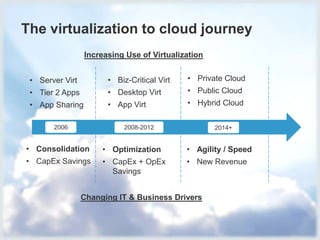
The virtualization to cloud journey
2006 2008-2012 2014+
Increasing Use of Virtualization
Changing IT & Business Drivers
• Consolidation
• CapEx Savings
• Server Virt
• Tier 2 Apps
• App Sharing
• Optimization
• CapEx + OpEx
Savings
• Biz-Critical Virt
• Desktop Virt
• App Virt
• Agility / Speed
• New Revenue
• Private Cloud
• Public Cloud
• Hybrid Cloud
© 2013 Forrester Research, Inc. Reproduction Prohibited 5
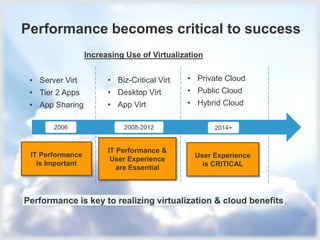
Performance becomes critical to success
2006 2008-2012 2014+
Increasing Use of Virtualization
Performance is key to realizing virtualization & cloud benefits
• Consolidation
• CapEx Savings
• Server Virt
• Tier 2 Apps
• App Sharing
• Optimization
• CapEx + OpEx
Savings
• Biz-Critical Virt
• Desktop Virt
• App Virt
• Agility / Speed
• New Revenue
• Private Cloud
• Public Cloud
• Hybrid Cloud
IT Performance
is Important
IT Performance &
User Experience
are Essential
User Experience
is CRITICAL
© 2013 Forrester Research, Inc. Reproduction Prohibited 66
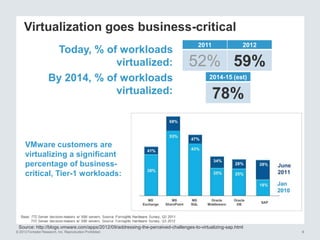
Today, % of workloads
virtualized:
By 2014, % of workloads
virtualized:
2011 2012
52% 59%
2014-15 (est)
78%
Virtualization goes business-critical
Source: http://blogs.vmware.com/apps/2012/09/addressing-the-perceived-challenges-to-virtualizing-sap.html
VMware customers are
virtualizing a significant
percentage of business-
critical, Tier-1 workloads:
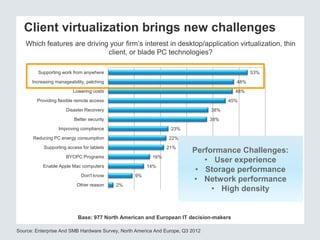
Client virtualization brings new challenges
Which features are driving your firm’s interest in desktop/application virtualization, thin
client, or blade PC technologies?
Source: Enterprise And SMB Hardware Survey, North America And Europe, Q3 2012
Base: 977 North American and European IT decision-makers
53%
48%
48%
45%
38%
38%
23%
22%
21%
16%
14%
9%
2%
Supporting work from anywhere
Increasing manageability, patching
Lowering costs
Providing flexible remote access
Disaster Recovery
Better security
Improving compliance
Reducing PC energy consumption
Supporting access for tablets
BYOPC Programs
Enable Apple Mac computers
Don't know
Other reason
Performance Challenges:
• User experience
• Storage performance
• Network performance
• High density
© 2012 Forrester Research, Inc. Reproduction Prohibited
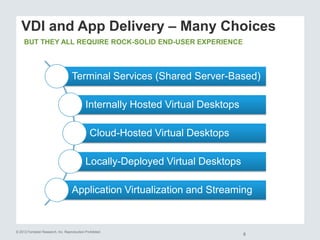
VDI and App Delivery – Many Choices
8
BUT THEY ALL REQUIRE ROCK-SOLID END-USER EXPERIENCE
Terminal Services (Shared Server-Based)
Internally Hosted Virtual Desktops
Cloud-Hosted Virtual Desktops
Locally-Deployed Virtual Desktops
Application Virtualization and Streaming
© 2013 Forrester Research, Inc. Reproduction Prohibited 9
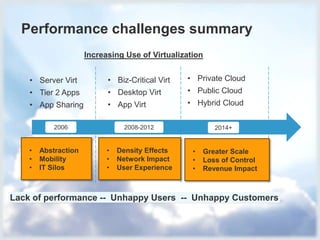
Performance challenges summary
2006 2008-2012 2014+
Increasing Use of Virtualization
• Consolidation
• CapEx Savings
• Server Virt
• Tier 2 Apps
• App Sharing
• Optimization
• CapEx + OpEx
Savings
• Biz-Critical Virt
• Desktop Virt
• App Virt
• Agility / Speed
• New Revenue
• Private Cloud
• Public Cloud
• Hybrid Cloud
• Abstraction
• Mobility
• IT Silos
• Density Effects
• Network Impact
• User Experience
• Greater Scale
• Loss of Control
• Revenue Impact
Lack of performance -- Unhappy Users -- Unhappy Customers
Applications
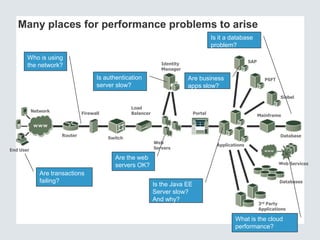
Many places for performance problems to arise
Firewall
Network
Switch
Load
Balancer Portal
Identity
Manager
End User
Router
SAP
PSFT
Siebel
Web Services
3rd Party
Applications
Databases
Mainframe
Database
Web
Servers
Who is using
the network?
Are transactions
failing?
Is authentication
server slow?
Are the web
servers OK?
Is the Java EE
Server slow?
And why?
Are business
apps slow?
Is it a database
problem?
What is the cloud
performance?
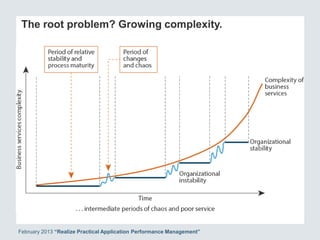
The root problem? Growing complexity.
February 2013 “Realize Practical Application Performance Management”
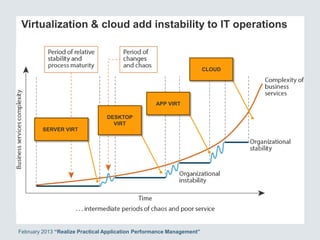
Virtualization & cloud add instability to IT operations
February 2013 “Realize Practical Application Performance Management”
SERVER VIRT
DESKTOP
VIRT
APP VIRT
CLOUD
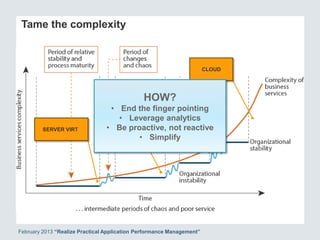
Tame the complexity
February 2013 “Realize Practical Application Performance Management”
SERVER VIRT
DESKTOP
VIRT
APP VIRT
CLOUD
HOW?
• End the finger pointing
• Leverage analytics
• Be proactive, not reactive
• Simplify
© 2012 Forrester Research, Inc. Reproduction Prohibited
14
1%
2%
2%
5%
11%
32%
44%
0%
2%
3%
5%
11%
30%
45%
11 or
more
6 to 10
5
4
3
2
1
2012 (N = 773)
2011 (N=804)
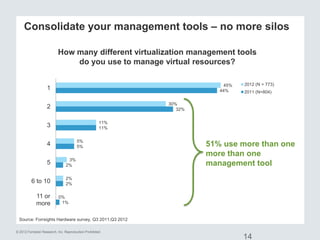
How many different virtualization management tools
do you use to manage virtual resources?
Source: Forrsights Hardware survey, Q3 2011;Q3 2012
Consolidate your management tools – no more silos
51% use more than one
more than one
management tool
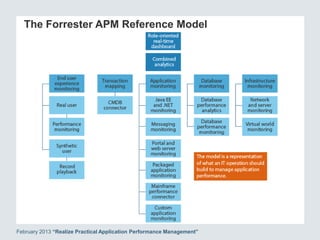
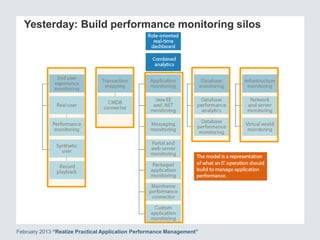
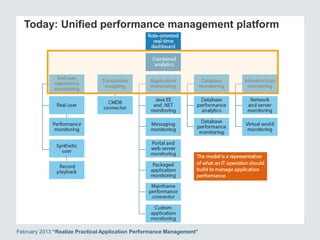
The Forrester APM Reference Model
February 2013 “Realize Practical Application Performance Management”
Yesterday: Build performance monitoring silos
February 2013 “Realize Practical Application Performance Management”
Today: Unified performance management platform
February 2013 “Realize Practical Application Performance Management”
© 2013 Forrester Research, Inc. Reproduction Prohibited 18
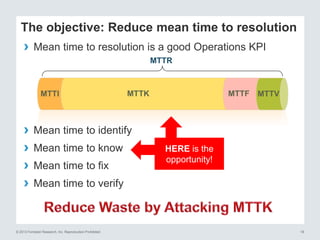
MTTI
The objective: Reduce mean time to resolution
› Mean time to identify
› Mean time to know
› Mean time to fix
› Mean time to verify
› Mean time to resolution is a good Operations KPI
MTTK MTTF MTTV
MTTR
HERE is the
opportunity!
© 2013 Forrester Research, Inc. Reproduction Prohibited 19
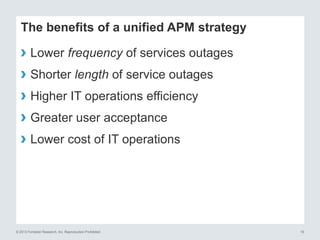
The benefits of a unified APM strategy
› Lower frequency of services outages
› Shorter length of service outages
› Higher IT operations efficiency
› Greater user acceptance
› Lower cost of IT operations
© 2013 Forrester Research, Inc. Reproduction Prohibited 20
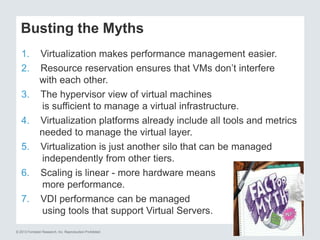
Busting the Myths
1. Virtualization makes performance management easier.
2. Resource reservation ensures that VMs don’t interfere
with each other.
3. The hypervisor view of virtual machines
is sufficient to manage a virtual infrastructure.
4. Virtualization platforms already include all tools and metrics
needed to manage the virtual layer.
5. Virtualization is just another silo that can be managed
independently from other tiers.
6. Scaling is linear - more hardware means
more performance.
7. VDI performance can be managed
using tools that support Virtual Servers.
Thank you
Dave Bartoletti
+1 415.294.8136
dbartoletti@forrester.com
© eG Innovations, Inc | www.eginnovations.com
Audience Poll
“What are your biggest
virtualization challenges?”
 Virtualization performance management is more complex
 Performance and user experience problems
 Inadequate performance management tools
 Lack of visibility into VMs and dependencies
 VM sprawl
© eG Innovations, Inc | www.eginnovations.com
About eG Innovations
Performance Assurance
Made Easy
 eG Innovations helps companies to dramatically simplify,
accelerate, and optimize performance management across
mission-critical virtual, cloud and physical IT environments
 Only eG Innovations award-winning root-cause diagnosis
technology can automatically pinpoint performance issues by
auto-correlating the user’s service experience with the
underlying infrastructure and application components
 Deliver exceptional performance, user productivity, and ROI
Worldwide
Locations
New York, New Jersey, Boston, Chicago, Los Angeles, Dallas, Austin,
Singapore, London, The Hague, Chennai
Customers Over 1,000 customers worldwide
Certifications &
Sample Awards
© eG Innovations, Inc | www.eginnovations.com
7 Secrets of Performance Management
in a Virtual Infrastructure
Srinivas Ramanathan
CEO & Founder
eG Innovations
Srinivas@eginnovations.com
© eG Innovations, Inc | www.eginnovations.com
Myth #1: Virtualization makes
performance management easier
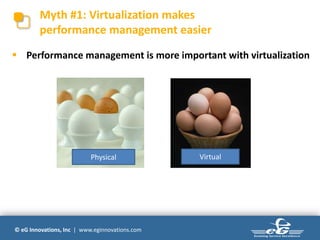
Physical Virtual
 Performance management is more important with virtualization
© eG Innovations, Inc | www.eginnovations.com
Myth #1: Virtualization makes
performance management easier
 Scope for performance management remains the same
 10 servers, 30 guests => 300 virtual machines to monitor
 New elements and features that need to be managed
 Hypervisor, datastores, LUNs, resource
pools, cluster, DRS, vMotion, snapshots, vSwitches, …
 Higher complexity because of resource sharing across VMs
 VMs share CPU, memory, disk, network resources
 A single malfunctioning application in a VM can impact performance of
all other VMs
 Performance management is more difficult with virtualization
© eG Innovations, Inc | www.eginnovations.com
Myth #2: Resource reservation ensures
that VMs don’t interfere with each other
 Resource reservation not always possible, or practical
 Defeats one of the big advantages of virtualization – resource
sharing
 Resource sharing is a powerful concept, but …
© eG Innovations, Inc | www.eginnovations.com
Myth #3: The hypervisor view of virtual
machines is sufficient to manage VMs
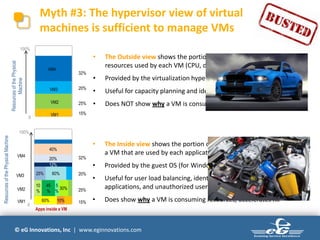
• The Outside view shows the portion of physical
resources used by each VM (CPU, disk, memory)
• Provided by the virtualization hypervisor
• Useful for capacity planning and identifying certain VM issues
• Does NOT show why a VM is consuming resources
ResourcesofthePhysical
Machine
0
100%
VM1 15%
VM2 25%
VM3 20%
VM4
32%
0
100%
ResourcesofthePhysicalMachine
VM1 15%60% 10%
VM2 25%
10
%
45
%
5
%
30%
VM3 20%25% 60%
VM4 32%
12%
20%
40%
Apps inside a VM
• The Inside view shows the portion of resources allocated to
a VM that are used by each application and each user of the VM
• Provided by the guest OS (for Windows: WMI)
• Useful for user load balancing, identifying guest OS issues, misbehaving
applications, and unauthorized user activities
• Does show why a VM is consuming resources, accelerates fix
© eG Innovations, Inc | www.eginnovations.com
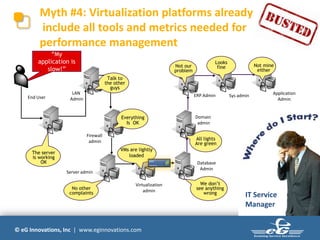
Myth #4: Virtualization platforms already
include all tools and metrics needed for
performance management
End User
LAN
Admin
Firewall
admin
Server admin
Virtualization
admin
Domain
admin
ERP Admin Sys admin Application
Admin
The server
is working
OK
No other
complaints
All lights
Are green
We don’t
see anything
wrong
Database
Admin
“My
application is
slow!”
VMs are lightly
loaded
Everything
Is OK
Not our
problem
Looks
fine Not mine
either
Talk to
the other
guys
IT Service
Manager
© eG Innovations, Inc | www.eginnovations.com
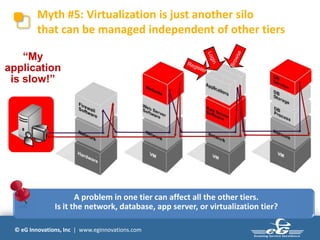
Myth #5: Virtualization is just another silo
that can be managed independent of other tiers
FIREWALL WEB SERVER
USER
APP SERVER DB SERVER
A problem in one tier can affect all the other tiers.
Is it the network, database, app server, or virtualization tier?
“My
application
is slow!”
© eG Innovations, Inc | www.eginnovations.com
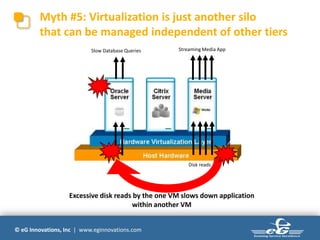
Myth #5: Virtualization is just another silo
that can be managed independent of other tiers
Disk reads
Streaming Media AppSlow Database Queries
Excessive disk reads by the one VM slows down application
within another VM
© eG Innovations, Inc | www.eginnovations.com
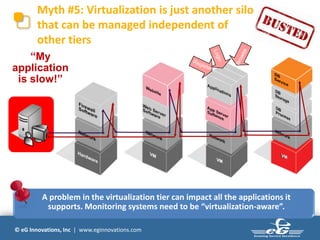
Myth #5: Virtualization is just another silo
that can be managed independent of
other tiers
FIREWALL WEB SERVER APP SERVER DB SERVER
A problem in the virtualization tier can impact all the applications it
supports. Monitoring systems need to be “virtualization-aware”.
`
USER
“My
application
is slow!”
© eG Innovations, Inc | www.eginnovations.com
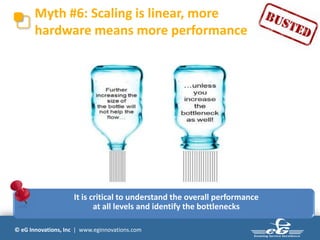
Myth #6: Scaling is linear, more
hardware means more performance
It is critical to understand the overall performance
at all levels and identify the bottlenecks
© eG Innovations, Inc | www.eginnovations.com
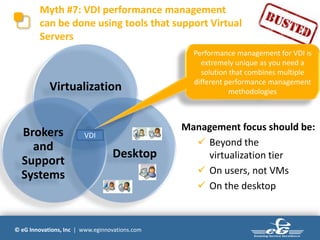
Myth #7: VDI performance management
can be done using tools that support Virtual
Servers
Citrix XenServerMicrosoft Hyper-V
Virtualization
Desktop
Brokers
and
Support
Systems
VDI
Management focus should be:
 Beyond the
virtualization tier
 On users, not VMs
 On the desktop
Performance management for VDI is
extremely unique as you need a
solution that combines multiple
different performance management
methodologies
© eG Innovations, Inc | www.eginnovations.com
The New Reality!
 Virtualization makes performance management more challenging.
 Conventional management tools not sufficient to handle the new
dependencies and dynamicity that virtualization introduces.
 IT operations teams now need virtualization-aware, unified
management solutions
 360 degree visibility into every layer, every tier - networks, physical
servers, virtual machines, hypervisors, storage, applications
 Correlation across these diverse metrics to pin-point the root-cause
 Management tools need to be domain-specific – VDI vs. virtual
server
© eG Innovations, Inc | www.eginnovations.com
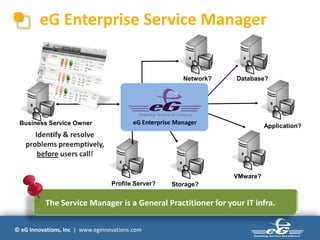
eG Enterprise Service Manager
Identify & resolve
problems preemptively,
before users call!
Network? Database?
Application?
VMware?
Storage?Profile Server?
The Service Manager is a General Practitioner for your IT infra.
eG Enterprise ManagerBusiness Service Owner
© eG Innovations, Inc | www.eginnovations.com
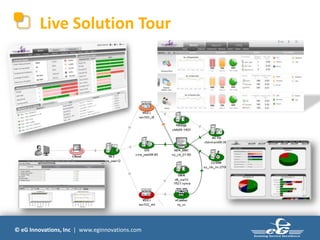
Live Solution Tour
© eG Innovations, Inc | www.eginnovations.com
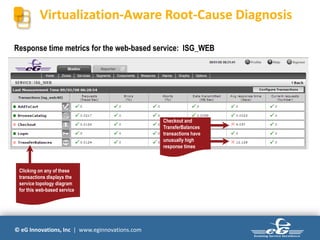
Virtualization-Aware Root-Cause Diagnosis
Response time metrics for the web-based service: ISG_WEB
Checkout and
TransferBalances
transactions have
unusually high
response times
Clicking on any of these
transactions displays the
service topology diagram
for this web-based service
© eG Innovations, Inc | www.eginnovations.com
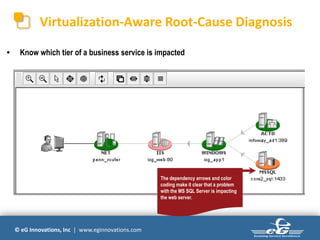
Virtualization-Aware Root-Cause Diagnosis
• Know which tier of a business service is impacted
The dependency arrows and color
coding make it clear that a problem
with the MS SQL Server is impacting
the web server.
© eG Innovations, Inc | www.eginnovations.com
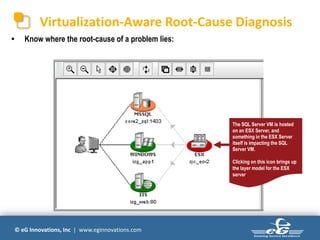
Virtualization-Aware Root-Cause Diagnosis
• Know where the root-cause of a problem lies:
The SQL Server VM is hosted
on an ESX Server, and
something in the ESX Server
itself is impacting the SQL
Server VM.
Clicking on this icon brings up
the layer model for the ESX
server.
© eG Innovations, Inc | www.eginnovations.com
Virtualization-Aware Root-Cause Diagnosis
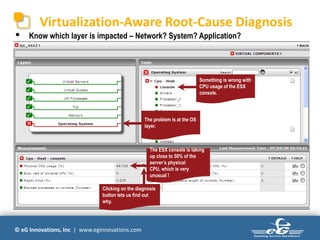
Something is wrong with
CPU usage of the ESX
console.
The ESX console is taking
up close to 50% of the
server’s physical
CPU, which is very
unusual !
• Know which layer is impacted – Network? System? Application?
The problem is at the OS
layer.
Clicking on the diagnosis
button lets us find out
why.
© eG Innovations, Inc | www.eginnovations.com
Virtualization-Aware Root-Cause Diagnosis
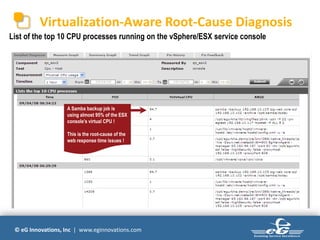
List of the top 10 CPU processes running on the vSphere/ESX service console
A Samba backup job is
using almost 95% of the ESX
console’s virtual CPU !
This is the root-cause of the
web response time issues !
© eG Innovations, Inc | www.eginnovations.com
Virtualization-Aware Root-Cause Diagnosis
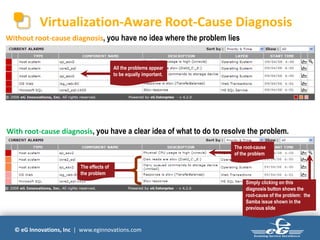
Without root-cause diagnosis, you have no idea where the problem lies
The root-cause
of the problem
The effects of
the problem
Simply clicking on this
diagnosis button shows the
root-cause of the problem: the
Samba issue shown in the
previous slide
All the problems appear
to be equally important.
With root-cause diagnosis, you have a clear idea of what to do to resolve the problem.
© eG Innovations, Inc | www.eginnovations.com
The eG Universal Agent
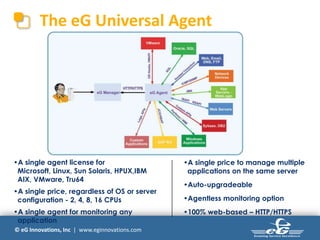
•A single agent license for
Microsoft, Linux, Sun Solaris, HPUX,IBM
AIX, VMware, Tru64
•A single price, regardless of OS or server
configuration - 2, 4, 8, 16 CPUs
•A single agent for monitoring any
application
•A single price to manage multiple
applications on the same server
•Auto-upgradeable
•Agentless monitoring option
•100% web-based – HTTP/HTTPS
© eG Innovations, Inc | www.eginnovations.com
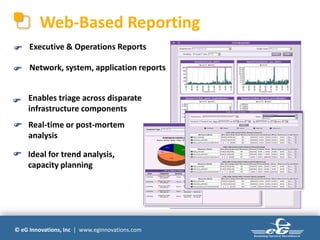
Web-Based Reporting
Executive & Operations Reports
Network, system, application reports
Enables triage across disparate
infrastructure components

Real-time or post-mortem
analysis

Ideal for trend analysis,
capacity planning

© eG Innovations, Inc | www.eginnovations.com
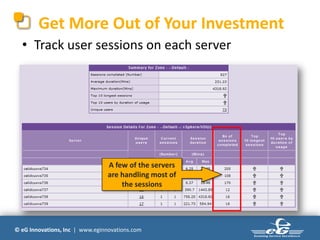
Get More Out of Your Investment
• Track user sessions on each server
A few of the servers
are handling most of
the sessions
© eG Innovations, Inc | www.eginnovations.com
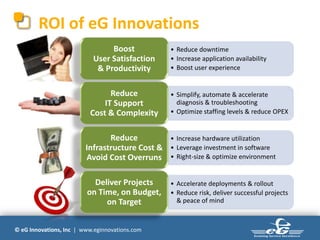
ROI of eG Innovations
• Reduce downtime
• Increase application availability
• Boost user experience
Boost
User Satisfaction
& Productivity
• Simplify, automate & accelerate
diagnosis & troubleshooting
• Optimize staffing levels & reduce OPEX
Reduce
IT Support
Cost & Complexity
• Increase hardware utilization
• Leverage investment in software
• Right-size & optimize environment
Reduce
Infrastructure Cost &
Avoid Cost Overruns
• Accelerate deployments & rollout
• Reduce risk, deliver successful projects
& peace of mind
Deliver Projects
on Time, on Budget,
on Target
© eG Innovations, Inc | www.eginnovations.com
Customers using eG Innovations
© eG Innovations, Inc | www.eginnovations.com
Next Steps
More details
www.eginnovations.com
Send an Email
info@eginnovations.com
Call Us
+1 (866) 526 6700
&

The 7 Secrets of Performance Management in Virtualized Environments

  • 1.
    The 7 Secretsto Performance Management of Virtualized Environments Presenters Dave Bartoletti (Senior Analyst, Forrester Research) Srinivas Ramanathan (CEO, eG Innovations)
  • 2.
    © eG Innovations,Inc | www.eginnovations.com Moderator Holger Schulze VP Marketing eG Innovations Holger.Schulze@eginnovations.com
  • 3.
    © eG Innovations,Inc | www.eginnovations.com Virtualization Trends Dave Bartoletti Senior Analyst Forrester Research dbartoletti@forrester.com
  • 4.
    © 2013 ForresterResearch, Inc. Reproduction Prohibited 4 The virtualization to cloud journey 2006 2008-2012 2014+ Increasing Use of Virtualization Changing IT & Business Drivers • Consolidation • CapEx Savings • Server Virt • Tier 2 Apps • App Sharing • Optimization • CapEx + OpEx Savings • Biz-Critical Virt • Desktop Virt • App Virt • Agility / Speed • New Revenue • Private Cloud • Public Cloud • Hybrid Cloud
  • 5.
    © 2013 ForresterResearch, Inc. Reproduction Prohibited 5 Performance becomes critical to success 2006 2008-2012 2014+ Increasing Use of Virtualization Performance is key to realizing virtualization & cloud benefits • Consolidation • CapEx Savings • Server Virt • Tier 2 Apps • App Sharing • Optimization • CapEx + OpEx Savings • Biz-Critical Virt • Desktop Virt • App Virt • Agility / Speed • New Revenue • Private Cloud • Public Cloud • Hybrid Cloud IT Performance is Important IT Performance & User Experience are Essential User Experience is CRITICAL
  • 6.
    © 2013 ForresterResearch, Inc. Reproduction Prohibited 66 Today, % of workloads virtualized: By 2014, % of workloads virtualized: 2011 2012 52% 59% 2014-15 (est) 78% Virtualization goes business-critical Source: http://blogs.vmware.com/apps/2012/09/addressing-the-perceived-challenges-to-virtualizing-sap.html VMware customers are virtualizing a significant percentage of business- critical, Tier-1 workloads:
  • 7.
    Client virtualization bringsnew challenges Which features are driving your firm’s interest in desktop/application virtualization, thin client, or blade PC technologies? Source: Enterprise And SMB Hardware Survey, North America And Europe, Q3 2012 Base: 977 North American and European IT decision-makers 53% 48% 48% 45% 38% 38% 23% 22% 21% 16% 14% 9% 2% Supporting work from anywhere Increasing manageability, patching Lowering costs Providing flexible remote access Disaster Recovery Better security Improving compliance Reducing PC energy consumption Supporting access for tablets BYOPC Programs Enable Apple Mac computers Don't know Other reason Performance Challenges: • User experience • Storage performance • Network performance • High density
  • 8.
    © 2012 ForresterResearch, Inc. Reproduction Prohibited VDI and App Delivery – Many Choices 8 BUT THEY ALL REQUIRE ROCK-SOLID END-USER EXPERIENCE Terminal Services (Shared Server-Based) Internally Hosted Virtual Desktops Cloud-Hosted Virtual Desktops Locally-Deployed Virtual Desktops Application Virtualization and Streaming
  • 9.
    © 2013 ForresterResearch, Inc. Reproduction Prohibited 9 Performance challenges summary 2006 2008-2012 2014+ Increasing Use of Virtualization • Consolidation • CapEx Savings • Server Virt • Tier 2 Apps • App Sharing • Optimization • CapEx + OpEx Savings • Biz-Critical Virt • Desktop Virt • App Virt • Agility / Speed • New Revenue • Private Cloud • Public Cloud • Hybrid Cloud • Abstraction • Mobility • IT Silos • Density Effects • Network Impact • User Experience • Greater Scale • Loss of Control • Revenue Impact Lack of performance -- Unhappy Users -- Unhappy Customers
  • 10.
    Applications Many places forperformance problems to arise Firewall Network Switch Load Balancer Portal Identity Manager End User Router SAP PSFT Siebel Web Services 3rd Party Applications Databases Mainframe Database Web Servers Who is using the network? Are transactions failing? Is authentication server slow? Are the web servers OK? Is the Java EE Server slow? And why? Are business apps slow? Is it a database problem? What is the cloud performance?
  • 11.
    The root problem?Growing complexity. February 2013 “Realize Practical Application Performance Management”
  • 12.
    Virtualization & cloudadd instability to IT operations February 2013 “Realize Practical Application Performance Management” SERVER VIRT DESKTOP VIRT APP VIRT CLOUD
  • 13.
    Tame the complexity February2013 “Realize Practical Application Performance Management” SERVER VIRT DESKTOP VIRT APP VIRT CLOUD HOW? • End the finger pointing • Leverage analytics • Be proactive, not reactive • Simplify
  • 14.
    © 2012 ForresterResearch, Inc. Reproduction Prohibited 14 1% 2% 2% 5% 11% 32% 44% 0% 2% 3% 5% 11% 30% 45% 11 or more 6 to 10 5 4 3 2 1 2012 (N = 773) 2011 (N=804) How many different virtualization management tools do you use to manage virtual resources? Source: Forrsights Hardware survey, Q3 2011;Q3 2012 Consolidate your management tools – no more silos 51% use more than one more than one management tool
  • 15.
    The Forrester APMReference Model February 2013 “Realize Practical Application Performance Management”
  • 16.
    Yesterday: Build performancemonitoring silos February 2013 “Realize Practical Application Performance Management”
  • 17.
    Today: Unified performancemanagement platform February 2013 “Realize Practical Application Performance Management”
  • 18.
    © 2013 ForresterResearch, Inc. Reproduction Prohibited 18 MTTI The objective: Reduce mean time to resolution › Mean time to identify › Mean time to know › Mean time to fix › Mean time to verify › Mean time to resolution is a good Operations KPI MTTK MTTF MTTV MTTR HERE is the opportunity!
  • 19.
    © 2013 ForresterResearch, Inc. Reproduction Prohibited 19 The benefits of a unified APM strategy › Lower frequency of services outages › Shorter length of service outages › Higher IT operations efficiency › Greater user acceptance › Lower cost of IT operations
  • 20.
    © 2013 ForresterResearch, Inc. Reproduction Prohibited 20 Busting the Myths 1. Virtualization makes performance management easier. 2. Resource reservation ensures that VMs don’t interfere with each other. 3. The hypervisor view of virtual machines is sufficient to manage a virtual infrastructure. 4. Virtualization platforms already include all tools and metrics needed to manage the virtual layer. 5. Virtualization is just another silo that can be managed independently from other tiers. 6. Scaling is linear - more hardware means more performance. 7. VDI performance can be managed using tools that support Virtual Servers.
  • 21.
    Thank you Dave Bartoletti +1415.294.8136 dbartoletti@forrester.com
  • 22.
    © eG Innovations,Inc | www.eginnovations.com Audience Poll “What are your biggest virtualization challenges?”  Virtualization performance management is more complex  Performance and user experience problems  Inadequate performance management tools  Lack of visibility into VMs and dependencies  VM sprawl
  • 23.
    © eG Innovations,Inc | www.eginnovations.com About eG Innovations Performance Assurance Made Easy  eG Innovations helps companies to dramatically simplify, accelerate, and optimize performance management across mission-critical virtual, cloud and physical IT environments  Only eG Innovations award-winning root-cause diagnosis technology can automatically pinpoint performance issues by auto-correlating the user’s service experience with the underlying infrastructure and application components  Deliver exceptional performance, user productivity, and ROI Worldwide Locations New York, New Jersey, Boston, Chicago, Los Angeles, Dallas, Austin, Singapore, London, The Hague, Chennai Customers Over 1,000 customers worldwide Certifications & Sample Awards
  • 24.
    © eG Innovations,Inc | www.eginnovations.com 7 Secrets of Performance Management in a Virtual Infrastructure Srinivas Ramanathan CEO & Founder eG Innovations Srinivas@eginnovations.com
  • 25.
    © eG Innovations,Inc | www.eginnovations.com Myth #1: Virtualization makes performance management easier Physical Virtual  Performance management is more important with virtualization
  • 26.
    © eG Innovations,Inc | www.eginnovations.com Myth #1: Virtualization makes performance management easier  Scope for performance management remains the same  10 servers, 30 guests => 300 virtual machines to monitor  New elements and features that need to be managed  Hypervisor, datastores, LUNs, resource pools, cluster, DRS, vMotion, snapshots, vSwitches, …  Higher complexity because of resource sharing across VMs  VMs share CPU, memory, disk, network resources  A single malfunctioning application in a VM can impact performance of all other VMs  Performance management is more difficult with virtualization
  • 27.
    © eG Innovations,Inc | www.eginnovations.com Myth #2: Resource reservation ensures that VMs don’t interfere with each other  Resource reservation not always possible, or practical  Defeats one of the big advantages of virtualization – resource sharing  Resource sharing is a powerful concept, but …
  • 28.
    © eG Innovations,Inc | www.eginnovations.com Myth #3: The hypervisor view of virtual machines is sufficient to manage VMs • The Outside view shows the portion of physical resources used by each VM (CPU, disk, memory) • Provided by the virtualization hypervisor • Useful for capacity planning and identifying certain VM issues • Does NOT show why a VM is consuming resources ResourcesofthePhysical Machine 0 100% VM1 15% VM2 25% VM3 20% VM4 32% 0 100% ResourcesofthePhysicalMachine VM1 15%60% 10% VM2 25% 10 % 45 % 5 % 30% VM3 20%25% 60% VM4 32% 12% 20% 40% Apps inside a VM • The Inside view shows the portion of resources allocated to a VM that are used by each application and each user of the VM • Provided by the guest OS (for Windows: WMI) • Useful for user load balancing, identifying guest OS issues, misbehaving applications, and unauthorized user activities • Does show why a VM is consuming resources, accelerates fix
  • 29.
    © eG Innovations,Inc | www.eginnovations.com Myth #4: Virtualization platforms already include all tools and metrics needed for performance management End User LAN Admin Firewall admin Server admin Virtualization admin Domain admin ERP Admin Sys admin Application Admin The server is working OK No other complaints All lights Are green We don’t see anything wrong Database Admin “My application is slow!” VMs are lightly loaded Everything Is OK Not our problem Looks fine Not mine either Talk to the other guys IT Service Manager
  • 30.
    © eG Innovations,Inc | www.eginnovations.com Myth #5: Virtualization is just another silo that can be managed independent of other tiers FIREWALL WEB SERVER USER APP SERVER DB SERVER A problem in one tier can affect all the other tiers. Is it the network, database, app server, or virtualization tier? “My application is slow!”
  • 31.
    © eG Innovations,Inc | www.eginnovations.com Myth #5: Virtualization is just another silo that can be managed independent of other tiers Disk reads Streaming Media AppSlow Database Queries Excessive disk reads by the one VM slows down application within another VM
  • 32.
    © eG Innovations,Inc | www.eginnovations.com Myth #5: Virtualization is just another silo that can be managed independent of other tiers FIREWALL WEB SERVER APP SERVER DB SERVER A problem in the virtualization tier can impact all the applications it supports. Monitoring systems need to be “virtualization-aware”. ` USER “My application is slow!”
  • 33.
    © eG Innovations,Inc | www.eginnovations.com Myth #6: Scaling is linear, more hardware means more performance It is critical to understand the overall performance at all levels and identify the bottlenecks
  • 34.
    © eG Innovations,Inc | www.eginnovations.com Myth #7: VDI performance management can be done using tools that support Virtual Servers Citrix XenServerMicrosoft Hyper-V Virtualization Desktop Brokers and Support Systems VDI Management focus should be:  Beyond the virtualization tier  On users, not VMs  On the desktop Performance management for VDI is extremely unique as you need a solution that combines multiple different performance management methodologies
  • 35.
    © eG Innovations,Inc | www.eginnovations.com The New Reality!  Virtualization makes performance management more challenging.  Conventional management tools not sufficient to handle the new dependencies and dynamicity that virtualization introduces.  IT operations teams now need virtualization-aware, unified management solutions  360 degree visibility into every layer, every tier - networks, physical servers, virtual machines, hypervisors, storage, applications  Correlation across these diverse metrics to pin-point the root-cause  Management tools need to be domain-specific – VDI vs. virtual server
  • 36.
    © eG Innovations,Inc | www.eginnovations.com eG Enterprise Service Manager Identify & resolve problems preemptively, before users call! Network? Database? Application? VMware? Storage?Profile Server? The Service Manager is a General Practitioner for your IT infra. eG Enterprise ManagerBusiness Service Owner
  • 37.
    © eG Innovations,Inc | www.eginnovations.com Live Solution Tour
  • 38.
    © eG Innovations,Inc | www.eginnovations.com Virtualization-Aware Root-Cause Diagnosis Response time metrics for the web-based service: ISG_WEB Checkout and TransferBalances transactions have unusually high response times Clicking on any of these transactions displays the service topology diagram for this web-based service
  • 39.
    © eG Innovations,Inc | www.eginnovations.com Virtualization-Aware Root-Cause Diagnosis • Know which tier of a business service is impacted The dependency arrows and color coding make it clear that a problem with the MS SQL Server is impacting the web server.
  • 40.
    © eG Innovations,Inc | www.eginnovations.com Virtualization-Aware Root-Cause Diagnosis • Know where the root-cause of a problem lies: The SQL Server VM is hosted on an ESX Server, and something in the ESX Server itself is impacting the SQL Server VM. Clicking on this icon brings up the layer model for the ESX server.
  • 41.
    © eG Innovations,Inc | www.eginnovations.com Virtualization-Aware Root-Cause Diagnosis Something is wrong with CPU usage of the ESX console. The ESX console is taking up close to 50% of the server’s physical CPU, which is very unusual ! • Know which layer is impacted – Network? System? Application? The problem is at the OS layer. Clicking on the diagnosis button lets us find out why.
  • 42.
    © eG Innovations,Inc | www.eginnovations.com Virtualization-Aware Root-Cause Diagnosis List of the top 10 CPU processes running on the vSphere/ESX service console A Samba backup job is using almost 95% of the ESX console’s virtual CPU ! This is the root-cause of the web response time issues !
  • 43.
    © eG Innovations,Inc | www.eginnovations.com Virtualization-Aware Root-Cause Diagnosis Without root-cause diagnosis, you have no idea where the problem lies The root-cause of the problem The effects of the problem Simply clicking on this diagnosis button shows the root-cause of the problem: the Samba issue shown in the previous slide All the problems appear to be equally important. With root-cause diagnosis, you have a clear idea of what to do to resolve the problem.
  • 44.
    © eG Innovations,Inc | www.eginnovations.com The eG Universal Agent •A single agent license for Microsoft, Linux, Sun Solaris, HPUX,IBM AIX, VMware, Tru64 •A single price, regardless of OS or server configuration - 2, 4, 8, 16 CPUs •A single agent for monitoring any application •A single price to manage multiple applications on the same server •Auto-upgradeable •Agentless monitoring option •100% web-based – HTTP/HTTPS
  • 45.
    © eG Innovations,Inc | www.eginnovations.com Web-Based Reporting Executive & Operations Reports Network, system, application reports Enables triage across disparate infrastructure components  Real-time or post-mortem analysis  Ideal for trend analysis, capacity planning 
  • 46.
    © eG Innovations,Inc | www.eginnovations.com Get More Out of Your Investment • Track user sessions on each server A few of the servers are handling most of the sessions
  • 47.
    © eG Innovations,Inc | www.eginnovations.com ROI of eG Innovations • Reduce downtime • Increase application availability • Boost user experience Boost User Satisfaction & Productivity • Simplify, automate & accelerate diagnosis & troubleshooting • Optimize staffing levels & reduce OPEX Reduce IT Support Cost & Complexity • Increase hardware utilization • Leverage investment in software • Right-size & optimize environment Reduce Infrastructure Cost & Avoid Cost Overruns • Accelerate deployments & rollout • Reduce risk, deliver successful projects & peace of mind Deliver Projects on Time, on Budget, on Target
  • 48.
    © eG Innovations,Inc | www.eginnovations.com Customers using eG Innovations
  • 49.
    © eG Innovations,Inc | www.eginnovations.com Next Steps More details www.eginnovations.com Send an Email info@eginnovations.com Call Us +1 (866) 526 6700
  • 50.