Dynamics 365
A solution for Disability Support Providers
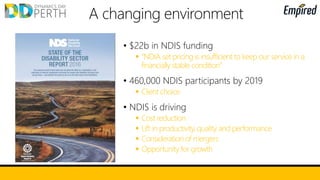
• $22b in NDIS funding
 “NDIA set pricing is insufficient to keep our service in a
financially stable condition”
• 460,000 NDIS participants by 2019
 Client choice
• NDIS is driving
 Cost reduction
 Lift in productivity, quality and performance
 Consideration of mergers
 Opportunity for growth
The Provider Experience
MSWA
Damien Hill – CRM Officer
 Active for 40 years
 1000+ staff within 2 years (33%+)
 3 main areas business areas
 Allied health services - physio, nursing, OT,
counselling, speech therapy, social welfare
 In home support services - personal care,
domestic support, recreation, supported accommodation
 Fundraising/marketing/events
Provider Profile
Adjusting to the New Business Environment
 Changing mindset - compete for clients, be profitable
 Billing in arrears, claiming through portal
 Indecision, inconsistency and changes to funding processes
 Likelihood of ongoing changes to funding model & administration
ICT Guiding Principles
 Obtain the most value for money as
a NFP
 Lean as a priority
 Scalable
 Focus on our business needs…not
reporting to government bodies
Striving for the Holy Grail
 Live funding balances
 Automated staff scheduling
 Staff able to complete admin
requirements with mobile devices
 Data is visually represented
 Systems are well integrated
Our Solution
 Founded on Microsoft products (Office 365, NAV, Field Service,
Xamarin, SharePoint, Power BI)
 Microsoft Australia has provided funding for key parts of the
solution (mobile app)
 Retaining current system functionality as well as benefitting from
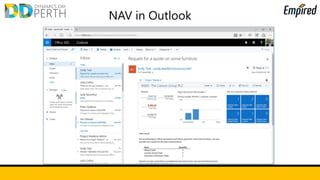
built in features (integration with Outlook)
 Management of any funding type – even if they are significantly
changed in the future
A work in progress - est. 3 years till peak performance
Support worker arrives
at a client’s home to
assist with personal care
Views job requirements
on mobile app
Once work is
completed, support
worker confirms via
app
The 2 hours of service delivery is auto-deducted from total
funding and the S12 service group strategy. This is then carried
across to the accounting system for billing (if required)
Live Funding Balance Example
Elements to Consider In Advance
 Limit the number of people involved. It is better to have fewer
people with an OK level of knowledge in each area of your
business rather than a lot of people with narrow but deep insight
 Involve people that are trusted across the business
 Know what you want to extract before designing
 Extracting your own data will save lots of money
 Keep functionality as lean as possible
 Give plenty of time for testing and changes
 Implement changes at the start of new financial year
Service Delivery – Illustrative Scenario
Top 5 system needs:
1. Get paid
2. Mobility
3. Centralised Participant info
4. User friendliness
5. Support delivery of outcomes
• Laura Jones is the mother of Adam who was recently
diagnosed with [disability].
• Laura heard about [Provider] and the assistance they
provide to people with [disability].
Laura Jones
Mother
A need
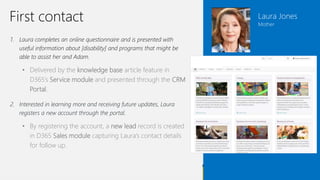
1. Laura completes an online questionnaire and is presented with
useful information about [disability] and programs that might be
able to assist her and Adam.
• Delivered by the knowledge base article feature in
D365’s Service module and presented through the CRM
Portal.
2. Interested in learning more and receiving future updates, Laura
registers a new account through the portal.
• By registering the account, a new lead record is created
in D365 Sales module capturing Laura’s contact details
for follow up.
First contact Laura Jones
Mother
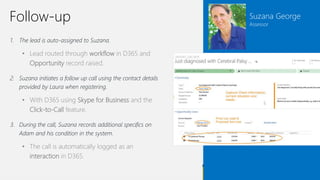
1. The lead is auto-assigned to Suzana.
• Lead routed through workflow in D365 and
Opportunity record raised.
2. Suzana initiates a follow up call using the contact details
provided by Laura when registering.
• With D365 using Skype for Business and the
Click-to-Call feature.
3. During the call, Suzana records additional specifics on
Adam and his condition in the system.
• The call is automatically logged as an
interaction in D365.
Suzana George
Assessor
Follow-up
Suzana George
Assessor
Raise quote
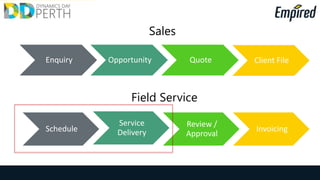
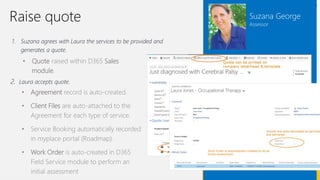
1. Suzana agrees with Laura the services to be provided and
generates a quote.
• Quote raised within D365 Sales
module.
2. Laura accepts quote.
• Agreement record is auto-created.
• Client Files are auto-attached to the
Agreement for each type of service.
• Service Booking automatically recorded
in myplace portal (Roadmap).
• Work Order is auto-created in D365
Field Service module to perform an
initial assessment
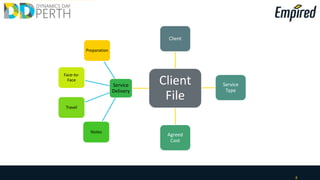
16
Client
File
Client
Service
Type
Agreed
Cost
Service
Delivery
Notes
Travel
Face-to-
Face
Preparation
Suzana George
Assessor
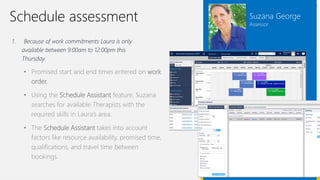
Schedule assessment
1. Because of work commitments Laura is only
available between 9:00am to 12:00pm this
Thursday.
• Promised start and end times entered on work
order.
• Using the Schedule Assistant feature, Suzana
searches for available Therapists with the
required skills in Laura’s area.
• The Schedule Assistant takes into account
factors like resource availability, promised time,
qualifications, and travel time between
bookings.
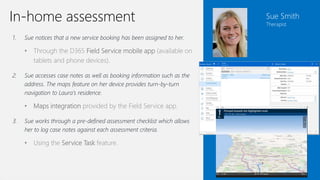
1. Sue notices that a new service booking has been assigned to her.
• Through the D365 Field Service mobile app (available on
tablets and phone devices).
2. Sue accesses case notes as well as booking information such as the
address. The maps feature on her device provides turn-by-turn
navigation to Laura’s residence.
• Maps integration provided by the Field Service app.
3. Sue works through a pre-defined assessment checklist which allows
her to log case notes against each assessment criteria.
• Using the Service Task feature.
Sue Smith
Therapist
In-home assessment
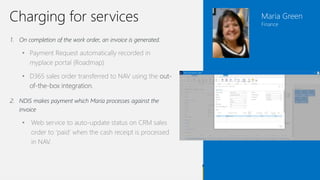
1. On completion of the work order, an invoice is generated.
• Payment Request automatically recorded in
myplace portal (Roadmap)
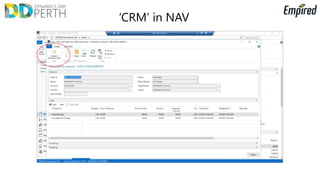
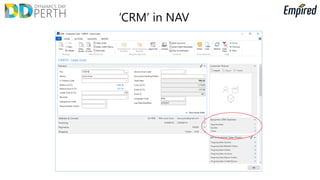
• D365 sales order transferred to NAV using the out-
of-the-box integration.
2. NDIS makes payment which Maria processes against the
invoice
• Web service to auto-update status on CRM sales
order to ‘paid’ when the cash receipt is processed
in NAV.
Maria Green
Finance
Charging for services
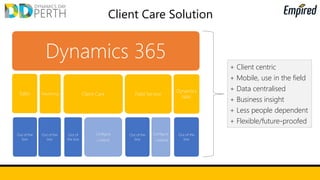
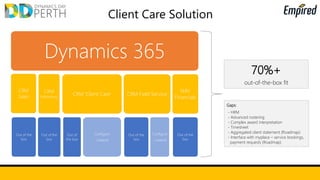
Client Care Solution
Dynamics 365
Sales
Out of the
box
Marketing
Out of the
box
Client Care
Out of
the box
Configure
/ extend
Field Service
Out of the
box
Configure
/ extend
Dynamics
NAV
Out of the
box
+ Client centric
+ Data centralised
+ Business insight
+ Not people dependent
+ Flexible/future-proofed
+ Client centric
+ Mobile, use in the field
+ Data centralised
+ Business insight
+ Less people dependent
+ Flexible/future-proofed
21
Client
Agreements
/ Client File
Case Notes
Disabilities
Plans /
Goals
Equipment
Parents,
Siblings,
Carers

Dynamics Day 2017 Perth: WA Solution for Disability Support Providers

  • 1.
    Dynamics 365 A solutionfor Disability Support Providers
  • 2.
    • $22b inNDIS funding  “NDIA set pricing is insufficient to keep our service in a financially stable condition” • 460,000 NDIS participants by 2019  Client choice • NDIS is driving  Cost reduction  Lift in productivity, quality and performance  Consideration of mergers  Opportunity for growth
  • 3.
  • 4.
     Active for40 years  1000+ staff within 2 years (33%+)  3 main areas business areas  Allied health services - physio, nursing, OT, counselling, speech therapy, social welfare  In home support services - personal care, domestic support, recreation, supported accommodation  Fundraising/marketing/events Provider Profile
  • 5.
    Adjusting to theNew Business Environment  Changing mindset - compete for clients, be profitable  Billing in arrears, claiming through portal  Indecision, inconsistency and changes to funding processes  Likelihood of ongoing changes to funding model & administration
  • 6.
    ICT Guiding Principles Obtain the most value for money as a NFP  Lean as a priority  Scalable  Focus on our business needs…not reporting to government bodies
  • 7.
    Striving for theHoly Grail  Live funding balances  Automated staff scheduling  Staff able to complete admin requirements with mobile devices  Data is visually represented  Systems are well integrated
  • 8.
    Our Solution  Foundedon Microsoft products (Office 365, NAV, Field Service, Xamarin, SharePoint, Power BI)  Microsoft Australia has provided funding for key parts of the solution (mobile app)  Retaining current system functionality as well as benefitting from built in features (integration with Outlook)  Management of any funding type – even if they are significantly changed in the future A work in progress - est. 3 years till peak performance
  • 9.
    Support worker arrives ata client’s home to assist with personal care Views job requirements on mobile app Once work is completed, support worker confirms via app The 2 hours of service delivery is auto-deducted from total funding and the S12 service group strategy. This is then carried across to the accounting system for billing (if required) Live Funding Balance Example
  • 10.
    Elements to ConsiderIn Advance  Limit the number of people involved. It is better to have fewer people with an OK level of knowledge in each area of your business rather than a lot of people with narrow but deep insight  Involve people that are trusted across the business  Know what you want to extract before designing  Extracting your own data will save lots of money  Keep functionality as lean as possible  Give plenty of time for testing and changes  Implement changes at the start of new financial year
  • 11.
    Service Delivery –Illustrative Scenario Top 5 system needs: 1. Get paid 2. Mobility 3. Centralised Participant info 4. User friendliness 5. Support delivery of outcomes
  • 12.
    • Laura Jonesis the mother of Adam who was recently diagnosed with [disability]. • Laura heard about [Provider] and the assistance they provide to people with [disability]. Laura Jones Mother A need
  • 13.
    1. Laura completesan online questionnaire and is presented with useful information about [disability] and programs that might be able to assist her and Adam. • Delivered by the knowledge base article feature in D365’s Service module and presented through the CRM Portal. 2. Interested in learning more and receiving future updates, Laura registers a new account through the portal. • By registering the account, a new lead record is created in D365 Sales module capturing Laura’s contact details for follow up. First contact Laura Jones Mother
  • 14.
    1. The leadis auto-assigned to Suzana. • Lead routed through workflow in D365 and Opportunity record raised. 2. Suzana initiates a follow up call using the contact details provided by Laura when registering. • With D365 using Skype for Business and the Click-to-Call feature. 3. During the call, Suzana records additional specifics on Adam and his condition in the system. • The call is automatically logged as an interaction in D365. Suzana George Assessor Follow-up
  • 15.
    Suzana George Assessor Raise quote 1.Suzana agrees with Laura the services to be provided and generates a quote. • Quote raised within D365 Sales module. 2. Laura accepts quote. • Agreement record is auto-created. • Client Files are auto-attached to the Agreement for each type of service. • Service Booking automatically recorded in myplace portal (Roadmap). • Work Order is auto-created in D365 Field Service module to perform an initial assessment
  • 16.
  • 17.
    Suzana George Assessor Schedule assessment 1.Because of work commitments Laura is only available between 9:00am to 12:00pm this Thursday. • Promised start and end times entered on work order. • Using the Schedule Assistant feature, Suzana searches for available Therapists with the required skills in Laura’s area. • The Schedule Assistant takes into account factors like resource availability, promised time, qualifications, and travel time between bookings.
  • 18.
    1. Sue noticesthat a new service booking has been assigned to her. • Through the D365 Field Service mobile app (available on tablets and phone devices). 2. Sue accesses case notes as well as booking information such as the address. The maps feature on her device provides turn-by-turn navigation to Laura’s residence. • Maps integration provided by the Field Service app. 3. Sue works through a pre-defined assessment checklist which allows her to log case notes against each assessment criteria. • Using the Service Task feature. Sue Smith Therapist In-home assessment
  • 19.
    1. On completionof the work order, an invoice is generated. • Payment Request automatically recorded in myplace portal (Roadmap) • D365 sales order transferred to NAV using the out- of-the-box integration. 2. NDIS makes payment which Maria processes against the invoice • Web service to auto-update status on CRM sales order to ‘paid’ when the cash receipt is processed in NAV. Maria Green Finance Charging for services
  • 20.
    Client Care Solution Dynamics365 Sales Out of the box Marketing Out of the box Client Care Out of the box Configure / extend Field Service Out of the box Configure / extend Dynamics NAV Out of the box + Client centric + Data centralised + Business insight + Not people dependent + Flexible/future-proofed + Client centric + Mobile, use in the field + Data centralised + Business insight + Less people dependent + Flexible/future-proofed
  • 21.
    21 Client Agreements / Client File CaseNotes Disabilities Plans / Goals Equipment Parents, Siblings, Carers