

Aleksei Milovidov
ClickHouse Deep Dive
A stream of events
› Actions of website visitors
› Ad impressions
› DNS queries
› E-commerce transactions
› …
We want to save info about these events and then glean some
insights from it
ClickHouse use cases
2
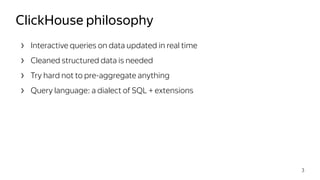
› Interactive queries on data updated in real time
› Cleaned structured data is needed
› Try hard not to pre-aggregate anything
› Query language: a dialect of SQL + extensions
ClickHouse philosophy
3
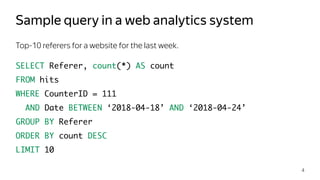
Top-10 referers for a website for the last week.
SELECT Referer, count(*) AS count
FROM hits
WHERE CounterID = 111
AND Date BETWEEN ‘2018-04-18’ AND ‘2018-04-24’
GROUP BY Referer
ORDER BY count DESC
LIMIT 10
Sample query in a web analytics system
4
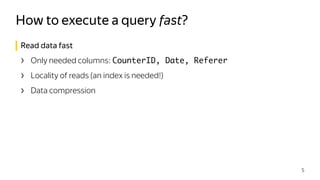
Read data fast
› Only needed columns: CounterID, Date, Referer
› Locality of reads (an index is needed!)
› Data compression
How to execute a query fast?
5
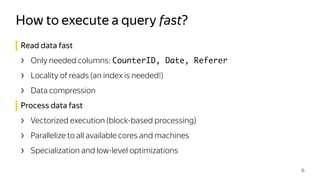
Read data fast
› Only needed columns: CounterID, Date, Referer
› Locality of reads (an index is needed!)
› Data compression
Process data fast
› Vectorized execution (block-based processing)
› Parallelize to all available cores and machines
› Specialization and low-level optimizations
How to execute a query fast?
6
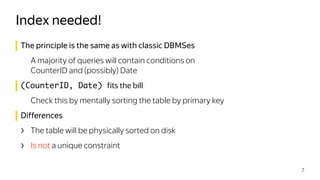
The principle is the same as with classic DBMSes
A majority of queries will contain conditions on

CounterID and (possibly) Date
(CounterID, Date) fits the bill
Check this by mentally sorting the table by primary key
Differences
› The table will be physically sorted on disk
› Is not a unique constraint
Index needed!
7
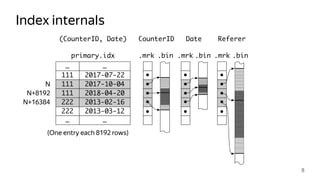
Index internals
8
222
…
2018-04-20
2017-07-22
…
111
111
111
…
2017-10-04
…
2013-02-16222
2013-03-12
primary.idx
CounterID
(One entry each 8192 rows)
Date Referer
N
N+8192
N+16384
(CounterID, Date)
.mrk .mrk .mrk.bin .bin .bin
Index is sparse
› Must fit into memory
› Default value of granularity (8192) is good enough
› Does not create a unique constraint
› Performance of point queries is not stellar
Table is sorted according to the index
› There can be only one
› Using the index is always beneficial
Things to remember about indexes
9
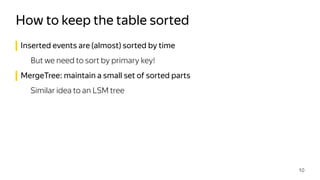
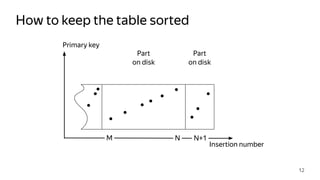
Inserted events are (almost) sorted by time
But we need to sort by primary key!
MergeTree: maintain a small set of sorted parts
Similar idea to an LSM tree
How to keep the table sorted
10
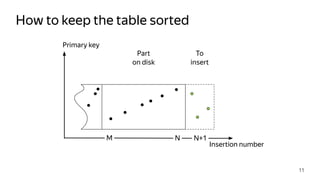
How to keep the table sorted
11
Primary key
Part
on disk
To
insert
Insertion number
M N N+1
How to keep the table sorted
12
Primary key
Part
on disk
Part
on disk
Insertion number
M N N+1
How to keep the table sorted
13
Insertion number
Primary key
Part
[M, N]
Part
[N+1]
Merge in the background
M N N+1
How to keep the table sorted
14
Part
[M, N+1]
Insertion number
Primary key
M N+1
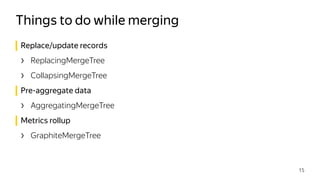
Replace/update records
› ReplacingMergeTree
› CollapsingMergeTree
Pre-aggregate data
› AggregatingMergeTree
Metrics rollup
› GraphiteMergeTree
Things to do while merging
15
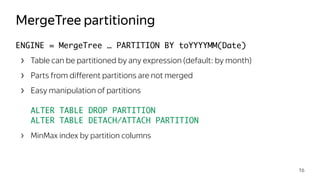
ENGINE = MergeTree … PARTITION BY toYYYYMM(Date)
› Table can be partitioned by any expression (default: by month)
› Parts from different partitions are not merged
› Easy manipulation of partitions


ALTER TABLE DROP PARTITION

ALTER TABLE DETACH/ATTACH PARTITION
› MinMax index by partition columns

MergeTree partitioning
16
Merging runs in the background
› Even when there are no queries!
Control total number of parts
› Rate of INSERTs
› MaxPartsCountForPartition and DelayedInserts
metrics are your friends
Things to remember about MergeTree
17
› The data won’t fit on a single server…
› You want to increase performance by adding more servers…
› Multiple simultaneous queries are competing for resources…
When one server is not enough
18
› The data won’t fit on a single server…
› You want to increase performance by adding more servers…
› Multiple simultaneous queries are competing for resources…
ClickHouse: Sharding + Distributed tables!
When one server is not enough
19
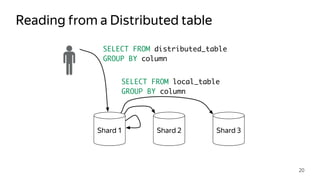
Reading from a Distributed table
20
Shard 1 Shard 2 Shard 3
SELECT FROM distributed_table
GROUP BY column
SELECT FROM local_table
GROUP BY column
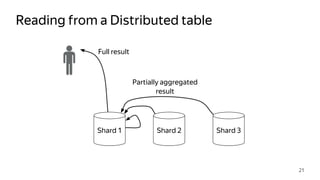
Reading from a Distributed table
21
Shard 1 Shard 2 Shard 3
Full result
Partially aggregated
result
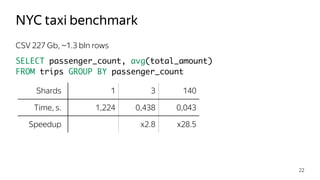
CSV 227 Gb, ~1.3 bln rows
SELECT passenger_count, avg(total_amount)

FROM trips GROUP BY passenger_count
NYC taxi benchmark
22
Shards 1 3 140
Time, s. 1,224 0,438 0,043
Speedup x2.8 x28.5
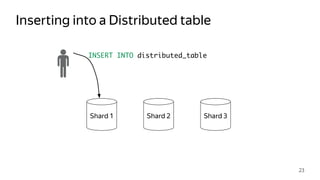
Inserting into a Distributed table
23
Shard 1 Shard 2 Shard 3
INSERT INTO distributed_table
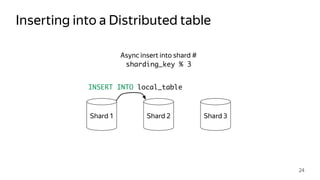
Inserting into a Distributed table
24
Shard 1 Shard 2 Shard 3
Async insert into shard #
sharding_key % 3
INSERT INTO local_table
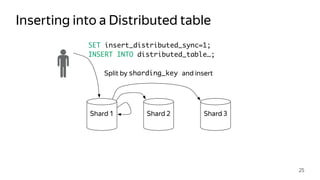
Inserting into a Distributed table
25
Shard 1 Shard 2 Shard 3
Split by sharding_key and insert
SET insert_distributed_sync=1;
INSERT INTO distributed_table…;
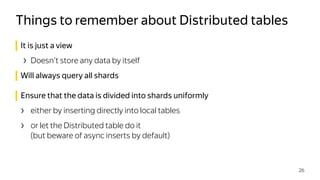
It is just a view
› Doesn’t store any data by itself
Will always query all shards

Ensure that the data is divided into shards uniformly
› either by inserting directly into local tables
› or let the Distributed table do it

(but beware of async inserts by default)
Things to remember about Distributed tables
26
› Protection against hardware failure
› Data must be always available for reading and writing
When failure is not an option
27
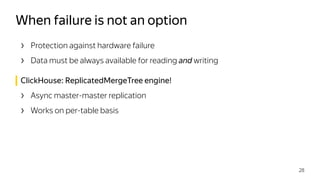
› Protection against hardware failure
› Data must be always available for reading and writing
ClickHouse: ReplicatedMergeTree engine!
› Async master-master replication
› Works on per-table basis
When failure is not an option
28
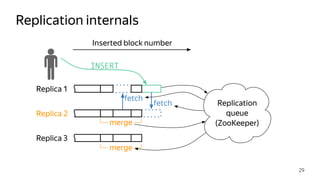
Replication internals
29
Replica 1
Replica 2
Replica 3
merge
Replication
queue
(ZooKeeper)
Inserted block number
fetch
fetch
INSERT
merge
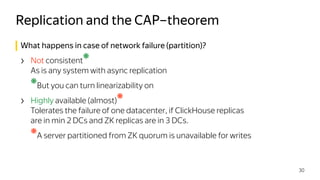
What happens in case of network failure (partition)?
› Not consistent
❋


As is any system with async replication
❋
But you can turn linearizability on
› Highly available (almost)
❋


Tolerates the failure of one datacenter, if ClickHouse replicas

are in min 2 DCs and ZK replicas are in 3 DCs.
❋
A server partitioned from ZK quorum is unavailable for writes
Replication and the CAP–theorem
30
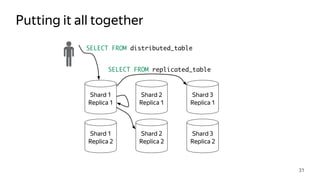
Putting it all together
31
Shard 1
Replica 1
Shard 2
Replica 1
Shard 3
Replica 1
Shard 1
Replica 2
Shard 2
Replica 2
Shard 3
Replica 2
SELECT FROM distributed_table
SELECT FROM replicated_table
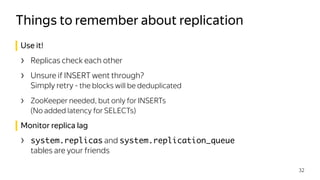
Use it!
› Replicas check each other
› Unsure if INSERT went through?

Simply retry - the blocks will be deduplicated
› ZooKeeper needed, but only for INSERTs 

(No added latency for SELECTs)
Monitor replica lag
› system.replicas and system.replication_queue
tables are your friends
Things to remember about replication
32
› Column–oriented
› Fast interactive queries on real time data
› SQL dialect + extensions
› Bad fit for OLTP, Key–Value, blob storage
› Scales linearly
› Fault tolerant
› Open source!
Brief recap
33
Questions? Or reach us at:
› clickhouse-feedback@yandex-team.com
› Telegram: https://t.me/clickhouse_en
› GitHub: https://github.com/yandex/ClickHouse/
› Google group: https://groups.google.com/group/clickhouse
Thank you
34

ClickHouse Deep Dive, by Aleksei Milovidov

  • 1.
  • 2.
    A stream ofevents › Actions of website visitors › Ad impressions › DNS queries › E-commerce transactions › … We want to save info about these events and then glean some insights from it ClickHouse use cases 2
  • 3.
    › Interactive querieson data updated in real time › Cleaned structured data is needed › Try hard not to pre-aggregate anything › Query language: a dialect of SQL + extensions ClickHouse philosophy 3
  • 4.
    Top-10 referers fora website for the last week. SELECT Referer, count(*) AS count FROM hits WHERE CounterID = 111 AND Date BETWEEN ‘2018-04-18’ AND ‘2018-04-24’ GROUP BY Referer ORDER BY count DESC LIMIT 10 Sample query in a web analytics system 4
  • 5.
    Read data fast ›Only needed columns: CounterID, Date, Referer › Locality of reads (an index is needed!) › Data compression How to execute a query fast? 5
  • 6.
    Read data fast ›Only needed columns: CounterID, Date, Referer › Locality of reads (an index is needed!) › Data compression Process data fast › Vectorized execution (block-based processing) › Parallelize to all available cores and machines › Specialization and low-level optimizations How to execute a query fast? 6
  • 7.
    The principle isthe same as with classic DBMSes A majority of queries will contain conditions on
 CounterID and (possibly) Date (CounterID, Date) fits the bill Check this by mentally sorting the table by primary key Differences › The table will be physically sorted on disk › Is not a unique constraint Index needed! 7
  • 8.
  • 9.
    Index is sparse ›Must fit into memory › Default value of granularity (8192) is good enough › Does not create a unique constraint › Performance of point queries is not stellar Table is sorted according to the index › There can be only one › Using the index is always beneficial Things to remember about indexes 9
  • 10.
    Inserted events are(almost) sorted by time But we need to sort by primary key! MergeTree: maintain a small set of sorted parts Similar idea to an LSM tree How to keep the table sorted 10
  • 11.
    How to keepthe table sorted 11 Primary key Part on disk To insert Insertion number M N N+1
  • 12.
    How to keepthe table sorted 12 Primary key Part on disk Part on disk Insertion number M N N+1
  • 13.
    How to keepthe table sorted 13 Insertion number Primary key Part [M, N] Part [N+1] Merge in the background M N N+1
  • 14.
    How to keepthe table sorted 14 Part [M, N+1] Insertion number Primary key M N+1
  • 15.
    Replace/update records › ReplacingMergeTree ›CollapsingMergeTree Pre-aggregate data › AggregatingMergeTree Metrics rollup › GraphiteMergeTree Things to do while merging 15
  • 16.
    ENGINE = MergeTree… PARTITION BY toYYYYMM(Date) › Table can be partitioned by any expression (default: by month) › Parts from different partitions are not merged › Easy manipulation of partitions
 
 ALTER TABLE DROP PARTITION
 ALTER TABLE DETACH/ATTACH PARTITION › MinMax index by partition columns
 MergeTree partitioning 16
  • 17.
    Merging runs inthe background › Even when there are no queries! Control total number of parts › Rate of INSERTs › MaxPartsCountForPartition and DelayedInserts metrics are your friends Things to remember about MergeTree 17
  • 18.
    › The datawon’t fit on a single server… › You want to increase performance by adding more servers… › Multiple simultaneous queries are competing for resources… When one server is not enough 18
  • 19.
    › The datawon’t fit on a single server… › You want to increase performance by adding more servers… › Multiple simultaneous queries are competing for resources… ClickHouse: Sharding + Distributed tables! When one server is not enough 19
  • 20.
    Reading from aDistributed table 20 Shard 1 Shard 2 Shard 3 SELECT FROM distributed_table GROUP BY column SELECT FROM local_table GROUP BY column
  • 21.
    Reading from aDistributed table 21 Shard 1 Shard 2 Shard 3 Full result Partially aggregated result
  • 22.
    CSV 227 Gb,~1.3 bln rows SELECT passenger_count, avg(total_amount)
 FROM trips GROUP BY passenger_count NYC taxi benchmark 22 Shards 1 3 140 Time, s. 1,224 0,438 0,043 Speedup x2.8 x28.5
  • 23.
    Inserting into aDistributed table 23 Shard 1 Shard 2 Shard 3 INSERT INTO distributed_table
  • 24.
    Inserting into aDistributed table 24 Shard 1 Shard 2 Shard 3 Async insert into shard # sharding_key % 3 INSERT INTO local_table
  • 25.
    Inserting into aDistributed table 25 Shard 1 Shard 2 Shard 3 Split by sharding_key and insert SET insert_distributed_sync=1; INSERT INTO distributed_table…;
  • 26.
    It is justa view › Doesn’t store any data by itself Will always query all shards
 Ensure that the data is divided into shards uniformly › either by inserting directly into local tables › or let the Distributed table do it
 (but beware of async inserts by default) Things to remember about Distributed tables 26
  • 27.
    › Protection againsthardware failure › Data must be always available for reading and writing When failure is not an option 27
  • 28.
    › Protection againsthardware failure › Data must be always available for reading and writing ClickHouse: ReplicatedMergeTree engine! › Async master-master replication › Works on per-table basis When failure is not an option 28
  • 29.
    Replication internals 29 Replica 1 Replica2 Replica 3 merge Replication queue (ZooKeeper) Inserted block number fetch fetch INSERT merge
  • 30.
    What happens incase of network failure (partition)? › Not consistent ❋ 
 As is any system with async replication ❋ But you can turn linearizability on › Highly available (almost) ❋ 
 Tolerates the failure of one datacenter, if ClickHouse replicas
 are in min 2 DCs and ZK replicas are in 3 DCs. ❋ A server partitioned from ZK quorum is unavailable for writes Replication and the CAP–theorem 30
  • 31.
    Putting it alltogether 31 Shard 1 Replica 1 Shard 2 Replica 1 Shard 3 Replica 1 Shard 1 Replica 2 Shard 2 Replica 2 Shard 3 Replica 2 SELECT FROM distributed_table SELECT FROM replicated_table
  • 32.
    Use it! › Replicascheck each other › Unsure if INSERT went through?
 Simply retry - the blocks will be deduplicated › ZooKeeper needed, but only for INSERTs 
 (No added latency for SELECTs) Monitor replica lag › system.replicas and system.replication_queue tables are your friends Things to remember about replication 32
  • 33.
    › Column–oriented › Fastinteractive queries on real time data › SQL dialect + extensions › Bad fit for OLTP, Key–Value, blob storage › Scales linearly › Fault tolerant › Open source! Brief recap 33
  • 34.
    Questions? Or reachus at: › clickhouse-feedback@yandex-team.com › Telegram: https://t.me/clickhouse_en › GitHub: https://github.com/yandex/ClickHouse/ › Google group: https://groups.google.com/group/clickhouse Thank you 34