tempDB
Microsoft SQL Server
Rev 1.4-1406
By Naji El Kotob
naji [@] dotnetheroes.com
www.DotNETHeroes.com
Outlines
 About tempDB Database
 Using “Sort in tempDB” with Index
 T-SQL
 Getting tempdb info
 Shrinking tempdb database
 Best Practices and Performance
 Change location
 Initial Size configuration
 Adding new files
 Interactive in-class DEMO
 QnA
 References
About tempDB
 You can use TempDB as a scratchpad (as MS-SQL Server does) to hold
temporary data values and tables.
 TempDB is especially useful for aggregating data values from multiple tables
in order to generate a summary report.
tempDB Database
 The tempdb system database is a global resource that is available to all users
connected to the instance of SQL Server.
 Operations within tempdb are minimally logged. This enables transactions to
be rolled back.
 tempdb is re-created every time SQL Server is started so that the system
always starts with a clean copy of the database.
 Temporary tables and stored procedures are dropped automatically on
disconnect, and no connections are active when the system is shut down.
Therefore, there is never anything in tempdb to be saved from one session of
SQL Server to another.
 Backup and restore operations are not allowed on tempdb.
Sort in tempDB
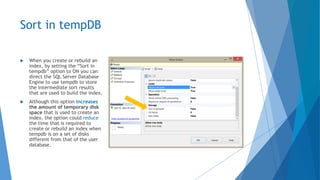
 When you create or rebuild an
index, by setting the “Sort in
tempdb” option to ON you can
direct the SQL Server Database
Engine to use tempdb to store
the intermediate sort results
that are used to build the index.
 Although this option increases
the amount of temporary disk
space that is used to create an
index, the option could reduce
the time that is required to
create or rebuild an index when
tempdb is on a set of disks
different from that of the user
database.
tempDB - Size and Location info using T-SQL
use tempdb
GO
SELECT name, (size*8) as FileSizeKB , physical_name from
sys.database_files
-- Or use the sp_helpfile
USE tempdb;
GO
EXEC sp_helpfile;
GO
tempDB – Autogrouth info using T-SQL
SELECT name AS FileName, size*1.0/128 AS FileSizeinMB,
CASE max_size
WHEN 0 THEN 'Autogrowth is off.'
WHEN -1 THEN 'Autogrowth is on.'
ELSE 'Log file will grow to a maximum size of 2 TB.'
END,
growth AS 'GrowthValue', 'GrowthIncrement' =
CASE
WHEN growth = 0 THEN 'Size is fixed and will not grow.'
WHEN growth > 0 AND is_percent_growth = 0
THEN 'Growth value is in 8-KB pages.'
ELSE 'Growth value is a percentage.'
END
FROM tempdb.sys.database_files;
GO
How to shrink tempdb using DBCC
SHRINKDATABASE
 DBCC SHRINKDATABASE(tempdb, ‘target_percentage_of_free_space’);
 So if the data files in tempdb had enough free space, you could shrink tempdb
by running this command to leave 30% of free space at the end of the files:
 DBCC SHRINKDATABASE(tempdb, 30);
Best practices for TempDB?
 Do not change collation from the SQL Server instance collation.
 Do not change the database owner from sa.
 Do not drop the TempDB database.
 Do not drop the guest user from the database.
 Do not change the recovery model from SIMPLE.
 Ensure the disk drives TempDB resides on have RAID protection i.e. 1, 1 + 0 or
5 in order to prevent a single disk failure from shutting down SQL Server.
Keep in mind that if TempDB is not available then SQL Server cannot operate.
 Size the TempDB database appropriately
Performance Keys
 The size and physical placement of the tempdb database can affect the
performance of a system.
Change tempDB Location
USE master;
GO
ALTER DATABASE tempdb
MODIFY FILE
(NAME = tempdev, FILENAME = 'C:[…]DATATEMPDBTempdb.mdf');
GO
ALTER DATABASE tempdb
MODIFY FILE
(NAME = templog, FILENAME = 'C:[…]DATATEMPDBTempdb.ldf');
GO
tempDB Initial Size
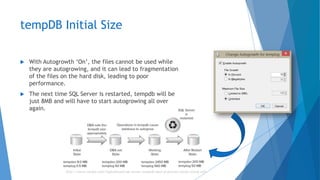
 With Autogrowth ‘On’, the files cannot be used while
they are autogrowing, and it can lead to fragmentation
of the files on the hard disk, leading to poor
performance.
 The next time SQL Server is restarted, tempdb will be
just 8MB and will have to start autogrowing all over
again.
http://www.confio.com/logicalread/sql-server-tempdb-best-practices-initial-sizing-w01
To what size should tempdb be set?
 It’s based on the workload, but simply set tempdb to be bigger than the
default.
 Move tempdb to its own disk and configure it to almost fill the drive.
Add new files
USE [master]
GO
ALTER DATABASE [tempdb] ADD FILE ( NAME = N'tempdev2',
FILENAME = N'C:Program FilesMicrosoft SQL
ServerMSSQL11.MSSQLSERVERMSSQLDATAtempdb2.ndf',
SIZE = 10MB , MAXSIZE = UNLIMITED, FILEGROWTH = 10%)
GO
DEMO
Q&A
 Please send your feedback to naji [@] dotnetheroes.com
References
 http://msdn.microsoft.com/en-us/library/ms190768(v=sql.110).aspx
(tempDB)
 http://msdn.microsoft.com/en-us/library/ms188281(v=sql.110).aspx
(SORT_IN_TEMPDB Option For Indexes)
 http://www.mssqltips.com/sqlservertip/1432/tempdb-configuration-best-
practices-in-sql-server/
 http://technet.microsoft.com/en-us/library/ms345368(v=sql.105).aspx

tempdb and Performance Keys

  • 1.
    tempDB Microsoft SQL Server Rev1.4-1406 By Naji El Kotob naji [@] dotnetheroes.com www.DotNETHeroes.com
  • 2.
    Outlines  About tempDBDatabase  Using “Sort in tempDB” with Index  T-SQL  Getting tempdb info  Shrinking tempdb database  Best Practices and Performance  Change location  Initial Size configuration  Adding new files  Interactive in-class DEMO  QnA  References
  • 3.
    About tempDB  Youcan use TempDB as a scratchpad (as MS-SQL Server does) to hold temporary data values and tables.  TempDB is especially useful for aggregating data values from multiple tables in order to generate a summary report.
  • 4.
    tempDB Database  Thetempdb system database is a global resource that is available to all users connected to the instance of SQL Server.  Operations within tempdb are minimally logged. This enables transactions to be rolled back.  tempdb is re-created every time SQL Server is started so that the system always starts with a clean copy of the database.  Temporary tables and stored procedures are dropped automatically on disconnect, and no connections are active when the system is shut down. Therefore, there is never anything in tempdb to be saved from one session of SQL Server to another.  Backup and restore operations are not allowed on tempdb.
  • 5.
    Sort in tempDB When you create or rebuild an index, by setting the “Sort in tempdb” option to ON you can direct the SQL Server Database Engine to use tempdb to store the intermediate sort results that are used to build the index.  Although this option increases the amount of temporary disk space that is used to create an index, the option could reduce the time that is required to create or rebuild an index when tempdb is on a set of disks different from that of the user database.
  • 6.
    tempDB - Sizeand Location info using T-SQL use tempdb GO SELECT name, (size*8) as FileSizeKB , physical_name from sys.database_files -- Or use the sp_helpfile USE tempdb; GO EXEC sp_helpfile; GO
  • 7.
    tempDB – Autogrouthinfo using T-SQL SELECT name AS FileName, size*1.0/128 AS FileSizeinMB, CASE max_size WHEN 0 THEN 'Autogrowth is off.' WHEN -1 THEN 'Autogrowth is on.' ELSE 'Log file will grow to a maximum size of 2 TB.' END, growth AS 'GrowthValue', 'GrowthIncrement' = CASE WHEN growth = 0 THEN 'Size is fixed and will not grow.' WHEN growth > 0 AND is_percent_growth = 0 THEN 'Growth value is in 8-KB pages.' ELSE 'Growth value is a percentage.' END FROM tempdb.sys.database_files; GO
  • 8.
    How to shrinktempdb using DBCC SHRINKDATABASE  DBCC SHRINKDATABASE(tempdb, ‘target_percentage_of_free_space’);  So if the data files in tempdb had enough free space, you could shrink tempdb by running this command to leave 30% of free space at the end of the files:  DBCC SHRINKDATABASE(tempdb, 30);
  • 9.
    Best practices forTempDB?  Do not change collation from the SQL Server instance collation.  Do not change the database owner from sa.  Do not drop the TempDB database.  Do not drop the guest user from the database.  Do not change the recovery model from SIMPLE.  Ensure the disk drives TempDB resides on have RAID protection i.e. 1, 1 + 0 or 5 in order to prevent a single disk failure from shutting down SQL Server. Keep in mind that if TempDB is not available then SQL Server cannot operate.  Size the TempDB database appropriately
  • 10.
    Performance Keys  Thesize and physical placement of the tempdb database can affect the performance of a system.
  • 11.
    Change tempDB Location USEmaster; GO ALTER DATABASE tempdb MODIFY FILE (NAME = tempdev, FILENAME = 'C:[…]DATATEMPDBTempdb.mdf'); GO ALTER DATABASE tempdb MODIFY FILE (NAME = templog, FILENAME = 'C:[…]DATATEMPDBTempdb.ldf'); GO
  • 12.
    tempDB Initial Size With Autogrowth ‘On’, the files cannot be used while they are autogrowing, and it can lead to fragmentation of the files on the hard disk, leading to poor performance.  The next time SQL Server is restarted, tempdb will be just 8MB and will have to start autogrowing all over again. http://www.confio.com/logicalread/sql-server-tempdb-best-practices-initial-sizing-w01
  • 13.
    To what sizeshould tempdb be set?  It’s based on the workload, but simply set tempdb to be bigger than the default.  Move tempdb to its own disk and configure it to almost fill the drive.
  • 14.
    Add new files USE[master] GO ALTER DATABASE [tempdb] ADD FILE ( NAME = N'tempdev2', FILENAME = N'C:Program FilesMicrosoft SQL ServerMSSQL11.MSSQLSERVERMSSQLDATAtempdb2.ndf', SIZE = 10MB , MAXSIZE = UNLIMITED, FILEGROWTH = 10%) GO
  • 15.
  • 16.
    Q&A  Please sendyour feedback to naji [@] dotnetheroes.com
  • 17.
    References  http://msdn.microsoft.com/en-us/library/ms190768(v=sql.110).aspx (tempDB)  http://msdn.microsoft.com/en-us/library/ms188281(v=sql.110).aspx (SORT_IN_TEMPDBOption For Indexes)  http://www.mssqltips.com/sqlservertip/1432/tempdb-configuration-best- practices-in-sql-server/  http://technet.microsoft.com/en-us/library/ms345368(v=sql.105).aspx