Optimize
TEMPDB Performance
By - Ravish Ranjan
Highlights of Discussion
Why we should optimize TEMPDB
 What Objects are Stored in TEMPDB
 TEMPDB’s Internals
 Types of TEMPDB Problems
 Ways to Monitor TEMPDB
 Ways to Optimize TEMPDB
Ravish Ranjan 2
Why we should optimize TEMPDB:
As we know the TEMPDB system database is a global
resource that is available to all users connected to the
instance of SQL Server or connected to SQL Database. It
has a vital role on server performance. Users should
take care of their created temporary object otherwise it
would results in high contention issues.
Ravish Ranjan 3
What Objects are Stored in TEMPDB?
TEMPDB is used to store three different
categories of temporary data:
– User Objects
– Internal Objects
– Version Stores
Ravish Ranjan 4
User Objects
 Local and global temporary tables (and indexes if created)
 Table variables
 User-defined tables and indexes
 Tables returned in table-valued functions
Ravish Ranjan 5
Internal Objects
 Working tables for DBCC CHECKDB and DBCC CHECKTABLE.
 Working tables for hash operations, such as joins and aggregations.
 Working tables for processing static or keyset cursors.
 Working tables for processing Service Broker objects.
 Working files needed for many GROUP BY, ORDER BY, UNION, SORT, and
SELECT DISTINCT operations.
 Working files for sorts that result from creating or rebuilding
 indexes (SORT_IN_TEMPDB).
Ravish Ranjan 6
Version Stores
The version store is a collection of pages used to store row-level
versioning of data.
There are two types of version stores:
1. Common Version Store: Examples include:
– Triggers.
– Snapshot isolation and read-committed snapshot
isolation.
2. Online-Index-Build Version Store:
– Used for online index builds or rebuilds. EE edition only.
Ravish Ranjan 7
TEMPDB Internals
 TEMPDB is cleared every time the SQL Server service is
stopped and restarted.
 By default, TEMPDB creates an MDF file of 8MB and an LDF
file of 1MB.
 By default, autogrowth is set to grow by 10% with an
unlimited MDF file size, and a 2TB maximum LDF file size.
 Each SQL Server instance have only one TEMPDB,
although TEMPDB may have multiple physical files within a
single filegroup.
Ravish Ranjan 8
Continued….
 Many TEMPDB database options can’t be changed
 (e.g. Database Read-Only, Auto Close, Auto Shrink).
 TEMPDB only uses the simple recovery model.
 TEMPDB cannot be backed up, restored, be mirrored
 TEMPDB cannot be dropped, detached, or attached.
Ravish Ranjan 9
Continued….
 TEMPDB logging works differently from regular logging process.
 Operations are minimally logged, as redo information is not
included, which reduces TEMPDB transaction log activity.
 The log is truncated constantly during the automatic
checkpoint process, and should not grow significantly, although it
can grow with long-running transactions, or if disk I/O is
bottlenecked.
 If a TEMPDB log file grows wildly:
– Check for long-running transactions (and kill them if necessary).
– Check for I/O bottlenecks (and fix them if possible).
– Manually running a checkpoint can often temporally reduce a
wildly growing log file if bottle-necked disk I/O is the problem.
Ravish Ranjan 10
Execution Plans and TEMPDB
 When a query execution plan is cached, user-created temporary
objects in TEMPDB that are required by the plan are often cached
as well. This is called temporary object reuse.
 Obviously, not the entire object is cached, just a portion of it. When
a temporary object is cached, up to nine pages are cached for reuse.
 This improves the performance of the next execution of the query
as the object already partially exists, but this also takes up space in
TEMPDB.
 If the system is low on memory, the Database Engine removes the
execution plan and drops the cached temporary objects.
Ravish Ranjan 11
TEMPDB Problems
• Generally, there are three major problems you find with TEMPDB:
1. TEMPDB experiences an I/O bottleneck, hurting performance.
These are most common type of TEMPDB problem.
2. TEMPDB experiences contention on various global allocation
structures as temporary objects are being created, populated, and dropped.
For Example- Any space-changing operation acquires a latch on PFS, GAM or
SGAM pages to update space allocation metadata.
A large number of such operations can cause excessive waits while latches
are acquired, creating a bottleneck and hurting performance.
3. TEMPDB has run out of space. Can happen to anyone.
• Ideally, we should be monitoring all these on a proactive basis to identify potential
problems.
Ravish Ranjan 12
Identifying TEMPDB I/O Problems
• Use Performance Monitor help determine how busy the disk is where
your TEMPDB MDF and LDF files are located.
• LogicalDisk Object: Avg. Disk Sec/Read: The average time, in
milliseconds, of a read of data from disk (read latency).
• LogicalDisk Object: Avg. Disk Sec/Write: The average time, in
milliseconds, of a write of data to the disk (write latency).
• Numbers below are a general guide only and may not apply to your
hardware configuration.
• Less than 10 milliseconds (ms) = very good
• Between 10-20 ms = okay
• Between 20-50 ms = slow
• Greater than 50-100 ms = potentially serious IO bottleneck
• Greater than 100 ms = definite IO bottleneck
Ravish Ranjan 13
Monitoring TEMPDB Space
Performance counters to consider watching:
• SQL Server: Database: Data File(s) Size(KB): TEMPDB
• SQL Server: Database: Log File(s) Used Size(KB): TEMPDB
• SQL Server: Transactions: Free Space in TEMPDB (KB)
DMV
• sys.dm_db_file_space_usage
Ravish Ranjan 14
If TEMPDB Space Runs Low,
Errors Occur
• Check the SQL Server error log for these errors:
 1101 or 1105: A session has to allocate more space in TEMPDB in order to
continue
 3959: The version store is full.
 3967: The version store has been forced to shrink because TEMPDB is full.
 958 or 3966: A transaction is unable to find a required version record in
TEMPDB.
Ravish Ranjan 15
Tips for Optimizing TEMPDB
 Minimize the use of TEMPDB
 Add more RAM to your server
 Keep the recovery model as simple
 Locate TEMPDB on a fast I/O subsystem
 Pre-allocate TEMPDB space
 Don’t shrink TEMPDB if you don’t need to
 Divide TEMPDB among multiple physical files
 Avoid using Transparent Data Encryption (2008)
Ravish Ranjan 16
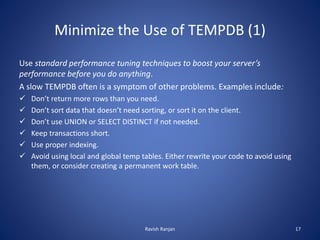
Minimize the Use of TEMPDB (1)
Use standard performance tuning techniques to boost your server’s
performance before you do anything.
A slow TEMPDB often is a symptom of other problems. Examples include:
 Don’t return more rows than you need.
 Don’t sort data that doesn’t need sorting, or sort it on the client.
 Don’t use UNION or SELECT DISTINCT if not needed.
 Keep transactions short.
 Use proper indexing.
 Avoid using local and global temp tables. Either rewrite your code to avoid using
them, or consider creating a permanent work table.
Ravish Ranjan 17
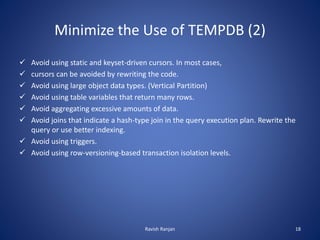
Minimize the Use of TEMPDB (2)
 Avoid using static and keyset-driven cursors. In most cases,
 cursors can be avoided by rewriting the code.
 Avoid using large object data types. (Vertical Partition)
 Avoid using table variables that return many rows.
 Avoid aggregating excessive amounts of data.
 Avoid joins that indicate a hash-type join in the query execution plan. Rewrite the
query or use better indexing.
 Avoid using triggers.
 Avoid using row-versioning-based transaction isolation levels.
Ravish Ranjan 18
Minimize the Use of TEMPDB (3)
 If you use the SORT_IN_TEMPDB option when creating or rebuilding an index,
schedule it to run during a slower time of the day.
 When using online index rebuilding (Enterprise Edition), which uses row versioning
and, in turn, uses TEMPDB, schedule it to run during a slower time of the day.
 Schedule jobs, such as DBCC CHECKDB, that use TEMPDB heavily, at times of the
day when the SQL Server instance is less busy. Or perform DBCC CHECKDB on a
database backup on another server.
Ravish Ranjan 19
Enhance Temporary Object Reuse
• Temporary objects need to be created inside another object in order to be cached,
such as:
– Stored procedure
– Trigger
– User-defined function
– Return table of a user-defined table-valued function
• Because of the above, temporary object reuse can’t be used if the objects are
created using dynamic T-SQL.
• If a temp table is created, and if any DDL (creating index for example) is run against
the table, it can’t be cached.
• Using named constraints when creating temp tables also prevents temporary object
reuse.
Ravish Ranjan 20
Add More RAM to Your Server
 Depending on the operation, SQL Server tries to perform the action in the buffer
cache. (e.g. sorts, hash joins)
 If the buffer cache does not have enough available space, then the operation may
have to spill to TEMPDB. This places additional overhead on TEMPDB.
 If your server is experiencing a memory bottleneck, then adding RAM can help
reduce the load on TEMPDB.
 On the other hand, if your server has plenty of memory, adding more probably
won’t help TEMPDB performance.
Ravish Ranjan 21
Locate TEMPDB on Fast I/O Subsystem
 Always locate TEMPDB on the fastest I/O subsystem you have available.
 Prefer RAID 10 or RAID 1. RAID 5 is slow for writes and should generally be
avoided for TEMPDB, as TEMPDB is often write-intensive.
 Use as many spindles as possible.
 If using a SAN, consult with a SAN engineer to ensure that TEMPDB won’t be
affected by other disk I/O.
 Consider SSD drives for TEMPDB MDF and LDF files.
Ravish Ranjan 22
Leave Auto Statistics On
• By default, the database options Auto Create Statistics and Auto Update
Statistics are turned on for TEMPDB.
• In most cases, don’t turn these options off, as SQL Server will automatically
create and update statistics as needed in temporary tables and indexes,
helping to boost performance of the many operations performed on them.
Ravish Ranjan 23
Pre-Allocate TEMPDB Space
 The default 8MB of TEMPDB space that is automatically allocated is generally
way too small a value.
 As SQL Server needs more TEMPDB space, it will request it, and through
autogrowth, it will get it, 10% at a time.
 When autogrowth kicks in, it uses up resources at often inconvenient times,
and transactions have to wait until autogrowth finishes, maybe causing timeouts.
Also, autogrowth can contribute to physical file fragmentation, which hurts I/O.
 Instead, you should pre-allocate TEMPDB space so that when SQL Server is
restarted, that it is immediately sized to the optimum size.
 Using Instant File Initialization can sometimes speed the process of growing the
TEMPDB at system start (but not for log growth).
Ravish Ranjan 24
Don’t Shrink TEMPDB
• The amount of space actually used out of the amount of space allocated to TEMPDB
can vary wildly over time. This is normal behaviour.
• Don’t be tempted to shrink TEMPDB just because it is not using all of its space. If you
do, you could start a cycle of growth and shrinkage that wastes server resources.
• If cases where TEMPDB grows excessively (due to a wild query, for example), and if
you don’t expect the behaviour to reoccur, then you may want to consider shrinking
TEMPDB to its “normal” size.
• The best way to shrink TEMPDB is to stop and restart the server so
that the pre-allocated size is recreated.
Ravish Ranjan 25
Divide TEMPDB Into Multiple Files
• By default, when TEMPDB is created, the MDF and LDF are created as single physical
files.
• While the LDF should always remain as a single physical file, often dividing
the TEMPDB MDF into multiple physical files can help performance.
• Multiple files can reduce contention on various global allocation structures
by spreading activity over multiple physical files (these don’t have to be on
different arrays). This is particularly useful for those TEMPDB database
which spend a large percentage of time allocating and de-allocating temporary
objects.
• Keep in mind that using more physical disk files for TEMPDB can increase
switching costs and file management overhead, which could potentially hurt
performance.
Ravish Ranjan 26
Be Careful Using TDE
• SQL Server 2008 offers a database-level encryption feature called
Transparent Database Encryption (TDE).
• If this is turned on for one or more databases on a SQL Server
instance, then all the activity in TEMPDB (whether it comes from a encrypted or
non-encrypted database) will be encrypted.
• Encryption increases CPU usage and slows down TEMPDB performance.
• If you decide to use TDE, you will want to incorporate as many of the TEMPDB
performance tuning tips that I have suggested in order to help overcome the
additional burden added by TDE.
Ravish Ranjan 27
Conclusion
We came across how TEMPDB and its performance is crucial for DB health.
We don’t know if we have a TEMPDB performance issue unless we check. It is easier to
prevent TEMPDB performance problems before they occur, than after they occur. This
includes both application design and server configuration. Implement as many as
these recommendations as we can on your SQL Server instances to be proactive and
to help prevent potential TEMPDB performance issues.
Ravish Ranjan 28
Please feel free to write your feedback at ravish.ranjan123@gmail.com
Ravish Ranjan 29

Optimize TempDB

  • 1.
  • 2.
    Highlights of Discussion Whywe should optimize TEMPDB  What Objects are Stored in TEMPDB  TEMPDB’s Internals  Types of TEMPDB Problems  Ways to Monitor TEMPDB  Ways to Optimize TEMPDB Ravish Ranjan 2
  • 3.
    Why we shouldoptimize TEMPDB: As we know the TEMPDB system database is a global resource that is available to all users connected to the instance of SQL Server or connected to SQL Database. It has a vital role on server performance. Users should take care of their created temporary object otherwise it would results in high contention issues. Ravish Ranjan 3
  • 4.
    What Objects areStored in TEMPDB? TEMPDB is used to store three different categories of temporary data: – User Objects – Internal Objects – Version Stores Ravish Ranjan 4
  • 5.
    User Objects  Localand global temporary tables (and indexes if created)  Table variables  User-defined tables and indexes  Tables returned in table-valued functions Ravish Ranjan 5
  • 6.
    Internal Objects  Workingtables for DBCC CHECKDB and DBCC CHECKTABLE.  Working tables for hash operations, such as joins and aggregations.  Working tables for processing static or keyset cursors.  Working tables for processing Service Broker objects.  Working files needed for many GROUP BY, ORDER BY, UNION, SORT, and SELECT DISTINCT operations.  Working files for sorts that result from creating or rebuilding  indexes (SORT_IN_TEMPDB). Ravish Ranjan 6
  • 7.
    Version Stores The versionstore is a collection of pages used to store row-level versioning of data. There are two types of version stores: 1. Common Version Store: Examples include: – Triggers. – Snapshot isolation and read-committed snapshot isolation. 2. Online-Index-Build Version Store: – Used for online index builds or rebuilds. EE edition only. Ravish Ranjan 7
  • 8.
    TEMPDB Internals  TEMPDBis cleared every time the SQL Server service is stopped and restarted.  By default, TEMPDB creates an MDF file of 8MB and an LDF file of 1MB.  By default, autogrowth is set to grow by 10% with an unlimited MDF file size, and a 2TB maximum LDF file size.  Each SQL Server instance have only one TEMPDB, although TEMPDB may have multiple physical files within a single filegroup. Ravish Ranjan 8
  • 9.
    Continued….  Many TEMPDBdatabase options can’t be changed  (e.g. Database Read-Only, Auto Close, Auto Shrink).  TEMPDB only uses the simple recovery model.  TEMPDB cannot be backed up, restored, be mirrored  TEMPDB cannot be dropped, detached, or attached. Ravish Ranjan 9
  • 10.
    Continued….  TEMPDB loggingworks differently from regular logging process.  Operations are minimally logged, as redo information is not included, which reduces TEMPDB transaction log activity.  The log is truncated constantly during the automatic checkpoint process, and should not grow significantly, although it can grow with long-running transactions, or if disk I/O is bottlenecked.  If a TEMPDB log file grows wildly: – Check for long-running transactions (and kill them if necessary). – Check for I/O bottlenecks (and fix them if possible). – Manually running a checkpoint can often temporally reduce a wildly growing log file if bottle-necked disk I/O is the problem. Ravish Ranjan 10
  • 11.
    Execution Plans andTEMPDB  When a query execution plan is cached, user-created temporary objects in TEMPDB that are required by the plan are often cached as well. This is called temporary object reuse.  Obviously, not the entire object is cached, just a portion of it. When a temporary object is cached, up to nine pages are cached for reuse.  This improves the performance of the next execution of the query as the object already partially exists, but this also takes up space in TEMPDB.  If the system is low on memory, the Database Engine removes the execution plan and drops the cached temporary objects. Ravish Ranjan 11
  • 12.
    TEMPDB Problems • Generally,there are three major problems you find with TEMPDB: 1. TEMPDB experiences an I/O bottleneck, hurting performance. These are most common type of TEMPDB problem. 2. TEMPDB experiences contention on various global allocation structures as temporary objects are being created, populated, and dropped. For Example- Any space-changing operation acquires a latch on PFS, GAM or SGAM pages to update space allocation metadata. A large number of such operations can cause excessive waits while latches are acquired, creating a bottleneck and hurting performance. 3. TEMPDB has run out of space. Can happen to anyone. • Ideally, we should be monitoring all these on a proactive basis to identify potential problems. Ravish Ranjan 12
  • 13.
    Identifying TEMPDB I/OProblems • Use Performance Monitor help determine how busy the disk is where your TEMPDB MDF and LDF files are located. • LogicalDisk Object: Avg. Disk Sec/Read: The average time, in milliseconds, of a read of data from disk (read latency). • LogicalDisk Object: Avg. Disk Sec/Write: The average time, in milliseconds, of a write of data to the disk (write latency). • Numbers below are a general guide only and may not apply to your hardware configuration. • Less than 10 milliseconds (ms) = very good • Between 10-20 ms = okay • Between 20-50 ms = slow • Greater than 50-100 ms = potentially serious IO bottleneck • Greater than 100 ms = definite IO bottleneck Ravish Ranjan 13
  • 14.
    Monitoring TEMPDB Space Performancecounters to consider watching: • SQL Server: Database: Data File(s) Size(KB): TEMPDB • SQL Server: Database: Log File(s) Used Size(KB): TEMPDB • SQL Server: Transactions: Free Space in TEMPDB (KB) DMV • sys.dm_db_file_space_usage Ravish Ranjan 14
  • 15.
    If TEMPDB SpaceRuns Low, Errors Occur • Check the SQL Server error log for these errors:  1101 or 1105: A session has to allocate more space in TEMPDB in order to continue  3959: The version store is full.  3967: The version store has been forced to shrink because TEMPDB is full.  958 or 3966: A transaction is unable to find a required version record in TEMPDB. Ravish Ranjan 15
  • 16.
    Tips for OptimizingTEMPDB  Minimize the use of TEMPDB  Add more RAM to your server  Keep the recovery model as simple  Locate TEMPDB on a fast I/O subsystem  Pre-allocate TEMPDB space  Don’t shrink TEMPDB if you don’t need to  Divide TEMPDB among multiple physical files  Avoid using Transparent Data Encryption (2008) Ravish Ranjan 16
  • 17.
    Minimize the Useof TEMPDB (1) Use standard performance tuning techniques to boost your server’s performance before you do anything. A slow TEMPDB often is a symptom of other problems. Examples include:  Don’t return more rows than you need.  Don’t sort data that doesn’t need sorting, or sort it on the client.  Don’t use UNION or SELECT DISTINCT if not needed.  Keep transactions short.  Use proper indexing.  Avoid using local and global temp tables. Either rewrite your code to avoid using them, or consider creating a permanent work table. Ravish Ranjan 17
  • 18.
    Minimize the Useof TEMPDB (2)  Avoid using static and keyset-driven cursors. In most cases,  cursors can be avoided by rewriting the code.  Avoid using large object data types. (Vertical Partition)  Avoid using table variables that return many rows.  Avoid aggregating excessive amounts of data.  Avoid joins that indicate a hash-type join in the query execution plan. Rewrite the query or use better indexing.  Avoid using triggers.  Avoid using row-versioning-based transaction isolation levels. Ravish Ranjan 18
  • 19.
    Minimize the Useof TEMPDB (3)  If you use the SORT_IN_TEMPDB option when creating or rebuilding an index, schedule it to run during a slower time of the day.  When using online index rebuilding (Enterprise Edition), which uses row versioning and, in turn, uses TEMPDB, schedule it to run during a slower time of the day.  Schedule jobs, such as DBCC CHECKDB, that use TEMPDB heavily, at times of the day when the SQL Server instance is less busy. Or perform DBCC CHECKDB on a database backup on another server. Ravish Ranjan 19
  • 20.
    Enhance Temporary ObjectReuse • Temporary objects need to be created inside another object in order to be cached, such as: – Stored procedure – Trigger – User-defined function – Return table of a user-defined table-valued function • Because of the above, temporary object reuse can’t be used if the objects are created using dynamic T-SQL. • If a temp table is created, and if any DDL (creating index for example) is run against the table, it can’t be cached. • Using named constraints when creating temp tables also prevents temporary object reuse. Ravish Ranjan 20
  • 21.
    Add More RAMto Your Server  Depending on the operation, SQL Server tries to perform the action in the buffer cache. (e.g. sorts, hash joins)  If the buffer cache does not have enough available space, then the operation may have to spill to TEMPDB. This places additional overhead on TEMPDB.  If your server is experiencing a memory bottleneck, then adding RAM can help reduce the load on TEMPDB.  On the other hand, if your server has plenty of memory, adding more probably won’t help TEMPDB performance. Ravish Ranjan 21
  • 22.
    Locate TEMPDB onFast I/O Subsystem  Always locate TEMPDB on the fastest I/O subsystem you have available.  Prefer RAID 10 or RAID 1. RAID 5 is slow for writes and should generally be avoided for TEMPDB, as TEMPDB is often write-intensive.  Use as many spindles as possible.  If using a SAN, consult with a SAN engineer to ensure that TEMPDB won’t be affected by other disk I/O.  Consider SSD drives for TEMPDB MDF and LDF files. Ravish Ranjan 22
  • 23.
    Leave Auto StatisticsOn • By default, the database options Auto Create Statistics and Auto Update Statistics are turned on for TEMPDB. • In most cases, don’t turn these options off, as SQL Server will automatically create and update statistics as needed in temporary tables and indexes, helping to boost performance of the many operations performed on them. Ravish Ranjan 23
  • 24.
    Pre-Allocate TEMPDB Space The default 8MB of TEMPDB space that is automatically allocated is generally way too small a value.  As SQL Server needs more TEMPDB space, it will request it, and through autogrowth, it will get it, 10% at a time.  When autogrowth kicks in, it uses up resources at often inconvenient times, and transactions have to wait until autogrowth finishes, maybe causing timeouts. Also, autogrowth can contribute to physical file fragmentation, which hurts I/O.  Instead, you should pre-allocate TEMPDB space so that when SQL Server is restarted, that it is immediately sized to the optimum size.  Using Instant File Initialization can sometimes speed the process of growing the TEMPDB at system start (but not for log growth). Ravish Ranjan 24
  • 25.
    Don’t Shrink TEMPDB •The amount of space actually used out of the amount of space allocated to TEMPDB can vary wildly over time. This is normal behaviour. • Don’t be tempted to shrink TEMPDB just because it is not using all of its space. If you do, you could start a cycle of growth and shrinkage that wastes server resources. • If cases where TEMPDB grows excessively (due to a wild query, for example), and if you don’t expect the behaviour to reoccur, then you may want to consider shrinking TEMPDB to its “normal” size. • The best way to shrink TEMPDB is to stop and restart the server so that the pre-allocated size is recreated. Ravish Ranjan 25
  • 26.
    Divide TEMPDB IntoMultiple Files • By default, when TEMPDB is created, the MDF and LDF are created as single physical files. • While the LDF should always remain as a single physical file, often dividing the TEMPDB MDF into multiple physical files can help performance. • Multiple files can reduce contention on various global allocation structures by spreading activity over multiple physical files (these don’t have to be on different arrays). This is particularly useful for those TEMPDB database which spend a large percentage of time allocating and de-allocating temporary objects. • Keep in mind that using more physical disk files for TEMPDB can increase switching costs and file management overhead, which could potentially hurt performance. Ravish Ranjan 26
  • 27.
    Be Careful UsingTDE • SQL Server 2008 offers a database-level encryption feature called Transparent Database Encryption (TDE). • If this is turned on for one or more databases on a SQL Server instance, then all the activity in TEMPDB (whether it comes from a encrypted or non-encrypted database) will be encrypted. • Encryption increases CPU usage and slows down TEMPDB performance. • If you decide to use TDE, you will want to incorporate as many of the TEMPDB performance tuning tips that I have suggested in order to help overcome the additional burden added by TDE. Ravish Ranjan 27
  • 28.
    Conclusion We came acrosshow TEMPDB and its performance is crucial for DB health. We don’t know if we have a TEMPDB performance issue unless we check. It is easier to prevent TEMPDB performance problems before they occur, than after they occur. This includes both application design and server configuration. Implement as many as these recommendations as we can on your SQL Server instances to be proactive and to help prevent potential TEMPDB performance issues. Ravish Ranjan 28
  • 29.
    Please feel freeto write your feedback at ravish.ranjan123@gmail.com Ravish Ranjan 29