Module 3: Managing
Database Files
Overview
 Introduction to Data Structures
 Creating Databases
 Managing Databases
 Placing Database Files and Logs
 Optimizing a Database Using Hardware-based RAID
 Optimizing a Database Using Filegroups
 Optimizing the Database Using Filegroups with
Hardware-based RAID
 Capacity Planning
Introduction to Data Structures
 How Data Is Stored
 Transactions
 How the Transaction Log Works
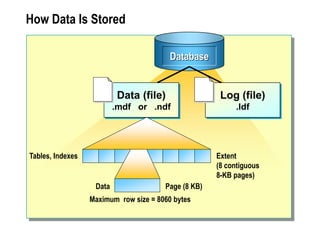
How Data Is Stored
Extent
(8 contiguous
8-KB pages)
Page (8 KB)
Tables, Indexes
Data
Database
Data (file)
.mdf or .ndf
Log (file)
.ldf
Maximum row size = 8060 bytes
Multimedia Presentation: Transactions
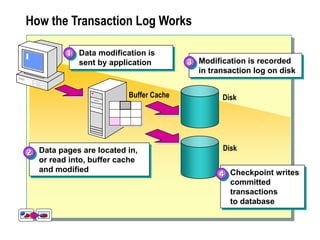
How the Transaction Log Works
Data modification is
sent by application
1
Disk
Modification is recorded
in transaction log on disk
3
Data pages are located in,
or read into, buffer cache
and modified
2
Buffer Cache
Disk
Checkpoint writes
committed
transactions
to database
4
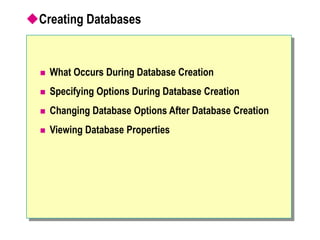
Creating Databases
 What Occurs During Database Creation
 Specifying Options During Database Creation
 Changing Database Options After Database Creation
 Viewing Database Properties
What Occurs During Database Creation
 Creates a Data File and a Transaction Log
 Requires That the Owner and Creator Have Permission
to the master Database
 Allows You to Define:
 The name of the database
 The properties of the database
 The location of the database files
Specifying Options During Database Creation
 Primary File
 Secondary Files
 Transaction Log
 File Name and Location
 Size
 File Growth
 Maximum Size
 Collation
Changing Database Options After Database Creation
Category of
database options
Auto
Cursor
Recovery
SQL
Controls
Certain automatic behaviors
Cursor behavior and scope
The recovery model for the database
Control ANSI compliance options
State
Whether the database is online or offline
Who can connect to the database
Whether the database is in read-only mode
Viewing Database Properties
 Use SQL Server Enterprise Manager
 Use SQL Query Analyzer
 System functions
 System stored procedures (sp_helpdb or
sp_spaceused)
 DBCC statements (DBCC SQLPERF (LOGSPACE))
Managing Databases
 Managing Data and Log File Growth
 Shrinking a Database or Database File Automatically
 Shrinking a Database or Database File Manually
 Deleting a Database
Managing Data and Log File Growth
 Using Automatic File Growth
 Specify space allocated, maximum size, and growth
increment of each file
 Optimize performance by allocating sufficient space,
setting maximum size, and setting growth increments
 Manually Expanding Data and Transaction Log Files
 Determining Whether to Expand Files Automatically or
Manually
 Creating Secondary Data and Transaction Log Files
Shrinking a Database or Database File Automatically
 Enabling Shrinking to Occur Automatically
 Specifying the autoshrink option in SQL Server
Enterprise Manager
 Executing the ALTER DATABASE AUTO_SHRINK
statement
 Executing the sp_dboption system stored procedure
 SQL Server Activities During Auto Shrink
 Shrinks data and transaction log files when more than 25
percent of the file contains unused space
 Performs shrinking in the background and does not
affect user activity
Shrinking a Database or Database File Manually
 Methods of Shrinking
 Shrinking a Database and Data Files
 Shrinking Transaction Log Files
 Shrinks inactive portions of the transaction log that are
larger than the desired size
 If that is not enough to reduce to the desired size,
SQL Server returns a message and notifies you what to
perform
 Configuring Shrink Database Options
Deleting a Database
 Methods of Deleting a Database
 Restrictions on Deleting a Database
 While it is being restored
 When a user is connected to it
 When publishing as part of replication
 A system database
Placing Database Files and Logs
 Managing Disk Storage
 Performance
 Fault tolerance
 Spreading Data Files
 Creating Transaction Logs on Separate Disks
 Placing the tempdb Database
Optimizing a Database Using Hardware-based RAID
 Using Hardware-based RAID
 Offers better performance than operating system-based
RAID
 Enables you to replace failed drive without shutting
down the system
 Applying Types of RAID
 Disk mirroring or disk duplexing (RAID 1) for redundancy
for the transaction log
 Disk striping with parity for performance and redundancy
for data files and transaction logs
 Disk mirroring with striping for maximum performance for
data files
Optimizing a Database Using Filegroups
 Introduction to User-defined Filegroups
 Creating User-defined Filegroups
 Using Filegroups for Performance
 Using Filegroups for Maintenance
 Considerations When Creating Filegroups
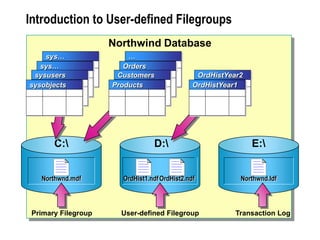
Introduction to User-defined Filegroups
Northwnd.ldf
E:
User-defined Filegroup
Primary Filegroup Transaction Log
OrdHist1.ndfOrdHist2.ndf
D:
Northwnd.mdf
C:
sys…
sys…
sysusers
sysobjects
…
Orders
Customers
Products
OrdHistYear2
OrdHistYear1
Northwind Database
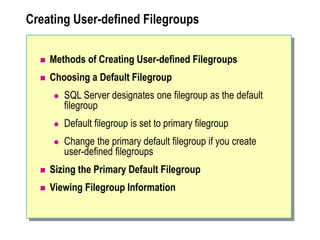
Creating User-defined Filegroups
 Methods of Creating User-defined Filegroups
 Choosing a Default Filegroup
 SQL Server designates one filegroup as the default
filegroup
 Default filegroup is set to primary filegroup
 Change the primary default filegroup if you create
user-defined filegroups
 Sizing the Primary Default Filegroup
 Viewing Filegroup Information
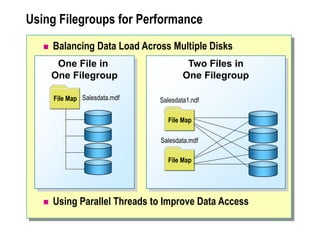
Using Filegroups for Performance
 Balancing Data Load Across Multiple Disks
 Using Parallel Threads to Improve Data Access
One File in
One Filegroup
File Map Salesdata.mdf
Two Files in
One Filegroup
Salesdata.mdf
Salesdata1.ndf
File Map
File Map
Using Filegroups for Maintenance
 Back Up or Restore Files or Filegroups Rather Than an
Entire Database
 Group Tables and Indexes with Similar Maintenance
Requirements into Same Filegroups
 Assign an Individual High-Maintenance Table to Its Own
Filegroup
Considerations When Creating Filegroups
 Monitor System Performance
 Use Maintenance Requirements Rather Than
Performance Considerations
 Specify a User-defined Filegroup as the Default
 Be Aware That Filegroups Do Not Provide Fault
Tolerance
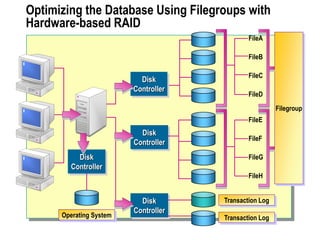
Optimizing the Database Using Filegroups with
Hardware-based RAID
Disk
Controller
Filegroup
Disk
Controller
FileE
FileF
FileG
FileH
FileA
FileB
FileC
FileD
Transaction Log
Transaction Log
Disk
Controller
Operating System
Disk
Controller
Capacity Planning
 Estimating the Size of a Database
 Estimating the Amount of Data in Tables
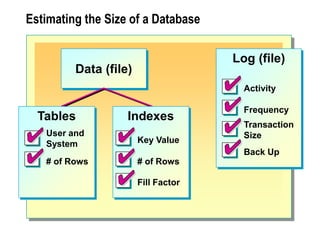
Estimating the Size of a Database
Log (file)
Activity
Frequency
Transaction
Size
Back Up
Data (file)
Tables
# of Rows
User and
System
Indexes
Key Value
# of Rows
Fill Factor
Estimating the Amount of Data in Tables
 Calculate Number of Bytes in a Row
 Total the bytes in the row
 Average variable-length columns
 Determine Number of Rows in a Data Page
 Divide 8060 by the total bytes in the row
 Round down to the next whole number
 Divide Number of Rows in the Table by Number of
Rows in a Data Page
Performance Considerations
 Use RAID to Improve Performance or Fault Tolerance
 Place Data Files and Transaction Logs on Separate
Physical Disks
 Use User-defined Filegroups to Simplify Backup
Strategies of Very Large Databases
Change the Default Filegroup
Back Up the master Database
Specify a Maximum File Size
Make Initial Database File Size and Autogrow Increments Large
Use Disk Mirroring, Disk Striping with Parity or
Disk Mirroring with Striping
Create One File for Each Physical Disk
Recommended Practices
Lab A: Managing Database Files
Review
 Introduction to Data Structures
 Creating Databases
 Managing Databases
 Placing Database Files and Logs
 Optimizing a Database Using Hardware-based RAID
 Optimizing a Database Using Filegroups
 Optimizing the Database Using Filegroups with
Hardware-based RAID
 Capacity Planning

6952234.ppt

  • 1.
  • 2.
    Overview  Introduction toData Structures  Creating Databases  Managing Databases  Placing Database Files and Logs  Optimizing a Database Using Hardware-based RAID  Optimizing a Database Using Filegroups  Optimizing the Database Using Filegroups with Hardware-based RAID  Capacity Planning
  • 3.
    Introduction to DataStructures  How Data Is Stored  Transactions  How the Transaction Log Works
  • 4.
    How Data IsStored Extent (8 contiguous 8-KB pages) Page (8 KB) Tables, Indexes Data Database Data (file) .mdf or .ndf Log (file) .ldf Maximum row size = 8060 bytes
  • 5.
  • 6.
    How the TransactionLog Works Data modification is sent by application 1 Disk Modification is recorded in transaction log on disk 3 Data pages are located in, or read into, buffer cache and modified 2 Buffer Cache Disk Checkpoint writes committed transactions to database 4
  • 7.
    Creating Databases  WhatOccurs During Database Creation  Specifying Options During Database Creation  Changing Database Options After Database Creation  Viewing Database Properties
  • 8.
    What Occurs DuringDatabase Creation  Creates a Data File and a Transaction Log  Requires That the Owner and Creator Have Permission to the master Database  Allows You to Define:  The name of the database  The properties of the database  The location of the database files
  • 9.
    Specifying Options DuringDatabase Creation  Primary File  Secondary Files  Transaction Log  File Name and Location  Size  File Growth  Maximum Size  Collation
  • 10.
    Changing Database OptionsAfter Database Creation Category of database options Auto Cursor Recovery SQL Controls Certain automatic behaviors Cursor behavior and scope The recovery model for the database Control ANSI compliance options State Whether the database is online or offline Who can connect to the database Whether the database is in read-only mode
  • 11.
    Viewing Database Properties Use SQL Server Enterprise Manager  Use SQL Query Analyzer  System functions  System stored procedures (sp_helpdb or sp_spaceused)  DBCC statements (DBCC SQLPERF (LOGSPACE))
  • 12.
    Managing Databases  ManagingData and Log File Growth  Shrinking a Database or Database File Automatically  Shrinking a Database or Database File Manually  Deleting a Database
  • 13.
    Managing Data andLog File Growth  Using Automatic File Growth  Specify space allocated, maximum size, and growth increment of each file  Optimize performance by allocating sufficient space, setting maximum size, and setting growth increments  Manually Expanding Data and Transaction Log Files  Determining Whether to Expand Files Automatically or Manually  Creating Secondary Data and Transaction Log Files
  • 14.
    Shrinking a Databaseor Database File Automatically  Enabling Shrinking to Occur Automatically  Specifying the autoshrink option in SQL Server Enterprise Manager  Executing the ALTER DATABASE AUTO_SHRINK statement  Executing the sp_dboption system stored procedure  SQL Server Activities During Auto Shrink  Shrinks data and transaction log files when more than 25 percent of the file contains unused space  Performs shrinking in the background and does not affect user activity
  • 15.
    Shrinking a Databaseor Database File Manually  Methods of Shrinking  Shrinking a Database and Data Files  Shrinking Transaction Log Files  Shrinks inactive portions of the transaction log that are larger than the desired size  If that is not enough to reduce to the desired size, SQL Server returns a message and notifies you what to perform  Configuring Shrink Database Options
  • 16.
    Deleting a Database Methods of Deleting a Database  Restrictions on Deleting a Database  While it is being restored  When a user is connected to it  When publishing as part of replication  A system database
  • 17.
    Placing Database Filesand Logs  Managing Disk Storage  Performance  Fault tolerance  Spreading Data Files  Creating Transaction Logs on Separate Disks  Placing the tempdb Database
  • 18.
    Optimizing a DatabaseUsing Hardware-based RAID  Using Hardware-based RAID  Offers better performance than operating system-based RAID  Enables you to replace failed drive without shutting down the system  Applying Types of RAID  Disk mirroring or disk duplexing (RAID 1) for redundancy for the transaction log  Disk striping with parity for performance and redundancy for data files and transaction logs  Disk mirroring with striping for maximum performance for data files
  • 19.
    Optimizing a DatabaseUsing Filegroups  Introduction to User-defined Filegroups  Creating User-defined Filegroups  Using Filegroups for Performance  Using Filegroups for Maintenance  Considerations When Creating Filegroups
  • 20.
    Introduction to User-definedFilegroups Northwnd.ldf E: User-defined Filegroup Primary Filegroup Transaction Log OrdHist1.ndfOrdHist2.ndf D: Northwnd.mdf C: sys… sys… sysusers sysobjects … Orders Customers Products OrdHistYear2 OrdHistYear1 Northwind Database
  • 21.
    Creating User-defined Filegroups Methods of Creating User-defined Filegroups  Choosing a Default Filegroup  SQL Server designates one filegroup as the default filegroup  Default filegroup is set to primary filegroup  Change the primary default filegroup if you create user-defined filegroups  Sizing the Primary Default Filegroup  Viewing Filegroup Information
  • 22.
    Using Filegroups forPerformance  Balancing Data Load Across Multiple Disks  Using Parallel Threads to Improve Data Access One File in One Filegroup File Map Salesdata.mdf Two Files in One Filegroup Salesdata.mdf Salesdata1.ndf File Map File Map
  • 23.
    Using Filegroups forMaintenance  Back Up or Restore Files or Filegroups Rather Than an Entire Database  Group Tables and Indexes with Similar Maintenance Requirements into Same Filegroups  Assign an Individual High-Maintenance Table to Its Own Filegroup
  • 24.
    Considerations When CreatingFilegroups  Monitor System Performance  Use Maintenance Requirements Rather Than Performance Considerations  Specify a User-defined Filegroup as the Default  Be Aware That Filegroups Do Not Provide Fault Tolerance
  • 25.
    Optimizing the DatabaseUsing Filegroups with Hardware-based RAID Disk Controller Filegroup Disk Controller FileE FileF FileG FileH FileA FileB FileC FileD Transaction Log Transaction Log Disk Controller Operating System Disk Controller
  • 26.
    Capacity Planning  Estimatingthe Size of a Database  Estimating the Amount of Data in Tables
  • 27.
    Estimating the Sizeof a Database Log (file) Activity Frequency Transaction Size Back Up Data (file) Tables # of Rows User and System Indexes Key Value # of Rows Fill Factor
  • 28.
    Estimating the Amountof Data in Tables  Calculate Number of Bytes in a Row  Total the bytes in the row  Average variable-length columns  Determine Number of Rows in a Data Page  Divide 8060 by the total bytes in the row  Round down to the next whole number  Divide Number of Rows in the Table by Number of Rows in a Data Page
  • 29.
    Performance Considerations  UseRAID to Improve Performance or Fault Tolerance  Place Data Files and Transaction Logs on Separate Physical Disks  Use User-defined Filegroups to Simplify Backup Strategies of Very Large Databases
  • 30.
    Change the DefaultFilegroup Back Up the master Database Specify a Maximum File Size Make Initial Database File Size and Autogrow Increments Large Use Disk Mirroring, Disk Striping with Parity or Disk Mirroring with Striping Create One File for Each Physical Disk Recommended Practices
  • 31.
    Lab A: ManagingDatabase Files
  • 32.
    Review  Introduction toData Structures  Creating Databases  Managing Databases  Placing Database Files and Logs  Optimizing a Database Using Hardware-based RAID  Optimizing a Database Using Filegroups  Optimizing the Database Using Filegroups with Hardware-based RAID  Capacity Planning