Managing and Configuring Databases 
Ram Kedem
Copyright 2014 © Ram Kedem. All rights reserved. Not to be reproduced without written consent 
SQL Server Data Files 
•The primary data file(mandatory) 
•is the starting point of the database and points to the other files in the database. 
•Every database has one primary data file. 
•The recommended file name extension for primary data files is .mdf
Copyright 2014 © Ram Kedem. All rights reserved. Not to be reproduced without written consent 
SQL Server Data Files 
•Secondary data files(Optional) 
•Secondary data files comprise all of the data files other than the primary data file. Some databases may not have any secondary data files, while others have multiple secondary data files. 
•The recommended file name extension for secondary data files is .ndf
Copyright 2014 © Ram Kedem. All rights reserved. Not to be reproduced without written consent 
SQL Server Data Files 
•Log files(mandatory) 
•Log files hold all of the log information used to recover the database. 
•There must be at least one log file for each database 
•The recommended file name extension for log files is .ldf
Copyright 2014 © Ram Kedem. All rights reserved. Not to be reproduced without written consent 
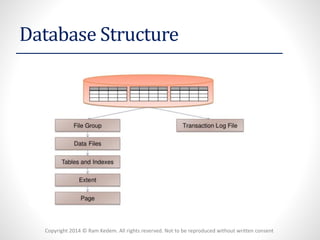
Database Structure
Copyright 2014 © Ram Kedem. All rights reserved. Not to be reproduced without written consent 
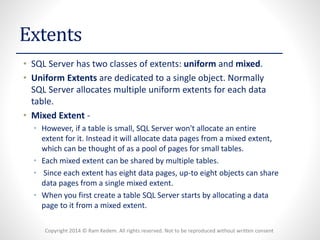
Extents 
•SQL Server has two classes of extents: uniformand mixed. 
•Uniform Extentsare dedicated to a single object. Normally SQL Server allocates multiple uniform extents for each data table. 
•Mixed Extent- 
•However, if a table is small, SQL Server won't allocate an entire extent for it. Instead it will allocate data pages from a mixed extent, which can be thought of as a pool of pages for small tables. 
•Each mixed extent can be shared by multiple tables. 
•Since each extent has eight data pages, up-to eight objects can share data pages from a single mixed extent. 
•When you first create a table SQL Server starts by allocating a data page to it from a mixed extent.
Copyright 2014 © Ram Kedem. All rights reserved. Not to be reproduced without written consent 
Extents 
(Mixed Extents continued) 
•Once the table has enough data to warrant a full extent, SQL Server will allocate a uniform extent to it. 
•Similarly if you build an index on a table that has at least eight pages SQL Server will dedicate a uniform extent for storing the index data.
Copyright 2014 © Ram Kedem. All rights reserved. Not to be reproduced without written consent 
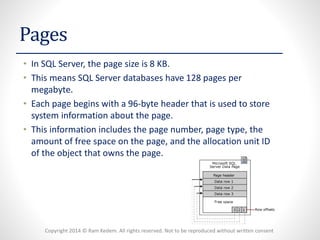
Pages 
•In SQL Server, the page size is 8 KB. 
•This means SQL Server databases have 128 pages per megabyte. 
•Each page begins with a 96-byte header that is used to store system information about the page. 
•This information includes the page number, page type, the amount of free space on the page, and the allocation unit ID of the object that owns the page.
Copyright 2014 © Ram Kedem. All rights reserved. Not to be reproduced without written consent 
Creating User Databases 
•1. Auto Options (such as auto statistics) 
•2. Page Verify 
•CHECKSUM. This option advises SQL Server to calculate a checksum over the contents of each data / index page when it is written to disk. This value is stored in the page header. When the page is read from the disk, checksum is computed again and compared to the value in page header 
• 
•TORN_PAGE_DETECTION 
•Saves a specific bit for each 512-byte sector in the 8-kilobyte (KB) database page and stored in the database page header when the page is written to disk. When the page is read from disk, the torn bits stored in the page header are compared to the actual page sector information. Unmatched values indicate that only part of the page was written to disk. In this situation, error message 824 (indicating a torn page error) is reported to both the SQL Server error log and the Windows event log. 
•3. Recovery Model 
•4. State Options
Copyright 2014 © Ram Kedem. All rights reserved. Not to be reproduced without written consent 
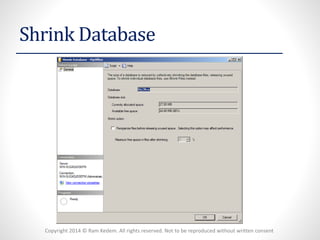
Shrink Database
Copyright 2014 © Ram Kedem. All rights reserved. Not to be reproduced without written consent 
Detach and Attach 
•UPDATE STATISTICS OPTION-updates statistics on table and index before detaching which might be a good option, if the database is attached in a read-only environment. But it is typically not a good choice if the database should just be moved to a new location. 
•DROP CONNECTIONS-closes all sessions connected to the same DB (when there is more than one session connected, this is the only option to detach a Database)
Copyright 2014 © Ram Kedem. All rights reserved. Not to be reproduced without written consent 
Determining File Placement and Number of Files 
1. Isolate log and data files at the physical disk levelFor performance and safety reasons. 
•Performance -The access patterns of data and log files are very different as there is mainly sequential access to log filesand random disk access on data files (especially in OLTP). 
•Safety -Also in case of a storage failure there is a better chance to recover the database fully if only parts of the database files are corrupt.
Copyright 2014 © Ram Kedem. All rights reserved. Not to be reproduced without written consent 
Determining File Placement and Number of Files 
2. Use appropriate RAID levels 
RAID (originally redundant array of inexpensive disks; now commonly redundant array of independent disks) is a data storage virtualization technology that combines multiple disk drive components into a logical unit for the purposes of data redundancy or performance improvement
Copyright 2014 © Ram Kedem. All rights reserved. Not to be reproduced without written consent 
Determining File Placement and Number of Files 
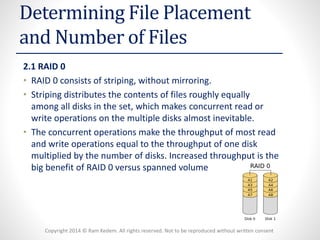
2.1 RAID 0 
•RAID 0 consists of striping, without mirroring. 
•Striping distributes the contents of files roughly equally among all disks in the set, which makes concurrent read or write operations on the multiple disks almost inevitable. 
•The concurrent operations make the throughput of most read and write operations equal to the throughput of one disk multiplied by the number of disks. Increased throughput is the big benefit of RAID 0 versus spanned volume
Copyright 2014 © Ram Kedem. All rights reserved. Not to be reproduced without written consent 
Determining File Placement and Number of Files 
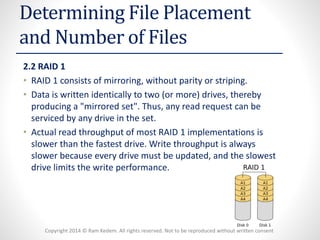
2.2 RAID 1 
•RAID 1 consists of mirroring, without parity or striping. 
•Data is written identically to two (or more) drives, thereby producing a "mirrored set". Thus, any read request can be serviced by any drive in the set. 
•Actual read throughput of most RAID 1 implementations is slower than the fastest drive. Write throughput is always slower because every drive must be updated, and the slowest drive limits the write performance.
Copyright 2014 © Ram Kedem. All rights reserved. Not to be reproduced without written consent 
Determining File Placement and Number of Files 
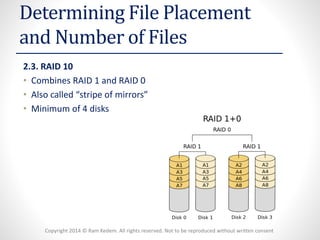
2.3. RAID 10 
•Combines RAID 1 and RAID 0 
•Also called “stripe of mirrors” 
•Minimum of 4 disks
Copyright 2014 © Ram Kedem. All rights reserved. Not to be reproduced without written consent 
Determining File Placement and Number of Files 
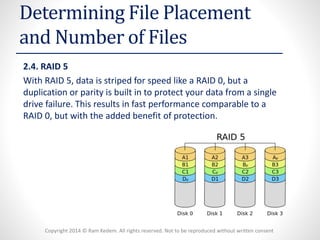
2.4. RAID 5 
With RAID 5, data is striped for speed like a RAID 0, but a duplication or parity is built in to protect your data from a single drive failure. This results in fast performance comparable to a RAID 0, but with the added benefit of protection.
Copyright 2014 © Ram Kedem. All rights reserved. Not to be reproduced without written consent 
Determining File Placement and Number of Files 
•Ensuring Sufficient File Capacity 
•It is important to estimate the maximum size of the database, indexes, transaction log and tempdb, through a predicted growth module. 
•Set the size to a reasonable size: 
•Leave enough space for new data, without the need to expand often 
•Monitordataand log file usage 
•Plan for manual expansion 
•Keep autogrowthenabledto allow for unexpected growth
Copyright 2014 © Ram Kedem. All rights reserved. Not to be reproduced without written consent 
System Databases Supplied with SQL Server 
•Master Database 
•Themasterdatabase records all the system-level information for a SQL Server system. This includes instance-wide metadata such as logon accounts, endpoints, linked servers, and system configuration settings. 
•masteris the database that records the existence of all other databases and the location of those database files and records the initialization information for SQL Server. 
•Therefore, SQL Server cannot start if themasterdatabase is unavailable.
Copyright 2014 © Ram Kedem. All rights reserved. Not to be reproduced without written consent 
System Databases Supplied with SQL Server 
•TempdbDatabase 
•Thetempdbsystem database is a global resource that is available to all users connected to the instance of SQL Server and is used to hold the following: 
•Temporary user objects that are explicitly created, such as: global or local temporary tables, temporary stored procedures, table variables, or cursors. 
•Internal objects that are created by the SQL Server Database Engine.
Copyright 2014 © Ram Kedem. All rights reserved. Not to be reproduced without written consent 
System Databases Supplied with SQL Server 
•Model Database 
•Themodeldatabase is used as the template for all databases created on an instance of SQL Server. 
•The entire contents of themodeldatabase, including database options, are copied to the new database. 
•Becausetempdbis created every time SQL Server is started, themodeldatabase must always exist on aSQL Server system. 
•Some of the settings ofmodelare also used for creating a newtempdbduring start up
Copyright 2014 © Ram Kedem. All rights reserved. Not to be reproduced without written consent 
System Databases Supplied with SQL Server 
•MSDB Database 
•Mainly Provides the capability us to save information about automation and backup & recovery 
•Themsdbdatabase is used by SQL Server Agent for scheduling alerts and jobs and by other features such as SQL Server Management Studio, Service Broker and Database Mail. 
•For example, SQL Server automatically maintains a complete online backup-and-restore history within tables inmsdb.

Managing and Configuring Databases

  • 1.
    Managing and ConfiguringDatabases Ram Kedem
  • 2.
    Copyright 2014 ©Ram Kedem. All rights reserved. Not to be reproduced without written consent SQL Server Data Files •The primary data file(mandatory) •is the starting point of the database and points to the other files in the database. •Every database has one primary data file. •The recommended file name extension for primary data files is .mdf
  • 3.
    Copyright 2014 ©Ram Kedem. All rights reserved. Not to be reproduced without written consent SQL Server Data Files •Secondary data files(Optional) •Secondary data files comprise all of the data files other than the primary data file. Some databases may not have any secondary data files, while others have multiple secondary data files. •The recommended file name extension for secondary data files is .ndf
  • 4.
    Copyright 2014 ©Ram Kedem. All rights reserved. Not to be reproduced without written consent SQL Server Data Files •Log files(mandatory) •Log files hold all of the log information used to recover the database. •There must be at least one log file for each database •The recommended file name extension for log files is .ldf
  • 5.
    Copyright 2014 ©Ram Kedem. All rights reserved. Not to be reproduced without written consent Database Structure
  • 6.
    Copyright 2014 ©Ram Kedem. All rights reserved. Not to be reproduced without written consent Extents •SQL Server has two classes of extents: uniformand mixed. •Uniform Extentsare dedicated to a single object. Normally SQL Server allocates multiple uniform extents for each data table. •Mixed Extent- •However, if a table is small, SQL Server won't allocate an entire extent for it. Instead it will allocate data pages from a mixed extent, which can be thought of as a pool of pages for small tables. •Each mixed extent can be shared by multiple tables. •Since each extent has eight data pages, up-to eight objects can share data pages from a single mixed extent. •When you first create a table SQL Server starts by allocating a data page to it from a mixed extent.
  • 7.
    Copyright 2014 ©Ram Kedem. All rights reserved. Not to be reproduced without written consent Extents (Mixed Extents continued) •Once the table has enough data to warrant a full extent, SQL Server will allocate a uniform extent to it. •Similarly if you build an index on a table that has at least eight pages SQL Server will dedicate a uniform extent for storing the index data.
  • 8.
    Copyright 2014 ©Ram Kedem. All rights reserved. Not to be reproduced without written consent Pages •In SQL Server, the page size is 8 KB. •This means SQL Server databases have 128 pages per megabyte. •Each page begins with a 96-byte header that is used to store system information about the page. •This information includes the page number, page type, the amount of free space on the page, and the allocation unit ID of the object that owns the page.
  • 9.
    Copyright 2014 ©Ram Kedem. All rights reserved. Not to be reproduced without written consent Creating User Databases •1. Auto Options (such as auto statistics) •2. Page Verify •CHECKSUM. This option advises SQL Server to calculate a checksum over the contents of each data / index page when it is written to disk. This value is stored in the page header. When the page is read from the disk, checksum is computed again and compared to the value in page header • •TORN_PAGE_DETECTION •Saves a specific bit for each 512-byte sector in the 8-kilobyte (KB) database page and stored in the database page header when the page is written to disk. When the page is read from disk, the torn bits stored in the page header are compared to the actual page sector information. Unmatched values indicate that only part of the page was written to disk. In this situation, error message 824 (indicating a torn page error) is reported to both the SQL Server error log and the Windows event log. •3. Recovery Model •4. State Options
  • 10.
    Copyright 2014 ©Ram Kedem. All rights reserved. Not to be reproduced without written consent Shrink Database
  • 11.
    Copyright 2014 ©Ram Kedem. All rights reserved. Not to be reproduced without written consent Detach and Attach •UPDATE STATISTICS OPTION-updates statistics on table and index before detaching which might be a good option, if the database is attached in a read-only environment. But it is typically not a good choice if the database should just be moved to a new location. •DROP CONNECTIONS-closes all sessions connected to the same DB (when there is more than one session connected, this is the only option to detach a Database)
  • 12.
    Copyright 2014 ©Ram Kedem. All rights reserved. Not to be reproduced without written consent Determining File Placement and Number of Files 1. Isolate log and data files at the physical disk levelFor performance and safety reasons. •Performance -The access patterns of data and log files are very different as there is mainly sequential access to log filesand random disk access on data files (especially in OLTP). •Safety -Also in case of a storage failure there is a better chance to recover the database fully if only parts of the database files are corrupt.
  • 13.
    Copyright 2014 ©Ram Kedem. All rights reserved. Not to be reproduced without written consent Determining File Placement and Number of Files 2. Use appropriate RAID levels RAID (originally redundant array of inexpensive disks; now commonly redundant array of independent disks) is a data storage virtualization technology that combines multiple disk drive components into a logical unit for the purposes of data redundancy or performance improvement
  • 14.
    Copyright 2014 ©Ram Kedem. All rights reserved. Not to be reproduced without written consent Determining File Placement and Number of Files 2.1 RAID 0 •RAID 0 consists of striping, without mirroring. •Striping distributes the contents of files roughly equally among all disks in the set, which makes concurrent read or write operations on the multiple disks almost inevitable. •The concurrent operations make the throughput of most read and write operations equal to the throughput of one disk multiplied by the number of disks. Increased throughput is the big benefit of RAID 0 versus spanned volume
  • 15.
    Copyright 2014 ©Ram Kedem. All rights reserved. Not to be reproduced without written consent Determining File Placement and Number of Files 2.2 RAID 1 •RAID 1 consists of mirroring, without parity or striping. •Data is written identically to two (or more) drives, thereby producing a "mirrored set". Thus, any read request can be serviced by any drive in the set. •Actual read throughput of most RAID 1 implementations is slower than the fastest drive. Write throughput is always slower because every drive must be updated, and the slowest drive limits the write performance.
  • 16.
    Copyright 2014 ©Ram Kedem. All rights reserved. Not to be reproduced without written consent Determining File Placement and Number of Files 2.3. RAID 10 •Combines RAID 1 and RAID 0 •Also called “stripe of mirrors” •Minimum of 4 disks
  • 17.
    Copyright 2014 ©Ram Kedem. All rights reserved. Not to be reproduced without written consent Determining File Placement and Number of Files 2.4. RAID 5 With RAID 5, data is striped for speed like a RAID 0, but a duplication or parity is built in to protect your data from a single drive failure. This results in fast performance comparable to a RAID 0, but with the added benefit of protection.
  • 18.
    Copyright 2014 ©Ram Kedem. All rights reserved. Not to be reproduced without written consent Determining File Placement and Number of Files •Ensuring Sufficient File Capacity •It is important to estimate the maximum size of the database, indexes, transaction log and tempdb, through a predicted growth module. •Set the size to a reasonable size: •Leave enough space for new data, without the need to expand often •Monitordataand log file usage •Plan for manual expansion •Keep autogrowthenabledto allow for unexpected growth
  • 19.
    Copyright 2014 ©Ram Kedem. All rights reserved. Not to be reproduced without written consent System Databases Supplied with SQL Server •Master Database •Themasterdatabase records all the system-level information for a SQL Server system. This includes instance-wide metadata such as logon accounts, endpoints, linked servers, and system configuration settings. •masteris the database that records the existence of all other databases and the location of those database files and records the initialization information for SQL Server. •Therefore, SQL Server cannot start if themasterdatabase is unavailable.
  • 20.
    Copyright 2014 ©Ram Kedem. All rights reserved. Not to be reproduced without written consent System Databases Supplied with SQL Server •TempdbDatabase •Thetempdbsystem database is a global resource that is available to all users connected to the instance of SQL Server and is used to hold the following: •Temporary user objects that are explicitly created, such as: global or local temporary tables, temporary stored procedures, table variables, or cursors. •Internal objects that are created by the SQL Server Database Engine.
  • 21.
    Copyright 2014 ©Ram Kedem. All rights reserved. Not to be reproduced without written consent System Databases Supplied with SQL Server •Model Database •Themodeldatabase is used as the template for all databases created on an instance of SQL Server. •The entire contents of themodeldatabase, including database options, are copied to the new database. •Becausetempdbis created every time SQL Server is started, themodeldatabase must always exist on aSQL Server system. •Some of the settings ofmodelare also used for creating a newtempdbduring start up
  • 22.
    Copyright 2014 ©Ram Kedem. All rights reserved. Not to be reproduced without written consent System Databases Supplied with SQL Server •MSDB Database •Mainly Provides the capability us to save information about automation and backup & recovery •Themsdbdatabase is used by SQL Server Agent for scheduling alerts and jobs and by other features such as SQL Server Management Studio, Service Broker and Database Mail. •For example, SQL Server automatically maintains a complete online backup-and-restore history within tables inmsdb.