Docker Aurangabad
Docker Beginners….
Docker is 
an open-source project that automates the deployment of 
applications inside software containers, by providing an additional 
layer of abstraction and automation of operating system–level 
virtualization on Linux and others.
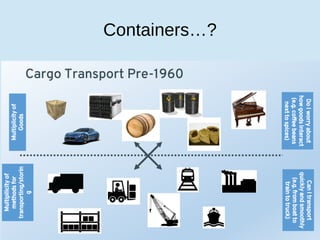
Containers…?
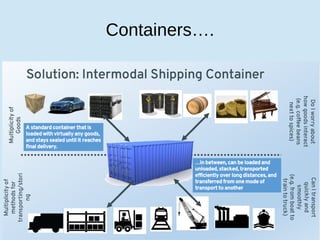
Containers….
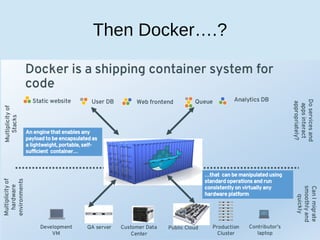
Then Docker….?
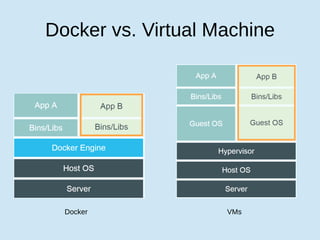
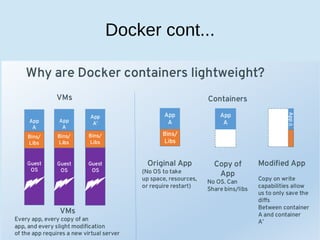
Docker vs. Virtual Machine
Docker VMs
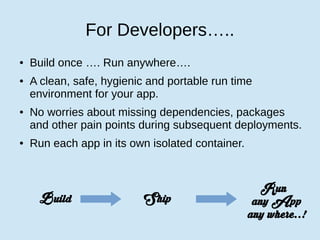
For Developers…..
● Build once …. Run anywhere….
● A clean, safe, hygienic and portable run time
environment for your app.
● No worries about missing dependencies, packages
and other pain points during subsequent deployments.
● Run each app in its own isolated container.
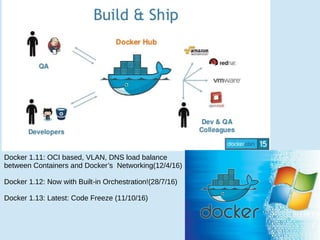
Build Ship
Run
any App
any where..!
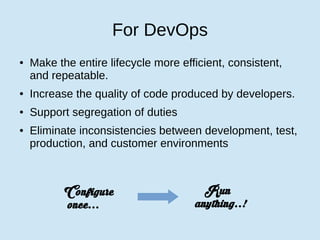
For DevOps
● Make the entire lifecycle more efficient, consistent,
and repeatable.
● Increase the quality of code produced by developers.
● Support segregation of duties
● Eliminate inconsistencies between development, test,
production, and customer environments
Configure
once...
Run
anything..!
Docker cont...
Docker cont...
Docker cont...
Docker cont...
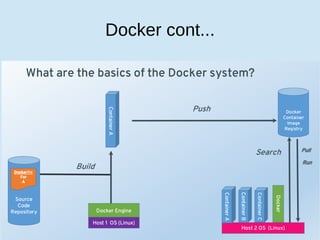
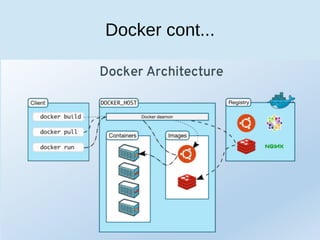
Docker Engine
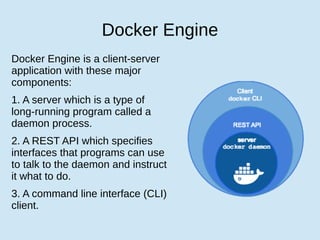
Docker Engine is a client-server
application with these major
components:
1. A server which is a type of
long-running program called a
daemon process.
2. A REST API which specifies
interfaces that programs can use
to talk to the daemon and instruct
it what to do.
3. A command line interface (CLI)
client.
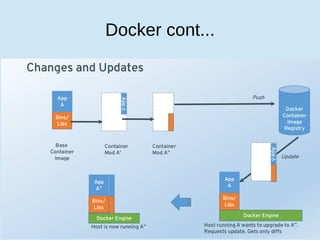
Docker Hub
● Docker registries hold images.
● These are public or private stores from which you
upload or download images.
● The public Docker registry is provided with the Docker
Hub. (hub.docker.com)
● Docker registries are the distribution component of
Docker.
● Kubernetes is an open-source platform for automating
deployment, scaling, and operations of application containers
across clusters of hosts, providing container-centric
infrastructure.
● Deploy your applications quickly and predictably.
● Scale your applications on the fly.
● Seamlessly roll out new features.
● Optimize use of your hardware by using only the
● resources you need
Container Life cycle
• The Life of a Container
– Conception
• BUILD an Image from a Dockerfile
– Birth
• RUN (create+start) a container
– Reproduction
• COMMIT (persist) a container to a new image
• RUN a new container from an image
– Sleep
• KILL a running container
– Wake
• START a stopped container
– Death
• RM (delete) a stopped container
• Extinction
– RMI a container image (delete image)
+ Points
Easy to build, run & share containers
Rapidly expanding ecosystem
Better performance vs. VMs
Layered file system gives us git-like control of images
Reduces complexity of system builds
Red Hat - Project Atomic Host, and certifications - containerized applications,
Geard and OpenShift.
Google is expected to tightly integrate containers with its IaaS and PaaS offerings.
# docker [command] [parameter]
images: List all local images
run: Create a container from an image and execute a command in it
tag: Tag an image
pull: Download image from repository
rmi: Delete a local image
ps: List all running containers
ps –a: List all containers (incl. stopped)
top: Display processes of a container
start: Start a stopped container
stop: Stop a running container
pause: Pause all processes within a container
rm: Delete a container
commit: Create an image from a container
Docker 1.11: OCI based, VLAN, DNS load balance
between Containers and Docker’s Networking(12/4/16)
Docker 1.12: Now with Built-in Orchestration!(28/7/16)
Docker 1.13: Latest: Code Freeze (11/10/16)
DEMO TIME…..!

Docker mentorweek

  • 1.
  • 2.
  • 3.
  • 4.
  • 5.
  • 6.
    Docker vs. VirtualMachine Docker VMs
  • 7.
    For Developers….. ● Buildonce …. Run anywhere…. ● A clean, safe, hygienic and portable run time environment for your app. ● No worries about missing dependencies, packages and other pain points during subsequent deployments. ● Run each app in its own isolated container. Build Ship Run any App any where..!
  • 8.
    For DevOps ● Makethe entire lifecycle more efficient, consistent, and repeatable. ● Increase the quality of code produced by developers. ● Support segregation of duties ● Eliminate inconsistencies between development, test, production, and customer environments Configure once... Run anything..!
  • 9.
  • 10.
  • 11.
  • 12.
  • 13.
    Docker Engine Docker Engineis a client-server application with these major components: 1. A server which is a type of long-running program called a daemon process. 2. A REST API which specifies interfaces that programs can use to talk to the daemon and instruct it what to do. 3. A command line interface (CLI) client.
  • 14.
    Docker Hub ● Dockerregistries hold images. ● These are public or private stores from which you upload or download images. ● The public Docker registry is provided with the Docker Hub. (hub.docker.com) ● Docker registries are the distribution component of Docker.
  • 15.
    ● Kubernetes isan open-source platform for automating deployment, scaling, and operations of application containers across clusters of hosts, providing container-centric infrastructure. ● Deploy your applications quickly and predictably. ● Scale your applications on the fly. ● Seamlessly roll out new features. ● Optimize use of your hardware by using only the ● resources you need
  • 16.
    Container Life cycle •The Life of a Container – Conception • BUILD an Image from a Dockerfile – Birth • RUN (create+start) a container – Reproduction • COMMIT (persist) a container to a new image • RUN a new container from an image – Sleep • KILL a running container – Wake • START a stopped container – Death • RM (delete) a stopped container • Extinction – RMI a container image (delete image)
  • 17.
    + Points Easy tobuild, run & share containers Rapidly expanding ecosystem Better performance vs. VMs Layered file system gives us git-like control of images Reduces complexity of system builds Red Hat - Project Atomic Host, and certifications - containerized applications, Geard and OpenShift. Google is expected to tightly integrate containers with its IaaS and PaaS offerings.
  • 18.
    # docker [command][parameter] images: List all local images run: Create a container from an image and execute a command in it tag: Tag an image pull: Download image from repository rmi: Delete a local image ps: List all running containers ps –a: List all containers (incl. stopped) top: Display processes of a container start: Start a stopped container stop: Stop a running container pause: Pause all processes within a container rm: Delete a container commit: Create an image from a container
  • 19.
    Docker 1.11: OCIbased, VLAN, DNS load balance between Containers and Docker’s Networking(12/4/16) Docker 1.12: Now with Built-in Orchestration!(28/7/16) Docker 1.13: Latest: Code Freeze (11/10/16)
  • 20.