Introduction to Docker Container
Samsul Ma’arif
<mail@samsul.web.id>
DevOps of DOT Indonesia
DILO Malang | 12 March 2018
2
Me ?
● Name : Samsul Ma’arif
● Born : Cilacap, 1989
● PtS : Turen, Kab. Malang
● Currently :
– DevOps of DOT Indonesia
– Infrastucture Team of BlankOn Linux Project
– Member of KLiM
3
Contents
● Virtualization?
● Introduction to Container
● What is Docker?
● Who use Docker?
● How to Install?
● Docker Engine
● Docker Architecture
● Docker Hub/Registry
● Docker CLI
● Demo Time
4
Virtualization?
5
Virtualization Types
● Hardware Level
– Full Virtualization: Oracle VirtualBox, VMWare
Workstation, Qemu
– Bare Metal Virtualization: RedHat KVM, Citrix Xen,
VMWare Vsphere, Microsoft HyperV
● Operating System Level (OS Container): OpenVZ,
LXC
● Application Level (Application Container): Docker, rkt
6
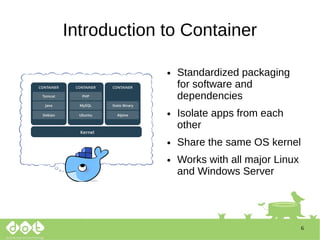
Introduction to Container
● Standardized packaging
for software and
dependencies
● Isolate apps from each
other
● Share the same OS kernel
● Works with all major Linux
and Windows Server
7
Why Container?
https://devrant.com/search?term=devops
8
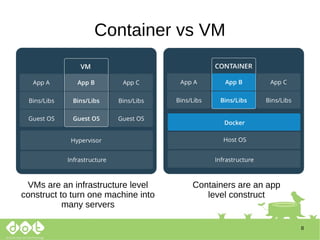
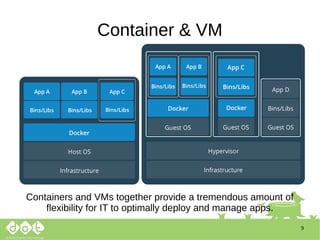
Container vs VM
VMs are an infrastructure level
construct to turn one machine into
many servers
Containers are an app
level construct
9
Container & VM
Containers and VMs together provide a tremendous amount of
flexibility for IT to optimally deploy and manage apps.
10
What is ?
● Docker is an open-source project that automates
the deployment of applications inside software
container
● Docker containers wrap up a piece of software in
a complete file system that contains everything it
needs to run: code, runtime, system tools, system
libraries – anything you can install on a server.
● This guarantees that it will always run the same,
regardless of the environment it is running in.
11
Key Benefits of Docker Containers
Speed Portability Efficiency
No OS to boot
=
Application
online in secons
Less
dependency
between
process layers
=
Ability to move
between
infrastructure
- Less OS
Overhead
- Improve VM
density
12
Why Developers Care?
● Build once, run anywhere
– A clean, safe, hygienic and portable runtime
environment for your app.
– No worries about missing dependencies, packages
and other pain points during subsequent
deployments.
– Run each app in its own isolated container, so you
can run various versions of libraries and other
dependencies for each app without worrying
13
Why Developers Care?
– Automate testing, integration, packaging...anything
you can script
– Reduce/eliminate concerns about compatibility on
different platforms, either your own or your
customers.
– Cheap, zero-penalty containers to deploy services?
A VM without the overhead of a VM? Instant replay
and reset of image snapshots? That’s the power of
Docker
14
Why DevOps Care?
● Configure once...run anything
– Make the entire lifecycle more efficient, consistent,
and repeatable
– Increase the quality of code produced by
developers.
– Eliminate inconsistencies between development,
test, production, and customer environments
15
Why DevOps Care?
– Support segregation of duties
– Significantly improves the speed and reliability of
continuous deployment and continuous integration
systems
– Because the containers are so lightweight, address
significant performance, costs, deployment, and
portability issues normally associated with VMs
16
Who use Docker?
https://www.docker.com/customers
17
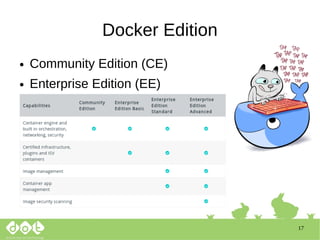
Docker Edition
● Community Edition (CE)
● Enterprise Edition (EE)
18
How to Install?
● Community Edition (CE)
● Ubuntu 16.04
● https://docs.docker.com/install/linux/docker-
ce/ubuntu/
curl -fsSL https://download.docker.com/linux/ubuntu/gpg | sudo apt-key add -
sudo add-apt-repository "deb [arch=amd64] https://download.docker.com/linux/ubuntu $(lsb_release
-cs) stable"
sudo apt install -y apt-transport-https
sudo apt-get update
apt-cache policy docker-ce
sudo apt-get install -y docker-ce
sudo systemctl status docker
sudo usermod -aG docker [username] <~~ change with your host username
19
How to Install?
● Too long?
sudo curl -sSL https://get.docker.io/ | sh
20
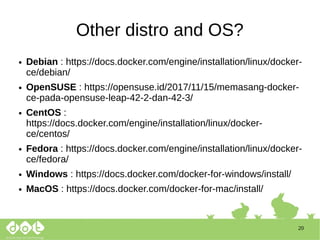
Other distro and OS?
● Debian : https://docs.docker.com/engine/installation/linux/docker-
ce/debian/
● OpenSUSE : https://opensuse.id/2017/11/15/memasang-docker-
ce-pada-opensuse-leap-42-2-dan-42-3/
● CentOS :
https://docs.docker.com/engine/installation/linux/docker-
ce/centos/
● Fedora : https://docs.docker.com/engine/installation/linux/docker-
ce/fedora/
● Windows : https://docs.docker.com/docker-for-windows/install/
● MacOS : https://docs.docker.com/docker-for-mac/install/
21
Docker Engine
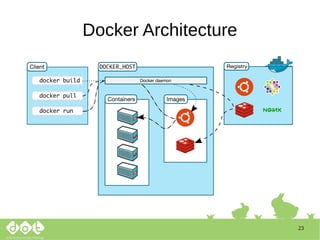
● Docker Engine is a client-server application with
these major components:
– A server which is a type of long-running program
called a daemon process (the dockerd command).
– A REST API which specifies interfaces that
programs can use to talk to the daemon and
instruct it what to do.
– A command line interface (CLI) client (the docker
command).
22
23
Docker Architecture
24
Docker Images
● A Docker image is a read-only template. For
example, an image could contain an Ubuntu
operating system with Apache and your web
application installed.
● Images are used to create Docker containers. Docker
provides a simple way to build new images or update
existing images, or you can download Docker images
thatother people have already created.
● Docker images are the build component of Docker.
25
Docker Hub/Registry
● A Docker registry stores Docker images.
Docker Hub and Docker Cloud are public
registries that anyone can use, and Docker is
configured to look for images on Docker Hub by
default. You can even run your own private
registry.
● http://hub.docker.com
26
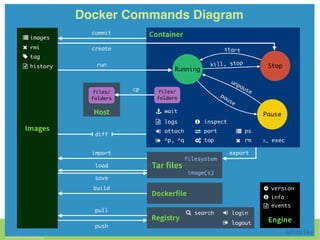
Docker CLI
● docker run
● docker images
● docker ps
● docker start | stop | restart
● docker build
● docker rm
● docker rmi
● docker inspect
27
28
29
Demo Time
30
Question?
31
What next?
● Docker Machine
● Docker Compose
● Docker Swarm
● Kubernetes
● …….
32
Thanks
www.samsul.web.id | 085747526846

Introduction to Docker Container

  • 1.
    Introduction to DockerContainer Samsul Ma’arif <mail@samsul.web.id> DevOps of DOT Indonesia DILO Malang | 12 March 2018
  • 2.
    2 Me ? ● Name: Samsul Ma’arif ● Born : Cilacap, 1989 ● PtS : Turen, Kab. Malang ● Currently : – DevOps of DOT Indonesia – Infrastucture Team of BlankOn Linux Project – Member of KLiM
  • 3.
    3 Contents ● Virtualization? ● Introductionto Container ● What is Docker? ● Who use Docker? ● How to Install? ● Docker Engine ● Docker Architecture ● Docker Hub/Registry ● Docker CLI ● Demo Time
  • 4.
  • 5.
    5 Virtualization Types ● HardwareLevel – Full Virtualization: Oracle VirtualBox, VMWare Workstation, Qemu – Bare Metal Virtualization: RedHat KVM, Citrix Xen, VMWare Vsphere, Microsoft HyperV ● Operating System Level (OS Container): OpenVZ, LXC ● Application Level (Application Container): Docker, rkt
  • 6.
    6 Introduction to Container ●Standardized packaging for software and dependencies ● Isolate apps from each other ● Share the same OS kernel ● Works with all major Linux and Windows Server
  • 7.
  • 8.
    8 Container vs VM VMsare an infrastructure level construct to turn one machine into many servers Containers are an app level construct
  • 9.
    9 Container & VM Containersand VMs together provide a tremendous amount of flexibility for IT to optimally deploy and manage apps.
  • 10.
    10 What is ? ●Docker is an open-source project that automates the deployment of applications inside software container ● Docker containers wrap up a piece of software in a complete file system that contains everything it needs to run: code, runtime, system tools, system libraries – anything you can install on a server. ● This guarantees that it will always run the same, regardless of the environment it is running in.
  • 11.
    11 Key Benefits ofDocker Containers Speed Portability Efficiency No OS to boot = Application online in secons Less dependency between process layers = Ability to move between infrastructure - Less OS Overhead - Improve VM density
  • 12.
    12 Why Developers Care? ●Build once, run anywhere – A clean, safe, hygienic and portable runtime environment for your app. – No worries about missing dependencies, packages and other pain points during subsequent deployments. – Run each app in its own isolated container, so you can run various versions of libraries and other dependencies for each app without worrying
  • 13.
    13 Why Developers Care? –Automate testing, integration, packaging...anything you can script – Reduce/eliminate concerns about compatibility on different platforms, either your own or your customers. – Cheap, zero-penalty containers to deploy services? A VM without the overhead of a VM? Instant replay and reset of image snapshots? That’s the power of Docker
  • 14.
    14 Why DevOps Care? ●Configure once...run anything – Make the entire lifecycle more efficient, consistent, and repeatable – Increase the quality of code produced by developers. – Eliminate inconsistencies between development, test, production, and customer environments
  • 15.
    15 Why DevOps Care? –Support segregation of duties – Significantly improves the speed and reliability of continuous deployment and continuous integration systems – Because the containers are so lightweight, address significant performance, costs, deployment, and portability issues normally associated with VMs
  • 16.
  • 17.
    17 Docker Edition ● CommunityEdition (CE) ● Enterprise Edition (EE)
  • 18.
    18 How to Install? ●Community Edition (CE) ● Ubuntu 16.04 ● https://docs.docker.com/install/linux/docker- ce/ubuntu/ curl -fsSL https://download.docker.com/linux/ubuntu/gpg | sudo apt-key add - sudo add-apt-repository "deb [arch=amd64] https://download.docker.com/linux/ubuntu $(lsb_release -cs) stable" sudo apt install -y apt-transport-https sudo apt-get update apt-cache policy docker-ce sudo apt-get install -y docker-ce sudo systemctl status docker sudo usermod -aG docker [username] <~~ change with your host username
  • 19.
    19 How to Install? ●Too long? sudo curl -sSL https://get.docker.io/ | sh
  • 20.
    20 Other distro andOS? ● Debian : https://docs.docker.com/engine/installation/linux/docker- ce/debian/ ● OpenSUSE : https://opensuse.id/2017/11/15/memasang-docker- ce-pada-opensuse-leap-42-2-dan-42-3/ ● CentOS : https://docs.docker.com/engine/installation/linux/docker- ce/centos/ ● Fedora : https://docs.docker.com/engine/installation/linux/docker- ce/fedora/ ● Windows : https://docs.docker.com/docker-for-windows/install/ ● MacOS : https://docs.docker.com/docker-for-mac/install/
  • 21.
    21 Docker Engine ● DockerEngine is a client-server application with these major components: – A server which is a type of long-running program called a daemon process (the dockerd command). – A REST API which specifies interfaces that programs can use to talk to the daemon and instruct it what to do. – A command line interface (CLI) client (the docker command).
  • 22.
  • 23.
  • 24.
    24 Docker Images ● ADocker image is a read-only template. For example, an image could contain an Ubuntu operating system with Apache and your web application installed. ● Images are used to create Docker containers. Docker provides a simple way to build new images or update existing images, or you can download Docker images thatother people have already created. ● Docker images are the build component of Docker.
  • 25.
    25 Docker Hub/Registry ● ADocker registry stores Docker images. Docker Hub and Docker Cloud are public registries that anyone can use, and Docker is configured to look for images on Docker Hub by default. You can even run your own private registry. ● http://hub.docker.com
  • 26.
    26 Docker CLI ● dockerrun ● docker images ● docker ps ● docker start | stop | restart ● docker build ● docker rm ● docker rmi ● docker inspect
  • 27.
  • 28.
  • 29.
  • 30.
  • 31.
    31 What next? ● DockerMachine ● Docker Compose ● Docker Swarm ● Kubernetes ● …….
  • 32.