UX Design for 
Mobile Payment Experiences 
10 Tips & Tricks 
Skip Allums 
UX Lead, Monitise Create 
@skippr #mobilepaymentux
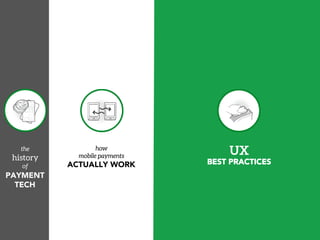
the 
history 
of 
PAYMENT 
TECH 
how 
mobile payments 
ACTUALLY WORK 
UX 
BEST PRACTICES
Available now in print & digital formats: 
§ oreilly.com 
§ your favorite bookstore 
More at: 
mobilepaymentux.com
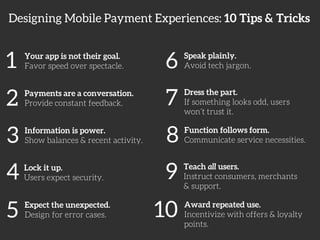
Designing Mobile Payment Experiences: 10 Tips & Tricks 
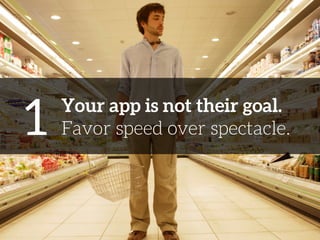
1 
Your app is not their goal. 
Favor speed over spectacle. 
2 
Payments are a conversation. 
Provide constant feedback. 
3 
Information is power. 
Show balances & recent activity. 
4 
Lock it up. 
Users expect security. 
5 
Expect the unexpected. 
Design for error cases. 
6 
Speak plainly. 
Avoid tech jargon. 
7 
Dress the part. 
If something looks odd, users 
won’t trust it. 
8 
Function follows form. 
Communicate service necessities. 
9 
Teach all users. 
Instruct consumers, merchants 
& support. 
10 
Award repeated use. 
Incentivize with offers & loyalty 
points.
1 
Your app is not their goal. 
Favor speed over spectacle.
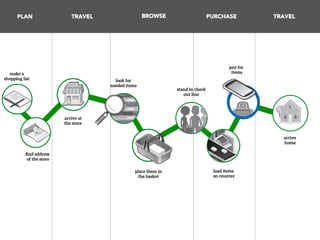
PLAN 
TRAVEL 
BROWSE 
PURCHASE 
TRAVEL 
make a 
shopping list! 
find address 
of the store! 
arrive at 
the store! 
look for 
needed items! 
place them in 
the basket 
stand in check 
out line 
pay for 
items 
load items 
on counter 
arrive 
home
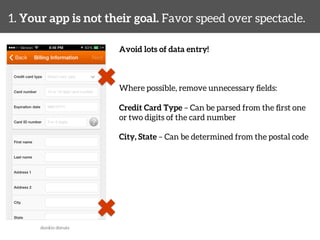
1. Your app is not their goal. Favor speed over spectacle. 
Avoid lots of data entry! 
Where possible, remove unnecessary fields: 
Credit Card Type – Can be parsed from the first one 
or two digits of the card number 
City, State – Can be determined from the postal code 
dunkin donuts
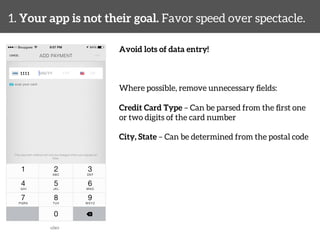
1. Your app is not their goal. Favor speed over spectacle. 
Avoid lots of data entry! 
Where possible, remove unnecessary fields: 
Credit Card Type – Can be parsed from the first one 
or two digits of the card number 
City, State – Can be determined from the postal code 
uber
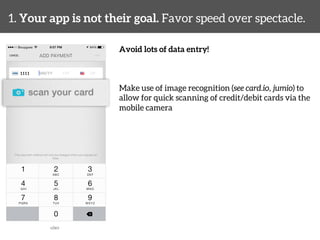
1. Your app is not their goal. Favor speed over spectacle. 
Avoid lots of data entry! 
Make use of image recognition (see card.io, jumio) to 
allow for quick scanning of credit/debit cards via the 
mobile camera 
uber
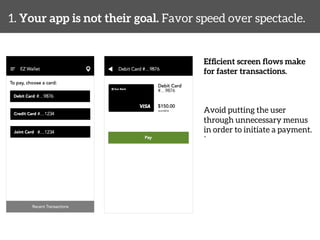
1. Your app is not their goal. Favor speed over spectacle. 
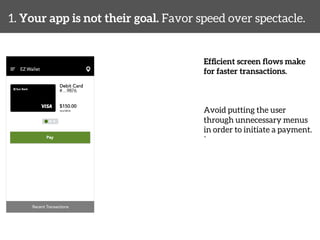
Efficient screen flows make 
for faster transactions. 
Avoid putting the user 
through unnecessary menus 
in order to initiate a payment. 
`
1. Your app is not their goal. Favor speed over spectacle. 
Efficient screen flows make 
for faster transactions. 
Avoid putting the user 
through unnecessary menus 
in order to initiate a payment. 
`
2 
Payments are a conversation. 
Provide constant feedback.
2. Payments are a conversation. Provide constant feedback. 
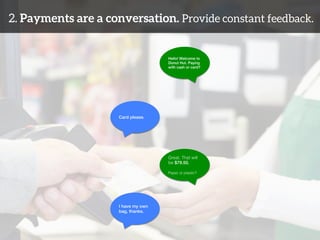
Hello! Welcome to 
Donut Hut. Paying 
with cash or card?! 
Card please.! 
Great. That will 
be $79.50.! 
! 
Paper or plastic?! 
I have my own ! 
bag, thanks.!
2. Payments are a conversation. Provide constant feedback. 
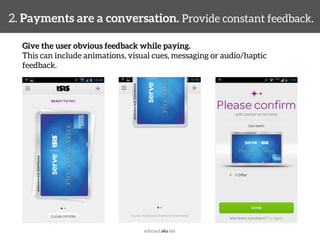
Give the user obvious feedback while paying. 
This can include animations, visual cues, messaging or audio/haptic 
feedback. 
softcard aka isis
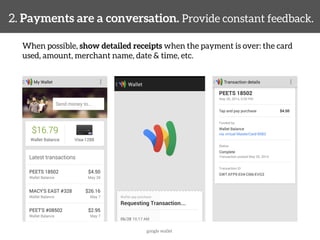
2. Payments are a conversation. Provide constant feedback. 
When possible, show detailed receipts when the payment is over: the card 
used, amount, merchant name, date & time, etc. 
google wallet
3 
Information is power. 
Show balances & recent activity.
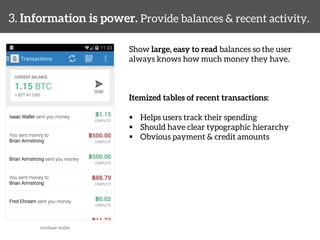
3. Information is power. Provide balances & recent activity. 
Show large, easy to read balances so the user 
always knows how much money they have. 
Itemized tables of recent transactions: 
§ Helps users track their spending 
§ Should have clear typographic hierarchy 
§ Obvious payment & credit amounts 
coinbase wallet
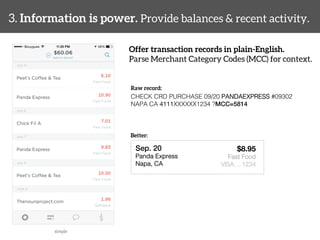
3. Information is power. Provide balances & recent activity. 
Offer transaction records in plain-English. 
Parse Merchant Category Codes (MCC) for context. 
simple 
Raw record: 
CHECK CRD PURCHASE 09/20 PANDAEXPRESS #09302 
NAPA CA 4111XXXXXX1234 ?MCC=5814! 
Better: 
Sep. 20! 
Panda Express! 
Napa, CA! 
! 
$8.95 
Fast Food! 
VISA… 1234
4 
Lock it up. 
Users expect security.
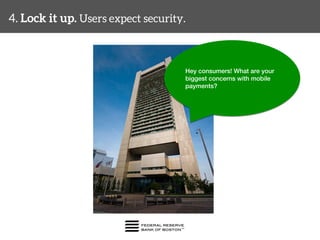
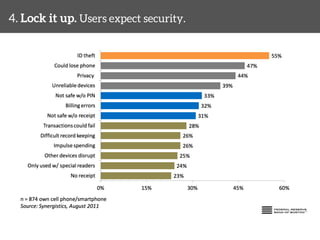
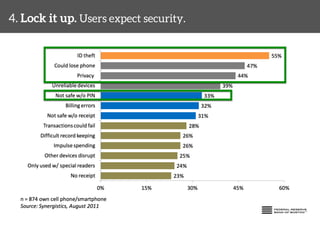
4. Lock it up. Users expect security. 
Hey consumers! What are your 
biggest concerns with mobile ! 
payments?!
4. Lock it up. Users expect security.
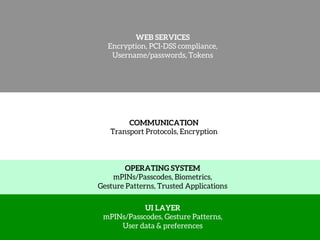
WEB SERVICES 
Encryption, PCI-DSS compliance, 
Username/passwords, Tokens 
COMMUNICATION 
Transport Protocols, Encryption 
OPERATING SYSTEM 
mPINs/Passcodes, Biometrics, 
Gesture Patterns, Trusted Applications 
UI LAYER 
mPINs/Passcodes, Gesture Patterns, 
User data & preferences
4. Lock it up. Users expect security. 
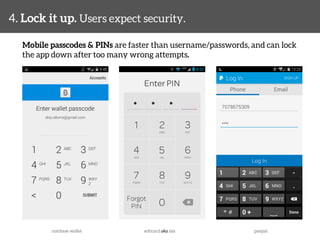
Mobile passcodes & PINs are faster than username/passwords, and can lock 
the app down after too many wrong attempts. 
coinbase wallet 
softcard aka isis 
paypal
4. Lock it up. Users expect security. 
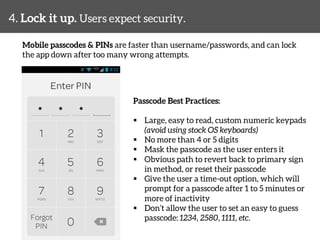
Mobile passcodes & PINs are faster than username/passwords, and can lock 
the app down after too many wrong attempts. 
Passcode Best Practices: 
§ Large, easy to read, custom numeric keypads 
(avoid using stock OS keyboards) 
§ No more than 4 or 5 digits 
§ Mask the passcode as the user enters it 
§ Obvious path to revert back to primary sign 
in method, or reset their passcode 
§ Give the user a time-out option, which will 
prompt for a passcode after 1 to 5 minutes or 
more of inactivity 
§ Don’t allow the user to set an easy to guess 
passcode: 1234, 2580, 1111, etc.
4. Lock it up. Users expect security. 
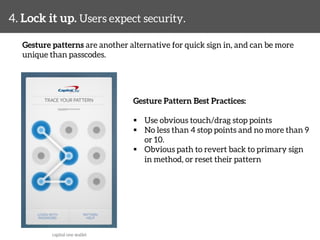
Gesture patterns are another alternative for quick sign in, and can be more 
unique than passcodes. 
Gesture Pattern Best Practices: 
§ Use obvious touch/drag stop points 
§ No less than 4 stop points and no more than 9 
or 10. 
§ Obvious path to revert back to primary sign 
in method, or reset their pattern 
capital one wallet
4. Lock it up. Users expect security. 
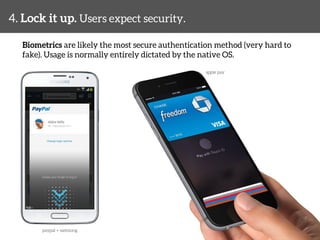
Biometrics are likely the most secure authentication method (very hard to 
fake). Usage is normally entirely dictated by the native OS. 
apple pay 
paypal + samsung
4. Lock it up. Users expect security. 
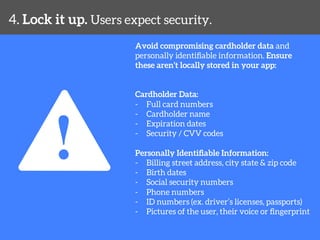
Avoid compromising cardholder data and 
personally identifiable information. Ensure 
these aren’t locally stored in your app: 
Cardholder Data: 
- Full card numbers 
- Cardholder name 
- Expiration dates 
- Security / CVV codes 
Personally Identifiable Information: 
- Billing street address, city state & zip code 
- Birth dates 
- Social security numbers 
- Phone numbers 
- ID numbers (ex. driver’s licenses, passports) 
- Pictures of the user, their voice or fingerprint
5 
Expect the unexpected. 
Design for error cases.
5. Expect the unexpected. Design for error cases. 
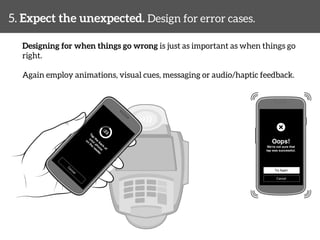
Designing for when things go wrong is just as important as when things go 
right. 
Again employ animations, visual cues, messaging or audio/haptic feedback.
5. Expect the unexpected. Design for error cases. 
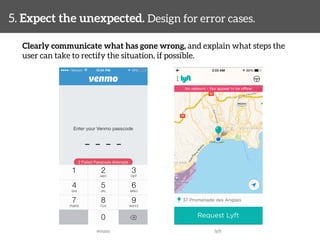
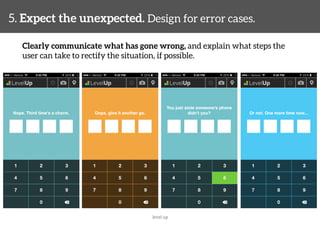
Clearly communicate what has gone wrong, and explain what steps the 
user can take to rectify the situation, if possible. 
venmo 
lyft
5. Expect the unexpected. Design for error cases. 
Clearly communicate what has gone wrong, and explain what steps the 
user can take to rectify the situation, if possible. 
level up
6 
Speak plainly. 
Avoid technical jargon.
6. Speak plainly. Avoid technical jargon. 
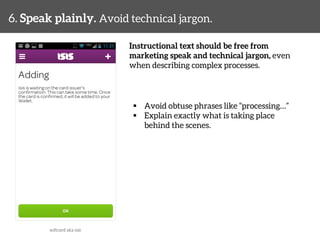
Instructional text should be free from 
marketing speak and technical jargon, even 
when describing complex processes. 
§ Avoid obtuse phrases like “processing…” 
§ Explain exactly what is taking place 
behind the scenes. 
softcard aka isis
6. Speak plainly. Avoid technical jargon. 
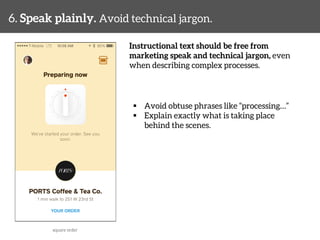
Instructional text should be free from 
marketing speak and technical jargon, even 
when describing complex processes. 
§ Avoid obtuse phrases like “processing…” 
§ Explain exactly what is taking place 
behind the scenes. 
square order
7 
Dress the part. 
If something looks odd, users 
won’t trust it.
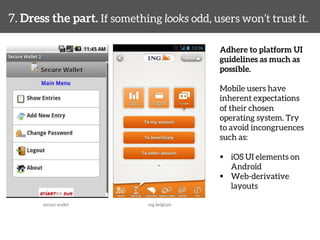
7. Dress the part. If something looks odd, users won’t trust it. 
Adhere to platform UI 
guidelines as much as 
possible. 
Mobile users have 
inherent expectations 
of their chosen 
operating system. Try 
to avoid incongruences 
such as: 
§ iOS UI elements on 
Android 
§ Web-derivative 
layouts 
secure wallet 
ing belgium
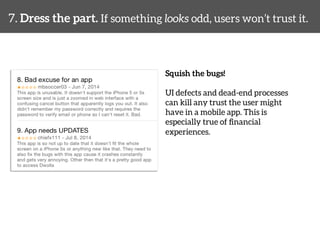
7. Dress the part. If something looks odd, users won’t trust it. 
Squish the bugs! 
UI defects and dead-end processes 
can kill any trust the user might 
have in a mobile app. This is 
especially true of financial 
experiences.
8 
Function follows form. 
Communicate service necessities.
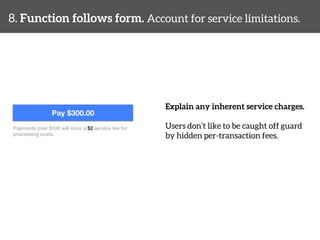
8. Function follows form. Account for service limitations. 
Explain any inherent service charges. 
Users don’t like to be caught off guard 
by hidden per-transaction fees. 
Pay $300.00 
Payments over $100 will incur a $2 service fee for ! 
processing costs.!
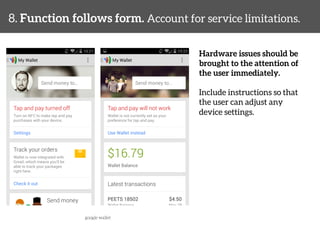
8. Function follows form. Account for service limitations. 
Hardware issues should be 
brought to the attention of 
the user immediately. 
Include instructions so that 
the user can adjust any 
device settings. 
google wallet
9 
Teach all users. 
Instruct consumers, merchants 
& support.
9. Teach all users. Instruct consumers, merchants & support. 
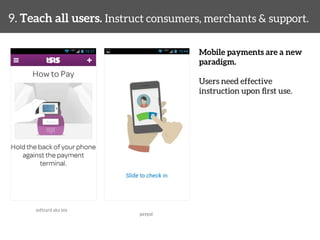
Mobile payments are a new 
paradigm. 
Users need effective 
instruction upon first use. 
softcard aka isis 
paypal
9. Teach all users. Instruct consumers, merchants & support. 
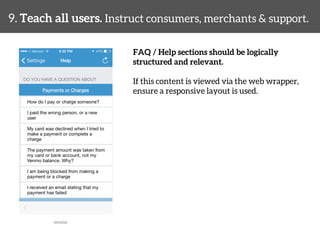
FAQ / Help sections should be logically 
structured and relevant. 
If this content is viewed via the web wrapper, 
ensure a responsive layout is used. 
venmo
9. Teach all users. Instruct consumers, merchants & support. 
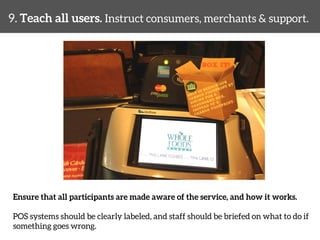
Ensure that all participants are made aware of the service, and how it works. 
POS systems should be clearly labeled, and staff should be briefed on what to do if 
something goes wrong.
10 
Award repeated use. 
Incentivize with offers & 
loyalty points.
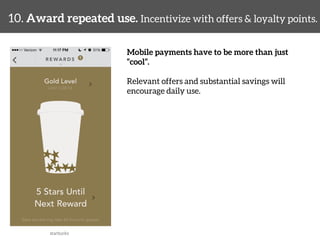
10. Award repeated use. Incentivize with offers & loyalty points. 
Mobile payments have to be more than just 
“cool”. 
Relevant offers and substantial savings will 
encourage daily use. 
starbucks
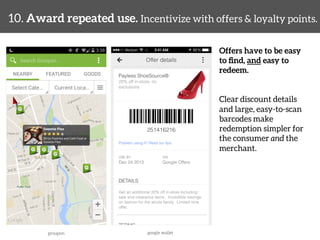
10. Award repeated use. Incentivize with offers & loyalty points. 
Offers have to be easy 
to find, and easy to 
redeem. 
Clear discount details 
and large, easy-to-scan 
barcodes make 
redemption simpler for 
the consumer and the 
merchant. 
groupon 
google wallet
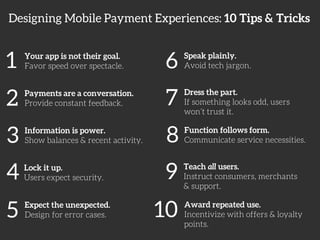
Designing Mobile Payment Experiences: 10 Tips & Tricks 
1 
Your app is not their goal. 
Favor speed over spectacle. 
2 
Payments are a conversation. 
Provide constant feedback. 
3 
Information is power. 
Show balances & recent activity. 
4 
Lock it up. 
Users expect security. 
5 
Expect the unexpected. 
Design for error cases. 
6 
Speak plainly. 
Avoid tech jargon. 
7 
Dress the part. 
If something looks odd, users 
won’t trust it. 
8 
Function follows form. 
Communicate service necessities. 
9 
Teach all users. 
Instruct consumers, merchants 
& support. 
10 
Award repeated use. 
Incentivize with offers & loyalty 
points.
THANK YOU 
Available now in print & digital formats: 
§ oreilly.com 
§ your favorite bookstore 
@skippr 
mobilepaymentux.com
UX Design for 
Mobile Payment Experiences 
10 Tips & Tricks 
Skip Allums 
UX Lead, Monitise Create 
@skippr #mobilepaymentux

UX Design for Mobile Payment Experiences

  • 1.
    UX Design for Mobile Payment Experiences 10 Tips & Tricks Skip Allums UX Lead, Monitise Create @skippr #mobilepaymentux
  • 3.
    the history of PAYMENT TECH how mobile payments ACTUALLY WORK UX BEST PRACTICES
  • 4.
    Available now inprint & digital formats: § oreilly.com § your favorite bookstore More at: mobilepaymentux.com
  • 5.
    Designing Mobile PaymentExperiences: 10 Tips & Tricks 1 Your app is not their goal. Favor speed over spectacle. 2 Payments are a conversation. Provide constant feedback. 3 Information is power. Show balances & recent activity. 4 Lock it up. Users expect security. 5 Expect the unexpected. Design for error cases. 6 Speak plainly. Avoid tech jargon. 7 Dress the part. If something looks odd, users won’t trust it. 8 Function follows form. Communicate service necessities. 9 Teach all users. Instruct consumers, merchants & support. 10 Award repeated use. Incentivize with offers & loyalty points.
  • 6.
    1 Your appis not their goal. Favor speed over spectacle.
  • 7.
    PLAN TRAVEL BROWSE PURCHASE TRAVEL make a shopping list! find address of the store! arrive at the store! look for needed items! place them in the basket stand in check out line pay for items load items on counter arrive home
  • 8.
    1. Your appis not their goal. Favor speed over spectacle. Avoid lots of data entry! Where possible, remove unnecessary fields: Credit Card Type – Can be parsed from the first one or two digits of the card number City, State – Can be determined from the postal code dunkin donuts
  • 9.
    1. Your appis not their goal. Favor speed over spectacle. Avoid lots of data entry! Where possible, remove unnecessary fields: Credit Card Type – Can be parsed from the first one or two digits of the card number City, State – Can be determined from the postal code uber
  • 10.
    1. Your appis not their goal. Favor speed over spectacle. Avoid lots of data entry! Make use of image recognition (see card.io, jumio) to allow for quick scanning of credit/debit cards via the mobile camera uber
  • 11.
    1. Your appis not their goal. Favor speed over spectacle. Efficient screen flows make for faster transactions. Avoid putting the user through unnecessary menus in order to initiate a payment. `
  • 12.
    1. Your appis not their goal. Favor speed over spectacle. Efficient screen flows make for faster transactions. Avoid putting the user through unnecessary menus in order to initiate a payment. `
  • 13.
    2 Payments area conversation. Provide constant feedback.
  • 14.
    2. Payments area conversation. Provide constant feedback. Hello! Welcome to Donut Hut. Paying with cash or card?! Card please.! Great. That will be $79.50.! ! Paper or plastic?! I have my own ! bag, thanks.!
  • 15.
    2. Payments area conversation. Provide constant feedback. Give the user obvious feedback while paying. This can include animations, visual cues, messaging or audio/haptic feedback. softcard aka isis
  • 16.
    2. Payments area conversation. Provide constant feedback. When possible, show detailed receipts when the payment is over: the card used, amount, merchant name, date & time, etc. google wallet
  • 17.
    3 Information ispower. Show balances & recent activity.
  • 18.
    3. Information ispower. Provide balances & recent activity. Show large, easy to read balances so the user always knows how much money they have. Itemized tables of recent transactions: § Helps users track their spending § Should have clear typographic hierarchy § Obvious payment & credit amounts coinbase wallet
  • 19.
    3. Information ispower. Provide balances & recent activity. Offer transaction records in plain-English. Parse Merchant Category Codes (MCC) for context. simple Raw record: CHECK CRD PURCHASE 09/20 PANDAEXPRESS #09302 NAPA CA 4111XXXXXX1234 ?MCC=5814! Better: Sep. 20! Panda Express! Napa, CA! ! $8.95 Fast Food! VISA… 1234
  • 20.
    4 Lock itup. Users expect security.
  • 21.
    4. Lock itup. Users expect security. Hey consumers! What are your biggest concerns with mobile ! payments?!
  • 22.
    4. Lock itup. Users expect security.
  • 23.
    4. Lock itup. Users expect security.
  • 24.
    WEB SERVICES Encryption,PCI-DSS compliance, Username/passwords, Tokens COMMUNICATION Transport Protocols, Encryption OPERATING SYSTEM mPINs/Passcodes, Biometrics, Gesture Patterns, Trusted Applications UI LAYER mPINs/Passcodes, Gesture Patterns, User data & preferences
  • 25.
    4. Lock itup. Users expect security. Mobile passcodes & PINs are faster than username/passwords, and can lock the app down after too many wrong attempts. coinbase wallet softcard aka isis paypal
  • 26.
    4. Lock itup. Users expect security. Mobile passcodes & PINs are faster than username/passwords, and can lock the app down after too many wrong attempts. Passcode Best Practices: § Large, easy to read, custom numeric keypads (avoid using stock OS keyboards) § No more than 4 or 5 digits § Mask the passcode as the user enters it § Obvious path to revert back to primary sign in method, or reset their passcode § Give the user a time-out option, which will prompt for a passcode after 1 to 5 minutes or more of inactivity § Don’t allow the user to set an easy to guess passcode: 1234, 2580, 1111, etc.
  • 27.
    4. Lock itup. Users expect security. Gesture patterns are another alternative for quick sign in, and can be more unique than passcodes. Gesture Pattern Best Practices: § Use obvious touch/drag stop points § No less than 4 stop points and no more than 9 or 10. § Obvious path to revert back to primary sign in method, or reset their pattern capital one wallet
  • 28.
    4. Lock itup. Users expect security. Biometrics are likely the most secure authentication method (very hard to fake). Usage is normally entirely dictated by the native OS. apple pay paypal + samsung
  • 29.
    4. Lock itup. Users expect security. Avoid compromising cardholder data and personally identifiable information. Ensure these aren’t locally stored in your app: Cardholder Data: - Full card numbers - Cardholder name - Expiration dates - Security / CVV codes Personally Identifiable Information: - Billing street address, city state & zip code - Birth dates - Social security numbers - Phone numbers - ID numbers (ex. driver’s licenses, passports) - Pictures of the user, their voice or fingerprint
  • 30.
    5 Expect theunexpected. Design for error cases.
  • 31.
    5. Expect theunexpected. Design for error cases. Designing for when things go wrong is just as important as when things go right. Again employ animations, visual cues, messaging or audio/haptic feedback.
  • 32.
    5. Expect theunexpected. Design for error cases. Clearly communicate what has gone wrong, and explain what steps the user can take to rectify the situation, if possible. venmo lyft
  • 33.
    5. Expect theunexpected. Design for error cases. Clearly communicate what has gone wrong, and explain what steps the user can take to rectify the situation, if possible. level up
  • 34.
    6 Speak plainly. Avoid technical jargon.
  • 35.
    6. Speak plainly.Avoid technical jargon. Instructional text should be free from marketing speak and technical jargon, even when describing complex processes. § Avoid obtuse phrases like “processing…” § Explain exactly what is taking place behind the scenes. softcard aka isis
  • 36.
    6. Speak plainly.Avoid technical jargon. Instructional text should be free from marketing speak and technical jargon, even when describing complex processes. § Avoid obtuse phrases like “processing…” § Explain exactly what is taking place behind the scenes. square order
  • 37.
    7 Dress thepart. If something looks odd, users won’t trust it.
  • 38.
    7. Dress thepart. If something looks odd, users won’t trust it. Adhere to platform UI guidelines as much as possible. Mobile users have inherent expectations of their chosen operating system. Try to avoid incongruences such as: § iOS UI elements on Android § Web-derivative layouts secure wallet ing belgium
  • 39.
    7. Dress thepart. If something looks odd, users won’t trust it. Squish the bugs! UI defects and dead-end processes can kill any trust the user might have in a mobile app. This is especially true of financial experiences.
  • 40.
    8 Function followsform. Communicate service necessities.
  • 41.
    8. Function followsform. Account for service limitations. Explain any inherent service charges. Users don’t like to be caught off guard by hidden per-transaction fees. Pay $300.00 Payments over $100 will incur a $2 service fee for ! processing costs.!
  • 42.
    8. Function followsform. Account for service limitations. Hardware issues should be brought to the attention of the user immediately. Include instructions so that the user can adjust any device settings. google wallet
  • 43.
    9 Teach allusers. Instruct consumers, merchants & support.
  • 44.
    9. Teach allusers. Instruct consumers, merchants & support. Mobile payments are a new paradigm. Users need effective instruction upon first use. softcard aka isis paypal
  • 45.
    9. Teach allusers. Instruct consumers, merchants & support. FAQ / Help sections should be logically structured and relevant. If this content is viewed via the web wrapper, ensure a responsive layout is used. venmo
  • 46.
    9. Teach allusers. Instruct consumers, merchants & support. Ensure that all participants are made aware of the service, and how it works. POS systems should be clearly labeled, and staff should be briefed on what to do if something goes wrong.
  • 47.
    10 Award repeateduse. Incentivize with offers & loyalty points.
  • 48.
    10. Award repeateduse. Incentivize with offers & loyalty points. Mobile payments have to be more than just “cool”. Relevant offers and substantial savings will encourage daily use. starbucks
  • 49.
    10. Award repeateduse. Incentivize with offers & loyalty points. Offers have to be easy to find, and easy to redeem. Clear discount details and large, easy-to-scan barcodes make redemption simpler for the consumer and the merchant. groupon google wallet
  • 50.
    Designing Mobile PaymentExperiences: 10 Tips & Tricks 1 Your app is not their goal. Favor speed over spectacle. 2 Payments are a conversation. Provide constant feedback. 3 Information is power. Show balances & recent activity. 4 Lock it up. Users expect security. 5 Expect the unexpected. Design for error cases. 6 Speak plainly. Avoid tech jargon. 7 Dress the part. If something looks odd, users won’t trust it. 8 Function follows form. Communicate service necessities. 9 Teach all users. Instruct consumers, merchants & support. 10 Award repeated use. Incentivize with offers & loyalty points.
  • 51.
    THANK YOU Availablenow in print & digital formats: § oreilly.com § your favorite bookstore @skippr mobilepaymentux.com
  • 52.
    UX Design for Mobile Payment Experiences 10 Tips & Tricks Skip Allums UX Lead, Monitise Create @skippr #mobilepaymentux

Editor's Notes

  • #4 what it covers history of payment technology a look at the underlying ecosystems that make proximity customer-to-merchant payments possible, with a take on the benefits and drawbacks of each from the consumer point of view, a series of best practices gleaned from examples of leading wallet & payment products (Isis/SoftCard, Google Wallet, PayPal) as well as illustrations and flows that show how to handle a variety of consumer payment interactions.