SESSION TITLE
Presenter’s Name
MIVA + WP
PRESENTER: Andrew Gray, CTO TGK
MIVA since 2009
WP since 2008
MIVA since 1999
WP since 2009
EXPERTS IN ECOMMERCE
EXPERTS IN AWESOME
Full-Service Digital Marketing
Agency in Wilmington, NC
@tayloegraykrist
/tayloegraykristof
Getting to Know You
• Who has a WordPress Site and a Miva Site?
– Hosted on the Same Server?
– Hosted on Different Servers?
• Improved Content
Management
– Blog / News Posts
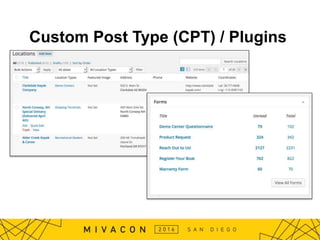
– Custom Post Types
• WordPress Plugins
– Forms, Events, etc
• Adding eCommerce
to an Existing Website
Why would you want to do this?
Custom Post Type (CPT) / Plugins
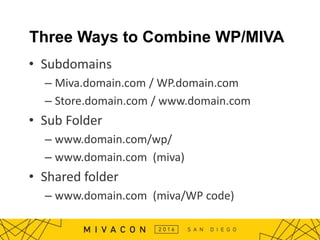
Three Ways to Combine WP/MIVA
• Subdomains
– Miva.domain.com / WP.domain.com
– Store.domain.com / www.domain.com
• Sub Folder
– www.domain.com/wp/
– www.domain.com (miva)
• Shared folder
– www.domain.com (miva/WP code)
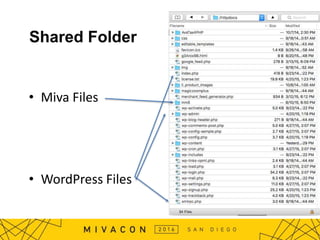
Shared Folder
• Miva Files
• WordPress Files
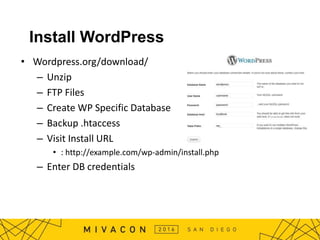
Install WordPress
• Wordpress.org/download/
– Unzip
– FTP Files
– Create WP Specific Database
– Backup .htaccess
– Visit Install URL
• : http://example.com/wp-admin/install.php
– Enter DB credentials
Considerations / Planning
• Theme
– Same Design?
• Menus
– Static or Generated?
• Search
– WP or Miva Search
– Third Party Search
• Login / Logout / Cart Status
– How to Show Mini Basket Page / Login
Case Studies
Simple Blog + Miva
Streamlined Integration
Complex Menu Integration
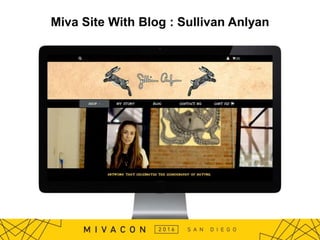
Miva Site With Blog : Sullivan Anlyan
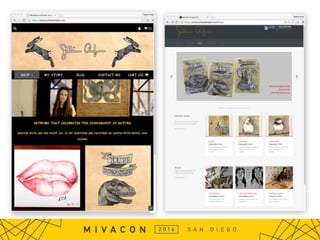
Miva Site With Blog: Sullivan Anlyan
• Miva in Docroot
– Blog in Subfolder
• Search: Only in Miva
• Cart: Direct Link from WP
• Two Themes
– Ready Theme on Miva
– Bought Theme on WP
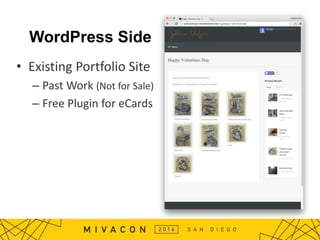
WordPress Side
• Existing Portfolio Site
– Past Work (Not for Sale)
– Free Plugin for eCards
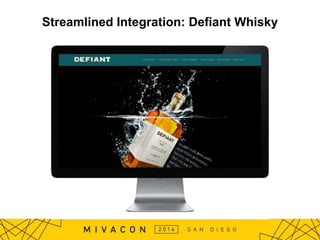
Streamlined Integration: Defiant Whisky
• Shared Install in Root
• Common (Simple Header) in Both Themes
– Login and Cart in the Sidebar
• WordPress CMS: Events, Awards, News
• Themes: Custom WP and Miva Theme
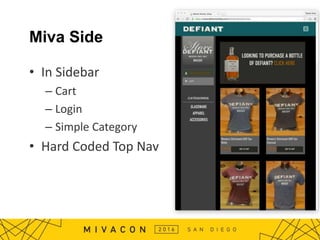
Miva Side
• In Sidebar
– Cart
– Login
– Simple Category
• Hard Coded Top Nav
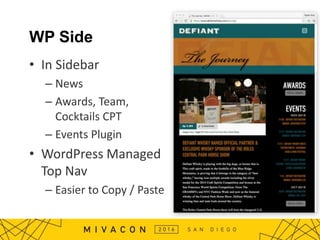
WP Side
• In Sidebar
– News
– Awards, Team,
Cocktails CPT
– Events Plugin
• WordPress Managed
Top Nav
– Easier to Copy / Paste
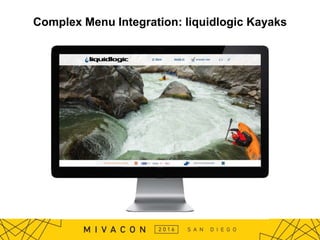
Complex Menu Integration: liquidlogic Kayaks
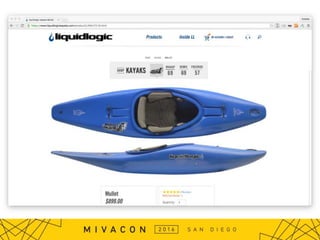
• Install: Shared Install in Docroot
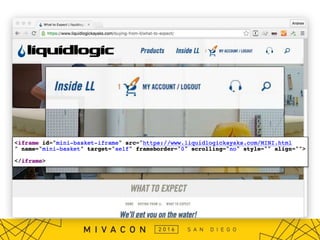
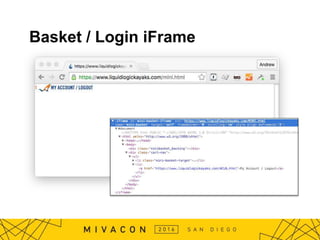
• Basket / Login: iframe from Miva
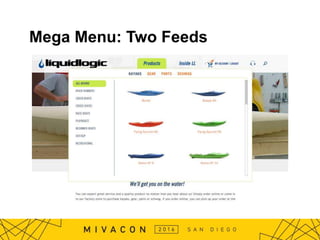
• Menu: WP Generated Menus,
– Includes Miva Product Miva From XML Feed
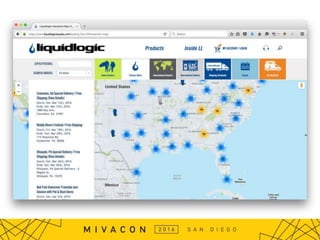
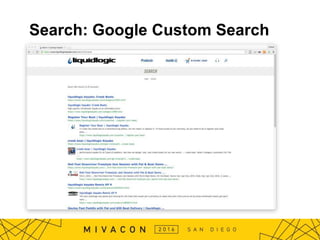
• Share Search: Google Custom Search
WordPress Side
Basket / Login iFrame
Mega Menu: Two Feeds
Mega Menu on WP Side
• WP Code Requests Category and Product
XML from Miva
• WP Processes Feed to Make Menu
• WP Writes Cached Header HTML
• WP and Miva Themes include header
HTML
Category Feed
• Custom XML Result Page
/mm5/merchant.mvc?Store_Code=LLK&Screen=XML_CAT_FEED&Category_Code=RIVR
<?xml version="1.0" encoding="UTF-8"?>
<menuitem>
<mvt:item name="category_listing" />
</menuitem>
<mvt:foreach iterator="product"
array="category_listing:products">
<product>
<productcatlink><![CDATA[&mvte:product:link;
]]></productcatlink>
<productcatimage><![CDATA[&mvte:product:imagetypes:inscale_p
hoto; ]]></productcatimage>
<productname>&mvte:product:name;</productname>
<productcode>&mvt:product:code;</productcode>
<productprice>&mvt:product:formatted_price;</productprice>
<productlink><![CDATA[https://www.liquidlogickayaks.com/mm5/
merchant.mvc?Screen=BASK&Store_Code=LLK&Product_Code=&m
vt:product:code;&Attributes=Yes&Quantity=1&Action=ADPR ]]></p
roductlink>
</product>
</mvt:foreach>
Product Feed
• Miva XML Result Page
/mm5/merchant.mvc?Store_Code=LLK&Screen=XML_CAT_FEED&Category_Code=RIVR
<?xml version="1.0" encoding="UTF-8"?>
<menuitem>
<mvt:item name="category_listing" />
</menuitem>
<mvt:foreach iterator="product"
array="category_listing:products">
<product>
<productcatlink><![CDATA[&mvte:product:link;
]]></productcatlink>
<productcatimage><![CDATA[&mvte:product:imagetypes:inscale_p
hoto; ]]></productcatimage>
<productname>&mvte:product:name;</productname>
<productcode>&mvt:product:code;</productcode>
<productprice>&mvt:product:formatted_price;</productprice>
<productlink><![CDATA[https://www.liquidlogickayaks.com/mm5/
merchant.mvc?Screen=BASK&Store_Code=LLK&Product_Code=&m
vt:product:code;&Attributes=Yes&Quantity=1&Action=ADPR ]]></p
roductlink>
</product>
</mvt:foreach>
WordPress Code (PHP)
• Get All Categories from Feed
– Loop Through Categories
• Get All Products in Category
• Generate Menu HTML
• Write Static File to Server
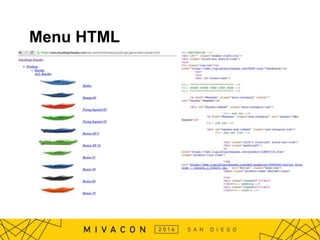
Menu HTML
WP and Miva Themes Include Header HTML
• WordPress:
– If Generated Header Does Not Exist, Generate
– Otherwise
• <?php include_once('generated-header.html'); ?>
– MIVA
• <mvt:assign name="g.file_read"
value="file_read('/wp-
content/themes/ll/generated-header.html','script',
g.wordpress_header)" />
&mvt:global:wordpress_header;
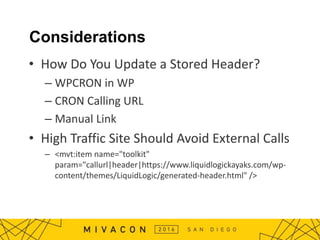
Considerations
• How Do You Update a Stored Header?
– WPCRON in WP
– CRON Calling URL
– Manual Link
• High Traffic Site Should Avoid External Calls
– <mvt:item name="toolkit"
param="callurl|header|https://www.liquidlogickayaks.com/wp-
content/themes/LiquidLogic/generated-header.html" />
Search: Google Custom Search
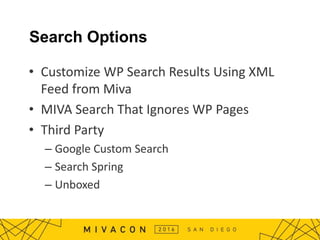
Search Options
• Customize WP Search Results Using XML
Feed from Miva
• MIVA Search That Ignores WP Pages
• Third Party
– Google Custom Search
– Search Spring
– Unboxed
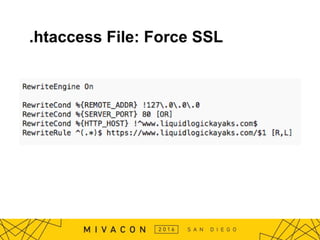
.htaccess File: Force SSL
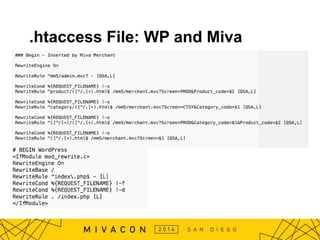
.htaccess File: WP and Miva
Security
• Miva and WP Backups
• WordPress Updates
– Be Wary of Purchased Themes / Unsupported
Plugins
• Malware Scanning
– We Recommend Wordfence
Scaling
• Denial of Service (DDOS)
– We Recommend CloudFlare
• Caching: WordPress Plugins
– We Recommend SuperCache
• CDN
– We Recommend MaxCDN (Origin Pull)
Questions?
Feel free to email nathan@tg-k.com for code samples.
Miva + WordPress

Miva + WordPress

  • 1.
    SESSION TITLE Presenter’s Name MIVA+ WP PRESENTER: Andrew Gray, CTO TGK
  • 2.
    MIVA since 2009 WPsince 2008 MIVA since 1999 WP since 2009 EXPERTS IN ECOMMERCE EXPERTS IN AWESOME Full-Service Digital Marketing Agency in Wilmington, NC @tayloegraykrist /tayloegraykristof
  • 3.
    Getting to KnowYou • Who has a WordPress Site and a Miva Site? – Hosted on the Same Server? – Hosted on Different Servers?
  • 4.
    • Improved Content Management –Blog / News Posts – Custom Post Types • WordPress Plugins – Forms, Events, etc • Adding eCommerce to an Existing Website Why would you want to do this?
  • 5.
    Custom Post Type(CPT) / Plugins
  • 6.
    Three Ways toCombine WP/MIVA • Subdomains – Miva.domain.com / WP.domain.com – Store.domain.com / www.domain.com • Sub Folder – www.domain.com/wp/ – www.domain.com (miva) • Shared folder – www.domain.com (miva/WP code)
  • 7.
    Shared Folder • MivaFiles • WordPress Files
  • 8.
    Install WordPress • Wordpress.org/download/ –Unzip – FTP Files – Create WP Specific Database – Backup .htaccess – Visit Install URL • : http://example.com/wp-admin/install.php – Enter DB credentials
  • 9.
    Considerations / Planning •Theme – Same Design? • Menus – Static or Generated? • Search – WP or Miva Search – Third Party Search • Login / Logout / Cart Status – How to Show Mini Basket Page / Login
  • 10.
    Case Studies Simple Blog+ Miva Streamlined Integration Complex Menu Integration
  • 11.
    Miva Site WithBlog : Sullivan Anlyan
  • 12.
    Miva Site WithBlog: Sullivan Anlyan • Miva in Docroot – Blog in Subfolder • Search: Only in Miva • Cart: Direct Link from WP • Two Themes – Ready Theme on Miva – Bought Theme on WP
  • 14.
    WordPress Side • ExistingPortfolio Site – Past Work (Not for Sale) – Free Plugin for eCards
  • 15.
  • 16.
    Streamlined Integration: DefiantWhisky • Shared Install in Root • Common (Simple Header) in Both Themes – Login and Cart in the Sidebar • WordPress CMS: Events, Awards, News • Themes: Custom WP and Miva Theme
  • 17.
    Miva Side • InSidebar – Cart – Login – Simple Category • Hard Coded Top Nav
  • 18.
    WP Side • InSidebar – News – Awards, Team, Cocktails CPT – Events Plugin • WordPress Managed Top Nav – Easier to Copy / Paste
  • 19.
    Complex Menu Integration:liquidlogic Kayaks
  • 20.
    Complex Menu Integration:liquidlogic Kayaks • Install: Shared Install in Docroot • Basket / Login: iframe from Miva • Menu: WP Generated Menus, – Includes Miva Product Miva From XML Feed • Share Search: Google Custom Search
  • 23.
  • 24.
  • 25.
  • 26.
    Mega Menu onWP Side • WP Code Requests Category and Product XML from Miva • WP Processes Feed to Make Menu • WP Writes Cached Header HTML • WP and Miva Themes include header HTML
  • 27.
    Category Feed • CustomXML Result Page /mm5/merchant.mvc?Store_Code=LLK&Screen=XML_CAT_FEED&Category_Code=RIVR <?xml version="1.0" encoding="UTF-8"?> <menuitem> <mvt:item name="category_listing" /> </menuitem> <mvt:foreach iterator="product" array="category_listing:products"> <product> <productcatlink><![CDATA[&mvte:product:link; ]]></productcatlink> <productcatimage><![CDATA[&mvte:product:imagetypes:inscale_p hoto; ]]></productcatimage> <productname>&mvte:product:name;</productname> <productcode>&mvt:product:code;</productcode> <productprice>&mvt:product:formatted_price;</productprice> <productlink><![CDATA[https://www.liquidlogickayaks.com/mm5/ merchant.mvc?Screen=BASK&Store_Code=LLK&Product_Code=&m vt:product:code;&Attributes=Yes&Quantity=1&Action=ADPR ]]></p roductlink> </product> </mvt:foreach>
  • 28.
    Product Feed • MivaXML Result Page /mm5/merchant.mvc?Store_Code=LLK&Screen=XML_CAT_FEED&Category_Code=RIVR <?xml version="1.0" encoding="UTF-8"?> <menuitem> <mvt:item name="category_listing" /> </menuitem> <mvt:foreach iterator="product" array="category_listing:products"> <product> <productcatlink><![CDATA[&mvte:product:link; ]]></productcatlink> <productcatimage><![CDATA[&mvte:product:imagetypes:inscale_p hoto; ]]></productcatimage> <productname>&mvte:product:name;</productname> <productcode>&mvt:product:code;</productcode> <productprice>&mvt:product:formatted_price;</productprice> <productlink><![CDATA[https://www.liquidlogickayaks.com/mm5/ merchant.mvc?Screen=BASK&Store_Code=LLK&Product_Code=&m vt:product:code;&Attributes=Yes&Quantity=1&Action=ADPR ]]></p roductlink> </product> </mvt:foreach>
  • 29.
    WordPress Code (PHP) •Get All Categories from Feed – Loop Through Categories • Get All Products in Category • Generate Menu HTML • Write Static File to Server
  • 30.
  • 31.
    WP and MivaThemes Include Header HTML • WordPress: – If Generated Header Does Not Exist, Generate – Otherwise • <?php include_once('generated-header.html'); ?> – MIVA • <mvt:assign name="g.file_read" value="file_read('/wp- content/themes/ll/generated-header.html','script', g.wordpress_header)" /> &mvt:global:wordpress_header;
  • 32.
    Considerations • How DoYou Update a Stored Header? – WPCRON in WP – CRON Calling URL – Manual Link • High Traffic Site Should Avoid External Calls – <mvt:item name="toolkit" param="callurl|header|https://www.liquidlogickayaks.com/wp- content/themes/LiquidLogic/generated-header.html" />
  • 33.
  • 34.
    Search Options • CustomizeWP Search Results Using XML Feed from Miva • MIVA Search That Ignores WP Pages • Third Party – Google Custom Search – Search Spring – Unboxed
  • 35.
  • 36.
  • 37.
    Security • Miva andWP Backups • WordPress Updates – Be Wary of Purchased Themes / Unsupported Plugins • Malware Scanning – We Recommend Wordfence
  • 38.
    Scaling • Denial ofService (DDOS) – We Recommend CloudFlare • Caching: WordPress Plugins – We Recommend SuperCache • CDN – We Recommend MaxCDN (Origin Pull)
  • 39.
    Questions? Feel free toemail nathan@tg-k.com for code samples.