Distributed computing
with Ray
Jan Margeta | |
PyDays Vienna, May 3, 2019
jan@kardio.me @jmargeta
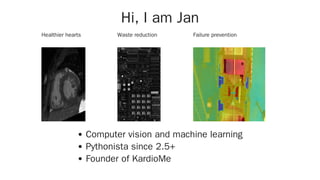
Healthier hearts Waste reduction Failure prevention
Hi, I am Jan
Computer vision and machine learning
Pythonista since 2.5+
Founder of KardioMe
Distributed what?
Martin Fowler's First rule of
distributed objects computing
Don't
Massive complexity booster
See also Common fallacies of distributed computing
Scale up and down on
demand
Yamazaki et al. and 2048 GPUs (March 2019)
ImageNet in 74.7 seconds
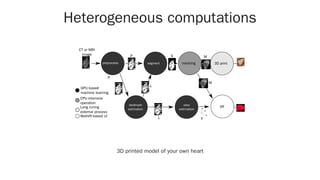
Heterogeneous computations
CT or MRI
image
segmentpreprocess
landmark
estimation
meshing
view
estimation
VR
L
L
P
P S
M
V
3D print
M
GPU-based
machine learning
CPU-intensive
operation
WebVR-based UI
-
Long runing
external process
3D printed model of your own heart
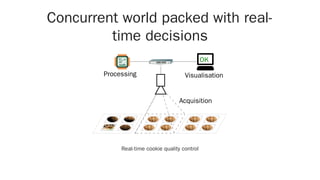
Concurrent world packed with real-
time decisions
OK
Acquisition
VisualisationProcessing
Real-time cookie quality control
Resilience cannot be
achieved with a single
machine
Concurrency and
parallelism in Python
Threads, processes, async, distributed, Dask, Celery,
PySpark…
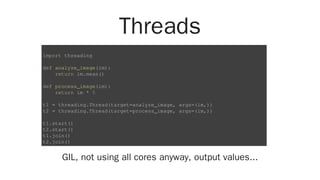
Threads
GIL, not using all cores anyway, output values...
import threading
def analyze_image(im):
return im.mean()
def process_image(im):
return im * 5
t1 = threading.Thread(target=analyze_image, args=(im,))
t2 = threading.Thread(target=process_image, args=(im,))
t1.start()
t2.start()
t1.join()
t2.join()
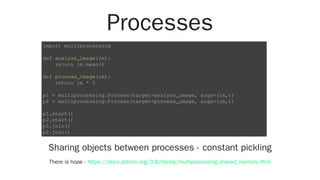
Processes
Sharing objects between processes - constant pickling
There is hope -
import multiprocessing
def analyze_image(im):
return im.mean()
def process_image(im):
return im * 5
p1 = multiprocessing.Process(target=analyze_image, args=(im,))
p2 = multiprocessing.Process(target=process_image, args=(im,))
p1.start()
p2.start()
p1.join()
p2.join()
https://docs.python.org/3.8/library/multiprocessing.shared_memory.html
And we are still just
running on a single
machine
Celery
from celery import Celery
app = Celery('jobs', ...)
@app.task
def compute_stuff(x, y):
return x + y
@app.task
def another_compute_stuff(x, y):
return x + y
from jobs import compute_stuff, another_compute_stuff
compute_stuff.delay(1, 1).get()
compute_stuff.apply_async((2, 2), link=another_compute_stuff.s(16))
compute_stuff.starmap([(2, 2), (4, 4)])
PySpark
Mature, excellent for ETL, simple queries
Great for homogeneous processing of the points
"BigData" ecosystem in Java
R = matrix(rand(M, F)) * matrix(rand(U, F).T)
ms = matrix(rand(M, F))
us = matrix(rand(U, F))
Rb = sc.broadcast(R)
msb = sc.broadcast(ms)
usb = sc.broadcast(us)
for i in range(ITERATIONS):
ms = sc.parallelize(range(M), partitions) 
.map(lambda x: update(x, usb.value, Rb.value)) 
.collect()
ms = matrix(np.array(ms)[:, :, 0])
…
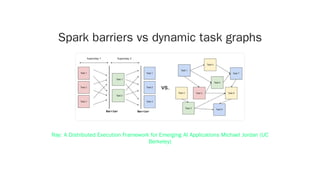
Spark barriers vs dynamic task graphs
Ray: A Distributed Execution Framework for Emerging AI Applications Michael Jordan (UC
Berkeley)
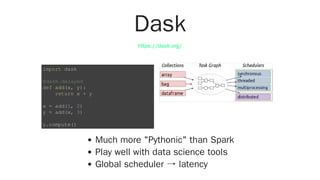
Dask
Much more "Pythonic" than Spark
Play well with data science tools
Global scheduler → latency
https://dask.org/
import dask
@dask.delayed
def add(x, y):
return x + y
x = add(1, 2)
y = add(x, 3)
y.compute()
Why new system?
Play well with existing tools
Scale from a laptop to a cluster
Heterogeneous code and hardware
Real-time and low-latency
Dynamically schedule tasks
Less cognitive load
Ray is a general purpose framework for parallel and
distributed Python and a collection of libraries targeting
data processing workflows
Developed at UC Berkeley as an attempt to replace Spark
https://github.com/ray-project/ray
Unique components
Stateless tasks and actors combined
Bottom-up scheduling for low latency
Shared object store with zero copy deserialization
Clean Pythonic API
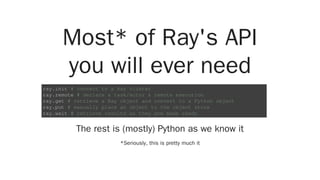
Most* of Ray's API
you will ever need
The rest is (mostly) Python as we know it
*Seriously, this is pretty much it
ray.init # connect to a Ray cluster
ray.remote # declare a task/actor & remote execution
ray.get # retrieve a Ray object and convert to a Python object
ray.put # manually place an object to the object store
ray.wait # retrieve results as they are made ready
Two main abstractions
Tasks and actors
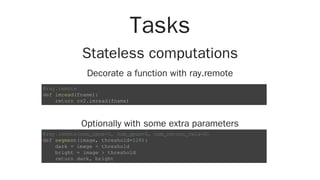
Tasks
Stateless computations
Decorate a function with ray.remote
Optionally with some extra parameters
@ray.remote
def imread(fname):
return cv2.imread(fname)
@ray.remote(num_cpus=1, num_gpus=0, num_return_vals=2)
def segment(image, threshold=128):
dark = image < threshold
bright = image > threshold
return dark, bright
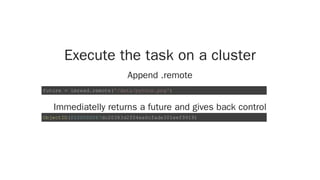
Execute the task on a cluster
Append .remote
Immediatelly returns a future and gives back control
future = imread.remote('/data/python.png')
ObjectID(0100000067dc20383d2f04ea6cfade301eef9919)
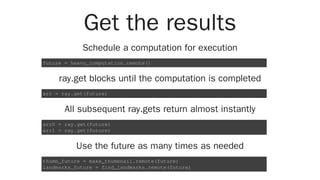
Get the results
Schedule a computation for execution
ray.get blocks until the computation is completed
All subsequent ray.gets return almost instantly
Use the future as many times as needed
future = heavy_computation.remote()
arr = ray.get(future)
arr0 = ray.get(future)
arr1 = ray.get(future)
thumb_future = make_thumbnail.remote(future)
landmarks_future = find_landmarks.remote(future)
Actors
Mutable state and unique resources
Instantiate the actor somewhere
@ray.remote
class ParameterServer(object):
def __init__(self, keys, values):
values = [value.copy() for value in values]
self.weights = dict(zip(keys, values))
def push(self, keys, values):
for key, value in zip(keys, values):
self.weights[key] += value
def pull(self, keys):
return [self.weights[key] for key in keys]
ps = ParameterServer.remote(keys, initial_values)
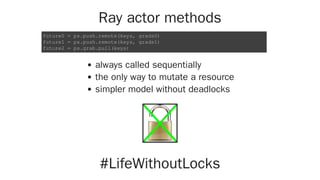
Ray actor methods
always called sequentially
the only way to mutate a resource
simpler model without deadlocks
#LifeWithoutLocks
future0 = ps.push.remote(keys, grads0)
future1 = ps.push.remote(keys, grads1)
future2 = ps.grab.pull(keys)
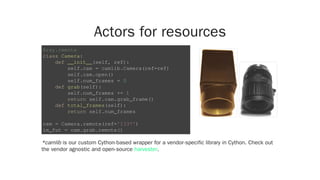
Actors for resources
*camlib is our custom Cython-based wrapper for a vendor-specific library in Cython. Check out
the vendor agnostic and open-source .
@ray.remote
class Camera:
def __init__(self, ref):
self.cam = camlib.Camera(ref=ref)
self.cam.open()
self.num_frames = 0
def grab(self):
self.num_frames += 1
return self.cam.grab_frame()
def total_frames(self):
return self.num_frames
cam = Camera.remote(ref='1337')
im_fut = cam.grab.remote()
harvester
Mix and match tasks and actors
Grab and process an images from a camera
Or run a distributed SGD training
frame_id = camera.grab.remote()
segmented_id = segment.remote(frame_id)
segmented = ray.get(segmented_id)
@ray.remote
def worker(ps):
while True:
# Get the latest parameters
weights = ray.get(ps.pull.remote(keys))
# Compute an update of the params
# (e.g. the gradients for neural nets)
# Push the updates to the parameter server
ps.push.remote(keys, gradients)
worker_tasks = [worker.remote(ps) for _ in range(10)]
Dynamically define by run
import numpy as np
@ray.remote
def aggregate_data(x, y):
return x + y
data = [np.random.normal(size=1000) for i in range(4)]
while len(data) > 1:
intermediate_result = aggregate_data.remote(data[0], data[1])
data = data[2:] + [intermediate_result]
result = ray.get(data[0])
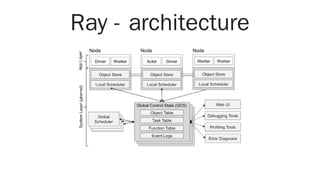
Ray - architecture
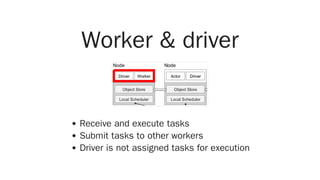
Worker & driver
Receive and execute tasks
Submit tasks to other workers
Driver is not assigned tasks for execution
Plasma - Shared
memory object store
Share objects across local processes
In-memory key-value object store
data = ['Hallo PyDays', 4, (5, 5), np.ones((128, 128))]
key = ray.put(data)
deserialized = ray.get(key)
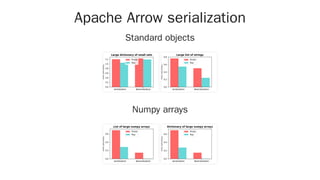
Apache Arrow serialization
Standard objects
Numpy arrays
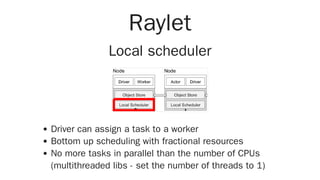
Raylet
Local scheduler
Driver can assign a task to a worker
Bottom up scheduling with fractional resources
No more tasks in parallel than the number of CPUs
(multithreaded libs - set the number of threads to 1)
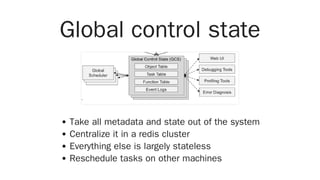
Global control state
Take all metadata and state out of the system
Centralize it in a redis cluster
Everything else is largely stateless
Reschedule tasks on other machines
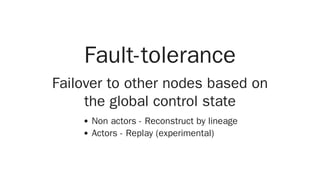
Fault-tolerance
Failover to other nodes based on
the global control state
Non actors - Reconstruct by lineage
Actors - Replay (experimental)
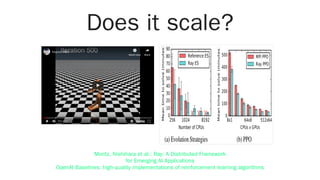
Does it scale?
mujoco video
Watch later Share
0:01 / 0:40
Moritz, Nishihara et al.: Ray: A Distributed Framework
for Emerging AI Applications
OpenAI Baselines: high-quality implementations of reinforcement learning algorithms
Setting up a Ray
cluster
On-prem set-up
Start Ray head on one of the nodes
Start Ray workers on the nodes
Connect and run commands
Teardown Ray
$ ray start --head --redis-port=6379 # head IP: 192.168.1.5
$ ray start --redis-address=192.168.1.5:6379
ray.init(redis_address="192.168.1.5:6379")
@ray.remote
def imread(filename):
return cv2.imread(filename)
ims = ray.get([imread.remote(f) for f in glob('*.png')])
$ ray stop
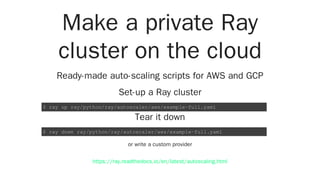
Make a private Ray
cluster on the cloud
Ready-made auto-scaling scripts for AWS and GCP
Set-up a Ray cluster
Tear it down
or write a custom provider
$ ray up ray/python/ray/autoscaler/aws/example-full.yaml
$ ray down ray/python/ray/autoscaler/aws/example-full.yaml
https://ray.readthedocs.io/en/latest/autoscaling.html
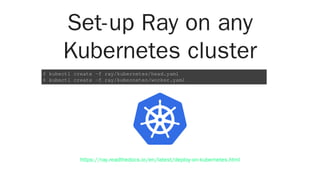
Set-up Ray on any
Kubernetes cluster
$ kubectl create -f ray/kubernetes/head.yaml
$ kubectl create -f ray/kubernetes/worker.yaml
https://ray.readthedocs.io/en/latest/deploy-on-kubernetes.html
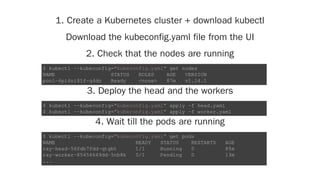
1. Create a Kubernetes cluster + download kubectl
Download the kubeconfig.yaml file from the UI
2. Check that the nodes are running
3. Deploy the head and the workers
4. Wait till the pods are running
$ kubectl --kubeconfig="kubeconfig.yaml" get nodes
NAME STATUS ROLES AGE VERSION
pool-6pi4ni81f-q4dn Ready <none> 87m v1.14.1
$ kubectl --kubeconfig="kubeconfig.yaml" apply -f head.yaml
$ kubectl --kubeconfig="kubeconfig.yaml" apply -f worker.yaml
$ kubectl --kubeconfig="kubeconfig.yaml" get pods
NAME READY STATUS RESTARTS AGE
ray-head-56fdb7fdd-qtgbt 1/1 Running 0 85m
ray-worker-85454649dd-5nb8k 0/1 Pending 0 13m
...
5. Enter the head pod and run ipython
6. Profit from a distributed Python
$ kubectl --kubeconfig="kubeconfig.yaml" exec -it 
ray-head-56fdb7fdd-qtgbt -- bash
$ ipython
from collections import Counter
import time
import ray
ray.init(redis_address="localhost:6379")
@ray.remote
def get_node_ip():
time.sleep(0.01)
return ray.services.get_node_ip_address()
%time Counter(ray.get([f.remote() for _ in range(100)]
Development tools
Testing
usually trivial - input → output well defined
pytest
Debugging
standard tools often work
pdb, pudb, web-pdb…
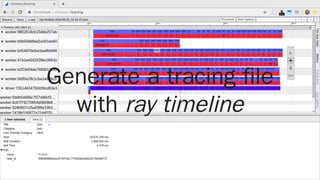
Generate a tracing file
with ray timeline
The ecosystem
Higher-level libs built on top of Ray
Tune - hyper-parameter optimization
rllib - reinforcement learning
modin - distributed* Pandas
and more…
*experimental
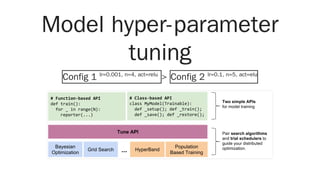
Model hyper-parameter
tuning
Config 1 lr=0.001, n=4, act=relu
> Config 2 lr=0.1, n=5, act=elu
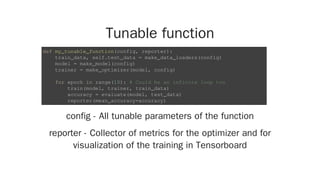
Tunable function
config - All tunable parameters of the function
reporter - Collector of metrics for the optimizer and for
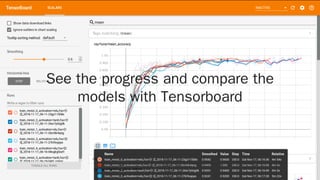
visualization of the training in Tensorboard
def my_tunable_function(config, reporter):
train_data, self.test_data = make_data_loaders(config)
model = make_model(config)
trainer = make_optimizer(model, config)
for epoch in range(10): # Could be an infinite loop too
train(model, trainer, train_data)
accuracy = evaluate(model, test_data)
reporter(mean_accuracy=accuracy)
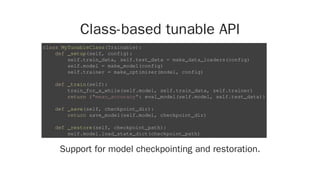
Class-based tunable API
Support for model checkpointing and restoration.
class MyTunableClass(Trainable):
def _setup(self, config):
self.train_data, self.test_data = make_data_loaders(config)
self.model = make_model(config)
self.trainer = make_optimizer(model, config)
def _train(self):
train_for_a_while(self.model, self.train_data, self.trainer)
return {"mean_accuracy": eval_model(self.model, self.test_data)}
def _save(self, checkpoint_dir):
return save_model(self.model, checkpoint_dir)
def _restore(self, checkpoint_path):
self.model.load_state_dict(checkpoint_path)
Define the parameter space
Register the trainable function
Launch hyper-parameter search
Consider extracting your argparse arguments
spec = {
"stop": {
"mean_accuracy": 0.995,
"time_total_s": 600,
},
"config": {
"activation": grid_search(["relu", "elu", "tanh"]),
"learning_rate": tune.grid_search([0.001, 0.01, 0.1]),
},
}
tune.register_trainable("train_imagenet", my_tunable_function)
tune.run("train_imagenet", name="tune_imagenet_test", **spec)
See the progress and compare the
models with Tensorboard
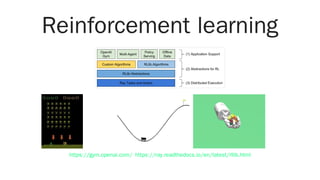
Reinforcement learning
https://gym.openai.com/ https://ray.readthedocs.io/en/latest/rllib.html
Wrapping OpenAI gym environments
in actors
import gym
@ray.remote
class Simulator:
def __init__(self):
self.env = gym.make("SpaceInvaders-v0")
self.env.reset()
def step(self, action):
return self.env.step(action)
simulator = Simulator.remote()
# Take actions in the simulator
observations = []
observations.append(simulator.step.remote(0))
observations.append(simulator.step.remote(1))
Speed-up your Pandas
With a single-line-of-code change
import modin.pandas as pd
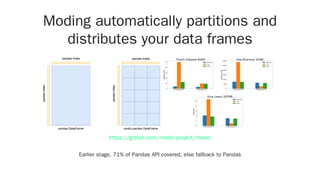
Moding automatically partitions and
distributes your data frames
Earlier stage, 71% of Pandas API covered, else fallback to Pandas
https://github.com/modin-project/modin
And some more…
Check out the detailed docs, examples, code
Serial Parallel and distributedf
Remember
def heavy_computation(x):
# do something nice here
return x
results = [
heavy_computation(i)
for i in range(100)
]
@ray.remote
def heavy_computation(x):
# do something nice here
return x
ray.init()
results = ray.get([
heavy_computation.remote(i)
for i in range(100)
])
Conclusion
Simple API with tasks and actors
A sane local alternative to threads and processes
Use the same code locally and on a cluster
Growing ecosystem of libraries
Ray has fantastic docs and tutorials
pip install ray
Thanks!
Distributed computing
with Ray
Jan Margeta | |
May 3, 2019
jan@kardio.me @jmargeta
References
Seven concurrency models in seven weeks - Butcher
A note on distributed computing - Waldo J. et al.
Free lunch is over - Herb sutter
Fallacies of distrib. computing explained - Rotem-Gal-
Oz
Fallacies of distrib. computing - P. Deutsch
Ray docs
Ray tutorial
Plasma store
Plasma store and Arrow
Scaling Python modules with Ray framework
References
Ray - a cluster computing engine for reinforcement
learning applictions
https://ray-project.github.io/2018/07/15/parameter-
server-in-fifteen-lines.html
Ray: A Distributed Execution Framework for AI | SciPy
2018 - Robert Nishihara
Dask and Celery - M. Rocklin
Dask comparison to Spark
Ray: A Distributed System for AI
Resources
My referral link to $100 at Digital ocean for 60 days

Distributed computing with Ray. Find your hyper-parameters, speed up your Pandas pipelines, and much more.

  • 1.
    Distributed computing with Ray JanMargeta | | PyDays Vienna, May 3, 2019 jan@kardio.me @jmargeta
  • 2.
    Healthier hearts Wastereduction Failure prevention Hi, I am Jan Computer vision and machine learning Pythonista since 2.5+ Founder of KardioMe
  • 3.
  • 4.
    Martin Fowler's Firstrule of distributed objects computing Don't Massive complexity booster See also Common fallacies of distributed computing
  • 5.
    Scale up anddown on demand Yamazaki et al. and 2048 GPUs (March 2019) ImageNet in 74.7 seconds
  • 6.
    Heterogeneous computations CT orMRI image segmentpreprocess landmark estimation meshing view estimation VR L L P P S M V 3D print M GPU-based machine learning CPU-intensive operation WebVR-based UI - Long runing external process 3D printed model of your own heart
  • 7.
    Concurrent world packedwith real- time decisions OK Acquisition VisualisationProcessing Real-time cookie quality control
  • 8.
    Resilience cannot be achievedwith a single machine
  • 9.
    Concurrency and parallelism inPython Threads, processes, async, distributed, Dask, Celery, PySpark…
  • 10.
    Threads GIL, not usingall cores anyway, output values... import threading def analyze_image(im): return im.mean() def process_image(im): return im * 5 t1 = threading.Thread(target=analyze_image, args=(im,)) t2 = threading.Thread(target=process_image, args=(im,)) t1.start() t2.start() t1.join() t2.join()
  • 11.
    Processes Sharing objects betweenprocesses - constant pickling There is hope - import multiprocessing def analyze_image(im): return im.mean() def process_image(im): return im * 5 p1 = multiprocessing.Process(target=analyze_image, args=(im,)) p2 = multiprocessing.Process(target=process_image, args=(im,)) p1.start() p2.start() p1.join() p2.join() https://docs.python.org/3.8/library/multiprocessing.shared_memory.html
  • 12.
    And we arestill just running on a single machine
  • 13.
    Celery from celery importCelery app = Celery('jobs', ...) @app.task def compute_stuff(x, y): return x + y @app.task def another_compute_stuff(x, y): return x + y from jobs import compute_stuff, another_compute_stuff compute_stuff.delay(1, 1).get() compute_stuff.apply_async((2, 2), link=another_compute_stuff.s(16)) compute_stuff.starmap([(2, 2), (4, 4)])
  • 14.
    PySpark Mature, excellent forETL, simple queries Great for homogeneous processing of the points "BigData" ecosystem in Java R = matrix(rand(M, F)) * matrix(rand(U, F).T) ms = matrix(rand(M, F)) us = matrix(rand(U, F)) Rb = sc.broadcast(R) msb = sc.broadcast(ms) usb = sc.broadcast(us) for i in range(ITERATIONS): ms = sc.parallelize(range(M), partitions) .map(lambda x: update(x, usb.value, Rb.value)) .collect() ms = matrix(np.array(ms)[:, :, 0]) …
  • 15.
    Spark barriers vsdynamic task graphs Ray: A Distributed Execution Framework for Emerging AI Applications Michael Jordan (UC Berkeley)
  • 16.
    Dask Much more "Pythonic"than Spark Play well with data science tools Global scheduler → latency https://dask.org/ import dask @dask.delayed def add(x, y): return x + y x = add(1, 2) y = add(x, 3) y.compute()
  • 17.
    Why new system? Playwell with existing tools Scale from a laptop to a cluster Heterogeneous code and hardware Real-time and low-latency Dynamically schedule tasks Less cognitive load
  • 18.
    Ray is ageneral purpose framework for parallel and distributed Python and a collection of libraries targeting data processing workflows Developed at UC Berkeley as an attempt to replace Spark https://github.com/ray-project/ray
  • 19.
    Unique components Stateless tasksand actors combined Bottom-up scheduling for low latency Shared object store with zero copy deserialization Clean Pythonic API
  • 20.
    Most* of Ray'sAPI you will ever need The rest is (mostly) Python as we know it *Seriously, this is pretty much it ray.init # connect to a Ray cluster ray.remote # declare a task/actor & remote execution ray.get # retrieve a Ray object and convert to a Python object ray.put # manually place an object to the object store ray.wait # retrieve results as they are made ready
  • 21.
  • 22.
    Tasks Stateless computations Decorate afunction with ray.remote Optionally with some extra parameters @ray.remote def imread(fname): return cv2.imread(fname) @ray.remote(num_cpus=1, num_gpus=0, num_return_vals=2) def segment(image, threshold=128): dark = image < threshold bright = image > threshold return dark, bright
  • 23.
    Execute the taskon a cluster Append .remote Immediatelly returns a future and gives back control future = imread.remote('/data/python.png') ObjectID(0100000067dc20383d2f04ea6cfade301eef9919)
  • 24.
    Get the results Schedulea computation for execution ray.get blocks until the computation is completed All subsequent ray.gets return almost instantly Use the future as many times as needed future = heavy_computation.remote() arr = ray.get(future) arr0 = ray.get(future) arr1 = ray.get(future) thumb_future = make_thumbnail.remote(future) landmarks_future = find_landmarks.remote(future)
  • 25.
    Actors Mutable state andunique resources Instantiate the actor somewhere @ray.remote class ParameterServer(object): def __init__(self, keys, values): values = [value.copy() for value in values] self.weights = dict(zip(keys, values)) def push(self, keys, values): for key, value in zip(keys, values): self.weights[key] += value def pull(self, keys): return [self.weights[key] for key in keys] ps = ParameterServer.remote(keys, initial_values)
  • 26.
    Ray actor methods alwayscalled sequentially the only way to mutate a resource simpler model without deadlocks #LifeWithoutLocks future0 = ps.push.remote(keys, grads0) future1 = ps.push.remote(keys, grads1) future2 = ps.grab.pull(keys)
  • 27.
    Actors for resources *camlibis our custom Cython-based wrapper for a vendor-specific library in Cython. Check out the vendor agnostic and open-source . @ray.remote class Camera: def __init__(self, ref): self.cam = camlib.Camera(ref=ref) self.cam.open() self.num_frames = 0 def grab(self): self.num_frames += 1 return self.cam.grab_frame() def total_frames(self): return self.num_frames cam = Camera.remote(ref='1337') im_fut = cam.grab.remote() harvester
  • 28.
    Mix and matchtasks and actors Grab and process an images from a camera Or run a distributed SGD training frame_id = camera.grab.remote() segmented_id = segment.remote(frame_id) segmented = ray.get(segmented_id) @ray.remote def worker(ps): while True: # Get the latest parameters weights = ray.get(ps.pull.remote(keys)) # Compute an update of the params # (e.g. the gradients for neural nets) # Push the updates to the parameter server ps.push.remote(keys, gradients) worker_tasks = [worker.remote(ps) for _ in range(10)]
  • 29.
    Dynamically define byrun import numpy as np @ray.remote def aggregate_data(x, y): return x + y data = [np.random.normal(size=1000) for i in range(4)] while len(data) > 1: intermediate_result = aggregate_data.remote(data[0], data[1]) data = data[2:] + [intermediate_result] result = ray.get(data[0])
  • 30.
  • 31.
    Worker & driver Receiveand execute tasks Submit tasks to other workers Driver is not assigned tasks for execution
  • 32.
    Plasma - Shared memoryobject store Share objects across local processes In-memory key-value object store data = ['Hallo PyDays', 4, (5, 5), np.ones((128, 128))] key = ray.put(data) deserialized = ray.get(key)
  • 33.
  • 34.
    Raylet Local scheduler Driver canassign a task to a worker Bottom up scheduling with fractional resources No more tasks in parallel than the number of CPUs (multithreaded libs - set the number of threads to 1)
  • 35.
    Global control state Takeall metadata and state out of the system Centralize it in a redis cluster Everything else is largely stateless Reschedule tasks on other machines
  • 36.
    Fault-tolerance Failover to othernodes based on the global control state Non actors - Reconstruct by lineage Actors - Replay (experimental)
  • 37.
    Does it scale? mujocovideo Watch later Share 0:01 / 0:40 Moritz, Nishihara et al.: Ray: A Distributed Framework for Emerging AI Applications OpenAI Baselines: high-quality implementations of reinforcement learning algorithms
  • 38.
    Setting up aRay cluster
  • 39.
    On-prem set-up Start Rayhead on one of the nodes Start Ray workers on the nodes Connect and run commands Teardown Ray $ ray start --head --redis-port=6379 # head IP: 192.168.1.5 $ ray start --redis-address=192.168.1.5:6379 ray.init(redis_address="192.168.1.5:6379") @ray.remote def imread(filename): return cv2.imread(filename) ims = ray.get([imread.remote(f) for f in glob('*.png')]) $ ray stop
  • 40.
    Make a privateRay cluster on the cloud Ready-made auto-scaling scripts for AWS and GCP Set-up a Ray cluster Tear it down or write a custom provider $ ray up ray/python/ray/autoscaler/aws/example-full.yaml $ ray down ray/python/ray/autoscaler/aws/example-full.yaml https://ray.readthedocs.io/en/latest/autoscaling.html
  • 41.
    Set-up Ray onany Kubernetes cluster $ kubectl create -f ray/kubernetes/head.yaml $ kubectl create -f ray/kubernetes/worker.yaml https://ray.readthedocs.io/en/latest/deploy-on-kubernetes.html
  • 42.
    1. Create aKubernetes cluster + download kubectl Download the kubeconfig.yaml file from the UI 2. Check that the nodes are running 3. Deploy the head and the workers 4. Wait till the pods are running $ kubectl --kubeconfig="kubeconfig.yaml" get nodes NAME STATUS ROLES AGE VERSION pool-6pi4ni81f-q4dn Ready <none> 87m v1.14.1 $ kubectl --kubeconfig="kubeconfig.yaml" apply -f head.yaml $ kubectl --kubeconfig="kubeconfig.yaml" apply -f worker.yaml $ kubectl --kubeconfig="kubeconfig.yaml" get pods NAME READY STATUS RESTARTS AGE ray-head-56fdb7fdd-qtgbt 1/1 Running 0 85m ray-worker-85454649dd-5nb8k 0/1 Pending 0 13m ...
  • 43.
    5. Enter thehead pod and run ipython 6. Profit from a distributed Python $ kubectl --kubeconfig="kubeconfig.yaml" exec -it ray-head-56fdb7fdd-qtgbt -- bash $ ipython from collections import Counter import time import ray ray.init(redis_address="localhost:6379") @ray.remote def get_node_ip(): time.sleep(0.01) return ray.services.get_node_ip_address() %time Counter(ray.get([f.remote() for _ in range(100)]
  • 44.
    Development tools Testing usually trivial- input → output well defined pytest Debugging standard tools often work pdb, pudb, web-pdb…
  • 45.
    Generate a tracingfile with ray timeline
  • 46.
    The ecosystem Higher-level libsbuilt on top of Ray Tune - hyper-parameter optimization rllib - reinforcement learning modin - distributed* Pandas and more… *experimental
  • 47.
    Model hyper-parameter tuning Config 1lr=0.001, n=4, act=relu > Config 2 lr=0.1, n=5, act=elu
  • 48.
    Tunable function config -All tunable parameters of the function reporter - Collector of metrics for the optimizer and for visualization of the training in Tensorboard def my_tunable_function(config, reporter): train_data, self.test_data = make_data_loaders(config) model = make_model(config) trainer = make_optimizer(model, config) for epoch in range(10): # Could be an infinite loop too train(model, trainer, train_data) accuracy = evaluate(model, test_data) reporter(mean_accuracy=accuracy)
  • 49.
    Class-based tunable API Supportfor model checkpointing and restoration. class MyTunableClass(Trainable): def _setup(self, config): self.train_data, self.test_data = make_data_loaders(config) self.model = make_model(config) self.trainer = make_optimizer(model, config) def _train(self): train_for_a_while(self.model, self.train_data, self.trainer) return {"mean_accuracy": eval_model(self.model, self.test_data)} def _save(self, checkpoint_dir): return save_model(self.model, checkpoint_dir) def _restore(self, checkpoint_path): self.model.load_state_dict(checkpoint_path)
  • 50.
    Define the parameterspace Register the trainable function Launch hyper-parameter search Consider extracting your argparse arguments spec = { "stop": { "mean_accuracy": 0.995, "time_total_s": 600, }, "config": { "activation": grid_search(["relu", "elu", "tanh"]), "learning_rate": tune.grid_search([0.001, 0.01, 0.1]), }, } tune.register_trainable("train_imagenet", my_tunable_function) tune.run("train_imagenet", name="tune_imagenet_test", **spec)
  • 51.
    See the progressand compare the models with Tensorboard
  • 52.
  • 53.
    Wrapping OpenAI gymenvironments in actors import gym @ray.remote class Simulator: def __init__(self): self.env = gym.make("SpaceInvaders-v0") self.env.reset() def step(self, action): return self.env.step(action) simulator = Simulator.remote() # Take actions in the simulator observations = [] observations.append(simulator.step.remote(0)) observations.append(simulator.step.remote(1))
  • 54.
    Speed-up your Pandas Witha single-line-of-code change import modin.pandas as pd
  • 55.
    Moding automatically partitionsand distributes your data frames Earlier stage, 71% of Pandas API covered, else fallback to Pandas https://github.com/modin-project/modin
  • 56.
    And some more… Checkout the detailed docs, examples, code
  • 57.
    Serial Parallel anddistributedf Remember def heavy_computation(x): # do something nice here return x results = [ heavy_computation(i) for i in range(100) ] @ray.remote def heavy_computation(x): # do something nice here return x ray.init() results = ray.get([ heavy_computation.remote(i) for i in range(100) ])
  • 58.
    Conclusion Simple API withtasks and actors A sane local alternative to threads and processes Use the same code locally and on a cluster Growing ecosystem of libraries Ray has fantastic docs and tutorials pip install ray
  • 59.
    Thanks! Distributed computing with Ray JanMargeta | | May 3, 2019 jan@kardio.me @jmargeta
  • 60.
    References Seven concurrency modelsin seven weeks - Butcher A note on distributed computing - Waldo J. et al. Free lunch is over - Herb sutter Fallacies of distrib. computing explained - Rotem-Gal- Oz Fallacies of distrib. computing - P. Deutsch Ray docs Ray tutorial Plasma store Plasma store and Arrow Scaling Python modules with Ray framework
  • 61.
    References Ray - acluster computing engine for reinforcement learning applictions https://ray-project.github.io/2018/07/15/parameter- server-in-fifteen-lines.html Ray: A Distributed Execution Framework for AI | SciPy 2018 - Robert Nishihara Dask and Celery - M. Rocklin Dask comparison to Spark Ray: A Distributed System for AI Resources My referral link to $100 at Digital ocean for 60 days