


When Disaster Strikes, It's Too Late! Be Prepared with Business Continuity Plans   Grant Howe VP of R&D for Sage Nonprofit Solutions
Learning Objectives After participating in this session, you will be able to:  Understand the goals of Disaster Recovery Planning Understand the components of a Disaster Recovery plan Begin your Disaster Recovery Planning project
What is a Disaster Recovery Plan? Disaster recovery planning is a subset of a larger process known as  business continuity planning  and should include planning for resumption of applications, data, hardware, communications (such as networking) and other IT infrastructure. A business continuity plan (BCP) includes planning for non-IT related aspects such as key personnel, facilities, crisis communication and reputation protection, and should refer to the disaster recovery plan (DRP) for IT related infrastructure recovery / continuity Source:  http://en.wikipedia.org/wiki/Disaster_recovery
Dilbert on Disaster Recovery Is this your current plan?
SETTING GOALS FOR OPERATIONAL CONTINUITY
Deciding goals for operational continuity? What are your organizations key business processes? How long can your org survive without these operations business process? Do manual methods make time to restore less critical? Do you have any processes with very little tolerance for downtime?
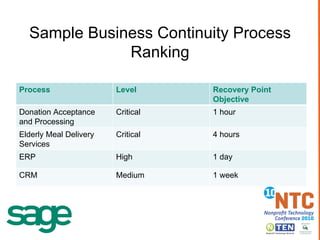
Sample Business Continuity Process Ranking Process Level Recovery Point Objective Donation Acceptance and Processing Critical 1 hour Elderly Meal Delivery Services Critical 4 hours ERP High 1 day CRM Medium 1 week
SUGGESTIONS FOR BUSINESS PROCESS “DISCOVERY”
“ Follow the Money” planning methodology Trace how money flows through your organization Start with income (donations, grants, revenue, etc) Map where that money goes as expenditures Document the process flow and include all of the systems used to process the transactions
“ Committed Service” planning methodology Identify services your organization provides (meals, counseling, etc.) Map how raw materials used in that service become usable and delivered (groceries, people, transportation) Document the process flow and include all of the systems used to process the transactions
COMPOSING A DISASTER RECOVERY PLAN
Decide Criteria for invoking the plan What is the maximum amount of time a process can be unavailable before action must be taken? At what point does the cost of executing the plan become secondary to the outage?
Critical Business Process Recovery Section Critical Business Process Workflow  Physical Plant Related Recovery Plans IT Related Recovery Plans People Related Recovery Plans Assignments and Execution Preconditions / Preventative Plans
Critical Business Process Workflows Use the process workflow that was developed through a “Discovery” methodology as outlined in the earlier sections Make sure the workflow shows   enough detail that someone who isn’t you can understand! Be sure to identify critical systems and applications used in the transactions
Physical Plant Recovery Related Plans Office space? Lights? Heat / AC? Power? Water? Delivery Transportation?
IT Related Recovery Plans Hardware? Power? Internet? Email? Phone Service? Applications (got media and a license key?) Data Recovery from Backup? (Do you have backups offsite?) Tech support contact information?
Technology Time out:  Consider Hosting, ASP or SaaS Consider preventing server disasters by owning and maintaining as few as possible Consider a provider that will be contractually bound to 99%+ uptime for your critical services without your efforts Ideas to look into: ASP or SaaS from your software vendor Rackspace (Managed service provider)
People Related Recovery Plans Who knows how to contact vendors? Who knows how to cut payroll checks? Who knows how to process credit card payments? Is there more than one person who can perform each critical business transaction? Do you have cell phone numbers to reach employees / volunteers / service providers?
Assignments and Execution What steps need to be taken to restore this process? Who has the authority with vendors to do so? Who has the required knowledge or training? Is there a backup operator to execute this plan if the primary is unavailable or unreachable? Who can make the decision to enact the plan? Assign roles and communicate expectations to staff
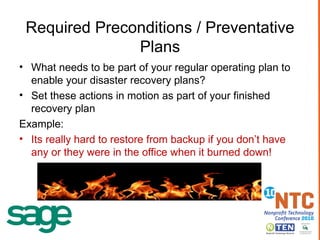
Required Preconditions / Preventative Plans What needs to be part of your regular operating plan to enable your disaster recovery plans? Set these actions in motion as part of your finished recovery plan Example: Its really hard to restore from backup if you don’t have any or they were in the office when it burned down!
Technology Time out:  Cloud Backup Solutions Example of cost :  Amazon S3 $0.15 / GB / month Don’t want to “Roll your own” try one of these: www.crashplan.com www.jungledisk.com www.spideroak.com TechSoup Stock: Backup Software
Testing The Plan Test each business process in your section when finished and at least annually after that! Make sure that you r  interactions with your vendors work as planned Streamline your plan based on your test results It is unlikely your plan will work exactly as you have planned it, do not be disappointed and focus on making corrections for the next test.
Plan Maintenance Review your business processes at least annually Update the processes for changes in how things work Examples: Did you add new software applications? Add new vendors you rely on? Are there new processes or services to constituents you need to protect?
Technology Time out:  Gosh, Where did I put that plan? Here in my desk (now melted and charred)? On 3 duplicate and encrypted USB drives carried by 3 different key DR team members (updated monthly) Available on encrypted secure storage on the internet to select DR team members (synced with a local folder) www.box.net www.spideroak.com www.elephantdrive.com
OMG! YOU SCARED ME! Practical short term risk reduction
Fix Your Backup Strategy Find out if you are doing backups at all Make a list of additional data that needs backing up Get a plan in place to backup everything on your list weekly Store your backups offsite Do it this week
Inventory your computing resources Make a list of all of the computers and storage devices (workstations & servers) Annotate the functions and applications that are used on each Rate each resource as critical or disposable Critical resources are those that cannot be rebuilt quickly from new hardware and a backup (app servers, databases etc) Disposable resources are those that can be recreated from backups and install disks easily Focus your attention on plans to recover from failure of only the critical resources as your first step Do it this month
Start talking about needs for a full plan Your ED and Board of Directors should easily realize the need Pass around this presentation for education Ask for assignment of a project manager / owner Begin a project plan Ask for budget
RESOURCES YOU SHOULD CHECK OUT
http://www.techsoup.org/toolkits/disasterplan/ Highlights – Techsoup Disaster Recovery Guide (PDF) Disaster Planning: What Organizations Need to Know to Protect Their Tech  (Webinar) Disaster Planning: Backup, Backup, Backup!  (Webinar) TechSoup Stock: Backup Software
Questions?
Sources / useful links http://en.wikipedia.org/wiki/Disaster_recovery http://www.drplanning.org/portal/ http://www.techsoup.org/toolkits/disasterplan/
Evaluation Code:  174 How Was this Session? Call In Text Online Call  404.939.4909 Enter Code  174   Text  174  to  69866 Visit  nten.org/ntc-eval Enter Code  174 Session feedback powered by: Tell Us and You Could Win a Free 2011 NTC Registration!

Disaster Recovery NTC 2010

  • 1.
    When Disaster Strikes,It's Too Late! Be Prepared with Business Continuity Plans Grant Howe VP of R&D for Sage Nonprofit Solutions
  • 2.
    Learning Objectives Afterparticipating in this session, you will be able to: Understand the goals of Disaster Recovery Planning Understand the components of a Disaster Recovery plan Begin your Disaster Recovery Planning project
  • 3.
    What is aDisaster Recovery Plan? Disaster recovery planning is a subset of a larger process known as business continuity planning and should include planning for resumption of applications, data, hardware, communications (such as networking) and other IT infrastructure. A business continuity plan (BCP) includes planning for non-IT related aspects such as key personnel, facilities, crisis communication and reputation protection, and should refer to the disaster recovery plan (DRP) for IT related infrastructure recovery / continuity Source: http://en.wikipedia.org/wiki/Disaster_recovery
  • 4.
    Dilbert on DisasterRecovery Is this your current plan?
  • 5.
    SETTING GOALS FOROPERATIONAL CONTINUITY
  • 6.
    Deciding goals foroperational continuity? What are your organizations key business processes? How long can your org survive without these operations business process? Do manual methods make time to restore less critical? Do you have any processes with very little tolerance for downtime?
  • 7.
    Sample Business ContinuityProcess Ranking Process Level Recovery Point Objective Donation Acceptance and Processing Critical 1 hour Elderly Meal Delivery Services Critical 4 hours ERP High 1 day CRM Medium 1 week
  • 8.
    SUGGESTIONS FOR BUSINESSPROCESS “DISCOVERY”
  • 9.
    “ Follow theMoney” planning methodology Trace how money flows through your organization Start with income (donations, grants, revenue, etc) Map where that money goes as expenditures Document the process flow and include all of the systems used to process the transactions
  • 10.
    “ Committed Service”planning methodology Identify services your organization provides (meals, counseling, etc.) Map how raw materials used in that service become usable and delivered (groceries, people, transportation) Document the process flow and include all of the systems used to process the transactions
  • 11.
    COMPOSING A DISASTERRECOVERY PLAN
  • 12.
    Decide Criteria forinvoking the plan What is the maximum amount of time a process can be unavailable before action must be taken? At what point does the cost of executing the plan become secondary to the outage?
  • 13.
    Critical Business ProcessRecovery Section Critical Business Process Workflow Physical Plant Related Recovery Plans IT Related Recovery Plans People Related Recovery Plans Assignments and Execution Preconditions / Preventative Plans
  • 14.
    Critical Business ProcessWorkflows Use the process workflow that was developed through a “Discovery” methodology as outlined in the earlier sections Make sure the workflow shows enough detail that someone who isn’t you can understand! Be sure to identify critical systems and applications used in the transactions
  • 15.
    Physical Plant RecoveryRelated Plans Office space? Lights? Heat / AC? Power? Water? Delivery Transportation?
  • 16.
    IT Related RecoveryPlans Hardware? Power? Internet? Email? Phone Service? Applications (got media and a license key?) Data Recovery from Backup? (Do you have backups offsite?) Tech support contact information?
  • 17.
    Technology Time out: Consider Hosting, ASP or SaaS Consider preventing server disasters by owning and maintaining as few as possible Consider a provider that will be contractually bound to 99%+ uptime for your critical services without your efforts Ideas to look into: ASP or SaaS from your software vendor Rackspace (Managed service provider)
  • 18.
    People Related RecoveryPlans Who knows how to contact vendors? Who knows how to cut payroll checks? Who knows how to process credit card payments? Is there more than one person who can perform each critical business transaction? Do you have cell phone numbers to reach employees / volunteers / service providers?
  • 19.
    Assignments and ExecutionWhat steps need to be taken to restore this process? Who has the authority with vendors to do so? Who has the required knowledge or training? Is there a backup operator to execute this plan if the primary is unavailable or unreachable? Who can make the decision to enact the plan? Assign roles and communicate expectations to staff
  • 20.
    Required Preconditions /Preventative Plans What needs to be part of your regular operating plan to enable your disaster recovery plans? Set these actions in motion as part of your finished recovery plan Example: Its really hard to restore from backup if you don’t have any or they were in the office when it burned down!
  • 21.
    Technology Time out: Cloud Backup Solutions Example of cost : Amazon S3 $0.15 / GB / month Don’t want to “Roll your own” try one of these: www.crashplan.com www.jungledisk.com www.spideroak.com TechSoup Stock: Backup Software
  • 22.
    Testing The PlanTest each business process in your section when finished and at least annually after that! Make sure that you r interactions with your vendors work as planned Streamline your plan based on your test results It is unlikely your plan will work exactly as you have planned it, do not be disappointed and focus on making corrections for the next test.
  • 23.
    Plan Maintenance Reviewyour business processes at least annually Update the processes for changes in how things work Examples: Did you add new software applications? Add new vendors you rely on? Are there new processes or services to constituents you need to protect?
  • 24.
    Technology Time out: Gosh, Where did I put that plan? Here in my desk (now melted and charred)? On 3 duplicate and encrypted USB drives carried by 3 different key DR team members (updated monthly) Available on encrypted secure storage on the internet to select DR team members (synced with a local folder) www.box.net www.spideroak.com www.elephantdrive.com
  • 25.
    OMG! YOU SCAREDME! Practical short term risk reduction
  • 26.
    Fix Your BackupStrategy Find out if you are doing backups at all Make a list of additional data that needs backing up Get a plan in place to backup everything on your list weekly Store your backups offsite Do it this week
  • 27.
    Inventory your computingresources Make a list of all of the computers and storage devices (workstations & servers) Annotate the functions and applications that are used on each Rate each resource as critical or disposable Critical resources are those that cannot be rebuilt quickly from new hardware and a backup (app servers, databases etc) Disposable resources are those that can be recreated from backups and install disks easily Focus your attention on plans to recover from failure of only the critical resources as your first step Do it this month
  • 28.
    Start talking aboutneeds for a full plan Your ED and Board of Directors should easily realize the need Pass around this presentation for education Ask for assignment of a project manager / owner Begin a project plan Ask for budget
  • 29.
  • 30.
    http://www.techsoup.org/toolkits/disasterplan/ Highlights –Techsoup Disaster Recovery Guide (PDF) Disaster Planning: What Organizations Need to Know to Protect Their Tech (Webinar) Disaster Planning: Backup, Backup, Backup! (Webinar) TechSoup Stock: Backup Software
  • 31.
  • 32.
    Sources / usefullinks http://en.wikipedia.org/wiki/Disaster_recovery http://www.drplanning.org/portal/ http://www.techsoup.org/toolkits/disasterplan/
  • 33.
    Evaluation Code: 174 How Was this Session? Call In Text Online Call 404.939.4909 Enter Code 174 Text 174 to 69866 Visit nten.org/ntc-eval Enter Code 174 Session feedback powered by: Tell Us and You Could Win a Free 2011 NTC Registration!