Disaster Recovery
         &
Risk Management in
        the
   Digital World
   Joseph P. Manzelli Jr. CPA.CITP
     Director, Fuoco Group LLP
          www.fuoco.com
        jmanzelli@fuoco.com
IT Infrastructure Background
   Main office in Hauppauge, NY (Long Island) where all
    servers are housed
   Two other offices – NYC and North Palm Beach, Florida
   Staff of about 65 individuals
   5 Servers
   Dual T-1’s in NYC, T-1 point-to-point (NYS-LI) T-1 and
    5mb line in LI and one T-1 in Florida
Common Disaster Recovery Terms
           (not just for IT)
   Recovery Time Objective (RTO)
       Time required to recover from a disaster
   Recovery Point Objective (RPO)
       How much data can you afford to lose
   Business Impact Analysis (BIA)
       Understand the degree of potential loss
   Bare Metal Recovery – Assumption you are
    ‘starting from scratch”
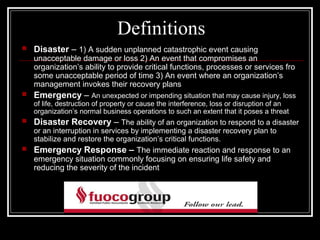
Definitions
   Disaster – 1) A sudden unplanned catastrophic event causing
    unacceptable damage or loss 2) An event that compromises an
    organization’s ability to provide critical functions, processes or services fro
    some unacceptable period of time 3) An event where an organization’s
    management invokes their recovery plans
   Emergency – An unexpected or impending situation that may cause injury, loss
    of life, destruction of property or cause the interference, loss or disruption of an
    organization’s normal business operations to such an extent that it poses a threat
   Disaster Recovery – The ability of an organization to respond to a disaster
    or an interruption in services by implementing a disaster recovery plan to
    stabilize and restore the organization’s critical functions.
   Emergency Response – The immediate reaction and response to an
    emergency situation commonly focusing on ensuring life safety and
    reducing the severity of the incident
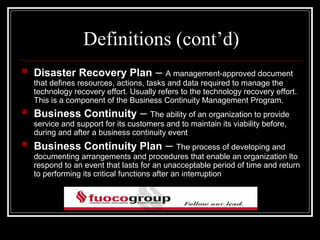
Definitions (cont’d)
   Disaster Recovery Plan –              A management-approved document
    that defines resources, actions, tasks and data required to manage the
    technology recovery effort. Usually refers to the technology recovery effort.
    This is a component of the Business Continuity Management Program.
   Business Continuity –             The ability of an organization to provide
    service and support for its customers and to maintain its viability before,
    during and after a business continuity event
   Business Continuity Plan –                  The process of developing and
    documenting arrangements and procedures that enable an organization lto
    respond to an event that lasts for an unacceptable period of time and return
    to performing its critical functions after an interruption
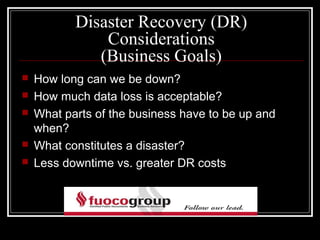
Disaster Recovery (DR)
               Considerations
              (Business Goals)
   How long can we be down?
   How much data loss is acceptable?
   What parts of the business have to be up and
    when?
   What constitutes a disaster?
   Less downtime vs. greater DR costs
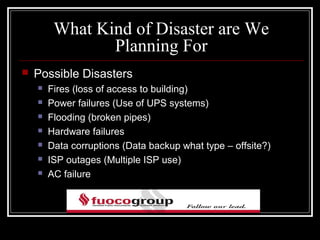
What Kind of Disaster are We
                Planning For
   Possible Disasters
       Fires (loss of access to building)
       Power failures (Use of UPS systems)
       Flooding (broken pipes)
       Hardware failures
       Data corruptions (Data backup what type – offsite?)
       ISP outages (Multiple ISP use)
       AC failure
Recovery Time Considerations
   What is acceptable downtime? What is your goal?
   How long does it take your systems to go from a
    completely down state to “ready for use” by staff
   How long would it take to restore data to servers?
   How long would it take to “switch back” to your
    main site after the disaster?
Disaster Recovery Communications
   How will you communicate to staff that there is an
    emergency?
   Where will people work from during a disaster?
   Does everyone know how to access DR systems?
   Cell phones and backup email addresses
Types of DR Sites to Consider
   Cold Site – Bare metal build – rebuild & restore everything from
    backups
   Warm Site – Full duplicates of systems & data maintained, but
    need work to “go live”
   Hot Site – Full duplicate of ‘live’ systems and data always ready
    for use (failover site)

   With multiple offices, we are between a Cold & Warm site option
Hosting center vs. Self-Hosted
   Hosting Quality: ISP diversity, HVAC, Power?
   Hosting Costs: Space, Power & Network
   Equipment costs: Lease? Purchase? Rent?
   Where is the DR site located? (travel issues)
   How long can you operate from the DR site?
   No matter what is chosen, you are maintaining
    two IT sites
Planning DR with Virtual Servers
   Full virtualization, in computer science, is a virtualization
    technique used to implement a certain kind of
    virtual machine environment: one that provides a complete
    simulation of the underlying hardware. The result is a
    system in which all software capable of execution on the
    raw hardware can be run in the virtual machine. In
    particular, this includes all operating systems. (This is
    different from other forms of virtualization – which allow
    only certain or modified software to run within a virtual
    machine.)
Planning DR with Virtual Servers
   Allows you to virtualize machines and cut down on
    hardware
   Replication
       Frequency & Process
       VM vs. SAN based
       Hosted, with agents and 3rd party
       Bandwidth restrictions (how much data do you have)
   Licenses (not trivial)
       Windows
       Replication software
       VMware ESX Server license vs. Windows 2008 Server
Issues to Consider
   How much work is sitting on people’s desks that is NOT
    digital
   Exceptions is there software, files, processes not on
    servers or that are know by only one person
   Do you have a full inventory of current equipment for the
    replacement of equipment and for the insurance
    company?
   Do you have all of the software ready to restore? Consider
    software as a service (SaaS)
   Plan should be WRITTEN and TESTED
Fuoco Group’s Plans
   Tape backup of data (daily) considering offsite
    online backup as well
   SAN Snap shots using Acronis software
   Windows Shadow Copy System
   Multiple T-1’s ISP’s
   Considering Virtualization
   Looking into CCH Global fx and CCH Document
    ASP
Risk Management in Digital World
   Risk – The possibility of suffering harm or loss
   Management – The act, manner, or practice of
    managing, handling, supervision, or control

    As the American Heritage Dictionary suggests,
    risk management is the process by which one
    attempts to manage or control the possibility of
    suffering loss
Overview
   Enron Arthur Anderson
   Spoliation (destroying evidence)
   The way in which information is created, processed ,
    and maintained in the modern, digital world has added a
    whole new layer of risk to the operation of any business,
    especially accounting firms
   Email handling has spawned a whole new industry
   An “ounce of prevention” will prevent “a pound of cure”
Document Management
                 & Retention
   What should be kept?
   For how long?
   Where is it?
   How do you maintain it?
   “Paperless” office
   A rough rule of thumb is that if electronically stored
    information is accessible (actively used for information
    retrieval) then it is likely subject to disclosure
Huey Long
       Notorious Louisiana governor
   Don’t write anything you can phone
   Don’t phone anything you can talk
   Don’t talk anything you can whisper
   Don’t whisper anything you can smile
   Don’t smile anything you can nod
   Don’t nod anything you can wink
Retention Policy
   Should you have one?
   Keep everything (electronic files)
        Storage space is cheap
       In litigation, discovery could be expensive as you have
        ALL files and pure volume of information would be
        overwhelming
   Keep nothing
       Litigation – proving your side
       Unlikely and unreasonable
Retention Policy
   Bottom line is there is no right or wrong answer
   Assess
       The nature of your practice
       Client base
       Claim History
       Applicable Law
       Best Practices of comparable firms
   Manage your risk by exercising good business judgment,
    develop procedures and stick to them
Sedona Guidelines
        www.thesedonaconference.org
   “Absent a legal requirement to the contrary, organizations
    may adopt programs that routinely delete certain recorded
    communications, such as electronic mail, instant
    messaging, text messaging and voice mail”
   Legal requirements could be:
       Sarbanes Oxley
       State law
       Federal law
       State accountancy regulations
       Self-imposed “litigation hold”
Retention Policies
   Whether hard copy or electronic the policies
    MUST BE
       Documented
       Communicated
       Enforced
       Updated
   Train staff – make them aware
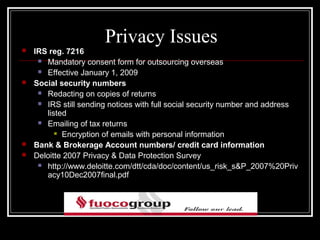
Privacy Issues
   IRS reg. 7216
      Mandatory consent form for outsourcing overseas

      Effective January 1, 2009

   Social security numbers
      Redacting on copies of returns

      IRS still sending notices with full social security number and address
       listed
      Emailing of tax returns
           Encryption of emails with personal information

   Bank & Brokerage Account numbers/ credit card information
   Deloitte 2007 Privacy & Data Protection Survey
      http://www.deloitte.com/dtt/cda/doc/content/us_risk_s&P_2007%20Priv
       acy10Dec2007final.pdf
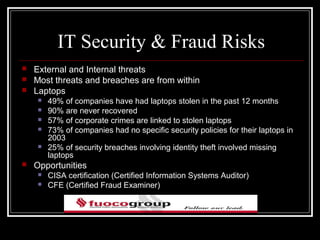
IT Security & Fraud Risks
   External and Internal threats
   Most threats and breaches are from within
   Laptops
       49% of companies have had laptops stolen in the past 12 months
       90% are never recovered
       57% of corporate crimes are linked to stolen laptops
       73% of companies had no specific security policies for their laptops in
        2003
       25% of security breaches involving identity theft involved missing
        laptops
   Opportunities
       CISA certification (Certified Information Systems Auditor)
       CFE (Certified Fraud Examiner)
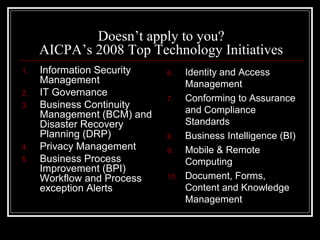
Doesn’t apply to you?
     AICPA’s 2008 Top Technology Initiatives
1.   Information Security   6.    Identity and Access
     Management                   Management
2.   IT Governance
                            7.    Conforming to Assurance
3.   Business Continuity
     Management (BCM) and         and Compliance
     Disaster Recovery            Standards
     Planning (DRP)         8.    Business Intelligence (BI)
4.   Privacy Management     9.    Mobile & Remote
5.   Business Process             Computing
     Improvement (BPI)
     Workflow and Process   10.   Document, Forms,
     exception Alerts             Content and Knowledge
                                  Management
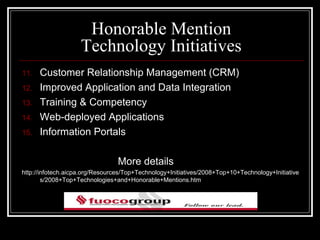
Honorable Mention
                    Technology Initiatives
11.   Customer Relationship Management (CRM)
12.   Improved Application and Data Integration
13.   Training & Competency
14.   Web-deployed Applications
15.   Information Portals

                                 More details
http://infotech.aicpa.org/Resources/Top+Technology+Initiatives/2008+Top+10+Technology+Initiative
        s/2008+Top+Technologies+and+Honorable+Mentions.htm
345 Seventh Avenue                          212-947-2000
8th Floor
New York, NY 10001

200 Parkway Drive South                     631-360-1700
Suite 302
Hauppauge, NY 11788

1224 US Highway One                         561-625-6692
Suite H
North Palm Beach, FL 33402

                               www.fuoco.com
                             jmanzelli@fuoco.com

Disaster recovery enw

  • 1.
    Disaster Recovery & Risk Management in the Digital World Joseph P. Manzelli Jr. CPA.CITP Director, Fuoco Group LLP www.fuoco.com jmanzelli@fuoco.com
  • 2.
    IT Infrastructure Background  Main office in Hauppauge, NY (Long Island) where all servers are housed  Two other offices – NYC and North Palm Beach, Florida  Staff of about 65 individuals  5 Servers  Dual T-1’s in NYC, T-1 point-to-point (NYS-LI) T-1 and 5mb line in LI and one T-1 in Florida
  • 3.
    Common Disaster RecoveryTerms (not just for IT)  Recovery Time Objective (RTO)  Time required to recover from a disaster  Recovery Point Objective (RPO)  How much data can you afford to lose  Business Impact Analysis (BIA)  Understand the degree of potential loss  Bare Metal Recovery – Assumption you are ‘starting from scratch”
  • 4.
    Definitions  Disaster – 1) A sudden unplanned catastrophic event causing unacceptable damage or loss 2) An event that compromises an organization’s ability to provide critical functions, processes or services fro some unacceptable period of time 3) An event where an organization’s management invokes their recovery plans  Emergency – An unexpected or impending situation that may cause injury, loss of life, destruction of property or cause the interference, loss or disruption of an organization’s normal business operations to such an extent that it poses a threat  Disaster Recovery – The ability of an organization to respond to a disaster or an interruption in services by implementing a disaster recovery plan to stabilize and restore the organization’s critical functions.  Emergency Response – The immediate reaction and response to an emergency situation commonly focusing on ensuring life safety and reducing the severity of the incident
  • 5.
    Definitions (cont’d)  Disaster Recovery Plan – A management-approved document that defines resources, actions, tasks and data required to manage the technology recovery effort. Usually refers to the technology recovery effort. This is a component of the Business Continuity Management Program.  Business Continuity – The ability of an organization to provide service and support for its customers and to maintain its viability before, during and after a business continuity event  Business Continuity Plan – The process of developing and documenting arrangements and procedures that enable an organization lto respond to an event that lasts for an unacceptable period of time and return to performing its critical functions after an interruption
  • 6.
    Disaster Recovery (DR) Considerations (Business Goals)  How long can we be down?  How much data loss is acceptable?  What parts of the business have to be up and when?  What constitutes a disaster?  Less downtime vs. greater DR costs
  • 7.
    What Kind ofDisaster are We Planning For  Possible Disasters  Fires (loss of access to building)  Power failures (Use of UPS systems)  Flooding (broken pipes)  Hardware failures  Data corruptions (Data backup what type – offsite?)  ISP outages (Multiple ISP use)  AC failure
  • 8.
    Recovery Time Considerations  What is acceptable downtime? What is your goal?  How long does it take your systems to go from a completely down state to “ready for use” by staff  How long would it take to restore data to servers?  How long would it take to “switch back” to your main site after the disaster?
  • 9.
    Disaster Recovery Communications  How will you communicate to staff that there is an emergency?  Where will people work from during a disaster?  Does everyone know how to access DR systems?  Cell phones and backup email addresses
  • 10.
    Types of DRSites to Consider  Cold Site – Bare metal build – rebuild & restore everything from backups  Warm Site – Full duplicates of systems & data maintained, but need work to “go live”  Hot Site – Full duplicate of ‘live’ systems and data always ready for use (failover site)  With multiple offices, we are between a Cold & Warm site option
  • 11.
    Hosting center vs.Self-Hosted  Hosting Quality: ISP diversity, HVAC, Power?  Hosting Costs: Space, Power & Network  Equipment costs: Lease? Purchase? Rent?  Where is the DR site located? (travel issues)  How long can you operate from the DR site?  No matter what is chosen, you are maintaining two IT sites
  • 12.
    Planning DR withVirtual Servers  Full virtualization, in computer science, is a virtualization technique used to implement a certain kind of virtual machine environment: one that provides a complete simulation of the underlying hardware. The result is a system in which all software capable of execution on the raw hardware can be run in the virtual machine. In particular, this includes all operating systems. (This is different from other forms of virtualization – which allow only certain or modified software to run within a virtual machine.)
  • 13.
    Planning DR withVirtual Servers  Allows you to virtualize machines and cut down on hardware  Replication  Frequency & Process  VM vs. SAN based  Hosted, with agents and 3rd party  Bandwidth restrictions (how much data do you have)  Licenses (not trivial)  Windows  Replication software  VMware ESX Server license vs. Windows 2008 Server
  • 14.
    Issues to Consider  How much work is sitting on people’s desks that is NOT digital  Exceptions is there software, files, processes not on servers or that are know by only one person  Do you have a full inventory of current equipment for the replacement of equipment and for the insurance company?  Do you have all of the software ready to restore? Consider software as a service (SaaS)  Plan should be WRITTEN and TESTED
  • 15.
    Fuoco Group’s Plans  Tape backup of data (daily) considering offsite online backup as well  SAN Snap shots using Acronis software  Windows Shadow Copy System  Multiple T-1’s ISP’s  Considering Virtualization  Looking into CCH Global fx and CCH Document ASP
  • 16.
    Risk Management inDigital World  Risk – The possibility of suffering harm or loss  Management – The act, manner, or practice of managing, handling, supervision, or control As the American Heritage Dictionary suggests, risk management is the process by which one attempts to manage or control the possibility of suffering loss
  • 17.
    Overview  Enron Arthur Anderson  Spoliation (destroying evidence)  The way in which information is created, processed , and maintained in the modern, digital world has added a whole new layer of risk to the operation of any business, especially accounting firms  Email handling has spawned a whole new industry  An “ounce of prevention” will prevent “a pound of cure”
  • 18.
    Document Management & Retention  What should be kept?  For how long?  Where is it?  How do you maintain it?  “Paperless” office  A rough rule of thumb is that if electronically stored information is accessible (actively used for information retrieval) then it is likely subject to disclosure
  • 19.
    Huey Long Notorious Louisiana governor  Don’t write anything you can phone  Don’t phone anything you can talk  Don’t talk anything you can whisper  Don’t whisper anything you can smile  Don’t smile anything you can nod  Don’t nod anything you can wink
  • 20.
    Retention Policy  Should you have one?  Keep everything (electronic files)  Storage space is cheap  In litigation, discovery could be expensive as you have ALL files and pure volume of information would be overwhelming  Keep nothing  Litigation – proving your side  Unlikely and unreasonable
  • 21.
    Retention Policy  Bottom line is there is no right or wrong answer  Assess  The nature of your practice  Client base  Claim History  Applicable Law  Best Practices of comparable firms  Manage your risk by exercising good business judgment, develop procedures and stick to them
  • 22.
    Sedona Guidelines www.thesedonaconference.org  “Absent a legal requirement to the contrary, organizations may adopt programs that routinely delete certain recorded communications, such as electronic mail, instant messaging, text messaging and voice mail”  Legal requirements could be:  Sarbanes Oxley  State law  Federal law  State accountancy regulations  Self-imposed “litigation hold”
  • 23.
    Retention Policies  Whether hard copy or electronic the policies MUST BE  Documented  Communicated  Enforced  Updated  Train staff – make them aware
  • 24.
    Privacy Issues  IRS reg. 7216  Mandatory consent form for outsourcing overseas  Effective January 1, 2009  Social security numbers  Redacting on copies of returns  IRS still sending notices with full social security number and address listed  Emailing of tax returns  Encryption of emails with personal information  Bank & Brokerage Account numbers/ credit card information  Deloitte 2007 Privacy & Data Protection Survey  http://www.deloitte.com/dtt/cda/doc/content/us_risk_s&P_2007%20Priv acy10Dec2007final.pdf
  • 25.
    IT Security &Fraud Risks  External and Internal threats  Most threats and breaches are from within  Laptops  49% of companies have had laptops stolen in the past 12 months  90% are never recovered  57% of corporate crimes are linked to stolen laptops  73% of companies had no specific security policies for their laptops in 2003  25% of security breaches involving identity theft involved missing laptops  Opportunities  CISA certification (Certified Information Systems Auditor)  CFE (Certified Fraud Examiner)
  • 26.
    Doesn’t apply toyou? AICPA’s 2008 Top Technology Initiatives 1. Information Security 6. Identity and Access Management Management 2. IT Governance 7. Conforming to Assurance 3. Business Continuity Management (BCM) and and Compliance Disaster Recovery Standards Planning (DRP) 8. Business Intelligence (BI) 4. Privacy Management 9. Mobile & Remote 5. Business Process Computing Improvement (BPI) Workflow and Process 10. Document, Forms, exception Alerts Content and Knowledge Management
  • 27.
    Honorable Mention Technology Initiatives 11. Customer Relationship Management (CRM) 12. Improved Application and Data Integration 13. Training & Competency 14. Web-deployed Applications 15. Information Portals More details http://infotech.aicpa.org/Resources/Top+Technology+Initiatives/2008+Top+10+Technology+Initiative s/2008+Top+Technologies+and+Honorable+Mentions.htm
  • 28.
    345 Seventh Avenue 212-947-2000 8th Floor New York, NY 10001 200 Parkway Drive South 631-360-1700 Suite 302 Hauppauge, NY 11788 1224 US Highway One 561-625-6692 Suite H North Palm Beach, FL 33402 www.fuoco.com jmanzelli@fuoco.com