

Technology
iMac
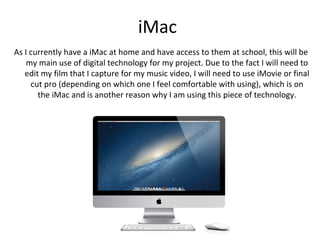
As I currently have a iMac at home and have access to them at school, this will be
    my main use of digital technology for my project. Due to the fact I will need to
   edit my film that I capture for my music video, I will need to use iMovie or final
     cut pro (depending on which one I feel comfortable with using), which is on
       the iMac and is another reason why I am using this piece of technology.
Google Chrome
During the research stage, which I am currently on, I will use Google Chrome
   as my web browser because it is the quickest to obtain information. Not
   only this but I will be capable to multi-task freely, by being able to look at
    music videos for inspiration as well as writing down my thoughts on my
   blog. As I will be constantly updating my blogger and other software such
   as slide share, YouTube etc, this will be one of my most highly demanded
                           technology I will end up using!
Blogger
 For the past year I have been using this website (www.blogger.com) to
update all of my posts. As I am fortunate to have access to the internet at
 both home and school, it shall be easy to show my progress on creating
                              my music video.
YouTube
 YouTube will be another major technology that will come in handy
throughout the duration of the course, as I will need to look at music
videos to give me inspiration and help me find the song I am going to
                        create for my project.
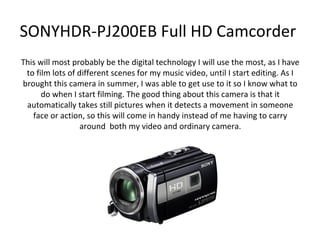
SONYHDR-PJ200EB Full HD Camcorder
This will most probably be the digital technology I will use the most, as I have
 to film lots of different scenes for my music video, until I start editing. As I
brought this camera in summer, I was able to get use to it so I know what to
      do when I start filming. The good thing about this camera is that it
 automatically takes still pictures when it detects a movement in someone
   face or action, so this will come in handy instead of me having to carry
                  around both my video and ordinary camera.
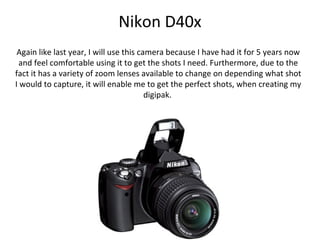
Nikon D40x
 Again like last year, I will use this camera because I have had it for 5 years now
  and feel comfortable using it to get the shots I need. Furthermore, due to the
fact it has a variety of zoom lenses available to change on depending what shot
I would to capture, it will enable me to get the perfect shots, when creating my
                                         digipak.
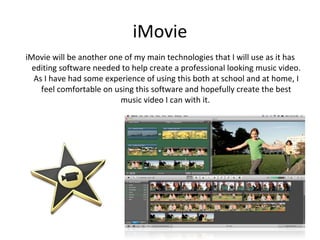
iMovie
iMovie will be another one of my main technologies that I will use as it has
  editing software needed to help create a professional looking music video.
  As I have had some experience of using this both at school and at home, I
    feel comfortable on using this software and hopefully create the best
                          music video I can with it.
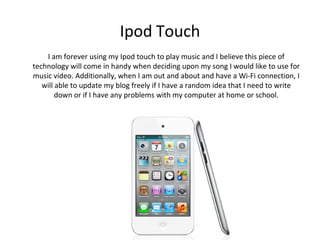
Ipod Touch
    I am forever using my Ipod touch to play music and I believe this piece of
technology will come in handy when deciding upon my song I would like to use for
music video. Additionally, when I am out and about and have a Wi-Fi connection, I
   will able to update my blog freely if I have a random idea that I need to write
        down or if I have any problems with my computer at home or school.
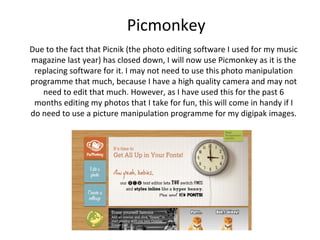
Picmonkey
Due to the fact that Picnik (the photo editing software I used for my music
magazine last year) has closed down, I will now use Picmonkey as it is the
 replacing software for it. I may not need to use this photo manipulation
programme that much, because I have a high quality camera and may not
   need to edit that much. However, as I have used this for the past 6
 months editing my photos that I take for fun, this will come in handy if I
do need to use a picture manipulation programme for my digipak images.
Slideshare
   Last year, I ended up using this piece of software rather frequently,
    instead of constantly writing everything on my blog. This year I am
   planning to do the same because I am comfortable knowing my way
around it, as well as being easily able to upload my PowerPoint's onto my
blog. I found this a really helpful website to use last year, as it enables me
  to directly embed HTML into a post on blogger and appearing straight
                       onto my post when I publish it.
Microsoft Software Applications
 Throughout this project I will most probably use Microsoft Word because
it is easily accessible both at home and at school. I am planning to use this
piece of software for writing up my music video script so I know what I am
                                 doing when.
Desktop Publishing
 I may need to use this application when it comes to creating my digipak,
as I am unsure what other piece of software that I would use for this task.
    Due to the fact I have used this software for many years now, I feel
                           comfortable in using it.
Flickr
With this programme I like how you can create a slideshow presentation of
   all the photos I have taken for my task, which may come in handy when
  doing my digipak. As well as this, it will enable me to add tags to each of
    my drafts or even my final drafts of my designs for my digipak when I
                         come to this point of the task.
Prezi
 Until last year when I use this piece of software for some of my music
   magazine evaluations, I haven’t used it before! Although it was a bit
  confusing and long winded at first, I now feel comfortable with using it
again I may use this as another way of presenting my work due to the fact
       it is more visually appealing on the eye than chunks of writing.

Digital Technology

  • 1.
  • 2.
    iMac As I currentlyhave a iMac at home and have access to them at school, this will be my main use of digital technology for my project. Due to the fact I will need to edit my film that I capture for my music video, I will need to use iMovie or final cut pro (depending on which one I feel comfortable with using), which is on the iMac and is another reason why I am using this piece of technology.
  • 3.
    Google Chrome During theresearch stage, which I am currently on, I will use Google Chrome as my web browser because it is the quickest to obtain information. Not only this but I will be capable to multi-task freely, by being able to look at music videos for inspiration as well as writing down my thoughts on my blog. As I will be constantly updating my blogger and other software such as slide share, YouTube etc, this will be one of my most highly demanded technology I will end up using!
  • 4.
    Blogger For thepast year I have been using this website (www.blogger.com) to update all of my posts. As I am fortunate to have access to the internet at both home and school, it shall be easy to show my progress on creating my music video.
  • 5.
    YouTube YouTube willbe another major technology that will come in handy throughout the duration of the course, as I will need to look at music videos to give me inspiration and help me find the song I am going to create for my project.
  • 6.
    SONYHDR-PJ200EB Full HDCamcorder This will most probably be the digital technology I will use the most, as I have to film lots of different scenes for my music video, until I start editing. As I brought this camera in summer, I was able to get use to it so I know what to do when I start filming. The good thing about this camera is that it automatically takes still pictures when it detects a movement in someone face or action, so this will come in handy instead of me having to carry around both my video and ordinary camera.
  • 7.
    Nikon D40x Againlike last year, I will use this camera because I have had it for 5 years now and feel comfortable using it to get the shots I need. Furthermore, due to the fact it has a variety of zoom lenses available to change on depending what shot I would to capture, it will enable me to get the perfect shots, when creating my digipak.
  • 8.
    iMovie iMovie will beanother one of my main technologies that I will use as it has editing software needed to help create a professional looking music video. As I have had some experience of using this both at school and at home, I feel comfortable on using this software and hopefully create the best music video I can with it.
  • 9.
    Ipod Touch I am forever using my Ipod touch to play music and I believe this piece of technology will come in handy when deciding upon my song I would like to use for music video. Additionally, when I am out and about and have a Wi-Fi connection, I will able to update my blog freely if I have a random idea that I need to write down or if I have any problems with my computer at home or school.
  • 10.
    Picmonkey Due to thefact that Picnik (the photo editing software I used for my music magazine last year) has closed down, I will now use Picmonkey as it is the replacing software for it. I may not need to use this photo manipulation programme that much, because I have a high quality camera and may not need to edit that much. However, as I have used this for the past 6 months editing my photos that I take for fun, this will come in handy if I do need to use a picture manipulation programme for my digipak images.
  • 11.
    Slideshare Last year, I ended up using this piece of software rather frequently, instead of constantly writing everything on my blog. This year I am planning to do the same because I am comfortable knowing my way around it, as well as being easily able to upload my PowerPoint's onto my blog. I found this a really helpful website to use last year, as it enables me to directly embed HTML into a post on blogger and appearing straight onto my post when I publish it.
  • 12.
    Microsoft Software Applications Throughout this project I will most probably use Microsoft Word because it is easily accessible both at home and at school. I am planning to use this piece of software for writing up my music video script so I know what I am doing when.
  • 13.
    Desktop Publishing Imay need to use this application when it comes to creating my digipak, as I am unsure what other piece of software that I would use for this task. Due to the fact I have used this software for many years now, I feel comfortable in using it.
  • 14.
    Flickr With this programmeI like how you can create a slideshow presentation of all the photos I have taken for my task, which may come in handy when doing my digipak. As well as this, it will enable me to add tags to each of my drafts or even my final drafts of my designs for my digipak when I come to this point of the task.
  • 15.
    Prezi Until lastyear when I use this piece of software for some of my music magazine evaluations, I haven’t used it before! Although it was a bit confusing and long winded at first, I now feel comfortable with using it again I may use this as another way of presenting my work due to the fact it is more visually appealing on the eye than chunks of writing.