Evaluation
Q4. How did you use media technologies in the construction and
research, planning and evaluation stages?
By Mona Khalajabadi
Research & Planning – Blogger
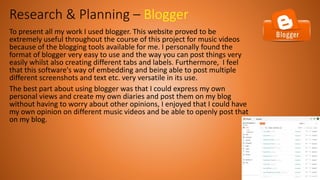
To present all my work I used blogger. This website proved to be
extremely useful throughout the course of this project for music videos
because of the blogging tools available for me. I personally found the
format of blogger very easy to use and the way you can post things very
easily whilst also creating different tabs and labels. Furthermore, I feel
that this software's way of embedding and being able to post multiple
different screenshots and text etc. very versatile in its use.
The best part about using blogger was that I could express my own
personal views and create my own diaries and post them on my blog
without having to worry about other opinions, I enjoyed that I could have
my own opinion on different music videos and be able to openly post that
on my blog.
Research & Planning – Different online tools
Throughout the course of creating my music
video I used different websites and online tools
to present my work. Some of the tools I used
where fantastic in terms of displaying my
research and planning tasks. Using these tools I
have inserted below, have helped make my
work look appealing and interesting for people
to want to read.
Research & Planning – CANVA
Personally, my favourite software that I used would definitely
be Canva. This is because I could create a poster with
whatever background/text/font/colours I wanted and display
It how I like, it also created multiple pages after you’ve
finished the first page.
An example of when I used Canva and I thought it worked
fantastically was when I created a poster for Stormzy.
Research & Planning - INSTAGRAM
I used Instagram for my filming diary, so every
time we would film I would post a few photos on
this Instagram page and explain what we done
and had achieved throughout the course of the
day. I felt that creating this page made me feel a
lot more organised and it also helped me write
some things that didn’t go to plan so we were
aware not to do them again.
Research & Planning – SLIDESHARE
I personally think, slideshare is one of the easiest and
simplest presentation software's I have used throughout
the course of creating this music video. It helps me keep
my presentations look neat and tidy and it also can be
manipulated to look very interesting and eye catching
for example like adding a cool background. However, I
can argue and say that is not the most interesting
software to use as I have found a lot more software's like
Prezi for example, look a lot nicer.
Research & Planning - PREZI
PREZI, again is another presentation software that I used and I felt that
this software was one of the best in terms of how it looks. They have
such a huge variety of different backgrounds and themes to choose
from that each presentation looks so unique and different and I feel
that makes it more eye-catching than slideshare.
Research & Planning – Technology
My laptop was my main platform I used everyday to do my
media work on.
Personally, I feel that without my laptop I would not have
been able to create the work I have on my blog. It has given
me a huge variety of sources and has made me able to
browse through different online tools and software's.
Having my own laptop ensured that I could do as much work as I
possibly could in my spare time outside of my lessons. I could use
photoshop, final cut and all the other presentation softwares on it and
this made me feel confident in using all of these due to the fact I got
loads of practice done outside of lessons.
Construction – Filming To film our music video we used an
iPhone 8 Plus camera.
Previously I had used a Nikon DSLR
camera for other filming but then I
thought it would be a good idea to
change it and use an iPhone 8
camera as they are fantastic. I loved
it as the iPhone 8 camera has a wide-
angle lens roughly around 28mm,
while the portrait camera has a
telephoto lens roughly 56mm.
If we had to use an ordinary digital camera, the
music video would not have looked up to a high
quality and would have looked quite fuzzy. This
means that the music video wouldn’t be as
affective/successful. Most successful music videos
have a VERY high quality and they are also very
smooth to watch and there usually aren’t any
glitches with them. To make our music video as
successful as possible we had to make sure all our
panning and angles were lined up and didn’t look
wonky or shaky at all.
Construction – FINAL CUT
To edit our music video we used final cut pro. The reason why we chose to edit
on this instead of iMovie was mainly because we both had macbooks and this
was an easier software to use on our laptops. There are so many advanatges
using Final Cut pro, firstly being, that the software if quite intuitive and full of
features. We achieved all of our successful editing from the features that the
software included. Another benefit was the innovative magnetic timeline. This
new take on the old concept of the timeline makes it easier to compose our
music video because it automatically snaps the clips into place. It also adjusts
clips automatically as you move clips around on the timeline. This is such a huge
advantage because it saves a lot of time for us.
Construction – Photoshop
Personally, I feel that without photoshop, my ancillary
task would not have been anywhere near as effective.
The photographs I used for my digipak and poster were
edited a lot and that is the reason to my end result.
Below I will have my before and after images of using
photoshop with my digipak and poster.
Regardless of the fact that I struggled hugely using
photoshop, I did learn loads of shortcuts and I learnt
how to add PNG effects and how to manipulate
photos to make them look a lot nicer.
Conclusion
Throughout this course of creating my music
video I have learned and picked up a lot of
techniques and I have used a range of
technologies which have helped make and
improve my work to look extremely
professional and also make It appealing to
read. Making all of my presentations and
using multiple different tools helped reach a
wider audience and helped expand my ideas
and my thoughts on everything.

Question 4 evaluation

  • 1.
    Evaluation Q4. How didyou use media technologies in the construction and research, planning and evaluation stages? By Mona Khalajabadi
  • 2.
    Research & Planning– Blogger To present all my work I used blogger. This website proved to be extremely useful throughout the course of this project for music videos because of the blogging tools available for me. I personally found the format of blogger very easy to use and the way you can post things very easily whilst also creating different tabs and labels. Furthermore, I feel that this software's way of embedding and being able to post multiple different screenshots and text etc. very versatile in its use. The best part about using blogger was that I could express my own personal views and create my own diaries and post them on my blog without having to worry about other opinions, I enjoyed that I could have my own opinion on different music videos and be able to openly post that on my blog.
  • 3.
    Research & Planning– Different online tools Throughout the course of creating my music video I used different websites and online tools to present my work. Some of the tools I used where fantastic in terms of displaying my research and planning tasks. Using these tools I have inserted below, have helped make my work look appealing and interesting for people to want to read.
  • 4.
    Research & Planning– CANVA Personally, my favourite software that I used would definitely be Canva. This is because I could create a poster with whatever background/text/font/colours I wanted and display It how I like, it also created multiple pages after you’ve finished the first page. An example of when I used Canva and I thought it worked fantastically was when I created a poster for Stormzy.
  • 5.
    Research & Planning- INSTAGRAM I used Instagram for my filming diary, so every time we would film I would post a few photos on this Instagram page and explain what we done and had achieved throughout the course of the day. I felt that creating this page made me feel a lot more organised and it also helped me write some things that didn’t go to plan so we were aware not to do them again.
  • 6.
    Research & Planning– SLIDESHARE I personally think, slideshare is one of the easiest and simplest presentation software's I have used throughout the course of creating this music video. It helps me keep my presentations look neat and tidy and it also can be manipulated to look very interesting and eye catching for example like adding a cool background. However, I can argue and say that is not the most interesting software to use as I have found a lot more software's like Prezi for example, look a lot nicer.
  • 7.
    Research & Planning- PREZI PREZI, again is another presentation software that I used and I felt that this software was one of the best in terms of how it looks. They have such a huge variety of different backgrounds and themes to choose from that each presentation looks so unique and different and I feel that makes it more eye-catching than slideshare.
  • 8.
    Research & Planning– Technology My laptop was my main platform I used everyday to do my media work on. Personally, I feel that without my laptop I would not have been able to create the work I have on my blog. It has given me a huge variety of sources and has made me able to browse through different online tools and software's. Having my own laptop ensured that I could do as much work as I possibly could in my spare time outside of my lessons. I could use photoshop, final cut and all the other presentation softwares on it and this made me feel confident in using all of these due to the fact I got loads of practice done outside of lessons.
  • 9.
    Construction – FilmingTo film our music video we used an iPhone 8 Plus camera. Previously I had used a Nikon DSLR camera for other filming but then I thought it would be a good idea to change it and use an iPhone 8 camera as they are fantastic. I loved it as the iPhone 8 camera has a wide- angle lens roughly around 28mm, while the portrait camera has a telephoto lens roughly 56mm. If we had to use an ordinary digital camera, the music video would not have looked up to a high quality and would have looked quite fuzzy. This means that the music video wouldn’t be as affective/successful. Most successful music videos have a VERY high quality and they are also very smooth to watch and there usually aren’t any glitches with them. To make our music video as successful as possible we had to make sure all our panning and angles were lined up and didn’t look wonky or shaky at all.
  • 10.
    Construction – FINALCUT To edit our music video we used final cut pro. The reason why we chose to edit on this instead of iMovie was mainly because we both had macbooks and this was an easier software to use on our laptops. There are so many advanatges using Final Cut pro, firstly being, that the software if quite intuitive and full of features. We achieved all of our successful editing from the features that the software included. Another benefit was the innovative magnetic timeline. This new take on the old concept of the timeline makes it easier to compose our music video because it automatically snaps the clips into place. It also adjusts clips automatically as you move clips around on the timeline. This is such a huge advantage because it saves a lot of time for us.
  • 11.
    Construction – Photoshop Personally,I feel that without photoshop, my ancillary task would not have been anywhere near as effective. The photographs I used for my digipak and poster were edited a lot and that is the reason to my end result. Below I will have my before and after images of using photoshop with my digipak and poster. Regardless of the fact that I struggled hugely using photoshop, I did learn loads of shortcuts and I learnt how to add PNG effects and how to manipulate photos to make them look a lot nicer.
  • 12.
    Conclusion Throughout this courseof creating my music video I have learned and picked up a lot of techniques and I have used a range of technologies which have helped make and improve my work to look extremely professional and also make It appealing to read. Making all of my presentations and using multiple different tools helped reach a wider audience and helped expand my ideas and my thoughts on everything.