Dictionaries in Python3
By Lakshmi Sarvani Videla
NOTE: all the contents in this ppt are taken from w3schools
https://www.w3schools.com/python/
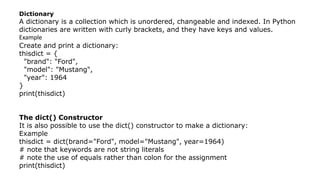
Dictionary
A dictionary is a collection which is unordered, changeable and indexed. In Python
dictionaries are written with curly brackets, and they have keys and values.
Example
Create and print a dictionary:
thisdict = {
"brand": "Ford",
"model": "Mustang",
"year": 1964
}
print(thisdict)
The dict() Constructor
It is also possible to use the dict() constructor to make a dictionary:
Example
thisdict = dict(brand="Ford", model="Mustang", year=1964)
# note that keywords are not string literals
# note the use of equals rather than colon for the assignment
print(thisdict)
Accessing Items
You can access the items of a dictionary by
referring to its key name, inside square brackets:
Example
Get the value of the "model" key:
x = thisdict["model"]
There is also a method called get() that will give
you the same result:
Example
Get the value of the "model" key:
x = thisdict.get("model")
Change Values
You can change the value of a specific item by referring to its key name:
Example
Change the "year" to 2018:
thisdict = { "brand": "Ford", "model": "Mustang", "year": 1964 }
thisdict["year"] = 2018
Loop Through a Dictionary
You can loop through a dictionary by using a for loop.
When looping through a dictionary, the return value are the keys of the dictionary, but
there are methods to return the values as well.
Example
Print all key names in the dictionary, one by one:
for x in thisdict:
print(x)
Example
Print all values in the dictionary, one by one:
for x in thisdict:
print(thisdict[x])
You can also use the values() function to return values of a dictionary:
for x in thisdict.values():
print(x)
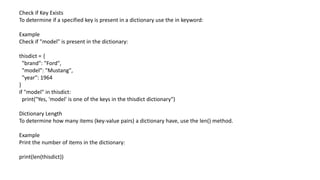
Check if Key Exists
To determine if a specified key is present in a dictionary use the in keyword:
Example
Check if "model" is present in the dictionary:
thisdict = {
"brand": "Ford",
"model": "Mustang",
"year": 1964
}
if "model" in thisdict:
print("Yes, 'model' is one of the keys in the thisdict dictionary")
Dictionary Length
To determine how many items (key-value pairs) a dictionary have, use the len() method.
Example
Print the number of items in the dictionary:
print(len(thisdict))
Adding Items
Adding an item to the dictionary is done by using a new index key and assigning a value to it:
Example
thisdict = {
"brand": "Ford",
"model": "Mustang",
"year": 1964
}
thisdict["color"] = "red"
print(thisdict)
Create a dictionary with 3 keys, all with the value 0:
x = ('key1', 'key2', 'key3')
y = 0
thisdict = dict.fromkeys(x, y)
print(thisdict)
Removing Items
There are several methods to remove items from a dictionary:
Example
The pop() method removes the item with the specified key name:
thisdict = { "brand": "Ford", "model": "Mustang", "year": 1964}
thisdict.pop("model")
print(thisdict)
The popitem() method removes the last inserted item (in versions before 3.7, a random item
is removed instead):
thisdict = { "brand": "Ford", "model": "Mustang", "year": 1964}
thisdict.popitem()
print(thisdict)
Example
The del keyword removes the item with the specified key name:
thisdict = { "brand": "Ford", "model": "Mustang", "year": 1964}
del thisdict["model"]
print(thisdict)
Example
The clear() keyword empties the dictionary:
thisdict = { "brand": "Ford", "model": "Mustang", "year": 1964 }
thisdict.clear()
print(thisdict)
Copy the car dictionary:
car = {
"brand": "Ford",
"model": "Mustang",
"year": 1964
}
x = car.copy()
print(x)
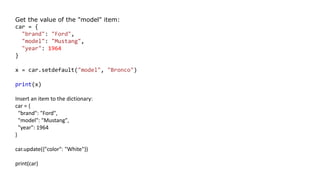
Get the value of the "model" item:
car = {
"brand": "Ford",
"model": "Mustang",
"year": 1964
}
x = car.setdefault("model", "Bronco")
print(x)
Insert an item to the dictionary:
car = {
"brand": "Ford",
"model": "Mustang",
"year": 1964
}
car.update({"color": "White"})
print(car)
Return the dictionary's key-value pairs:
car = {
"brand": "Ford",
"model": "Mustang",
"year": 1964
}
x = car.items()
print(x)

Dictionary

  • 1.
    Dictionaries in Python3 ByLakshmi Sarvani Videla NOTE: all the contents in this ppt are taken from w3schools https://www.w3schools.com/python/
  • 2.
    Dictionary A dictionary isa collection which is unordered, changeable and indexed. In Python dictionaries are written with curly brackets, and they have keys and values. Example Create and print a dictionary: thisdict = { "brand": "Ford", "model": "Mustang", "year": 1964 } print(thisdict) The dict() Constructor It is also possible to use the dict() constructor to make a dictionary: Example thisdict = dict(brand="Ford", model="Mustang", year=1964) # note that keywords are not string literals # note the use of equals rather than colon for the assignment print(thisdict)
  • 3.
    Accessing Items You canaccess the items of a dictionary by referring to its key name, inside square brackets: Example Get the value of the "model" key: x = thisdict["model"] There is also a method called get() that will give you the same result: Example Get the value of the "model" key: x = thisdict.get("model")
  • 4.
    Change Values You canchange the value of a specific item by referring to its key name: Example Change the "year" to 2018: thisdict = { "brand": "Ford", "model": "Mustang", "year": 1964 } thisdict["year"] = 2018
  • 5.
    Loop Through aDictionary You can loop through a dictionary by using a for loop. When looping through a dictionary, the return value are the keys of the dictionary, but there are methods to return the values as well. Example Print all key names in the dictionary, one by one: for x in thisdict: print(x) Example Print all values in the dictionary, one by one: for x in thisdict: print(thisdict[x]) You can also use the values() function to return values of a dictionary: for x in thisdict.values(): print(x)
  • 6.
    Check if KeyExists To determine if a specified key is present in a dictionary use the in keyword: Example Check if "model" is present in the dictionary: thisdict = { "brand": "Ford", "model": "Mustang", "year": 1964 } if "model" in thisdict: print("Yes, 'model' is one of the keys in the thisdict dictionary") Dictionary Length To determine how many items (key-value pairs) a dictionary have, use the len() method. Example Print the number of items in the dictionary: print(len(thisdict))
  • 7.
    Adding Items Adding anitem to the dictionary is done by using a new index key and assigning a value to it: Example thisdict = { "brand": "Ford", "model": "Mustang", "year": 1964 } thisdict["color"] = "red" print(thisdict) Create a dictionary with 3 keys, all with the value 0: x = ('key1', 'key2', 'key3') y = 0 thisdict = dict.fromkeys(x, y) print(thisdict)
  • 8.
    Removing Items There areseveral methods to remove items from a dictionary: Example The pop() method removes the item with the specified key name: thisdict = { "brand": "Ford", "model": "Mustang", "year": 1964} thisdict.pop("model") print(thisdict) The popitem() method removes the last inserted item (in versions before 3.7, a random item is removed instead): thisdict = { "brand": "Ford", "model": "Mustang", "year": 1964} thisdict.popitem() print(thisdict) Example The del keyword removes the item with the specified key name: thisdict = { "brand": "Ford", "model": "Mustang", "year": 1964} del thisdict["model"] print(thisdict)
  • 9.
    Example The clear() keywordempties the dictionary: thisdict = { "brand": "Ford", "model": "Mustang", "year": 1964 } thisdict.clear() print(thisdict) Copy the car dictionary: car = { "brand": "Ford", "model": "Mustang", "year": 1964 } x = car.copy() print(x)
  • 10.
    Get the valueof the "model" item: car = { "brand": "Ford", "model": "Mustang", "year": 1964 } x = car.setdefault("model", "Bronco") print(x) Insert an item to the dictionary: car = { "brand": "Ford", "model": "Mustang", "year": 1964 } car.update({"color": "White"}) print(car)
  • 11.
    Return the dictionary'skey-value pairs: car = { "brand": "Ford", "model": "Mustang", "year": 1964 } x = car.items() print(x)