Dictionary
Presented by:
Saliha Mumtaz
Laiba Kalam
Haider Raza
Usman Shafique
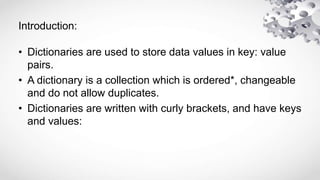
Introduction:
• Dictionaries are used to store data values in key: value
pairs.
• A dictionary is a collection which is ordered*, changeable
and do not allow duplicates.
• Dictionaries are written with curly brackets, and have keys
and values:
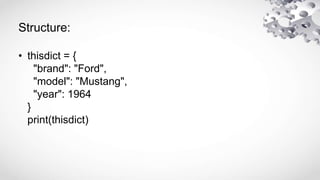
Structure:
• thisdict = {
"brand": "Ford",
"model": "Mustang",
"year": 1964
}
print(thisdict)
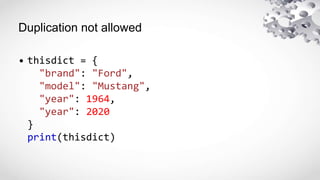
Duplication not allowed
• thisdict = {
"brand": "Ford",
"model": "Mustang",
"year": 1964,
"year": 2020
}
print(thisdict)
Dictionary Length
• print(len(thisdict))
• String, int, boolean, and list data types:
• thisdict = {
"brand": "Ford",
"electric": False,
"year": 1964,
"colors": ["red", "white", "blue"]
}
FEATURES OF DICTIONARY
IN PYTHON
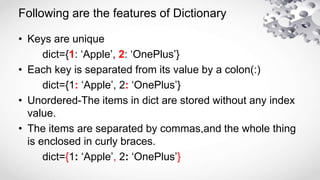
Following are the features of Dictionary
• Keys are unique
dict={1: ‘Apple’, 2: ‘OnePlus’}
• Each key is separated from its value by a colon(:)
dict={1: ‘Apple’, 2: ‘OnePlus’}
• Unordered-The items in dict are stored without any index
value.
• The items are separated by commas,and the whole thing
is enclosed in curly braces.
dict={1: ‘Apple’, 2: ‘OnePlus’}
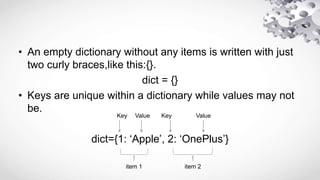
• An empty dictionary without any items is written with just
two curly braces,like this:{}.
dict = {}
• Keys are unique within a dictionary while values may not
be.
dict={1: ‘Apple’, 2: ‘OnePlus’}
item 1 item 2
Key Key
Value Value
• keys must be immutable
You can use string,numbers or tuples as dictionary
keys but something like [‘key’] is not allowed.
student={[‘Name’]: ZARA, ‘Age’:7}
print(“student[‘Name’]:”,student[‘Name’])//Type Error
Not Alllowed
• More than one entry per key not allowed
It means no duplicate key is allowed.When duplicate
keys encountered during assignment,the last
assignment wins.
student={‘Name’: ‘Zara’, ‘Age’:7, ‘Name’: ‘Manni’}
print(“student[‘Name’]:”,student[‘Name’])
//Output:
student[‘Name’]:Manni
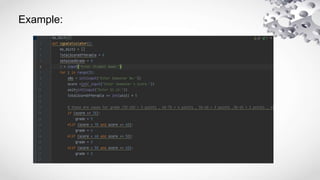
Example:
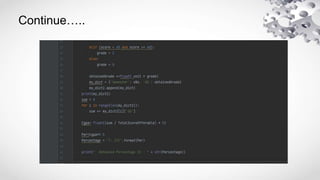
Continue…..
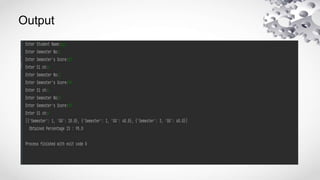
Output
PYTHON DICTIONARY.pptx

PYTHON DICTIONARY.pptx

  • 1.
    Dictionary Presented by: Saliha Mumtaz LaibaKalam Haider Raza Usman Shafique
  • 2.
    Introduction: • Dictionaries areused to store data values in key: value pairs. • A dictionary is a collection which is ordered*, changeable and do not allow duplicates. • Dictionaries are written with curly brackets, and have keys and values:
  • 3.
    Structure: • thisdict ={ "brand": "Ford", "model": "Mustang", "year": 1964 } print(thisdict)
  • 4.
    Duplication not allowed •thisdict = { "brand": "Ford", "model": "Mustang", "year": 1964, "year": 2020 } print(thisdict)
  • 5.
    Dictionary Length • print(len(thisdict)) •String, int, boolean, and list data types: • thisdict = { "brand": "Ford", "electric": False, "year": 1964, "colors": ["red", "white", "blue"] }
  • 6.
  • 7.
    Following are thefeatures of Dictionary • Keys are unique dict={1: ‘Apple’, 2: ‘OnePlus’} • Each key is separated from its value by a colon(:) dict={1: ‘Apple’, 2: ‘OnePlus’} • Unordered-The items in dict are stored without any index value. • The items are separated by commas,and the whole thing is enclosed in curly braces. dict={1: ‘Apple’, 2: ‘OnePlus’}
  • 8.
    • An emptydictionary without any items is written with just two curly braces,like this:{}. dict = {} • Keys are unique within a dictionary while values may not be. dict={1: ‘Apple’, 2: ‘OnePlus’} item 1 item 2 Key Key Value Value
  • 9.
    • keys mustbe immutable You can use string,numbers or tuples as dictionary keys but something like [‘key’] is not allowed. student={[‘Name’]: ZARA, ‘Age’:7} print(“student[‘Name’]:”,student[‘Name’])//Type Error Not Alllowed
  • 10.
    • More thanone entry per key not allowed It means no duplicate key is allowed.When duplicate keys encountered during assignment,the last assignment wins. student={‘Name’: ‘Zara’, ‘Age’:7, ‘Name’: ‘Manni’} print(“student[‘Name’]:”,student[‘Name’]) //Output: student[‘Name’]:Manni
  • 11.
  • 12.
  • 13.