Batchable vs. @future vs. Queueable
The Batchable Interface
• When should I use it?
- Complex long running processes (thousands of records)
- Asynchronous processing
- Scheduled jobs
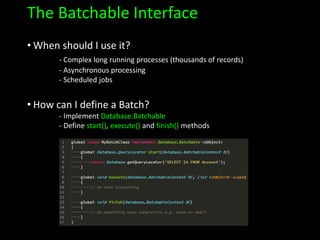
• How can I define a Batch?
- Implement Database.Batchable
- Define start(), execute() and finish() methods
The Batchable Interface
• Advantages
- It can process up to 50m records
- It can be scheduled to run at a particular time
• Disadvantages
- Only 5 concurrent batch jobs running at a time*
- It’s difficult to troubleshoot
- Execution may be delayed based on server availability
- @future methods are not allowed
- Can’t use getContent/getContentAsPDF methods
- and a few more governor limits…
@future method
• When should I use it?
- When it’s not a batch (group = 2 or more)
- Asynchronous processing (simple and often)
- Long-running operations (callouts to external web services)
- Separating mixed DML operations
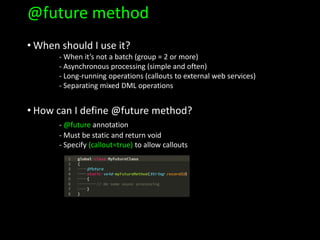
• How can I define @future method?
- @future annotation
- Must be static and return void
- Specify (callout=true) to allow callouts
@future method
• Advantages
- Asynchronous processing without a concurrent limit (queue)
- Easier and quicker to implement as opposed to Batch
• Disadvantages
- Parameters passed in can be only of Primitive type
- Can’t use getContent/getContentAsPDF methods
- Can’t chain @future methods
- Difficult access to job ID
The Queueable Interface
• When should I use it?
- When Batch and @future need to meet in the middle
- Chaining jobs
- You need @future method with support for non-primitive types
- Asynchronous monitoring
• How can I define Queueable Apex?
- Implement the Queueable interface
- Define execute() method
• How can I enqueue a job?
- ID jobID = System.enqueueJob(new MyQueueableClass());
The Queueable Interface
• Advantages
- Asynchronous processing with non-primitive arguments
- Easy access to the job ID
- Chaining jobs*
• Disadvantages
- Can’t have more than 1 job in the chain that does callouts
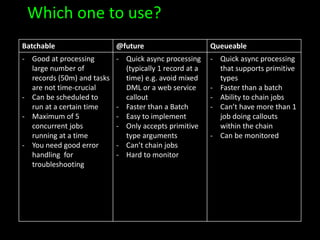
Which one to use?
Batchable @future Queueable
- Good at processing
large number of
records (50m) and tasks
are not time-crucial
- Can be scheduled to
run at a certain time
- Maximum of 5
concurrent jobs
running at a time
- You need good error
handling for
troubleshooting
- Quick async processing
(typically 1 record at a
time) e.g. avoid mixed
DML or a web service
callout
- Faster than a Batch
- Easy to implement
- Only accepts primitive
type arguments
- Can’t chain jobs
- Hard to monitor
- Quick async processing
that supports primitive
types
- Faster than a batch
- Ability to chain jobs
- Can’t have more than 1
job doing callouts
within the chain
- Can be monitored
Questions?

Batchable vs @future vs Queueable

  • 1.
    Batchable vs. @futurevs. Queueable
  • 2.
    The Batchable Interface •When should I use it? - Complex long running processes (thousands of records) - Asynchronous processing - Scheduled jobs • How can I define a Batch? - Implement Database.Batchable - Define start(), execute() and finish() methods
  • 3.
    The Batchable Interface •Advantages - It can process up to 50m records - It can be scheduled to run at a particular time • Disadvantages - Only 5 concurrent batch jobs running at a time* - It’s difficult to troubleshoot - Execution may be delayed based on server availability - @future methods are not allowed - Can’t use getContent/getContentAsPDF methods - and a few more governor limits…
  • 4.
    @future method • Whenshould I use it? - When it’s not a batch (group = 2 or more) - Asynchronous processing (simple and often) - Long-running operations (callouts to external web services) - Separating mixed DML operations • How can I define @future method? - @future annotation - Must be static and return void - Specify (callout=true) to allow callouts
  • 5.
    @future method • Advantages -Asynchronous processing without a concurrent limit (queue) - Easier and quicker to implement as opposed to Batch • Disadvantages - Parameters passed in can be only of Primitive type - Can’t use getContent/getContentAsPDF methods - Can’t chain @future methods - Difficult access to job ID
  • 6.
    The Queueable Interface •When should I use it? - When Batch and @future need to meet in the middle - Chaining jobs - You need @future method with support for non-primitive types - Asynchronous monitoring • How can I define Queueable Apex? - Implement the Queueable interface - Define execute() method • How can I enqueue a job? - ID jobID = System.enqueueJob(new MyQueueableClass());
  • 7.
    The Queueable Interface •Advantages - Asynchronous processing with non-primitive arguments - Easy access to the job ID - Chaining jobs* • Disadvantages - Can’t have more than 1 job in the chain that does callouts
  • 8.
    Which one touse? Batchable @future Queueable - Good at processing large number of records (50m) and tasks are not time-crucial - Can be scheduled to run at a certain time - Maximum of 5 concurrent jobs running at a time - You need good error handling for troubleshooting - Quick async processing (typically 1 record at a time) e.g. avoid mixed DML or a web service callout - Faster than a Batch - Easy to implement - Only accepts primitive type arguments - Can’t chain jobs - Hard to monitor - Quick async processing that supports primitive types - Faster than a batch - Ability to chain jobs - Can’t have more than 1 job doing callouts within the chain - Can be monitored
  • 9.

Editor's Notes

  • #2 All async All share same majority of the apex governor limits If multiple in the queue, the order is not guaranteed, so use with care
  • #3 Breaking processing into chunks of 200
  • #4 Apex Flex Queue can hold up to 100
  • #5 Batch has max of 5 concurrent jobs Future runs faster and can have 1000 submitted at the same time 50 per apex invocation 250k per 24h or licences x 200
  • #8 Max depth of 2 in the chain You can only chain 1 job from an executing job Suicidal chaining (exponential delay up to a minute) Can’t chain with callouts