











Automate All The Things With Flow!
http://bit.ly/NYCWT19
@jenwlee
Jennifer Lee, Lead Solution Designer
This presentation may contain forward-looking statements that involve risks, uncertainties, and assumptions. If any such uncertainties materialize or if any of the assumptions
proves incorrect, the results of salesforce.com, inc. could differ materially from the results expressed or implied by the forward-looking statements we make. All statements other
than statements of historical fact could be deemed forward-looking, including any projections of product or service availability, subscriber growth, earnings, revenues, or other
financial items and any statements regarding strategies or plans of management for future operations, statements of belief, any statements concerning new, planned, or upgraded
services or technology developments and customer contracts or use of our services.
The risks and uncertainties referred to above include – but are not limited to – risks associated with developing and delivering new functionality for our service, new products and
services, our new business model, our past operating losses, possible fluctuations in our operating results and rate of growth, interruptions or delays in our Web hosting, breach of
our security measures, the outcome of any litigation, risks associated with completed and any possible mergers and acquisitions, the immature market in which we operate, our
relatively limited operating history, our ability to expand, retain, and motivate our employees and manage our growth, new releases of our service and successful customer
deployment, our limited history reselling non-salesforce.com products, and utilization and selling to larger enterprise customers. Further information on potential factors that
could affect the financial results of salesforce.com, inc. is included in our annual report on Form 10-K for the most recent fiscal year and in our quarterly report on Form 10-Q for
the most recent fiscal quarter. These documents and others containing important disclosures are available on the SEC Filings section of the Investor Information section of our
Web site.
Any unreleased services or features referenced in this or other presentations, press releases or public statements are not currently available and may not be delivered on time or
at all. Customers who purchase our services should make the purchase decisions based upon features that are currently available. Salesforce.com, inc. assumes no obligation and
does not intend to update these forward-looking statements.
Statement under the Private Securities Litigation Reform Act of 1995
Forward-Looking Statement
Jennifer W. Lee
Lead Solution Designer
@jenwlee
6x
@WiT_Diversity
Jenwlee.wordpress.com
@jenwlee
#LifeWithGoldie
We will cover…
• What is Lightning Flow?
• Why Does Flow Matter?
• When Do I Use Flow to Automate Processes?
• Let’s See Some Flow Solutions!
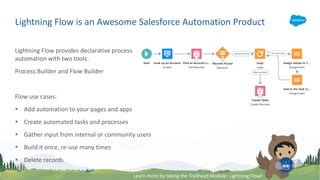
Lightning Flow provides declarative process
automation with two tools:
Process Builder and Flow Builder
Flow use cases:
§ Add automation to your pages and apps
§ Create automated tasks and processes
§ Gather input from internal or community users
§ Build it once, re-use many times
§ Delete records
Lightning Flow is an Awesome Salesforce Automation Product
Learn more by taking the Trailhead Module: Lightning Flow!
Top 4 Reasons Why Flow Matters
§ Replace CODE! Drive down that code count.
§ Process automation ADMINS create and maintain with no or
low code. No dependency on developer resources.
§ Progression to become developer.
§ It’s cool to be a #Flownatic! Let’s go, #Flowhana!
Demo Time!
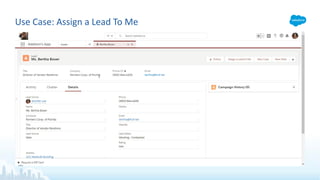
Use Case: Assign a Lead To Me
A Sales Rep needs to assign a lead with one click. Currently, it
takes several steps (i.e. specify search by user and by user’s
name, select user).
Solution: Flow, Custom Button
>>Blog Post<<
Use Case: Assign a Lead To Me
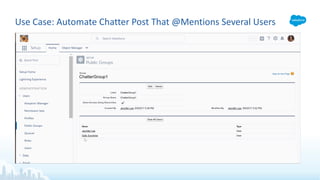
Steven Moon, Director of Operations, requested that when an
opportunity is closed won, a chatter post is posted and specific
people @mentioned.
The post should not to be addressed to a chatter group as
chatter notifications for the group is specified by the user.
Steven wants everyone to be notified once posted.
Solution: Flow, Public Group, Custom Metadata Type, Process
>>Blog Post<<
Use Case: Automate Chatter Post That @Mentions Several Users
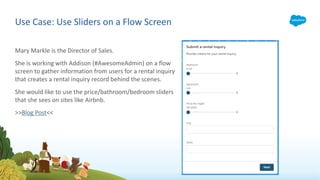
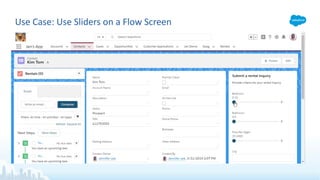
Mary Markle is the Director of Sales.
She is working with Addison (#AwesomeAdmin) on a flow
screen to gather information from users for a rental inquiry
that creates a rental inquiry record behind the scenes.
She would like to use the price/bathroom/bedroom sliders
that she sees on sites like Airbnb.
>>Blog Post<<
Use Case: Use Sliders on a Flow Screen
Use Case: Create Task w/QA But Only Under Certain Circumstances
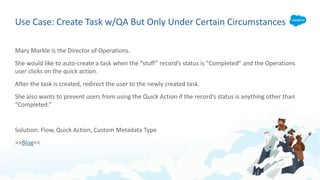
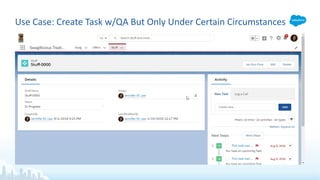
Mary Markle is the Director of Operations.
She would like to auto-create a task when the “stuff” record’s status is “Completed” and the Operations
user clicks on the quick action.
After the task is created, redirect the user to the newly created task.
She also wants to prevent users from using the Quick Action if the record’s status is anything other than
“Completed.”
Solution: Flow, Quick Action, Custom Metadata Type
>>Blog<<
Use Case: Create Task w/QA But Only Under Certain Circumstances
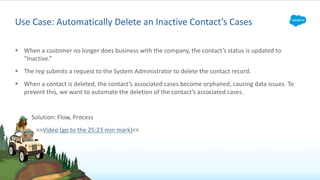
§ When a customer no longer does business with the company, the contact’s status is updated to
“Inactive.”
§ The rep submits a request to the System Administrator to delete the contact record.
§ When a contact is deleted, the contact’s associated cases become orphaned, causing data issues. To
prevent this, we want to automate the deletion of the contact’s associated cases.
Solution: Flow, Process
>>Video (go to the 25:23 min mark)<<
Use Case: Automatically Delete an Inactive Contact’s Cases
Use Case: Automatically Delete an
Inactive Contact’s Cases
DEMO
Use Case: Highlight Contact Record Attributes
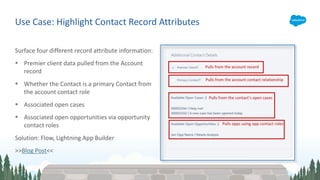
Surface four different record attribute information:
§ Premier client data pulled from the Account
record
§ Whether the Contact is a primary Contact from
the account contact role
§ Associated open cases
§ Associated open opportunities via opportunity
contact roles
Solution: Flow, Lightning App Builder
>>Blog Post<<
Use Case: Highlight Contact Record
Attributes – Premier Client
DEMO
Use Case: Highlight Contact Record
Attributes – Open Cases
DEMO
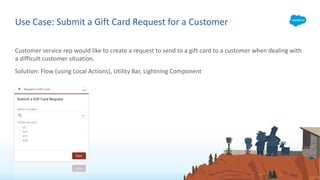
Customer service rep would like to create a request to send to a gift card to a customer when dealing with
a difficult customer situation.
Solution: Flow (using Local Actions), Utility Bar, Lightning Component
Use Case: Submit a Gift Card Request for a Customer
Use Case: Submit a Gift Card Request for a
Customer
DEMO
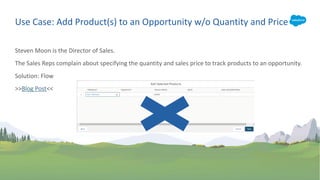
Steven Moon is the Director of Sales.
The Sales Reps complain about specifying the quantity and sales price to track products to an opportunity.
Solution: Flow
>>Blog Post<<
Use Case: Add Product(s) to an Opportunity w/o Quantity and Price
Use Case: Add Product(s) to an
Opportunity w/o Quantity and Price
DEMO
Use Case: User Controls Show/Hide Info with a Flow Toggle
Lightning record pages are so flexible, especially the ability to control the component visibility.
End users want to be in control. They decide whether to show or hide components and have the system
remember their preference for a given record.
Solution: Flow (using Flow Toggle), Lightning App Builder
>>Blog Post<<
Use Case: User Controls to Show/Hide
Info with a Flow Toggle
DEMO
Use Case: Access Classically Encrypted Fields Using Flow
Mary Markle is the Director of Operations.
The SSN field is a classically encrypted field.
She wants to know when the field is updated but she does not want the field to be tracked in field history.
Instead, she wants it noted in the Description field.
Solution: Flow, Lightning App Builder
>>Blog Post<<
Use Case: Access Classically Encrypted
Fields Using Flow
DEMO
§ Automatically Assign/Remove Users from a Permission Set
§ Auto Assign Public Groups to Users Based on Profile
§ Update Inactive User to Active User as Contact Owner
§ Remind Users to Add a Chatter Profile Photo Upon Login Using Login Flow
§ Build a Search Tool Using Flow
§ Remove a Contact from Campaign(s) Who Opt Out of Marketing Campaigns
Other Use Cases
Flow Resources
Upcoming Webinars:
§ May 10: Randi Thompson
§ May 24: Narender Singh
§ June 7: Jeffrey Kranz
§ June 21: MVP Nana Gregg
§ July 12: Michelle Hansen
Automation Hour
Co-Hosts: Rakesh Gupta, Jennifer Lee & David Litton
Date/Time: every other Friday, 3-4pm ET
Previous recordings: http://bit.ly/AutomationHourVideos
Trailblazer Community: Salesforce Automation Hour
Web site: AutomationHour.com
Flow Resources
Here are some resources to help you get started on visual workflow:
Unofficial Flow Web site: http://lightningflow.net
Trailmix: https://trailhead.salesforce.com/users/00550000006172eAAA/trailmixes/get-with-the-flow
Trailhead Lightning Flow Module
Build Flows with Flow Builder Trail
Salesforce Trailblazer Communities:
• Salesforce Automation Hour
• Visual Workflow Discussions
• Salesforce Workflow Automation
Salesforce MVP Jennifer Lee’s blog: jenwlee.wordpress.com
Salesforce MVP Rakesh Gupta’s blog: AutomationChampion.com
Salesforce MVP’s David Litton’s blog: salesforcesidekick.com
Introduction to loops:
Download this deck: http://bit.ly/NYCWT19

Automate All The Things with Flow

  • 1.
    Automate All TheThings With Flow! http://bit.ly/NYCWT19 @jenwlee Jennifer Lee, Lead Solution Designer
  • 2.
    This presentation maycontain forward-looking statements that involve risks, uncertainties, and assumptions. If any such uncertainties materialize or if any of the assumptions proves incorrect, the results of salesforce.com, inc. could differ materially from the results expressed or implied by the forward-looking statements we make. All statements other than statements of historical fact could be deemed forward-looking, including any projections of product or service availability, subscriber growth, earnings, revenues, or other financial items and any statements regarding strategies or plans of management for future operations, statements of belief, any statements concerning new, planned, or upgraded services or technology developments and customer contracts or use of our services. The risks and uncertainties referred to above include – but are not limited to – risks associated with developing and delivering new functionality for our service, new products and services, our new business model, our past operating losses, possible fluctuations in our operating results and rate of growth, interruptions or delays in our Web hosting, breach of our security measures, the outcome of any litigation, risks associated with completed and any possible mergers and acquisitions, the immature market in which we operate, our relatively limited operating history, our ability to expand, retain, and motivate our employees and manage our growth, new releases of our service and successful customer deployment, our limited history reselling non-salesforce.com products, and utilization and selling to larger enterprise customers. Further information on potential factors that could affect the financial results of salesforce.com, inc. is included in our annual report on Form 10-K for the most recent fiscal year and in our quarterly report on Form 10-Q for the most recent fiscal quarter. These documents and others containing important disclosures are available on the SEC Filings section of the Investor Information section of our Web site. Any unreleased services or features referenced in this or other presentations, press releases or public statements are not currently available and may not be delivered on time or at all. Customers who purchase our services should make the purchase decisions based upon features that are currently available. Salesforce.com, inc. assumes no obligation and does not intend to update these forward-looking statements. Statement under the Private Securities Litigation Reform Act of 1995 Forward-Looking Statement
  • 3.
    Jennifer W. Lee LeadSolution Designer @jenwlee
  • 4.
  • 5.
    We will cover… •What is Lightning Flow? • Why Does Flow Matter? • When Do I Use Flow to Automate Processes? • Let’s See Some Flow Solutions!
  • 6.
    Lightning Flow providesdeclarative process automation with two tools: Process Builder and Flow Builder Flow use cases: § Add automation to your pages and apps § Create automated tasks and processes § Gather input from internal or community users § Build it once, re-use many times § Delete records Lightning Flow is an Awesome Salesforce Automation Product Learn more by taking the Trailhead Module: Lightning Flow!
  • 7.
    Top 4 ReasonsWhy Flow Matters § Replace CODE! Drive down that code count. § Process automation ADMINS create and maintain with no or low code. No dependency on developer resources. § Progression to become developer. § It’s cool to be a #Flownatic! Let’s go, #Flowhana!
  • 8.
  • 9.
    Use Case: Assigna Lead To Me A Sales Rep needs to assign a lead with one click. Currently, it takes several steps (i.e. specify search by user and by user’s name, select user). Solution: Flow, Custom Button >>Blog Post<<
  • 10.
    Use Case: Assigna Lead To Me
  • 11.
    Steven Moon, Directorof Operations, requested that when an opportunity is closed won, a chatter post is posted and specific people @mentioned. The post should not to be addressed to a chatter group as chatter notifications for the group is specified by the user. Steven wants everyone to be notified once posted. Solution: Flow, Public Group, Custom Metadata Type, Process >>Blog Post<< Use Case: Automate Chatter Post That @Mentions Several Users
  • 12.
    Use Case: AutomateChatter Post That @Mentions Several Users
  • 13.
    Mary Markle isthe Director of Sales. She is working with Addison (#AwesomeAdmin) on a flow screen to gather information from users for a rental inquiry that creates a rental inquiry record behind the scenes. She would like to use the price/bathroom/bedroom sliders that she sees on sites like Airbnb. >>Blog Post<< Use Case: Use Sliders on a Flow Screen
  • 14.
    Use Case: UseSliders on a Flow Screen
  • 15.
    Use Case: CreateTask w/QA But Only Under Certain Circumstances Mary Markle is the Director of Operations. She would like to auto-create a task when the “stuff” record’s status is “Completed” and the Operations user clicks on the quick action. After the task is created, redirect the user to the newly created task. She also wants to prevent users from using the Quick Action if the record’s status is anything other than “Completed.” Solution: Flow, Quick Action, Custom Metadata Type >>Blog<<
  • 16.
    Use Case: CreateTask w/QA But Only Under Certain Circumstances
  • 17.
    § When acustomer no longer does business with the company, the contact’s status is updated to “Inactive.” § The rep submits a request to the System Administrator to delete the contact record. § When a contact is deleted, the contact’s associated cases become orphaned, causing data issues. To prevent this, we want to automate the deletion of the contact’s associated cases. Solution: Flow, Process >>Video (go to the 25:23 min mark)<< Use Case: Automatically Delete an Inactive Contact’s Cases
  • 18.
    Use Case: AutomaticallyDelete an Inactive Contact’s Cases DEMO
  • 19.
    Use Case: HighlightContact Record Attributes Surface four different record attribute information: § Premier client data pulled from the Account record § Whether the Contact is a primary Contact from the account contact role § Associated open cases § Associated open opportunities via opportunity contact roles Solution: Flow, Lightning App Builder >>Blog Post<<
  • 20.
    Use Case: HighlightContact Record Attributes – Premier Client DEMO
  • 21.
    Use Case: HighlightContact Record Attributes – Open Cases DEMO
  • 22.
    Customer service repwould like to create a request to send to a gift card to a customer when dealing with a difficult customer situation. Solution: Flow (using Local Actions), Utility Bar, Lightning Component Use Case: Submit a Gift Card Request for a Customer
  • 23.
    Use Case: Submita Gift Card Request for a Customer DEMO
  • 24.
    Steven Moon isthe Director of Sales. The Sales Reps complain about specifying the quantity and sales price to track products to an opportunity. Solution: Flow >>Blog Post<< Use Case: Add Product(s) to an Opportunity w/o Quantity and Price
  • 25.
    Use Case: AddProduct(s) to an Opportunity w/o Quantity and Price DEMO
  • 26.
    Use Case: UserControls Show/Hide Info with a Flow Toggle Lightning record pages are so flexible, especially the ability to control the component visibility. End users want to be in control. They decide whether to show or hide components and have the system remember their preference for a given record. Solution: Flow (using Flow Toggle), Lightning App Builder >>Blog Post<<
  • 27.
    Use Case: UserControls to Show/Hide Info with a Flow Toggle DEMO
  • 28.
    Use Case: AccessClassically Encrypted Fields Using Flow Mary Markle is the Director of Operations. The SSN field is a classically encrypted field. She wants to know when the field is updated but she does not want the field to be tracked in field history. Instead, she wants it noted in the Description field. Solution: Flow, Lightning App Builder >>Blog Post<<
  • 29.
    Use Case: AccessClassically Encrypted Fields Using Flow DEMO
  • 30.
    § Automatically Assign/RemoveUsers from a Permission Set § Auto Assign Public Groups to Users Based on Profile § Update Inactive User to Active User as Contact Owner § Remind Users to Add a Chatter Profile Photo Upon Login Using Login Flow § Build a Search Tool Using Flow § Remove a Contact from Campaign(s) Who Opt Out of Marketing Campaigns Other Use Cases
  • 31.
  • 32.
    Upcoming Webinars: § May10: Randi Thompson § May 24: Narender Singh § June 7: Jeffrey Kranz § June 21: MVP Nana Gregg § July 12: Michelle Hansen Automation Hour Co-Hosts: Rakesh Gupta, Jennifer Lee & David Litton Date/Time: every other Friday, 3-4pm ET Previous recordings: http://bit.ly/AutomationHourVideos Trailblazer Community: Salesforce Automation Hour Web site: AutomationHour.com
  • 33.
    Flow Resources Here aresome resources to help you get started on visual workflow: Unofficial Flow Web site: http://lightningflow.net Trailmix: https://trailhead.salesforce.com/users/00550000006172eAAA/trailmixes/get-with-the-flow Trailhead Lightning Flow Module Build Flows with Flow Builder Trail Salesforce Trailblazer Communities: • Salesforce Automation Hour • Visual Workflow Discussions • Salesforce Workflow Automation Salesforce MVP Jennifer Lee’s blog: jenwlee.wordpress.com Salesforce MVP Rakesh Gupta’s blog: AutomationChampion.com Salesforce MVP’s David Litton’s blog: salesforcesidekick.com Introduction to loops:
  • 34.
    Download this deck:http://bit.ly/NYCWT19